





The Evolving Landscape of Multicloud: A Journey, Not a Destination

2713
Of your peers have already read this article.
2:30 Minutes
The most insightful time you'll spend today!
Editor’s note: This post is part of an ongoing series on IT predictions from Google Cloud experts. Check out the full list of our predictions on how IT will change in the coming years.
Prediction: Over half of all organizations using public cloud will freely switch their primary cloud provider as a result of available multicloud capabilities
In the years ahead, companies will use a multicloud strategy not just as a way to hedge their bets, but as a way to switch from their first cloud to their next one. Research shows that the majority of companies are already multicloud, meaning they use more than one hyperscale cloud provider.
More and more, we’re talking to companies that describe using multicloud technologies as a way to do switch not just workloads — but mindshare — to a different cloud. In other words, for many people, multicloud is a phase, not a permanent state.
You may start using one cloud but still need to be able to incorporate existing investments you’ve already made in other clouds without having to move anything. Here at Google Cloud, we’ve made unique investments to make sure we can meet our customers wherever, and in whatever cloud, they are.
For instance, Anthos, our multicloud management plane, ensures consistency when working with your compute and data on other clouds. You can view workloads, deploy services, and apply common security policies across multiple clouds. BigQuery Omni allows you to query data in other cloud storage accounts in Amazon S3 or Azure Storage without having to move the data itself, helping to bring analytics to data wherever it resides.
Building new skills and getting comfortable in other clouds is not where multicloud stops. Many organizations are taking it a step further — upgrading technology, moving core data, and continuing to grow cloud adoption with a secondary provider.
What starts out as wanting the best capabilities to achieve IT goals will often lead organizations to swap from their first cloud to their next cloud — and by 2025, we believe that most organizations will be doing just that.
Vodafone Turns to Google Maps Platform to Expand and Improve its Network

6398
Of your peers have already read this article.
1:30 Minutes
The most insightful time you'll spend today!
Vodafone India had a manual, labor-intensive process for determining network capabilities and reach. The company sent field operatives to every customer location to conduct a feasibility study. These feasibility studies help Vodafone determine whether they can provide connectivity and services to customers based on the infrastructure at that location.
Everyone from the IT team and end users to the field operatives doing the work recognized the need to adopt a new solution to automate the measurements. They needed a technology that was easy to use and maintain.
“Vodafone used to manually perform physical surveys for each feasibility, which is a time-consuming and labor-intensive process. Often, feasibility studies were delayed, and we missed out on opportunities to serve additional customers. With SmartFeasibility, we’ve increased our capacity 15 fold, which positively impacts our bottom line and allows us to provide better and smarter customer service.”
—Rajneesh Asthana, IT Planning and Delivery, Vodafone India
Partnering with Lepton Software (a leading global provider of location-based analytics solution) Vodafone introduced SmartFeasibility—a solution that changed the feasibility testing from a manual to an automated process. This involved a full Google geo platform solution – leveraging world class technology like maps, roads and directions.
Google Maps Platform Results
- Employees are able to access information faster with SmartFeasibility—they have data at their fingertips, rather than waiting for an employee to collect it
- Field operatives have increased their conversion rates by providing more accurate readings on feasibilities and closing more customer business
- Addresses are now easy to find with a click of a button. The Vodafone India team can search feasibilities that have been loaded into the database, so if there’s an issue or if they need to reference a past action, they have that information at their fingertips
- 2 day turnaround versus 5 before the solution was implemented
- 400+ new customers added per day
With the new solution, Vodafone India no longer needs field operatives to manually calculate these measurements. With Google Maps, users can search customers’ addresses, calculate the distance between Vodafone’s location and the customer’s location and research building data such as height.
The old system of having field operatives collect data was unreliable. With Google Maps Platform, the Vodafone India team knows that the measurements are accurate and reliable.
Streamlining Workflow Executions: Using Cloud Tasks in Google Cloud

902
Of your peers have already read this article.
3:30 Minutes
The most insightful time you'll spend today!
Introduction
In my previous post, I talked about how you can use a parent workflow to execute child workflows in parallel for faster overall processing time and easier detection of errors. Another useful pattern is to use a Cloud Tasks queue to create Workflows executions and that’s the topic of this post.
When your application experiences a sudden surge of traffic, it’s natural to want to handle the increased load by creating a high number of concurrent workflow executions. However, Google Cloud’s Workflows enforces quotas to prevent abuse and ensure fair resource allocation. These quotas limit the maximum number of concurrent workflow executions per region, per project, for example, Workflows currently enforces a maximum of 2000 concurrent executions by default. Once this limit is reached, any new executions beyond the quota will fail with an HTTP 429 error.
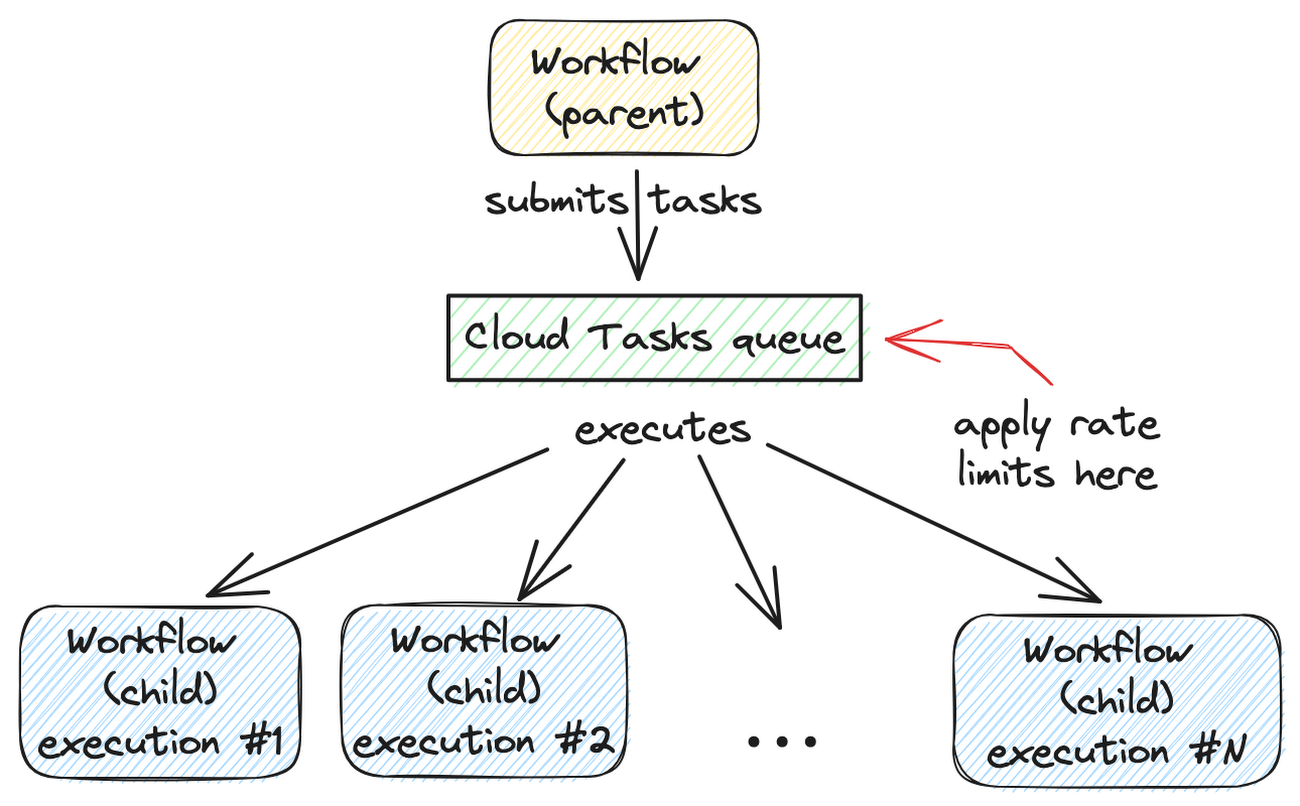
A Cloud Tasks queue can help. Rather than creating Workflow executions directly, you can add Workflows execution tasks to the Cloud Tasks queue and let Cloud Tasks drain the queue at a rate that you define. This allows for better utilization of your workflow quota and ensures the smooth execution of workflows.
Let’s dive into how to set this up.
Create a Cloud Tasks queue
We’ll start by creating a Cloud Tasks queue. The Cloud Tasks queue acts as a buffer between the parent workflow and the child workflows, allowing us to regulate the rate of executions.
Create the Cloud Tasks queue (initially with no dispatch rate limits) with the desired name and location:
QUEUE=queue-workflow-child
LOCATION=us-central1

gcloud tasks queues create $QUEUE --location=$LOCATION
Now that we have our queue in place, let’s proceed to set up the child workflow.
Create and deploy a child workflow
The child workflow performs a specific task and returns a result to the parent workflow.
Create workflow-child.yaml to define the child workflow:
main:

  params: [args]

  steps:

    - init:

        assign:

          - iteration: ${args.iteration}

    - wait:

        call: sys.sleep

        args:

            seconds: 10

    - return_message:

        return: ${"Hello world" + iteration}
In this example, the child workflow receives an iteration argument from the parent workflow, simulates work by waiting for 10 seconds, and returns a string as the result.
Deploy the child workflow:
gcloud workflows deploy workflow-child --source=workflow-child.yaml --location=$LOCATION
Create and deploy a parent workflow
Next, create a parent workflow in workflow-parent.yaml.
The workflow assigns some constants first. Note that it’s referring to the child workflow and the queue name between the parent and child workflows:
main:
  steps:
    - init:
        assign:
          - project_id: ${sys.get_env("GOOGLE_CLOUD_PROJECT_ID")}
          - project_number: ${sys.get_env("GOOGLE_CLOUD_PROJECT_NUMBER")}
          - location: ${sys.get_env("GOOGLE_CLOUD_LOCATION")}
          - workflow_child_name: "workflow-child"
          - queue_name: "queue-workflow-child"
In the next step, Workflows creates and adds a high number of tasks (whose body is an HTTP request to execute the child workflow) to the Cloud Tasks queue:
- enqueue_tasks_to_execute_child_workflow:
        for:
          value: iteration
          range: [1, 100]
          steps:
              - iterate:
                  assign:
                    - data:
                        iteration: ${iteration}
                    - exec:
                        # Need to wrap into argument for Workflows args.
                        argument: ${json.encode_to_string(data)}
              - create_task_to_execute_child_workflow:
                  call: googleapis.cloudtasks.v2.projects.locations.queues.tasks.create
                  args:
                      parent: ${"projects/" + project_id + "/locations/" + location + "/queues/" + queue_name}
                      body:
                        task:
                          httpRequest:
                            body: ${base64.encode(json.encode(exec))}
                            url: ${"https://workflowexecutions.googleapis.com/v1/projects/" + project_id + "/locations/" + location + "/workflows/" + workflow_child_name + "/executions"}
                            oauthToken:
                              serviceAccountEmail: ${project_number + "-compute@developer.gserviceaccount.com"}
Note that task creation is a non-blocking call in Workflows. Cloud Tasks takes care of running those tasks to execute child workflows asynchronously.
Deploy the parent workflow:
gcloud workflows deploy workflow-parent --source=workflow-parent.yaml --location=$LOCATION
Execute the parent workflow with no dispatch rate limits
Time to execute the parent workflow:
gcloud workflows run workflow-parent --location=$LOCATION
As the parent workflow is running, you can see parallel executions of the child workflow, all executed roughly around the same:
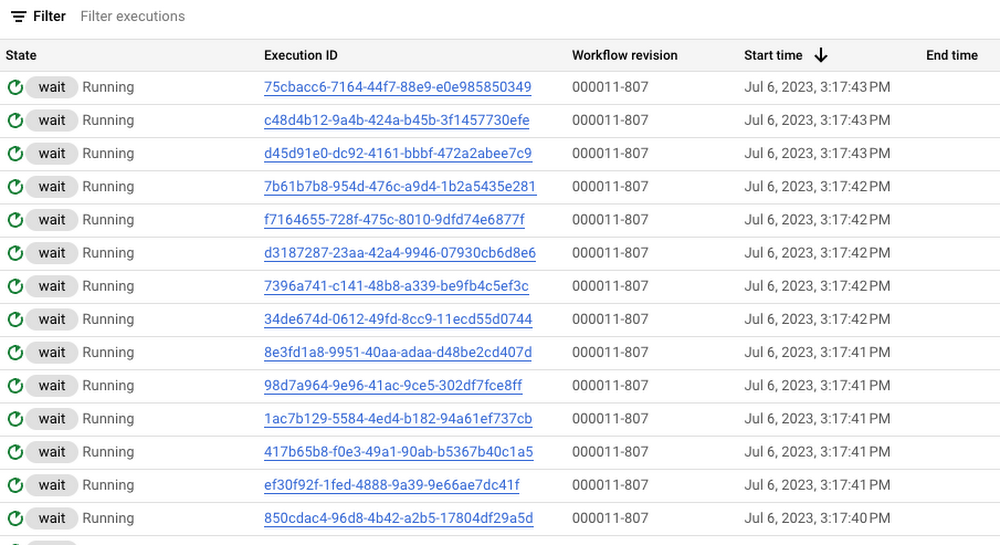
In this case, 100 executions is a well under the concurrency limit for Workflows. Quota issues may arise if you submit 1000s of executions all at once. This is when Cloud Tasks queue and its rate limits become useful.
Execute the parent workflow with dispatch rate limits
Let’s now apply a rate limit to the Cloud Tasks queue. In this case, 1 dispatch per second:
gcloud tasks queues update $QUEUE --max-dispatches-per-second=1 --location=$LOCATION
Execute the parent workflow again:
gcloud workflows run workflow-parent --location=$LOCATION
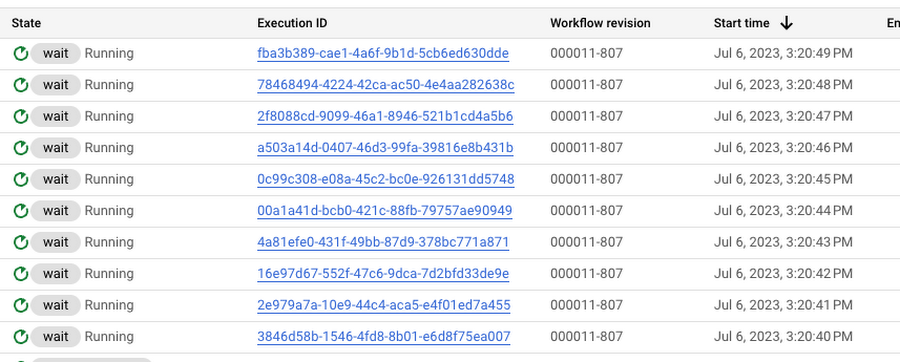
This time, you see a more smooth execution rate (1 execution request per second):
Summary
By introducing a Cloud Tasks queue before executing a workflow and playing with different dispatch rates and concurrency settings, you can better utilize your Workflows quota and stay below the limits without triggering unnecessary quota related failures.
Check out the Buffer HTTP requests with Cloud Tasks codelab, if you want to get more hands-on experience with Cloud Tasks. As always, feel free to contact me on Twitter @meteatamel for any questions or feedback.
5344
Of your peers have already watched this video.
31:30 Minutes
The most insightful time you'll spend today!
Enhancing Collaboration with Sheets, Python, and Google Cloud
See how you can enhance collaboration within your organization using Google Sheets. Watch to learn about a new set of tools to create custom functions that tap into the power of Python and to expose functions in a standardized fashion throughout your organization.
5 Ways You Need to Know to Reduce Costs with Containers

3184
Of your peers have already read this article.
2:30 Minutes
The most insightful time you'll spend today!
“Cloud Wisdom Weekly: for tech companies and startups” is a new blog series we’re running this fall to answer common questions our tech and startup customers ask us about how to build apps faster, smarter, and cheaper. In this installment, Google Cloud Product Manager Rachel Tsao explores how to save on compute costs with modern container platforms.
Many tech companies and startups are built to operate under a certain degree of pressure and to efficiently manage costs and resources. These pressures have only increased with inflation, geopolitical shifts, and supply chain concerns, however, creating urgency for companies to find ways to preserve capital while increasing flexibility. The right approach to containers can be crucial to navigating these challenges.
In the last few years, development teams have shifted from virtual machines (VMs) to containers, drawn to the latter because they are faster, more lightweight, and easier to manage and automate. Containers also consume fewer resources than VMs, by leveraging shared operating systems. Perhaps most importantly, containers enable portability, letting developers put an application and all its dependencies into a single package that can run almost anywhere.
Containers are central to an organization’s agility, and in our conversations with customers about why they choose Google Cloud, we hear frequently that services like Google Kubernetes Engine (GKE) and Cloud Run help tech companies and startups to not only go to market quickly, but also save money. In this article, we’ll explore five ways to help your business quickly and easily reduce compute costs with containers.
5 ways to control compute costs with containers
Whether your company is an established player that is modernizing its business or a startup building its first product, managed containerized products can help you reduce costs, optimize development, and innovate. The following tips will help you to evaluate core features you should expect of container services and include specific advice for GKE and Cloud Run.
- Identify opportunities to reduce cluster administration
Most companies want to dedicate resources to innovation, not infrastructure curation. If your team has existing Kubernetes knowledge or runs workloads that need to leverage machine types or graphics processing units (GPUs), you may be able to simplify provisioning with GKE Autopilot. GKE Autopilot provisions and manages the cluster’s underlying infrastructure, all while you pay for only the workload, not 24/7 access to the underlying node-pool compute VMs. In this way, it can reduce cluster administration while saving you money and giving you hardened security best practices by default.
- Consider serverless to maximize developer productivity
Serverless platforms continue the theme of empowering your technical talent to focus on the most impactful work. Such platforms can promote productivity by abstracting away aspects of infrastructure creation, letting developers work on projects that drive the business while the platform provider oversees hardware and scalability, aspects of security, and more.
For a broad range of workloads that don’t need machine types or GPUs, going serverless with Cloud Run is a great option for building applications, APIs, internal services, and even real-time data pipelines. Analyst research supports that Cloud Run customers achieve faster deployments with less time spent monitoring services, resulting in reinvested productivity that lets these customers do more with fewer resources.
Designed with high scalability in mind, and an emphasis on the portability of containers, Cloud Run also supports a wide range of stateless workloads, including jobs that run to completion. Moreover, it lets you maximize the skills of your existing team, as it does not require cluster management, a Kubernetes skillset or prior infrastructure experience. Additionally, Cloud Run leverages the Knative spec and a container image as a deployment artifact, enabling an easy migration to GKE if your workload needs change.
With Cloud Run, gone are the days of infrastructure overprovisioning! The platform scales down to zero automatically, meaning your services always have the capacity to meet demand, but do not incur costs if there is no traffic.
- Save with committed use discounts
Committed use discounts provide discounted pricing in exchange for committing to a minimal level of usage in a region for a specified term. If you are able to reliably predict your resource needs, for instance, you can get a 17% discount for Cloud Run (for either one year or three years), and either a 20% discount (for one year) or a 45% discount (for three years) on GKE Autopilot.
- Leverage cost management features
Minimum and maximum instances are useful for ensuring your services are ready to receive requests but do not cause cost overages. For Google Cloud customers, best practices for cost management include building your container with Cloud Build, which offers pay-for-use pricing and can be more cost efficient than steady-state build farms.
Relatedly, if you choose to leverage serverless containers with Cloud Run, you can set minimum instances to avoid the lag (i.e., the cold start) when a new container instance is starting up from zero. Minimum instances are billed at one-tenth of the general Cloud Run cost. Likewise, if you are testing and want to avoid costs spiraling, you can set a maximum number of instances to ensure your containers do not scale beyond a certain threshold. These settings can be turned off anytime, resulting in no costs when your service is not processing traffic. To have better oversight of costs, you can also view built-in billing reports and set budget alerts on Cloud Billing.
- Match workload needs to pricing models
GKE Autopilot is great for running highly reliable workloads thanks to its Pod-level SLA. But if you have workloads that do not need a high level of reliability (e.g., fault tolerant batch workloads, dev/test clusters), you can leverage spot pricing to receive a discount of 60% to 91% compared to regularly-priced pods. Spot Pods run on spare Google Cloud compute capacity as long as resources are available. GKE will evict your Spot Pod with a grace period of 25 seconds during times of high resource demand, but you can automatically redeploy as soon as there is available capability. This can result in significant savings for workloads that are a fit.
Innovation requires balance
Put into practice, these tips can help you and your business to get the most out of containers while controlling management and resource costs. That said, it is worth noting that while managing cloud costs is important, the relationship between “cloud” and “cost” is often complex. If you are adopting cloud computing with only the primary goal of saving money, you may soon run into other challenges. Cloud services can save your business money in many ways, but they can also help you get the most value for your money. This balance between cost efficiency and absolute cost is important to keep in mind so that even in challenging economic landscapes, your tech company or startup can continue growing and innovating.
Beyond cost savings, many tech and startup companies are seeking improved business agility, which is the ability to deploy new products and features frequently and with high quality. With deployment best practices built into GKE Autopilot and Cloud Run, you can transform the way your team operates while maximizing productivity with every new deployment.
You can learn if your existing workloads are appropriate for containers with this fit assessment and these guides for migrating to containers. For new workloads, you can leverage these guides for GKE Autopilot and Cloud Run. And for more tips on cost optimization, check out our Architecture Framework for compute, containers, and serverless.
If you want to learn more about how Google Cloud can help your startup, visit our page here to get more information about our program and apply for our Google for Startups Cloud Program, and sign up for our communications to get a look at our community activities, digital events, special offers, and more.
Lending DocAI Shortens Borrowers’ Journey on Roostify

11838
Of your peers have already read this article.
3:00 Minutes
The most insightful time you'll spend today!
The home lending journey entails processing an immense number of documents daily from hundreds of thousands of borrowers. Currently, home lending document processing relies on some outdated digital models and a high dependency on manual labor, resulting in slow processing times and higher origination costs. Scaling a business that sorts through millions of documents daily, while increasing efficacy and accuracy, is no small feat. When it comes to applying for a mortgage loan, consumers expect a digital experience that’s as good as the in-person one. Roostify simplifies the home lending journey for lenders and their customers.
No time to spare: Overcoming document processing challenges with AI
Roostify provides enterprise cloud applications for mortgage and home lenders. In order to empower its customers to deliver a better, more personalized lending experience, they needed to automate and scale their in-house document parsing functionality.
As a key component of its document intelligence service, Roostify is leveraging Google Cloud’s Lending DocAI machine learning platform to automate processing documents required during a home loan application process, such as tax returns or bank statements with multi-language support. This partnership delivers data capture at scale, enabling Roostify customers to automatically identify document types from the uploaded file and to extract relevant entities such as wages, tax liabilities, names, and ID numbers for further processing, and make things move faster in the cumbersome lending process.
Roostify’s solutions leverage Google Cloud’s Lending DocAI, which is built on the recently announced Document AI platform, a unified console for document processing. Customers can easily create and customize all the specialized parsers (e.g., mortgage lending documents and tax returns parsers) on the platform without the need to perform additional data mapping or training. All Google Cloud’s specialized parsers are fine-tuned to achieve industry-leading accuracy, helping customers and partners confidently unlock insights from documents with machine learning. Learn more about the solution from the GA launch blog and the overview video.
Integrating Lending DocAI’s intelligent document processing capabilities into the Roostify platform means more innovation for their customers and tangible results: faster loan processing times, fewer document intake errors, and lower origination costs. Additional support in Google Lending DAI for other languages and more documents like global Know Your Customer (KYC) documents or payroll reports is in the near future.
Full integration of AI solutions
Working together with Roostify’s platform team, we were able to help them solve their document processing challenge through integration of various GCP products such as Lending DocAI (LDAI), Data Loss Prevention (DLP) for redacting sensitive data, BigQuery for data warehousing and analytics, and Firestore for API status. To make it very safe and secure, all data was encrypted end-to-end at Rest and in Transit. LDAI won’t require any training data to process. It is an easy plug and play API.
Here is a sneak peek in the high level deployment architecture for LDAI in Roostify environment:

Here are the steps for processing data:
- Receives document processing request from the client.
- API Function directs requests to the pre-processing service. For Async requests a processing ID is generated and returned to the caller.
- Pre-processing service sends the request for further processing (Long/short PDF conversion), calling other microservices and receives back the responses. Any error in the response received is then sent to the response processing service.
- If the response is synchronous, the pre-processing service directs it to the LDAI Invoker service.
- If the response is asynchronous, the pre-processing service feeds it into the Cloud Pub/Sub service.
- Cloud Pub/Sub service feeds the response back to the LDAI Invoker service.
- LDAI Invoker service routes the request to the Google LDAI API for classification if there are multiple pages in the document.
- Document will be split based on LDAI response and then saved in a GCS bucket for temporary storage.
- LDAI entity interface for single page processing and then LDAI Invoker sends LDAI results to LDAI Response Processing
- If a request is a synchronous request the LDAI Response Processor sends results to the API Function so that it can complete the synchronous call and respond to the rConnect caller.
- If the request is an asynchronous request the LDAI Response Processor will respond to the caller’s webhook and complete the transaction.
- Finally, Data stored in the GCP bucket will be deleted.
All the responses that come from the LDAI API can optionally feed into BigQuery via the Response Processor, after parsing it through Data Loss Prevention (DLP) API to redact the PII/sensitive information. Throughout the processing of both asynchronous and synchronous requests all transactions are logged using Cloud Logging. For asynchronous transactions, the state is maintained throughout the process using Cloud Firestore.
Roostify currently uses this technology to power two different solutions: Roostify Document Intelligence and Roostify Beyond™. Roostify Document Intelligence is a real-time document capture, classification, and data extraction solution built for home lenders. It ingests documents uploaded by borrowers and loan officers, identifies the relevant documents, and extracts and classifies key information. Roostify Document Intelligence is available as a standalone API service to any home lender with any digital lending infrastructure already in place.
Roostify Beyond™ is a robust suite of AI-powered solutions that enables home lenders to create intelligent experiences from start to close. It combines powerful data, insightful analytics, and meaningful visualization to streamline the underwriting process. Roostify Beyond™ is currently available only to Roostify customers as part of an Early Adopter program and will be rolled out to the market later this year.


Through this partnership, Roostify has enabled its customers to adopt a data-first approach to their home lending processes, which will lead to improved user experiences and significantly reduced loan processing times.
Fast track end-to-end deployment with Google Cloud AI Services (AIS)
Google AIS (Professional Services Organization), in collaboration with our partner Quantiphi, helped Roostify deploy this system into production and fast-tracked the development multifold to generate the final business value.
The partnership between Google Cloud and Roostify is just one of the latest examples of how we’re providing AI-powered solutions to solve business problems.
More Relevant Stories for Your Company

Conquering Hybrid API Management: Building The Perfect Team and Platform
Introduction In our discussions with technology leaders from around the world for – The Digital Crunch Time: 2022 State of APIs and Applications – two themes emerged #1 Cloud — and hybrid cloud specifically — is becoming a driving factor of success with 59% of respondents saying they were looking to increase

APIs and IT Rationalization: Cost Avoidance and Cost Savings for Enterprise IT
The dynamic and fast-moving business environments of today demands that technology leaders and teams deliver more at a lightning speed, all the while working within the constraints of shoe-string budgets and tight project timelines. Winning in today’s environment requires a more strategic approach to optimize utilization of resources, remove unnecessary

Rubin Observatory Leverages Google Cloud to Power Astronomical Research
This week, the Vera C. Rubin Observatory is launching the first preview of its new Rubin Science Platform (RSP) for an initial cohort of astronomers. The observatory, which is located in Chile but managed by the U.S. National Science Foundation’s NOIRLab in Tucson, AZ and SLAC in California, is jointly funded by the NSF and the U.S. Department




Why Apigee: Customers Explain How this API Platform Boosts their Business
Apigee customers Expedia, Equinix, Morningstar, Swisscom, Vantiv, Telstra, Fox Broadcasting company, Laterooms.com and partners, SAP and Accenture share why they joined forces with the intelligent API management platform company. Apigee is helping customers execute businesses commerce with other partners, securely expose assets to external developer communities, secure APIs throughout the
