





3615
Of your peers have already watched this video.
6:20 Minutes
The most insightful time you'll spend today!
Why Apigee: Customers Explain How this API Platform Boosts their Business
Apigee customers Expedia, Equinix, Morningstar, Swisscom, Vantiv, Telstra, Fox Broadcasting company, Laterooms.com and partners, SAP and Accenture share why they joined forces with the intelligent API management platform company.
Apigee is helping customers execute businesses commerce with other partners, securely expose assets to external developer communities, secure APIs throughout the digital value chains, open up new revenue streams and do much more.
Here is A Quick Glance at Who Said What
“Through our partnership with Apigee we have been able to create some really amazing implementations using our APIs to commerce with other partners and other types of content interactions in the marketplace and so far, the response in the market has been outstanding,” says Brad Jaehn, VP, Product GoGo.
“Businesses cannot afford to be on an island. It really is all about the interconnections among businesses. And when you are talking about sharing digital assets, you really are talking about APIs. Apigee is essential to provide a way for sharing of APIs, sharing of those assets between those companies,” says Garrett Vargas, Senior Director of Technology, Expedia.
“We mainly choose Apigee for three reasons. One is their experience in the enterprise market. They could really handle big data amounts for big enterprise customers. Second, their experience in telecom and third they really helped us to securely expose our telecom assets to the external developer community,” Heinz Herren, Head of IT.
“One of the primary reasons we selected Apigee was because it could secure APIs throughout the digital value chain. It offered us access control, authentication control, even versioning of APIs so that our customers are selecting the right APIs. It protects them and their assets as well as our assets, backend systems, and processes. Apigee allowed us to do this not only securely but very quickly. So, we are excited to partner with Apigee on the Equinix cloud exchange,” says Brian Lillie, CIO, Equinix.
“We all talk about user experience. It’s the end thing in Silicon Valley. But what about DevX. Vantiv wants to provide clean, open and standard APIs. To the Apigee powered Vantiv platform, enables our community of developers to innovate much faster. rather than having them discover capabilities by various other providers of commerce services, this one-stop shop Vantiv platform powered by Apigee give a clean, open and standard API layer for all commerce services to our developers,” says Navneet Singh, Senior VP, Product, Vantiv.
Watch this short video to know what else Apigee customers and partners are saying about the platform.
A Guide to Anthos Hybrid Environment Reference Architecture
1273
Of your peers have already read this article.
1:30 Minutes
The most insightful time you'll spend today!
To help improve your security posture, improve the reliability of your applications, and reduce configuration drift in your environment, we’re excited to announce a new Anthos reference architecture.
Written in collaboration across our product, engineering, support, and field teams, this new reference architecture helps you plan, deploy, and configure the required components for Anthos hybrid environments.
Anthos hybrid environments give you the flexibility to deploy on-premises components that run container-based workloads and VMs using Anthos clusters on VMware and Anthos clusters on bare metal. You can continue to utilize existing investments in your on-premises infrastructure, and start to add components like Anthos Config Management. When you’re ready to bring everything together, you can add additional Google Cloud-based services like Artifact Registry, Cloud Monitoring, and Identity and Access Management (IAM).
The following sneak peek covers some of our best practices for architecting an Anthos hybrid environment. For more detailed guidance and planning information, see the full Anthos hybrid environment reference architecture.
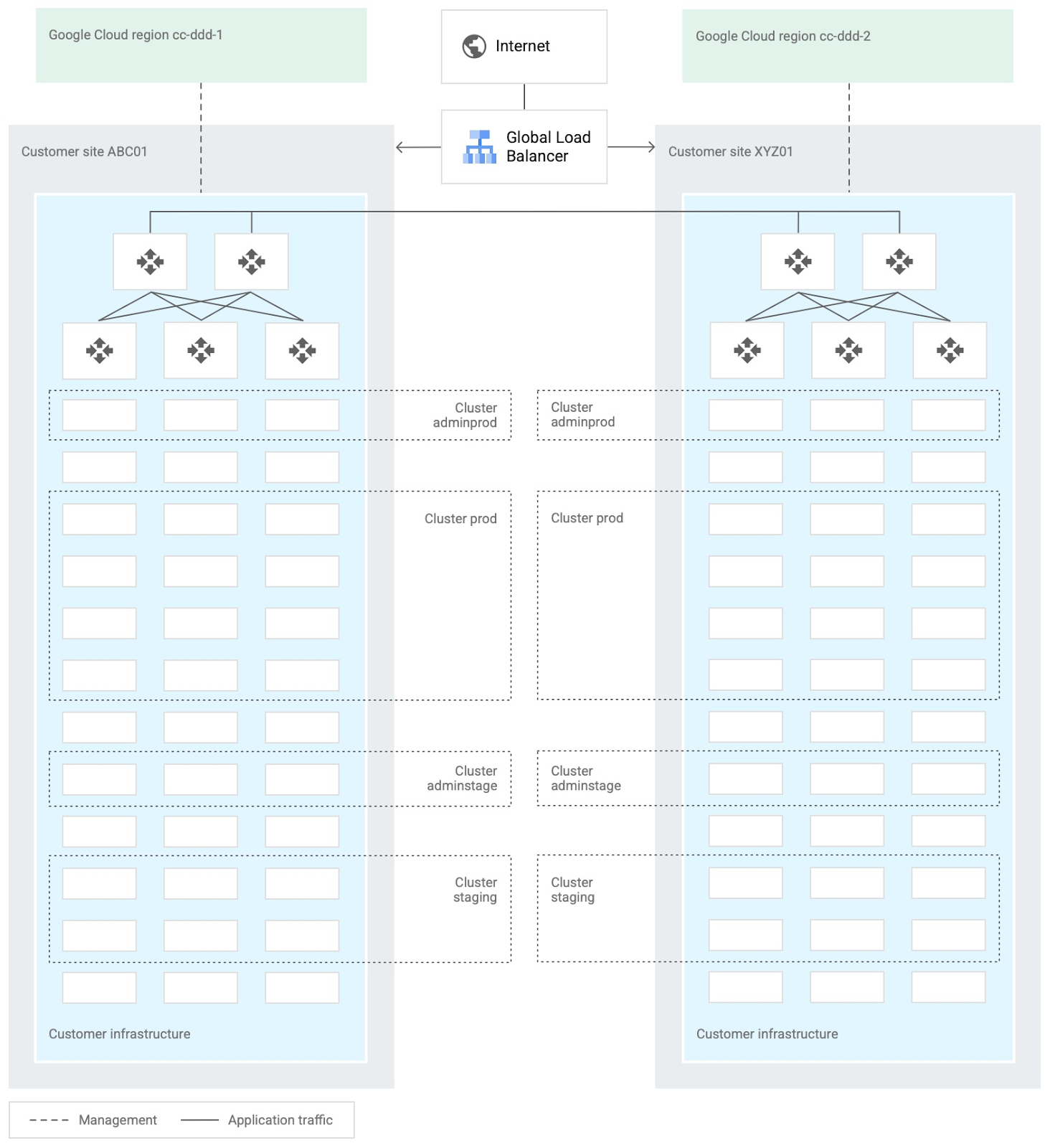
When you design and deploy an Anthos hybrid environment, we recommend that you use two or more on-premises computing customer sites and two or more Google Cloud regions. In your sites, run multiple clusters. This approach is recommended for several reasons, such as:
- Disaster recovery. If one cluster or site fails, you can continue to run workloads.
- Multiple environments, like production and staging, to test infrastructure changes.
- Different cluster types in each environment: admin clusters and user clusters. This approach separates administrative resources, which is a security best-practice.
The following diagram shows an example of an Anthos hybrid environment that’s spread across customer sites and regions, with different clusters for admin and user workloads and for production and staging:
In each site, you can use Anthos clusters on VMware or Anthos clusters on bare metal. For both products, we recommend the following:
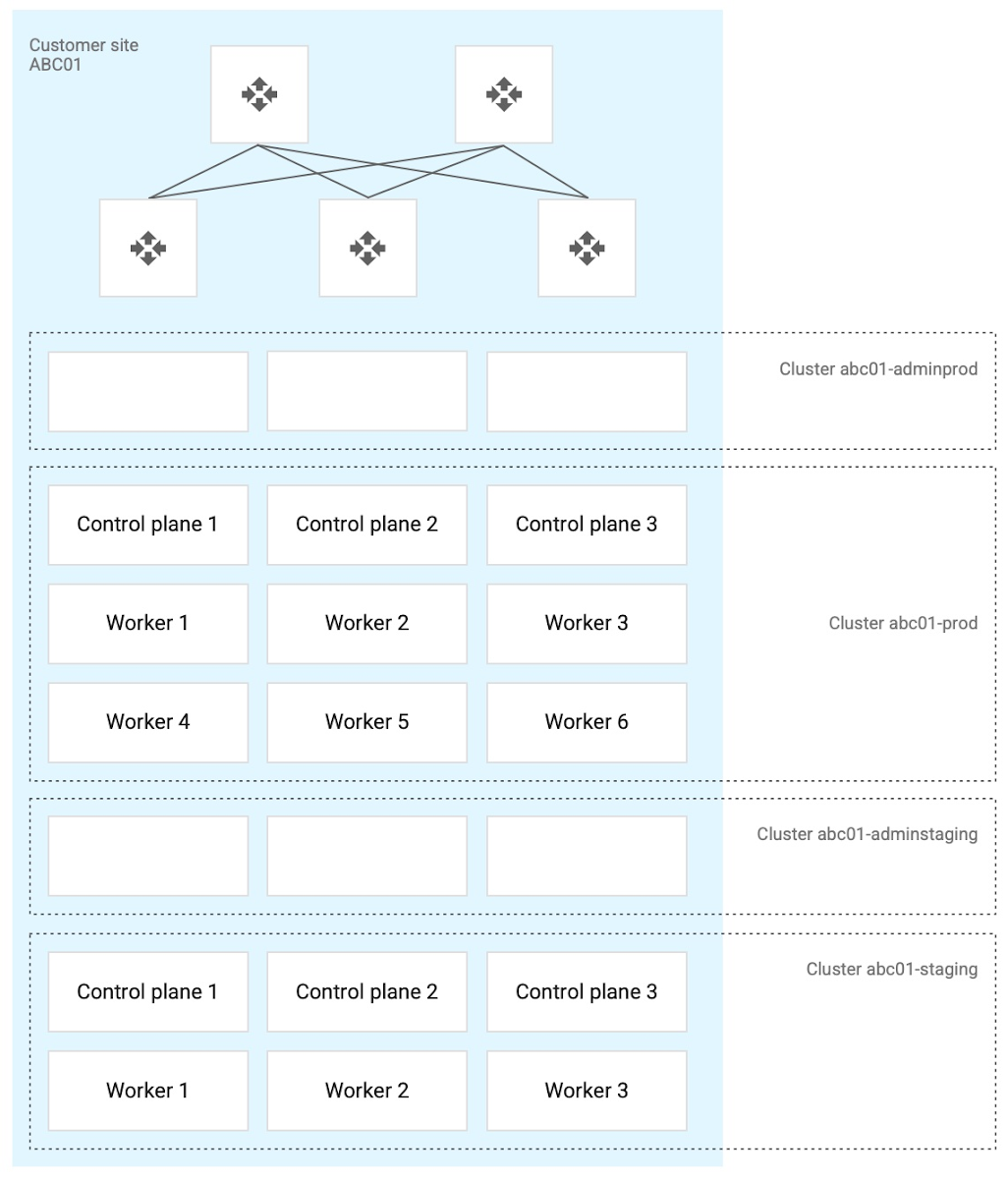
- Use a highly available (HA) control plane with three members for continued control plane availability concurrently with operating system upgrades, control plane software updates, or single-machine hardware or kernel failures.
- Deploy two admin clusters so that admin cluster configuration changes and updates can be tested in the staging environment first.
The following diagram shows an example of Anthos clusters on bare metal with control plane and worker nodes spread across physical machines. With Anthos clusters on VMware, the control plane and worker nodes are spread across VMware VMs:
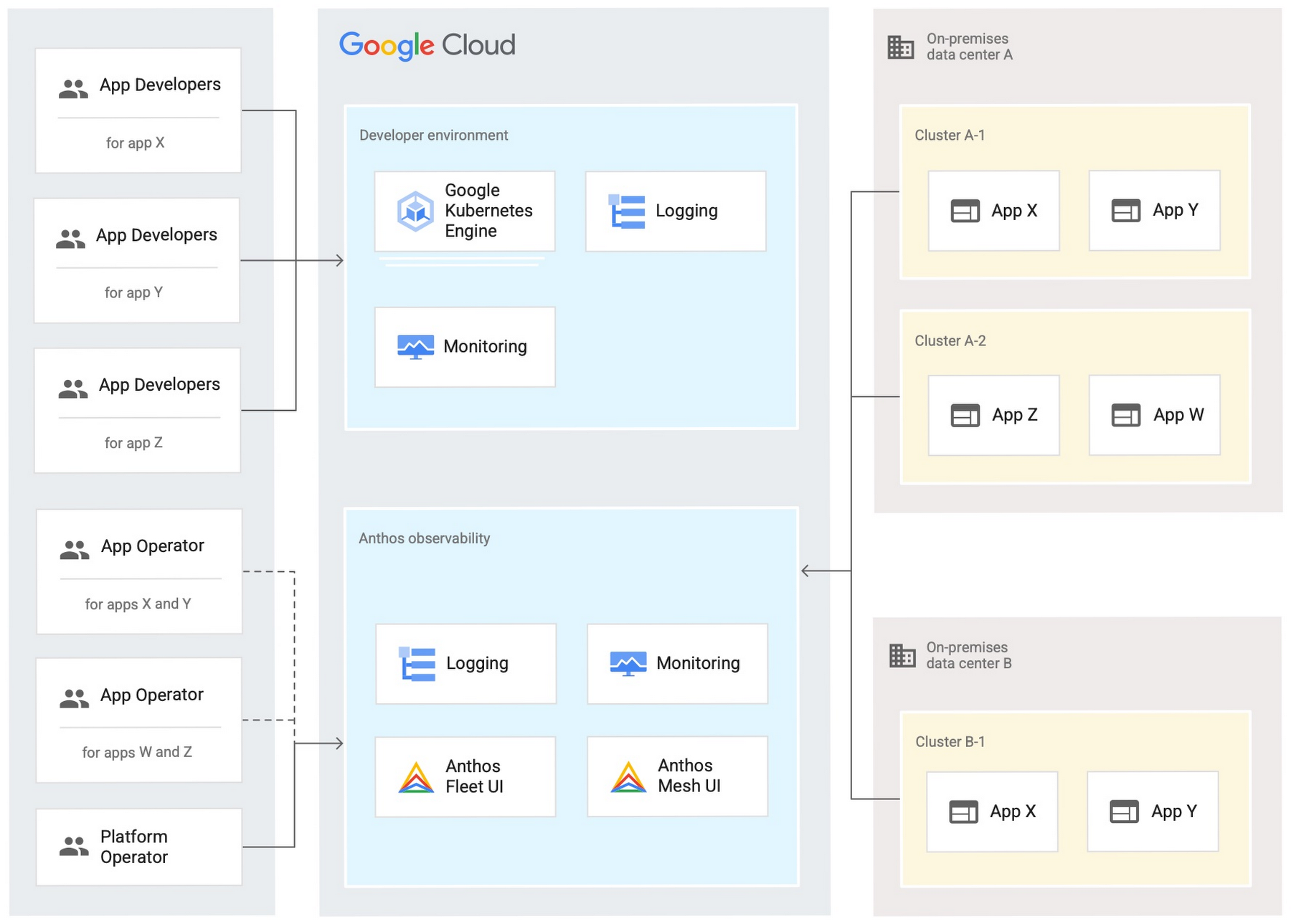
Configure your on-premises clusters and applications to send logging and monitoring data back to Google Cloud for analysis and review. Different personas should only be granted access to the environments they need. The following diagram shows how application developers and application or platform operators can then view logging and monitoring data in Google Cloud:
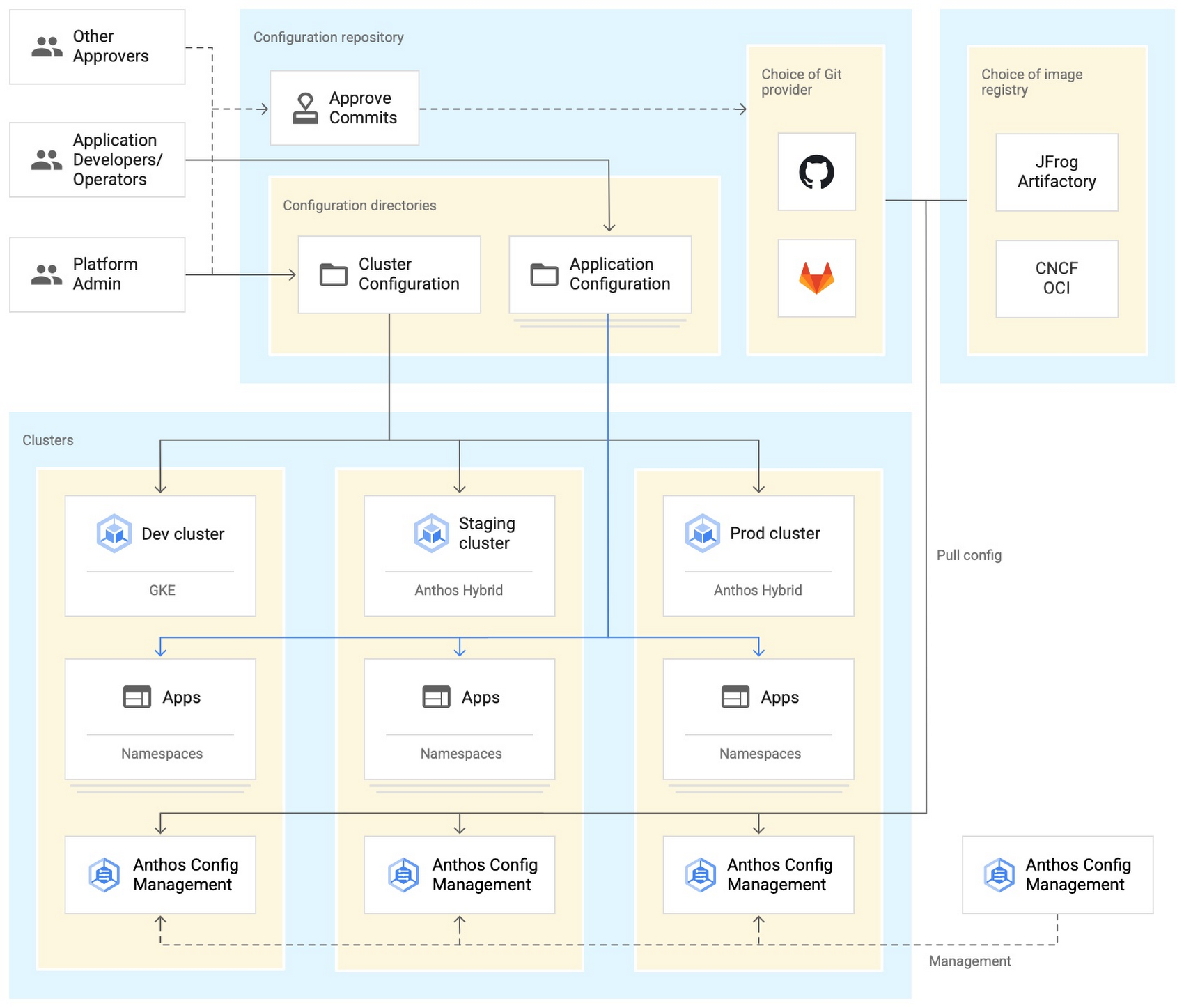
Use Anthos Config Management to manage Kubernetes objects in your clusters. Anthos Config Management is a GitOps-style tool that uses a Git repository or Open Container Initiative (OCI) as its storage mechanism and source of truth. Git provider workflows allow multiple stakeholders to participate in review of changes.
As shown in the following diagram, a common Anthos Config Management deployment uses one folder containing configuration for all clusters. Use separate additional folders to hold configuration data, one for application:
Plan and implement a way to secure the network traffic in your Anthos hybrid environment. The following services help with authentication, connectivity, and communication in a cluster:
- Anthos Identity Service connects clusters to on-site identity providers to authenticate local access.
- Connect gateway and workforce identity federation can provide secure cloud-mediated access to mobile workforce clusters without using a VPN.
- Workload Identity provides on-premises workloads with managed short-lifetime credentials for access to cloud resources.
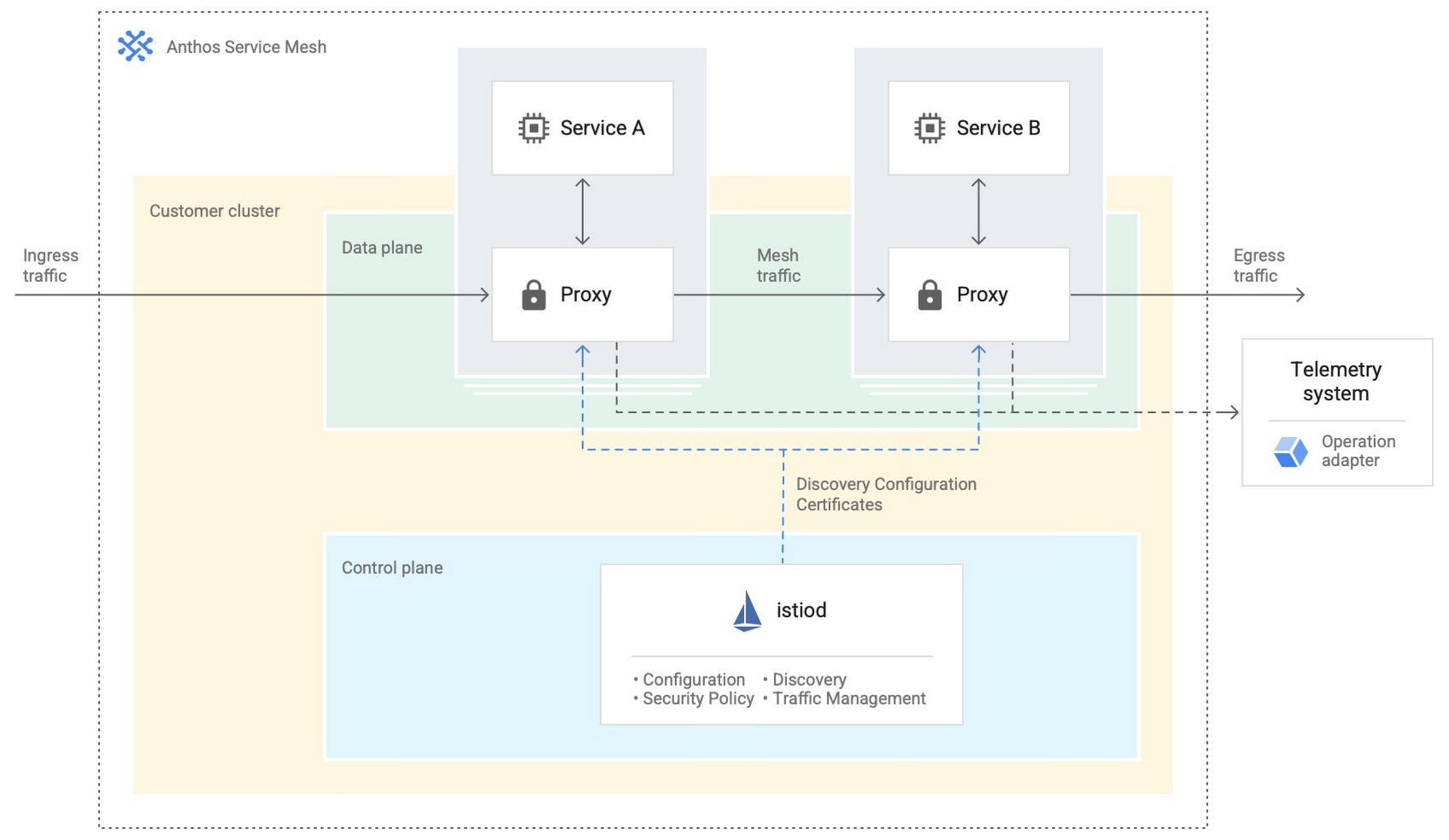
- Anthos Service Mesh encrypts and controls communication between services in the same cluster.
The following diagram shows how Anthos Service Mesh can control the flow of traffic between services within your clusters:
You don’t have to implement all these cloud-based services as part of your initial on-premises deployments. As you become more comfortable and want to expand your capabilities, you can add in some of these hybrid offerings. But, we hope that this blog post has given you some ideas to think about when you start to plan and design your own Anthos hybrid environments.
For more detailed guidance and planning information, see the full Anthos hybrid environment reference architecture. Let us know what you think!
Rapido: Finding the Quickest Route to Success with Google Maps Platform

3876
Of your peers have already read this article.
3:30 Minutes
The most insightful time you'll spend today!
Founded in 2015, Rapido operates a mobile app-based two-wheeler taxi service across more than 40 cities in India. More than 100,000 drivers provide Rapido two-wheeler taxi services, while more than 400,000 current or prospective drivers have downloaded the company’s app. Consumers have downloaded the app more than 5 million times, and the business receives about 5 million orders per month for taxi services.
“If a consumer wants to travel from point A to point B, they simply open up the app on their smartphone, select pickup and dropoff locations, and tap ‘request,'” explains Rishikesh SR, Co-Founder, Rapido. “We can track that request to the nearest available two-wheeler taxi and allocate the job to the right driver.”
Google a compelling opportunity
The business started operations on a cloud service. However, Google presented a compelling opportunity to Rapido to improve its location-based intelligence through a wide range of cloud-based map APIs, infrastructure, and mobile app development services. “Google Maps Platform was particularly interesting to our business and we saw enormous potential to use it to improve our service and gain a competitive edge,” says Rishikesh.
Rapido elected to use Geocoding API to enable its app to convert addresses to geographic coordinates, and the reverse, allowing consumers to identify point A and point B on their journey. The company also uses Directions API to identify the fastest route between pickup and dropoff locations, which enables Rapido to provide users with approximate prices for trips. Distance Matrix API is used to calculate the travel times and distances between locations, and Maps SDKs for Android and iOS to add interactive maps to the app.
Google Cloud Results
- Enables the business to optimize use of Maps Platform APIs
- Takes 5 million orders per month
- Establishes a robust platform for expansion
“Google Maps Platform is particularly useful for us as it identifies optimum routes for two-wheel services,” says Rishikesh. “This saves us time and money, while helping us deliver a better consumer experience.”
In addition, Rapido uses the Snap to Roads service to deliver best-fit geometry for sets of GPS coordinates within the Roads API, which identifies and provides metadata about the roads on which drivers travel. “Snap to Roads in Roads API allows us to optimize the path drivers take and helps ensure the fare charged is accurate,” says Rishikesh.
Improving user experiences
As Rapido matured, Rishikesh considered how to improve the user experience of the app while reducing the business’ costs. In 2017, Rapido asked Google Cloud Premier Partner and Google Maps Platform Partner Searce to help meet these objectives. Searce provided the technical and business advice that prompted Rapido to take advantage of the unlimited API calls, 24-hours-a-day, 7-days-a-week support, and strict SLAs available through the Google Maps APIs Premium Plan for Asset Tracking.
Searce also helped Rapido optimize its API calls and integrate directions and distance calls with the Roads API to smooth out variations in GPS readings received from the handsets of two-wheeler taxi owners. Finally, Searce helped Rapido deploy the Firebase mobile and web development platform to automate the mode configuration of the API keys, rather than maintain a time-consuming manual process. This move also minimized the likelihood of any issues arising if Rapido decided to start multiple projects or add more licenses, or combine Google Maps APIs Premium Plan for Asset Tracking with an external license.
Technical skill and experience
Searce finalized its initial engagement with Rapido last year and provides ongoing support and advice. “Searce’s technical skill with Google Maps Platform put us on the right path to provide a better, more relevant user experience,” says Rishikesh.
Rapido also now uses a range of Firebase services for app development, testing, and modification. The business employs Google Analytics for Firebase to measure customer use of and engagement with its app, enabling the business to make informed decisions about where to direct its resources. In addition, the business is using the Firebase Test Lab app-testing infrastructure to test its Android and iOS apps across a range of device configurations, view the outcomes, and make changes as needed.
Rapido uses Firebase Remote Config to change the app’s behavior and appearance on the fly in response to the results of A/B testing across sections of its user base. Furthermore, Rapido uses Firebase Crashlytics to provide app crash reports to its Firebase console.
Firebase Dynamic Links allows Rapido to direct users to linked content in the iOS or Android version of the app, while Firebase Cloud Messaging enables Rapido to deliver notifications and other messages to users. Cloud Firestore provides a NoSQL cloud database to store and sync data for the Rapido app.
Rapido has also started using the Firebase Realtime Database to store and sync information about customers that can be used to provide a more informed, personalized service.
At the same time, Rapido uses a BigQuery data warehouse to process about 10TB of data every month for analysis and reporting that supports decision-making across the business. The organization is also using application containerization through Google Kubernetes Engine on Google Cloud Platform.
“We are moving our apps from dedicated virtual machines to a scalable containerized environment that consumes fewer resources,” says Rishikesh. “It makes sense to work with Google – the business that designed the Kubernetes container-orchestration system.”
Rapido has also started using the Cloud Functions event-driven serverless compute platform to process smaller jobs. “This is ideal for small use cases in particular as we do not have to spin up virtual machine instances,” says Rishikesh.
Finally, Rapido is using image classification through the Vision AI service to analyze riders’ documentation, such as driving licenses. This allows the business to verify details such as names, addresses, and expiry dates with more than 90 percent accuracy – a high rate in a country where each state has its own license template.
Expanding rapidly to new cities
The Rapido app enables drivers to pick up customers quickly – in most cases, between 2 and 5 minutes.
Overall, the high-quality experience for consumers and drivers delivered by Google Maps Platform, combined with Firebase, has helped power Rapido to robust growth. The business now takes more than 5 million orders per month.
“With Google, we are delivering the right experience to users through Google Maps Platform, Firebase, and Google Cloud Platform services,” concludes Rishikesh. “We have realized our vision faster and now have a robust platform to grow in the future.”
Google Cloud Helps LiveRamp Capture, Manage, Process and Visualize Data at Scale

4916
Of your peers have already read this article.
2:30 Minutes
The most insightful time you'll spend today!
Editor’s note: Today we’re hearing from Sagar Batchu, Director of Engineering at LiveRamp. He shares how Google Cloud helped LiveRamp modernize its data analytics infrastructure to simplify its operations, lower support and infrastructure costs and enable its customers to connect, control, and activate customer data safely and securely.
LiveRamp is a data connectivity platform that provides best in class identity resolution, activation and measurement for customer data so businesses can create a true customer 360 degree view. We run data engineering workloads at scale, often processing petabytes of customer data every day via LiveRamp Connect platform APIs.
As we integrated more internal and external APIs and the sophistication of our product offering grew, the complexity of our data pipelines increased. The status quo for building data pipelines very quickly became painful and cumbersome as these processes take time and knowledge of an increasingly complex data engineering stack. Pipelines became harder to maintain as the dependencies grew and the codebase became increasingly unruly.
Beginning last year, we set out to improve these processes and re-envision how we reduce time to value for data teams by thinking of our canonical ETL/LT analytics pipelines as a set of reusable components. We wanted teams to spend their time adding new features which encapsulate business value rather than spending time figuring out how to run workloads at scale on cloud infrastructure. This was even more pertinent with data science, data analyst and services teams whose daily wheelhouse was not the nitty gritty of deploying pipelines.
With all this in mind, we decided to start a data operations initiative, a concept popularised in the last few years, which aims to accelerate the time to value for data-oriented teams by allowing different personas in the data engineering lifecycle to focus on the “what” rather than the “how.”
We chose Google Cloud to execute on this initiative to speed up our transformation. Our architectural optimizations, coupled with Google Cloud’s platform capabilities simplified our operational model, reduced time to value, and greatly improved the portability of our data ecosystem for easy collaboration. Today, we have ten teams across LiveRamp running hundreds of workloads a day, and in the next quarter, we plan to scale to thousands.
Why LiveRamp Chose Google Cloud
Google Cloud provides all the necessary services in a serverless fashion to build complex data applications and run massive infrastructure. Google Cloud offers data analytics capabilities that help organizations like LiveRamp to easily capture, manage, process and visualize data at scale. Many of the Google Cloud data processing platforms also have open source roots making them extremely collaborative. One such platform is CDAP (Cask Data Application Platform), which Cloud Data Fusion is built on. We were drawn to this for the following reasons:
- CDAP is inherently multicloud. Pipeline building blocks known as Plugins define individual units of work. They can be run through different provisioners which implement managed cloud runtimes.
- The control plane is a set of microservices hosted on Kubernetes, whereas the data plane leverages the best of breed big data cloud products such as Dataproc.
- It is built as a framework and is inherently extensible, and decoupled from the underlying architecture. We can extend it both at the system and user-level through “extensions” and “plugins” respectively. For example, we were able to add a system extension for LiveRamp specific authorisation and build a plugin that encompasses common LiveRamp identity operations.
- It is open sourced, and there is a dedicated team at Google Cloud building and maintaining the core codebase as well as a growing suite of source, transform and sink connectors.
- It aligns with our remote execution and non-data movement strategy. CDAP executes pipelines remotely and manages through a stream of metadata via public cloud APIs.
- CDAP supports an SRE mindset by providing out of the box monitoring and observability tooling.
- It has a rich set of APIs backed by scalable microservices to provide ETL as a Service to other teams.
- Cloud Data Fusion, Google Cloud’s fully managed, native data integration platform is based on CDAP. We benefit from the managed security features of Data Fusion like IAM integration, customer manager encryption keys, role based access controls and data residency to ensure stricter governance requirements around data isolation.
How are teams using the Data Operations Platform?
Through this initiative, we have encouraged data science and engineering teams to focus on business logic and leave data integrations and infrastructure as separate concerns. A centralised team runs CDAP as a service, and custom plugins are hosted in a democratized plugin marketplace where any team can contribute their canonical operations.
Adoption of the platform was driven by one of our most common patterns of data pipelining: The need to resolve customer data using our Identity APIs. LiveRamp Identity APIs connect fragmented and inaccurate customer identity by providing a way to resolve PII to pseudonymous identifiers. This enables client brands to connect, control, and activate customer data safely and securely.
The reality of customer data is that it lives in a variety of formats, storage locations, and often needs bespoke cleanup. Before, technical services teams at LiveRamp had to develop expensive processes to manage these hygiene and validation processes even before the data was resolved to an identity. Over time, a combination of bash and python scripts and custom ETL pipelines became untenable.

By implementing our most used Identity APIs, a series of CDAP plugins, our customers were able to operationalise their processes by logging into a Low Code user interface, select a source of data, run standard validation and hygiene steps, visually inspect using CDAP’s Wrangler interface for especially noisy cases, and channel data into our Identity API. As these workflows became validated, they have been established as standard CDAP pipelines that can now be parameterized and distributed on the internal marketplace. These technical services teams have not only reduced their time to value but have also enabled future teams to leverage their customer pipelines without worrying about the portability to other team’s infrastructures.
What’s Next ?
With critical customer use cases now powered by CDAP, we plan on scaling out usage of the platform to the next batch of teams. We plan on taking on more complex pipelines, cross-team workloads, and adding support for the ever growing LiveRamp platform API suite.
In addition to the Google Cloud community and the external community, we have a growing base of LiveRamp developers building out plugins on CDAP to support routine transforms and APIs. These are used by other teams who push the limits and provide feedback — spinning a flywheel of collaboration between those who build and those who operate. Furthermore, teams internally can continue to use their other favorite data tools like BigQuery and Airflow as we continue to deeply integrate CDAP into our internal data engineering ecosystem.
Our data operations platform powered by CDAP is quickly becoming a center point for data teams – a place to ingest, hygiene, transform, and sink their data consistently.
We are excited by Google Cloud’s roadmap for CDAP and Data Fusion. Support for new execution engines, data sources and sinks, and new features like Datastream and Replication will mean LiveRamp teams can continue to trust that their applications will be able to interoperate with the ever evolving cloud data engineering ecosystem.
Consent is a Key Component for a Successful Embedded Financial Solution: Read Why

3234
Of your peers have already read this article.
5:00 Minutes
The most insightful time you'll spend today!
When banks and other financial institutions make their products available via non-banks, we call that Embedded Finance. Think, for example, of a retailer offering financing for people buying goods; or a budgeting app gathering bank transactions to help you categorize and understand your spending patterns. The finance – the money management – has been embedded into the retailer or the budgeting experience.
This last example falls under the Data Exchange category of Embedded Finance , and it’s often also called Open Banking. In many countries this active data exchange is actually mandated by law, with specific Open Banking standards encoded into law for all financial institutions. As of this blog post, there are approximately 37 countries with such laws already in place or currently being worked on.
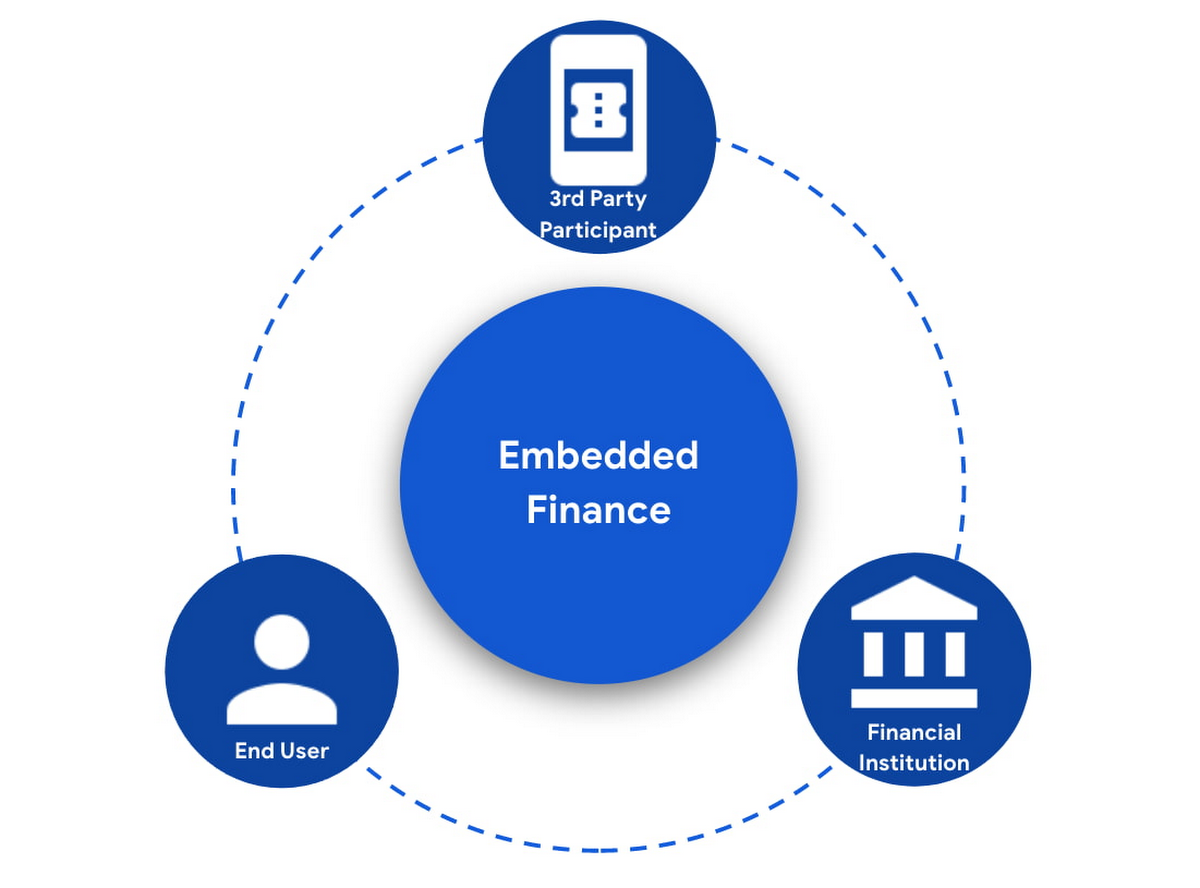
In an Embedded Finance scheme there are three main players: The financial institution offering their products and services, a third party provider (TPP) making use of those products or services, and an end user who is a customer of the financial institution and is interacting with the TPP.
The most important ingredient for these schemes is consumer trust. If a consumer does not trust that their data will be safely shared with a third party, and that they can easily understand the terms they have agreed to and stop sharing their data whenever they want to, consumers will simply not participate. When a consumer agrees for their data to be shared, this is called consent.
What components do I need for a successful Embedded Finance solution?
Banks’ products and services are made available to other parties via APIs, thus a fundamental component is an API Management platform. An API Management Platform lets you design, secure, analyze, and scale APIs anywhere with visibility and control.
Also, we need a component to manage consents given by end users. Consent Management refers not only to the capability of checking whether a certain action by a third party (eg: access an end user’s account balance) is valid according to the consent granted by the end user to that TPP, but also the availability of tools for end users to check existing consents, modify them or revoke them, as well as tools for financial institutions to perform similar actions on behalf of their customers.
Finally, we need an Identity Platform capable of authenticating an end user and establishing their identity.

A Google Cloud based embedded finance solution uses Apigee as the API management platform, Identity Platform or your own identity platform of choice, and a consent management service (CMS). Google Cloud has partnered with two leading providers in the consent management space: Clarip and CloudEntity.

How do these components work together?
The main roles and responsibilities of each of the three components are quite clear, but there is a certain degree of flexibility on how to orchestrate the interactions between the components, and which component performs which function when there is an overlap of functionality between them.
Google Cloud has tested the following interaction patterns:
- Interaction Pattern #1: Apigee as the main orchestrator
In this interaction pattern, Apigee interacts with both the consent management service and the identity platform, coordinating end user authentication with the identity platform, and authorization and consent with the consent management service. Apigee acts as the “broker” between users, their identity, and their consent.
- Interaction Pattern #2: The consent management service abstracts the identity platform.
In this case, the consent management service manages all the interactions with the identity management platform, and the identity platform acts as the “broker”. Apigee only interacts with the consent service.
The three components share a common pool of client apps and end users. One of the components is typically designated as the source of truth for these entities, while the other components that need to know about these entities synchronize that information from the source of truth.
The identity platform is typically the source of truth for end user identities and the consent management component will synchronize that information by pulling it from the identity platform.
The consent management service is the source of truth for user opt-in and current consent status. Apigee will either check with the service the validity of a consent every time a request comes through, or to make it more efficient, it will validate the main attributes of the consent based on information stored in Apigee. To maintain consistency, the consent management service should tell Apigee to invalidate any tokens associated with a consent when it is revoked via other means (for example, if an end user revoked consent from a consent dashboard).
For client apps, either Apigee or the consent management component can act as the source of truth, with the other component synchronizing the information. In the context of Open Banking in particular, standards often mandate that financial institutions support Dynamic Client Registration. This means having endpoints that new clients can use to register themselves as clients for the Open Banking APIs. In this case, the synchronization of clients can easily be incorporated into Dynamic Client Registration.
Let’s look now into more detail about how the three components interact. There are two user journeys that are particularly relevant:
Authentication/Authorization/Consent
This is the beginning of the typical consumer client journey, when an end user starts using a third party app that requires access to that user’s data. The third party app needs to authenticate itself, and request authorization to access the user’s data. This will trigger the authentication of the end user and consent granting: Consent granting being the process of, the user authorizing the operations the app will execute on their behalf, and establishing the list of accounts on which these operations will be performed. The authorization is represented by an access token, which the app will need to include in all subsequent requests.
This is quite a complex journey with many steps involved in order to make this as secure as possible. To make it easier to understand, we will simplify some of the steps (apologies in advance to you OIDC/FAPI experts out there!).
At a high level, these are the steps involved in this user journey:
- End user starts using an app
- The app requests permission to access user’s data
- The identity platform (IdP) authenticates the end user
- The consent management service obtains consent from end user
- An access token is issued for the app, encapsulating the authorized permissions, accounts, etc. A refresh token is also issued – the access token normally has a short life (measured in minutes), but the app can use the refresh token, which typically lasts much longer (days or months), in order to obtain a new access token without the need of going through the end user authentication/authorization/consent process again.
The way these steps are orchestrated varies depending on the interaction pattern among the components.
Pattern #1: Apigee orchestrates all interactions
When the client requests permission, Apigee will record the request and then redirect the client app to the IdP login page. Once the end user logs in, the IdP will return an authorization code to the callback URL that Apigee registered in the IdP configuration.
Apigee will then redirect the client app to the Consent Management service, so that the consent form is displayed. Once the user grants consent, selects the desired permissions, and selects the accounts it will apply to, the Consent Management Service will update Apigee with the status of the consent, via a callback Apigee registered in the consent configuration.
Now that the end user has authenticated and granted consent, Apigee can now issue an authorization code, and associate all the necessary information, for instance, details about the consent, the authorization code issued by the Identity Platform (IdP), the identification of the end user in the IdP, etc. Apigee will return this authorization code to the client app via a callback endpoint that the app provided when registering with Apigee.
The app will then exchange the authorization code for an access token. Apigee will obtain an access token from the IdP, abd update the status of the consent before issuing an access token to the client.
Pattern #2: The Consent Management Service is the center of the Architecture
In Pattern #2, Apigee will only communicate with the Consent Management Service, which acts as an authorization server for the app and will also coordinate all interaction with the IdP.
When the client requests permission, Apigee will forward the request to the CMS. The CMS will record the request and then redirect the client app to the IdP login page. Once the end user logs in, the IdP will return an authorization code to the callback the CMS registered in the IdP configuration.
The CMS then displays the consent form. Once the user approves the consent and selects the desired permissions and accounts it will apply to, the Consent Management Service will return an authorization code to Apigee, via a callback Apigee registered in the CMS configuration.
From now on, the flow is the same as explained above. Apigee will issue an authorization code, associate all the necessary information and will return this authorization code to the client app via a callback endpoint. The app will then exchange the authorization code for an access token. Apigee will obtain an access token from the CMS, before issuing an access token to the client.
Let’s now look at the other relevant user journey:
Access shared data
Once the third party app has been authorized, it will then start requesting that end user’s data. For instance, it may request the list of accounts or the balance of a particular account.
When that request goes through, a series of checks need to be performed: Is this third party app still authorized? Has it been granted the right permission for the operation being requested? Is the account involved included in the list of accounts authorized by the end user? Apigee can perform all these checks by inspecting the access token presented by the third party app.
There is, however, one other check which cannot be done simply by inspecting the token. Imagine for a moment that in-between the user granting consent and the app requesting the user’s data, the end user decided to revoke that consent. This could be done by other means than the app itself, for instance by checking all consents granted to all apps in a consent dashboard accessible via other channels such as an “Internet Banking” site. When the app requests the user data, the token is still valid, however the consent has already been revoked. Therefore, in this user journey, Apigee will check with the Consent Management service to check if the consent is still valid. This adds a bit of overhead, which can be minimized by other means. For instance, one popular optimization is to make sure that the Consent Management service asks Apigee to revoke any access or refresh tokens associated with a given consent when that consent is revoked via other channels. If that guardrail is in place, then Apigee can determine if a request should be allowed simply by validating the access token and using the consent information stored alongside the token.
The following diagram summarizes the interactions required between Apigee and the Consent Management component. The interaction is essentially the same in both interaction patterns.

What’s next?
In this article we have described how Apigee, a Consent Management service, and an Identity Platform are the fundamental ingredients of a successful and secure Embedded Finance solution. We have also looked at how these components interact with each other to keep user consent consistent and available. Both interaction patterns described are valid and have been proven to work. So which one may be right for you? The answer ultimately depends on your particular requirements, the choice of consent management service, and your choice of identity platform. As a rule of thumb, if you have multiple application experiences, identity systems, and sources of consent, an Apigee-centric architecture is a great solution. If you are looking at a Consent Management service in the context of an Open Banking implementation mandated by a centralized authority (eg: Open Banking Brazil, Consumer Data Standards in Australia), CloudEntity is a good choice for consent management, as their product is also Certified Financial-grade API (FAPI) OpenID Provider, with profiles for the various Open Banking standards. CloudEntity integrates with Apigee using Pattern #2.
For more details on both Clarip and CloudEntity’s offerings and how their particular solution works with GCP please check:
- Clarip: Universal Consent Management Platform – GDPR
- CloudEntity: Certified OpenBanking & Consent (UK, Brazil and Australia) at scale
For more details on Apigee API Management, see https://cloud.google.com/apigee
You can also learn about our solutions for retail banking or contact sales.
5041
Of your peers have already watched this video.
21:00 Minutes
The most insightful time you'll spend today!
Uber’s Story of Scaling Their App with Millions of Concurrent Requests
Uber has millions of concurrent customers who use the platform to book rides and place food delivery orders, generating billions of database transactions per day. In just a click of a button, Uber captures users’ intent which bases their fulfillment model to meet the customers’ demand, and match it to active providers that address their demand with supply.
Uber’s fulfillment platform capability is the lifeline powering every line of business and also allows rapid scaling of new verticals. Hundreds of microservices at Uber depend on this fulfillment platform as a source of truth for all their active booking, delivery or order session. The events generated by this platform are used by hundreds of offline data sets to power business decisions. Additionally over hundreds of developers at Uber extend the platform with APIs, events and codes to build 120+ unique fulfillment flows!
Watch the video to learn about Uber’s decision to move from on-prem to Google Cloud’s Cloud Spanner while still taking live orders at scale and meeting customers’ expectations.
More Relevant Stories for Your Company

Seven Steps to Making DevOps a Reality
When it comes to creating a business that can thrive in the digital age, the benefits of DevOps are clear. In a recent survey sponsored by Google Cloud, Harvard Business Review Analytic Services found that about two-thirds of the respondents who use DevOps have seen benefits that impact their bottom line, including




Video: How Pitney Bowes Leveraged Apigee to Create New Revenue Streams
Headquartered in Stamford, Connecticut, Pitney Bowes helps businesses navigate the complex world of commerce. They enable organizations to send parcels and packages across the globe. Pitney Bowes serves 90 percent of Fortune 500 companies, has 90 plus years of innovation, supports 1.5 million small businesses and has 15,000 employees globally.

Custom Voice Feature Can Help Brands Tweak IVR for Better Customer Experiences
With the rise of digital assistants and conversational interfaces, people have grown accustomed to hearing and speaking to synthetic voices. But what do those voices sound like? Often, pretty repetitive. We’re all familiar with the Google Assistant voice, for example. That’s why we are excited to announce the general availability

Streamlining Business Processes with Google Cloud’s Application Integration
According to a recent Accenture report, large businesses deploy an average of 500 different applications. This trend shows no signs of slowing down, with the majority of respondents signaling plans to acquire even more applications. No surprise, all these applications present a number of integration challenges, which the impending wave of
