






APIs and IT Rationalization: Cost Avoidance and Cost Savings for Enterprise IT
READ FULL INTRODOWNLOAD AGAIN3805
Of your peers have already downloaded this article
6:30 Minutes
The most insightful time you'll spend today!
5 Ways You Need to Know to Reduce Costs with Containers

3174
Of your peers have already read this article.
2:30 Minutes
The most insightful time you'll spend today!
“Cloud Wisdom Weekly: for tech companies and startups” is a new blog series we’re running this fall to answer common questions our tech and startup customers ask us about how to build apps faster, smarter, and cheaper. In this installment, Google Cloud Product Manager Rachel Tsao explores how to save on compute costs with modern container platforms.
Many tech companies and startups are built to operate under a certain degree of pressure and to efficiently manage costs and resources. These pressures have only increased with inflation, geopolitical shifts, and supply chain concerns, however, creating urgency for companies to find ways to preserve capital while increasing flexibility. The right approach to containers can be crucial to navigating these challenges.
In the last few years, development teams have shifted from virtual machines (VMs) to containers, drawn to the latter because they are faster, more lightweight, and easier to manage and automate. Containers also consume fewer resources than VMs, by leveraging shared operating systems. Perhaps most importantly, containers enable portability, letting developers put an application and all its dependencies into a single package that can run almost anywhere.
Containers are central to an organization’s agility, and in our conversations with customers about why they choose Google Cloud, we hear frequently that services like Google Kubernetes Engine (GKE) and Cloud Run help tech companies and startups to not only go to market quickly, but also save money. In this article, we’ll explore five ways to help your business quickly and easily reduce compute costs with containers.
5 ways to control compute costs with containers
Whether your company is an established player that is modernizing its business or a startup building its first product, managed containerized products can help you reduce costs, optimize development, and innovate. The following tips will help you to evaluate core features you should expect of container services and include specific advice for GKE and Cloud Run.
- Identify opportunities to reduce cluster administration
Most companies want to dedicate resources to innovation, not infrastructure curation. If your team has existing Kubernetes knowledge or runs workloads that need to leverage machine types or graphics processing units (GPUs), you may be able to simplify provisioning with GKE Autopilot. GKE Autopilot provisions and manages the cluster’s underlying infrastructure, all while you pay for only the workload, not 24/7 access to the underlying node-pool compute VMs. In this way, it can reduce cluster administration while saving you money and giving you hardened security best practices by default.
- Consider serverless to maximize developer productivity
Serverless platforms continue the theme of empowering your technical talent to focus on the most impactful work. Such platforms can promote productivity by abstracting away aspects of infrastructure creation, letting developers work on projects that drive the business while the platform provider oversees hardware and scalability, aspects of security, and more.
For a broad range of workloads that don’t need machine types or GPUs, going serverless with Cloud Run is a great option for building applications, APIs, internal services, and even real-time data pipelines. Analyst research supports that Cloud Run customers achieve faster deployments with less time spent monitoring services, resulting in reinvested productivity that lets these customers do more with fewer resources.
Designed with high scalability in mind, and an emphasis on the portability of containers, Cloud Run also supports a wide range of stateless workloads, including jobs that run to completion. Moreover, it lets you maximize the skills of your existing team, as it does not require cluster management, a Kubernetes skillset or prior infrastructure experience. Additionally, Cloud Run leverages the Knative spec and a container image as a deployment artifact, enabling an easy migration to GKE if your workload needs change.
With Cloud Run, gone are the days of infrastructure overprovisioning! The platform scales down to zero automatically, meaning your services always have the capacity to meet demand, but do not incur costs if there is no traffic.
- Save with committed use discounts
Committed use discounts provide discounted pricing in exchange for committing to a minimal level of usage in a region for a specified term. If you are able to reliably predict your resource needs, for instance, you can get a 17% discount for Cloud Run (for either one year or three years), and either a 20% discount (for one year) or a 45% discount (for three years) on GKE Autopilot.
- Leverage cost management features
Minimum and maximum instances are useful for ensuring your services are ready to receive requests but do not cause cost overages. For Google Cloud customers, best practices for cost management include building your container with Cloud Build, which offers pay-for-use pricing and can be more cost efficient than steady-state build farms.
Relatedly, if you choose to leverage serverless containers with Cloud Run, you can set minimum instances to avoid the lag (i.e., the cold start) when a new container instance is starting up from zero. Minimum instances are billed at one-tenth of the general Cloud Run cost. Likewise, if you are testing and want to avoid costs spiraling, you can set a maximum number of instances to ensure your containers do not scale beyond a certain threshold. These settings can be turned off anytime, resulting in no costs when your service is not processing traffic. To have better oversight of costs, you can also view built-in billing reports and set budget alerts on Cloud Billing.
- Match workload needs to pricing models
GKE Autopilot is great for running highly reliable workloads thanks to its Pod-level SLA. But if you have workloads that do not need a high level of reliability (e.g., fault tolerant batch workloads, dev/test clusters), you can leverage spot pricing to receive a discount of 60% to 91% compared to regularly-priced pods. Spot Pods run on spare Google Cloud compute capacity as long as resources are available. GKE will evict your Spot Pod with a grace period of 25 seconds during times of high resource demand, but you can automatically redeploy as soon as there is available capability. This can result in significant savings for workloads that are a fit.
Innovation requires balance
Put into practice, these tips can help you and your business to get the most out of containers while controlling management and resource costs. That said, it is worth noting that while managing cloud costs is important, the relationship between “cloud” and “cost” is often complex. If you are adopting cloud computing with only the primary goal of saving money, you may soon run into other challenges. Cloud services can save your business money in many ways, but they can also help you get the most value for your money. This balance between cost efficiency and absolute cost is important to keep in mind so that even in challenging economic landscapes, your tech company or startup can continue growing and innovating.
Beyond cost savings, many tech and startup companies are seeking improved business agility, which is the ability to deploy new products and features frequently and with high quality. With deployment best practices built into GKE Autopilot and Cloud Run, you can transform the way your team operates while maximizing productivity with every new deployment.
You can learn if your existing workloads are appropriate for containers with this fit assessment and these guides for migrating to containers. For new workloads, you can leverage these guides for GKE Autopilot and Cloud Run. And for more tips on cost optimization, check out our Architecture Framework for compute, containers, and serverless.
If you want to learn more about how Google Cloud can help your startup, visit our page here to get more information about our program and apply for our Google for Startups Cloud Program, and sign up for our communications to get a look at our community activities, digital events, special offers, and more.
Transport Platform’s Richly-detailed Geospatial Data Allows Commuters to Track Buses in Real-time!

5625
Of your peers have already read this article.
3:00 Minutes
The most insightful time you'll spend today!
Vinayak Bhavnani, Co-Founder and CTO of India-based bus transport technology company Chalo, shares how Google Maps Platform is used to improve visibility for commuters and bus operators across India by visualizing geospatial data.
Effective public transport networks contribute to the local economy and help make cities safe, pleasant, and sustainable. In India, buses make up around 90% of the public transport offering, but when you talk to the people who ride them every day, you find that there’s a lot of room for improvement. Heavy traffic means there are rarely any fixed schedules and it’s impossible to know exactly when your bus is coming. We’ve found that people tend to wait at a bus stop for up to 30 minutes a day, which creates a lot of frustration and wasted time.
When we founded Chalo, our aim was to make the daily city commute a more positive experience. Reliability is synonymous with visibility: when you know exactly when the bus is coming, you can plan your day better. If you’re in your office, for example, and see the next bus is in 10 minutes, you can be at the stop at the exact time it arrives, instead of waiting around. To enable this, we base our solutions on richly-detailed geospatial data provided by Google Maps Platform.
Eliminating wait times and increasing revenue with geospatial data
In India, bus passengers tend to have fewer resources. The Chalo App, which can be downloaded for free, allows them to see exactly where their bus is on its route and when it will arrive at their nearest stop. They also tend to be late adopters of mobile technology, meaning we had to create an interface that was user-friendly, reassuring and adapted to all age groups and backgrounds. One of the main reasons we opted for Google Maps Platform is that it’s very present in India and other emerging markets and is familiar to our users, which inspires trust. At the same time, we like the fact that Google Maps Platform provides rich geospatial data while being simple to implement and work with. We use the Geocoding API, Reverse Geocoding, and the Directions API to enable location search and provide directions.
We also worked with MediaAgility to identify the Google Maps Platform products most suited to our needs and the best practices to be followed. This helped to ensure that our business objectives could be met efficiently.
The Chalo App also enables digital ticketing, alongside the Chalo Card, a payment card for those who don’t own a smartphone. India, like the rest of the world, is gradually moving away from cash payments, but the public transport system is proving slow to catch up, meaning people still must have cash in hand when they board the bus. Digital ticketing not only makes commuting more convenient, it also helps protect passengers, drivers and conductors during the COVID-19 health crisis by limiting physical contact.
Chalo also offers solutions aimed at bus operators that help them improve their services and their bottom line. In major Indian cities, buses are run by a combination of public and private agencies and small private individual bus operators, with the majority of the latter only operating one or two buses. The market is very fragmented and there’s not much incentive for bus operators to invest in infrastructure or customer experience – especially when they have little to no visibility on where their fleet is at a given time, how many kilometers it travels in a day, or how much money it takes.
The Chalo dashboard provides operators with a map-based real-time overview of bus locations, alongside scheduling features and route, ticketing, and passenger statistics. Geospatial intelligence and insight into passenger demand enable operators to explore new avenues of revenue and adapt routes and services to passenger needs. Operators who’ve partnered with Chalo report an average improvement of 10% to 30% of their bus fleet operations.
Chalo is currently powering about 100 million rides a month on 15,000 buses in 37 cities. We’d like to see the number of rides increase tenfold over the next few years. To do that, we’re looking to broaden our offer and expand to other parts of the country and across international borders. A pilot is underway in Bangkok, and we’re considering expansion into South-East Asia, Africa, and the Middle East. Having access to detailed geospatial data anywhere in the world via Google Maps Platform, without having to make any major investments or changes to our technology stack, will make this considerably easier.
At the same time, we’re exploring artificial intelligence and machine learning to improve the accuracy of our scheduling features and we’re introducing video-based solutions for people-counting on buses. Our aim is to continually improve our offering and optimize our services. We’re looking forward to working closely with Google to make that happen.
For more information on Google Maps Platform, visit our website.
Google Cloud is Every Retailer’s Most Trusted Cloud

6602
Of your peers have already read this article.
3:00 Minutes
The most insightful time you'll spend today!
Whether they were ready for it or not, the COVID-19 pandemic transformed many retailers into digital businesses. Retailers made huge investments into commerce technologies, customer experience tools, sales and fulfillment technology, and improving digital experiences to continue providing their goods and services to their customers. Now, more than a year into the COVID-19 pandemic, digital retail is the new normal. In fact, many retailers are planning on expanding their digital investments. However, as their digital footprint expands, so do their threats and security concerns.
As a digital-focused retailer, your website is the most visible part of your attack surface. Your website is where your customers search for goods or services, make payments, or learn more about your brand. However, your website does not operate in isolation. There is an underlying infrastructure as well as the services that run on top of it that need protection from a wide array of attacks that may seek to compromise your data, internal employees, business, and customers. During this week’s Google Cloud Retail Summit, we’ve shared why Google Cloud is built to be the most trusted cloud for retailers. From providing you with control over your data as you move from your own data centers to the public cloud to giving you built-in technology to protect your applications all the way to your end users, Google Cloud helps you safely migrate to and operate in our Trusted Cloud.
Trusted Cloud Gives You Control, Transparency, and Sovereignty
- Access Transparency: We offer the ability to monitor and approve access to your data or configurations by Google Cloud support and engineering based on specific justifications and context, so you have visibility and control over insider access.
- Certificate Authority Service (CAS): CAS is a highly scalable and available service that simplifies and automates the management and deployment of private CAs while meeting the needs of modern developers and applications. With CAS, you can offload to the cloud time-consuming tasks associated with operating a private CA, like hardware provisioning, infrastructure security, software deployment, high-availability configuration, disaster recovery, backups, and more, allowing you to stand up a private CA in minutes, rather than the months it might normally take to deploy.
- Confidential Computing: We already encrypt data at-rest and in-transit, but customer data needs to be decrypted for processing. Confidential Computing is a breakthrough technology which encrypts data in-use—while it’s being processed. Confidential VMs take this technology to the next level by offering memory encryption so that you can further isolate your workloads in the cloud. With the beta launch of Confidential VMs, we’re the first major cloud provider to offer this level of security and isolation while giving you a simple, easy-to-use option for your newly built and “lift and shift” applications.
- Cloud Key Management: We allow you to configure the locations where your data is stored, where your encryption keys are stored, and where your data can be accessed from. We give you the ability to manage your own encryption keys, even storing them outside Google’s infrastructure. Using our External Key Management service, you have the ability to deny any request by Google to access encryption keys necessary to decrypt customer data at rest for any reason.
Trusted cloud Helps You Prevent, Detect, and Respond to Threats
- BeyondCorp Enterprise is Google’s comprehensive zero trust product offering. Google has over a decade of experience managing and securing cloud applications at a global scale, and this offering was developed based on learnings from our experience managing our own enterprise, feedback from customers and partners, as well as informed by leading engineering and security research. We understand that most customers host resources across different cloud providers. With this in mind, BeyondCorp Enterprise was purpose-built as a multicloud solution, enabling customers to securely access resources hosted not only on Google Cloud or on-premises, but also across other clouds such as Azure and Amazon Web Services (AWS).
- Cloud Armor: We’re simplifying how you can use Cloud Armor to help protect your websites and applications from exploit attempts, as well as Distributed Denial of Service (DDoS) attacks. With Cloud Armor Managed Protection Plus, you will get access to DDoS and WAF services, curated rule sets, and other services for a predictable monthly price.
- Chronicle: Chronicle is a threat detection solution that identifies threats, including ransomware, at unparalleled speed and scale. Google Cloud Threat Intelligence for Chronicle surfaces highly actionable threats based on Google’s collective insight and research into Internet-based threats. Threat Intel for Chronicle allows you to focus on real threats in the environment and accelerate your response time.
- Google Workspace Security: Used by more than five million organizations worldwide, from large banks and retailers with hundreds of thousands of people to fast-growing startups, Google Workspace and Google Workspace for Education include the collaboration and productivity tools found here. Google Workspace and Google Workspace for Education are designed to help teams work together securely in new, more efficient ways, no matter where members are located or what device they use. For instance, Gmail scans over 300 billion attachments for malware every week and prevents more than 99.9% of spam, phishing, and malware from reaching users. We’re committed to protecting against security 1 threats of all kinds, innovating new security tools for users and admins, and providing our customers with a secure cloud service.
- Identity & Access Management IAM: Identity and Access Management (IAM) lets administrators authorize who can take action on specific resources, giving you full control and visibility to manage Google Cloud resources centrally. For enterprises with complex organizational structures, hundreds of workgroups, and many projects, IAM provides a unified view into security policy across your entire organization, with built-in auditing to ease compliance processes.
- reCAPTCHA Enterprise: reCAPTCHA has over a decade of experience defending the internet and data for its network of more than 5 million sites. reCAPTCHA Enterprise builds on this technology with capabilities, such as two-factor authentication and mobile application support, designed specifically for enterprise security concerns. With reCAPTCHA Enterprise, you can defend your website against common web-based attacks like credential stuffing, account takeovers, and scraping and help prevent costly exploits from malicious human and automated actors. And, just like reCAPTCHA v3, reCAPTCHA Enterprise will never interrupt your users with a challenge, so you can run it on all webpages where your customers interact with your services.
- Security Command Center: With Security Command Center (SCC), our native posture management platform, you can prevent and detect abuse of your cloud resources, centralize security findings from Google Cloud services and partner products, and detect common misconfigurations, all in one easy-to-use platform. We have Premium tier for Security Command Center to provide even more tools to protect your cloud resources. It adds new capabilities that let you spot threats using Google intelligence for events in Google Cloud Platform (GCP) logs and containers, surface large sets of misconfigurations, perform automated compliance scanning and reporting. These features help you understand your risks on Google Cloud, verify that you’ve configured your resources properly and safely, and document it for anyone who asks.
- VirusTotal: VirusTotal inspects items with over 70 antivirus scanners and URL/domain blocklisting services, in addition to a myriad of tools to extract signals from the studied content. Any user can select a file from their computer using their browser and send it to VirusTotal.
- Web Risk API: With Web Risk, you can quickly identify known bad sites, warn users before they click infected links, and prevent users from posting links to known infected pages from your site. Web Risk includes data on more than a million unsafe URLs and stays up to date by examining billions of URLs each day.
Trusted cloud Plays an Active Role in Our Shared Fate
Our trusted cloud provides a shared-fate model for risk management. We stand with retailers from day one, helping them implement best practices for safely migrating to and operating in our trusted cloud.
We hope you enjoy the sessions we’ve created for you with Google Cloud Retail Summit and that they help you understand the ways our trusted cloud can help secure retailers all over the world.
3567
Of your peers have already watched this video.
1:30 Minutes
The most insightful time you'll spend today!
Building a Powerful Digital Payments Solution
See how the Payeezy business platform, which enables merchants to establish and grow their eCommerce business, was set up and how it works.
The platform enables the exposure of First Data services, processes, and data to partners. The Payeezy API provides all the tools partners need to set up payments in their apps, set up merchant accounts on behalf of clients, and get paid.
First Data partners with Apigee to offer a powerful and easy to use developer portal.The Apigee Edge API management platform enabled First Data to accelerate development of the Payeezy APIs.
Conquering Hybrid API Management: Building The Perfect Team and Platform

2006
Of your peers have already read this article.
5:00 Minutes
The most insightful time you'll spend today!
Introduction
In our discussions with technology leaders from around the world for – The Digital Crunch Time: 2022 State of APIs and Applications – two themes emerged
#1 Cloud — and hybrid cloud specifically — is becoming a driving factor of success with 59% of respondents saying they were looking to increase their hybrid cloud adoption within the next 12 months.
#2 82% of organizations with a mature API strategy and higher API adoption reported increased efficiency, collaboration, and agility.
It’s clear that hybrid cloud – usually a combination of on-premise infrastructure (or private cloud) and a public cloud computing environment (like Google Cloud) – and APIs are becoming popular keys to success. The challenge now becomes – how to structure your teams and architect your platform to manage APIs at scale in hybrid environments?
In this two-part series, we’ll look at how successful organizations are managing APIs on a large scale across hybrid environments using Apigee. In this post we’ll look at how to structure the right team and set up the platform to help you thrive. In part 2 of this series, we will explore how to operate the platform with optimum clusters, scaling, and automation.
Why is it difficult to manage APIs at scale in hybrid environments?
As your business grows, it makes sense that you will need to scale and build more APIs to keep pace. This can mean thousands of APIs with tens of thousands of transactions per second. And these APIs are often operated across completely different business units with many development teams. Like with any large scale operation, building a central governance across these hundreds of APIs is extremely challenging.
Operating APIs in a hybrid environment offers a number of benefits — less latency, compliance with regulations etc., — but to get the most out of them, you need a clinical and pragmatic approach to solving the two challenges outlined below.
#1 How to structure your API teams?
One of the most successful patterns when structuring your API teams is a Center for Enablement team. This team is made up of many federated API producer teams throughout the enterprise with one central team of deep subject matter experts. This central team builds out the guardrails for the API program, develops reusable content, helps automate things like the CI/CD pipeline, and delivers best practices.
Note that the level of implementation handled by the centralized team may vary. For example, they may have a full CI/CD pipeline to maintain, or they may simply provide templates for the federated dev teams to build their own pipeline. However implementation is coordinated, having this structure ensures a consistent API model with appropriate governance and security in place across the enterprise.
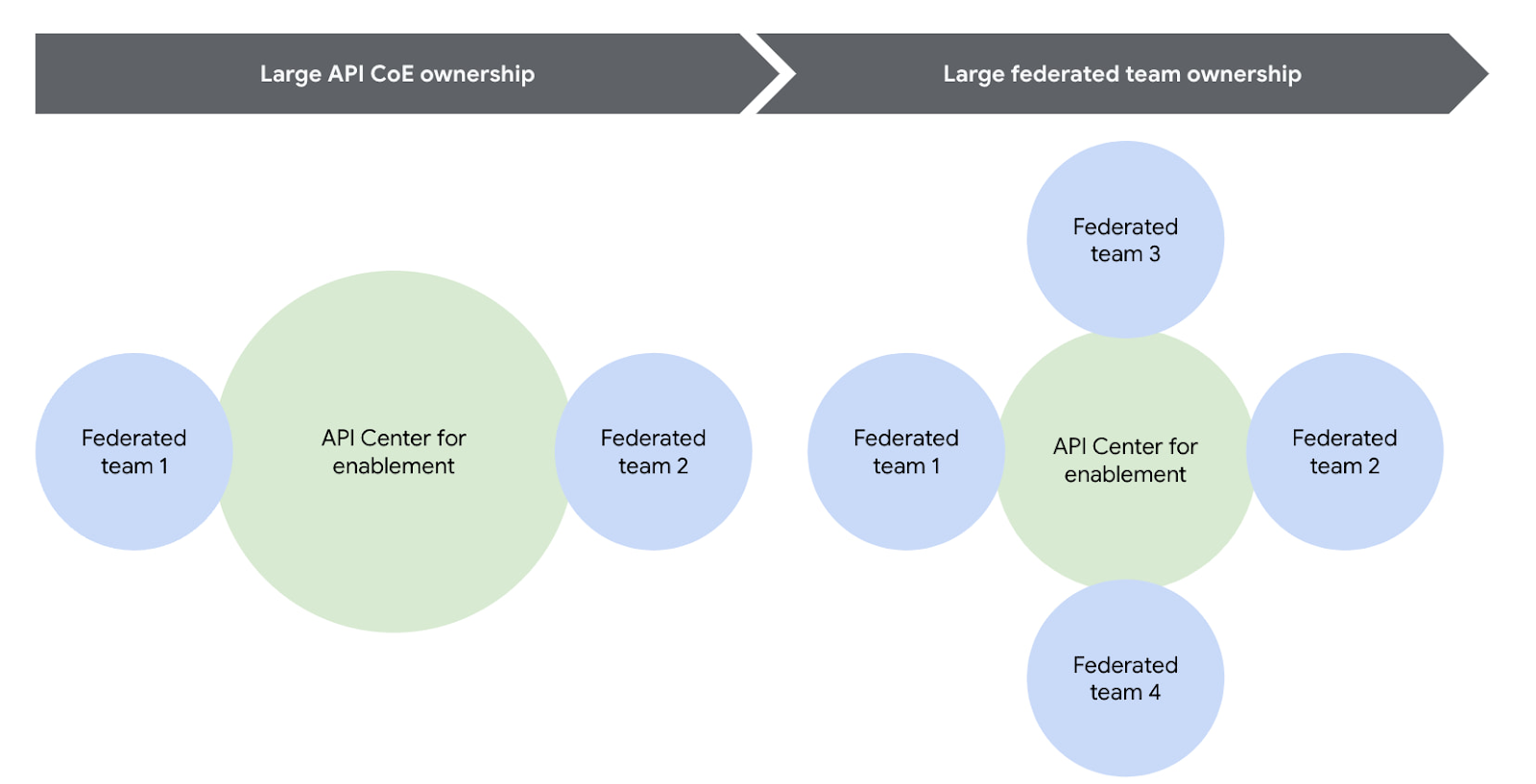
Another successful strategy is to reduce the size or redefine the role of the central teams over time. For example, one of our customers recently adopted a model where their largest business units are fully responsible for operating their own infrastructure using a GitOps model. In this case, the centralized team created the automation for installing and upgrading Apigee hybrid, but the business units themselves operated their own copy of the platform, allowing them complete autonomy. In this way, gradually increasing the autonomy for the federated teams will help avoid delivery bottlenecks while ensuring consistent governance.
You can visualize this change over time pretty easily using the following diagram.
#2 How to architect your platform?
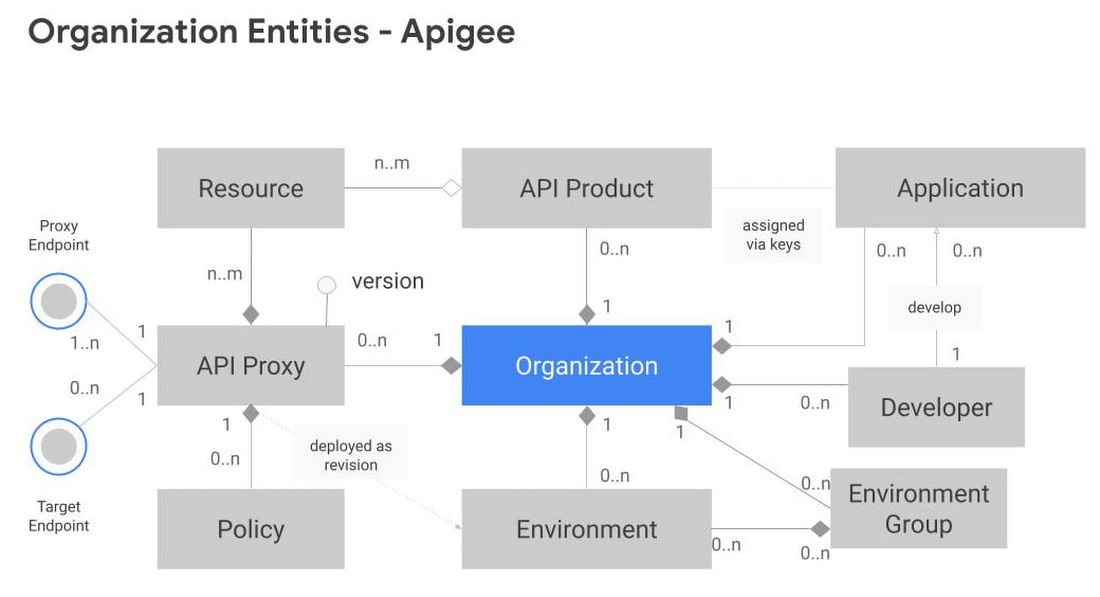
Another challenge is designing your Apigee organizations (top-level container that contains all your API proxies and related resources) and environments (software environment for creating and deploying API proxies). To tackle this, you first need to understand the relationship between different entities within an Apigee organization. Apigee organization is the top level entity – nothing shared between Apigee organizations. Using an organization in Apigee, customers can segregate resources and manage access to these resources based on their own requirements. In practice, this means that each Apigee organization has its own apps, API keys, developers, proxies, and so on. The diagram below provides a visual representation of how different entities in an Apigee organization interact with each other.
Another key factor to consider is the technical limits of the platform – designing around these limits leads to higher platform performance and stability.
In the design phase, it is vital to articulate fundamental requirements of your architecture and agree on these baseline principles with all the stakeholders involved. Some of these fundamental questions include:
- How many regions need to host runtimes?
- Host runtime instances for organizations that handle production traffic in at least 2 regions to meet aggressive uptime SLAs. During upgrades, ensure only one of these regions upgrades at a time.
- What are the steps in your Software Development Lifecycle (SDLC) and how does Apigee fit into it?
- Use Apigee organizations as the SDLC perimeter — such as a dev organization and a test organization — to give yourself the capacity for a large number of proxies. It is also common that the dev organization in this model has relatively permissive access for developers, allowing them to work more efficiently.
- What level of access or separation do you need between business units or development teams?
- Create separation between different teams by leveraging environments with conditional identity and access management to restrict access as necessary
- If your team is very large and you plan to have multiple organizations, you may want to divide the operational ownership for these different Apigee organizations among different teams in your enterprise while keeping them operating under the centralized team.
- In such a shared responsibility model, the largest consumers of the system stand up and operate their own instances. Teams with many APIs or distinct operational needs can use the automation from the central team to stand up and operate their own Apigee hybrid clusters. This reduces the burden on the centralized team while allowing business units to be self-sufficient and ensuring that the clusters are optimized to meet that team’s needs.
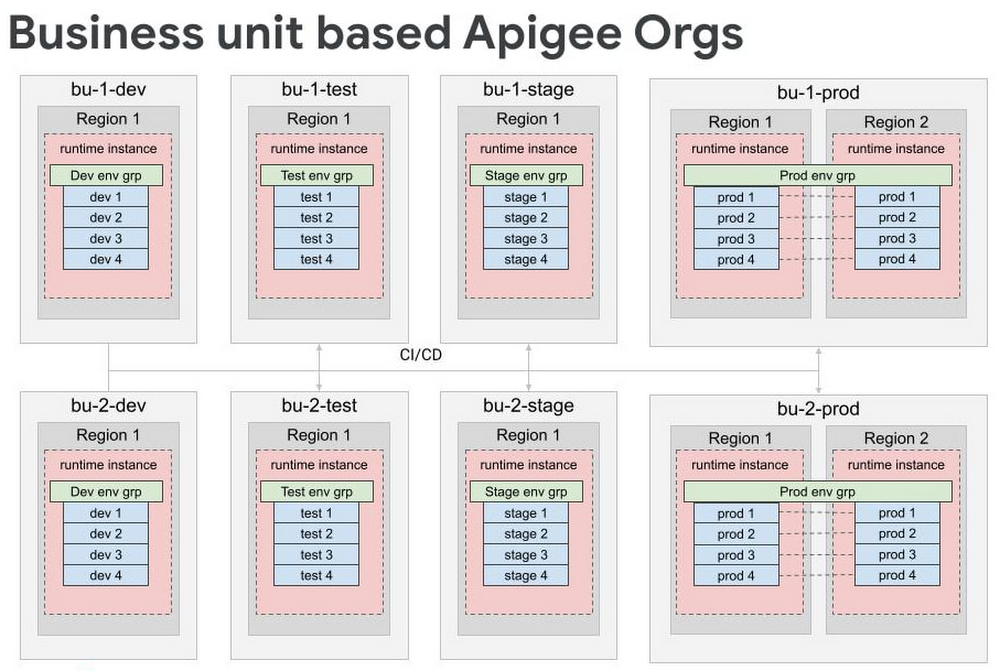
- For very large scale programs where additional separation is necessary, consider creating separate organizations for each business unit, each of which has the full complement of SDLC orgs. Some customers have this level of scale, and often it makes logical sense to divide up into different Apigee orgs because it’s rare that 5000 APIs are all related and used together.
By working off these baseline recommendations, you will come up with your own logical design of Apigee organizations and environments. Using Apigee organizations to represent your SDLC with business units — or functional areas or some other dividing mechanism — is a good way to design different environments.
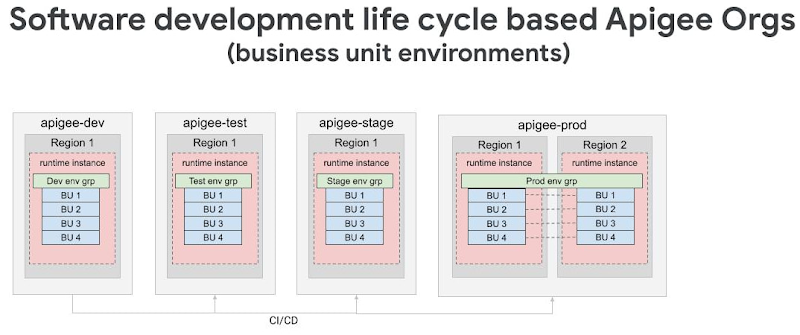
For large scale deployments — involving thousands of proxies — we recommend dividing organizations into different logical business units while still following the SDLC model. In many cases, only the largest business units will need their own organizations, and it is possible to have a shared organization that contains multiple business units.
Conclusion
Like with any large scale IT project, there isn’t one“correct” way to operate APIs in a hybrid cloud environment. Finding the right approach for your enterprise starts with knowing the organizational requirements and tailoring Apigee for your use case. In the next installment of this series, we will explore how to operate Apigee with the optimal resources (clusters, automation, and monitoring etc.) for a large scale hybrid API program.
Check out our documentation to learn more or start using Apigee hybrid.
More Relevant Stories for Your Company

1 Developer. 5 Months. A Revenue Generating App With 100K Users With Firebase
This is a guest post authored by Firebase customer, Anton Ivanov, Founder & CEO of DealCheck Real estate investing is a fantastic way to build a stream of passive income and grow your wealth. Numerous studies have pointed out that real estate investing has created more millionaires throughout history than

Introducing a strong alternative to CentOS: Rocky Linux Optimized for Google Cloud
As CentOS 7 reaches end of life, many enterprises are considering their options for an enterprise-grade, downstream Linux distribution on which to run their production applications. Rocky Linux has emerged as a strong alternative that, like CentOS, is 100% compatible with Red Hat Enterprise Linux. In April 2022, we announced

Anthos Makes Hybrid and Multi-Cloud Deployments Easy
Most enterprises have applications in disparate locations—in their own data centers, in multiple public clouds, and at the edge. These apps run on different proprietary technology stacks, which reduces developer velocity, wastes computing resources, and hinders scalability. How can you consistently secure and operate existing apps, while developing and deploying

Are You Providing Sufficient Digital Leadership?
It has been seven years since Marc Andreesen’s famous article “Why Software is Eating the World” was published in the Wall Street Journal, and given the slow pace of change in many companies, some executives still may not be taking the threat of being “eaten” seriously enough. Software, and platform
