





Google Spanner Wins SIGOPS Hall of Fame Award 2022

2915
Of your peers have already read this article.
1:30 Minutes
The most insightful time you'll spend today!
Earlier this month, SIGOPS announced that it had selected the paper, “Spanner: Google’s Globally-Distributed Database” for the 2022 SIGOPS Hall of Fame Award, an honor bestowed on the most influential Operating Systems papers published by the organization.
In giving this award, the award committee stated:
“Spanner showed how to balance the requirements of consistency, availability, and partition tolerance for a globally replicated transactional database system. In doing so, Spanner simplified the implementation of a range of higher level services which could then scale across the planet through a familiar and powerful transactional API. The key insights of leveraging clock synchronization using TrueTime and a dedicated, redundant, high-capacity datacenter WAN distinct from the public Internet as the basis for scaling remain fundamental design patterns today.”
As one of the original authors of the paper, to say that I am humbled by this award is an understatement. It’s also taken me on a trip down memory lane, and gotten me thinking about all the ways — expected and unexpected — that Spanner has influenced not only how Google builds its applications, but also how it’s simplified application design and operations for organizations that aren’t running at hyperscale.
From very early on — think early 2000s — one of Google’s biggest challenges was scaling its software to keep up with the rapid growth of the internet. We needed a database that scaled, that could be built with a small team. Those needs led to Bigtable and the NoSQL movement: a feature-lean database that performed and scaled.
But as Google grew, and entered other lines of business, our priorities evolved. We needed to simplify the jobs of our ever-larger engineering staff and support business-critical services like the AdWords and Payments platforms, as well as then-new consumer products like Gmail. To do that, we knew we had to give our product teams database features like ACID transactions, multi-region consistency, schema-declared invariants, SQL, and more — without compromising on cost or scale. At the time it was an outrageous goal, but with our experience building Bigtable and Megastore, as well as new innovations like TrueTime, we knew it could be done – and it was clear talking to our internal customers that it needed to be done.
Like most good software, our plans for Spanner really came together when we found our first serious customer: AdWords. At the time, Google’s entire advertiser-facing interface was sharded across MySQL instances on specially acquired hardware. Ads had just completed a very challenging resharding project to accommodate Google’s growing business, and was resolute in its desire to never do it again. So the Spanner team and Ads partnered on a project, called F1, to transparently move the entire AdWords stack from MySQL to Spanner.
“Before Spanner, Google’s entire advertiser-facing interface was sharded across MySQL instances on specially acquired hardware.”
By 2012, when we published the Spanner paper, we had just completed the migration of AdWords frontend traffic to the new Spanner backend, and we knew we had the seed of something really interesting. Since then, we have been rapidly improving Spanner in every dimension. Google, like most businesses, needs databases that are fully managed, easy to deploy, highly available, and robust in the face of any workload. Google services set a high bar: Spanner stores a copy of the Internet (actually several, at different stages of the indexing pipeline) and is the bedrock of availability and durability for billions of users that depend on Google in their daily lives.
Then, in 2017, Google Cloud launched Cloud Spanner, a fully managed database service that brought the unique capabilities of Spanner to every organization, allowing them to deliver always-on experiences at any scale from thousands to millions of active users across the world without sacrificing consistency.
That took us down another road: innovating to make it easy for all enterprises to build data-driven applications using Cloud Spanner. This meant adding enterprise features such as CMEK and access approval, fine-grained access control, backup and restore, and point-in-time recovery (PITR). We also added VPC Service Controls support and compliance certifications and necessary approvals so that Spanner can be used for workloads requiring ISO 27001, 27017, 27018, PCI DSS, SOC1|2|3, HIPAA and FedRamp. More recently, we added granular instance sizing, a PostgreSQL interface, and free trial instances to lower the barrier to entry for Spanner, and make it accessible for any developer and for any application, big or small.
Speaking of small, one of the interesting things we discovered along the way is that Spanner isn’t only a great fit for huge mission-critical applications – we also use it internally for smaller applications and internal tools, secure in the knowledge that the data is safe, available, and nowhere near any limits. That’s the thing about infrastructure innovations: at their best, they aren’t only about scale, they’re about extracting complexity from applications and presenting the solution in an easy-to-use package.
As we have incorporated solutions to those problems into Spanner, customers have dramatically simplified their applications. For example, application teams often created a dedicated “storage” tier to provide higher-level features like indexes, transactions, or data synchronization needed to support their business logic. Spanner enables application teams to hollow out or even completely eliminate these tiers for significant cost and maintenance savings. We have also seen big reliability dividends: rather than each application discovering the corner cases of transactions, consistency or high availability architectures one at a time, Spanner’s customers are all able to benefit from a rigorously designed and battle-tested implementation out of the gate.
“At their best, infrastructure innovations aren’t only about scale, they’re about extracting complexity from applications and presenting the solution in an easy-to-use package.”
The tradeoff between the scale limitations of relational databases and the functionality limitations of NoSQL systems is really familiar, and the software world has learned to build great applications within those confines. But we never tire of seeing great applications transform as Spanner melts the distinction away.
Get started with Spanner
It has never been easier to try out Spanner. With a free trial instance, you can try out Spanner at no cost for 90 days. You can even prototype an entire application for free on Google Cloud by using the Spanner free trial along with the free tier offered by other Google Cloud products such as Compute Engine and BigQuery.
Create a 90-day Spanner free trial instance. Try Spanner free.
Take a deep dive into the new trial experience and learn more about Spanner.
PaGaLGuY Turns to Google Cloud Platform to Power Leading India Education Network

8128
Of your peers have already read this article.
2:30 Minutes
The most insightful time you'll spend today!
Founded in 2006, PaGaLGuY started as a forum that enabled students, typically aged between 20 and 30 to discuss and seek advice on academic issues. By 2011, PaGaLGuY had increased its traffic to about 250,000 page views per month. The business is now one of India’s largest education networks and provides an app that users can download to their Android and iOS devices.
Over the past six years, PaGaLGuY has extended its service to include video advice from experts on education topics and grown the number of views of its pages to 1.5 million per day. As Head of Technology for the business, Sandeep Kalidindi has played a key role in ensuring PaGaLGuY is as engaging as possible to users. “Because the product is advertising based, the greater the user engagement, the greater the advertising revenue,” Kalidindi explains.
Google Cloud Platform Results
- Supported growth to 1.5 million page views per day and demand spikes that see requests increase from about 90 per second to about 1,200 per second
- Reduced API latency from about 1 second to about 40 milliseconds
- Reduced system administration time from three to four days per week to 30 minutes every two weeks
In 2015, PaGaLGuY’s senior management team decided to deliver an even more relevant experience for users of the education network. “The core thing we had to do was personalise the experience for each and every student that visited PaGaLGuY,” Kalidindi says. “So we had to capture each student’s data to customise what they see when they open the site.”
The business also found traffic to the network was straining its infrastructure. During demand peaks, created by exams involving as many as 5 million students, PaGaLGuY would be inaccessible for periods of 30 minutes to one hour. Furthermore, average API latency had climbed to an unacceptable 1 second, compromising performance.
PaGaLGuY needed to access extensive compute resources to undertake its planned change. Had the business relied on a physical technology architecture to undertake the transformation, it would have had to purchase capacity equivalent to 16 new servers. “There was no way with a small team we could grow to that extent in a short time,” Kalidindi says. “This was the right moment for us to explore cloud services.”
The business established two primary requirements the selected cloud service needed to meet. First, PaGaLGuY had to be able to scale the platform with costs rising only in proportion to the increase in resources consumed. Accordingly, the business would have to minimise the number of employees required to manage the cloud environment. Second, the platform had to give PaGaLGuY easy access to student data and the ability to undertake prompt, granular analysis.
PaGaLGuY reviewed available public cloud services and determined that Google Cloud Platform (GCP) was the best fit for its business. “Google Cloud Platform was considerably more mature than the alternatives, with a high degree of automation and a suite of managed services,” Kalidindi says. PaGaLGuY management then discussed with Google how to optimise cost, performance and availability of its personalised education network on GCP.
With assistance from Google and business transformation specialists Searce, PaGaLGuY was able to deliver the platform into production on GCP in 10 months. “Searce was very proactive in ensuring the environment met our needs and allowing us to gain priority access to Google services in development,” Kalidindi says. “Their team was integral to the success of the migration.”
PaGaLGuY has been running in production in GCP for two years. The education network’s GCP architecture comprises a scalable back-end built on Google App Engine; a managed environment for its containerised applications in Google Kubernetes Engine; messaging-oriented middleware through Google Cloud Pub/Sub; a relational database in Google Cloud SQL; a managed data analytics warehouse running in Google BigQuery; stream and batch data processing through Google Cloud Dataflow; and object storage in Google Cloud Storage.
PaGaLGuY has leveraged GCP services to break down its platform application from a monolithic build to a series of microservices running in Google App Engine that enable independent deployment cycles, minimise test and quality assurance overheads and provide clearer monitoring and logging.
Running on GCP has enabled PaGaLGuY to add new personalisation features and grow fourfold without having to add any new engineers or administrators to accommodate the increased traffic. The business has also used the platform to seamlessly collect and aggregate students’ data for analysis, reporting and delivering a more targeted user experience. Furthermore, PaGaLGuY has been able to provide its management team with direct access to Google BigQuery to scrutinise data rather than require them to wait at least a day to view reports created by the product or technology teams.
Support demand peaks of 1,200 requests per second
“Thanks to Google Cloud Platform, we can easily support demand peaks that see requests per second rise from an average 90 per second to about 1,200 per second for as long as 45 minutes,” Kalidindi says. Due to GCP’s scalability, PaGaLGuY can ensure its education network remains available and performance remains consistent during those periods.
Latency cut to 40 milliseconds
The business has also reduced average API latency from 1 second to about 40 milliseconds. Furthermore, using GCP has enabled PaGaLGuY to automate most of its processes and reduce system administration requirements from three to four days a week across its team members to about half an hour per week.
The performance of GCP has transformed PaGaLGuY’s culture and processes. “Once our team was exposed to Google Cloud Platform and understood the superiority of the platform, our mindset changed from ‘let us do everything on our own’ to ‘let us do what we do best’ and delegate the remainder,” Kalidindi says. The quality of the service provided by GCP means PaGaLGuY effectively considers the cloud provider as part of its team. “We are always eager to see what new services are being launched and are extremely excited about what Google Cloud Platform can provide as part of its roadmap.” he concludes.
Bitly’s Big Move: A Story of Massive Data Migration to Google’s Cloud Bigtable

956
Of your peers have already read this article.
3:30 Minutes
The most insightful time you'll spend today!
Editor’s note: Bitly, the link & QR Code management platform, migrated 80 billion rows of link data to Cloud Bigtable. Here’s how and why they moved this data from a MySQL database, all in just six days.
Our goal at Bitly is simple: Make your life easier with connections. Whether you’re sharing links online, connecting the physical and digital worlds with custom QR Codes or creating a killer Link-in-bio, we’re here to help make that happen.
Bitly customers run the gamut from your local middle school to most of the Fortune 500 with every use case you can think of in play. On a typical day, we process approximately 360 million link clicks and QR Code scans and support the creation of 6-7 million links or QR Codes for more than 350,000 unique users.
At the heart of our platform is link data consisting of three major datasets for the approximately 40 billion active links in our system (and counting). For years we stored this data in a self-managed, manually sharded MySQL database. While that setup served us well over time, it did present some challenges as we looked to expand and move into the future.
MySQL: Challenges and growing pains
First, performing operational actions like software and security upgrades or database host provisioning — all while keeping the databases 100% available for our customers — was challenging to say the least.
Additionally, the backup and restore process was both costly and time-consuming. Daily backups for the growing dataset took almost an entire day to complete. And if we ever had to restore the entire data set, it would have undoubtedly taken at least two people working for several days — not a fun prospect and thankfully something we never had to do.
While manual sharding for MySQL offers good key distribution across physical and logical shards, it’s pretty high-maintenance — we tried to avoid touching our sharding config because of how error-prone making changes was. And even with a forward-thinking shard allocation, we found this approach to have a limited lifespan.
And finally, when we turned our attention towards multi-region and global distribution, manually sharded MySQL proved to be a major hurdle, especially compared to the convenience of a managed service that handles geo-distribution for us.
As we thought about the future of our data and how to best meet our expansion goals, we determined that an update was necessary. We needed a system more set up for growth and increased reliability, preferably one with built-in functionality for replication and scaling. Investigation and research brought us to Cloud Bigtable, Google Cloud’s enterprise-grade NoSQL database service.
The Bitly link, in a nutshell
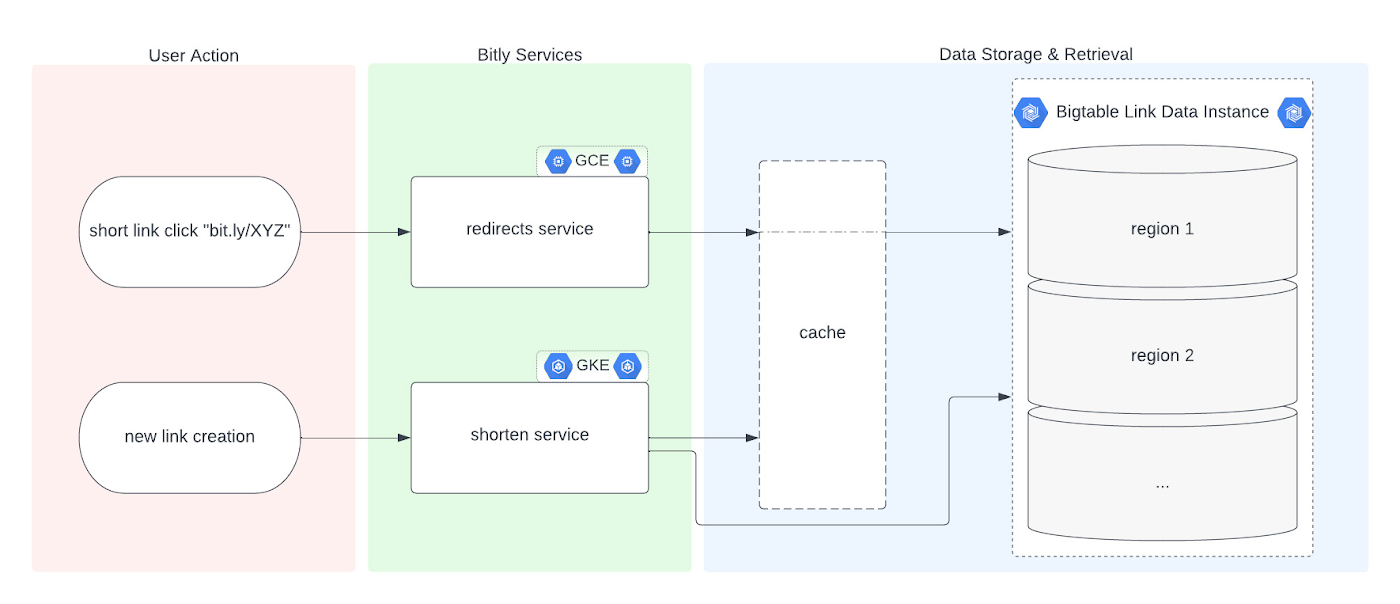
Before we dive into the Bigtable migration, it’s useful to understand the basics of our link management system. When a user shortens a long URL with Bitly, information is saved to the backend data stores through our API layer. This information consists of a Bitly short link and the corresponding destination link for proper routing, as well as some additional metadata. When a user clicks the Bitly short link, our services query these same backend data stores for the redirect destination for the request. This basic flow, which also includes other Bitly link options like custom back-halves, is the backbone of the Bitly link management platform.
Where Bigtable comes in
As mentioned, after researching our options, the solution that best fit our needs was Bigtable. It offered the features we were looking for, including:
- A 99.999% SLA
- Limitless scale
- Single-digit millisecond latency
- A built-in monitoring system
- Multi-region replication
- Geo-distribution, which allows for seamless replication of data across regions and reduces latency
- On-demand scaling of compute resources and storage, which adjusts to user traffic and allows our system to grow and scale as needed
- Seamless integration with our general architecture; we use Google Cloud services for many other parts of our system, including the APIs that interact with these databases
- A NoSQL database that doesn’t require relational semantics, as the datasets we’re migrating are indexed on a single primary key in our applications
Making the move
We targeted three of our major, self-managed datasets to migrate. The larger two were organized in a sharded database architecture. The first thing we did for migration was prepare the new Bigtable database. We iterated over a schema design process and conducted a thorough performance analysis of Bigtable to ensure an uninterrupted user experience during and after the migration. After that, we made minor adjustments to our application code so that it could seamlessly integrate and interact with Bigtable. Finally, we implemented a robust post-migration disaster recovery process to mitigate any potential risks.
During the actual migration, we enabled our applications to start a “dual writes” phase. This involved concurrently writing new link data to both our existing MySQL and the new Bigtable tables. Once data started writing to our Bigtable instance, we ran our migration scripts. We used a Go script to walk each of the existing MySQL datasets and insert each row into Bigtable. This enabled us to clean up outdated information and backfill older records with newer field data.
Cleaning up clutter along the way
In the process of migration, we were actually able to free up a huge amount of storage. Because of the elimination of an early feature of the Bitly platform, we were able to exclude from the migration to Bigtable a little less than half of the total data stored in MySQL. Since we were creating a completely clean dataset, we had the opportunity simply to skip those unneeded rows during the migration.
Altogether, the migration process walked through 80 billion MySQL rows, which resulted in just over 40 billion records finding their new home in Bigtable. In the end, our starting point with Bigtable is a 26 TB dataset, not including replication. A set of concurrent Go scripts running in parallel on a handful of machines allowed us to complete this migration project in six days. (Go rarely disappoints.)
Write twice, cut once – validation before migration
Next up was the data validation and cutover period when we started returning data from Bigtable, but continued to write to MySQL as a precaution in case we needed to roll back at any point.
As we dove into the validation process, we compared the data between MySQL and Bigtable and noted any discrepancies whenever a link was clicked or created. After verifying that all our responses were stable, we proceeded with a gradual cutover process, rolling out in percentages until we reached 100% Bigtable for all writes and reads. After a comfortable run period, we’ll turn off the dual writes completely and finally decommission our workhorse MySQL hosts to live on a farm upstate.
Google’s got Bitly’s back(ups)
Our data is our lifeline, and we’re doing everything we can to ensure it’s always protected. We put together a redundancy plan using both Bigtable backups as well as a process for keeping a copy of the data outside Bigtable for true disaster recovery.
The first line of defense involves a switchover to the backup Bigtable dataset in case we need it. Beyond that, we’ve implemented two more layers of defense to protect against instance failure, corrupted data, and any other data failure that would require a restore of one or more tables from backup.
For this process, we start by creating daily Bigtable backups of our tables that we store for a fixed number of days. Second, we execute a Dataflow job to export our data from Bigtable into Cloud Storage approximately every week. And, if the need arises, we can use Dataflow to import our data back from Cloud Storage into a new Bigtable table.
While running the Dataflow jobs to export from Bigtable to Cloud Storage, we’ve seen an impressive export speed of 7-8 million rows read per second on average and up to 15 million per second at times. All the while, our production reads and writes continued without disruption. When we tested the Cloud-Storage-to-Bigtable restore job, the write speed, expectedly, increased with instance scale — at the maximum node quota for our regions, we observed an average of just under 2 million rows per second written to our new table.
Short links for the long haul
As mentioned above, not only did Bigtable meet our technical requirements and operational needs, but we also chose Bigtable because it sets us up for future growth. Its ability to scale seamlessly over time while improving our system availability SLA was a major factor in our decision.
As we increase our scale by 5x, 10x, or more, it’s imperative that our data backbone scales accordingly and that the SLAs we provide to customers stay stable or even add another coveted “9”. We have big plans in the coming years and Bigtable will help us achieve them.
Interested in learning more? We found the following resources to be useful in our journey to Bigtable evaluation and ultimate adoption:
- Evaluate Bigtable schema design for your relational database and application workloads
- Understand how to increase availability and distribute data globally with Bigtable replication in any region combination of your choice
- Learn more about Bigtable backups and importing/exporting data with Bigtable Dataflow templates
Bonus: If you’re interested in learning more of the nuts and bolts of how we migrated the data, I’ll be talking all about that very topic at GopherCon 2023 this September in San Diego!
5 Reasons Your Legacy Data Warehouse Won’t Cut It

4468
Of your peers have already read this article.
8:15 Minutes
The most insightful time you'll spend today!
As we engage with enterprises across the globe, one thing is becoming clear: Today’s businesses are solving complex business problems that are data-intensive.
But often, their data platform infrastructure is holding them back. Data platform architectures that were designed in the 1990s are not ready to solve business problems for 2020. We don’t have to tell you about the explosive data growth that’s going on for businesses around the world. If you’re managing data infrastructure today, you already know plenty about that data growth.
Ever faster and larger data streams, global business needs, and tech-savvy users are all putting the pressure on IT teams to move faster, with more agility.
Despite all these changes, it is often the legacy, traditional data warehouse where most of the data analytics tasks take place, and they’re underprepared for those demands.
When we talk to people working in IT today, we hear a lot about the constraints that come with operating legacy technology while trying to build a modern data strategy. Those legacy data warehouses likely aren’t cutting it anymore. Here’s why—and here’s what you can do about it.
1. Business agility is hard to achieve with legacy tools.
Business agility is the main goal as organizations move toward completely digital operations. Think of online banking, or retailers staying ahead of always-on e-commerce needs in a competitive environment. All these great, cutting-edge innovations reflect cultural and technical change, where flexibility is essential. A business has to be able to manage and analyze data quickly to understand how to better serve customers, and allow its internal teams to do their best work with the best data available.
We hear that lots of data warehouses running today are operating at 95% or 100%, maxing out what they can provide to the business.
Whether it’s on-premises or an existing data warehouse infrastructure moved wholesale to cloud, those warehouses aren’t keeping up with all the data requests users have. Managing and preventing these issues can take up a lot of IT time, and the problems often compound over time. Hitting capacity limits slows down users and ties up database administrators too.
From a data infrastructure perspective, separating the compute and storage layers is essential to achieve business agility. When a data warehouse can handle your scalability needs and self-manage performance, that’s when you can really start being proactive.
2. Legacy data warehouses require a disproportionate degree of management.
Most of the reports and queries your business runs are probably time-sensitive, and that sense of urgency is only increasing as users and teams see the possibilities of data analytics.
In our engagements with customers, we often observe that they are spending a majority of the time on systems engineering, so that only about 15% of the time is spent analyzing data. That’s a lot of time spent on maintenance work.
Because legacy infrastructure is complex, we often hear that businesses continue to invest in hiring people to manage those outdated systems, even though they’re not advancing data strategy or agility.
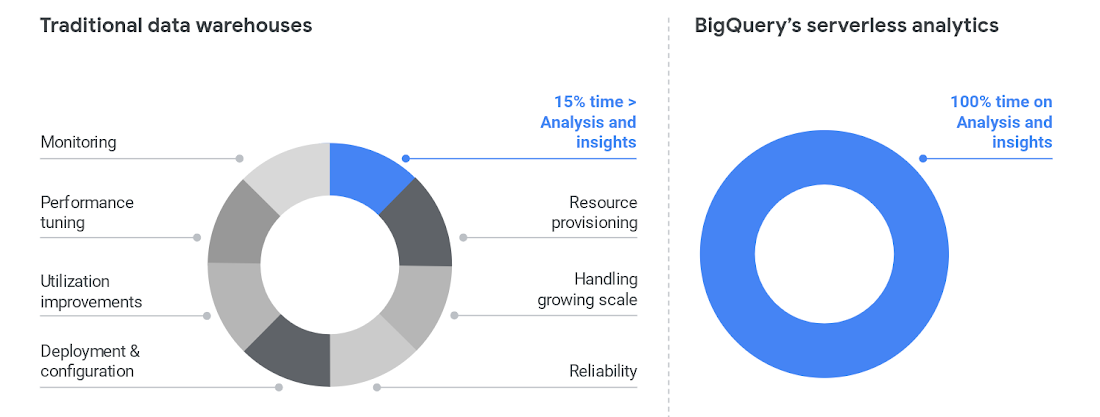
To cut time on managing a data warehouse, it helps to automate the system engineering work away from the analytics work, like BigQuery enables.
Once those functions are separated, the analytics work can take center stage and let users become less dependent on administrators. BigQuery also helps remove the user access issues that are common with legacy data warehouses. Once that happens, users can focus on building reports, exploring datasets, and sharing trusted results easily.
3. Legacy data warehouse costs make it harder to invest in strategy.
Like other on-prem systems, data warehouses adhere to the old-school model of paying for technology, with the associated hardware and licensing costs and ongoing systems engineering.
This kind of inefficient architecture drives more inefficiency. When the business is moving toward becoming data-driven, they’ll continue to ask your team for more data. But responding to those needs means you’ll run out of money pretty quickly.
Cloud offers much more cost flexibility, meaning you’re not paying for, or managing, the entire underlying infrastructure stack. Of course, it’s possible to simply port an inefficient legacy architecture into the public cloud.
To avoid that, we like to talk about total cost of ownership (TCO) for data warehouses, because it captures the full picture of how legacy technology costs and business agility aren’t matching up.
Moving to BigQuery isn’t just moving to cloud—it’s moving to a new cost model, where you’re cutting out that underlying infrastructure and systems engineering. You can get more detail on cloud data warehouse TCO comparisons from ESG.
4. A legacy data warehouse can’t flexibly meet business needs.
While overnight data operations used to be the norm, the global opportunities for businesses mean that a data warehouse now has to load streaming and batch data while also supporting simultaneous queries. Hardware is the main constraint for legacy systems as they struggle to keep up.
Moving your existing architecture into the cloud usually means moving your existing issues into the cloud, and we hear from businesses that doing so still doesn’t allow for real-time streaming.
That’s a key component for data analysts and users. Using a platform like BigQuery means you’re essentially moving your computational capabilities into the data warehouse itself, so it scales as more and more users are accessing analytics.
Unlimited compute is a pretty good way to help your business become digital. Instead of playing catch-up with user requests, you can focus on developing new features. Cloud brings added security, too, with cloud data warehouses able to do things like automatically replicate, restore and back up data, and offer ways to classify and redact sensitive data.
5. Legacy data warehouses lack built-in, mature predictive analytics solutions.
Legacy data warehouses are usually struggling to keep up with daily data needs, like providing reports to departments like finance or sales. It can be hard to imagine having the time and resources to start doing predictive analytics when provisioning and compute limits are holding your teams back.
We hear from customers that many of them are tasked with simplifying infrastructure and adding modern capabilities like AI, ML and self-service analytics for business users.
The best stories about digital transformation are those where the technology changes and business or cultural changes happen at the same time. One customer told us that because BigQuery uses a familiar SQL interface, they were actually able to shift the work of data analytics away from a small, overworked group of data scientists into the hands of many more workers.
Doing so also eliminated a lot of the siloed data lakes that had sprung up as data scientists extracted data one project at a time into various repositories to train ML models.
These large-scale computational possibilities save time and overhead, but also let businesses explore new avenues of growth. AI and ML are already changing the face of industries like retail, where predictive analytics can provide forecasting and other tasks to help the business make better decisions. BigQuery lets you take on sophisticated machine learning tasks without moving data or using a third-party tool.
We designed BigQuery so that our engineers deploy the resources needed for you to scale. It means your focus can change entirely toward meeting the needs the business has put forth, and bringing a lot more flexibility.
BigQuery is fully serverless and runs on underlying Google infrastructure, so it integrates with our ecosystem of data and analytics partner tools. This architecture means you’re continually getting the most up-to-date software stack—analytics that scale, real-time insights, and cutting-edge functionality that includes geospatial and machine learning right from the SQL interface.
Streamline your path to data warehouse modernization with BigQuery by learning about Google Cloud’s proven migration methodology and get started with your data warehouse by applying for our migration offer.
New Enterprise Capabilities and Changes to Cloud Spanner Reduces Cost of Running Workloads by 90 Percent

5385
Of your peers have already read this article.
3:00 Minutes
The most insightful time you'll spend today!
Customers love Cloud Spanner because it gives them the benefits of relational semantics and SQL while also delivering the scale and availability of non-relational databases. Many of these customers want to move even more of their work to Spanner, and have requested smaller instance sizes to support development, testing and small production workloads. We’re happy to announce that they’ll soon get what they asked for: more granular instance sizing is coming to Spanner.
Granular instance sizing will be available in Public Preview soon. With this feature, you can run workloads on Spanner at as low as 1/10th the cost of regular instances, equating to approximately $65/month.
In addition, we are launching new enterprise capabilities to break down operational silos for real-time insights and provide greater database observability to developers:
- Datastream, now in public preview, is a change data capture (CDC) service that allows enterprises to synchronize data across heterogeneous databases and applications. With Spanner support in Datastream, users will be able to stream data from MySQL or Oracle to Spanner reliably and with minimal latency.
- BigQuery federation to Spanner (coming soon) lets users query transactional data residing in Spanner, from BigQuery, without moving or copying data.
- Key Visualizer, available now in public preview, provides interactive monitoring so developers can quickly identify trends and usage patterns in Spanner.
Democratizing access with more granular instance sizing
Today, customers provision Spanner instances by specifying the number of nodes they need to run their workloads. Each node can provide up to 10,000 queries per second (QPS) of reads or 2,000 QPS of writes (writing single rows at 1 KB of data per row) and 2 TB of storage. A Spanner node is replicated across 3 zones for regional instances, and 5 or more zones for multi-regional instances. The choice of node count determines the amount of serving and storage resources that are available to the databases in a given instance.
Historically, the most granular unit for provisioning resources on Spanner has been one node. To enable more granular control, we are introducing Processing Units (PUs); one Spanner node is equal to 1,000 PUs. Customers can now provision in batches of 100 PUs, and get a proportionate amount of compute and storage resources. This will allow teams to run smaller workloads on Spanner at much lower cost. With this feature, customers can start at 100 PUs and scale up as needed in batches of 100 PUs, to up to 1,000 PUs (1 node), all with zero downtime. Subsequently, customers can continue to scale up by adding more nodes, just like what they do today. Customers do have the choice of using either PUs or nodes to provision resources within workloads, when those workloads occupy multiple nodes of capacity.
To illustrate with an example, let’s say a game developer creates a Spanner instance called “baseball-game” in us-central1, with 100 PU compute capacity at $65/month price.
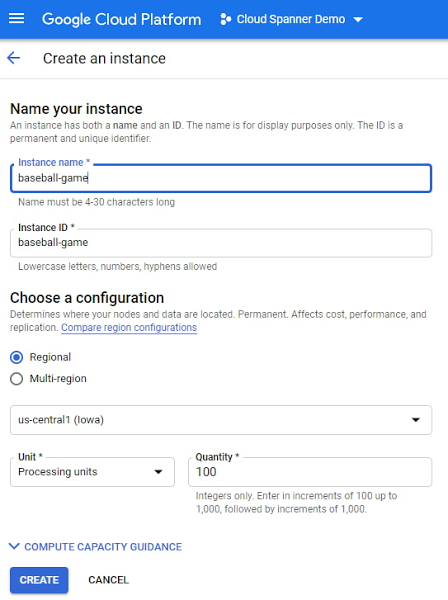
As you can see below, proportional maximum storage of 205 GB is assigned to the 100 PU instance.
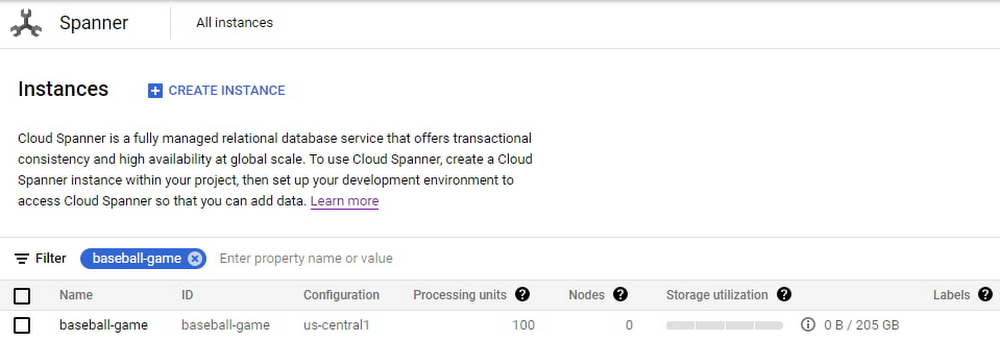
Once the game starts becoming popular and resource demands increase, the user edits the instance to increase the compute capacity to 500 PUs with proportional maximum 1 TB of storage.
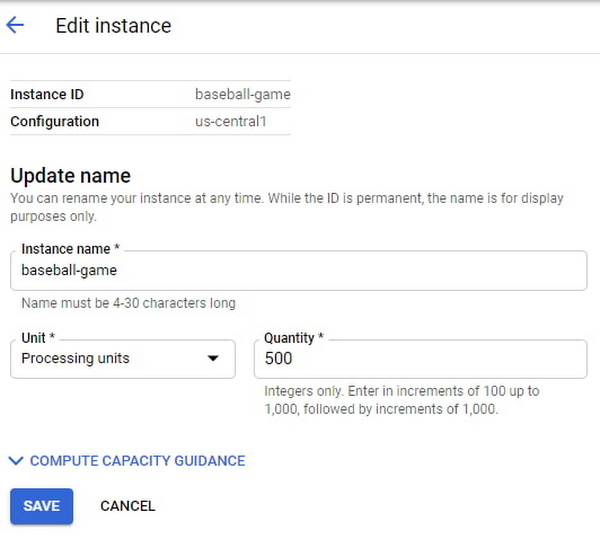
The game grows in popularity, and the gaming company prepares to launch a much-awaited capability in the game. Anticipating a sharp increase in usage at launch day, the game developers increase the compute capacity to 3,000 PUs. Compute capacity assigned to the instance over a period of time can be viewed in Cloud Monitoring graphs:

Request Access
You can request early access to granular instance sizing feature by filling this form.
Breaking down operational silos with Datastream CDC and BigQuery federation
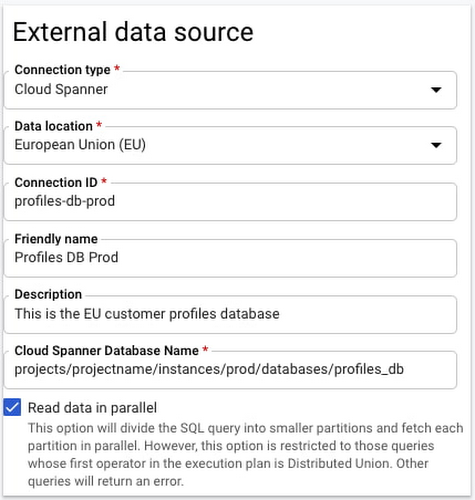
BigQuery Federation. BigQuery has made analytics easy by bringing together data from multiple sources for seamless analysis. Soon you’ll also be able to analyze data in Spanner directly in BigQuery. With Spanner’s BigQuery federation, you’ll be able to instantly query data residing in Spanner in real-time without moving or copying the data. Simply set up the Spanner as an external data source in BigQuery, as shown below.
Change Data Capture ingest. Now in public preview, Datastream lets you stream change data into Google Cloud from MySQL and Oracle databases. As of today, you can ingest this change data directly into Spanner using a built-in Dataflow template. This lets you migrate data from MySQL and Oracle databases into Spanner in near-real time.
Understanding performance and resource usage with Key Visualizer
Key Visualizer is a new interactive monitoring tool that lets developers and administrators analyze usage patterns in Spanner. It reveals trends and outliers in key performance and resource metrics for databases of any size, helping to optimize queries and reduce infrastructure costs. Designed for performance tuning and instance sizing, Key Visualizer is available today in public preview in the web-based Cloud Console for all Spanner databases at no additional cost. Learn more in the Key Visualizer blog.
Learn more
- To request early access to granular instance sizing in Spanner, fill out this form.
- To get started with Spanner today, create an instance or try it out with a Spanner Qwiklab.
Wunderkind Leverages Google Cloud to Address the Growing Needs of its Customer Base

5325
Of your peers have already read this article.
1:30 Minutes
The most insightful time you'll spend today!
Editor’s note: We’re hearing here how martech provider Wunderkind easily met the scaling demands of their growing customer base on multiple use cases with Cloud Bigtable and other Google Cloud data solutions.
Wunderkind is a performance marketing channel and we mostly have two kinds of customers: online retailers, and publishers like Gizmodo Media Group, Reader’s Digest, The New York Post and more. We help retailers boost their e-commerce revenue through real-time messaging solutions designed for email, SMS, onsite, and advertising. Brands want to provide a one-to-one experience to more of their customers, and we use our extensive history with best practices in email marketing and technology to help brands reach more customers through targeted messaging and personalized shopping experiences. With publishers, it’s a different value proposition, we use the same platform to provide a non disruptive and personalized ad experience for their website. For example, if you are on their site and then you left, we might show an ad tailored to you when you come back later – depending on the campaign.
After running into limitations with our legacy database system, we turned to Cloud Bigtable and Google Cloud, which helped us be more flexible and easily scale for high traffic demand – which can be a stable 40,000 requests per second, and meet the needs of our growing number of data use cases.
Three different databases power our core product
In our core offering, companies send us user events from their websites. We store these events and later decide (using our secret sauce) if and how to reach out to those users on behalf of our customers. Because many of our customers are retailers, Black Friday and Cyber Monday are big traffic days for us as. On such days, we can get 31 billion events, sometimes as many as 200K events per second. We show 1.6 billion impressions that have seen close to 1 billion pageviews. And at the end of all this, we securely send about 100 million emails. We noticed the same thing for election time; traffic reached the same high volume. We need scalable solutions to support this level of traffic as well as the elasticity to let us pay only for what we use, and that’s where Google Cloud comes in.
So how does this work? Our externally facing APIs, which are running on Google Kubernetes Engine, receive those user events—up to hundreds of thousand per second. All the components in our architecture need to be able to handle this demand. So from our APIs, those events go to Pub/Sub, Dataflow and from there they are written to Bigtable and BigQuery, Google Cloud’s serverless, and highly scalable data warehouse. This business user activity data underpins almost all our products. Events can be things like product views or additions to shopping carts. When we store this data in Bigtable, we use a combination of email address and the customer ID as the Bigtable key and we record the event details in that record.
What do we do with this information next? It’s important to mention that we also mark the last time we received an event about a user in Memorystore for Redis, Google Cloud’s fully managed Redis service. This is important because we have another service that is periodically checking Memorystore for users that have not been active for a campaign-specific period of time (it can be 30 minutes, for example), then deciding whether to reach out to them.
How we decide when we reach out is an intelligent part of our product offering, based on the channel, message, product, etc. When we do reach out, we use Memorystore for Redis as a rate limiter or token bucket. In order not to overwhelm the email or texting providers we send API requests to, we throttle those requests using Memorystore. (We prefer to preemptively throttle the outgoing API requests as opposed to handling errors later.)
When we do reach out, often we will need details for a specific product—let’s say if the website belongs to a retailer. We usually get that information from the retailer through various channels and we store product information in Cloud SQL for MySQL. We pull that information when we need to send an email with product information, and we use Memorystore for Redis to cache that information, since many of the products are repeatedly called. Our Cloud SQL instance has 16 vCPUs, 60GBs of memory and 0.5TB of disk space and when we perform those product information updates, we have about a thousand write transactions per second. We are also in the process of migrating some tables from a self managed MySQL instance, and we keep those tables synchronized with Cloud SQL using Datastream.
Our user history database was originally stored in AWS DynamoDB, but we were running into problems with how they structured the data, and we’d often get hot shards but with no way to determine how or why. That led to our decision to migrate to Bigtable. We set up the migration first by writing the data to two locations from Pub/Sub, performed some backfill of data until that was up and running, and then started working on the reading. We performed this over a few short months, then switched everything to Bigtable.
So, as mentioned, we are using Bigtable for multiple databases. The instance that stores our user events has about 30 TB with about 50 nodes.
Profile management
A second use case for Bigtable is for user profile management, where we track, for example, user attributes based on subscription activity, whether they’ve opted in or out of various lists, and where we apply list-specific rules that determine which targeted emails we send out to users.
Our very own URL shortener
Our third use case for Bigtable is our URL shortener. When our customers build out campaigns and choose a URL, we append tracking information to the query string of the URLs and they become long. Many times, we are sending them via SMS texts, so the URLs need to be short. We originally used an external solution, but made the determination that they couldn’t support our future demands. Our calls tend to be very bursty in nature, and we needed to plan for a future state of supporting higher throughput. We use a separate table in Bigtable for this shortened URL. We generate the short slug that is 62 bit-encoded and use it as the rowkey. We use the long slug as a Protobuf-encoded data structure in one of the row cells and we also have a cell for counting how many times it was used. We use Bigtable’s atomic increment to increase that counter to track how many times the short slug was used.
When the user receives a text message on their phone, they click the short URL, which goes through to us, and we expand it to the long slug (from Bigtable) and redirect them to the appropriate site location. Obviously, for the URL shortener use case, we need to make the conversion very quickly. Bigtable’s low latency helps us meet that demand and we can scale it up to meet higher throughput demands.
Meeting the future with Google Cloud
Our business has grown considerably, and as we keep signing up new clients, we need to scale up accordingly, and Bigtable has met our scaling demands easily. With Bigtable and other Google Cloud products powering our data architecture, we’ve met the demand of incredibly high traffic days in the last year, including Black Friday and Cyber Monday. Traffic for these events went much higher than expected, and Bigtable was there, helping us easily scale on demand.
We are working on leveraging a more cloud native approach and using Google Cloud managed services like GKE, Dataflow, pub/sub, Cloud SQL , Memorystore, BigQuery and more. Google has those 1st party products and we don’t see the value in rolling out or self managing such solutions ourselves..
Thanks to Google Cloud, we now have reliable and flexible data solutions that will help us meet the needs of our growing customer base, and delight their users with fast, responsive, personalized shopping messaging and experiences.
Learn more about Wunderkind and Cloud Bigtable. Or check out our recent blog exploring the differences between Bigtable and BigQuery.
More Relevant Stories for Your Company

HSBC Overcomes Capacity Challenges and Innovation-Blocks With Google BigQuery
At HSBC, we serve 39 million customers, in-person and online, from consumers to businesses, in 66 countries. We maintain data centers in 21 countries, with more than 94,000 servers. With an on-premises infrastructure supporting our business, we kept running into capacity challenges, which really became an innovation blocker and ultimately

The Benefits of Cloud SQL for Business: Faster Deployments, Lower Costs, and Enhanced Agility
If you’re self-managing relational databases such as MySQL, PostgreSQL or SQL Server, you may be thinking about the pros and cons of cloud-based database services. Regardless of whether you’re running your databases on premises or in the cloud, self-managed databases can be inefficient and expensive, requiring significant effort around patching,

Google’s Anti-Pattern Recognition Tool: Streamlining BigQuery Performance
Why do we need a BigQuery anti-pattern recognition tool? BigQuery is a serverless and cost-effective enterprise data warehouse that works across cloud environments and scales with your data. As with any large scale data-intensive platform, following best practices and avoiding inefficient anti-patterns goes a long way in terms of performance and cost

Dataflow is getting better with Dataflow Prime, Dataflow Go, and Dataflow ML
By the end of 2024, 75% of enterprises will shift from piloting to operationalizing artificial intelligence according to IDC, yet the growing complexity of data types, heterogeneous data stacks and programming languages make this a challenge for all data engineers. With the current economic climate, doing more with cheaper costs
