





The Benefits of Cloud SQL for Business: Faster Deployments, Lower Costs, and Enhanced Agility

2785
Of your peers have already read this article.
3:00 Minutes
The most insightful time you'll spend today!
If you’re self-managing relational databases such as MySQL, PostgreSQL or SQL Server, you may be thinking about the pros and cons of cloud-based database services. Regardless of whether you’re running your databases on premises or in the cloud, self-managed databases can be inefficient and expensive, requiring significant effort around patching, hardware maintenance, backups, and tuning. Are managed database services a better option?
To answer this question, Google Cloud sponsored a business value white paper by IDC, based on the real-life experiences of eight Cloud SQL customers. Cloud SQL is an easy-to-use, fully-managed database service for running MySQL, PostgreSQL and SQL Server workloads. More than 90% of the top 100 Google Cloud customers use Cloud SQL.
The study found that migration to Cloud SQL unlocked significant efficiencies and cost reductions for these customers. Let’s take a look at the key benefits in this infographic.

A deeper dive into Cloud SQL benefits
To read the full IDC white paper, you can download it here: The Business Value of Cloud SQL: Google Cloud’s Relational Database Service for MySQL, PostgreSQL, and SQL Server, by Carl W. Olofson, Research Vice President, Data Management Software, IDC and Matthew Marden, Research Vice President, Business Value Strategy Practice, IDC.
Looking for commentary from IDC? Listen to the on-demand webinar, How Enterprises Have Achieved Greater Efficiency and Improved Business Performance using Google Cloud SQL, where Carl Olofson discusses the downsides of self-managed databases and the benefits of managed services like Cloud SQL, including the cost savings and improved business performance realized by the customers interviewed in the study.
Getting started
You can use our Database Migration Service for an easy, secure migration to Cloud SQL. Since Cloud SQL supports the same database versions, extensions and configuration flags as your existing MySQL, PostgreSQL and SQL Server instances, a simple lift-and-shift migration is usually all you need. So let Google Cloud take routine database administration tasks off your hands, and enjoy the scalability, reliability and openness that the cloud has to offer.
Start your journey with a Cloud SQL free trial.

Takeaways from Forrester’s Cloud Data Warehouse Q1 2021 Report
DOWNLOAD RESEARCH REPORTS5145
Of your peers have already downloaded this article
20:00 Minutes
The most insightful time you'll spend today!
Cloud data warehouse (CDW) solutions have transformed the delivery of modern analytics and are known to have the capabilities to provision data warehouse of any size in a matter of minutes, autotune queries, scale resources including compute and storage on demand and auto-upgrade to the latest version. As the need for integrated, real-time and self-service analytics scale, CDW vendors continue to focus on native integration with data lakes and object stores; self-service to simplify access and administration for larger and more complex warehouses; and advanced capabilities on parallel processing, compression, partitioning, indexing, query optimization, and dynamic resource provisioning. The most common CDW use cases include customer analytics, AI/machine learning (ML)-based analytics, vertical-specific analytics, and real-time analytics. Customers that are looking to select a CDW vendor need to consider couple of factors.
Download the report learn more 13 leading CDW providers in the Forrester Wave: Cloud Data Warehouse, Q1 2021 report and also explore Google Cloud’s BigQuery for data warehousing.
Google’s Diversity Annual Report public dataset & BigQuery

3255
Of your peers have already read this article.
3:30 Minutes
The most insightful time you'll spend today!
Since 2014, tech companies have relied on metrics to identify trouble spots, establish baselines, and measure meaningful progress in diversity, including publishing DEI data directly through diversity annual reports. However, as our understanding of DEI has evolved over time each company’s report has diverged, creating a fragmented landscape of industry-wide data. This separation is problematic as no single company’s diversity dataset can solve tech’s DEI challenges. Instead, we need to build industry-wide systemic solutions to create sustainable change, and those start with establishing a common language for DEI data and standardizing and sharing DEI data across tech companies.
The challenge is most companies publish diversity data in a way that makes it difficult to analyze, such as using bar graphs and pie charts. Researchers, as a result, are unable to easily pull the real, detailed data or aggregate and analyze it for their unique needs (e.g. hiring trends for tech vs. nontechnical roles, representation of Asian women in leadership, and more). As we shared in our most recent Diversity Annual Report, external research shows that sustainable change will only come from solutions that encompass the entire tech industry and data transparency is a critical step in this work.
Google’s Diversity Annual Report public dataset & BigQuery
In May, we released our 2022 Diversity Annual Report, which includes demographic data on workforce representation, hiring, and attrition of employees at Google, including leadership. You can see our hiring data by race/ethnicity, gender, and intersectional hiring over time, by region, and more. In an effort to make this data more transparent and accessible for analysis, we have added it as a public dataset in BigQuery, Google Cloud’s powerful data warehousing tool. Our data is now even easier for researchers, community organizations, and industry groups to leverage and compare against external benchmarks to help contextualize our progress.
As one of the first in the industry, we are proud to have published our diversity data on BigQuery for the second year in a row. Our dataset, among others, is public, stored and paid for by Google so those who are interested can use BigQuery’s advanced analytic capabilities through the Google Cloud Public Dataset Program for free*.
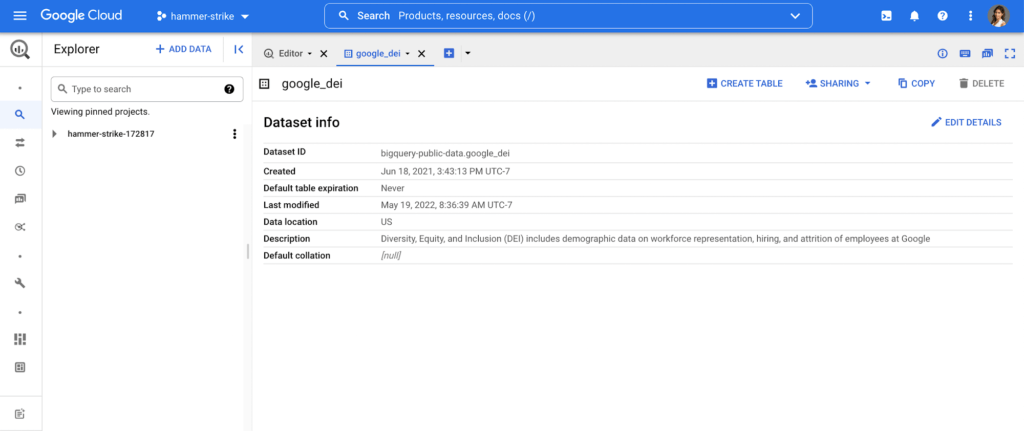
Contextualizing diversity data is necessary to make meaningful conclusions
While Google’s diversity dataset can help users compare their own datasets to Google’s current and historical trends, DEI data is only useful when analyzed in the context of other relevant datasets. For example, concluding that Black+ hiring has increased from 8.8% to 9.4% has little meaning unless there is a point of reference, like US general census data, labor force participation rates or graduation rates. It’s why Google also includes other public datasets in BigQuery such as related industry DEI data, talent and graduation pools. By doing so, users can run a sample query that then compares Google’s hiring and representation to related industries (software publishers, data process services, etc.). Users can then better understand and contextualize areas of progress and opportunity, and they can more objectively identify where organizations can take a proactive role in addressing not only DEI in their companies, but also in the communities in which they call home.
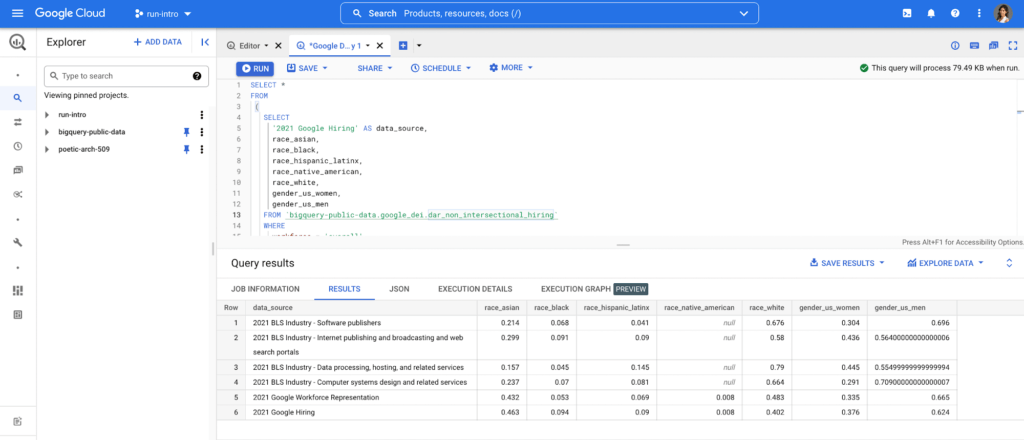
Intersectional data and disaggregated baseline metrics
In the workplace, intersectional data is key to understanding the layers of exclusion and inequity that may exist for certain groups. This includes those with social identity overlap, like race, gender, and LGBTQ+, that create multiple levels of inequality or discrimination. It’s critical for DEI data to be disaggregated in a meaningful way to diagnose the true health of a system and to better understand how intersectionality contributes to the greater DEI landscape .
Google’s Diversity Annual Report public dataset includes Google’s intersectional hiring and representation data also broken down by tech, non-tech, and leadership roles. BigQuery’s friendly interface makes it easy to select the relevant parameters and join this data with other public or private datasets to help meaningfully contextualize Google’s data against the broader industry. Anyone from data scientists to DEI stewards can launch public datasets from the Google Cloud Marketplace and start querying them right away. Findings can be visualized through tools like Looker, Data Studio, or Tableau.
This is just the beginning
As DEI work continues to evolve into an industry-wide approach, we must encourage a standard of practice for collecting and reporting data across the board. At scale, data has the power to enable the tech industry to make real improvements collectively, in addition to inside our individual companies. We hope our dataset and sample queries give researchers and individuals a launchpad to become DEI practitioners of the tech industry, and ensure we have the right data to solve the right problems.
Footnote:
*The only time anyone would need to pay is for queries performed on the data after BigQuery’s 1TB/mo of free tier processing. This means that each user receives 1TB of free BigQuery processing every month, which can be used to run queries on this public dataset.
10524
Of your peers have already watched this video.
2:15 Minutes
The most insightful time you'll spend today!
The True Story of How HotStar Broke a World-Record–Thanks to Firebase and Google BigQuery
Hotstar, India’s largest video streaming platform with 150 million monthly active users around the world, provides live-streaming of TV shows, movies, sports, and news on the go.
By using a combination of Firebase products together, Hotstar safely rolled out new features to its watch screen during a major live-streaming event without disrupting users, sacrificing stability, or releasing a new build. They also used Firebase with BigQuery to analyze their event data and reduce app startup time.
“We have an ambitious mission, but our engineering team is only a fraction of the size of most of our competitors. But we are still keeping up, and we are doing it with the help of Firebase,” says Ayushi Gupta, Android Engineer, Hotstar.
BigQuery’s User-friendly SQL is Like a Cool Drink for Hot Summer

5680
Of your peers have already read this article.
2:30 Minutes
The most insightful time you'll spend today!
With summer just around the corner, things are really heating up. But you’re in luck because this month BigQuery is supplying a cooler full of ice cold refreshments with this release of user-friendly SQL capabilities.
We are pleased to announce three categories of BigQuery user-friendly SQL launches: Powerful Analytics Features, Flexible Schema Handling, and New Geospatial Tools.
Powerful Analytics Features
These powerful SQL analytics features provide greater flexibility to analysts for organizing, filtering, and rendering data in BigQuery than ever before. You can enable spreadsheet-like functionality on summarized data using PIVOT and UNPIVOT and filter irrelevant data in analytic functions using QUALIFY.
Through this section, we will become familiar with these new features through examples using the BigQuery Public dataset, usa_names.
PIVOT/UNPIVOT (Preview)
One of the most time-consuming tasks for data analytics practitioners is wrangling data into the right shape. SQL is great for wrangling data, but sometimes you want to reformat a table as you would in a spreadsheet, pivoting rows and columns interchangeably. To support this use case, we are pleased to introduce PIVOT and UNPIVOT operators in BigQuery. PIVOT creates columns from unique values in rows by aggregating values, and UNPIVOT reverses this action.The example below uses PIVOT on bigquery-public-data.usa_names.usa_1910_current to show the number of males and females born each year, representing each gender as a column. Then UNPIVOT reverses this action.
Language: SQL
-- we start with SQL to create a simple table-- we only include gender, year, and number.CREATE TABLEmydataset.sampletable1 AS (SELECTGender,Year,SUM(Number) AS NumberFROM`bigquery-public-data.usa_names.usa_1910_current`WHEREYear >= 2017GROUP BYGender, Year);-- The resulting table:--+----------------------------------------+--| Gender | Year | Number |--+----------------------------------------+--| F | 2019 | 1353716 |--| F | 2017 | 1403989 |--| F | 2018 | 1380382 |--| M | 2018 | 1568678 |--| M | 2019 | 1538056 |--| M | 2017 | 1604609 |--+----------------------------------------+-- use PIVOT to create columns for “female” and “male”CREATE TABLEmydataset.Pivoted ASSELECTyear, male, femaleFROMmydataset.sampletable1PIVOT( SUM(Number) FOR gender IN ('M' AS male,'F' AS female))ORDER BYyear;-- The resulting pivoted table:--+----------------------------------------+--| Year | female | male |--+----------------------------------------+--| 2017 | 1403989 | 1604609 |--| 2018 | 1380382 | 1568678 |--| 2019 | 1353716 | 1538056 |--+----------------------------------------+-- UNPIVOT reverses the row/column rotation of PIVOT.SELECT*FROMmydataset.PivotedUNPIVOT(number FOR gender IN (male AS 'M',female AS 'F'));
QUALIFY (Preview)
More advanced users of SQL know the power of analytic functions (aka window functions). These functions compute values over a group of rows, returning a single result for each row. For example, customers use analytic functions to compute a grand total, subtotal, moving average, rank, and more. With the announcement of support for QUALIFY, BigQuery users can now filter on the results of analytic functions by using the QUALIFY clause.
QUALIFY belongs in the family of query clauses used for filtering along with WHERE and HAVING. The WHERE clause is used to filter individual rows in a query. The HAVING clause is used to filter aggregate rows in a result set after aggregate functions and GROUP BY clauses. The QUALIFY clause is used to filter results of analytic functions.
To show the utility of QUALIFY, the example below uses QUALIFY to return the top 3 female names from each year in the last decade using from bigquery-public-data.usa_names.usa_1910_current.
Language: SQL
-- QUALIFY filters the result of the RANK functionSELECTname,year,SUM(number) AS total,RANK() OVER (PARTITION BY yearORDER BY SUM(number) DESC) AS rankFROM`bigquery-public-data.usa_names.usa_1910_current`WHEREgender = 'F'AND YEAR >= 2010GROUP BY 1,2QUALIFY RANK <= 3ORDER BY 2,4;
Flexible Schema Handling
New SQL for administrators and data engineers enables table renaming for data pipeline processes, as well as flexible column management.
Table Rename (GA)
In data pipeline processes, tables are often created and then renamed so that they can make way for the next iteration of the pipeline run. To accomplish this, customers need a mechanism by which they can create a table and then subsequently rename it. Now if customers want to change this name using SQL, they can. Using the simple syntax that ALTER TABLE RENAME TO provides, customers will be able to rename a table after creation to clear the way for the next iteration of tables in the data pipeline.
Language: SQL
-- create a sample table “tablename” in “mydataset”.-- You will rename this table.CREATE OR REPLACE TABLE dataset.tablename(col1 STRING,col2 NUMERIC);-- if this table “tablename” becomes obsolete-- perform Table Rename to “obsoletetable”ALTER TABLEmydataset.name RENAME TO obsoletetable;
DROP NOT NULL constraints on a column (GA)
While BigQuery has historically provided many tools available in the UI, CLI and APIs, we know that many administrators prefer interfacing with the database using SQL. BigQuery recently released DDL statements which enable data administrators to provision and manage datasets and tables, greatly simplifying provisioning and management. Today, we continue the next addition in this line of releases by announcing ALTER COLUMN DROP NOT NULL constraint on a column:
- ALTER COLUMN DROP NOT NULL allows the administrator to remove the NOT NULL constraint from a column in BigQuery.
Language: SQL
-- create a table to store credit card numbers-- the business requires this field, so-- include a NOT NULL constraintCREATE TABLEmydataset.customers(credit_card_number STRING NOT NULL);-- if needs of the business no longer require this field,-- the customer can allow null entries in this column-- by dropping the constraintALTER TABLEmydataset.customersALTER COLUMN credit_card_number DROP NOT NULL;
CREATE VIEW with column list (GA)
Views are used ubiquitously by BigQuery customers to capture business logic. Oftentimes, BigQuery users have business requirements to assign aliases to columns in views. Now BigQuery supports doing so upon view creation in a column name list format with the release of CREATE VIEW with column list syntax.
Language: SQL
-- aliases list1 and list2 can be assigned in a list formatCREATE VIEWmyview (list1, list2) ASSELECTcolumn_1, column_2FROMmydataset.exampletable
New Geospatial Tools
ST_POINTN, ST_STARTPOINT, and ST_ENDPOINT
Geospatial data is incredibly valuable to data analytics customers dealing with data from the physical world. BigQuery has very strong geospatial function support to help customers process marketing data, track storms, or manage self-driving cars. Particularly for analyzing vehicle or location tracking data, we’re thrilled to provide three new functions to allow users to easily extract or filter on key points:
For example, when working with vehicle histories, ST_POINTN, ST_STARTPOINT, and ST_ENDPOINT allow users to extract elements such as the start and the end of a trip. For identifying origin-destination pairs these functions will make that task much easier.
Language: SQL
-- pull the first, second, penultimate and final points-- from a linestringWITH linestring as (SELECT ST_GeogFromText('linestring(1 1, 2 1, 3 2, 3 3)') g)SELECTST_StartPoint(g) AS first, ST_EndPoint(g) AS last,ST_PointN(g,2) AS second, ST_PointN(g, -2) as second_to_lastFROMlinestring+--------------+--------------+--------------+----------------+| first | last | second | second_to_last |+--------------+--------------+--------------+----------------+| POINT(1 1) | POINT(3 3) | POINT(2 1) | POINT(3 2) |+--------------+--------------+--------------+----------------+
As sure as a hot summer day pairs well with an ice-cold beverage, these new user-friendly SQL features in BigQuery pair well with your data analytics workflows. To learn more about BigQuery, visit our website, and get started immediately with the free BigQuery Sandbox.
Simplifying Your Database Migration With Google Cloud

2868
Of your peers have already read this article.
3:30 Minutes
The most insightful time you'll spend today!
For several decades, before the rise of cloud computing upended the way we think about databases and applications, Oracle and Microsoft SQL Server databases were a mainstay of business application architectures. But today, as you map out your cloud journey, you’re probably reevaluating your technology choices in light of the cloud’s vast possibilities and current industry trends.
In the database realm, these trends include a shift to open source technologies (especially to MySQL, PostgreSQL, and their derivatives), adoption of non-relational databases, multi-cloud and hybrid-cloud strategies, and the need to support global, always-on applications. Each application may require a different cloud journey, whether it’s a quick lift-and-shift migration, a larger application modernization effort, or a complete transformation with a cloud-first database.
Google Cloud offers a suite of managed database services that support open source, third-party, and cloud-first database engines. At Next 2022, we published five new videos specifically for Oracle and SQL Server customers looking to either lift-and-shift to the cloud or fully free themselves from licensing and other restrictions. We hope you’ll find the videos useful in thinking through your options, whether you’re leaning towards a homogeneous migration (using the same database you have today) or a heterogeneous migration (switching to a different database engine).
Let’s dive into our five new videos.
#1 Running Oracle-based applications on Google Cloud
By Jagdeep Singh & Andy Colvin
Moving to the cloud may be difficult if your business depends on applications running on an Oracle database. Some applications may have dependencies on Oracle for reasons such as compatibility, licensing, and management. Learn about several solutions from Google Cloud, including Bare Metal Solution for Oracle, a hardware solution certified and optimized for Oracle workloads, and solutions from cloud partners such as VMware and Equinix. See how you can run legacy workloads on Oracle while adopting modern cloud technologies for newer workloads.
#2 Running SQL Server-based applications on Google Cloud
By Isabella Lubin
Microsoft SQL Server remains a popular commercial database engine. Learn how to run SQL Server reliably and securely with Cloud SQL, a fully-managed database service for running MySQL, PostgreSQL and SQL Server workloads. In fact, Cloud SQL is trusted by some of the world’s largest enterprises with more than 90% of the top 100 Google Cloud customers using Cloud SQL. We’ll explore how to select the right database instance, how to migrate your database, how to work with standard SQL Server tools, and how to monitor your database and keep it up to date.
#3 Choosing a PostgreSQL database on Google Cloud
By Mohsin Imam
PostgreSQL is an industry-leading relational database widely admired for its permissive open source licensing, rich functionality, proven track record in the enterprise, and strong community of developers and tools. Google Cloud offers three fully-managed databases for PostgreSQL users: Cloud SQL, an easy-to-use fully-managed database service for open source PostgreSQL; AlloyDB, a PostgreSQL-compatible database service for applications that require an additional level of scalability, availability, and performance; and Cloud Spanner, a cloud-first database with unlimited global scale, 99.999% availability and a PostgreSQL interface. Learn which one is right for your application, how to migrate your database to the cloud, and how to get started.
#4 How to migrate and modernize your applications with Google Cloud databases
By Sandeep Brahmarouthu
Migrating your applications and databases to the cloud isn’t always easy. While simple workloads may just require a simple database lift-and-shift, custom enterprise applications may benefit from more complete modernization and transformation efforts. Learn about the managed database services available from Google Cloud, our approach to phased modernization, the database migration framework and programs that we offer, and how we can help you get started with a risk-free assessment.
#5 Getting started with Database Migration Service
By Shachar Guz & Inna Weiner
Migrating your databases to the cloud becomes very attractive as the cost of maintaining legacy databases increases. Google Cloud can help with your journey whether it’s a simple lift-and-shift, a database modernization to a modern, open source-based alternative, or a complete application transformation. Learn how Database Migration Service simplifies your migration with a serverless, secure platform that utilizes native replication for higher fidelity and greater reliability. See how database migration can be less complex, time-consuming and risky, and how to start your migration often in less than an hour.
We can’t wait to partner with you
Whichever path you take in your cloud journey, you’ll find that Google Cloud databases are scalable, reliable, secure and open. We’re looking forward to creating a new home for your Oracle- and SQL Server-based applications.
Start your journey with a Cloud SQL or Spanner free trial, and accelerate your move to Google Cloud with the Database Migration Program.
More Relevant Stories for Your Company

AWS to Google Cloud Translator: Which AWS Database Service Is Equal to Google Cloud Database?
There are multiple reasons a growing number of database administrators, enterprise architects, application developers and other technology practitioners are moving to Google Cloud’s various database services. Some are being driven by missing features in offering from other providers such as AWS. In Gartner’s Magic Quadrant for Operational Database Management Systems,

Optimizing Bigtable Performance: Unveiling 20-50% Increase in Single-Row Read Throughput
Bigtable is a scalable, distributed, high-performance NoSQL database that processes more than 6 billion requests per second at peak and has more than 10 Exabytes of data under management. Operating at this scale, Bigtable is highly optimized for high-throughput and low-latency reads and writes. Even so, our performance engineering team continually

What is Cloud SQL for SQL Server? And What Do IT Departments Say About It?
At Google Cloud, we develop our database services to meet the needs of enterprise teams wherever they are in their cloud journey. That is why we announce launched Cloud SQL for SQL Server and make it available to all of our customers. This addition to our database lineup means you can migrate

Creating and Using Storage Buckets for Your Data Needs
So, you want to store objects on the cloud? But you're really new to Google Cloud or Cloud Storage and would like someone to walk you through the process step by step? Today is your lucky day! I will help you understand the big steps involved in setting up and
