





Introducing IAM Deny: Harden Your Security Posture at Scale the Easy Way

2638
Of your peers have already read this article.
1:30 Minutes
The most insightful time you'll spend today!
At Google Cloud, we’re focused on making it easy for organizations to build solutions quickly and securely. Identity and Access Management (IAM) is the core security control for establishing who has access to which cloud resources and making sure access permissions are aligned to your company’s business and security policies.
We are excited to announce the general availability of IAM Deny policies. This new capability helps you easily create access guardrails for Google Cloud resources. With IAM Deny policies, you can create rules that broadly restrict resource access. It provides a powerful, coarse-grained access control to help implement security policies at scale.
Control with IAM Policy – Allow and Deny
IAM Deny policies complement IAM Allow policies as you define access to your resources. Google Cloud’s IAM Allow policy lets you grant granular access to Google Cloud resources. The more coarse-grained Deny policies let you explicitly prohibit access to certain resources regardless of existing Allow rules. IAM Deny policies always supersede IAM Allow policies and override conflicting IAM Allow rules.
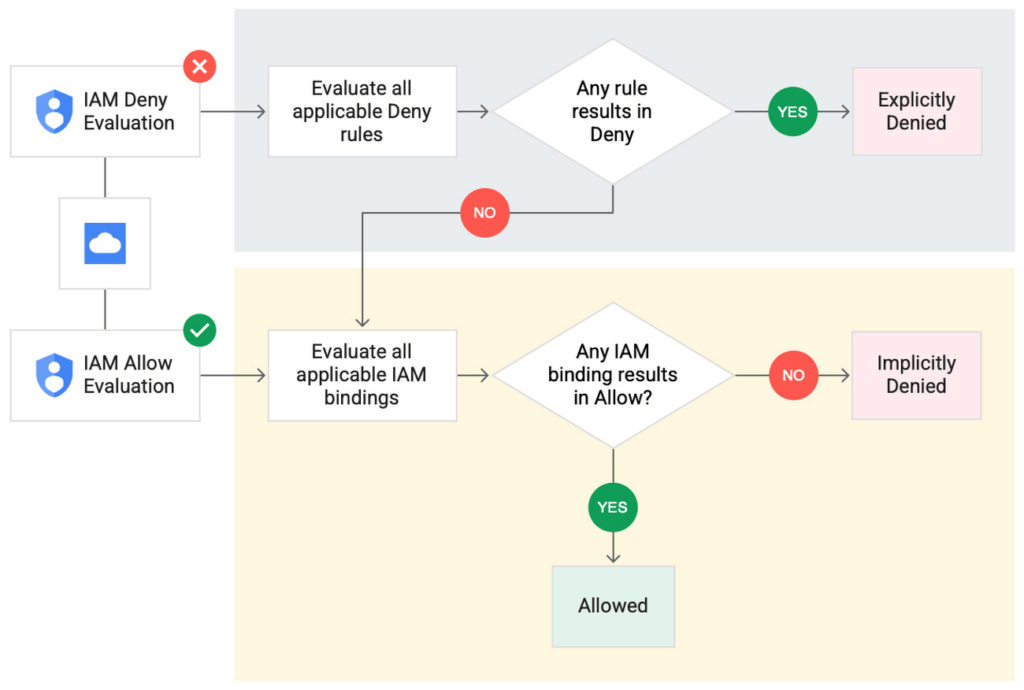
IAM Deny policies can be applied across many Google Cloud resources, such as Compute Engine, Cloud Storage, and Google Cloud Kubernetes Engine. These policies can help reduce toil on administrators as they can set up deny rules that will be enforced at scale without requiring reviews and changes of existing access rules. This makes resource governance simpler.
How to strengthen your security posture with IAM Deny
There are multiple use cases where IAM Deny policies can be used to help strengthen posture. Some of these are:
- Establish a default security baseline: IAM Deny can be used to set base policies at the organization level, folder level, and project level to deny access to resources. For example, you can attach a deny policy at the organization level to deny all users access to sensitive data storage buckets, making an exception for a specific user group.
- Prevent backdoors: IAM Deny rules override any IAM Allow rules. This can help you ensure that no “backdoor” access can be granted. For example, an organization that wants to ensure only central-admin can create projects in a folder can add an IAM Deny policy that restricts all users from creating projects except central-admin. This can help ensure no backdoor users will be added using allow policy rules.
- Prevent data exfiltration: Controlling access to data is a key measure to prevent exfiltration. For example, an organization that wants to restrict access to their personally identifiable information (PII) can set an IAM Deny policy on resources containing PII that denies access to all users except those in a group called PII-admin.
- Demonstrate compliance: Many industry regulations and compliance frameworks require organizations to demonstrate least-privilege access to sensitive resources. IAM Deny policies can create a baseline access restriction that always takes precedence when applied to resources.
Simplify IAM administration
IAM Deny can also help simplify common administrative tasks. It provides a list of permissions for Google Cloud services that you can readily use in your deny policies. Here are a few common situations where you can use IAM Deny to help streamline your access management.
- Centralize administrative privileges: You can use deny policies to restrict certain types of administrative activities to specific users or user groups. For example, if you want to limit custom role management to a single central team, you can create a deny rule that denies the permissions required for custom role management to all users, except users in the central-admin group. This will only let members of the central-admin group manage custom roles, even if other users have the required permissions.
- Create exceptions to access grants: You can use deny policies to deny inherited permissions. For example, you can grant a role at a high level in the resource hierarchy, and then deny the role’s permissions on individual lower-level resources if necessary.
- Block access based on tags: Google Cloud supports key-value based tags and you can use deny policies to deny permissions based on tags without adding an IAM Condition to every role grant. For example, you can create a rule to deny delete permissions for resources tagged as “production” for everyone except project-admins.
IAM Deny in action
The following example illustrates how a deny policy can be used to block all users from deleting projects unless the user is a member of a project-admins group or the project being deleted is tagged as a “test” project. Without a deny policy, you would have to manually track all members who have the permission to delete projects, and ensure that no undesired user has access to this permission. The deny policy makes it easy for the administrator to build this guardrail.
The below deny rule denies permission to everyone except project-admins@example.com for projects not tagged as test. Add this deny rule to a deny policy and attach the policy at the org level. That’s it!
(Note that project-admins@example.com is a security group. Using security groups is a best practice that should be followed to help keep your resources secure.)
{
"name": "policies/cloudresourcemanager.googleapis.com%2Fprojects%2F253519172624/denypolicies/limit-project-deletion",
"uid": "06ccd2eb-d2a5-5dd1-a746-eaf4c6g3f816",
"kind": "DenyPolicy",
"displayName": "Only project admins can delete projects.",
"etag": "MTc1MTkzMjY0MjUyMTExODMxMDQ=",
"createTime": "2021-09-07T23:15:35.258319Z",
"updateTime": "2021-09-07T23:15:35.258319Z",
"rules": [
{
"denyRule": {
"deniedPrincipals": [
"principalSet://goog/public:all"
],
"exceptionPrincipals": [
"principalSet://goog/group/project-admins@example.com"
],
"deniedPermissions": [
"cloudresourcemanager.googleapis.com/projects.delete"
],
"denialCondition": {
"title": "Only for non-test projects",
"expression": "!resource.matchTag('12345678/env', 'test')"
}
}
}
]
}
Getting started with IAM Deny Policies
With IAM Deny, you now have a powerful new capability to build security guardrails and more effectively control access to your Google Cloud resources. IAM Deny is now generally available for all customers through gCloud and APIs. We offer IAM Deny to Google Cloud customers at no additional cost. You can learn more about IAM Deny by visiting our documentation page.
Aiming for successful cloud security transformations to help CISOs prepare for future threats

2948
Of your peers have already read this article.
3:30 Minutes
The most insightful time you'll spend today!
Many security leaders head into the cloud armed mostly with tools, practices, skills and ultimately the mental models for how security works that were developed on premise. This leads to cost and efficiency problems that can be solved by mapping their existing mental models to those of the cloud.
When it comes to understanding the differences between on-premises cybersecurity mental models and their cloud cybersecurity counterparts, a helpful place to start is by looking at the kinds of threats each one is attempting to block, detect, or investigate.
Traditional on-premise threats focused on stealing data from databases, file storage, and other corporate resources. The most common defenses of these resources rely on layers of network, endpoint, and sometimes application security controls. The proverbial “crown jewels” of corporate data were not made accessible with an API to the outside world or stored in publicly accessible storage buckets. Other threats aimed to disrupt operations or deploy malware for various purposes, ranging from outright data theft to holding data for ransom.
There are some threats that are specifically aimed at the cloud. Bad actors are always trying to take advantage of the ubiquitous nature of the cloud. One common cloud-centered attack vector that they pursue is constantly scanning IP address space for open storage buckets or internet-exposed compute resources.
As Gartner points out, securing the cloud requires significant changes in strategy from the approach we take to protect on-prem data centers. Processes, tools, and architectures need to be designed using cloud-native approaches to protect critical cloud deployments. And when you are in the early stages of cloud adoption, it’s critical for you to be aware of the division of security responsibilities between your cloud service provider and your organization to make sure you are less vulnerable to attacks targeting cloud resources.
Successful cloud security transformations can help better prepare CISOs for threats today, tomorrow, and beyond, but they require more than just a blueprint and a set of projects. CISOs and cybersecurity team leaders need to envision a new set of mental models for thinking about security, one that will require you to map your current security knowledge to cloud realities.
As a way to set the groundwork for this discussion, the cloud security transformation can start with a meaningful definition of what “cloud native” means. Cloud native is really an architecture that takes full advantage of the distributed, scalable, and flexible nature of the public cloud. (To be fair, the term implies that you need to be born in the cloud to be a native, but we’re not trying to be elitist about it. Perhaps a better term would be “cloud-focused” or doing the security “the cloudy way.”)
However we define it, adopting cloud is a way to maximize your focus on writing code, creating business value, and keeping your customers happy while taking advantage of cloud-native inherent properties—including security. One sure way to import legacy mistakes, some predating cloud by decades, into the future would be to merely lift-and-shift your current security tools and practices into the public cloud environment.
Going cloud-native means abstracting away many layers of infrastructure, whether it’s network servers, security appliances, or operating systems. It’s about using modern tools built for the cloud and built in the cloud. Another way to think about it: You’ll worry less about all these things because you’re going to build code on top of that to help you move more quickly. Abandoning legacy security hardware maintenance requirements is part of the win here. To put another way, security will follow in the steps of IT that has been transformed by the SRE and DevOps revolution.
You can extend this thinking to cloud native security, where some of your familiar tools combine with solutions provided by cloud service providers to take advantage of cloud native architecture to secure what’s built and launched in the cloud. While we talked about the differences between on-prem targeted threats compared to threats targeting cloud infrastructure, here are other vital areas to re-evaluate in terms of a cloud security mental model.
Network security
Some organizations practice network security in the cloud as if it were a rented data center. While many traditional practices that worked reasonably well on-premise for decades, along with many traditional network architectures, are either not applicable in the cloud or not optimal for cloud computing.
However, concepts like a demilitarized zone (DMZ) can be adapted to today’s cloud environments. For example, a more modern approach to DMZ would use microsegmentation and govern access by identity in context. Making sure that the right identity, in the right context, has access to the correct resource gives you strong control. Even if you get it wrong, microsegmentation can limit a breach blast radius.
Becoming cloud native also drives the adoption of new approaches to enterprise network security, such as BeyondProd. It also benefits organizations because it gets them away from traditional network perimeter security to focus on who and what can access your services—rather than where requests for access originated.
Although network security changes driven by cloud adoption can be enormous and transformational, not all areas shift in the same way.
Endpoint security
In the cloud, the concept of a security endpoint changes. Think of it this way: A virtual server is a server. But what about a container? What about microservices and SaaS? With software as a service cloud model, there’s no real endpoint there. All along your cloud security path, users only need to know what happens where.
Here is a helpful mental model translation: An API can be seen as sort of an endpoint. Some of the security thinking developed for endpoints applies to cloud APIs as well. Securing access, permissions, privileged access thinking can be carried over, but the concept of endpoint operating system maintenance does not.
Even with automation of service agents on virtual machines in the cloud, insecure agents may increase risks because they are operating at scale in the cloud. Case in point: This major Microsoft Azure cross-tenant vulnerability highlighted a new type of risk that wasn’t even on the radar of many of its customers.
In light of this, across the spectrum of endpoint security approaches, some disappear (such as patching operating systems for SaaS and PaaS), some survive (such as the need to secure privileged access,) and yet others are transformed.
Detection and response
With a move to the cloud comes changes to the threats you’ll face, and changes to how you detect and respond to them. This means that using on-prem detection technology and approaches as a foundation for future development may not work well. Copying all your on-premises detection tools and their threat detection content won’t reduce risks in the way that most cloud-first organizations will need..
Moving to the cloud provides the opportunity to rethink how you can achieve your security goals of confidentiality, integrity, availability, and reliability with the new opportunities created by cloud process and technology.
Cloud is distributed, often immutable, API-driven, automatically scalable, and centered on the identity layer and often contains ephemeral workloads created for a particular task. All these things combine to affect how you handle threat detection for the cloud environment and necessitate new detection methods and mechanisms.
There are six key domains where threats in the cloud can be best detected: identify, API, managed services, network, compute, and Kubernetes. These provide the coverage needed related to network, identity, compute, and container infrastructure. They also provide specific detection mechanisms for API access logs and network traffic captures.
As with endpoint security, some approaches become less important (such as network IDS on encrypted links), others can grow in importance (such as detecting access anomalies,) while others transform (such as detecting threats from the provider backplane).
Data security
The cloud is changing data security in significant ways, and that includes new ways of looking at data loss prevention, data encryption, data governance, and data access.
Cloud adoption sets you on a path to what we at Google call “autonomic data security.” Autonomic data security means security has been integrated throughout the data lifecycle and is improving over time. At the same time, it makes things easier on users, freeing them from having to define and redefine myriad rules about who can do what, when, and with which data. It lets you keep pace with constantly evolving cyberthreats and business changes, so you can keep your IT assets more secure and make your business decisions faster.
Similar to other categories, some data security approaches wane in importance or disappear (such as manual data classification at cloud scale), some retain their importance from on-prem to cloud unchanged, while others transform (such as pervasive encryption with effective and secure key management).
Identity and access management
The context for identity and access management (IAM) in the cloud is obviously different from your on-premise data center. In the cloud, every person and service has its own identity and you want to be able to control access.
Within the cloud, IAM gives you fine-grained access control and visibility for centrally managing cloud resources. Your administrators authorize who can act on specific resources, giving you full control and visibility to manage cloud resources centrally. What’s more, if you have complex organizational structures, hundreds of workgroups, and a multitude of projects, IAM gives you a unified view into security policy across your entire organization.
With identity and access management tools, you’re able to grant access to cloud resources at fine-grained levels, well beyond project-level access. You can create more granular access control policies to resources based on attributes like device security status, IP address, resource type, and date and time. These policies help ensure that the appropriate security controls are in place when granting access to cloud resources.
The concept of Zero Trust is strongly in play here. It’s the idea that implicit trust in any single component of a complex, interconnected system can create significant security risks. Instead, trust needs to be established via multiple mechanisms and continuously verified. To protect a cloud-native environment, a zero trust security framework requires all users to be authenticated, authorized, and validated for security configuration and posture before being granted or keeping access to cloud-based applications and data.
This means that IAM mental models from on premise security mostly survive, but a lot of underlying technology changes dramatically, and the importance of IAM in security grows significantly as well.
Shared fate for greater trust in cloud security
Clearly, cloud is much more than “someone else’s computer.” That’s why trust is such a critical component of your relationship with your chosen cloud service providers. Many cloud service providers acknowledge shared responsibility, meaning that they supply the underlying infrastructure but leave you responsible for many seemingly inscrutable security tasks.
With Google Cloud, we operate in a shared fate model for risk management in conjunction with our customers. We believe that it’s our responsibility to be active partners as our customers deploy securely on our platform, not delineators of where our responsibility ends. We stand with you from day one, helping you implement best practices for safely migrating to and operating in a trusted cloud.
Get ready to go cloud native
We offer you several great resources to help you prepare for cloud migration, and guide you as you review your current security approaches for signs of on-prem thinking.
Listen to our podcast series where Phil Venables, Vice President, CISO at Google Cloud, and
Nick Godfrey, Director, Financial Services Security & Compliance and member of Office of the CISO at Google Cloud, join me in a discussion on preparing for cloud migration (Podcast 1, Podcast 2). You can deepen your cloud native skills by earning a Professional Cloud Security Engineer certification from Google.
4663
Of your peers have already watched this video.
1:30 Minutes
The most insightful time you'll spend today!
Best Practices to Protect APIs against 6 Common Threats
APIs are exposed to a set of vulnerabilities that are both, unique and similar to that of software and web apps. Watch the video to learn six common API threats and best practices to protect from unwanted attacks.
VCP Peering and Private Endpoints on Vertex AI to Better Security and Predictions in Near Real-time

4482
Of your peers have already read this article.
2:00 Minutes
The most insightful time you'll spend today!
One of the biggest challenges when serving machine learning models is delivering predictions in near real-time. Whether you’re a retailer generating recommendations for users shopping on your site, or a food service company estimating delivery time, being able to serve results with low latency is crucial. That’s why we’re excited to announce Private Endpoints on Vertex AI, a new feature in Vertex Predictions. Through VPC Peering, you can set up a private connection to talk to your endpoint without your data ever traversing the public internet, resulting in increased security and lower latency for online predictions.
Configuring VPC Network Peering
Before you make use of a Private Endpoint, you’ll first need to create connections between your VPC (Virtual Private Cloud) network and Vertex AI. A VPC network is a global resource that consists of regional virtual subnetworks, known as subnets, in data centers, all connected by a global network. You can think of a VPC network the same way you’d think of a physical network, except that it’s virtualized within GCP. If you’re new to cloud networking and would like to learn more, check out this introductory video on VPCs.
With VPC Network Peering, you can connect internal IP addresses across two VPC networks, regardless of whether they belong to the same project or the same organization. As a result, all traffic stays within Google’s network.
Deploying Models with Vertex Predictions
Vertex Predictions is a serverless way to serve machine learning models. You can host your model in the cloud and make predictions through a REST API. If your use case requires online predictions, you’ll need to deploy your model to an endpoint. Deploying a model to an endpoint associates physical resources with the model so it can serve predictions with low latency.
When deploying a model to an endpoint, you can specify details such as the machine type, and parameters for autoscaling. Additionally, you now have the option to create a Private Endpoint. Because your data never traverses the public internet, Private Endpoints offer security benefits in addition to reducing the time your system takes to serve the prediction when it receives the request. The overhead introduced by Private Endpoints is minimal, achieving performance nearly identical to DIY serving on GKE or GCE. There is also no payload size limit for models deployed on the private endpoint.
Creating a Private Endpoint on Vertex AI is simple.
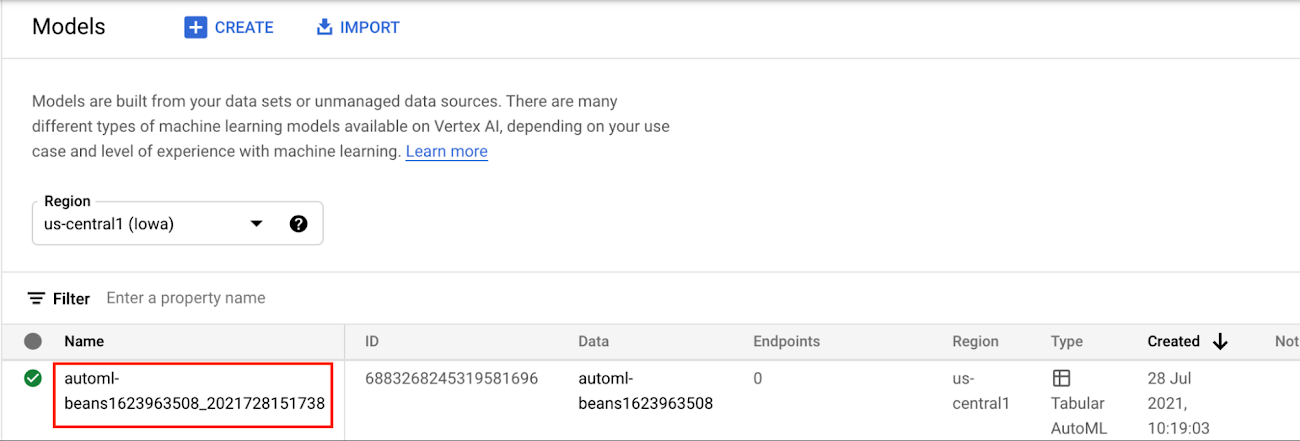
In the Models section of the Cloud console, select the model resource you want to deploy.
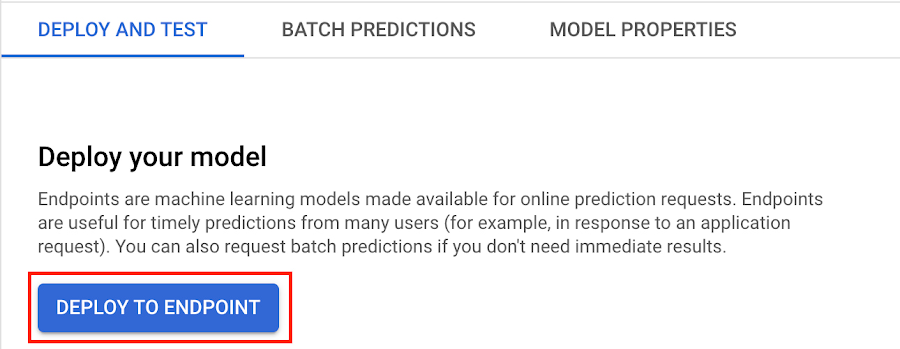
Next, select DEPLOY TO ENDPOINT
In the window on the right hand side of the console, navigate to the Access section and select Private. You’ll need to add the full name of the VPC network for which your deployment should be peered.
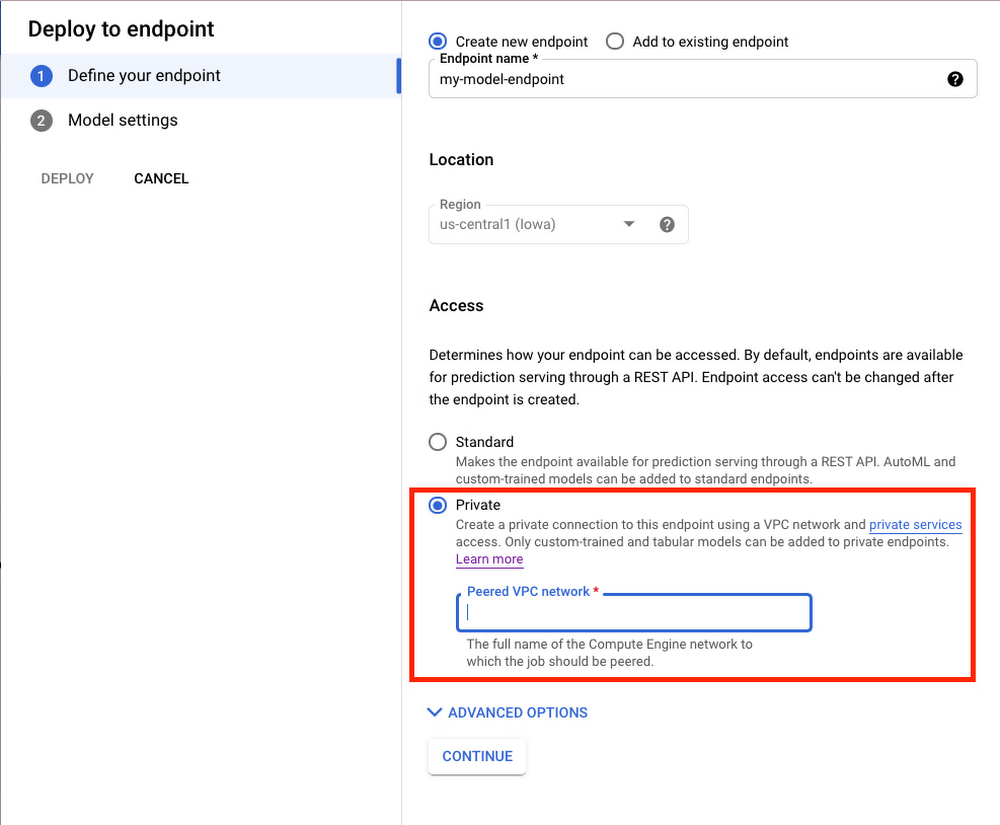
Note that many other managed services on GCP support VPC peering, such as Vertex Training, Cloud SQL, and Firestore. Endpoints is the latest to join that list.
What’s Next?
Now you know the basics of VPC Peering and how to use Private Endpoints on Vertex AI. If you want to learn more about configuring VPCs, check out this overview guide. And if you’re interested to learn more about how to use Vertex AI to support your ML workflow, check out this introductory video. Now it’s time for you to deploy your own ML model to a Private Endpoint for super speedy predictions!
Security Talks: Addressing the Toughest SOC Challenges with SolarWinds, Chrome, Zero Trust, and More

2514
Of your peers have already read this article.
1:30 Minutes
The most insightful time you'll spend today!
Security operations teams are facing a “perfect storm” of challenges from nation-state actors turning their attention to financial crime, to rising uncertainty and potential complexities because of rapidly advancing cloud migration and IoT adoption, to the long-lamented skills shortage.
Now imagine having to face this trifecta without visibility into your IT and security infrastructure because scale and cost concerns have impeded your ability to ingest and monitor critical telemetry. To help organizations rethink threat detection and broader security team efforts, we showcased at this month’s Google Cloud Security Talks a keynote on why DEI is a cybersecurity imperative, Mandiant’s review of lessons for organizations two years after SolarWinds, how Google Chrome already helps protect your business (and what more you can make do with it,) how best to encourage your organization to pursue Zero Trust, and three key ways in which Chronicle Security Operations can help your organization scale threat detection and actionable outcomes. These include:
1. Operationalizing threat intelligence
Harnessing the power of threat intelligence to acquire context, prioritize risk, and act on detections requires more than just ingesting a set of indicator of compromise (IOC) feeds. Threat intelligence must have breadth and depth of coverage to provide custom details on the tools, tactics, and procedures of threat actors. Explore why part of the “magic” behind Google Cloud’s security is the sheer scale of threat intelligence we can share with our customers.
2. Driving detection as code
We want to enable organizations that are more advanced in their cybersecurity maturity to build their own custom detections and rules, which means offering our customers a powerful detection-authoring platform. Chronicle Security Operations can help analysts build specific detections around, for example, known bad files or a specific registry key change. We also demonstrated how to create more complex detections, such as flagging process execution patterns or crafting a suspicious-behavior trigger from a specific activity sequence.
3. Leveraging curated detections
With curated detections, which we announced in August, we are putting the power of Google Cloud’s intelligence in the hands of security operations teams everywhere. Our detections offer actionable, ready-to-use threat detection content curated, built, and maintained by Google Cloud Threat Intelligence (GCTI) researchers. These detection sets cover a wide variety of threats for your network and beyond, including attacks such as ransomware, remote-access tools (RAT), infostealers, data exfiltration, and suspicious activity.
You can watch all nine of our Security Talks recorded sessions here, and keep an eye out for our next Security Talks, coming in March 2023.
5680
Of your peers have already watched this video.
22:00 Minutes
The most insightful time you'll spend today!
Chronicle Security Analytics: Key to Address Security Data Overload
Google Cloud’s Chronicle is a security analytics platform built for modern use cases to combat modern threats. In today’s world, enterprises have undergone significant changes in all aspects, and must adapt to their security needs to counter threats and attacks. Watch the video to learn Google Cloud’s initiative to help businesses improve their security by 10x to catch up with the way the world is changing and how Chronicle Security Analytics is poised to help address data security challenges.
More Relevant Stories for Your Company

Cloud on Europe’s Terms: How Google Sets to Deliver Cloud Services for Driving Digital Sovereignty
Cloud computing is globally recognized as the single most effective, agile and scalable path to digitally transform and drive value creation. It has been a critical catalyst for growth, allowing private organizations and governments to support consumers and citizens alike, delivering services quickly without prohibitive capital investment. European organizations—in both

New Study Suggests Public Sector Firms Must Move Over Legacy Productivity Tools
Prior to joining Google Cloud, I spent 20 years in the public sector serving in various security roles, most recently as the head of the cybersecurity division at the newly established Cybersecurity and Infrastructure Security Agency (CISA). I was responsible for delivering services and capabilities to about 100 civilian agencies,

Latest Update: Keep Your Accounts Secure with Sensitive Actions
At Google Cloud, we operate in a shared fate model, working in concert with our customers to help achieve stronger security outcomes. One of the ways we do this is to identify potentially risky behavior to help customers determine if action is appropriate. To this end, we now provide insights

How Google Cloud Helps Educational Institutions Ward off the Risk of Data Breaches
In the US alone, 24.5 million school records have been leaked across 1,327 data breaches since 2005. And when +1.3 billion students moved to remote learning, the pandemic became an accelerant for cyber attacks with the number of attacks in education spiking 30% YoY during July and August 2020. In our experience working with education
