





Fortress Vault Joins Forces with Google Cloud: Launches Private Data Storage for NFTs

2970
Of your peers have already read this article.
2:30 Minutes
The most insightful time you'll spend today!
Over the past two years, the general population has become more acquainted with cryptocurrencies and the first iterations of NFTs, which were among the earliest use cases for blockchain technology. This public awareness and participation has led to a growing interest in, and demand for, Web3 technology at the enterprise level.
But building trust in a new wave of technology, especially in large organizations, doesn’t happen overnight. That is why it’s critical for Web3 technologists to bring the broader benefits, use cases, and core capabilities of blockchain to the forefront of the conversation. If businesses don’t understand how this new technology can help them, how can they prioritize it among competing tech plans and resources? And without baseline protocols that account for privacy, confidential data, and IP, how can they future-proof a business?
Answering these questions and delivering trustworthy infrastructure is exactly why Scott Purcell and I founded Fortress Web3 Technologies — to bring about the next wave of Web3 utility. The company’s goal is to provide infrastructure that eliminates barriers to Web3 adoption with RESTful APIs and widgetized services that enable businesses to quickly launch and scale their Web3 initiatives.
Our tools include embeddable wallets for NFTs and fungible rewards tokens; NFT minting engines; and core financial services. These include payments, compliance, and crypto liquidity via our wholly-owned financial institution, Fortress Trust. Being overseen by a chartered, regulated entity ensures privacy, compliance and business continuity.
Fortress chose Google Cloud to help usher in this new-wave technology because no other cloud provider is better suited to helping regulated industries get up to scale on our Web3 infrastructure and blockchain technology. I’ll get into more specifics below, but at the highest level: IPFS (the current standard distributed storage) is going to face major resistance when it comes to industries that are heavily regulated or deal in ownership rights. By leveraging Google Cloud, which has critical certifications such as HIPPA, Department of Defense, ISO, and Motion Picture, we’re striking the appropriate balance between decentralization and centralization, using the best of both technologies.
The Fortress Vault on Google Cloud is a huge and necessary step forward as the first ever NFT-database solution to protect intellectual property, confidential documents, and other electronic records. It represents the first technology that marries privately stored content with the accessibility, privacy, portability, and provenance that blockchain provides.
Understanding Non-Fungible Tokens (NFTs)
An NFT is not an expensive jpeg. From a technical point of view, an NFT is a unique key stored in a distributed and trustless ledger we call a blockchain. This blockchain token is uniquely identifiable from any other token and acts as a digital key to authenticate ownership and unlock data held in a database.
While different blockchains have adopted different standards, Ethereum standards are a good proxy to represent overall concepts. Going back to the primitives, if you read the EIP 721 proposal, metadata is explicitly optional. While today’s NFT hype has indeed leveraged that technology to monetize and distribute digital art, the potential of blockchain is in the ability to digitally represent ownership of a wide variety of different asset classes on a decentralized ledger.
Unique, non-fungible tokens are not a new concept. We use them every day in technical systems for things like authentication, database keys, idempotency, and much more. Now, thanks to blockchain technology, you can take those out of their walled gardens and into an open platform that can lead to transformational utility and applications.
Take real estate, for example. Instead of a paper-based title documenting you as the owner of your home, imagine that the title is tokenized with an NFT on a blockchain. Any platform could cryptographically verify the authenticity of that form of title along with its provenance in real time and confirm that you’re the rightful owner of that property.
But, perhaps you don’t want the title of your property visible to others, nor the associated permits, tax documents, architectural drawings, contractor lists, and other documents. Maybe you just want banks, insurance companies, and others to be able to confirm that you are indeed the owner without revealing the details of those records. The NFT metadata records immutable public-facing provenance, while the underlying data remains private and protected using Fortress Vault on Google Cloud.
Apply that same utility to other sensitive information such as medical records, intellectual property, estate documents, corporate contracts, and other confidential information and it’s easy to see how enterprises are just now exploring how to hold traditional assets as NFTs.
Fortress Vault: Intellectual Property, Confidential Documents, and Other Electronic Records
What NFTs and Web3 have been lacking is the ability to make the tokenized data accessible exclusively by the owner — and only the owner. NFTs are a digital key to unlock everything ranging from music and event tickets, to real estate deeds and healthcare records, to estate documents, and to everything in the world that’s digital.
This is why we created the Fortress Vault. When building it, we had to make a fundamental decision: Either go with a distributed and permissionless storage protocol like IPFS, filecoin, or other blockchain-based database offerings, or work with an industry-leading cloud platform that understands data integrity and is establishing itself as the leader in the space.
Ultimately, we chose Google Cloud for its industry-leading object storage, professional management, fault tolerance, and myriad of certifications for architecture and data integrity.
Some of the challenges faced when vaulting a vast variety and quantity of digital content at scale include:
- Balancing data availability versus cost of storage
- Data redundancy
- Long term archival needs
- Business continuity
- Flexibility to meet current and future needs of the rapidly evolving Web3 industry.
Google Cloud is the clear leader across all of these pain points. The object lifecycle management of Google Cloud Storage enables efficient transition between storage classes when either the data matures to a certain point or it’s updated with newer files. Content in the Fortress Vault can range from on-demand data to long-term uses, such as estate planning documents that won’t be accessed for 30 years.
When storing NFT data, robust disaster recovery is table stakes. We quickly gravitated to the automatic redundancy options and multi-region storage buckets that let us customize where we store our data without massive devops and management overhead. By leveraging Google Cloud, we can offer industry leading retention, redundancy, and integrity for our customers’ NFT content.
Working with a leader in data storage was key to making this a reality. Additionally, Google Cloud shares our vision of bringing every industry forward into the world of Web3. We are both focused on building the critical infrastructure that allows everyone from Web3 native companies to Fortune 500 brands navigate the strategic shift to blockchain technology.
Why Web3 Matters
“Web3” is shorthand for the “third wave” of the internet and the technological innovation that brought us here.
Web 1 — the earliest internet — democratized reading and access to information, opening the doors to mass communication. Web 2 expanded on that with the ability to read and “write.” It democratized publishing by letting people directly engage in producing information through blogs, social media, gaming, and contributions to collective knowledge.
Web 3 expands our technological capabilities even more with the ability to read, write, and “own.” With blockchain, we can now establish clear provenance with visibility into the origination of ownership of any tokenized asset, and we can see the chain of ownership. We can rely on this next-generation technology to track, authenticate, protect, and keep a ledger of our assets.
With the Fortress Vault on Google Cloud, we have the capability to ensure the integrity of non-public data while making it accessible via NFTs. This is a game changer for Web3 adoption, particularly in industries like music, event ticketing, gaming, finance, transportation, real estate, and healthcare. Every industry can benefit from the ability to tokenize assets on blockchain technology without leaving the trusted safety of Google Cloud data storage.
The market for NFTs is everyone. And the Fortress Vault on Google Cloud is the technology evolution that makes it possible for Web3 innovators to confidently build, launch, and scale their initiatives across every industry imaginable.
4570
Of your peers have already watched this video.
43:30 Minutes
The most insightful time you'll spend today!
What is Cloud Spanner and Is It the Right Database for You?
You’ve probably heard about Cloud Spanner, but what exactly does it do that is so different from other databases out there?
How do you know if it’s worth spending your valuable time trying out?
Cloud Spanner is the first enterprise-grade, globally distributed, and strongly consistent database service built for the cloud specifically to combine the benefits of relational database structure with non-relational database scale.
Phew! That was a mouthful.
So, what really differentiates it? It’s unique in the marketplace in that it combines transactions, SQL query, and relational structure with the scalability you typically associate with non-relational or NoSQL databases.
Databases are part of every application. So it’s very important to pick the right database for your application.
With Cloud Spanner, you enjoy all the traditional benefits of a SQL database; transactions, high availability, schema changes without downtime, and SQL queries. But unlike many relational databases, Cloud Spanner scales horizontally from one to thousands of servers, an arbitrarily large number.
With fully automatic data replication and server redundancy, Cloud Spanner delivers up to five nines of availability in multi-region instances and four nines of availability in regional instances.
In fact, Google’s internal Spanner instance has been handling millions of queries per second from many Google services for years.
In this video, you’ll find out what Cloud Spanner is, what it’s useful for, why it’s unique, and the challenges it solves.
Enhancing Data Governance through Automation with Dataplex and BigLake

3001
Of your peers have already read this article.
2:00 Minutes
The most insightful time you'll spend today!
Unlocking the full potential of data requires breaking down the silo between open-source data formats and data warehouses. At the same time, it is critical to enable data governance team to apply policies regardless of where the data happens, whether – on file or columnar storage.
Today, data governance teams have to become subject matter experts on each storage system the corporate data happens to reside on. Since February 2022, Dataplex has offered a unified place to apply policies, which are propagated across both lake storage and data warehouses in GCP. Rather than specifying policies in multiple places, bearing the cognitive load of translating policies from “what you want the storage system to do” to “how your data should behave” Dataplex offers a single point for unambiguous policy management. Now, we are making it easier for you to use BigLake.
Earlier this year, we launched BigLake into general availability, BigLake unifies data fabric between Data Lakes and Data Warehouses by extending BigQuery storage to open file formats. Today, we announce BigLake Integration with Dataplex (available in preview). This integration eliminates the configuration steps for the admin taking advantage of BigLake and managing policies across GCS and BigQuery from a unified console.
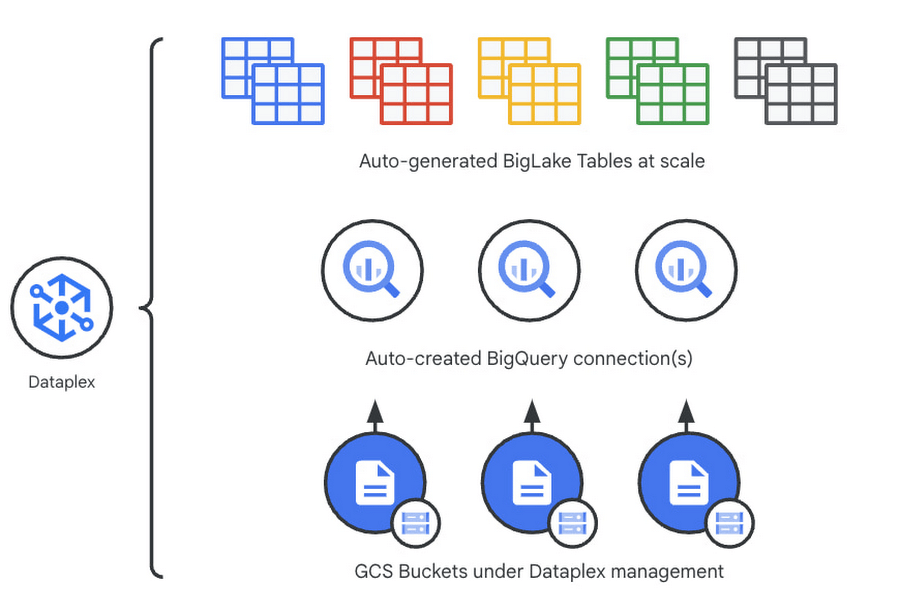
Previously, you could point Dataplex at a Google Cloud Storage (GCS) bucket, and Dataplex will discover and extract all metadata from the data lake and register this metadata in BigQuery (and Dataproc Metastore, Data Catalog) for analysis and search. With the BigLake integration capability, we are building on this capability by allowing an “upgrade” of a bucket asset, and instead of just creating external tables in BigQuery for analysis – Dataplex will create policy-capable BigLake tables!
The immediate implication is that admins can now assign column, row, and table policies to the BigLake tables auto-created by Dataplex, as with BigLake – the infrastructure (GCS) layer is separate from the analysis layer (BigQuery). Dataplex will handle the creation of a BigQuery connection and a BigQuery publishing dataset and ensure the BigQuery service account has the correct permissions on the bucket.
But wait – there’s more.
With this release of Dataplex, we are also introducing advanced logging called governance logs. Governance logs allow tracking the exact state of policy propagation to tables and columns – adding an additional level of detail going beyond the high-level “status” for the bucket and into fine-grained status and logs for tables, columns.
What’s next?
- We have updated our documentation for managing buckets and have additional detail regarding policy propagation and the upgrade process.
- Stay tuned for an exciting roadmap ahead, with more automation around policy management.
For more information, please visit:

Google Leads the Database-as-a-Service Market: Forrester Research
DOWNLOAD RESEARCH REPORTS5492
Of your peers have already downloaded this article
3:00 Minutes
The most insightful time you'll spend today!
Database-as-a-service (DBaaS) has become critical for all businesses to build and support modern business applications and operational systems. It is changing the way companies build and support business applications and operational systems. With DBaaS, organizations can provision a relational or non-relational database of any size in minutes, without needing any technical expertise.
For app developers, it offers a database platform to build simple to sophisticated applications quickly, allowing them to focus on application logic rather than deal with database administration challenges. DBaaS automates the provisioning, administration, backup, recovery, availability, security, and scalability of the database without the need for a database administrator (DBA).
In addition, DBaaS helps enterprises migrate from their on-premises databases to the cloud to save money, support elastic scale, and deliver higher performance for expanding workloads.
Analyst firm Forrester Research in its recent report on the Database-as-a-Service market has named Google Cloud a leader in this space as it supports a broader set of use cases, automation, high-end scalability and performance, and security.
Download this Forrester Research report to understand why enterprises are turning to DBaaS and why Google Cloud is a leader in this space.
BigQuery ML for Sentiment Analysis: How to Make the Most of Your Data

1828
Of your peers have already read this article.
4:30 Minutes
The most insightful time you'll spend today!
Introduction
We recently announced BigQuery support for sparse features which help users to store and process the sparse features efficiently while working with them. That functionality enables users to represent sparse tensors and train machine learning models directly in the BigQuery environment. Being able to represent sparse tensors is a useful feature because sparse tensors are used extensively in encoding schemes like TF-IDF as part of data pre-processing in NLP applications and for pre-processing images with a lot of dark pixels in computer vision applications.
There are numerous applications of sparse features such as text generation and sentiment analysis. In this blog, we’ll demonstrate how to perform sentiment analysis with the space features in BigQuery ML by training and inferencing machine learning models using a public dataset. This blog also highlights how easy it is to work with unstructured text data on BigQuery, an environment traditionally used for structured data.
Using sample IMDb dataset
Let’s say you want to conduct a sentiment analysis on movie reviews from the IMDb website. For the benefit of readers who want to follow along, we will be using the IMDb reviews dataset from BigQuery public datasets. Let’s look at the top 2 rows of the dataset.
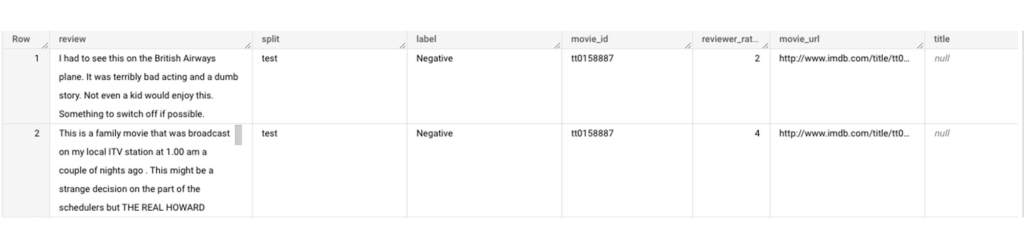
Although the reviews table has 7 columns, we only use reviews and label columns to perform sentiment analysis for this case. Also, we are only considering negative and positive values in the label columns. The following query can be used to select only the required information from the dataset.
SELECT
 review,
 label,
FROM
 `bigquery-public-data.imdb.reviews`
WHERE
 label IN ('Negative', 'Positive')
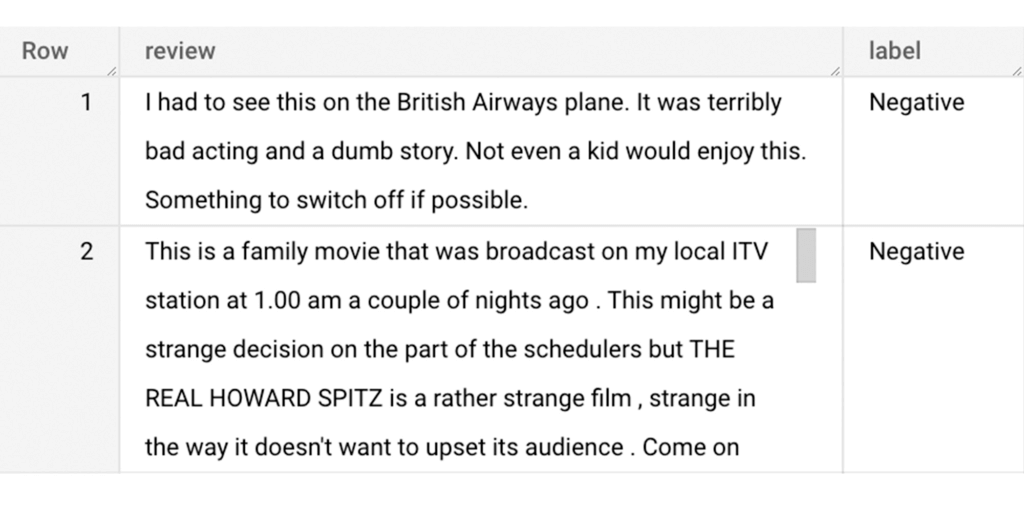
The top 2 rows of the result is as follows:
Methodology
Based on the dataset that we have, the following steps will be carried out:
- Build a vocabulary list using the review column
- Convert the review column into sparse tensors
- Train a classification model using the sparse tensors to predict the label (“positive” or “negative”)
- Make predictions on new test data to classify reviews as positive or negative.
Feature engineering
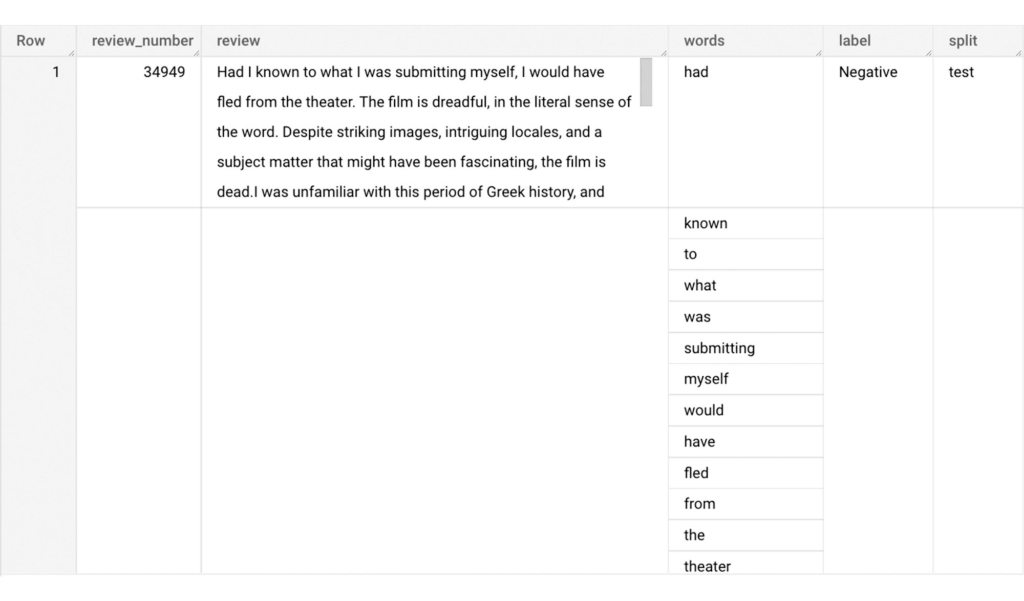
In this section, we will convert the text from the reviews column to numerical features so that we can feed them into a machine learning model. One of the ways is the bag-of-words approach where we build a vocabulary using the words from the reviews and select the most common words to build numerical features for model training. But first, we must extract the words from each review. The following code creates a dataset and a table with row numbers and extracted words from reviews.
-- Create a dataset named `sparse_features_demo` if doesn’t exist
CREATE SCHEMA IF NOT EXISTS sparse_features_demo;


-- Select unique reviews with only negative and positive labels
CREATE OR REPLACE TABLE sparse_features_demo.processed_reviews AS (
 SELECT
   ROW_NUMBER() OVER () AS review_number,
   review,
   REGEXP_EXTRACT_ALL(LOWER(review), '[a-z]{2,}') AS words,
   label,
   split
 FROM (
   SELECT
     DISTINCT review,
     label,
     split
   FROM
     `bigquery-public-data.imdb.reviews`
   WHERE
     label IN ('Negative', 'Positive')
 )
);
The output table from the query above should look like this:
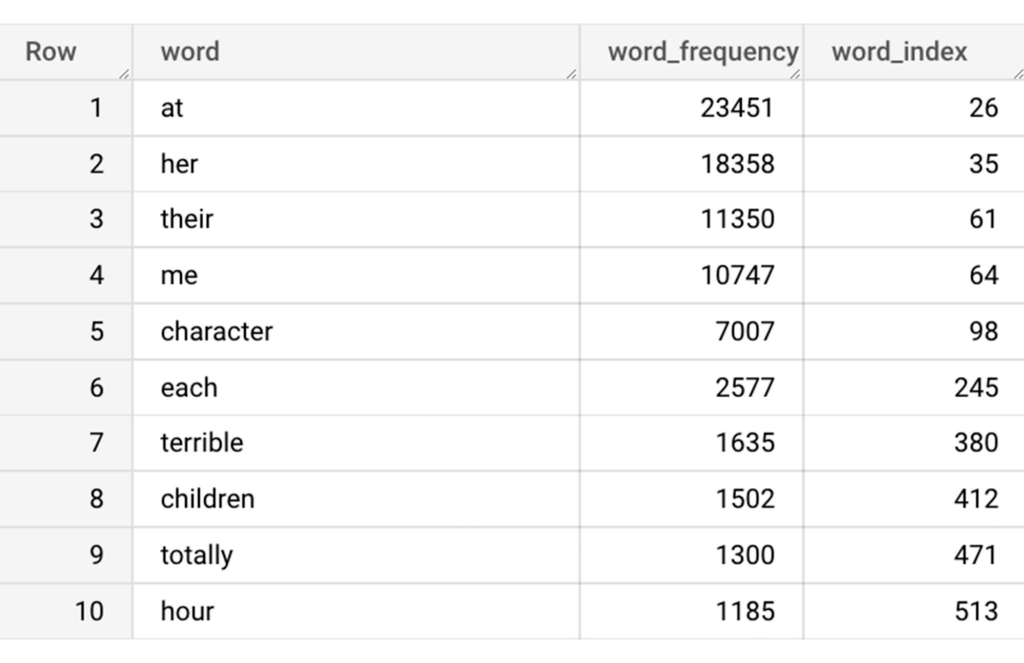
The next step is to build a vocabulary using the extracted words. The following code creates a vocabulary including word frequency and word index from reviews. For this case, we are going to select only the top 20,000 words to reduce the computation time.
-- Create a vocabulary using train dataset and select only top 20,000 words based on frequency
CREATE OR REPLACE TABLE sparse_features_demo.vocabulary AS (
 SELECT
   word,
   word_frequency,
   word_index
 FROM (
   SELECT
     word,
     word_frequency,
     ROW_NUMBER() OVER (ORDER BY word_frequency DESC) - 1 AS word_index
   FROM (
     SELECT
       word,
       COUNT(word) AS word_frequency
     FROM
       sparse_features_demo.processed_reviews,
       UNNEST(words) AS word
     WHERE
       split = "train"
     GROUP BY
       word
   )
 )
 WHERE
   word_index < 20000 # Select top 20,000 words based on word count
);
The following shows the top 10 words based on frequency and their respective index from the resulting table of the query above.
Creating a sparse feature
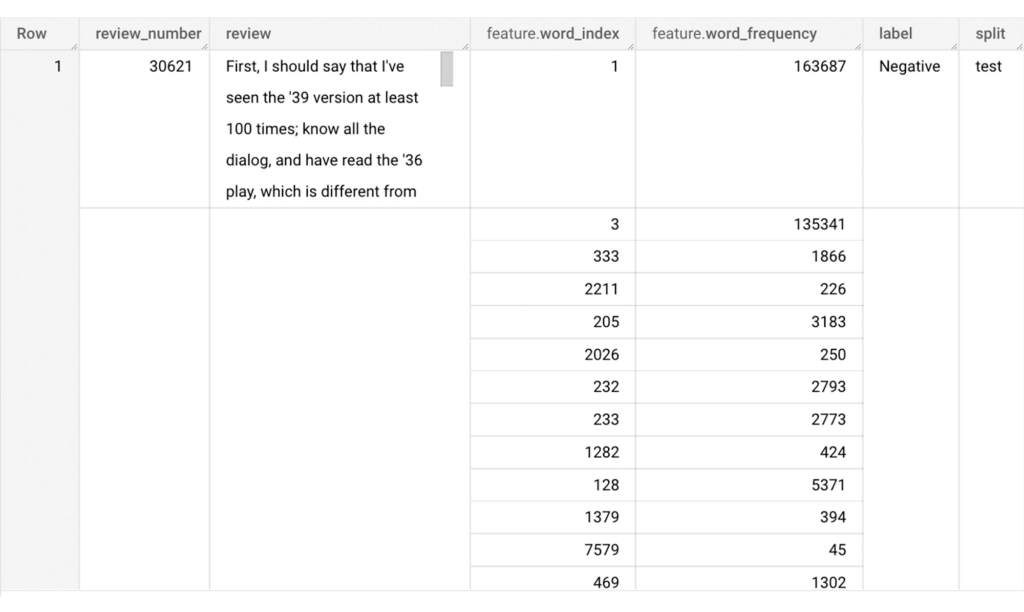
Now we will use the newly added feature to create a sparse feature in BigQuery. For this case, we aggregate word_index and word_frequency in each review, which generates a column as ARRAY[STRUCT] type. Now, each review is represented as ARRAY[(word_index, word_frequency)].
-- Generate a sparse feature by aggregating word_index and word_frequency in each review.
CREATE OR REPLACE TABLE sparse_features_demo.sparse_feature AS (
 SELECT
   review_number,
   review,
   ARRAY_AGG(STRUCT(word_index, word_frequency)) AS feature,
   label,
   split
 FROM (
   SELECT
     DISTINCT review_number,
     review,
     word,
     label,
     split
   FROM
     sparse_features_demo.processed_reviews,
     UNNEST(words) AS word
   WHERE
     word IN (SELECT word FROM sparse_features_demo.vocabulary)
 ) AS word_list
 LEFT JOIN
   sparse_features_demo.vocabulary AS topk_words
   ON
     word_list.word = topk_words.word
 GROUP BY
   review_number,
   review,
   label,
   split
);
Once the query is executed, a sparse feature named `feature` will be created. That `feature` column is an `ARRAY of STRUCT` column which is made of `word_index` and `word_frequency` columns. The picture below displays the resulting table at a glance.
Training a BigQuery ML model
We just created a dataset with a sparse feature in BigQuery. Let’s see how we can use that dataset to train with a machine learning model with BigQuery ML. In the following query, we will train a logistic regression model using the review_number, review, and feature to predict the label:
-- Train a logistic regression classifier using the data with sparse feature
CREATE OR REPLACE MODEL sparse_features_demo.logistic_reg_classifier
 TRANSFORM (
   * EXCEPT (
       review_number,
       review
     )
 )
 OPTIONS(
   MODEL_TYPE='LOGISTIC_REG',
   INPUT_LABEL_COLS = ['label']
 ) AS
 SELECT
   review_number,
   review,
   feature,
   label
 FROM
    sparse_features_demo.sparse_feature
 WHERE
   split = "train"
;
Now that we have trained a BigQuery ML Model using a sparse feature, we evaluate the model and tune it as needed.
-- Evaluate the trained logistic regression classifier
SELECT * FROM ML.EVALUATE(MODEL sparse_features_demo.logistic_reg_classifier);
The score looks like a decent starting point, so let’s go ahead and test the model with the test dataset.

-- Evaluate the trained logistic regression classifier using test data
SELECT * FROM ML.EVALUATE(MODEL sparse_features_demo.logistic_reg_classifier,
 (
   SELECT
     review_number,
     review,
     feature,
     label
   FROM
     sparse_features_demo.sparse_feature
   WHERE
     split = "test"
 )
);
The model performance for the test dataset looks satisfactory and it can now be used for inference. One thing to note here is that since the model is trained on the numerical features, the model will only accept numeral features as input. Hence, the new reviews have to go through the same transformation steps before they can be used for inference. The next step shows how the transformation can be applied to a user-defined dataset.
Sentiment predictions from the BigQuery ML model
All we have left to do now is to create a user-defined dataset, apply the same transformations to the reviews, and use the user-defined sparse features to perform model inference. It can be achieved using a WITH statement as shown below.
WITH
 -- Create a user defined reviews
 user_defined_reviews AS (
   SELECT
     ROW_NUMBER() OVER () AS review_number,
     review,
     REGEXP_EXTRACT_ALL(LOWER(review), '[a-z]{2,}') AS words
   FROM (
     SELECT "What a boring movie" AS review UNION ALL
     SELECT "I don't like this movie" AS review UNION ALL
     SELECT "The best movie ever" AS review
   )
 ),


 -- Create a sparse feature from user defined reviews
 user_defined_sparse_feature AS (
   SELECT
     review_number,
     review,
     ARRAY_AGG(STRUCT(word_index, word_frequency)) AS feature
   FROM (
     SELECT
       DISTINCT review_number,
       review,
       word
     FROM
       user_defined_reviews,
       UNNEST(words) as word
     WHERE
       word IN (SELECT word FROM sparse_features_demo.vocabulary)
   ) AS word_list
   LEFT JOIN
     sparse_features_demo.vocabulary AS topk_words
     ON
       word_list.word = topk_words.word
   GROUP BY
     review_number,
     review
 )


-- Evaluate the trained model using user defined data
SELECT review, predicted_label FROM ML.PREDICT(MODEL sparse_features_demo.logistic_reg_classifier,
 (
   SELECT
     *
   FROM
     user_defined_sparse_feature
 )
);
Here is what you would get for executing the query above:
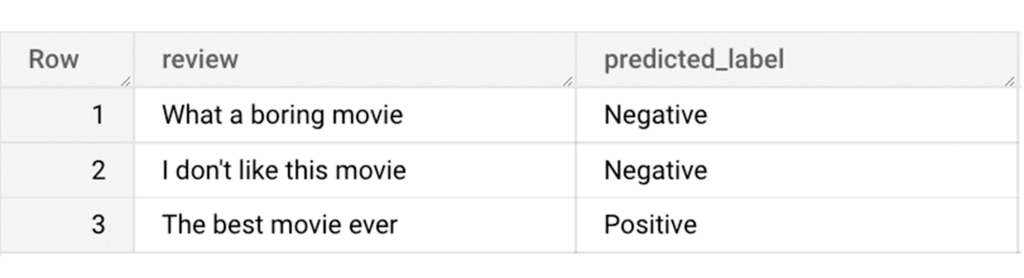
And that’s it! We just performed a sentiment analysis on the IMDb dataset from a BigQuery Public Dataset using only SQL statements and BigQuery ML. Now that we have demonstrated how sparse features can be used with BigQuery ML models, we can’t wait to see all the amazing projects that you would create by harnessing this functionality.
If you’re just getting started with BigQuery, check out our interactive tutorial to begin exploring.
What is Cloud SQL for SQL Server? And What Do IT Departments Say About It?

3801
Of your peers have already read this article.
4:30 Minutes
The most insightful time you'll spend today!
At Google Cloud, we develop our database services to meet the needs of enterprise teams wherever they are in their cloud journey. That is why we announce launched Cloud SQL for SQL Server and make it available to all of our customers.
This addition to our database lineup means you can migrate your enterprise SQL Server workloads to Google Cloud easily, and take advantage of fully managed services.
Cloud SQL for SQL Server is a key component when onboarding your existing applications and infrastructure to get the benefits of a fully managed and compatible database that will reduce your operational costs and overhead.
Highlights of Cloud SQL for SQL Server
Cloud SQL for SQL Server brings some key benefits that can help you run workloads easily.
- Compatibility: Cloud SQL for SQL Server offers multiple editions of the current version of SQL Server and works with popular clients such as SQL Server Management Studio.
- Flexible backups: Schedule automatic daily backups or run them on-demand.
- Scalability: Enable the automatic storage increase configuration and Cloud SQL will add storage capacity whenever you approach your limit. Easily scale up your customized machines’ memory and processor cores as necessary.
- Built-in high availability: Cloud SQL for SQL Server has built-in high availability enabled for all editions that synchronously replicates data to each zone’s regional persistent disk.
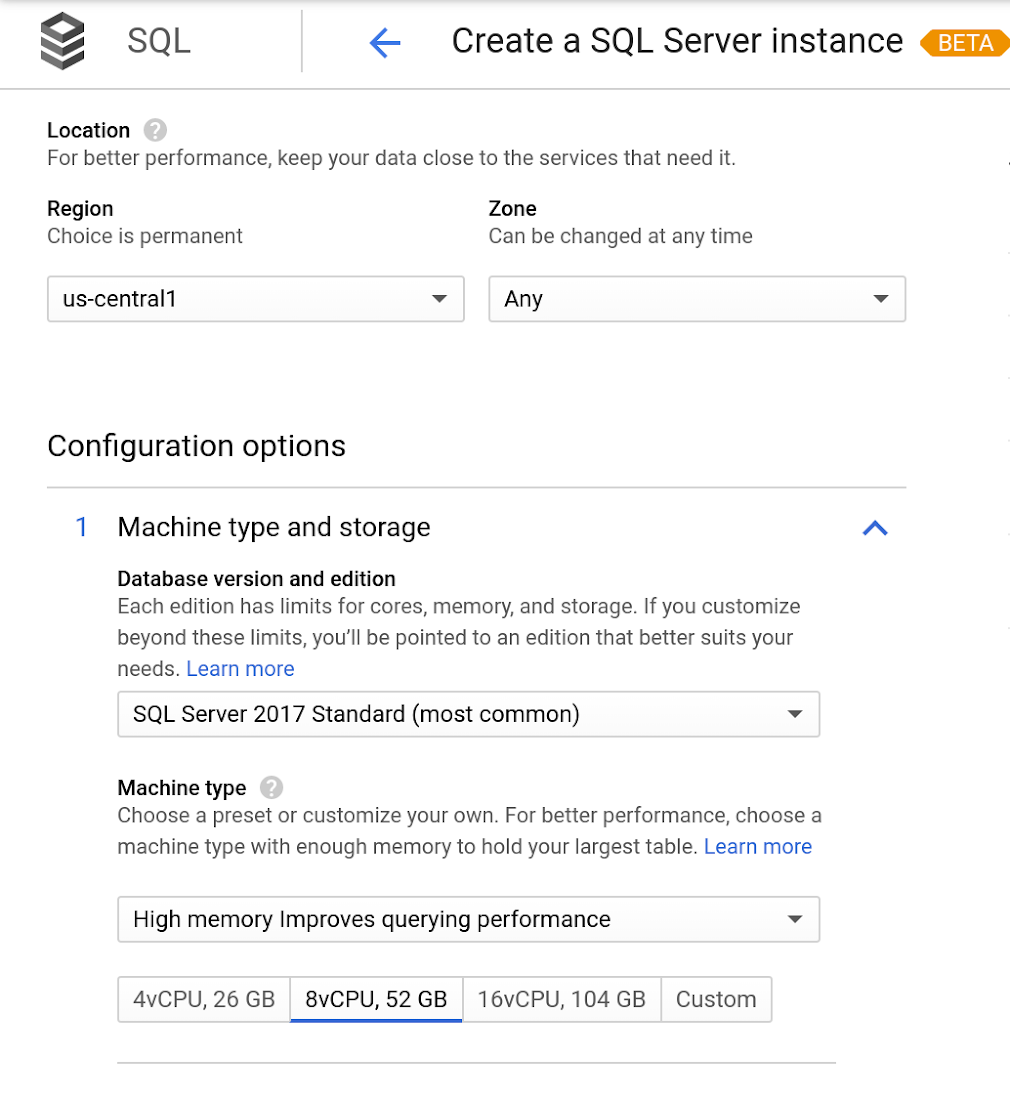
Cloud SQL for SQL Server is currently available regions and will integrate with our existing Cloud SQL functionality, such as connectivity via the Cloud SQL Proxy. Here’s a look at creating a new instance.
Early adopters of Cloud SQL for SQL Server have been using the service talk about the value for onboarding more workloads.
“Cloud SQL for SQL Server was very easy and fast to get up and going.” says Andrew P. Toi, database engineer lead at advertising management software company WideOrbit Inc. “With built-in high availability that can be used across editions, I can reduce the cost and overhead of managing databases dramatically, especially for smaller workloads”
And desktop virtualization infrastructure company Itopia had this to say. “Cloud SQL Server dramatically reduces the complexity and cost involved in deploying cloud desktop infrastructure for our customers,” says Ubaldo Don, CTO of Itopia. “It turns a bulky pillar of infrastructure into a one-click service, reducing IT service management overhead.”
More Relevant Stories for Your Company

Simplifying Unstructured Data Analytics with BigQuery ML and Vertex AI: A Comprehensive Guide
Unstructured data such as images, speech and textual data can be notoriously difficult to manage, and even harder to analyze. The analysis of unstructured data includes use cases such as extracting text from images using OCR, sentiment analysis on customer reviews and simplifying translation for analytics. All of this data

Principles to Make Organizations Data Engineering Driven
In the “What type of data processing organisation” paper, we examined that you can build a data culture whether your organization consists mostly of data analysts, or data engineers, or data scientists. However, the path and technologies to become a data-driven innovator are different and success comes from implementing the right

Bigtable’s High Performance and Low Opex is Great for Building Personalization
Customer expectations have shifted as a result of evolving needs. Across industries, customers expect that you treat them as individuals, and demonstrate how well you understand and serve their unique needs. This concept—personalization—is the idea that you’re delivering a tailored experience to each customer corresponding to their needs and preferences;

How TapClicks’ Google Cloud Migration Makes Life Easy for Marketers
Editor’s note: In this blog post we learn how TapClicks migrated to Google Cloud to offer their marketing customers a unified platform for data management, operations, insights, and analysis. TapClicks is a smart marketing cloud, powered by data, that unifies our customer’s marketing. By choosing to migrate our core applications last
