





Case Study: Twitter is Taking Their CX to The Next Level with AutoML

2777
Of your peers have already read this article.
2:00 Minutes
The most insightful time you'll spend today!
Editor’s note: Since launching its Spaces feature, Twitter has demonstrated that hearing people’s voices can bring conversations on Twitter to life in a completely new way. Next, it aimed to make it easier for customers to join and listen to live conversations they personally care about. In this blog, we learn how the Twitter Spaces Engineering team is bringing this vision to life with AutoML, powering a new ML heuristic which serves personalized recommendations to Twitter customers. The authors would like to thank Chuan Lu, Joe Balistreri, Chen-Rui Chou, Pablo Jablonski, Alberto Parrella, Pradip Thachile and Sam Lee from Twitter, as well as Helin Wang from Google, for contributions to this blog.
Since Twitter introduced Spaces in 2020 to enable live audio conversations on its platform, the Twitter Spaces Engineering team has been continually testing, building, and updating this feature in the open. Today, anyone can join, listen, and speak in a Space on Twitter, and the feature’s popularity has taken off. But this success also poses a challenge: with millions of people creating and joining Spaces at any time, how can they find the Spaces to engage with while they’re happening? Taking this as an opportunity to further improve the experience of its customers, Twitter has turned to machine learning (ML) and cloud technology for answers.
“ML fits into the natural progression of Twitter consumer and revenue product building, especially for a product feature such as Spaces,” explains Diem Nguyen, Senior Machine Learning Engineer and Data Scientist at Twitter. “We launched Spaces with a base-line algorithm using the ‘most popular’ heuristic which assumes that if a Space is popular, there’s a good chance you’d like it too. But our aim is to leverage ML to surface the most interesting and relevant Spaces to a particular Twitter customer, making it easier for them to find and join the conversations they personally care about. This is a complex functionality that Google Cloud ML capabilities help us to enable.”
Setting the stage for building new features with limited ML resources
While looking for the right tools to power this vision, Nguyen and her team started evaluating in December 2021 whether the Vertex AI platform and AutoML in particular could solve challenges observed when they first started building Spaces. These included a lack of dedicated ML resources to build and deploy the product feature, and the need to work on a multi-cloud environment.
“We had three key questions in mind during our assessment,” Nguyen explains. “Can we realistically deploy the AutoML model off-platform? Once deployed, can it solve for the request load that we get from the service we’re serving (in this case, the Spaces tab)? And finally, can we develop and maintain such a solution without a dedicated team of ML experts for this project?” The answer to all three questions was yes.
Positive answers motivated the Spaces Engineering team to take the solution to production in February 2022. “We started using AutoML Tables to train high-accuracy models with minimal ML expertise or effort, alleviating our resource constraint,” says Nguyen of the results. “Soon AutoML also stood out for its high performance and for supporting easy deployment beyond the Google Cloud Platform, making it ideal for this project hosted in a multi-cloud environment.”
Increasing customer engagement at speed with accurate ML predictions
With a classification model in place to predict the probability of user engagement in a particular Space, Twitter now aims to optimize its model with aggregated data around Twitter features that can help it better understand customer preferences. For example, if a customer has historically engaged with a particular topic and a new Space matches that topic, the ML model increases the score of that Space being served to that user on the Spaces tab.
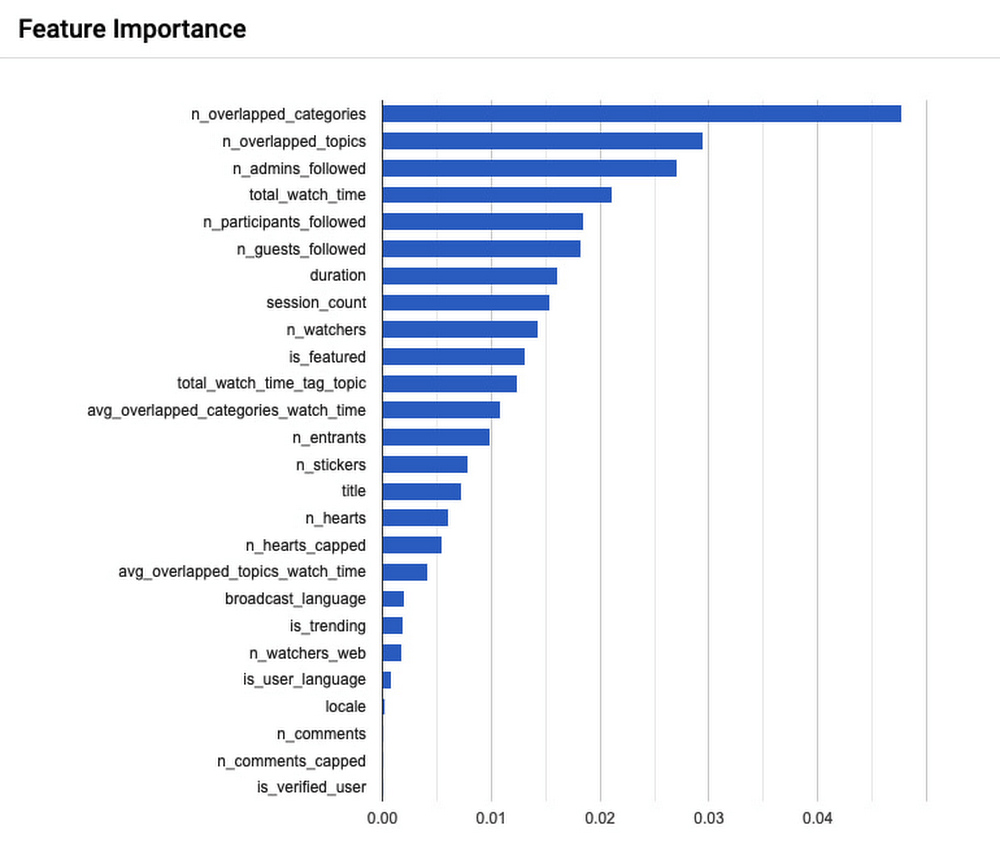
Because Spaces are live audio conversations, the Spaces tab needs to be ranked to customers in near real time so they don’t miss out. With this in mind, Twitter’s model currently performs 900 queries per second on the Spaces tab, and evaluates 50,000 candidates per second. Meanwhile, 99% of these requests are faster than 100 milliseconds, and 90% of requests are faster than 50 milliseconds.
To measure the success of this project, Nguyen’s team conducted A/B experiments around key customer engagement metrics–A stands for the ‘most popular’ heuristic previously in production, and B is the new AutoML model which seeks to personalize Spaces recommendations to the interests of individual Twitter users. Three months into the project, the numbers were encouraging. “After deploying our AutoML Tables solution we saw an increase of 1.96% in Spaces daily active customers, which is one of our key metrics. We also noticed an increase of 1.99% in Spaces join in rates, and an increase of 8.42% in user clicks to explore a Space,” Nguyen shares. “These are positive signals that users are now engaging more with the Spaces tab service on the Twitter app, which is exactly what we set out to do with this project.”
Powering new use cases with hands-off ML frameworks
With this first solution running in production to improve the performance of the Spaces tab, Nguyen starts to ask how else it might support the experience of Twitter users moving forward. “The Spaces tab is a small surface on the Twitter app. With our current ML solution we’re some distance away from serving our home tab traffic, which is where a lot of our traffic happens and therefore would involve a much bigger-scale operation. Getting there will take some work but we’re evaluating the possibility of optimizing our model performance for this in collaboration with Google Cloud,” says Nguyen.
“As a product-led company, we focus on continually improving the customer experience and we want to iterate faster to get to that point. AutoML brings that value to our product teams because it is so hands-off. You don’t need to write any model code in order to reap the benefits from this machine learning framework; AutoML automatically experiments with many different model architectures and comes up with a state-of-the-art model that addresses your needs. So while it is not a one-size-fits-all solution, it is a great solution with the potential to power many more Twitter use cases,” she concludes.
Transcend from Prototype to Production: Train Your ML models with Vertex AI

2616
Of your peers have already read this article.
1:30 Minutes
The most insightful time you'll spend today!
You’re working on a new machine learning problem, and the first environment you use is a notebook. Your data is stored on your local machine, and you try out different model architectures and configurations, executing the cells of your notebook manually each time. This workflow is great for experimentation, but you quickly hit a wall when it comes time to elevate your experiments up to production scale. Suddenly, your concerns are more than just getting the highest accuracy score.
Sound familiar?
Developing production applications or training large models requires additional tooling to help you scale beyond just code in a notebook, and using a cloud service provider can help. But that process can feel a bit daunting.
To make things a little easier for you, we’ve created the Prototype to Production video series, which covers all the foundational concepts you’ll need in order to build, train, scale, and deploy machine learning models on Google Cloud using Vertex AI.
Let’s jump in and see what it takes to get from prototype to production!
Getting started with Notebooks for machine learning
Episode one of this series shows you how to create a managed notebook using Vertex AI Workbench. With your environment set up, you can explore data, test different hardware configurations, train models, and interact with other Google Cloud services.
Storing data for machine learning
When working on machine learning problems, it’s easy to be laser focused on model training. But the data is where it all really starts.
If you want to train models on Vertex AI, first you need to get your data into the cloud. In episode 2, you’ll learn the basics of storing unstructured data for model training and see how to access training data from Vertex AI Workbench.
Training custom models on Vertex AI
You might be wondering, why do I need a training service when I can just run model training directly in my notebook? Well, for models that take a long time to train, a notebook isn’t always the most convenient option. And if you’re building an application with ML, it’s unlikely that you’ll only need to train your model once. Over time, you’ll want to retrain your model to make sure it stays fresh and keeps producing valuable results.
Manually executing the cells of your notebook might be the right option when you’re getting started with a new ML problem. But when you want to automate experimentation at scale, or retrain models for a production application, a managed ML training option will make things much easier.
Episode 3 shows you how to package up your training code with Docker and run a custom container training job on Vertex AI. Don’t worry if you’re new to Docker! This video and the accompanying codelab will cover all the commands you’ll need.
CODELAB: Training custom models with Vertex AI
How to get predictions from an ML model
Machine learning is not just about training. What’s the point of all this work if we don’t actually use the model to do something?
Just like with training, you could execute predictions directly from a notebook by calling model.predict. But when you want to get predictions for lots of data, or get low latency predictions on the fly, you’re going to need something more than a notebook. When you’re ready to use your model to solve a real world problem with ML, you don’t want to be manually executing notebook cells to get a prediction.
In episode 4, you’ll learn how to use the Vertex AI prediction service for batch and online predictions.
CODELAB: Getting predictions from custom trained models
Tuning and scaling your ML models
By this point, you’ve seen how to go from notebook code, to a deployed model in the cloud. But in reality, an ML workflow is rarely that linear. A huge part of the machine learning process is experimentation and tuning. You’ll probably need to try out different hyperparameters, different architectures, or even different hardware configurations before you figure out what works best for your use case.
Episode 5, covers the Vertex AI features that can help you with tuning and scaling your ML models. Specifically, you’ll learn about hyperparameter tuning, distributed training, and experiment tracking.
CODELAB: Hyperparameter tuning on Vertex AI
CODELAB: Distributed Training on Vertex AI
We hope this series inspires you to create ML applications with Vertex AI! Be sure to leave a comment on the videos if you’d like to see any of the concepts in more detail, or learn how to use the Vertex AI MLOps tools.
If you’d like try all the code for yourself, check out the following codelabs:
Transforming the Contact Center Experience with Artificial Intelligence

2497
Of your peers have already read this article.
1:30 Minutes
The most insightful time you'll spend today!
We meet daily with contact center owners and customer experience (CX) execs across all industries, geographies, and business sizes. Looking back at these conversations, it’s crystal clear that 2022 was a high-stakes year for call centers, with three primary challenges trending across all customers and continuing in 2023:
- Many organizations feel pressure to rapidly scale up their call center operations in response to macroeconomic changes. Uncertain conditions are forcing Contact Centers to be ever more cost-effective, and to find ways to generate revenue for the business.
- End users are increasingly demanding and less forgiving when it comes to CX. Users have a choice, and they expect brands to meet them where they are with superior experiences. Connecting with customers where they engage is one of the key components of superior CX—customers should not have to go through elaborate processes or unhelpful phone trees to get help but should rather have service available quickly and easily in their preferred channels. Consumers demand more intimate ways of connecting with brands and Conversational AI can create that critical interaction medium.
- Organizations understand that AI can help address these challenges. However, many business leaders remain unsure how to successfully make the journey. A growing number of offerings are on the market, but many don’t deliver on their promise, with long and expensive integration requirements and unpredictable and underwhelming outcomes.
Helping our customers successfully address these challenges and opportunities was one of our top priorities last year and will continue to be a significant focus in coming months. In this blog post, we’ll review our Contact Center AI (CCAI) news from last year, as a primer for 2023.
Looking back: Why 2022 was a big year for Contact Center AI
In 2022, we increased our strategic investment in CCAI, including expanding it to include a comprehensive, end-to-end contact center solution suite that is user-first, AI-first, and cloud-first. We launched Contact Center AI Platform, our Contact Center as a Service (CCaaS) offering, as part of the CCAI product suite that offers a modern, turnkey solution, designed with user-first, AI-first, and cloud-first design. During Google Cloud Next ‘22, we shared lots of great content on how organizations can use CCAI to improve customer experiences, including these breakout sessions:
- Delight customers in every interaction with Contact Center AI
- Power new voice enabled interfaces with applications with Google Cloud’s speech solutions
We also got a chance to hear how customers are using CCAI to better reach their own customers, including Wells Fargo and TIAA. We partnered with CDW to discuss Providing Better Customer Experiences and with Quantiphi in a webinar called “Elevating the Banking Experience with CCAI Platform.” Just recently, our customer Segra shared their success story.
Through these customer interactions, three key priorities have surfaced as we look forward to 2023: Elevate the customer experience, bring new forms of AI to drive new automation and accelerate time to value.
Looking forward: Elevate CX, integrate new forms of AI, accelerate time to value
1. User-first: Meet them where they are with elevated Customer Experience.
As we have learned, users expect that brands meet them where they are and on their own terms and expectations. To do that, brands must integrate with and adopt the latest user-centric technologies and product best practices from consumer mobile and web apps. Enterprise B2C can’t exist anymore in a parallel world of different and often inferior user experience. Google has over 20 years of experience in building such consumer experiences, with multiple products successfully serving billions of users. Bringing these capabilities and experiences from our consumer products and research teams to our cloud offerings was a key component for our product offerings in 2022 and is a big part of our key investments in 2023. Moreover, a vast majority of CX user journeys start with a query on Google Search or YouTube. Connecting with the users at that point, even before they reach out directly to the contact center is a win-win, saving money for the brand and delivering immediate value to the user. By focusing on the user we created a superior integrated omnichannel experience.
2. AI-first and cloud-first: Quality contact center growth depends on transforming to modern, Cloud, AI solutions.
For contact centers to evolve, they need to transform from cost centers to revenue generators. That requires modern Cloud and AI solutions. Conversational data spans across all parts of the contact center, opening new ways to generate value. Cloud capabilities of privacy, security and scale can enable personalized CX across channels, enabling key omnichannel experiences. From a study by McKinsey: “Cross-channel integration and migration issues continue to hamper progress. For example, 77 percent of survey respondents report that their organizations have built digital platforms, but only 10 percent report that those platforms are fully scaled and adopted by customers. Only 12 percent of digital platforms are highly integrated, and, for most organizations, only 20 percent of digital contacts are unassisted.” Traditional telephony technologies are becoming commoditized and struggle to keep up with ever more complex rule based systems. Leaders in applicative AI and Cloud technology are stepping up as the new partners for brands who understand they need to take the leap to the next generation CX solutions. .
3. Accelerating time to value while future proofing investments with predictable and measurable value
Reducing upfront implementation investment and accelerating time to value can be a challenge for contact center solutions. Scaling Cloud and AI can provide a faster path advanced conversational AI, can help address these challenges. Let’s look at three examples:
- Out of the Box(OOTB) integrated transcription, chat and voice summarization, and topic modeling — This saves customers money by reducing agent handling time for every chat and call, as well as providing valuable insights that can be used for quality management, contact center optimization and automation, agent and user churn prediction, business insights, and revenue opportunities.
- AI based chat and voice calls steering paired with info-seeking virtual agents — Together these deliver higher Customer Satisfaction at scale while reducing cost – by significantly reducing waiting queues and being routed to the wrong agent, as well as automating away total handling time.
- Reduced time to full automation — Reduce the complexity of conversation modeling, prebuilt components and APIs for shorter time to value and more predictable outcomes, and metrics driven ML-Dev & QA tools and playbooks.
With these new capabilities, our customers can now see results as soon as they implement CCAI. We’re excited to get our customers to where they want to be faster!
And there you have it: a quick overview of CCAI and its progress in 2022 and what’s coming in 2023. For more details, check out the documentation or our CCAI solutions page.
Recommendations for Modelling SAP Data inside BigQuery

8424
Of your peers have already read this article.
4:00 Minutes
The most insightful time you'll spend today!
Over the past few years, many organizations have experienced the benefits of migrating their SAP solutions to Google Cloud. But this migration can do more than reduce IT maintenance costs and make data more secure. By leveraging BigQuery, SAP customers can complement their SAP investments and gain fresh insights by consolidating enterprise data and easily extending it with powerful datasets and machine learning from Google.
BigQuery is a leading cloud data warehouse, fully managed and serverless, and allows for massive scale, supporting petabyte-scale queries at super-fast speeds. It can easily combine SAP data with additional data sources, such as Google Analytics or Salesforce, and its built-in machine learning lets users operationalize machine learning models using standard SQL — all at a comparatively low cost.
If your SAP-powered organization is looking to supercharge its analytics with the strength of BigQuery, read on for considerations and recommendations for modeling with SAP data. These guidelines are based on our real-world implementation experience with customers and can serve as a roadmap to the analytics capabilities your business needs.
Considerations for data replication
Like most technology journeys, this one should start with a business objective. Keeping your intended business value and goals in mind is critical to making the right decisions in the early steps of the design process.
When it comes to replicating the data from an SAP system into BigQuery, there are multiple ways to do it successfully. Decide which method will work best for your organization by answering these questions:
- Does your business need real-time data? Will you need to time travel into past data?
- Which external datasets will you need to join with the replicated data?
- Are the source structures or business logic likely to change? Will you be migrating the SAP source systems any time soon? For instance, will you be moving from SAP ECC to SAP S/4HANA?
You’ll also need to determine whether replication should be done on a table-by-table basis or whether your team can source from pre-built logic. This decision, along with other considerations such as licensing, will influence which replication tool you should use.
Replicating on a table-by-table basis
Replicating tables, especially standard tables in their raw form, allows sources to be reused and ensures more stability of the source structure and functional output. For example, the SAP table for sales order headers (VBAK) is very unlikely to change its structure across different versions of SAP, and the logic that writes to it is also unlikely to change in a way that affects a replicated table.
Something else to consider: Reconciliation between the source system and the landing table in BigQuery is linear when comparing raw tables, which helps avoid issues in consolidation exercises during critical business processes, such as period-end closing. Since replicated tables aren’t aggregated or subject to process-specific data transformation, the same replicated columns can be reused in different BigQuery views. You can, for instance, replicate the MARA table (the material master) once and use it in as many models as needed.
Replicating pre-built logic
If you replicate pre-built models, such as those from SAP extractors or CDS views, you don’t need to build the logic in BigQuery, since you’re using existing logic. Some of these extraction objects have embedded delta mechanisms, which may complement a replication tool that can’t handle deltas. This will save initial development time, but it can also lead to challenges if you create new columns, or if customizations or upgrades change the logic behind the extraction.
It’s also important to note that different extraction processes may transform and load the same source columns multiple times, which creates redundancy in BigQuery and can lead to higher maintenance needs and costs. However, replicating pre-built models may still be a good choice, since doing so can be especially useful for logic that tends to be immutable, such as flattening a hierarchy, or logic that is highly complex.
How you approach replication will also depend on your long-term plans and other key factors — for example, the availability (and curiosity) of your developers, and the time or effort they can put into applying their SQL knowledge to a new data warehouse.
With either replication approach, bear in mind when designing your replication process that BigQuery is meant to be an append-always database — so post-processing of data and changes will be required in both cases.
Processing data changes
The replication tool you choose will also determine how data changes are captured (known as CDC – change data capture). If the replication tool allows for it (for example as SAP SLT does) the same patterns described in the CDC with BigQuery documentation also apply to SAP data.
Because some data, like transactions, are known to be less static than others (e.g., master data), you need to decide what should be scanned in real time, what will require immediate consistency, and what can be processed in batches to manage costs. This decision will be based on the reporting needs from the business.
Consider the SAP table BUT000, containing our example master data for business partners, where we have replicated changes from an SAP ERP system:

In an append-always replication in BigQuery, all updates are received as new records. For example, deleting a record in the source will be represented as a new record in BigQuery with a deletion flag. This applies to whether the records are coming from raw tables like BUT000 itself or pre-aggregated data, as from a BW extractor or a CDS view.
Let’s take a closer look at data coming particularly from the partners “LUCIA” and “RIZ”. The operation flag tells us whether the new record in BigQuery is an insert (I), update (U) or deletion (D), while the timestamps help us identify the latest version of our business partner.

If we want to find the latest updated record for the partners LUCIA and RIZ, this is what the query would look like:
SELECT partner,ARRAY_AGG(i1 ORDER BY i1.recordstamp DESC LIMIT 1) AS rowFROM SAP_ECC.but000 i1WHERE partner in ('LUCIA','RIZ')GROUP BY partner
With the following result:

After identifying stale records for “LUCIA” and “RIZ” business partners, we can proceed to deleting all stale records for “LUCIA” if we do not want to retain the history. In this example, we are using a different table to which the same replication has been done, for the purpose of comparison and to check that all stale records have been deleted for the selection made and that we only kept last updated records. For example:
DELETE SAP_HANA.but000 i1WHEREi1.recordstamp < TIMESTAMP_SUB(CURRENT_TIMESTAMP(), INTERVAL 3 HOUR) ANDi1.recordstamp < (SELECT MAX(recordstamp) FROM SAP_HANA.but000 i2WHEREi1.partner = i2.partnerand partner="LUCIA")
You can also use the following query to retrieve stale records for “LUCIA” partner before moving forward with deletion
SELECT partner, operation_flag, recordstamp FROM SAP_HANA.but000 i1WHEREi1.recordstamp < TIMESTAMP_SUB(CURRENT_TIMESTAMP(), INTERVAL 3 HOUR)ANDi1.recordstamp < (SELECT MAX(recordstamp) FROM SAP_HANA.but000 i2WHEREi1.partner = i2.partnerand partner="LUCIA")
Which produces all of the records, except the latest update:

Partitioning and clustering
To limit the number of records scanned in a query, save on cost and achieve the best performance possible, you’ll need to take two important steps: determine partitions and create clusters.
Partitioning
A partitioned table is one that’s divided into segments, called partitions, which make it easier to manage and query your data. Dividing a large table into smaller partitions improves query performance and controls costs because it reduces the number of bytes read by a query.
You can partition BigQuery tables by:
- Time-unit column: Tables are partitioned based on a “timestamp,” “date,” or “datetime” column in the table.
- Ingestion time: Tables are partitioned based on the timestamp recorded when BigQuery ingested the data.
- Integer range: Tables are partitioned based on an integer column.
Partitions are enabled when the table is created, as in the example below. A great tip is to always include the partition filter as shown on the left-hand side of the query.

Clustering
Clustering can be created on top of partitioned tables by applying the fields that are likely to be used for filtering. When you create a clustered table in BigQuery, the table data is automatically organized based on the contents of one or more of the columns in the table’s schema. The columns you specify are then used to colocate related data.
Clustering can improve the performance of certain query types — for example, queries that use filter clauses or that aggregate data. It makes a lot of sense to use them for large tables such as ACDOCA, the table for accounting documents in SAP S/4HANA. In this case, the timestamp could be used for partitioning, and common filtering fields such as the ledger, company code, and fiscal year could be used to define the clusters.

A great feature is that BigQuery will also periodically recluster the data automatically.
Materialized views
In BigQuery, materialized views are precomputed views that periodically cache the results of a query for better performance and efficiency. BigQuery uses precomputed results from materialized views and, whenever possible, reads only the delta changes from the base table to compute up-to-date results quickly. Materialized views can be queried directly or can be used by the BigQuery optimizer to process queries to the base table.
Queries that use materialized views are generally completed faster and consume fewer resources than queries that retrieve the same data only from the base table. If workload performance is an issue, materialized views can significantly improve the performance of workloads that have common and repeated queries. While materialized views currently only support single tables, they are very useful common and frequent aggregations like stock levels or order fulfillment.
Further tips on performance optimization while creating select statements can be found in the documentation for optimizing query computation.
Deployment pipeline and security
For most of the work you’ll do in BigQuery, you’ll normally have at least two delivery pipelines running — one for the actual objects in BigQuery and the other to keep the data staging, transforming, and updated as intended within the change-data-capture flows. Note that you can use most existing tools for your Continuous Integration / Continuous Deployment (CI/CD) pipeline — one of the benefits of using an open system like BigQuery. But, if your organization is new to CI/CD pipelines, this is a great opportunity to gradually gain experience. A good place to start is to read our guide for setting up a CI/CD pipeline for your data-processing workflow.
When it comes to access and security, most end-users will only have access to the final version of the BigQuery views. While row and column-level security can be applied, as in the SAP source system, separation of concerns can be taken to the next level by splitting your data across different Google Cloud projects and BigQuery datasets. While it’s easy to replicate data and structures across your datasets, it’s a good idea to define the requirements and naming conventions early in the design process so you set it up properly from the start.
Start driving faster and more insightful analytics
The best piece of advice we can give you is this: Try it yourself. Anyone with SQL knowledge can get started using the free BigQuery tier. New customers get $300 in free credits to spend on Google Cloud during the first 90 days. All customers get 10 GB storage and up to 1 TB queries/month, completely free of charge. In addition to discovering the massive processing capabilities, embedded machine learning, multiple integration tools, and cost benefits, you’ll soon discover how BigQuery can simplify your analytics tasks.
If you need additional assistance, our Google Cloud Professional Services Organization (PSO) and Customer Engineers will be happy to help show you the best path forward for your organization. For anything else, contact us at cloud.google.com/contact.
Leading Verve Group’s CX Innovation with Google Cloud Vertex AI

903
Of your peers have already read this article.
2:30 Minutes
The most insightful time you'll spend today!
Verve Group is an ecosystem of demand and supply technologies fusing data, media, and technology to deliver results and growth to both advertisers and publishers – no matter the screen or location, no matter who, what, or where a customer is. Classifying massive amounts of this unstructured data at scale is the first step in helping to surface relevant, high-quality content to users—and that’s where natural language processing (NLP) comes in.
Verve Group uses the NLP API from Google Cloud’s Vertex AI to fetch data for their internal content classification quality verification and as an additional source for building categorization models. By leveraging the NLP API’s Content Classification models, which are now generally available and offer Google’s latest large language model (LLM) technology, Verve Group powers classification through an updated and expanded training data set with over 1,000 labels and support for 11 languages (Chinese, French, German, Italian, Japanese, Korean, Portuguese, Russia, Spanish, and Dutch join previously-available English).
Verve Group has been using Google Cloud’s NLP API since day one, because of both the ease of implementation and the quality compared to competing NLP products. With documentation that is “comprehensive and self-explanatory,” the NLP API “allows for fast adoption and implementation, from test models all the way to production,” said Rami Alanko, GM of Verve Group.
Leveraging the NLP API has facilitated Verve Group’s fast go-to-market motions by enabling its customers to quickly discover and classify new content. “Operating on a global level with tens of different regions and languages, we have still been able to maintain high quality for our product and high retention rates with our clients,” Rami shared. “In a recent client case, we achieved 82% improvement in CTR when optimized with content quality measurements enabled by the API. In another client case, we drove brand safety risk down to 0.16% from 4% thanks to classification quality. Along with the new functionalities of the Google NLP, I can only see this trend continuing to strengthen.”
Verve Group is excited to further expand their NLP use cases by leveraging the new Content Classification models, which have already helped them expand their classification inventory, improve the quality and performance of their quality verification for customers, and unlock new use cases for NLP. “Our classification model accuracy improved 41% using Google NLP as a verification partner,” said Rami.
Additionally, Verve Group is now using the API for metadata analysis on a large image database. “We browse the database and run the image metadata via our classification. This flow enables us to classify images reliably aligned with our standard classification. We pretty much use the same data flow for our runtime in-app textual content analysis, therefore allowing for close to real-time consumer engagement,” Rami added.
To learn more about how companies are leveraging NLP API from Google Cloud Vertex AI, click here, and to learn more about Google Cloud’s work with foundation models and generative AI, read The Prompt on Transform with Google Cloud.
Time-series Model on Google Cloud Allows Better Transparency on Fishing and Marine Activities

4397
Of your peers have already read this article.
3:30 Minutes
The most insightful time you'll spend today!
Who would have known that today technology would enable us with the ability to use machine learning to track vessel activity, and make pattern inferences to help address IUU (illegal, unreported, and unregulated) fishing activities. What’s even more noteworthy is that we now have the computing power to share this information publicly in order to enable fair and sustainable use of our ocean.
An amazing group of humans at the nonprofit Global Fishing Watch took on this massive big data challenge and succeeded. You can immediately access their dynamic map on their website globalfishingwatch.org/map that is bringing greater transparency to fishing activity and supporting the creation and management of marine protected areas throughout the world.

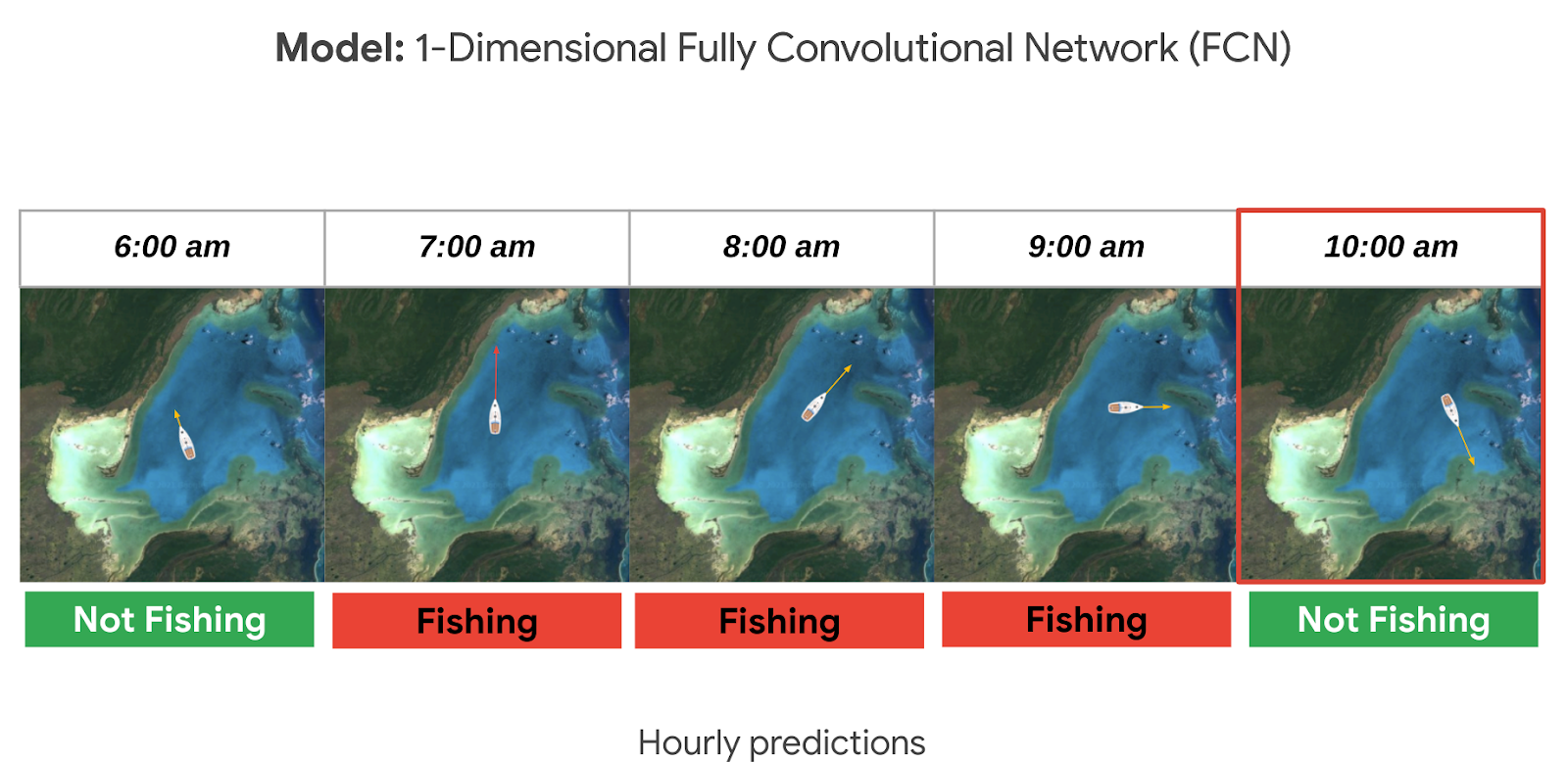
In our second episode of our People and Planet AI series we were inspired by their ML solution to this challenge, and we built a short video and sample with all the relevant code you need to get started with building a basic time-series classification model in Google Cloud, and visualize it in an interactive map.
Architecture
These are the components used to build a model for this sample:
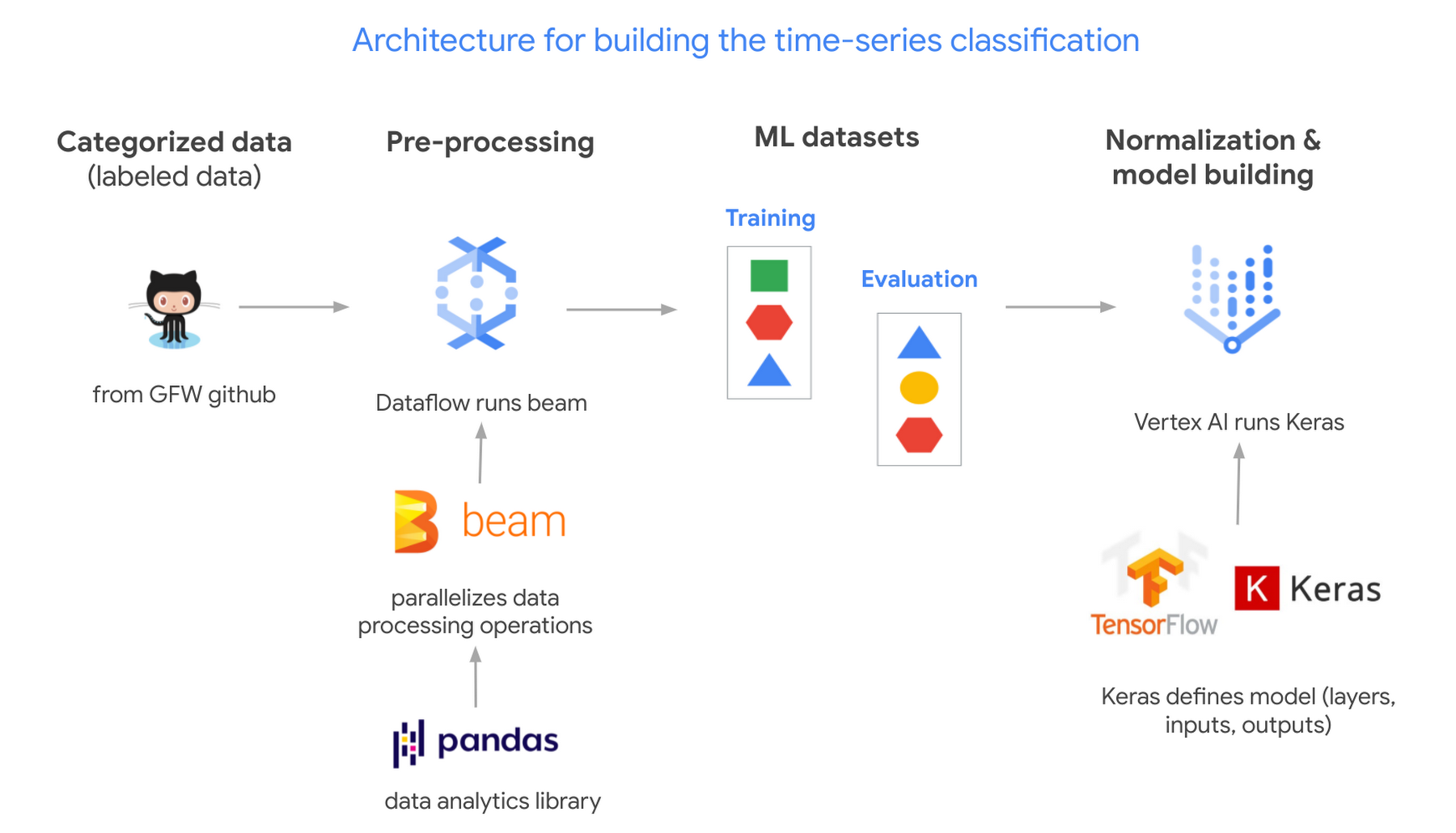
- Global Fishing Watch GitHub: where we got the data
- Apache Beam: (open source library) runs on Dataflow.
- Dataflow: (Google’s data processing service) creates 2 datasets; 1 for training a model and the other to evaluate its results.
- TensorflowKeras: (high level API library) used to define a machine learning model, which we then train in Vertex AI.
- Vertex AI: (a platform to build, deploy, and scale ML models) we train and output the model.
Pricing and steps
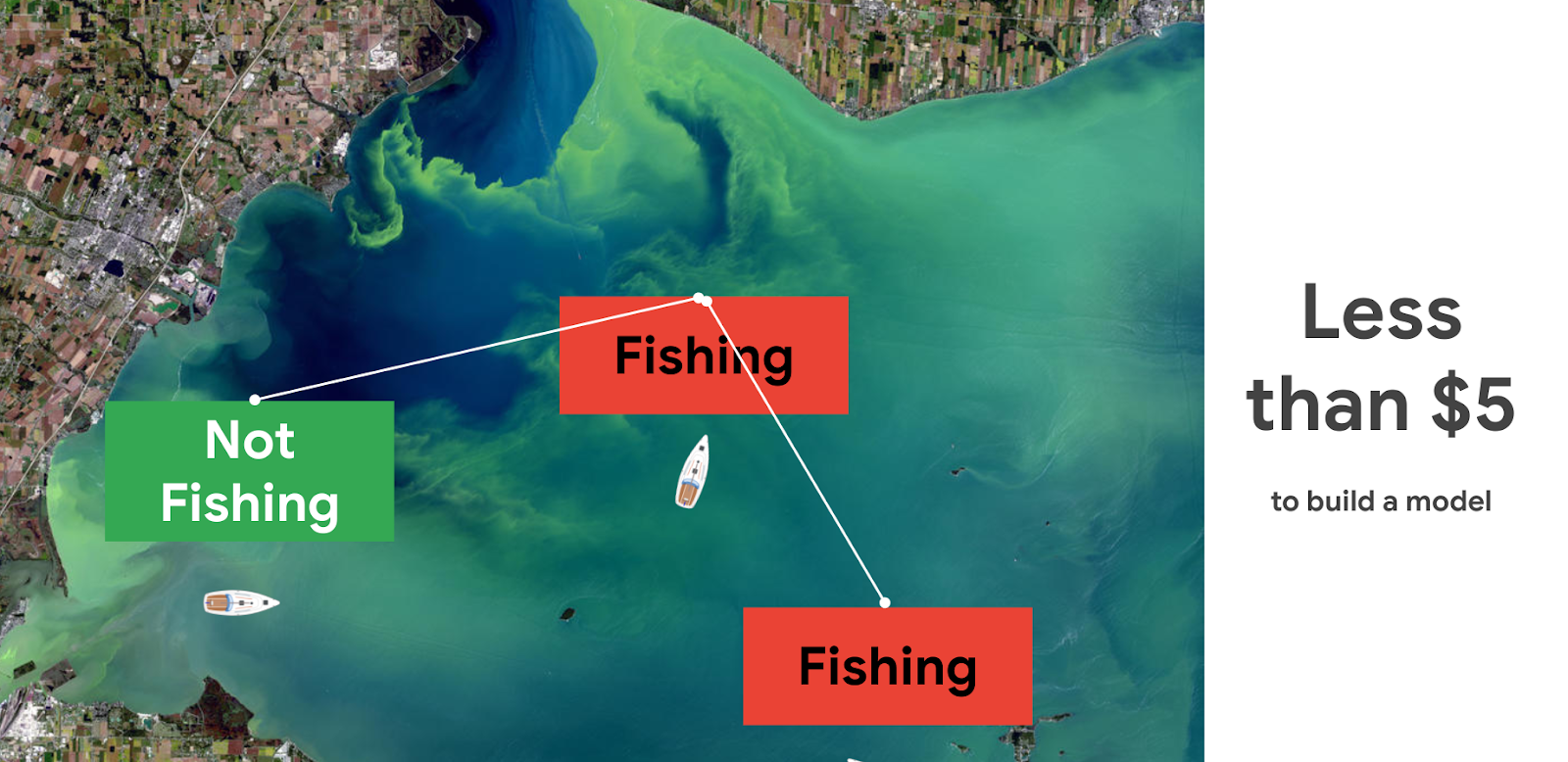
The total cost to run this solution was less than $5.
There are seven steps we went through with their approximate time and cost:
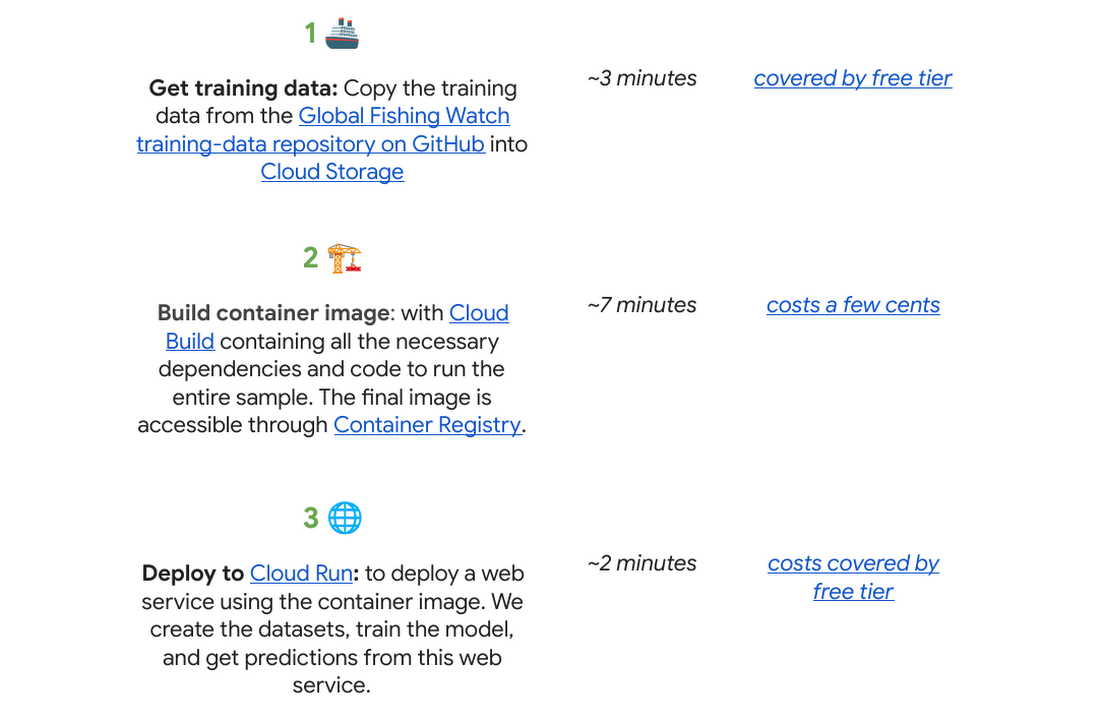
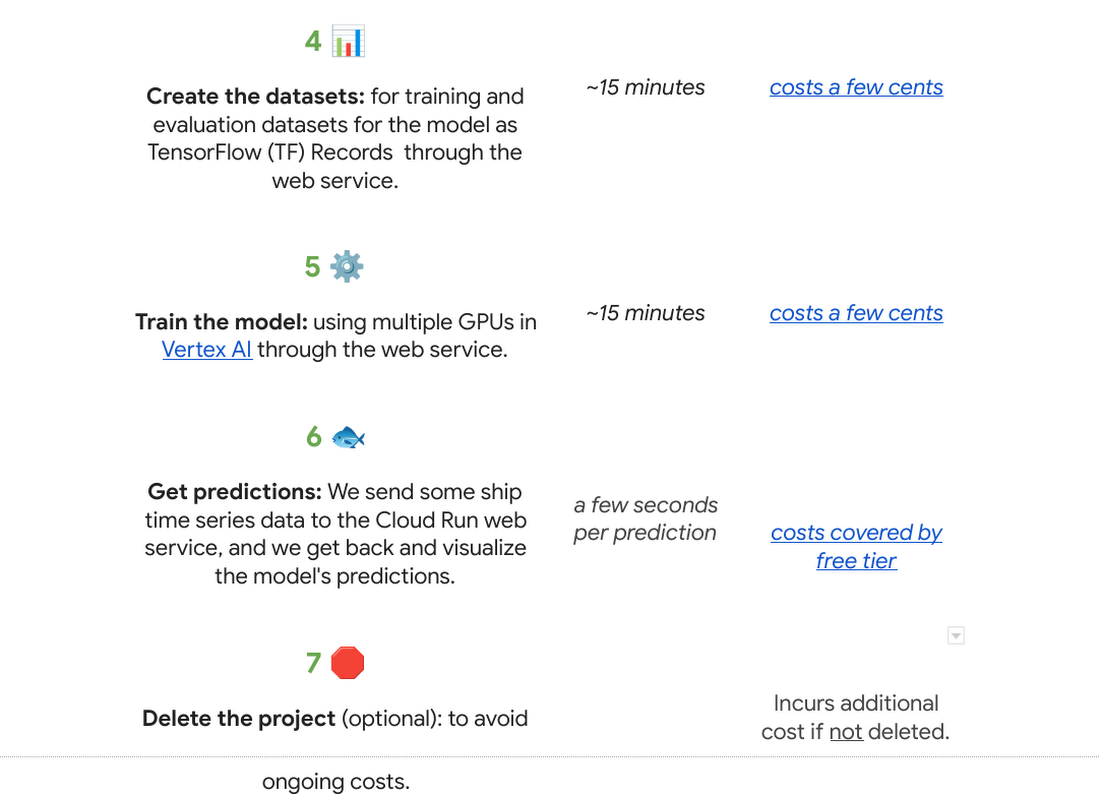
Why do we use a time series classification model?
Vessels in the ocean are constantly moving, which creates distinctive patterns from a satellite view.

We can train a model to recognize the shapes of a vessel’s trajectory. Large vessels are required to use the automatic identification system, or AIS. The GPS-like transponders regularly broadcast a vessel’s maritime mobile service identity, or MMSI, and other critical information to nearby ships, as well as to terrestrial and satellite receivers. While AIS is designed to prevent collisions and boost overall safety at sea, it has turned out to be an invaluable system for monitoring vessels and detecting suspicious fishing behavior globally.

One tricky part is that the MMSI data location signal (which includes a timestamp, latitude, longitude, distance from port, and more) is not emitted at regular intervals. AIS broadcast frequency changes with vessel speed (faster at higher speeds), and not all AIS messages that are broadcast are received – terrestrial receivers require line-of-sight, satellites must be overhead, and high vessel density can cause signal interference. For example, AIS messages might be received frequently as a vessel leaves the docks and operates near shore, then less frequently as they move further offshore until satellite reception improves. This is challenging for a machine learning model to interpret. There are too many gaps in the data, which makes it hard to predict.
A way to solve this is to normalize the data and generate fixed-sized hourly windows. Then the model can predict if the vessel is fishing or not fishing for each hour.

It could be hard to know if a ship is fishing or not by just looking at its current position, speed, and direction. So we look at the data from the past as well, looking at the future could also be an option if we don’t need to do real time predictions. For this sample, it seemed reasonable to look 24 hours into the past to make a prediction. This means we need at least 25 hours of data to make a prediction for a single hour (24 hours in the past + 1 current hour). But we could predict longer time sequences as well. In general, to get hourly predictions, we need (n+24) hours of data.
Options to deploy and access the model
For this sample specifically we used Cloud Run to host the model as a web app so that other apps can call it to make predictions on an ongoing basis; this is our favorite in terms of pricing if you need to access your model from the internet over an extended period of time (charged per prediction request). You can also host it directly from Vertex AI where you trained and built the model, just note there is an hourly cost for using those VMs even if they are idle. If you do not need to access the model over the internet, you can make predictions locally or download the model onto a microcontroller if you have an IoT sensor strategy.

Want to go deeper?
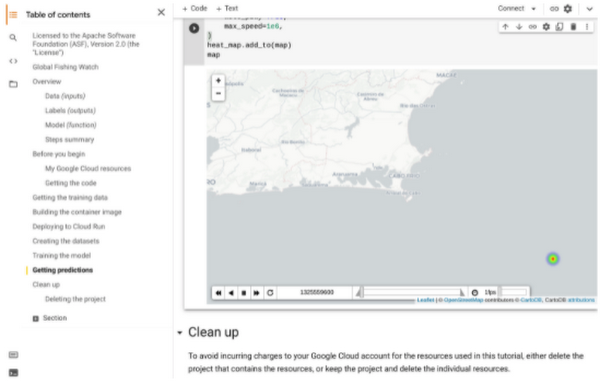
If you found this project interesting and would like to dive deeper either into the specifics of the thought process behind each step of this solution or even run through the code in your own project (or test project); we invite you to check out our interactive sample hosted on Colab, which is a free Jupyter notebook. It serves as a guide with all the steps to run the sample, including visualizing the predictions on a dynamically moving map using an open source Python library called Folium.
There’s no prior experience required! Just click “open in Colab” which is linked at the bottom of GitHub.
You will need a Google Cloud Platform project. If you do not have a Google Cloud project you can create one with the free $300 Google Cloud credit, you just need to ensure you set up billing, and later delete the project after testing the desired sample.
🌏🌎🌍 We hope to inspire you to build other beautiful climate-related solutions.
More Relevant Stories for Your Company

How Toyota’s Google Cloud-powered Voice Assistant Gives a Turboboost to Drivers’ Experience
Over the decades, technology has helped us organize large amounts of physical information in ways that are streamlined, efficient, and easily accessible. Rows upon rows of encyclopedias are no longer needed; simply punch in or speak a query into Google Search and find numerous results at your fingertips. There’s no
How to Choose the Right ML Model for Your Applications
Many of our customers want to know how to choose a technology stack for solving problems with machine learning (ML). There are many choices for these solutions available, some that you can build and some that you can buy. We’ll be focusing on the build side here, exploring the various


AI-powered Cameras Help You Serve Your Pets Better. Learn How
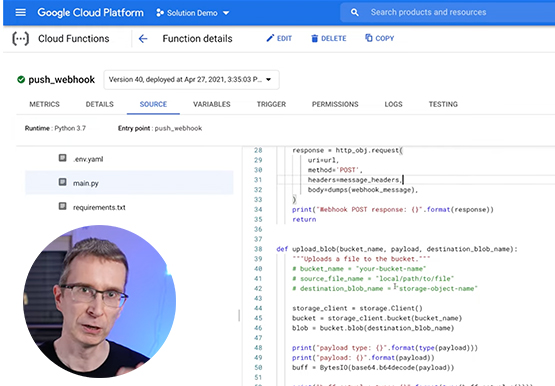
Watch the video to learn how you can leverage Google Cloud platform and AI functions to build pet-detection cameras that can capture and send image-based alert messages on your phone to notify when your pets arrive or leave.

Everything a Marketer Needs to Know About Machine Learning
As consumer expectations grow for more personalized, relevant, and assistive experiences, machine learning is becoming an invaluable tool to help meet those demands. It’s helping marketers create smarter customer segmentations, deliver more relevant creative campaigns, and measure performance more effectively. In fact, 85% of executives believe AI will allow their
