





4849
Of your peers have already watched this video.
38:32 Minutes
The most insightful time you'll spend today!
Everything You Need to Know About Google Cloud ML Engine 101
Machine learning is all around us today. But data scientists and IT teams tasked with creating models have a hard time bringing together the right mix of ingredients—from data, infrastructure, tools, and APIs—to do their jobs effectively.
Google’s Cloud ML Engine eases many of the challenges data scientists and IT teams face. It’s a managed service that allows businesses to build and deploy their own models using any type or any size of data.
With Google’s Cloud ML Engine, data scientists can create models for training and prediction. And it provides APIs for these two building blocks.
Nikhil Kothari, Senior Staff Software Engineer, Google Cloud, breaks down Google’s Cloud ML Engine. He shows you how to use it as a service, so that data scientists can focus on data and on building models instead of managing infrastructure.
End Security Risks with the Unattended Projects Recommender Feature

6125
Of your peers have already read this article.
3:00 Minutes
The most insightful time you'll spend today!
In fast-moving organizations, it’s not uncommon for cloud resources, including entire projects, to occasionally be forgotten about. Not only such unattended resources can be difficult to identify, but they also tend to create a lot of headaches for product teams down the road, including unnecessary waste and security risks.
To help you prune your idle cloud resources, we’re excited to introduce Unattended Project Recommender. It’s a new feature of Active Assist that provides you with a one-stop shop for discovering, reclaiming, and shutting down unattended projects. With actionable and automatic recommendations, you no longer have to worry about wasting money or mitigating security risks presented by your idle resources. Unattended Project Recommender uses machine learning to identify, with a high degree of confidence, projects that are likely abandoned based on API and networking activity, billing, usage of cloud services, and other signals. This feature is available via the Recommender API today, making it easy for you to integrate with your company’s existing workflow management and communication tools, or export results to a BigQuery table for custom analysis.
Thousands of projects can be unattended in large organizations, presenting major security risks
Your cloud projects can go abandoned or unattended for a number of reasons — ranging from a test environment that’s no longer needed, to project cancellation, to project owner switching jobs, and more. Not only can such projects contribute to your cloud bill (waste) but they may contain security issues such as open firewalls or privileged service account keys that attackers can exploit to get a hold of your cloud resources for cryptocurrency mining or, worse, compromise your company’s sensitive data. These security risks tend to grow over time because the latest best practices and patches are usually not applied to unattended projects.
We experience this issue here at Google, too… In fact, it has been on Google’s internal security team’s radar for some time now, so we joined forces and looked into this problem together, starting with our very own “google.com” organization cloud projects. We quickly found some projects that were unattended, but remediating this issue was easier said than done due to challenges in several areas:
- Detection: With lots of signals available to you via sources like Cloud Monitoring, what are the right ones you should look at (e.g. API, networking, user activity)? How can you tell the difference between an unattended project and a project that has a low level of activity by design (e.g. a “shell” project that holds an auth token)?
- Remediation: Once you have identified a project that seems abandoned, how do you go about ensuring that it’s indeed an unattended project? How do you reduce the risk of deleting something that might be essential to a production workload, causing irreversible data loss? How do you solve this at the scale of your entire organization, beyond a one-time cleanup?
Over the course of 2021 we built and tested a Google-internal prototype first, cleaning up many of our internal unattended projects, and then worked with a number of Google Cloud customers to build and tune this feature based on real-life data (thank you to all of our early adopters for working with us and your generous feedback that helped us shape this feature!) It was not uncommon for us to come across organizations with thousands of unattended projects, and we’re very excited to bring Unattended Project Recommender to all customers, in public preview.
Discovering and acting on unattended project recommendations
Unattended Project Recommender analyzes usage activity across all projects under your organization, including the following data:
- API activity (e.g. service accounts with authentication activity, API calls consumed)
- Networking activity (ingress and egress)
- Billing activity (e.g. services with billable usage)
- User activity (e.g. active project owners)
- Cloud services usage (e.g. number of active VMs, BigQuery jobs, storage requests)
Based on these signals, it can generate recommendations to clean up projects that have low usage activity (where “low usage” is defined using a machine learning model that ranks projects in your organization by level of usage), or recommendations to reclaim projects that have high usage activity but no active project owners. Here’s what an example post-processed summary list of recommendations can look like for the “foobar” organization that has 3 projects:
Project ID: demo-project-307815Recommendation: CLEANUP_PROJECTProject ID: new-projectRecommendation: N/AProject ID: bobs-playground-projectRecommendation: RECLAIM_PROJECT
In addition to the recommendations, you can also examine the underlying project activity insights that the recommendations are based upon. The insights provide additional information that can be useful for integration with your organization’s existing workflows and automation (e.g. send an auto-generated email or chat message to project owners based on the list provided by the owners field). Here’s an example insight payload:
content:activeAppengineInstanceDailyCount: 0activeCloudsqlInstanceDailyCount: 0activeGceInstanceDailyCount: 3activeServiceAccountDailyCount: 1apiClientDailyCount: 18922 // Daily average API calls producedbigqueryInflightJobDailyCount: 0bigqueryInflightQueryDailyCount: 0bigqueryStorageDailyBytes: 0bigqueryTableDailyCount: 0consumedApiDailyCount: 0 // Daily average API calls consumeddatastoreApiDailyCount: 0gcsObjectDailyCount: 11gcsRequestDailyCount: 0gcsStorageDailyBytes: 2663548hasActiveOauthTokens: false // OAuth tokens used in the last 180 dayshasBillingAccount: truenumActiveUserOwners: 1owners: // List of project owners- activeOnProject: falsemember: user:user1@example.com- activeOnProject: truemember: user:user2@example.comserviceWithBillableUsage:– Cloud Storage- Compute EnginevpcEgressDailyBytes: 264456938 // Daily average VPC egress bytesvpcIngressDailyBytes: 392435047 // Daily average VPC ingress bytesusagePercentile: 20 // Level of usage relative to other projects
GCP projects are used in many different ways and for many different purposes. In case you get a recommendation to delete a project that’s being used in a way that’s out of the scope for this feature, you can dismiss the recommendation and it will stop showing up for the given project.
Restoring deleted projects
When you choose to shut down a project using the projects.delete() method, it gets marked for deletion. After a project is marked for deletion, it becomes unusable, all resources within that project are shut down, and a 30-day wait period for the project and all of its data to get fully deleted begins.
In case a useful project is accidentally shut down, you have the option to restore the project within that 30-day wait period. Since restoring allows you to recover most but not necessarily all of your project data and resources, we recommend carefully examining the utilization insights associated with a project and considering any additional utilization signals that may not be captured by the Unattended Project Recommender before taking the cleanup action.
Early customer success stories
A number of enterprise customers are already using Unattended Project Recommender to keep their organizations clean of unattended projects and resources.
Decathlon, a French sporting goods retailer, is excited for the insight Unattended Project Recommender will bring to their environment, and are already deploying it as a part of their latest cloud security initiatives.
“After a thorough test of this feature and the validation of our CISO, we ended up deleting our first 775 projects, and no one complained! A great help to improve our security. The next step for us will be to operationalize it at scale, and implement a company wide policy for unattended resource management.” —Adeline Villette, Cloud Security Officer
For Veolia, one of the world’s largest water, waste and energy management companies, not only does this feature reduce security risks and waste, but also helps drive cultural shift and alignment with its ecological transformation strategy.
“This feature allows us to reduce our costs and security debt on assets that are no longer in use, and is also fully in line with Veolia’s philosophy of limiting its carbon footprint. After having tested Unattended Project Recommender on more than 3,000 projects throughout our organization, we are looking to bring it as proactive alerts to our project owners at scale.”—Thomas Meriadec, Product Manager
Box, a secure cloud content management provider, views it as a foundation for building a repeatable process to remediate unused resources.
“Unattended Project Recommender is a great fit for us. It gives us a unified view of project usage across our entire organization and enables us to address security risks of legacy projects in a systematic and organized manner, ensuring an even safer environment.” —Matt Bowes, Staff Security Engineer
Getting started with the Unattended Project Recommender
To help you get started, we’ve prepared a Cloud Shell tutorial (source code) that you can use to find unattended project recommendations within your own Projects/Folders/Organization. Click this button to clone the tutorial from GitHub and run in your Cloud Shell environment:

As you can see, listing recommendations for your projects only takes a few clicks with the tutorial (special thanks to Lanre Ogunmola, Security & Compliance Specialist, for making this look so easy)! For additional detail on using the gcloud CLI or API to discover unattended project recommendations, please refer to the documentation page.
You can also automatically export all recommendations from your Organization to BigQuery and then investigate the recommendations with DataStudio or Looker, or use Connected Sheets that let you use Google Workspace Sheets to interact with the data stored in BigQuery without having to write SQL queries.
As with any other Recommender, you can choose to opt out of data processing at any time by disabling the appropriate data groups in the Transparency & control tab under Privacy & Security settings.
We hope that you can leverage Unattended Project Recommender to improve your cloud security posture and reduce cost, and can’t wait to hear your feedback and thoughts about this feature! Please feel free to reach us at active-assist-feedback@google.com and we also invite you to sign up for our Active Assist Trusted Tester Group if you would like to get early access to the newest features as they are developed.
Poor Product Discovery Causes Shoppers’ Abandonment, Time to Augment ‘Search Experience’ with Google’s Retail Search!

3103
Of your peers have already read this article.
2:30 Minutes
The most insightful time you'll spend today!
How many times has a shopper searched for a product on a store’s website only to get results that aren’t relevant—or worse, provided no search results at all? While most ecommerce sites have search capabilities, few accomplish their ultimate goal: making it easy for customers to discover the products they want.
Some 94% of U.S. consumers abandoned a shopping session because they received irrelevant search results, according to a 2021 survey conducted by The Harris Poll and Google Cloud. It’s a phenomenon known as “search abandonment.” Indeed, poor product discovery experiences can stop a purchase in its tracks and leave shoppers frustrated. Retailers miss out on a staggering $300 billion each year due to search abandonment in the U.S. alone.
With the announcement today of our latest discovery solution, Retail Search, now generally available, retailers worldwide can supercharge their websites and mobile apps with Google-quality search. Built on Google’s technologies that understand user intent and context, the solution helps businesses improve the search and overall shopping experience across all of their digital touchpoints.
Already, early adopters like Lowes, Fnac Darty, and Casas Pernambucanas have been using Google Cloud’s discovery solutions to increase sales conversions, boost basket sizes, and improve customer engagement.
Understanding user intent in search is a hard problem
While we’ve come a long way from the days when search was largely based on keywords and boolean rules, shoppers still struggle to find what they’re looking for. They often have to come up with a perfectly-worded query that a retailer’s site search engine will understand, sometimes rephrasing several times before getting the results they want—if they find anything relevant at all.
Traditional search technologies don’t work in the modern age of online retail, where tens or even hundreds of thousands of items are available on a single ecommerce site.
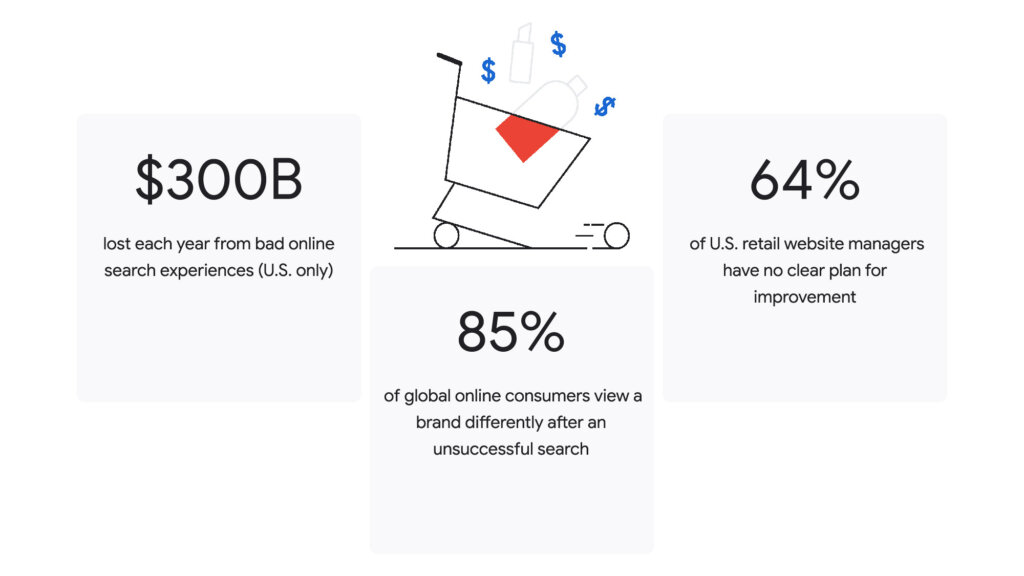
Today, people expect search engines to understand their intent more deeply, return relevant results faster, and help them discover new products easily with personalized recommendations.
Fortunately, product discovery experiences on retail sites can now offer superior, contextual experiences for consumers, combining marketing and data science insights along with advanced search technologies based on machine learning and artificial intelligence.
Now, through the power of Retail Search, when a shopper searches for a “long black dress with short sleeves and comfortable fit” on an ecommerce site, they should immediately get results for precisely that—rather than refining their search multiple times, or worse, giving up their shopping journey.
Helping retailers solve their search experience woes
Retail Search transforms the shopping experience and makes it easier for shoppers to find relevant products by surfacing results that are intuitive and contextual.
This fully managed service is easily customizable, enabling organizations to craft shopper-focused search experiences. Our site search solution builds upon decades of Google’s experience and innovation in search indexing, retrieval, and ranking. Retailers can make product discovery even easier for shoppers, while optimizing for their business goals with advanced capabilities, including:
- Advanced query understanding that produces better results from even the broadest queries, including non-product searches.
- Semantic search to effectively match product attributes with website content for fast, relevant product discovery.
- Optimized results that leverage user interaction and ranking models to meet specific business goals.
- State-of-the-art security and privacy practices that ensure retailer data is isolated with strong access controls and is only used to deliver relevant search results on their own properties.
Retailers can now shape product discovery into a shopping experience that is timely, relevant, and personalized—all powered by Google Cloud.
Early adopters seeing immediate impact
Several leading retailers around the world have been able to quickly create better online shopping experiences for their customers and capture more digital and omnichannel growth using Google Cloud’s product discovery solutions.
“With limited customer signals and no historical data, descriptive long-tail searches are some of the most challenging queries to understand,” said Neelima Sharma, senior vice president, technology, e-commerce, marketing and merchandising at Lowe’s. “We have been partnering with Google Cloud to give our customers relevant results for long-tail searches and have seen an increase in click-through and search conversion and a drop in our ‘No Results Found’ rate since we launched.”
“Making constant improvements to our website search engines has always been a priority for us as we aim to give our customers a simpler, more customized and enhanced online shopping experience,” said Olivier Theulle, Fnac Darty’s chief ecommerce and digital officer. “As we implement Google Cloud’s site search solution on our Fnac Darty websites and are the first French retailer to do so, we expect the solution to deliver increased conversion rates while also offering greater customer satisfaction.”
“Google Cloud has helped improve the indexing and quality of search results on Pernambucanas’ digital platforms, providing a better experience to our customers and improving sales conversions,” said Fabiano Rustice, chief information officer at Pernambucanas. “On Black Friday in November 2021—the largest retail date in Brazil—we saw a 20% reduction in search refinements per user, for which Retail Search was instrumental. We are proud to be an early adopter and to have Google Cloud as a strategic innovation partner.”
In addition to Google Cloud’s efforts working directly with customers, our ecosystem of key partners, including GroupBy, Lucidworks, GridDynamics, SpringML, and others are also leveraging Google Cloud discovery solutions to provide value added services to their customers.
“In the fast paced and extremely competitive ecommerce environment, we are seeing that forward-looking and innovative retailers are prioritizing product discovery,” said Roland Gossage, CEO of GroupBy. “GroupBy has proudly partnered with Google Cloud to launch its product discovery solutions across several client environments. Already we have seen a more than 10% increase in online revenues, which equates to millions of dollars, and this is just the beginning.”
To learn more, visit Discovery Solutions for Retail or contact your Google Cloud field sales representative.
3017
Of your peers have already watched this video.
18:00 Minutes
The most insightful time you'll spend today!
Driving Business Transformation in Financial Services Using Google Cloud and AI/ML
These are challenging times with financial services institutions navigating the pandemic.
Interest rates are an all-time low, and customer expectations are changing with the shift to digital. For example, digital banking has increased from 63 in 2019 to 72 percent today. Then regulatory requirements are evolving and compliance costs are increasing. Also, the financial services industry as a whole is facing new and creative types of fraud.
In this video, Tom Shane, Product Manager – Google Cloud and Michael Baldwin, Head of Product – Financial Services, Google Cloud – Google Cloud, uncover three areas where they see AI helping to unlock business transformation in financial services.
Find out how AI can help reimagine the customer experience, how financial institutions are looking for ways to use data and analytics to transform how they detect and manage risk, and how financial institutions are asking Google Cloud experts for a best-in-class AI platforms so that they can build their own AI-powered solutions to solve their most critical business problems.
Pay-as-you-go AI Management Platform Available on Google Cloud Marketplace

3087
Of your peers have already read this article.
2:30 Minutes
The most insightful time you'll spend today!
Editor’s note: Prevision.io has built the first ever pay-as-you-go AI management platform that simplifies the machine learning project lifecycle while offering powerful analytics capabilities. Now available exclusively on Google Cloud Marketplace, users can experiment, build, deploy, and manage AI projects in the cloud in weeks—without having extensive data science knowledge.
Similar to the momentum that cloud technology has had in the business world, AI and machine learning are quickly becoming essential to the enterprise. 86% of companies now view AI as a “mainstream technology,” and corporate AI adoption rose 50% in 2021 from the year prior for initiatives such as service-operations optimization and product enhancement. But for companies that don’t fall into the Fortune 500, initiating AI projects can come with several challenges, ranging from one-size-fits-all subscription models to skills gaps and resource-heavy monitoring requirements.
My team of data scientists saw a real need for software that could democratize machine learning innovation by removing these common barriers. We knew that features like automation could make building and deploying AI much more doable for other data scientists, as well as citizen data scientists. So, we launched Prevision.io, a first-of-its-kind dedicated AI management platform built on Google Cloud and now available exclusively on Google Cloud Marketplace.
As a Google Cloud Partner Advantage Member, we knew the benefits of an elastic infrastructure, full integration with BigQuery, and access to a large library of complementary tools, such as Kubeflow on Google Cloud. As a result, it’s easier for our users to improve upon their robust AI projects.
Set up in minutes, deploy a machine learning model in weeks
Users can start building and deploying models in Prevision.io immediately after subscribing through Google Cloud Marketplace. Instead of taking weeks to onboard and months to launch a real-world model into production, Prevision.io’s intuitive interface and powerful predictive analytics capability makes it possible to set up in minutes–and have models up and running in three to four weeks. Since we believe in cost-efficient scaling, our platform operates on a pay-as-you-go model with no long-term contracts, licensing, or per-user fees.
Simply connect Prevision.io with your data–whether it exists in buckets or in an SQL data source like BigQuery. No matter your data source, set up is quick. There are even tutorials to help if you’re using APIs. Follow this tutorial for step-by-step set up details in Google Cloud.
Once historical data is imported, you can start applying your own models inside Prevision.io, or use Prevision.io to build a bespoke model. There’s more good news: expenditures on Prevision.io’s platform are applied toward customers’ Google Cloud spend commitments.
Full lifecycle AI project management made easy
By automating the complexity of AI project management with a no-code approach, businesses do not have to add more data scientists to their teams, risk data drift or outdated models, spend hundreds of thousands on unused software, or massively expand IT budgets. By connecting BigQuery or other datastores to Prevision.io, you can launch high-performing machine learning projects and manage them across the entire lifecycle. With Prevision.io you can:
- Experiment with iteration and optimization to get an effective model into production from the start. Track performance and compare versions to identify the most reliable model. Because there is no infrastructure to manage, users can focus only on the project and see ROI sooner.
- Automate training and prediction tasks to improve collaboration, reduce time-consuming manual operations, and boost results. Users can implement automation across the production pipeline with built-in features like AutoML and a scheduler for recurring tasks. Retrain automations and integrate custom code to keep processes aligned and relevant.
- Deploy scalable working models securely and reliably in one-click. Tailor deployments using REST APIs or as a component to generate batch predictions. Create dashboards to share with stakeholders, and swiftly update your model without worrying about service interruptions or breakages.
- Monitor infrastructure and model behavior to understand resource utilization and how data changes over time—without requiring more of IT. Put an end to endless maintenance meetings with reliable, real-time monitoring applications around drift, data in-and-out, and prediction distribution. If an issue arises, Prevision.io provides detailed alerts and analysis to understand the root of a problem.
Any business can benefit
Regardless of industry or department, we’ve seen Prevision.io help businesses solve some of their biggest challenges. Utilities companies are relying on better forecasts of the energy consumption (gas or electricity).. Transportation companies have deployed machine learning models that can inform logistical operations based on fluctuating supply and demand. Doing more with data not only improves what a business can offer their customers but can also yield significant savings. Here are a few real-life examples:
La Poste: delivery data saves the day
Global delivery company La Poste was having trouble meeting customers’ demand for speed and visibility, and inaccurate estimated arrival times for packages was costing them money. The team wanted to put its tracking and tracing data to work, and turned to Prevision.io to select technical metrics, set up personalized machine learning models for delivery rounds of all personnel, and speed up the iteration and training process. After deploying its model in four weeks, La Poste achieved an 89% accuracy rate for delivery times and saw a 10x improvement in IT infrastructure and operational costs. And of course, happier customers who keep coming back.
BPCE: machine learning helps us help our clients
An arm of BPCE Group, the second largest banking group in France, was feeling the effects of the pandemic’s impact on customers. It needed a more efficient way of determining who would need what type of help—and when–to reduce the number of customers entering the collections process. Using its wealth of data to create and deploy a machine learning model in Prevision.io, the firm was able to rapidly identify the most at-risk customers and better understand the root causes behind potential debt default—some of which are easily fixable. As a result, the firm has seen a fifteen-fold increase in the sums they have been able to recover, and decreased the number of collection cases by 50%.
Pharmaceutical company: marketing medicine with MLOps
The marketing department at a healthcare company serving pharmacies was able to reduce customer churn and improve growth by using Prevision.io to compute market segmentation based on anticipated customer revenue. This helped the company determine the best way to engage with each pharmacy—and when. Being able to make strategic decisions based on automated predictions and more targeted data saved the company $1.3M Euros in two fiscal quarters.
See how AI project management and MLOps made easy can transform your business. Access Prevision.io on Google Cloud Marketplace and take advantage of the 14-day free trial.
A Breakdown of Cloud-based Data Ingestion Practices

8824
Of your peers have already read this article.
3:00 Minutes
The most insightful time you'll spend today!
Businesses around the globe are realizing the benefits of replacing legacy data silos with cloud-based enterprise data warehouses, including easier collaboration across business units and access to insights within their data that were previously unseen. However, bringing data from numerous disparate data sources into a single data warehouse requires you to develop pipelines that ingest data from these various sources into your enterprise data warehouse. Historically, this has meant that data engineering teams across the organization procure and implement various tools to do so. But this adds significant complexity to managing and maintaining all these pipelines and makes it much harder to effectively scale these efforts across the organization. Developing enterprise-grade, cloud-native pipelines to bring data into your data warehouse can alleviate many of these challenges. But, if done incorrectly, these pipelines can present new challenges that your teams will have to spend their time and energy addressing.
Developing cloud-based data ingestion pipelines that replicate data from various sources into your cloud data warehouse can be a massive undertaking that requires significant investment of staffing resources. Such a large project can seem overwhelming and it can be difficult to identify where to begin planning such a project. We have defined the following principles for data pipeline planning to begin the process. These principles are intended to help you answer key business questions about your effort and begin to build data pipelines that address your business and technical needs. Each section below details a principle of data pipelines and certain factors your teams should consider as they begin developing their pipelines.
Principle 1: Clarify your objectives
The first principle to consider for pipeline development is clarify your objectives. This can be broadly defined as taking a holistic approach to pipeline development that encompasses requirements from several perspectives: technical teams, regulatory or policy requirements, desired outcomes, business goals, key timelines, available teams and their skill sets, and downstream data users. Clarifying your objectives clearly identifies and defines requirements from each key stakeholder at the beginning of the process and continually checks development against these requirements to ensure the pipelines built will meet these requirements.This is done by first clearly defining the desired end state for each project in a way that addresses a demonstrated business need of downstream data users. Remember that data pipelines are almost always the means to accomplish your end state, rather than the end state itself. An example of an effectively defined end-state is “enabling teams to gain a better understanding of our customers by providing access to our CRM data within our cloud data warehouse” rather than “move data from our CRM to our cloud data warehouse”. This may seem like a merely semantic difference, but framing the problem in terms of business needs helps your teams make technical decisions that will best meet these needs.
After clearly defining the business problem you are trying to solve, you should facilitate requirement gathering from each stakeholder and use these requirements to guide the technical development and implementation of your ingestion pipelines. We recommend gathering stakeholders from each team, including downstream data users, prior to development to gather requirements for the technical implementation of the data pipeline. These will include critical timelines, uptime requirements, data update frequency, data transformation, DevOps needs, and security, policy, or regulatory requirements by which a data pipeline must meet.
Principle 2: Build your team
The second principle to consider for pipeline development is build your team. This means ensuring you have the right people with the right skills available in the right places to develop, deploy, and maintain your data pipelines. After you have gathered your pipeline requirements, you can begin to develop a summary architecture that will be used to build and deploy your data pipelines. This will help you identify the human talent you will need to successfully build, deploy, and manage these data pipelines and identify any potential shortfalls that would require additional support from either third-party partners or new team members.
Not only do you need to ensure you have the right people and skill sets available in aggregate, but these individuals need to be effectively structured to empower them to maximize their abilities. This means developing team structures that are optimized for each team’s responsibilities and their ability to support adjacent teams as needed.
This also means developing processes that prevent blockers to technical development whenever possible, such as ensuring that teams have all of the appropriate permissions they need to move data from the original source to your cloud data warehouse without violating the concept of least privilege. Developers need access to the original data source (depending on your requirements and architecture) in addition to the destination data warehouse. Examples of this are ensuring that developers have access to develop and/or connect to a Salesforce Connected App or read access to specific Search Ads 360 data fields.
Principle 3: Minimize time to value
The third principle to consider for pipeline development is minimize time to value. This means considering the long-term maintenance burden of a data pipeline prior to developing and deploying it in addition to being able to deploy a minimum viable pipeline as quickly as possible. Generally speaking, we recommend the following approach to building data pipelines to minimize their maintenance burden: Write as little code as possible. Functionally, this can be implemented by:
1. Leveraging interface-based data ingestion products whenever possible. These products minimize the amount of code that requires ongoing maintenance and empower users who aren’t software developers to build data pipelines. They can also reduce development time for data pipelines, allowing them to be deployed and updated more quickly.
- Products like Google Data Transfer Service and Fivetran allow for managed data ingestion pipelines by any user to centralize data from SaaS applications, databases, file systems, and other tooling. With little to no code required, these managed services enable you to connect your data warehouse to your sources quickly and easily.
- For workloads managed by ETL developers and data engineers, tools like Google Cloud’s Data Fusion provide an easy-to-use visual interface for designing, managing and monitoring advanced pipelines with complex transformations.
2. Whenever interface-based products or data connectors are insufficient, use pre-existing code templates. Examples of this include templates available for Dataflow that allow users to define variables and run pipelines for common data ingestion use cases, and the Public Datasets pipeline architecture that our Datasets team uses for onboarding.
3. If neither of these options are sufficient, utilize managed services to deploy code for your pipelines. Managed services, such as Dataflow or Dataproc, eliminate the operational overhead of managing pipeline configuration by automatically scaling pipeline instances within predefined parameters.
Principle 4: Increase data trust and transparency
The fourth principle to consider for pipeline development is increase data trust and transparency. For the purposes of this document, we define this as the process of overseeing and managing data pipelines across all tools. Numerous data ingestion pipelines that each leverage different tools or are not developed under a coordinated management plan can result in “tech sprawl”, which significantly increases the management overhead of data ingestion pipelines as the quantity of data pipelines increases. This becomes especially cumbersome if you are subject to service-level agreements, or legal, regulatory, or policy requirements for overseeing data pipelines. Preventing tech sprawl is, by far, the best strategy for dealing with it by developing streamlined pipeline management processes that automate reporting. Although this can theoretically be achieved by building all of your data pipelines using a single cloud-based product, we do not recommend doing so because it prevents you from taking advantage of features and cost optimizations that come with choosing the best product for your use case.
A monitoring service such as Google Cloud Monitoring Service or Splunk that automates metrics, events, and metadata collection from various products, including those hosted in on-premise and hybrid computing environments, can help you centralize reporting and monitoring of your data pipelines. A metadata management tool such as Google Cloud’s Data Catalog or Informatica’s Enterprise Data Catalog can help you better communicate the nuances of your data so users better understand which data resources are best fit for a given use case. This significantly reduces your pipeline’s governance burden by eliminating manual reporting processes that often result in inaccuracies or lagging updates.
Principle 5: Manage costs
The fifth principle to consider for pipeline development is manage costs. This encompasses both the cost of cloud resources and the staffing costs necessary to design, develop, deploy, and maintain your cloud resources. We believe that your goal should not necessarily be to minimize cost, but rather maximizing the value of your investment. This means maximizing the impact of every dollar spent by minimizing waste in cloud resource utilization and human time. There are several factors to consider when it comes to managing costs:
- Use the right tool for the job – Different data ingestion pipelines will have different requirements for latency, uptime, transformations, etc. Similarly, different data pipeline tools have different strengths and weaknesses. Choosing the right tool for each data pipeline can help your pipelines operate significantly more efficiently. This can reduce your overall cost, free up staffing time to focus on the most impactful projects, and make your pipelines much more efficient.
- Standardize resource labeling – Implement and utilize a consistent labeling schema across all tools and platforms to have the most comprehensive view of your organization’s spending. One example is requiring all resources to be labeled by the cost center or team at time of creation. Consistent labeling allows you to monitor your spend across different teams and calculate the overall value of your cloud spending.
- Implement cost controls – If available, leverage cost controls to prevent errors that result in unexpectedly large bills.
- Capture cloud spend – Capture your spend on all cloud resource utilization for internal analysis using a cloud data warehouse and a data visualization tool. Without it, you won’t understand the context of changes in cloud spend and how they correlate with changes in business.
- Make cost management everyone’s job – Managing costs should be part of the responsibilities of everyone who can create or utilize cloud resources. To do this well, we recommend making cloud spend reporting more transparent internally and/or implementing chargebacks to internal cost centers based on utilization.
Long-term, the increased granularity in cost reporting available within Google Cloud can help you better measure your key performance indicators. You can shift from cost-based reporting (i.e. – “We spent $X on BigQuery storage last month”) to value-based reporting (i.e. – “It costs $X to serve customers who bring in $Y revenue”).
To learn more about managing costs, check out Google Cloud’s “Understanding the principles of cost optimization” white paper.
Principle 6: Leverage continually improving services
The sixth principle is leverage continually improving services. Cloud services are consistently improving their performance and stability, even if some of these improvements are not obvious to users. These improvements can help your pipelines run faster, cheaper, and more consistently over time. You can take advantage of the benefits of these improvements by:
- Automating both your pipelines and pipeline management: Not only should data pipelines be automated, but almost all aspects of managing your pipelines can also be automated. This includes pipeline/data lineage tracking, monitoring, cost management, scheduling, access management and more. This helps reduce long-term operational costs of each data pipeline that can significantly alter your value proposition and prevent any manual configurations from negating the benefits of later product improvements.
- Minimizing pipeline complexity whenever possible: While ingestion pipelines are relatively easy to develop using UI-based or managed services, they also require continued maintenance as long as they are in use. The most easily maintained data ingestion pipelines are typically the ones that minimize complexity and leverage automatic optimization capabilities. Any transformation in a data ingestion pipeline is a manual optimization of the pipeline that may struggle to adapt or scale as the underlying services improve. You can minimize the need for such transformations by building ELT (extract, load, transform) pipelines rather than ETL (extract, transform, load) pipelines. This pushes transformations down to the data warehouse that is use a specifically optimized query engine to transform your data rather than manually configured pipelines.
Next steps
If you’re looking for more information about developing your cloud-based data platform, check out our Build a modern, unified analytics data platform whitepaper. You can also visit our data integration site to learn more and find ways to get started with your data integration journey.
Once you’re ready to begin building your data ingestion pipelines, learn more about how Cloud Data Fusion and Fivetran can help you make sure your pipelines address these principles.
More Relevant Stories for Your Company


AI-as-a-Service is Here. It’s Really Almost Plug-and-Play
What is the one thing that enterprises want providers to do vis-à-vis AI? To decomplexify it. Today, the path to AI adoption is confusing, and requires skills that are out of reach for most enterprises. That’s what Google Cloud is addressing. “It used to be—still is true—that AI's a pretty




AutoML Vision: Among the Fastest and Easiest Way to Adopt AI for Your Enterprise
What’s among the largest impediment to the adoption of AI within enterprises? Not enough access to skills. According to 80 percent of business respondents to an EY survey, the top challenge to an enterprise AI program is the lack of requisite talent. What companies need today is a way to

How to Build A Basic Image Search Utility for Natural Language Queries
This post shows how to build an image search utility using natural language queries. Our aim is to use different GCP services to demonstrate this. At the core of our project is OpenAI's CLIP model. It makes use of two encoders - one for images and one for texts. Each encoder

Data to Business Outcomes with Google’s Data Analytics Design Pattern
Companies today are inundated with vast amounts of data from various sources. This overwhelming amount of data is meant to benefit the company, but often leaves data teams feeling overwhelmed, which can create data bottlenecks and result in a slow time to value. In fact, only twenty seven percent of
