





3240
Of your peers have already watched this video.
38:09 Minutes
The most insightful time you'll spend today!
TensorFlow: The Show-and-Tell Data Scientists Have Been Asking For
TensorFlow is among the most popular, if not, the most popular deep learning libraries today. According to one ranking, “TensorFlow is at least two standard deviations above the mean on all calculated metrics.”
Watch as Lak Lakshmanan, Technical Lead, Machine Learning and Big Data, Google Cloud, walks through a development workflow that will make operationalization easier to execute, including the process of building a complete machine learning pipeline covering ingest, exploration, training, evaluation, deployment, and prediction.
He also talks about the need for distributed training. But what’s the benefit of distributed TensorFlow? Many machine learning frameworks can only handle “toy problems”, or problems that can be solved by input data that fits into memory. These are small data sets.
But to build effective machine learning you need big data, feature engineering, and model architectures. With large amounts of data batching and distribution are very important. That’s where distributed training comes in.
Elevating Voice Solutions: Google Cloud Introduces Speech-to-Text v2 API and Chirp for Businesses

916
Of your peers have already read this article.
3:30 Minutes
The most insightful time you'll spend today!
As one of the most innate and ubiquitous forms of expression, speech is a fundamental pillar of human interaction. It comes as no surprise, then, that Google Cloud’s Speech API has become a crucial tool for enterprise customers, launched to general availability (GA) over six years ago and, now, processing over 1 billion voice minutes each month.
With the Speech API, we’ve been pleased to serve thousands of customers and provide industry-leading speech recognition quality and cost-effective products across a range of industries. We want to constantly evolve our offerings and bring new benefits to organizations, which is why today, we’re excited to announce the GA release of our new Speech-to-Text v2 API.
Speech-to-Text v2 modernizes our API interface and introduces several new features. It also migrates all of our existing functionality, so you can use the same models and features that you were using in STT v1 or v1p1beta1 APIs. This new version of our API also allows us to take advantage of significant cost savings in our serving path, and as such we are reducing our base price, as well as adding pricing incentives for large workloads and those willing to accept longer turnaround times.
This new infrastructure also allows us to serve a wide variety of new types of models, including Chirp , our latest 2B-parameter large speech model. All of these are Generally Available to Google Cloud Platform customers and users starting today.
Let’s have a more thorough look though at the enhanced features of Speech-to-Text API V2 and illustrate how your business can benefit from our new capabilities:
Expanding Speech-to-Text features with V2 API
Since the official launch of Speech-to-Text API back in 2017, we’ve utilized Google’s global infrastructure to host and monitor our production-facing transcription models. This robust, well-connected network has been the backbone of our offering for all of our customers.
However, a unified view of our Speech-to-Text service has been a crucial request for our enterprise customers who need to satisfy data residency and compliance requirements, especially in regulated industries like banking and public sector. We listened carefully to this feedback, and starting today, our Speech-to-Text v2 API supports full regionalization, allowing our customers to invoke identical copies of all our transcription models in the Google Cloud Platform region of their choice.
In addition to giving users the flexibility to deploy in any region, we are adding a number of new features to help developers build on the API:
- Recognizers: A user-defined named configuration that combines a model identifier, the language-locale of the audio to be transcribed, and the cloud region for the transcription model to run. Once-created, the recognizer can be referenced to every subsequent transcription request, eliminating the need for users to repeatedly define the same configuration parameters. This resourceful implementation of recognizers allows for greater flexibility in authentication and authorization, as users are not longer required to set up dedicated service accounts.
- Cloud Logging: Requests performed using a recognizer object automatically support cloud logging by default. Since the recognizers are defined as named entities, customers can partition traffic based on the recognizer of interest or collectively.
- Audio Format Auto-Detection: Instead of having our users analyze and manually define the audio configuration settings to pass in a transcription request, the new Speech-to-Text V2 API detects settings like encoding, sampling rate, and channel count, then automatically populates the request configuration parameters.
Increasing accuracy at Enterprise Scale with Chirp
As part of our continuous investment in foundational speech models, in March 2023 we released research results for our Universal Speech Mode (USM), a family of state-of-the-art speech models with 2B parameters and support for transcriptions of 300+ languages. In May 2023, at Google I/O, we announced Chirp in Private Preview, the latest version of the USM family, fine-tuned for our Cloud-specific use-cases.
Chirp is now GA through the Speech-to-Text v2 API. Following extensive testing and feedback from our customers, we are making the power of pre-trained large models accessible through a simple enterprise-grade API surface. Our early adopters have seen major strides in customer engagement, thanks to the market-leading accuracy and language coverage of the new model, and we cannot wait to see what opportunities our enterprise customers will unlock.
Introducing new pricing, tiers, and options
We have heard from customers that price can be just as important as quality for many workloads. That’s why the Speech-to-Text API v2 features totally new pricing. We have lowered the cost of real-time and batch transcription from $0.024 per minute to $0.016 per minute. Additionally, we know that pricing can be a concern for those that have very large transcription workloads. For that reason, we are also introducing standard volume tiers, allowing costs as low as $0.004 per minute. As always, additional discounts are available to those with even larger workloads.

Staying true to our commitment on flexibility and choice in pricing, we noticed that even though the majority of our customers are interested in our models for real-time transcription scenarios, many are also interested in non-real time transcriptions for data at rest. With our new API v2 infrastructure, we can take greater advantage of capacity that goes unused at certain times. With our new Dynamic Batch pricing, we are passing this savings on to customers that are less latency sensitive. Aimed at users who can wait up to 24 hours for transcription results, Dynamic Batch is a new discounted pricing tier that offers 75% lower price per minute for transcription audio relative to our Standard tier.

For more information on Dynamic Batch and all our new STT v2 API pricing, check out our pricing page.
Learn more and start you Speech-to-Text journey
For more information to help get you started on your migration journey from V1 to V2, head over to the detailed documentation and try our walkthroughs to make the most of regionalization and recognizers.
If you are curious to learn more about how to use Chirp, you can get started by following our tutorial. You can also read more about how we built it in our research blog post.
We are very excited to bring all these improvements to our developer ecosystem and provide you with the tools to leverage the power of voice for your businesses, programs, and applications.
Architecting Data Pipelines Directly Improves Customer Experience at Universe.com

6103
Of your peers have already read this article.
3:30 Minutes
The most insightful time you'll spend today!
At Universe, we serve customers day and night and are always working to make sure they have a great experience, whether online or at one of our live events.
Our technology has to make that possible, and our legacy systems weren’t cutting it anymore. What we needed was a consistent, reliable infrastructure that would help our internal teams provide a fast and innovative ticket-buying experience to customers.
With our data well-managed, we could free up time for our developers to bring new web features to customers, like tailored add-ons at checkout.
Our team of about 20 software engineers needed more flexibility and agility in our infrastructure; we were using various data processing tools, and it wasn’t easy to share data across teams so that everyone saw the same information.
We also needed to incorporate streaming data into the data warehouse to ensure the consistency and integrity of data that’s read in a particular window of time from multiple sources. Our developer teams needed to be able to ship new features faster, and the data back ends were getting in the way.
In addition, when GDPR regulations went into effect, we needed to make sure all our data was anonymized, and we couldn’t do that with our legacy tools.
Finding the right data tools for the job
To make sure our customers were getting a top-notch online experience, we had to make the right technology choices.
Our first step was to centralize multiple data sources and create a single data warehouse that could serve as the foundation for all of our reporting requirements, both internal and external.
The new technology infrastructure we built had to let us move and analyze data easily, so our teams could focus on using that data and insights to better serve our customers.
Previously, we had lots of siloed systems and applications running in AWS. We did a trial using Redshift, but we needed more flexibility than it offered in how we loaded historical data into our cloud data warehouse. Though we were using MongoDB Atlas for our transactional database, it was important to continue using SQL for querying data.
The trial task that really sold us on BigQuery was when we wanted to alter a small table that had about 20 million rows, used for internal reporting.
We needed to add a value, but our PostgreSQL system wouldn’t allow it. Using Apache Beam, we set up a simple pipeline that moved data from the original source into BigQuery to see if we could add the column there.
BigQuery ingested the data and let us add the new value in seconds. That was a significant moment that led us to start looking at how we could build end-to-end solutions on Google Cloud. BigQuery gave us multiple options to load our historical data in batches and build powerful pipelines.
We also explored Google Cloud’s migration tools and data pipeline options. Once we saw how Cloud Dataflow worked, with its Apache Beam back-end, we never looked back. Google Cloud provided us with the data tools we needed to build our data infrastructure.
Cloud for data, and for users
Introducing new technologies isn’t always simple—companies sometimes avoid it altogether because it’s so hard. But our Google Cloud onboarding process has been easy.
It took us less than two months to fully deploy our BigQuery data warehouse using the Cloud Dataflow-Apache Beam combination.
Moving to Google Cloud brought us a lot of technology advantages, but it’s also been hugely helpful for our internal users and customers. The data analytics capabilities that we’re now able to offer users has really impressed our internal teams, including developers and DevOps, even those who haven’t used this type of technology before.
Some internal clients are already entirely self-service. We’ve hosted frequent demos, and also hosted some “hack days,” where we share knowledge with our internal teams to show them what’s possible.
We quickly found that BigQuery helped us solve scale and speed problems.
One of our main pain points had been adding upsell opportunities for customers during the checkout process. The legacy technology hadn’t allowed us to quickly reflect those changes in the data warehouse. With BigQuery, we’re able to do that, and devote fewer resources to making it happen. We’ve also eliminated the time we were spending tuning memory and availability, since BigQuery handles that. Database administration and tuning required specialized knowledge and experience and took up time. With BigQuery, we don’t have to worry about configuring that hardware and software. It just works.
We’ve also eliminated the time we were spending tuning memory and availability, since BigQuery handles that. Database administration and tuning required specialized knowledge and experience and took up time. With BigQuery, we don’t have to worry about configuring that hardware and software. It just works.
Two features in particular that we implemented using BigQuery have helped us improve the performance of our core transactional database. First, using Cloud Dataflow to convert raw MongoDB logs to structured rows under a BigQuery table, which we can then query using SQL to identify slow or underperforming queries. Second, we can now query multiple logging tables using wildcards, since we load Fastly logs to BigQuery.
Along with MongoDB Atlas as our main transactional database, much of our infrastructure now runs as Google Cloud microservices using Google Kubernetes Engine (GKE), including the home page and our payment system. Kubernetes cron jobs power background scheduled jobs, and we also use Cloud Pub/Sub. Cloud Storage handles any data storage if any space constraints emerge.
Our overall performance has increased by about 10x with BigQuery. Both our customers and internal clients, like our sales and finance teams, benefit from the new low-latency reporting. Reports that used to be weekly or monthly are now available in near-real time. It’s not only faster to read records, but faster to move the data, too.
We have Cloud Dataflow pipelines that write to multiple places, and the speed of moving and processing data is incredibly helpful. We stream in financial data using Cloud Dataflow in streaming mode, and plan to have different streaming pipelines as we grow. We have several batch pipelines that run every day. We can move terabytes of data without performance issues, and process more than 100,000 rows of data per second from the underlying database. It used to take us a month to move that volume of data into our data warehouse. With BigQuery, it takes two days.
We’re also enjoying how easy and productive these tools are. They make our life as software engineers easier, so we can focus on the problem at hand, not fighting with our tools.
What’s next for Universe
Our team will continue to push even more into Google Cloud’s data platform. We have plans to explore Cloud Datastore next. We’re also moving our databases to PostgreSQL on GCP, using Cloud Dataflow and Beam. BigQuery’s machine learning tools may also come into play as Universe’s cloud journey evolves, so we can start doing predictive analytics based on our data. We’re looking forward to gaining even more speed and agility to meet our business goals and customer needs.
Plainsight Vision AI Available for Google Cloud Customers to Unlock Accurate, Actionable Insights
4675
Of your peers have already read this article.
4:00 Minutes
The most insightful time you'll spend today!
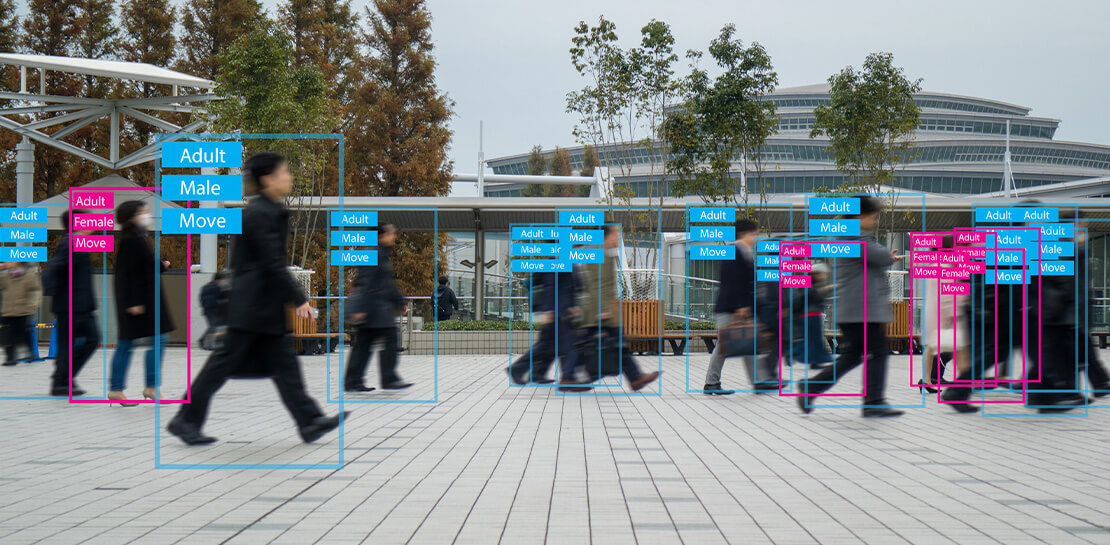
Data-savvy businesses increasingly rely on images and videos for critical functions, and yet are challenged by the sheer mass of information—more than 3.2 billion images and 720,000 hours of video are created daily. This explosion in visual data has paved the way for the growth of computer vision, a form of artificial intelligence (AI) that enables computers to “see” the world similarly to the way people do, but with unblinking consistency, and greater accuracy.
The transformational impact and value of computer vision solutions are significant and has been a guiding objective for companies and AI developers. And yet, even as the applications for computer vision increase dramatically, architecting and implementing vision AI solutions remain highly complex. Visual data, such as images and video, are made up of thousands of pixels of information that represent millions of different patterns and meanings, which can make interpreting even a single image overwhelming from a computational perspective.
Many organizations struggle with deployments and fail to operationalize vision AI solutions due to development delays, machine learning and data science hiring challenges, inaccurate output, a lack of integration with existing infrastructure, difficulty of use, and high cost. Plainsight, with the power of Google Cloud resources, is addressing all these challenges and helping businesses by enabling the deployment of vision AI within enterprise private networks that can be managed easily and scaled economically.
Plainsight has announced availability of its vision AI platform on Google Cloud Marketplace. Businesses can now easily deploy end-to-end vision AI to private clouds to realize the full value of their video and other visual data for accurate, actionable insights across diverse use cases.
Delivering on the Promise of AI: Seeing What’s Hiding In Plain Sight
For organizations to integrate AI and machine learning into their businesses successfully, the technology must be powerful enough to solve real challenges, yet fast, easy, and accessible enough to ensure the innovation potential is realized. Plainsight on Google Cloud delivers the power of enterprise vision AI that’s quick and easy to use with Google Cloud resources that enable global scale, increased security, bolstered privacy, unified billing, and cost savings.
To streamline vision AI workflows, Plainsight facilitates the entire pipeline, from visual data ingestion and annotation, through continuous model training, deployment, and monitoring for easier innovation and faster time-to-production. Our platform accelerates vision AI development in a manner that is complete, accurate, and accessible to non-technical business leaders. We believe that AI should be available and accessible to anyone and everyone—so that teams across entire organizations can reap the benefits.
By integrating Plainsight into their private networks, companies worldwide can now leverage one intuitive platform for centralized control of streamlined vision AI model creation and training with optimized visual data handling for diverse enterprise solutions. These use cases include: social distancing monitoring, medical imaging, drug compound screening, defect detection in manufacturing processes, identifying gas leaks, or even livestock counting and crop health monitoring for agriculture, to name a few.https://www.youtube.com/embed/A7U_0UkjvEg?enablejsapi=1&
We enable customers so they can create successful solutions that enable them to clearly see their business from all angles and to take advantage of the knowledge visual data can reveal by simply and quickly operationalizing practical vision AI applications.
AI-Powered Dataset Creation, Automated Model Training & Easy Deployment Without A Single Line Of Code
For vision AI applications, success is inextricably dependent on the quality and quantity of the datasets required to train the relevant models. To aid enterprises in this vital stage, the Plainsight platform provides built-in data annotation for the fast and easy creation of datasets. This includes AI-powered features that accelerate the speed and quality of labeling such as SmartPoly, for the automated polygon masking of objects, TrackForward, to predict and automatically label objects from frame to frame in video annotations, and AutoLabel for automated object recognition and labeling based on pre-trained machine learning models, to highlight a few.

In addition, to ensure the success of AI integration, we significantly reduce time-intensive processes with Plainsight vision AI’s automated machine learning with continuous model training and easy deployment capabilities. In just a few clicks, users can leverage optimizations for the most reliable model training without endless experimentation cycles. And, models are easily deployed at scale all within one, easy-to-manage model operationalization process for the business.
Growing With Google Cloud
Plainsight is a vision AI innovation leader, developing solutions that address unmet needs for challenger brands and Fortune 500s across vertical markets. As a team recognized for succeeding where others have failed, our expanding partnership with Google Cloud provides a powerful combination that helps customers see and activate the value of their visual data with a suite of services in a secure and private manner.
Our vision AI Platform simplifies building and operationalizing AI to solve business problems enterprises are facing every day—and the demand is increasing. To accelerate our journey to faster, more accessible AI for enterprises, we knew we needed strong support to grow Plainsight and scale our backend tools to match our vision.
Google Cloud delivered everything, and more, in one program. The Startup Program by Google Cloud provided the technology and services for scale and the support we needed to maximize the value the Program provided us. The Startup Program has been a springboard for architecting Plainsight vision AI in the cloud, accelerating our goals and optimizing innovation, efficiency, and growth. The team also helped us optimize Google Ads campaigns, fueling adoption of Plainsight.
After launching the SaaS version of Plainsight Data Annotation in November 2020, we grew our user base by nearly 110x in just three short months. Google Ads has also dramatically increased website traffic, growing new users by nearly 5.75X and page views by over 5X. The Google team helped us identify where Google Cloud offerings could be leveraged instead of developing in-house solutions and offered best practices that enabled us to deliver faster on our initiatives.
Kubernetes was already the underlying component of our platform and leveraging Google Kubernetes Engine (GKE) as a managed service removed a layer of complexity. By combining GKE and Anthos, we were able to standardize our deployments, aligning to how our customers leverage Anthos for enterprise applications in their own organizations. In addition, as a fast-moving, customer-centric company we use Google Workspace to help us centralize and manage our day-to-day work internally. By leveraging multiple products across Google’s ecosystem, we take advantage of a holistic partnership that has helped our business tremendously as we scale.
Leveraging Google’s Partners for Strategic Consultation
To facilitate this expansion of our partnership with Google and to maximize our use of Google Cloud services, we are working with DoiT International, a Google Managed Services Provider and 2020 Global Reseller Partner of the Year. DoiT provides us with ongoing technical consultation for cloud-native architecture, Google Cloud Marketplace integration, production-grade Kubernetes support, Google Cloud cost optimization, and technical support. The DoiT team has been invaluable in compiling best practices, tips, and strategies from their vast experience with various cloud customers to ease our Marketplace integration and is providing input for infrastructure strategy to support our continued rapid growth.
Plainsight Delivers Enterprise Vision AI Through The Google Cloud Platform Marketplace
Plainsight vision AI is now available to Google Cloud Customers on Google Cloud Marketplace enabling organizations across industries to deploy private Plainsight instances within their own environments. Marketplace customers will benefit from Google Cloud privacy, security, scalability and unified billing through their Google Cloud account.
Combining the powerful benefits provided by Google Cloud resources with Plainsight’s vision AI Platform into private networks, enterprises worldwide can now leverage one intuitive platform for centralized control of streamlined vision AI model creation and training with optimized visual data handling for diverse enterprise solutions.
Through our Google partnership, we’re able to leverage a powerful foundation that allows us to rapidly innovate, scale and accelerate delivery on our vision AI platform capabilities. By executing on our vision to make AI easier, faster and more accessible for all users across entire enterprises, we’re helping businesses see more and by seeing more, they’ll have the power to solve more.
If you want to learn more about how Google Cloud can help your startup, visit our page here where you can apply for our Startup Program, and sign up for our monthly startup newsletter to get a peek at our community activities, digital events, special offers, and more.
Make Meaningful Analysis with Geo Boundary Public Datasets on BigQuery

6342
Of your peers have already read this article.
4:00 Minutes
The most insightful time you'll spend today!
Geospatial data is a critical component for a comprehensive analytics strategy. Whether you are trying to visualize data using geospatial parameters or do deeper analysis or modeling on customer distribution or proximity, most organizations have some type of geospatial data they would like to use – whether it be customer zipcodes, store locations, or shipping addresses. However, converting geographic data into the correct format for analysis and aggregation at different levels can be difficult. In this post, we’ll walk through some examples of how you can leverage the Google Cloud platform alongside Google Cloud Public Datasets to perform robust analytics on geographic data. The full queries can be accessed from this notebook here.
Public US Geo Boundaries dataset
BigQuery hosts a slew of public datasets for you to access and integrate into your analytics. Google pays for the storage of these datasets and provides public access to the data via the bigquery-public-data project. You only pay for queries against the data. Plus, the first 1 TB per month is free! These public datasets are valuable on their own, but when joined against your own data they can unlock new analytics use cases and save the team a lot of time.
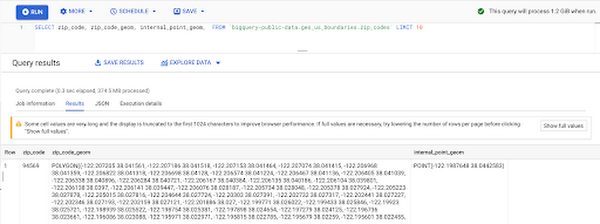
Within the Google Cloud Public Datasets Program there are several geographic datasets. Here, we’ll work with the geo_us_boundaries dataset, which contains a set of tables that have the boundaries of different geospatial areas as polygons and coordinates based on the center point (GEOGRAPHY column type in BigQuery), published by the US Census Bureau.
Mapping geospatial points to hierarchical areas
Many times you will find yourself in situations where you have a string representing an address. However, most tools require lat/long coordinates to actually plot points. Using the Google Maps Geocoding API we can convert an address into a lat/long and then store the results in the BigQuery table.
With a lat/long representation of our point, we can join our initial dataset back onto any of the tables here using the ST_WITHIN function. This allows us to check and see if a point is within the specified polygon.
ST_WITHIN(geography_1, geography_2)
This can be helpful for ensuring standard nomenclature; for example, metropolitan areas that might be named differently. The query below maps each customers’ address to a given metropolitan area name.
SELECTcust.id as customer_id,metro.name as metro_nameFROM `looker-private-demo.retail.customers` as cust,`bigquery-public-data.geo_us_boundaries.metropolitan_divisions` as metroWHERE ST_WITHIN(ST_GEOGPOINT(cust.longitude, cust.latitude),metro.metdiv_geom)
It can also be useful for converting to designated market area (DMA), which is often used in creating targeted digital marketing campaigns.
SELECTcust.id as customer_id,dma.dma_nameFROM `looker-private-demo.retail.customers` as cust,`bigquery-public-data.geo_us_boundaries.designated_market_area` as dmaWHERE ST_WITHIN(ST_GEOGPOINT(cust.longitude, cust.latitude),dma.dma_geom)
Or for filling in missing information; for example, some addresses may be missing zip code which results in incorrect calculations when aggregating up to the zipcode level. By joining onto the zip_codes table we can ensure all coordinates are mapped appropriately and aggregate up from there.
SELECTzip.zip_code,count(distinct cust.id) as unique_customersFROM `looker-private-demo.retail.customers` as cust,`bigquery-public-data.geo_us_boundaries.zip_codes` as zipWHERE ST_WITHIN(ST_GEOGPOINT(cust.longitude, cust.latitude),zip.zip_code_geom)GROUP BY 1
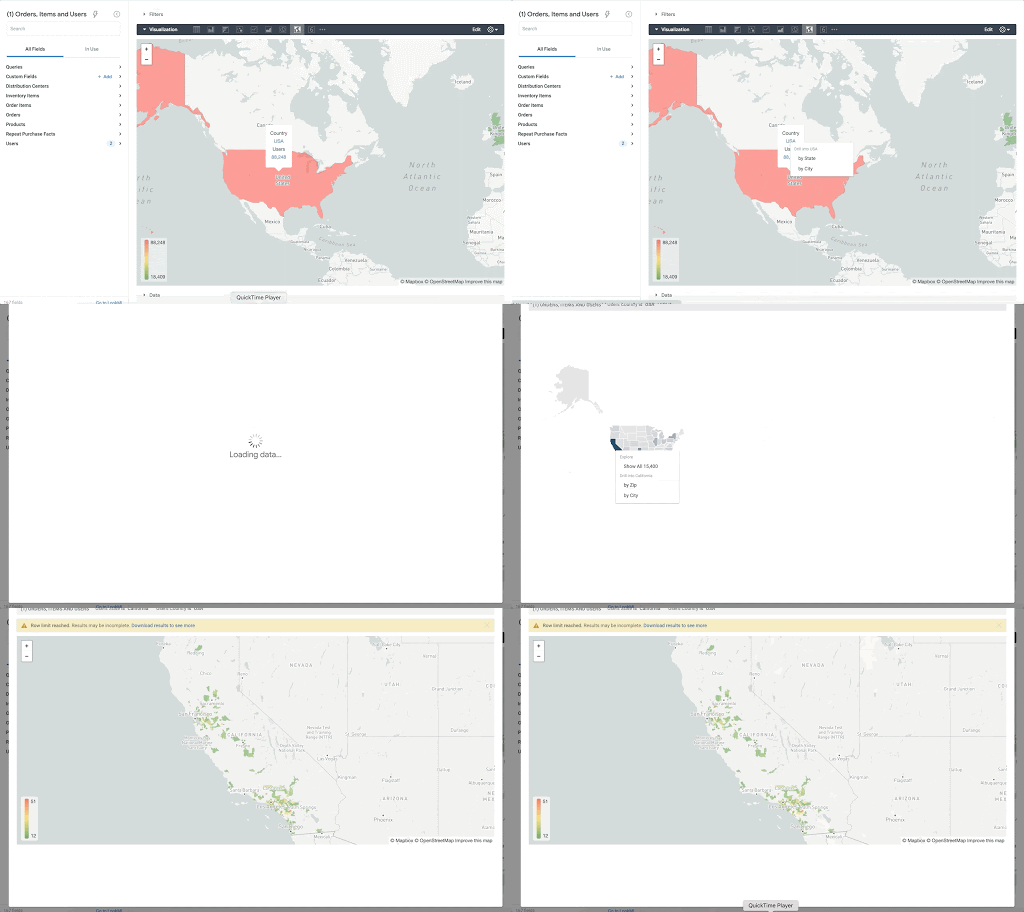
Note that the zip code table isn’t a comprehensive list of all US zip codes, they are zip code tabulation areas (ZCTAs). Details about the differences can be found here. Additionally, the zip code table gives us hierarchical information, which allows us to perform more meaningful analytics. One example is leveraging hierarchical drilling in Looker. I can aggregate my total sales up to the country level, and then drill down to state, city and zipcode to identify where sales are highest. You can also use the BigQuery GeoViz tool to visualize geospatial data!
Aside from simply checking if a point is within an area, we can also use ST_DISTANCE to do something like find the closest city using the centerpoint for the metropolitan area table.
SELECTcust.id as customer_id,ARRAY_AGG(metro.name order by ST_DISTANCE(ST_GEOGPOINT(cust.longitude, cust.latitude),metro.internal_point_geom) asc limit 1)[offset(0)] as metro_nameFROM`looker-private-demo.retail.customers` as cust,`bigquery-public-data.geo_us_boundaries.metropolitan_divisions` as metroGROUP BY cust.id
This concept doesn’t just hold true for points, we can also leverage other GIS functions to see if a geospatial area is contained within areas that are listed in the boundaries datasets. If your data comes into BigQuery as a GeoJSON string, we can convert it to a GEOGRAPHY type using the ST_GEOGFROMGEOJSON function. Once our data is in a GEOGRAPHY type we can do things like check to see what urban area the geo is within – using either ST_WITHIN or ST_INTERSECTS to account for partial coverage. Here, I am using the customer’s zip code to find all metropolitan divisions where the zip code polygon and the metropolitan polygon intersect. I am then selecting the metropolitan area that has the most overlap (or the intersection has the largest area) to be the customer’s metro that we use for reporting.
SELECTcust.id as customer_id,ARRAY_AGG(metro.name order by ST_AREA(ST_INTERSECTION(zip.zip_code_geom,metro.metdiv_geom)) desc limit 1)[offset(0)] as metro_nameFROM`looker-private-demo.retail.customers` as custJOIN `bigquery-public-data.geo_us_boundaries.zip_codes` as zip on cust.zip=zip.zip_code,`bigquery-public-data.geo_us_boundaries.metropolitan_divisions` as metroWHERE ST_INTERSECTS(zip.zip_code_geom,metro.metdiv_geom)GROUP BY cust.id
The same ideas can be applied to the other tables in the dataset including the county, urban areas and National Weather Service forecast regions (which can also be useful if you want to join your datasets onto weather data).
Correcting for data discrepancy
One problem that we may run into when working with geospatial data is that different data sources may have different representations of the same information. For example, you might have one system that records state as a two letter abbreviation and another using the full name. Here, we can use the state table to join the different datasets.
SELECTst.state_name,sum(ab.sales+fn.sales) as total_salesFROM `bigquery-public-data.geo_us_boundaries.states` as stLEFT JOIN abbreviated_table as ab on ab.state = st.stateLEFT JOIN fullname_table as fn on fn.state = st.state_nameWHERE COALESCE(ab.state, fn.state) IS NOT NULLGROUP BY 1
Another example might be using the tables as a source of truth for fuzzy matching. If the address is a manually entered field somewhere in your application, there is a good chance that things will be misspelled. Different representations of the same name may prevent tables from joining with each other or lead to duplicate entries when performing aggregations. Here, I use a simple Soundex algorithm to generate a code for each county name, using helper functions from this blog post. We can see that even though some are misspelled they have the same Soundex code.
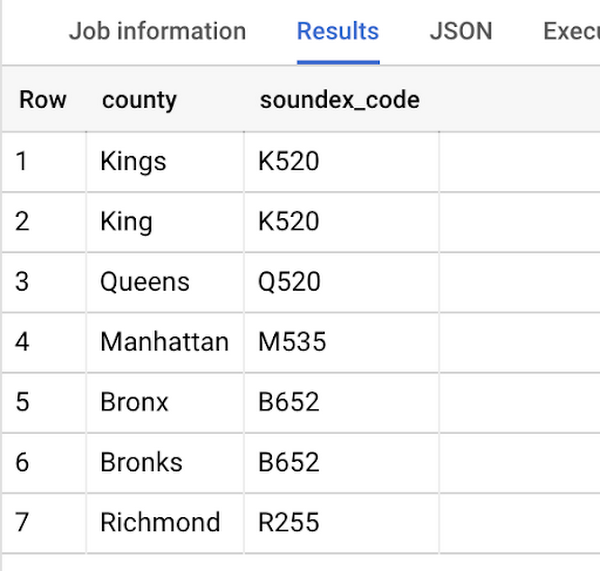
Next, we can join back onto our counties table so we make sure to use the correct spelling of the county name. Then, we can simply aggregate our data for more accurate reporting.
SELECTc.county_name,sum(sales) as total_salesFROMtableJOIN `bigquery-public-data.geo_us_boundaries.counties` as con testing.dq_fm_Soundex(table.county) = testing.dq_fm_Soundex(c.county_name)WHERE c.state_fips_code = cast(36 as string)GROUP BY 1
Note that fuzzy matching definitely isn’t perfect and you might need to try different methods or apply certain filters for it to work best depending on the specifics of your data.
The US Geo Boundary datasets allow you to perform meaningful geographic analysis without needing to worry about extracting, transforming or loading additional datasets into BigQuery. These datasets, along with all the other Google Cloud Public Datasets, will be available in the Analytics Hub. Please sign up for the Analytics Hub preview, which is scheduled to be available in the third quarter of 2021, by going to g.co/cloud/analytics-hub.
5492
Of your peers have already downloaded this article
10:30 Minutes
The most insightful time you'll spend today!
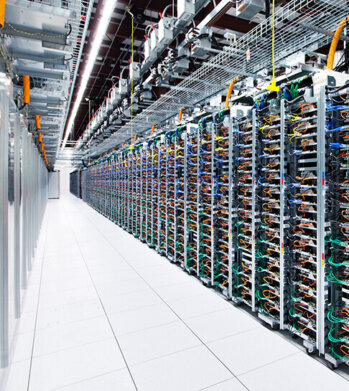
Modernizing your data warehouse is one way to keep up with evolving business requirements and harness new technology. For many companies, cloud data warehousing offers a fast, flexible, and cost-effective alternative to traditional on-premises solutions.
In a report sponsored by Google Cloud, TDWI examines the rise of cloud-based data warehouses and identifies associated opportunities, benefits, and best practices.
Featuring strategic advice from Google experts, it answers questions such as:
- What’s driving businesses to consider the cloud for their data warehousing strategy?
- What are the advantages of a cloud-native data warehouse?
- How can you coordinate data warehouse modernization with other modernization projects?
- What’s the first step in migrating your data warehouse to the cloud?
- How will cloud data warehousing affect your business’s security posture?
Download the complete report to learn more about cloud data warehousing and how it can help your business transform with the times — and prepare for the future.
More Relevant Stories for Your Company

Google Search Feature with Document AI Simplifies Document Extraction!
Google Cloud introduced Document AI to automate document processing and to streamline workflows with state-of-the-art machine learning models. With the deep neural networks, the models generalize the learning from seeing hundreds of thousands variations of the documents. But when information is missing or ambiguous on a document - like a missing address

How to Use Machine Learning to Achieve 300% Increase in Gross Profits
Since 1994, IDOM, Japan’s leading buyer and retailer of used cars, has enjoyed success in the auto industry with a simple yet traditional business model: buy pre-owned vehicles directly from car owners and auction them to third-party dealers, or sell them to other consumers at retail stores. In an increasingly
Google Submits Two Large Language Model Benchmarks into the Open Division
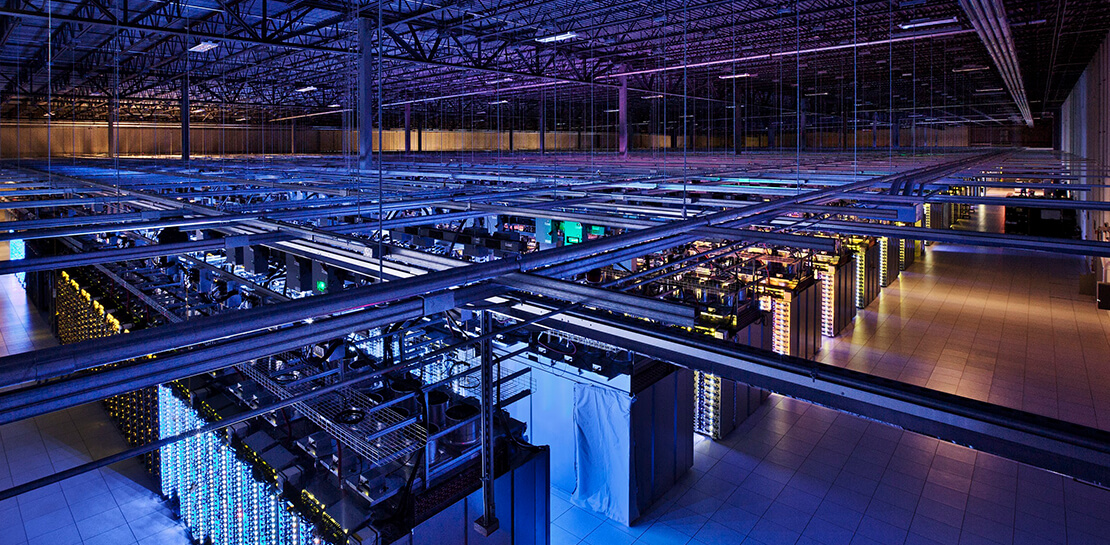
Recently, models with billions or trillions of parameters have shown significant advances in machine learning capabilities and accuracy. For example, Google’s LaMDA model is able to engage in a free-flowing conversation with users about a large variety of topics. There is enormous interest within the machine learning research and product communities in

Achieving MLOps Excellence with Google Cloud and Equinix Collaboration
In recent years, machine learning (ML) has gained tremendous popularity as a powerful tool for solving complex problems across various domains. However, building and deploying ML models at scale can be challenging, as it involves a range of tasks such as data preparation, feature engineering, model training, deployment, monitoring, maintenance
