





Lower risk, greater return: Public sector organizations are focusing on multicloud adoption

3002
Of your peers have already read this article.
4 Minutes
The most insightful time you'll spend today!
Government organizations are starting to realize that no single cloud can meet their wide range of needs. According to the Nutanix 2022 Enterprise Cloud Index1, 75% of public sector organizations agree that multicloud is ideal, and more public sector organizations than average have adopted multicloud as a primary IT operating model (outpacing the global average). Furthermore, global public sector multicloud adoption is expected to nearly double from 39% to 67% in the next three years.
Some leaders worry about the perceived complexity of multicloud —as well as cost, security, and overall compliance requirements. But the right strategy, tools, and partners can help alleviate these concerns and help create a path to new levels of efficiency, service delivery effectiveness, and security.
Multicloud math: Greater return at lower risk
Modern financial theory asserts that a diversified portfolio is an effective hedge that yields greater return at lower risk. Similarly, multicloud, a diversified portfolio of clouds, has the potential to yield a stronger return on IT investment, provide a lower risk, and deliver greater overall efficacy. While this may seem counterintuitive, the “Anything as a service” (XaaS) nature of cloud can be even more potent across a portfolio of trusted Cloud Service Providers (CSPs).
Each cloud brings unique strengths and capabilities in terms of costs, services, footprint, support, and innovation. Moreover, each cloud continues to evolve. Implementing a multicloud portfolio has the potential to optimize the power of these clouds while reducing overall risk.
It’s fair to say that considerations should go beyond just a diversification and cost strategy. Multicloud gives public sector organizations the power to select best-of-breed capabilities and match the right workload to the optimal cloud. In addition, multicloud helps empower government leaders to protect themselves against vendor lock-in, fluctuating costs, and potential external risks. It also broadens access to an ecosystem of strategic partners.
Accelerating the cloud adoption curve
Once you get started with your first CSP, it can be easier to incorporate additional CSPs. Many aspects of the processes, knowledge base, and efficiencies created during the first rollout can serve as a playbook for future cloud engagements.
For instance, technical training can be easier and more iterative. When an organization first embraces cloud, it can make significant investments in training engineers and security staff, in addition to general education for the broader workforce. Subsequent cloud training with additional CSPs is then generally easier for teams to learn and adopt. Furthermore, key concepts are transferable, and some APIs and services are exact duplicates—all of which helps make learning new CSPs easier and cost-effective.
Cloud management efficiency at scale
Standardizing processes at scale across providers is essential to avoiding cumulative overhead costs and complexity. Agnostic partner tools play an important role. For example Kion and Prisma Cloud by Palo Alto standardize and automate security, compliance, and financial processes across CSPs. And, Terraform by Hashicorp has an infrastructure-as-code software tool that provides a consistent command-line interface workflow to manage CSPs (even on-premises).
Public sector organizations can use these options to create and maintain cloud environments that have uniform configurations and security postures and can provide real-time security monitoring—reducing costs, boosting overall security, and optimizing resource availability. For instance, in partnership with Palo Alto Networks, Google Cloud built a secure cloud access solution that allows the Defense Innovation Unit (DIU) users to access services in any commercial cloud environment, while performing the required security actions of logging, threat analysis, and session control (read more here).
The right partners for your mission
A successful multicloud strategy starts with finding the right CSPs for your mission. Google’s multicloud solutions can help kick-start the journey with open source collaboration and the ability to build and scale. Beyond core capabilities, it’s essential to find a cloud partner that can help serve the core needs of your mission: simplicity and rapid time to value. For example, Google Cloud’s Anthos helps public sector organizations ensure multicloud security, allowing them to manage containerized applications across multiple cloud and on-premises environments from a single management plane.
The key to multicloud success is managing and optimizing multicloud using proven portfolio techniques to maximize return and reduce risk. Ready to elevate your multicloud strategy? Download our whitepaper, 5 ways Google can help you succeed in a hybrid and multicloud world, to learn more about how diversifying your cloud portfolio can help you meet the needs of your agency and its mission.
References:
3231
Of your peers have already watched this video.
21:30 Minutes
The most insightful time you'll spend today!
Accelerate App Development and Delivery: The Modern Way
Cloud-native, Kubernetes, Serverless have been the hottest and most widely discussed topics given the velocity and agility benefits. Learn more about how you can leverage these modern app development practices to ship software faster, while reducing costs and improving security and compliance.
Learn how Google Cloud lets you modernize existing applications at your own pace using these technologies. Regardless of where you are in your app modernization journey, learn how to improve the developer experience and deliver software faster.
Partnering for a Healthier Tomorrow: Device Connect for Fitbit

2871
Of your peers have already read this article.
3:30 Minutes
The most insightful time you'll spend today!
Healthcare is at the beginning of a fundamental transformation to become more patient-centered and data-driven than ever before. We now have better access to healthcare, thanks to improved virtual care, while wearables and other tools have dramatically increased our ability to take control of our own health and wellness.
Healthcare alone generates as much as 30% of the world’s data and much of this will come from the Internet of Medical Things (IoMT) and consumer wearable devices. Gaining insights from wearable data can be challenging, however, due to the lack of a common data standard for health devices resulting in different data types and formats. So what do we do with all this data, and how do we make it most useful?
Today, Fitbit Health Solutions and Google Cloud are introducing Device Connect for Fitbit, which empowers healthcare and life sciences enterprises with accelerated analytics and insights to help people live healthier lives. Fitbit data from their consenting users is made available through the Fitbit Web API, providing users with control over what data they choose to share and ensuring secure data storage and protection. Unlocking actionable insights about patients can help support management of chronic conditions, help drive population health impact, and advance clinical research to help transform lives.
With this solution, healthcare organizations will be increasingly able to gain a more holistic view of their patients outside of clinical care settings. These insights can enhance understanding of patient behaviors and trends while at home, enabling healthcare and life science organizations to better support care teams, researchers, and patients themselves. Based on a recent Harris poll, more than 9 in 10 physicians (92%) believe technology can have a positive impact on improving patient experiences, and 96% agree that easier access to critical information may help save someone’s life.
Help people live healthier lives
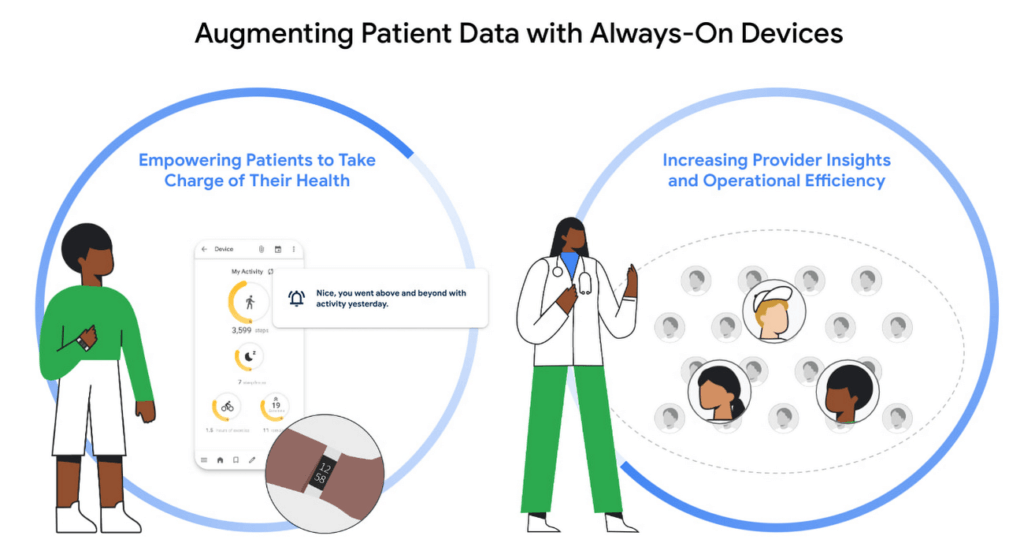
This new solution can support care teams and empower patients to live healthier lives in several critical ways:
- Pre- and post-surgery: Supporting the patient journey before and after surgery can lead to higher patient engagement and more successful outcomes.1 However, many organizations lack a holistic view of patients. Fitbit tracks multiple behavioral metrics of interest, including activity level, sleep, weight and stress, and can provide visibility and new insights for care teams to what’s happening with patients outside of the hospital.
- Chronic condition management: For people living with diabetes, maintaining their blood glucose levels within an acceptable range is a constant concern. It’s just one of countless examples, from heart diseases to high blood pressure, where care teams want to promote healthy behaviors and habits to improve outcomes. Better understanding how lifestyle factors may impact disease indicators such as blood glucose levels can enable organizations to deliver more personalized care and tools to support healthy lifestyle changes.
- Population health: Supporting better management of community health outcomes with a focus on preventive care can help reduce the likelihood of getting a chronic disease and improve quality of life.2 Fitbit users can choose to share their data with organizations that deliver lifestyle behavior change programs aimed at both prevention and management of chronic or acute conditions.
- Clinical research: Clinical trials depend on rich patient data. Collection in a physician’s office captures a snapshot of the participant’s data at one point in time and doesn’t necessarily account for daily lifestyle variables. Fitbit, used in more than 1,500 published studies–more than any other wearable device–can enrich clinical trial endpoints with new insights from longitudinal lifestyle data, which can help improve patient retention and compliance with study protocols.
- Health equity: Addressing healthcare disparities is a priority across the healthcare ecosystem. Analyzing a variety of datasets, such as demographic and social determinants of health (SDOH) alongside Fitbit data has the potential to provide organizations and researchers with new insights regarding disparities that may exist across populations—such as obesity disparities that exist among children in low-income families, or increased risk of complications among Black women related to pregnancy and childbirth. Learn more about Fitbit’s commitment to health equity research here.
Accelerate time to insight
Gaining a more holistic view of the patient can better support people on their health and wellness journeys, identify potential health issues earlier, and provide clinicians with actionable insights to help increase care team efficiency. Device Connect for Fitbit addresses data interoperability to “make the invisible visible” for organizations, providing users with consent management and control over their data. Leveraging world-class Google Cloud technologies, Device Connect for Fitbit offers several pre-built components that help make Fitbit data accessible, interoperable and useful—with security and privacy as foundational features.
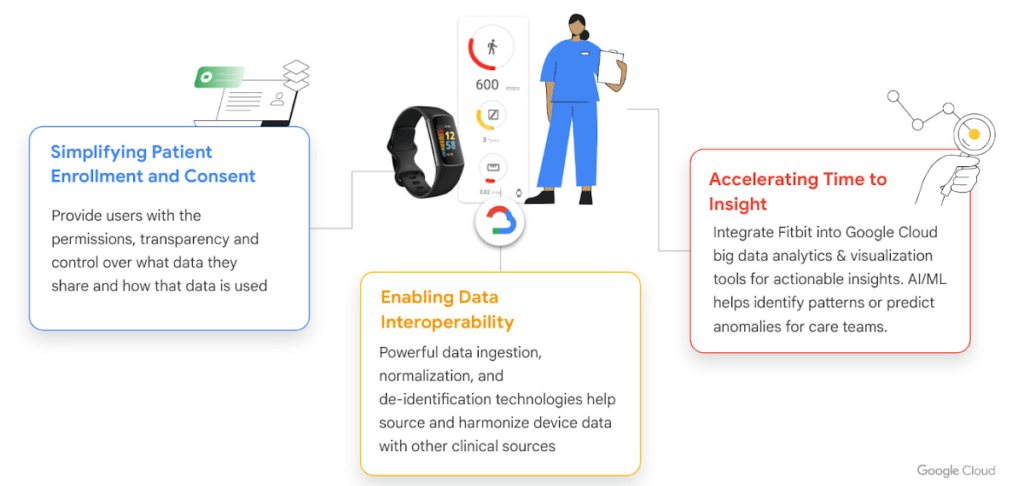
- Enrollment & consent app for web and mobile: The pre-built patient enrollment and consent app enables organizations to provide their users with the permissions, transparency, and frictionless experience they expect. For example, users have control over what data they share and how that data is used.
- Data connector: Device Connect for Fitbit offers an open-source data connector3, with automated data normalization and integration with Google Cloud BigQuery for advanced analytics. Our data connector can support emerging standards like Open mHealth and enables interoperability with clinical data when used with Cloud Healthcare API for cohort building and AI training pipelines.
- Pre-built analytics dashboard: The pre-built Looker interactive visualization dashboard can be easily customized for different clinical settings and use cases to provide faster time to insights.
- AI and machine learning tools: Use AutoML Tables to build advanced models directly from BigQuery or build custom models with 80% fewer lines of code required using Vertex AI—the groundbreaking ML tools that power Google, developed by Google Research.
Google Cloud’s ecosystem of delivery partners will provide expert implementation of services for Device Connect for Fitbit to help customers deploy at scale, and includes BlueVector AI, CitiusTech, Deloitte, and Omnigen.
Potential to help predict and prevent disease
The Hague’s Haga Teaching Hospital in the Netherlands is one of the first organizations to use Device Connect for Fitbit. The solution is helping the organization support a new study on early identification and prevention of vascular disease.
“Collaborating with Google Cloud allows us to do our research, with the help of data analytics and AI, on a much greater scale,” cardiologist Dr. Ivo van der Bilt said. “Being able to leverage the new solution makes it easier than ever to gain the insights that will make this trial a success. Health is a precious commodity. You realize that all the more if you are struck down by an illness. If you can prevent it or catch it in time so that it can be treated, you have gained a great deal.”
Fitbit innovation continues
Since becoming part of the Google family in January 2021, Fitbit has continued to help people around the world live healthier, more active lives and to introduce innovative devices and features, including FDA clearance for the new PPG AFib algorithm for irregular heart rhythm detection, released in April of this year. Fitbit metrics including activity, sleep, breathing rate, cardio fitness score (Vo2 Max), heart rate variability, weight, nutrition, SP02 and more will be accessible through Device Connect Fitbit. Google’s interactions with Fitbit are subject to strict legal requirements, including with respect to how Google accesses and handles relevant Fitbit health and wellness data. You can find details on these obligations here.
We look forward to empowering our customers to create more patient-centered, data-driven healthcare. Read more about Haga Teaching Hospital’s work to predict heart disease on the Google Cloud blog, and visit cloud.google.com/device-connect to learn more about Device Connect for Fitbit.
- Harris Poll
- CDC
- Device Connect for Fitbit is built on the Fitbit Web API and data available from consenting users is the same as that made available for third parties through the Fitbit Web API, and enables the enterprise customer services through Google Cloud.
Securing apps using Anthos Service Mesh

3985
Of your peers have already read this article.
1:30 Minutes
The most insightful time you'll spend today!
Hi there! I’m David Challoner from Access Site Reliability Engineering (SRE), here with Anthony Bushong from Developer Relations to talk about how Corp Eng is adopting Anthos Service Mesh internally at Google.
Corp Eng is Google’s take on “Enterprise IT”. A big part of the Corp Eng mission is running the first and third party software that powers internal business processes – from legal and finance to floor planning and even the app hosting our cafe menus – all with the same security or production standards as any of Google’s first party applications.
Googlers need to access these applications, which sometimes then need to access other applications or other Google Cloud services. This traffic can cross different trust boundaries which can trigger different policies.
Access SRE runs the systems that mediate this access, and we implemented Anthos Service Mesh as part of our solution to secure the way Googlers access these applications.
But why?
You can probably tell, but the applications Corp Eng is responsible for have disparate requirements. This often means that certain applications are tied to disparate infrastructure due to legal, business or technical reasons – which can be challenging when those infrastructures work and operate differently.
Enter Anthos. Google Cloud built Anthos to provide a consistent platform interface unifying the experience of working with apps on these varying underlying infrastructures, with the Kubernetes API at its foundation.
So when searching for the right tool to build a common authorization framework to mediate access to CorpEng services, we turned to Anthos – specifically Anthos Service Mesh, powered by the open-source project, Istio. Whether these services were deployed in Google Cloud, in Corp Eng data centers, or at the edge onsite at actual Google campuses, Anthos Service Mesh delivered a consistent means for us to program secure connectivity.
To frame the impact ASM had on our organization, it’s helpful to introduce the roles of the folks who manage and use it:
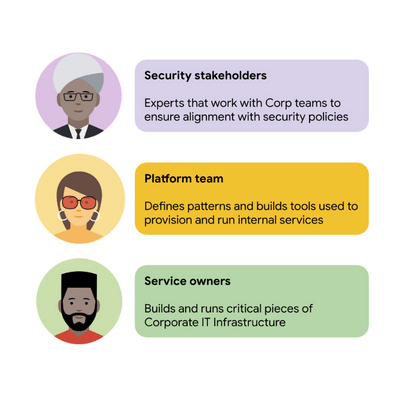
For security stakeholders, ASM provides an extensible policy enforcement point running next to each application capable of provisioning a certificate based on the identity of the workload and enforcing mandatory fine-grained application-aware access controls.
For platform operators, ASM is delivered as a managed product, which reduces operational overhead by providing out-of-the-box release channels, maintenance windows, and a published Service Level Objective(SLO).
For service owners, ASM enables the decoupling of their applications from networking concerns, while also providing features like rate limiting, load shedding, request tracing, monitoring, and more. Features like these were typically only available for applications that ran on Borg, Google’s first-party cluster manager that ultimately inspired the creation of Kubernetes.
In sum, we were able to secure access to a plethora of different services with minimal operational overhead, all while providing service owners granular traffic control.
Let’s see what this looks like in practice!
The architecture
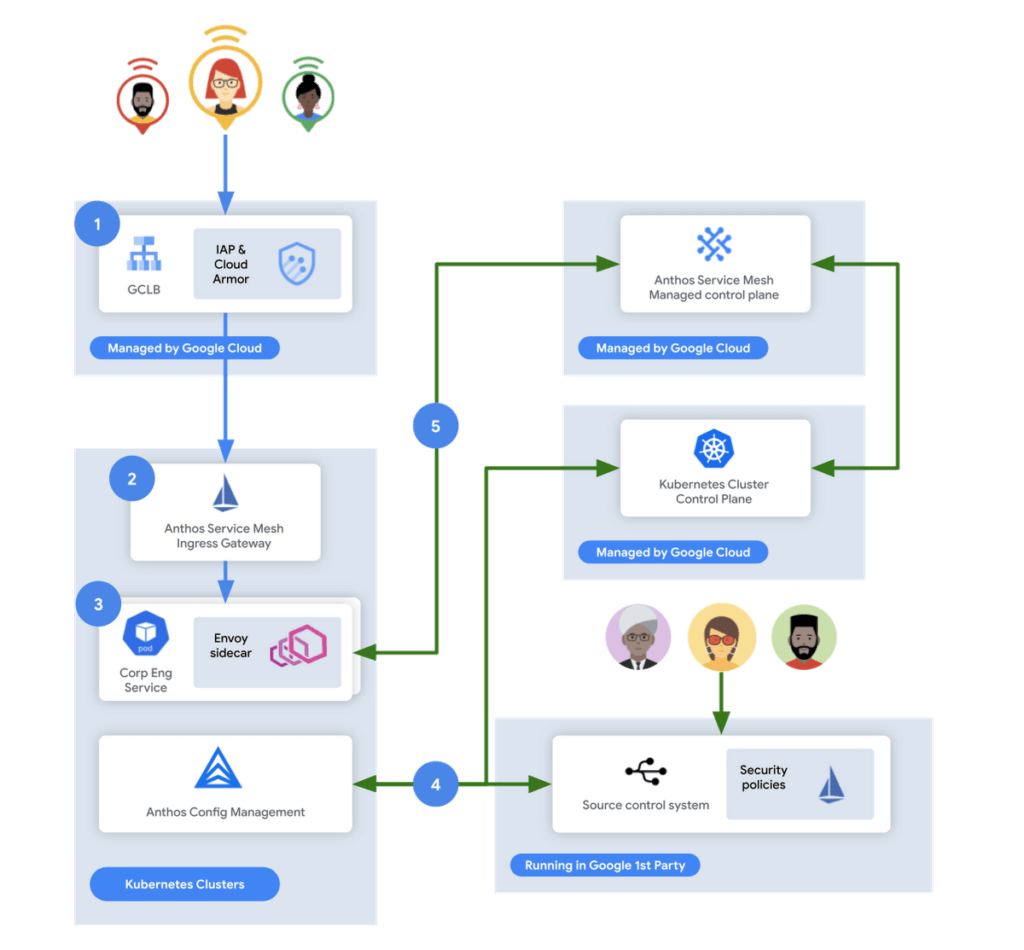
In this flow, user access first reaches the Google Cloud Global Load Balancer [1], configured with Identity Aware Proxy (IAP) and Cloud Armor. IAP is the publicly available implementation of Google’s internal philosophy of BeyondCorp, providing an authentication layer that works from untrusted networks without the need for a VPN.
Once a user is authenticated, their request then flows to the Ingress Gateway provided by Anthos Service Mesh [2]. This provides additional checks that traffic flows to services only when the request has come through IAP, while also enforcing mutual TLS (mTLS) between the Anthos Service Mesh Gateway to the Corp services owned by various teams.
Finally, additional policies are enforced by the sidecar running in every single service Pod [3]. Policies are pulled from source control using Anthos Config Management[4], and are propagated to all sidecars by the managed control plane provided by Anthos Service Mesh[5].
Managing the mesh
If you’re not familiar with how Istio works, it follows the pattern of a control plane and a data plane. We talked a little bit about the data plane – it is made up of the sidecar containers running alongside all of our service Pods. The control plane, however, is what’s responsible for updating these sidecars with the policies we want to enforce:
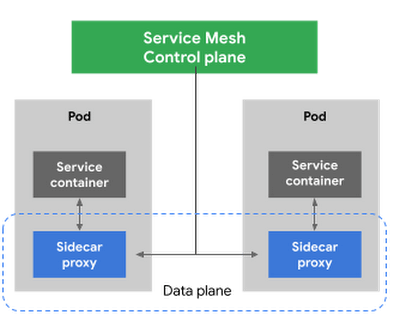
Figure 3 – High-level architecture for Istio
Thus, it is critical for us to ensure that the control plane is healthy. This is where Anthos Service Mesh gives our platform owners a huge advantage with its support for a fully-managed control plane. To provision cloud resources, like many other companies, our organization uses Terraform, the popular open-source infrastructure as code project. This gave us a declarative and familiar means for provisioning the Anthos Service Mesh control plane.
First, you enable the managed control plane feature for GKE by creating the google_gke_hub_feature resource below using Terraform.
resource "google_gke_hub_feature" "feature_asm" {
name = "servicemesh"
location = "global"
provider = google-beta
}
Keep in mind that at publication time, this is only available via the google-bet provider in Terraform.
Once created, we then provision a ControlPlaneRevision custom resource in a GKE cluster to spin up a managed control plane for ASM in that cluster:
apiVersion: mesh.cloud.google.com/v1alpha1
kind: ControlPlaneRevision
metadata:

name: asm-managed

namespace: istio-system
spec:

type: managed_service

channel: regular
Using this custom resource, we are able to set the release channel for the ASM managed control plane. This allows for our platform team to define the pace of upgrades in accordance with our team’s needs.
In addition to managing the control plane, ASM also provides management functionality around the data plane to ensure each sidecar Envoy is kept up to date with the latest security updates and is compatible with the control plane – one less thing for service operators to worry about. It does this using Kubernetes Mutating Admission Webhooks and Namespace labels to modify our Pod workload definitions to inject the appropriate sidecar proxy version.
Syncing mandatory access policies
With the core Anthos Service Mesh components in place, our security practitioners can define consistent, mandatory security policies for every single GKE cluster, using Istio APIs.
For example, one policy is enforcing strict mTLS between Pods using automatically provisioned workload identity certificates. Earlier, we talked about how this is enforced between the Istio Gateway; that same policy enforces mTLS between all Pods in our cluster.

Another policy we implement is denying all egress traffic by default, requiring service teams to explicitly declare their outbound dependencies. The following is an example of using an Istio Service Entry to allow granular access to a specific external service – in this case, Google. This helps prevent unintended access to external services.
apiVersion: networking.istio.io/v1alpha3

kind: ServiceEntry
metadata:

name: google
spec:

hosts:
  - www.google.com

ports:
  - number: 443

name: https

protocol: HTTPS

resolution: DNS

location: MESH_EXTERNAL
EOF
These policies are automatically synced to all service mesh namespaces in each cluster using Anthos Config Management. By using our internal source control system as a source of truth, Anthos Config Management can sync and reconcile policies across all of our GKE clusters, ensuring that these policies are in place for every single one of our services. You can find more details about our implementation of Anthos Config Management here.
With this in place, our team plans on eventually migrating away from security automation that operates solely based on explicit IP, port and protocol policies.
Integration with Identity-aware Proxy
The publicly available version of the BeyondCorp proxy used by CorpEng is called Identity-aware Proxy (IAP), which offers an integration with Anthos Service Mesh. IAP allows you to authenticate users trying to access your services and apply Context-Aware-Access policies. This integration comes with two main benefits:
- Ensuring that user traffic to services in the service mesh only come through Identity-aware Proxy
- Enforcing Context-aware access (CAA) trust levels for devices, defined by multiple device signals we collect
Identity-aware Proxy allows us to capture this information in a Request Context Token (RCToken), which is a JSON Web Token (JWT) created by Identity-aware Proxy that can be verified by ASM. IAP inserts this JWT into the Ingress-Authorization header. Using Istio Authorization Policies similar to the following policy, any requests without this JWT are denied:
apiVersion: security.istio.io/v1beta1
kind: AuthorizationPolicy
metadata:
name: iap-gateway-require-jwt
namespace: istio-system
spec:
selector:
matchLabels:
app: istio-iap-ingressgateway
action: DENY
rules:
- from:
- source:
notRequestPrincipals: ["*"]
Here is an example policy that requires a fullyTrustedDevice access level – this might be a device in your organization that is known to be corporate-owned, fully-updated, and running an IT-approved configuration :
apiVersion: security.istio.io/v1beta1
kind: AuthorizationPolicy
metadata:
  name: require-fully-trusted-device
  namespace: fooService
spec:
  selector:
    matchLabels:
      app: fooService
  action: ALLOW
  rules:
  - from:
    - source:
       requestPrincipals: ["*"]
    when:
    - key: request.auth.claims[google.access_levels]
      values: ["accessPolicies/$orgId/accessLevels/fullyTrustedDevice"]
This allows our security team to not only secure service to service communications, or outbound calls from services, but also specifically require incoming requests come from trusted devices and authenticated users using a trusted device.
Enabling service teams
As an SRE, one of our priorities is ensuring Service-level indicators (SLIs), SLOs, and Service-level agreements (SLAs) exist for services. Anthos Service Mesh helps us empower service owners to do this for their services, as it exposes horizontal request metrics like latency and availability to all services in the mesh.
Before Anthos Service Mesh, each application had to export these separately (if at all). With ASM service owners can easily define their Service’s SLOs in the cloud console or via terraform using these horizontally exported metrics. This then allows us to integrate SLOs into our higher-level service definitions so we can enable SLO monitoring and alerting by default. You can see the SRE book for more details on SLOs and Error budgets.
The takeaway
ASM is a powerful tool that enterprises can use to modernize their IT infrastructure. It provides:
- A shared environment-agnostic enforcement point to manage security policy
- A unified way to provision identities, describe application dependencies
This also enables previously unheard of operational capabilities such as distributed tracing or incremental canary rollouts – which were difficult to find in the typical enterprise application landscape.
Because it can be incrementally adopted and composed with existing authorization systems to close gaps – barriers to adoption are low and we recommend you start evaluating it today!
Cadbury Worldwide Hide: How the Chocolatier Made the Hiding Eggs Ritual Possible with Google Maps

3714
Of your peers have already read this article.
3:00 Minutes
The most insightful time you'll spend today!
Editor’s note: Today’s post is a Q&A with the VCCP London and VCCP CX team. VCCP London conceived of and built the Cadbury Worldwide Hide platform using Google Maps Platform as a way to get consumers ‘hiding’ eggs and engaging with loved ones during a time when they could not be physically together.
How did the team come up with the idea for the ‘Cadbury Worldwide Hide’?
VCCP London is the agency of record for Cadbury both locally in the UK and centrally with the Global team. So, when Cadbury briefed us in May for their Easter 2021 campaign, they wanted us to come up with a creative way to encourage people to hide eggs and get consumers excited about interacting with loved ones. At the time, the pandemic was constantly changing, and it was looking like we were going to continue to be in lock-down for the foreseeable future, into the Easter season.
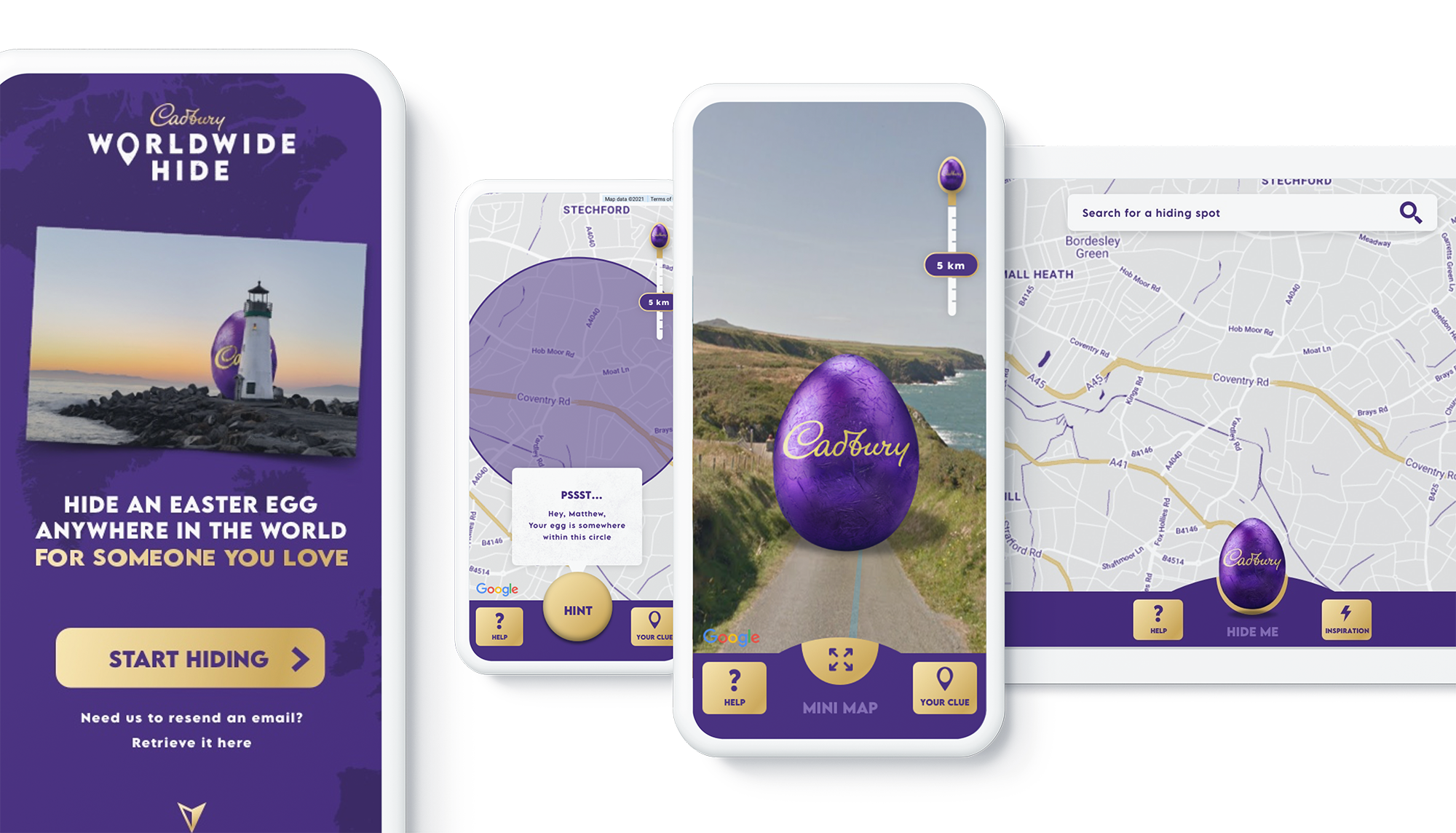
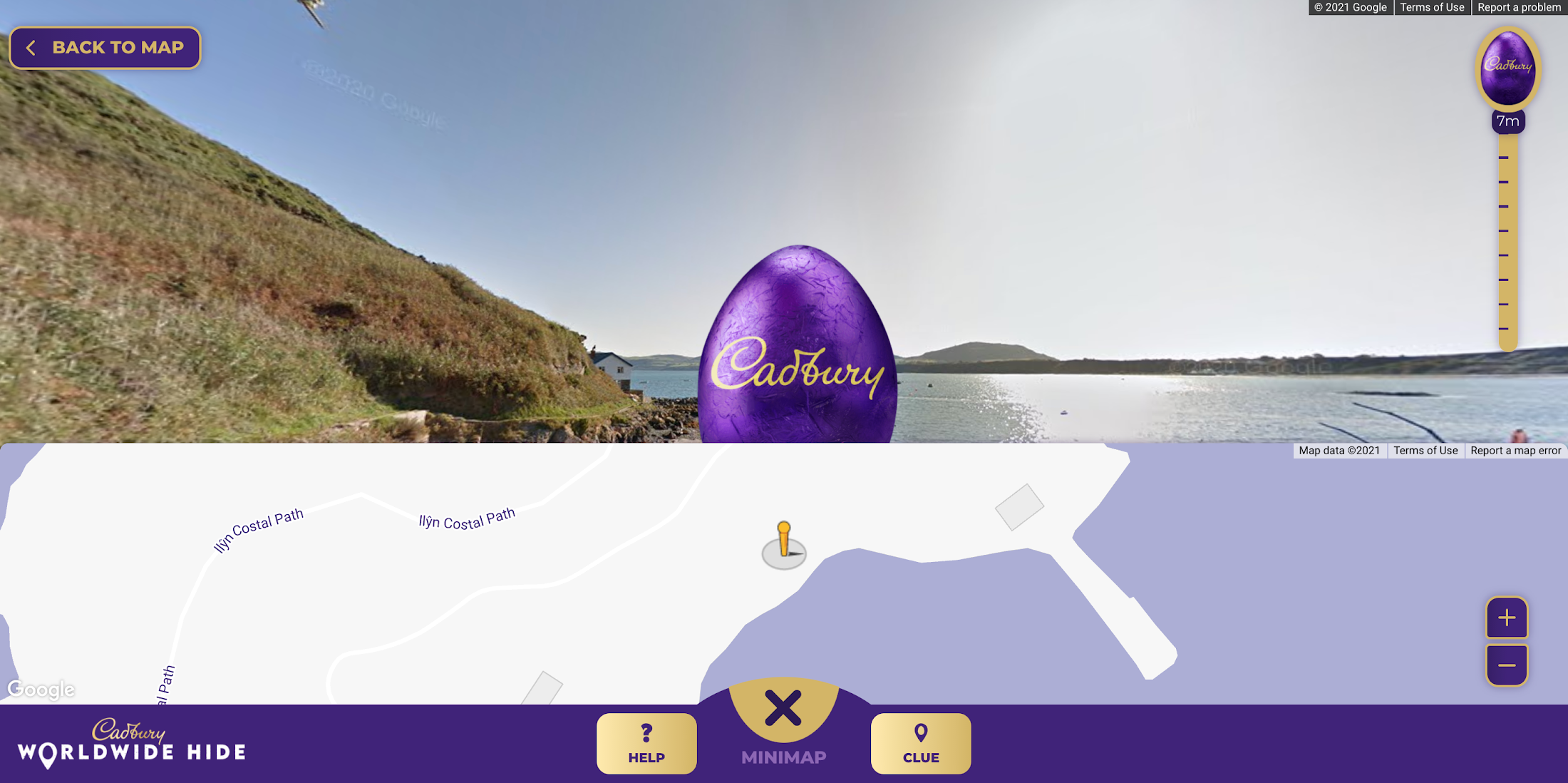
We then came up with an idea: wouldn’t it be really cool if somehow you could still hide a real Easter egg for someone you love, but do it virtually. And then once it’s found, that real egg could be delivered to the seeker’s home. With the use of some creativity and technology, we brought this idea to life. The experience we developed allowed our users to purchase a real Cadbury Easter Egg, hide it virtually on the map in a special location, then write the recipient a personalized clue for him to find the egg. Once the seeker found the egg, they would receive a real, physical egg the hider bought for her delivered to her home.
We wanted it to be a truly meaningful one-to-one connection, to bring back some lovely memories for people, and to allow a real chocolate egg to be hidden for a loved one no matter where they were.

Why was this important to Cadbury?
Generosity is at the heart of Cadbury’s brand, and Easter is our opportunity to show that ‘there’s a glass and a half in everyone’. As we enter the second year of our campaign ‘Show you care, hide it’, we are flipping the Easter ritual on its head and showing that the generous act is in hiding an egg for someone you love.
Physical connection has been restricted by the global pandemic and that’s why this year’s Easter campaign sets out to connect people across the UK through the power of generosity.
Tell us a little bit about the technical side of the project. Which Google Maps Platform products did you use to create the user experience?
The Cadbury Worldwide Hide launched across 4 markets (UK, IE, AU, NZ) simultaneously. Integration with regional e-commerce and CRM partners brought the activation into the real world with chocolate eggs being delivered throughout the campaign as seekers found them.
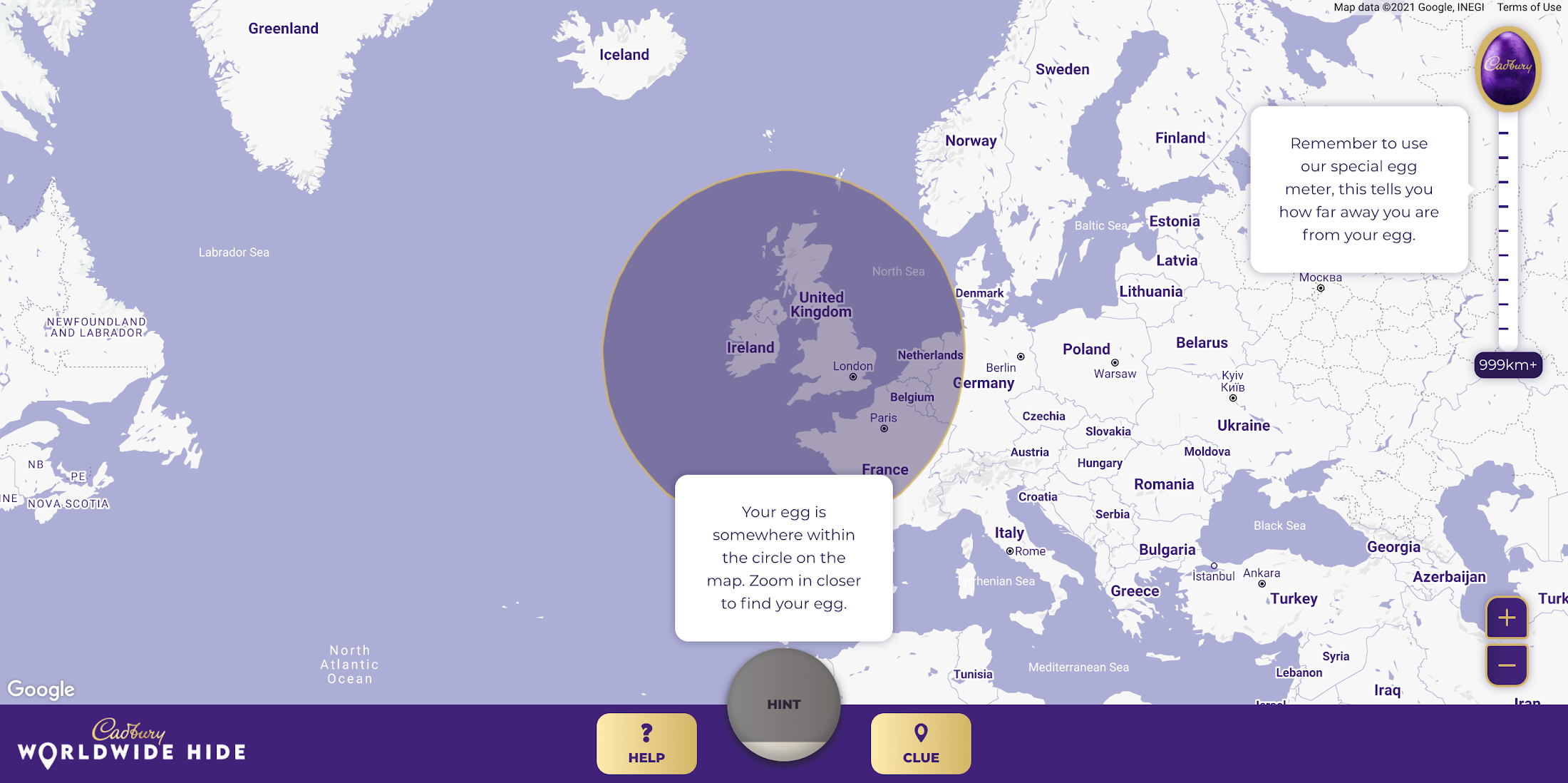
Providing an engaging map experience to our users was key to the execution and by leveraging the Google Maps interface consumers already use on a daily basis, we were able to focus on our core campaign message. We built the platform using both the Maps Javascript API to render the 2D maps and the Street View API, which allowed users to hide their egg anywhere in the world for their loved one to find. We also used Place Autocomplete powered search allowing users to search for their favorite location while contextual hints kept hiders on track. Seekers were aided with a distance meter and hints system if they got stuck. Our Design and Engineering team used Google Maps Platform Cloud-based maps styling to customize the map.
To get the campaign to as many people as possible we prioritized accessibility throughout the site, from screen-reader support and relevant tab indexes through to full keyboard shortcuts within the map experience – allowing users to hide (or find!) their egg without ever using a mouse. Real user testing was done throughout the UX, design and development process to ensure best practices were being followed.
How long did it take the VCCP team to build-out the solution?
Discovery to the roll-out of the solution took about 7 months. Our Design and Engineering team started with a 4-week discovery phase in September 2020 where we developed a service blueprint that set the foundations of the project. By visualizing the entire process of a service from start to finish, listing all the activities that happened at each stage, and the different roles, actions, processes and systems involved, the blueprint allowed all stakeholders to align on the solution.
We started iterative cycles of development in November 2020, beginning with UX (prototype for user testing), UI (look and feel and customization of Google Maps using Cloud-based Maps styling), and then kicked off front end and back end development in December. We launched the Cadbury Worldwide Hide platform in early March 2021—just in time for millions of users around the world to enjoy ahead of Easter.
Did you experience any challenges as you developed the experience?
The biggest challenge was actually around adapting to change in plans in response to the desire to launch the platform across more markets than originally intended. During the development phase, we rapidly scaled up to develop the platform for Ireland, Australia and New Zealand in addition to the UK within the same timeframe.
What results were you able to achieve and how did you measure the success of the project?
One week before Easter Sunday, we had sold out of Cadbury Worldwide Hide chocolate eggs. There were over 2.26 million site visits with an average time spent on the platform of almost five minutes. Over 809k virtual eggs were hidden in total and 14.5k real Cadbury Easter eggs bought. The Cadbury Worldwide Hide platform was the number one Mondelēz International website globally, and a couple even used the platform for a marriage proposal!

Would you recommend this type of campaign and user engagement to other B-to-C brands, if so, why?
Direct to consumer capabilities are increasingly important for brands, particularly in the FMCG (Fast Moving Consumer Goods) space. Local lockdowns and restrictions on physical retail have accelerated our adoption of ecommerce. Not only have brands had to adapt quickly, but consumers are beginning to expect direct-to-consumer capabilities from their favorite brands. Cadbury recognized this behavior shift early. What the Cadbury Worldwide Hide did well was to innovate beyond the traditional DTC and ecommerce experience by gamifying the platform and enabling moments of human connection at a time when physical connection was impossible.
What advice would you give to other agencies or brands thinking about creating user experiences with Google Maps Platform?
We learned a great deal taking on this project. Here are just a few highlights:
- Assume anything is possible.
- Our ‘Mobile First’ approach allowed consumers to access the platform from any device with consistent, engaging brand experience.
- Think big and beyond the traditional use of Google Maps and treat it as a foundation platform to build upon.
- Prototype and test early to validate your hypotheses. We created a technical proof of concept which enabled us to test using ‘real’ Google Maps and real people early in our design process.
- Don’t assume everything is accessible to everyone. You may need to build upon the ‘out the box’ functionality to ensure as many people as possible can use your solution.
For more information on Google Maps Platform, visit our website.
Best Practices for Cost Optimization in the Cloud

5428
Of your peers have already read this article.
3:30 Minutes
The most insightful time you'll spend today!
When customers migrate to Google Cloud Platform (GCP), their first step is often to adopt Compute Engine, which makes it easy to procure and set up virtual machines (VMs) in the cloud that provide large amounts of computing power. Launched in 2012, Compute Engine offers multiple machine types, many innovative features, and is available in 20 regions and 61 zones!
Compute Engine’s predefined and custom machine types make it easy to choose VMs closest to your on-premises infrastructure, accelerating the workload migration process cost effectively. Cloud allows you the pricing advantage of ‘pay as you go’ and also provides significant savings as you use more compute with Sustained Use Discounts.
As Technical Account Managers, we work with large enterprise customers to analyze their monthly spend and recommend optimization opportunities. In this blog, we will share the top recommendations that we’ve developed based on our collective experience working with GCP customers.
Getting ready to save
Before you get started, be sure to familiarize yourself with the VM instance pricing page—required reading for anyone who needs to understand the Compute Engine billing model and resource-based pricing. In addition to those topics, you’ll also find information about the various Compute Engine machine types, committed use discounts and how to view your usage, among other things.
Another important step to gain visibility into your Compute Engine cost is using Billing reports in the Google Cloud Console and customizing your views based on filtering and grouping by projects, labels and more. From there you can export Compute Engine usage details to BigQuery for more granular analysis. This allows you to query the datastore to understand your project’s vCPU usage trends and how many vCPUs can be reclaimed. If you have defined thresholds for the number of cores per project, usage trends can help you spot anomalies and take proactive actions. These actions could be rightsizing the VMs or reclaiming idle VMs.
Now, with these things under your belt, let’s go over the five ways you can optimize your Compute Engine resources that we believe will give you the most immediate benefit.
1. Apply Compute Engine rightsizing recommendations
Compute Engine’s rightsizing recommendations feature provides machine type recommendations that are generated automatically based on system metrics gathered by Stackdriver Monitoring over the past eight days. Use these recommendations to resize your instance’s machine type to more efficiently use the instance’s resources. It also recommends custom machine types when appropropriate. Compute Engine makes viewing, resizing and other actions easier right from the Cloud Console as shown below.
Recently, we expanded Compute Engine rightsizing capabilities from just individual instances to managed instance groups as well. Check out the documentation for more details.

For more precise recommendations, you can install the Stackdriver Monitoring agent which collects additional disk, CPU, network, and process metrics from your VM instances to better estimate your resource requirements. You can also leverage the Recommender API for managing recommendations at scale.
2. Purchase Commitments
Our customers have diverse workloads running on Google Cloud with differing availability requirements. Many customers follow a 70/30 rule when it comes to managing their VM fleet—they have constant year-round usage of ~70%, and a seasonal burst of ~30% during holidays or special events.
If this sounds like you, you are probably provisioning resources for peak capacity. However, after migrating to Google Cloud, you can baseline your usage and take advantage of deeper discounts for Compute workloads. Committed Use Discounts are ideal if you have a predictable steady-state workload as you can purchase a one or three year commitment in exchange for a substantial discount on your VM usage.
We recently released a Committed Use Discount analysis report in the Cloud Console that helps you understand and analyze the effectiveness of the commitments you’ve purchased. In addition to this, large enterprise customers can work with their Technical Account Managers who can help manage their commitment purchases and work proactively with them to increase Committed Use Discount coverage and utilization to maximize their savings.
3. Automate cost optimizations
The best way to make sure that your team is always following cost-optimization best practices is to automate them, reducing manual intervention.
Automation is greatly simplified using a label—a key-value pair applied to various Google Cloud services. For example, you could label instances that only developers use during business hours with “env: development.” You could then use Cloud Scheduler to schedule a serverless Cloud Function to shut them down over the weekend or after business hours and then restart them when needed. Here is an architecture diagram and code samples that you can use to do this yourself.
Using Cloud Functions to automate the cleanup of other Compute Engine resources can also save you a lot of time and money. For example, customers often forget about unattached (orphaned) persistent disk, or unused IP addresses. These accrue costs, even if they are not attached to a virtual machine instance. VMs with the “deletion rule” option set to “keep disk” retain persistent disks even after the VM is deleted. That’s great if you need to save the data on that disk for a later time, but those orphaned persistent disks can add up quickly and are often forgotten! There is a Google Cloud Solutions article that describes the architecture and sample code for using Cloud Functions, Cloud Scheduler, and Stackdriver to automatically look for these orphaned disks, take a snapshot of them, and remove them. This solution can be used as a blueprint for other cost automations such as cleaning up unused IP addresses, or stopping idle VMs.
4. Use preemptible VMs
If you have workloads that are fault tolerant, like HPC, big data, media transcoding, CI/CD pipelines or stateless web applications, using preemptible VMs to batch-process them can provide massive cost savings. In fact, customer Descartes Labs reduced their analysis costs by more than 70% by using preemptible VMs to process satellite imagery and help businesses and governments predict global food supplies.
Preemptible VMs are short lived— they can only run a maximum of 24 hours, and they may be shut down before the 24 hour mark as well. A 30-second preemption notice is sent to the instance when a VM needs to be reclaimed, and you can use a shutdown script to clean up in that 30-second period. Be sure to fully review the full list of stipulations when considering preemptible VMs for your workload. All machine types are available as preemptible VMs, and you can launch one simply by adding “-preemptible” to the gcloud command line or selecting the option from the Cloud Console.
Using preemptible VMs in your architecture is a great way to scale compute at a discounted rate, but you need to be sure that the workload can handle the potential interruptions if the VM needs to be reclaimed. One way to handle this is to ensure your application is checkpointing as it processes data, i.e., that it’s writing to storage outside the VM itself, like Google Cloud Storage or a database. As an example, we have sample code for using a shutdown script to write a checkpoint file into a Cloud Storage bucket. For web applications behind a load balancer, consider using the 30-second preemption notice to drain connections to that VM so the traffic can be shifted to another VM. Some customers also choose to automate the shutdown of preemptible VMs on a rolling basis before the 24-hour period is over, to avoid having multiple VMs shut down at the same time if they were launched together.
5. Try autoscaling
Another great way to save on costs is to run only as much capacity as you need, when you need it. As we mentioned earlier, typically around 70% of capacity is needed for steady-state usage, but when you need extra capacity, it’s critical to have it available. In an on-prem environment, you need to purchase that extra capacity ahead of time. In the cloud, you can leverage autoscaling to automatically flex to increased capacity only when you need it.
Compute Engine managed instance groups are what give you this autoscaling capability in Google Cloud. You can scale up gracefully to handle an increase in traffic, and then automatically scale down again when the need for instances is lowered (downscaling). You can scale based on CPU utilization, HTTP load balancing capacity, or Stackdriver Monitoring metrics. This gives you the flexibility to scale based on what matters most to your application.
High costs do not compute
As we’ve shown above, there are many ways to optimize your Compute Engine costs. Monitoring your environment and understanding your usage patterns is key to understanding the best options to start with, taking the time to model your baseline costs up front. Then, there are a wide variety of strategies to implement depending on your workload and current operating model.
For more on cost management, check out our cost management video playlist. And for more tips and tricks on saving money on other GCP services, check out our blog posts on Cloud Storage, Networking and BigQuery cost optimization strategies. We have additional blog posts coming soon, so stay tuned!
More Relevant Stories for Your Company

A Road to Possibilities: Google Maps Platform Website
For more than 15 years, developers have used Google Maps Platform to deliver location-based experiences to their end users and used location intelligence to optimize their businesses. Along this journey, we’ve made a variety of changes to better support our community as needs have changed and new industries and technologies

How APIs Helped PWC Open New Revenue Streams Using Existing Data
PwC, one of the “Big Four” accounting firms, is well-known for professional services structured around auditing, insurance, tax, legal, and traditional management consulting. In Australia, the PwC Innovation and Ventures group has taken the global lead in building new, technology-based, turnkey lines of business outside of PwC’s traditional service areas.

The Latest in Spring Cloud GCP: Upgrading the Sample Bank of Anthos App
We’re excited to announce that Spring Cloud GCP version 4.0 is now generally available! In this post, we’ll be describing what the new major version has to offer, and demonstrating the process of using the migration guide on one of our reference architectures, Bank of Anthos. What’s new? With this release, Spring Cloud

Application Modernization Made Easy
Modernizing apps on the cloud isn’t an “all or nothing” decision. Businesses want the option to modernize on-premises or choose multi-cloud solutions that meet their needs. That’s why we created a new solution for running apps anywhere – simply, flexibly, and securely. Embracing open standards, Anthos lets you run your applications, unmodified,
