





Indonesia moves towards advanced education with Cloud, ML & Mobile Development

3216
Of your peers have already read this article.
2:30 Minutes
The most insightful time you'll spend today!
Indonesia is leading the way for digital transformation in Southeast Asia. According to Google’s e-Conomy South East Asia report, the country’s 2030 Gross Merchandise Value – the value of online retailing to consumers – could be twice the value of the whole of Southeast Asia today.
This growth means that many companies need more qualified IT graduates and employees with digital skills than they have today. Fast-growing tech companies need more qualified IT graduates, and employees with digital skills. According to the World Bank, Indonesia needs an additional nine million people with digital skills by 2030. The shortage of technical talent reiterates the need to invest in a reliable skills pipeline.
Following years of digital talent developments in Indonesia, Google has become a supporter of Bangkit, an academy designed to produce high-caliber technical talent for Indonesian technology companies and startups. Bangkit has facilitated a multi-stakeholder collaboration between Google, government, industry, and universities across Indonesia.
Last year, the President of Indonesia and the Ministry of Education and Culture, Research, and Technology, acknowledged Bangkit’s significant impact, with 3,000 students completing nearly 15,000 courses and specialisations.
Building on last year’s success, Bangkit started its 2022 program in February, offering three learning paths to students:
- Cloud computing with Google Cloud, preparing students for the Google Associate Cloud Engineer certification. Some of the course components are also available online
- Mobile development with Android, preparing students for the Google Associate Android Developer exam. An online version is available here.
- Machine learning with Tensorflow, getting students ready to take the Tensorflow Developer certification. Some of the online courses are available here for others.
Bangkit 2022 has enrolled 3,100 university students who will take a five month study course, obtaining university study credit, as well as industry certifications. The program accepts diverse cohorts of people who are passionate about preparing for a tech career in the near future, with support and encouragement for women, people with disabilities, and students from across Indonesia to apply.
Since its pilot in 2019, Bangkit has been guided by three principles:
- Industry-led: provides curriculum and instructors from industry experts, including Google, GoTo and Traveloka. Instructors include key figures such as Laurence Moroney (Google, Lead AI Advocate), Google Developer Experts, and other committed professionals.
- Immersive: combines online learning methods conducted in both individual and group settings.
- Interdisciplinary: contains knowledge and best practices in tech, soft skills, and English to provide complete career readiness.
The program runs from February to July 2022, and has a 900-hour curriculum throughout the 18-week learning experience.
Benefits for students participating in Bangkit include:
- Study credit conversion
- Job opportunities at our career fair
- Google Cloud, TensorFlow and AAD exam vouchers
- Incubation funds and mentorship support from industry
Towards the end of Bangkit 2022, students will team up for the Capstone Project challenge to propose solutions to some of the nation’s most pressing problems, such as environmentalism, accessibility, and more. The top 15 teams will be selected to receive funding to incubate their capstone projects. These education and career-preparedness offerings are provided at no cost.
Google is partnering with industry, governments, universities, and employers to help meet the skill demands of today. From supporting the State of Ohio to offer tech skills to residents, to working with the University of Minnesota-Rochester to create a customized health sciences degree program, Google is here to help our partners prepare those they serve for a cloud-first world.
How to Get Your Cloud Migration Journey Started Off on the Right Foot

3613
Of your peers have already read this article.
2:30 Minutes
The most insightful time you'll spend today!
When moving to the cloud, many organizations concentrate their focus on the change in technology, and overlook an area just as complex: cultural change.
At Google, we’ve spent years nurturing our culture and workforce to best operate in the cloud, and the Google Cloud Professional Services team leverages the lessons we’ve learned for the benefit of enterprise customers embarking on their own cloud journeys.
While it can be tempting to believe in a universally ‘correct’ strategy for change management, there is no one-size-fits-all answer. Every organization will have its own unique considerations. But with that said, there are some core strategies we’ve found to be relevant and useful across a broad range of businesses.
1. Define your purpose for moving to Cloud
While pockets of cloud use and experimentation can evolve independently and in parallel across an organization, it’s important to make some deliberate decisions before starting a larger migration. At this stage, we recommend having a detailed answer to two key questions to ensure a successful cloud migration:
- Where do you want to go? (Or “What’s your cloud vision?”)
- How do you plan to get there?
Start by having a conversation with leaders and those who will be key to the journey about how far you want to push your cloud vision. This alignment ensures everyone is on the same page—and will provide greater direction, allowing more deliberate action.
2. Find the change path which is right for you
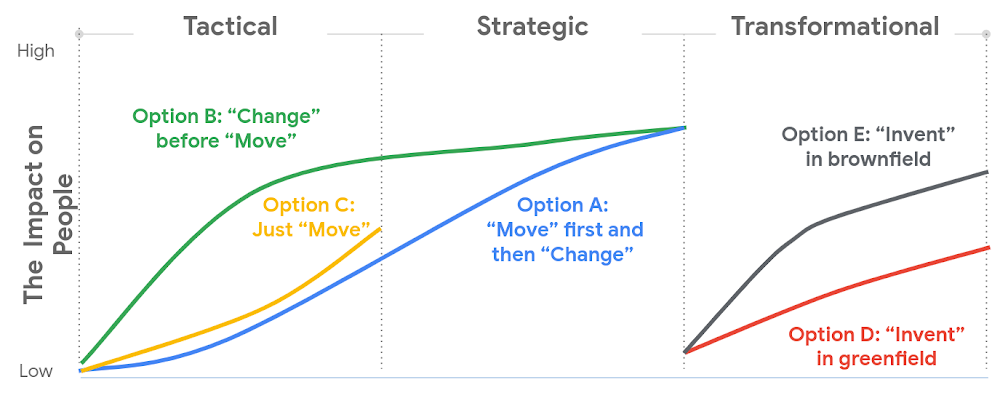
Whether a ‘lift and shift’ approach to the cloud is right for you, or a more transformative approach with a lot of re-architecting—the most important thing is to find the flavor of change which is appropriate to your context and level of ambition.This will both shape your key migration activities, but also the level of impact to be managed within your organization.
There are many ways to embark on a change journey for cloud migration (which one can find in the chart below). It is important to deeply understand the needs of your business and its people and determine what strategy makes the most sense.
3. Learn from best practices
Based on the lessons we’ve learned along our own journey, and the work we’ve done with customers, there are a number of recommendations we can share that can make a cloud migration more successful. We go into these in more detail in our new whitepaper, but below you can find the ones we think are most relevant:
- Share the vision—and measure, measure, measure. Once you’ve crystallised your cloud vision with leadership and key stakeholders, share that vision widely. Set success goals and communicate them to hold yourself accountable.
- Be clear about the capabilities you will need in the future—and where you’ll get them. For example, if your vision is to become a cloud-first, data and AI-led organization, ensuring you have the right data science skills and machine learning capabilities in your organization to achieve that vision becomes a critical step—be they home-grown or bought-in.
- Find the right balance between capabilities that should be under central control, and capabilities that should be decentralized, or agile. For example, should machine learning be something that sits centrally, or should it be spread across your organization? For every business, the solution will be a little different, and there’s no “one true answer.” There’ll be lots of different opinions about this, so the sooner the conversation starts, the better.
- Start thinking about the needed tech and non-tech skills now, and how you’ll fill the gaps. Building the tech skills will take time, and not everyone will feel comfortable with the future picture of collaboration, innovation, and agility.
To help businesses navigate their own cloud journeys, Google Cloud Professional Services has released a new whitepaper that can help guide organizations. “Managing Change in the Cloud” is closely aligned with the Google Cloud Adoption Framework and is a practical guide for organizations looking to maintain momentum in their cloud adoption. You can download the whitepaper here.

3690
Of your peers have already downloaded this article
1:30 Minutes
The most insightful time you'll spend today!
Across industries, CEOs share a top priority—harness technology to jump-start growth, accelerate time to market, and foster innovation. CIOs and other technology leaders recognize that the C-suite depends on them to achieve growth and meet rising expectations for agility.
They increasingly view IT modernization—including migrating to the cloud, adopting new application architectures, and building on cloud-native services—as a way to sustain these goals. To date, however, most companies have not captured the anticipated agility benefits because a number of challenges hinder technology leaders as they push ahead with modernization initiatives.
While many of these challenges are valid, there are some false tradeoffs that can be avoided. New McKinsey research highlights that cloud migration needs to be combined with a comprehensive organizational approach to allow for a much more effective agile transformation. CIOs need to promote the transformation mind-set of focusing on differentiated business value by adopting agile processes, automating policies, and upskilling talent across the entire organization. They need to look beyond technology to change the way their IT organization operates across three foundational elements—people, processes, and policies.
Priorities include upskilling existing talent and creating new roles (such as site reliability engineers, full-stack engineers, and data scientists), revamping procedures by adopting agile
development processes with security integrated into every step, and enforcing policies through automation.
Download this McKinsey research report to understand the practices of leaders versus that of laggards and get the key “unlocks” that can help organizations move to higher levels of business agility as they pursue increased cloud adoption.
Learn to Access Process Metrics for Full-visibility into Software and Infrastructure behind Your Apps

3400
Of your peers have already read this article.
2:00 Minutes
The most insightful time you'll spend today!
When you are experiencing an issue with your application or service, having deep visibility into both the infrastructure and the software powering your apps and services is critical. Most monitoring services provide insights at the Virtual Machine (VM) level, but few go further. To get a full picture of the state of your application or service, you need to know what processes are running on your infrastructure. That visibility into the processes running on your VMs is provided out of the box by the new Ops Agent and made available by default in Cloud Monitoring. Today we will cover how to access process metrics and why you should start monitoring them.
Better visibility with process metrics
The data gathered by process metrics include CPU, memory, I/O, number of threads, and more, for any running processes and services on your VMs. When the Ops Agent or the Cloud Monitoring agent is installed, these metrics are captured at 60-second intervals and sent to Cloud Monitoring so you can visualize, analyze, track, and alert on them. A single VM may run tens or hundreds of processes, while you may have tens of thousands running across your fleet of VMs.
As a developer, you may only care about seeing inside a single VM to troubleshoot and identify memory leaks or the source of performance issues.
As an operator or IT Admin, you may be interested in aggregate resource consumption, building baseline views of compute, storage, and networking usage across your VM fleet. Then, when those baseline consumption levels break normal behaviors, you will know when to investigate your systems.
Built for scale and ease of use
Cloud Monitoring is built on the same advanced backend that powers metrics across Google. This proven scalability means your metrics ingestion will be supported despite the extremely high cardinality. Additionally, our agents do not require any config file changes to turn on process metric monitoring.
Lastly, our goal is to provide you the observability and telemetry data where, and when, you need it. So, like the rest of the operations suite, we deliver process metrics in the context of your infrastructure, directly in the VM admin console.
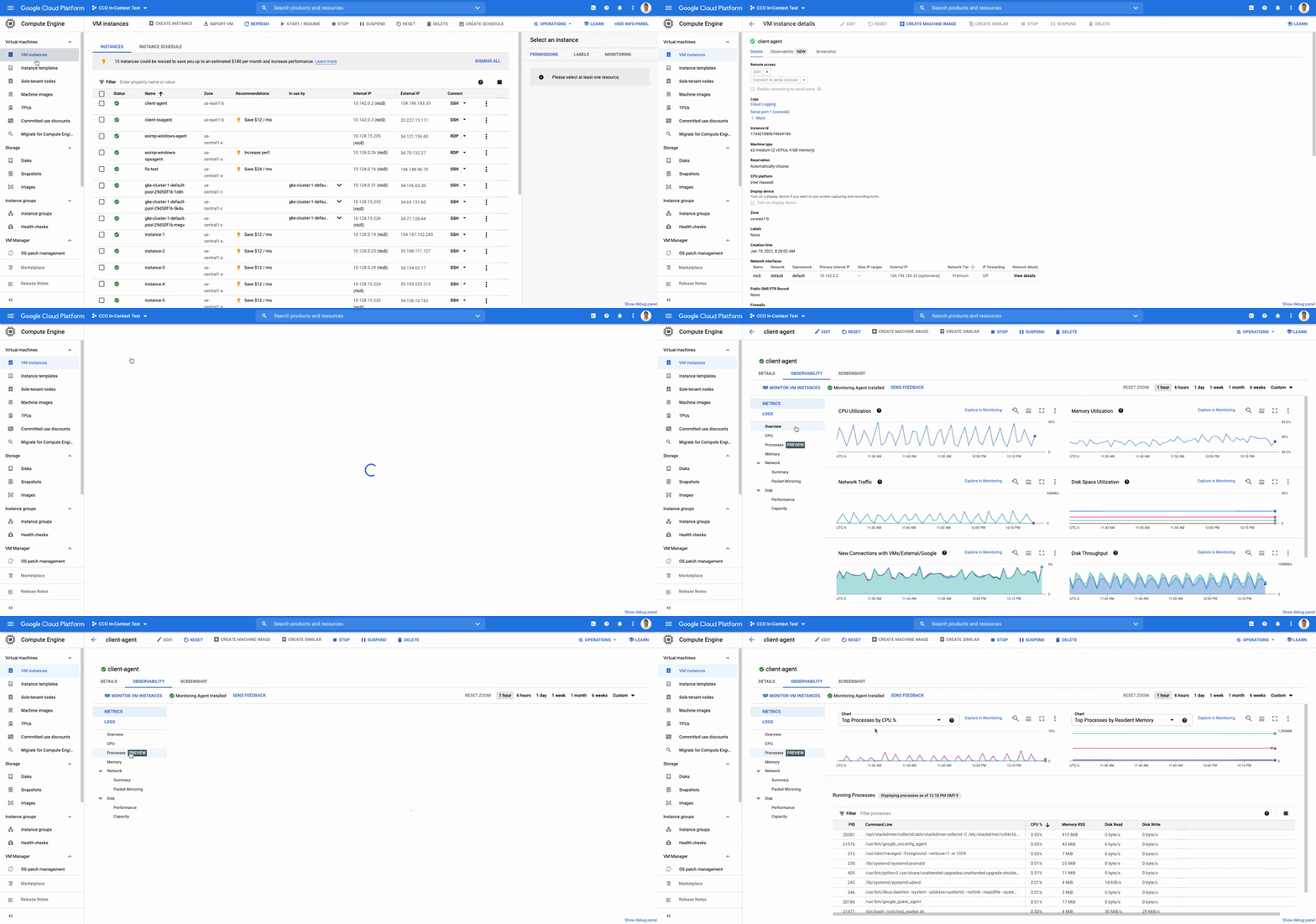
The navigation is simple. Once you have the Ops Agent or the Cloud Monitoring agent installed in your VMs:
- Go to the Compute Engine console page and click on VM Instances
- Select the VM that you want to investigate
- In the navigation menu on the top, click Observability
- Click on Metrics
- Lastly, click on Processes
In the window on the right you will see a chart and a table with all of the processes in your VM. You can also filter by time frame and sort by name or value. You do not need to do anything, other than have the agent installed, for the process to be detected and displayed.
Fleet-wide metrics monitoring
Cloud Monitoring gives you a look across your fleet of VMs so you can identify the aggregated usage of resources by processes. This level of broad, yet granular, insight can drive your decisions around which software to run or how many VMs you need to optimally power your apps and services. Admins can perform a cost-savings analysis if they determine that certain processes are slowing down the work of a large number of VMs. The larger numbers of less powerful VMs can be replaced by fewer, more capable VMs.
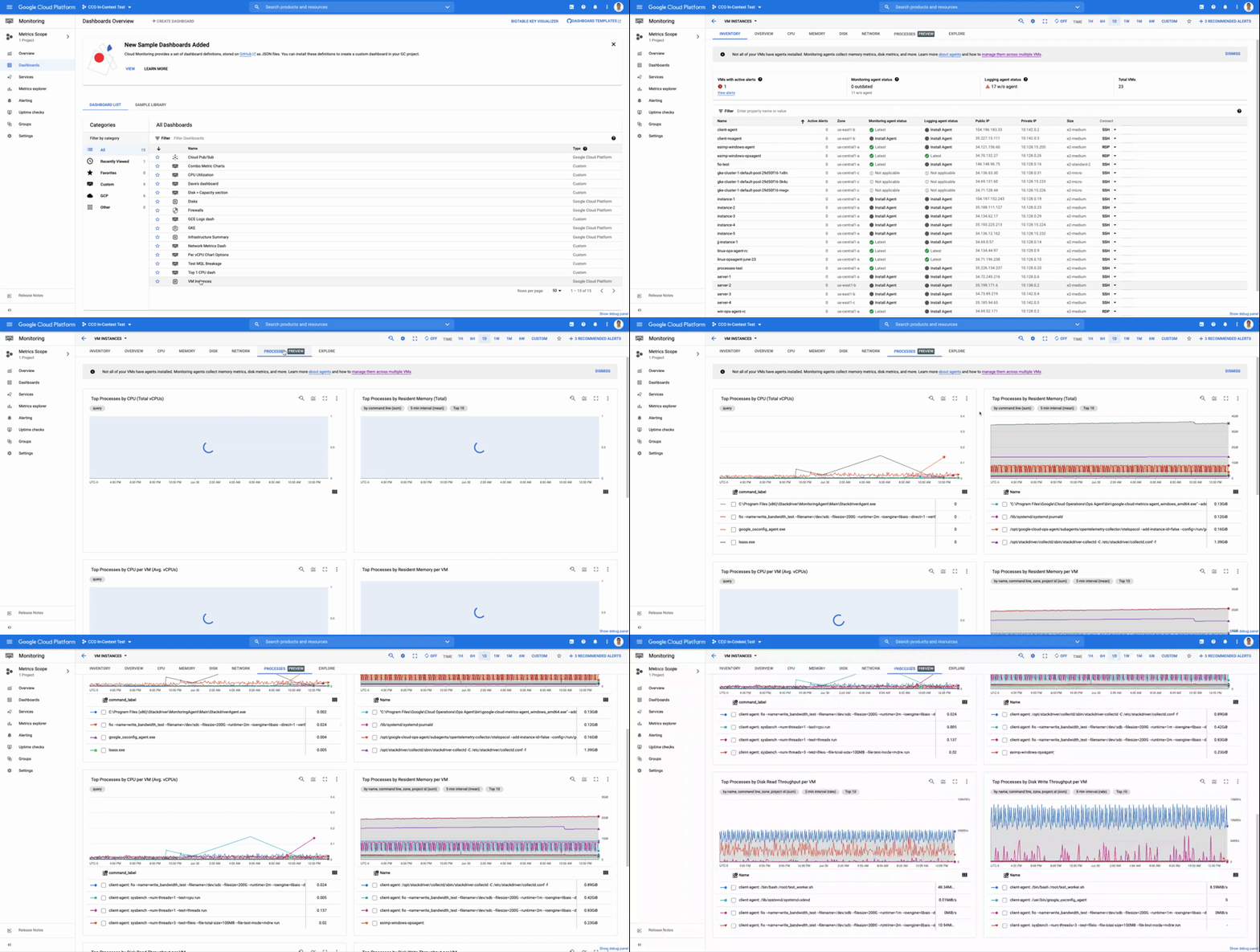
To get this fleet-wide view:
- Navigate to Cloud Monitoring
- Click Dashboards in the left menu
- In the All Dashboards list, click on VM Instances
- Towards the top of the window, click on Processes
This provides many charts detailing the processes running across your fleet of VMs.
Get started today
To start identifying and monitoring your process metrics, you must first install the Ops Agent, or have installed the legacy Cloud Monitoring agent. Once that is complete, the process metrics data will automatically be ingested into Cloud Monitoring and the VM admin console.
If you have any questions, or to join the conversation with other developers, operators, DevOps, and SREs, visit the Cloud Operations page in the Google Cloud Community.
Cloud FinOps: Maximizing Business Value and Optimizing Cloud Spend

1194
Of your peers have already read this article.
6:30 Minutes
The most insightful time you'll spend today!
We’ve been saying it for years, the benefits and potential of the cloud abound.
And yet, more than 80% of respondents in a survey of 753 business leaders point to managing cloud spend as their top organizational challenge, and these same respondents estimate that nearly 1/3 of their cloud spend is inefficient or wasted (Flexera, 2023). Many organizations are new to optimizing cloud costs and ensuring resources are used efficiently.
As your organization digitally transforms you may be realizing what other organizations are realizing too: When it comes to business value, simply migrating to the cloud isn’t enough. Achieving the full benefits of cloud requires fundamental changes to both mindset and behaviors around existing financial-management practices. It requires changing the way your disparate teams work together.
Enter the Cloud FinOps Building Blocks
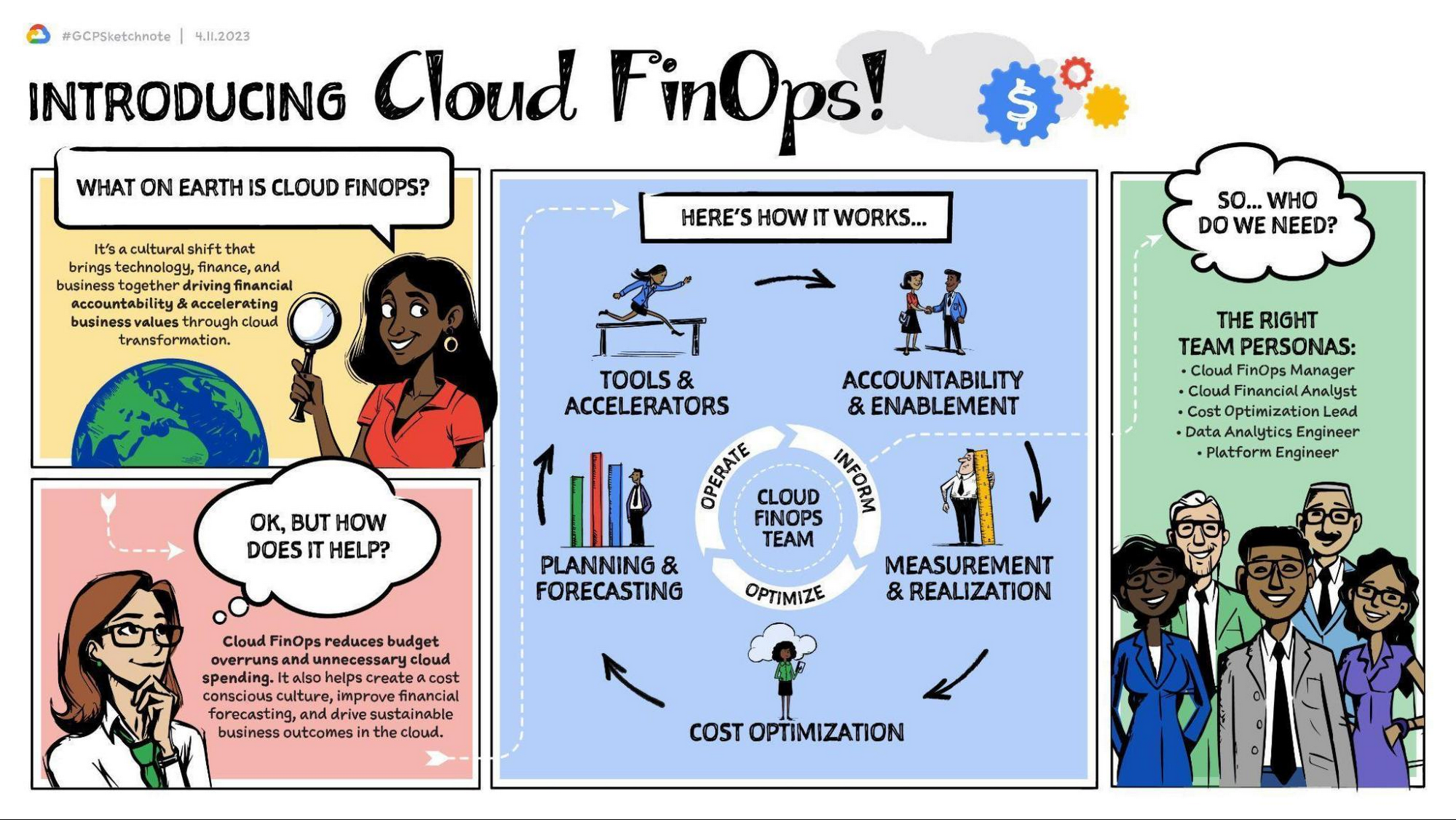
Cloud FinOps is a framework, discipline, and cultural shift combining people, processes, and technology to drive financial awareness and accountability. FinOps practices align engineering, finance, technology and business leaders and teams under a primary objective: to maximize business value from the cloud. With Cloud FinOps practices, every business stakeholder is charged not only to take responsibility for their spending and costs, but also to optimize them. These practices enable businesses to manage consumption and make sound, data-informed cloud-spend decisions. Cloud FinOps is comprised of five building blocks:
- Accountability and enablement
Establishing governance and policies to manage cloud spend and realize business value. - Measurement and realization
Driving financial accountability and value realization with a defined set of KPIs and success metrics. - Cost optimization
Providing financial visibility and recommendations of IT resource usage to optimize cloud spend. - Planning and forecasting
Modernizing budgeting, forecasting, and chargeback methods to allow for iterative, innovative and cost effective development practices. - Tools and accelerators
Deploying and integrating a set of cloud cost tooling to effectively manage and track cloud spend. Learn more here.
For a general overview of the Cloud FinOps framework and more on the five building blocks, check out these resources:
- Video | What is FinOps and 3 reasons why you should care about it.
This 5-minute video provides an overview of FinOps, the 5 building blocks, and how they can benefit your organization. - Podcast | FinOps with Joe Daly
In this podcast, Joe Daly of the FinOps Foundation shares about the key principles of FinOps, which he refers to as financial DevOps. Daly discusses how this framework is helping companies make better and more efficient financial decisions while taking advantage of the cloud. - Blog | Decoding Cloud FinOps to accelerate digital transformation
This blogpost discusses the critical role of FinOps in a successful digital transformation. It outlines key metrics to help measure and track business value and to increase visibility into the effects of digital transformation on top-line revenue. - Article | Cloud FinOps: The secret to unlocking the economic potential of public cloud
This Forbes article profiles OpenX, the first major advertising exchange platform to migrate entirely to the cloud. It details the 5 key pillars of the Cloud FinOps framework, which OpenX leveraged in their digital transformation strategy. In just 9 months, they reduced their per-unit costs by more than 60%.
Importantly, Cloud FinOps isn’t about saving money; it’s about making money. It’s about promoting a cost-conscious culture, financial accountability, and business agility in the cloud. Whatever stage of the cloud journey you’re at, cloud FinOps practices will help you get the most value out of Google Cloud. This framework can help to remove blockers, implement the building blocks, and empower your teams to make better business decisions.
The Cloud FinOps Journey
Implementing Cloud FinOps is neither a destination nor a box your organization will check then archive. Rather, Cloud FinOps is an ongoing journey and discipline. It’s inherently iterative. As such, growth and maturity across processes, capabilities, and domains requires action, repetition, and continuous learning.
Across the five FinOps building blocks, we’ve identified 50 subprocesses to best understand organizations’ FinOps proficiency, capabilities, practice domains, and blind spots. We scale them from 1 to 5 and categorize them in one of three phases of maturity: Crawl, Walk, or Run. Organizations in the Crawl phase tend to focus on technical problem solving and cloud-cost visibility. Organizations in the Walk phase emphasize strategic improvements such as employing cost visibility dashboards to realize better business value. And organizations in the Run phase are focused primarily on transformational change and strategic innovation, factoring cost considerations into both processes and cloud architecture.
Through this “crawl, walk, run” maturity model, we can evaluate proficiency, establish a benchmark, and recommend a targeted action plan for FinOps adoption. And whatever your level of maturity, your organization can take quick scalable action not only to foster improvement but also to evaluate outcomes and gain insights.
The key here is that regardless of your organization’s Cloud FinOps maturity level, you can take small steps now toward continuous improvement. Here are some common focus areas and several more resources organized by maturity level that you can access.
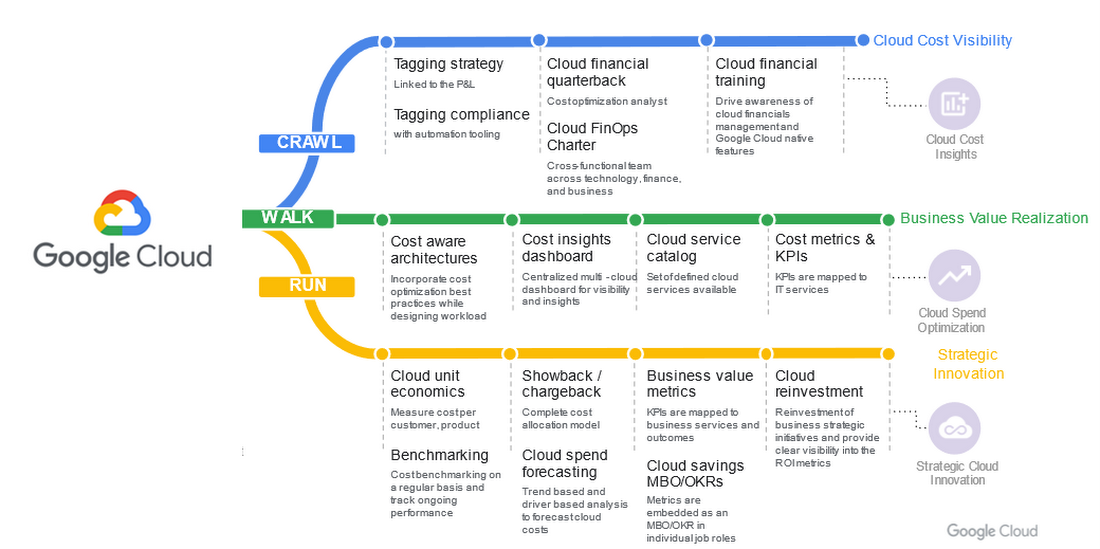
Crawl phase
Improve cloud-cost visibility.
- Whitepaper | Drive Cloud FinOps at scale with Google Cloud Tagging
Tags and labels can be useful and flexible tools to help your organization segment cloud spend and allocate costs. This whitepaper introduces Google Cloud Tags and best practices for implementing them. It differentiates tags, which offer reliable reporting and governance features, from labels, which can be prone to problems, including poor coverage and a lack of integrity in data labeling. - Whitepaper | Unlocking the value of Cloud FinOps with a new operating model
This white paper unpacks the details of the FinOps operating model, including roles, organizational alignment, and driving culture change. It details how to establish strong financial governance and a cost-conscious culture. - Whitepaper | Cloud FinOps: Shared services cost allocation
In this whitepaper, you’ll explore the elements of cost allocation as well as the complexities and challenges associated with shared-services cost allocation. While some of these concepts and models are interchangeable between legacy and cloud environments, this whitepaper focuses primarily on cloud computing and associated services.
Walk phase
Improve business-value realization.
- Blog | 5 key metrics to measure Cloud FinOps impact in your organization in 2022 and beyond
To drive business growth and topline revenue, business leaders must be able to connect cloud investments to business outcomes. As such, traditional IT metrics and KPIs must continue to evolve. In this blogpost, we’ll explore five key business-value metrics aligned to the five Cloud FinOps building blocks. - Whitepaper | Maximize business value with Cloud FinOps
The cloud introduces new complexity and challenges to traditional IT financial management. As such, it requires strategic financial governance, processes, and partnership across the organization. This whitepaper explains how Cloud FinOps helps enterprises that have invested in cloud to drive financial accountability and accelerate business value.
Run phase
Improve strategic cloud innovation.
- Whitepaper | Unit costing: The next frontier in cloud
In this whitepaper, you’ll explore the nature of and need for cloud unit costing, the standard by which FinOps practitioners obtain full business context for their cloud costs. It features examples from cloud-first organizations that have pioneered FinOps practices. Additionally, it examines several cloud forecasting and budgeting methods, ranging from least to most rigorous. - Blog | You get what you pay for: Principles for designing a chargeback process
Chargeback, a crucial Cloud FinOps capability, is the process of mapping cloud consumption to internal users within an organization. It provides transparency, facilitates accountability, enables recovery of cloud costs, and fosters a culture of fiscal responsibility. This blogpost will walk you through some best practices in designing an effective chargeback process in Google Cloud.
Success with Cloud FinOps
As global markets continue to face challenges, there’s never been a better time to increase the return on your cloud investments. Adopting and implementing FinOps practices will help. For some real-world examples of how organizations across a range of FinOps maturity levels have collectively saved millions of dollars on their overall cloud spend, check out these customers’ stories.
- Video | Next 2022: Top 10 ways to lower your costs on Google Cloud with General Mills
In this video, which highlights ten leading cloud cost optimization practices, hear how General Mills, which is on pace to increase their cloud footprint by 60%, has approached the discipline of cost savings and accelerated their adoption of Cloud FinOps to drive waste out of their cloud usage. - Video | How Nuro optimized their costs on Google Cloud
In this video, you’ll get an overview of the Google Cloud FinOps framework, a deep dive on cost-optimization best practices, and hear about how startup Nuro AI has adopted their own cost-savings discipline and Cloud FinOps practice. - Video | How OpenX reduce per unit costs by 60%
In this video, you’ll learn how to establish a cost center of excellence within your cloud practice, explore several cost-optimization recommendations, and hear from OpenX about how they reduced their costs on Google Cloud. - Case Study | How Sky saved millions with Google Cloud
In this case study, read how a few years into their cloud adoption journey, media and entertainment company, Sky Group discovered over $1.5 million in savings and optimized costs with BigQuery, Compute Engine, and Cloud Storage. - Case Study | Etsy: Doing more with less cost and infrastructure
In this case study, read how after migrating their data center and ecommerce platform to the cloud, Etsy realized more than 50% savings in compute energy and leveraged committed use discounts (CUDs) to reduce their compute costs by 42%.
It’s important to remember that FinOps success looks different for different organizations. It’s neither a one-time fix nor a destination reached by way of a single path. But for every organization, success requires small actions, refinement, and continuous improvement. As you leverage Google Cloud FinOps resources and tools, your organization can:
- Drive financial accountability and visibility.
- Optimize cloud usage and cost efficiency.
- Enable cross organizational trust and collaboration.
- Prevent cloud-spend sprawl.
- Break down departmental silos.
- Accelerate innovation.
Getting started with Cloud FinOps
At Google, we have a team of experts in leading FinOps practices dedicated to helping you create an actionable plan to optimize cloud spend and drive cost efficiency. We’ve created numerous resources to help you get started from any stage in the FinOps journey.
Whitepaper | Maximize Business Value with Cloud FinOps
This whitepaper outlines steps to help your organization implement FinOps. It details required teams and processes as well as the optimal behaviors, approaches, and outcomes to help maximize your investment on Google Cloud.
With Google Cloud FinOps, your organization can also accelerate business value in the cloud. To find out more, join us on the Google Cloud Twitter channel twice a month for open Twitter Spaces discussions or reach out to your Google Cloud Sales Representative for a 1:1 discussion.
Three German Retail Firms Choose Google Cloud to Migrate SAP Workloads for Business Transformation

3688
Of your peers have already read this article.
1:30 Minutes
The most insightful time you'll spend today!
The retail industry is rapidly evolving, with customers demanding exceptional digital experiences, and retailers adjusting their businesses to be more efficient. With many retailers relying on SAP for critical business functions like digital transactions, finance, supply chains and more, this shift has led them to look for ways to modernize these systems, deliver them on highly scalable infrastructure, and extract more value out of the data from within them.
I’m proud that we are helping German retailers successfully migrate business-critical SAP systems onto Google Cloud, minimizing risk and downtime and ultimately helping them build a foundation for future growth. Our work with retailers like Otto Group, one of the world’s largest ecommerce businesses, MediaMarktSaturn, the large consumer electronics retailer, and METRO, the wholesale retailer with operations across Europe, demonstrates our deep partnership with SAP to support customers’ digital transformations.
Helping Otto Group IT run SAP on secure, sustainable infrastructure
Otto Group, a leading online-retailer and services group in Germany and one of the world’s largest ecommerce companies, migrated their SAP workloads to Google Cloud in order to modernize their SAP landscape and build a more agile environment that would enable them to quickly scale up or down according to business needs.
The Otto Group, which consistently balances the sustainable use of resources and climate-neutral action with economic growth, is also able to leverage Google Cloud’s clean infrastructure to deliver the bulk of its internal SAP environment, ensuring the company’s business systems are running on secure, sustainable infrastructure. Since 2017, Google has matched 100% of its global electricity use with purchases of renewable energy every year, and is now building on that progress with a new goal of running entirely on carbon-free energy at all times by 2030.
With Google Cloud, Otto Group has told us they have access to better means of automation and improved network capability compared to what they had with their previous provider. Through this cloud migration, Otto Group IT is providing modern and flexibly scalable SAP systems to their internal customers.
Powering MediaMarktSaturn’s online ecommerce experience
For MediaMarktSaturn, SAP is critical to the smooth day-to-day running of its business, so the company was keen to ensure maximum availability and stability with a cloud environment. After a thorough examination of its business needs and hands-on support from Google Cloud’s teams, MediaMarktSaturn elected to migrate its SAP HANA database onto Google Cloud, enabling a performance increase of four times compared to its previous on-premises installations.
The SAP suite is critical for the ecommerce platform to run smoothly on a day-to-day basis. By migrating to Google Cloud, the retailer is providing even more support and maximum availability for its customers. With Google Cloud’s industry-specific expertise, MediaMarktSaturn’s customers have access to a reliable and stable ecommerce platform, so they can browse for products online from wherever they are.
Transforming METRO’s business by running SAP workloads in the cloud
With more than 97,000 employees in 34 countries, Germany’s METRO is one of the world’s largest B2B wholesalers. Previously, METRO relied on unique finance systems that were different in each country, and updates or system testing required substantial coordination across numerous teams, which was both time-consuming and costly.
To address these pain points, METRO is moving away from on premise deployments and is now migrating its SAP S/4HANA finance systems to Google Cloud to support everything from classical role-based accounting to the use of cognitive tools. Now, internal METRO teams can work seamlessly across operations, enhancing the services they provide to customers by addressing demands in real time.
To read more about how SAP on Google Cloud drives agility, efficiency, and innovation for our customers, visit our solutions page here.
More Relevant Stories for Your Company

7 Common Myths About Cloud Computing That Must Be Banished
No discussion about the emerging technologies that are shaping our future is complete without a mention of cloud computing. Unfortunately, too many of these discussions are filled with misinformation and fear-mongering. And while it’s always advisable to approach new technologies with a degree of healthy skepticism, this should always be

Vodafone Leverages Google Cloud to Aid COVID-19 Frontline with Anonymized Insights on Population Mobility
Editor’s note: When Europe’s largest mobile communications company, Vodafone, was asked by the European Commission to help understand population movement across the European Union and the UK to help fight COVID-19, it was able to provide anonymized mobile network-based insights to answer the call. Here’s how Vodafone, with the support

Take a Look at 30 Eventrac Locations!
New locations in Eventarc Back in August, we announced more Eventarc locations (17 new regions, as well as 6 new dual-region and multi-region locations to be precise). This takes the total number of locations in Eventarc to more than 30. You can see the full list in the Eventarc locations page or by running gcloud

Three Typical Connectivity Use Cases to Pick the Right Option for Your Enterprise
Enterprises today have a very broad mix of networks — from SD-WANs, dedicated WANs such as MPLS, cloud interconnects, to VPNs. At the same time, they’re moving those WANs to the cloud to take advantage of faster turn-up, lower cost, and increased feature velocity. As workloads migrate to the cloud
