





Unlocking Economic Potential: Cloud FinOps

3252
Of your peers have already read this article.
4:00 Minutes
The most insightful time you'll spend today!
Built for a CapEx world, most organizations’ finance systems aren’t set up to take advantage of cloud’s dynamic, OpEx-driven consumption patterns.

GETTY
It may not be a household name yet, but chances are you’ve crossed paths with OpenX today. OpenX, a leader in programmatic advertising, operates one of the world’s largest ad exchanges, serving over 250 billion ad requests per day, connecting more than 30,000 brands and reaching nearly one billion consumers. To make it happen, in 2019, OpenX migrated entirely out of its data centers and became the first major ad-exchange platform to move completely to the cloud.
The OpenX CTO, Paul Ryan, knew that this cloud transformation initiative had the potential to increase costs faster than its revenues. To be successful, he needed his engineering, finance, and business teams to forge a new “cost-aware” culture, complete with effective cost visibility and controls. In other words, he needed Cloud FinOps — an operational framework and cultural shift that brings technology, finance, and business together to drive financial accountability and realize business benefits through cloud transformation.
Ryan laid out a cloud migration roadmap that included cost governance and controls around project ownership, established cost responsibility with engineering teams to accurately forecast cloud consumption, and challenged developers to lower per-unit costs — while at the same time improving performance, scalability, speed and global reach.
It worked! In just 9 months, OpenX reduced their per-unit cost by over 60%. The framework allowed OpenX to launch new regions in a matter of days, reduce their time to market for new features by over 50%, and complete their migration in record time — seven months! “We are now able to stop worrying about legacy infrastructure and focus more on our growth categories,” said Ryan. “Our tech stack is getting smarter and more sophisticated by the day, and we have the flexibility to scale our infrastructure in real-time as the business scales and evolves.”
Unblocking Cloud’s Potential
Cloud holds the key to a successful digital transformation. In fact, McKinsey forecasts that by 2030, the Fortune 500 alone may realize over $1 trillion of EBITDA value drivers associated with public cloud enablement. But unlike OpenX, many companies struggle to achieve near-term value objectives from their cloud investments. Surveys reflect that more than 30% of cloud spend in 2021 was wasted or inefficient, while upwards of 80% of CIOs have yet to achieve the business benefits of migrating to the cloud.
Traditional IT finance processes are ill-suited for cloud infrastructure: Traditional planning and budgeting processes are challenged to address dynamic consumption patterns and complex migrations. Centralized IT budgets using traditional allocations fail to provide the necessary visibility into sources of cost overruns. CapEx-focused cost controls have little ability to manage largely OpEx-driven spend. Trend-based forecasting often inaccurately predicts cloud costs. And developer teams lack access to cost-aware architecture patterns to deploy the applications more efficiently.
Enter Cloud FinOps
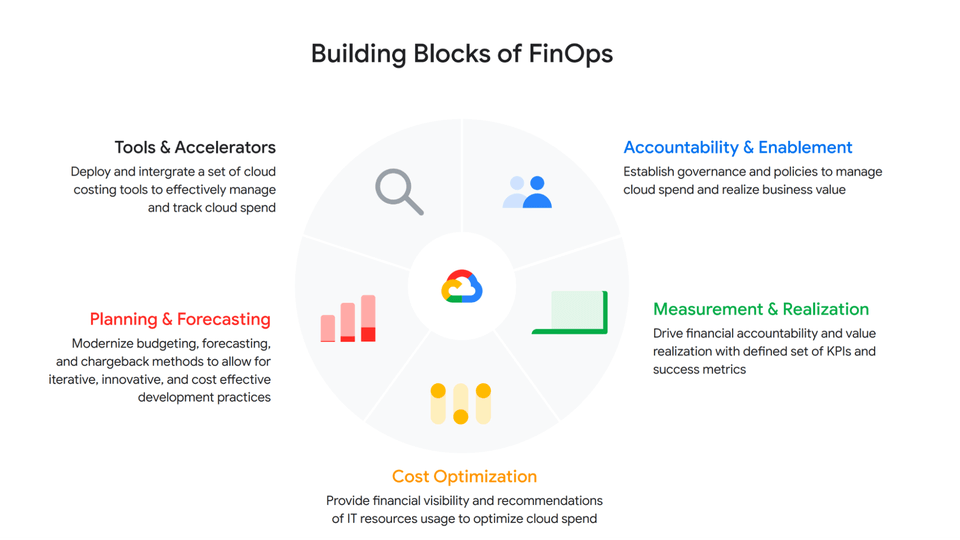
At Google we’ve worked with many companies, like OpenX, to help organizations realize the transformational benefits of the cloud by cultivating a culture of transparency and embedding agile processes to manage costs. We’ve distilled these learnings into a Cloud FinOps operational framework that gives organizations the financial governance and accountability they need to grow their business sustainably.
GOOGLE CLOUD
At a high level, a Cloud FinOps approach depends on five key areas:
- Accountability and Enablement
Accountability and enablement aim at instilling a cost-conscious culture across the organization. Oftentimes, this means standing up a cross-functional and dedicated team with members from technology, finance and engineering to establish cloud financial best practices and governance. In various organizations, we’ve seen this through an extension of a Cloud Center of Excellence, a Cloud Business Office or simply a Cloud FinOps team. Enablement focuses on empowering IT, finance and business leaders through training to help them better understand the economics of cloud services and the strategies to efficiently deploy and manage them. Cloud financial training guides teams on how to design cost-effective cloud environments, for example, embracing ”cloud-native” design principles such as auto-scaling/elasticity and Infrastructure as a Code.
- Measurement and Business Value Realization
Effective measurements not only create awareness and enable agile processes, but also support a culture that celebrates success and rewards teams for achieving business objectives. As such, measurement in the service of business value realization is about developing a comprehensive set of long-term benefits and cost KPIs to quantify the total net value of the return on digital transformation. Organizations often start with cost-related KPIs and eventually evolve those KPIs into business value metrics that are mapped to targeted business outcomes.
- Cloud Cost Optimization
Cloud cost optimization is an iterative and continuous process that provides a consistent methodology to manage cloud consumption cost-effectively. There are three key areas of optimization:
Resource optimization – Model cost-effective cloud usage based on utilization and consumption patterns.
Pricing optimization – Manage cloud spend through a continuous analysis of various pricing models. In a Google Cloud context, that might mean Committed Use Discounts, BigQuery flat rate reservations, etc.
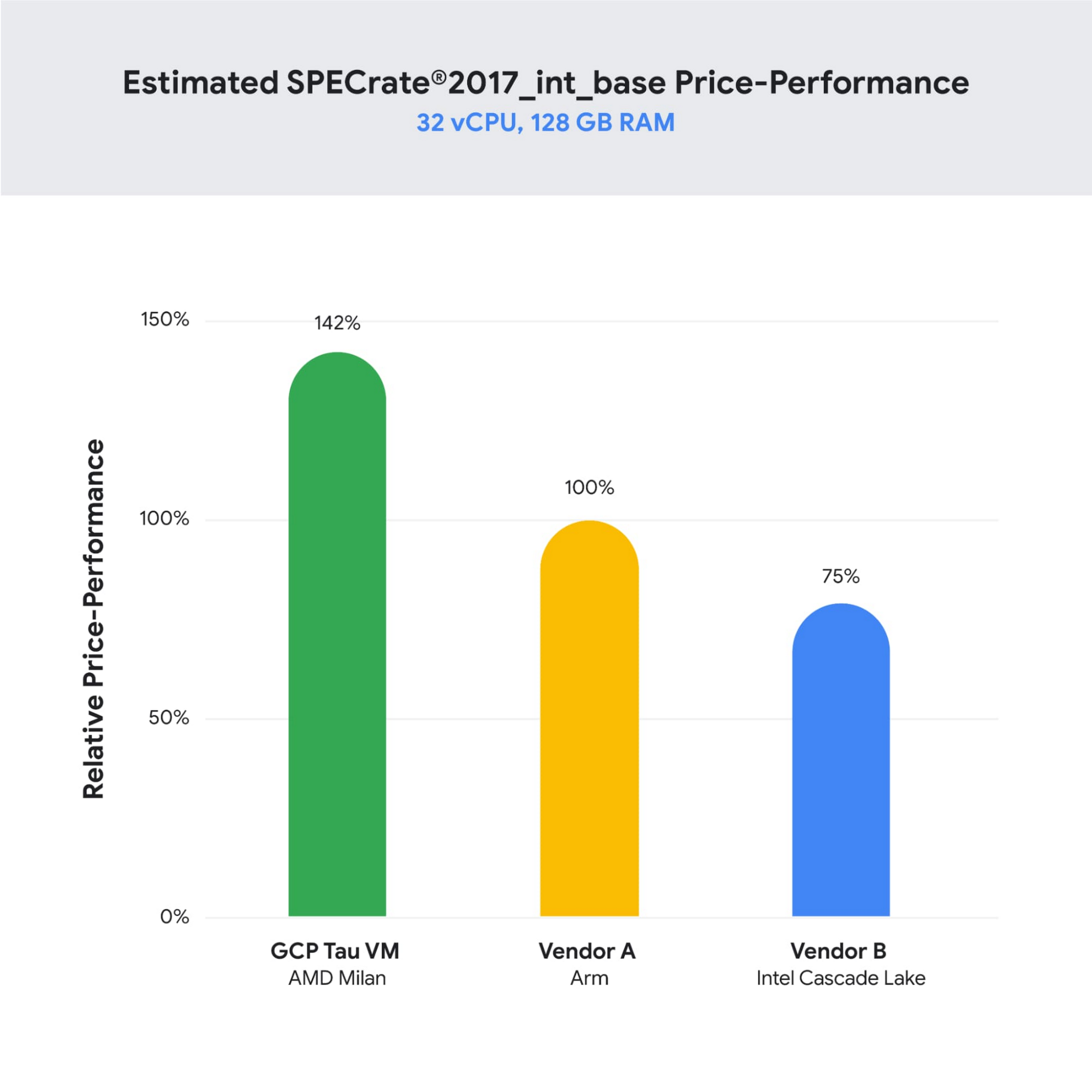
Architecture optimization – Build applications with a cost-aware architecture by leveraging newer generation compute instances (like Tau VMs, which offer an industry-leading 42% better price-performance versus comparable offerings), or using managed services and serverless technology to offload operational overhead.
For example, video hosting, sharing and services platform provider Vimeo built transcoding pipelines by using Google Cloud Spot VMs to optimize their infrastructure spend. To do so, they created fault-tolerant workloads that could withstand preemptions, and in exchange, got up to a 91% discount compared to using regular on-demand instances.
- Planning and Forecasting
In the cloud, accurately forecasting your finances requires rethinking of traditional approaches to depreciation and trend-based forecasting of maintenance and licensing costs. One way to improve the accuracy of your dynamic cloud needs is to use workload-specific forecasting models that leverage a combination of trend-based models for steady-state workloads, driver-based models for scaling applications, as well as monthly variance analysis. In other words, you can define cloud budgets and forecasts by monitoring cloud consumption trends, allocating cloud cost pools with a proper tagging strategy that’s mapped to a chart of accounts in a general ledger, and conducting a cost-benefit analysis based on cloud infrastructure, implementation, and support costs.
- Tools and Accelerators
Without the proper tools and processes in place, understanding and managing cloud costs can be complex — and this especially true as organizations scale their business in the cloud. By deploying proper cloud cost management tools and accelerators such as Looker Cloud Cost Management and automation scripts to set guardrails and enforce cost control policies, organizations can effectively manage and track cloud spend with access to near-real-time billing and cost data to make better informed business decisions.
The key objectives of Google Cloud Cost Management tools are to make it as simple as possible for organizations to get visibility into their current and forecasted costs with built-in reporting and customizable dashboards; help drive greater accountability for cloud spending across the organization by providing flexible ways to organize cloud resources and allocate costs; provide strong financial governance controls to reduce the risk of overspending; and offer intelligent recommendations for optimizing cloud costs and usage.
Start Saving with Cloud
Businesses are continuously seeking to better operate and manage their cloud environments and the need is ever increasing to transparently manage cloud spend, optimize costs, and obtain their desired business agility. By enhancing your Cloud FinOps capabilities and adopting principles of continuous cost optimization, you too can accelerate the business value of cloud computing.
Special thanks to Bruce Warner, Daniel Petibone, Nihar Jhawar and FinOps Foundation community for their contributions and sharing their domain expertise to this important Cloud FinOps topic.
EyecareLive Sees a Brighter Future in the Cloud with Enhanced Support

2940
Of your peers have already read this article.
3:30 Minutes
The most insightful time you'll spend today!
EyecareLive transforms the healthcare ecosystem with Enhanced Support, a support service from the Google Cloud Customer Care portfolio.
Telemedicine is now mainstream. It exploded during the COVID-19 pandemic. A 2022 survey by Jones Lang Lasalle (registration required) found that 38% of U.S. patients were using some form of telemedicine. This number is expected to grow as consumers are demanding more convenient and immediate access to care, and doctors are seeking efficiencies, cost savings, and to forge closer relationships with patients.
But because the eye-care field is so heavily regulated, optometrists and ophthalmologists face more technical hurdles to perform telemedicine than their peers in other medical practices.
To join the telemedicine revolution, a generic technology solution wouldn’t do. Eye-care professionals need a more carefully architected and rigorously secure platform – one that ensures a very high degree of compliance and privacy.
EyecareLive provides exactly that. Their comprehensive cloud-based solution was built specifically for eye-care telemedicine practices. They not only facilitate telemedicine visits with patients via video, but help providers stay in compliance with complex industry regulations.
What’s more, EyecareLive is the only platform in the industry that conducts vision screening using Food and Drug Administration (FDA)-registered tests to check a patient’s vision before connecting them to a doctor through a video call. The doctor can thus triage any issues immediately and quickly determine the right next steps for proper care. In addition, their platform digitally connects optometrists and ophthalmologists to the entire eye-care ecosystem, including other doctors for referrals, insurance companies, hospitals, pharmaceutical firms, pharmacies, and, of course, patients.
On top of all of this, the automated back office for their eye-care practices processes electronic health records (EHRs), clinical workflow, billing, coding, and more into one platform. EyecareLive streamlines operations and frees up doctors to focus on delivering the highest possible eye healthcare and on building stronger relationships with patients.
“Considering the number of plug-and-play services that Google has built into the Google Cloud Healthcare solutions, Google is basically supporting the entire healthcare industry from an infrastructure provider point of view.” — Raj Ramchandani, CEO, EyecareLive
Seeking greater agility, EyecareLive migrated to Google Cloud
EyecareLive is truly cloud first. They had operated entirely in the AWS cloud since opening their doors in 2017. Several years in, they decided to look for an additional cloud provider with broader support for digital health platforms. They specifically wanted to migrate to one they could rely on to deliver plug-and-play services, which would accelerate innovation of their platform. Rather than re-architecting for a new cloud, EyecareLive wanted a cloud platform that would offer compatible services they could use to meet their needs for reliability and availability.
“If we want to deploy a new conversational bot or build AI models that assist doctors to diagnose based on a retina image, Google Cloud provides these services which are reliable and tested by Google Cloud Healthcare solutions in many cases.” — Raj Ramchandani, CEO, EyecareLive
Versatility was another requirement. The EyecareLive platform must fulfill the demands of a variety of organizations — doctors, pharmaceutical companies, clinics, and others. EyecareLive also has an international deployment strategy that goes far beyond offering a domestic telehealth solution. Therefore EyecareLive needed a cloud functionality that extended into the broader global eye-care ecosystem.
EyecareLive chose Google Cloud. The most compelling reason was the deep industry expertise found in Google Cloud for healthcare and life sciences. This distinguished Google Cloud from all other possible cloud providers considered by EyecareLive. “We like Google Cloud because of the differentiations such as Google Cloud Healthcare solutions, computer vision, and AI models that can be used out of the box,” says Raj Ramchandani, CEO of EyecareLive. “We found these features more robust for our use cases on Google Cloud than any other.”
“Google is heavily into its Healthcare Cloud. That’s what differentiates it. We love that part because we can tap into innovative healthcare cloud functionality quickly.” — Raj Ramchandani, CEO, EyecareLive
Key to production deployment (and beyond): Google Cloud Enhanced Support
As a cloud-born company, EyecareLive had an exceedingly tech-savvy team. But the migration was a complex one that involved migrating third-party software and networking products that were tightly integrated into EyecareLive’s own code. The team knew it needed expert help with the migration. What’s more, doctors, patients, and other users required 24/7 access to the platform, and any interruptions to availability or infrastructure hiccups during the migration would disrupt their online experiences. However, the EyecareLive team was already stretched by continuing to grow and innovate the business, so they asked Google Cloud for help.
EyecareLive purchased Enhanced Support, a support service offered by the Google Cloud Customer Care portfolio. Specifically designed for small and midsized businesses (SMBs). Enhanced Support gave EyecareLive unlimited, fast access to expert support from a team of experienced Google Cloud engineers during the intricate, multifaceted migration.
“It was my top priority to engage Google Cloud Customer Care to help us keep the platform always available for our doctors and users,” says Ramchandani. “The level of detail to the answers, the clarifications of having the Enhanced Support experts tell us to do it a certain way has been enormously helpful.”
For example, one of the valuable features delivered by Enhanced Support is Third-Party Technology Support, which gives EyecareLive access to experts with specialized knowledge of third-party technologies, such as networking, MongoDB, and infrastructure. This meant all components in EyecareLive’s infrastructure could be seamlessly migrated to Google Cloud, and afterward EyecareLive could lean on Enhanced Support experts to continue to troubleshoot and mitigate issues as necessary.
“The response times to the questions and issues we had when going live was fantastic. It was the best experience with a tech vendor we’ve had in a long time.” — Raj Ramchandani, CEO, EyecareLive
With Enhanced Support at their side, EyecareLive was able to get up and running quickly in preparation for their international expansion by using Google Cloud’s prebuilt AI models, load balancers, and networking technologies that were designed to be easily deployed across multiple regions throughout the globe. “We know exactly how to implement data locality to scale our deployment into different regions and into different countries, because we’ve learned that from the Google Cloud support team.” — Raj Ramchandani, CEO, EyecareLive
EyecareLive then proceeded to rapidly scale their business, knowing that Google Cloud would ensure they could meet compliance standards in whatever country or region they expanded into.
“Since we’ve moved to Google Cloud and chose Enhanced Support, we’ve had 100% availability. That’s zero downtime, which is incredible.” — Raj Ramchandani, CEO, EyecareLive
Enhanced Support also provided the capabilities for EyecareLive to:
- Resolve issues and minimize any unplanned downtime to maintain a high-quality, secure experience for doctors and patients during and after migration
- Acquire fast responses to questions from technical support experts
- Learn from guidance from the Enhanced Support team beyond immediate technical issues
EyecareLive builds momentum toward their vision for eye-care telemedicine
By working closely with the Google Cloud Enhanced Support team, EyecareLive was able to successfully migrate their platform.
“If you ask any of my engineers which cloud provider they prefer, they’d all respond ‘Google Cloud,’” says Ramchandani. “The documentation is there, the sample code is there, everything that we need to get started is available.”
EyecareLive was then able to go on to grow and scale their business in the cloud in the following ways:
- Successfully managed a complex migration with minimal disruption and maximum availability, ensuring a consistent, secure, and compliant-ready experience for doctors and patients
- Gained the trust of both doctors and patients – they know that EyecareLive protects their sensitive medical data
- Kept EyecareLive agile and focused on innovating forward rather than building new features from scratch by supporting the team as they took advantage of Google’s tailored, plug-and-play technologies
- Analyzed performance over time to plan for future growth by partnering with Enhanced Support for the long term
“We know we can rely on Google Cloud from a security point of view. We love the fact that Google Cloud Healthcare solution is HIPAA compliant. Those are the things that make us trust Google to do the right thing.” — Raj Ramchandani, CEO, EyecareLive
With Enhanced Support, EyecareLive sees a bright future in the cloud
With the help of Enhanced Support, EyecareLive brings digital transformation to the eye-care in the healthcare industry by integrating the entire ecosystem of eye-care partners onto one platform making EyecareLive a leader in their industry.
Learn more about Google Cloud Customer Care services and sign up today.
5 Features IT Departments Love About Google Cloud

3651
Of your peers have already read this article.
5:30 Minutes
The most insightful time you'll spend today!
Throughout the past couple of years, I have helped a good number of companies, big and small, migrate their systems to the Google Cloud Platform (aka GCP). During the course of these migrations, there are always a few of those moments where people look at a specific Google Cloud feature and say, “now, that’s cool!”.
More often than not, it is because, coming from other platforms, they have gotten used to some features requiring multiple steps, or some operations being complicated, etc. And often they find out that in GCP you can do this specific operation in a couple of clicks, or by setting up a simple text-based configuration. Then you see that light bulb turning on in their head, and there you go… happy customer.
A few of these happen so often that I compiled them in a list to share with others who might also benefit from these “aha!” moments. You could say these are the five things I wish they told me when I started using Google Cloud.
Projects: Naturally Group Resources Together
A project is a namespace where resources live. Every resource you instantiate in GCP, from load balancers to Kubernetes clusters to virtual machines, belongs to a single project, and has no access (by default) to resources in other projects. User roles and authorisations can be defined per-project and trickle down to everything in it. This has two immediate benefits: you can group things that belong together in neat logical units, and things that don’t belong together are isolated from each other (and isolation is a Good Thing)
This is powerful and quite simple, but it often takes new users off-guard. I’ve had many clients call me and ask me “How can I make sure my developers cannot access the production machines? What’s the best way to create access policies? ”
The answer to this is actually super-simple:
- have a project for development where your developers have rights,
- have a project for production where they don’t.
- That’s it.
Every machine/other resource in the production project won’t be accessible to developers.
Of course there is a lot more to it, and you can refine roles and permissions to a much greater degree using Organizations, Folders, etc. Not to mention all the crazy things you can do with per-project billing. But at least you can say “hey, if it’s a machine in the staging environment then it can be found in the “staging” project”.
Global Virtual Networks Are *Truly* Global
Imagine you are using a Cloud provider and that you have servers in the US, and servers in Singapore, and that they need to communicate.
So you create a VPC (Virtual Private Cloud) network in the US data center, another one in the Singapore data center, and then you will connect them by setting up inter-region VPC peering or a VPN (Virtual Private Network) or a transit VPC or other routing magic.
Lots of work, right? And many moving parts, so lots of opportunities for things to break.
With GCP, however, what makes my clients go “aha!” is when they realize that in GCP a single VPC network covers the entire planet. Only subnets are attached to a geographic location, and virtual machines communicate between subnets on private IPs (good old RFC1918 addresses) — no extra routing needed.
So, to make your server communicate across continents on GCP, here are the steps:
- create a VPC network
- create a subnet in the US, put your US servers in it
- create a subnet in Singapore, put your Singapore servers in it
That’s all there is to it. Your VPC network spanning 2 continents is ready to use. Below is a screenshot of how it looks on my account, for a VPC network called ‘my-global-network’ with 2 subnets. The first column (“us-central1” and “asia-southeast1”) contains the name of the GCP regions (read: data centers). The second column is the subnet name that I picked when I created them.

A machine in the US (on the “us-central” subnet) with IP 10.0.0.5 can communicate directly with a machine in Singapore (on the “singapore”) subnet with IP 10.10.0.8.
Nothing else to set up.
And thanks to the way these networks work, the Google Cloud Load Balancer can present a single IP to the world, and forward traffic to the instances that are the closest to you geographically without having to setup a tedious DNS-based load balancing. But that’s worth an entire blog. I’ll save it for another day.
Firewalls with Tags and (Almost) No IP Addresses
There is no network security without a firewall so unsurprisingly GCP comes with one built-in.
Now, I don’t know about you, but nothing makes my brain hurt like a list of firewall rules displaying IP ranges and addresses and ‘Allow/Deny’ directives. It looks a bit like this:

If you imagine a normal network with a few dozen (hundred?) servers, you can quickly see how this can get out of control. You’d better have a solid printout of your network layout to refer to when you start adding and changing rules. And good luck debugging things!
Wouldn’t it be nice if, instead, you could just tell the firewall: “the HTTP traffic from outside can only reach the HTTP servers and the MySQL database is only reachable by the HTTP server(s) on the same network?”
Turns out it’s pretty simple on GCP by using a little thing called network tags. As the documentation says:
“Network tags are text attributes you can add to Compute Engine virtual machine (VM) instances. Tags allow you to make firewall rules and routes applicable to specific VM instances.”
So let’s see how it works. Firewall rules in GCP are defined in terms of source and target (the traffic flows from the source to the target). You can define filtering rules that apply to the source or the target, and in both cases you can use tags.
This is simpler shown with an example. The rule below states that on the default network, the traffic to the VMs with the tag mysql-server can come from the VMs with the tag http-appserver. Any other traffic is “Deny”-ed by default.

All you have to do is to tag your machines properly, and they will automatically be covered by the rule. You don’t need to enter their IP range.
That’s neat if you ask me. It makes it a lot simpler to grasp what’s happening.
Of course, there’s a TON more to firewalls in GCP. Tags also apply to routes and you can mix and match IP-based rules with tag-based rules. Not to mention that thing called service accounts, but I’ll leave those for another day.
The bottom line is that you can create most rules by just expressing a business need and not having to remember complicated network layouts. I have no hard stats, but I’m pretty sure this has saved me hours of work.
Console Access to VMs from the Browser
Easily access virtual machines (VMs) from the Google Cloud console was one of my first “aha!” moments when I started using GCP.
This is a screen capture of my Google Cloud console, with a virtual machine and its internal IP.

The last column has a header that says “Connect” and when you click on the word “SSH” a separate windows pops up. You wait for a few seconds, and… this is what you get. Your personal shell access — in a browser popup no less.

You are connected through ssh to the virtual machine of your choice. You did not have to download ssh keys and put them in the ~/.ssh directory, do the correct chmod command and run a long-winded ssh -i ~/.ssh/somekey me@<it-took-me-forever-to-copy-paste-the-address-here>
In addition, you have access to a few nifty features such as uploading and downloading files, changing the user etc. Just use the menu behind the cog icon at the top right.
In truth, you should not need to connect directly that often, but when you have to, this is a godsend.
Your Personal Jumphost from the Google Cloud Console
The Google Cloud console has a cool trick: you can actually connect to a virtual environment that is managed by the Google Cloud console itself. It serves a bit as a jump host. You can access most resources from the projects from it, and you can activate it directly from the top menu with, no particular setup on your side. It’s called the Cloud Shell.
This is how it looks at the top right of the console:

When you activate the Cloud Shell, the session opens at the bottom of the console. You get a command line prompt and it’s fully configured with the gcloud command line tool (the jack-of-all-trades of Google Cloud scripting).

You can do a great many things from there, and this even includes uploading and downloading files, editing code or deploying it, a web preview for your AppEngine application, and more.
So you can get access to a fully configured shell environment in your project from any laptop where you can connect with your credentials. On top of this, it persists between connections so you can fine-tune it to your needs and have these changes available the next time you re-connect.
This has saved me many times during my previous life as a traveling consultant!
Live migration
Did I say 5 “Aha!” moments ? Well, you’ve been patient reading all the way to here, so here’s one more for free.
Google Cloud has an amazing way to literally “teleport” a running virtual machine between physical hosts without stopping it. It’s called Live Migration. It allows Google to move your virtual machine away from a defective host, or a host that needs a patch or an upgrade, or for any other infrastructure related reason.
It’s all done in the background, and is totally transparent, so you never really see it happening. Unless you look VERY closely. I once did a demo to a client, where a machine was live migrated while he was simulating a solid network load — and we did not lose a single packet, with no noticeable degradation in latency.
And that’s a wrap!
So there you go. These are 5+1 things that made me go “Aha!” when I became more familiar with the Google Cloud Platform, and that still make my clients do the same.
There is a lot of depth to the platform, and my examples above only scratch the surface of our features. I encourage you to try it yourself. There is a generous free tier, and when you are ready to take the plunge and create that new company, please contact us at Google Cloud for Startups. We’ll get you up and running in no time.
Jerome is a Startup Architect at Google Cloud. Based in Singapore, he helps startups make the most of the Google Cloud Platform.
Tau VMs Joins Google Cloud to Offer Cost-effective Performance of Scale-out Workloads

5609
Of your peers have already read this article.
2:00 Minutes
The most insightful time you'll spend today!
Scale-out workloads demand the best combination of performance and price to bring down the cost of delivering applications, all while providing an excellent user experience. We are excited to announce a new virtual machine (VM) family, Tau VMs, coming to Google Cloud. Tau VMs extend Compute Engine’s VM offerings with a new option optimized for cost-effective performance of scale-out workloads.
T2D, the first instance type in the Tau VM family, is based on 3rd Gen AMD EPYCTM processors and leapfrogs the VMs for scale-out workloads of any leading public cloud provider available today, both in terms of performance and workload total cost of ownership (TCO). The x86 compatibility provided by these AMD EPYC processor-based VMs gives you market-leading performance improvements and cost savings, without having to port your applications to a new processor architecture.
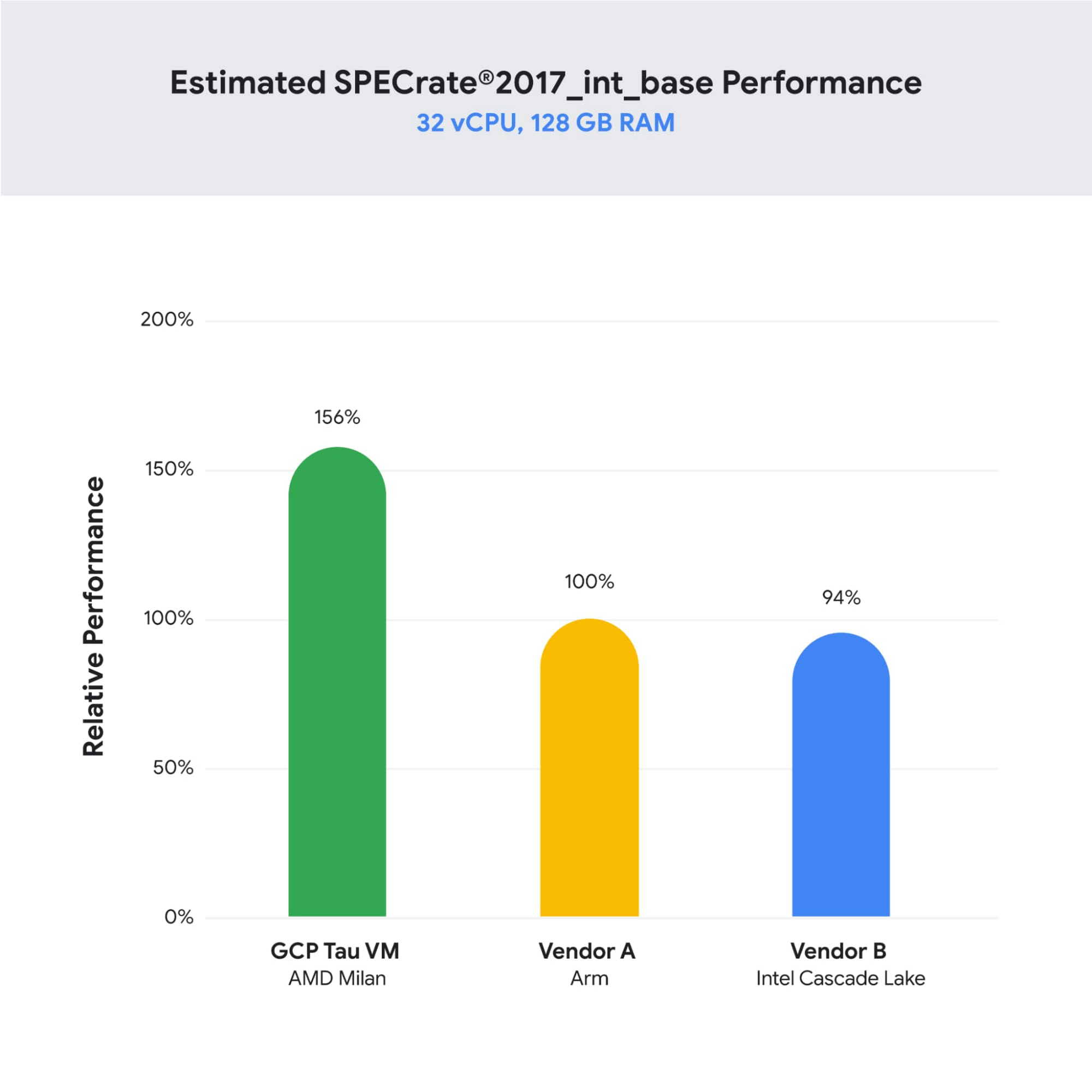
As illustrated below, Tau VMs offer 56% higher absolute performance and 42% higher price-performance (est. SPECrate2017_int_base) compared to general-purpose VMs from any of the leading public cloud vendors.
SPECrate is a trademark of the Standard Performance Evaluation Corporation. More information available at www.spec.org
What our customers and partners are saying
Snap
“At Snap, it is critical for our business to continue improving our scale-out compute infrastructure for key Snapchat capabilities like AR, Lenses, Spotlight and Maps,” said Cody Powell, Senior Engineering Manager, Snap Inc. “We were impressed when we tested Google Cloud’s new Tau VMs with Google Kubernetes Engine. While it’s early days, we believe we can gain double digits in infrastructure performance improvements for key workloads—enabling us to do more with less and invest even more in new features for our amazing Snapchat community.”
Twitter
“High performance at the right price point is a critical consideration as we work to serve the global public conversation,” said Nick Tornow, Platform Lead, Twitter. “We are excited by initial tests that show potential for double digit performance improvement. We are collaborating with Google Cloud to more deeply evaluate benefits on price and performance for specific compute workloads that we can realize through use of the new Tau VM family.”
DoiT
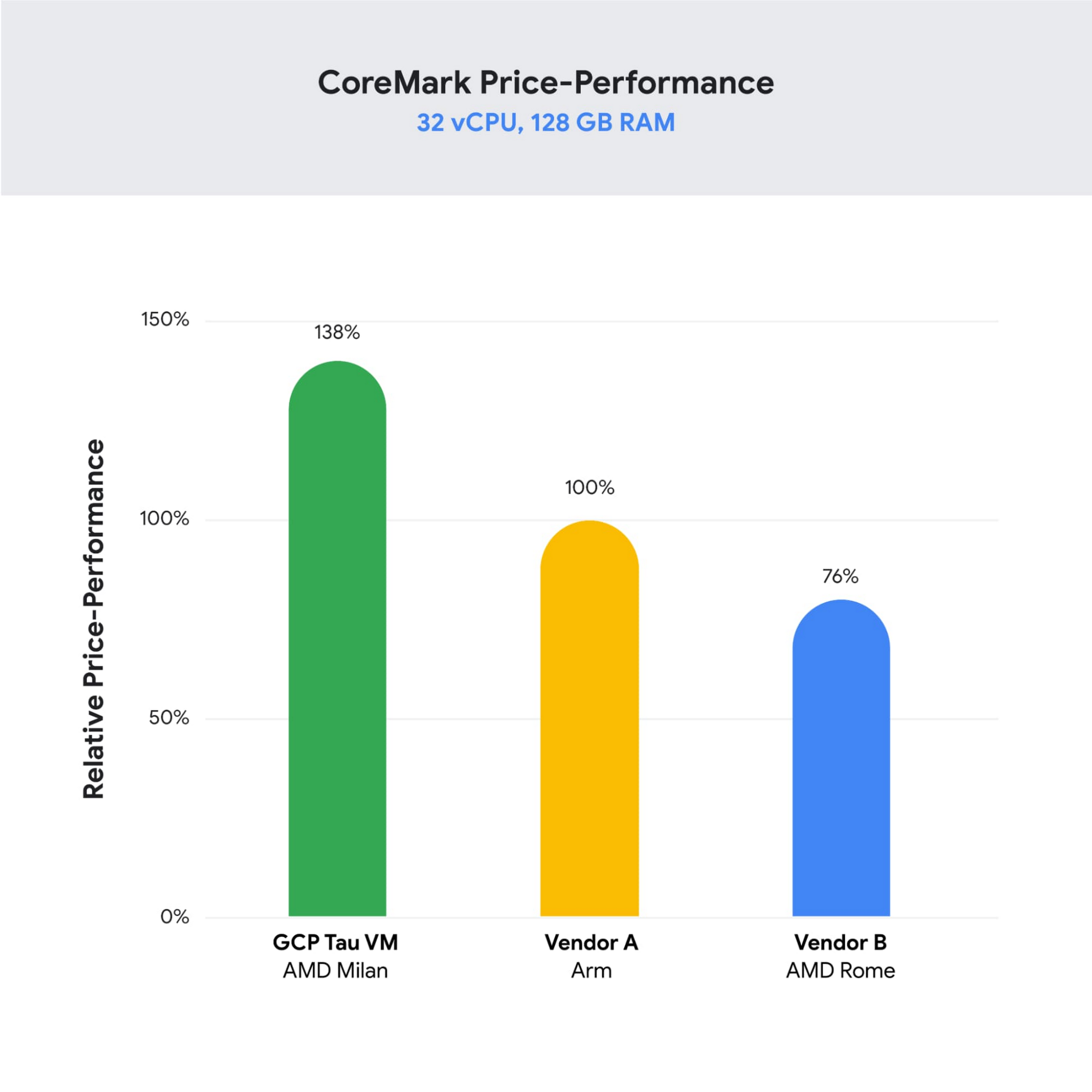
“DoiT partners with leading cloud vendors who are focused on growth and cost optimization,” said Yoav Toussia-Cohen, CEO, DoiT International. “In our preliminary testing of Google’s new Tau VMs with the Coremark benchmark, we were thrilled to see the incredible performance at 50% better than a comparable ARM-based offering from another leading public cloud. With Tau VMs, Google Cloud has set a new bar for price-performance, making the cloud even more accessible to digital-native companies. We are excited to bring Google’s Tau VMs to our joint customers.”
Designed for demanding scale-out workloads
Tau VMs bring the benefit of Google’s long-standing experience engineering platforms for scale-out workloads to our customers. They come in multiple predefined VM shapes, with up to 60vCPUs per VM, and 4GB of memory per vCPU. They offer up to 32 Gbps networking bandwidth and a wide range of network attached storage options, making Tau VMs ideal for scale-out workloads including web servers, containerized microservices, data-logging processing, media transcoding, and large-scale Java applications.
Google Kubernetes Engine support
Google Kubernetes Engine (GKE) is the de facto standard for organizations looking for advanced container orchestration, delivering the highest levels of reliability, security, and scalability. GKE supports Tau VMs on day 1, helping you optimize price-performance for your containerized workloads. You can add Tau VMs to your GKE clusters by specifying the T2D machine type in your GKE node-pools.
Pricing
Tau VMs will be priced to support significant TCO and price-performance improvements for your cloud applications. A 32vCPU VM with 128GB RAM will be priced at $1.3520 per hour for on-demand usage in us-central1.
Coming soon to a Google Cloud region near you
If you are interested in trying out T2D VMs when they become available in Q3 2021 please sign-up here.

The Cloud-First Imperative to Accelerate Digital Transformation in BFSI
DOWNLOAD WHITEPAPER3376
Of your peers have already downloaded this article
1:30 Minutes
The most insightful time you'll spend today!
In a study of 60 business and technology decision makers and influencers from Indian BFSI organizations, conducted by Forrester Consulting, it is revealed that public cloud adoption in India is on the rise with 78% of the organizations intending to increase the number of secure or compliance-sensitive workloads in the cloud.
According to the study, public cloud platforms help BFSI organizations to:
- Improve customer experience
- Free up IT time to focus on core differentiators instead of commodity workloads
- Reduce reliance on legacy infrastructure
- Help to scale business faster and more easily
Download this infographic to understand why Indian BFSI organizations are adopting a cloud-first approach to accelerate digital transformation.
If You Run Your Country’s Largest Retail Franchise, How Do You Pull Together, in Sync?

6300
Of your peers have already read this article.
9:30 Minutes
The most insightful time you'll spend today!
In 1984, Mario Maio set up a small business manufacturing electrical transformers in his Johannesburg garage. Over the next two decades, the ACDC Dynamics company he created came to dominate manufacturing, import, and distribution in South Africa’s electrical goods sector. Then, in 2007, Mario’s son, Ricardo Maio, founded a retail arm to the business, ACDC Express. Today ACDC Express is South Africa’s largest electrical retail franchise, with 29 franchise stores across the country. Eight of those franchises joined in 2017 alone, and ACDC Express is experiencing quarter-on-quarter growth of 28% per year.
Rapid expansion increases the demands on the ACDC Express central administration, which provides each franchise with IT support and a full suite of marketing, operational, and bookkeeping functions. So when email server downtime became a frequent problem, Ricardo and his team chose G Suite to transform the way the franchise worked.
“We lost revenue when our email servers went down. When I researched Google’s SLA of 99.9% uptime and experimented with G Suite on my private Gmail account, I could see the difference this technology could create.”
Ricardo Maio, CEO, ACDC Express
“On consecutive occasions, our entire email server went down,” says Ricardo Maio, CEO at ACDC Express. “It would take more than one or two days to bring it back up. We had already highlighted software cost overhead as a potential thing to reduce, so when that happened several times within a short period, we knew it was time to make a change.”
Building a better franchise
Franchise businesses undergoing rapid expansion must respond quickly to the demands of new stores. At ACDC Express, 33 staff run the national franchise, delivering core services and support to 29 franchises across the country. Key tasks, such as updating the operations manual, were hampered by a reliance on paper forms and mail services, while email servers experienced repeat failures, which compromised communication. By implementing new, cloud-based productivity tools, ACDC Express looked to cut down on slow and expensive practises, and deliver an agile, reliable online communications platform.
To do that, ACDC Express migrated its franchise to G Suite with Opennetworks. “We lost revenue when our email servers went down,” says Ricardo. “When I researched Google’s SLA of 99.9% uptime and experimented with G Suite on my private Gmail account, I could see the difference this technology could create.”
Since moving to Gmail, ACDC Express reports that the problem of email server downtime “is no longer existent for us,” while with Google Drive, versioning problems have been resolved. Using surveys on Google Forms, ACDC Express quickly and easily collects data from stores and customers—whether they are in stores or on the road—and populates Google Sheets with the information.
“Our operations manual is a binding document, and it’s a living document that gets regularly updated. In the past, we would struggle to track which franchise had which version. With Google Drive, we can be sure that everyone is looking at the right one.”
Ricardo Maio, CEO, ACDC Express
With Google Data Studio, the managing team then consolidates that data on dashboards, creating snapshots of performance, complete with averages and simple comparisons, which make it easy to spot issues and outliers in need of attention. Individual businesses that do require help are then contacted over Google Hangouts Meet to assess what they need, part of a culture of sharing expertise, which Ricardo sees as key to the franchise mode.
“As a franchise, sharing knowledge is as important as maintaining control,” he says. “If there’s a new procedure or system that worked in one store, we can immediately update our manuals and documentation so that everyone has access to it. That’s been fantastic.”
“Our operations manual is a binding document, and it’s a living document, which gets regularly updated,” says Ricardo. “In the past, we would struggle to track which franchise had which version, and every time we had to make a change we would print out a version and send it to stores through an unreliable postal service. With Google Drive, we can be sure that everyone is looking at the right one.”
Remote training, rapid migration
Rolling out new IT tools across a franchise is often expensive, demanding extensive travel and numerous training sessions, which often repeat the same material. Instead, ACDC Express set up training on Google Hangouts that staff could drop into at their convenience, creating a cost-effective training schedule, which meant individual stores could plan their own learning process.
“When we moved to G Suite, we did it all at once, with every employee changing at the same time. We took a band-aid approach, switching to the new tools as rapidly as possible. After six months of training, there have been no reported problems with G Suite at all.”
Ricardo Maio, CEO, ACDC Express
“The whole benefit of franchising is that you can learn from your peers,” says Ricardo. “When we moved to G Suite, we did it all at once, with every employee changing at the same time. We took a band-aid approach, switching to the new tools as rapidly as possible. After six months of training, there have been no reported problems with G Suite at all.”
More mobile, more reliable
Today, ACDC Express operates 240 Google accounts, and information from the franchises’ marketing systems, research, operations, and accounting is fed back automatically to Google Sheets and Google Dashboard at the headquarters in Edenvale, Gauteng. By Ricardo’s estimation, the administrative team is now so effective with G Suite tools, it can achieve twice as much as it could without them.
Now, ACDC Express is looking to use Google Chromebooks in a new web-based point-of-sale system, and considering moving its ERP onto Google Cloud Platform for greater stability, in another project with Opennetworks.
“We’ve developed an in-house point of sale system that’s web-based and can use a functional touchscreen,” adds Ricardo. “We’re looking at rolling that out with Google Chromebooks. We really like how straightforward and simple the Google Chrome devices are, and because we’ve taken a lot of infrastructure into the cloud, we no longer actually need physical machines on our counters. We can work anywhere. That’s something that applies from our head office right down to our smallest franchise store.”
More Relevant Stories for Your Company

How Do You Cut Costs and Improve Staff Productivity, and Business Visibility? Ascend Money Has an Answer
Hundreds of millions of residents of South East Asia have only limited access to banking and finance services. However, help is at hand. One of South East Asia's largest fintech businesses, Ascend Money is using digital technologies to realize its mission of enabling as many people as possible to access

PaGaLGuY Turns to Google Cloud Platform to Power Leading India Education Network
Founded in 2006, PaGaLGuY started as a forum that enabled students, typically aged between 20 and 30 to discuss and seek advice on academic issues. By 2011, PaGaLGuY had increased its traffic to about 250,000 page views per month. The business is now one of India’s largest education networks and
What You Can Learn from ‘Up or Out’ Framework for Cloud Adoption
In times of significant disruption, organizations are faced with three choices: Retrench within legacy solutions, pause and do nothing while waiting for more data or different circumstances, or press ahead, potentially even accelerating to realize the desired outcome. In such an environment, it is critical to ensure you’re delivering the
Google Leads the Pack in Cloud Data Warehouse: Forrester Research
Cloud data warehouse solutions are changing the way firms build and support data platforms for insights. From provisioning a cloud data warehouse in minutes without requiring any technical expertise to allowing business analysts and other nontechnical users to access, store, and process large amounts of data for insights, they allow
