





Google Research: Themes from 2021 and Beyond

2881
Of your peers have already read this article.
4:00 Minutes
The most insightful time you'll spend today!
Posted by Jeff Dean, Senior Fellow and SVP of Google Research, on behalf of the entire Google Research community
Over the last several decades, I’ve witnessed a lot of change in the fields of machine learning (ML) and computer science. Early approaches, which often fell short, eventually gave rise to modern approaches that have been very successful. Following that long-arc pattern of progress, I think we’ll see a number of exciting advances over the next several years, advances that will ultimately benefit the lives of billions of people with greater impact than ever before. In this post, I’ll highlight five areas where ML is poised to have such impact. For each, I’ll discuss related research (mostly from 2021) and the directions and progress we’ll likely see in the next few years.
· Trend 1: More Capable, General-Purpose ML Models
· Trend 2: Continued Efficiency Improvements for ML
· Trend 3: ML Is Becoming More Personally and Communally Beneficial
· Trend 4: Growing Benefits of ML in Science, Health and Sustainability
· Trend 5: Deeper and Broader Understanding of ML
Trend 1: More Capable, General-Purpose ML Models
Researchers are training larger, more capable machine learning models than ever before. For example, just in the last couple of years models in the language domain have grown from billions of parameters trained on tens of billions of tokens of data (e.g., the 11B parameter T5 model), to hundreds of billions or trillions of parameters trained on trillions of tokens of data (e.g., dense models such as OpenAI’s 175B parameter GPT-3 model and DeepMind’s 280B parameter Gopher model, and sparse models such as Google’s 600B parameter GShard model and 1.2T parameter GLaM model). These increases in dataset and model size have led to significant increases in accuracy for a wide variety of language tasks, as shown by across-the-board improvements on standard natural language processing (NLP) benchmark tasks (as predicted by work on neural scaling laws for language models and machine translation models).
Many of these advanced models are focused on the single but important modality of written language and have shown state-of-the-art results in language understanding benchmarks and open-ended conversational abilities, even across multiple tasks in a domain. They have also shown exciting capabilities to generalize to new language tasks with relatively little training data, in some cases, with few to no training examples for a new task. A couple of examples include improved long-form question answering, zero-label learning in NLP, and our LaMDA model, which demonstrates a sophisticated ability to carry on open-ended conversations that maintain significant context across multiple turns of dialog.


(Weddell Seal image cropped from Wikimedia CC licensed image.)
Transformer models are also having a major impact in image, video, and speech models, all of which also benefit significantly from scale, as predicted by work on scaling laws for visual transformer models. Transformers for image recognition and for video classification are achieving state-of-the-art results on many benchmarks, and we’ve also demonstrated that co-training models on both image data and video data can improve performance on video tasks compared with video data alone. We’ve developed sparse, axial attention mechanisms for image and video transformers that use computation more efficiently, found better ways of tokenizing images for visual transformer models, and improved our understanding of visual transformer methods by examining how they operate compared with convolutional neural networks. Combining transformer models with convolutional operations has shown significant benefits in visual as well as speech recognition tasks.
The outputs of generative models are also substantially improving. This is most apparent in generative models for images, which have made significant strides over the last few years. For example, recent models have demonstrated the ability to create realistic images given just a category (e.g., “irish setter” or “streetcar”, if you desire), can “fill in” a low-resolution image to create a natural-looking high-resolution counterpart (“computer, enhance!”), and can even create natural-looking aerial nature scenes of arbitrary length. As another example, images can be converted to a sequence of discrete tokens that can then be synthesized at high fidelity with an autoregressive generative model.

Because these are powerful capabilities that come with great responsibility, we carefully vet potential applications of these sorts of models against our AI Principles.
Beyond advanced single-modality models, we are also starting to see large-scale multi-modal models. These are some of the most advanced models to date because they can accept multiple different input modalities (e.g., language, images, speech, video) and, in some cases, produce different output modalities, for example, generating images from descriptive sentences or paragraphs, or describing the visual content of images in human languages. This is an exciting direction because like the real world, some things are easier to learn in data that is multimodal (e.g., reading about something and seeing a demonstration is more useful than just reading about it). As such, pairing images and text can help with multi-lingual retrieval tasks, and better understanding of how to pair text and image inputs can yield improved results for image captioning tasks. Similarly, jointly training on visual and textual data can also help improve accuracy and robustness on visual classification tasks, while co-training on image, video, and audio tasks improves generalization performance for all modalities. There are also tantalizing hints that natural language can be used as an input for image manipulation, telling robots how to interact with the world and controlling other software systems, portending potential changes to how user interfaces are developed. Modalities handled by these models will include speech, sounds, images, video, and languages, and may even extend to structured data, knowledge graphs, and time series data.

Often these models are trained using self-supervised learning approaches, where the model learns from observations of “raw” data that has not been curated or labeled, e.g., language models used in GPT-3 and GLaM, the self-supervised speech model BigSSL, the visual contrastive learning model SimCLR, and the multimodal contrastive model VATT. Self-supervised learning allows a large speech recognition model to match the previous Voice Search automatic speech recognition (ASR) benchmark accuracy while using only 3% of the annotated training data. These trends are exciting because they can substantially reduce the effort required to enable ML for a particular task, and because they make it easier (though by no means trivial) to train models on more representative data that better reflects different subpopulations, regions, languages, or other important dimensions of representation.
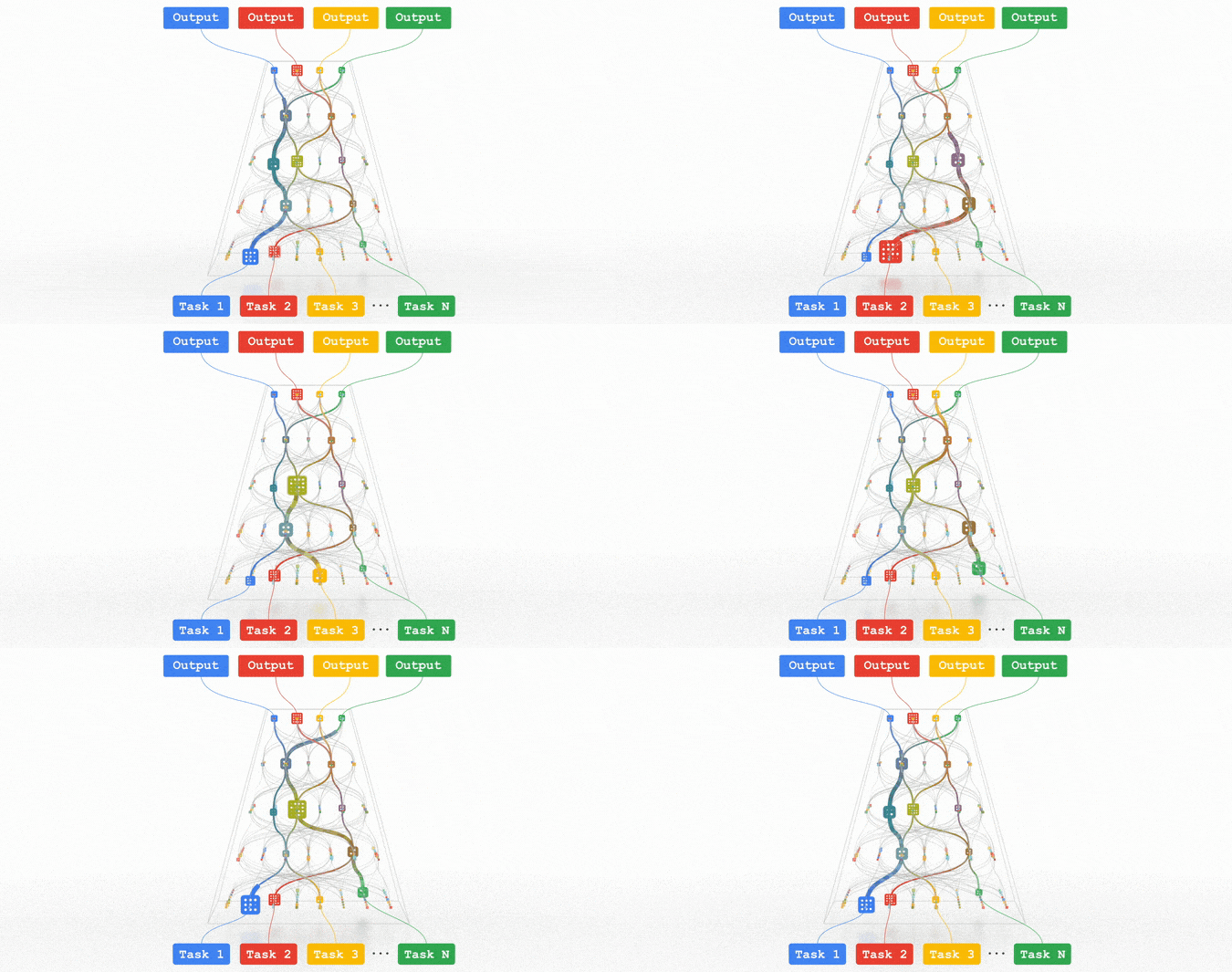
All of these trends are pointing in the direction of training highly capable general-purpose models that can handle multiple modalities of data and solve thousands or millions of tasks. By building in sparsity, so that the only parts of a model that are activated for a given task are those that have been optimized for it, these multimodal models can be made highly efficient. Over the next few years, we are pursuing this vision in a next-generation architecture and umbrella effort called Pathways. We expect to see substantial progress in this area, as we combine together many ideas that to date have been pursued relatively independently.
3050
Of your peers have already watched this video.
20:00 Minutes
The most insightful time you'll spend today!
Driving Business Transformation in Retail Using AI
Retailers face numerous challenges in their business every day. Especially today.
Watch this discussion of how retailers are working with Google Cloud on machine learning and AI to transform their business.
This video presents an overview of the AI Platforms, products, and solutions Google Cloud is building to address those challenges across digital and omnichannel personalization, merchandising, the supply chain, and optimizing operations.
You will also get to hear real-world examples of how enterprises leveraging are using Google Cloud AI in practice today.
Maximize Efficiency in Document Extraction Models with Document AI Workbench GA Release

1302
Of your peers have already read this article.
3:30 Minutes
The most insightful time you'll spend today!
Each day, more documents are created and used across companies to make decisions. However, the value in these documents is primarily expressed as unstructured data, which makes the value difficult and manually intensive to extract and use for business processes.
As the number and variety of documents used by businesses proliferate, machine learning (ML) solutions need to be more flexible to handle the broader set of use cases. That’s why we introduced the first Document AI Workbench model, Custom Document Extractor (CDE), in Public Preview at Google Cloud Next ‘22. CDE makes it fast and easy to apply ML to virtually any document-based workflow to extract structured data from unstructured document types, to automate business processes.
CDE lets developers and analysts use their own data to train models and extract fields from documents needed for the business. CDE lets organizations build models faster and with less data — thus accelerating time-to-value for processing and analysis of data in documents.
Today, we announce that Document AI Workbench is Generally Available (GA), open to all customers, ready for production use through APIs and the Google Cloud Console. Document AI Workbench is covered by the Document AI SLA — online and batch document prediction is supported with >=99.9% uptime. Furthermore, Document AI Workbench is now covered by Google Cloud’s GA product terms. For example, Google will notify customers at least 12 months before significantly modifying a customer-facing Google API in a backwards-incompatible manner.
In this blog post, we’ll explore ways customers are already using CDE and Document AI Workbench’s updated capabilities.
What users are saying about Workbench
Deliver higher model accuracy with Workbench
Users leverage Workbench to ultimately save time and money. A third party evaluated Document AI Workbench and concluded that it extracts data more accurately1 than several competing products for document types with variable layouts (e.g. invoice, receipt, bank statements, paystubs). Better accuracy drives higher automation rates, helping Workbench users save time and money.
Chris Jangareddy, managing director for Artificial Intelligence & Data at Deloitte Consulting LLP said, “Google Cloud Document AI is a leading document processing solution packed with rich features like multi-step classify and text extraction to automate sorting, classification, extraction, and quality assurance. By combining Document AI with Workbench, Google Cloud has created a forward-thinking and powerful AI platform for intelligent document processing that will allow for process transformation at an enterprise scale with predictable outcomes that can benefit businesses.”
Mansoor Khan, CEO of OneClinic said, “We help medical professionals scale their clinics through automation. We used Google’s Document AI Workbench to create a model to automatically extract data from patients’ insurance cards as part of our patient check-in software. Workbench is easy to use and we are really happy with the model accuracy — it extracts data more accurately than what we would expect from human data entry.”
Rajnish Palande, VP, Google Business Unit for BFSI, TCS said, “The Google Cloud Document AI Workbench leverages artificial intelligence (AI) to manage and glean insights from unstructured data. The Workbench brings together the power of classification, auto-annotation, page-number identification and multi-language support to help organizations rapidly deliver enhanced accuracy, improved operational efficiency, higher confidence in the information extract, and increased return on investment.”
Build production ready models faster with Workbench
Document AI Workbench helps users create machine learning models faster. For example, a third-party evaluation shows Document AI Workbench trains machine learning models up to 3x faster than a leading competitor. This is an important improvement which lowers total cost of ownership and increases value.
Dallas Dolen, Partner, Google Alliance Leader at PwC said, “Google Document AI Workbench helps to accelerate our custom parser models training as well as improves accuracy and performance using a custom document extractor with human in the loop. It helps us solve complex business problems for our clients in the financial services and healthcare industries.”
Ziang Jia, Senior DocAl Development Lead at Resultant, said, “Document AI Workbench has unlocked a brand-new machine learning development experience for information extraction solutions. Its simplicity and robustness enabled us to build models and deliver a highly accurate outcome in an agile way for a large government agency. We couldn’t be more impressed by its simplicity and robustness and are excited to see how the product will evolve in the future.”
Sean Earley, VP of Delivery Services of Zencore said, “Document AI Workbench allows us to develop highly accurate document parsing models in a matter of days. Our customers have automated tasks that formerly required significant human labor. For example, using Document AI Workbench, a team of two trained a model to split, classify and extract data from 15 document types to automate Home Mortgage Disclosure Act reporting. The mean trained model accuracy was 94%, drastically reducing the operational cost of our customer’s compliance reporting procedures.”
What’s new with Document AI Workbench
The latest Workbench capabilities make it even easier to train and deploy an extraction model:
- With Workbench’s public APIs, you can programmatically create, delete, train, evaluate and deploy models.
- Our updated dataset management tools automatically detect and create existing schema labels from your pre-annotated documents. They also provide you more flexibility when creating and managing schema.
- Our new DocAI Toolkit includes a labeled document converter so that you can easily convert your labeled documents to DocAI’s format and start training faster.
- We’ve reduced the cognitive load for labelers with efficiency enhancements to our Labeling UI.
- The revamped Processor Gallery helps you quickly identify the best model for your use case.
What’s next for Document AI Workbench
We continue to invest in Document AI Workbench to help you automate document processing. Here are a few things we’re working on that we’re excited about:
- Classify document types with the Custom Document Classifier (CDC), coming soon in public preview
- Copy processor versions across projects and processors to streamline managing development and production environments
- Support larger documents (e.g., longer than 50 pages) so you can process a wider array of documents
- Broader (non-latin) language support–equivalent to Document AI OCR
- And many more investments, using state of the art technology, to help you build world class models faster to automate document processing
Document AI Workbench is in GA and ready for production workloads. Learn more via Document AI Workbench documentation or try it out in the Google Cloud Console.
Acknowledgements: Tomas Moreno, Outbound Product Manager, Lukas Rutishauser, Software Engineering Manager, Michael Kwong, Software Engineering Manager, Rajagopal Janani, Software Engineering Manager, Michael Lanning, UX Designer.
1. When trained with 200+ documents
ML Models Built on Google Cloud Solutions Help You Virtually Participate in National Muffin Day!

2956
Of your peers have already read this article.
2:00 Minutes
The most insightful time you'll spend today!
If you’re here you’re probably wondering: what on Earth is the connection between muffins and machine learning, and what is National Muffin Day? To understand this, let’s start with National Muffin Day: an annual holiday co-founded by Jacob and his friend Julia Levy in 2015 to bake muffins and raise money for homelessness. National Muffin Day will occur on Sunday, February 20 this year. For more information on how to participate in National Muffin Day (which involves delicious baked goods and donations to people in need), please see the information at the bottom of this post. Last year, a colleague connected Jacob with Sara, who had done several baking projects that used machine learning to generate new recipes. They decided to collaborate for this year’s National Muffin Day, adding a new muffin recipe created with the help of machine learning.
In this post, we’ll explain how Sara used Google Cloud to develop a new muffin recipe, show you how you can participate virtually in National Muffin Day, and of course—share the recipe.
Machine learning for muffins
At its core, machine learning is the process of finding patterns in data and using those patterns to make predictions on new data. After a lot of baking over the past few years, Sara learned that baking is also based on patterns. For example, the ratio of flour, fat, liquid, and sugar that make up a cookie is very different from the ratio of those ingredients for a bread, a pie crust, or a muffin. She used that discovery to create a recipe for a hybrid cake + cookie, and a cake filled with Maltesers. Next up: muffins!
The first step was figuring out how to translate the task of generating a new muffin recipe into a machine learning task. To solve this, she planned to use numerical data on the amounts of different ingredients in a muffin recipe to train the model. Sara considered two types of models for this task: classification and regression. A classification model would categorize muffin recipes into different muffin types based on their ingredient amounts, and a regression model would do the reverse: take a type of muffin and return the amount of each ingredient needed to make it. She decided to build a regression model, since it would be more fun for the model to return ingredient amounts, rather than tell you which type of muffin recipe you’re already making.
Implementing this first required identifying a few muffin categories and collecting recipe data. This presented a new challenge, since her previous baking models used categories for distinct baked goods (i.e. cakes, cookies, breads). After scouring through quite a few recipes, Sara discovered that many muffins fall into two types: those that use only traditional ingredients as their base (flour, sugar, butter, milk, etc.), and those that include an alternative ingredient, most commonly a pureed fruit, to make the base (like bananas, applesauce, or pumpkin). Using those two categories, the model would take the type of muffin as input and return the amounts of base ingredients required to make that recipe. Here, the inputs can be any values adding up to 100%:
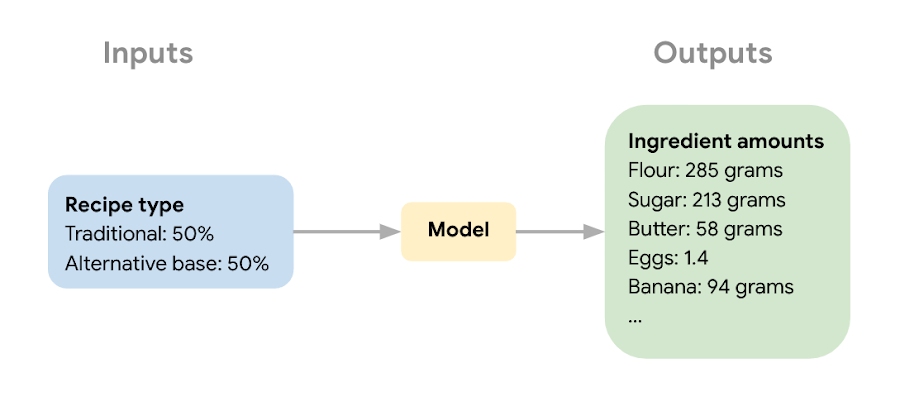
The next step in the ML process was collecting recipe data to use for model training and narrowing down the ingredients used to train the model. Sara wanted the model to learn the combination of core ingredients that make up a muffin batter, rather than flavorings and additions like blueberries, vanilla extract, or chocolate chips. These tasty additions could be added after the model helped create the muffin batter. Once she gathered enough recipes, she removed extra ingredients for training purposes and converted ingredients from different recipes into the same unit (grams, milliliters, and teaspoons).
Building a muffin model with Vertex AI
Sara uploaded the muffin ingredient data into BigQuery, and then created a notebook instance in Vertex AI Workbench to analyze the data. With the new Workbench managed instances, you can interactively query BigQuery tables directly from your instance and copy the code to download your data to a notebook as a Pandas DataFrame:
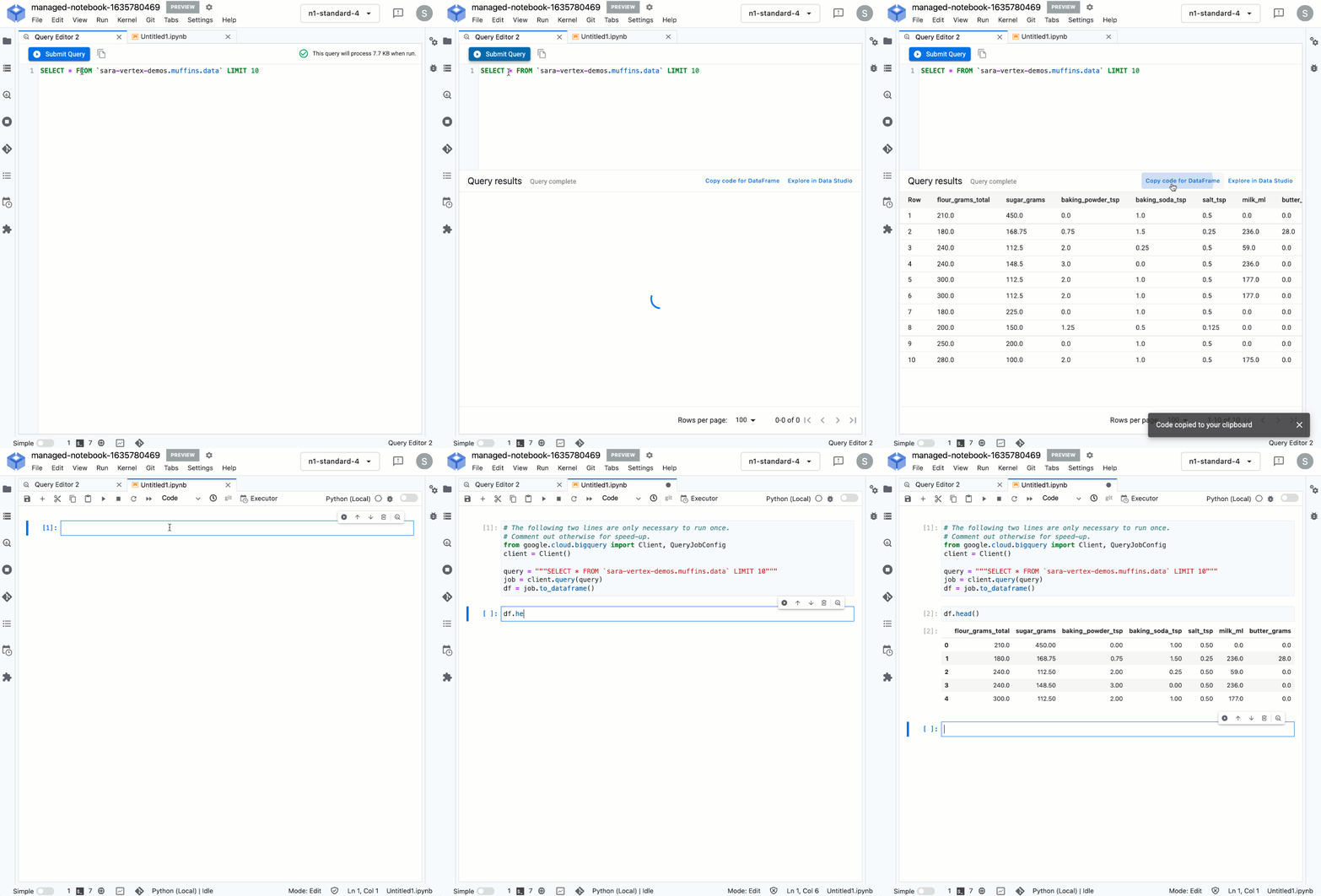
From her notebook instance, Sara experimented with different ML frameworks and model types. She landed on a Scikit-learn regression model to solve this task, and to mimic a real-world production environment, decided to convert this workflow into a ML pipeline. Using the Kubeflow Pipelines SDK, she ran the following on Vertex Pipelines:
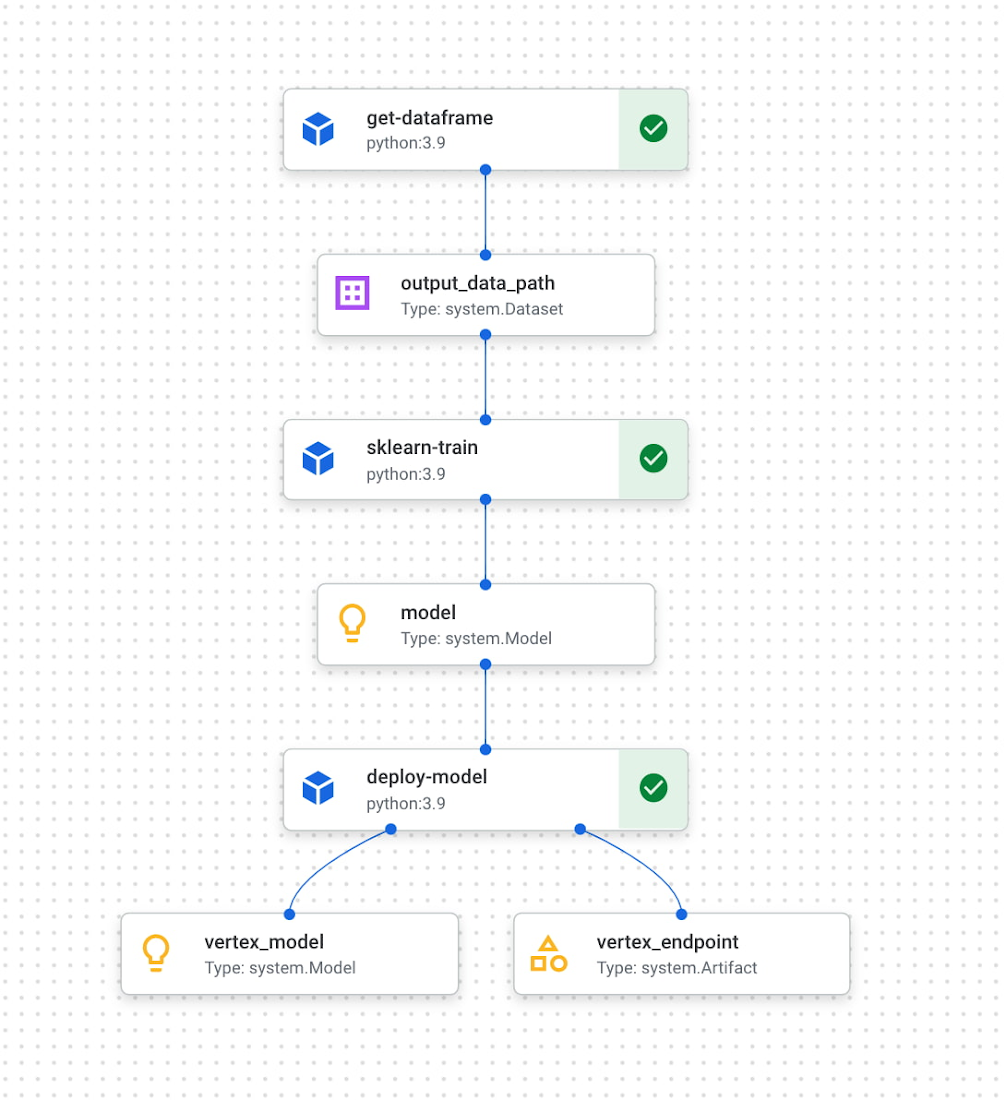
The first component reads the ingredient data from BigQuery and converts it into a Pandas DataFrame which is passed to the next pipeline step. In this step, we train a custom Scikit-learn model on the recipe data. Finally, this model is deployed to an endpoint in Vertex AI. To put it all together, Sara built a web app that allowed her to easily generate ingredient amounts for different muffin types. The web app uses the Vertex AI SDK to call the deployed model endpoint and return ingredient amounts.
The recipe
With a deployed recipe generation model, the only thing left to do was test recipes in the kitchen! Because the model only returns ingredient amounts, there were still many key human elements to complete the baking process: adding yummy additions to the core muffin batter, making adjustments to optimize taste, determining the method for adding ingredients, baking time, and more. After testing a few recipes generated by the model, we landed on a favorite which we’re very excited to share with you here.
Berry ML Muffins

Makes 12 muffins
Flour 285 grams (2 cups)
Granulated sugar 250 grams (1 cup)
Baking powder 2 teaspoons
Baking soda ¼ teaspoon
Salt ½ teaspoon
Cinnamon ½ teaspoon
Milk 170 ml (⅔ cup), room temperature
Butter 55 grams (¼ cup), melted and slightly cooled
Eggs 1 egg plus 1 egg white, room temperature
Canola or vegetable oil 50 grams (¼ cup)
Sour cream 50 grams (3 tablespoons + ¾ teaspoon), room temperature
Vanilla extract 1 ½ teaspoons
Blueberries or raspberries 240 grams (1 ½ cups)
Coarse sugar, like demerara or turbinado (optional for topping) 1 tablespoon
- Measure your three cold ingredients and allow them to come to room temperature: 1 egg + 1 egg white, sour cream, and milk.
- Preheat the oven to 375 F / 190 C. Line a 12-muffin tin with cupcake liners or lightly grease with baking spray.
- In a large bowl, whisk together flour, baking powder, baking soda, salt, and cinnamon. Set aside.
- Melt your butter in a medium heat proof bowl, and allow it to cool slightly for a few minutes. Whisk in sugar until combined. Then add egg, oil, and vanilla, milk, and sour cream and whisk until fully incorporated.
- Pour the wet ingredients into the dry ingredients, mixing with a spatula until just combined. Be careful not to overmix, it’s ok if there are a few lumps in your batter.
- Prepare your fruit. If you can’t decide whether to use blueberries or raspberries, divide your batter into two bowls and do both! Crush half of your fruit and fold it into the batter. Then mix in the remaining whole berries.
- Divide the mixture evenly into the muffin tin. Optionally (but extra tasty), sprinkle the tops of each muffin with about ⅛ teaspoon of coarse sugar. Turbinado or demerara sugar work well for this. This will caramelize and add a nice texture to the tops of your muffins.
- Bake at 375 for 22 – 24 minutes, or until a toothpick inserted in the center comes out clean. For best results, do a toothpick test in a few muffins since not all ovens have an even temperature throughout. Let the muffins cool in the muffin tin for a few minutes, then transfer to a wire rack to cool completely.
- Enjoy!
How can you participate in National Muffin Day?
Participation in National Muffin Day is as easy as 1-2-3!
- On February 20, Bake Muffins. It’s time to dust those muffin tins, grab your blueberries, chocolate chips, rhubarb, and favorite ingredients, and create some magical scrumdiddlyumptiousness! If you want to join Jacob in a virtual baking party, you can register here.
- Then, Give. In non-pandemic years, we asked our bakers to personally hand muffins to hungry folks in their cities. While this is a valuable and rewarding experience, the current state of Covid means this practice is still unsafe, so we request that you refrain from doing this. Instead, if it feels safe, we encourage you to take your delicious baked goods and donate them to local homeless shelters, which can distribute them to those in need. Alternatively, you can share your muffins with friends and families and then make a donation to an organization that benefits people experiencing homelessness, like the ones listed below in step 3.
- Share Your Muffin Pics on Social Media. We’d love to see your muffins! Share your pictures on Twitter or Instagram with the hashtags #givemuffins, or share them to our official Facebook Event page. For each individual baker who participates, we will make donations to Project Homeless Connect, which provides much needed resources to people experiencing homelessness in San Francisco, Family promise, which supports unhoused families nationwide, and Pine Street Inn which provides resources for people experiencing homelessness in Boston. Donations will be on a per-baker basis (with up to $80 donated per baker!), so please feel free to loop in your significant others, kids, nieces and nephews, roommates, friends, and anybody else with a giving spirit who loves deliciousness!
Google Introduces ML-based Predictive Autoscaling to Forecast Capacity and Match Scaling Demands

4991
Of your peers have already read this article.
3:00 Minutes
The most insightful time you'll spend today!
At Google Cloud, we believe you get most benefits from the cloud when you scale infrastructure based on changing demand. Compute Engine allows you to configure autoscaling to save costs during periods of low demand, and add capacity to support peak loads.
When you use a managed instance group (MIG), you can have an autoscaler automatically create or delete virtual machine (VM) instances based on increases or decreases in load. However, if your application takes several minutes to initialize, creating VMs in response to growing load might not increase your application’s capacity quickly enough. For example, if there’s a large increase in load (like when users first wake up in the morning), some users might experience delays while your application is initializing on new instances.
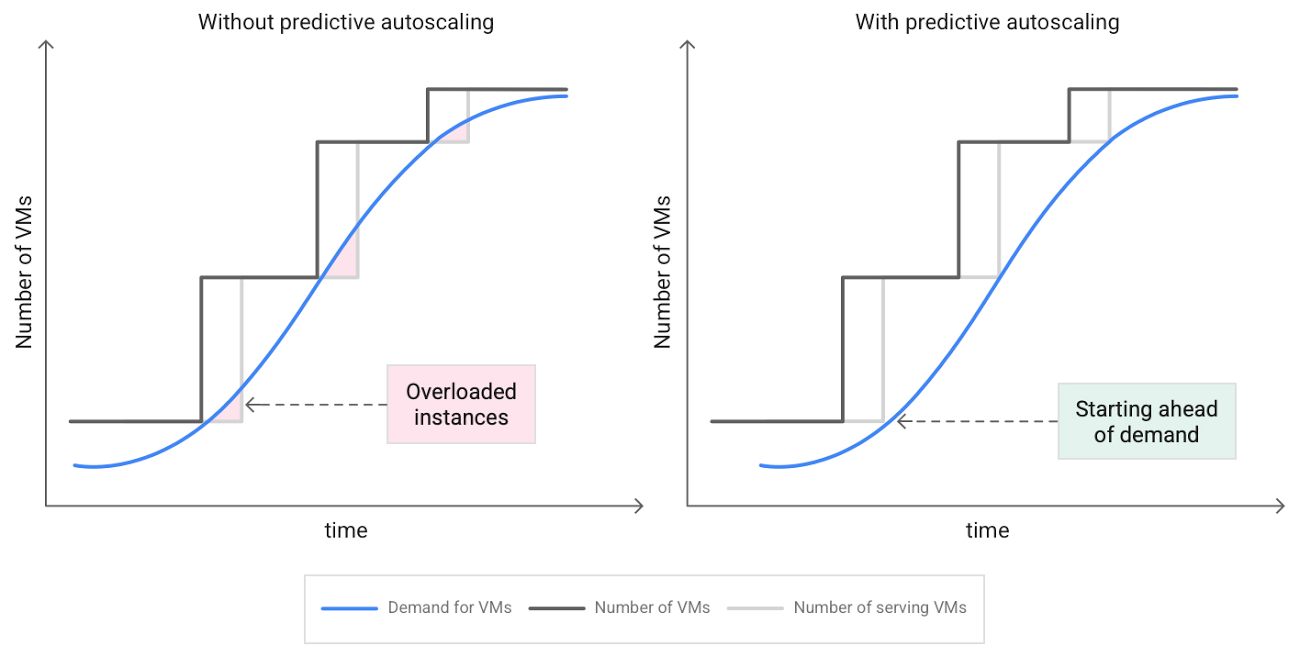
A good way to solve this problem would be to create VMs ahead of demand so that your application has enough time to initialize beforehand. This requires knowing upcoming demand. If only we could predict the future… Well, now we can!
Introducing predictive autoscaling
Predictive autoscaling uses Google Cloud’s machine learning capabilities to forecast capacity needs. It creates VMs ahead of growing demand allowing enough time for your application to initialize.
How does it work?
Predictive autoscaling uses your instance group’s CPU history to forecast future load and calculate how many VMs are needed to meet your target CPU utilization. Our machine learning adjusts the forecast based on recurring load patterns for each MIG.
You can specify how far in advance you want autoscaler to create new VMs by configuring the application initialization period. For example, if your app takes 5 minutes to initialize, autoscaler will create new instances 5 minutes ahead of the anticipated load increase. This allows you to keep your CPU utilization within the target and keep your application responsive even when there’s high growth in demand.
Many of our customers have different capacity needs during different times of the day or different days of the week. Our forecasting model understands weekly and daily patterns to cover for these differences. For example, if your app usually needs less capacity on the weekend our forecast will capture that. Or, if you have higher capacity needs during working hours, we also have you covered.
Why should you try it?
Predictive autoscaling continuously adapts forecasted capacity to best match upcoming demand. Autoscaler checks the forecast several times per minute and creates or deletes VMs to match its prediction. The forecast itself is updated every few minutes to match recent load trends so if your growth rate is higher or lower than usual we will adjust the forecast accordingly. This gives you capacity needed to cover peak load while saving on cost when demand goes down.
You can start using predictive autoscaling without worry as it’s fully compatible with the current autoscaler. Autoscaler will calculate enough VMs to cover both forecasted as well as real-time CPU load—whichever is higher. This works with other autoscaling features as well: you can scale based on schedule, your Load Balancer request target or Cloud Monitoring metrics. Autoscaler provides enough capacity to all of your configurations by taking the highest number of VMs needed to meet all your targets.
Getting started
You can enable predictive autoscaling in the Google Cloud Console. Select an autoscaled MIG from the instance groups page and click Edit group. Change predictive autoscaling configuration from Off to Optimize for availability.
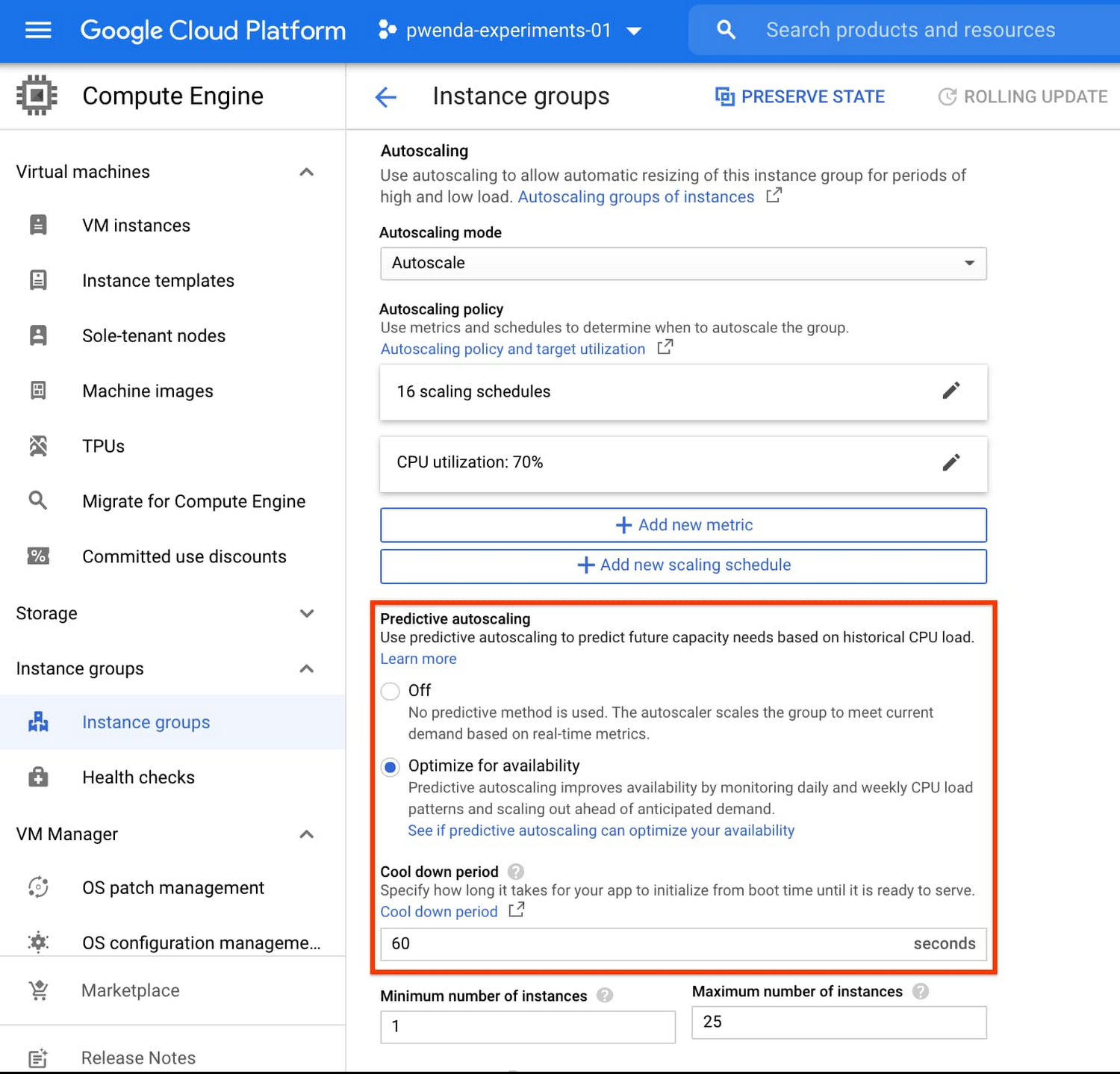
To better understand whether predictive autoscaling is good for your application, click the link See if predictive autoscaling can optimize your availability. This will show you a comparison of the last seven days with your current autoscaling configuration vs. with predictive autoscaling enabled.
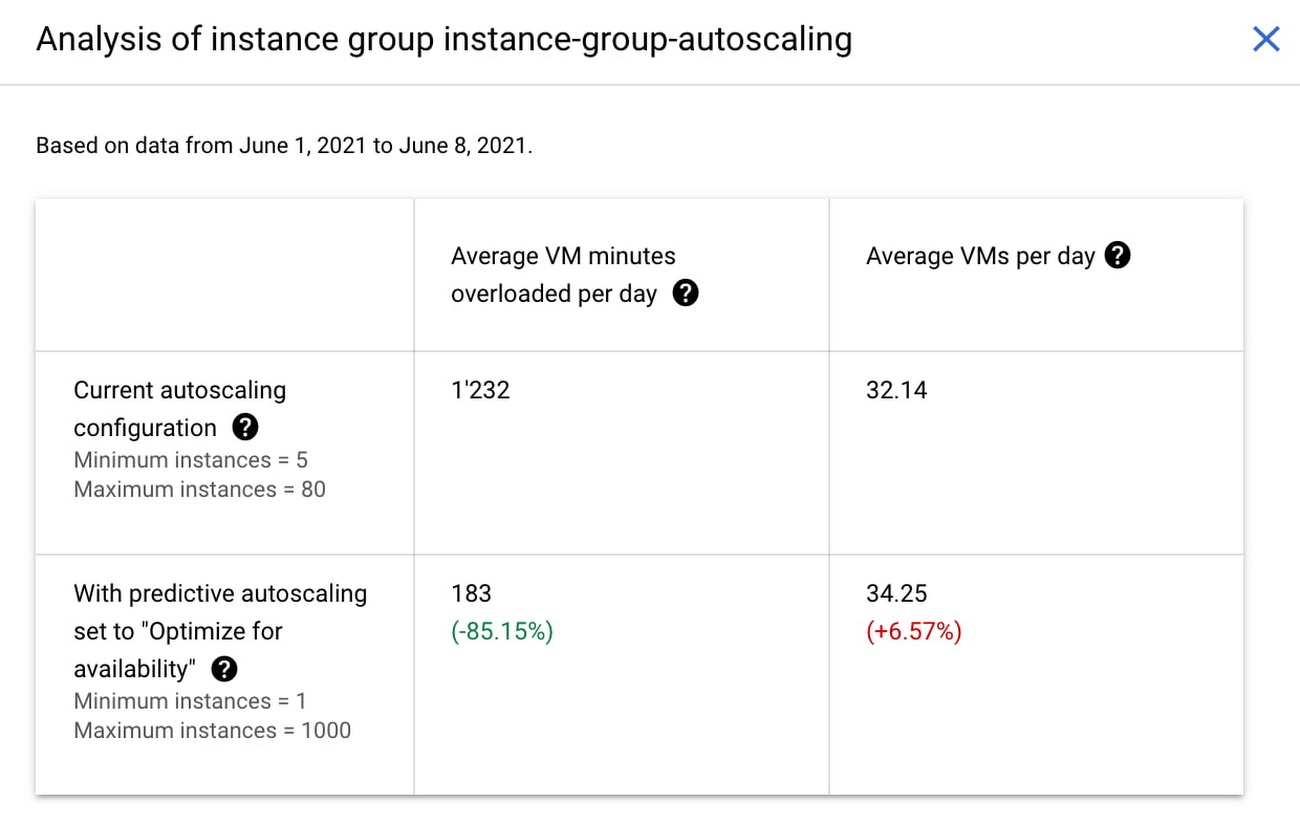
In the above chart,
- Average VM minutes overloaded per day shows how often your VMs exceed your CPU utilization target. This happens when demand is higher than available capacity. Predictive autoscaling can reduce this by starting VMs ahead of anticipated load.
- Average VMs per day is a proxy for cost. This shows how much additional VM capacity you need to keep your CPU utilization within the target you have set. You can optimize your cost by adjusting Minimum instances andCPU utilization as explained below.
Optimizing your configuration
Make sure your Cool down period reflects how long it takes for your application to initialize from VM boot time until it’s ready to serve the load. Predictive autoscaling will use this value to start VMs ahead of forecasted load. If you set it to 10 minutes (600 seconds) your VMs will start 10 minutes before the load is expected to increase.
Review your autoscaling CPU utilization target and Minimum number of instances. With predictive autoscaling you no longer need a buffer to compensate for the time it takes for a VM to start. If your application works best at 70% CPU utilization you don’t need to set target to a much lower value as predictive autoscaling will start VMs ahead of usual load. A higher CPU utilization and lower Minimum number of instances allows you to reduce the cost as you don’t need to pay for additional capacity to prepare for growing demand.
Try predictive autoscaling today
Predictive autoscaling is generally available across all Google Cloud regions. For more information on how to configure, simulate and monitor predictive autoscaling, consult the documentation.
Google Cloud Next 21 for Data Analytics Unplugged

4946
Of your peers have already read this article.
4:30 Minutes
The most insightful time you'll spend today!
October 23rd (this past Saturday!) was my 4th Googlevarsery and we are wrapping an incredible Google Next 2021!
When I started in 2017, we had a dream of making BigQuery Intelligent Data Warehouse that would power every organization’s data driven digital transformation.
This year at Next, It was amazing to see Google Cloud’s CEO, Thomas Kurian, kick off his keynote with CTO of WalMart, Suresh Kumar , talking about how his organization is giving its data the “BigQuery treatment”.

AS I recap Next 2021 and reflect on our amazing journey over the past 4 years, I’m so proud of the opportunity I’ve had to work with some of the world’s most innovative companies from Twitter to Walmart to Home Depot, Snap, Paypal and many others.
So much of what we announced at Next is the result of years of hard work, persistence and commitment to delivering the best analytics experience for customers.
I believe that one of the reasons why customers choose Google for data is because we have shown a strong alignment between our strategy and theirs and because we’ve been relentlessly delivering innovation at the speed they require.
Unified Smart Analytics Platform
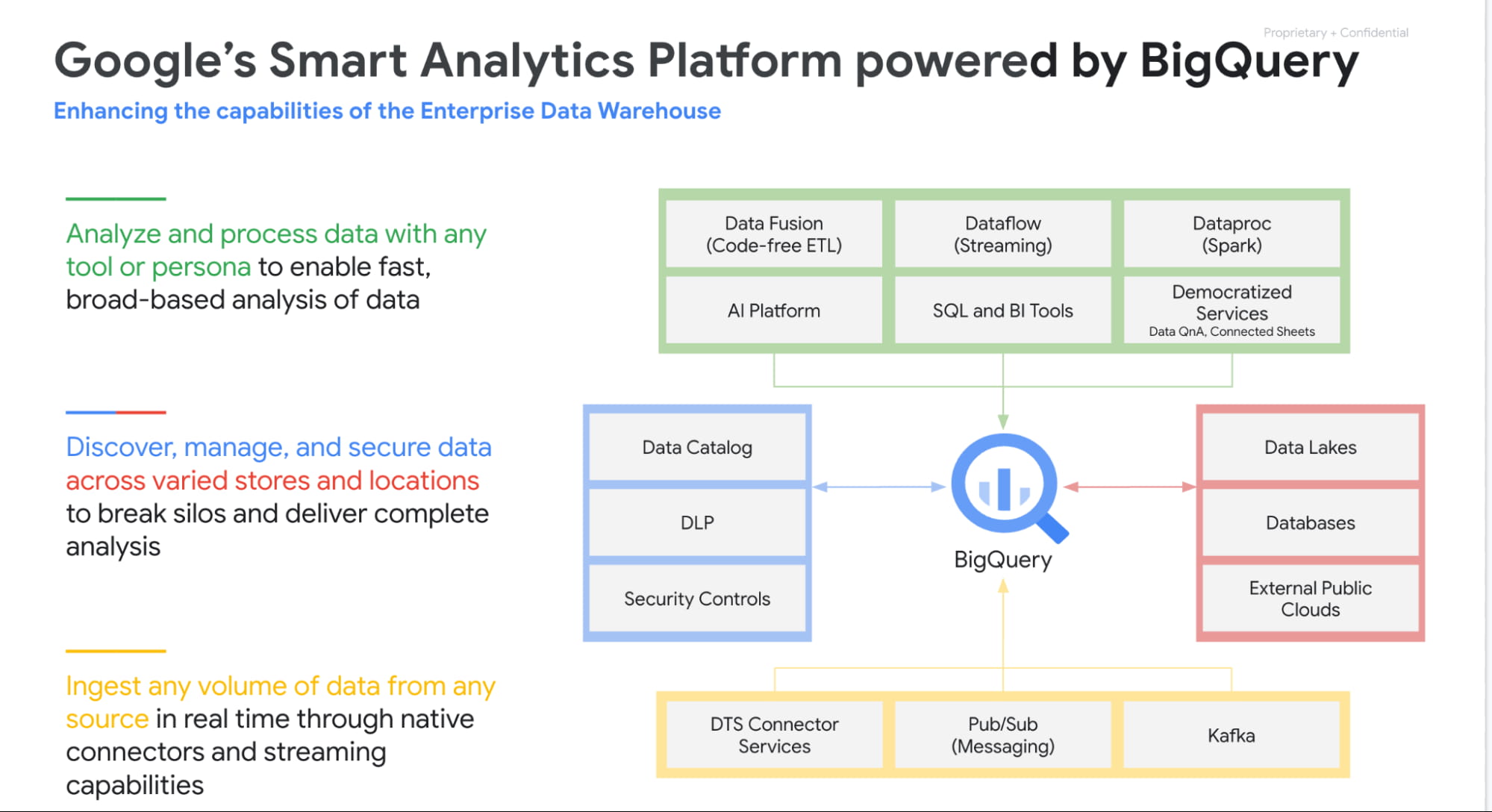
Over the past 4 years our focus has been to build industries leading unified smart analytics platforms. BigQuery is at the heart of this vision and seamlessly integrates with all our other services. Customers can use BigQuery to query data in BigQuery Storage, Google Cloud Storage, AWS S3, Azure Blobstore, various databases like BigTable, Spanner, Cloud SQL etc. They can also use any engine like Spark, Dataflow, Vertex AI with BigQuery. BigQuery automatically syncs all its metadata with Data Catalog and users can then run a Data Loss Prevention service to identify sensitive data and tag it. These tags can then be used to create access policies.
In addition to Google services, all our partner products also integrate with BigQuery seamlessly. Some of the key partners highlighted at Next 21 included Data Ingestion (Fivetran, Informatica & Confluent), Data preparation (Trifacta, DBT), Data Governance (Colibra), Data Science (Databricks, Dataiku) and BI (Tableau, PowerBI, Qlik etc).
Planet Scale analytics with BigQuery
BigQuery is an amazing platform and over the past 11 years we have continued to innovate in various aspects. Scalability has always been a huge differentiator for BigQuery. BigQuery has many customers with more than 100 petabytes of data and our largest customer is now approaching an exabyte of data. Our large customers have run queries over trillions of rows.
But scale for us is not just about storing or processing a lot of data. Scale is also how we can reach every organization in the world. This is the reason we launched BigQuery Sandbox which enables organizations to get started with BigQuery without a credit card. This has enabled us to reach tens of thousands of customers. Additionally to make it easy to get started with BigQuery we have built integrations with various Google tools like Firebase, Google Ads, Google Analytics 360, etc.
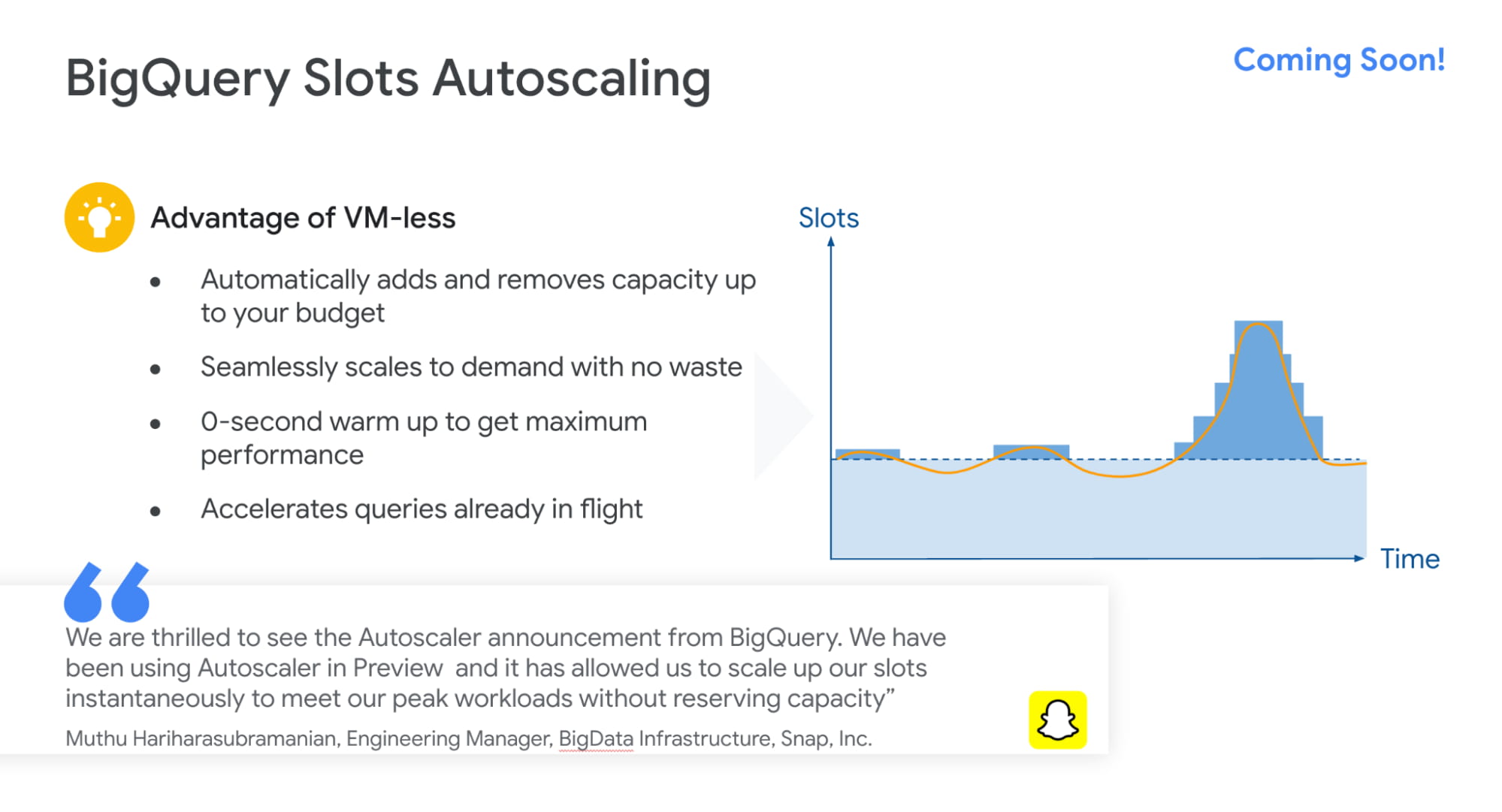
Finally, to simplify adoption we now provide options for customers to choose whether they would like to pay per query, buy flat rate subscriptions or buy per second capacity. With our autoscaling capabilities we can provide customers best value by mixing flat rate subscription discounts with auto scaling with flex slots.
Intelligent Data Warehouse to empower every data analyst to become a data scientist
BigQuery ML is one of the biggest innovations that we have brought to market over the past few years. Our vision is to make every data analyst a data scientist by democratizing Machine learning. 80% of time is spent in moving, prepping and transforming data for the ML platform. This also causes a huge data governance problem as now every data scientist has a copy of your most valuable data. Our approach was very simple. We asked:”what if we could bring ML to data rather than taking data to an ML engine?”
That is how BigQuery ML was born. Simply write 2 lines of SQL code and create ML models.
Over the past 4 years we have launched many models like regression, matrix factorization, anomaly detection, time series, XGboost, DNN etc. These models are used by customers to solve complex business problems simply from segmentation, recommendations, time series forecasting, package delivery estimation etc. The service is very popular: 80%+ of our top customers are using BigQueryML today. When you consider that the average adoption rate of ML/AI is in the low 30%, 80% is a pretty good result!

We announced tighter integration of BQML with Vertex AI. Model explainability will provide the ability to explain the results of predictive ML classification and regression models by understanding how each feature contributes to the predicted result. Also users will be able to manage, compare and deploy BigQuery ML models in Vertex; leverage Vertex Pipelines to train and predict BigQuery ML models.
Real-time streaming analytics with BigQuery
Customer expectations are changing and everyone wants everything in an instant: according to Gartner, by the end of 2024, 75% of enterprises will shift from piloting to operationalizing AI, driving a 5X increase in streaming data and analytics infrastructures.
The BigQuery’s storage engine is optimized for real-time streaming. BigQuery supports streaming ingestion of 10s of millions of events in real-time and there is no impact on query performance. Additionally customers can use materialized views and BI Engine (which is now GA) on top of streaming data. We guarantee always fast, always fresh data. Our system automatically updates MVs and BI Engine.
Many customers also use our PubSub service to collect real-time events and process these through Dataflow prior to ingesting into BigQuery. This is a streaming ETL pattern which is very popular. Last year,we announced PubSub Lite to provide customers with a 90% lower price point and aTCO that is lower than any DIY Kafka deployment.
We also announced Dataflow Prime, it is our next generation platform for Dataflow. Big Data processing platforms have only focused on horizontal scaling to optimize workloads. But we have seen new patterns and use cases like streaming AI where you may have a few steps in pipelines that perform data prep and then customers have to run a GPU based model. Customers want to use different sizes and shapes of machines to run these pipelines in the most optimum manner. This is exactly what Dataflow Prime does. It delivers vertical auto scaling with the right fitting for your pipelines. We believe this should lower costs for pipelines significantly.
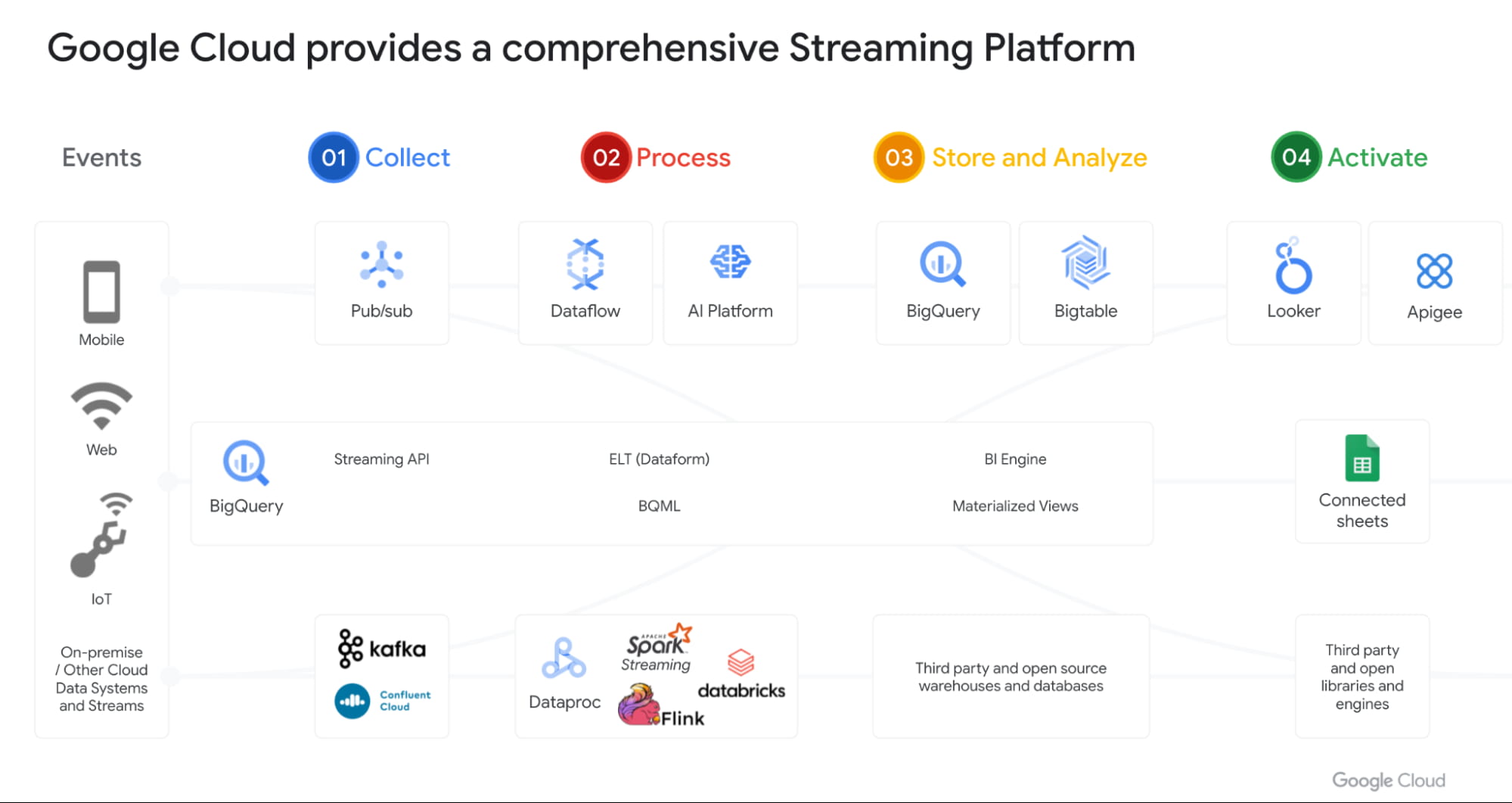
With Datastream as our change data capture service (built on Alooma technology), we have solved the last key problem space for customers. We can automatically detect changes in your operational databases like MySQL, Postgres, Oracle etc and sync them in BigQuery.
Most importantly, all these products work seamlessly with each other through a set of templates. Our goal is to make this even more seamless over next year.
Open Data Analytics with BigQuery
Google has always been a big believer in Open Source initiatives. Our customers love using various open source offerings like Spark, Flink, Presto, Airflow etc. With Dataproc & Composer our customers have been able to run various of these open source frameworks on GCP and leverage our scale, speed and security. Dataproc is a great service and delivers massive savings to customers moving from on-prem Hadoop environments. But customers want to focus on jobs and not clusters.
That’s why we launched Dataproc Serverless Spark (GA) offering at Next 2021. This new service adheres to one of our key design principles we started with: make data simple.
Just like with BigQuery, you can simply RUN QUERY. With Spark on Google Cloud, you simply RUN JOB. ZDNet did a great piece on this. I invite you to check it out!
Many of our customers are moving to Kubernetes and wanted to use that as the platform for Spark. Our upcoming Spark on GKE offering will give the ability to deploy spark workloads on existing Kubernetes clusters.
But for me the most exciting capability we have is, the ability to run Spark directly on BigQuery Storage. BigQuery storage is highly optimized analytical storage. By running Spark directly on it, we again bring compute to data and avoid moving data to compute.
BigSearch to power Log Analytics
We are bringing the power of Search to BigQuery. Customers already ingest massive amounts of log data into BigQuery and perform analytics on it. Our customers have been asking us for better support for native JSON and Search. At Next 21 we announced the upcoming availability of both these capabilities.
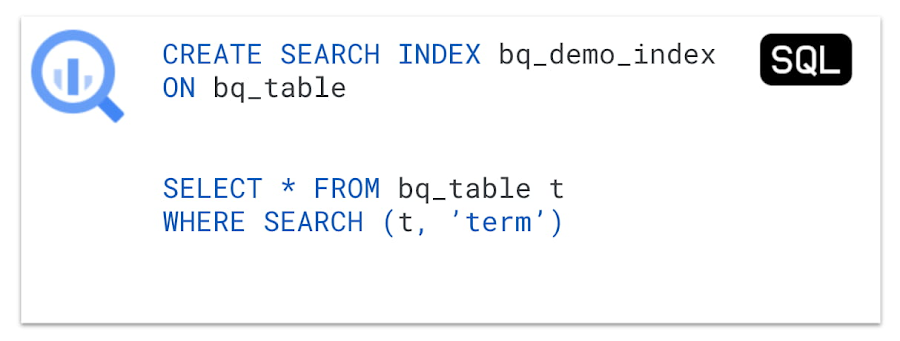
Fast cross column search will provide efficient indexing of structured, semi-structured and unstructured data. User friendly SQL functions let customers rapidly find data points without having to scan all the text in your table or even know which column the data resides in.
This will be tightly integrated with native JSON, allowing customers to get BigQuery performance and storage optimizations on JSON as well as search on unstructured or constantly changing data structures.
Multi & Cross Cloud Analytics
Research on multi cloud adoption is unequivocal — 92% of businesses in 2021 report having a multi cloud strategy. We have always believed in providing customers choice to our customers and meeting them where they are. It was clear that all our customers wanted us to take our gems like BigQuery to other clouds as their data was distributed on different clouds.
Additionally it was clear that customers wanted cross cloud analytics not multi-cloud solutions that can just run in different clouds. In short, see all their data with a single pane of glass, perform analysis on top of any data without worrying about where it is located, avoid egress costs and finally perform cross cloud analysis across datasets on different clouds.
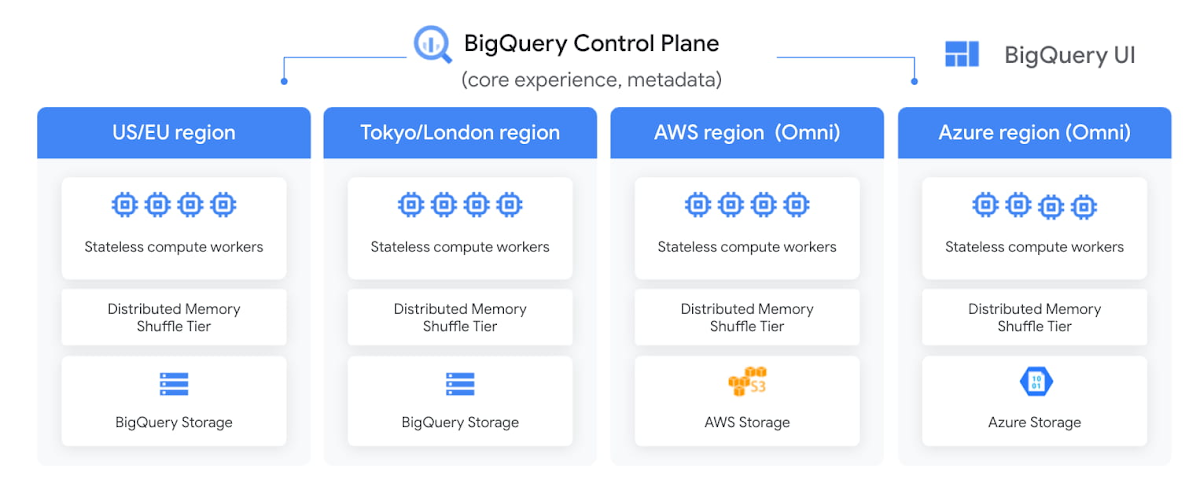
With BigQuery Omni, we deliver on this vision, with a new way of analyzing data stored in multiple public clouds. Unlike competitors, BigQuery Omni does not create silos across different clouds. BigQUery provides a single control plane that shows an analyst all data they have access to across all clouds. Analyst just writes the query and we send it to the right cloud across AWS, Azure or GCP to execute it locally. Hence no egress costs are incurred.
We announced BQ Omni GA for both AWS and Azure at Google Next 21 and I’m really proud of the team for delivering on this vision. Check out Vidya’s session and learn from Johnson and Johnson how they innovate in a multi-cloud world.
Geospatial Analytics with BigQuery and Earth Engine
We have partnered with our Google Geospatial team to deliver GIS functionality inside BigQuery over the years. At Next we announced that customers will be able to integrate Earth Engine with BigQuery, Google Cloud’s ML technologies, and Google Maps Platform.
Think about all the scenarios and use-cases your team’s going to be able to enable sustainable sourcing, saving energy or understanding business risks.
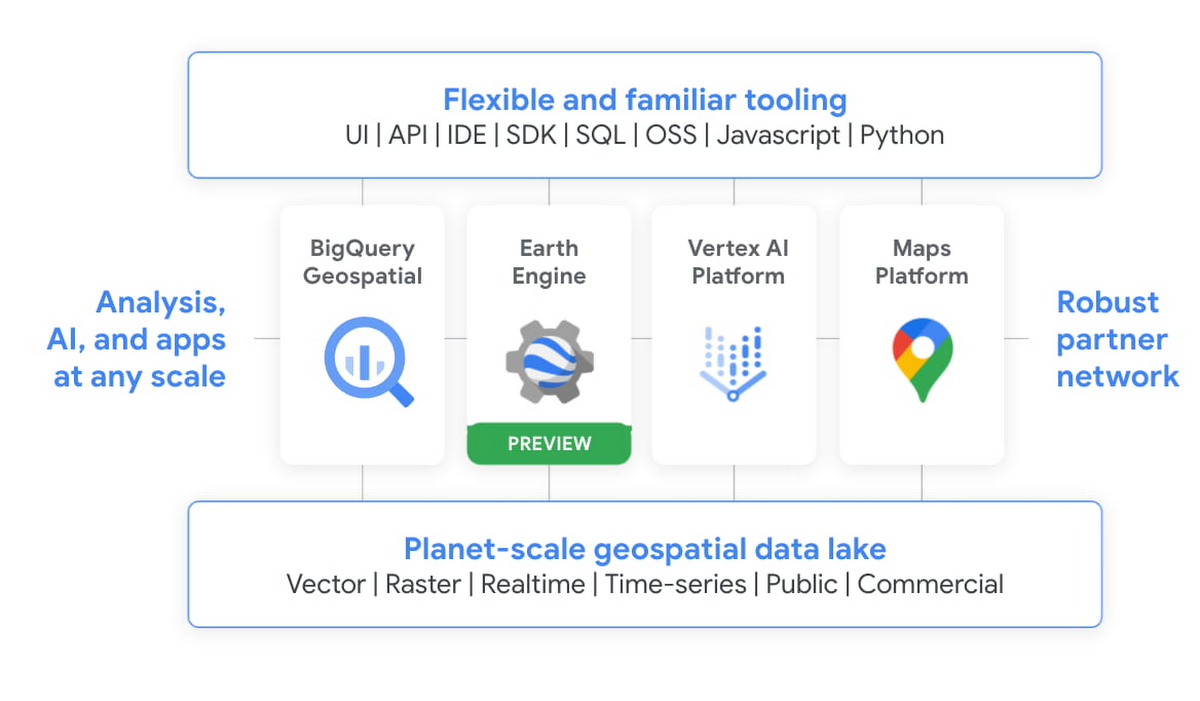
We’re integrating the best of Google and Google Cloud together to – again – make it easier to work with data to create a sustainable future for our planet.
BigQuery as a Data Exchange & Sharing Platform
BigQuery was built to be a sharing platform. Today we have 3000+ organizations sharing more than 250 petabytes of data across organizations. Google also brings more than 150 public datasets to be used across various use cases. In addition to this, we are also bringing some of the most unique datasets like Google Trends to BigQuery. This will enable organizations to understand in real-time trends and apply to their business problems.
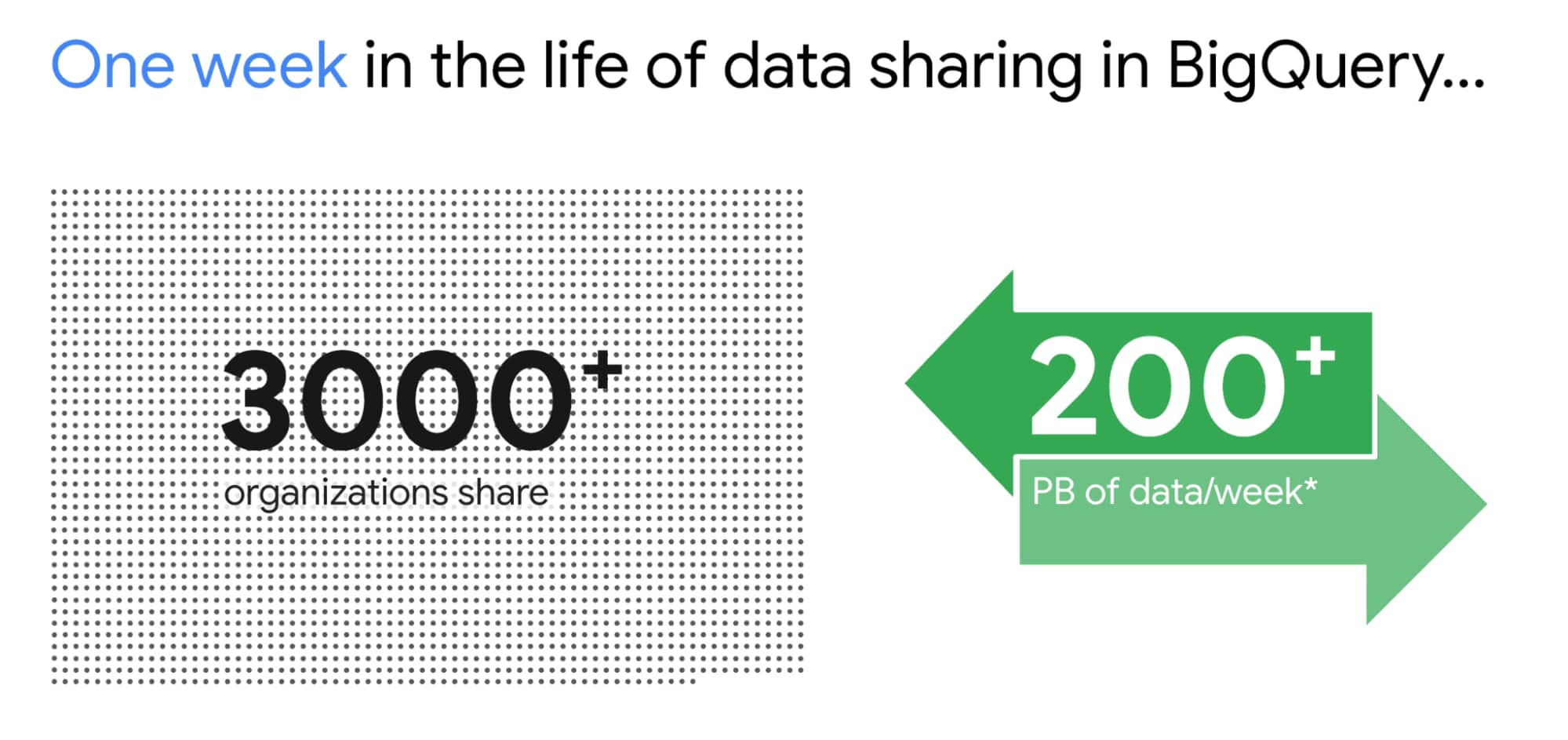
I am super excited about the Analytics Hub Preview announcement. Analytics Hub will provide the ability for organizations to build private and public analytics exchanges. This will include data, insights, ML Models and visualizations. This is built on top of the industry leading security capabilities of BigQuery.

Breaking Data Silos
Data is distributed across various systems in the organization and making it easy to break the data silo and make all this data accessible to all is critical. I’m also particularly excited about the Migration Factory we’re building with Informatica and the work we are doing for data movement, intelligent data wrangling with players like Trifacta and FiveTran, with whom we share over 1,000 customers (and growing!). Additionally we continue to deliver native Google service to help our customers.
We acquired Cask in 2018 and launched our self service Data Integration service in Data Fusion. Now Fusion allows customers to create complex pipelines with just simple drag and drop. This year we focused on unlocking SAP data for our customers. We have launched various SAP connectors and accelerators to achieve this.
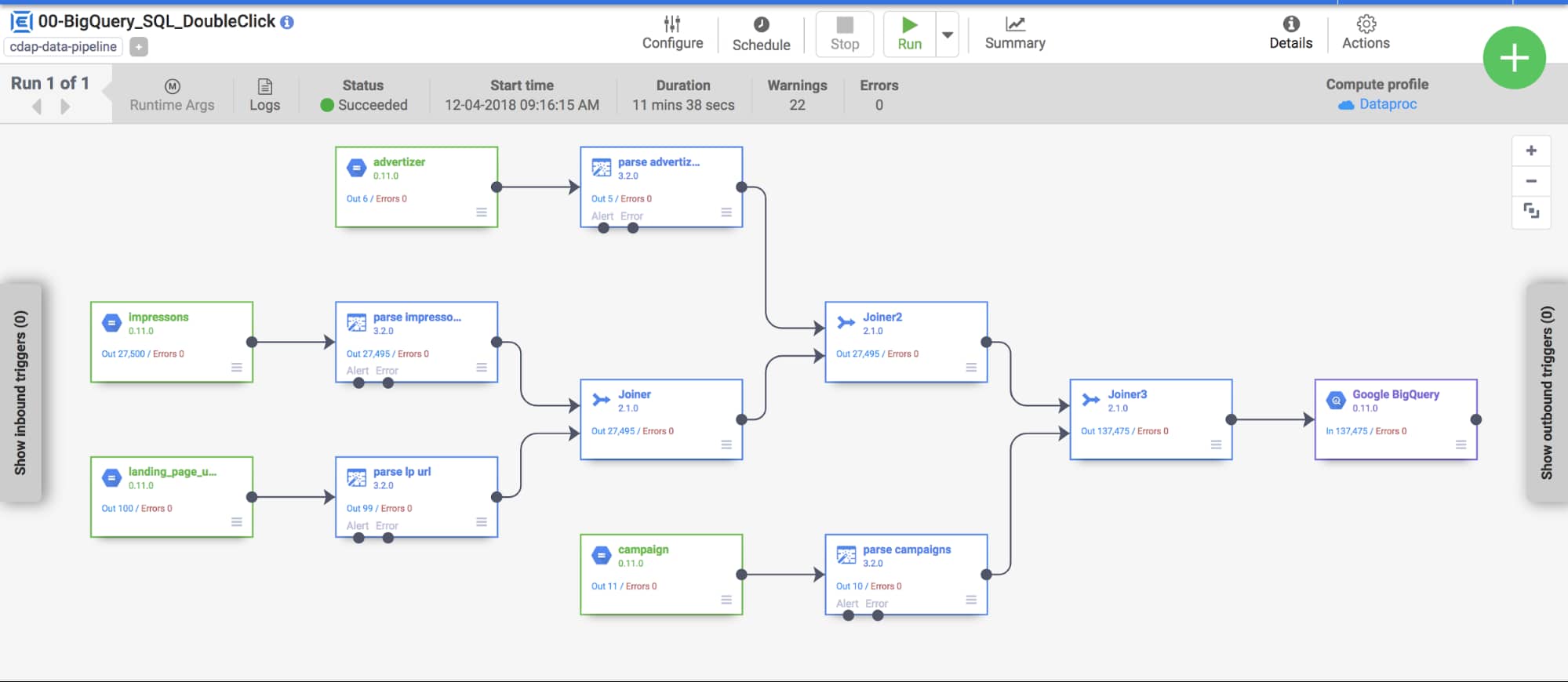
At GCP Next we also announced our BigQuery Migration service in preview. Many of our customers are migrating their legacy data warehouses and data lakes to BigQuery. BigQuery Migration Service provides end-to-end tools to simplify migrations for these customers.
And today, to make migrations to BigQuery easier for even more customers, I am super excited to announce the acquisition of CompilerWorks. CompilerWorks’ Transpiler is designed from the ground up to facilitate SQL migration in the real world and will help our customers accelerate their migrations. It supports migrations from over 10 legacy enterprises data warehouses and we will be making it available as part of our BigQuery Migration service in the coming months.
Data Democratization with BigQuery
Over the past 4 years we have focused a lot on making it very easy to derive actionable insights from data in BigQuery. Our priority has been to provide a strong ecosystem of partners that can provide you with great tools to achieve this but also deliver native Google capabilities.
With our BI engine GA announcement which we introduced in 2019, previewed earlier this year and showcased with tools like Microsoft PowerBI and Tableau, is now available for all to play with.

BigQuery + Data Studio are like peanut butter and Jelly. They just work well together. We launched BI Engine first with Data Studio and scaled it to all the users. More than 40% of our BigQuery customers use Data Studio. Once we knew BI Engine works extremely well we now have made it an integral part of BigQuery API and launched it for all our internal and partner BI tools.
We announced GA for BI Engine at Next 2021 but we were already GA with Data Studio for the past 2 years. We recently moved the Data Studio team back into Google Cloud making the partnership even stronger. If you have not used Data Studio, I encourage you to take a look and get started for free today here!!
Connected Sheets for BigQuery is one of my favorite combinations. You can give every business user in your organization the ability to analyze billions of records using standard Google Sheets experience. I personally use it everyday to analyze all our product data.
We acquired Looker in Feb 2020 with a vision of providing a semantic modeling layer to our customers with a governed BI solution. Looker is tightly integrated with BigQuery including BigQuery ML. Our latest partnership with Tableau where Tableau customers will soon be able to leverage Looker’s semantic model, enabling new levels of data governance while democratizing access to data.
Finally, I have a dream that one day we will bring Google Assistant to your enterprise data. This is the vision of Data QnA. We are in early innings on this and we will continue to work hard to make this vision a reality.
Intelligent Data Fabric to unify the platform
Another important trend that shaped our market is the Data Mesh. Earlier this year, Starburst invited me to talk about this very topic. We have been working for years on this concept, and although we would love for all data to be neatly organized in one place, we know that our customers’ reality is that it is not (If you want to know more about this, read about my debate on this topic with Fivetran’s George Fraser, a16z’s Martin Casado and Databricks’ Ali Ghodsi).
Everything I’ve learned from customers over my years in this field is that they don’t just need a data catalog or a set of data quality and governance tools, they need an intelligent data fabric. That is why we created Dataplex, whose general availability we announced at Next.
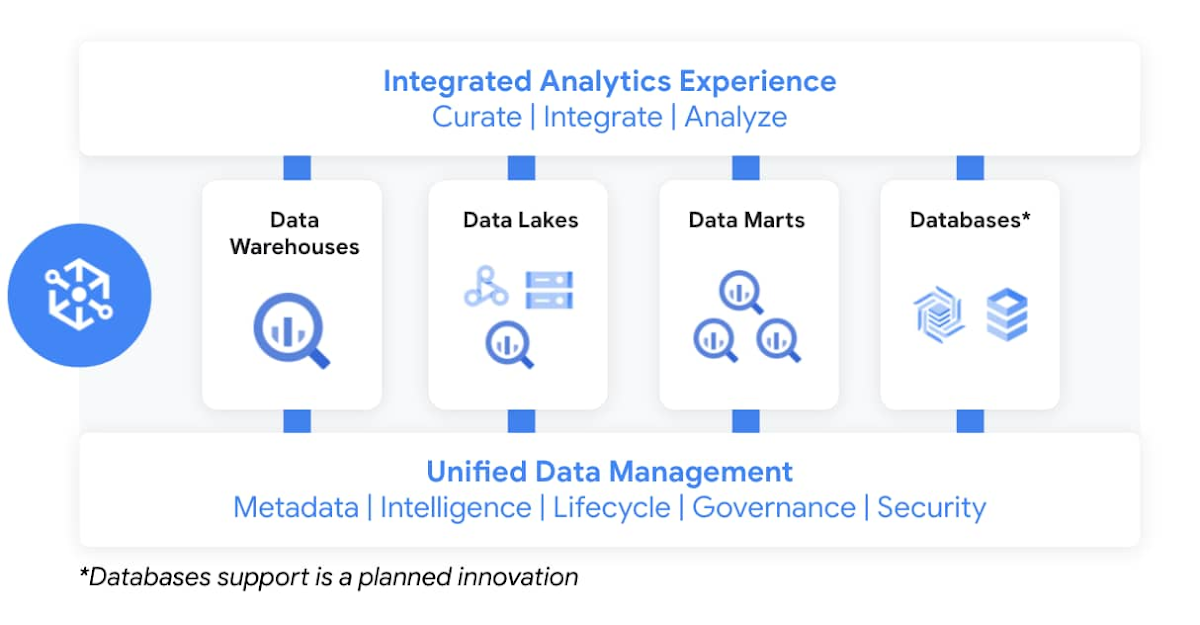
Dataplex enables customers to centrally manage, monitor, and govern data across data lakes, data warehouses, and data marts, while also ensuring data is securely accessible to a variety of analytics and data science tools. It lets customers organize and manage data in a way that makes sense for their business, without data movement or duplication. It provides logical constructs – lakes, data zones, and assets – which enable customers to abstract away the underlying storage systems to build a foundation for setting policies around data access, security, lifecycle management, and so on. Check out Prajakta Damle’s session and learn from Deutsche Bank how they are thinking about a unified data mesh across distributed data.
Closing Thoughts
Analysts have recognized our momentum and, as I look back at this year, I couldn’t thank our customers and partners enough for the support they provided my team and I across our large Data Analytics portfolio: in March, Google BigQuery was named a Leader in The Forrester Wave™: Cloud Data Warehouse, Q1 2021. And in June, Dataflow was named a Leader in The Forrester Wave™: Streaming Analytics, Q2 2021 report.
If you want to get a taste for why customers choose us over other hyperscalers or cloud data warehousing, I suggest you watch the Data Journey series we’ve just launched, which documents the stories of organizations modernizing to the cloud with us.
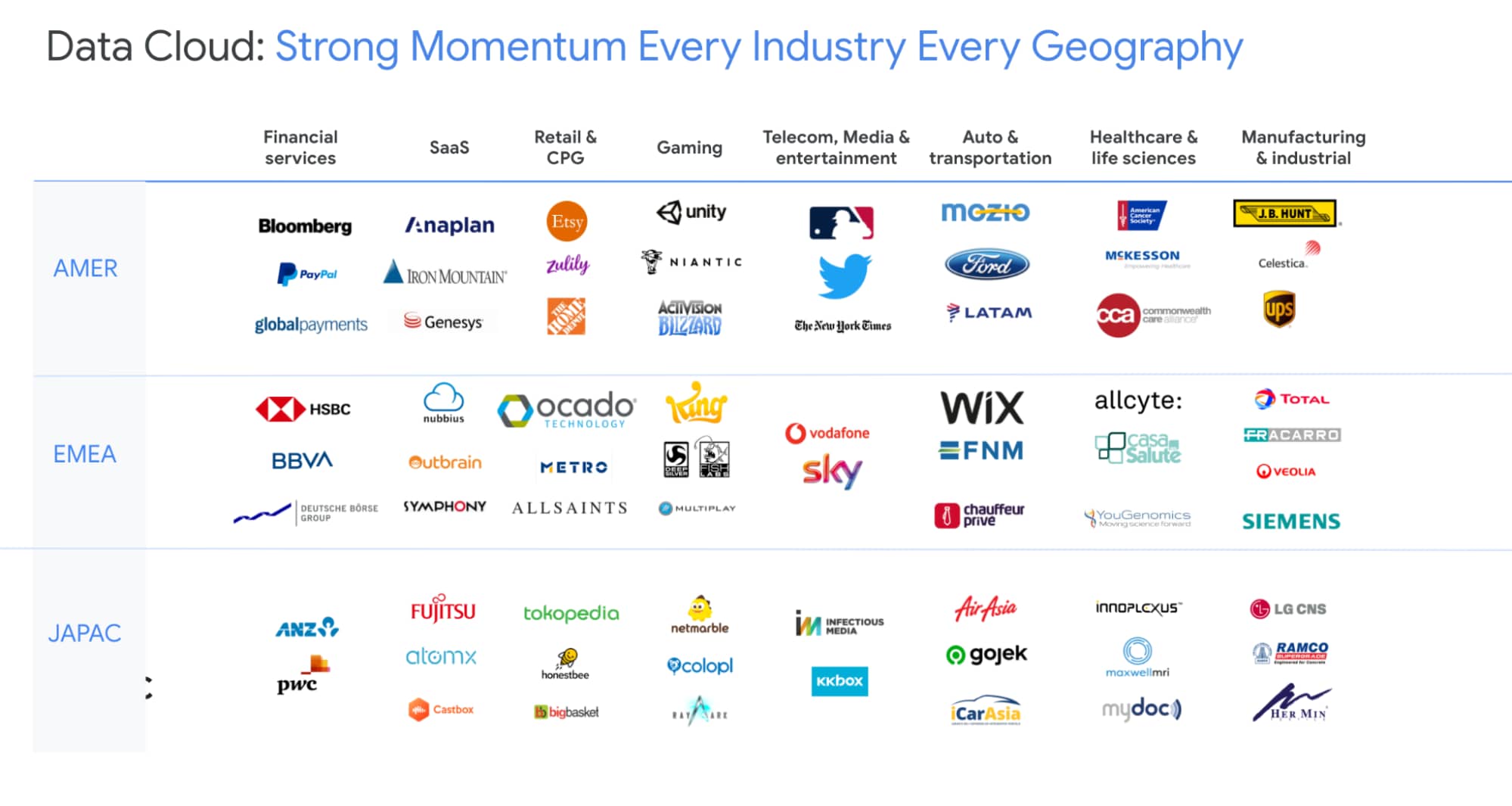
The Google Cloud Data Analytics portfolio has become a leading force in the industry and I couldn’t be more excited to have been part of it. I do miss you, my customers and partners, and I’m frankly bummed that we didn’t get to meet in person like we’ve done so many times before (see a photo of my last in-person talk before the pandemic), but this Google Next was extra special, so let’s dive into the product innovation and their themes.
I hope that I will get to see you in person next time we run Google Next!
More Relevant Stories for Your Company



The 5-Min Demo: How to Develop, Train and Deploy Training Models on Kubernetes
Machine learning has taken businesses by storm. A growing number of organizations, both large and small, and spread across a swathe of industries, are figuring out how to quickly adopt ML. But in the midst of that accelerated push, infrastructure and data science teams have to come to terms with

Lufthansa: Wind Forecasting with Google Cloud ML Helps Increase On-time Flights
The magnitude and direction of wind significantly impacts airport operations, and Lufthansa Group Airlines are no exception. A particularly troublesome kind is called BISE: it is a cold, dry wind that blows from the northeast to southwest in Switzerland, through the Swiss Plateau. Its effects on flight schedules can be

Siemens: What Smarter New Age Recruiting Looks Like
Siemens aims to shape the future—and has the scale, culture, and know-how to realize its ambitions. The Germany-headquartered industrial manufacturing business operates in more than 120 countries and focuses on electrification, automation, and digitalization. Siemens' extensive portfolio includes industrial production digitalization and automation technologies, diagnostic and therapeutic imaging for healthcare, and
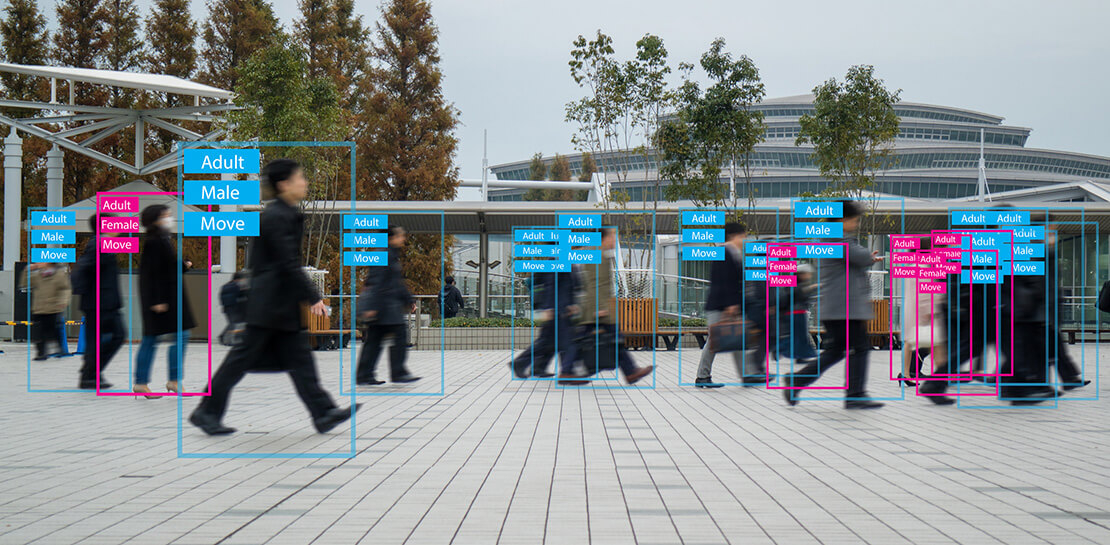
How Vertex Vizier’s Automated Hyperparameter Tuning Improves ML Models
We recently launched Vertex AI to help you move machine learning (ML) from experimentation into production faster and manage your models with confidence—speeding up your ability to improve outcomes at your organization. But we know many of you are just getting started with ML and there’s a lot to learn! In tandem
