





2970
Of your peers have already watched this video.
9:00 Minutes
The most insightful time you'll spend today!
Satellites Can Help Map Carbon Emissions By Looking at Images of Power Plants!
Did you know that Satellites can now help track power plants and determine if they are on or off? And did also know that compute processing that classifies over 59 trillion bytes of data from over 11,000 sensors from 300 satellites is done on on Google Cloud?
Google Cloud’s sustainability initiatives along with its cutting-edge, powerful technology and products are leveraged worldwide by organizations, non-profits and governments to keep a check on greenhouse gas emissions and build self-reporting, power monitoring platforms. Climate TRACE, a collaborative data sharing project with 50+ organizations is dedicated towards this cause by building a visual and meaningful way on a web app. In this video you can learn how generate geo-spatial model that can view the images of power plants gathered from satellite called Sentinel-2 to assess emissions from power plants. Watch the video to learn Google Cloud’s vehement role in funding and staffing special initiatives with Googlers who are experts in AI/ML, UX, data analytics and more!
3103
Of your peers have already watched this video.
48:30 Minutes
The most insightful time you'll spend today!
Responsible AI: From Theory to Practice
In less than 10 years, AI will be the number one driver of global GDP growth. And organizations that achieve AI absorption will be the leaders of the global economy.
But as fast as AI is progressing, it also requires more care and attention from a responsibility standpoint. A more accurate and powerful vision AI technology, for example, when used in a harmful way can lead to harmful and intentional misuse, unintentional failure modes, and loss of personal privacy contributing to severe, real-life consequences for individuals.
Listen to Tracy Frey, Director, Product Strategy & Operations, Cloud AI – Google Cloud discuss implementing AI Principles into well-known products. Hear approaches in place for applying AI Principles in the product development process, including user research, product design, product reviews, testing, documentation, and marketing.
ShareChat Builds its Diverse, Hyperlocal Social Network. Thanks to Google Cloud

9254
Of your peers have already read this article.
3:00 Minutes
The most insightful time you'll spend today!
Editor’s note: Today’s guest post comes from Indian social media platform ShareChat. Here’s the story of how they improved performance, app development, and analytics for serving regional content to millions of users using Google Cloud.
How do you create a social network when your country has 22 major official languages and countless active regional dialects? At ShareChat, we serve more than 160 million monthly active users who share and view videos, images, GIFs, songs, and more in 15 different Indian languages. We also launched a short video platform in 2020, Moj, which already supports over 80 million monthly active users.
Connecting with people in the language they understand
As mobile data and smartphones have become more affordable in India, we noticed a large new segment of people, many in rural areas, being welcomed onto the internet. However, many of them didn’t speak English, and when it comes to accessing content and information—language plays a significant role. Instead of joining other social media sites where English reigned supreme, new internet users chose to join language or dialect-specific Whatsapp groups where they felt more comfortable instead.
So, we set out to build a platform where people can share their opinions, document their lives, and make new friends, all in their native language. ShareChat simplifies content and people discovery by using a personalized content newsfeed to deliver language-specific content to the right audience.
Given the high-intensity data and high volume of content and traffic, we rely heavily on IT infrastructure. On top of that, a large number of our users rely on 2G networks to post, like, view, or follow each other. Our platform needs to deliver great experiences to people who are spread out across the country and different networks without any reduction in performance.
The right cloud partner to support future growth
ShareChat was born in the cloud—we already knew how to scale systems to serve a large customer base with our existing cloud provider. But like many companies, we struggled with over-provisioning compute and storage to accommodate unpredictable traffic and avoid running out of storage. With demand rising for local language content and an increase in online interactions in response to the COVID-19 crisis, we realized that we would need a more efficient way to scale dynamically and allocate resources as needed.
Google Cloud was a natural choice for us. We wanted to partner with a technology-first company that would make it easy (and cost-effective) to manage a strong technology portfolio that would allow us to build whatever we wanted. Google is at the forefront of technology innovation and provided everything we needed to build, run, and manage our applications (including creating an efficient DevOps pipeline to fix and release new features quickly).
We had a few issues in mind at the start of discussions with the Google Cloud team, but over time, as we got information and support from them, we realized that these were the partners we wanted in our corner when it came time to tackle our most challenging problems. In the end, we decided to take our entire infrastructure to Google Cloud.
To support millions of users, we deploy and scale using Google Kubernetes Engine. While we analyze our data using a combination of managed data cloud services, such as Pub/Sub for data pipelines, BigQuery for analytics, Cloud Spanner for real-time app serving workloads, and Cloud Bigtable for less-indexed databases. We also rely on Cloud CDN to help us distribute high-quality and reliable content delivery at low latency to our users.
We now use just half the total core consumption of our legacy environment to run ShareChat’s existing workloads.
Google Cloud delivers better outcomes at every level
By moving to Google Cloud, we saw major benefits in several key areas:
Zero-downtime migration for users
At the time of migration, we had over 70 terabytes of data, consisting of 220 tables—some of which were up to 14 terabytes with nearly 50 billion rows. Due to our data’s interdependencies, moving services over one at a time wasn’t an option for us.
Even though we were migrating such large volumes of data, we didn’t want to impact any of our customers. Latency spikes for out-of-sync data might affect message delivery. For instance, if a message or notification was delayed, we didn’t want to risk a bad user experience causing someone to abandon ShareChat.
To prepare for the move, we ran a proof-of-concept cluster for over four months to test database performance in a real-world scenario for handling more than a million queries per second. Using an open-source API gateway, we replicated our legacy data environment into Google Cloud for performance testing and capacity analysis. As soon as we were confident Google Cloud could handle the same traffic as our previous cloud environment, we were ready to execute.
Using wrappers, we were able to migrate without having to change anything in our existing application code. The entire migration of 60 million users to Google Cloud took five hours—without any data loss or downtime. Today, ShareChat has grown to 160 million users, and Google Cloud continues to give us the support we need.
Scaling globally to meet unexpected demand
We rely on real-time data to drive everything on ShareChat by tracking everything that goes on in our app—from messages and new groups to content people like or who they follow. Our users create more than a million posts per day, so it’s critical that our systems can process massive amounts of data efficiently.
We chose to migrate to Spanner for its global consistency and secondary index. Unlike our legacy NoSQL database, we could scale without having to rethink existing tables or schema definitions and keep our data systems in sync across multiple locations. It’s also cost-effective for us—moving over 120 tables with 17 indexes into Cloud Spanner reduced our costs by 30%.
Spanner also replicates data seamlessly in multiple locations in real time, enabling us to retrieve documents if one region fails. For instance, when our traffic unexpectedly grew by 500% over just a few days, we were able to scale horizontally with zero lines of code change. We were also launching our Moj video app simultaneously, and we were able to move it to another region without a single issue.
Simplifying development and deployment
On average, we experience about 80,000 requests per second (RPS) –nearly 7 billion RPS per day. That means daily push notifications sent out to the entire user base about daily trending topics can often result in a spike of 130,000 RPS in just a few seconds.
Instead of over-provisioning, Google Kubernetes Engine (GKE) enables us to pre-scale for traffic spikes around scheduled events, such as holidays like Diwali, when millions of Indians send each other greetings.
Migrating to GKE has also enabled us to adopt more agile ways of work, such as automating deployment and saving time with writing scripts. Even though we were already using container-based solutions, they lacked transparency and coverage across the entire deployment funnel.
Kubernetes features, such as sidecar proxy, allows us to attach peripheral tasks like logging into the application without requiring us to make code changes. Kubernetes upgrades are managed by default, so we don’t have to worry about maintenance and stay focused on more valuable work. Clusters and nodes automatically upgrade to run the latest version, minimizing security risks and ensuring we always have access to the latest features.
Low latency and real-time ML predictions
Even though many of our users may be accessing ShareChat outside of metropolitan areas, it doesn’t mean they’re more patient if the app loads slowly or their messages are delayed. We strive to deliver a high-performance experience, regardless of where our users are.
We use Cloud CDN to cache data in five Google Cloud Point of Presence (PoP) locations at the edge in India, allowing us to bring content as close as possible to people and speeding up load time. Since moving to Cloud CDN, our cache hit ratio has improved from 90% to 98.5%—meaning our cache can handle 98.5% of content requests.
As we expand globally, we’d like to use machine learning to reach new people with content in different languages. We want to build new algorithms to process real-time datasets in regional languages and accurately predict what people want to see. Google Cloud gives us an infrastructure optimized to handle compute-intensive workloads that will be useful to us both now—and in the future.
The confidence to build the best platform
Our current system now performs better than before we migrated, but we are continuously building new features on top of it. Google’s data cloud has provided us with an elegant ecosystem of services that allows us to build whatever we want, more easily and faster than ever before.
Perhaps the biggest advantage of partnering with Google Cloud has been the connection we have with the engineers at Google. If we’re working to solve a specific problem statement and find a specific solution in a library or a piece of code, we have the ability to immediately connect with the team responsible for it.
As a result, we have experienced a massive boost in our confidence. We know that we can build a really good system because we not only have a good process in place to solve problems—we have the right support behind us.

How 20th Century Fox Uses Machine Learning to Gauge the Financial Performance of a Movie
DOWNLOAD CASE STUDY5885
Of your peers have already downloaded this article
4:15 Minutes
The most insightful time you'll spend today!
Success in the movie industry relies on a studio’s ability to attract moviegoers—but that’s sometimes easier said than done.
Moviegoers are a diverse group, with a wide variety of interests and preferences. Historically, movie studios have relied heavily on experience when deciding to invest in a particular script—but this can lead to huge risks, particularly when investing in new, original stories.
The iterative and complex process of matching stories and audiences is something that Julie Rieger, President, Chief Data Strategist and Head of Media, and Miguel Campo-Rembado, SVP of Data Science, together with their team of data scientists at 20th Century Fox, decided to clarify with data.
Together, Google Cloud and 20th Century Fox have built privacy-robust data partnerships to better understand moviegoers, and have developed in-house deep learning models that train on granular customer data and movie scripts to identify the basic patterns in audiences’ preferences for different types of films.
In 18 months, these models have become routine considerations for important business decisions, and provide one of their most objective, data-driven, and effective barometers to evaluate the tone of a movie, its affinity with core and stretch audiences, and its potential financial performance.
Find how machine learning helped achieve this (clue: it used movie trailers). Download the case study.
Google Cloud Modernized Wisconsin Department of Workforce Development to Process 150K+ Unemployment Claims Per Week

2994
Of your peers have already read this article.
2:00 Minutes
The most insightful time you'll spend today!
When confronted with challenges, resilient organizations adapt and innovate to address changing customer needs. Through its partnership with Google Cloud, the Wisconsin Department of Workforce Development exemplifies this evolutionary approach.
Just a few months ago, challenges created by the antiquated unemployment insurance (UI) system threatened the agency’s ability to serve constituents who lost their jobs during the pandemic. Now, and in the months ahead, that continuing evolution will transform how the DWD serves its constituents with the modernization of their UI system, which includes customer experience workflows, predictive analytics, and streamlining and expediting paper applications.
Like many workforce development agencies nationwide, last year, DWD experienced a deluge of claims filed in response to the COVID-19 economic fallout. Unfortunately, DWD’s legacy UI infrastructure — largely written in the COBOL computing language and hosted on a mainframe server – was no match for the volume and complexity of cases. Wisconsin’s multiple technology systems required a large amount of manual processing, with staff using spreadsheets to manually calculate benefit adjustments. As a result, the state just couldn’t keep up with the surge of claims, and it needed to pivot quickly to a new solution to keep up with demand.
DWD initially responded by staffing up call centers, hiring UI application adjudicators, and deploying other personnel–all told, hiring, contracting with, or reassigning more than 1,300 individuals. However, while this enabled DWD to respond to approximately 7 million calls per month, the massive number of incoming claims surged to create a backlog of more than 750,000 claims. Legacy technology issues continued to significantly slow the query-response time.
DWD leaders recognized that staffing alone was not the solution and that innovation was needed to overcome past, inadequate IT investment. To address the inherited issues, Wisconsin turned to Google Cloud. Working together, we were able to scale the state’s response to claims and speed up overall response time. We were also successful in screening out fraudulent claims so that the UI program could be administered–with integrity–to Wisconsinites who needed financial assistance.
Year-to-date, Wisconsin has now disbursed $2 billion in unemployment benefits, in addition to successfully clearing its entire 2020 UI backlog. As a result of our partnership, the state is now processing an average of 157,000 claims each week and releasing most payments to citizens within two to three business days. Before the new system was in place, the response time could be weeks or even months.
Here is how Wisconsin and Google Cloud are modernizing the state’s current legacy system through a modular approach:
- Artificial intelligence (AI)/ machine learning (ML) for predictive analytics: Through the use of Google AI/ML, the state is creating predictive analytics based on historical data to shorten adjudication decision-making for UI claims, enabling it to release payments to eligible claimants faster. Comprehensive data models and confidence scores analyze the backlog data to determine the shortest route to approval and payments, with a high level of confidence and accuracy. DWD is using Google Cloud technology to identify where in the process the claimant was getting stuck in one of the “hold buckets” for processing a UI claim. Using Google Cloud’s data and AI/ML tools, Wisconsin is able to identify problem areas and quickly resolve those issues. This informed DWD’s rewrite of the UI claim application process. And it also helped DWD identify fraudulent claims.
- Document AI (DocAI) for streamlining paper applications: DWD is also partnering with Google Cloud to streamline paper applications and fax documents as part of UI claims processing–enabling documents to be submitted online instead of by fax or hard-copy mail. Our DocAI solution helps Wisconsin staff make faster decisions by rapidly extracting critical data from documents, saving time, and removing manual processes, which allows employees to focus on high-priority activities.
These modernization steps in Wisconsin are resulting in a bold new vision for state unemployment systems across the United States. Through a combination of design thinking, deep partnership with state officials, and modern technology, DWD’s solutions are tailored to maximize benefits to the constituents they’re designed to serve. By joining forces with Google Cloud and utilizing modernizing technology to make informed, data-driven decisions, Wisconsin DWD is helping residents have a better experience that is easier to understand and navigate–all while better serving the community overall.
Making Your Pictures Worth a Thousand Labels! (with Cloud Vision API)
1206
Of your peers have already read this article.
2:30 Minutes
The most insightful time you'll spend today!
In this post, I’ll be showing some amazing ways the Vision API can extract meaning from your images – keep reading, or jump directly into a tutorial using Python, Node.js, Go, or Java! This tutorial can be completed at no cost within the Google Cloud Free Tier.
They say a picture is worth a thousand words. But how do you make those words available and useful? Around the world, we are generating more images than ever before, and it’s no surprise that businesses are turning to image recognition technology to help meet the immense opportunities created with this growing set of data.
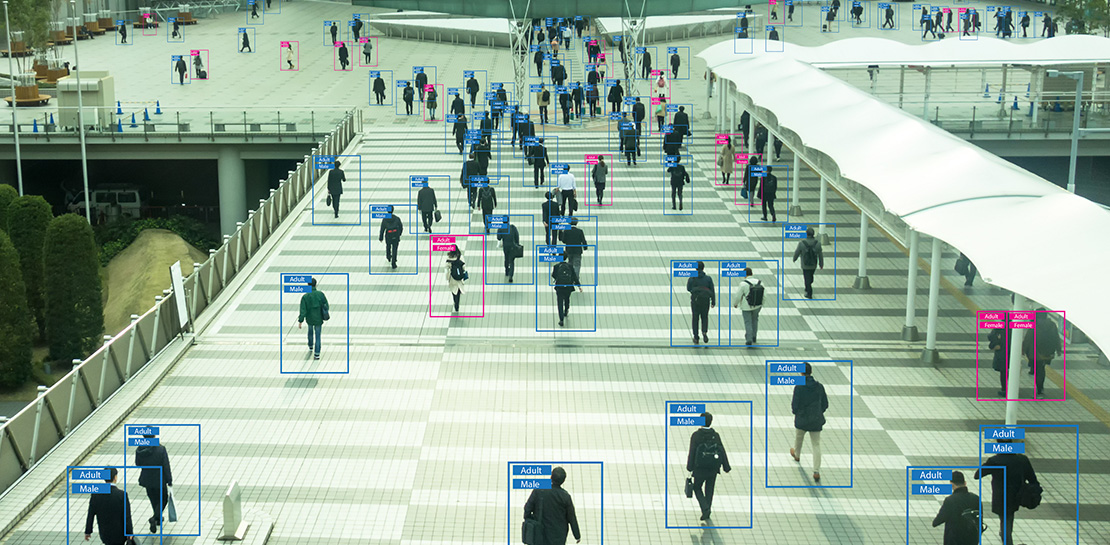
Cloud Vision API is a powerful tool that enables you to perform a variety of tasks including label detection, text recognition, and object tracking on your image data. Whether it’s identifying products in a retail store, analyzing social media posts for brand mentions, or scanning through millions of images to find a specific object, the Cloud Vision API can help businesses automate their image analysis workflows and gain valuable insights from their visual data. To protect privacy, and help you build responsibly, the Cloud Vision API offers features to limit personal identification, such as person blur, which hides identifiable features.
Let’s explore a few of the key features of the Cloud Vision API.
Detect famous landmarks
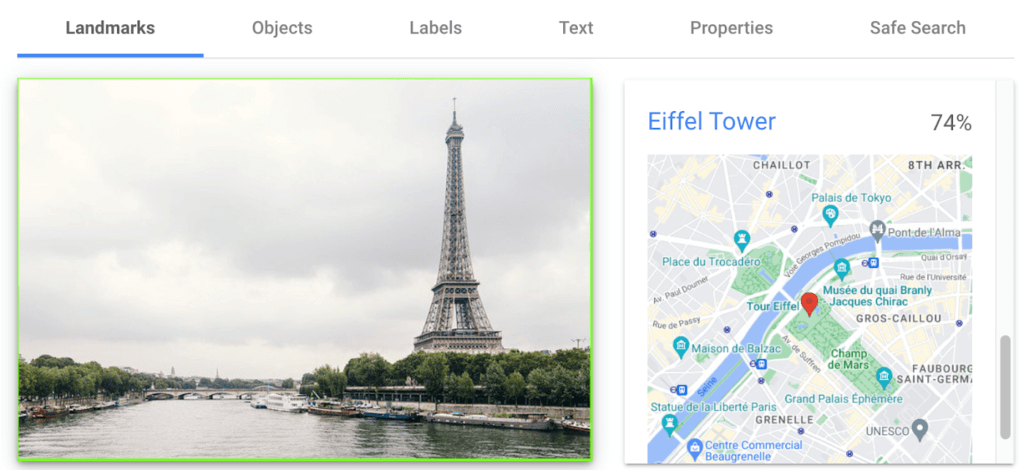
Landmark detection allows you to analyze images to identify specific landmarks such as buildings, natural features, and other recognizable locations. Cloud Vision API recognizes landmarks and provides information about them, including their name, location, and other relevant details. Perhaps you are trying to identify the landmarks in images shared by customers as part of social campaigns, or want to build a mobile app that provides information to tourists on famous landmarks.
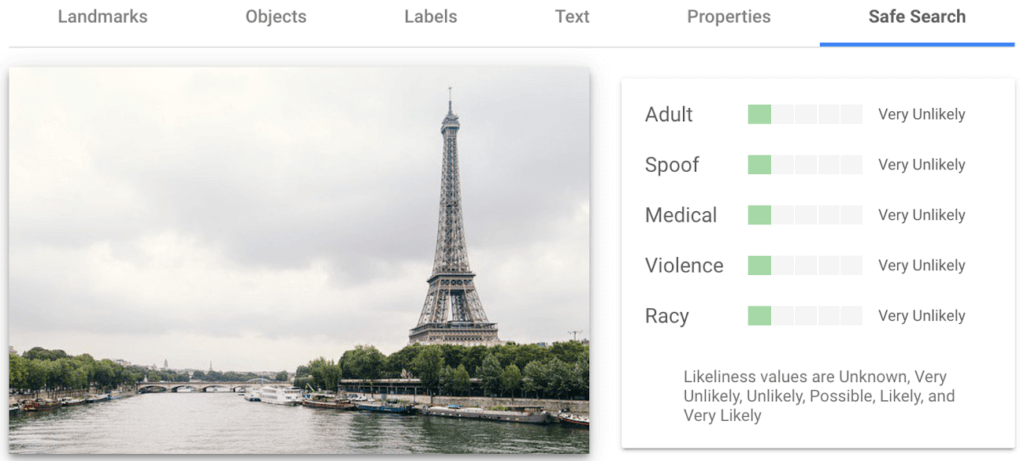
In the below left-hand side image, Cloud Vision API has detected the Eiffel Tower, shown in the visualized response. Not shown in this visualization here, but also detected, were Pont de Bir-Hakeim (the bridge) and Champs de Mars (the park in front of the Eiffel Tower).
Detect objects and label images
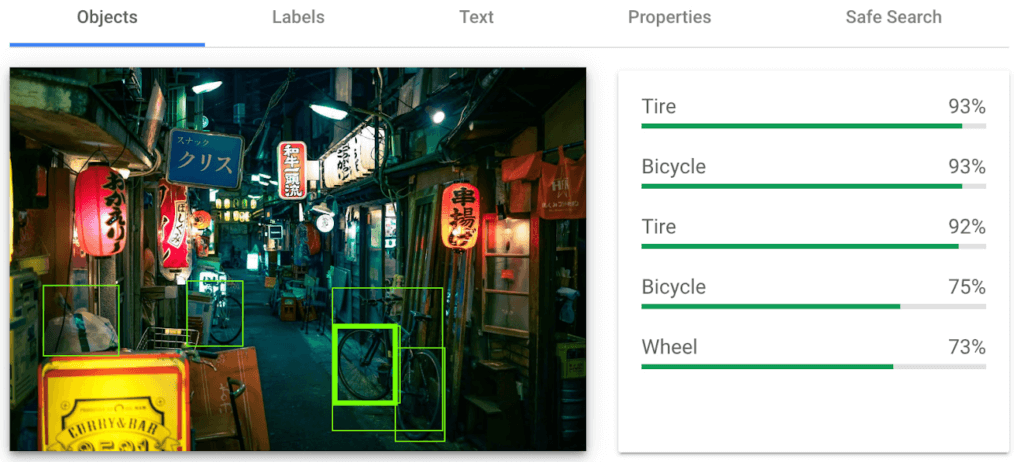
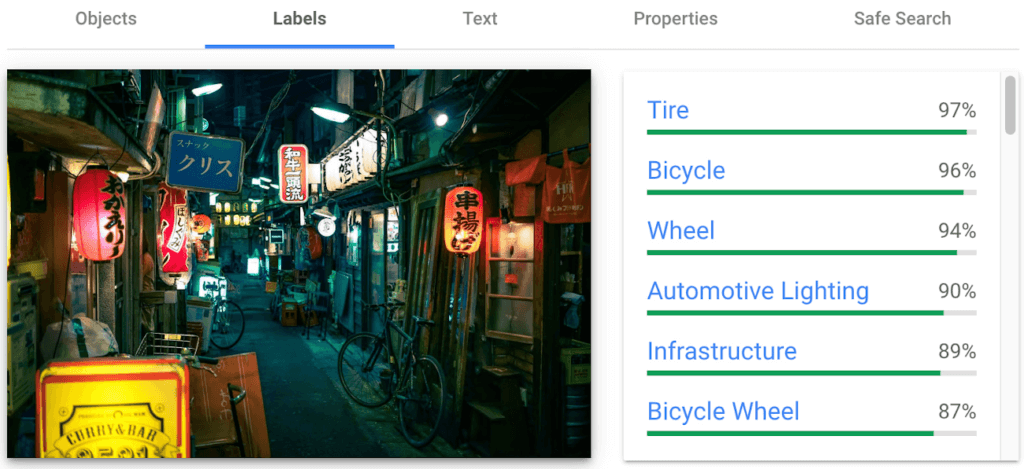
Object detection and labels are two related features that enable you to identify and classify objects within an image. Object detection detects and locates objects within an image, and provides information such as the position, size, and orientation of each object. Labels, on the other hand, provide a general classification of the content within an image.
Object detection has practical applications in many industries such as self-driving vehicles (where it’s critical), retail, manufacturing and more, while labels can be used to help classify and organize large collections of images, or to categorize and filter content.
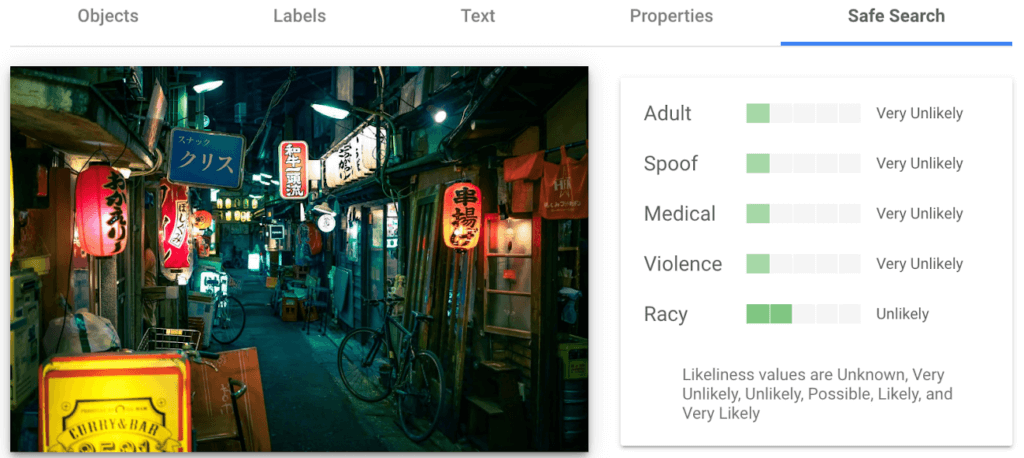
You can see the similarities and differences in the responses provided by the object detection and labeling features in this image taken in Setagaya.
Detect text
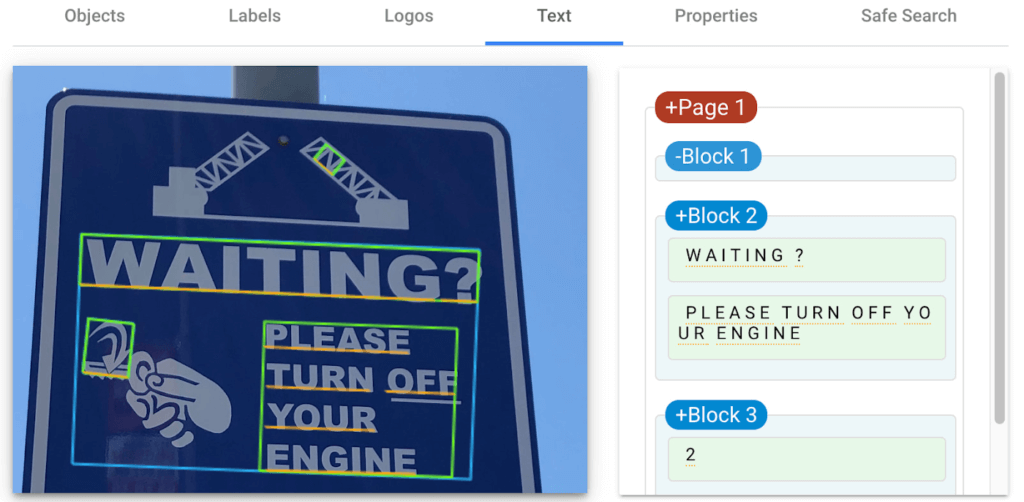
Cloud Vision API detects and extracts text from any image, even if it’s handwritten or in different languages. Once it detects text, the API can provide information about the position, orientation, and size of each text element, as well as individual words, and their bounding boxes.
In this image of a traffic sign, Cloud Vision API has detected the text and provided it in the response.
Detect explicit content
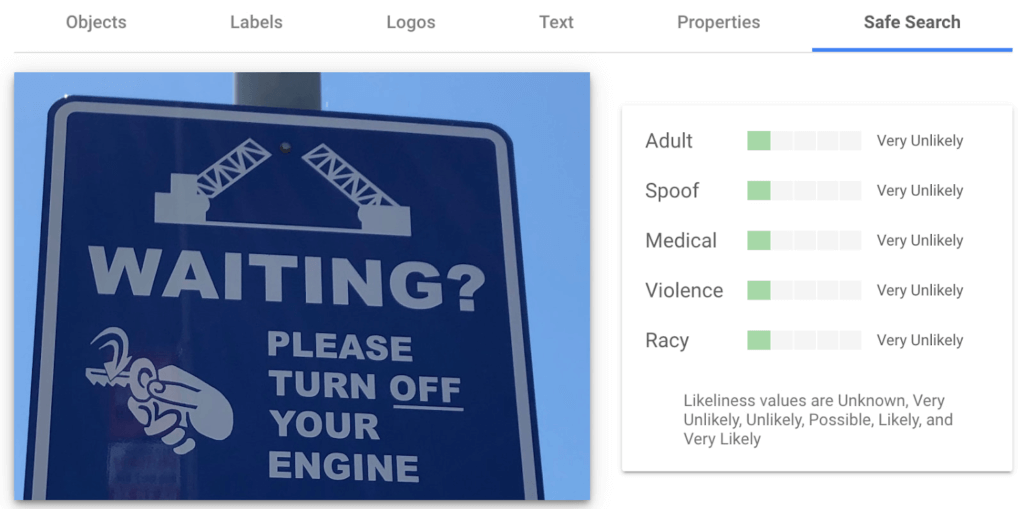
Cloud Vision API can automatically identify and flag explicit or inappropriate content within an image using five categories: adult, spoof, medical, violence, and racy. The API provides a score that indicates the likelihood for each category in the image, which you can use to set thresholds in your application and decide how to handle those that exceed them. This feature is particularly useful for filtering or moderating user-generated content.
Luckily for the images I shared here, each category has been deemed “very unlikely” to be present. Phew!
Next Steps
These are just a few features of the Cloud Vision API and how it can help your business with automating image analysis workflows and gaining valuable insights from your visual data.
Head to the interactive walkthrough tutorials in Python, Node.js, Go, and Java to see step-by-step how to access the API and learn more about all the features that you can integrate into your own applications! Again, this tutorial can be completed at no cost within the Google Cloud Free Tier.
More Relevant Stories for Your Company

AI-powered Business Messages for Timely, Engaging and Helpful Conversations with Customers
Over the last two years, we’ve seen a significant uptick in the number of people using messaging to connect with businesses. Whether it was checking hours of operation, verifying what was in stock, or scheduling a pick-up, the pandemic caused a significant shift in consumer behavior. 45% of users are

Enhanced AI-based Photo Editing: Let’s Enhance Fuels The Next Wave of Innovation with Google Cloud and NVIDIA
There’s an explosion in the number of digital images generated and used for both personal and business needs. On e-commerce platforms and online marketplaces for example, product images and visuals heavily influence the consumer’s perception, decision making and ultimately conversion rates. In addition, there’s been a rapid shift towards user-generated

How One Company Uses AI and Data Analysis to Boost Revenue
AI, deep learning, and image recognition is transforming the shopping experience. These technologies enable consumers to use product images or screenshots rather than text to search for similar products. This improves the customer experience and enables retailers with online and offline outlets to provide a genuine omnichannel experience. The lack of

Google Cloud and Univision Partnership to Up the Ante in UX for Spanish-speaking Audience
The past year has given everyone lots to think about—about our priorities as people and as businesses. As the world retreated behind closed doors, we saw how shared interests and experiences can bring us together. As the world grappled with a common enemy, we witnessed just how differently individuals, communities
