





Bringing Multiple Security Elements Together: Chrome

5380
Of your peers have already read this article.
2:00 Minutes
The most insightful time you'll spend today!
Security and the way we’ve been able to advance user protections over the years is hands down one of my favorite topics when it comes to Chrome. I’ve been on the Chrome team for over 14 years and have seen the browser evolve to become a critical tool that helps people get work done at home or in the office. At the same time, Chrome is often the best line of defense to protect users against malicious software on the internet.
Now more than ever, security has to be top of mind for IT and security teams. Cybercrime is up 600% due to the COVID-19 pandemic, and remote work has increased the average cost of a data breach by $137,000. Those numbers are staggering. And IT teams need to make sure every piece of their tech stack helps support their security needs.
Chrome has worked for years to quickly mitigate risks, block malicious sites and content, and proactively improve web security to keep your users and corporate data safe, pioneering new layered defenses like sandboxing and site isolation. When we think of security and Chrome, we believe it takes multiple elements of security coming together to give organizations the best protection possible.
Security you don’t have to think about: Chrome has many built in protections in place by default that benefit all users. This includes our team’s work to minimize zero days and roll out fixes quickly. With auto updates enabled, Chrome offers enterprises fast and automatic fixes for zero day vulnerabilities. The Chrome security team recently published a post explaining the state of in-wild-bugs that’s worth a read. More examples of the defense-in-depth Chrome offers include capabilities like site isolation and sandboxing that keep malicious code from affecting other visited sites or impacting user machines. Our scanning infrastructure helps us detect and remove harmful extensions from the Chrome Web Store (in fact, last year we saw an almost 90% drop in malware) to prevent your end users from getting infected with malicious extensions. These are protections built directly into Chrome that automatically keep your users and organization safe.
Protections for Chrome users: We provide additional layers of protection that keep your end users safe while they’re on the web and give them helpful information whenever there are potential security risks. For example, Safe Browsing, offered natively in Chrome, helps protect devices by showing warnings to users when they attempt to navigate to dangerous sites or download malicious files. We also give users insights into the safety of their passwords, letting them know if their passwords have been compromised, or even prompting them to change their corporate password if they try to re-use it against company policies. You users are working hard to get things done, and Chrome’s layered security supports their workflows while helping them stay safe on the web.
Enterprise Controls: Every organization has unique security needs. That’s why Chrome provides enterprises with advanced safeguards and granular policy management to help meet those security goals. With hundreds of policy options, admins can use a variety of management tools, including Chrome Browser Cloud Management, to customize the browser. Chrome Browser Cloud Management goes even further, providing powerful enterprise extension management, a security priority for many organizations. Our extension request workflow allows end users to request extensions and admins to allow or deny extension requests. We also recently released extension pinning that allows admins to pin to specific versions of extensions to support any internal security review processes.
Visibility and reporting is another focus area to support IT teams. Through Chrome Browser Cloud Management, administrators can get more insight into their browser environment. This data can help IT teams make security decisions, better understand the devices running Chrome and investigate if issues arise.
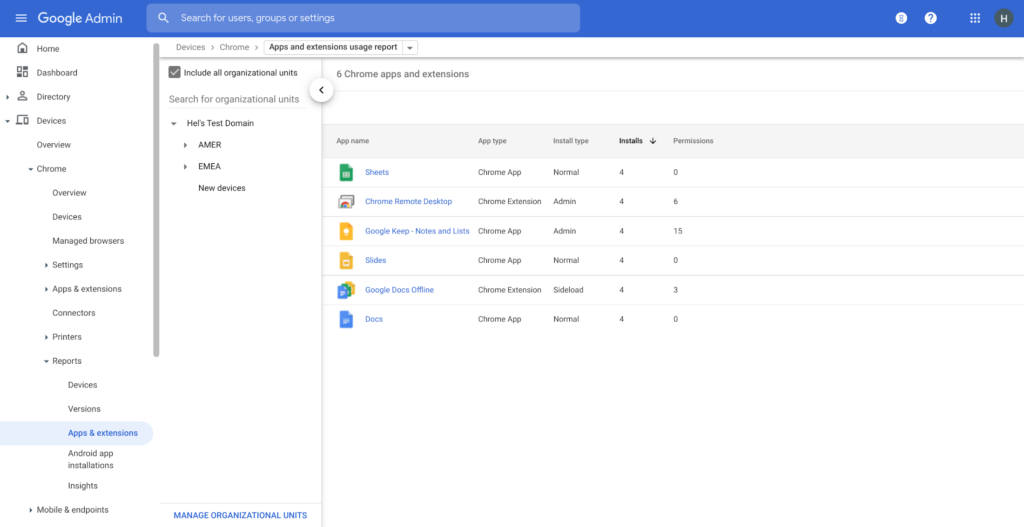
Zero trust security: Finally, Chrome can help modernize an enterprise’s security strategy by migrating to Zero Trust access models. BeyondCorp Enterprise helps secure endpoints by directly integrating Threat and Data Protection in Chrome. This protects against intentional or accidental data loss and prevents malware and phishing in real-time. Additionally, Chrome and BeyondCorp Enterprise provide device trust and endpoint security signals directly from the browser, significantly easing deployment of zero-trust in your environment. In 2022, we plan to partner with leading players in the cybersecurity and zero trust space to add additional integrations.
For security recommendations, check out the new Chrome 2.1 CIS Benchmark that covers independent recommendations on which Chrome policies to configure to help support organizations’ security and compliance needs.
How Google Classroom Helps State of Iowa Employees Serve the Public Better

5580
Of your peers have already read this article.
1:30 Minutes
The most insightful time you'll spend today!
Organizations are pressed with the need to engage, retain, and upskill employees with many positions staying fully or partially remote as the pandemic continues. The Center for Digital Government (CDG) reports that 74% of state and local governments believe they will continue hybrid operations for the long-term. This transition is the latest in a long list of reasons agencies are looking for solutions to help train their workforce digitally. Some have found Google Classroom to be the perfect solution.
The State of Iowa knew about the advantages of digital classrooms even before the pandemic. They were already successfully using Google Classroom for in-person training, making the transition to digital seamless when the state closed down. Jessica Van Heuveln, a Google support specialist for the State of Iowa CIO’s Office, says the switch to digital doesn’t deprive workers of hands-on training. “You can use Google Classroom for many different environments, so if you’re doing self-taught, in-person or virtual training, it’s going to work with all those approaches.”
The logistics of a digital classroom
Iowa uses Google Classroom to onboard and upskill employees as well as train volunteers. When the pandemic shifted the state’s workforce to 70% working from home, they needed a platform that could not only handle a vast range of topics and teaching styles to support remote workers but also scale to meet their demand. Van Heuveln notes that Google Classroom was particularly helpful for handling compliance training, especially with its integration with Google Meet. These trainings often require an entire sector of the workforce to attend a single class with more than 100 attendees, according to Van Heuveln. The logistics of these larger sessions cuts down on the number of total sessions the state needs to host. Iowa also found that employees were less apprehensive about learning when they could do it from the comfort of their own homes.
Iowa follows a train-the-trainer model to train employees expected to instruct using Google Classroom. Trainers working in departments across the state learn to use Google Classroom to create and host virtual learning experiences specific to their own departments.
Collaborative classrooms made simple
Google Classroom meets many needs for Iowa, such as setting up training, managing attendance, reviewing uploaded coursework, and communicating with attendees. Both course attendees and trainers have everything they need in one place, and robust engagement tools help attendees stay focused while giving trainers the feedback they need from their lessons. Built-in survey options let trainers gauge attendee knowledge, and the chat function ensures no one ever misses a question. The reporting dashboard gives trainers access to analytics to track engagement and attendance, providing insights that can improve future training sessions.
Google Classroom also makes it easier to ensure attendees stay on board throughout the training program. Coursework can be uploaded directly into Google Classroom, and training sessions can be recorded and archived. This feature allows employees to work at their own pace or lets them catch up when a scheduling conflict means they might miss a session.
The enterprise version of Google Classroom Iowa uses interfaces with other Google Workspace tools such as Google Meet, Google Calendar, Google Drive, and Gmail, which streamlines training and leads to more collaboration between employees and trainers. It can also interface with applications from other providers, further boosting its utility as an effective virtual classroom. Google Drive stores training materials securely. Lastly, Google Classroom enterprise comes with 24/7 support to make sure agencies always have everything they need for success.
Helping employees be better prepared to serve
Google Classroom can be a powerful part of any training program, whether it be digital or in-person. Building virtual connections empowers organizations to deliver better experiences. Google Classroom is helping the State of Iowa accomplish this for their constituents. Designed to scale and be accessible from anywhere, the platform helps public employees better serve the public. Virtual training strategies are essential for agencies that are looking to grow their workforce and build employee skill levels. The most important thing, however, is that training programs enable employees to further your agency’s mission. To learn more about Google Classroom and see more solutions designed with government in mind, check out the Google Cloud for government page.
Safeguarding time and attention with Google Workspace and Gmail

3994
Of your peers have already read this article.
3:30 Minutes
The most insightful time you'll spend today!
As the pandemic forced millions of people to work from home, many of us found ourselves spending more time in video meetings and in our inboxes as a way to bridge the distance from our colleagues. When the workplace became the living room or the makeshift home office, and as professional and personal responsibilities sometimes collided, we had to find new ways to manage time and attention and to sustain human connection.
When it comes to work emails during the pandemic, we were sending more of them, to more recipients, and we often sent them outside of normal business hours. A study conducted by the Organizational Behavior Unit of Harvard Business School assessed email statistics eight weeks before the start of the pandemic-related lockdowns and eight weeks after. The study concluded that after lockdowns, employees sent 5.2% more emails a day, emails had 2.9% more recipients, and about 8.3% more emails were sent after business hours.
Many of the latest Google Workspace features are designed to help people save time, find focus, and manage tasks more efficiently, whether it’s with smarter emails, writing suggestions, Google Assistant, segmentable working hours, or predictive search. These features combine to save the equivalent of a full working month every year, per person, so that you can spend more time on what matters instead of managing tools.
With that in mind, let’s take a deeper look at how Gmail can help you better manage time and attention.
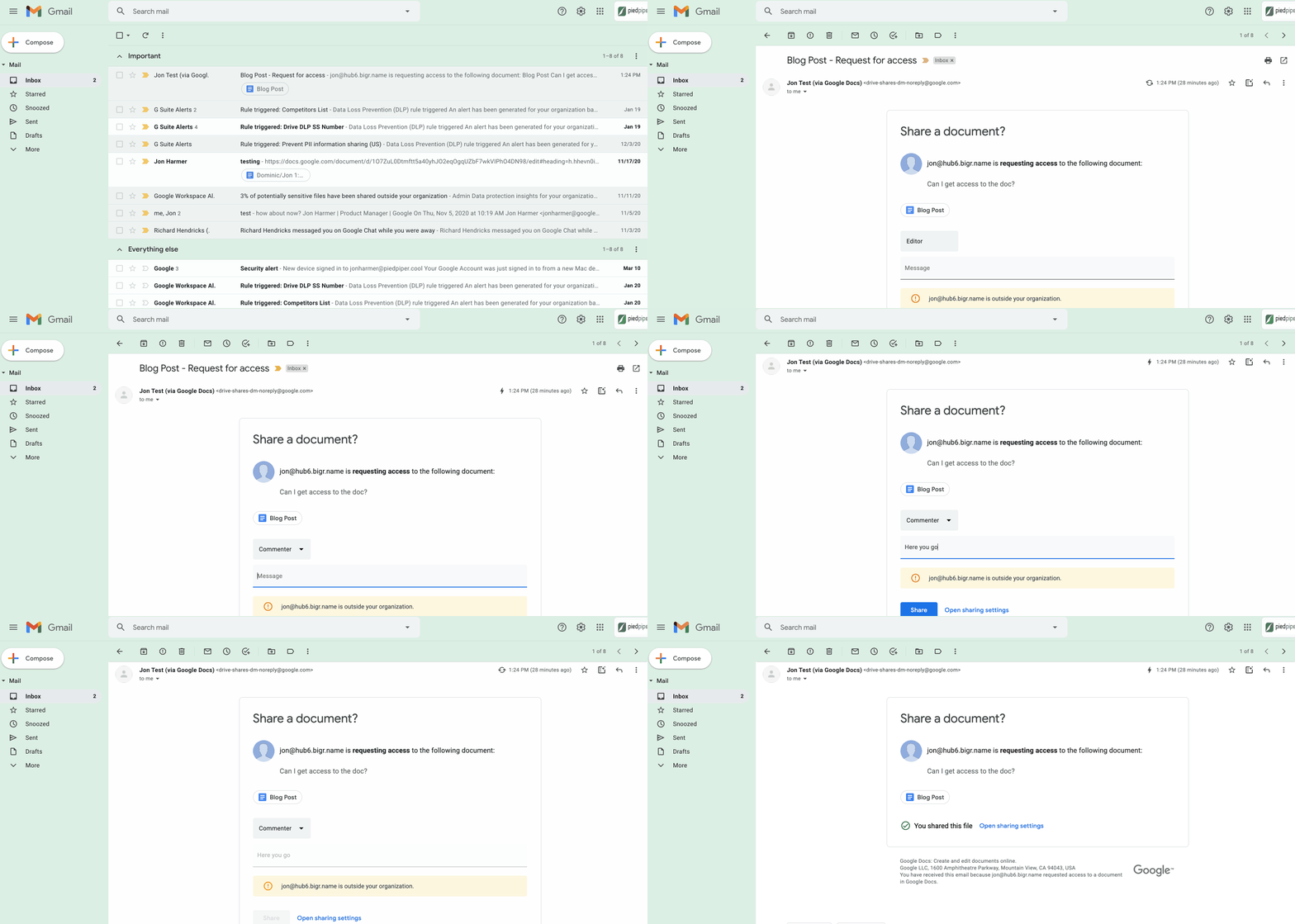
1. Use dynamic email to help recipients complete tasks directly inside an email message. With the new dynamic email support in Gmail, you can easily send and receive emails that enable the reader to take action directly from within the message. This removes the burden of opening multiple documents and tabs. Email recipients can grant access to Drive files, respond to or resolve comments in Docs, Slides, or Sheets, and RSVP to events—all without leaving the message. Learn more.
2. Stay productive, even when you’re offline. Gmail Offline lets you read, reply, delete, and search your Gmail messages when you’re not connected to the internet. Once you set it up, an outbox will appear in the left panel. When a connection later becomes available, Gmail will automatically send the messages from your outbox, and download any new messages to your inbox. This is great for those working on the frontlines who need to stay productive and informed, even when they’re offline.
3. Get organized and prioritize your work with Tasks in Gmail. This feature allows you to easily convert emails into tasks with just one click. You can create due dates that will automatically appear in your calendar, and check tasks off as you complete them. Baked directly into the side panel, you can create, view and manage your task lists without leaving Gmail.
4. Spend time innovating, not writing emails. Gmail’s template functionality lets you create standardized email messages that can be edited and sent out to different recipients in a matter of seconds. If this feature sounds appealing, check out Smart Reply and Smart Compose to learn more ways to write and reply to emails faster.
5. Get search results faster in Gmail. Search chips help you find what you’re looking for in Gmail faster, without needing to sort through irrelevant results or use search operators (e.g., from: marketing@company.com). For example, you can search a colleague’s name and further narrow your results by selecting search chips like attachment type (Doc, Sheet, PDF, etc.) or a specific timeframe. You can even exclude specific keywords and calendar invites from your results. You can also use search chips to search your Google Chat history, directly from within Gmail. To use search chips, all you need to do is type in a Gmail search, click on the search filter chips below the search box and Gmail will take care of the rest.

6. Tune out the irrelevant with the Gmail mute feature. Because we’ve all found ourselves trapped in unnecessary email threads, we created the Gmail Mute feature. With two clicks, you can mute email threads that aren’t relevant or that you no longer wish to follow. All future responses to that thread will now be automatically muted so you can focus your attention elsewhere. If you decide to rejoin the conversation, you can unmute the email thread just as easily.
Making Hybrid Work Human: Google Workspace and Economist Impact Survey

5472
Of your peers have already read this article.
2:30 Minutes
The most insightful time you'll spend today!
Google Workspace recently commissioned Economist Impact to complete a global survey (October 2021)* on the state of hybrid work, including its challenges and opportunities. We already knew that the pandemic had fundamentally changed the world of work, but the survey emphasizes the scale, reach, and longevity of those changes..
Over 75% of respondents believe that hybrid/flexible work will be a standard practice within their organizations in the coming three years. Given that 70% of respondents said they never worked remotely before the pandemic, it’s clear that hybrid has become the dominant model for work and that it’s here to stay.
But it’s also clear, as we’ll see below, that hybrid has some serious gaps that need to be addressed if it’s going to be sustainable and successful in the long term.
Defining hybrid work
As part of our work on the hybrid work survey and a broader project with The Economist Group, we interviewed a group of experts across research, consulting, business, and the advocacy world to arrive at a definition of hybrid work that captures all ways work is changing.
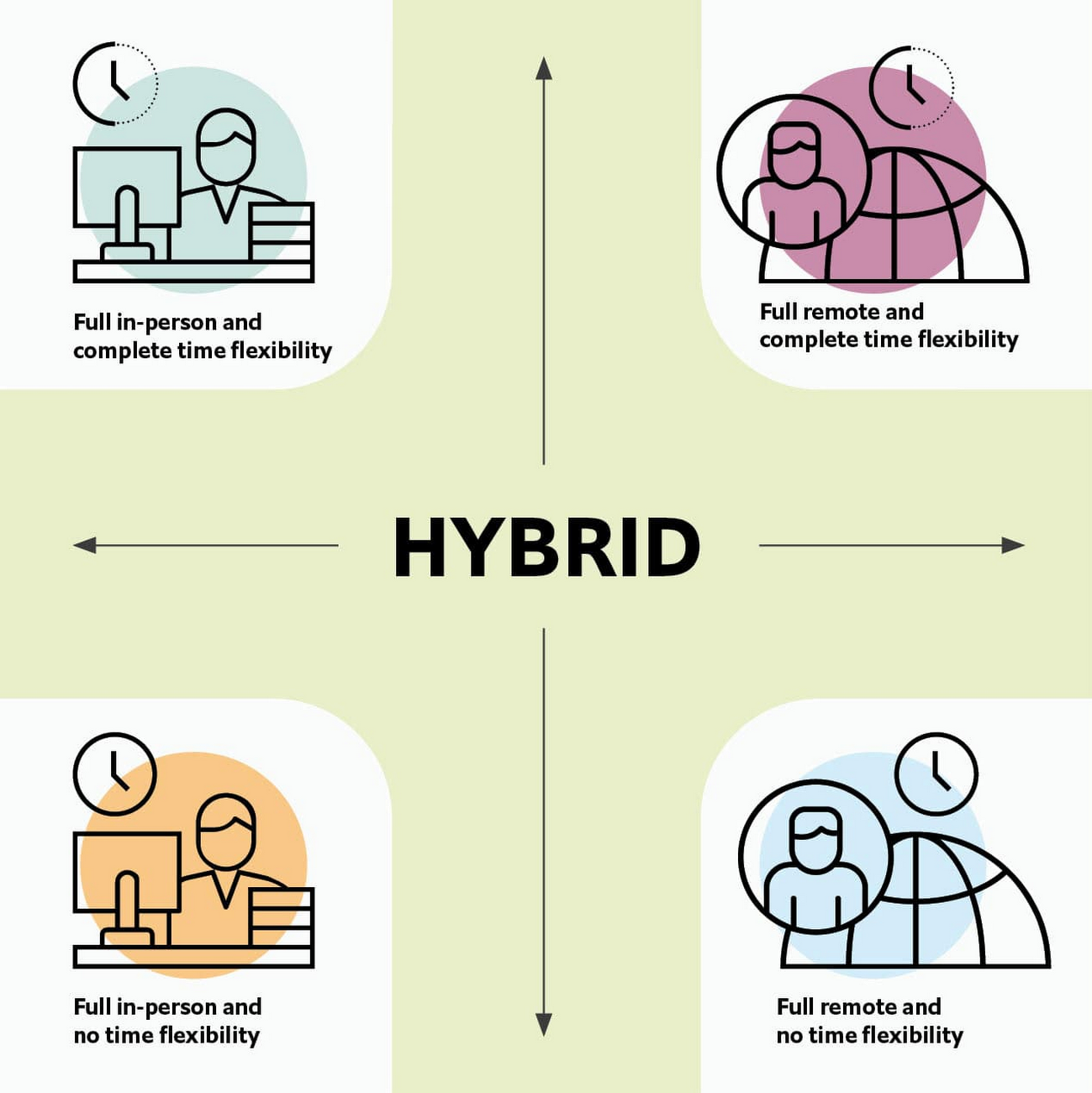
As Brian Kropp, one of the interviewees and vice president at Gartner, puts it: “Hybrid work is not just about different locations, but also different timings and different schedules.”
Harriet Molyneaux, managing director at HSM Advisory, a future-of-work research and advisory group, adds to this notion by describing the time-location work spectrum: “At one end of the spectrum is everyone in the office, nine till five, so both restricted time and location. And then at the other end of the spectrum is anywhere around the world at any time. So no restricted time or location. A hybrid is anything that sits in the middle of that.”
I agree with Brian and Harriet’s views. Flexibility in both location and hours is a core part of our working definition of hybrid work: a spectrum of flexible work arrangements in which an employee’s work location and/or hours are not strictly standardized.
Given this definition and framework, how is hybrid work faring and what lies ahead?
Individual wellbeing is coming at the cost of organizational connection
Early on in the pandemic, productivity remained steady or even increased for many organizations. But it came at a cost, with levels of burnout spiking as employees juggled caregiving, homeschooling, and other demands in their personal lives with work responsibilities.
Based on the survey data, wellbeing has made an upward shift, no doubt aided by things like students returning to schools in many regions and fewer demands being made of working parents. The majority of respondents said that hybrid work, based on their own experiences, can have a positive impact on the physical, mental, financial, and social wellbeing of employees.
But it appears that individual wellbeing is coming at the cost of organizational connection. The majority of respondents said they feel disconnected from their organization and co-workers (57%), that limited networking opportunities negatively impact career growth (62%), and that limited social interactions with co-workers has had a negative impact on their mental health (54%).
To be sustainable, hybrid work models must address this sense of disconnection in real and tangible ways. And it won’t happen just by increasing the number of virtual meetings. Although 72% of people say that virtual meetings improve inclusion and participation, 68% also say there are too many virtual meetings to begin with. We need new ways for people to connect spontaneously.
Hybrid workers are often using tools built for a bygone desktop era
When asked about the most important conditions needed to achieve the long-term success of hybrid work models, the number one choice globally was “new technologies that allow for time and location flexibility.”
Naturally, it was gratifying to see this, since Google Workspace is built on a cloud-based platform that empowers collaboration from anywhere, on any device, but the survey answer also highlights how much organizations have had to scramble to meet the demands of the pandemic. Some had to take legacy, office-centric systems and make them work for a distributed workforce overnight, often leveraging less-than-ideal technologies like VPNs that introduce digital friction.
As a result, top technology concerns of respondents include:
- unreliable internet access (if only all our WiFi connections were hybrid-ready!)
- reliance on slow or outdated tools
- accessing and maintaining files in multiple places
- relying on too many applications in order to get work done
Hybrid work, it seems to me, doesn’t need more applications and collaboration surfaces. It needs deeper, more meaningful connections in the tools and surfaces we already have.
As organizations assess their tech stacks, they should consider whether they can shape the behaviors they want from hybrid employees (e.g., real-time collaboration, ease of information sharing) with the tools they have in place. Or are the limits of the technology determining hybrid employee behavior?
The management and culture gap
In the same way that tools have often been built for a shared physical workspace, organizational culture seems to lag behind the hybrid moment. The majority of respondents said that a lack of face-to-face supervision creates a sense of distrust among managers and employees, and that they feel stressed by increased monitoring associated with flexible work. And more than 62% said that limited networking opportunities with senior employees and co-workers has a negative impact on career growth.
Strikingly, more than 70% of respondents indicated that the culture of trust between managers and employees needed improvement. Training and management best practices (60% of people want more of both) might help fill some of the gaps, but a manager can’t build trust with their hybrid teams by going through a training program.
The role of manager must itself evolve to meet the demands of a hybrid model. How can we empower managers to be the bridge between the “office of one” and the “office of many”? And as I discussed previously on Forbes, driving towards impact rather than output is a more sustainable metric for team engagement and productivity. It also dispenses with monitoring as a core part of a manager’s role, freeing them up to be a coach-and-connector.
How Google Workspace can help bridge the hybrid work gaps
No one has all the answers for how to make hybrid work successful, and I suspect we will see iterations of the model into 2022 and beyond as organizations—including Google—experiment with the right mix of location, culture, processes, and tools.
On the technology front, Google Workspace is uniquely positioned to bridge many of the emerging hybrid work gaps. Over the last year, we’ve delivered a set of innovations that are designed to deepen collaboration experiences while strengthening social connections within and across teams.
For example, we launched smart canvas to bring new collaboration capabilities to the places where people are already working together, helping to keep them connected, rather than having them switch tabs or open new apps. And we delivered Spaces as a central place for collaboration, where teams can share ideas, work on documents together, and manage tasks from a single place. Because all their work is preserved for future reference, team members can easily jump in and contribute at a time that works best for them, seeing a full history of the conversations, context, and content along the way. Spaces helps people maintain individual wellbeing while preserving the health of a group project.
In Google Meet, we’ve introduced real-time captions in multiple languages (in preview now), the ability for people to customize their video tiles, including being able to turn off their own to help with meeting fatigue, and we’ve implemented automatic light adjustments and noise cancellation. These changes help ensure that everyone can be seen and heard.
Meanwhile, features like hand-raise, Q&A, and polls have helped make meetings more inclusive and companion mode (in preview) can bring these to life in hybrid settings, to help ensure that there’s one cohesive conversation between the people in the office and their colleagues working somewhere else. We view companion mode as a bridge between the office and “somewhere else.”
On the personal wellbeing front, we launched Focus Time, which lets people block out their calendars for uninterrupted focus work, and Time Insights in Google Calendar, where employees can look at how they’re spending their time and adjust as needed.
As hybrid work continues to evolve, Google Workspace is committed to supporting wellbeing and seamless collaboration with tools that can remove digital friction and help people maintain connections—to each other and the organizations they work for.
*Survey details: The survey, completed in October 2021, polled a total of 1,244 employees and managers in four regions (North America, Europe, APAC, and Latin America), from more than 15 industries, in every age group, and from both small and large organizations. The focus was on knowledge workers, though it’s important to note that some of those people have been working on the frontlines; 20% of respondents indicated they haven’t worked remotely at all during the pandemic. This includes people in hospitality, retail, transportation and logistics, and healthcare.
Google AppSheet Leads the Low-code Development Platform Market for Business Developers: Forrester

5256
Of your peers have already read this article.
1:30 Minutes
The most insightful time you'll spend today!
We’re excited to share the news that leading global research and advisory firm Forrester Research has named Google AppSheet a Leader in the recently released report The Forrester Wave™: Low-code Platforms for Business Developers, Q4 2021. It’s our treasured community of business developers—those closest to the challenges that line-of-business apps can solve—who deserve credit for not only the millions of apps created with AppSheet, but also the collaborative approach to no-code development that has helped further our mission of empowering everyone to build custom solutions to reclaim their time and talent.
AppSheet received the highest marks possible in the product vision and planned enhancements criteria, with Forrester noting in the report that “AppSheet’s vision for AI-infused-and-supported citizen development is unique and particularly well suited to Google. The tech giant’s deep pockets and ecosystem give AppSheet an advantage in its path to market, market visibility, and product roadmap.”
“Features for process automation and AI are leading,” remarking that, “The platform provides a clean, intuitive modeling environment suitable for both long-running processes and triggered automations, as well as a useful range of pragmatic AI services such as document ingestion.”
Many enterprise customers including Carrefour Property – Carmila, Globe Telecom, American Electric Power, and Singapore Press Holdings (SPH) choose AppSheet as their business developer partner, along with thousands of other organizations in every industry. We are honored to serve these customers and to be a Leader in the Forrester Wave™: Low-code Platforms for Business Developers. We look forward to continuing to innovate and to helping customers on their digital transformation journey. To download the full report, visit here and enter your email address. To learn more about AppSheet, visit our website.
Google Workspace Now has Adobe Add-on!
3866
Of your peers have already read this article.
2:00 Minutes
The most insightful time you'll spend today!
Every day, individual people and creative teams combine Google Workspace with Adobe Creative Cloud to bring their best ideas to life and delight their customers or friends, across photography, design, video, 3D design, and more. In fact, Adobe’s add-on for Google Workspace has had over a million installs and counting. By partnering with Adobe, we’re helping people boost creative collaboration wherever and however they work together. And they can benefit from a potential tenfold increase in productivity that results from things like shared libraries and styles across all the apps they use.
We started integrating Adobe apps with Google Workspace last year by introducing Adobe XD integration into Flutter, enabling developers to simplify the design-to-development workflow, and letting creative teams design apps in XD and convert those designs into Flutter code with the click of a button.
Next, we brought together Adobe Creative Cloud and Gmail to make it easier to share links to your creative assets with external teams and stakeholders through email. With this integration, you can search for your Creative Cloud assets and attach public links to synced files, libraries, and creations made on mobile devices without leaving Gmail. You can also save any attachments received in Gmail directly to Creative Cloud in a few clicks.
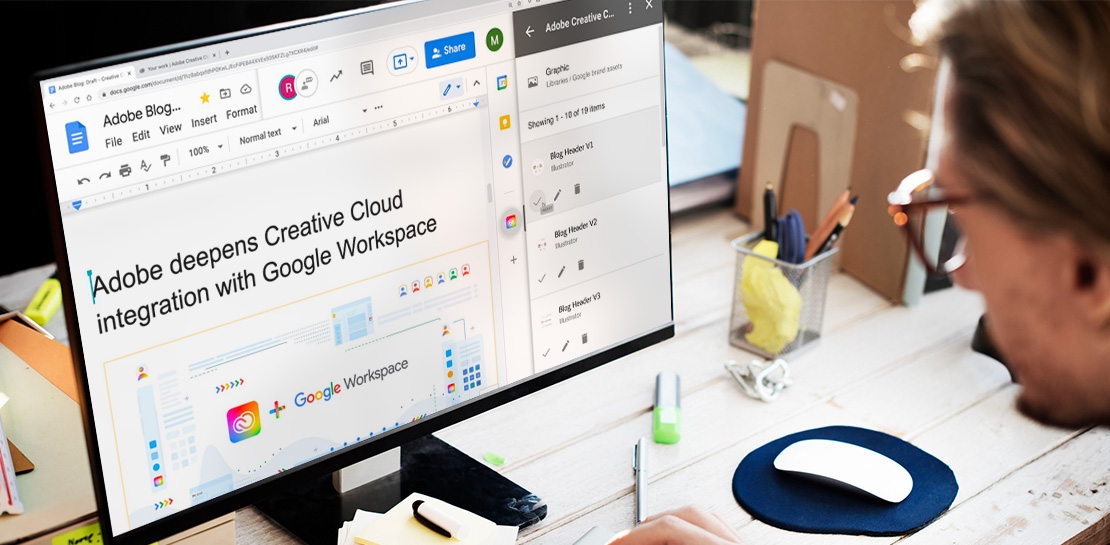
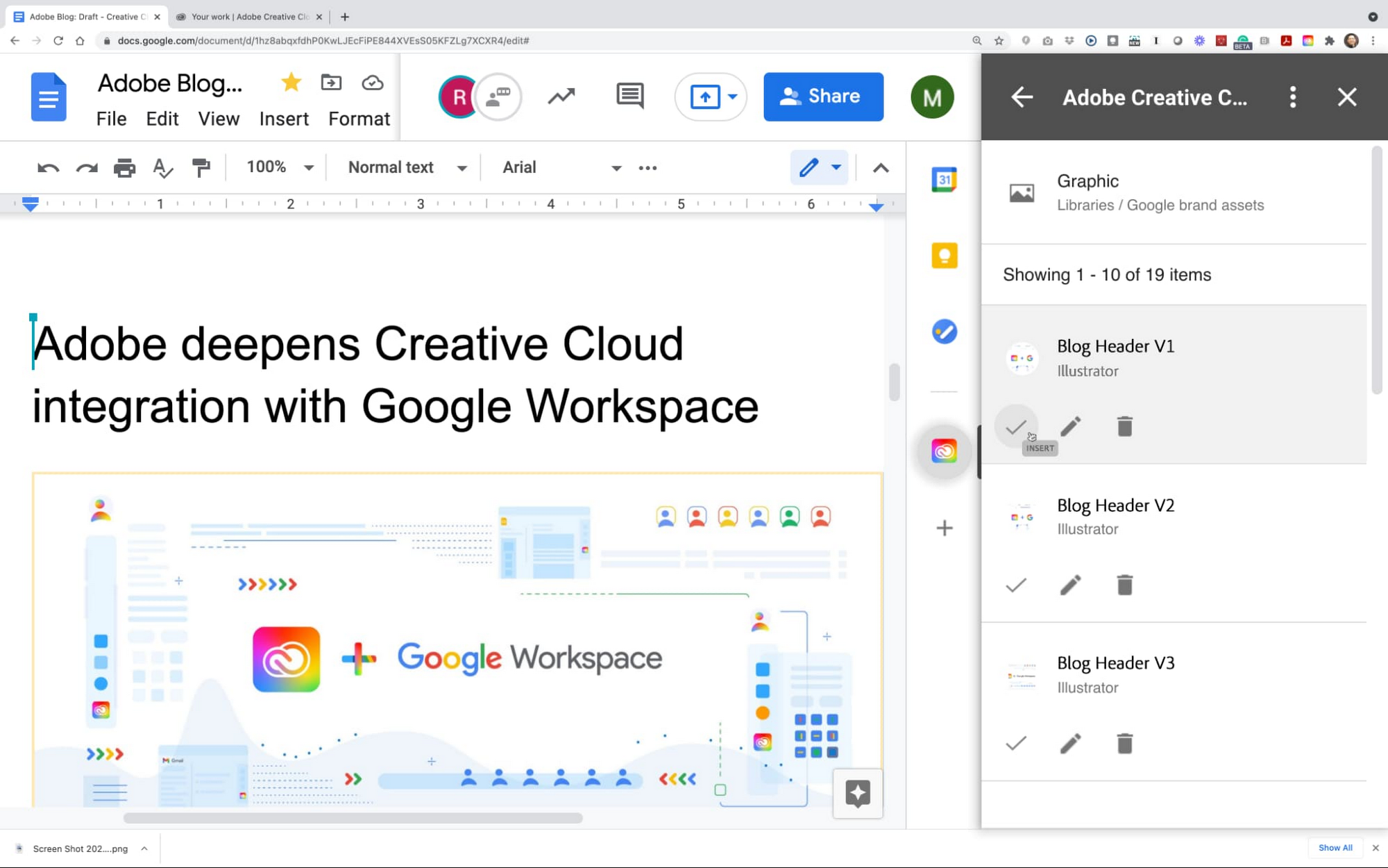
This year we are furthering our collaboration with Adobe with some exciting new capabilities. We’re integrating Adobe Creative Cloud with Docs and Slides, and launching Adobe Creative Cloud for Chrome.
The integration of Adobe Creative Cloud with Docs and Slides will give creative and business stakeholders a single source of truth and a powerful new way to manage brand assets. With easy access to Creative Cloud Libraries inside both Adobe Creative Cloud (with apps like Photoshop, Illustrator, InDesign, XD, and more) and inside Google Workspace (with apps like Gmail, Docs, and Slides), marketing and product design teams can seamlessly share work, get feedback, and stay connected along the way. Learn more about this integration.
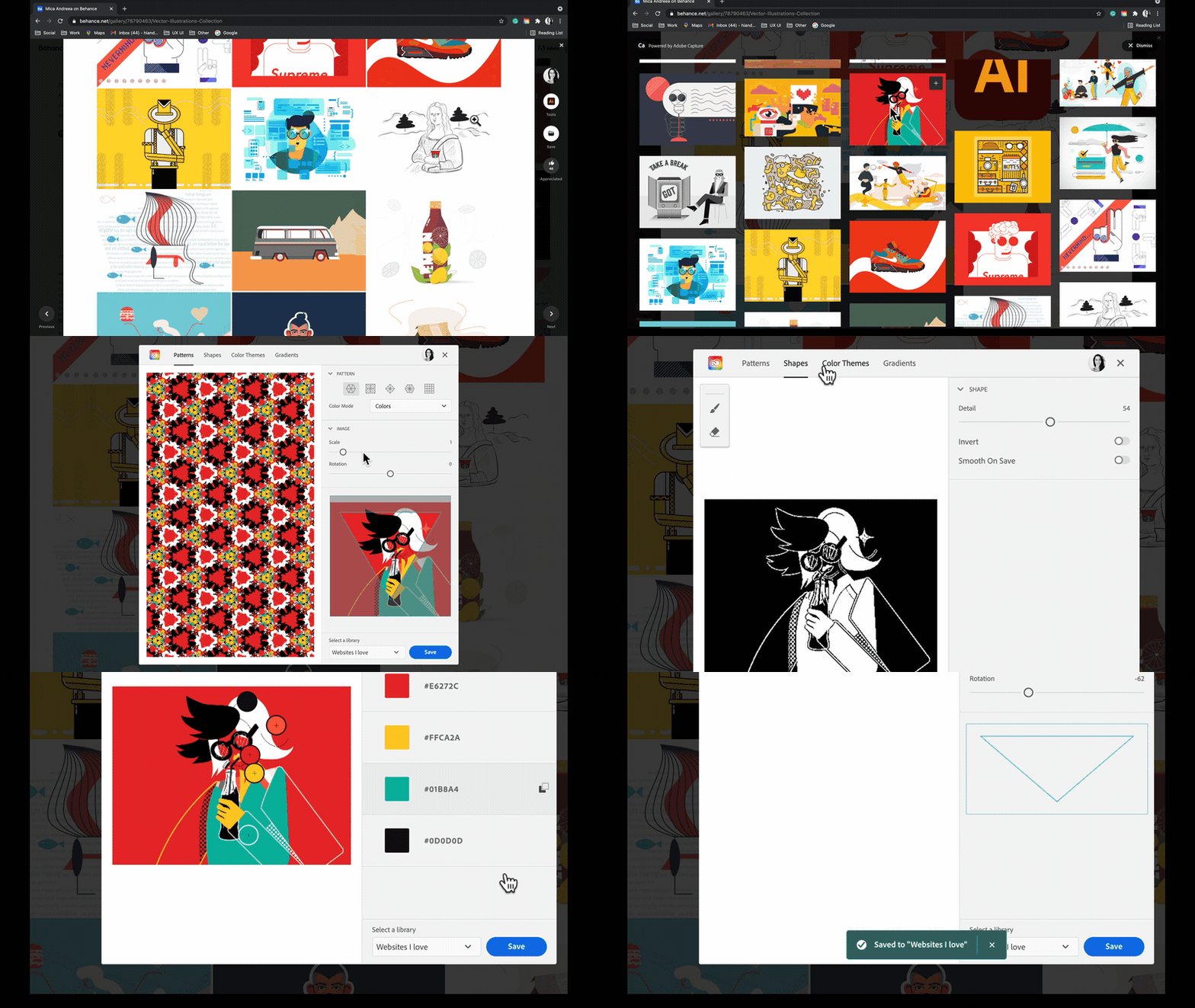
Adobe Creative Cloud for Chrome is a new extension that lets designers draw inspiration from the web’s most beautiful designs and artwork. Whether you’re looking for color combinations, patterns, vector shapes, or gradients extracted from images, the new Chrome extension helps you capture them from the source and apply them to your own design work. Adobe Capture features are available on mobile, on desktop for Photoshop and Creative Cloud Libraries, and now on the web, so wherever and whenever inspiration strikes, you’ll be ready to capture the moment. This feature became available in May. Learn more
These new integrations between Adobe Creative Cloud and Google Workspace and Google Chrome let creatives focus on what they do best: ideate, create, and innovate. Creative teams of 1 or 100 have fast, seamless access to the digital assets and editor tools that bring their work to life. And they’re ready to capture inspiration from the web whenever and wherever it strikes using Google Chrome. We’re committed to boosting creative collaboration in Google Workspace with Adobe as a trusted partner. Start using Google Workspace and Creative Cloud today.
More Relevant Stories for Your Company

Chrome OS Helped Ocwen Achieve Remote Workplace in Just 2 Weeks during the 2020 Pandemic
Editor’s note: Today’s post is by Parveen Chander Aery, CIO, and Rishi Gupta, Head of Global IT Infrastructure, of Ocwen, a provider of residential and commercial mortgage loan services. The U.S.-based company adopted Chrome OS devices to help global contact center teams work productively together. We’re used to deployments of new

Why I Moved to the G Suite: Rentokil CIO
Whether it's getting rid of pests, cleaning up a crime scene or tending to office plants, Rentokil Initial is a service business whose primary aim is to offer customers the best possible standard. This can only be achieved if teams work closely together, sharing expertise and ideas and communicating constantly.

How EDI empowers its workforce in the field, in the office, and at home
For consulting companies such as EDI Environmental Dynamics Inc. (EDI), interactions among employees and customers are the direct drivers of value, and helping them collaborate has a tangible impact on the bottom line. However, connecting people from the field to work-from-home spaces to the office is no easy task. EDI, an environmental



How a Furniture Retailer Found a Cool Way to Innovate Every Day and Beat Competition
MADE.COM is a London-based company that designs and retails homewares and furniture online, and across a network of experiential showrooms in Europe. Founded by serial entrepreneur Ning Li and Brent Hoberman, with Julien Callède and Chloe Macintosh in 2010, the company works with independent designers to create world-class furniture for
