





How Google Cloud Sped up Nuro’s Data Delivery to Engineers and Automated Storage Transfer

3407
Of your peers have already read this article.
3:00 Minutes
The most insightful time you'll spend today!
Engineers that build last-mile delivery services belong to an elite order, a hallowed subcategory. Delivery customers are incredibly demanding when it comes to speed and convenience, and the services they use must take variables like increased traffic, road conditions, human error, and even driver availability into account every day.
Nuro is a company with a new approach to delivery services. Nuro has a fleet of autonomous vehicles designed to address many of the problems related to last-mile delivery. And every day, these vehicles — and their sensors — generate a lot of data before parking for the night. For Nuro engineers, that data can help them understand the impact of new on-road features, make improvements to their vehicles’ software, and ensure even better deliveries for their customers.
For Nuro, the key challenge is how to move petabytes of data as quickly, securely, and easily as possible from their edge environments, like vehicle depots, to Google’s Cloud Storage. For this delivery effort, Nuro selected Google’s Transfer Appliance with its new online transfer capability, now generally available.
Helping Nuro to speed up data delivery from the edge to the cloud
Like many Google Cloud customers, Nuro collects data from remote environments, like vehicle depots, that have different networking and storage capabilities when compared to a traditional data center. For a transfer solution to be effective moving unstructured data from these environments to the cloud, the solution needs to be easy to deploy and automate, while still providing similar performance as a more complicated alternative.
The Transfer Appliance was built for this use case. It arrives to customers as a physical appliance with a preconfigured version of Google’s Storage Transfer Service software already installed. Customers can move files to the appliance by using SFTP or SCP, or, alternately, can mount the appliance as an NFS share and copy target. Data can be stored locally on the appliance or transferred over the network, and secure encryption — at-rest and in-flight — is enabled by default.
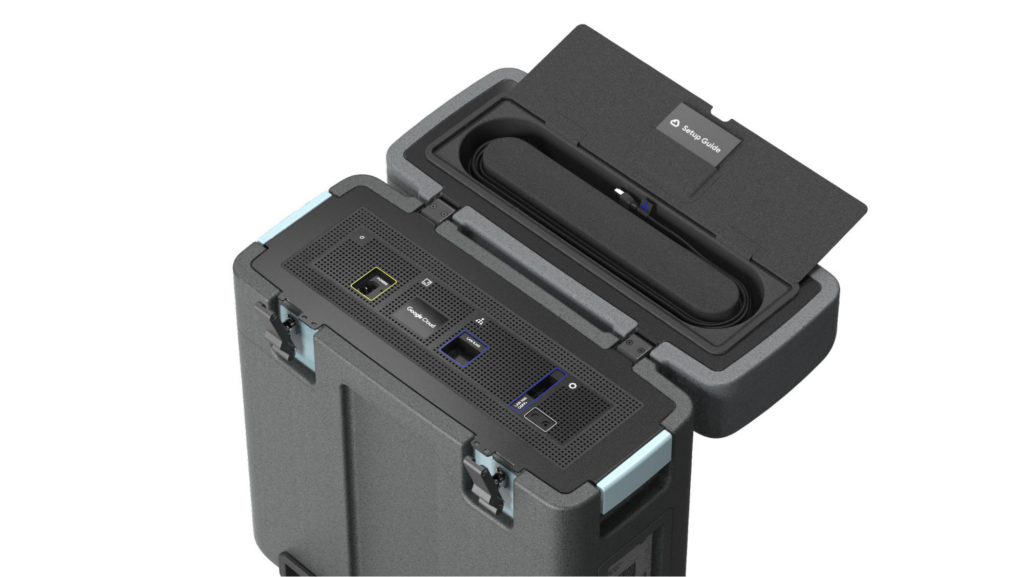
With these new appliances, Nuro will be able to automate much of their storage transfer needs. When their autonomous vehicles return to the depot, they can move data like software logs, LIDAR data, and sensor data — all ideal fits for Google’s Cloud Storage — from parked vehicles to the Transfer Appliance. Online transfers can then be performed throughout the day, ensuring a steady stream of valuable data in the cloud for developers to analyze and use in their nightly builds. All of this will help Nuro’s engineering leaders like Jie Pan to run more productive development teams with less operational overhead.
“Our autonomous vehicles generate a tremendous amount of useful data, and our goal is to get that data to our engineers as soon as possible,” said Jie Pan, Engineering Manager at Nuro. “When vehicles return to the depot, we can move data hourly into Cloud Storage over the network. We also have the flexibility to return the Transfer Appliance back to Google Cloud. Most importantly, this rapid transfer architecture gives a meaningful boost to engineering productivity and development velocity.”
Going the extra mile
Engineering and infrastructure leaders understand the value of delivering the right data to the right teams, as fast as possible. By adding preconfigured, over-the-network transfer into a turnkey Transfer Appliance, Google Cloud customers can more easily automate these data deliveries by scheduling regular migrations of on-premises files, objects, and other unstructured data to our Cloud Storage.
As Nuro continues to grow their manufacturing and testing footprint, they plan to use Transfer Appliances to further scale and simplify their data migration from on-premises to Google Cloud. Cutting the time to migrate their data by more than half will make for happier, more productive developers, and that will help Nuro bring us all the future of delivery a little faster.
If you’d like to learn more about Transfer Appliance and its new online transfer capability, click here or reach out to your Google Cloud account team.
Google Announced Leader in 2021 Gartner Magic Quadrant for Cloud Infrastructure and Platform Services

3558
Of your peers have already read this article.
3:00 Minutes
The most insightful time you'll spend today!
For the fourth consecutive year, Gartner has positioned Google as a Leader in the 2021 Gartner Magic Quadrant for Cloud Infrastructure and Platform Services (formerly titled as Magic Quadrant for Cloud Infrastructure as a Service upto 2014 Infrastructure as a Service, or (IaaS).
With our customers and communities adjusting to new ways of working and doing business, Google Cloud has remained focused on building services and platforms that help you be more resilient and derive even more value from your cloud infrastructure. We believe Gartner’s analysis and recognition gives our customers the confidence needed to choose Google as the platform for customer-centric innovation. Here are just a few recent examples.
Ready for the most demanding, mission-critical workloads
Our enterprise-ready cloud provides you the uptime, performance, and scale to run even your most demanding workloads. Examples of recent launches:
- The largest single-node GPU-enabled VM in the industry with up to 16 NVIDIA A100 instances so that our customers can run their ML workloads
- The only cloud to support scale-out out 96TB SAP HANA so that customers can confidently bring their most critical workloads to GCP
- Strategic partnerships with leading partners like SAP
- Several regions and an expanded global network footprint including new subsea cables, Firmina, Dunant, Blue and Raman
- High bandwidth 50/75/100Gbps networking for VMs
- Persistent Disk Extreme (block storage) with 120K IOPS
- Filestore High Scale scale-out NFS for HPC
Saves you money
Save money with a transparent and innovative approach to pricing and intelligent recommendations. In the past year, we’ve launched several innovations to help you save costs:
- Tau VMs, which offer the best price-performance among leading clouds for scale-out workloads
- Machine-learning-driven predictive auto-scaling for VMs and GKE Autopilot, enabling infrastructure to scale up and down as needed with minimal waste
- Standard network tier which routes traffic over the internet for cost optimization
Open
We have a long history of leadership in open technologies—from projects like Kubernetes, the industry standard in container orchestration and interoperability, to TensorFlow, a platform to help anyone develop and train machine learning models. Here are a few recent improvements we’ve made to ensure your cloud is an open cloud:
- Extended Anthos to bare metal and Microsoft Azure to support customers who want a multi-cloud and hybrid cloud posture.
- Announced a new network dataplane for Google Kubernetes Engine (GKE) and Anthos that supports eBPF, an open-source Linux kernel technology optimized for Kubernetes.
- Google Kubernetes Engine (based on the Kubernetes standard) received the top overall score based on 2021 Gartner Solution Scorecard for Google Kubernetes Engine.
Secure
Google Cloud’s trusted infrastructure uses layers of security to protect your data with advanced technologies and operations, keeping your organization secure and compliant. For example, we offer:
- Confidential VMs and Confidential GKE with in-memory encryption and encryption keys controlled by you, with a single checkbox
- Enhanced security for Cloud Run
- Strong support against DDoS attacks. In 2017, our infrastructure absorbed the largest-known DDoS attack at 2.5Tbps with no impact to customers.
Sustainable
Google Cloud helps customers transform their business sustainably. We operate the cleanest cloud in the industry to make sure your digital footprint doesn’t leave a carbon one. Here are a few proof points:
- Google has been carbon neutral since 2007, and for the past four years has matched 100% of the electricity we consume globally with wind and solar purchases. Everything you run on Google Cloud is net carbon neutral.
- We continue to innovate towards greater energy efficiency in our data centers, and compared with five years ago, now deliver around seven times as much computing power with the same amount of electrical power.
- Recently we announced new features to help customers reduce the carbon footprint of their applications and infrastructure, including a region picker to help with architecture decisions, and low carbon indicators in the Google Cloud Console.
Supporting our customers
Most importantly, our field organizations and partner organizations work with a singular focus to ensure customer success. This has made Google Cloud the fastest growing hyperscaler, with a rapidly expanding customer base across all geos and industries.
Since launching Customer Care last year, we consolidated and simplified the post-sales engagement with customers, increased the support channels, created an API to allow programmatic case creation, and combined product specific support into a single package for all of Google Cloud. Enterprises with Customer Care continue to report high levels of satisfaction with their focused technical account managers (TAMs), helping them get the most business value out of Google Cloud.
We are committed to sustaining and accelerating the pace of customer-centric innovation. You can download a complimentary copy of the 2021 Magic Quadrant for Cloud Infrastructure and Platform Services on our website.
Join us to learn much more about Google Cloud at the upcoming Google Cloud Next ‘21 digital conference.
Gartner, Magic Quadrant for Cloud Infrastructure and Platform Services, Raj Bala | Bob Gill | Dennis Smith | Kevin Ji | David Wright, 27 July 2021
Gartner, Solution Scorecard for Google Kubernetes Engine, Tony Iams | Traverse Clayton | Megan Bain, 12 April 2021
Gartner does not endorse any vendor, product or service depicted in its research publications, and does not advise technology users to select only those vendors with the highest ratings or other designation. Gartner research publications consist of the opinions of Gartner’s research organization and should not be construed as statements of fact. Gartner disclaims all warranties, expressed or implied, with respect to this research, including any warranties of merchantability or fitness for a particular purpose.

How The New York Times Increased Speed of Delivery by Using Kubernetes
DOWNLOAD CASE STUDY6186
Of your peers have already downloaded this article
2:40 Minutes
The most insightful time you'll spend today!
When New York Times decided a few years ago to move out of its data centers, its first deployments on the public cloud were smaller and less critical applications that were being managed on virtual machines.
“We started building more and more tools, and at some point, we realized that we were doing a disservice by treating Amazon as another data center,” says Deep Kapadia, Executive Director, Engineering at The New York Times.
Kapadia was tapped to lead a Delivery Engineering Team that would “design for the abstractions that cloud providers offer us.”
The team decided to use Google Cloud Platform and its Kubernetes-as-a-service offering, GKE (Google Kubernetes Engine). Owing to Google Cloud solution and GKE, The New York Times was able to increase the speed of delivery.
Some of the legacy VM-based deployments took 45 minutes; with Kubernetes, that time was “just a few seconds to a couple of minutes,” says Brian Balser, Engineering Manager at The New York Times.
“Teams that used to deploy on weekly schedules or had to coordinate schedules with the infrastructure team, now deploy their updates independently, and can do it daily when necessary,” says Tony Li, Site Reliability Engineer, The New York Times.
Adopting Cloud Native Computing Foundation technologies allowed The New York Times to have a more unified approach to deployment across the engineering staff, and portability for the company.
Thinking of a Multicloud Journey? Here’s What Our Experts Want You to Consider

4808
Of your peers have already read this article.
3:00 Minutes
The most insightful time you'll spend today!
Do you want to fire up a bunch of techies? Talk about multicloud! There is no shortage of opinions. I figured we should tackle this hot topic head-on, so I recently talked to four smart folks—Corey Quinn of Duckbill Group, Armon Dadgar of Hashicorp, Tammy Bryant Butow of Gremlin, and James Watters of VMware—about what multicloud is all about, key considerations, and why you should (or shouldn’t!) do it.
Five important insights came out of these discussions. If you’re on a multicloud journey or considering one, keep reading.
Do: Choose to do multicloud for the right reasons
Don’t do multicloud because Gartner says so, implores Corey Quinn. Before embarking on a multicloud, define a “why” focused on business value journey, says Armon Dadger. For example, you might want to use services from each public cloud because of their differentiated services, according to Tammy Bryant Butow. Armon also calls out regulatory reasons, existing business relationships, and accommodating mergers and acquisitions. On the topic of M&A, Corey points out that if you acquire a company that uses another cloud, it’s usually expensive and difficult to consolidate. It can be smarter to stay put.
https://youtube.com/watch?v=xFSDexQhCUY%3Fenablejsapi%3D1%26
Don’t: Over-engineer for workload or data portability
Thinking that you’ll build a system that moves seamlessly among the various cloud providers? Hold up, says our group of experts. Armon points out that aspects of your toolchain or architecture may be multicloud—think of some of your workflows or global network routing—but that shifting workloads or data is far from simple. Corey says that trying to engineer for “write once, run anywhere” can slow you down, and ignores the inherent uniqueness that’s part of each platform. Specifically, Corey calls out the per-cloud stickiness of identity management, security features, and even network functionality. And data gravity is still a thing, says James, that causes some to dismiss multicloud outright.
If you’re using multiple public clouds, you take advantage of the distinct value each offers, Armon says. Use native cloud services where possible so that you see the benefits from useful innovations, built-in resilience, and baked-in best practices. The value from that cloud-infused workload may outweigh the benefits of seamless portability.
https://youtube.com/watch?v=B1VH56_L8f8%3Fenablejsapi%3D1%26
Do: Recognize different stakeholder interests and needs
James smartly points out that many multicloud debates happen because people are arguing from different perspectives. Context matters. If you’re an infrastructure engineer who invests heavily in a given cloud’s identity and access management model, multicloud looks tricky. Or if you’re a data engineer with petabytes of data homed in a particular cloud, multicloud may look unrealistic. James highlights that many developers default to multicloud because their local tools—where all the work happens—are multicloud. A developer’s IDE and preferred code framework(s) aren’t tied to any given cloud. Be aware that groups within your organization will come at multicloud from distinct directions. And this may impact your approach!
https://youtube.com/watch?v=I9sqXDqkKBM%3Fenablejsapi%3D1%26
Don’t: Go it alone
Corey talks about the importance of asking others what worked, and what didn’t. Tammy offers her best practices around sharing results from experiments. It’s about sharing knowledge and tapping into it for community benefit. Others have probably tried what you’re trying, and can help you avoid common pitfalls. If you’ve just made an architectural choice that didn’t work out, share it, and help others avoid the pain.
Read research from analysts, go to conferences or watch videos to observe case studies, and join online communities that offer a safe place to share mistakes and learn from others.
https://youtube.com/watch?v=mrSb5vqOfuI%3Fenablejsapi%3D1%26
Do: Experiment first using techniques like multi-region deployments
If you think you can operate systems across clouds, how about you first try doing it across regions in a specific cloud, suggests Corey. Getting a system to properly work across cloud regions isn’t trivial, he says, and that experience can help you uncover where you have architectural or operational constraints that will be even worse across cloud providers.
This is great guidance if your multicloud aspirations involve using multiple clouds to power one application—versus the more standard definition of multicloud where you use different clouds for different applications—but can also surface issues in your support process or toolchain that fail when faced with distributed systems. Start with muti-region deployments and chaos engineering experiments before aggressively jumping into multicloud architectures.
The Google Cloud take
Do the things above. It’s great advice. I’ll add three more things that we’ve learned from our customers.
- Don’t fear multicloud. You’re already doing it. You don’t single-source everything. As Corey mentioned, you probably already have one cloud for productivity tools, another for source code, another for cloud infrastructure. You’ll use software and application services from a mix of providers for a single app. You have that experience in your team and have been doing that for decades. What people do rightly worry about is using more than one infrastructure service beneath an application, as that can introduce latency, security, and logistical hurdles. Make sure you know which model your team is considering.
- Embrace the right foundational components, including Kubernetes. Will everything run on Kubernetes? Of course not. Don’t try to do that. But it also represents the closest thing we have to a multicloud API. Companies are using Kubernetes to stripe a consistent experience across clouds. And this isn’t just to orchestrate containers, but also to manage infrastructure and cloud-native services. Also, consider where you need other fundamental consistency across clouds, including areas like provisioning and identity federation.
- Use Google Cloud as your anchor. Here’s a fundamental question you have to decide for yourself: Are you going to bring your on-premises technology and practices to the cloud, or bring cloud technology and practices on-prem? We sincerely believe in the latter. Anchor to where you’re trying to get to. We offer Anthos as a way to build and run distributed Kubernetes fleets in Google Cloud and across clouds. By using a cloud-based backplane instead of an on-prem one, you’re offloading toil, leveraging managed services for scale and security, and introducing modern practices to the rest of your team.
We learned a lot about multicloud through these discussions, and it seems like others did too. That’s why we’re going to do a second round of interviews with a new crop of experts so that we can keep digging deeper into this topic. Stay tuned!

Total Economic Impact of Running SAP on Google Cloud: Forrester’s Report
DOWNLOAD RESEARCH REPORTS3969
Of your peers have already downloaded this article
1:30 Minutes
The most insightful time you'll spend today!
Forrester interviewed 6 customers, conducted a survey as well as a data aggregation to measure the total economic impact of running and migrating SAP systems on Google Cloud. Download the report for details on the findings on the benefits and three-year financial impact!
A Record Breaking Calculation: 100 Trillion Digits of π on Google Cloud!

3581
Of your peers have already read this article.
4:00 Minutes
The most insightful time you'll spend today!
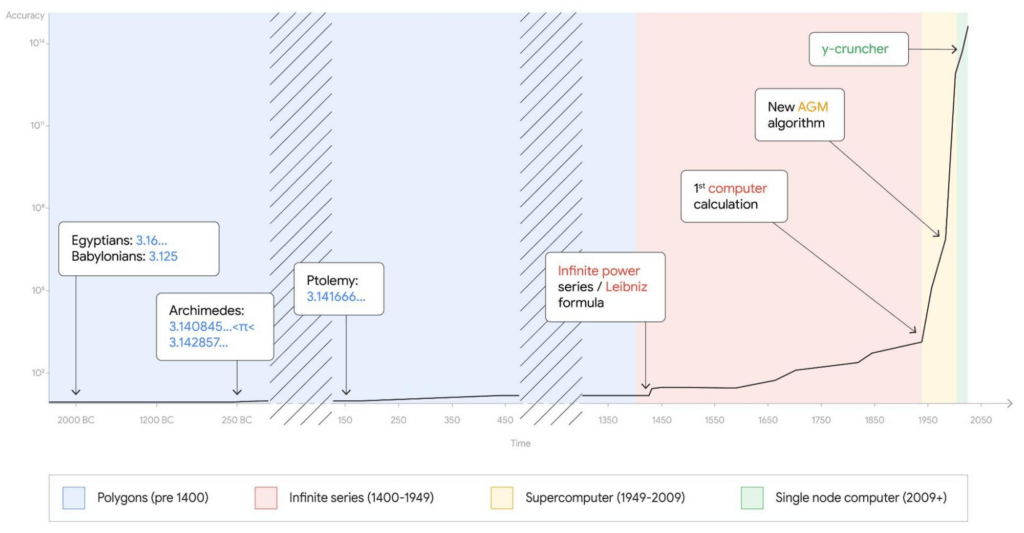
Records are made to be broken. In 2019, we calculated 31.4 trillion digits of π — a world record at the time. Then, in 2021, scientists at the University of Applied Sciences of the Grisons calculated another 31.4 trillion digits of the constant, bringing the total up to 62.8 trillion decimal places. Today we’re announcing yet another record: 100 trillion digits of π.
This is the second time we’ve used Google Cloud to calculate a record number1 of digits for the mathematical constant, tripling the number of digits in just three years.
This achievement is a testament to how much faster Google Cloud infrastructure gets, year in, year out. The underlying technology that made this possible is Compute Engine, Google Cloud’s secure and customizable compute service, and its several recent additions and improvements: the Compute Engine N2 machine family, 100 Gbps egress bandwidth, Google Virtual NIC, and balanced Persistent Disks. It’s a long list, but we’ll explain each feature one by one.
Before we dive into the tech, here’s an overview of the job we ran to calculate our 100 trillion digits of π.
- Program: y-cruncher v0.7.8, by Alexander J. Yee
- Algorithm: Chudnovsky algorithm
- Compute node: n2-highmem-128 with 128 vCPUs and 864 GB RAM
- Start time: Thu Oct 14 04:45:44 2021 UTC
- End time: Mon Mar 21 04:16:52 2022 UTC
- Total elapsed time: 157 days, 23 hours, 31 minutes and 7.651 seconds
- Total storage size: 663 TB available, 515 TB used
- Total I/O: 43.5 PB read, 38.5 PB written, 82 PB total
Architecture overview
Calculating π is compute-, storage-, and network-intensive. Here’s how we configured our Compute Engine environment for the challenge.
For storage, we estimated the size of the temporary storage required for the calculation to be around 554 TB. The maximum persistent disk capacity that you can attach to a single virtual machine is 257 TB, which is often enough for traditional single node applications, but not in this case. We designed a cluster of one computational node and 32 storage nodes, for a total of 64 iSCSI block storage targets.
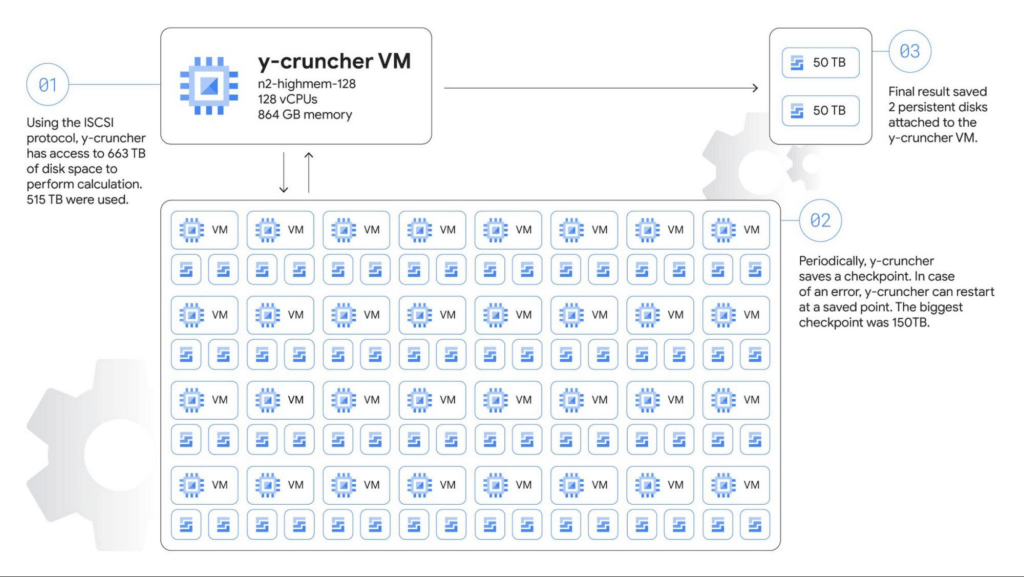
The main compute node is a n2-highmem-128 machine running Debian Linux 11, with 128 vCPUs and 864 GB of memory, and 100 Gbps egress bandwidth support. The higher bandwidth support is a critical requirement for the system as we adopted a network-based shared storage architecture.
Each storage server is a n2-highcpu-16 machine configured with two 10,359 GB zonal balanced persistent disks. The N2 machine series provides balanced price/performance, and when configured with 16 vCPUs it provides a network bandwidth of 32 Gbps, with an option to use the latest Intel Ice Lake CPU platform, which makes it a good choice for high-performance storage servers.
Automating the solution
We used Terraform to set up and manage the cluster. We also wrote a couple of shell scripts to automate critical tasks such as deleting old snapshots, and restarting from snapshots (we didn’t need to use this though). The Terraform scripts created OS guest policies to help ensure that the required software packages were automatically installed. Part of the guest OS setup process was handled by startup scripts. In this way, we were able to recreate the entire cluster with just a few commands.
We knew the calculation would run for several months and even a small performance difference could change the runtime by days or possibly weeks. There are also a number of combinations of parameters in the operating system, infrastructure, and application itself. Terraform helped us test dozens of different infrastructure options in a short time. We also developed a small program that runs y-cruncher with different parameters and automated a significant portion of the measurement. Overall, the final design for this calculation was about twice as fast as our first design. In other words, the calculation could’ve taken 300 days instead of 157 days!
The scripts we used are available on GitHub if you want to look at the actual code that we used to calculate the 100 trillion digits.
Choosing the right machine type for the job
Compute Engine offers machine types that support compute- and I/O-intensive workloads. The amount of available memory and network bandwidth were the two most important factors, so we selected n2-highmem-128 (Intel Xeon, 128 vCPUs and 864 GB RAM). It satisfied our requirements: high-performance CPU, large memory, and 100 Gbps egress bandwidth. This VM shape is part of the most popular general purpose VM family in Google Cloud.
100 Gbps networking
The n2-highmem-128 machine type’s support for up to 100 Gbps of egress throughput was also critical. Back in 2019 when we did our 31.4-trillion digit calculation, egress throughput was only 16 Gbps, meaning that bandwidth has increased by 600% in just three years. This increase was a big factor that made this 100-trillion experiment possible, allowing us to move 82.0 PB of data for the calculation, up from 19.1 PB in 2019.
We also changed the network driver from virtio to the new Google Virtual NIC (gVNIC). gVNIC is a new device driver and tightly integrates with Google’s Andromeda virtual network stack to help achieve higher throughput and lower latency. It is also a requirement for 100 Gbps egress bandwidth.
Storage design
Our choice of storage was crucial to the success of this cluster – in terms of capacity, performance, reliability, cost and more. Because the dataset doesn’t fit into main memory, the speed of the storage system was the bottleneck of the calculation. We needed a robust, durable storage system that could handle petabytes of data without any loss or corruption, while fully utilizing the 100 Gbps bandwidth.
Persistent Disk (PD) is a durable high-performance storage option for Compute Engine virtual machines. For this job we decided to use balanced PD, a new type of persistent disk that offers up to 1,200 MB/s read and write throughput and 15-80k IOPS, for about 60% of the cost of SSD PDs. This storage profile is a sweet spot for y-cruncher, which needs high throughput and medium IOPS.
Using Terraform, we tested different combinations of storage node counts, iSCSI targets per node, machine types, and disk size. From those tests, we determined that 32 nodes and 64 disks would likely achieve the best performance for this particular workload.
We scheduled backups automatically every two days using a shell script that checks the time since the last snapshots, runs the fstrim command to discard all unused blocks, and runs the gcloud compute disks snapshot command to create PD snapshots. The gcloud command returns and y-cruncher resumes calculations after a few seconds while the Compute Engine infrastructure copies the data blocks asynchronously in the background, minimizing downtime for the backups.
To store the final results, we attached two 50 TB disks directly to the compute node. Those disks weren’t used until the very last moment, so we didn’t allocate the full capacity until y-cruncher reached the final steps of the calculation, saving four months worth of storage costs for 100 TB.
Results
All this fine tuning and benchmarking got us to the one-hundred trillionth digit of π — 0. We verified the final numbers with another algorithm (Bailey–Borwein–Plouffe formula) when the calculation was completed. This verification was the scariest moment of the entire process because there is no sure way of knowing whether or not the calculation was successful until it finished, five months after it began. Happily, the Bailey-Borwein-Plouffe formula found that our results were valid. Woo-hoo! Here are the last 100 digits of the result:
4658718895 1242883556 4671544483 9873493812 1206904813
2656719174 5255431487 2142102057 7077336434 3095295560
You can also access the entire sequence of numbers on our demo site.
So what?
You may not need to calculate trillions of decimals of π, but this massive calculation demonstrates how Google Cloud’s flexible infrastructure lets teams around the world push the boundaries of scientific experimentation. It’s also an example of the reliability of our products – the program ran for more than five months without node failures, and handled every bit in the 82 PB of disk I/O correctly. The improvements to our infrastructure and products over the last three years made this calculation possible.
Running this calculation was great fun, and we hope that this blog post has given you some ideas about how to use Google Cloud’s scalable compute, networking, and storage infrastructure for your own high performance computing workloads. To get started, we’ve created a codelab where you can create and calculate pi on a Compute Engine virtual machine with step-by-step instructions. And for more on the history of calculating pi, check out this post on The Keyword. Here’s to breaking the next record!
- We are actively working with Guinness World Records to secure their official validation of this feat as a “World Record”, but we couldn’t wait to share it with the world. This record has been reviewed and validated by Alexander J. Yee, the author of y-cruncher.
More Relevant Stories for Your Company

Transitioning from Amazon Glacier to Google Cloud
This comprehensive guide provides a detailed process for migrating archival workloads from Amazon Glacier to Google Cloud Storage Nearline in the Indian context. The process involves carefully planning data retrieval and staging strategies to ensure an efficient and cost-effective migration. The whitepaper includes: Different storage methods on Amazon Glacier and

Forrester Focus Report on Indian BFSI: We’re Betting On…
The banking and financial services industry (BFSI) in India is going through a period of unprecedented innovation. Customers in India have more information than ever before to make better-informed decisions and can pick the banking and other financial services they need from a wide range of providers. New players like

Innovation in the Clouds: Sky’s Blue-Sky Approach to FinOps
Google Cloud’s partnership with Sky Group, one of Europe’s largest media and entertainment companies, dates back more than four years to when Sky first became a Google Cloud customer moving diagnostic data from millions of its Sky Q TV boxes to its Google Cloud data platform. In June 2019, a

Making Weather Predictions Easy with Weather Research and Forecasting (WRF) Models on Google Cloud!
Weather forecasting and climate modeling are two of the world's most computationally complex and demanding tasks. Further, they’re extremely time-sensitive and in high demand — everyone from weekend travelers to large-scale industrial farming operators wants up-to-date weather predictions. To provide timely and meaningful predictions, weather forecasters usually rely on high
