





You Can Quantify and Maximize Value of Your Org’s AI/ML and Analytics Teams!

4415
Of your peers have already read this article.
1:30 Minutes
The most insightful time you'll spend today!
Investing in Artificial Intelligence (AI) can bring a competitive advantage to your organization. If you’re in charge of an AI or Data Science team, you’ll want to measure and maximize the value that you’re providing. Here is some advice from our years of experience in the field.
A checklist to embark on a project:
As you embark on projects we’ve found it’s good to have the following areas covered:
- Have a customer. It’s important to have a customer for your work, and that they agree with what you’re trying to achieve. Be sure to know what value you’re delivering to them.
- Have a business case. This will rely on estimates and assumptions, and may take no more than a few minute’s work. You should revise this, but always know what justifies your team’s effort, and what you (and your customer) expect to get in return.
- Know what process you will change or create. You’ll want to put your work in production, so you have to be clear about what business operations are changing or created around your work and who needs to be involved to make it happen
- Have a measurement plan. You’ll want to show that ongoing work is impacting some relevant business indicator. Measure and show incremental value. The goal of these measurements is to establish what has changed because of your project that would otherwise not have changed. Be sure to account for other factors like seasonality or other business changes that may affect your measurements.
- Use all the above to get your organization’s support for your team and your work.
What measures to use?
As you start the work, what measures and indicators can you use to show that your team’s work is useful for your organization?
How many decisions you make. A major function of ML is to automate and optimize decisions: which product to recommend, which route to follow, etc. Use logs to track how many decisions your systems are making.
Changes to revenue or costs. Better and quicker decisions often lead to increased revenue or savings. If possible, measure it directly, otherwise estimate it (for example fuel costs saved from less distance traveled, or increased purchases from personalized offers).
As an example, the Illinois Department of Employment Security is using Contact Center AI to rapidly deploy virtual agents to help more than 1 million citizens file unemployment claims. To measure success the team tracked the two outcomes: (1) the number of web inquiries and voice calls they were able to handle, and (2) the overall cost of the call center after the implementation. Post implementation, they were able to observe more than 140,000 phone and web inquiries per day and over 40,000 after-hours calls per night. They also anticipate an estimated annual cost savings of $100M based on an initial analysis of IDES’s virtual agent data (see more in the link to case study).
Implementation costs. The other side of increased revenue or savings, is to put your achievements in the context of how much they cost. Show the technology costs that your team incurs and, ideally, how you can deliver more value, more efficiently.
How much time was saved. If the team built a routing system then it saved travel time, if it built an email classifier then it saved reading time, etc. Quantify how many hours were given back to the organization thanks to the efficiency of your system.
In the medical field, quicker diagnostics matter. Johns Hopkins University’s Brain Injury Outcomes (BIOS) Division has focused on studying brain hemorrhage aiming to improve medical outcomes. The team identified the time to insights as a key metric in measuring business success. They experimented with a range of cloud computing solutions like Dataflow, Cloud Healthcare API, Compute Engine, and AI Platform for distributed training to accelerate iterations. As a result, in their recent work they were able to accelerate insights from scans from approximately 500 patients from 2,500 hours to 90 minutes.
How many applications your team supports. Some of your organization’s operations don’t use ML (say reconciling financial ledgers) but others do. Know how many parts of your organization benefit from the optimization and automation your team builds.
User experience. You may be able to measure your customer’s experience: fewer complaints, better reviews, reduced latency, more interactions, etc. This is valid both for internal and external stakeholders. At Google we measure usage and regularly ask for feedback on any internal system or process.
One of our customers, The City of Memphis, is using VisionAI and ML to tackle a common but very challenging issue: identifying and addressing potholes. The implementation team identified the percentage increase of potholes identified as one of the key metrics along with accuracy and cost savings. The solution captures video footage from it’s public vehicles and leverages Google Cloud capabilities like Compute Engine, AI Platform, and BigQuery to automate the review of videos. The project increased pothole detection by 75% with over 90% accuracy. By measuring and demonstrating these outcomes, the team proved the viability of a cost-effective, cloud-based machine learning model and is looking into new applications of AI and ML that will further improve city services and help it build a better future for its 652,000 residents.
Acknowledgements
Filipe and Payam would like to thank our colleague and co-author Mona Mona (AI/ML Customer Engineer, Healthcare and lifesciences) who contributed equally to the writing.
Contact Center AI (CCAI) with Agent Assist can Lower Opex and Handle 28% More Chats

4801
Of your peers have already read this article.
1:30 Minutes
The most insightful time you'll spend today!
Contact Center AI (CCAI) brings Google’s innovation in conversational AI to solve the most challenging customer service needs while lowering operational costs. More than a thousand customers have deployed CCAI and are steadily turning it on to power their production contact centers.
Today, we’re excited to announce that we’ve made CCAI even stronger with Agent Assist for Chat, now in public preview.
Agent Assist provides your human agents with continuous support during their calls and now chats by identifying the customers’ intent and providing them with real-time recommendations such as articles and FAQs as well as responses to customer messages to more effectively resolve the conversation.
Customers using Agent Assist for Chat have been able to manage up to 28% more conversations concurrently, while also driving up customer satisfaction by 10%. Additionally, we’ve seen them respond up to 15% faster to chats, reducing chat abandonment rates and solving more customer problems.
Agent Assist provides two key components to help agents manage conversations better:
- Smart Reply provides response suggestions to agents so they can quickly and appropriately respond to customer messages. These suggestions can be taken from your top performing agents as well as modified even further to ensure suggestions properly reflect the tone and voice of your brand. Agent Assist learns when and what recommendations to make by building a custom model that’s trained on your (and only your) data.
- Knowledge Assist unlocks the power of your knowledge base to provide articles and FAQ suggestions to agents in real-time as the conversation progresses. When using Knowledge Assist, agents no longer need to make the customer wait while they navigate multiple applications and data to find the resolution to the customer’s issue — the answer is delivered right to them.
“We’ve been very impressed by the chat capabilities of Agent Assist,” said Chris Smith, Vice President of Digital Service at Optus, one of the largest telecommunications companies in Australia
Optus has been using CCAI Dialogflow CX to send queries to virtual agents and sees great potential to use Agent Assist to provide recommendations to their customer support representatives. They expect Agent Assist to help minimize repetitive tasks by providing response and typeahead suggestions, helping improve the efficiency of their agents and the quality and consistency of service they provide.
Another customer, LoveHolidays, is using Agent Assist to support their agents and customers in the travel industry.
“Agent Assist has been a beneficial aid to agents and our customers alike… It gives us the power to flex our contact center staff levels in hours not weeks,” said Eugene Neale, Director of CX Engineering & Business IT at LoveHolidays
Analysts say online chat is becoming one of the most popular ways to reach out to businesses for customer support. IDC research finds that single-function contact centers worldwide are increasingly rare — in 2020, although phone/voice is still responsible for most interactions (at around 18%); email is responsible for around 13% of interactions, and live chat (without automation) is responsible for around 8% of interactions, according to IDC, Toward the AI-Powered Contact Center, Doc # EUR147017320, December 2020.
Deploying CCAI with Agent Assist for Chat
As part of Google’s Contact Center AI suite, Agent Assist provides a seamless handoff from chats managed by your Dialogflow CX virtual agents. If a conversation or customer requires a live agent, Agent Assist will help your team pick it up quickly and drive it to a satisfying resolution.
Historically, when managers saw contact center volumes increase they had two choices: allow customers to wait longer to speak to someone (lowering customer satisfaction) or bring on more agents (increasing cost to serve). Deploying CCAI provides contact center leaders with a third choice: equip agents with tools like, Agent Assist for Chat, to efficiently manage customer interactions while maintaining high quality service.
Global CCAI partners support Agent Assist for Chat
Agent Assist for Chat is a set of public APIs that your engineering team can integrate directly into an agent desktop to control the agent experience from end-to-end. For a more out-of-the-box solution, we have partnered with LivePerson and 247.ai to build Agent Assist directly into their agent desktops.
“Integrating our Conversational Cloud directly with Agent Assist means agents can leverage cutting-edge productivity AI to build even further on the massive ROI of conversational commerce, from reduced agent effort and time-to-respond to increased customer satisfaction and revenue,” said Alex Spinelli, CTO of LivePerson.
More Agent Assist resources
To learn more, check out the Agent Assist webpage. Give Agent Assist a try by training a model and then testing it using the Agent Assist simulator.
Southwire Completes SAP Migration to Google Cloud as a First Step of its Tech Evolution

4932
Of your peers have already read this article.
1:30 Minutes
The most insightful time you'll spend today!
“Talk about tough times, right?”
That’s how Dan Stuart, Senior Vice President of IT Services at Southwire Company, refers to the months following a December 2019 ransomware event, and the COVID crisis that began in spring of 2020. Those events hit just as the company was preparing for an overhaul of their SAP environment. This comprehensive plan included three key elements. First, the company wanted to upgrade their SAP ECC environment to take advantage of the latest functionality available for this critical ERP system. Second, Southwire aimed to deploy SAP Business Warehouse on SAP HANA to accelerate vital reporting for all business users. Third, the company wanted to upgrade to the latest version of SAP Process Orchestration—an essential component that touches key manufacturing interfaces in all Southwire facilities.
Southwire had looked at multiple options for the upgrades, including remaining entirely on-premises, colocation, and full cloud migration. “Going to the cloud seemed a lot more compelling,” says Joe Schleupner, Southwire’s Senior Director of PMO & ITS planning and implementation. “We were going to the cloud eventually, so why take these intermediary steps? Let’s just get it done.”
After looking at several options, Southwire decided to migrate to Google Cloud. “We wanted to be on a platform for SAP that was flexible, scalable, and secure; that we could count on to get up and running quickly,” says Stuart. “We chose Google Cloud not only for those reasons, but also because we recognize that Google has other assets that we may be able to take advantage of down the line, such as technologies like artificial intelligence (AI).”
More stability, less worry
As one of the leading manufacturers of wire and cable used in the transmission and distribution of electricity, Southwire aids the delivery of power to millions of people worldwide. They have more than 30 manufacturing facilities across the United States running 24/7. Any downtime directly affects productivity and revenue. With help from Google Cloud and their implementation partner NIMBL, Southwire completed the SAP migration to Google Cloud over a planned maintenance weekend on July 4th.
The migration itself, while complex, went quickly and smoothly. “Just moving to the cloud was quite a feat because we were dealing with so much data, but in total the SAP system was down for only ~16 hours,” says Schleupner.
“As a project manager, I always felt that Google Cloud had my back” Schleupner says. The Process Orchestration (PO) migration was of particular concern, considering that it controlled all of Southwire’s manufacturing interfaces across the entire company. “Every critical piece of information that goes from SAP down to the manufacturing system goes through that system,” says Schleupner.
Even after migrating, Southwire discovered that making changes to the system was fast, easy, and resulted in no downtime. Normally, certain types of changes would have involved taking down SAP for at least an hour.
The Southwire team also appreciates the fact that the modern cloud architecture means spending less time on routine infrastructure maintenance. “It’s one less thing for me to worry about,” Stuart says, “I can focus on the business side of the house and move the technology and responsibilities to what we do within the Google Cloud Platform.”
What comes next?
While the cloud migration will increase stability, uptime, performance, and security, there is much more to come. Southwire is currently working on a disaster recovery implementation for their SAP environment on Google Cloud. Stuart and Schleupner are excited about where Google Cloud can further take Southwire. They are considering an SAP Hybris e-commerce implementation as well as connected factory and/or factory automation initiatives that can take advantage of artificial intelligence and machine learning.
To Stuart and Schleupner, the migration of Southwire’s SAP environment to Google Cloud, as important as it was, really represents the first step in the company’s tech evolution. Now that much of the heavy lifting is complete, Southwire’s digital transformation can begin in earnest. “There’s no shortage of areas where I think Google Cloud will come into play,” Stuart says, “and we intend to look at these things with an open mind to understand how we can leverage current investments to take our organization where we want to go.”
Learn more about Southwire’s SAP on Google Cloud deployment and how Google Cloud can transform the way you work with your SAP enterprise applications. Visit cloud.google.com/solutions/sap.
Candidate360: Google Cloud and Deloitte Product Improves Universities’ Enrollment and Admission Processes

4806
Of your peers have already read this article.
2:00 Minutes
The most insightful time you'll spend today!
Given the May 1 deadline for students to enroll, colleges and universities have been carefully watching the numbers of students who put down deposits and commit to a school. Like nearly every other sector in the U.S., colleges and universities have been hit hard by the pandemic and economic downturn, making enrollment numbers more important than ever to maintain financial health and meet student body goals. Technology and AI-based models are providing a way for institutions to manage their admissions data efficiently and cost-effectively.
For example, an admissions officer may want to offset drops in international or out-of-state enrollment by attracting local talent so they can achieve their target class profile. Additionally, institutions have sought to increase the availability and access of higher ed and are intentionally recruiting more low-income and underrepresented populations. New technologies allow admissions officers to have a stronger grasp of the incoming class’ details. With the press of a button, users can switch between overall, in-state, out-of-state, and international enrollment figures. The “How Do Regions Compare to Last Year” tile lets users view the percentage of change and the total number of candidates by region, comparing 2020 and 2021 side-by-side. With access to data, regional recruiters can focus on individual candidates and develop a plan to change the numbers.
An innovative enrollment strategy at MSU
Michigan State University was looking to improve how they managed the recruiting process. They implemented an enrollment strategy that saw their out-of-state enrollment increase by over 20% and generate $5M in additional net tuition revenue in a single year. “We knew we needed better real-time and predictive insights about our enrollment pipeline, and we understood the value of bringing in external data on prospects, but we couldn’t do that by ourselves.
The solution really helped us be innovative with our analytics and improve our enrollment outcomes,” said someone close to the project at Michigan State University.
Data-driven insights support informed enrollment decisions
Student admissions and marketing groups are turning to Google Cloud and Deloitte to help support their enrollment decisions with predictive, actionable insights across recruiting and admissions processes. The partnership resulted in Candidate360, a solution that helps institutions process and analyze large amounts of data and develop meaningful insights to support their enrollment goals and mission. Part of Google’s Student Success Services offerings, Candidate360 uses artificial intelligence and predictive analytics to help higher education institutions improve enrollment and matriculation, as well as optimize financial aid decisions.
With nine AI/ML models, Candidate360’s capabilities help university leaders, enrollment teams and recruiters do things like:
- Identify regions with clusters of candidates or see dips in application numbers
- Deploy marketing resources and admissions staff to the right geographic areas
- Understand applicants’ needs in terms of academics, safety, and social activities
- Make intelligent financial aid decisions to recruit and retain talented students from underrepresented communities
- Respond faster to the students who are most likely to be accepted and then go on to enroll, stay enrolled, and graduate
- Work towards the ideal class composition and increase competitiveness with peer institutions
Enhancing the student experience
Enrollment is the first key touchpoint with incoming students, and tools like Candidate360 can help institutions build a student preferences profile throughout the application process. They can understand each student’s prospective major, areas of interest, dream job, and more, allowing colleges and universities to personalize recommendations and advising for enrolled students.
With integrated toolsets, Candidate360 and Google Cloud’s Student Success Services can help colleges and universities emerge from the pandemic stronger than ever.
To see a demonstration of Candidate360 in action, contact our sales team.
Simplifying Unstructured Data Analytics with BigQuery ML and Vertex AI: A Comprehensive Guide

1534
Of your peers have already read this article.
6:30 Minutes
The most insightful time you'll spend today!
Unstructured data such as images, speech and textual data can be notoriously difficult to manage, and even harder to analyze. The analysis of unstructured data includes use cases such as extracting text from images using OCR, sentiment analysis on customer reviews and simplifying translation for analytics. All of this data needs to be stored, managed and made available for machine learning.
The new BigQuery ML inference engine empowers practitioners to run inferences on unstructured data using pre-trained AI models. The results of these inferences can be analyzed to extract insights and improve decision making. This can all be done in BigQuery, using just a few lines of SQL.
In this blog, we’ll explore how the new BigQuery ML inference engine can be used to run inferences against unstructured data in BigQuery. We’ll demonstrate how to detect and translate text from movie poster images, and run sentiment analysis against movie reviews.
BigQuery ML’s new inference engine
Google Cloud is home to a suite of pre-trained AI models and APIs. The BigQuery ML inference engine can call these APIs and manage the responses on your behalf. All you have to do is define the model you want to use and run inferences against your data. All of this is done in BigQuery using SQL. The inference results are returned in JSON format and stored in BigQuery for analysis.
Why run your inferences in BigQuery?
Traditionally, working with AI models to run inferences required expertise in programming languages like Python. The ability to run inferences in BigQuery using just SQL can make generating insights from your data using AI simple and accessible. BigQuery is also serverless, so you can focus on analyzing your data without worrying about scalability and infrastructure.
The inference results are stored in BigQuery, which allows you to analyze your unstructured data immediately, without the need to move or copy your data. A key advantage here is that this analysis can also be joined with structured data stored in BigQuery, giving you the opportunity to deepen your insights. This can simplify data management and minimize the amount of data movement and duplication required.
Which models are supported?
For now, the BigQuery ML inference engine can be used with these pre-trained Vertex AI models:
- Vision AI API: This model can be used to extract features from images managed by BigQuery Object Tables and stored on Cloud Storage. For example, Vision AI can detect and classify objects, or read handwritten text.
- Translation AI API: This model can be used to translate text in BigQuery tables into over one hundred languages.
- Natural Language Processing API: This model can be used to derive meaning from textual data stored in BigQuery tables. For example, features like sentiment analysis can be used to determine whether the emotional tone of text is positive or negative.
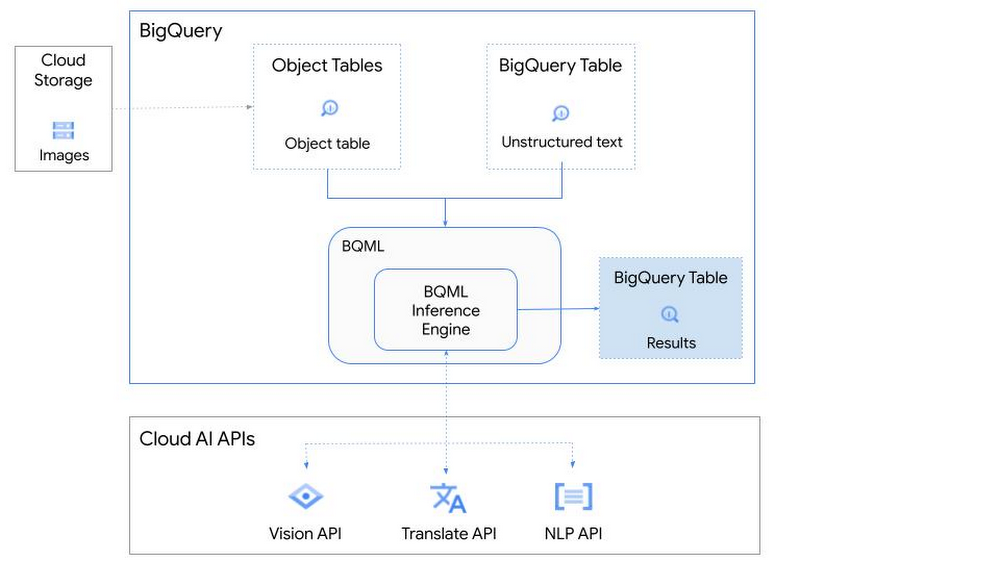
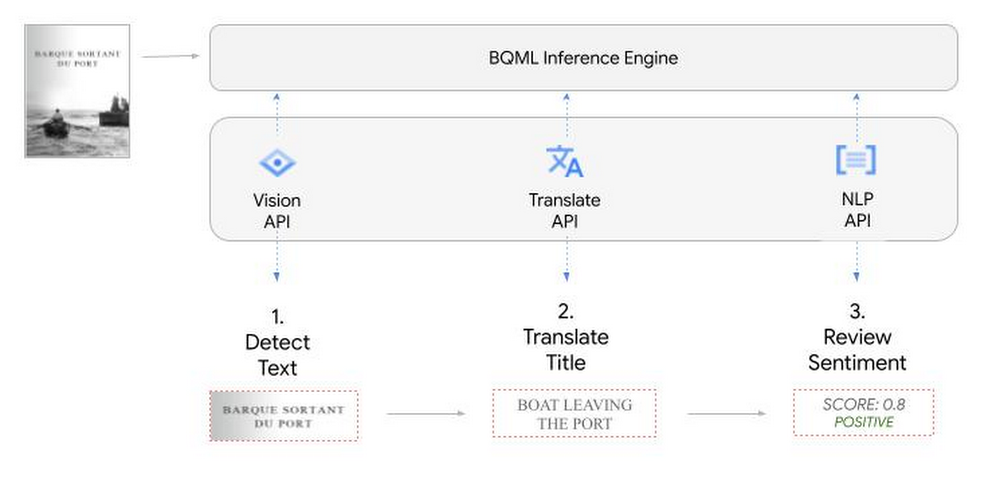
So, how does this work in practice? Let’s look at an example using images of movie posters

- We will define our pre-trained models for Vision AI, Translation AI and NLP AI in BigQuery ML.
- We’ll then use Vision AI to detect the text from some classic movie posters images.
- Next, we’ll use Translation AI to detect any foreign posters and translate them to a language of our choosing – English in this case.
- Finally, we’ll combine our unstructured data with structured data in BigQuery.
We’ll use the extracted movie titles from our movie posters to look up the viewer reviews from the BigQuery IMDB public dataset. We can then run sentiment analysis against these reviews using NLP AI.
Note: The BigQuery ML inference engine is currently in Preview. You will need to complete this enrollment form to have your project allowlisted for use with the BQML Inference Engine.
We’ll give examples of the BigQuery SQL needed to define your models and run your inferences. You’ll want to check out our notebook for a detailed guide on how to get this up and running in your Google Cloud project.
1. Define your AI Models in BigQuery
You will need to enable the APIs listed below, and also create a Cloud resource connection to enable BigQuery to interact with these services.
| API | Model Name |
| Vision AI API | Cloud_ai_vision_v1 |
| Translation AI API | Cloud_ai_translate_v3 |
| NLP AI API | Cloud_ai_natural_language_v1 |
You can then run the CREATE MODEL query for each AI service to create your pretrained models, replacing the model_name as required.
CREATE OR REPLACE MODEL
`{PROJECT_ID}.{DATASET_ID}.{VISION_MODEL_NAME}`
REMOTE WITH
CONNECTION `{PROJECT_ID}.{REGION}.{CONN_NAME}`
OPTIONS ( remote_service_type = '<model_name>' );
2. Use the Vision AI API to detect text in images stored in Cloud Storage
You will need to create an object table for your images in Cloud Storage. This read-only object table provides metadata for images stored in Cloud Storage:
CREATE OR REPLACE EXTERNAL TABLE
`{PROJECT_ID}.{DATASET_ID}.{OBJECT_TABLE_NAME}`
WITH
CONNECTION `{REGION}.{CONN_NAME}`
OPTIONS (object_metadata = 'SIMPLE', uris = ['{BUCKET_LOCATION}/*']);
To detect the text from our posters, you can then use ML.ANNOTATE_IMAGE and specify the text_detection feature.
SELECT
       ml_annotate_image_result.full_text_annotation.text AS text_content,
       *
FROM
       ML.ANNOTATE_IMAGE(
         MODEL `{PROJECT_ID}.{DATASET_ID}.{VISION_MODEL_NAME}`,
         TABLE `{DATASET_ID}.{OBJECT_TABLE_NAME}`,
         STRUCT(['TEXT_DETECTION'] AS vision_features));
A JSON response will be returned to BigQuery that includes the text content and language code of the text. You can parse the JSON to a scalar result using the dot annotation highlighted above.

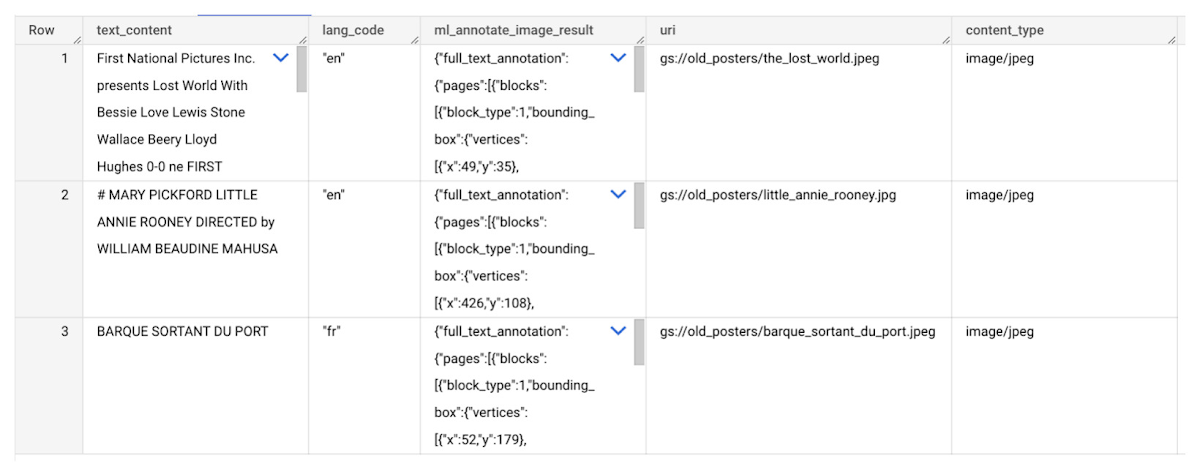
3. Use the Translation AI API to translate foreign movie titles
ML.TRANSLATE can now be used to translate the foreign titles we’ve extracted from our images into English. You just need to specify the target language and the table of the movie posters for translation:
SELECT
text_content,
STRING(ml_translate_result.translations[0].detected_language_code)
as original_language,
STRING(ml_translate_result.translations[0].translated_text)
as translated_title
FROM
  ML.TRANSLATE(
MODEL `{PROJECT_ID}.{DATASET_ID}.{TRANSLATE_MODEL_NAME}`,
TABLE `{DATASET_ID}.image_results`,
STRUCT('TRANSLATE_TEXT' as translate_mode, "en" as target_language_code));
Note: The table column with the text you want to translate must be named text_content:
The table of results will include json that can be parsed to extract both the original language and the translated text. In this case, the model has detected that title text is in French and has translated it to English:

4. Finally, use natural language processing (NLP) to run sentiment analysis against movie reviews
You can easily join inference results from your unstructured data with other BigQuery datasets to bolster your analysis. For example, we can now join the movie titles we extracted from our posters with thousands of movie reviews stored in BigQuery’s IMDB public dataset `bigquery-public-data.imdb.reviews`.
You can use ML.UNDERSTAND_TEXT with the analyze_sentiment feature to run sentiment analysis against some of these reviews to determine whether they are positive or negative:
SELECT
   primary_title, start_year, text_content AS review,
   FLOAT64(ml_understand_text_result.document_sentiment.score) AS score,
   FLOAT64(ml_understand_text_result.document_sentiment.magnitude) AS magnitude,
FROM
   ML.UNDERSTAND_TEXT(
     MODEL `{PROJECT_ID}.{DATASET_ID}.{NLP_MODEL_NAME}`,
           (
           SELECT
             primary_title, start_year, review AS text_content
           FROM
             `bigquery-public-data.imdb.title_basics` titles
           JOIN
             `bigquery-public-data.imdb.reviews` reviews
           ON
             reviews.movie_id = titles.tconst
           WHERE
             UPPER(titles.primary_title) = 'THE LOST WORLD' AND
             start_year = 1925
           ),
      STRUCT("analyze_sentiment" AS nlu_option)) ;
Note: The table column with the text you want to analyze must be named text_content:
The JSON response will include a score and magnitude. The score indicates the overall emotion of the text while the magnitude indicates how much emotional content is present:
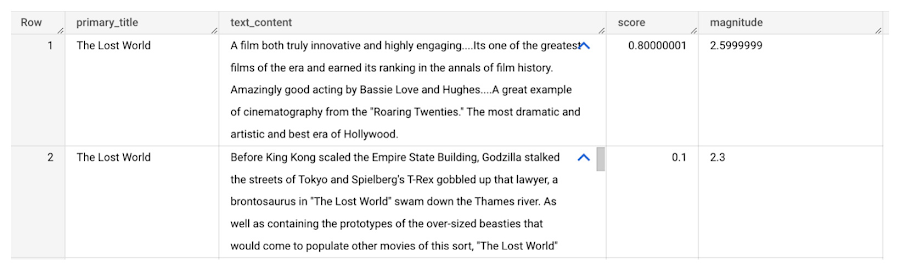
So, how did the Lost World compare with other movies that year?
To wrap up, we’ll compare the average review score of the 1925 Lost World movie to other movies released that year to see which was more popular. This can be done using familiar SQL analysis:
SELECT
 primary_title, start_year,
 AVG(FLOAT64(ml_understand_text_result.document_sentiment.score))AS av_score,
 AVG(FLOAT64(ml_understand_text_result.document_sentiment.magnitude)) AS av_magnitude
FROM
 ML.UNDERSTAND_TEXT(
   MODEL `{PROJECT_ID}.{DATASET_ID}.{NLP_MODEL_NAME}`,
         (
         SELECT
           primary_title, start_year, movie_id, review AS text_content
         FROM
           `bigquery-public-data.imdb.title_basics` titles
         JOIN
           `bigquery-public-data.imdb.reviews` reviews
         ON
           reviews.movie_id = titles.tconst
         WHERE
           start_year = 1925
         ),
   STRUCT("analyze_sentiment" AS nlu_option))
GROUP BY
   primary_title, start_year
ORDER BY
   av_score DESC;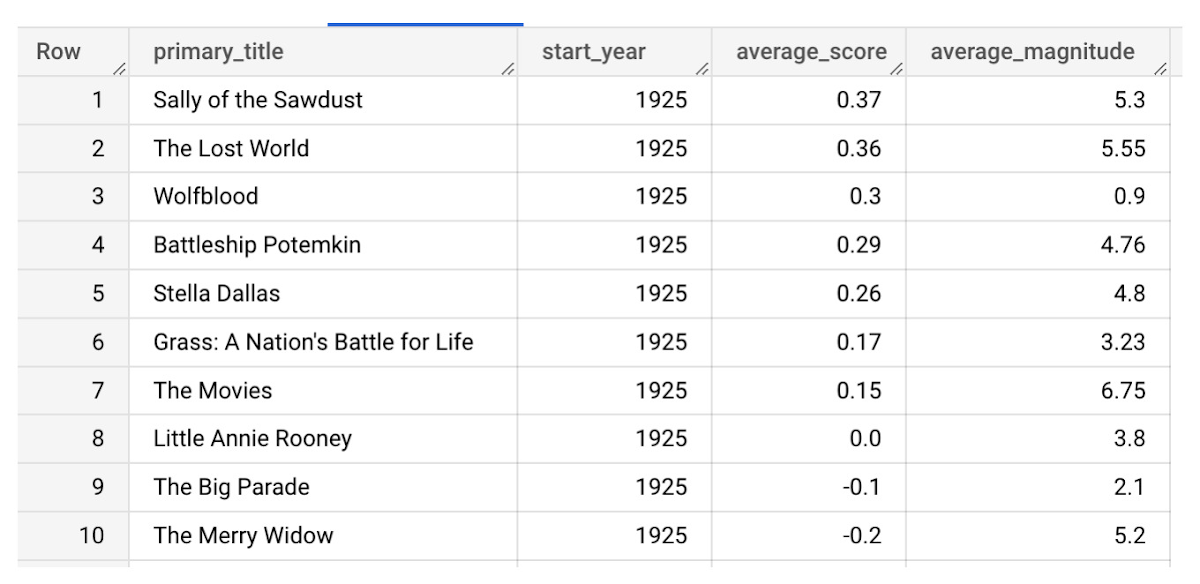
It looks like The Lost World narrowly missed out on the top spot to Sally of the Sawdust!
Want to learn more?
Check out our notebook for a step by step guide on using the BQML inference engine for unstructured data in Google Cloud. You can also check out our Cloud AI service table-valued functions overview page for more details. Curious about pricing? The BQML Pricing page gives a breakdown of how costs are applied across these services.
3781
Of your peers have already watched this video.
2:30 Minutes
The most insightful time you'll spend today!
How e-Com Firm Bukalapak Achieved 5X ROAS With Machine Learning
In 2018, Indonesia accounted for 94% of SEA’s $23 billion e-commerce industry. Today, the country’s massive e-commerce sector continues to grow, along with the number of brands looking for innovative ways to compete for a piece of the pie.
As one of the largest e-commerce companies in the region, Bukalapak receives a high volume of website visitors via direct traffic, Shopping ads, Google Display Network ads, and YouTube ads.
But when the brand noticed too many potential customers were browsing its website without converting, it knew it had to reconsider its marketing strategy. In an effort to reach consumers who were more likely to buy its products, Bukalapak turned to Smart Shopping campaigns.
Experimenting with Automation
By combining standard shopping and dynamic remarketing campaigns, Smart Shopping campaigns use automated bidding and ad placement to promote products to users across Search, Display, and YouTube. The automated solution also allows brands to reach high-value users who have already seen its ads or visited its site directly but left without converting.
Always open to trying new strategies, Bukalapak launched a three-month Smart Shopping campaign focused on 5% of its Shopping ads traffic using a maximize conversion value bidding strategy. The rest of the brand’s traffic (95%) was assigned standard shopping and dynamic remarketing campaigns, and the results of these were measured against the automated alternative.
The team was able to launch the Smart Shopping campaign with little manual effort by:
- creating a separate campaign with a determined traffic split and a recommended daily budget.
- uploading the Bukalapak logo and image banner for responsive display ads.
- designating Indonesia as the country of sale.
The campaign combined the brand’s existing product feed with Google’s machine learning algorithm to serve more than 40 million products to potential customers across multiple channels — all while automating ad placement and bidding for maximum conversion value.
Smart Shopping Campaign Saves Time, Boosts ROAS
The Smart Shopping campaign achieved 5X higher ROAS than the standard shopping effort while also driving 4X more conversions and 300% growth in conversion value, leading to 2.5X more new customers.
“The automation not only allowed the team to focus less on manual campaign optimization but also helped them boost relevance among high-value users,” said Tushar Bhatia, associate vice president of growth at Bukalapak.

The impressive results encouraged Bukalapak to increase its investment in Smart Shopping campaigns by 27X over the past year. The brand plans to remain at the forefront of innovation by continually testing new products and further optimizing its campaign strategies.
More Relevant Stories for Your Company

New Research Shows Top Marketers Use Machine Learning to Drive Growth
Automation and machine learning technologies are changing the way marketers drive results for their customers and brands. But there’s still a significant gap between those who are just talking about machine learning and those who are taking action. For marketers looking to become leaders in their field, this is an

How the Telegraph is Reimagining Media with Google Cloud
Whether they’re reading the newspaper on the way to work, or catching up on the latest headlines on their smartphones, readers expect up-to-the-minute news wherever and whenever makes the most sense for them. As a result, media companies are increasingly looking for ways to improve, expand, and simplify their offerings,



Creating Value With the Breadth and Depth of AI Platform
Watch Craig Wiley, Director of Product Management - Google Cloud, as he breaks down and simplifies AI for enterprises and the adoption of AI. “As I think about AI, fundamentally AI only does two things. One it helps you grow your market, increase subscribership, increase users, increase their spend or

Google Cloud and Univision Partnership to Up the Ante in UX for Spanish-speaking Audience
The past year has given everyone lots to think about—about our priorities as people and as businesses. As the world retreated behind closed doors, we saw how shared interests and experiences can bring us together. As the world grappled with a common enemy, we witnessed just how differently individuals, communities
