





Make Your Data Useful with Google Cloud Products and Services

3238
Of your peers have already read this article.
1:30 Minutes
The most insightful time you'll spend today!
While you likely know that data science is the practice of making data useful, you may not have a clear landscape around the tools that can aid each stage of the data science workflow as you use machine learning to tackle your challenges.
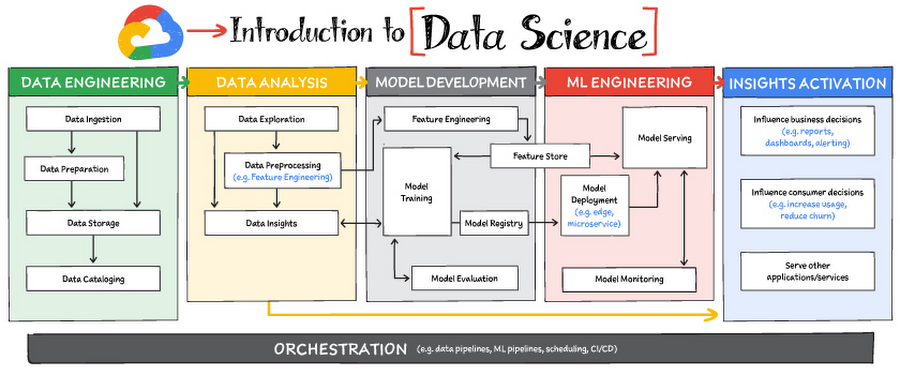
Read on to discover the six broad areas that are critical to the process of making data useful, and some corresponding Google Cloud products and services for those areas.
https://youtube.com/watch?v=EQvLUMjz-g4%3Fenablejsapi%3D1%26
Data engineering
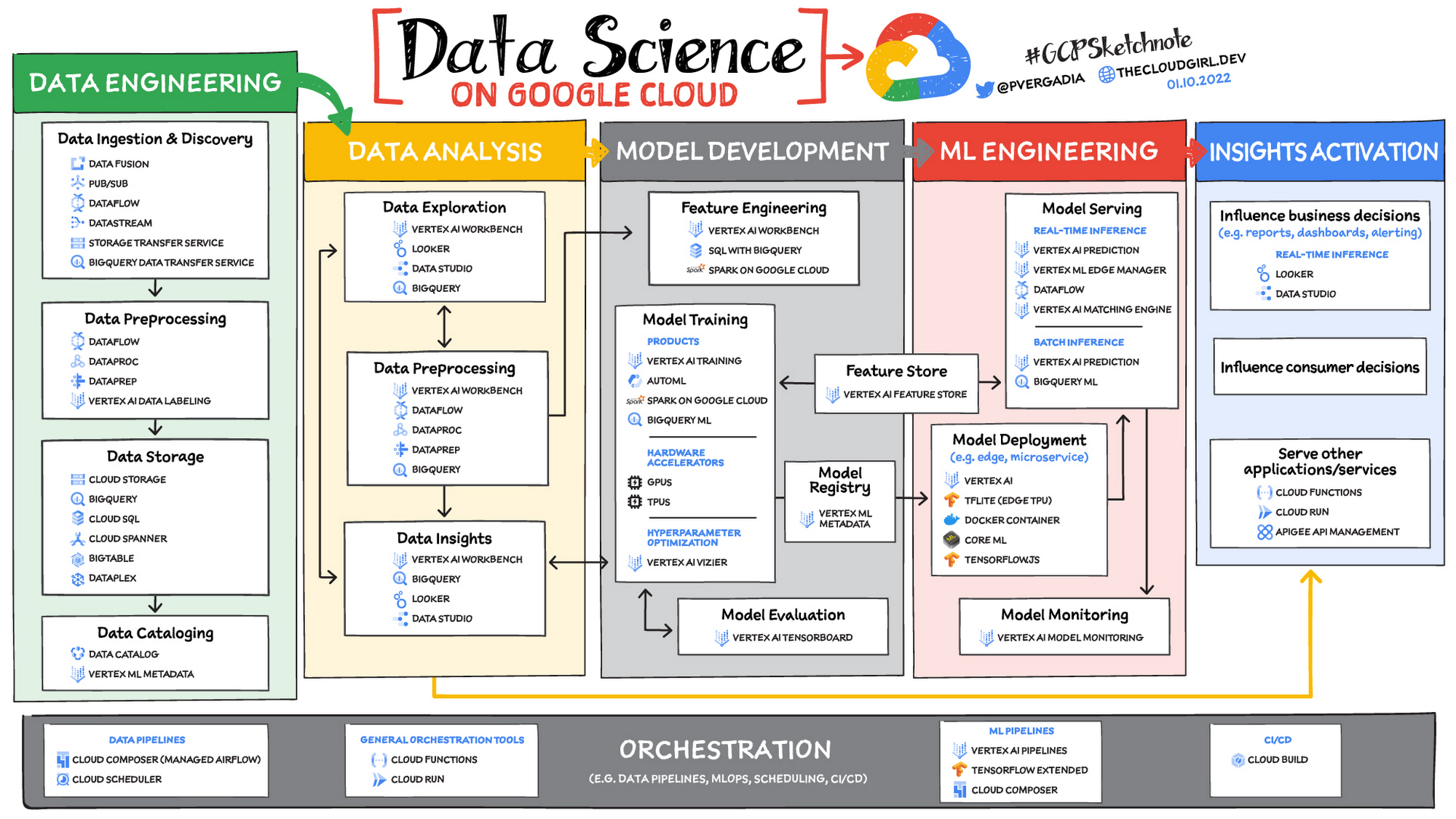
Perhaps the greatest missed opportunities in data science stem from data that exists somewhere, but hasn’t been made accessible for use in further analysis. Laying the critical foundation for downstream systems, data engineering involves the transporting, shaping, and enriching of data for the purposes of making it available and accessible.
Data ingestion and data preprocessing on Google Cloud
Here we consider data ingestion as moving data from one place to another, and data preparation the process of transformation, augmentation, or enrichment prior to consumption. Global scalability, high throughput, real-time access, and robustness are common challenges in this stage. For scalable, real-time, and batch data processing, look into building data ingestion and preprocessing pipelines with Dataflow, a managed Apache Beam service. There’s a reason why Dataflow is called the backbone of analytics on Google Cloud.
If you’re looking for a scalable messaging system to help you ingest data, consider Cloud Pub/Sub, a global, horizontally scalable messaging infrastructure. Cloud Pub/Sub was built using the same infrastructure component that enabled Google products, including Ads, Search, and Gmail, to handle hundreds of millions of events per second.
If you want an easy way to automate data movement to BigQuery, a serverless data warehouse on Google Cloud, look into the BigQuery Data Transfer Service. For transferring data to Cloud Storage, take a look at the Storage Transfer Service. Or, for a no-code data ingestion and transformation tool, check out Data Fusion, which has over 150 preconfigured connectors and transformations. In addition to Dataflow and Data Fusion for data preparation, Spark users may want to look at related products and features for Spark on Google Cloud.
Data storage and data cataloging on Google Cloud
For structured data, consider a data warehouse like BigQuery, or any of the Cloud Databases (relational ones like Cloud SQL and NoSQL ones like Cloud BigTable and Cloud Firestore). For unstructured data, you can always use Cloud Storage. You may also want to consider a data lake. For data discovery, cataloging, and metadata management, consider Data Catalog. For a unified solution, take a look at Dataplex, which integrates a unified data management solution with an integrated analytics experience.
Learn more about data engineering on Google Cloud
- Explore the data engineering learning path
- Discover reference patterns
- Get certified by Google Cloud as a Professional Data Engineer
Data Analysis
From descriptive statistics to visualizations, data analysis is where the value of data starts to appear.
Data exploration, data preprocessing, and data insights
Data exploration, a highly iterative process, involves slicing and dicing data via data preprocessing before data insights can start to manifest through visualizations or simply via simple group-by, order-by operations. One hallmark of this phase is that the data scientist may not yet know which questions to ask about the data. In this somewhat ephemeral phase, a data analyst or scientist has likely uncovered some aha-moments, but hasn’t shared them yet. Once insights are shared, the flow enters the Insights Activation stage, where those insights become used to guide business decisions, influence consumer choices, or become embedded in other applications or services.
On Google Cloud, there are many ways to explore, preprocess, and uncover insights in your data. If you are looking for a notebook-based end-to-end data science environment, check out Vertex AI Workbench, which enables you to access, analyze, and visualize your entire data estate: from structured data at the petabyte-scale in SQL with BigQuery, to processing data with Spark on Google Cloud and its serverless, auto-scaling, and GPU acceleration capabilities. As a unified data science environment, Vertex AI Workbench also makes it easy to do machine learning with TensorFlow, PyTorch, and Spark, with built-in MLOps capabilities.
Finally, if your focus is on analyzing structured data from data warehouses and insight activation for business intelligence, you may want to also consider using Looker, with its rich interactive analytics, visualizations, dashboarding tools, and Looker Blocks to help you accelerate your time-to-insight.
Learn more about data analysis on Google Cloud
- Learn about Vertex AI Workbench for a Jupyter-based fully managed notebook environment
- Learn about how you can use BigQuery for petabyte-scale data analysis
- Learn about Spark on Google Cloud
- Discover the data analyst learning path
- Explore reference patterns for common analytics use cases
Model development
From linear regression to XGBoost, from TensorFlow to PyTorch, the model development stage is where machine learning starts to provide new ways of unlocking value from your data. Experimentation is a strong theme here, with data scientists looking to accelerate iteration speed between models without worrying about infrastructure overhead or context-switching between tools for data analysis and tools for productionizing models with MLOps.
To solve these challenges, once again, as a Jupyter-based fully managed, scalable, and enterprise-ready environment, Vertex AI Workbench makes it easy as the one-stop-shop for data science, combining analytics and machine learning, including Vertex AI services. Apache Spark, XGBoost, TensorFlow, and PyTorch are just some of the frameworks supported on Vertex AI Workbench. Vertex AI Workbench makes managing the underlying compute infrastructure needed for model training easy with the ability to scale vertically and horizontally, and with idle timeouts and auto shutdown capabilities to reduce unnecessary costs. Notebooks themselves can be used for distributed training and hyperparameter optimization, and they include Git integration for version control. Due to the significant reduction in context switching required, data scientists can build and train models 5x faster using Vertex AI Workbench than when using traditional notebooks.
With Vertex AI, custom models can be trained and deployed using containers. You can take advantage of pre-built containers or custom containers to train and deploy your models.
For low-code model development, data analysts and data scientists can use SQL with BigQuery ML to train and deploy models (including XGBoost, deep neural networks, and PCA), directly using BigQuery’s built-in serverless, autoscaling capabilities. Behind-the-scenes, BigQuery ML leverages Vertex AI to enable automated hyperparameter tuning, and explainable AI. For no-code model development, Vertex AI Training provides a point-and-click interface to train powerful models using AutoML, which comes in multiple flavors: AutoML Tables, AutoML Image, AutoML Text, AutoML Video, and AutoML Translation.
Learn more about model development on Google Cloud
- Learn about Vertex AI Workbench for a Jupyter-based fully managed notebook environment
- Learn more about Vertex AI
ML engineering
Once a satisfactory model is developed, the next step is to incorporate all the activities of a well-engineered application lifecycle, including testing, deployment, and monitoring. And all of those activities should be as automated and robust as possible.
Managed datasets and Feature Store on Vertex AI provide shared repositories for datasets and engineered features, respectively, which provide a single source of truth for data and promote reuse and collaboration within and across teams. Vertex AI’s model serving capability enables deployment of models with multiple versions, automatic capacity scaling, and user-specified load balancing. Finally, Vertex AI Model Monitoring provides the ability to monitor prediction requests flowing into a deployed model and automatically alert model owners whenever the production traffic deviates beyond user-defined thresholds and previous historical prediction requests.
MLOps is the industry term for modern, well engineered ML services, with scalability, monitoring, reliability, automated CI/CD, and many other characteristics and functions that are now taken for granted in the application domain. The ML engineering features provided by Vertex AI are informed by Google’s extensive experience deploying and operating internal ML services. Our goal with Vertex AI is to provide everyone with easy access to essential MLOps services and best practices.
Learn more about ML engineering and MLOps on Google Cloud
- Follow the guides, tutorials and documentation for Vertex AI
- Watch this video to learn more about Vertex AI
- Discover the data scientist/machine learning engineer learning path
- Get certified as a Professional ML Engineer
Insights activation
The insights activation stage is where your data has now become useful to other teams and processes. You can use Looker and Data Studio to enable use cases in which data is used to influence business decisions with charts, reports, and alerts.
Data can also influence customer decisions and as a result increase usage or decrease churn, for example. Finally, the data can also be used by other services to drive insights; these services can run outside Google Cloud, inside Google Cloud on Cloud Run or Cloud Functions, and/or using Apigee API Management as an interface.
Learn more about insights activation on Google Cloud
- Watch this video to learn about building interactive ML apps using Looker and Vertex AI
- Learn about Looker, and Looker solutions for eCommerce, Digital Media and more
- Discover a gallery of interactive dashboards created with Data Studio
- Watch this video to understand the difference between Cloud Run and Cloud Functions
Orchestration
All of the capabilities discussed above provide the key building blocks to a modern data science solution, but a practical application of those capabilities requires orchestration to automatically manage the flow of data from one service to another. This is where a combination of data pipelines, ML pipelines, and MLOps comes into play. Effective orchestration reduces the amount of time that it takes to reliably go from data ingestion to deploying your model in production, in a way that lets you monitor and understand your ML system.
For data pipeline orchestration, Cloud Composer and Cloud Scheduler are both used to kick off and maintain the pipeline.
For ML pipeline orchestration, Vertex AI Pipelines is a managed machine learning service that enables you to increase the pace at which you experiment with and develop machine learning models and the pace at which you transition those models to production. Vertex Pipelines is serverless, which means that you don’t need to deal with managing an underlying GKE cluster or infrastructure. It scales up when you need it to, and you pay only for what you use. In short, it lets you just focus on building your data science pipelines.
Learn more about orchestration on Google Cloud
- Read more about Cloud Composer for Airflow-based pipelines
- Try some example notebooks on Github with Vertex AI Pipelines
- Learn different ways to trigger Vertex AI Pipeline runs
- Read the whitepaper on Practitioners Guide to MLOps: A framework for continuous delivery and automation of machine learning
Summary
Google Cloud offers a complete suite of data management, analytics, and machine learning tools to generate insights from data. Want to learn more? Check out the following resources:
Special thanks to the following contributors to this blogpost: Alok Pattani, Brad Miro, Saeed Aghabozorgi, Diptiman Raichaudhuri, Reza Rokni.
Home Depot’s Interconnected Retail Experience by Virtue of Google Cloud Migration for SAP Applications

8290
Of your peers have already read this article.
1:30 Minutes
The most insightful time you'll spend today!
With nearly 2,300 stores, The Home Depot is the world’s largest home-improvement chain — a brand that professional contractors and DIYers alike have come to depend on. The home improvement industry continues to experience unprecedented demand and dramatic increases in online ordering accompanied by expanding consumer expectations for things like curbside pickup and same day delivery. The Home Depot’s decision to migrate to cloud-based infrastructure, including the migration of the company’s SAP applications on Google Cloud which began in 2017, has set it up for success in an increasingly digital world, and helped the company adapt to changing market conditions quickly.
Interconnected retail at scale
Building on a strong customer-first philosophy, The Home Depot aims to create what it calls interconnected retail—allowing customers to shop however, whenever, and wherever they want. “So many companies are focused on omni-channel retail,” explains Sam Moses, Vice President of Corporate Systems. “At The Home Depot, we wanted to take it to the next level. Interconnected retail puts the customer at the center of everything and enables them to shop in store, online, or both. Customers can begin a transaction online and continue in-store, or vice-versa.”
To support this strategy, the company’s SAP environment needed to be more agile. Running everything on-premises, from central finance to POS systems, meant that The Home Depot’s IT teams experienced redundancy and repetitive, manual processes. Their data warehouse needed an upgrade to process and analyze growing and increasingly diverse data sets. The Home Depot chose to migrate its SAP environment to Google Cloud to support both the velocity and scale needed for the business as well as critical analytics capabilities needed for its bold digital initiatives. “We chose Google Cloud to support our SAP implementation. Our decision had a lot to do with the relationship between Google Cloud and SAP and also for the applications and services that are offered by Google Cloud, like BigQuery, which are helping to enable data and analytics within our organization,” Moses explains.
After migrating its SAP applications—including S/4HANA, its customer activity repository (CAR), general ledger, e-commerce system, enterprise data warehouse and more to Google Cloud, the company now has the speed, scale and flexibility to tackle enormous spikes in the business, all while staying fully available for their customers. Additionally, The Home Depot was able to transform its financial systems and make them more agile to deliver critical information across multiple business functions in real time.
Maximizing data insights to support customer experiences
By migrating to Google Cloud, The Home Depot is leveraging Google Cloud analytics to build the industry’s most efficient supply chain including more robust demand forecasting, supplier lead times, estimated delivery times and more, all while maintaining better security than before. “We experienced unprecedented change in our customers’ behavior and their buying patterns, which puts a lot of pressure on our supply chain,” explains Moses. “So having the ability to leverage data and analytics gives us insights to know exactly what it is that our customers need.”
The company’s analysts now use BigQuery ML for machine learning directly against the company’s BigQuery data and use AutoML to determine the best model for predictions. The Home Depot’s engineers have also adapted BigQuery to monitor, analyze, and act on application performance data across all its stores and warehouses in real time—capabilities that were not as seamless in the on-premises environment.
With hundreds of projects on Google Cloud, The Home Depot’s cloud journey is well on track, but the company is always looking to the future. “As our customers’ needs have continued to evolve, and as technology has continued to evolve, our relationship with Google will continue to advance — to be able to innovate together, to be able to find new solutions together, to better serve our customers.”
Learn more about how The Home Depot is renovating its retail operation with SAP on Google Cloud.
Learn to Deploy Custom Models on Vertex AI

3031
Of your peers have already read this article.
2:00 Minutes
The most insightful time you'll spend today!
In May we announced Vertex AI, our new unified AI platform which provides options for everything from using pre-trained models to building your models with a variety of frameworks. In this post we’ll do a deep dive on training and deploying a custom model on Vertex AI. There are many different tools provided in Vertex AI, as you can see in the diagram below. In this scenario we’ll be using the products highlighted in green:
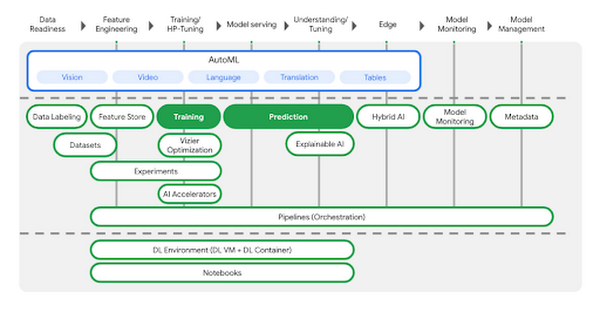
AutoML is a great choice if you don’t want to write your model code yourself, but many organizations have scenarios that require building custom models with open-source ML frameworks like TensorFlow, XGBoost, or PyTorch. In this example, we’ll build a custom TensorFlow model (built upon this tutorial) that predicts the fuel efficiency of a vehicle, using the Auto MPG dataset from Kaggle.
If you’d prefer to dive right in, check out the codelab or watch the two minute video below for a quick overview of our demo scenario: https://www.youtube.com/embed/bHoAXR26hWo?enablejsapi=1&
Environment setup
There are many options for setting up an environment to run these training and prediction steps. In the lab linked above, we use the IDE in Cloud Shell to build our model training application, and we pass our training code to Vertex AI as a Docker container. You can use whichever IDE you’re most comfortable working with, and if you’d prefer not to containerize your training code, you can create a Python package that runs on one of Vertex AI’s supported pre-built containers.
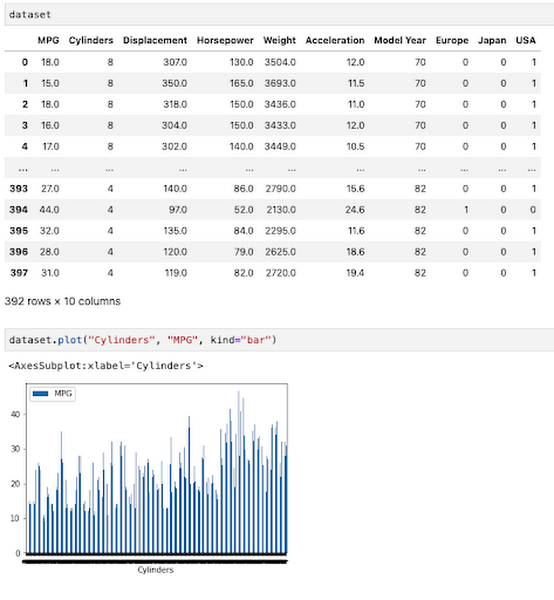
If you would like to use Pandas or another data science library to do exploratory data analysis, you can use the hosted Jupyter notebooks in Vertex AI as your IDE. For example, here we wanted to inspect the correlation between fuel efficiency and one of our data attributes, cylinders. We used Pandas to plot this relationship directly in our notebook.
To get started, you’ll want to make sure you have a Google Cloud project with the relevant services enabled. You can enable all the products we’ll be using in one command using the gcloud SDK:
gcloud services enable compute.googleapis.com \containerregistry.googleapis.com \aiplatform.googleapis.com
Then create a Cloud Storage bucket to store our saved model assets. With that, you’re ready to start developing your model training code.
Containerizing training code
Here we’ll develop our training code as a Docker container, and deploy that container to Google Container Registry (GCR). To do that, create a directory with a Dockerfile at the root, along with a trainer subdirectory containing a train.py file. This is where you’ll write the bulk of your training code:
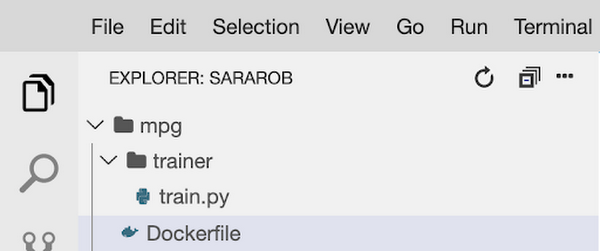
To train this model, we’ll build a deep neural network using the Keras Sequential Model API:
model = keras.Sequential([layers.Dense(64, activation='relu', input_shape=[len(train_dataset.keys())]),layers.Dense(64, activation='relu'),layers.Dense(1)])
We won’t include the full model training code here, but you can find it in this step of the codelab. Once your training code is complete, you can build and test your container locally. The IMAGE_URI in the snippet below corresponds to the location where you’ll deploy your container image in GCR. Replace $GOOGLE_CLOUD_PROJECT below with the name of your Cloud project:
IMAGE_URI="gcr.io/$GOOGLE_CLOUD_PROJECT/mpg:v1"docker build ./ -t $IMAGE_URIdocker run $IMAGE_URI
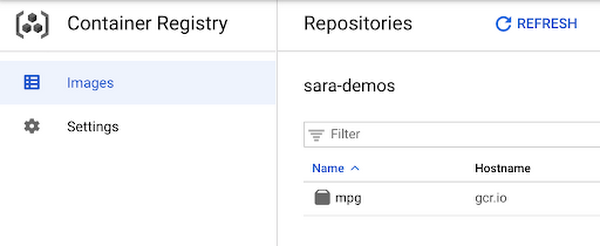
All that’s left to do is push your container to GCR by running docker push $IMAGE_URI. In the GCR section of your console, you should see your newly deployed container:
Running the training job
Now you’re ready to train your model. You can select the container you created above in the models section of the platform. You can also specify key details like the training method, compute preferences (GPUs, RAM, etc.) and hyperparameter tuning if required.
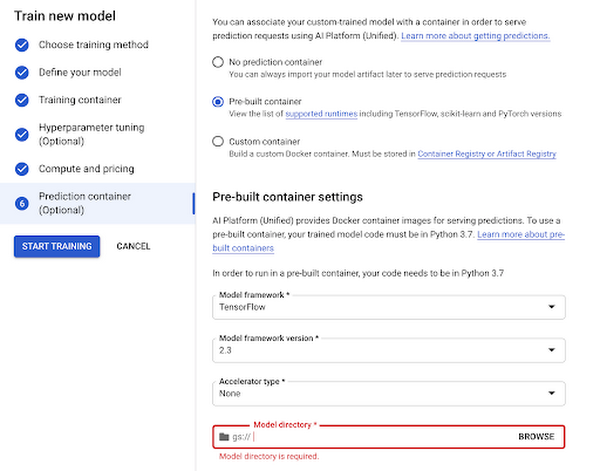
Now you can hand over training your model and let Vertex do the heavy lifting for you.
Deploy to endpoint
Next, let’s get your new model incorporated into your app or service. Once your model is done training you will see an option to create a new endpoint. You can test out your endpoint in the console during your development process. Using the client libraries, you can easily create a reference to your endpoint and get a prediction with a single line of code:
from google.cloud import aiplatformendpoint = aiplatform.Endpoint(endpoint_name="projects/YOUR-PROJECT-NUMBER/locations/us-central1/endpoints/YOUR-ENDPOINT-ID"). . .endpoint.predict(test_instances)
Start building today
Ready to start using Vertex AI? We have you covered for all your use cases spanning from simply using pre-trained models to every step of the lifecycle of a custom model.
- Use Jupyter notebooks for a development experience that combines text, code and data
- Fewer lines of code required for custom modeling
- Use MLOps to manage your data with confidence and scale
Get started today by trying out this codelab yourself or watching this one hour workshop.

Upgrade Your Contact Center with Knowlarity’s AI-powered Speech Analytics for Higher CX
DOWNLOAD E-BOOK6223
Of your peers have already downloaded this article
7:00 Minutes
The most insightful time you'll spend today!
Did you know, everyday about 56 million hours worth of phone conversations, equalling to 420 billion spoken words are handled by contact centers? Knowlarity, a renowned cloud business communication service provider with nearly 6,000 customers and over a million virtual users, leverages AI-powered speech analytics that offer insights to gauge customer preferences and emotions, campaign performance, agent’s effectiveness and much more. Knowlarity’s programmatic speech analytics platform is built with Google Cloud to optimize contact center performance by transcribing and analyzing millions of calls to impact savings, operations, CX, customer loyalty and retention, and revenue generation.
Download the e-Book to learn more about Knowlarity’s speech analytics for your business’ contact centers and elevate your agents’ performance by leveraging ML, natural language processing (NLP) and AI capabilities.
3964
Of your peers have already watched this video.
1:30 Minutes
The most insightful time you'll spend today!
90-Sec Demos of Truly Incredible Customer Care Calls Powered By AI
How real, fast, and easy do you think an AI-powered call center experience is for customers today?
It’s likely you have seen AI-powered chatbots and are deeply unimpressed with the static nature of the interaction between customers and service representatives.
But that’s not how Google Cloud’s AI-powered contact centers are.
Here have a look yourself. Here’s what a customer from a bank or financial organisation would experience.
And here’s what a customer from a telecom company would experience.
AI Solutions for Government Organizations: How to Get Started

4393
Of your peers have already read this article.
3:00 Minutes
The most insightful time you'll spend today!
Cloud-native features are helping public sector teams innovate faster than ever. Ideas discussed in a morning meeting can be a working proof of concept later that day. Managed services can remove administrative burden and reduce the steps needed to design and provision cloud infrastructure. Security can be built-in from the beginning with Identity and Access Management (IAM), Virtual Private Cloud Service Controls (VPC-SC), and Data Loss Prevention (DLP). Short-lived services and infrastructure-as-code allow rapid and cost-effective prototyping. These technologies can be used to architect a solution that follows the principle of least privilege and helps you secure your data.
So the question becomes: given the complex problems agencies face, where do you start? Google Public Sector now offers “Getting Started” and “Scaling” service offerings for CCAI, DocAI, and BigQuery to help you jumpstart your AI journey, based on where you are.
Complex problems, simpler AI-based solutions
Solving more challenging problems with cloud-native technology doesn’t have to be overwhelming. You can approach them the same way you might solve a puzzle: start with one piece that follows another until the larger picture takes shape. Though you can simplify the steps, solving these problems still requires powerful tools. Google Cloud’s AI/ML capabilities may be the answer for your team.
Google Public Sector is making it easier to get started with advanced technologies, beginning with artificial intelligence and machine learning (AI/ML) workloads for government organizations, and it’s something you can do now, one piece at a time.
Automating your FAQs with CCAI
Does your agency require a team to answer commonly asked questions? What if you could train an agent to answer questions immediately and operate 24/7? Contact Center AI (CCAI) can do this and more. Already using CCAI and need the agent to level up to address complex interactive dialogs? Getting Started with CCAI and Scaling with CCAI are new Google service offerings specifically designed to help public sector organizations tackle situations like these.
Automate data entry with DocAI
How many hours does your team spend manually reviewing or entering data from standardized forms? What if you could automatically pull data right from the page? Google Document AI (DocAI) specializes in exactly this—even if the form has handwritten text. Getting Started with DocAI and Scaling with DocAI are new service offerings that help you remove this burden from your team. DocAI automates data entry and makes that data available to other teams while prioritizing both security and ease of use.
Making data and insights accessible with BigQuery
Then there’s all your existing data. You may have years of it stored in many places, and you may not have a way to make use of it when you need it. BigQuery is Google’s enterprise data warehouse. It was designed for data analytics—looking back at historical data to make conclusions about it. But BigQuery’s analytics don’t stop there. It can also look forward in time to make predictions, often using the same datasets. Getting Started with BigQuery and Scaling with BigQuery are new service offerings that help you take your first steps toward AI/ML capabilities by starting with a single table or pipeline that can help make sense of all your data.
The best help is the kind that meets you where you are and gets you where you want to be. Google Public Sector’s new service offerings do just that: help you work through complex problems by meeting you wherever your starting line is, whether you’re ready to start or ready to scale. Let us know if you would like us to contact you about the services mentioned in this article. Let’s solve your highest impact problems together, one puzzle piece at a time.
More Relevant Stories for Your Company


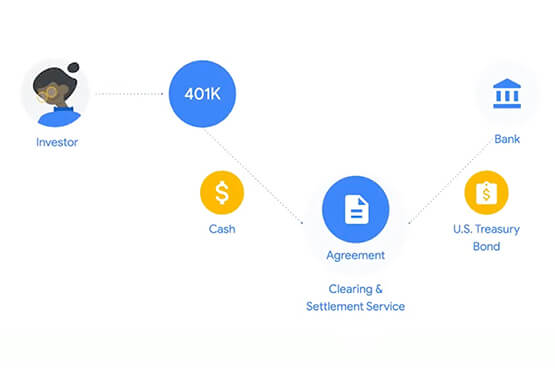

Predicting Treasury Settlement Failures with ML
BNY Mellon’s Government Securities Services (GSS) business is the sole provider of treasury settlement services in the United States of America. Given its unique market position, GSS is exploring how to help clients improve their forecasting of $70+ billion in daily settlement fails leveraging Google Cloud. Sarthak Pattanaik, Chief Information

Unified, Flexible and Accessible: How Companies’ Data Help Them Achieve More on Google Cloud
As the volume of data that people and businesses produce continues to grow exponentially, it goes without saying that data-driven approaches are critical for tech companies and startups across all industries. But our conversations with customers, as well as numerous industry commentaries, reiterate that managing data and extracting value from


Responsible AI: From Theory to Practice
In less than 10 years, AI will be the number one driver of global GDP growth. And organizations that achieve AI absorption will be the leaders of the global economy. But as fast as AI is progressing, it also requires more care and attention from a responsibility standpoint. A more

Value Realization with Google Cloud for Retail SAP Data
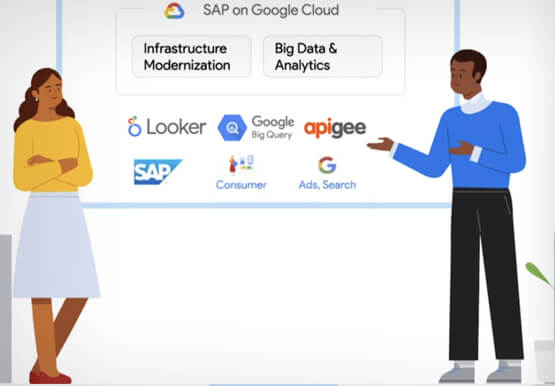
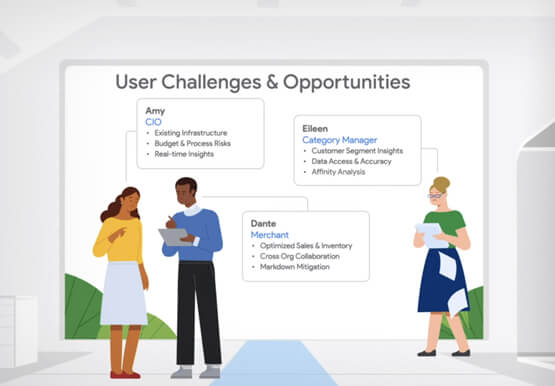
Retail engagements have changed drastically over the last few years, and by the virtue of COVID-19 pandemic, retail data and customers' expectations plummeted. To drive value and transformation across the entire value-chain retailers can make most of Google Cloud's secure, reliable IaaS by migrating their SAP systems and taking advantage
