





2022’s First Cloud CISO Perspectives: Recap of the Megatrends, Releases and News

9357
Of your peers have already read this article.
3:00 Minutes
The most insightful time you'll spend today!
I’m excited to share our first Cloud CISO Perspectives post of 2022. It’s already shaping up to be an eventful year for our industry and we’re only in month one. There’s a lot to recap in this post, including the U.S. government’s recent efforts to address critical security issues, like open source software security and zero trust architectures. We’ve also released new resources from our Google Cybersecurity Action Team like the Cloud Security Megatrends and the Boards of Directors whitepaper on cloud risk governance.
Cloud Security Megatrends
We’re often asked if the cloud is more secure than on-prem (and why) so we shared our answer in a recent blog post. At Google Cloud, security by design is our priority. We’ve long adopted zero-trust principles for our baseline security architectures and built a global network that relies on defense in depth layers to protect against configuration errors and attacks. But security is always evolving and that is why we also take advantage of the following megatrends:
- Economy of scale: Decreasing the marginal cost of security raises the baseline level of security.
- Shared fate: A flywheel of increasing trust drives more transition to the cloud, which compels even higher security and even more skin-in-the-game from the cloud provider.
- Healthy competition: The race by deep-pocketed cloud providers to create and implement leading security technologies is the tip of the spear of innovation.
- Cloud as the digital immune system: Every security update the cloud gives the customer is informed by some threat, vulnerability, or new attack technique often identified by someone else’s experience. Enterprise IT leaders use this accelerating feedback loop to get better protection.
- Software-defined infrastructure: Cloud is software defined, so it can be dynamically configured without customers having to manage hardware placement or cope with administrative toil. From a security standpoint, that means specifying security policies as code, and continuously monitoring their effectiveness.
- Increasing deployment velocity: Because of cloud’s vast scale, providers have had to automate software deployments and updates, usually with automated continuous integration/continuous deployment (CI/CD) systems. That same automation delivers security enhancements, resulting in more frequent security updates.
- Simplicity: Cloud becomes an abstraction-generating machine for identifying, creating and deploying simpler default modes of operating securely and autonomically.
- Sovereignty meets sustainability: The cloud’s global scale and ability to operate in localized and distributed ways creates three pillars of sovereignty. This global scale can also be leveraged to improve energy efficiency.
If you’re an IT decision maker, pay attention to these megatrends that will continue to drive and reinforce cloud security and will outpace the security of on-prem infrastructure well into the future.
U.S. Federal government cybersecurity momentum
- Open source software security: Earlier this month, Google participated in the White House Summit on open source software security. The meeting came at a critical time for the industry following December’s Log4j vulnerabilities and was both a recognition of the challenge and an important first step towards addressing it. The open source software ecosystem is not homogenous, despite the fact that the industry often thinks of or treats it this way. Some of it, like Linux, is highly curated, while other critical software is supported through diffuse communities including technology companies and other stakeholders. There is also a long tail of many other critical projects driven by a dedicated community of maintainers around the world, including Googlers. In light of this reality, we welcomed the chance to share our recommendations to advance the future of open source software security. Some work we’ve done includes founding the Open Source Security Foundation, which has been instrumental already in making security improvements. We’ve also helped drive a number of key security initiatives within the open source community including security scorecards, the SLSA framework to improve the security and integrity of open source packages, and Secure Open Source Rewards to financially incentivize improvements to critical open source security projects.
- OMB’s Federal zero trust strategy: The publication of the Office of Management and Budget’s zero trust architecture strategy marks an important step for the U.S. federal government’s efforts to modernize under Executive Order 14028. Google Cloud supports this approach, which recognizes the immense security benefits offered by modern computing architectures. For the past decade, Google has successfully applied zero trust principles through our BeyondCorp and BeyondProd frameworks for providing end-user access and securing our cloud workloads. And we’ve brought these best practices from our own journey to global governments and businesses of any size through solutions like BeyondCorp Enterprise and capabilities like Binary Authorization and Anthos Service Mesh, which are embedded in Anthos, our managed application platform. For Federal agencies embarking on this zero trust journey, the Google Cybersecurity Action Team will offer our expertise by conducting Zero Trust Foundations strategy workshops, which can help organizations in the public and private sectors develop actionable and achievable strategies and plans for zero trust implementation.
Google Cybersecurity Action Team Highlights
Here are the latest updates, products, services and resources across our security teams this month:
Security
- Democratizing security operations: We recently announced that Siemplify, a leading security orchestration, automation and response (SOAR) provider, is joining Google Cloud to help companies better manage their threat response. Providing a proven SOAR capability with Chronicle’s approach to security analytics is an important step forward in our vision to advance invisible security and democratize security operations for every organization.
- Security by design: The Highmark Health security team is using “secure-by-design” techniques to address the security, privacy, and compliance aspects of its Living Health solution with Google Cloud’s Professional Services Organization (PSO). Google has long advocated for and followed security by design principles, which is why we’re continuously building enhanced security, controls, resiliency and more into our cloud products and services.
- Secure collaboration for hybrid work environments: The Google Workspace team shared its recommendations for businesses as they prepare for the future of work, where the hybrid/flexible work model is becoming standard practice and a new approach to security is essential.
- Anthos Policy Controller CIS Benchmark enforcement: A big part of our shared fate philosophy is to build secure products and not just security products. A recent example of this in action is embedding CIS benchmark policy conformance in the Anthos Policy Controller. We believe the more we embed approaches like this into our products, the more application and infrastructure teams can intrinsically embed security at the start and reduce toil for the security team.
- DevOps for technology-driven organizations and startups: A key success factor for many security programs is the partnership and integration with development teams, and there are some great resources and lessons in our DORA research.
- Security by design with Chrome OS: ABN AMRO’s Asia-Pacific region team recently shared how they are using Chrome OS and CloudReady to work securely in the cloud, reduce total cost of ownership, and add flexibility for employees. This is a great example of secure by design principles in the use of Chromium.
Risk & Compliance
- Boards of Directors summary guide to cloud risk governance: The latest whitepaper from the Google Cybersecurity Action Team outlines how boards of directors can prioritize safe, secure, and compliant adoption processes for cloud technologies within their organizations.
- TruSight Risk Assessment of Google Cloud: TruSight recently released a comprehensive
risk assessment report on Google Cloud. Our Enterprise Trust team collaborated on this robust assessment of Google Cloud services to validate the design and implementation of controls. TruSight’s risk assessment of our security controls will help customers accelerate and complete their risk management due diligence. - Data governance: Check out this new blog series on data governance where our teams explain the role of data governance, its importance, and the necessary processes to run an effective data governance program. Implementing data governance will help maximize value derived from business data, build user trust, and ensure compliance with required security measures.
Controls and Products
- Encrypting Data Fusion: To help meet the security, privacy and compliance requirements of customers in regulated industries like finance or public sector, we announced the general availability of Customer Managed Encryption Keys (CMEK) integration for Cloud Data Fusion, which enables encryption of both user data and metadata at rest with a key that customers can control through our Cloud Key Management Service (KMS).
Don’t forget to sign-up for our newsletter if you’d like to have our Cloud CISO Perspectives post delivered every month to your inbox. We’ll be back next month with more updates and security-related news.
What You Need to Know About Compute Engines

6537
Of your peers have already read this article.
1:30 Minutes
The most insightful time you'll spend today!
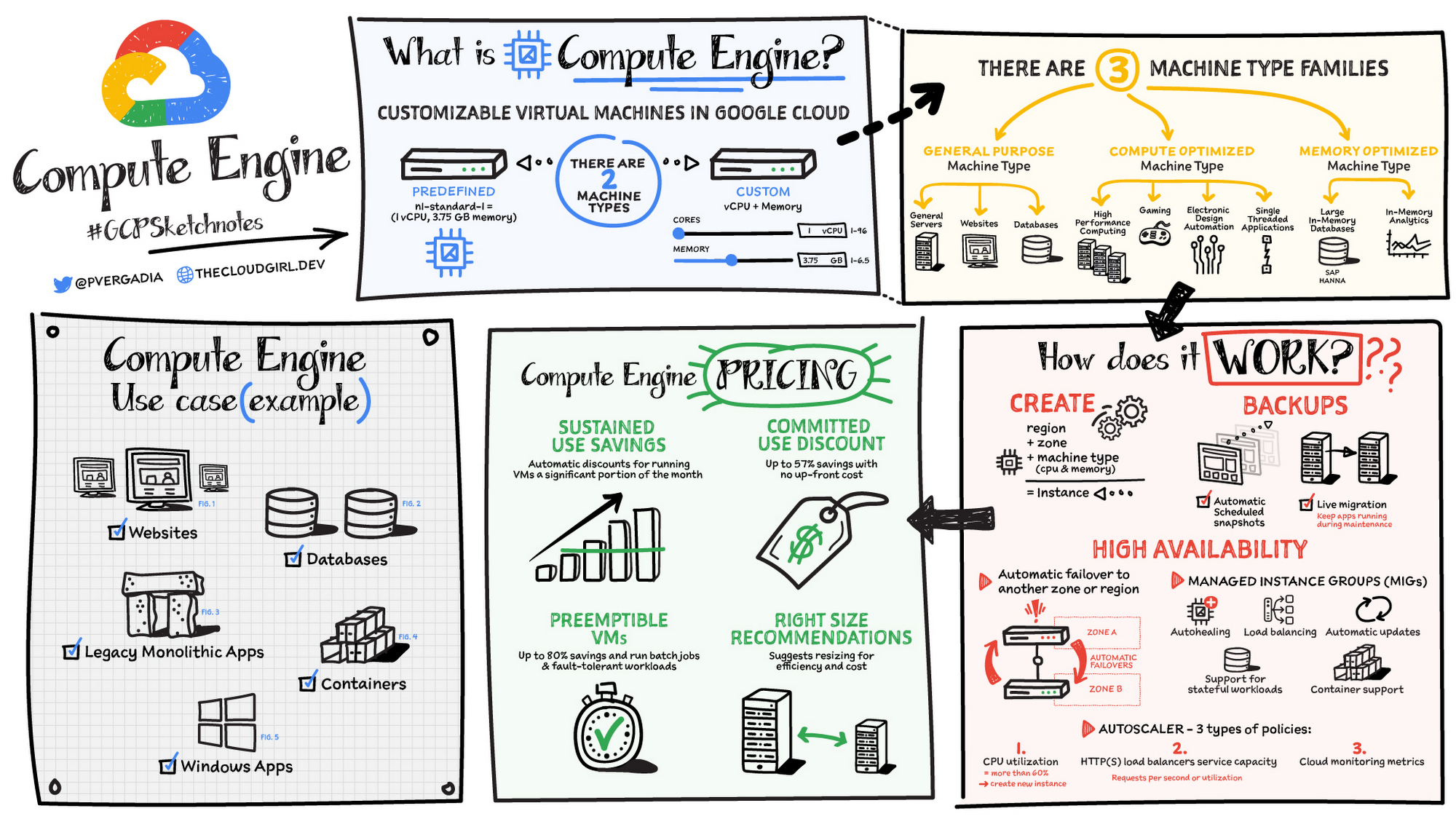
Compute Engine is a customizable compute service that lets you create and run virtual machines on Google’s infrastructure. You can create a Virtual Machine (VM) that fits your needs. Predefined machine types are pre-built and ready-to-go configurations of VMs with specific amounts of vCPU and memory to start running apps quickly. With Custom Machine Types, you can create virtual machines with the optimal amount of CPU and memory for your workloads. This allows you to tailor your infrastructure to your workload. If requirements change, using the stop/start feature you can move your workload to a smaller or larger Custom Machine Type instance, or to a predefined configuration.
Machine types
In Compute Engine, machine types are grouped and curated by families for different workloads. You can choose from general-purpose, memory-optimized, compute-optimized and accelerator-optimized families.
- General-purpose machines are used for Day-to-day computing at a lower cost and for balanced price/performance across a wide range of VM shapes. The use cases that best fit here are web serving, app serving, back office applications, databases, cache, media-streaming, microservices, virtual desktops, development environments.
- Memory-Optimized machine are recommended for ultra high-memory workloads such as in-memory analytics and large in-memory databases such as SAP HANA
- Compute-Optimized machines are recommended for ultra high performance workloads such as High Performance Computing (HPC), Electronic Design Automation (EDA), gaming, video transcoding, single-threaded applications.
- Accelerator-Optimized machines are optimized for high performance computing workloads such as Machine learning (ML), Massive parallelized computations and High Performance Computing (HPC)
How does it work?
You can create a VM instance using a boot disk image, a boot disk snapshot, or a container image. The image can be a public operating system (OS) image or a custom one. Depending on where your users are you can define the zone you want the virtual machine to be created in. By default all traffic from the internet is blocked by the firewall and you can enable the HTTP(s) traffic if needed.
Use snapshot schedules (hourly, daily, or weekly) as a best practice to back up your Compute Engine workloads. Compute Engine offers live migration by default to keep your virtual machine instances running even when software or hardware update occurs. Your running instances are migrated to another host in the same zone instead of requiring your VMs to be rebooted.
Availability
For High Availability (HA) Compute Engine offers automatic failover to other regions or zones in event of a failure. Managed instance groups (MIGs) help keep the instances running by automatically replicating instances from a predefined image. They also provide application based autohealing health checks. If an application is not responding on a VM, the auto healer automatically recreates that VM for you. Regional MIGs let you spread app load across multiple zones. This replication protects against zonal failures. MIGs work with load balancing services to distribute traffic across all of the instances in the group.
Compute Engine offers autoscaling to automatically add or remove VM instances from a managed instance group based on increases or decreases in load. Autoscaling lets your apps gracefully handle increases in traffic, and it reduces cost when the need for resources is lower. You define the autoscaling policy for automatic scaling based on the measured load, CPU utilization, requests per second or other metrics.
Active Assist’s new feature, predictive autoscaling, helps improve response times for your applications–When you enable predictive autoscaling, Compute Engine forecasts future load based on your Managed Instance Group’s (MIG) history and scales it out in advance of predicted load, so that new instances are ready to serve when the load arrives. Without predictive autoscaling, an autoscaler can only scale a group reactively, based on observed changes in load in real time. With predictive autoscaling enabled, the autoscaler works with real-time data as well as with historical data to cover both the current and forecasted load. That makes predictive autoscaling ideal for those apps with long initialization times and whose workloads vary predictably with daily or weekly cycles. For more information, see How predictive autoscaling works or check if predictive autoscaling is suitable for your workload, and to learn more about other intelligent features, check out Active Assist.
Pricing
You pay for what you use. But you can save cost by taking advantage of some discounts! Sustained use saving are automatic discounts applied for running instances for a significant portion of the month. If you know your usage upfront, you can take advantage of committed use discounts which can lead up to significant savings without any upfront cost. And by using short lived preemptive instances you can save up to 80%, they are great for batch jobs and fault tolerant workloads. You can also optimize resource utilization with automatic recommendations. For example if you are using a bigger instance for a workload that can run on a smaller instance you can save costs applying these recommendations.
Security
Compute Engine provides you default hardware security. Using Identity and Access Management (IAM) you just have to ensure that proper permissions are given to control access to your VM resources. All the other basic security principles apply, if the resources are not related and don’t require network communication amongst themselves, consider hosting them on different VPC networks. By default, users in a project can create persistent disks or copy images using any of the public images or any images that project members can access through IAM roles. You may want to restrict your project members so that they can create boot disks only from images that contain approved software that meet your policy or security requirements. You can define an organization policy that only allows Compute Engine VMs to be created from approved images. This can be done by using the Trusted Images Policy to enforce images that can be used in your organization.
By default all VM families are Shielded VMs. Shielded VMs are virtual machine instances that are hardened with a set of easily configurable security features to ensure that when your VM boots, it’s running a verified bootloader and kernel — is the default for everyone using Compute Engine, at no additional charge. For more details on Shielded VMs refer to the documentation here.
For additional security, you also have the option to use Confidential VM to encrypt your data in use, while it’s being processed in Compute Engine. For more details on Confidential VM refer to the documentation here.
Use cases
There are many use cases Compute Engine can serve in addition to running websites and databases. You can also migrate your existing systems onto Google Cloud, with Migrate for Compute Engine, enabling you to run stateful workloads in the cloud within minutes rather than days or weeks. Windows, Oracle or VMware applications have solution sets enabling a smooth transition to Google Cloud. To run windows applications either bring your own license leveraging Sole-tenant nodes or using the included licenced images.
Conclusion
Whatever your application use case may be, from legacy enterprise applications to digital native applications, Compute Engine’s families will fit it. For a more in-depth look into Compute Engine check out the documentation.
For more #GCPSketchnote, follow the GitHub repo. For similar cloud content follow me on Twitter @pvergadia and keep an eye out on thecloudgirl.dev
Google Cloud to Implement European Commission’s New Privacy Clauses to Safeguard Cross-border Data Transfer
2960
Of your peers have already read this article.
1:30 Minutes
The most insightful time you'll spend today!
The European Commission (EC) has recently published new Standard Contractual Clauses (SCCs, also known as Model Contractual Clauses) to help safeguard European personal data. Following the applicable transition period, these new SCCs will replace the SCCs previously adopted by the EC. Google Cloud plans to incorporate the new SCCs into our contracts to help protect our customers’ data and meet the requirements of European privacy legislation.
Like the previous SCCs, these clauses can be used to facilitate lawful transfers of data under certain conditions. By imposing various contractual obligations, SCCs allow personal data subject to the EU’s General Data Protection Regulation (GDPR) to flow to recipients outside the European Economic Area (EEA). The GDPR is an important piece of EU privacy legislation that became applicable in 2018. It requires appropriate safeguards for EEA personal data moving from the EEA to any non-EEA countries that do not meet the EU ‘adequacy’ standard for privacy protection.
Google Cloud’s industry-leading controls, contractual commitments, and accountability tools have helped organizations across Europe meet stringent data protection regulatory requirements for years. We have provided customers with SCCs since 2012. In 2017, EU Data Protection Authorities confirmed that Google Cloud’s contractual commitments met the legal requirements for transfers of data from the EU to the rest of the world under EU Data Protection Directive 95/46/EC. Google Cloud remains committed to protecting the privacy of our customers and their users, and to helping thems address EU regulatory obligations.
To learn more about how Google Cloud can help organizations with their compliance efforts, visit our Cloud Compliance resource center.
Security Talks: Addressing the Toughest SOC Challenges with SolarWinds, Chrome, Zero Trust, and More

2517
Of your peers have already read this article.
1:30 Minutes
The most insightful time you'll spend today!
Security operations teams are facing a “perfect storm” of challenges from nation-state actors turning their attention to financial crime, to rising uncertainty and potential complexities because of rapidly advancing cloud migration and IoT adoption, to the long-lamented skills shortage.
Now imagine having to face this trifecta without visibility into your IT and security infrastructure because scale and cost concerns have impeded your ability to ingest and monitor critical telemetry. To help organizations rethink threat detection and broader security team efforts, we showcased at this month’s Google Cloud Security Talks a keynote on why DEI is a cybersecurity imperative, Mandiant’s review of lessons for organizations two years after SolarWinds, how Google Chrome already helps protect your business (and what more you can make do with it,) how best to encourage your organization to pursue Zero Trust, and three key ways in which Chronicle Security Operations can help your organization scale threat detection and actionable outcomes. These include:
1. Operationalizing threat intelligence
Harnessing the power of threat intelligence to acquire context, prioritize risk, and act on detections requires more than just ingesting a set of indicator of compromise (IOC) feeds. Threat intelligence must have breadth and depth of coverage to provide custom details on the tools, tactics, and procedures of threat actors. Explore why part of the “magic” behind Google Cloud’s security is the sheer scale of threat intelligence we can share with our customers.
2. Driving detection as code
We want to enable organizations that are more advanced in their cybersecurity maturity to build their own custom detections and rules, which means offering our customers a powerful detection-authoring platform. Chronicle Security Operations can help analysts build specific detections around, for example, known bad files or a specific registry key change. We also demonstrated how to create more complex detections, such as flagging process execution patterns or crafting a suspicious-behavior trigger from a specific activity sequence.
3. Leveraging curated detections
With curated detections, which we announced in August, we are putting the power of Google Cloud’s intelligence in the hands of security operations teams everywhere. Our detections offer actionable, ready-to-use threat detection content curated, built, and maintained by Google Cloud Threat Intelligence (GCTI) researchers. These detection sets cover a wide variety of threats for your network and beyond, including attacks such as ransomware, remote-access tools (RAT), infostealers, data exfiltration, and suspicious activity.
You can watch all nine of our Security Talks recorded sessions here, and keep an eye out for our next Security Talks, coming in March 2023.
Workforce Identity Federation: A Seamless Experience for Users

2746
Of your peers have already read this article.
2:30 Minutes
The most insightful time you'll spend today!
At Google Cloud, we’re focused on giving customers new ways to strengthen their security posture. Managing identities and authorization is a core security control that underpins interactions inside and collaboration outside the organization. To address fraud, identity theft, and other security challenges associated with the proliferation of online accounts, many organizations have opted to use centralized identity provider (IdP) products that can help secure and manage identities for their users and SaaS applications, and we want to strengthen support for these solutions and the use cases they support.
Today we’re pleased to announce Workforce Identity Federation in Preview. This new Google Cloud Identity and Access Management (IAM) feature can rapidly onboard workforce user identities from external IdPs and provide direct secure access to Google Cloud services and resources. Workforce Identity Federation uses a federation approach instead of Directory Synchronization, the method currently used by most organizations for onboarding Google Cloud identities. Workforce Identity Federation provides flexibility to support third-party collaboration use cases and business requirements that can be better addressed by using a localized, customer-managed IdP.
Federating existing identities eliminates the need to maintain separate identities across multiple platforms. This means that organizations using Workforce Identity Federation no longer need to synchronize workforce user identities from their existing identity management solutions to Google Cloud. IdPs can include Identity-as-a-Service (IDaaS) and directory products such as those from ForgeRock, Microsoft, Okta, JumpCloud, or Ping Identity.
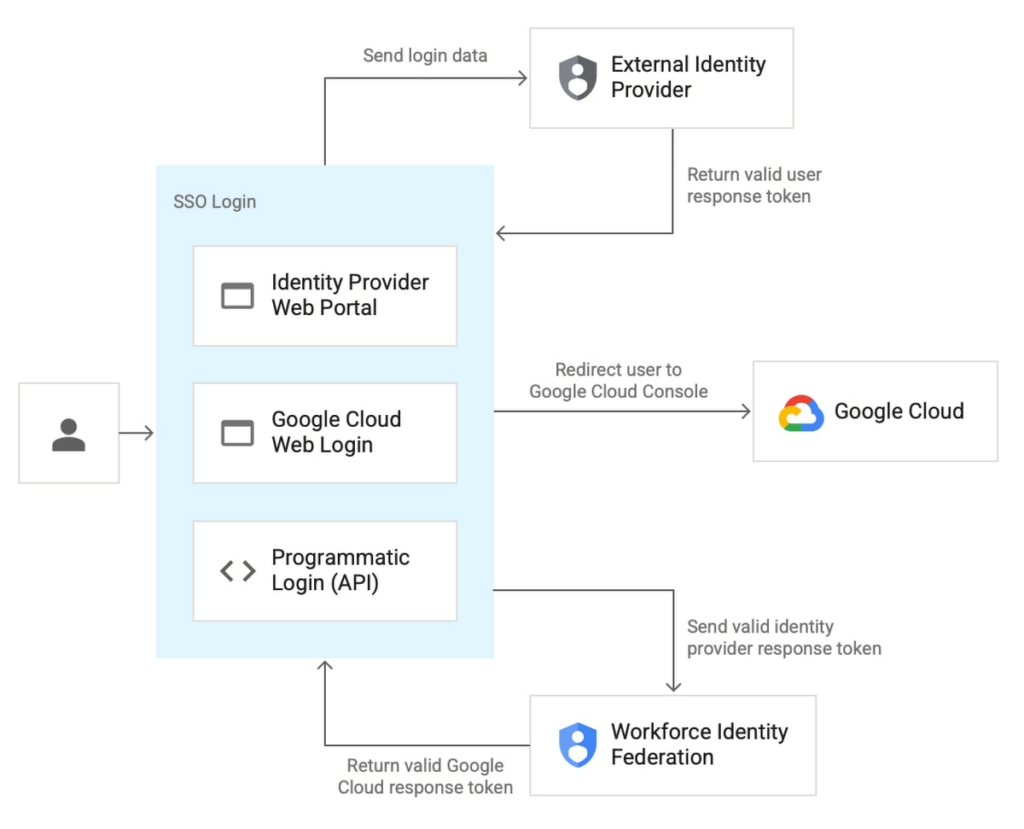
Workforce Identity Federation is another example of how we are working to make Google Cloud’s Invisible Security vision a reality, in this case delivering secure access leveraging customers’ current identity and access management solutions without the need for redundant user administration

VMware is one of our customers using Workforce Identity Federation in Preview. Thiru Bhat, director at VMware, explained why he’s excited for the new feature.
“VMware runs its own IdP and we needed a solution to allow our developers to access their Google Cloud projects while maintaining corporate control over identities and permissions. Syncing of user identities outside of our IdP is not permitted per our InfoSec policies and we deployed Google Cloud’s Workforce Identity Federation to fulfill our identity requirements. Workforce Identity Federation feature meets our needs with a solution that is robust and straightforward to configure.”
Here’s a closer look at a few use cases and the benefits from the new Workforce Identity Federation.
Use case: Employee sign-in and authorization
Streamlined authentication experience with fine-grained access control
Workforce Identity Federation can enable your organization’s users to access Google Cloud through the same login experience they already use for their existing IdP for single sign-on. Workforce Identity Federation also can enable fine-grained access through attribute mapping and attribute conditions. Attributes — which some IdPs call claims — contain additional information about users.
Google Cloud can use these attributes to further inform authentication decisions. Attribute mapping lets your administrators map identity attributes that are defined in your IdP to those that Google Cloud can use. Your administrators can configure Google Cloud with attribute conditions to authenticate conditionally — to let only a subset of external identities authenticate to your Google Cloud project based on attributes.
For example, your administrators might want to let only those employees who are part of the accounting team sign in. To do this, your administrators can configure an IdP attribute, such as EmployeeJobFamily. Using attribute mapping, they could map this attribute to a similar attribute in Google Cloud, such as employee_job_family. Then, they could configure an attribute condition, assertion.employee_job_family=="accounting".
Use case: Secure access for partners and vendors
Restricted and secure access to Google Cloud services from a partner or vendor that has their own IdP and associated privacy and data policies
Today, the modern enterprise depends on partners and vendors more than ever. Partners and vendors can help scale enterprise workflows, but they also can introduce new complexities for IT teams, such as how to secure partner or vendor identities in addition to the rest of their enterprise users.
Workforce Identity Federation can enable enterprises to selectively federate users from partner or vendor IdPs without requiring enterprise IT teams to sync or create a separate identity store to use Google Cloud resources.
One common scenario where Workforce Identity Federation can help is when a company hires a partner or vendor to provide outsourced development services using cloud resources (such as when Google Kubernetes Engine (GKE) DevOps services are outsourced to a partner.) The company creates a separate workforce pool for the partner or vendor’s administrator, who can then use their own IdP to grant access to their workforce.
This use case can also help support organizations who have requirements to store and maintain identity information locally in support of data residency or digital sovereignty initiatives. By using a local IdP, either customer-managed or partner-managed, and federating identities to Google Cloud, organizations can further strengthen control over their identity information.
Seamless experience for users, easy access management for administrators
Before Workforce Identity Federation, organizations would need to duplicate user identities from their IdP by creating user accounts in Google Cloud Identity. Workforce Identity Federation can help you access Google Cloud without having to first create Cloud Identity user accounts. It also reduces toil by eliminating the need to maintain two separate identity management systems.
Identity providers such as ForgeRock see tremendous value in the Workforce Identity Federation, and how Google Cloud can work with them to jointly help customers manage workforce identities. Peter Barker, ForgeRock’s Chief Product Officer, said that his company’s partnership with Google Cloud makes identity management easy and secure for administrators and users alike.
“Our strategic partnership with Google Cloud delivers great value to our customers and we’re excited to continue to expand our relationship. This integration with Google Cloud Workforce Identity Federation enables ForgeRock customers to leverage their current IAM investments and makes it easier for employees, contractors, and partners to securely access Google Cloud resources.”
Getting started with Workforce Identity Federation
Workforce Identity Federation is now available in Preview to customers already using Google Cloud. You can learn more about Workforce Identity Federation by visiting our webpage and watching this video.
Please contact your account manager to see if workforce identity federation is the right fit for your organization. And, you can get started with these new capabilities today using our product documentation.
Bringing Multiple Security Elements Together: Chrome

5382
Of your peers have already read this article.
2:00 Minutes
The most insightful time you'll spend today!
Security and the way we’ve been able to advance user protections over the years is hands down one of my favorite topics when it comes to Chrome. I’ve been on the Chrome team for over 14 years and have seen the browser evolve to become a critical tool that helps people get work done at home or in the office. At the same time, Chrome is often the best line of defense to protect users against malicious software on the internet.
Now more than ever, security has to be top of mind for IT and security teams. Cybercrime is up 600% due to the COVID-19 pandemic, and remote work has increased the average cost of a data breach by $137,000. Those numbers are staggering. And IT teams need to make sure every piece of their tech stack helps support their security needs.
Chrome has worked for years to quickly mitigate risks, block malicious sites and content, and proactively improve web security to keep your users and corporate data safe, pioneering new layered defenses like sandboxing and site isolation. When we think of security and Chrome, we believe it takes multiple elements of security coming together to give organizations the best protection possible.
Security you don’t have to think about: Chrome has many built in protections in place by default that benefit all users. This includes our team’s work to minimize zero days and roll out fixes quickly. With auto updates enabled, Chrome offers enterprises fast and automatic fixes for zero day vulnerabilities. The Chrome security team recently published a post explaining the state of in-wild-bugs that’s worth a read. More examples of the defense-in-depth Chrome offers include capabilities like site isolation and sandboxing that keep malicious code from affecting other visited sites or impacting user machines. Our scanning infrastructure helps us detect and remove harmful extensions from the Chrome Web Store (in fact, last year we saw an almost 90% drop in malware) to prevent your end users from getting infected with malicious extensions. These are protections built directly into Chrome that automatically keep your users and organization safe.
Protections for Chrome users: We provide additional layers of protection that keep your end users safe while they’re on the web and give them helpful information whenever there are potential security risks. For example, Safe Browsing, offered natively in Chrome, helps protect devices by showing warnings to users when they attempt to navigate to dangerous sites or download malicious files. We also give users insights into the safety of their passwords, letting them know if their passwords have been compromised, or even prompting them to change their corporate password if they try to re-use it against company policies. You users are working hard to get things done, and Chrome’s layered security supports their workflows while helping them stay safe on the web.
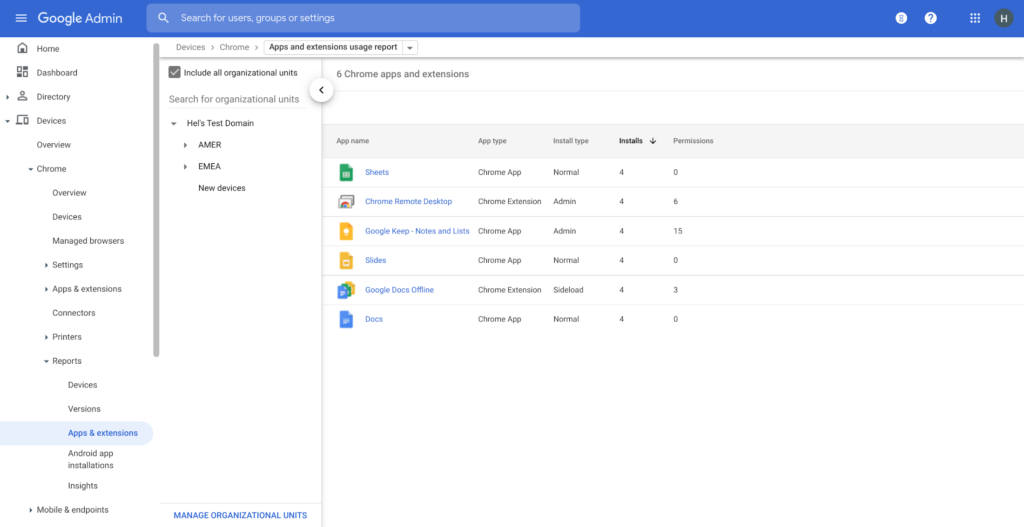
Enterprise Controls: Every organization has unique security needs. That’s why Chrome provides enterprises with advanced safeguards and granular policy management to help meet those security goals. With hundreds of policy options, admins can use a variety of management tools, including Chrome Browser Cloud Management, to customize the browser. Chrome Browser Cloud Management goes even further, providing powerful enterprise extension management, a security priority for many organizations. Our extension request workflow allows end users to request extensions and admins to allow or deny extension requests. We also recently released extension pinning that allows admins to pin to specific versions of extensions to support any internal security review processes.
Visibility and reporting is another focus area to support IT teams. Through Chrome Browser Cloud Management, administrators can get more insight into their browser environment. This data can help IT teams make security decisions, better understand the devices running Chrome and investigate if issues arise.
Zero trust security: Finally, Chrome can help modernize an enterprise’s security strategy by migrating to Zero Trust access models. BeyondCorp Enterprise helps secure endpoints by directly integrating Threat and Data Protection in Chrome. This protects against intentional or accidental data loss and prevents malware and phishing in real-time. Additionally, Chrome and BeyondCorp Enterprise provide device trust and endpoint security signals directly from the browser, significantly easing deployment of zero-trust in your environment. In 2022, we plan to partner with leading players in the cybersecurity and zero trust space to add additional integrations.
For security recommendations, check out the new Chrome 2.1 CIS Benchmark that covers independent recommendations on which Chrome policies to configure to help support organizations’ security and compliance needs.
More Relevant Stories for Your Company

Thwart Ransomware Threats with Google Cloud’s 5 Pillars of Protection
Ransomware, a form of malware that encrypts a user’s or organization’s most important files or data rendering them unreadable, isn’t a novel threat in the world of computer security. These destructive, financially-motivated attacks where cybercriminals demand payment to decrypt data and restore access have been studied and documented for many years. Today’s

Customer Voices: How Firms from Across Industries Leverage Google Cloud
From powering everyday operations and accelerating application innovation, to providing tools for specific business needs and executing on big ideas, to advancing the security of technology solutions, companies from across industries have leveraged Google Cloud for business benefits. Companies from across industries have turned to Google Cloud for transforming their

Taking Maps Further: New Website Experience for Product Discovery, Budgeting and Access to Dev Documentation
For more than 15 years, developers have used Google Maps Platform to deliver location-based experiences to their end users and used location intelligence to optimize their businesses. Along this journey, we’ve made a variety of changes to better support our community as needs have changed and new industries and technologies

Takeaways from the Google Cloud Public Sector Summit on Prioritizing Tech Investments
Editor’s note: Today’s post highlights five takeaways from our session at the first ever Google Cloud Public Sector Summit. To watch the full session, check out All the Right Moves: Prioritizing Investments in Technology. Now more than ever, government agencies need to invest in digital services to fulfill their missions and better
