





4479
Of your peers have already watched this video.
9:49 Minutes
The most insightful time you'll spend today!
Quick Tips: How to Set Up a Business Without Investing Too Much
Running a business is everybody’s dream but only a few get to realize it. Among the many hurdles that entrepreneurs face, setting up the business with everyday tools like business emails, calendars, and finding cost-effective ways to collaborate are imperatives.
But it isn’t a struggle in the age of the cloud. Cloud computing takes care of infrastructure costs, breaks geographical boundaries, and makes collaboration across continents a walk in the park.
Google’s G Suite—a cloud-based collaboration and productivity platform—helps organizations achieve exactly that. G Suite is an affordable option to keeping your business organized. It’s the one stop shop for collaborating, creating consistency, and developing the professionalism your business needs.
What does that essentially mean?
Your marketing teams can create pitch presentations on Slides by collaborating in real time. All of them can work on the same version of the presentation all at once, ensuring everybody is on the same page.
Your finance teams can move over complex spreadsheet formulas and analyse costs just by asking—in words—Google Sheets to throw up answers to questions like: “What was our average spend last month?”
Your executive boards can meet on Hangouts from wherever they are, leading to faster decision-making.
Amber Hurdle, author of The Bombshell Business Woman, expands on the Tech Tools chapter of her book, by walking through how she uses G Suite to streamline her business.
YoungCapital Scales Up with Ease With Chrome Enterprise and G Suite

4289
Of your peers have already read this article.
2:45 Minutes
The most insightful time you'll spend today!
When your business is rapidly adding new employees, expanding to new countries, and always focused on staying ahead of the competition, you have to take a hard look at the tools that are slowing you down—and swap them out for better ones that can keep pace with the company.
We’re expanding YoungCapital in Germany, which means more offices, more people, and more technology to make the business run smoothly.
As we scale, Google Cloud tools like Chromebooks and G Suite help us grow our business efficiently. They free us up from sluggish, time-intensive technology that’s hard to maintain and repair, and give us the freedom to work together in faster, smarter ways.
Free from hours of device setup. Some months, there are as many as 40 new employees starting at YoungCapital—and as we continue to expand that number will continue to rise, especially now that we’ve opened three new offices in Germany.
With our old Windows desktops, setting up new computers could take up to an hour per employee (which can add up to about 40 hours a month for IT). Today, using Chrome Enterprise tools, it takes about five minutes to get an Acer Spin or Pixelbook ready to hand off to a new hire—saving us more than three months per year of device setup time.
Free from VPNs. Our previous Windows machines required a complicated virtual private network (VPN) for accessing corporate files outside of the office.
Using a VPN was complicated for our employees because the software wasn’t intuitive; if an employee had trouble signing into the VPN while at home or traveling, they could not log in and work as quickly as they needed to. With Chromebooks, all you need is an online connection to sign into G Suite to access files and work from anywhere.
From our perspective, Chromebooks are resistant to threats like ransomware and phishing attacks, giving us confidence that our data can stay secure.
With Chrome Enterprise Upgrade, our IT admins can strengthen security even further: for example, by enabling advanced security features that help block vulnerabilities, locking down lost or stolen devices right away, and setting device security policies in the cloud so devices everywhere are safer.
Free from infrastructure. We used to have to invest in servers, and then add more time and money to keep them running. Now we don’t have to run the business on infrastructure or hire people to maintain it—we can just use Google’s cloud.
NextNovate is helping us make the most of Google Cloud Platform, like integrating some of our proprietary applications with G Suite and building our own add-ons. For example, we created a button for Gmail that connects to our job candidate database; when candidates email us, we can click on the button and see their profiles and work experience.
Free from multiple passwords and logins. Chrome Browser and G Suite with single sign-provider SAML are the portal to all the productivity apps our employees need. Once people log in to G Suite, they don’t have to remember a bunch of other user names and passwords. The IT team loves it too, because we don’t have to spend hours zeroing out passwords and creating new ones.
Free to manage cross-country devices easily in the cloud. Our four-person IT support team, which keeps our systems humming, hasn’t grown, even though we’ve doubled the number of employees.
When we were on Windows devices, we fielded roughly 1,800 IT support requests every month. Now we get about 1,300 requests a month, from a much bigger employee base. This translates to nearly 30% fewer requests for our lean support team, which reduces their workload significantly even though we have roughly 20% more employees—all made possible with Chrome Enterprise.
Being free of slow, high-maintenance technology doesn’t just make the IT department happy—people are actually changing how they work. They no longer send files to each other by email or struggle to keep track of versions; they store everything in Google Drive and work together in Google Docs on a single document at the same time.
And instead of traveling to other offices, connecting with each other in video conferences on Hangouts Meet has become a completely natural way to do business.
With Chromebooks and G Suite, we’re ready for anything: more new markets, more employees, and more-flexible ways to work together and shake up the staffing industry.
7 Tricks No One Will Tell You to Work Smarter and Grow Your Business Faster

7121
Of your peers have already read this article.
4:20 Minutes
The most insightful time you'll spend today!
We’re dedicated to creating products that are helpful for our users, including those in a business setting. G Suite helps companies of all sizes transform how they work by encouraging people to focus on what really matters, whether that be fostering a culture of collaboration like Iron Mountain or reducing IT and infrastructure costs like Nielsen.
Here’s how Google’s leading artificial intelligence (AI) can help people accomplish more in the workplace. First, Google Docs is packed with more assistive features to help you create high-quality work more quickly. In addition, the Google Assistant has been helping people get things done in their personal lives for the past few years. With remote working becoming the norm these days, Google Assistant has more features to help G Suite users work more efficiently and seamlessly.
Assistive writing features in Google Docs
AI-powered capabilities within Docs makes it faster and easier for people to create high-quality, error-free content.
- Write faster. Smart Compose in Google Docs uses Google AI to suggest complete sentences as they are created. Smart Compose has already saved people from typing more than 2 billion characters each week.
- Cut back on grammatical and spelling errors. To build on the intelligence, Docs is using cutting-edge, neural network technology to power grammar suggestions. The neural network approach has proven to help individuals catch even more errors in internal experiments. In addition, we’ve brought spelling autocorrect to Docs. Using the power of Google Search, this intelligent feature constantly learns new words or phrases that become part of the English language from search to inform spelling suggestions in documents, just as it does already in Gmail.
- Receive suggestions that are tailored to your business. Lastly, our machine-learning based spelling suggestions to recognize commonly used words from your business domain to inform recommendations is also a useful feature. For example, if your organization has an internal project name or acronym that’s commonly used, Docs will not only stop underlining such terms, but will also suggest corrections when these terms are misspelled.
Expanding the power of the Google Assistant for G Suite Businesses
You can accomplish more on the go with the Google Assistant when you’re logged into your G Suite account. We’ve also enabled remote workers with the Asus Hangouts Meet Hardware kit to respond to voice commands in meeting rooms.
- Manage your calendar while on the move. Whether you’re on your commute home or on the go between meetings, the Google Assistant can help you manage scheduling in Google Calendar. You can ask the Assistant to read your calendar, create events, cancel events, or even reschedule events.
- Send quick messages and dial into calls hands-free. Beyond managing your calendar, we know that sometimes you need to send messages and join calls on the go. You can say things like, “Hey Google, join my next meeting” or “Hey Google, send an email to my next meeting”.
- Have a more seamless meeting experience. Google Assistant is available in meeting rooms with Asus Hangouts Meet Hardware kit. Instead of clicking into meetings to join them, people can say voice commands to the Assistant to join a meeting, exit a meeting, or even make a phone call.
- Increase accessibility in meeting rooms. Another goal in bringing the Google Assistant into meeting rooms is to increase accessibility. People can say a voice command, like “Hey, Google, turn on spoken feedback,” to use accessibility features without having to find the button to turn them on.
How Buffalo Tours CEO Found a Way to Increase Bookings by Over 1 Percent

4413
Of your peers have already read this article.
2:30 Minutes
The most insightful time you'll spend today!
Buffalo Tours serves tons of passengers each month, helping them with various aspects of their travel. These involve tour booking requests from passengers, request processing and information checking. Prior to the Google implementation, Buffalo Tour’s email exchange was supported by another email server. Employees lamented the frequent loss of emails and the ineffective spam filtering system, which resulted in legitimate emails from customers being treated as junk mail. Prior to adopting Gmail, the trend of lost emails or failed delivery accounted for 5% of the business. This means that five out of every 100 incoming requests to Buffalo Tours were lost.
“We are in the business of servicing customers and when missing emails become a regularity, it damages our company’s credibility and image, not to mention a loss of company revenue. Internal communication with the various representative offices is mostly conducted online, and lost emails inhibits workplace collaboration,” said Bui Anh Tuan, IT manager of Buffalo Tours.
Managing the email server was also a challenge as the server was hosted by a network operator but located on-premise. Due to the logistical challenges, each time the server failed, it took some time before the server could be rebooted. The complex system configuration also meant it was not easy to get new employees on board.
Gmail emerged as a viable option to replace Buffalo Tour’s existing email server as it was cloud-based and user-friendly. At the start, Buffalo Tours made use of the free Gmail service for business. Happy with the results, Buffalo Tours decided to switch to G Suite on a permanent basis.
“G Suite has enabled us to manage our emails in a more professional manner. This means improved work efficiency and better customer service. Furthermore, it also offers many other essential services that benefit the work that we do,” said Tuan.
Many employees at Buffalo Tours have been utilizing Gmail as their main communication tool. Buffalo Tours is looking at ways to further utilize the other products within G Suite such as Google Sites, Google Docs, and Google Drive.
Since making the switch to Gmail, the company does not have to bear the cost of buying and maintaining a physical server, resulting in cost savings of around 17% annually. The rate of lost emails is now down to almost zero, which is the icing on the cake for Buffalo Tours.
One of the distinct advantages of Gmail is its impressive spam filter capabilities. For the premium version, this service is enhanced with Blacklist and Whitelist features, making the spam filter even more effective. With the enhanced control features, business and junk mail are easily categorised.
“Our staff can easily input the IDs of the entire office and regular customers to the Whitelist. With a click of a mouse, important business emails are never missed. There is a 10-15% increase in employee productivity now that the issue of lost emails is resolved,” Tuan commented. Gmail has also brought about increased convenience to Buffalo Tours. G Suite is easy to configure for any new employee. All employees need is their username, password and an Internet connection to check emails. What used to take a lot of time and resources is now a simple administration process.
With the current blooming mobility trend, Gmail provides Buffalo Tours with the flexibility to empower employees to work more efficiently. Employees can now access their work emails on their personal smartphones, tablets or other mobile devices. “Since we switched to G Suite, there have been zero customer complaints around the inability to contact the sales division. Meanwhile, our business continues to prosper and our yearly bookings increased by 1.5%. Together with Google, we are confident of our continued growth,” concluded Tuan.
5903
Of your peers have already watched this video.
1:30 Minutes
The most insightful time you'll spend today!
FFF Enterprises See 80% Improvements in Speed at Lower Cost by Moving SAP Data to Google Cloud
FFF Enterprises, a pharmaceutical distributor of lifesaving biopharma products, vaccines and plasma products deployed SAP on Google Cloud to leverage its ability to scale server demands, reduce costs and improve speed and performance. Learn how the migration helps FFF empower healthcare to care!
Gmail Turns 18, Has 3 Billion Users! A Product Lead Breaks Down How Gmail Stays Interesting

3816
Of your peers have already read this article.
1:30 Minutes
The most insightful time you'll spend today!
This April, Gmail will be 18 years old. That’s a big milestone, given that email as a medium just turned 50.
Launched in 2004—with its 1 GB free storage, conversation based grouping, and enhanced search capabilities—Gmail quickly became one of the most popular email services in the world.
What started off as Paul Buchheit’s side project is now part of Google Workspace, a solution that’s used by over 3 billion users.
Yet despite this growth and Gmail’s long history, the product continues to find new ways to delight its users with great experiences, new features, and constant innovation.
How does the product team do it?
To help us unpack this question, I interviewed Matthew Izatt, Product Lead for Gmail.
Matthew has been building and growing Gmail for the last 10+ years. He started off in mobile where he built the Android and iOS apps for Gmail, and eventually he became the lead product owner for all of Gmail’s front end. He also led the development of the new Gmail in 2018, which was a complex rebuild of the technical architecture and visual design, along with the addition of multiple enterprise focused features. Since then, he has been leading Google’s charge on redefining how we work as the product lead for the Workspace Platform and Partnerships efforts with a team of over 100.
What follows is an edited version of our interview.
Mustafa Kapadia: Matt, thank you for joining us. Now, before we jump into how your team does its magic, can you please share with me some of the challenges you face when you build a new feature or experience on Gmail?
Matthew Izatt: Thanks Mustafa. And I think this is a great place to start.
One of the biggest challenges is that Google Workspace is used by over 3 billion users, and while that is great, there are many different ways of using our product. It’s not like a doorbell, where there is only one way of using it. With Gmail, it’s like an infinite Swiss army knife, where everyone has their own favorite way of using the product.
Second, Gmail is a critical product for many of our users. Yes, it’s fun to use, but people use it to get important work done—sending job proposals, emailing with their kids’ teachers, or booking medical appointments. This is why we have to be careful about what we experiment with and what we roll out. We can’t just throw things out there and see what works. We have to do our homework.
Third, we have to constantly innovate and think outside the box. Email is an old product, but it continues to evolve. Every day we have new startups reinventing email and challenging the big players. If we are to remain a market leader, we literally have to rethink the product every few years. Which is why creating the new Gmail was so much fun.
Mustafa: I don’t envy you. This is not an easy product to build. Going back to something you touched on: Given these hurdles, how do you build these great experiences? Is there an example that you can share with us?
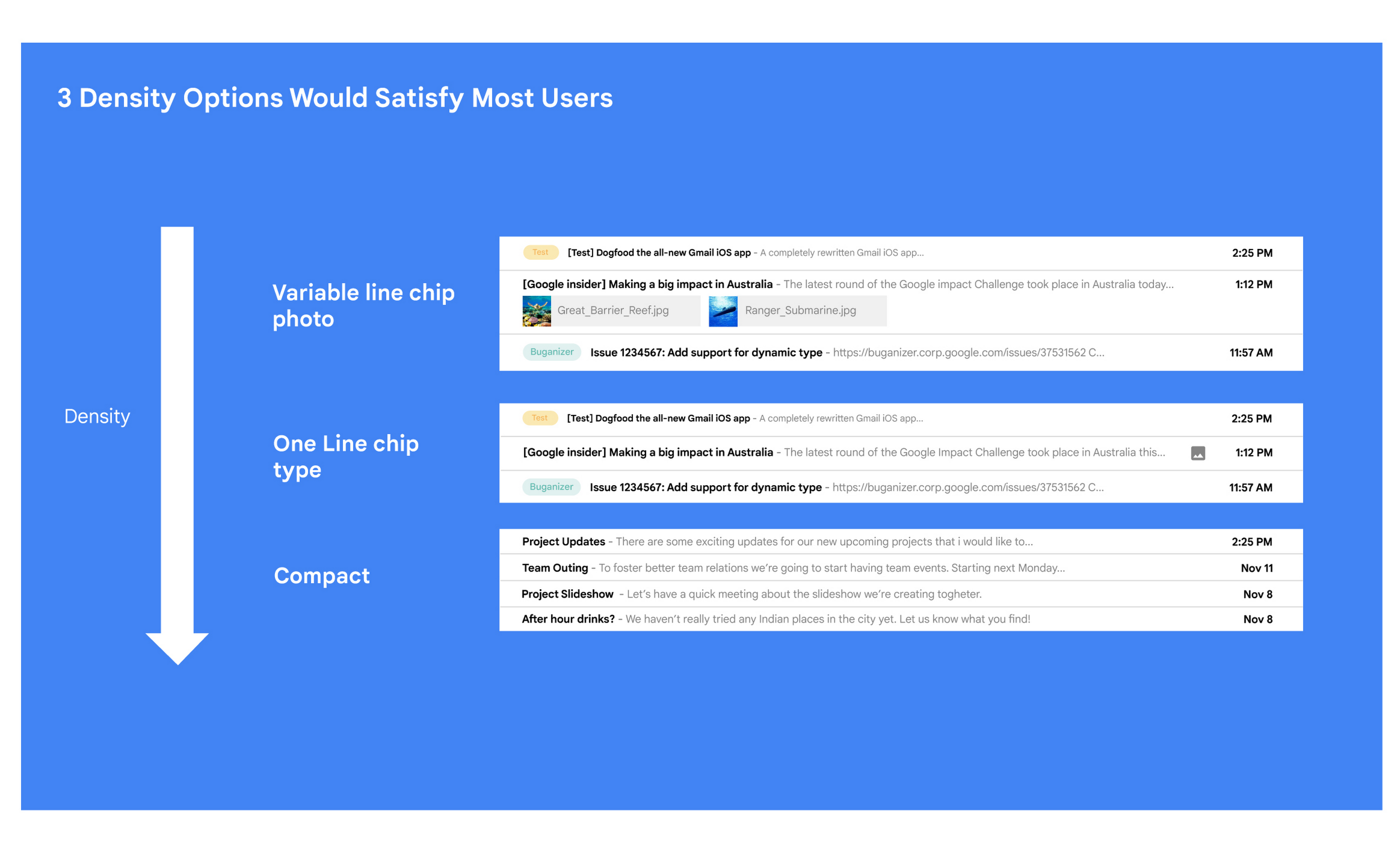
Matt: A specific example I always like to share is the story of how we came up with the right display density on our thread list. The thread list is your inbox; it’s the list of all the messages that you have. The display density is how that information is presented to you.
In Gmail you can choose to have fewer messages with a lot of information about each message. Or you can choose to see a larger number of messages with much less information about each message.
It really comes down to your preferences. And it’s one of the reasons why so many users like using Gmail. In fact, being able to set inbox display preferences is actually one of the top 10 most used settings within Gmail.
Mustafa: So you were really trying to give users choice on how they would like their information presented?
Matt: Exactly. Now, we could have added 100 different levers so that every user could customize their email feed to an infinite degree. While that is possible from a coding perspective, it’s not practical for three reasons.
First, infinite choice sounds good on paper, but in reality, too many options creates a confusing user experience. Second, development would take many months—maybe even a year. And third, it would be a long-term maintenance nightmare.
Mustafa: So how did you go about doing it? Share with me the inner workings of Gmail in Google Workspace. How is the sausage made?
Matt: Well, it came down to four key steps, working closely with our amazing UX Research team.
First came the primary research to find out if building this experience was worth doing. After all, what is the point of building it if no one wants it? For this we actually sat down with real users inside and outside of Google to understand their needs.
Second, we brainstormed 100 potential solutions and narrowed them down to 8 options. Then we mocked up each of the 8 options to see how they looked.

While it would have been easy to just pick the option we liked the most and build it, we wanted to create what our users want, not what we like the most. So we took those options and surveyed the users from step 1 again. We specifically asked them to rank their preferences across three dimensions: Love It, Hate It, or Meh!
Based on the user responses, we realized that 3 configurations would meet the needs of most users. These were the three options we developed and deployed to Google Workplace.
Mustafa: I love how you used data to guide your decision of what to build. This really is Google’s secret sauce—first-hand data collected from users.
Matt: Absolutely. Without their feedback, we would have never been able to narrow down to the 3 options that would satisfy most of our users.
Mustafa: Talking about risks: Getting user feedback and validating before you build is one way to de-risk your product, but you even de-risked your product launch strategy, correct?
Matt: Yes. Sometimes we launch features individually. Sometimes we launch them as a group. In this particular case, we had a lot of moving parts. We had a complete UI redesign, 10 or 12 new features, and architecture changes.
So to de-risk this, we put in place—I kid you not—a 26-stage launch process. We started off with the technical architecture changes—stuff that the user would not notice—to make sure that it was working. And we did it in small increments.
Then we rolled out a few features at a time, launching it first to our early access program—where users have opted in to receive updates. We measured their reaction and satisfaction first, and then moved on to the next group.
At every stage, we kept our blast radius small and put in these checks and balances where we could launch, measure reaction, and then reassess our strategy. And that worked out pretty well for us for this massive launch.
Mustafa: Agreed! Thank you for taking the time to talk to me. And good luck with building the next version of Gmail.
Matt: Thanks for having me.
More Relevant Stories for Your Company

How EDI empowers its workforce in the field, in the office, and at home
For consulting companies such as EDI Environmental Dynamics Inc. (EDI), interactions among employees and customers are the direct drivers of value, and helping them collaborate has a tangible impact on the bottom line. However, connecting people from the field to work-from-home spaces to the office is no easy task. EDI, an environmental



On-Demand Webinar: 3 Ways Collaboration Transforms How Your Company Works
A majority of your employees and teams spend 38% of their time unsuccessfully searching and recreating content, according to IDC. They also spend 20% of their time looking for information, according to McKinsey. That’s 58% of time lost in unproductive tasks that could have been spent coming up with the

How This Company Doubled in Size and Expanded its Business in Just Six Months
In the past six months, Mynd Property Management has doubled in size—in part by hiring, but also through acquisitions that help build our business. It’s an exciting time to be at Mynd—every week brings new people who need to be set up with email and network access, which can also

Elevate Your SRE Practice: Streamlining Your SLO Design Process
Poll three Site Reliability Engineers with the question "What is SRE?" and you're likely to get five different answers: an implementation of DevOps, a role, a set of practices, a cultural shift, a snazzy title. While these definitions may not necessarily align with those in the SRE books, there is one
