





Time-series Model on Google Cloud Allows Better Transparency on Fishing and Marine Activities

4391
Of your peers have already read this article.
3:30 Minutes
The most insightful time you'll spend today!
Who would have known that today technology would enable us with the ability to use machine learning to track vessel activity, and make pattern inferences to help address IUU (illegal, unreported, and unregulated) fishing activities. What’s even more noteworthy is that we now have the computing power to share this information publicly in order to enable fair and sustainable use of our ocean.
An amazing group of humans at the nonprofit Global Fishing Watch took on this massive big data challenge and succeeded. You can immediately access their dynamic map on their website globalfishingwatch.org/map that is bringing greater transparency to fishing activity and supporting the creation and management of marine protected areas throughout the world.
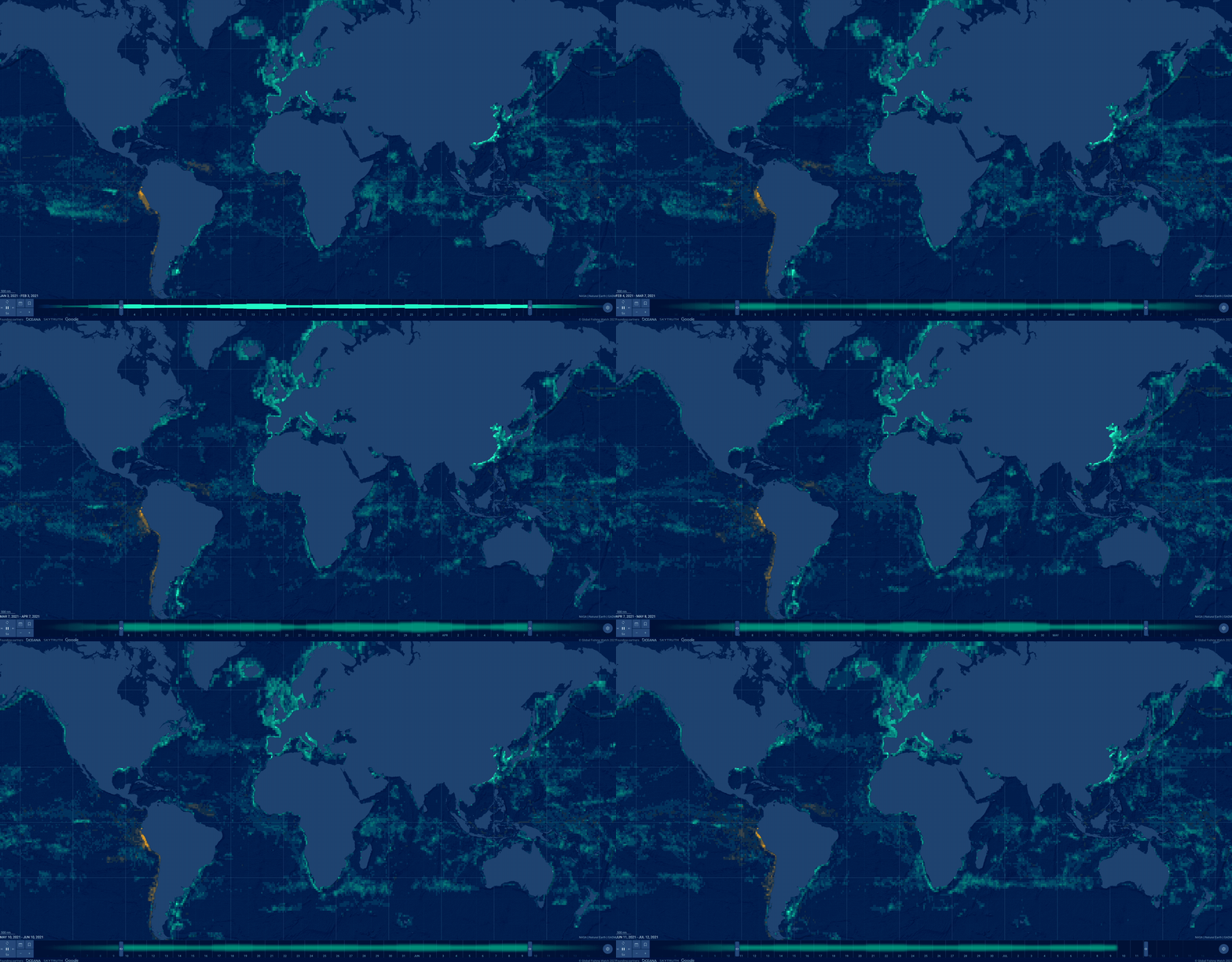
In our second episode of our People and Planet AI series we were inspired by their ML solution to this challenge, and we built a short video and sample with all the relevant code you need to get started with building a basic time-series classification model in Google Cloud, and visualize it in an interactive map.
Architecture
These are the components used to build a model for this sample:
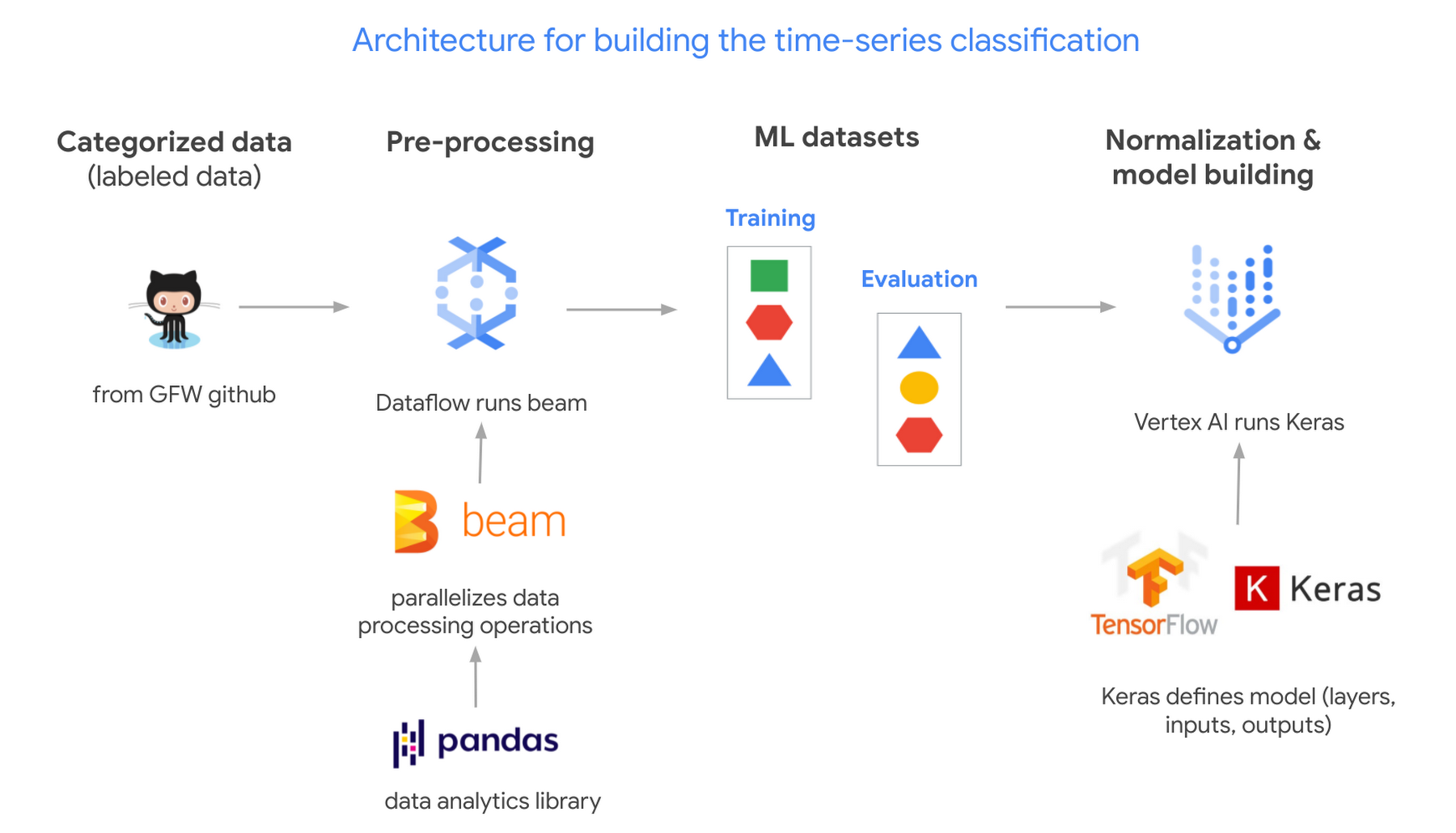
- Global Fishing Watch GitHub: where we got the data
- Apache Beam: (open source library) runs on Dataflow.
- Dataflow: (Google’s data processing service) creates 2 datasets; 1 for training a model and the other to evaluate its results.
- TensorflowKeras: (high level API library) used to define a machine learning model, which we then train in Vertex AI.
- Vertex AI: (a platform to build, deploy, and scale ML models) we train and output the model.
Pricing and steps
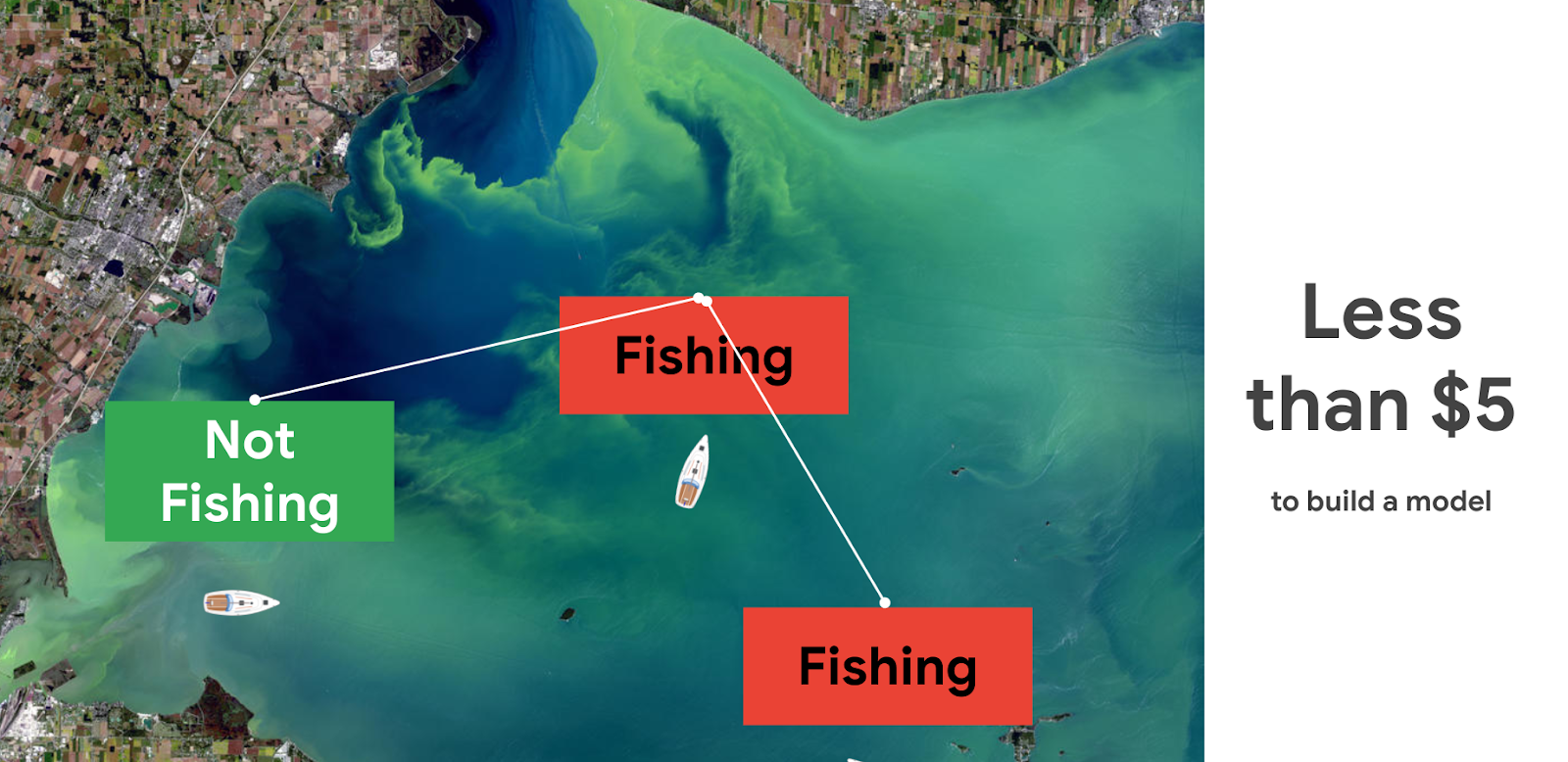
The total cost to run this solution was less than $5.
There are seven steps we went through with their approximate time and cost:
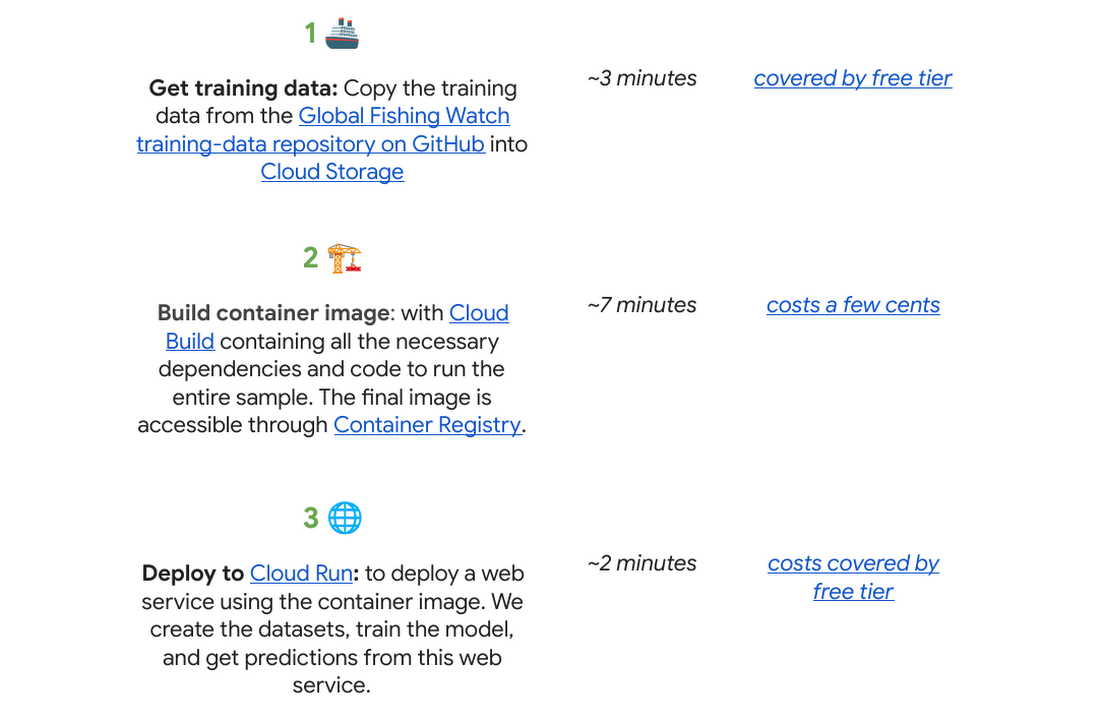
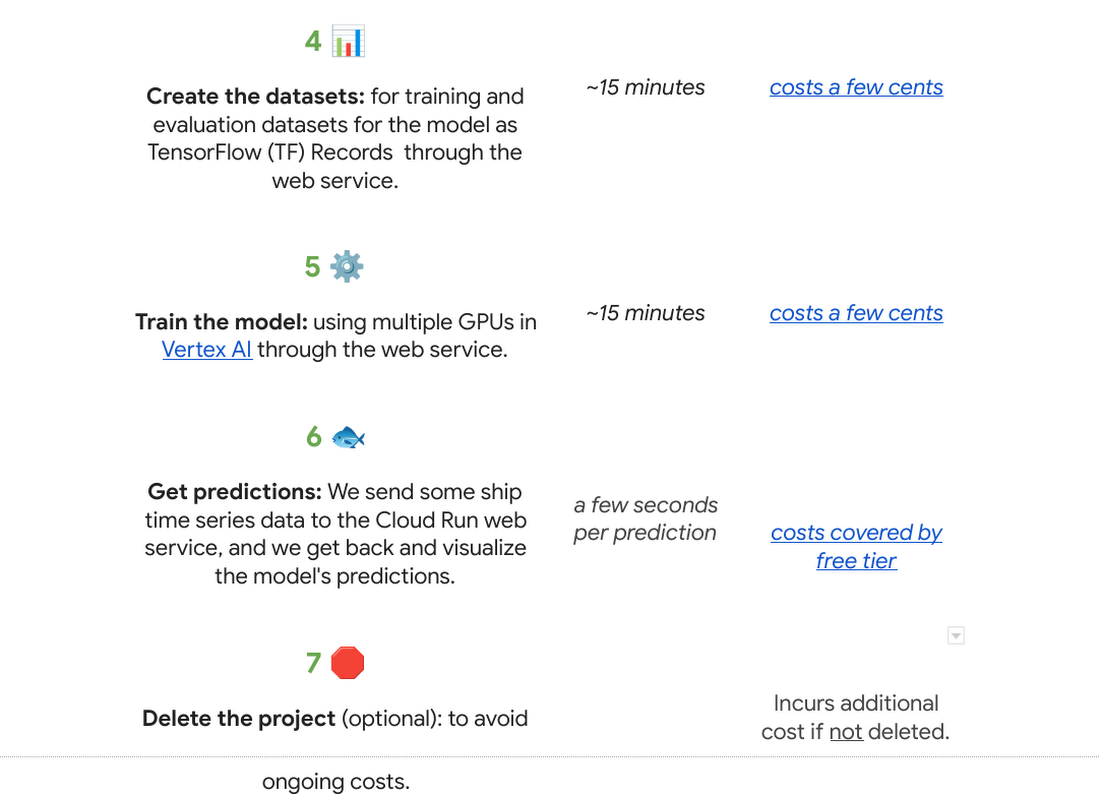
Why do we use a time series classification model?
Vessels in the ocean are constantly moving, which creates distinctive patterns from a satellite view.

We can train a model to recognize the shapes of a vessel’s trajectory. Large vessels are required to use the automatic identification system, or AIS. The GPS-like transponders regularly broadcast a vessel’s maritime mobile service identity, or MMSI, and other critical information to nearby ships, as well as to terrestrial and satellite receivers. While AIS is designed to prevent collisions and boost overall safety at sea, it has turned out to be an invaluable system for monitoring vessels and detecting suspicious fishing behavior globally.

One tricky part is that the MMSI data location signal (which includes a timestamp, latitude, longitude, distance from port, and more) is not emitted at regular intervals. AIS broadcast frequency changes with vessel speed (faster at higher speeds), and not all AIS messages that are broadcast are received – terrestrial receivers require line-of-sight, satellites must be overhead, and high vessel density can cause signal interference. For example, AIS messages might be received frequently as a vessel leaves the docks and operates near shore, then less frequently as they move further offshore until satellite reception improves. This is challenging for a machine learning model to interpret. There are too many gaps in the data, which makes it hard to predict.
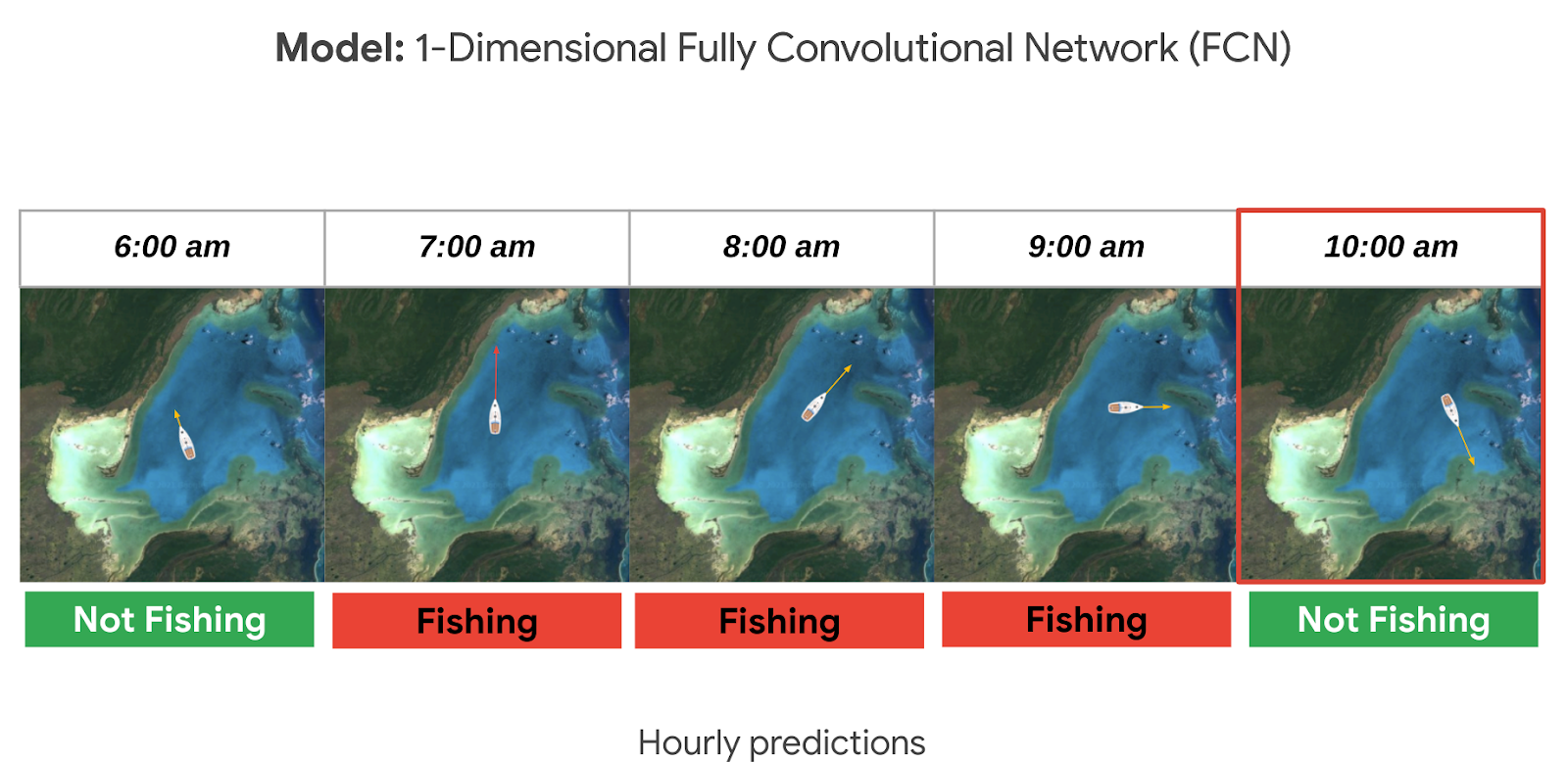
A way to solve this is to normalize the data and generate fixed-sized hourly windows. Then the model can predict if the vessel is fishing or not fishing for each hour.

It could be hard to know if a ship is fishing or not by just looking at its current position, speed, and direction. So we look at the data from the past as well, looking at the future could also be an option if we don’t need to do real time predictions. For this sample, it seemed reasonable to look 24 hours into the past to make a prediction. This means we need at least 25 hours of data to make a prediction for a single hour (24 hours in the past + 1 current hour). But we could predict longer time sequences as well. In general, to get hourly predictions, we need (n+24) hours of data.
Options to deploy and access the model
For this sample specifically we used Cloud Run to host the model as a web app so that other apps can call it to make predictions on an ongoing basis; this is our favorite in terms of pricing if you need to access your model from the internet over an extended period of time (charged per prediction request). You can also host it directly from Vertex AI where you trained and built the model, just note there is an hourly cost for using those VMs even if they are idle. If you do not need to access the model over the internet, you can make predictions locally or download the model onto a microcontroller if you have an IoT sensor strategy.

Want to go deeper?
If you found this project interesting and would like to dive deeper either into the specifics of the thought process behind each step of this solution or even run through the code in your own project (or test project); we invite you to check out our interactive sample hosted on Colab, which is a free Jupyter notebook. It serves as a guide with all the steps to run the sample, including visualizing the predictions on a dynamically moving map using an open source Python library called Folium.
There’s no prior experience required! Just click “open in Colab” which is linked at the bottom of GitHub.
You will need a Google Cloud Platform project. If you do not have a Google Cloud project you can create one with the free $300 Google Cloud credit, you just need to ensure you set up billing, and later delete the project after testing the desired sample.
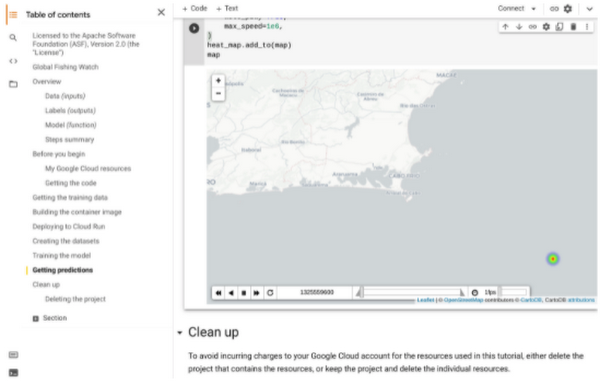
🌏🌎🌍 We hope to inspire you to build other beautiful climate-related solutions.
3784
Of your peers have already watched this video.
2:30 Minutes
The most insightful time you'll spend today!
How e-Com Firm Bukalapak Achieved 5X ROAS With Machine Learning
In 2018, Indonesia accounted for 94% of SEA’s $23 billion e-commerce industry. Today, the country’s massive e-commerce sector continues to grow, along with the number of brands looking for innovative ways to compete for a piece of the pie.
As one of the largest e-commerce companies in the region, Bukalapak receives a high volume of website visitors via direct traffic, Shopping ads, Google Display Network ads, and YouTube ads.
But when the brand noticed too many potential customers were browsing its website without converting, it knew it had to reconsider its marketing strategy. In an effort to reach consumers who were more likely to buy its products, Bukalapak turned to Smart Shopping campaigns.
Experimenting with Automation
By combining standard shopping and dynamic remarketing campaigns, Smart Shopping campaigns use automated bidding and ad placement to promote products to users across Search, Display, and YouTube. The automated solution also allows brands to reach high-value users who have already seen its ads or visited its site directly but left without converting.
Always open to trying new strategies, Bukalapak launched a three-month Smart Shopping campaign focused on 5% of its Shopping ads traffic using a maximize conversion value bidding strategy. The rest of the brand’s traffic (95%) was assigned standard shopping and dynamic remarketing campaigns, and the results of these were measured against the automated alternative.
The team was able to launch the Smart Shopping campaign with little manual effort by:
- creating a separate campaign with a determined traffic split and a recommended daily budget.
- uploading the Bukalapak logo and image banner for responsive display ads.
- designating Indonesia as the country of sale.
The campaign combined the brand’s existing product feed with Google’s machine learning algorithm to serve more than 40 million products to potential customers across multiple channels — all while automating ad placement and bidding for maximum conversion value.
Smart Shopping Campaign Saves Time, Boosts ROAS
The Smart Shopping campaign achieved 5X higher ROAS than the standard shopping effort while also driving 4X more conversions and 300% growth in conversion value, leading to 2.5X more new customers.
“The automation not only allowed the team to focus less on manual campaign optimization but also helped them boost relevance among high-value users,” said Tushar Bhatia, associate vice president of growth at Bukalapak.

The impressive results encouraged Bukalapak to increase its investment in Smart Shopping campaigns by 27X over the past year. The brand plans to remain at the forefront of innovation by continually testing new products and further optimizing its campaign strategies.
2021 was the Momentum for Contact Center AI!

3497
Of your peers have already read this article.
1:30 Minutes
The most insightful time you'll spend today!
2021 has been a high-stakes year for call centers, with many organizations forced to rapidly scale up their call center operations in response to ongoing pandemic disruptions. We’re proud that 2021 has also been an amazing year for Google Cloud’s Contact Center AI (CCAI), which has helped our customers adapt and thrive, despite the challenging conditions.
Beginning in January, we launched Dialogflow CX in GA. Agent Assist preview was released in May. Most recently, CCAI Insights GA was announced at Google Cloud NEXT in October. During NEXT, we shared lots of great content on how you can use CCAI to improve your customer experience with these breakout sessions:
- Using CCAI Insights to Better Understand Your Customers
- Customer Impact with Conversational AI
- Drive Results by Transforming the Customer Experience with AI-Powered Business Messages
But don’t just take our word for it. We also got a chance to hear how some companies are using CCAI to better reach their own customers, including The Home Depot, TELUS, and Love Holidays. We partnered with CDW to discuss transforming the contact center with AI and with Quantiphi on how to migrate from Dialogflow EX to CX. Our integration with Looker Block also makes CCAI Insights even more powerful by visualizing contact center metrics. Over the summer, we hosted a Dialogflow CX competition with more than 1,100 participants. Just last month, we showed how we’ve enabled businesses to use AI in their interactions using Google Business Messages. Looking to the future, we talked about the future in our article,“Reimagining your Customer Experience with Conversational AI.”
Amwell, a U.S.-based telehealth company that is launching CCAI, including the recently launched CCAI Insights, is among the enterprises harnessing AI to transform its call centers. “With Contact Center AI, we aim to digitize our support for improved operational efficiency and elevated analytics capabilities, while enhancing the customer experience for patients, providers, and staff,” says Paul Johnson, SVP Client Services at Amwell. “Contact Center AI Insights will allow Amwell to better understand why our platform users are reaching out to support and how they feel about the overall experience – valuable insights for our support organization.”
As we recap the momentum of CCAI for 2021, it’s also a good time to review exactly how CCAI works.
What is CCAI?
As the volume of customer calls increases, it’s becoming even more important to make the most of human agents’ time to lower costs and improve customer experiences. CCAI enables you to do just that: it frees human agents to concentrate on more complex calls by providing them with real-time information to better handle those calls.
Single source of intelligence: Contact Center AI provides a consistent, high-quality conversational experience across all channels and platforms, both human and virtual. Because the “brains” of CCAI are centralized in the cloud, you can apply consistent intelligence across every application in the customer journey.
Ability to go off-script: Huge cost savings can be realized by having a virtual agent handle voice calls. This is easier said than done, however, because conversations rarely are completely linear; instead, they meander from topic to topic, which is difficult to handle programmatically in a fixed-path Interactive Voice Response (IVR) system.
Contact Center AI has the ability to go “off script” — to let callers go down tangents or side paths to the main conversation, while still tracking towards the main objective of the call. With CCAI, your virtual agents can answer complex questions and complete complicated tasks, including allowing for unexpected stops and starts, unusual word choices, or implied meanings. Developers can define supplemental questions, and CCAI can easily retain the context, answer the supplemental question, and come back to the main flow.
Versatile fulfillment: CCAI has the ability to handle multiple use cases for the customer with the same virtual agent, which enables you to fully automate routine tasks and deflect calls. The same virtual agent can take a payment, update information like a phone number, give a customer information on their balance, and process information for other tasks, all within the same conversational flow.
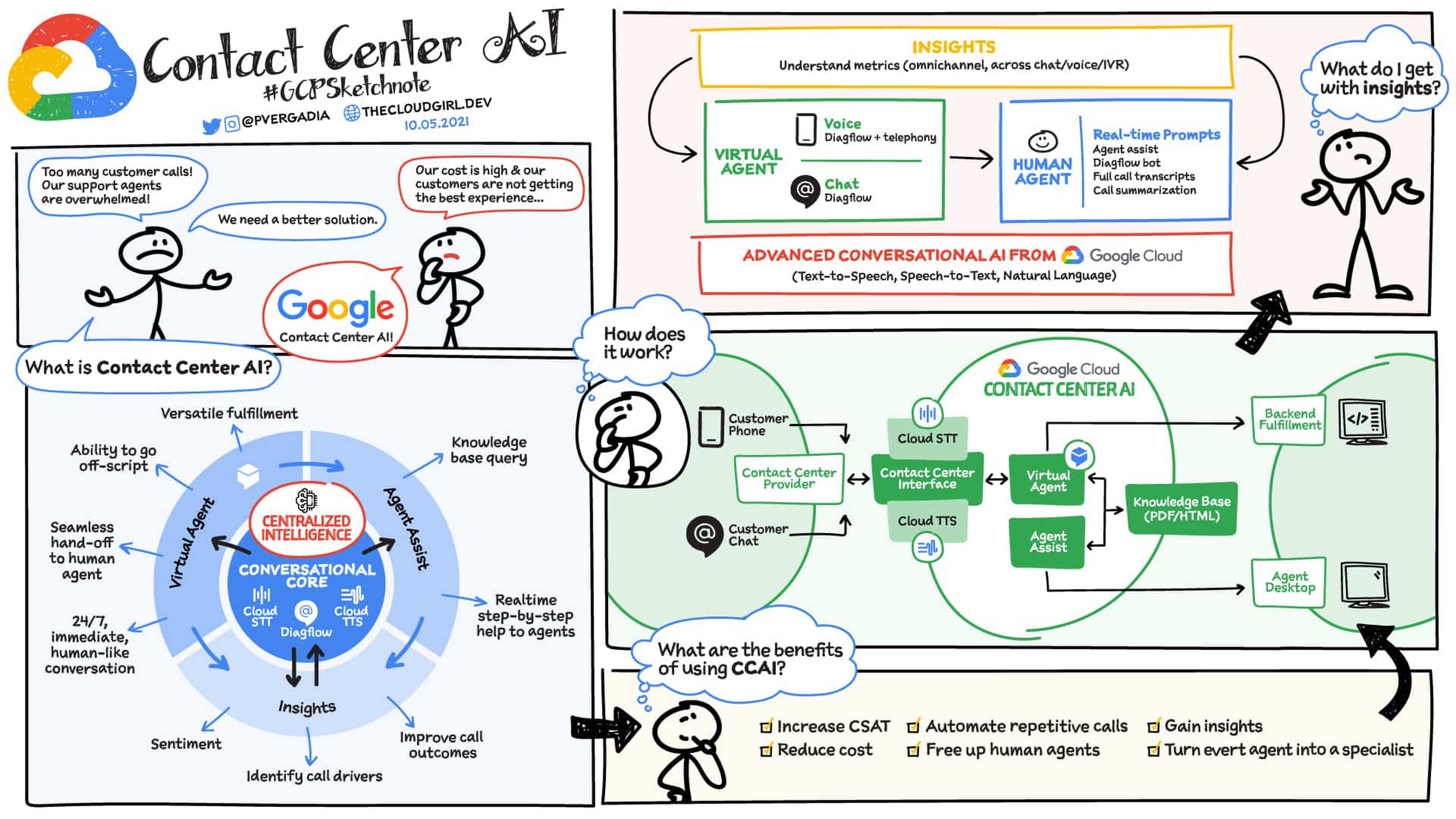
How does CCAI work?
CCAI has three key components:
- Conversation Core: This is the central AI brain that underpins CCAI and its ability to understand, talk, and interact. It enables and orchestrates high-quality conversational experiences at scale making it possible for customers to have conversations with a virtual agent that are as good as conversations with a human agent.
- Understand – Speech-to-text speech recognition understands what customers are saying regardless of how they phrase things, what vocabulary they use, what accent they have, and so on.
- Talk – Text-to-speech enables virtual agents to respond to customers in a natural, human-like manner that pushes the conversation along, rather than frustrate them.
- Interact – Dialogflow identifies customer intent and determines the appropriate next step. You can build conversational flows in a point-and-click interface, and generate automated ML models for human-like conversational experiences.
- Virtual agents with Dialogflow: This component automates interactions with customers, using natural conversation to identify and address their issues. Virtual agents enable customers to get immediate help anytime, day or night. Agent Assist: This component brings AI to human agents to increase the quality of their work, while decreasing their average handling time. Agent Assist shares initial context and provides real-time, turn-by-turn guidance to coach agents through business processes, as well as full call transcriptions that agents can edit and file quickly.
- CCAI Insights: CCAI Insights aids your contact center management team in making better data driven decisions for their business by breaking down conversations using natural language processing and machine learning. Having this information allows your business to reduce manual analysis and focus on decision making like which conversations need your attention, where to deploy virtual agent automation to have the biggest impact and how to address your customer needs.
How does CCAI create experiences for agents and customers?
When a user initiates a chat or voice call and the contact center provider connects them with CCAI, a virtual agent engages with the user, understands their intent, and fulfills the request by connecting to the backend. If necessary, the call can be handed off to a human agent, who sees the transcript of the interaction with the virtual agent, gets feedback from the knowledge base to respond to queries in real time, and receives a summary of the call at the end. Insights help you understand what happened during the virtual agent and live agent sessions. The result is improved customer experiences and CSAT scores, lower agent handling times, and more time for human agents to spend on more complicated customer issues.
And there you have it: a quick overview of CCAI and its progress in 2021. For more details, check out the documentation or our CCAI solutions page.https://www.youtube.com/embed/6_Gilug2QYw?enablejsapi=1&
For more #GCPSketchnote, follow the GitHub repo. For similar cloud content follow me on Twitter @pvergadia and keep an eye out on thecloudgirl.dev.
Beany’s Cloud-Based Accounting Solutions Transform Small Business Finance

1810
Of your peers have already read this article.
2:30 Minutes
The most insightful time you'll spend today!
Many people start a small business that aligns with their passions, but soon discover the day-to-day running of a business is very different than anticipated. Dealing with accounting, finance, and other daily activities can quickly overwhelm even the most promising of new businesses.
Recognizing the unique challenges facing small businesses, we founded Beany. With our personalized accounting platform, small business owners can relax knowing that we will look after all their compliance and advisory needs. Business owners who use Beany also benefit because they end up freeing more time to focus on what they enjoy and do best—likely the main reasons they started their business in the first place. We prepare financial statements, minimize tax and keep an eye that our clients are paying the right amount at the right time. We also advise on business purchase and sale, valuations and forecasting for banks. In fact, we do everything that a business owner needs from their accountant, including a help desk filled with domain experts to provide free & unlimited advice and support.
As we expand our team, we’ll continue to introduce new solutions, services, and integrations that make it even easier for small businesses to prioritize business planning, balance budgets, and keep up with ever-changing tax laws. We also plan to launch Beany in new markets and extend our global footprint beyond New Zealand, Australia, and the UK.
Migrating and scaling Beany
Beany was initially developed and hosted on a virtual private server (VPS) with limited capabilities. As our subscriber base grew, we realized we needed a more scalable, secure solution to eliminate downtime and deliver a reliable customer experience. We also understood it would be challenging for our small engineering team to cost-effectively test and deploy new features without a more agile development environment.
With that in mind, we chose the secure-by-design infrastructure of Google Cloud to power Beany and help us scale our innovative accounting platform. We now use Compute Engine to cost-effectively create virtual machines (VMs) that automatically select optimal amounts of processing and memory.
In addition, we encrypt, store, and archive everything on highly secure Cloud Storage, leveraging a combination of solid-state drives (SSDs) and hard disk drives (HDDs) for hot, nearline, and coldline data. With Cloud Storage, we can replicate data between regions in under 15 minutes to enable rapid recovery and business continuity. This has been really useful moving images to data centers on the other side of the planet quickly as we primarily operate out of Sydney and London.
We also connect, create, and collaborate on Google Workspace using Google Gmail, Docs, Calendar, and Meet. Beany smoothly integrates with Google Sheets to provide live reporting from our application direct to our sales, marketing and support staff. It also makes sharing account data with our accounting clients easy and secure.
Analyzing financial data with Google Cloud AI and machine learning
Joining the Google for Startups Cloud Program gave us immediate access to Google Cloud credits which we use to cost-effectively trial and deploy additional Google Cloud solutions. We continue to evaluate Cloud Code which will help our developers more efficiently create, deploy, and integrate applications directly on Google Cloud. We’re also exploring how Google Cloud AI and machine learning products such as Vertex AI and AutoML can further revolutionize accounting with advanced financial analyses and end-to-end automation of business processes.
We can’t wait to see what we accomplish next as we grow our team and introduce new services and solutions that enable small businesses to streamline operations, lower costs, and increase profits. It’s exciting to help small business owners manage accounting and financial planning so they can spend more time doing what they love and realize their business vision.

Beany team members
If you want to learn more about how Google Cloud can help your startup, visit our page here to get more information about our program, and sign up for our communications to get a look at our community activities, digital events, special offers, and more.
US County, the Size of Mangalore, Uses AI to Offer Voice-Enabled Virtual Agent

3059
Of your peers have already read this article.
5:30 Minutes
The most insightful time you'll spend today!
From the historic Gold Country to the rugged heights of the Sierra Nevada, Placer County encompasses more than 1,500 square miles—and provides services to nearly 400,000 residents. Across the county, residents access resources in person, over the phone, and through the county website. In 2018, the county piloted a suite of eServices through its Community Development Resource Agency (CDRA) with the goal of helping its geographically dispersed population more easily apply for permits, make appointments, and get immediate answers to specific questions.
Now, with the help of Google Cloud Dialogflow and Speech-to-Text API, the county has created a virtual agent that enables anyone, anywhere, to simply start a conversation by saying “Ask Placer County” into a variety of voice assistant hardware. This virtual agent builds on the success of eServices and helps the public access information through their smartphones or smart home devices, which is especially helpful for individuals without immediate access to a computer—such as the traveling public or a contractor working on-site, for example.
The pilot program has been an opportunity to explore new technology and create another communication channel to our citizens. “Our ambitious and long-term goal is that ‘Ask Placer County’ will be like having a personal assistant to everything related to Placer County. While the virtual agent is currently limited to a few departments, we plan to expand it countywide,” says Ben Palacio, senior IT analyst for Placer County.
“Our ambitious and long-term goal is that ‘Ask Placer County’ will be like having a personal assistant to everything related to Placer County. While the virtual agent is currently limited to a few departments, we plan to expand it countywide.”
—Ben Palacio, Senior IT Analyst, Placer County
New eServices get a boost from AI virtual agent
The CDRA, one of many departments and agencies within Placer County, deployed interactive eServices for residents. As part of this initiative, the CDRA made a special request to the information technology (IT) department: Build an AI-based virtual agent that would spotlight the eServices on the website and make them easily available through a conversational interface.
“Having a specific technology requirement voiced by an agency was visionary and very welcome. It meant they were engaged and excited about the possibilities that these new technologies had to offer,” says Mike Spak, IT Manager for Placer County.
Today, the CDRA’s eServices help residents answer important questions, such as: “Is my land zoned for adding a garage?” “What historical engineering work has been done on my property?” And, “How can I make an appointment at a permitting office?”
“Having a specific technology requirement voiced by an agency was visionary and very welcome. It meant they were engaged and excited about the possibilities that these new technologies had to offer.”
—Mike Spak, IT Manager, Placer County
Google Cloud fit easily into Placer County’s multivendor environment
With the help of consultants from Dito, a Google Cloud Premier Partner, Placer County chose Google Cloud to help with “Ask Placer County.”
Placer County runs a multivendor IT environment. “Especially with the cloud, the easier it is to integrate a vendor’s capabilities with others, the better for everybody,” says Palacio. “Google Cloud was able to integrate with other vendors’ capabilities for this project.”
For example, Placer County uses the Google Cloud operations suite (formerly Stackdriver) to monitor, troubleshoot, and improve its cloud infrastructure and application performance. And it uses Dialogflow, which powers the natural language processing (NLP) interface of the “Ask Placer County” virtual agent. Both integrate easily with tools from other vendors.
“Especially with the cloud, the easier it is to integrate a vendor’s capabilities with others, the better for everybody. Google Cloud was able to integrate with other vendors’ capabilities for this project.”
—Ben Palacio, Senior IT Analyst, Placer County
Real-time conversations powered by “Ask Placer County”
Dito got “Ask Placer County” up and running using App Engine and Datastore. Today, the “Ask Placer County” virtual agent provides information ranging from how to adopt a pet to short-term-rental compliance.
Users can say “Ask Placer County” into their smartphones or their computer microphones and access targeted information from the pilot departments. IT staff reviews the asked questions and are constantly updating the virtual agent to provide more accurate and responsive information.
“You could be in your backyard with a contractor trying to get a project started, and if the contractor has a question about permitting or zoning, they can use their smartphone to get an answer right then and there, rather than having to interrupt the meeting, get back in their car, and drive to a county office,” says Palacio.
The county hopes “Ask Placer County” will improve the efficiency of in-person interactions between the public and county employees as well. Because the public can access common questions and information online or through the virtual agent, employees’ interactions with the public can be more focused and productive.
“We are providing more effective and efficient service to our customers through 24/7 access to information and by reducing the proportion of staff’s time in responding to emails and voicemails to answer our customer questions,” says Shawna Purvines, Principal Planner for Placer County.
According to Placer County, the virtual agent currently answers a monthly average of around 200 questions for the CDRA, and the county continues to develop more and more complete answers across participating departments.
“We are providing more effective and efficient service to our customers through 24/7 access to information and by reducing the proportion of staff’s time in responding to emails and voicemails to answer our customer questions.”
—Shawna Purvines, Principal Planner, Placer County
Constantly evolving based on users’ needs
To best serve the needs of the CDRA, and potentially other departments over time, “Ask Placer County” continues to evolve. The county can add and retire questions based on the needs of constituents. This technology can be tailored to address current needs, such as responding to COVID-19. “Our hope is that, in quickly evolving situations, the virtual agent can be a resource for the public to access real-time information about public services,” says Palacio.
As a component of the eServices group, “Ask Placer County” has kept construction and development in Placer County operational during the COVID-19 pandemic, and it continues to provide opportunities for the public to access county resources without coming in to the counters, reducing the need for in-person visits. In fact, according to Placer County data, permit applications have increased by 17%.
Placer County also performs analytics using the Google Cloud operations suite to gain insights into the most popular questions and, just as importantly, the questions that are not being answered. “We get insight into what we’re missing—for those times when the virtual agent can’t find a response in our database,” says Palacio. Placer County uses these insights to improve answers and ultimately improve the efficacy of the virtual agent over time.
“This continual, real-time learning is the exciting part of the application that lets us help constituents in entirely new ways. It’s really cool,” says Palacio.
County IT workers actively analyze CDRA webpages to determine which are the most visited and to craft questions and answers to add to “Ask Placer County.” According to Placer County, the number of questions the virtual agent can answer is now more than 600. But the CDRA pages are just a small subset of the 5,000 pages that make up the Placer County website. A future goal is to provide a backstop for customer questions that can’t be answered, transferring those customers to county staff for resolution.
“Looking ahead, this technology has the ability to provide answers to thousands and thousands of questions,” says Palacio.
“This continual, real-time learning is the exciting part of the application that lets us help constituents in entirely new ways. It’s really cool.”
—Ben Palacio, Senior IT Analyst, Placer County
Scaling “Ask Placer County” countywide
The limited rollout of the virtual agent technology allowed IT to monitor its effectiveness and make initial adjustments. As the virtual agent evolves, the Placer County chief information officer sees opportunities for it to engage the public countywide.
The “Ask Placer County” virtual agent can truly be a concierge, helping the public navigate county resources. It can help citizens become more engaged with their elected officials, it can provide information, and it can more efficiently connect the public with the services they seek.
Some of the future possibilities include providing current information on board meetings and individual elected officials, checking on permit status and burn days, and getting the latest county news. “There are so many ways we can use this solution to tackle issues within the county that we’re going to have to somehow prioritize them,” says Palacio.
6575
Of your peers have already watched this video.
8:00 Minutes
The most insightful time you'll spend today!
Hospitals Can Offer Interconnected Patient Experiences Using Google’s Natural Language Services
Machine Learning (ML) in healthcare helps extract data from conversations, medical records, forms, research reports, insurance claims and other documents across the care value-chain to help care providers have a holistic view of their patients to draw insights for diagnoses and treatments. With Natural Language Processing(NLP), healthcare organizations can program computers and systems to process and analyse large volumes of human communication in form of spoken texts, written documentation and utterances. Watch the video to learn how the healthcare community can leverage Google’s NLP services to process structured and unstructured data to offer interconnected experiences for patients.
More Relevant Stories for Your Company

Google is a Leader in the 2019 Gartner Magic Quadrant for Data Management Solutions for Analytics
As organizations continue to produce vast quantities of data, they increasingly need platforms that allow them to analyze, store, and extract meaningful insights from that data. And research from analyst firms like Gartner offer an important way for organizations to evaluate and compare cloud data warehouse providers. Earlier this year,

Drive Business Results Faster with Advanced AI Technology: Translation Hub, Document AI, and Contact Center AI
When it comes to the adoption of artificial intelligence (AI), we have reached a tipping point. Technologies that were once accessible to only a few are now broadly available. This has led to an explosion in AI investment. However, according to research firm McKinsey, for AI to make a sizable

SystemsResearch@Google (SRG) to Revamp the Future of Hyperscaler Systems
For over two decades, Google has helped lead the invention of modern cloud systems—defining, designing and deploying warehouse-scale computing as the foundation for reliable, performant, and secure global-scale information services delivered to billions of users around the world. This leadership involves significant innovation across a broad range of systems technologies, including distributed systems, storage

Ahead of the Curve: 5 Data and AI Trends Set to Shape 2023
How will your organization manage this year's data growth and business requirements? Your actions and strategies involving data and AI will improve or undermine your organization's competitiveness in the months and years to come. Our teams at Google Cloud have an eye on the future as we evolve our strategies
