





Drive Business Results Faster with Advanced AI Technology: Translation Hub, Document AI, and Contact Center AI

2770
Of your peers have already read this article.
2:30 Minutes
The most insightful time you'll spend today!
When it comes to the adoption of artificial intelligence (AI), we have reached a tipping point. Technologies that were once accessible to only a few are now broadly available. This has led to an explosion in AI investment. However, according to research firm McKinsey, for AI to make a sizable contribution to a company’s bottom line, they “must scale the technology across the organization, infusing it in core business processes” — and based on conversations with our customers, we couldn’t agree more.
While investments in pure data science continue to be essential for many, widespread adoption of AI increasingly involves a category of applications and services that we call AI Agents. These are technologies that let customers apply the best of AI to common business challenges, with limited technical expertise required by employees, and include Google Cloud products like Document AI and Contact Center AI. Today, at Google Cloud Next ‘22, we’re announcing new features to our existing AI Agents and a brand new one with Translation Hub.
“AI is becoming a key investment for many companies’ long term success. However, most companies are still in the experimental phases with AI and haven’t fully put the technology into production because of long deployment timelines, IT staffing needs, and more,” said Ritu Jyoti, group vice president, worldwide AI and automation research practice global AI research lead, at IDC. “Organizations need AI products that can be immediately applied to automate processes and solve business problems. Google Cloud is answering this problem by providing fully managed, scalable AI Agents that can be deployed fast and deliver immediate results.”
Translation Hub: An enterprise-scale translation AI Agent
At I/O this year, we announced the addition of 24 new languages to Google Translate to allow consumers in more locations, especially those whose languages aren’t represented in most technology, to help reduce communication barriers through the power of translation. Businesses strive for the same goals, but unfortunately it is often out of reach due to the high costs that come with scaling translation.
That’s why today, we are announcing Translation Hub, our AI Agent that provides customers with self-service document translation. With 135 languages, Translation Hub can create impactful, inclusive, and cost-effective global communications in a few clicks.

With Translation Hub, now researchers are able to share their findings instantly across the world, goods and services providers can reach underserved markets, and public sector administrators can reach more members of their communities in a language they understand — all of which ultimately help make for a more connected, inclusive world.
Translation Hub brings together Google Cloud AI technology, like Neural Machine Translation and AutoML, to help make it easy to ingest and translate content from the most common enterprise document types, including Google Docs and Slides, PDFs, and Microsoft Word. It not only preserves layouts and formatting, but also provides granular management controls such as support for post-editing human-in-the-loop feedback and document review.
“In just three months of using Translation Hub and AutoML translation models, we saw our translated page count go up by 700% and translation cost reduced by 90%,” said Murali Nathan, digital innovation and employee experience lead, at materials science company Avery Dennison. “Beyond numbers, Google’s enterprise translation technology is driving a feeling of inclusion among our employees. Every Avery Dennison employee has access to on-demand, general purpose, and company-specific translations. English language fluency is no longer a barrier, and our employees are beginning to broadly express themselves right in their native language.”
Document AI: A document processing AI Agent to automate workflows
Every organization needs to process documents, understand their content, and make them available to the appropriate people. Whether it’s during procurement cycles involving invoices and receipts, contract processes to close deals, or for general increases in efficiency, Document AI simplifies and automates various document processing. With two new features launching today, Document AI can allow employees to focus on higher impact tasks and better serve their own customers.
For example, payments provider Libeo used Document AI to uptrain an invoice parser with 1,600 documents and increase its testing accuracy from 75.6% to 83.9%. “Thanks to uptraining, the Document AI results now beat the results of a competitor and will help Libeo save ~20% on the overall cost for model training over the long run,” said Libeo chief technology officer, Pierre-Antoine Glandier.
Today, we’re announcing these new features to our existing Document AI Agent:
- Document AI Workbench can remove the barriers around building custom document parsers, helping organizations extract fields of interest that are specific to their business needs. Relative to more traditional development approaches, it requires less training data and offers a simple interface for both labeling data and one-click model training.
- Document AI Warehouse can eliminate the challenges that many enterprises face when tagging and extracting data in documents by bringing Google’s Search technologies to Document AI. This feature can make it simpler and easier to search for and manage documents like workflow controls to accommodate invoice processing, contracts, approvals, and custom workflows.
Contact Center AI: A contact center AI Agent to improve customer experiences
Scaling call center support can be expensive and difficult, especially when implementing AI technologies to support representatives. Contact Center AI is an AI Agent for virtually all contact center needs, from intelligently routing customers, to facilitating handoffs between virtual and human customer support representatives, to analyzing call center transcripts for trends and much more.
Just days ago, we announced that Contact Center AI Platform is now generally available to provide additional deployment choice and flexibility. With this addition to Contact Center AI, we are furthering our commitment to providing an AI Agent that can assist organizations to quickly scale their contact centers to improve customer experiences and create value via data-driven decisions.
Dean Kontul, division chief information officer at KeyBank, had this to say about powering their contact center with Contact Center AI from Google Cloud: “With Google Cloud and Contact Center AI, we will quickly move our contact center to the Cloud, supporting both our customers and agents with industry-leading customer experience innovations, all while streamlining operations through more efficient customer care operations.”
Start delivering business results with AI Agents, today!
If you’re ready to get started with Translation Hub, this Next ‘22 session has the details, including a deeper dive into Avery Dennison’s use of the AI Agent.
To learn more about our Document AI announcements, check out our session with Commerzbank, “Improve document efficiency with AI,” as well as “Transform digital experiences with Google AI powered search and recommendations.”
And, to explore Contact Center AI Platform, watch “Delight customers in every interaction with Contact Center AI,” featuring more insight into KeyBank’s use case.

3126
Of your peers have already downloaded this article
22:30 Minutes
The most insightful time you'll spend today!
Companies everywhere are seeking to leverage the power of AI. And rightly so. The smart applications of AI enable organizations to improve, to scale, and to accelerate the decision-making process across most business functions, so as to work both more efficiently and more effectively. It can also open up new avenues and new revenue streams, providing the organization with an additional competitive edge.
In short, many believe (as we do) that the enterprises that invest in building industry-specific AI solutions today are positioning themselves to be the global economic leaders of tomorrow. But the path to building an effective AI capability is not an easy one. There are many challenges to overcome. Challenges with the technology to develop platforms and solutions. With the people who will implement and manage that technology. With the data that fuels the technology. And with the processes that govern the whole of it. How do you harness the power inherent in AI, while avoiding any potential missteps?
That’s where Google Cloud comes in. Our framework for AI adoption provides a guide to technology leaders who want to build an effective AI capability, one that enables them to leverage the power of AI to enhance and streamline their business, smoothly and smartly. The framework is informed by Google’s own evolution, innovation, and leadership in AI, including experience deploying AI in production through products such as Gmail and Google Photos. It is also inspired by many years of experience helping cloud customers — from startups to enterprises, in various industries — to solve complex challenges.
With Google Cloud’s AI Adoption Framework, you’ll be able to create and evolve your own transformative AI capability. You’ll have a map for assessing where you are in the journey and where, at the end of it, you’d like to be. You’ll have a structure for building scalable AI capabilities to create better insights from big data with powerful algorithms across the entire business.
With Google Cloud as your guide, the path to AI is considerably smoother.
Download this whitepaper to find out:
- A map for assessing where you are in your AI journey and where you want to be
- A comprehensive structure for building an effective AI capability across your entire organisation to create actionable insights from data
- A technical deep dive for technology leaders
Parent Company of Retail Luxury Brands Leverages Product Recommendation Algorithms and Integrated Client Platform to Entice Customers

3103
Of your peers have already read this article.
3:00 Minutes
The most insightful time you'll spend today!
Whether they meet customers online, offline, or in some combination, retailers share a big problem: How can they offer the right choices, when and how the customer wants, without overwhelming (and often losing) the buyer?
More than anything, this is an information problem. As such, it’s a good candidate for using artificial intelligence (AI) for greater success. Here’s how Richemont tackled the problem.
Richemont owns a portfolio of leading luxury goods brands, recognized for their distinctive heritage, craftsmanship and creativity. It has strengths and specialties in jewelry (Cartier, Van Cleef & Arpels), luxury watches (IWC, Jaeger-LeCoultre, Panerai, Vacheron Constantin), and fashion & accessories (Chloé, Montblanc, dunhill).
People shop for such goods in a number of ways, from online searching to individual meetings in boutiques, and Richemont must be prepared for every context. Understanding which shoppers are likely to buy or repurchase, when to engage directly, and what creation to suggest enables sales associates to spend quality time with clients, engaging at the right time with meaningful advice. Richemont solves these retail challenges with an integrated Client Platform leveraging Google Cloud and its AI/ML capabilities.
Enticing peoples’ desires with Machine Learning
Richemont began by posing two questions:
- Which prospects or clients need extra attention? Specifically, who is likely to convert or to repurchase?
- What would be meaningful items to suggest to each client and prospect?
Both questions were addressed with machine learning algorithms. Their challenges included deploying and monitoring algorithms at scale for several brands across the globe, while addressing the specific business needs for each brand. For instance, it may be more relevant to recommend in-season items for fashion brands, while for watchmakers it is more about cross-fertilization across each brand’s iconic creations.
This graph summarizes the prediction process implemented by Richemont:
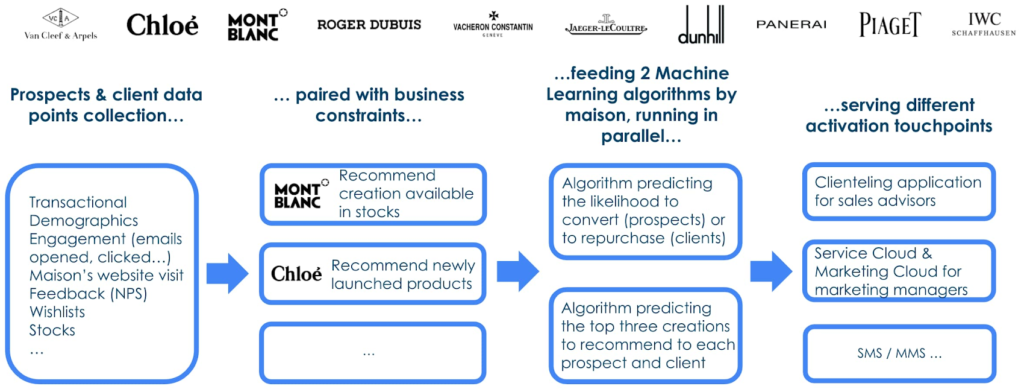
Engagement data (email opened, clicked, SMS/MMS, website visits…) was found crucial to predict conversion of prospects for whom per definition no transaction history is available. For website interactions Richemont leverages the Google x Salesforce Connector.
To deploy the Machine Learning algorithms and to monitor them, Richemont leveraged Vertex AI, along with BigQuery, Cloud Functions and Google Storage, all orchestrated with Google Cloud Composer.
The role of product recommendation algorithms
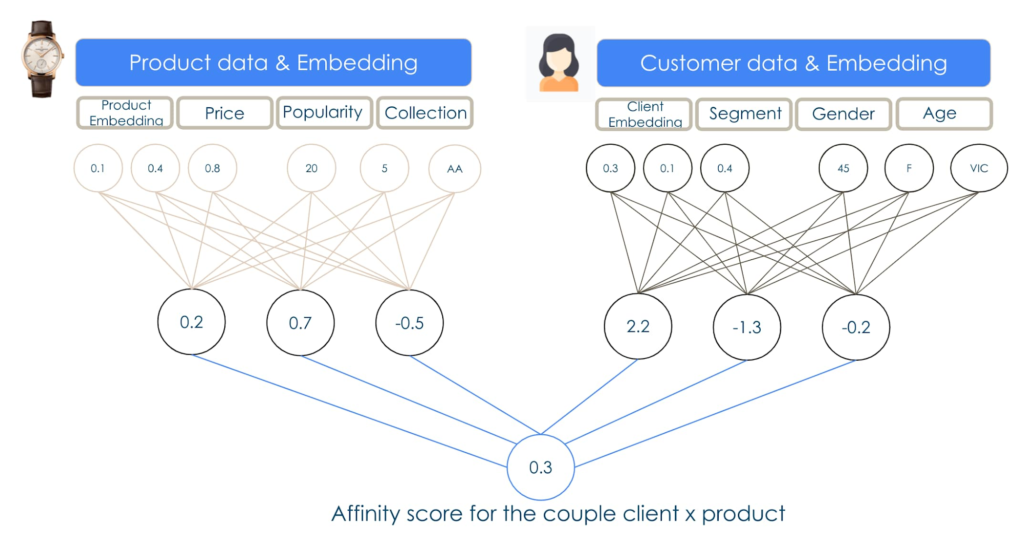
Richemont used the deep learning library TensorFlow Recommenders to perform the product recommendation tasks. This library enables companies to build state of the art deep learning algorithms to achieve relevant and robust predictions.
Unlocking client value with integrated technology
Richemont’s innovations show how technology that considers many parts of the customer experience creates more value. In this case, the company used in store applications to invite people with a strong propensity to buy for boutique visits, while others at a different point in the purchasing journey were offered different options more suited to their tastes and inclinations.This solution, now deployed across 11 brands in over 25 countries, shows just one way that AI can improve customer experience, for better customer loyalty.
Key to the process, here and elsewhere, is the way a retailer and its partners put customer understanding at the center of the process. As AI becomes more important not only in retail, but in every industry, this human understanding will become even more important as a fundamental organizing principle. Much is changing, but once again, the winners will be the companies that focus best on their customers.
Contact Center AI & Automation Anywhere Help Virtual Agents Deliver Next Level CX

3036
Of your peers have already read this article.
2:30 Minutes
The most insightful time you'll spend today!
With the advent of the pandemic, contact center traffic has increased by as much as 300%, taxing center capabilities. To help handle the surge, and keep up with heightened customer demands, many customer experience providers have deployed automation in the form of virtual agents that serve as the first—and, sometimes the last—line of customer support. How effective these virtual agents are in delivering timely, complete customer service depends in large part on the contact center’s infrastructure and the power of the automation solution.
Customer support providers can now start to reimagine customer experience with Conversational AI and take advantage of the Google Cloud-Automation Anywhere partnership to modernize their operations.
Bringing together the Google Cloud Contact Center AI (CCAI) solution and the Automation Anywhere cloud-native Automation 360 platform, the partnership helps contact centers remain competitive by improving their performance metrics and customer satisfaction to exceed the continuously growing expectations.
Information here, there, anywhere—with limited access
Over the years, many contact centers have accumulated a multitude of systems, often creating a disconnected infrastructure. As a result, both human and virtual agents alike are challenged to keep up with growing customers’ expectations for timely, accurate, and complete service. Without up-to-date software and infrastructure, human agents have to perform a “swivel-chair” maneuver, logging in to the different systems, sifting through records, copying the needed information, and deciding what the next action should be. This approach is not conducive to achieving lower average handle times (or AHT), reduced processing errors, or increased customer satisfaction.
In such a siloed environment, virtual agents may not connect to all the relevant data systems and applications. That also limits what they can do to support human agents. Typically, a virtual agent can handle basic customer requests, such as providing banking customers with their account balances. For more complex requests, such as applying for a line of credit, a virtual agent still must transfer customers to human agents, and the swivel-chair maneuver begins.
Enter the RPA-assisted AI-powered virtual agent
The combination of Google Cloud Contact Center AI and Automation Anywhere’s Automation 360 RPA platform can help contact centers get the maximum benefit from utilizing virtual agents, enriching customer engagements. Further, by integrating automation, opening up APIs, and creating new processes for virtual agents, customer experience teams can help streamline operations by enabling users to quickly access the information they require. This helps minimize the need for the “swivel-chair” maneuver.
Automation 360 makes it possible for the CCAI virtual agents to access all systems and applications in both legacy and modern infrastructure, helping resolve every case quickly and easily. Not only can the virtual agents respond faster with answers, but they can complete more complex end-to-end requests. With RPA, customers are reporting 66% improved efficiency of contact center operations while exceeding their AHT reduction goals.
This video illustrates how such automation can dramatically reduce the processing time of a customer service request, and you can read more about the details of contact center automation, as well.
Additionally, a comprehensive development platform, the Google Cloud CCAI Dialogflow, powers virtual agents—chatbots and voicebots—with Conversational AI to deliver lifelike customer experiences anytime a customer reaches out to a brand. CCAI Agent Assist helps human agents with turn-by-turn guidance, ready-to-deliver answers, and ready-to-send responses. CCAI Insights identifies key metrics such as call drivers and customer sentiment for workflow optimization.
Living up to their potential
TELUS International, a leading digital customer experience provider and long-time partner of both Google Cloud and Automation Anywhere, has been leveraging virtual agents to enhance the employee and customer experience.
“We are very proud of the enormous value that we can provide our clients through combining our expertise in customer experience and digital transformation alongside the innovative solutions of our technology partners,” Jim Radzicki, CTO of TELUS International, explains. “For instance, through leveraging Google Cloud Contact Center AI and Automation Anywhere’s RPA integration, we are able to expand the capabilities of virtual agents to process a wider variety of customer requests while allowing our team members to focus on the most critical conversations and creating a meaningful connection with every customer.”
With CCAI and Automation 360, virtual agents can help contact centers deliver 24/7, comprehensive, accurate service, all of which helps eliminate wait times—even with heavy traffic. And this is just the start.
With deeper integration planned between Automation 360 and CCAI, RPA can augment CCAI Agent Assist’s abilities to help human agents by bringing untapped case-sensitive information to their fingertips. Furthermore, Automation 360 Bot Insight can complement CCAI Insights’ as well as TELUS International’s Intelligent Insights, a tool-agnostic platform to monitor and manage RPA solutions and bots, with backend data access metrics.
At Google Cloud and Automation Anywhere, we’ll continue developing our contact center solution to extend automation capabilities for better customer service and greater customer satisfaction. Instead of constantly swiveling, agents can once again be at the center of the call center action, taking their work—and the experience of their customers—to the next level.
Scaling Machine Learning Operations with Vertex AI AutoML and Pipeline

2552
Of your peers have already read this article.
2:30 Minutes
The most insightful time you'll spend today!
When you build a Machine Learning (ML) product, consider at least two MLOps scenarios. First, the model is replaceable, as breakthrough algorithms are introduced in academia or industry. Second, the model itself has to evolve with the data in the changing world.
We can handle both scenarios with the services provided by Vertex AI. For example:
- AutoML capability automatically identifies the best model based on your budget, data, and settings.
- You can easily manage the dataset with Vertex Managed Datasets by creating a new dataset or adding data to an existing dataset.
- You can build an ML pipeline to automate a series of steps that start with importing a dataset and end with deploying a model using Vertex Pipelines.
This blog post shows you how to build this system. You can find the full notebook for reproduction here. Many folks focus on the ML pipeline when it comes to MLOps, but there are more parts to building MLOps as a “system”. In this post, you will see how Google Cloud Storage (GCS) and Google Cloud Functions manage data and handle events in the MLOps system.
Architecture
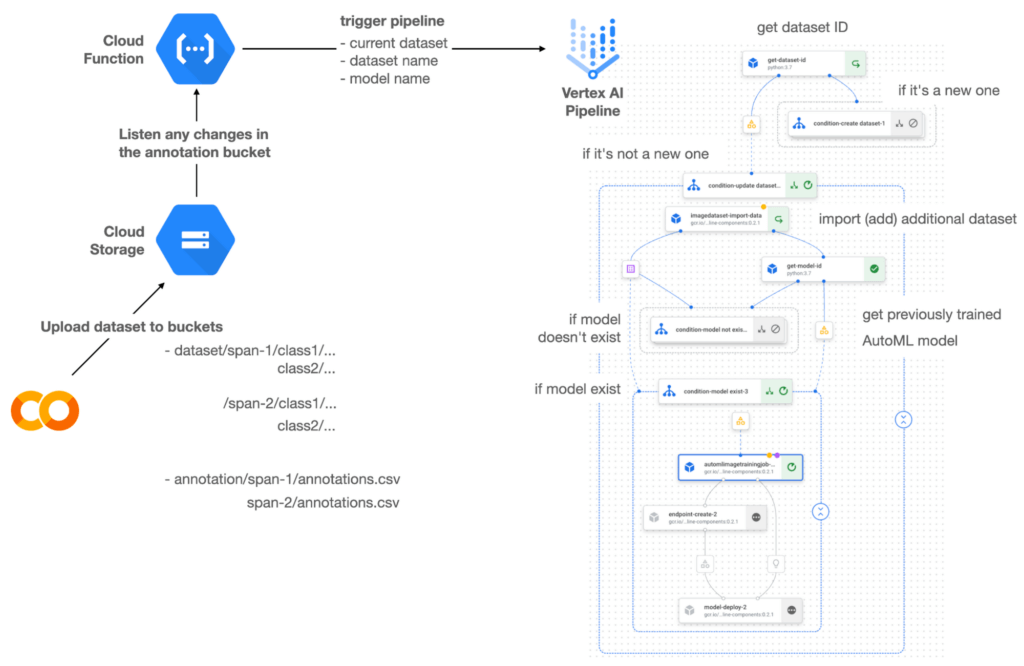

Figure 1 shows the overall architecture presented in this blog. We cover the components and their connection in the context of two common workflows of the MLOps system.
Components
Vertex AI is at the heart of this system, and it leverages Vertex Managed Datasets, AutoML, Predictions, and Pipelines. We can create and manage a dataset as it grows using Vertex Managed Datasets. Vertex AutoML selects the best model without your knowing much about modeling. Vertex Predictions creates an endpoint (RestAPI) to which the client communicates.
It is a simple, fully managed yet somewhat complete end-to-end MLOps workflow moves from a dataset to training a model that gets deployed. This workflow can be programmatically written in Vertex Pipelines. Vertex Pipelines outputs the specification for an ML pipeline allowing you to re-run the pipeline whenever or wherever you want. Specify when and how to trigger the pipeline using Cloud Functions and Cloud Storage.
Cloud Functions is a serverless way to deploy your code in Google Cloud. In this particular project, it triggers the pipeline by listening to changes on the specified Cloud Storage location. Specifically, if a new dataset is added, for example, a new span number is created; the pipeline is triggered to train the dataset, and a new model is deployed.
Workflow
This MLOps system prepares the dataset with either Vertex Dataset’s built-in user interface (UI) or any external tools based on your preference. You can upload the prepared dataset into the designated GCS bucket with a new folder named SPAN-NUMBER. Cloud Functions then detects the changes in the GCS bucket and triggers the Vertex Pipeline to run the jobs from AutoML training to endpoint deployment.
Inside the Vertex Pipeline, it checks if there is an existing dataset created previously. If the dataset is new, Vertex Pipeline creates a new Vertex Dataset by importing the dataset from the GCS location and emits the corresponding Artifact. Otherwise, it adds the additional dataset to the existing Vertex Dataset and emits an artifact.
When the Vertex Pipeline recognizes the dataset as a new one, it trains a new AutoML model and deploys it by creating a new endpoint. If the dataset isn’t new, it tries to retrieve the model ID from Vertex Model and determines whether a new AutoML model or an updated AutoML model is needed. The second branch determines whether the AutoML model has been created. If it hasn’t been created, the second branch creates a new model. Also, when the model is trained, the corresponding component emits the artifact as well.
Directory structure that reflects different distributions
In this project, I have created two subsets of the CIFAR-10 dataset, SPAN-1 and SPAN-2. A more general version of this project can be found here, which shows how to build training and batch evaluation pipelines pipelines. The pipelines can be set up to cooperate so they can evaluate the currently deployed model and trigger the retraining process.
ML Pipeline with Kubeflow Pipelines (KFP)
We chose to use Kubeflow Pipelines to orchestrate the pipeline. There are a few things that I would like to highlight. First, it’s good to know how to make branches with conditional statements in KFP. Second, you need to explore AutoML API specifications to fully leverage AutoML capabilities, such as training a model based on the previously trained one. Last, you also need to find a way to emit artifacts for Vertex Dataset and Vertex Model to consume that Vertex AI can recognize them. Let’s go through these one by one.
Branching strategy
In this project, there are two main conditions and two sub-branches inside the second main branch. The main branches split the pipeline based on a condition if there is an existing Vertex Dataset. The sub-branches are applied in the second main branch, which is selected when there is an exciting Vertex Dataset. It looks up the list of models and decides to train an AutoML model from scratch or a previously trained one.
ML pipelines written in KFP can have conditions with a special syntax of kfp.dsl.Condition. For instance, we can define the branches as follows:
from google_cloud_pipeline_components import aiplatform as gcc_aip


# try to get Vertex Dataset ID
dataset_op = get_dataset_id(...)

with kfp.dsl.Condition(name="create dataset",
                       dataset_op.outputs['Output'] == 'None'):
    # Create Vertex Dataset, train AutoML from scratch, deploy model

with kfp.dsl.Condition(name="update dataset",
                       dataset_op.outputs['Output'] != 'None'):
    # Update existing Vertex Dataset
    ...

    # try to get Vertex Model ID
    model_op = get_model_id(...)

    with kfp.dsl.Condition(name='model not exist',
                           model_op.outputs['Output'] == 'None'):
    # Create Vertex Dataset, train AutoML from scratch, deploy model

    with kfp.dsl.Condition(name='model exist',
                           model_op.outputs['Output'] != 'None'):
        # Create Vertex Dataset, train AutoML based on trained one, deploy model
get_dataset_id and get_model_id are custom KFP components used to determine if there is an existing Vertex Dataset and Vertex Model respectively. Both return “None” if a model is found and some other value if a model isn’t found. They also emit Vertex AI-aware artifacts. You will see what this means in the next section.
Emit Vertex AI-aware artifacts
Artifacts track the path of each experiment in the ML pipeline and display metadata in the Vertex Pipeline UI. When Vertex AI aware artifacts are released into in the pipeline, Vertex Pipeline UI displays links for its internal services such as Vertex Dataset, so that users can visit a web page for more information.
So how could you write a custom component to generate Vertex AI-aware artifacts? To do this, custom components should have Output[Artifact] in their parameters. Then you need to replace the resourceName of the metadata attribute with a special string format.
The following code example is the actual definition of get_dataset_id used in the previous code snippet:
@component(
    packages_to_install=["google-cloud-aiplatform",
                         "google-cloud-pipeline-components"]
)
def get_dataset_id(project_id: str,
                     location: str,
                 dataset_name: str,
                 dataset_path: str,
                      dataset: Output[Artifact]) -> str:
    from google.cloud import aiplatform
    from google.cloud.aiplatform.datasets.image_dataset import ImageDataset
    from google_cloud_pipeline_components.types.artifact_types import VertexDataset


    aiplatform.init(project=project_id, location=location)

    datasets = aiplatform.ImageDataset.list(project=project_id,
                                            location=location,
                                            filter=f'display_name={dataset_name}')

    if len(datasets) > 0:
        dataset.metadata['resourceName'] =
               f'projects/{project_id}/locations/{location}/datasets/{datasets[0].name}'
        return f'projects/{project_id}/locations/{location}/datasets/{datasets[0].name}'
    else:
        return 'None'
As you see, the dataset is defined in the parameters as Output[Artifact]. Even though it appears in the parameter, it is actually emitted automatically. You just need to provide the necessary data as if it is a function variable.
The dataset component retrieves the list of Vertex Dataset by calling the aiplotform.ImageDataset.list API. If the length of it is zero, it simply returns ‘None’. Otherwise, it returns the found resource name of the Vertex Dataset and provides the dataset.metadata[‘resourceName’] with the resource name at the same time. The Vertex AI-aware resource name follows a special string format, which is ‘projects/<project-id>/locations/<location>/<vertex-resource-type>/<resource-name>’.
The <vertex-resource-type>can be anything that points to an internal Vertex AI service. For instance, if you want to specify that the artifact is the Vertex Model, then you should replace <vertex-resource-type> with models. The <resource-name> is the unique ID of the resource, and it can be accessed in the name attribute of the resource found by the aiplatform API. The other custom component, get_model_id, is written in a very similar way as well.
AutoML based on the previous model
You sometimes want to train a new model on top of the previously best model. If that is possible, the new model will probably be much better than the one trained from scratch, because it leverages previously learned knowledge.
Luckily, Vertex AutoML comes with the ability to train a model using a previous model. AutoMLImageTrainingJobRunOp component lets you train a model by simply providing the base_model argument as follows:
training_job_run_op =
gcc_aip.AutoMLImageTrainingJobRunOp(
…,
base_model=model_op.outputs['model'],
…
)
When training a new AutoML model from scratch, you pass ‘None‘ in the base_model argument, and it is the default value. However, you can set it with a VertexModel artifact, and the component will trigger an AutoML training job based on the other model.
One thing to be careful of is that VertexModel artifacts can’t be constructed in a typical way of Python programming That means you can’t create an instance of VertexModel artifact by setting the id found in the Vertex Model dashboard. The only way you can create one is to set the metadata[‘resourceName’] parameters properly. The same rule applies to other Vertex AI-related artifacts such as VertexDataset. You can see how the VertexDataset artifact is constructed properly to get an existing Vertex Dataset to import additional data into it. See the full notebook of this project here.
Cost
You can reproduce the same result from this project with the free $300 credit when you create a new GCP account.
At the time of this blog post, Vertex Pipelines costs about $0.03/run, and the type of underlying VM for each pipeline component is e2-standard-4, which costs about $0.134/hour. Vertex AutoML training costs about $3.465/hour for image classification. GCS holds the actual data, which costs about $2.40/month for 100GiB capacity, and Vertex Dataset is free.
To simulate two different branches, the entire experiment took about one to two hours, and the total cost for this project is approximately $16.59. Please find more detailed pricing information about Vertex AI here.
Conclusion
Many people underestimate the capability of AutoML, but it is a great alternative for app and service developers who have little ML background. Vertex AI is a great platform that provides AutoML as well as Pipeline features to automate the ML workflow. In this article, I have demonstrated how to set up and run a basic MLOps workflow, from data injection to training a model based on the previously-achieved best one, to deploying the model to a Vertex AI platform. With this, we can let our ML model automatically adapt to the changes in a new dataset. What’s left for you to implement is to integrate a model monitoring system to detect data/model drift. One example is found here.
2858
Of your peers have already watched this video.
16:00 Minutes
The most insightful time you'll spend today!
Conversational AI in Search, Maps and Online Shopping!
Did you know about 77 percent of customers are likely to make a purchase from a brand they can message with? Direct interaction with the brand to gather product information shortens buyers’ journey and personalizes it with appropriate messages. To helps businesses add speed, simplicity and convenience in brand-customers interaction, Google’s Business Messages helps add chat feature in Search, Maps or other mediums.
Watch the video to learn to integrate conversational AI based on Google’s superior AI and ML features and build interactive and connected chat automation using Google Cloud’s suite of tools and products!
More Relevant Stories for Your Company

Japanese Used Car Operator Uses Machine Learning to Improve Marketing
Since 1994, IDOM, Japan’s leading buyer and retailer of used cars, has enjoyed success in the auto industry with a simple yet traditional business model: buy pre-owned vehicles directly from car owners and auction them to third-party dealers, or sell them to other consumers at retail stores. In an increasingly

How AI Can Predict Consumer Demand and Retain Customers
How can AI help you target customers who are looking for products like yours? The challenge: This customer wants to buy the best cat food for her pets. Reach the Right Customers How can AI help you target customers who are looking for products like yours?The challenge: This customer wants

Google Cloud’s Med-PaLM 2: Pioneering Ethical AI Solutions for the Medical Domain
Healthcare breakthroughs change the world and bring hope to humanity through scientific rigor, human insight, and compassion. We believe AI can contribute to this, with thoughtful collaboration between researchers, healthcare organizations and the broader ecosystem. Today, we're sharing exciting progress on these initiatives, with the announcement of limited access to

Google Products Helps HMH’s Healthcare Staff Work from Anywhere Efficiently and Securely!
Hackensack Meridian Health (HMH) executive Mark Eimer explains how an ambitiously-timed rollout of a comprehensive suite of Google products helped the entire organization—from doctors to IT staff—achieve better security, cultivate a more equitable work environment, and ultimately, improve patient outcomes. How does a recently merged, 17-hospital healthcare system fast-track a platform migration
