





6550
Of your peers have already watched this video.
17:00 Minutes
The most insightful time you'll spend today!
Eli Lilly’s Custom-built Translation Service Leverages Google’s Translation Engine
Eli Lilly leverages Google Cloud’s machine translation to globalize content to serve their multilingual employees. Watch the video to learn how the healthcare company built an in-house solution powered by Google Cloud APIs to address the challenge of translating multilingual content at scale. Also explore Google’s innovations and investments into services for language translations produced for machine learning (also called as machine translation or neural machine translation) for safe and secure documents and text translation via an easy-to-use interface and API.
Simplifying Unstructured Data Analytics with BigQuery ML and Vertex AI: A Comprehensive Guide

1546
Of your peers have already read this article.
6:30 Minutes
The most insightful time you'll spend today!
Unstructured data such as images, speech and textual data can be notoriously difficult to manage, and even harder to analyze. The analysis of unstructured data includes use cases such as extracting text from images using OCR, sentiment analysis on customer reviews and simplifying translation for analytics. All of this data needs to be stored, managed and made available for machine learning.
The new BigQuery ML inference engine empowers practitioners to run inferences on unstructured data using pre-trained AI models. The results of these inferences can be analyzed to extract insights and improve decision making. This can all be done in BigQuery, using just a few lines of SQL.
In this blog, we’ll explore how the new BigQuery ML inference engine can be used to run inferences against unstructured data in BigQuery. We’ll demonstrate how to detect and translate text from movie poster images, and run sentiment analysis against movie reviews.
BigQuery ML’s new inference engine
Google Cloud is home to a suite of pre-trained AI models and APIs. The BigQuery ML inference engine can call these APIs and manage the responses on your behalf. All you have to do is define the model you want to use and run inferences against your data. All of this is done in BigQuery using SQL. The inference results are returned in JSON format and stored in BigQuery for analysis.
Why run your inferences in BigQuery?
Traditionally, working with AI models to run inferences required expertise in programming languages like Python. The ability to run inferences in BigQuery using just SQL can make generating insights from your data using AI simple and accessible. BigQuery is also serverless, so you can focus on analyzing your data without worrying about scalability and infrastructure.
The inference results are stored in BigQuery, which allows you to analyze your unstructured data immediately, without the need to move or copy your data. A key advantage here is that this analysis can also be joined with structured data stored in BigQuery, giving you the opportunity to deepen your insights. This can simplify data management and minimize the amount of data movement and duplication required.
Which models are supported?
For now, the BigQuery ML inference engine can be used with these pre-trained Vertex AI models:
- Vision AI API: This model can be used to extract features from images managed by BigQuery Object Tables and stored on Cloud Storage. For example, Vision AI can detect and classify objects, or read handwritten text.
- Translation AI API: This model can be used to translate text in BigQuery tables into over one hundred languages.
- Natural Language Processing API: This model can be used to derive meaning from textual data stored in BigQuery tables. For example, features like sentiment analysis can be used to determine whether the emotional tone of text is positive or negative.
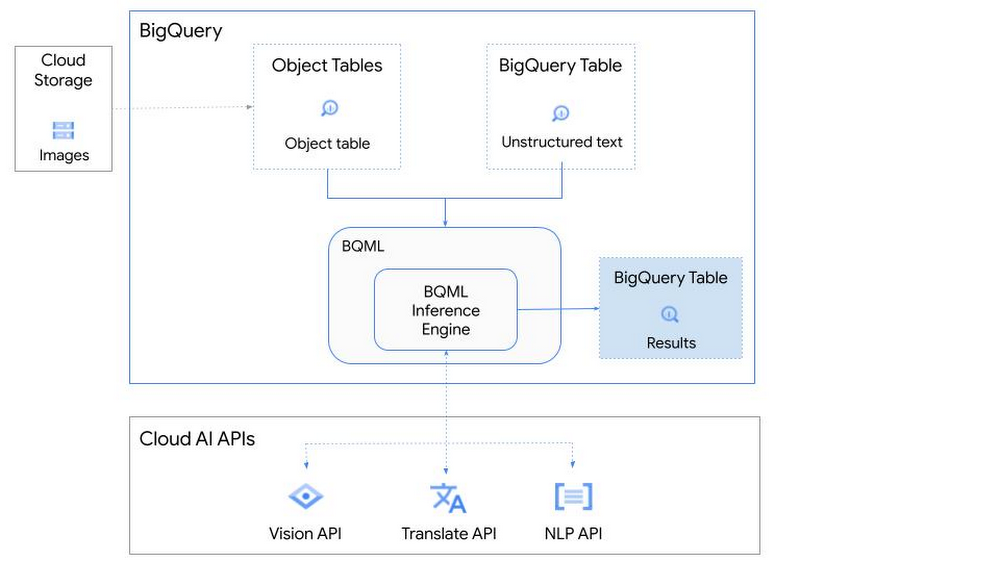
So, how does this work in practice? Let’s look at an example using images of movie posters

- We will define our pre-trained models for Vision AI, Translation AI and NLP AI in BigQuery ML.
- We’ll then use Vision AI to detect the text from some classic movie posters images.
- Next, we’ll use Translation AI to detect any foreign posters and translate them to a language of our choosing – English in this case.
- Finally, we’ll combine our unstructured data with structured data in BigQuery.
We’ll use the extracted movie titles from our movie posters to look up the viewer reviews from the BigQuery IMDB public dataset. We can then run sentiment analysis against these reviews using NLP AI.
Note: The BigQuery ML inference engine is currently in Preview. You will need to complete this enrollment form to have your project allowlisted for use with the BQML Inference Engine.
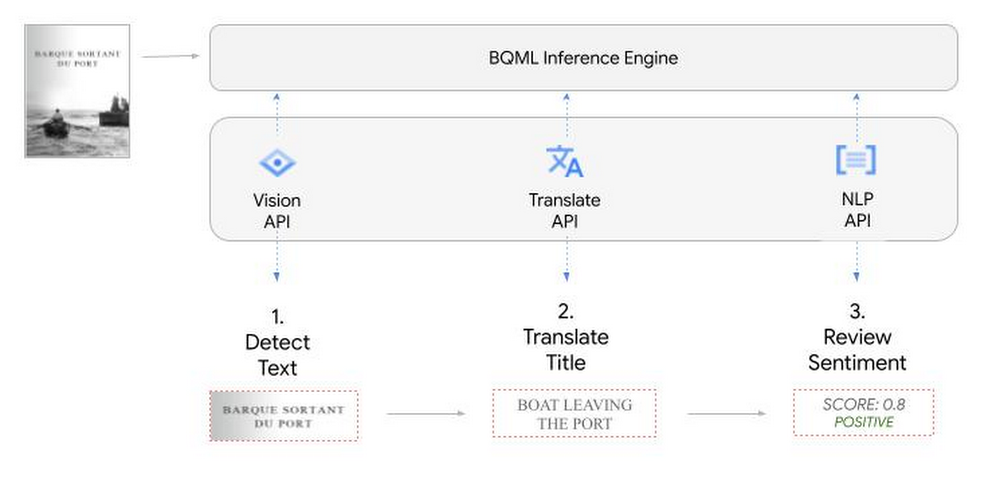
We’ll give examples of the BigQuery SQL needed to define your models and run your inferences. You’ll want to check out our notebook for a detailed guide on how to get this up and running in your Google Cloud project.
1. Define your AI Models in BigQuery
You will need to enable the APIs listed below, and also create a Cloud resource connection to enable BigQuery to interact with these services.
| API | Model Name |
| Vision AI API | Cloud_ai_vision_v1 |
| Translation AI API | Cloud_ai_translate_v3 |
| NLP AI API | Cloud_ai_natural_language_v1 |
You can then run the CREATE MODEL query for each AI service to create your pretrained models, replacing the model_name as required.
CREATE OR REPLACE MODEL
`{PROJECT_ID}.{DATASET_ID}.{VISION_MODEL_NAME}`
REMOTE WITH
CONNECTION `{PROJECT_ID}.{REGION}.{CONN_NAME}`
OPTIONS ( remote_service_type = '<model_name>' );
2. Use the Vision AI API to detect text in images stored in Cloud Storage
You will need to create an object table for your images in Cloud Storage. This read-only object table provides metadata for images stored in Cloud Storage:
CREATE OR REPLACE EXTERNAL TABLE
`{PROJECT_ID}.{DATASET_ID}.{OBJECT_TABLE_NAME}`
WITH
CONNECTION `{REGION}.{CONN_NAME}`
OPTIONS (object_metadata = 'SIMPLE', uris = ['{BUCKET_LOCATION}/*']);
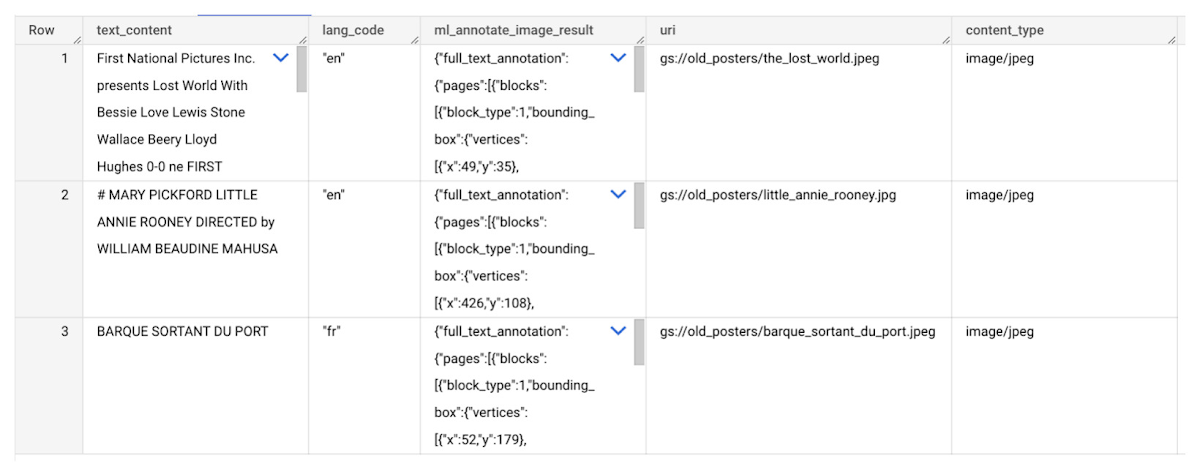
To detect the text from our posters, you can then use ML.ANNOTATE_IMAGE and specify the text_detection feature.
SELECT
       ml_annotate_image_result.full_text_annotation.text AS text_content,
       *
FROM
       ML.ANNOTATE_IMAGE(
         MODEL `{PROJECT_ID}.{DATASET_ID}.{VISION_MODEL_NAME}`,
         TABLE `{DATASET_ID}.{OBJECT_TABLE_NAME}`,
         STRUCT(['TEXT_DETECTION'] AS vision_features));
A JSON response will be returned to BigQuery that includes the text content and language code of the text. You can parse the JSON to a scalar result using the dot annotation highlighted above.

3. Use the Translation AI API to translate foreign movie titles
ML.TRANSLATE can now be used to translate the foreign titles we’ve extracted from our images into English. You just need to specify the target language and the table of the movie posters for translation:
SELECT
text_content,
STRING(ml_translate_result.translations[0].detected_language_code)
as original_language,
STRING(ml_translate_result.translations[0].translated_text)
as translated_title
FROM
  ML.TRANSLATE(
MODEL `{PROJECT_ID}.{DATASET_ID}.{TRANSLATE_MODEL_NAME}`,
TABLE `{DATASET_ID}.image_results`,
STRUCT('TRANSLATE_TEXT' as translate_mode, "en" as target_language_code));
Note: The table column with the text you want to translate must be named text_content:
The table of results will include json that can be parsed to extract both the original language and the translated text. In this case, the model has detected that title text is in French and has translated it to English:

4. Finally, use natural language processing (NLP) to run sentiment analysis against movie reviews
You can easily join inference results from your unstructured data with other BigQuery datasets to bolster your analysis. For example, we can now join the movie titles we extracted from our posters with thousands of movie reviews stored in BigQuery’s IMDB public dataset `bigquery-public-data.imdb.reviews`.
You can use ML.UNDERSTAND_TEXT with the analyze_sentiment feature to run sentiment analysis against some of these reviews to determine whether they are positive or negative:
SELECT
   primary_title, start_year, text_content AS review,
   FLOAT64(ml_understand_text_result.document_sentiment.score) AS score,
   FLOAT64(ml_understand_text_result.document_sentiment.magnitude) AS magnitude,
FROM
   ML.UNDERSTAND_TEXT(
     MODEL `{PROJECT_ID}.{DATASET_ID}.{NLP_MODEL_NAME}`,
           (
           SELECT
             primary_title, start_year, review AS text_content
           FROM
             `bigquery-public-data.imdb.title_basics` titles
           JOIN
             `bigquery-public-data.imdb.reviews` reviews
           ON
             reviews.movie_id = titles.tconst
           WHERE
             UPPER(titles.primary_title) = 'THE LOST WORLD' AND
             start_year = 1925
           ),
      STRUCT("analyze_sentiment" AS nlu_option)) ;
Note: The table column with the text you want to analyze must be named text_content:
The JSON response will include a score and magnitude. The score indicates the overall emotion of the text while the magnitude indicates how much emotional content is present:
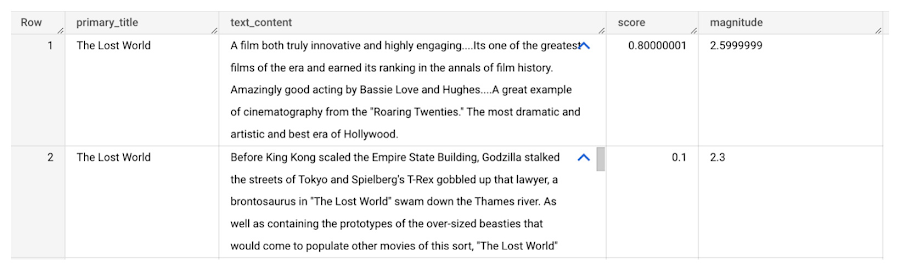
So, how did the Lost World compare with other movies that year?
To wrap up, we’ll compare the average review score of the 1925 Lost World movie to other movies released that year to see which was more popular. This can be done using familiar SQL analysis:
SELECT
 primary_title, start_year,
 AVG(FLOAT64(ml_understand_text_result.document_sentiment.score))AS av_score,
 AVG(FLOAT64(ml_understand_text_result.document_sentiment.magnitude)) AS av_magnitude
FROM
 ML.UNDERSTAND_TEXT(
   MODEL `{PROJECT_ID}.{DATASET_ID}.{NLP_MODEL_NAME}`,
         (
         SELECT
           primary_title, start_year, movie_id, review AS text_content
         FROM
           `bigquery-public-data.imdb.title_basics` titles
         JOIN
           `bigquery-public-data.imdb.reviews` reviews
         ON
           reviews.movie_id = titles.tconst
         WHERE
           start_year = 1925
         ),
   STRUCT("analyze_sentiment" AS nlu_option))
GROUP BY
   primary_title, start_year
ORDER BY
   av_score DESC;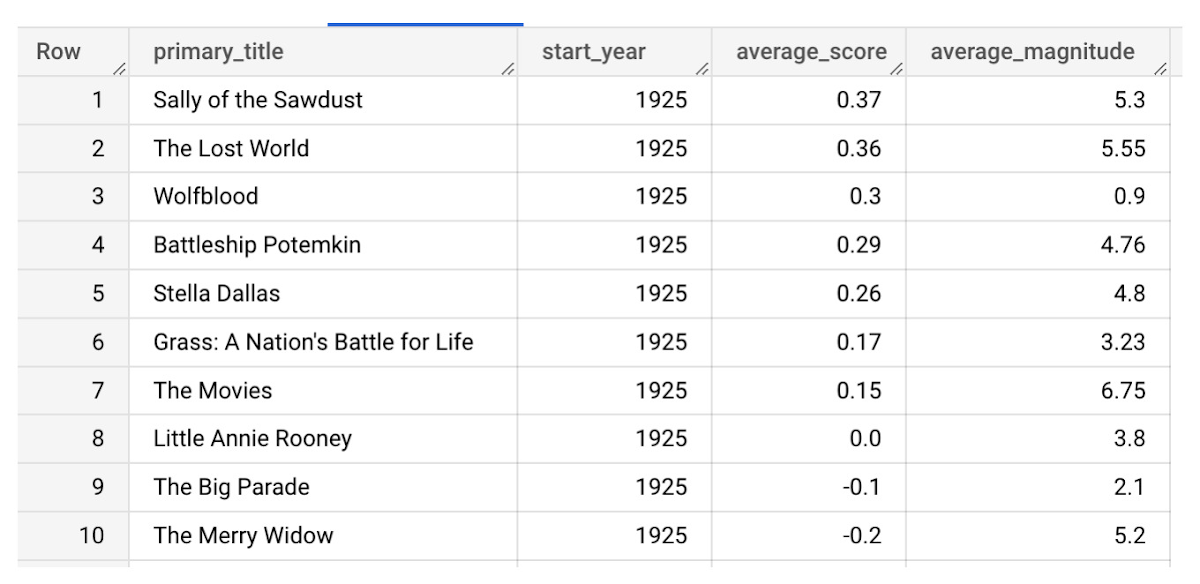
It looks like The Lost World narrowly missed out on the top spot to Sally of the Sawdust!
Want to learn more?
Check out our notebook for a step by step guide on using the BQML inference engine for unstructured data in Google Cloud. You can also check out our Cloud AI service table-valued functions overview page for more details. Curious about pricing? The BQML Pricing page gives a breakdown of how costs are applied across these services.
3129
Of your peers have already watched this video.
17:00 Minutes
The most insightful time you'll spend today!
How FLYR and Google Cloud Help Airlines Forecast Demand and Set Prices
FLYR Labs is an international team of industry experts and specialists in revenue management that works to bring in intelligence to the airlines companies. FLYR uses machine learning and AI to help predict demand and optimize price so that every airline is operating its complete capacity. Watch the video from Architecting with Google Cloud to deep-dive into a use case with FLYR involving the use of historic data, competitors data and future information to build model for outputting demand, set prices and optimize revenue. You can can even have a quick view of the FLYR ML platform!
Unlocking Data Value: Latest Data Platforms and Announcements at the Next 21

6424
Of your peers have already read this article.
3:30 Minutes
The most insightful time you'll spend today!
Today at Google Cloud Next we are announcing innovations that will enable data teams to simplify how they work with data and derive value from it faster. These new solutions will help organizations build modern data architectures with real-time analytics to power innovative, mission-critical, data-driven applications.
Too often, even the best minds in data are constrained by ineffective systems and technologies. A recent study showed that only 32% of companies surveyed gained value from their data investments. Previous approaches have resulted in difficult to access, slow, unreliable, complex, and fragmented systems.
At Google Cloud, we are committed to changing this reality by helping customers simplify their approach to data to build their data clouds. Google Cloud’s data platform is simply unmatched for speed, scale, security, and reliability for any size organization with built-in, industry-leading machine learning (ML) and artificial intelligence (AI), and an open standards-based approach.
Vertex AI and data platform services unlock rapid ML modeling
With the launch of Vertex AI in May 2021, we empowered data scientists and engineers to build reliable, standardized AI pipelines that take advantage of the power of Google Cloud’s data pipelines. Today, we are taking this a step further with the launch of Vertex AI Workbench, a unified user experience to build and deploy ML models faster, accelerating time-to-value for data scientists and their organizations. We’ve integrated data engineering capabilities directly into the data science environment, which lets you ingest and analyze data, and deploy and manage ML models, all from a single interface.
Data scientists can now build and train models 5X faster on Vertex AI than on traditional notebooks. This is primarily enabled by integrations across data services (like Dataproc, BigQuery, Dataplex, and Looker), which significantly reduce context switching. The unified experience of Vertex AI let’s data scientists coordinate, transform, secure and monitor Machine Learning Operations (MLOps) from within a single interface, for their long-running, self-improving, and safely-managed AI services.
“As per IDC’s AI StrategiesView 2021, model development duration, scalable deployment, and model management are three of the top five challenges in scaling AI initiatives,” said Ritu Jyoti, Group Vice President, AI and Automation Research Practice at IDC. “Vertex AI Workbench provides a collaborative development environment for the entire ML workflow – connecting data services such as BigQuery and Spark on Google Cloud, to Vertex AI and MLOps services. As such, data scientists and engineers will be able to deploy and manage more models, more easily and quickly, from within one interface.”
Ecommerce company, Wayfair, has transformed its merchandising capabilities with data and AI services. “At Wayfair, data is at the center of our business. With more than 22 million products from more than 16,000 suppliers, the process of helping customers find the exact right item for their needs across our vast ecosystem presents exciting challenges,” said Matt Ferrari, Head of Ad Tech, Customer Intelligence, and Machine Learning; Engineering and Product at Wayfair. “From managing our online catalog and inventory, to building a strong logistics network, to making it easier to share product data with suppliers, we rely on services including BigQuery to ensure that we are able to access high-performance, low-maintenance data at scale. Vertex AI Workbench and Vertex AI Training accelerate our adoption of highly scalable model development and training capabilities.”
BigQuery Omni: Breaking data silos with cross-cloud analytics and governance
Businesses across a variety of industries are choosing Google Cloud to develop their data cloud strategies and better predict business outcomes — BigQuery is a key part of that solution portfolio. To address complex data management across hybrid and multicloud environments, this month we are announcing the general availability of BigQuery Omni, which allows customers to analyze data across Google Cloud, AWS, and Azure. Healthcare provider, Johnson and Johnson was able to combine data in Google Cloud and AWS S3 with BigQuery Omni without needing data to migrate.
This flexible, fully-managed, cross-cloud analytics solution allows you to cost-effectively and securely answer questions and share results from a single pane of glass across your datasets, wherever you are. In addition to these multicloud capabilities, Dataplex will be generally available this quarter to provide an intelligent data fabric that enables you to keep your data distributed while making it securely accessible to all your analytics tools.
Spark on Google Cloud simplifies data engineering
To help make data engineering even easier, we are announcing the general availability of Spark on Google Cloud, the world’s first autoscaling and serverless Spark service for the Google Cloud data platform. This allows data engineers, data scientists, and data analysts to use Spark from their preferred interfaces without data replication or custom integrations. Using this capability, developers can write applications and pipelines that autoscale without any manual infrastructure provisioning or tuning. This new service makes Spark a first class citizen on Google Cloud, and enables customers to get started in seconds and scale infinitely, regardless if you start in BigQuery, Dataproc, Dataplex, or Vertex AI.
Spanner meets PostgreSQL: global, relational scale with a popular interface
We’re continuing to make Cloud Spanner, our fully managed, globally scalable, relational database, available to more customers now with a PostgreSQL interface, now in preview. With this new PostgreSQL interface, enterprises can take advantage of Spanner’s unmatched global scale, 99.999% availability, and strong consistency using skills and tools from the popular PostgreSQL ecosystem.
This interface supports Spanner’s rich feature set that uses the most popular PostgreSQL data types and SQL features to reduce the barrier to entry for building transformational applications. Using the tools and skills they already have, developer teams gain flexibility and peace of mind because the schemas and queries they build against the PostgreSQL interface can be easily ported to another Postgres environment. Complete this form to request access to the preview.
Our commitment to the PostgreSQL ecosystem has been long standing. Customers choose Cloud SQL for the flexibility to run PostgreSQL, MySQL and SQL Server workloads. Cloud SQL provides a rich extension collection, configuration flags, and open ecosystem, without the hassle of database provisioning, storage capacity management, or other time-consuming tasks.
Auto Trader has migrated approximately 65% of their Oracle footprint to Cloud SQL, which remains a strategic priority for the company. Using Cloud SQL, BigQuery, and Looker to facilitate access to data for their users, and with Cloud SQL’s fully managed services, Auto Trader’s release cadence has improved by over 140% (year-over-year), enabling an impressive peak of 458 releases to production in a single day.
Looker integrations make augmented analytics a reality
We are announcing a new integration between Tableau and Looker that will allow customers to operationalize analytics and more effectively scale their deployments with trusted, real-time data, and less maintenance for developers and administrators. Tableau customers will soon be able to leverage Looker’s semantic model, enabling new levels of data governance while democratizing access to data. They will also be able to pair their enterprise semantic layer with Tableau’s leading analytics platform. The future might be uncertain, but together with our partners we can help you plan for it.
We remain committed to developing new ways to help organizations go beyond traditional business intelligence with Looker. In addition to innovating within Looker, we’re continuing to integrate within other parts of Google Cloud. Today, we are sharing new ways to help customers deliver trusted data experiences and leverage augmented analytics to take intelligent action.
First, we’re enabling you to democratize access to trusted data in tools where you are already familiar. Connected Sheets already allows you to interactively explore BigQuery data in a familiar spreadsheet interface and will soon be able to leverage the governed data and business metrics in Looker’s semantic model. It will be available in preview by the end of this year.
Another integration we’re announcing is Looker’s Solution for Contact Center AI, which helps you gain a deeper understanding and appreciation of your customers’ full journey by unlocking insights from all of your company’s first-party data, such as contextualizing support calls to make sure your most valuable customers receive the best service.
We’re also sharing the new Looker Block for Healthcare NLP API, which provides simplified access to intelligent insights from unstructured medical text. Compatible with Fast Healthcare Interoperability Resources (FHIR), healthcare providers, payers, and pharma companies can quickly understand the context and relationships of medical concepts within the text, and in turn, can begin to link this to other clinical data sources for additional AI and ML actions.
Bringing the best of Google together with Google Earth Engine and Google Cloud
We are thrilled to announce the preview of Google Earth Engine on Google Cloud. This launch makes Google Earth Engine’s 50+ petabyte catalog of satellite imagery and geospatial data sets available for planetary-scale analysis. Google Cloud customers will be able to integrate Earth Engine with BigQuery, Google Cloud’s ML technologies, and Google Maps Platform. This gives data teams a way to better understand how the world is changing and what actions they can take — from sustainable sourcing, to saving energy and materials costs, to understanding business risks, to serving new customer needs.
For over a decade, Earth Engine has supported the work of researchers and NGOs from around the world, and this new integration brings the best of Google and Google Cloud together to empower enterprises to create a sustainable future for our planet and for your business.
At Google Cloud, we are deeply grateful to work with companies of all sizes, and across industries, to build their data clouds. Join my keynote session to hear how organizations are leveraging the full power of data, from databases to analytics that support decision making to AI and ML that predict and automate the future. We’ll also highlight our latest product innovations for BigQuery, Spanner, Looker, and Vertex AI.
I can’t wait to hear how you will turn data into intelligence and look forward to connecting with you.
2990
Of your peers have already watched this video.
26:30 Minutes
The most insightful time you'll spend today!
What’s Next for Personalization on Google Cloud
Customer shopping behavior has changed for good. With fewer in-store shopping visits retailers have had to shore up their digital storefronts and explore new ways to meaningfully engage with their customers.
Delivering a superior customer experience has become even more of a differentiator for the early movers and personalized recommendations have emerged as one of the strongest potential drivers of revenue lift.
But as many retailers have discovered delivering recommendations at scale can actually be quite complex and time consuming.
Learn how to deliver highly-personalized product recommendations with Google Cloud Recommendations AI.
Recommendations AI is now fully open access and self-serve, with more built-in integrations with Google Shopping Merchant Center and Google Analytics, as well as more controls over how you create recommendation pipelines and manage your costs.
You will also hear how Google Cloud partners like Qubit and BigCommerce have successfully deployed Recommendations AI for their customers and made us an integral part of their solution offerings.
Enhanced AI-based Photo Editing: Let’s Enhance Fuels The Next Wave of Innovation with Google Cloud and NVIDIA

2713
Of your peers have already read this article.
3:30 Minutes
The most insightful time you'll spend today!
There’s an explosion in the number of digital images generated and used for both personal and business needs. On e-commerce platforms and online marketplaces for example, product images and visuals heavily influence the consumer’s perception, decision making and ultimately conversion rates. In addition, there’s been a rapid shift towards user-generated visual content for ecommerce — think seller-generated product imagery, host-generated rental property photos and influencer-generated social media content. The challenge? These user-generated images are often captured using mobile cameras and vary greatly in terms of their size, quality, compression ratios and resolution, making it difficult for companies to provide consistent high-quality product images on their platforms.
That’s exactly the problem that Let’s Enhance, a computer vision startup with teams across the US and Ukraine, set out to solve with AI. The Let’s Enhance platform improves the quality of any user-generated photo automatically using AI-based features to enhance images through automatic upscaling, pixelation and blur fixes, color and low-light correction, and removing compression artifacts — all with a single click and no professional equipment or photo-editing chops.
“Let’s Enhance.io is designed to be a simple platform that brings AI-powered visual technologies to everyone — from marketers and entrepreneurs to photographers and designers,” said Sofi Shvets, CEO and Co-founder of Let’s Enhance.
To date, Let’s Enhance has processed more than 100M photos for millions of customers worldwide for use-cases ranging from digital art galleries, real estate agencies, digital printing, ecommerce and online marketplaces. With the introduction of Claid.ai, their new API to automatically enhance and optimize user-generated content at scale for digital marketplaces, they needed to process millions of images every month and manage sudden peaks in user demand.
However, building and deploying an AI-enabled service at scale for global use is a huge technical challenge that spans model building, training, inference serving and resource scaling. It demands an infrastructure that’s easy to manage and monitor, can deliver real-time performance to end customers wherever they are and can scale as user-demand peaks, all while optimizing costs.
To support their growing user-base, Let’s Enhance chose to deploy their AI-powered platform to production on Google Cloud and NVIDIA. But before diving into their solution, let’s take a close look at the technical challenges they faced in meeting their business goals.
Architecting a solution to fuel the next wave of growth and innovation
To deliver the high-quality enhanced images that end-customers see, Let’s Enhance products are powered by cutting-edge deep neural networks (DNNs) that are both compute- and memory-intensive. While building and training these DNN models in itself is a complex, iterative process, application performance — when processing new user-requests, for instance — is crucial to delivering a quality end user experience and reducing total deployment costs.
A single inference or processing request i.e., from user-generated image, which can vary widely in size, at the input to the AI-enhanced output image, requires combining multiple DNN models within an end-to-end pipeline. The key inference performance metrics to optimize for included latency (the time it takes from providing an input image to the enhanced image being available) and throughput ( the number of images that can be processed per second)..
Together, Google Cloud and NVIDIA technologies provided all the elements that the Let’s Enhance team needed to set themselves up for growth and scale. There were three main components in the solution stack:
- Compute resources: A2 VMs, powered by NVIDIA A100 Tensor Core GPUs
- Infrastructure management: Google Kubernetes Engine (GKE)
- Inference serving: NVIDIA Triton Inference Server
Improved throughput and lower costs with NVIDIA A100 Multi-Instance GPUs (MIG) on Google Cloud
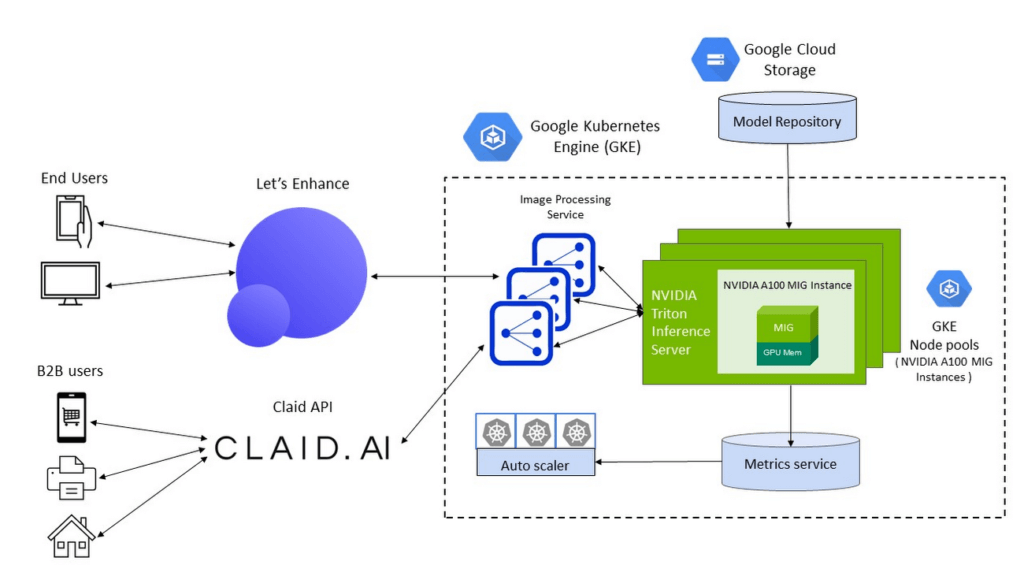
To meet the computational requirements of the DNN models and deliver real-time inference performance to their end-users, Let’s Enhance chose Google Cloud A2 VMs powered by NVIDIA A100 Tensor Core GPUs as their compute infrastructure. A100 GPU’s Multi-Instance GPU (MIG) capability offered them the unique ability to partition a single GPU into two independent instances and simultaneously process two user-requests at a time, making it possible to service a higher volume of user requests while reducing the total costs of deployment.
The A100 MIG instances delivered a 40% average throughput improvement compared to the NVIDIA V100 GPUs, with an increase of up to 80% for certain image enhancement pipelines using the same number of nodes for deployment. With improved performance from the same sized node pools, Let’s Enhance observed a 34% cost savings using MIG-enabled A100 GPUs.
Simplified infrastructure management with GKE
To offer a guaranteed quality-of-service (QoS) to their customers and manage user demand, Let’s Enhance needed to provision, manage and scale underlying compute resources while keeping utilization high and costs low.
GKE offers industry-leading capabilities for training and inference such as support for 15,000 nodes per cluster, auto-provisioning, auto-scaling and various machine types (e.g. CPU, GPU and on-demand, spot), making it the perfect choice for Let’s Enhance.
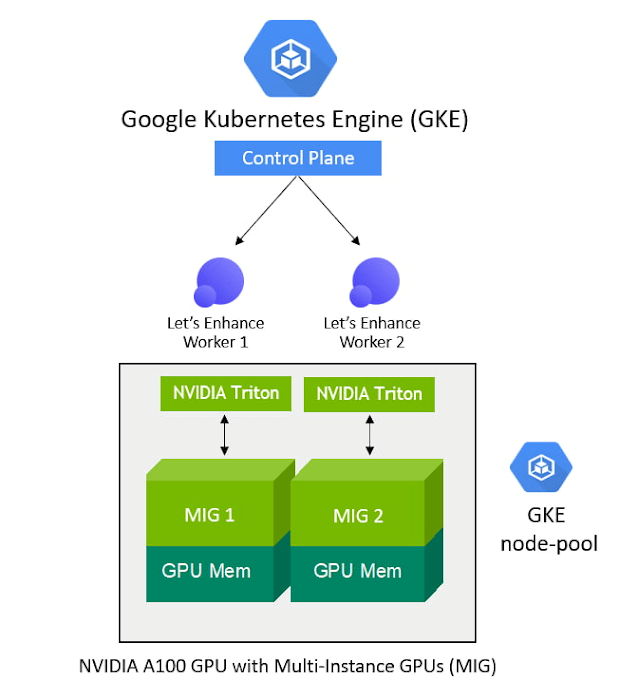
With support for NVIDIA GPUs and NVIDIA GPU sharing capabilities, GKE can provision multiple A100 MIG instances to process user requests in parallel and maximize utilization. As the compute required for the deployed ML pipelines increases (e.g., a sudden surge in inference requests to service), GKE can automatically scale to additional node-pools with MIG partitions — offering finer granularity to provision the right-sized GPU acceleration for workloads of all sizes.
“Our total averaged throughput varied between 10 and 80 images / sec. Thanks to support for NVIDIA A100 MIG and auto scaling mechanisms in GKE we can now scale that up to 150 images/sec and more, based on user-demand and GPU availability,” said Vlad Pranskevičius, Co-founder and CTO, Let’s Enhance.
In addition, GKE’s support for dynamic scheduling, automated maintenance and upgrades, high availability, job API, customizability and fault tolerance simplified managing a production deployment environment, allowing the Let’s Enhance team to focus on building advanced ML pipelines.
High-performance inference serving with NVIDIA Triton Inference Server
To optimize performance and simplify the deployment of their DNN models onto the GKE-managed node pools of NVIDIA A100 MIG instances, Let’s Enhance chose the open-source NVIDIA Triton Inference Server, which deploys, runs and scales AI models from any framework onto any GPU- or CPU-based infrastructure.
NVIDIA Triton’s support for multiple frameworks enabled the Let’s Enhance team to serve models trained in both TensorFlow and PyTorch, eliminating the need to set up and maintain multiple serving solutions for different framework backends. In addition, Triton’s ensemble model and shared memory features helped maximize performance and minimize data transfer overhead for their end-to-end image processing pipeline, which consists of multiple models and large amounts of raw image data transferring between them.
“We saw over 20% performance improvement with Triton vs. custom inference serving code, and were also able to fix several errors during deployment due to Triton’s self-healing features”, said Vlad. “Triton is packed with cool features, and as I was watching its progress from the very beginning, the pace of product development is just amazing.”
To further enhance end-to-end inference performance, the team is adopting NVIDIA TensorRT, an SDK to optimize trained models for deployment with the highest throughput and lowest latency while preserving the accuracy of predictions.
“With the subset of our models which we converted from Tensorflow to NVIDIA TensorRT we observed a speedup of anywhere between 10% and 42%, depending on the model, which is impressive,” said Vlad. “For memory-intensive models like ours, we were also able to achieve predictable memory consumption, which is another great benefit of using TensorRT, helping prevent any unexpected memory-related issues during production deployment.”
Teamwork makes the dream work
By using Google Cloud and NVIDIA, Let’s Enhance addressed the real-time inference serving and infrastructure management challenges of taking their AI-enabled service to production at scale in a secure Google Cloud infrastructure.
GKE, NVIDIA AI software and A2 VMs powered by NVIDIA A100 GPUs brought together all the elements they needed to deliver the desired user experience and build a solution that can dynamically scale their end-to-end pipelines based on user demand.
The close collaboration with the Google Cloud and NVIDIA team, every step of the way, also helped Let’s Enhance get their solution to market fast. “The Google Cloud and NVIDIA teams are incredible to work with. They are highly professional, always responsive and genuinely care about our success,” said Vlad. “We were able to get technical advice and recommendations directly from Google Cloud product and engineering teams, and also have a channel to share our feedback about Google Cloud products, which was really important to us.”
With a solid foundation and solution architecture that can meet their growing business needs, Let’s Enhance is marching towards their goal of bringing AI-enhanced digital images to everyone. “Our vision is to help businesses effectively manage user-generated content and increase conversion rates with next-gen AI tools,” said Sofi. ”Our next step towards that is to expand our offerings to completely replace manual work for photo preparation, including as well as cover pre-stages as image quality assessment and moderation.”
To learn more about the Let’s Enhance products and services, check out their blog here.
More Relevant Stories for Your Company
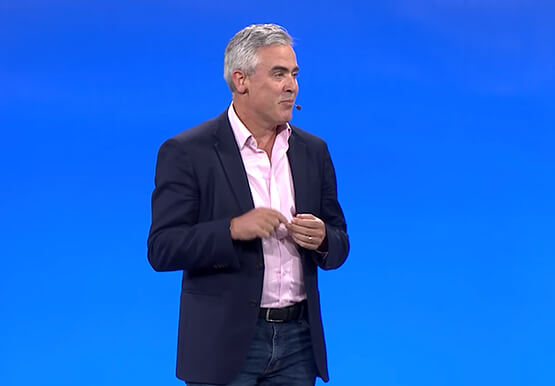


How Real Companies Are Innovating with AI Today—and the Benefits They’re Seeing
What do you get when you mix Target, women’s swim wear, and AI? “Joy!” says Mike McNamara, CIO and CDO, Target. McNamara is just one of the many stories of real businesses conquering old challenges, and new disruptive industry challenges, with artificial intelligence. McNamara, Nick Rockwell, CTO, The New York

The Future of Language Processing: Google Cloud’s Enhanced NLP Models
Natural language understanding (NLU) is getting increasingly better at solving complex problems and these language breakthroughs are creating big waves in Artificial Intelligence. For example, new language models are enabling Everyday Robots to create more helpful robots that can break down user instructions and have even enabled people to generate imaginative visuals from

A Breakdown of Cloud-based Data Ingestion Practices
Businesses around the globe are realizing the benefits of replacing legacy data silos with cloud-based enterprise data warehouses, including easier collaboration across business units and access to insights within their data that were previously unseen. However, bringing data from numerous disparate data sources into a single data warehouse requires you

Experiment: Machine Learning Helps IGG Acquire High-value App Users
What we set out to test Can machine learning help app businesses efficiently acquire high-value users at scale? The background IGG (I Got Games) is a China-based online game developer with over 300 million players worldwide. They are always looking to acquire and grow a valuable user base for their games.
