





Create and Protect Admin Accounts

4865
Of your peers have already read this article.
1:30 Minutes
The most insightful time you'll spend today!
Setting up your new cloud infrastructure is scary. Extra scary when you realize that someone (is it gonna be you?) gets to have phenomenal cosmic power over the whole thing.
Yes, I’m talking about the admin account, and today we’ll dig into why they are important, dangerous and different.
When the team at pistach.io got their nuts-as-a-service business growing fruitfully, they knew they needed to think carefully about admin accounts. These people would have tremendous control over their use of Google Cloud, and they could potentially cause very big problems if any were compromised. Definitely resources that require a protective shell.

Early in pistach.io’s development, an employee named Walter Nutt wanted to play a prank by changing his co-worker’s profile photo from an almond to a peanut (pretty devious, since a peanut is actually a legume). He didn’t have access to his friend’s computer, but he did have access to the company’s Cloud Storage bucket. While searching for the profile photo in question, Wally inadvertently deleted the entire contents of the bucket!
As he searched for ways to restore its contents, Wally modified access to two other pistach.io buckets. The company was ground to a halt for a week while teams worked to crack through the permissions issues.
Time to rethink permissions a bit, so this couldn’t spoil their buttery smooth operations in the future.
Following the resource manager guide, the team made a super admin email address that wasn’t tied to a particular individual or Workspace account, and secured it with strong multi-factor authentication. This would be their backup in case an admin account were to be compromised, so they could recover and repair.
The team already uses Google Workspace, so they have an organization set up already. That creation process established initial super administrators, allowing them to create and modify all other resources inside the organization. As they looked toward using Google Cloud, the super administrators could:
- Give the admin role to people, for Cloud
- Act as a point of contact for account recovery
- Modify or delete the organization if needed
Making admin users for the organization allows other people to then flesh out the resources and policies for pistach.io, before they go nuts and give everyone all the permissions. While that would speed things up, it would make it easy for an attacker to crack through the security shell because any account compromise could give ousize access. Yikes!

Instead, the IT leads specified certain people to act as organization admins, and then gave them permissions to:
- Define Identity and Access Management policies
- Structure the Resource Hierarchy
- Delegate control of specific Cloud elements to others on the team
Once those organization admins were set up, they could give management and oversight of Compute, Storage, Networking and other resource types to the relevant leads, making sure each person had just the right amount of permission for the role they needed to perform. The organization admins don’t have permissions themselves to make these resources. They just delegate.
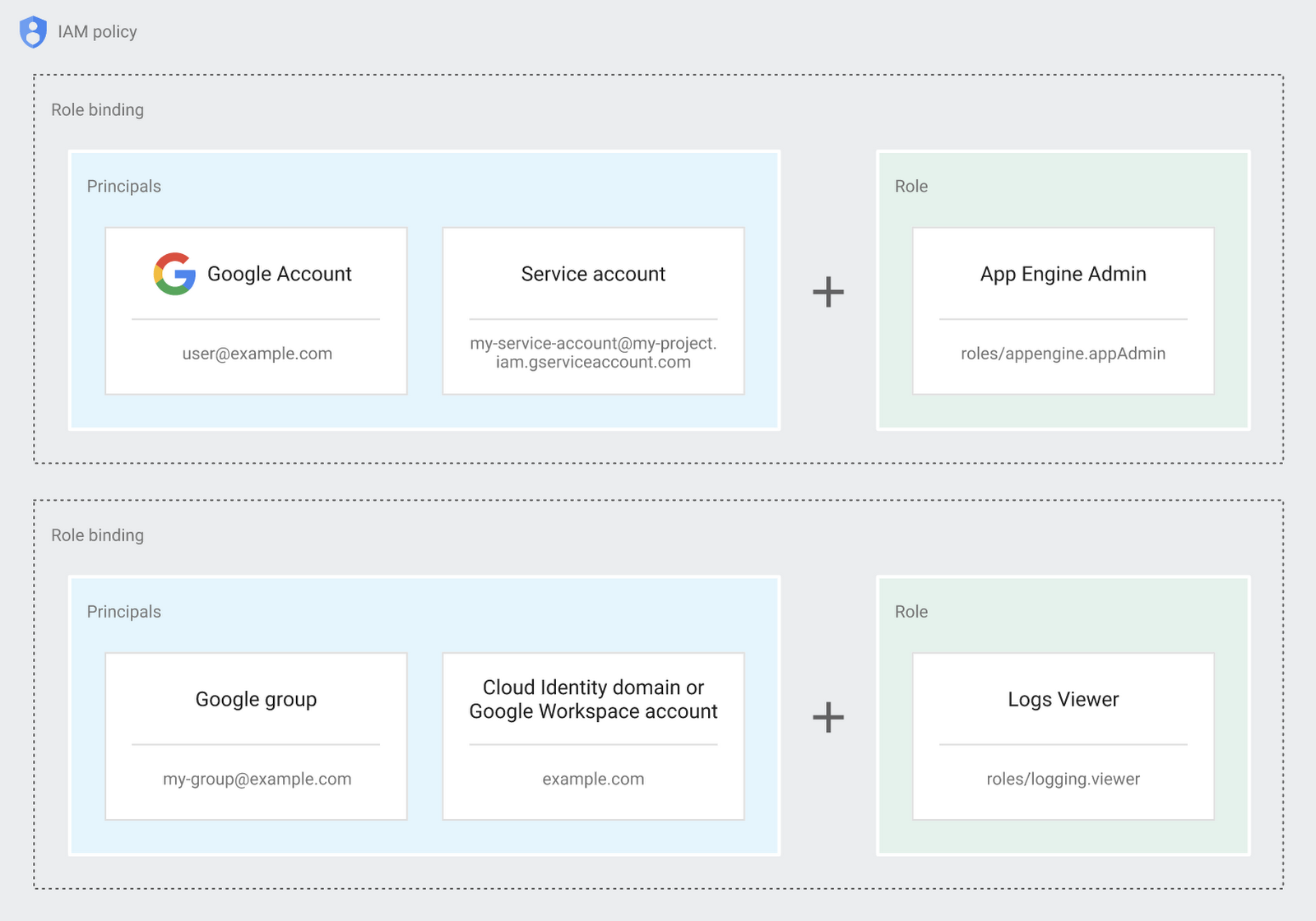
Now each person can accomplish the job they’re responsible for, but doesn’t have overly permissive access. Delegating like this keeps the entire organization safer, and limits the blast radius if someone does manage to break in.
You can go through these steps yourself with this tutorial.
By default the creation of an organization resource for the domain gives everyone the ability to create projects and billing accounts. Once they set up their Organization Admin at pistach.io they decided to remove some of these wide permissions and, in a nutshell, bring everything down to a much finer control. So people could get permissions for a folder or a project, but not the entire organization!
Remember to take care of your admin roles, as they have the power, and responsibility, to cause serious harm if not used safely. Be safe with your Identity and Access Management. And keep your data yours!
Next time we join you we’ll take a crack at creating and provisioning an app to run inside the policies and resource management frameworks created today.
How TapClicks’ Google Cloud Migration Makes Life Easy for Marketers

8541
Of your peers have already read this article.
2:00 Minutes
The most insightful time you'll spend today!
Editor’s note: In this blog post we learn how TapClicks migrated to Google Cloud to offer their marketing customers a unified platform for data management, operations, insights, and analysis.
TapClicks is a smart marketing cloud, powered by data, that unifies our customer’s marketing. By choosing to migrate our core applications last year to Google Cloud, we cut costs, solved data-sharing concerns for our customers, and opened our stack up to a new ecosystem of possibilities.
The core problem that we’re solving for our customers is how to manage their marketing infrastructures data and operations. Life isn’t easy for marketers now. There are 7,000 different vendors servicing this space today – creating much complexity between digital agencies, media, and brands. Marketers face challenges in navigating all of these systems, logging in and out, understanding pacing goals, and managing the flow of marketing data so they can analyze and report internally as well as to their clients at scale.
We unify omnichannel campaign data (250 API connectors and 6000 Smart Connectors ™ ) from a plethora of marketing sources on an automated data warehousing solution, creating simplicity for organizations. Over 4,000 agencies, media companies, and brands use our Marketing Operations and Data Management Platform, which imports data at scale and creates an automatic data warehouse on Google Cloud. Teams can also leverage TapClicks, like our world class Facebook connector, to import data directly into Google Data Studios. Beyond importing and storing, we also provide data exporting to other Google solutions like Google Data Studio and Google Sheets. We also create interactive dashboards that let stakeholders and clients analyze their data, as well as automated, multi-channel reports that go out to clients at specified times. So channel comparisons, optimizations, attribution, and calculations are easily performed. Some of our customers are able to generate hundreds of thousands of individual reports and dashboards for their clients.
Although we may be best known for our reporting and analytics, we also empower teams managing the marketing operations workflow from customers and internal stakeholders, especially at scale. Our user-friendly, configurable system helps manage their orders and campaigns. Through automation of this process, we deliver tremendous amounts of efficiency, time saving, cost savings, and reduction of errors. The combination of these solutions makes up our unified platform, with additional capabilities like marketing intelligence that offers competitive and brand-level analysis. This is a disruptive solution in use by all leading media companies, agencies and many brands.
Partnering for possibilities
We faced a few challenges with our original tech stack, which included a mix of the leader in web services revenue, leaders in high performance data warehousing, as well as vendors on bare metal servers.
- One challenge was around costs, which were growing.
- Second, many of our customers work with multiple brands, and are very hesitant to share their data with the leader in web services, who’s often viewed as their competitor.
- Third, these vendors are more focused on their own revenue rather than a true long term partnership that would enable their customers to enjoy similar success as they have experienced.
When looking at other cloud providers, Google Cloud emerged for us as the front runner. They were competitive on costs, and their native Kubernetes support was superior— a big selling point for our DevOps team. There’s also a movement in the marketing and advertising industry away from AWS toward Google Cloud because of the data-sharing concern. Finally, most of our customers are already using Google Cloud tools, so there’s brand recognition and familiarity there, and easier integrations with their own systems.
Migrating to Google Cloud
Our migration, which took about five months, involved moving a significant chunk of our infrastructure, including our core applications, using Google Kubernetes Engine (GKE). In our legacy architecture, each of our clients was assigned to one of our virtual machines (VMs), and there was a lot of unused capacity because we had to provision for the max usage. We appreciated GKE’s cloud native capabilities, especially autoscaling, a huge benefit for our web application. We have varying usage patterns during the day, and though our application is mostly used during business hours, there are also days in the month of higher usage, and autoscaling saves us time and costs. GKE also makes deployments much easier, and we anticipate a lot of benefits there for our developer environments. We’ve moved some of our microservices into GKE and plan to move more in the future. All in all, we were able to migrate our core products and the bulk of our AWS spend successfully to Google Cloud.
We also moved from our other vendors Relational Database Service (RDS) to running MySQL on our own VMs on Google Cloud, which gives us more flexibility in terms of settings and fine tuning. We’re still trying to find the best mix as we’re modernizing our infrastructure, and we took this opportunity to migrate from MySQL 5.7 to 8.0.
Our next stage is exploring more of the capabilities and services of Google Cloud, including BigQuery, which we’re considering for our own data warehouse. The fact that we could also run Snowflake on Google Cloud, if needed, was another selling point for our migration.
We’re especially interested in BigQuery ML’s machine learning and natural language processing capabilities, which enabled better predictive insights. Our customers want insights from their campaigns— which are working, which are paying off, where should they invest next? Using our platform, they’re looking not only to generate reporting, but also identify opportunities to improve campaign performance. We plan to use AI and ML to improve those capabilities, so that our customers can seamlessly unlock insight and intelligence from their marketing data and campaigns.
Double-clicking on Google Cloud
For us, being able to deeply leverage and partner with Google Cloud to deliver those solutions on a single stack is critical, and we think our customers will love it. We see TapClicks and Google Cloud partnering at a level beyond what you typically see in a cloud provider relationship. Already, fifty percent of our company is working with various Google Cloud solutions, and we envision TapClicks and Google Cloud as extensions of each other, providing a single, powerful platform solution.
Google Cloud understands the partnership concept, and their team was able to shine a light on their services and what they could bring to the table. Compared to our previous experiences, dealing with the Google Cloud team has been a true pleasure. Now that we’ve migrated, we’re ready to take our next steps into the services available to us in the Google Cloud ecosystem, and the problems we’ll continue to solve for our customers. Learn more about TapClicks and BigQuery ML.
Digital Maturity in Higher Ed Tied to Improvements in Students’ Journey: Study

5135
Of your peers have already read this article.
3:00 Minutes
The most insightful time you'll spend today!
Why Higher Ed Needs to Go All-in on Digital
In the wake of the COVID-19 pandemic, the majority of students within the 18-24-year-old demographic now expect hybrid learning environments–even once we are beyond the pandemic. And a vast number of adult learners are seeking options that accommodate their work and family lives now that it’s clear that effective learning can indeed occur virtually. Implementing cloud technologies and achieving digital maturity within higher education will enable institutions to be innovative and responsive to evolving student preferences, while being prepared for future disruptions.
The state of digital maturity
In February and March 2021, Boston Consulting Group (BCG), in partnership with Google, surveyed U.S. higher education leaders on their views of the state of digital maturity in the higher education sector. This survey found that institutional and technology leaders strongly agreed that moving legacy IT systems to the cloud, centralizing and integrating data, and increasing the use of advanced analytics is necessary to make a successful digital transformation, and ultimately achieve digital maturity.
But what is digital maturity? Digital maturity—a measure of an organization’s ability to create value through digital delivery—focuses on three areas of technological advancement that drive large-scale innovation:
- Using cloud infrastructure
- Expanding access to data
- Using that data to improve processes through advanced analytics, such as Artificial Intelligence and Machine Learning (AI/ML)
Although university leaders agree on prioritizing digital maturity, more than 55% said they considered their schools to be “digital performers” or “digital leaders.” However, only 25% of tech leaders at these universities stated that their schools regularly use data analytics. As with corporations and governments, higher education institutions face barriers to technological innovation, such as:
- Competing priorities to meet step-change goals and decentralized decision making
- Budget constraints
- Cultural resistance to change
- Tech staff skillset gaps
Still, leaders understand that the way to overcome institutional inertia is with a strong, goal-oriented vision of what is best for the institution overall. Although only a handful of schools have reached digital maturity as we define it, others can learn a great deal from their examples. Here are the top takeaways from higher education leaders who successfully transformed their institutions:
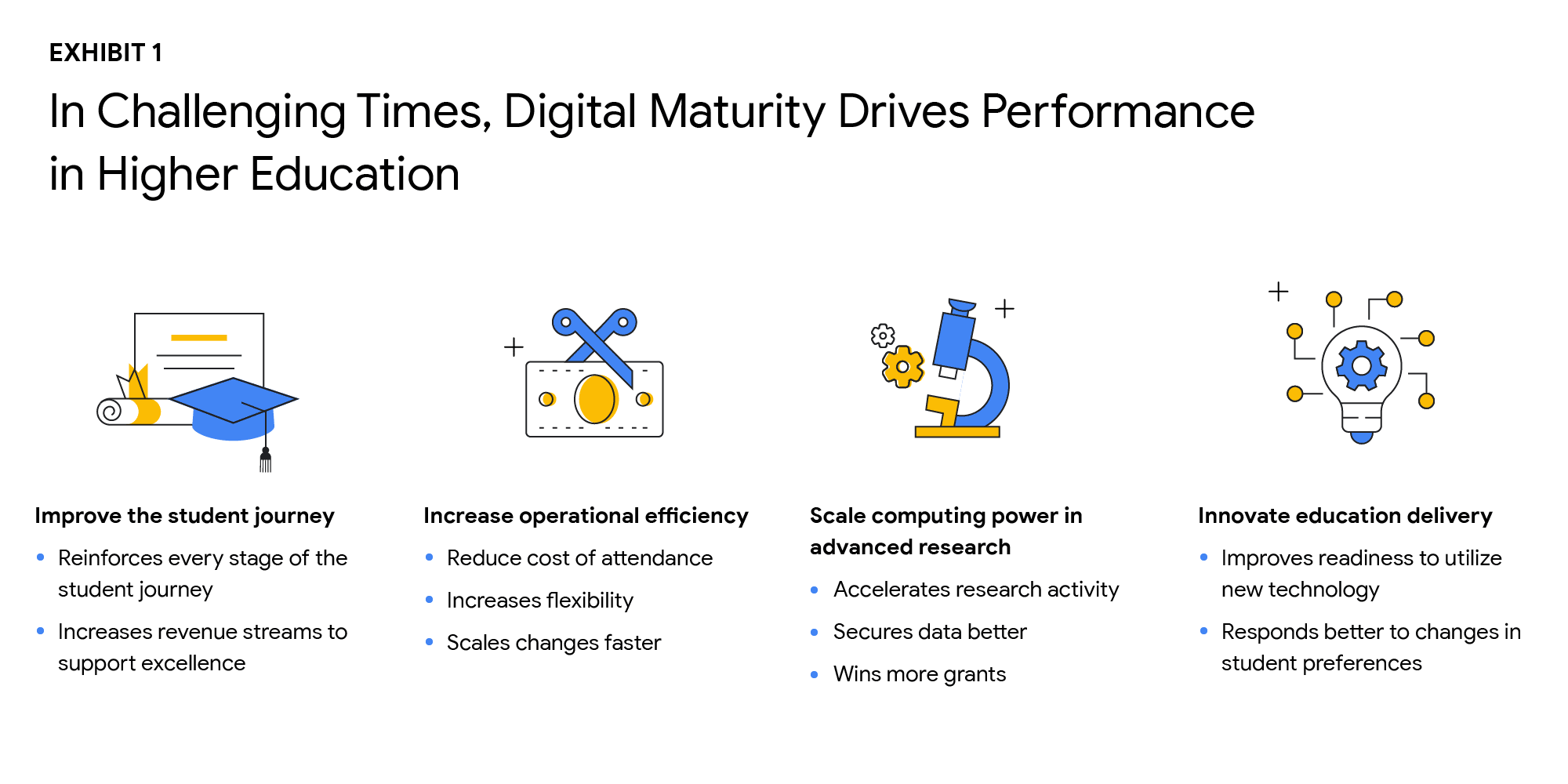
Digital solutions can improve the student journey in many ways
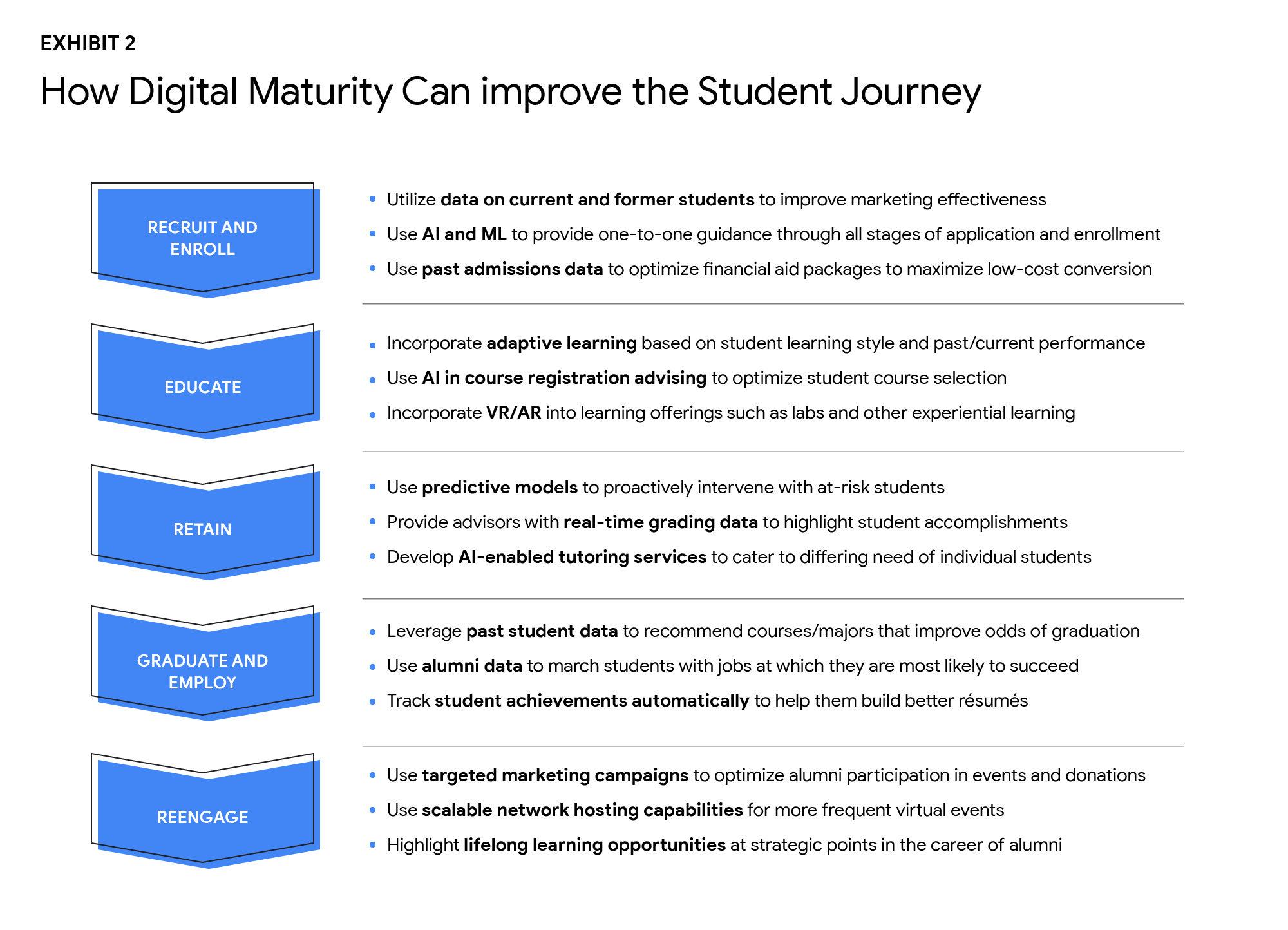
As digital capabilities hold the key to dealing effectively with declining enrollment and rising costs, higher ed leaders identified four goals that are critical to improving performance:
- Improve the student journey
- Increase operational efficiency
- Scale computing power in advanced research
- Innovate education delivery
The research found that technology investments can help enhance the student journey in the recruiting and retention of students, improving digital education delivery, government funding, and donations from alumni. Digital maturity can make institutions more agile and efficient in delivering education that aligns with the changing societal norms, evolving student preferences, and future disruptions. Survey participants shared that they plan to increase the use of the cloud by more than 50% over the next three years. By shifting legacy IT systems to the cloud, institutions can increase scalability, lower the cost of ownership, and improve operational agility, while offering a more secure, long-term data storage solution.
Cloud-native software-as-a-service (SaaS) solutions provide an excellent platform for centralizing data. However, institutions that attempt to “lift and shift” their legacy systems to the cloud may encounter challenges to achieving measurable improvements in data integration and cost reduction. Higher ed leaders must realize that centralizing data and transitioning to the cloud do not happen simultaneously.
Leaders who are able to articulate a strong vision and commitment will experience a more successful technology transformation. By linking their vision to specific needs, such as more effective recruiting, leaders will find their technology investments will have a more substantial return. University presidents should base their decisions about which systems to move, when, and how on desired performance outcomes.
Big visions become a reality with small steps. Small pilot projects are an excellent way to start the journey toward digital maturity. Small steps toward a significant transformation can reduce resistance to change, build positive momentum, and produce better student outcomes. Read the full report here. If you’d like to talk to a Google Cloud expert, get in touch.
Three Benefits of VPC Network Peering for SAP Managed Apps

3527
Of your peers have already read this article.
3:00 Minutes
The most insightful time you'll spend today!
Over the past year, RISE with SAP has emerged as a valuable solution for SAP customers seeking a faster, simpler, and more affordable path to the cloud. RISE with SAP is a subscription-based offering that typically includes a number of fully managed cloud application options, including SAP S/4HANA Cloud and elements of the SAP Business Technology Platform. It’s a great way to migrate your business to modern cloud ERP applications, while handing off the implementation and management to SAP and freeing your own IT staff to focus on other projects.
As a strategic partner for RISE with SAP, Google Cloud works closely with SAP to ensure reliable, secure, high-performance connectivity between your SAP managed applications and your other Google Cloud applications and services. Today, we’re focusing on a Google Cloud capability that plays a big part in achieving this goal: VPC network peering. If your company uses Google Cloud to host its RISE with SAP managed applications (or any other SAP-managed offering, such as SAP Enterprise Cloud Services), it’s worth learning more about why VPC network peering is an important capability and how your network admin can implement it.
VPC network peering: The critical link for your SAP managed applications
We recently co-authored a white paper with SAP that goes into technical detail about how VPC network peering works and includes step-by-step configuration instructions. But it is useful to understand, at a higher level, why it matters for RISE with SAP subscribers.
When SAP implements your RISE with SAP managed applications on Google Cloud, it also provisions a virtual private cloud (VPC) — a virtualized network that provides the same functionality, performance, and security benefits as a dedicated physical network — for this SAP environment. In fact, a VPC actually gives you some capabilities that a physical network can’t match, such as the ability to increase IP space without downtime.
Using VPC network peering to connect your SAP managed environment with your Google Cloud applications and services gives you three key benefits:
- Network latency: Traffic that remains inside Google’s network enjoys lower latency than connectivity that uses external addresses.
- Network security: Service owners do not need to have their services exposed to the public internet and deal with its associated risks.
- Network cost: Rather than pay egress bandwidth costs for networks using external IPs to communicate, peered networks can use internal IPs to communicate, saving you money on those egress costs. Regular network pricing still applies to all traffic.
Many customers also appreciate the flexibility they get from VPC network peering: It supports the ability to peer your own VPC networks with other VPC networks that reside in different projects and even in different organizations.
Using VPC network peering to strengthen your SAP security posture
Most Google Cloud customers find VPC network peering most useful to ensure seamless connectivity between their SAP managed applications and the rest of their Google Cloud environment. But some companies also rely on VPC network peering to gain greater control over the security of their cloud environments. This can include:
- Implementing additional network security capabilities, such as advanced firewalls, intrusion detection, and network package inspection, that go above and beyond standard SAP security measures.
- Leveraging Google Cloud Interconnect to link your on-premises and Google Cloud environments, including your RISE with SAP managed applications, without sending traffic across the public internet.
Once your company has configured VPC network peering, things get even more interesting. Google Cloud offers plenty of ways to complement and enhance the value of your SAP applications: using Google BigQuery to consolidate and enrich your SAP application data; relying on Google AI/ML capabilities to sharpen your predictive analytics and real-time decision-making; or leveraging Google Kubernetes Engine to jump-start your own cloud-native application development efforts, among many other examples.
Some of the world’s biggest SAP customers, including The Home Depot, and Cardinal Health, have chosen Google Cloud to migrate their business-critical SAP applications. And we’ve seen how useful VPC network peering can be for SAP customers to unlock the full value and potential of Google Cloud. Be sure to download our white paper so you can get VPC network peering configured for your RISE with SAP managed applications, and discover for yourself just what’s possible when you run SAP applications on Google Cloud.

3579
Of your peers have already downloaded this article
3:30 Minutes
The most insightful time you'll spend today!
Defending the world’s largest network against persistent and constantly evolving cyber threats has driven Google to architect, automate, and develop advanced tools to help keep it ahead. Understanding how Google has built and evolved it’s defenses can help you make smart architectural decisions of your own as you move forward.
- At Google every minute:
- 10 million spam messages are prevented from reaching Gmail customers.
- 694,000 indexed Web pages are scanned for harmful software.
- 7,000 deceitful URLs, executables, and browser extensions that may carry viruses, unwanted content, or phishing attempts are spotted and stopped.
- 6000 instances of unwanted software and nearly 1,000 instances of suspected malware are reported to Chrome users.
- 2 phishing sites and 1 malware site are found and labeled.
Download this e-book to know more about Google’s security at scale.

3602
Of your peers have already downloaded this article
1:30 Minutes
The most insightful time you'll spend today!
Through customer interviews, a survey, and data aggregation, Forrester concluded that migrating and running SAP on Google Cloud has a number of benefits, including financial benefits.
Download this Forrester infographic to understand the 3-year financial impact it can have on your organization.
More Relevant Stories for Your Company

Google Cloud Announces Improvements in Private Catalog to Drive Terraform Deployments
As an enterprise admin, when you choose to use Google Cloud Private Catalog to enable curated, self-serve Google Cloud infrastructure provisioning, you need the ability to manage your organization’s deployments. Today, we’re pleased to announce support for several improvements to Terraform driven deployments through Private Catalog. With this new release, you can
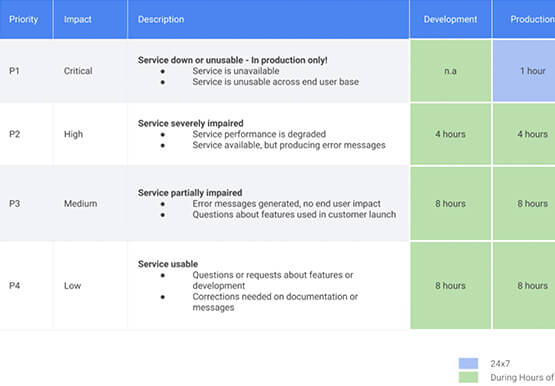


Relax: Support on Google Cloud is Easy and Efficient
To navigate the complexity of today’s cloud environment and to get the most out of your investment, you need robust support that is fast, efficient, and available at the time of need. Google Cloud Platform support checks all the boxes and helps you architect for the inevitable and quickly resolve

Accelerating business growth with a seamless migration to Google Cloud
In today’s hybrid office environments, it can be difficult to know where your most valuable, sensitive content is, who’s accessing it, and how people are using it. That’s why Egnyte focuses on making it simple for IT teams to manage and control a full spectrum of content risks, from accidental

Google Cloud: Craft Your Successful Migration Path
There is no one-size-fits-all solution to cloud migration. Every approach has unique considerations, so you need to understand the trade-offs of each to execute an effective migration plan. We’ve outlined the key things to consider when crafting your migration journey, including: The benefits of having your applications in the cloud.
