





Google Cloud Announces Improvements in Private Catalog to Drive Terraform Deployments

3370
Of your peers have already read this article.
3:00 Minutes
The most insightful time you'll spend today!
As an enterprise admin, when you choose to use Google Cloud Private Catalog to enable curated, self-serve Google Cloud infrastructure provisioning, you need the ability to manage your organization’s deployments. Today, we’re pleased to announce support for several improvements to Terraform driven deployments through Private Catalog.
With this new release, you can update Terraform configurations and keep your end users informed about updates. At the same time, Private Catalog users have the ability to view new updates, note version highlights and then update the deployment. This gives you greater control over managing deployments for solutions provisioned through Private Catalog and ensuring compliance with organizational policies and standards.
Let’s take a closer look at the features you’ll find in this release.
Deployment change management
Terraform solutions use Cloud Storage’s Object Versioning to manage updates to configuration files. With this release, you may update configuration files using multiple approaches.
- Update the solution’s Cloud Storage object with a new configuration version
- Use a different Cloud Storage object that contains a new configuration file
Once you view and apply the changes to the solution in a Private Catalog, end users are immediately able to consume the new version of the deployment configuration.

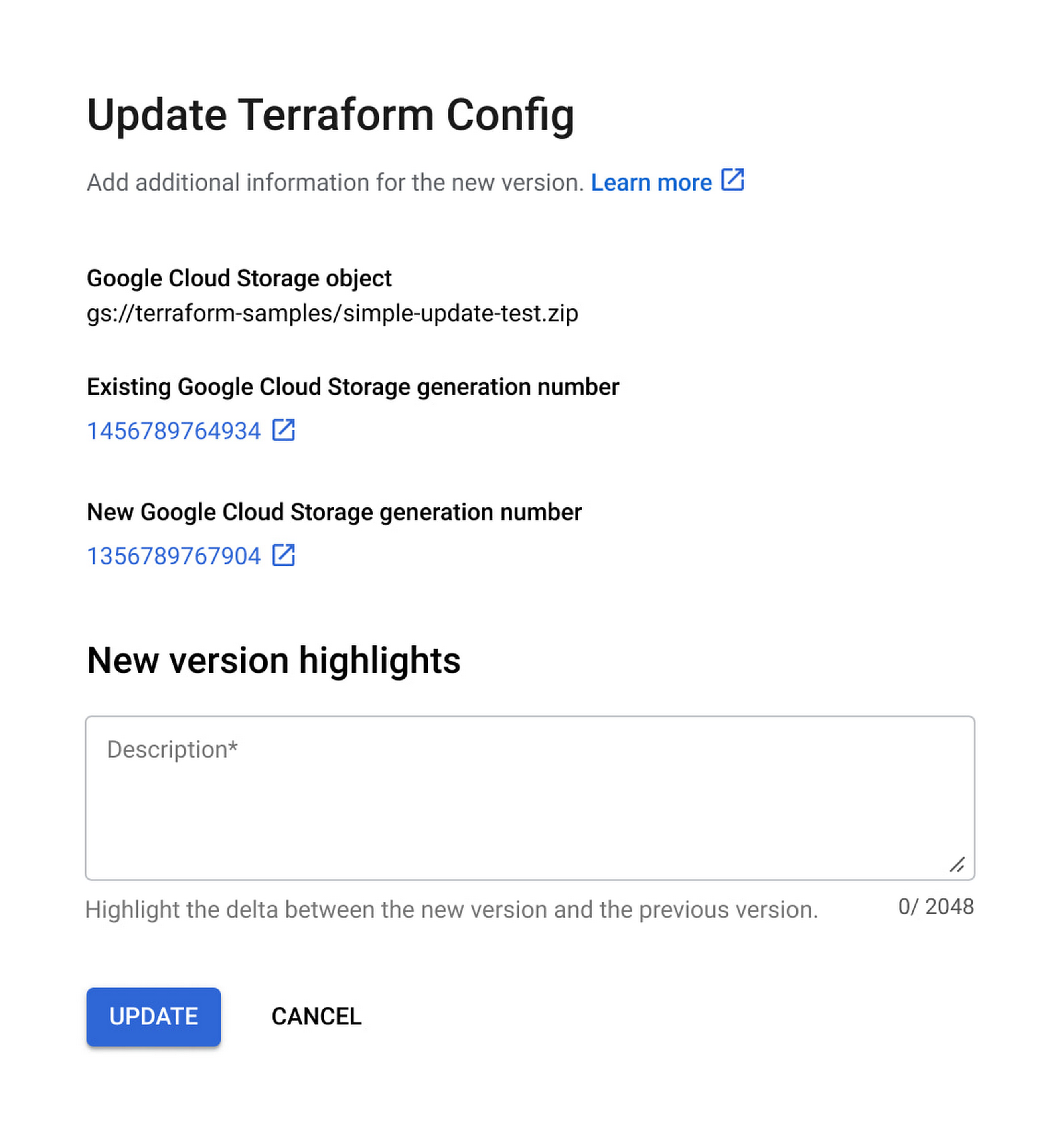
Additionally, prior to applying any changes, you can evaluate the contents of an update by comparing versions to download and compare the current and latest versions of the configuration and use new version highlights to add a description about the updates.

Ease of consumption
Once Private Catalog detects a change to the deployment configuration, it automatically informs catalog users about the change. On the Solutions page, end users have the ability to:
- Get informed about solutions that have updates
- View version highlights published by the admin
- Apply the new version
Additionally, with this release, Catalog users can retry existing deployments by modifying deployment parameters.
Reporting improvements
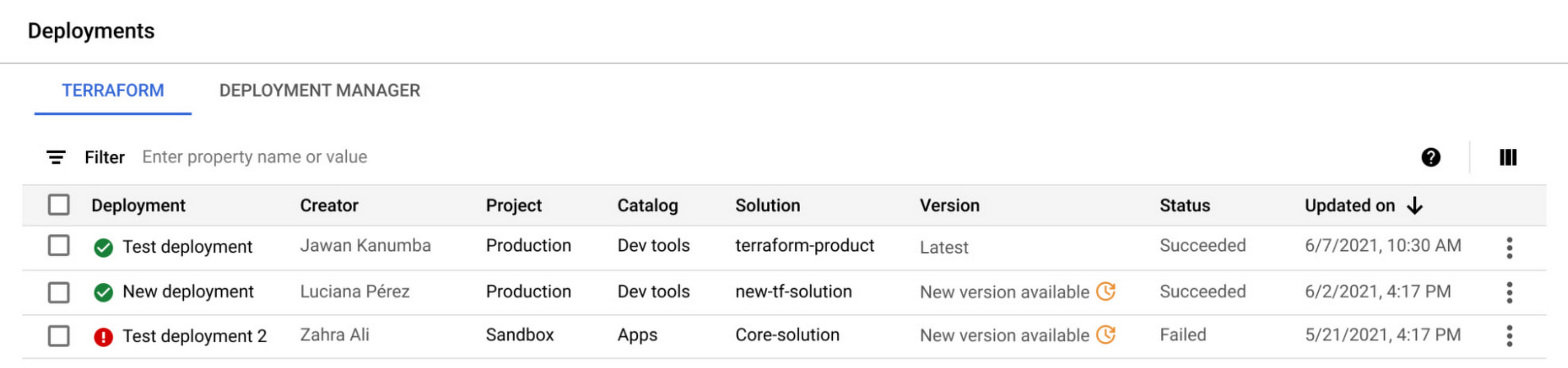
The deployment reporting dashboards for Private Catalog-based deployments now show additional information about the version of a solution deployed. This enables deeper insights into the overall deployment status across all Private Catalog solution assets.

Get started today
These new features are available to all Private Catalog customers. To learn how to use these features, refer to our documentation:
- Create a Terraform configuration in Private Catalog
- Manage and update your Terraform configurations in Private Catalog
Google Extends Support for Windows Server Containers on Anthos for Faster App Modernization and Consistent Dev Experience

5604
Of your peers have already read this article.
3:00 Minutes
The most insightful time you'll spend today!
Today, many applications in organizations’ data centers run on Windows Server. Modernizing these traditional Windows apps onto Kubernetes promises a host of benefits: a consistent platform across environments, better portability, scalability, availability, simplified management and speed of deployment, just to name a few. But how? Rewriting traditional .NET applications to run on Linux with .NET Core can be challenging and time-consuming. There is, however, a lower-toil, more developer friendly option.
Last year, we announced support for Windows Server containers running on Google Kubernetes Engine (GKE), our cloud-based managed Kubernetes service, which lets you take the advantage of containers without porting your apps to .NET core or rewriting them for Linux. Today, we’re going a step further with support for Windows Server containers on Anthos clusters on VMware in your on-premises environment. Now available in preview, you can consolidate all your Windows operations across on-prem and Google Cloud.
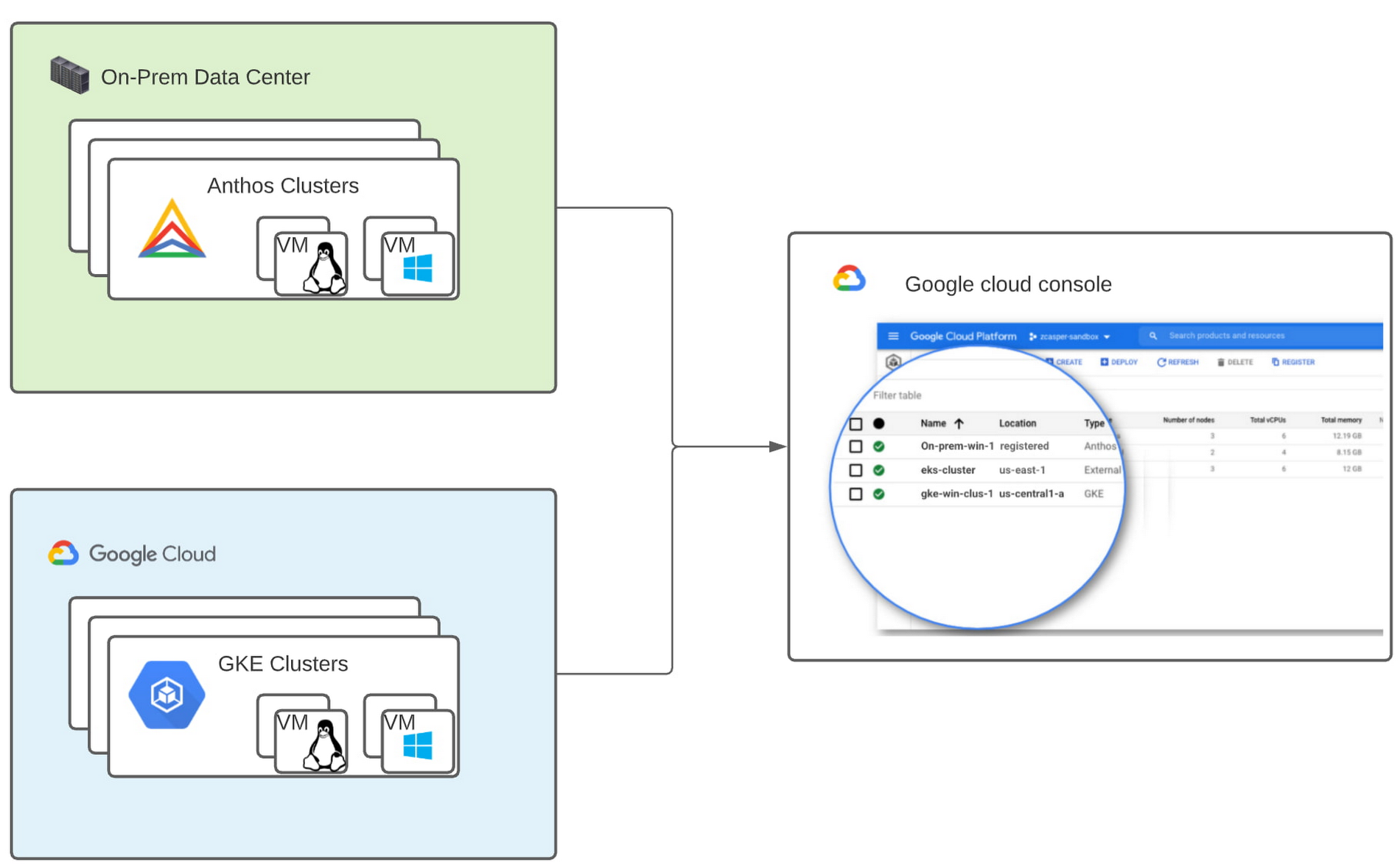
Bringing Windows Server support to our family of Kubernetes-based services—GKE running on Google Cloud, and Anthos everywhere—with the same experience, lets you modernize apps faster and achieve a consistent development and deployment experience across hybrid and cloud environments. Further, by running Windows and Linux workloads side by side, you get operational consistency and efficiency—no need to have multiple teams specializing in different tooling or platforms to manage different workloads. The single-pane-of-glass view and the ability to manage policies from a central control plane simplifies the management experience, while bin packing multiple Windows applications drives better resource utilization, leading to infrastructure and license savings.
With all these benefits, it’s no surprise that customers such as Thales, a French multinational firm specializing in aerospace and security services, have been able to reap significant benefits by moving Windows applications to GKE.
“We moved our Windows applications from VMs to Windows containers on GKE and now have a unified mechanism for Linux and Windows-based application management, scaling, logging, and monitoring. Earlier, setting up these applications in VMs and configuring them for high availability used to take up to a week, and the applications were not easily scalable,” said Najam Siddiqui, Solutions Architect at Thales. “Now with GKE, the setup takes only a few minutes. GKE’s automatic scaling and built-in resiliency features make scaling and high-availability setup seamless. Also, manually maintaining the VMs and applying security patches used to be tedious, which is now handled by GKE.”
Let’s take a deeper look at the architecture that lets you run your Windows container-based workloads on-prem.
Windows Server running on-prem with Anthos
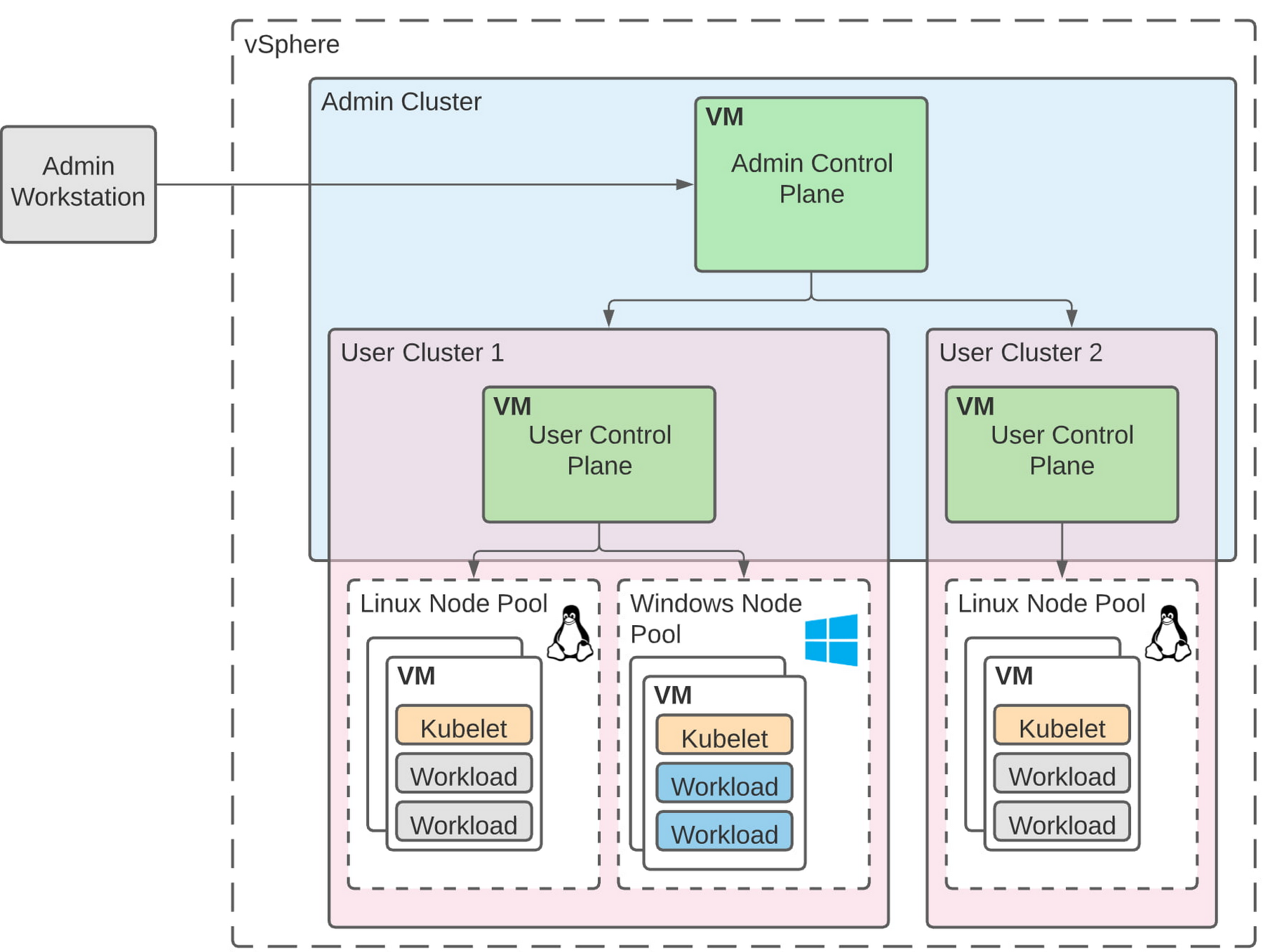
The diagram below illustrates the high-level architecture of running Windows container-based workloads in an on-prem GKE cluster with Anthos. Windows server node-pools can be added to an existing or new Anthos cluster. Kubelet and Kube-proxy run natively on Windows nodes, allowing you to run mixed Windows and Linux containers in the same cluster. The admin cluster and the user cluster control plane continue to be Linux-based, providing you a consistent orchestration experience and management ease across Windows and Linux workloads.
Get started today
When considering modernizing your on-prem Windows estate, we recommend running Windows Server containers on Anthos in your own data center. If you are new to Anthos, the Anthos getting started page and the Coursera course on Architecting Hybrid Cloud with Anthos are good places to start. You can also find detailed documentation on our website, and our partners are eager to help you with any questions related to the published solutions, as is the GCP sales team. And as always, please don’t hesitate to reach out to us at anthos-onprem-windows@google.com if you have any feedback or need help unblocking your use case.
The Power of Two: Best Practices for Mergers & Acquisitions on Google Cloud

3386
Of your peers have already read this article.
3:00 Minutes
The most insightful time you'll spend today!
Congratulations! Your company just acquired or merged with another organization, beginning an important new chapter in its history. But like with many business deals, the devil is in the details — particularly when it comes to integrating the two companies’ cloud domains and organizations. In this blog post, we look at how to approach mergers and acquisitions (M&A) from the perspective of Google Cloud. These are the best practices that your Google Cloud Technical Account Managers follow — or that we recommend you follow if you plan to perform the integration yourself.
Although there are various M&A scenarios, here are the two most common ones we will focus on:
- Both entities engaged in the M&A have some presence on Google Cloud and are looking for some level of integration
- Only one of the entities has a presence on Google Cloud, and is looking at best ways to work together
Depending on your situation, your approach to integrating the two companies will vary substantially.
When both companies have a Google Cloud presence
In the first scenario, let’s assume company A is acquiring company B. Prior to the M&A, both companies have their own Google Cloud Organizations — the top level structures in the Google Cloud resource hierarchy — and have one or more billing accounts associated with them. There are also various Folders and Projects below each Google Cloud Organization. In this scenario, here are the key questions to ask:
- How do you plan to integrate/consolidate two distinct Google Cloud Organizations?
- How do you plan to organize the billing structure?
- How do you handle Projects under the two Organizations?
- What is the identity management strategy for the two Organizations?
For each of these key questions, go ahead and formulate a detailed plan of action. If you have access to the Technical Account Manager service through Google Cloud Premium Support, you can reach out to them to further develop this plan.
Understanding Google Cloud Organizations
From an organizational integration standpoint, when each entity in an M&A has its own Google Cloud Organization, you have various options: no integration, partial, or full.
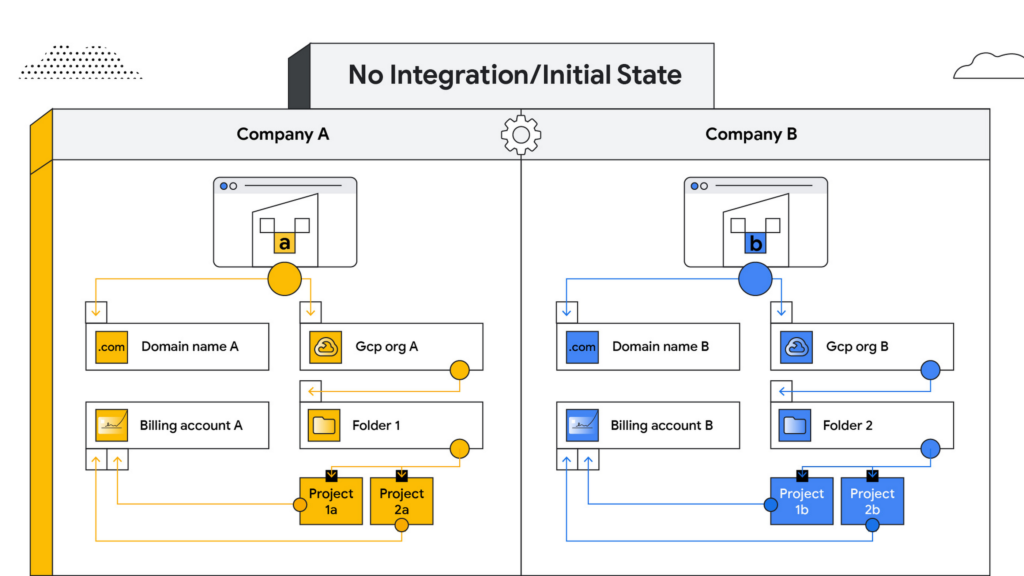
No integration – When company B operates as an independent entity from company A, no migration is required. One caveat is if company A has negotiated better pricing terms/discounts and support packages with Google Cloud. In that case, you can sign an affiliate addendum by working with your Google Cloud account team to help unlock the same benefits for company B.
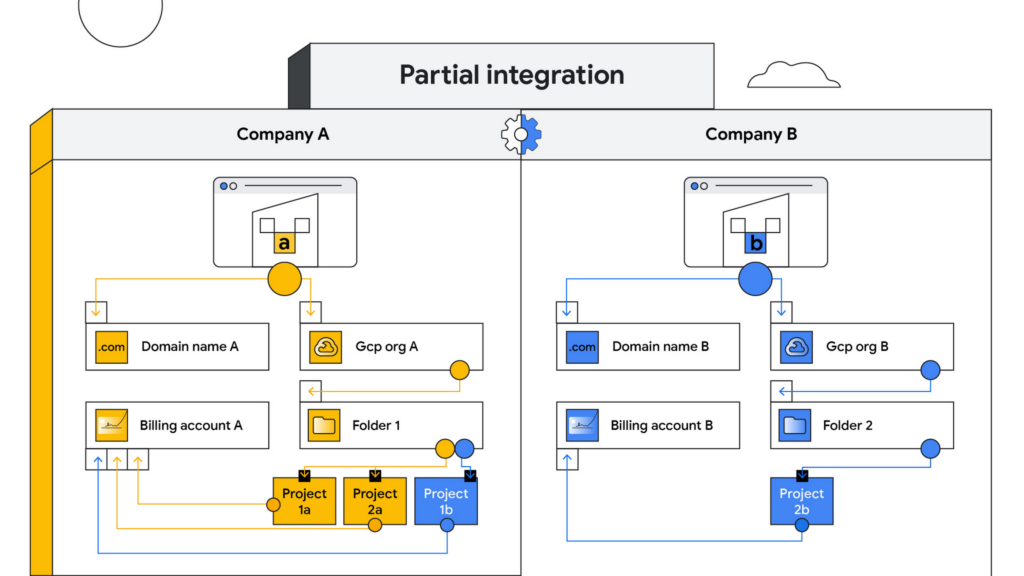
Partial integration – Some projects move over to company A from company B and others stay with Company B. There can be some shared access between the two companies and each of the organizations can continue to use their existing identity providers. This can be a self-serve or a paid services engagement with Google Cloud depending on the complexity of the two companies and how many project migrations need to take place between them.
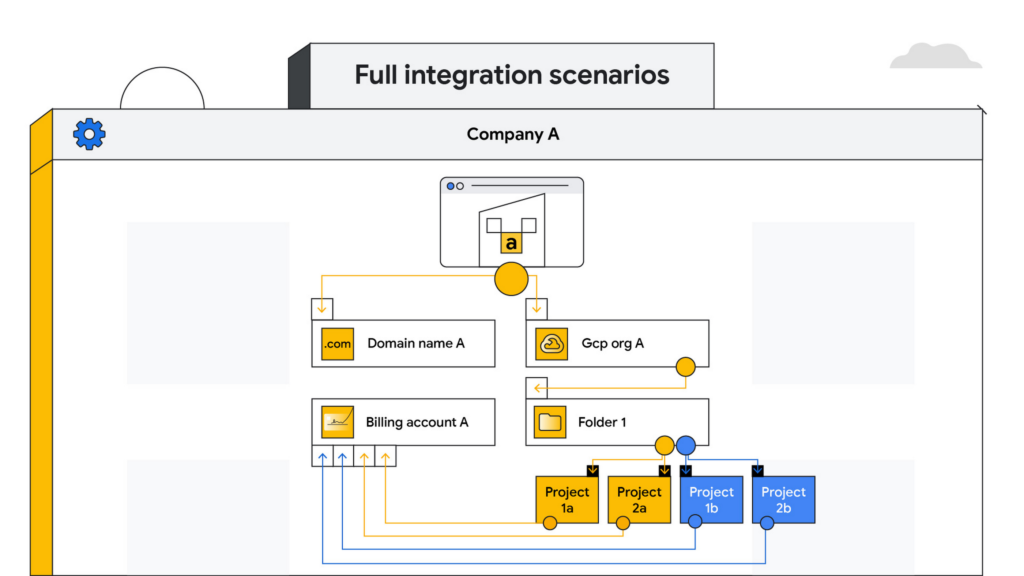
Full integration – Company B is fully incorporated into company A. This means you go through a full billing, Google Workspace identity and project migration from company B into company A. This can be a complex process and we highly recommend engaging your Google Cloud account teams to scope out a paid services engagement to go through this transition.
Planning your project migration
No matter what you want your end state to look like, project migration requires careful planning. Again, if you have an assigned Technical Account Manager, please reach out to them to ensure that you have a conversation around best practices before starting this migration.
If you’re taking a self-service approach, at a high level, we recommend leveraging the Resource Manager API to manage your project migrations. Do keep in mind that there are several prerequisites and required permissions documented here that need to be assigned before going down this path.
In addition, please be sure to read the billing and identity management considerations below to ensure that you are covering all of the bases associated with such a migration, as your choices can fundamentally alter your Google Cloud footprint.
Billing considerations
When deciding how to structure your Organizations and billing accounts, our recommendation is to always limit the number of Organization nodes and use the Folder structure to manage departments/teams within it. Creating additional Organization nodes is only advised in cases where you require a level of isolation for certain Projects from central administration for a specific business reason, for example, if the company being acquired already has their own Organization node and there is a business justification to let it operate as a standalone entity.
Warning: If you have multiple Organization nodes, be aware that you will not have central visibility across all your organizational resources, and that policy management across different Organization nodes can be cumbersome. You will also have to manage multiple Workspace accounts and manage identities across them, which can be difficult, especially when operating at scale.
From a billing account management perspective, our recommendation is to create one central billing account that lives within the Organization node with tags and labels incorporated for additional granularity. However, there are a few business cases which warrant the creation of additional billing accounts such as:
- You need to split charges for legal or accounting purposes
- Invoices are paid in multiple currencies
- You need to segregate usage to draw down on a Google Cloud promotional credit
- Subsidiaries need their own invoice
Keep in mind that committed-use and spend-based discounts and promotional credits cannot be shared across billing accounts and are provisioned on a per-billing-account basis. As such, more billing accounts can make it harder to leverage these discounts and credits.
Identity management
As you might expect, merging two entities has identity management implications. Cloud Identity is the solution leveraged by Google Cloud to help you manage your user and group identities. Even if the acquired company only uses the productivity products that are part of Google Workspace, the identities would still be managed by Cloud Identity.
Google Workspace considerations
To move large amounts of content into a Google Workspace domain, we recommend one of three options, depending on your end goal and data complexity:
- For general migrations: Leverage Google Workspace Migrate to move data into your Workspace domain from either another Workspace domain or a third-party productivity solution
- For manual migrations: Use the Export tool to move your organization’s data to a Cloud Storage archive so you can selectively download exported data by user and service
- For complex Google Workspace scenarios: Speak with your Google Cloud Technical Account Manager about the possibility of using a custom scoped engagement to merge two Google Workspace environments without business interruption
When only one company is on Google Cloud
Now, let’s consider the scenario where only company A has a presence on Google Cloud but company B does not. The approach you take to integrate the two organizations largely depends on your desired end state — full, partial or no integration.
If the plan is to eventually integrate company B into company A, your approach here will have a lot of similarities with the ‘full integration’ option mentioned above — just at a later point in time.
You may also run into a scenario where company B has a presence on an alternative cloud platform and you need to migrate resources into or out of Google Cloud. Again, similar to the partial integration option called out above, a paid engagement or a self-service exercise would be a good fit depending on the complexity of the desired end state.
Here to help
A merger or acquisition is an exciting milestone for any company, but one that needs to be managed carefully. Once you carefully review these considerations, develop a plan of action for your organization. You can also engage Google’s Professional Services for a paid engagement or Google’s Technical Account Management Service for a self-managed process to achieve the desired results.
If you are going through or considering going through M&A at your organization and have a different scenario than what we have discussed, please feel free to reach out to your account teams for guidance or contact us at https://cloud.google.com/contact.
Google Unveils Topaz, the New Subsea Cable Connecting Asia and Canada

3326
Of your peers have already read this article.
3:00 Minutes
The most insightful time you'll spend today!
There’s a new subsea cable in town: Topaz, the first-ever fiber cable to connect Canada and Asia.
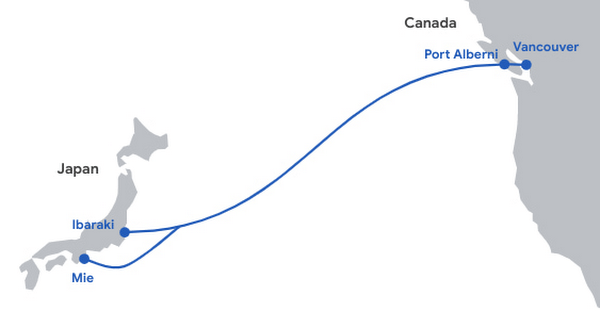
Once complete, Topaz will run from Vancouver to the small town of Port Alberni on the west coast of Vancouver Island in British Columbia, and across the Pacific Ocean to the prefectures of Mie and Ibaraki in Japan. We expect the cable to be ready for service in 2023, not only delivering low-latency access to Search, Gmail and YouTube, Google Cloud, and other Google services, but also increasing capacity to the region for a variety of network operators in both Japan and Canada.
Google is spearheading construction of the project, joined by a number of local partners in Japan and Canada to deliver the full Topaz subsea cable system. Other networks and internet service providers will be able to benefit from the cable’s additional capacity, whether for their own use or to provide to third parties. And, similar to other cables we’ve built, with Topaz we will exchange fiber pairs with partners who have systems along similar routes. This is a longstanding practice in the industry that strengthens the intercontinental network lattice for network operators, for Google, and for users around the world.
Network infrastructure investments like Topaz bring significant economic activity to the regions where they land. For example, according to a recent Analysys Mason study, Google’s historical and future network infrastructure investments in Japan are forecasted to enable an additional $303 billion (USD) in GDP cumulatively between 2022 and 2026.
The width of a garden hose, the Topaz cable will house 16 fiber pairs, for a total capacity of 240 Terabits per second (not to be confused with TSPs). It includes support for Wavelength Selective Switch (WSS), an efficient and software-defined way to carve up the spectrum on an optical fiber pair for flexibility in routing and advanced resilience. We’re proud to bring WSS to Topaz and to see the technology is being implemented widely across the submarine cable industry.
While Topaz is the first trans-Pacific fiber cable to land on the West Coast of Canada, it’s not the first communication cable to connect to Vancouver Island. In the 1960s, the Commonwealth Pacific Cable System (COMPAC) was a copper undersea cable linking Vancouver with Honolulu (United States), Sydney (Australia), and Auckland (New Zealand), expanding high-quality international phone connectivity. Today, COMPAC is no longer in service but its legacy lives on. The original cable landing station in Vancouver — the facility where COMPAC made landfall on Canadian soil — has been upgraded to fit the needs of modern fiber optics and will house the eastern end of the Topaz cable.
Traditional and treaty rights, and local communities, are deeply important to our infrastructure projects. The Topaz cable is built alongside the traditional territories of the Hupacasath, Maa-nulth, and Tseshaht, and we have consulted with and partnered with these First Nations every step of the way.
“Tseshaht is very proud of this collaboration and our partnership with Google, who has been very respectful and thoughtful in its engagement with our Nation. That’s how we carry ourselves and that’s how we want business to carry themselves in our territory.“ — Tseshaht First Nation – Elected Chief Councillor-Ken Watts
“The five First Nations of the Maa-nulth Treaty Society are pleased that we have concluded an agreement with Google Canada and have consented to the installation of a new, high-speed fiber optic cable through our traditional territories. This agreement, in which both Google Canada and our Nations benefit, is based on respect for our constitutionally protected treaty and aboriginal rights and enhances the process of reconciliation. We would also like to acknowledge the sensitivity that Google Canada expressed during our talks in regard to the pain and trauma experienced by our people as a result of residential school experience. We look forward to a long and mutually beneficial relationship with Google Canada.” —Chief Charlie Cootes, President of the Maa-nulth Treaty Society
“Google’s respect towards our Nation is appreciated and has good energy behind it.” —Hupacasath First Nation – Elected Chief Councilor – Brandy Lauder
With the addition of Topaz today, we have announced investments in 20 subsea cable projects. This includes Curie, Dunant, Equiano, Firmina and Grace Hopper, and consortium cables like Blue, Echo, Havfrue and Raman — all connecting 29 cloud regions, 88 zones, 146 network edge locations across more than 200 countries and territories. Learn about Google Cloud’s network and infrastructure on our website and in the below video.
BigQuery’s User-friendly SQL is Like a Cool Drink for Hot Summer

5682
Of your peers have already read this article.
2:30 Minutes
The most insightful time you'll spend today!
With summer just around the corner, things are really heating up. But you’re in luck because this month BigQuery is supplying a cooler full of ice cold refreshments with this release of user-friendly SQL capabilities.
We are pleased to announce three categories of BigQuery user-friendly SQL launches: Powerful Analytics Features, Flexible Schema Handling, and New Geospatial Tools.
Powerful Analytics Features
These powerful SQL analytics features provide greater flexibility to analysts for organizing, filtering, and rendering data in BigQuery than ever before. You can enable spreadsheet-like functionality on summarized data using PIVOT and UNPIVOT and filter irrelevant data in analytic functions using QUALIFY.
Through this section, we will become familiar with these new features through examples using the BigQuery Public dataset, usa_names.
PIVOT/UNPIVOT (Preview)
One of the most time-consuming tasks for data analytics practitioners is wrangling data into the right shape. SQL is great for wrangling data, but sometimes you want to reformat a table as you would in a spreadsheet, pivoting rows and columns interchangeably. To support this use case, we are pleased to introduce PIVOT and UNPIVOT operators in BigQuery. PIVOT creates columns from unique values in rows by aggregating values, and UNPIVOT reverses this action.The example below uses PIVOT on bigquery-public-data.usa_names.usa_1910_current to show the number of males and females born each year, representing each gender as a column. Then UNPIVOT reverses this action.
Language: SQL
-- we start with SQL to create a simple table-- we only include gender, year, and number.CREATE TABLEmydataset.sampletable1 AS (SELECTGender,Year,SUM(Number) AS NumberFROM`bigquery-public-data.usa_names.usa_1910_current`WHEREYear >= 2017GROUP BYGender, Year);-- The resulting table:--+----------------------------------------+--| Gender | Year | Number |--+----------------------------------------+--| F | 2019 | 1353716 |--| F | 2017 | 1403989 |--| F | 2018 | 1380382 |--| M | 2018 | 1568678 |--| M | 2019 | 1538056 |--| M | 2017 | 1604609 |--+----------------------------------------+-- use PIVOT to create columns for “female” and “male”CREATE TABLEmydataset.Pivoted ASSELECTyear, male, femaleFROMmydataset.sampletable1PIVOT( SUM(Number) FOR gender IN ('M' AS male,'F' AS female))ORDER BYyear;-- The resulting pivoted table:--+----------------------------------------+--| Year | female | male |--+----------------------------------------+--| 2017 | 1403989 | 1604609 |--| 2018 | 1380382 | 1568678 |--| 2019 | 1353716 | 1538056 |--+----------------------------------------+-- UNPIVOT reverses the row/column rotation of PIVOT.SELECT*FROMmydataset.PivotedUNPIVOT(number FOR gender IN (male AS 'M',female AS 'F'));
QUALIFY (Preview)
More advanced users of SQL know the power of analytic functions (aka window functions). These functions compute values over a group of rows, returning a single result for each row. For example, customers use analytic functions to compute a grand total, subtotal, moving average, rank, and more. With the announcement of support for QUALIFY, BigQuery users can now filter on the results of analytic functions by using the QUALIFY clause.
QUALIFY belongs in the family of query clauses used for filtering along with WHERE and HAVING. The WHERE clause is used to filter individual rows in a query. The HAVING clause is used to filter aggregate rows in a result set after aggregate functions and GROUP BY clauses. The QUALIFY clause is used to filter results of analytic functions.
To show the utility of QUALIFY, the example below uses QUALIFY to return the top 3 female names from each year in the last decade using from bigquery-public-data.usa_names.usa_1910_current.
Language: SQL
-- QUALIFY filters the result of the RANK functionSELECTname,year,SUM(number) AS total,RANK() OVER (PARTITION BY yearORDER BY SUM(number) DESC) AS rankFROM`bigquery-public-data.usa_names.usa_1910_current`WHEREgender = 'F'AND YEAR >= 2010GROUP BY 1,2QUALIFY RANK <= 3ORDER BY 2,4;
Flexible Schema Handling
New SQL for administrators and data engineers enables table renaming for data pipeline processes, as well as flexible column management.
Table Rename (GA)
In data pipeline processes, tables are often created and then renamed so that they can make way for the next iteration of the pipeline run. To accomplish this, customers need a mechanism by which they can create a table and then subsequently rename it. Now if customers want to change this name using SQL, they can. Using the simple syntax that ALTER TABLE RENAME TO provides, customers will be able to rename a table after creation to clear the way for the next iteration of tables in the data pipeline.
Language: SQL
-- create a sample table “tablename” in “mydataset”.-- You will rename this table.CREATE OR REPLACE TABLE dataset.tablename(col1 STRING,col2 NUMERIC);-- if this table “tablename” becomes obsolete-- perform Table Rename to “obsoletetable”ALTER TABLEmydataset.name RENAME TO obsoletetable;
DROP NOT NULL constraints on a column (GA)
While BigQuery has historically provided many tools available in the UI, CLI and APIs, we know that many administrators prefer interfacing with the database using SQL. BigQuery recently released DDL statements which enable data administrators to provision and manage datasets and tables, greatly simplifying provisioning and management. Today, we continue the next addition in this line of releases by announcing ALTER COLUMN DROP NOT NULL constraint on a column:
- ALTER COLUMN DROP NOT NULL allows the administrator to remove the NOT NULL constraint from a column in BigQuery.
Language: SQL
-- create a table to store credit card numbers-- the business requires this field, so-- include a NOT NULL constraintCREATE TABLEmydataset.customers(credit_card_number STRING NOT NULL);-- if needs of the business no longer require this field,-- the customer can allow null entries in this column-- by dropping the constraintALTER TABLEmydataset.customersALTER COLUMN credit_card_number DROP NOT NULL;
CREATE VIEW with column list (GA)
Views are used ubiquitously by BigQuery customers to capture business logic. Oftentimes, BigQuery users have business requirements to assign aliases to columns in views. Now BigQuery supports doing so upon view creation in a column name list format with the release of CREATE VIEW with column list syntax.
Language: SQL
-- aliases list1 and list2 can be assigned in a list formatCREATE VIEWmyview (list1, list2) ASSELECTcolumn_1, column_2FROMmydataset.exampletable
New Geospatial Tools
ST_POINTN, ST_STARTPOINT, and ST_ENDPOINT
Geospatial data is incredibly valuable to data analytics customers dealing with data from the physical world. BigQuery has very strong geospatial function support to help customers process marketing data, track storms, or manage self-driving cars. Particularly for analyzing vehicle or location tracking data, we’re thrilled to provide three new functions to allow users to easily extract or filter on key points:
For example, when working with vehicle histories, ST_POINTN, ST_STARTPOINT, and ST_ENDPOINT allow users to extract elements such as the start and the end of a trip. For identifying origin-destination pairs these functions will make that task much easier.
Language: SQL
-- pull the first, second, penultimate and final points-- from a linestringWITH linestring as (SELECT ST_GeogFromText('linestring(1 1, 2 1, 3 2, 3 3)') g)SELECTST_StartPoint(g) AS first, ST_EndPoint(g) AS last,ST_PointN(g,2) AS second, ST_PointN(g, -2) as second_to_lastFROMlinestring+--------------+--------------+--------------+----------------+| first | last | second | second_to_last |+--------------+--------------+--------------+----------------+| POINT(1 1) | POINT(3 3) | POINT(2 1) | POINT(3 2) |+--------------+--------------+--------------+----------------+
As sure as a hot summer day pairs well with an ice-cold beverage, these new user-friendly SQL features in BigQuery pair well with your data analytics workflows. To learn more about BigQuery, visit our website, and get started immediately with the free BigQuery Sandbox.
Payhawk Becomes a Unicorn with Google Cloud-Powered Automated Financing Software

2730
Of your peers have already read this article.
3:30 Minutes
The most insightful time you'll spend today!
For far too long, managing employee expenses has been a time-consuming process that requires manual data entry and reconciliation to bridge the gap between business bank accounts and ERP systems. In the absence of an integrated workflow, finance teams use multiple systems to manage credit card and cash payments, and finding receipts. In most cases, they also lack real-time visibility into company spending.
The complexity grows exponentially as businesses expand, especially into new regions. Extra administration required to manage new bank accounts, card issuers, and local accounting systems impedes decision making and negatively impacts revenues and growth. Businesses of all sizes struggle with this, but it can be especially challenging for medium to large enterprises.
Payhawk set out to help businesses overcome these challenges when we founded the company in 2018. We combine VISA company cards, reimbursable expenses, and accounts payable into a single product. Our customers can automate manual processes, maximize efficiency, and accelerate business expansion.

Setting up our first cloud cluster in less than a week
To support growth and attract investment we were keen to launch our solution on a scalable, future-proof IT architecture that didn’t require extensive technical support. This is where Google Cloud made a big impression, especially the user interface and documentation which massively reduces the resources required to set up clusters and put them into production.
I’m a CTO, not a DevOps specialist, but in less than a week I was able to set up a secure, reliable operating infrastructure. This enabled us to fast-track our application development and we were able to issue our first card in just eight months. Our Google Cloud partner, Cloud Office also gave us valuable assistance, guiding us through the deployment process and advising on Google Cloud’s extensive range of solutions.
Google Kubernetes Engine (GKE) played a critical role, accelerating the deployment and management of our cloud native applications. We use Cloud SQL as our database while other important tools include Cloud Memorystore, Vision AI, Cloud Storage and Artifact Registry for our wider data storage and application needs. With Firebase we’ve been able to build a notification system for mobile devices.
Another incentive is that most other cloud solutions require add-on services to build and keep your product live. With Google Cloud, all the services that Payhawk needs including logging, metrics, monitoring of resources, and utilization of CPU memory come as standard.
For instance, I was really impressed by Google Cloud’s operations suite, which includes Cloud Logging and Cloud Monitoring. If there are any anomalies in our cloud architecture, we can track and resolve them with minimal disruption to our operations. This also removes the need to invest in an additional observability solution.
Reliability that builds customer trust
Google Cloud also supports Payhawk’s mission to put customers at the center of our organization. Thanks to Google Cloud error reporting and tracking and Google Cloud single sign on, Payhawk’s engineering team can anticipate customer issues and correct them in less than one hour. Trust is everything, and Google Cloud gives us the tools to boost customer satisfaction and build long-term relationships.
As a young business, managing costs is also a priority. The Google for Startups Cloud Program, which includes credits for Google software and tools, enabled us to push the business forward without having to worry about financing our infrastructure, especially in the first year. This gave us breathing room to work through funding, application development, and the onboarding of our first customers.
In addition, Google Cloud gives us confidence that we can grow the business fast. In most months we have seen more than 10% growth — in some cases it’s been 20%. In the first half of 2022, the business doubled in size, but Google Cloud gave us the flexibility to scale our infrastructure, adding storage, memory, and processing power as we onboarded new customers. The pricing model is also generous so that we can grow our revenues while keeping control of operational expenditure.
Since launch we have acquired a valuable mix of customers from startups to large businesses that want to reduce the costs of their expenses programs and increase employee satisfaction. They include ATU, a German automobile servicing company, which has successfully digitized its entire procurement process, and Discordia, a Bulgarian logistics business with 10,000 trucks, which has issued Payhawk cards to all its drivers.
Looking to the future, it’s no exaggeration to say that Google Cloud is a foundation of our business and has given investors confidence in our operations. From a first seeding round of €3 million, early this year we closed a Series B extension of $100 million. This gives us a valuation of $1bn and makes Payhawk the first ever Bulgarian unicorn.
We now operate in 32 countries in Europe and the US, and plan to double our team by the end of the year. It feels like we’ve come a long way since we first started using Google Cloud, and I’m thrilled that we have Google Cloud as a global technology partner supporting our mission to transform expense management and financial operations worldwide.
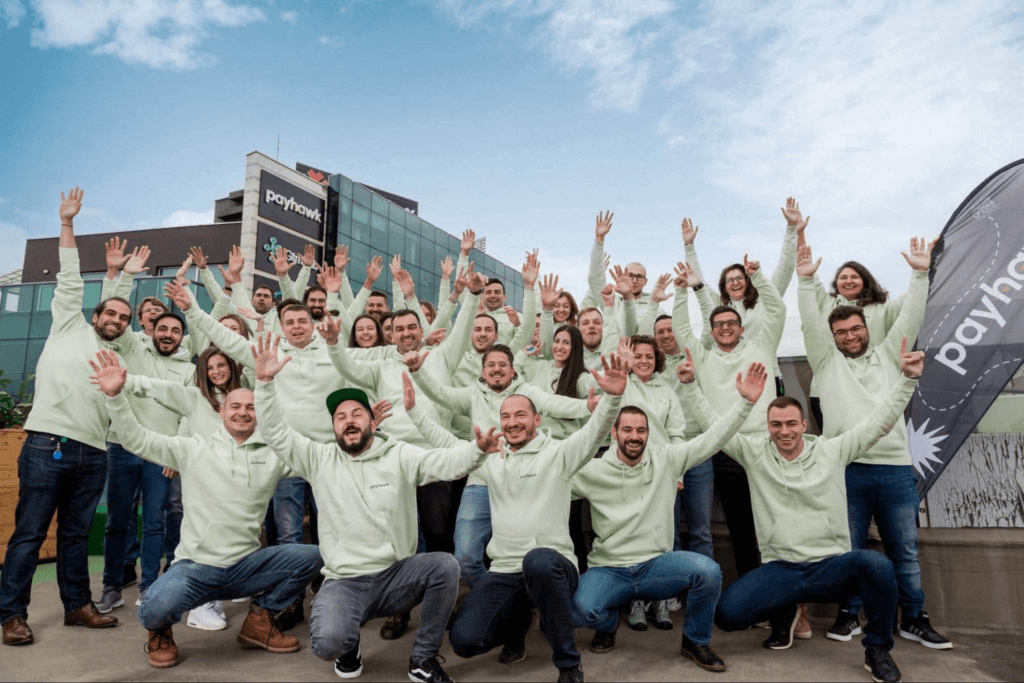
If you want to learn more about how Google Cloud can help your startup, visit our page here to get more information about our program, and sign up for our communications to get a look at our community activities, digital events, special offers, and more.
More Relevant Stories for Your Company

Know the Leaders of Google Cloud Public Sector Community
At Google Cloud, being a strategic partner is part of our DNA. Whether it’s listening closely to our customers, helping to build team skills for innovation or simply being there (since we know the cloud is 24/7), we get excited about working hands-on with customers to deliver new solutions. As

Developers and Practitioners’ Guide for Moving On-prem Data Warehouse to BigQuery
Data teams across companies have continuous challenges of consolidating data, processing it and making it useful. They deal with challenges such as a mixture of multiple ETL jobs, long ETL windows capacity-bound on-premise data warehouses and ever-increasing demands from users. They also need to make sure that the downstream requirements

Mid-Sized B2B Firm Achieves the Business Trifecta with a Single Strategy
Thirteen years’ experience in e-commerce has given Teddy Chan, Chief Executive Officer and Chief Technology Officer, AfterShip, a deep understanding of the challenges of shipping and tracking packages to customers worldwide. “The key problem many merchants face is customers asking ‘where is my order?’ and ‘when I will get the package?’”

ATB Financial Focuses on Customer Experience with the Speed it Gains in the Cloud
As senior vice president and head of technology enablement for ATB Financial, Barry Hensch has a mission: creating a seamless experience for the Alberta, Canada-based bank’s nearly 800,000 customers by leveraging the latest digital technology. ATB is a purpose-driven financial institution owned and operated by Alberta’s provincial government, with about
