





Google Cloud Extends Research Credits to Non-profit Research Projects

3375
Of your peers have already read this article.
1:30 Minutes
The most insightful time you'll spend today!
To fuel the breakthroughs of the future, today’s researchers need easy access to the most innovative cloud technologies. That’s why we are delighted to announce the latest expansion of Google Cloud research credits beyond its previous scope of government and academic research institutions to researchers at nonprofit institutions. This initiative is part of our ongoing efforts to make the advantages of cloud research available to more people everywhere–and to drive more discoveries faster.
To serve researchers outside of academia, we are now offering nonprofit institutions access to Google’s research credit program. Leading centers of scientific knowledge like the New York Genome Center, Scripps Research Institute, the Vector Institute in Toronto, the Ontario Institute for Cancer Research, and the Allen Institute for AI (AI2) have already benefited from the efficiencies of managing and analyzing their datasets on Google Cloud.
Michael Schmitz, Director of Engineering at AI2, reports that “Google Cloud has been essential for our research program. While we have an on-premise installation for custom hardware, the ability to use Google Cloud for isolated workstations (where researchers always have guaranteed access to a development environment) and bursting with increased need (such as our summer intern surge or a hyperparameter tuning just before our deadline) has been a critical part of conducting our research.”
Also, to better support Ph.D. students, we are updating the terms of Google Cloud credits for use toward advanced research. Now, Ph.D. students can apply for up to $1,000 grants that are renewable over the five years of their programs. We know that the researchers of the future need the best resources now.
Hassaan Maan, Ph.D. student at the University of Toronto/Vector Institute, says “when the pandemic started, I began working on a web-based platform to help researchers analyze genome sequences of the COVID-19 virus in real time and compare with data from labs around the world. Deploying the Covid Genotyping Tool (CGT) platform was challenging, as I had minimal experience hosting web applications and we required a scalable and fine-tuned deployment. Google Cloud’s comprehensive user interface and thorough documentation made for a seamless deployment, and I was able to get the platform up and running in less than two weeks. Google Cloud was a huge factor in the success of this project, and I hope to be able to use it further during my Ph.D. studies.”
To ramp up your own research project with Google Cloud, apply now for free credits in selected countries. To supplement your own learning on Google Cloud, sign up to earn four Google Cloud skills badges that you can share on your social platforms.
4829
Of your peers have already watched this video.
2:30 Minutes
The most insightful time you'll spend today!
Haaretz on Google Cloud Guarantees Faster, Reliable & Responsive Services to its Audience
Israeli centenarian newspaper, Haaretz relied on on-prem infrastructure to serve readers digitally. As the need for scalability, security and business intelligence grew alongside their readership, Haaretz was looking for more than just a cloud-based solution to replace their infrastructure. Inon Gershovitz, CTO, Haaretz takes us through the journey of recreating digital news experience, serving growing reader traffic and keeping up the editorial standards with Google Cloud.
Watch the video to hear from Haaretz’ leaders on delivering personalized content to readers with Google Cloud solutions!
Forrester and IDC’s Research Confirms Quantifiable Benefits of Running SAP on Google Cloud

3643
Of your peers have already read this article.
3:00 Minutes
The most insightful time you'll spend today!
Cloud migration is top of mind for most companies with SAP applications. While the advantages of the cloud for SAP customers is generally understood, the move itself can be complicated and disruptive. So what actually are the business benefits and cost savings? How long will it take to recoup such an investment? Two recently published reports from Forrester and IDC can help to quantify the benefits and ROI.
Getting answers to the million-dollar questions
Forrester and IDC bring different methodologies to the table; they asked somewhat different questions and used different models to calculate their financial KPIs. This allows you to get two different points of view on the same basic questions about value, risk, and ROI.
As it turns out, both reports found that customers who migrate their SAP environments to Google Cloud see an impressive return on their investments. From uptime and infrastructure to efficiency and productivity—both Forrester and IDC identified major benefits to companies that have made the move to Google Cloud.
Let’s walk through some of the highlights from both reports.
Forrester’s TEI model spotlights the power of uptime improvements
Based on in-depth conversations and quantitative research with six companies, here are the key findings from the Forrester Total Economic Impact (TEI) study for companies running SAP systems on Google Cloud:
- Direct cost savings. When they compare cloud subscription and related costs to what they spent on legacy systems and infrastructure, most IT leaders expect a cloud migration to deliver up-front savings. But according to Forrester, the companies interviewed reported average savings of more than $3 million a year, including eliminated hardware purchases, right-sized software licensing, staffing efficiencies, and other operational cost savings.
- Dramatically improved uptime. Customers told Forrester that migrating SAP to Google Cloud pretty much eliminates downtime—planned or unplanned—as a significant IT concern. According to Forrester, companies realized an average of $1.5 million in savings per year by avoiding the revenue and user productivity losses that had once been a fact of life for their IT teams.
- Significant efficiency gains. Because Google Cloud works to mitigate performance bottlenecks, infrastructure mishaps, network delays and more, the companies Forrester interviewed reported a yearly average of $500,000 in productivity gains for SAP business users and frontline workers.
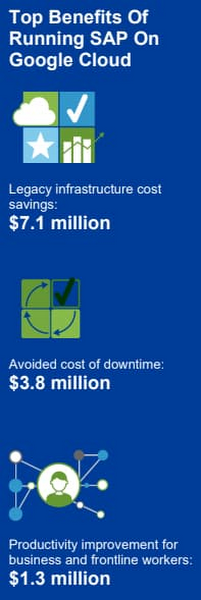
Companies also reported an annual average of $500,000 in additional IT efficiency gains after migrating SAP to Google Cloud. This quantifies what happens when IT practitioners no longer have to deal with the bottlenecks that come with legacy systems, and are able to spend their time on tasks that actually build value and help the business. Based on the Forrester analysis, the companies interviewed could expect average three-year net benefits of about $15.4 million.
“We benefit from any technical innovation in the infrastructure area because Google Cloud is doing that for us,” one customer told Forrester. “So, whenever there’s new hardware available or new processes or whatever, I don’t have to run the specific project to migrate from A to B.”
IDC finds that good things happen when SAP downtime is reduced
The IDC report highlights four areas where Google Cloud generates the most value for customers:
1. Cutting infrastructure costs. According to IDC, customers running SAP on Google Cloud spent 31% less on infrastructure each year, or an average of $233,000 less per company. The ability to scale SAP environments dynamically and to keep them right-sized was a major factor; so were the advantages of automated infrastructure monitoring and savings on software licenses once these companies could stop overprovisioning.
2. Giving a team better things to do. IDC found that the infrastructure, database, and security teams of the companies they interviewed reduced the time they need to maintain and manage SAP environments by an average of 66% per year, for a savings of $443,000, per company. As a result, these companies got the equivalent of a major staff expansion from their SAP migrations—giving them both the staff time and the expertise to focus on far more valuable activities.
3. Limiting unplanned downtime. These companies reported to IDC an average 98% reduction in unplanned downtime. Migrating SAP to Google Cloud significantly reduces the threat of downtime and saves the business an average of nearly $770,000 per year in lost revenue and user productivity. For some firms, the downtime savings topped $1 million per year.
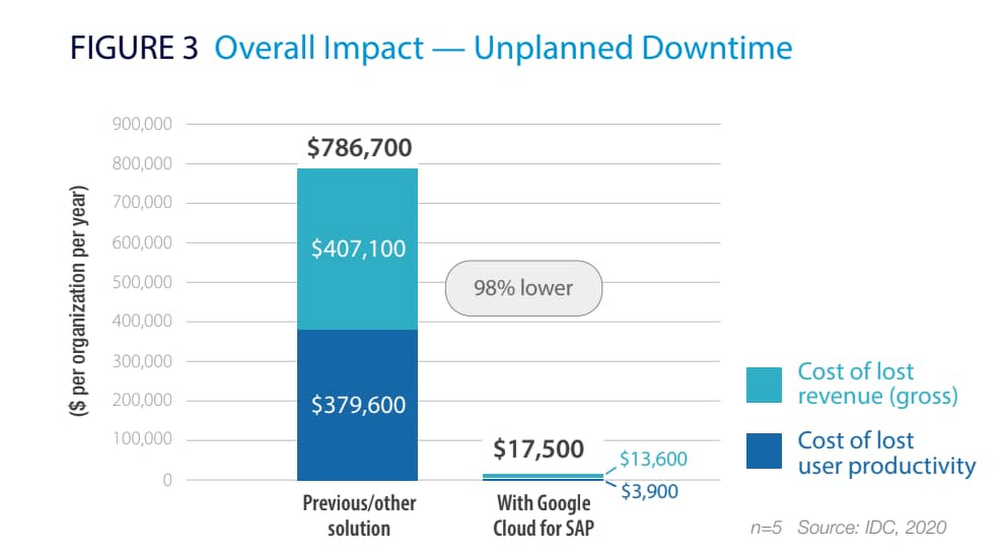
4. Making users more productive. The companies interviewed told IDC that by avoiding downtime and disruptions associated with upgrade and maintenance tasks for their legacy SAP systems, they saved an average of $363,000 annually in user productivity. But there’s an even more interesting under-the-hood stat contributing to these gains: These companies reduced the time required to deploy new SAP compute and storage resources from an average of 8.8 days to 1 hour.
When IDC added up these and other savings associated with running SAP on Google Cloud, it found an average three-year savings of more than $3.5 million and a five-month payback period.
“We acquired another company, so basically overnight we needed to be able to deal with that increase,” said one customer IDC spoke with. “We doubled our footprint overnight, and we had to take on hundreds of additional employees. We needed a platform that we could easily scale up if we required, and that’s the benefit of running SAP on Google Cloud for us.”
Explore the reports
There is a lot to think about when considering a move of SAP systems to the cloud. The cloud has many advantages, but migration can seem complicated and tricky; we appreciate that you are looking to understand the full picture. These papers are a great place to start.
Download the reports—Forrester’s “Total Economic Impact of SAP on Google Cloud” and IDC’s “Business Value of SAP for Google Cloud Environments.” Then, get in touch.
3493
Of your peers have already watched this video.
1:30 Minutes
The most insightful time you'll spend today!
How Carrefour is Building the Future of Retail on Google Cloud
Multinational retailer Carrefour was facing the challenge of meeting increasing customer expectations and realized that it needed to innovate faster. That’s when the company decided to move its SAP workloads to Gooogle Cloud.
As a result, Carrefour transformed over 1,000 stores and redesigned its back office management with SAP on Google Cloud. Not just that, it also realized the added benefits of flexibility, agility, and disaster recovery.
Watch this video as Carrefour executives explain why they decided to move SAP to Google Cloud and the benefits the company derived.
5170
Of your peers have already watched this video.
24:00 Minutes
The most insightful time you'll spend today!
BK Medical’s Lift and Shift of SAP Environs on Google Cloud Results in Real-time Success
BK Medical is known for designing active imaging systems to help care providers visualize anatomy and provide real-time guidance to aid surgical interventions. After becoming an entity independent of the parent company, Analogic corporation, BK Medical decided to separate its SAP environs from the latter, and move into cloud. After assessing cloud vendors with Managecore, BK Medical chose Google Cloud as its managed service provider that could serve as a single source of truth and also help walk through the lift and shift of SAP ECC systems to the cloud. Watch the video to learn how the migration impacted BK Medical’s goals.
How We Built a Brand New Bank on Google Cloud and Cloud Spanner: The First Scalable, Enterprise-grade, Database Service

6571
Of your peers have already read this article.
6:30 Minutes
The most insightful time you'll spend today!
Editor’s note: Technology today lets companies of any size take on entire industries simply with an innovative business model plus digital distribution. Take Shine, a French startup whose platform helps freelancers manage their finances — and their administrative commitments. Here, Raphael Simon, Shine’s CTO and co-founder, talks about why Shine built a new bank on Google Cloud Platform, and in particular Cloud Spanner.
More and more people are deciding to take the plunge and start a freelance career. Some of them by choice, others out of necessity. One of their biggest pain points is dealing with administrative tasks.
In some countries, especially in Europe, the administrative burden of being a freelancer is similar to what a company of 10 or more people deals with. A freelancer doesn’t necessarily have the time or skills to manage all this paperwork. So we are building a new bank for freelancers from the ground up that helps automate administrative tasks associated with their business.
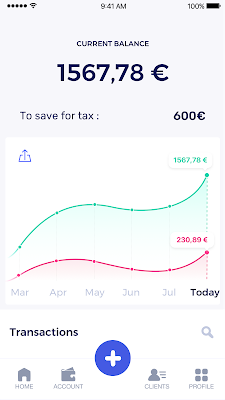
Shine’s banking services and financial tools make it as easy to work as a freelancer as it is to work for a larger company. We deal with administrative tasks on behalf of the freelancer so that he or she can focus on their job: finding and wowing clients.

Building our infrastructure
As a new bank, we had the opportunity to build our infrastructure from the ground up. Designing an infrastructure and choosing a database presents tough decisions, especially in the financial services world. Financial institutions come under tremendous scrutiny to demonstrate stability and security. Even a tiny leak of banking data can have tremendous consequences both for the bank and its clients, and any service interruption can trigger a banking license to be suspended or a transaction to be declined.
At the same time, it’s vital for us to optimize our resources so we can maximize the time we spend developing user-facing features. In our first six months, we iterated and validated a prototype app using Firebase, and secured our seed funding round (one of the largest in Europe in 2017).
Based on our positive experience with Firebase, plus the ease-of-use and attractive pricing that Google Cloud offered, we decided to build our platform on Google Cloud Platform (GCP).
We were drawn to GCP because it has a simple, consistent interface that is easy to learn. We chose App Engine flexible environment with Google Cloud Endpoints for an auto-scaling microservices API. These helped us reduce the time, effort, and cost in terms of DevOps engineers, so we could invest more in developing features, while maintaining our agility.
We use Cloud Identity and Access Management (Cloud IAM) to help control developer access to critical parts of the application such as customer bank account data. It was quite a relief to lean on a reliable partner like Google Cloud for this.
Database decisions
Next came time to choose a database. Shine lives at the financial heart of our customers’ businesses and provides guidance on things like accounting and tax declaration. The app calculates the VAT for each invoice and forecasts the charges they must pay each quarter.
Due to the sensitivity of our customers’ data, the stakes are high. We pay careful attention to data integrity and availability and only a relational database with support for ACID transactions (Atomicity, Consistency, Isolation, Durability) can meet this requirement.
At the same time, we wanted to focus on the app and user experience, not on database administration or scalability issues. We’re trying to build the best possible product for our users, and administering a database has no direct value for our customers. In other words, we wanted a managed service.
Cloud Spanner combines a globally distributed relational database service with ACID transactions, industry-standard SQL semantics, horizontal scaling, and high availability. Cloud Spanner provided additional security, high-availability, and disaster recovery features out-of-the-box that would have taken months for us to implement on our own. Oh, and no need to worry about performance — Cloud Spanner is fast. Indeed, Cloud Spanner has been a real asset to the project, from the ease-of-use of creating an instance to scaling the database.
Cloud Spanner pro tips
We began working with Cloud Spanner and have learned a lot along the way. Here are some technical notes about our deployment and some best practices that may be useful to you down the road:
- Cloud Spanner allows us to change a schema in production without downtime. We always use a NOT NULL constraint, because we generally think that using NULL leads to more errors in application code. We always use a default value when we create an entity through our APIs and we use Cloud Dataflow to set values when we change a schema (e.g., adding a field to an entity).
- With microservices, it’s generally a good practice to make sure every service has its own database to ensure data isolation between the different services. However, we adopted a slightly different strategy to optimize our use of Cloud Spanner. We have an instance on which there are three databases — one for production, one for staging and one for testing our continuous integration (CI) pipeline. Each service has one or more interleaved tables that are isolated from others services’ tables (we do not use foreign-keys between tables from different services). This way our microservices data are not tightly “coupled”.
- We created an internal query service that performs read-only queries to Cloud Spanner to generate a dashboard or do complex queries for analytics. It is the only service where we allow joins between tables across services.
- We take advantage of Cloud Spanner’s scalability, and thus don’t delete any data that could one day be useful and/or profitable.
- We store all of our business logs on Cloud Spanner, for example connection attempts to the application. We append the ‘-Logs’ suffix to them.
- When possible, we always create an interleave.
In short, implementing Cloud Spanner has been a good choice for Shine:
- It’s saved us weeks, if not months, of coding.
- We feel we can rely on it since it’s been battle-tested by Google.
- We can focus on building a disruptive financial services product for freelancers and SMBs.
And because Cloud Spanner is fully managed and horizontally scalable, we don’t have to worry about hardware, security patches, scaling, database sharding, or the possibility of a long and risky database migration in the future. We are confident Cloud Spanner will grow with our business, particularly as we expand regionally and globally. I strongly recommend Cloud Spanner to any company looking for a complete database solution for business-critical, sensitive, and scalable data.
More Relevant Stories for Your Company

You Can Now ‘Listen’ to Over 50 Tech Blogs on Google Cloud Reader
🎧 Prefer to listen? Check out this episode on the Google Cloud Reader podcast If you’re anything like me, you love reading, but also appreciate that sometimes your eyes need to be doing other things; whether it’s finding your exit off the highway, or keeping your puppy from destroying the couch. And

A New Milestone: Istio Comes Closer to Cloud-native Ecosystem
Today we are excited to announce that Google and the Istio Steering Committee have submitted the Istio project for consideration as an incubating project within the Cloud Native Computing Foundation (CNCF). This is a significant milestone for Istio and its community, and we are thrilled to reach this next step

The Fantastic Story of How BMG Enables a Micropayments Strategy So Music Artists Get Paid
The music industry is rapidly changing. Only 20 years ago, the availability of music and the infrastructure that was required to make an album a sales success were incredibly complex and expensive. With the decline of physical sales and a fundamental shift to digital, music streaming now accounts for more


Rethinking Financial Services with Google Cloud
Cloud technologies are not just a way to reduce costs, but also rethink financial services. Firms are using structured and unstructured data to find better trading opportunities and create predictive models. In risk management, professionals can use the cloud’s computational capabilities that take into account a lot more variables and
