





Takeaways from the Google Cloud Public Sector Summit on Prioritizing Tech Investments

4766
Of your peers have already read this article.
3:00 Minutes
The most insightful time you'll spend today!
Editor’s note: Today’s post highlights five takeaways from our session at the first ever Google Cloud Public Sector Summit. To watch the full session, check out All the Right Moves: Prioritizing Investments in Technology.
Now more than ever, government agencies need to invest in digital services to fulfill their missions and better serve communities. Yet modernization isn’t a one-and-done approach; it’s a sustained effort, with multi-year implications, and requires careful consideration of how to integrate existing investments to optimize costs. Digital transformation requires coordination between different programs and agencies, including all of their many competing considerations. In short, maximizing technology investments requires careful planning, strategic thinking, and industry partners that can provide flexibility and security and meet agencies where they are.
I sat down with Suzette Kent, former U.S. federal chief information officer, and Dominic Sale, assistant commissioner for Technology Transformation Services at the General Services Administration (GSA) for a conversation to unpack this important topic and discuss industry best practices.
The panelists had five tips for government employees who are making technology purchasing decisions for their agency.
1. Put the agency’s mission first.Avoid getting distracted by exciting new trends and focus on long-term goals that can impact which procurement strategies or funds could be used. The discussion started with how government agencies could cut through the noise about technology and prioritize which technology is best for their needs. Sale and Kent agreed that an agency should focus on its core mission outcomes and let its technology needs flow from that. Sale also emphasized the importance of having technology design respond to humans’ needs, which has historically been a challenge for government agencies.
For agencies to stay focused on their mission, final decisions about technology need to be made by the program manager who best understands each program’s mission. The government CIO’s role is to be the enabler for the technology and leverage it at the enterprise level, particularly when it comes to sharing infrastructure. The takeaway: enable mission programs by empowering your teams and providing access to authorized, compliant, innovative data platforms that programs can move confidently and quickly with.
2. Invest in interoperability. Agency employees often struggle to balance the need for a positive return on investment (ROI) with requirements for meeting mission objectives. While the panelists agreed that the total cost of ownership was important, they also emphasized taking an expanded view of ROI, including future-proofing and investing in functionality that may not realize its return for many years based on the initiative. Saving money isn’t particularly valuable if the solution doesn’t meet an agency’s needs. When choosing a technology partner, government employees should understand its long-term vision to ensure that the partner fits agency priorities. Partners’ technologies should also integrate seamlessly with existing systems so agencies don’t duplicate investment costs.
For example, Google Anthos extends Google Cloud services and engineering practices into an organization’s existing environment, establishing operational consistency across apps and modernization. With Anthos, agencies can simply and securely build and deploy applications anywhere, integrating cloud services across platforms. This allows them to enjoy a consistent DevOps experience for hybrid and multi-cloud environments and enables new innovation. Most importantly, this enables an enterprise data platform, one of the largest catalysts for mission transformation and applied AI.
3. Take advantage of artificial intelligence (AI) benefits. Over the course of the pandemic, the rapid application of AI has improved government productivity, efficiency, and the ability to deliver critical new services to the public at scale. This has further cemented AI’s role as an essential government technology for the present and future. In fact, Nextgov reports that “46% of government IT specialists plan to use AI and machine learning (ML) for embedded systems in the near future.”
As we’ve seen over the course of the pandemic, government programs can start small with AI pilots before moving into broad deployment. This can help agencies understand AI’s potential before moving to full production. People always supervise AI technologies, and the possibilities are endless. Google Cloud’s Contact Center AI (CCAI) has helped government agencies improve the customer experience, by allowing citizens to schedule vaccine appointments via a platform of their choice with up to 28 languages and dialects, and manage vaccine deployment. The U.S. Navy spends billions annually to fight rust and corrosion on its ships. Inspections of ships, aircraft and vehicles are a time-consuming and critical part of keeping the U.S. Navy at top performance so Google Cloud and Simple Technology Solutions (STS) rapidly built an AI-based corrosion-detection and analysis system. The system detected and analyzed corrosion on vessels with 90% accuracy and will eventually be used to automate inspections of vessels, aircraft, and vehicles—saving billions of dollars. Document AI helps a variety of government agencies scale their document processing, reducing the time it typically takes to process enormous amounts of data and related citizen claims.
Successful adoption of AI also depends on the quality of the data. Ultimately, agencies need high-quality enterprise data pipes so that employees and the community trust the system and public sector agencies. Sale described a GSA project that used AI bots to read legal contracts and look for particular phrases that would indicate a specific use case. Previously, an employee would have had to read through the contracts and search for the information. In this way, AI is saving the government both money and time.
4. Creating better experiences for the public. Sale observed that, “trust is the government’s currency and profit motive.” And trust comes when the public can be served with the same modern tools and technology they’re used to – in real-time and with transparency in mind. For example, agencies can provide transparency in public-facing dashboards for programs and supply services that deliver information in real-time through solutions like CCAI.
Trust also requires that constituents feel that government agencies will keep their data safe and secure. The need for a globally secure infrastructure with systems that are up-to-date and designed with security at every level, underpinned by zero-trust enterprise-wide remains paramount – particularly after the series of recent cyberattacks targeting government IT infrastructure.
5. Finding the right technology partner. Government leaders need technology partners who provide a flexible and interoperable platform to integrate existing investments and maximize technical value. Historically, public sector agencies have largely been forced to adopt private clouds, which has reduced their access to richer features, and hindered their ability to adopt a full range of security and product capabilities. The right partner won’t require government leaders to compromise on functionality or service availability to achieve compliance. The right partner can harness the power of emerging technology to make it Government-ready and the true promise of cloud– the access and integration of open data– to make missions more powerful and impactful for the constituencies they serve.
Efficient, Safe and Dynamic Gaming Experience: Aristocrat’s Digital Journey on Google Cloud

4760
Of your peers have already read this article.
2:00 Minutes
The most insightful time you'll spend today!
Since Aristocrat’s founding in 1953, technology has constantly transformed gaming and the digital demands on our gaming business are a far cry from challenges we faced when we started. As we continue to expand globally, security and compliance are top priorities.
Managing IT security for several gaming subsidiaries and our core business became more complex as we entered into new markets and scaled up our number of users. We needed a centralized platform that could give us full visibility into all of our systems and efficient monitoring capabilities to keep data and applications secure. We also needed the ability to secure our systems without compromising user experiences.
We turned to Google Cloud and Splunk to better manage complexity and support highly efficient, secure, and more dynamic gaming experiences for everyone. We are committed to using today’s modern technologies to give players more optimal experiences.
Bringing our digital footprint into the cloud
When we set out on our digital transformation, we looked to address many business requirements.
These requirements included:
- Regulation: We wanted a platform that could efficiently address our industry’s stringent and global regulatory compliance requirements.
- Player experience: Our IT environment must support smooth gaming experiences to keep users engaged and satisfied.
- Scalability: As we grow and diversify, meeting the changing demands of an increasingly global gaming community, we need an easily scalable platform to align with our current and future needs.
Google Cloud offered us the perfect foundation through solutions such as Compute Engine, Google Kubernetes Engine, BigQuery, and Google Cloud Storage. These acted as the right infrastructure components for us for the following reasons:
- Google Cloud is globally accessible and supports compliance, helping to streamline security and regulatory processes for our team.
- With Google Cloud, we can manage our entire development and delivery processes globally with fast and efficient reconciliation of regional compliance requirements.
- When we need to adjust existing infrastructure or deliver new capabilities, Google Cloud accelerates the process and takes the heavy lifting off of our team.
- Google Cloud allows us to support tens of thousands of players on each of our apps while experiencing minimal downtime and low latency. The importance of this support can’t be underestimated in an industry where players have little to no patience if lags in games occur.
We migrated our back-office IT stack alongside our consumer-facing production applications to Google Cloud given our positive experiences with compliance, security, scalability, and process management. This migration has significantly accelerated our digital transformation while streamlining our infrastructure for faster and more cost-effective performance.
In many ways, Google Cloud has been, with maybe a pun intended, a game-changer for us. For instance, when we suddenly had to support a lot of remote work during the COVID-19 pandemic, native identity and access management tools in Google Cloud allowed us to retire costly VPNs used for backend access and quickly adopt a more easily managed, cost-effective zero-trust security posture.
Accessing vital third-party partners and managed services
Aristocrat has many IT needs best addressed in a multi-cloud environment. Google Cloud is particularly attractive given its strong cloud interoperability, as well as the many products and services available on Google Cloud Marketplace. The marketplace accelerated our deployment of key third-party apps including Splunk and Qualys.
Given the personal information we store and the global regulatory compliance statutes we must oblige, security lies at the heart of our business. Splunk is a critical component of our digital transformation because it offers solutions that provide the enhanced monitoring capabilities and visibility we need. The integration between Splunk and Google Cloud gives us confidence that our data is secure. We know our data can be secure in Google Cloud, while simplified billing through Google Cloud Marketplace makes payments and license tracking easier for our procurement team.
As part of our protected environment, we use the Splunk platform as our security information and event management system, leveraging the InfoSec app for Splunk that provides continuous monitoring and advanced threat detection to significantly improve our security.
We can manipulate and present data in Splunk in a way that provides us with a single pane-of-glass for our hybrid, multi-cloud environment and our third-party apps and systems. Splunk observability tools have likewise helped us to track browser-based applications like our online gaming apps to monitor details related to security and performance.
Splunk and Google Cloud have transformed how we operate. We can now quickly ingest and analyze data at scale within our refined approach to security management by offloading software management to Splunk and Google Cloud. This ability enables us to approach security more strategically, and positions us to integrate more AI/ML capabilities into our products for even greater governance and performance.
This is just the beginning of our journey with Splunk and Google Cloud. We’re excited to see the innovation we can continue bringing to the gaming community worldwide.
Google Products Helps HMH’s Healthcare Staff Work from Anywhere Efficiently and Securely!

10188
Of your peers have already read this article.
3:00 Minutes
The most insightful time you'll spend today!
Hackensack Meridian Health (HMH) executive Mark Eimer explains how an ambitiously-timed rollout of a comprehensive suite of Google products helped the entire organization—from doctors to IT staff—achieve better security, cultivate a more equitable work environment, and ultimately, improve patient outcomes.
How does a recently merged, 17-hospital healthcare system fast-track a platform migration and hardware rollout securely and in a way that improves work for everyone, regardless of location or role? These are the questions that kept me up at night in early 2020, when the pandemic demanded a “big bang”—something our legacy laptops and operating systems couldn’t handle.
We began our work with Google in 2020 with the adoption of Chrome as our default browser. As we migrated platforms, keeping patient data safe was of the utmost importance to us, along with providing every staff member with the tools they needed to work virtually. Our staff often experienced issues accessing our web-based applications using Internet Explorer or Edge Browser, a problem that went away when we switched to Chrome. Chrome’s versatile compatibility also made it easier for my team to migrate all of our web-based operations, and Chrome’s security and manageability were key components to making this switch a huge win for the organization.
The success of this migration led us to extend our Google partnership to patient care applications—where Google’s expertise in AI and ML helps scale the use of diagnostics tools and improve other aspects of the patient journey.

Achieving security at every step
Like so many other healthcare organizations, we’ve been concerned about ransomware attacks. This is part of why we moved to Google Workspace and distributed over 3,000 Chrome OS devices in kiosk mode in March of 2020, when many of us went remote due to the pandemic. We were very concerned about team members accessing corporate applications through home devices that were running EOL operating systems (WIN7), as well as a general lack of antivirus and encryption measures.
We were protected by the fact that Google’s software and hardware both had built-in security features that we needed to stave off sophisticated attackers. For example, Chrome OS automatically updates to the latest security update and encrypts data living outside the cloud on the hardware. These features protected us from security-related disruptions, letting us securely move a huge library of file shares and emails across thousands of accounts to Google Chrome OS in just four months.
A year later, in March 2021, we migrated the enterprise over to Google Workspace and saw an immediate reduction in spam by 30% from the inherent built-in AI/ML. This meant staff were less likely to receive (and click through) phishing attempts. My team could connect, create, and collaborate easily and securely—even as more of us were working from home and needed to access sensitive data remotely.
Leveling the playing field
As an organization, we were surprised by how many team members didn’t have personal computers at home. We quickly decided that if we needed team members to work from home, the health network would have to supply hardware. Chromebooks’ lower price tag compared to PCs—on top of their built-in security controls—allowed us to purchase, deploy, and support that initial distribution of 3,000 Chromebooks to team members in less than three weeks, providing devices to every eligible remote employee instead of just a select few. This was vital to reaching our equitable technology goal as part of our diversity and inclusion initiative: everybody has the same tools to do good work.
When all employees have what they need to do their jobs well, we get better patient outcomes. Before we began this cloud adoption journey, patient and staff experiences were different within the hospitals and outside of them.
Now it’s the same wherever our staff is, and we’ve seen efficiency and accessibility benefits extend to the patient side. For example, we built a web-based contact center that supports 80 locations that use Workspace and Chrome OS devices. Since customer service, admin, and providers are all on the same system, it has become a one-stop shop for patients.
Furthermore, through the Grow with Google program, we were able to provide another benefit to employees that drove our equity goals. Google trained 50 non-IT staff members—from environmental services, food and nutrition, and other non-tech areas who were interested in making a career change to IT—on the Google products we were using. They may not have thought about switching to a career in IT before the Grow with Google program came to our organization, but through this partnership, they now have that opportunity.
A strategic, long-term partner
With any large-scale rollout, the work doesn’t end once laptops are in employee hands. Google has shown their commitment to long-term collaboration as they continuously optimize their products for the unique needs of healthcare providers and go the extra mile in tailoring tools to our staff’s workflows.
For example, on the Chrome OS side, the Google team has helped our registration desks and document centers with device integration for hardware like credit card readers and e-signature pads. They’ve also helped us meet security and privacy requirements mandated by state and federal governments around HIPAA, Medicaid, and Medicare reimbursements. Over this next year, we’ll look at a feature roadmap with Google Cloud to deliver further enhancements, iterating on the product itself to meet our needs for the present and the future.

Delivering the future of healthcare
The benefits we’ve seen around security and usability—and the ability to provide all staff with equal access to Google’s technology—are why we’re expanding our partnership with Google to both the administrative and clinical sides of HMH. In addition to further Google rollouts with corporate, next year we’re distributing Chromebooks to all 350 of our ambulatory clinics.
We’re also working with the Google professional services team to create a custom AI model that analyzes 3D mammogram images. This AI model will enable two providers to read mammograms—which adheres to international best practices but is currently rare in the US—without requiring additional time. Conducting double readings of mammograms will yield better health outcomes for our patients, such as a lower patient recall rate and an increased accuracy in detecting breast cancer.
We’re currently building the model using a variety of Google Cloud products, including Cloud Healthcare API. Once complete, this model is expected to be trained, deployed, and maintained in Google’s Vertex AI, allowing our providers to be more productive as they make clinical decisions with AI support. As the model is proven over time, we plan to make the predictive services accessible to other healthcare organizations.
With Google, we’re able to achieve a unified architecture for storing data as well as training and deploying AI models, which enable our staff to work more efficiently and securely from anywhere. While I may not be able to predict the future as accurately as AI can, I foresee our continued partnership with Google as a key part of HMH’s improved provider and patient outcomes.
Google Cloud Content Protection: Unlock the Power of CSAP for Security

1296
Of your peers have already read this article.
2:45 Minutes
The most insightful time you'll spend today!
Content production is increasingly happening in the cloud. While moving a creative process that spans three centuries into the modern era brings challenges and risks, MovieLabs is one organization that takes digital transformation seriously.
A nonprofit research and development group founded by a consortium of the major Hollywood studios, MovieLabs describes their mission as “exploring innovative solutions to industry challenges shared by both our member studios and the broader production, post-production and distribution ecosystem.”
In more than 50 pages of densely-packed ideas and principles, MovieLab’s The Evolution of Media Production lays out an ambitious and revelatory vision for streamlining media production in the cloud. The key themes are summarized in 10 declarative statements, which envision a new modality for media production by the year 2030:
- All assets are created or ingested straight into the cloud and do not need to be moved.
- Applications come to the media.
- Propagation and distribution of assets is a “publish” function.
- Archives are deep libraries with access policies matching speed, availability and security to the economics of the cloud.
- Preservation of digital assets includes the future means to access them and edit them.
- Every individual on a project is identified and verified, and their access permissions are efficiently and consistently managed.
- All media creation happens in a highly secure environment that adapts rapidly to changing threats.
- Individual media elements are referenced, accessed, tracked and interrelated using a universal linking system.
- Media workflows are non-destructive and dynamically created using common interfaces, underlying data formats and metadata.
- Workflows are designed around real-time iteration and feedback.
The four bolded statements above are further explored in a follow-up whitepaper from MovieLabs, The Evolution of Production Security, which likewise offers six statements about what secure production in the cloud should look like:
- Security is Intrinsic and does not Inhibit Creative Processes
- The Security Architecture Addresses Challenges Specific to Cloud Workflows
- Production Workflows, Processes, and Assets are Secure, even on Untrusted Infrastructure
- The Content Owner Controls Security and Workflow Integrity
- The Security Can Be Scaled to Appropriate Levels and Can Integrate
- The Security Architecture Limits the Spread of any Breach and is Adaptable
The key to understanding these two papers is repeated in their titles: Evolution. Neither document is meant to outline solely what’s possible today; rather they are beacons guiding us toward a future in which the movie business is truly transformed by the cloud operating model. That means a future where media productions run much more like software supply chains: with speed, agility, and scale, and without sacrificing availability or security.
The good news is that it is possible to deploy secure production workloads in the cloud today. Using some of the built-in security features of Google Cloud, content producers can achieve Common Security Architecture for Production (CSAP) “Level 100” security for their assets (using the CSAP scale L100-L300).
However, we think that “evolution” word is important. As many companies have learned, operating an infrastructure cloud can be costly and often presents new threat vectors for attackers. Our mission at Google Cloud is to provide scalable, reliable services for traditional IT functions and to accelerate the abilities of every organization to digitally transform its business.
We believe the era of the transformation cloud is dawning, and companies who have been successfully operating in the cloud for years are now looking for ways to reduce costs while maintaining the cloud-scale advantages of agility and global reach. This aligns perfectly with the evolutionary vision of the MovieLabs papers, which envision media workflows changing radically to embrace cloud dynamism without all the unnecessary asset movement and complexity.
An important part of that vision from Google Cloud is that cloud service providers should remain open and interoperable with other clouds and infrastructures.
Here is a quickstart guide to mapping the L100 CSAP requirements to Google Cloud:
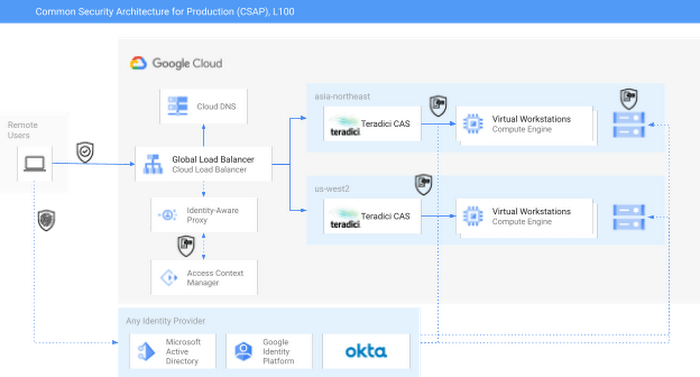
As you can see in the diagram, external identity providers (IdPs) such as Okta or Active Directory can serve as core security components of a CSAP L100 architecture. Alternatively, Google Cloud services such as Cloud Identity or Managed AD could be substituted.
Next, Google Cloud’s Identity-Aware Proxy (IAP) can be used in combination with Access Context Manager (ACM) to act as the first Policy Enforcement Point. This is an optional step, since it is somewhat redundant with the routing and authorization function performed by the native HP/Teradici Connection Brokers. However, IAP and ACM are core components of Google Cloud’s BeyondCorp architecture, on which CSAP is based. Additionally, adopting IAP with ACM offers productions the ability to swap out the Teradici PCoIP protocol for an alternative, such as Unity’s Parsec, without sacrificing security.
The Teradici Connection Broker is also a Policy Enforcement Point, since groups and role membership can be used to enforce access to specific workstations.
Finally, the identity context for each user is passed through to the storage layer. For some productions, Google Cloud Storage (GCS) buckets may offer enough functionality; GCS offers an S3-compatible API which should make it easy to immediately adopt OSS tools built for S3. Other options for this include the managed NetApp Cloud Volumes and Dell PowerScale for Google Cloud services. Both of these are managed shared storage services which offer file-level access controls using standard SMB/NFS permissions. There are also a variety of third-party filers available in the Google Cloud Marketplace, such as Nasuni. You can read more about those here.
For added security, both NetApp and PowerScale should be configured to use the private services access model in Google Cloud. This effectively limits any external access to these resources by only allowing traffic from user-managed VPCs into the Google-managed and peered VPC.
Following this architecture, you can see how to achieve CSAP L100 compliance by using either only Google Cloud services or a mix of managed and cloud-first services. In either scenario, access is managed through a unified control plane and based on both user identity and role. Zero Trust principles such as context-aware access and dynamic rulesets could further be applied to the Authentication step using either Google Cloud IAP or the equivalent services from Okta, Active Directory, or others.
At this weekend’s National Association of Broadcasters conference, Google experts will be talking about the cloud and content production, and the intersection of AI and media. The journey to 2030 is only just beginning.
Introducing IAM Deny: Harden Your Security Posture at Scale the Easy Way

2634
Of your peers have already read this article.
1:30 Minutes
The most insightful time you'll spend today!
At Google Cloud, we’re focused on making it easy for organizations to build solutions quickly and securely. Identity and Access Management (IAM) is the core security control for establishing who has access to which cloud resources and making sure access permissions are aligned to your company’s business and security policies.
We are excited to announce the general availability of IAM Deny policies. This new capability helps you easily create access guardrails for Google Cloud resources. With IAM Deny policies, you can create rules that broadly restrict resource access. It provides a powerful, coarse-grained access control to help implement security policies at scale.
Control with IAM Policy – Allow and Deny
IAM Deny policies complement IAM Allow policies as you define access to your resources. Google Cloud’s IAM Allow policy lets you grant granular access to Google Cloud resources. The more coarse-grained Deny policies let you explicitly prohibit access to certain resources regardless of existing Allow rules. IAM Deny policies always supersede IAM Allow policies and override conflicting IAM Allow rules.
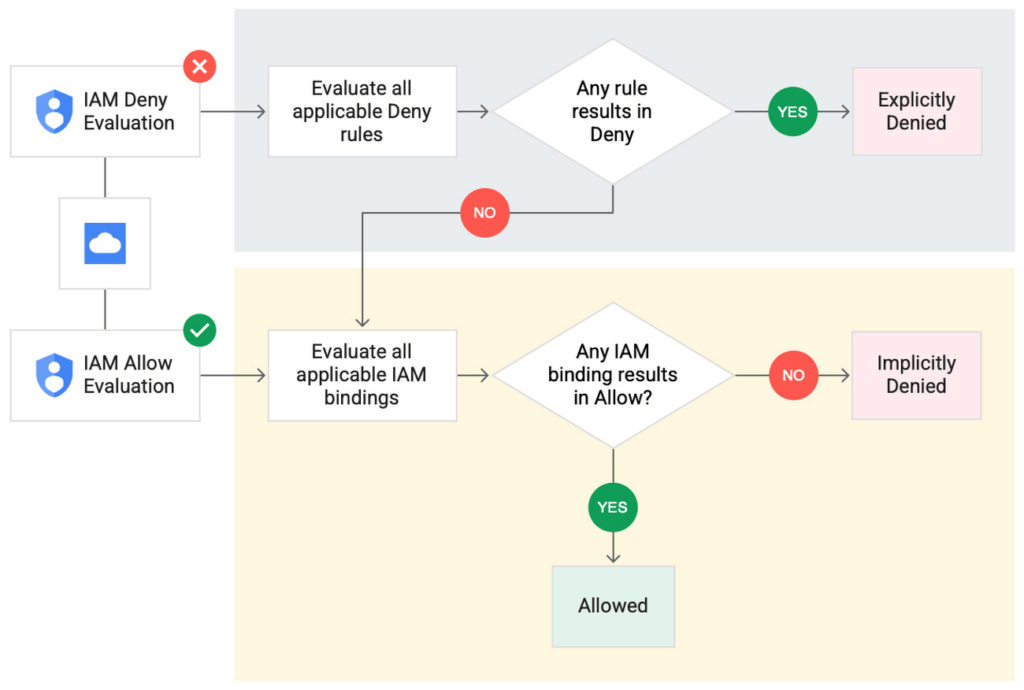
IAM Deny policies can be applied across many Google Cloud resources, such as Compute Engine, Cloud Storage, and Google Cloud Kubernetes Engine. These policies can help reduce toil on administrators as they can set up deny rules that will be enforced at scale without requiring reviews and changes of existing access rules. This makes resource governance simpler.
How to strengthen your security posture with IAM Deny
There are multiple use cases where IAM Deny policies can be used to help strengthen posture. Some of these are:
- Establish a default security baseline: IAM Deny can be used to set base policies at the organization level, folder level, and project level to deny access to resources. For example, you can attach a deny policy at the organization level to deny all users access to sensitive data storage buckets, making an exception for a specific user group.
- Prevent backdoors: IAM Deny rules override any IAM Allow rules. This can help you ensure that no “backdoor” access can be granted. For example, an organization that wants to ensure only central-admin can create projects in a folder can add an IAM Deny policy that restricts all users from creating projects except central-admin. This can help ensure no backdoor users will be added using allow policy rules.
- Prevent data exfiltration: Controlling access to data is a key measure to prevent exfiltration. For example, an organization that wants to restrict access to their personally identifiable information (PII) can set an IAM Deny policy on resources containing PII that denies access to all users except those in a group called PII-admin.
- Demonstrate compliance: Many industry regulations and compliance frameworks require organizations to demonstrate least-privilege access to sensitive resources. IAM Deny policies can create a baseline access restriction that always takes precedence when applied to resources.
Simplify IAM administration
IAM Deny can also help simplify common administrative tasks. It provides a list of permissions for Google Cloud services that you can readily use in your deny policies. Here are a few common situations where you can use IAM Deny to help streamline your access management.
- Centralize administrative privileges: You can use deny policies to restrict certain types of administrative activities to specific users or user groups. For example, if you want to limit custom role management to a single central team, you can create a deny rule that denies the permissions required for custom role management to all users, except users in the central-admin group. This will only let members of the central-admin group manage custom roles, even if other users have the required permissions.
- Create exceptions to access grants: You can use deny policies to deny inherited permissions. For example, you can grant a role at a high level in the resource hierarchy, and then deny the role’s permissions on individual lower-level resources if necessary.
- Block access based on tags: Google Cloud supports key-value based tags and you can use deny policies to deny permissions based on tags without adding an IAM Condition to every role grant. For example, you can create a rule to deny delete permissions for resources tagged as “production” for everyone except project-admins.
IAM Deny in action
The following example illustrates how a deny policy can be used to block all users from deleting projects unless the user is a member of a project-admins group or the project being deleted is tagged as a “test” project. Without a deny policy, you would have to manually track all members who have the permission to delete projects, and ensure that no undesired user has access to this permission. The deny policy makes it easy for the administrator to build this guardrail.
The below deny rule denies permission to everyone except project-admins@example.com for projects not tagged as test. Add this deny rule to a deny policy and attach the policy at the org level. That’s it!
(Note that project-admins@example.com is a security group. Using security groups is a best practice that should be followed to help keep your resources secure.)
{
"name": "policies/cloudresourcemanager.googleapis.com%2Fprojects%2F253519172624/denypolicies/limit-project-deletion",
"uid": "06ccd2eb-d2a5-5dd1-a746-eaf4c6g3f816",
"kind": "DenyPolicy",
"displayName": "Only project admins can delete projects.",
"etag": "MTc1MTkzMjY0MjUyMTExODMxMDQ=",
"createTime": "2021-09-07T23:15:35.258319Z",
"updateTime": "2021-09-07T23:15:35.258319Z",
"rules": [
{
"denyRule": {
"deniedPrincipals": [
"principalSet://goog/public:all"
],
"exceptionPrincipals": [
"principalSet://goog/group/project-admins@example.com"
],
"deniedPermissions": [
"cloudresourcemanager.googleapis.com/projects.delete"
],
"denialCondition": {
"title": "Only for non-test projects",
"expression": "!resource.matchTag('12345678/env', 'test')"
}
}
}
]
}
Getting started with IAM Deny Policies
With IAM Deny, you now have a powerful new capability to build security guardrails and more effectively control access to your Google Cloud resources. IAM Deny is now generally available for all customers through gCloud and APIs. We offer IAM Deny to Google Cloud customers at no additional cost. You can learn more about IAM Deny by visiting our documentation page.
How Ocado Technology revolutionized the online grocery space by applying technology and automation

2849
Of your peers have already read this article.
2:30 Minutes
The most insightful time you'll spend today!
Grocery shopping has changed for good and Ocado Group has played a major role in this transformation. We started as an online supermarket, applying technology and automation to revolutionise the online grocery space. Today, after two decades of innovation, we are a global technology company providing state-of-the-art software, robotics, and AI solutions for online grocery. We created the Ocado Smart Platform, which powers the online operations of some of the world’s most forward-thinking grocery retailers, from Kroger in the U.S. to Coles in Australia.
With the global penetration of the Ocado Smart Platform and the increasing complexity of our operations, we’re paying close attention to our security estate. To proactively identify and tackle any security vulnerabilities, we decided to introduce Google Cloud’s Security Command Center (SCC) Premium as our centralized vulnerability and threat reporting service.
Gaining consolidated visibility into Ocado’s cloud assets
From the start, we were impressed with the speed of deployment and security findings surfaced with SCC. Where it would take several weeks in the past with other software vendors, we were able to quickly set up SCC in our environment and we could immediately start identifying our most vulnerable assets.
Today, we use SCC to detect misconfigurations and vulnerabilities across hundreds of projects throughout our organization and we use it to get an aggregated view of our security health findings. We filter the findings and then use Pub/Sub or Cloud Functions to send alerts directly to the tools each division is working with, such as Splunk or JIRA. This way, each of our teams can discover and respond to the security findings in their own environment, with SCC acting as the single source of truth for our security-related issues.
Driving autonomy by delegating security findings
Autonomy fuels innovation at Ocado Technology, which is why we want to make our teams as self-sufficient as possible. SCC helps to make our divisions more autonomous from the central organization. It delivers all the security insights technology teams need to make smart decisions on their own and at pace.
Here’s where SCC’s delegation features providing folder and project level access control come in. The platform’s fine-grained access control capabilities enable us to delegate SCC findings to specific teams, without having to give them a view of the entire Ocado Technology organization. Business units no longer need to contact us in the security team to track down vulnerabilities, they can do it themselves in a compliant and secure manner. It makes our work more efficient and autonomous, allowing everyone to focus on their own areas of expertise and environments.
Identifying and remediating multiple medium and high vulnerabilities
SCC’s findings are very rich and don’t end with the identification of the potential misconfigurations and vulnerabilities. It goes beyond this, recommending solutions to resolve any issues and providing clear guidelines on next steps. That’s why the feedback from our users across the organization has been so good.
SCC delivers on both quality and quantity. Since implementation, it has helped us identify and remove hundreds of medium and high vulnerabilities from our Google Cloud estate. The number of security related findings have also gone down each quarter, indicating real and tangible improvements in our security posture. SCC is so useful in maintaining our security posture as once we know where the issues are, tackling them is easy.
From 8-hour security scans to instant insights
One particular issue we’ve been able to handle well with SCC are vulnerabilities targeting the Apache logging system Log4j. SCC informed us about attempted compromises, active compromises, or the vulnerability exposure of our Dataproc images. During Log4j response, all these would have been otherwise very hard to track down, especially with limited resources. With SCC, we were able to leverage the security expertise of Google Cloud to identify the latest vulnerabilities, based on the most up-to-date security trends, and act on them quickly.
Obviously, speed is of the essence when it comes to threat mitigation and SCC has enabled us to fix issues faster, making us less exposed to outside threats. In the past, just scanning everything once could take up to eight hours. SCC sped things up from the start and findings have been nearly instantaneous since it rolled out real-time Security Health Analytics.
Strengthening compliance and demonstrating standards to stakeholders
SCC helps us to achieve better compliance standards, and demonstrate these standards to our stakeholders. We recently ran an internal audit exercise across the Ocado Technology organization, for example, where we identified the projects with the most numerous and severe security-related findings. Without the reports from SCC, this would have been extremely hard or even impossible.
We also use the Security Health Analytics information from SCC to visualize the data per project, creating a kind of heat map of security across the organization. This helps us assign our resources to the right projects and prioritize our efforts accordingly, informing our strategic decisions.
From top-down to a developer-led security
There’s been a paradigm shift in security operations, and things are moving from a top-down approach to a more developer-led and autonomous process. SCC helps drive that change at Ocado Technology. It enables us to place the responsibility for security-related issues closer to the resource owners. By making sure that the teams most impacted by a potential problem are the ones who get to fix it, we empower teams to resolve issues proactively and efficiently.
Looking forward, we can’t wait to see SCC evolve further. One of the features we’re most excited about is the ability to create custom findings (currently in preview) and additional integration capabilities that enable automation. We’re still not using everything SCC has to offer, but it is already a vital tool for our security team.
At Ocado Technology, we’re pioneering the future of online grocery shopping, and this future needs a strong security foundation. SCC helps us to strengthen and maintain that foundation, making profitable, scalable, and secure online grocery shopping possible for even more businesses around the world.
More Relevant Stories for Your Company

How Firewall Insights can Simplify Corporate Firewall Rules
Corporate firewalls typically include a massive number of rules, which accumulate over time as new workloads are added. When rules stack up piecemeal like this, misconfigurations occur that, at best, create headaches for security administrators, and at worst, create vulnerabilities that lead to security breaches. To address this, we have

Google’s ASO to Help U.S. Public Sector Achieve M-21-31 and EO 14028
As sophisticated cyberattack campaigns increasingly target the U.S. public and private sectors during the COVID era, the White House and federal agencies have taken steps to protect critical infrastructure and remote-work infrastructure. These include Executive Order 14028 and the Office of Management and Budget’s Memorandum M-21-31, which recommend adopting Zero

Embracing Confidential Computing: Secure Your Data in the Cloud
As one of the most trusted cloud platform providers, Google is committed to providing our clients secure and reliable environments for their workloads. Google believes the future of computing will increasingly shift to private, encrypted services where users can be confident that their data is not being exposed to cloud

Latest Enhancements in reCAPTCHA Enterprise Helps Govts Sites Protect against Digital Frauds
Download our guidebook to learn how reCAPTCHA Enterprise can help strengthen your website security quickly. Cyber threats on the rise In 2021, the United States saw 40.5% of website attacks committed through “bad bots” on the internet, with 37.2% of government website traffic being bad bots, according to research by
