





Conversations on Government Security with Dmitri Alperovitch, CrowdStrike’s Founder and Former CTO

4831
Of your peers have already read this article.
2:00 Minutes
The most insightful time you'll spend today!
As I was preparing for my fireside chat with Dmitri Alperovitch, Founder and Former CTO of CrowdStrike and Executive Chairman of the Silverado Policy Accelerator, for the Google Cloud Government Security Summit taking place on Tuesday, July 20th, I was reflecting about recent developments in cybersecurity, Zero Trust best practices – including aspects of Google’s journey – and the benefits that this approach to cybersecurity brings to the public sector.
As Dmitri and I discussed what we wanted to share during our session at the Government Security Summit, I quickly realized how pertinent the information was to our public sector audience. For that reason, ahead of Tuesday’s event, I wanted to give you a glimpse of what is to come in our fireside chat. Read below for an exclusive preview of what we plan to discuss. If you are planning to attend on Tuesday, we encourage you to ask questions through our interactive chat function and sign up for 1:1 time with our Ask the Expert program.
Check out my chat with Dmitri below…
Heather: What do you see as the most significant changes in both the attack surface and cybercriminal tactics in recent years? And why do these changes present unprecedented challenges for public sector?
Dmitri: In terms of the threat landscape, the more things change, the more they stay the same. The adversaries haven’t changed that much. It’s actually striking. Not all threats are emanating from governments or state actors – either directly or by providing safe harbor to criminals – but a large portion are. That has not changed. The volume and scale of attacks have grown, however, and become massive. And now, the greatest challenge is that everyone is a target. Before, only top-end institutions and government organizations were facing nation state threats. That has changed either through targeted attacks or accidental ones, such as WannaCry. The question now is “How do we protect the most vulnerable and extend much-needed protection to smaller organizations that do not have deep security expertise or resources?”
Heather: Earlier this year, the Biden Administration released its Cybersecurity Executive Order (EO). What do you see as the most important takeaways and potential impact of the EO?
Dmitri: The Cybersecurity EO is set to have a significant impact. The biggest change is a shift in strategy. For many decades, we all had the mentality that we have to keep attackers out of the network. That is great in theory, but we all know that it is a virtual impossibility with a network of any significant size. Adversaries will find a way in. And, we used to think it was game over once they were in the network.
Then about 10 years ago, we began to see a change. Google led the way with its BeyondCorp strategy as did Lockheed Martin with its sentinel Kill Chain framework. Now, when an adversary penetrates a network, it’s not the end of the game, but the beginning. That is the case if the organization is prepared with a network architecture built around Zero Trust principles. The adversary now has to move laterally, steal credentials, and elevate privileges to get to the resources they want. A Zero Trust architecture can slow them down and give organizations time to detect and eject adversaries from the network. The EO recognizes the power of this approach and has made Zero Trust its fundamental tenet.
Heather: Federal agencies have spent the last 60 days looking at Zero Trust and developing their plans. What do you hope to see? What is critical to accelerating implementation?
Dmitri: The EO establishes a very ambitious timeline, and the US government is not known to move rapidly due to a number of restrictions and considerations. That said, the EO recognizes the idea that logging has to be at the center of modern architecture. Agencies need full visibility into what is going on at endpoints and across the network, have to hunt continuously across networks for adversaries, and must work to rapidly eject them. That is at the core of the EO, and it is a great shift. The private sector should be watching and learning as well.
Heather: What pitfalls should the Federal government look out for in moving forward to implement the EO?
Dmitri: One of the main challenges is the limited authority of the President. Congress is the only branch with the power to change the laws. While the establishment of the Cybersecurity and Infrastructure Security Agency (CISA) a few years ago allows for hunting across agency networks, CISA still has limited authority. It cannot manage the cybersecurity of more than 120 civilian agencies.
Some agencies are performing well when it comes to security, but we have to recognize that this is not the norm. Not all agencies have the capacity to recruit the best cybersecurity talent, but their needs may be just as great. We need to centralize capabilities and leverage the cloud, like Google, to provide all agencies with the best cyber talent and resources.
Join us at the Google Cloud Government Security Summit to hear the rest of our conversation. The event is complimentary. Register today to reserve your spot on July 20th. If you have any questions about the event, please reach out to us at cloudsummitsupport@google.com.
3103
Of your peers have already watched this video.
23:30 Minutes
The most insightful time you'll spend today!
Three Lesser-Known Ways to Protect Your Customers and Business From Phishing and Fraud
Your users are critical to your business, and you need security controls to keep them — and your business — safe. Built from years of Google Cloud technology and experience, these security features focus on keeping users safe on the web.
You can reduce online fraud (chargebacks, hijackings, and abuse) with reCAPTCHA Enterprise, help protect your customers from phishing sites with Phishing Protection, and detect malicious links with the Web Risk API.
Fight Fraud: Fraudulent web activities cost enterprises billions of dollars each year. Security teams need to keep the bad actors out of their websites and ensure that their customers can always get in. reCAPTCHA has been defending millions of sites for almost a decade, and the reCAPTCHA Enterprise service builds on this technology with capabilities designed specifically for enterprise security concerns.
Combat Phishing: The majority of cyber attacks begin with phishing emails and websites. Attackers use many tricks, including by leveraging enterprise brand assets, such as company names and logos, to develop phishing websites that appear authentic and lure internet users to enter valuable information such as user names and passwords. Phishing Protection helps prevent users from accessing phishing sites by identifying various signals associated with malicious content.
Watch the video to find out how the third method and what impact it can create on your organization.
reCAPTCHA & Cloud Armor: Helping Organizations Adopt Bot Management Strategies

3031
Of your peers have already read this article.
2:00 Minutes
The most insightful time you'll spend today!
Unwelcome web traffic from bots has proliferated, becoming a significant contributor to business and operational risk. The motivations of bot controllers range from disruption of business through DDoS attacks to fraud such as credential stuffing, denial of inventory, scraping, and fraudulent card use. Google is well positioned to help detect and mitigate these risks by leveraging both our AI/ML strengths for combatting bot traffic as well as the global scale of our network to absorb even the largest threats.
Today we are announcing the public preview of Cloud Armor bot management with reCAPTCHA Enterprise.This new set of capabilities is centered around a new deep integration between reCAPTCHA Enterprise and Cloud Armor as part of our overall Web-App and API Protection (WAAP) solution, which also includes Apigee. You can now leverage the power of reCAPATCHA’s intelligence gained from protecting 5+ million sites directly in Cloud Armor to comprehensively manage risk from bots and other application layer threats. You can enable this protection using an easy-to-configure policy in Cloud Armor without any server-side changes to your applications. Because detection and enforcement happens in-line, at the edge of Google’s network, you can mitigate threats before they have a chance to impact your applications, whether they run on GCP, on premise, or in a hybrid or multi-cloud deployment.
Google Cloud Armor
Cloud Armor is the DDoS mitigation service and web-application firewall (WAF) that brings to bear the global scale of Google’s network – blocking unwelcome traffic upstream from your infrastructure. Cloud Armor helps protect your websites and applications from volumetric and protocol based (Layer 3/4) DDoS attacks, application level DDoS attacks, and mitigates the rest of the OWASP Top 10. With Cloud Armor, you can enforce custom Layer 7 filtering and rate-limiting policies at the edge to ensure availability of your workloads and meet security and compliance requirements.
reCAPTCHA Enterprise
reCAPTCHA Enterprise is Google’s fraud detection service that leverages over a decade of experience defending the internet and data from Google’s network of over 5 million sites. reCAPTCHA Enterprise can be used to prevent fraud and attacks perpetrated by scripts, bot software, or humans. When installed on a web page at the point of action, such as login, purchase, or account creation, reCAPTCHA Enterprise provides a frictionless user experience that allows legitimate users to proceed using a web page while fake users and bots are blocked.
The Cloud Armor and reCAPTCHA Enterprise integration
Users can now configure their Cloud Armor security policies to block requests that reCAPTCHA determines to be coming from a bot. There are several ways to do this:
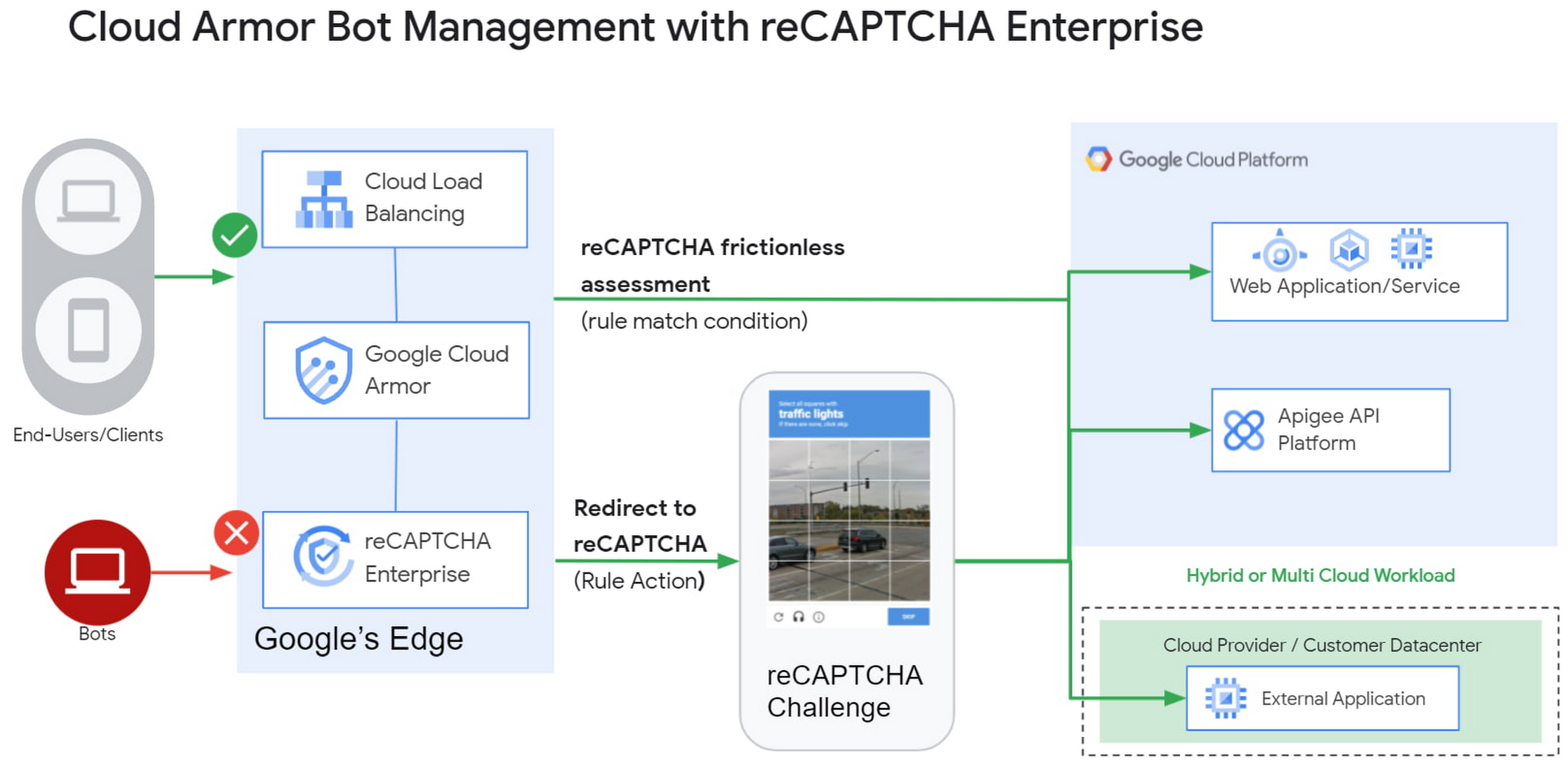
1) Enforce reCAPTCHA Enterprise frictionless assessment
reCAPTCHA Enterprise assigns risk scores to interactions on your website (e.g., logins, signups, gift card redemption, checking out, etc.) Based on these interactions, it returns a score between 0.0 and 1.0, with 0.0 being a likely fraudulent interaction and 1.0 being a likely legitimate interaction. To reduce fraud, you might choose to take action on returned scores for logins below 0.5, but allow users with higher scores to continue their login with zero friction.
With this new integration, you can also have Cloud Armor take action based on the score, including blocking or redirecting the request based on reCAPTCHA’s assessment from the client-side instrumentation. The client-side instrumentation can be enabled by installing reCAPATCHA’s javascript library into browser applications or using the reCAPTCHA SDK with mobile applications. By the time the user’s request leaves the client, it will have a reCAPTCHA assessment and bot score attached to it. This scoring is accomplished in-line, as the user’s request is being evaluated through your Cloud Armor security policy. Crucially, this occurs without incurring the latency of an additional request/response back to the reCAPTCHA service.
2) Serve reCAPTCHA Challenge in Cloud Armor
In this scenario, suspicious users are blocked by Cloud Armor until they solve the reCAPTCHA Enterprise challenge.You can configureCloud Armor to serve a reCAPTCHA challenge for any requests that match on a Cloud Armor security policy rule. To do so, you can configure a rule in through the Google Cloud CLI with an action to redirect to reCAPTCHA Enterprise in order to serve a CAPTCHA:
gcloud beta compute security-policies rules create 1000--security-policy my-policy--expression "request.path.matches("/login.html")"--action redirect--redirect-type google-recaptcha
In the above example, we are choosing to have reCAPTCHA Enterprise deployed to assess every request attempting to access the login page to prevent bots from logging into our service. With Cloud Armor first requiring reCAPTCHA Enterprise to assess the bot risk of reach request, unwelcome traffic from bots would be blocked at the edge.
3) Redemption Flow
While we aim to make the initial reCAPTCHA assessment as accurate as possible, some organizations prefer to give the end-user another chance by solving a challenge in the event that the reCAPTCHA score is lower than their defined threshold. As part of this release, you can combine both the frictionless assessment and manual challenge into what we call the “redemption flow”. To do so, you can configure the match condition of a Cloud Armor rule to detect a low reCAPTCHA token score and configure the action of the same rule to redirect to a reCAPTCHA challenge.
gcloud beta compute security-policies rules create 1000--security-policy my-policy--expression "request.path.matches(\"/login.html\") && token.recaptcha.score <= 0.3"--action redirect--redirect-type google-recaptcha
By combining both of these scenarios into the redemption flow, you can give suspicious clients the opportunity to redeem themselves by proving they are not a bot.
These bot detection and mitigation use cases, taken together or separately, allow your bot management strategy to scale up without impacting your protected workloads, as all decisions are made at the edge of Google’s network.
Additional bot management capabilities
In addition to the integration with reCAPTCHA Enterprise, Cloud Armor has added more capabilities to help you implement an effective bot management strategy:
- Redirect actions – Cloud Armor rules now support a redirect action to redirect end-clients to a user-configured URL. Requests that match on such rules would respond with an HTTP 302 to the end-client in order to send them to an alternative destination.
- Insert Header – With the ability to conditionally insert a custom header and value into an incoming request, users can now tag requests based on the criteria in the match condition of any Cloud Armor rule. This allows you to treat tagged requests differently downstream in your applications. For example, you can choose to route suspicious requests to a honeypot or silently not process their transaction so as not to tip off the bot that it has been detected.
Learn more
Cloud customers can get started right now by configuring a rule to redirect to reCAPTCHA in their Cloud Amor security policies through the command line interface. Learn more in these documentation links:
5132
Of your peers have already watched this video.
18:00 Minutes
The most insightful time you'll spend today!
Trusted Collaboration for Hybrid Workplace with Google Workspace
Hybrid workspace need high levels of security, data privacy, and trust for seamless collaboration across workforce. As we navigate to the new normal, your enterprise can learn about the security and privacy specific innovations Google Workspace utilizes to help customers realize powerful, trusted, cloud-native collaboration.
Introducing IAM Deny: Harden Your Security Posture at Scale the Easy Way

2639
Of your peers have already read this article.
1:30 Minutes
The most insightful time you'll spend today!
At Google Cloud, we’re focused on making it easy for organizations to build solutions quickly and securely. Identity and Access Management (IAM) is the core security control for establishing who has access to which cloud resources and making sure access permissions are aligned to your company’s business and security policies.
We are excited to announce the general availability of IAM Deny policies. This new capability helps you easily create access guardrails for Google Cloud resources. With IAM Deny policies, you can create rules that broadly restrict resource access. It provides a powerful, coarse-grained access control to help implement security policies at scale.
Control with IAM Policy – Allow and Deny
IAM Deny policies complement IAM Allow policies as you define access to your resources. Google Cloud’s IAM Allow policy lets you grant granular access to Google Cloud resources. The more coarse-grained Deny policies let you explicitly prohibit access to certain resources regardless of existing Allow rules. IAM Deny policies always supersede IAM Allow policies and override conflicting IAM Allow rules.
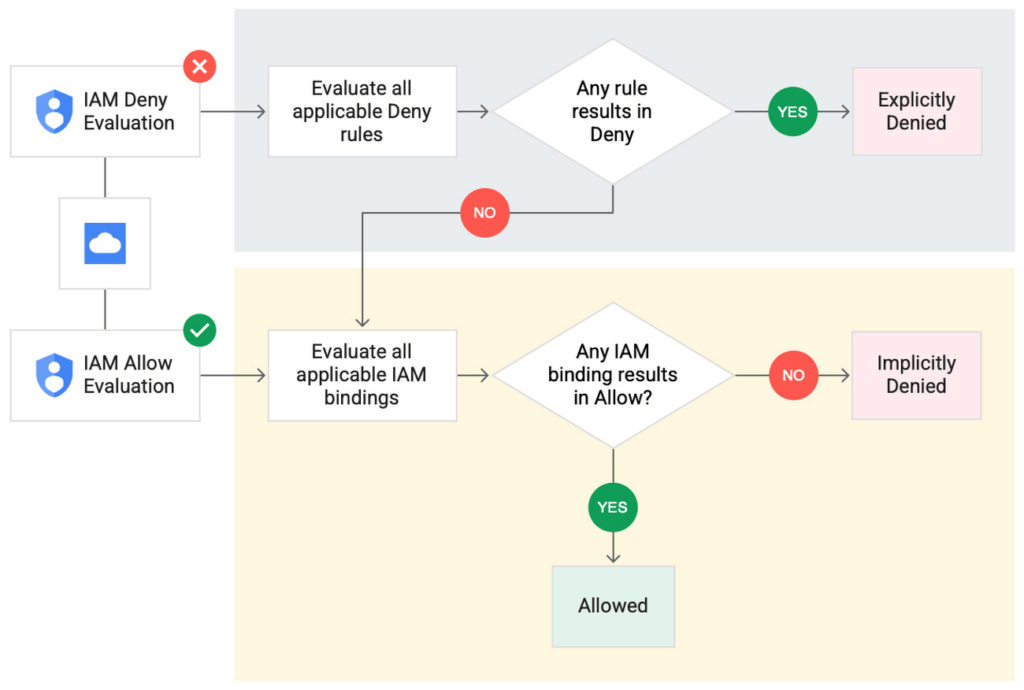
IAM Deny policies can be applied across many Google Cloud resources, such as Compute Engine, Cloud Storage, and Google Cloud Kubernetes Engine. These policies can help reduce toil on administrators as they can set up deny rules that will be enforced at scale without requiring reviews and changes of existing access rules. This makes resource governance simpler.
How to strengthen your security posture with IAM Deny
There are multiple use cases where IAM Deny policies can be used to help strengthen posture. Some of these are:
- Establish a default security baseline: IAM Deny can be used to set base policies at the organization level, folder level, and project level to deny access to resources. For example, you can attach a deny policy at the organization level to deny all users access to sensitive data storage buckets, making an exception for a specific user group.
- Prevent backdoors: IAM Deny rules override any IAM Allow rules. This can help you ensure that no “backdoor” access can be granted. For example, an organization that wants to ensure only central-admin can create projects in a folder can add an IAM Deny policy that restricts all users from creating projects except central-admin. This can help ensure no backdoor users will be added using allow policy rules.
- Prevent data exfiltration: Controlling access to data is a key measure to prevent exfiltration. For example, an organization that wants to restrict access to their personally identifiable information (PII) can set an IAM Deny policy on resources containing PII that denies access to all users except those in a group called PII-admin.
- Demonstrate compliance: Many industry regulations and compliance frameworks require organizations to demonstrate least-privilege access to sensitive resources. IAM Deny policies can create a baseline access restriction that always takes precedence when applied to resources.
Simplify IAM administration
IAM Deny can also help simplify common administrative tasks. It provides a list of permissions for Google Cloud services that you can readily use in your deny policies. Here are a few common situations where you can use IAM Deny to help streamline your access management.
- Centralize administrative privileges: You can use deny policies to restrict certain types of administrative activities to specific users or user groups. For example, if you want to limit custom role management to a single central team, you can create a deny rule that denies the permissions required for custom role management to all users, except users in the central-admin group. This will only let members of the central-admin group manage custom roles, even if other users have the required permissions.
- Create exceptions to access grants: You can use deny policies to deny inherited permissions. For example, you can grant a role at a high level in the resource hierarchy, and then deny the role’s permissions on individual lower-level resources if necessary.
- Block access based on tags: Google Cloud supports key-value based tags and you can use deny policies to deny permissions based on tags without adding an IAM Condition to every role grant. For example, you can create a rule to deny delete permissions for resources tagged as “production” for everyone except project-admins.
IAM Deny in action
The following example illustrates how a deny policy can be used to block all users from deleting projects unless the user is a member of a project-admins group or the project being deleted is tagged as a “test” project. Without a deny policy, you would have to manually track all members who have the permission to delete projects, and ensure that no undesired user has access to this permission. The deny policy makes it easy for the administrator to build this guardrail.
The below deny rule denies permission to everyone except project-admins@example.com for projects not tagged as test. Add this deny rule to a deny policy and attach the policy at the org level. That’s it!
(Note that project-admins@example.com is a security group. Using security groups is a best practice that should be followed to help keep your resources secure.)
{
"name": "policies/cloudresourcemanager.googleapis.com%2Fprojects%2F253519172624/denypolicies/limit-project-deletion",
"uid": "06ccd2eb-d2a5-5dd1-a746-eaf4c6g3f816",
"kind": "DenyPolicy",
"displayName": "Only project admins can delete projects.",
"etag": "MTc1MTkzMjY0MjUyMTExODMxMDQ=",
"createTime": "2021-09-07T23:15:35.258319Z",
"updateTime": "2021-09-07T23:15:35.258319Z",
"rules": [
{
"denyRule": {
"deniedPrincipals": [
"principalSet://goog/public:all"
],
"exceptionPrincipals": [
"principalSet://goog/group/project-admins@example.com"
],
"deniedPermissions": [
"cloudresourcemanager.googleapis.com/projects.delete"
],
"denialCondition": {
"title": "Only for non-test projects",
"expression": "!resource.matchTag('12345678/env', 'test')"
}
}
}
]
}
Getting started with IAM Deny Policies
With IAM Deny, you now have a powerful new capability to build security guardrails and more effectively control access to your Google Cloud resources. IAM Deny is now generally available for all customers through gCloud and APIs. We offer IAM Deny to Google Cloud customers at no additional cost. You can learn more about IAM Deny by visiting our documentation page.
Protect Corporate Apps with BeyondCorp Enterprise

2674
Of your peers have already read this article.
2:30 Minutes
The most insightful time you'll spend today!
As part of our efforts to democratize Zero Trust, Google Cloud has designed our BeyondCorp Enterprise solution to be an extensible platform where customers can choose to integrate signals from other technology vendors and incorporate these into their Zero Trust access policies. Following our integrations announcements earlier this year, we are excited to announce a new BeyondCorp Enterprise integration with Microsoft Intune, now available in Preview.
This integration allows organizations to craft Zero Trust access policies and protect private applications and SaaS applications, including Office 365, based on data collected from the Intune graph API, including device posture and other trust signals. It can also be leveraged to configure context-aware access policies for Workspace applications.
These policies can be applied across end-user devices, no matter where they are located. The ability to leverage device information to make access decisions is a critical component of a Zero Trust approach. Intune is a widely used mobile device management (MDM) tool and many of our customers will be able to benefit from this integration to help ensure that their distributed workforce can appropriately access corporate resources.
The BeyondCorp Enterprise integration with Microsoft Intune collects data from Intune using the Microsoft Graph API. End-user device information collected by the connector is then fed into Access Context Manager, a component of BeyondCorp Enterprise, to gate access to resources based on policies and access levels.
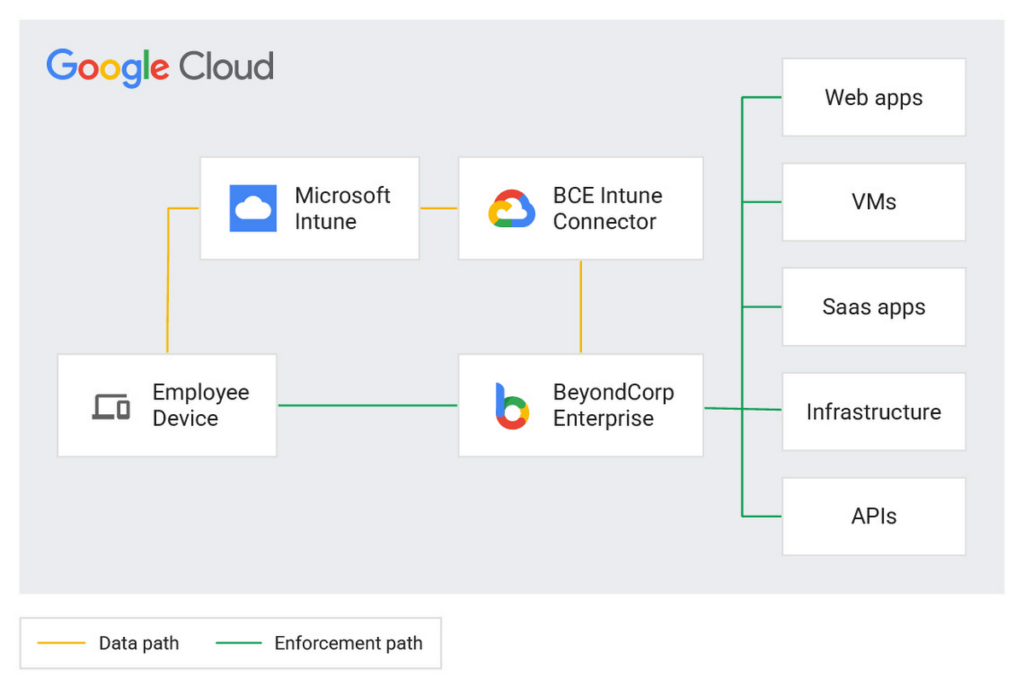
Customers are already seeing the benefits of the BeyondCorp Enterprise integration with Microsoft Intune. For example, one of our customers, a global ecommerce vendor, uses it to ensure their corporate-owned devices comply with internal policies before they are able to connect to corporate resources. With the Intune integration, they are then able to quickly and easily configure context-aware access policies with an attribute that company-owned devices must be in compliance in order to access the specific applications.
Previously, without the integration, they would need to set up a custom integration and manage both the code and the infrastructure where it was running. This integration not only alleviates the need to create custom code, but the customer has also seen a reduction in the time it takes to onboard new devices and build these policies.
If you’re interested in learning more or joining the preview, a full reference guide to the Intune integration can be found in our documentation here.
We believe that customers should be able to leverage their existing technology investments to build a more secure ecosystem. BeyondCorp Enterprise can help ensure that the right people have access to the right resources—only authorized users should be able to access only the resources that they have been approved for, based on their identity and device information. Google Workspace customers can also incorporate signal information from other vendors, including Intune, to create context-aware access policies for securing Workspace applications.
Earlier this year, we announced Netskope as a new member of the BeyondCorp Alliance to enable integration of a user’s risk score between Netskope Cloud Exchange and Google Cloud. We also announced new integrations with Jamf Pro for MacOS, which shares the Jamf-determined compliance state with BeyondCorp Enterprise so admins can incorporate this information into context-aware policies to restrict or allow access to protected applications.
You can learn more about BeyondCorp Enterprise integrations by registering for Google Cloud Next ‘22 on October 11-13, and attending the “What’s New in Zero Trust” session. Google Cloud will also be featured at the upcoming Jamf Nation User Conference (JNUC), September 27-29, to discuss BeyondCorp Enterprise integrations with Jamf.
More Relevant Stories for Your Company

Latest News: Secure Digital Infrastructure Services with Apigee Advanced API Security for Google Cloud
Organizations in every region and industry are developing APIs to enable easier and more standardized delivery of services and data for digital experiences. This increasing shift to digital experiences has grown API usage and traffic volumes. However, as malicious API attacks also have grown, API security has become an important

Nine Interesting Google Cloud Identity and Environment Features to Know About!
I’ve been at Google Cloud just a few weeks, following years of experience as an AWS Hero and building on other clouds. So last week’s Google Cloud Next–my first!—was a bit of a culture shock. On the GCP podcast, I used the word “intentionality” to describe what I’m seeing: a thoughtful,

10 Reasons that Make Google Cloud the Champion of IaaS
When you choose to run your business on Google Cloud you benefit from the same planet-scale infrastructure that powers Google’s products such as Maps, YouTube, and Workspace. We have picked 10 ways in which Google Cloud Infrastructure services outshine alternatives in the market in how they simplify your operations, save

Data Security Excellence: Google Takes the Lead in Forrester’s Wave Report
To help organizations confidently move their sensitive data to the cloud, Google Cloud works diligently to earn and maintain customer trust. Our Trusted Cloud is committed to giving you a secure foundation that you can verify and independently control. Discovery and protection of sensitive data are integral parts of Google
