






APIs and IT Rationalization: Cost Avoidance and Cost Savings for Enterprise IT
READ FULL INTRODOWNLOAD AGAIN3809
Of your peers have already downloaded this article
6:30 Minutes
The most insightful time you'll spend today!
5 Ways You Need to Know to Reduce Costs with Containers

3178
Of your peers have already read this article.
2:30 Minutes
The most insightful time you'll spend today!
“Cloud Wisdom Weekly: for tech companies and startups” is a new blog series we’re running this fall to answer common questions our tech and startup customers ask us about how to build apps faster, smarter, and cheaper. In this installment, Google Cloud Product Manager Rachel Tsao explores how to save on compute costs with modern container platforms.
Many tech companies and startups are built to operate under a certain degree of pressure and to efficiently manage costs and resources. These pressures have only increased with inflation, geopolitical shifts, and supply chain concerns, however, creating urgency for companies to find ways to preserve capital while increasing flexibility. The right approach to containers can be crucial to navigating these challenges.
In the last few years, development teams have shifted from virtual machines (VMs) to containers, drawn to the latter because they are faster, more lightweight, and easier to manage and automate. Containers also consume fewer resources than VMs, by leveraging shared operating systems. Perhaps most importantly, containers enable portability, letting developers put an application and all its dependencies into a single package that can run almost anywhere.
Containers are central to an organization’s agility, and in our conversations with customers about why they choose Google Cloud, we hear frequently that services like Google Kubernetes Engine (GKE) and Cloud Run help tech companies and startups to not only go to market quickly, but also save money. In this article, we’ll explore five ways to help your business quickly and easily reduce compute costs with containers.
5 ways to control compute costs with containers
Whether your company is an established player that is modernizing its business or a startup building its first product, managed containerized products can help you reduce costs, optimize development, and innovate. The following tips will help you to evaluate core features you should expect of container services and include specific advice for GKE and Cloud Run.
- Identify opportunities to reduce cluster administration
Most companies want to dedicate resources to innovation, not infrastructure curation. If your team has existing Kubernetes knowledge or runs workloads that need to leverage machine types or graphics processing units (GPUs), you may be able to simplify provisioning with GKE Autopilot. GKE Autopilot provisions and manages the cluster’s underlying infrastructure, all while you pay for only the workload, not 24/7 access to the underlying node-pool compute VMs. In this way, it can reduce cluster administration while saving you money and giving you hardened security best practices by default.
- Consider serverless to maximize developer productivity
Serverless platforms continue the theme of empowering your technical talent to focus on the most impactful work. Such platforms can promote productivity by abstracting away aspects of infrastructure creation, letting developers work on projects that drive the business while the platform provider oversees hardware and scalability, aspects of security, and more.
For a broad range of workloads that don’t need machine types or GPUs, going serverless with Cloud Run is a great option for building applications, APIs, internal services, and even real-time data pipelines. Analyst research supports that Cloud Run customers achieve faster deployments with less time spent monitoring services, resulting in reinvested productivity that lets these customers do more with fewer resources.
Designed with high scalability in mind, and an emphasis on the portability of containers, Cloud Run also supports a wide range of stateless workloads, including jobs that run to completion. Moreover, it lets you maximize the skills of your existing team, as it does not require cluster management, a Kubernetes skillset or prior infrastructure experience. Additionally, Cloud Run leverages the Knative spec and a container image as a deployment artifact, enabling an easy migration to GKE if your workload needs change.
With Cloud Run, gone are the days of infrastructure overprovisioning! The platform scales down to zero automatically, meaning your services always have the capacity to meet demand, but do not incur costs if there is no traffic.
- Save with committed use discounts
Committed use discounts provide discounted pricing in exchange for committing to a minimal level of usage in a region for a specified term. If you are able to reliably predict your resource needs, for instance, you can get a 17% discount for Cloud Run (for either one year or three years), and either a 20% discount (for one year) or a 45% discount (for three years) on GKE Autopilot.
- Leverage cost management features
Minimum and maximum instances are useful for ensuring your services are ready to receive requests but do not cause cost overages. For Google Cloud customers, best practices for cost management include building your container with Cloud Build, which offers pay-for-use pricing and can be more cost efficient than steady-state build farms.
Relatedly, if you choose to leverage serverless containers with Cloud Run, you can set minimum instances to avoid the lag (i.e., the cold start) when a new container instance is starting up from zero. Minimum instances are billed at one-tenth of the general Cloud Run cost. Likewise, if you are testing and want to avoid costs spiraling, you can set a maximum number of instances to ensure your containers do not scale beyond a certain threshold. These settings can be turned off anytime, resulting in no costs when your service is not processing traffic. To have better oversight of costs, you can also view built-in billing reports and set budget alerts on Cloud Billing.
- Match workload needs to pricing models
GKE Autopilot is great for running highly reliable workloads thanks to its Pod-level SLA. But if you have workloads that do not need a high level of reliability (e.g., fault tolerant batch workloads, dev/test clusters), you can leverage spot pricing to receive a discount of 60% to 91% compared to regularly-priced pods. Spot Pods run on spare Google Cloud compute capacity as long as resources are available. GKE will evict your Spot Pod with a grace period of 25 seconds during times of high resource demand, but you can automatically redeploy as soon as there is available capability. This can result in significant savings for workloads that are a fit.
Innovation requires balance
Put into practice, these tips can help you and your business to get the most out of containers while controlling management and resource costs. That said, it is worth noting that while managing cloud costs is important, the relationship between “cloud” and “cost” is often complex. If you are adopting cloud computing with only the primary goal of saving money, you may soon run into other challenges. Cloud services can save your business money in many ways, but they can also help you get the most value for your money. This balance between cost efficiency and absolute cost is important to keep in mind so that even in challenging economic landscapes, your tech company or startup can continue growing and innovating.
Beyond cost savings, many tech and startup companies are seeking improved business agility, which is the ability to deploy new products and features frequently and with high quality. With deployment best practices built into GKE Autopilot and Cloud Run, you can transform the way your team operates while maximizing productivity with every new deployment.
You can learn if your existing workloads are appropriate for containers with this fit assessment and these guides for migrating to containers. For new workloads, you can leverage these guides for GKE Autopilot and Cloud Run. And for more tips on cost optimization, check out our Architecture Framework for compute, containers, and serverless.
If you want to learn more about how Google Cloud can help your startup, visit our page here to get more information about our program and apply for our Google for Startups Cloud Program, and sign up for our communications to get a look at our community activities, digital events, special offers, and more.
Simplify Cloud Development with Duet AI on Google Cloud

1526
Of your peers have already read this article.
4:00 Minutes
The most insightful time you'll spend today!
Cloud developers — you’ve got it all. You can code in your choice of languages, enjoy portability with containers, minimize complexity with serverless, and manage the entire software lifecycle by following DevOps principles. But let’s face it, building and onboarding new cloud applications still requires a lot of manual planning, synthesis, and, yes, hard work. You need to research and plan your deployment, create a workable, secure architecture, and of course, you need to write the actual code,
For the last several decades, the cloud has been primarily a “do it yourself” model with volumes of options that have made development more complicated. The cloud went from overwhelmingly exciting to…. a bit overwhelming.
What if we all could bring that excitement back? What if you had some help that was available whenever and wherever you needed it?
Say hello to Duet AI for Google Cloud
Powered by Google’s state-of-the-art generative-AI foundation models, Duet AI for Google Cloud is an always-on AI collaborator that provides help to users of all skill levels where they need it. With Duet AI, we’re on a mission to deliver a new cloud experience that’s personalized and intent-driven, and can deeply understand your environment to assist you in building secure, scalable applications, while providing expert guidance.
As we evolve Google Cloud with Duet AI, we are looking to build a cloud platform that is more human-centric, holistic, and helpful, with responsible AI at the center of the experience:
- Human-centric: With Duet AI, we are making Google Cloud more accessible and personal to any type of user at any skill level by providing them with support whenever they need it, from code recommendations for developers, to prompt-based data insights for data engineers, to chat-based app creation for business users.
- Holistic: With generative AI at the center of the cloud experience, cloud development can be more cohesive, with fewer silos across functions, services, and tech stacks, providing a holistic picture in the format you want, wherever you are in Google Cloud.
- Helpful: To deliver smarter, contextual recommendations for building and operating apps with Google Cloud, we pre-trained Codey, one of the foundation models that powers Duet AI, with Google Cloud-specific content like documentation and sample code, and fine-tuned it based on Google Cloud user behaviors and patterns.
- Responsible: Our AI Principles set out our commitment to developing technology responsibly. Your code and recommendations will not be reused for any model learning and development. This helps ensure the privacy of your data and code, and also the integrity of the knowledge space from which our AI models are trained.
New capabilities available in Duet AI for Google Cloud
Here are some of the new capabilities available to get us started on our mission to deliver a new personalized and intent-driven cloud experience:
- Code assistance provides AI-driven code assistance for cloud users such as application developers and data engineers. It gives code recommendations as they type in real time, generates full functions and code blocks, and identifies vulnerabilities and errors in the code, while suggesting fixes.
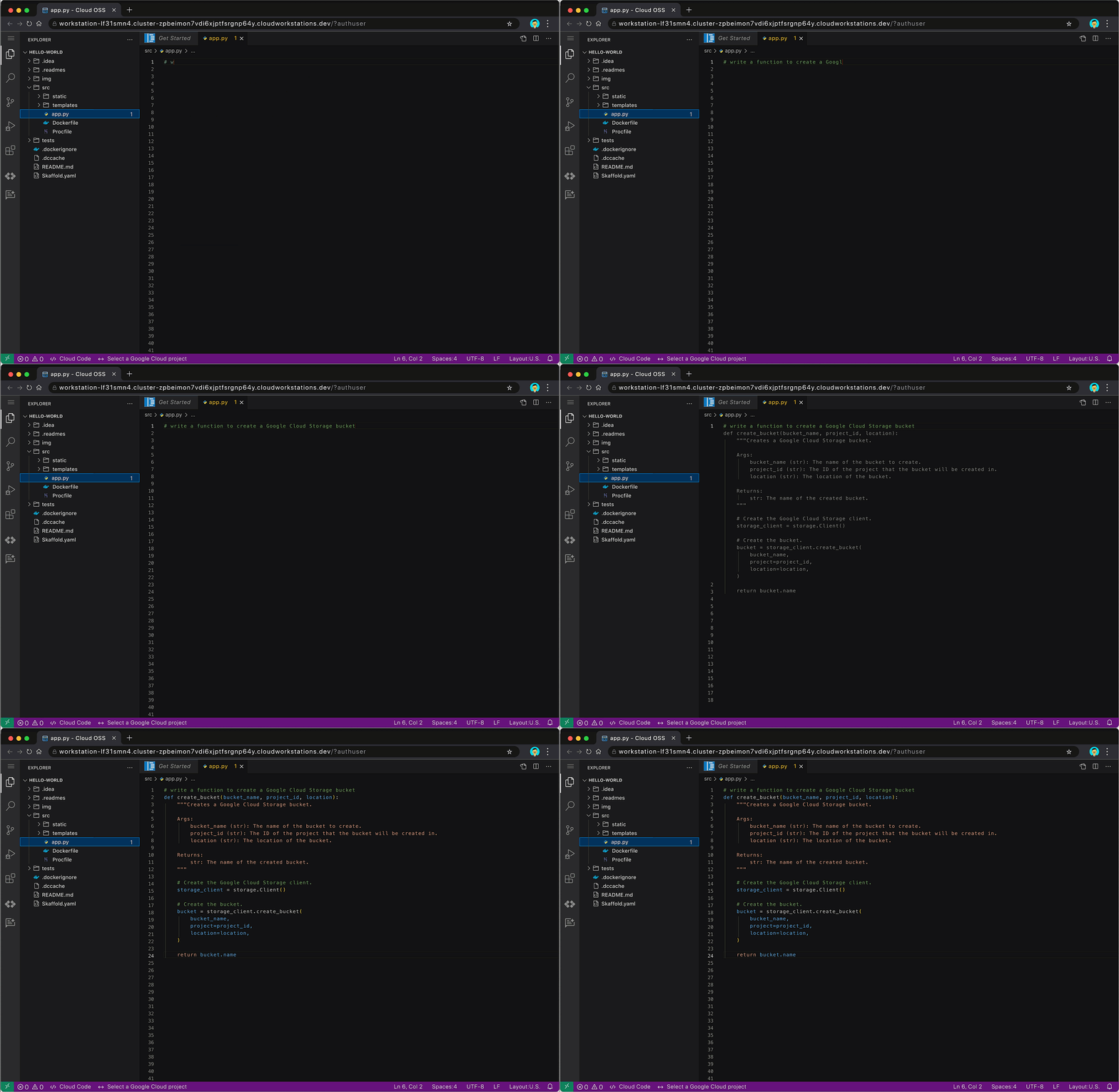
Code assistance auto-generates code for creating a Google Cloud Storage bucket
Code assistance will be available through multiple products and services across Google Cloud, such as in Cloud Workstations, our fully-managed secure development environment, and other code-editing experiences in the Google Cloud Console. Developers will also find code assistance in Cloud Shell Editor or via our Cloud Code IDE extensions for VSCode and JetBrains IDEs. It supports multiple languages including Go, Java, Javascript, Python, and SQL.
- Chat assistance allows people to use simple natural language to get answers on specific development or cloud-related questions. Users can engage with chat assistance to get real-time guidance on various topics, such as how to use certain cloud services or functions, or get detailed implementation plans for their cloud projects. It can also provide architectural or coding best practices, helping to reduce the need to go searching for relevant documents.

Use chat assistance to get the detailed steps for deploying an app on Cloud Run
Chat assistance will also be available across multiple Google Cloud surface areas, for example IDEs, the Cloud Console, and through products and services. Whether you’re a developer, operator, data engineer, or security professional, you’ll be able to leverage chat assistance to help get more work done faster.
Looking to optimize these features further for developers specialized in one particular area? With Generative AI support in Vertex AI, enterprises can fine-tune Codey using their own code base. They can consume these customized Codey models directly from Vertex AI today, and later this year, they will be able to connect it to the built-in Duet AI experience. And don’t worry, if you choose to train Codey with your code, your private data is kept private, and not used in the broader foundation model training corpus. You will have transparency and control over where data is stored and how or if it is used.
- Duet AI for AppSheet will let users create intelligent business applications, connect their data, and build workflows into Google Workspace via natural language. With no coding required, users will be able to build apps by describing their needs in a chat guided by AI-powered prompts. This makes app creation accessible to more users, which can allow developer teams to focus their time on other high-impact work.
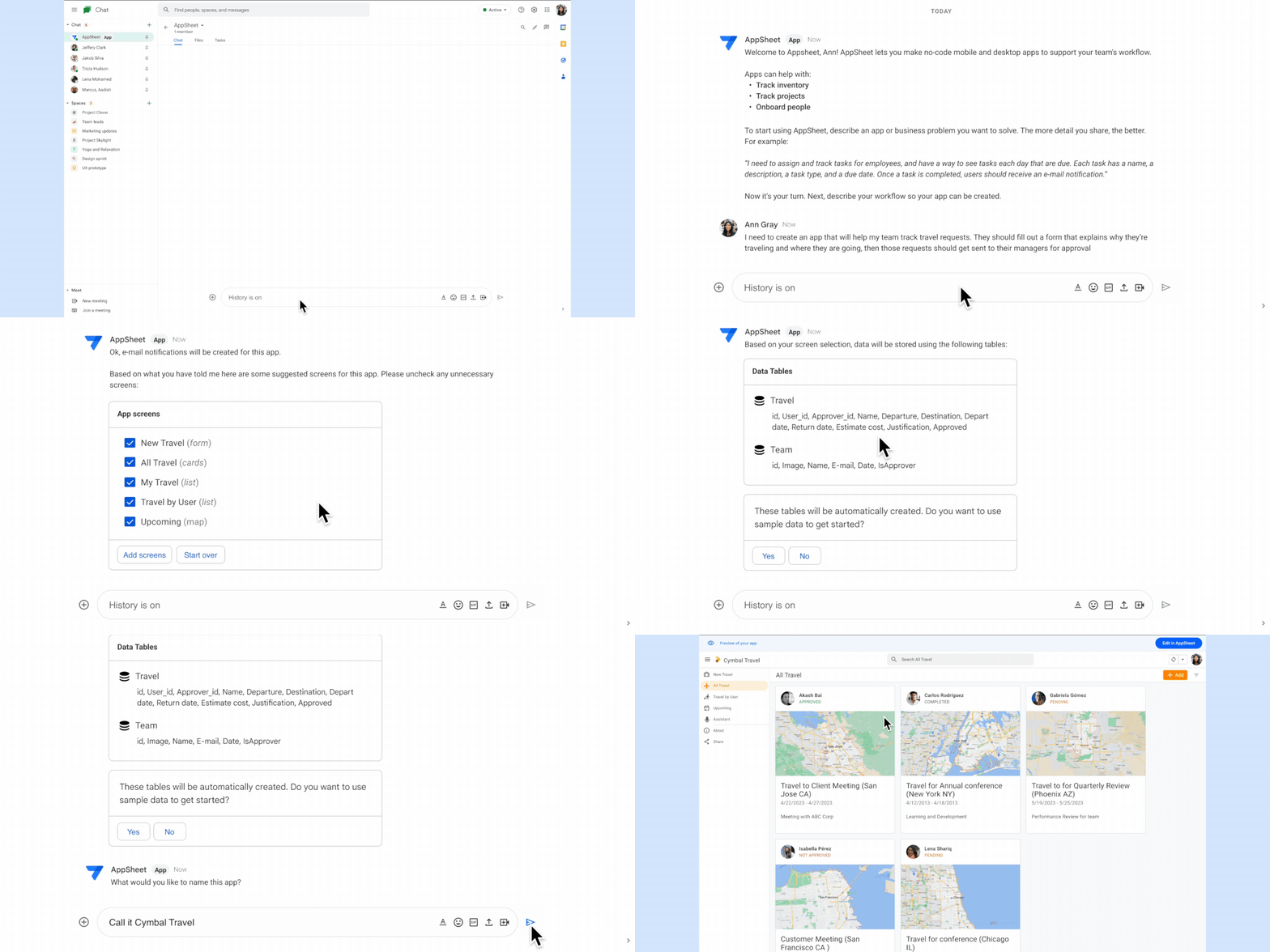
Create business applications with Duet AI for AppSheet using natural language
Experiment with Duet AI for Google Cloud today
We believe that having an assistant who is constantly evolving by your side will not only reduce an already overwhelmed developer’s workload, but also bring back the excitement of cloud development. With Duet AI, you can navigate the cloud with more confidence, ease, and — dare we say it — fun.
And this is just the beginning. The future of the cloud experience that we are shaping with Duet AI is full of possibilities. We believe the future of developer productivity is more targeted personalized assistance. Check here to see our vision for Duet AI for Google Cloud – the redefinition of productivity in the workplace through unique end-to-end AI assisted technologies.
These early features of Duet AI for Google Cloud are available today for limited users and we will be expanding access very soon. Sign up here to join Google Cloud’s AI Trusted Tester Program.
3180
Of your peers have already watched this video.
6:00 Minutes
The most insightful time you'll spend today!
A Headless Ecommerce on Google Cloud
Headless commerce helps marketing teams gain flexibility to alter frontend elements to run marketing campaigns and promotions and create the most superior customer experience on frontend devices. Watch the video to learn the basics of building a headless commerce application on Google Cloud. Meaning you will learn to have the frontend experience deployed on Cloud Run in Google Cloud, and integrate with commerce backend from Google Cloud Marketplace offering partner commerce tools.
1 Developer. 5 Months. A Revenue Generating App With 100K Users With Firebase

7865
Of your peers have already read this article.
5:30 Minutes
The most insightful time you'll spend today!
This is a guest post authored by Firebase customer, Anton Ivanov, Founder & CEO of DealCheck
Real estate investing is a fantastic way to build a stream of passive income and grow your wealth. Numerous studies have pointed out that real estate investing has created more millionaires throughout history than any other form of investing (like this one and this one). So why don’t more people do it?
I asked myself this very question a few years ago after talking to a group of friends about the success I’ve had with real estate, and listening to their reasons why they think it’s out of their reach.
A common theme among them was that they viewed it as something too difficult to learn and master. There were too many steps, the learning curve was steep and there was a lot of room for mistakes for somebody just starting out, especially when analyzing the financial performance of potential investment properties.
Traditionally, most investors used spreadsheets to do the math – which works only if you know what and how you’re calculating something. But if you don’t know that, it’s very easy to make mistakes and overlook things. And no one wants to make mathematical errors before a huge purchase like an investment property.

Where do I even begin?!
And that’s when I had the idea to build DealCheck – a cloud-based, easy-to-use property analysis tool for real estate investors and agents. I wanted to create a platform that would help new investors learn the ropes and avoid costly mistakes, but at the same time provide the flexibility to perform more advanced analysis with a click of a button.
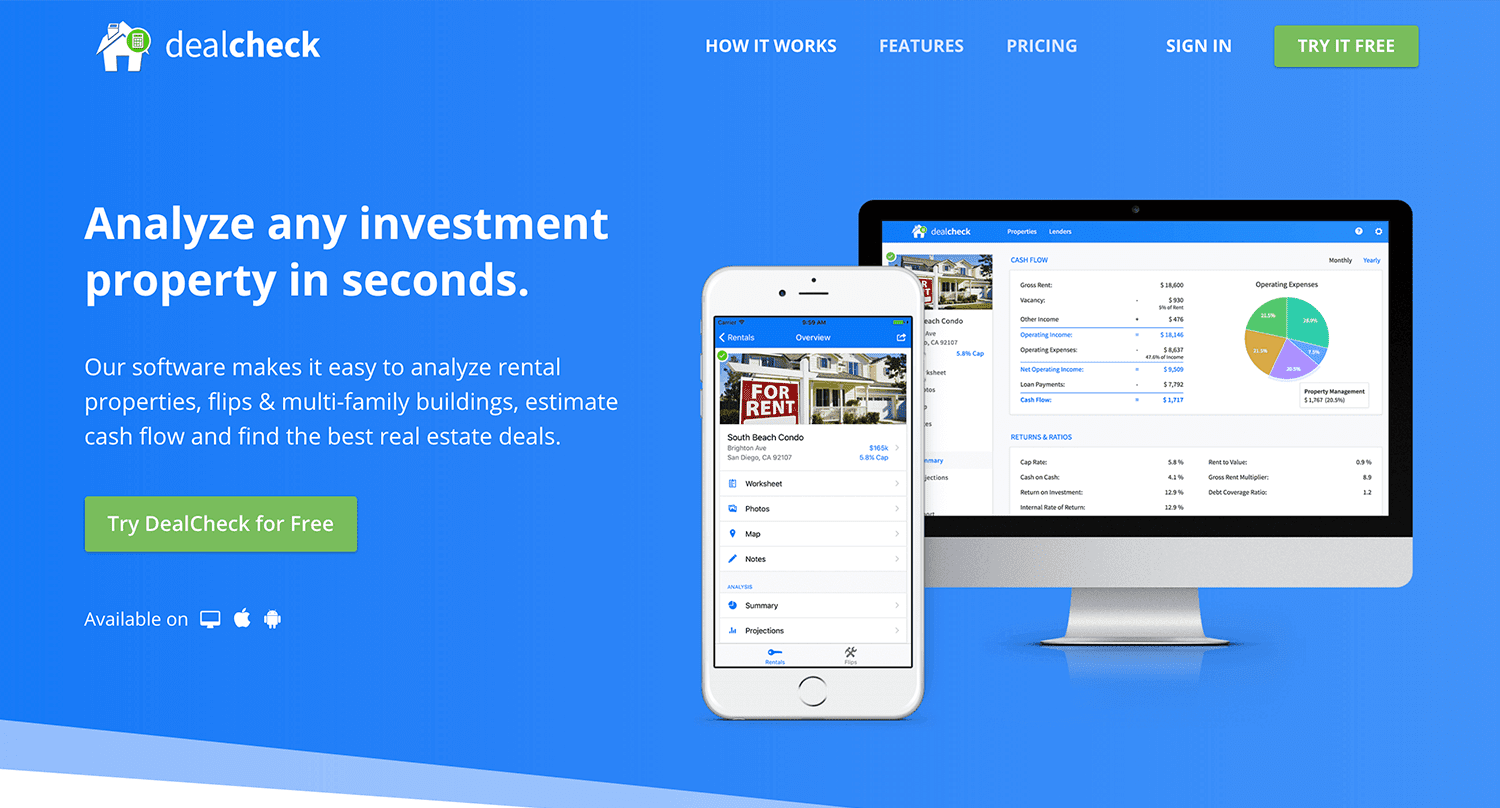
Making real estate investing easier and more accessible.
The Challenges of Solo Development
I was working as a front-end engineer at the time, so I knew I could build the UI myself, but what about the back-end, data storage, authentication, and a bunch of other things you need for a full-functioning cloud app?
I didn’t know anybody I could bring on as a co-founder, so I set out to research what technologies and platforms I could leverage to help me with the back-end and server infrastructure.
Firebase kept popping up again and again and I began to look at it in more detail. It was then recently acquired by Google and its collection of BaaS (backend-as-a-service) modules seemed to offer the exact solution I needed to build DealCheck.
I was especially impressed with the documentation for each feature and how well all of the different technologies could be tied together to create one unified platform.
It wasn’t long before I signed up and started building the first MVP of the app.
Using Firebase to Quickly Build a Scalable Backend
As the only developer on the project, I had limited time and resources to spend on building the back-end, so I set out to use every Firebase feature that was available at the time to my advantage.
My goal was actually to write as little server-side code as possible and instead focus on leveraging the different Firebase modules to solve three specific challenges:
Challenge #1 – Authentication and User Management
The first one was authentication and user management. DealCheck’s users needed the ability to create their accounts so they can view and analyze properties on any device (more on that later). I wanted to have the ability to sign in with email, Facebook or a Google account.
Firebase Authentication was designed specifically for this purpose and I used it to handle pretty much the entire authentication flow. Out-of-the-box, it has support for all the major social networks, cross-network credential linking and the basic account management operations like email changes, password resets and account deletions.
There was no server-side code required at all – I just needed to build the UI on the front-end.
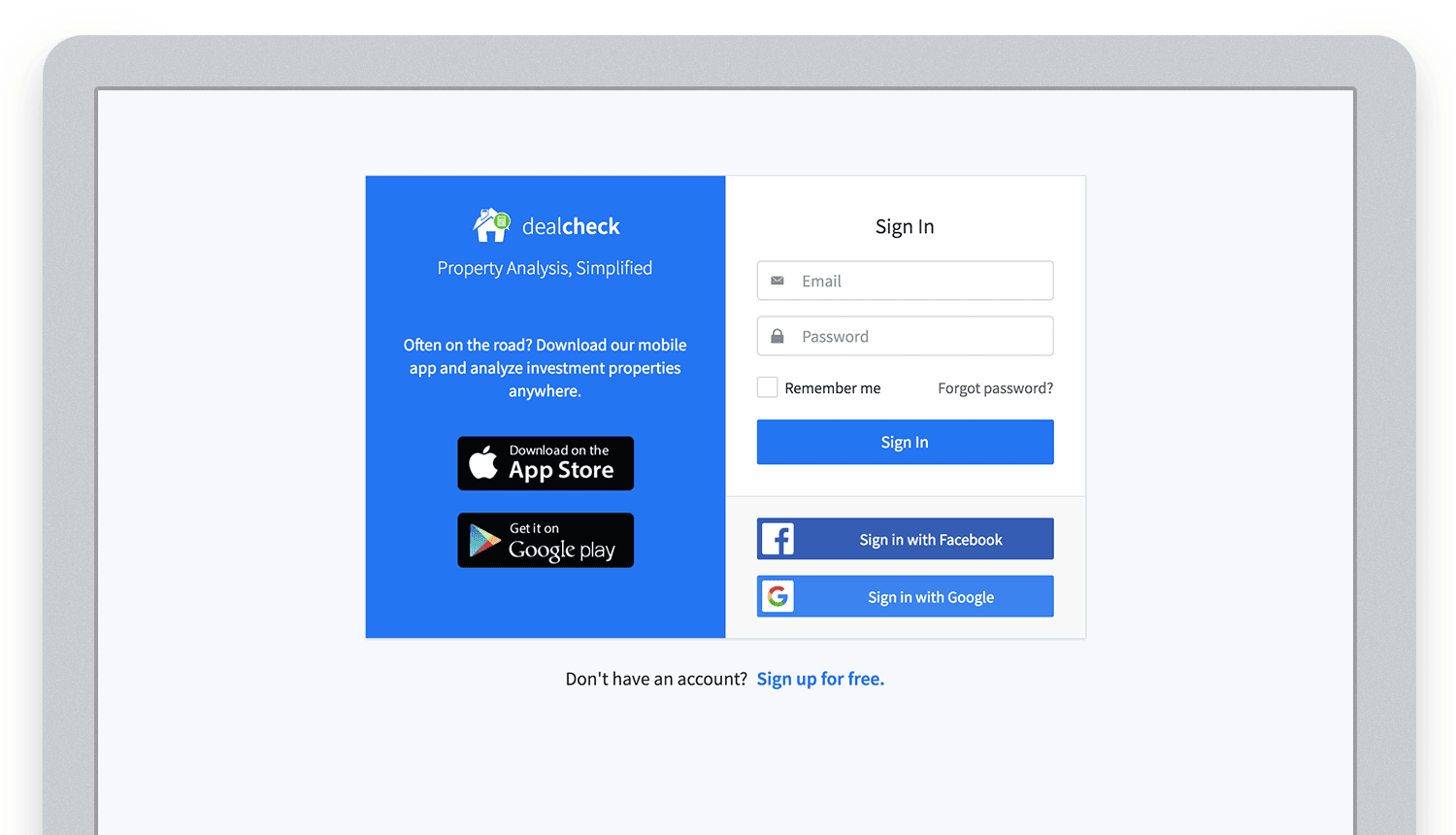
Email, Facebook and Google sign in powered by Firebase.
And as an added benefit, Firebase Authentication ties directly into the Realtime Database product to create a declarative permissions and access control framework that’s easy to implement and maintain. This helped me make sure user data was protected from unauthorized access, but also facilitate data sharing among users.
Challenge #2 – Cloud Storage with Cross-Device Sync
Next up was data storage. I knew that I wanted DealCheck’s users to be able to use the app and analyze properties online, on iOS and Android. So I needed a real-time, cloud-based database solution that could sync data across any device.
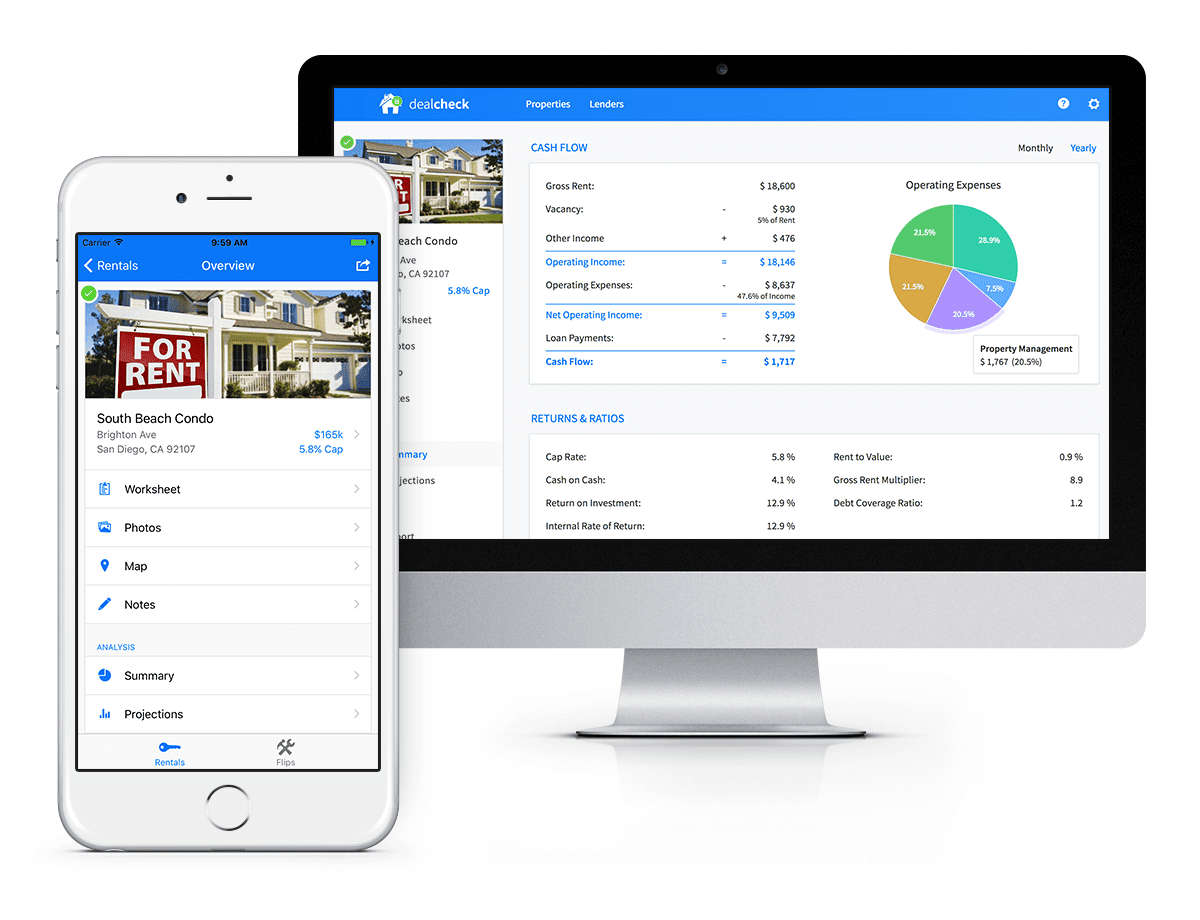
Syncing data across web and mobile is not easy!
Firebase Realtime Database is a NoSQL, JSON-based database solution that was designed exactly for this purpose, and I was actually surprised how great it worked. I used the official AngularJS bindings for Firebase on the front-end to read and write to it directly from the client.
I had to do some extra work on mobile to implement an offline mode with syncing after reconnections, but all-together the code required to make everything work was minimal.
As I mentioned, Firebase Authentication tied directly to the database to facilitate access control, so I really didn’t need to do anything extra there. And I was able to set up automatic daily backups of all the data with a click of a button.
Challenge #3 – Third-Party Integrations
Up to now, I had written exactly 0 lines of server-side code and everything was handled by the client directly. As DealCheck’s development progressed, however, I knew that I would need a server to handle some operations that could not be done in the client.
I wasn’t very experienced with server maintenance and DevOps, but fortunately the Firebase Cloud Functions product was able to solve all of my needs. Cloud Functions are essentially single-purpose functions that can be triggered (or executed) based on a specific HTTP request or events coming from the Authentication, Realtime Database or other Firebase products.
Each function can be run once based on a specific event trigger to perform its prescribed task. You don’t have to worry about provisioning a server instance or managing load – everything is done automatically for you by Firebase.
What’s even cooler, is that Cloud Functions can access the Realtime Database and Cloud Storage buckets of the same project, performing operations on them server-side, as needed.
This is how DealCheck processes subscription payments through Stripe, validates Apple and Google Play mobile subscription receipts, integrates with third-party APIs and updates database records without user interaction.
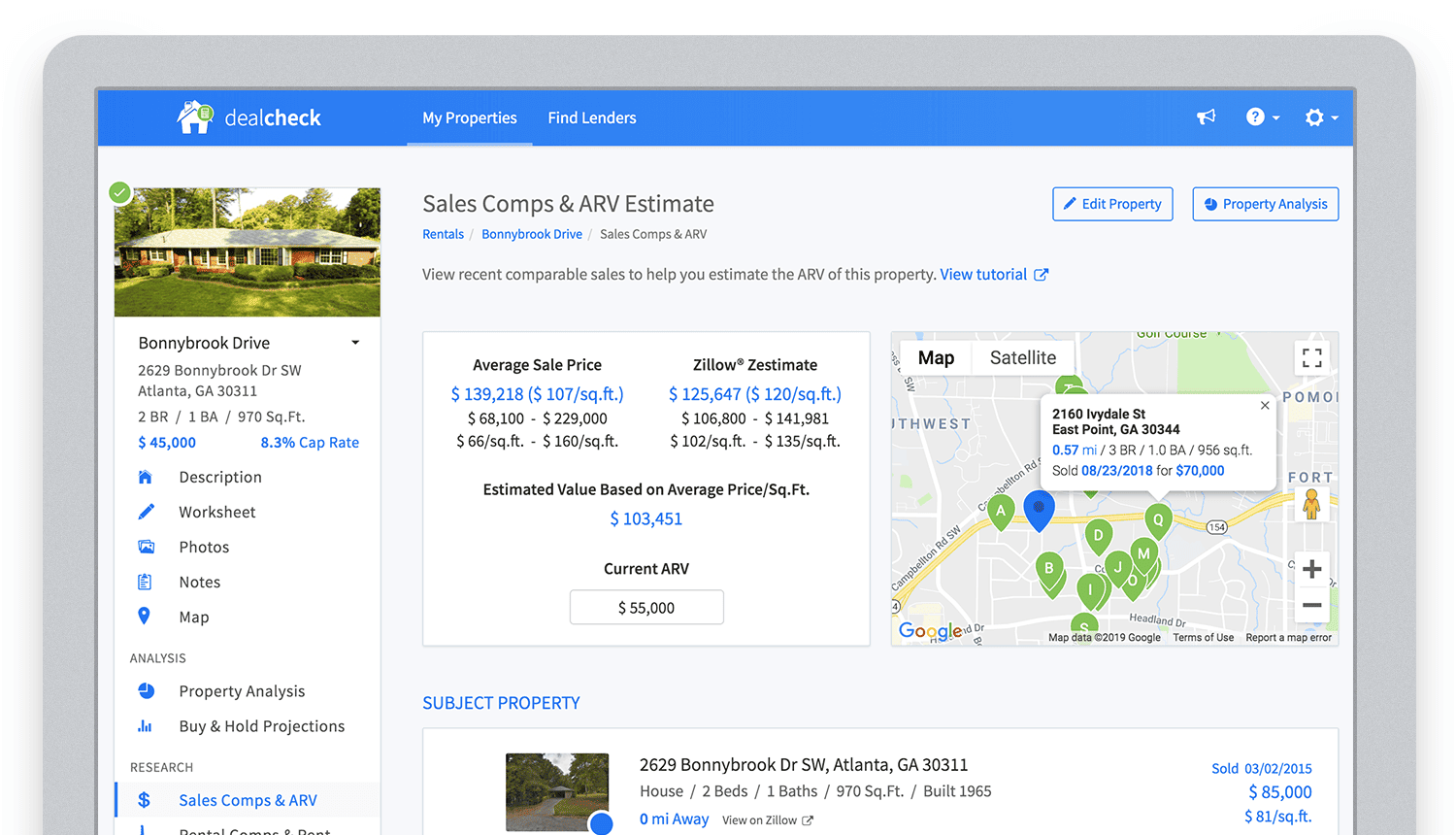
Bringing in sales comparable data from third-party providers into DealCheck.
Cloud Functions became the “glue” that tied the entire back-end infrastructure together.
Growing from an MVP to 100,000 Users with Firebase
The first version of the DealCheck app was built and launched in less than 5 months with just me on the development team. I definitely don’t think that would have been possible without Firebase powering the back-end infrastructure. Maybe the project wouldn’t have ever launched at all.
While Firebase is awesome for quick MVP development, it’s definitely designed to power production applications at scale as well. As DealCheck grew from a small side-project to one of the most popular real estate apps with over 100k users, all of the Firebase products that we use scaled to support the increasing load.
Moreover, the fantastic interoperability of all Firebase modules allows us to develop and release new features much faster because of the reduced coding requirements and ease of configuration.
So next time you’re looking to build an ambitious project with a small team – take a look at how Firebase can help you reduce development time and provide a suite of powerful tools that scale as your business grows.
This is exactly how DealCheck grew from a simple idea to make property analysis easier and faster, to an app that is helping tens of thousands of people grow their wealth and passive income through real estate investing. It’s a truly awesome and fulfilling experience to see your work positively impact so many people and it wouldn’t have been possible without Firebase.
Scaling with Breaking News: BBC’s Serverless Infrastructure on Google Cloud

1273
Of your peers have already read this article.
3:30 Minutes
The most insightful time you'll spend today!
Editors note: Today’s post is from Neil Craig at the British Broadcasting Corporation (BBC), the national broadcaster of the United Kingdom. Neil is part of the BBC’s Digital Distribution team which is responsible for building the services such as the public-facing www bbc.co.uk and .com websites and ensuring they are able to scale and operate reliably.
The BBC’s public-facing websites inform, educate, and entertain over 498 million adults per week across the world. Because breaking news is so unpredictable, we need a core content delivery platform that can easily scale in response to surges in traffic, which can be quite unpredictable.
To this end, we recently rebuilt our log-processing infrastructure on a Google Cloud serverless platform. We’ve found that the new system, based on Cloud Storage, Eventarc, Cloud Run and BigQuery, enables us to provide a reliable and stable service without us having to worry about scaling up during busy times. We’re also able to save license fee payers money by operating the service more cost effectively than our previous architecture. Not having to manually manage the scale of major components of the stack has freed up our time, allowing us to spend it on using, rather than creating the data.
A log in time
To operate the site and ensure our services run smoothly we continually monitor Traffic Manager and CDN access logs. Our websites generate more than 3B log lines per day, and handle large data bursts during major news events; on a busy day our system supports over 26B log lines in a single day.
As initially designed, we stored log data in a Cloud Storage bucket. But every time we needed to access that data, we had to download terabytes of logs down to a virtual machine (VM) with a large amount of attached storage, and use the ‘grep’ tool to search and analyze them. From beginning to end, this took us several hours. On heavy news days, the time lag made it difficult for the engineering team to do their jobs.
We needed a more efficient way to make this log data available, so we designed and deployed a new system that deals with logs and reacts to spikes more efficiently as they arrive, improving the timeliness of critical information significantly.
In this new system, we still leverage Cloud Storage buckets, but on arrival, each log generates an event using EventArc. That event triggers Cloud Run to validate, transform and enrich various pieces of information about the log file such as filename, prefix, and type, then processes it and outputs the processed data as a stream into BigQuery. This event-driven design allows us to process files quickly and frequently — processing a single log file typically takes less than a second. Most of the files that we feed into the system are small, fewer than 100 Megabytes, but for larger files, we automatically split those into multiple files and Cloud Run automatically creates additional parallel instances very quickly, helping the system scale almost instantly.
The nature of running a global website which provides news coverage means we see frequent, unpredictable large spikes of traffic. We learn from these and optimize our systems where necessary so we’re confident in the system’s ability to handle significant traffic. For example, around the time of the announcement of the Queen’s passing in September, we saw some huge traffic spikes. During the largest, within one minute, we went from running 150 – 200 container instances to over 1000…. and the infrastructure just worked. Because we engineered the log processing system to rely on the elasticity of a serverless architecture, we knew from the get-go that it would be able to handle this type of scaling.
Around the time of the announcement of the Queen’s passing in September, we saw some huge traffic spikes. During the largest, within one minute, we went from running 150 – 200 container instances to over 1000…. and the infrastructure just worked
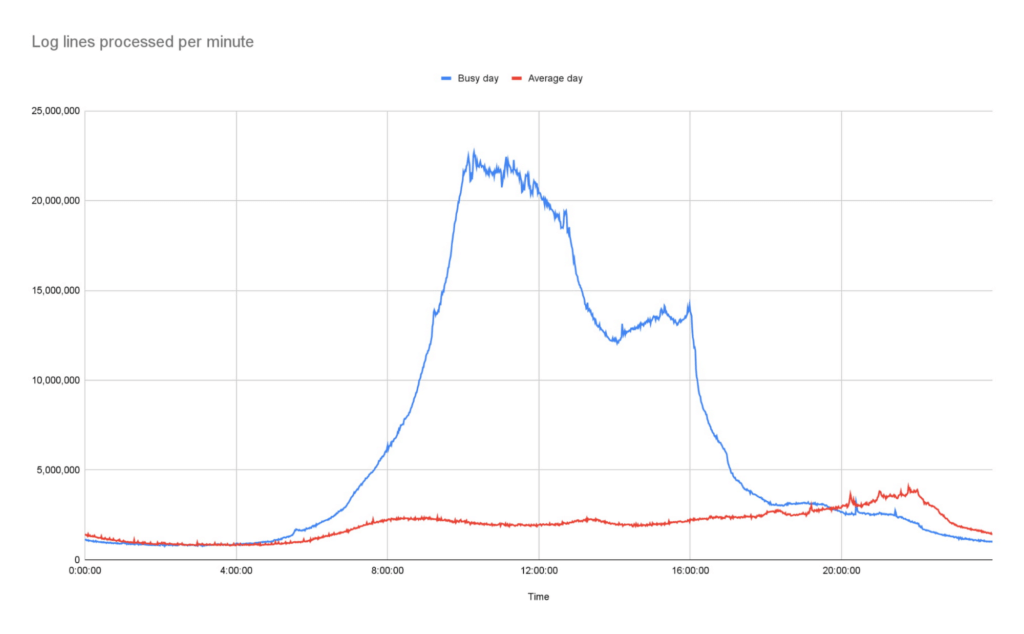
Our initial concern about choosing serverless was cost. It turns out that using Cloud Run is significantly more cost-effective than running the number of VMs we would need for a system that could survive reasonable traffic spikes with a similar level of confidence.
Switching to Cloud Run also allows us to use our time more efficiently, as we no longer need to spend time managing and monitoring VM scaling or resource usage. We picked Cloud Run intentionally because we wanted a system that could scale well without manual intervention. As the digital distribution team, our job is not to do ops work on the underlying components of this system — we leave that to the specialist ops teams at Google.
Another conscious choice we made whilst rebuilding the system was to use the built-in service-to-service authentication in Google Cloud. Rather than implementing and maintaining the authentication mechanism ourselves, we add some simple configuration which instructs the client side to create and send a OIDC token for a service account we define and the server side to authenticate and authorize the client. Another example is pushing events into Cloud Run, where we can configure Cloud Run authorization to only accept events from specific EventArc triggers, so it is fully private.
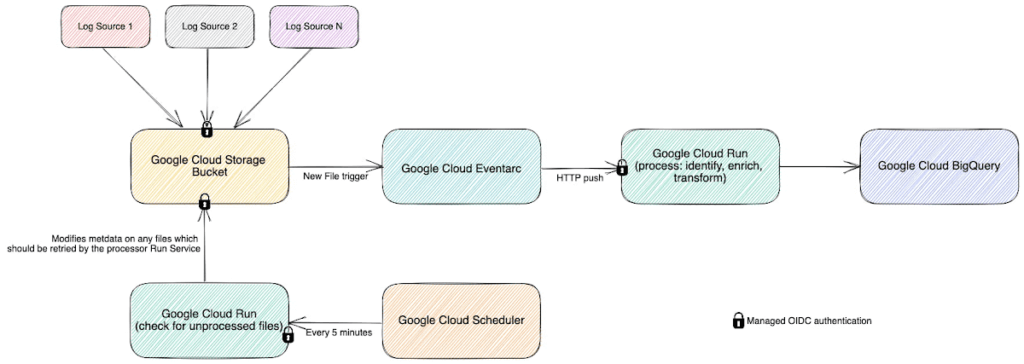
Going forward, the new system has allowed us to make better use of our data safely. For example, BigQuery’s per-column permissions allow us to open up access to our logs to other engineering teams around the organization, without having to worry about sharing PII that’s restricted to approved users.
The goal of our team is to empower all teams within the BBC to get the content they want on the web when they want it, make it reliable, secure, and make sure it can scale. Google Cloud serverless products helped us to achieve these goals with relatively little effort and require significantly less management than previous generations of technology.
More Relevant Stories for Your Company

APIs Pivotal to Building Business Resilience
Recently, consumer interactions and relationships among suppliers, partners and customers have turned digital and dynamic, requiring a certain degree of technological reimagining for businesses. To stay relevant with times and build resilience with digital transformation, businesses can explore application programming interfaces or APIs to leverage to make existing data value

PaGaLGuY Turns to Google Cloud Platform to Power Leading India Education Network
Founded in 2006, PaGaLGuY started as a forum that enabled students, typically aged between 20 and 30 to discuss and seek advice on academic issues. By 2011, PaGaLGuY had increased its traffic to about 250,000 page views per month. The business is now one of India’s largest education networks and

Traveloka Scales Up Operations and Growth with APIs
Traveloka is an Indonesian tech company currently focusing on the travel and lifestyle markets. Our customers, the majority of which come from Southeast Asia, visit the site mainly to book flights, hotels, transportation, lifestyle experiences (e.g. theme parks, movie tickets, beauty and spa treatments, and restaurant vouchers), and much more. We

Cardinal Health Leads the Way in Healthcare App Modernization
Apps play a critical role in an ever-expanding range of healthcare services, as patients and providers increasingly expect streamlined, engaging digital experiences. This means that IT must become faster, more agile, and free from the constraints of everyday infrastructure management. At Cardinal Health, we are continuously enhancing our technology to
