





Cardinal Health Leads the Way in Healthcare App Modernization

2866
Of your peers have already read this article.
3:30 Minutes
The most insightful time you'll spend today!
Apps play a critical role in an ever-expanding range of healthcare services, as patients and providers increasingly expect streamlined, engaging digital experiences. This means that IT must become faster, more agile, and free from the constraints of everyday infrastructure management.
At Cardinal Health, we are continuously enhancing our technology to empower innovators across our organization as they strive to build connections across the continuum of care. Through our efforts, we have adopted a continuous integration and continuous delivery (CI/CD) pipeline that powers breakthroughs and drives innovation. Our CI/CID pipelines use a combination of Cloud Build for foundational elements, as well as our internal DevSecOps platform, NitroDX, to deploy our application workloads built on Google Cloud.
This CI/CD pipeline powered the development of our Pharmacy Marketing Advantage (PMA) Commerce, which was built from the ground up on Google Kubernetes Engine (GKE), to provide independent pharmacists with a digital platform that expands online shopping capabilities for patients by offering more than 11,000 over-the-counter products. We also replatformed our Order Express tool, which is a simple, reliable web ordering application for independent pharmacists, from on-prem to Google Compute Engine and GKE, which allowed us to shift from quarterly releases to weekly on-demand releases.
Our application teams work in close alignment with our product teams and handle everything from basic software updates to more advanced cloud-native app development. We place tremendous value on our ability to empower our application teams, and we invest in tools and technologies to make them as efficient and successful as possible.
As part of our efforts to optimize applications and deliver engaging digital experiences for our customers and their patients, we saw the value of rethinking our approach to storage and overall IT administration. Working with the NetApp Cloud Volume Service (CVS), a fully managed storage service, and Google Cloud, we fundamentally changed our IT capabilities.
Accelerating app development
As a cloud-first company, Cardinal Health has embraced a managed approach to IT provisioning in many areas. When we offload responsibilities like infrastructure maintenance, patching, and updates, we enable our developers to focus on continuous innovations that directly impact the quality of patient and provider experiences.
We’ve made measurable progress in automating our CI/CD pipelines to simplify provisioning Virtual Machines (VMs), managing firewall rules, launching Google Cloud projects, and more. Our NitroDx platform also significantly reduced development time from weeks to minutes, improving the software delivery process and accelerating digital transformation.
Google Cloud is our primary cloud services vendor and has removed much of the heavy lifting related to server provisioning, firmware patches, and similar tasks. We rely on a mix of Google Cloud services, including Compute Engine, GKE, BigQuery, and Vertex AI to deliver patient-centric solutions. We also work closely with partners like NetApp to improve our storage management at a much greater scale and more efficiently than we could do on our own.
By using a combination of NetApp and Google Cloud solutions, we’ve been able to decouple storage from our underlying infrastructure to make better use of our resources and accelerate app development. When running on-prem, shared storage proved to be a time and resource drain.
If an application needed shared storage in our legacy on-prem environment, we had to communicate the requirements to an engineer and create a change control. And even then, if all staff and funding were in place to support the change, it would take weeks to complete. This held up projects and delayed our time to market.
We quickly overcame this challenge with NetApp CVS. Through this tool, we can delegate permissions directly within a teams’ Google Cloud project, allowing them to administer their own shared volumes. This translates to on-demand shared storage without operational complexities or the need for dedicated teams to manage it.
We were an early adopter of NetApp CVS, and we’re happy to have made that decision. In addition to cost savings and faster time-to-market, we can now provide our staff with more professional development opportunities. The team members who made up the dedicated storage team now work across the cloud organization, focused on innovation and enablement rather than maintenance.
A stronger foundation for developers to stand on
We constantly work to fill gaps at any point in the developer experience. Containerizing our apps and deploying to GKE has been a major part of this process, driving efficiencies through consolidation and improving our processes to keep our operating systems patched, updated and maintained.
In the past, it was also difficult for us to get reproducible or CI/CD pipelines into our application spaces. Now, we make things easier for application teams as we can provide a CI/CD pipeline for the containers themselves, automating more of the underlying technology to keep developers moving forward.
As we shift more traditional virtual machine (VM) workloads into GKE and leverage NetApp CVS for shared storage, our developers can more easily plug into file-based services. This further accelerates app development and deployments and fuels a more easily managed, efficient CI/CD framework focused on value, not system maintenance.
Smart, data-driven decisions
We’ve been impressed by how quickly we can aggregate data, analyze it, and uncover insights with BigQuery, Vertex AI, and Dataproc — at a speed that would not have been possible without Google Cloud. Vertex AI pipelines helped us automate and standardize our ML operations so data scientists can focus on innovating code vs. managing deployments. This allowed us to make improvements in areas such as more accurately predicting market demand and providing more relevant product recommendations to our customers.
To date, Google Cloud has collaborated with us on many projects, giving us access to early-release products, listening to our needs, and applying our feedback to their product development. Likewise, NetApp continues to work closely with us to expand what is possible with NetApp CVS, particularly with the types of data we can store and the ability to manage it easily.
It’s an excellent partnership, and our work with Google Cloud and NetApp helps us redefine the possibilities of app modernization in healthcare. We can continue to push boundaries of speed, agility, and success of CI/CD pipelines. It’s exciting to see what we are accomplishing today and what we’ll do in the future to constantly improve our customer’s digital experience.
Learn how integrated solutions with NetApp on Google Cloud can help you unlock the full potential of your data.

Google Cloud Garners Highest Score in Forrester New Wave for Computer Vision Platforms
DOWNLOAD WHITEPAPER5328
Of your peers have already downloaded this article
8:30 Minutes
The most insightful time you'll spend today!
In Forrester’s evaluation of the emerging market for computer vision platforms, it identified the 11 most significant providers in the category — Amazon Web Services, Chooch AI, Clarifai, Deepomatic, EdgeVerve, Google, Hive, IBM, Microsoft, Neurala, and SAS — and evaluated them.
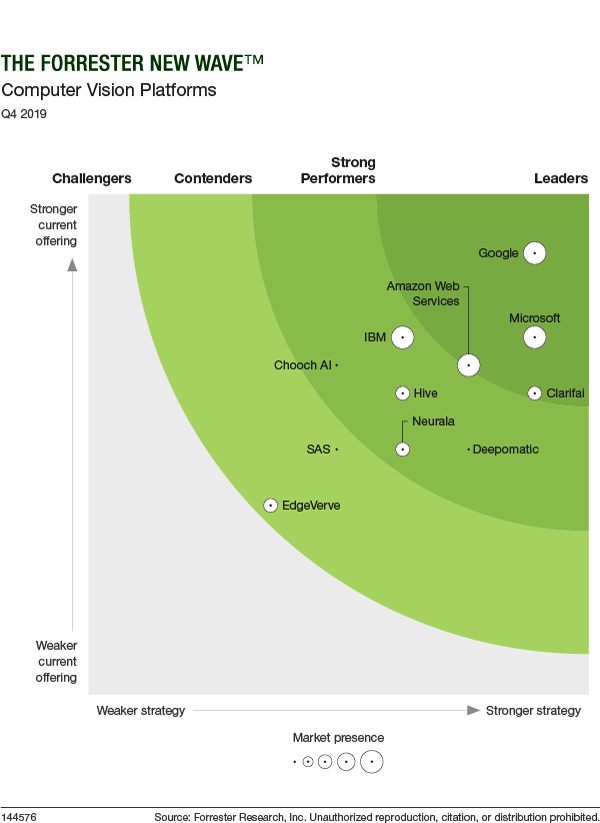
Its report details its findings about how well each vendor scored against 10 criteria and where they stand in relation to each other.
Google Cloud was classified as “differentiated” (the highest class) across all 10 criteria.
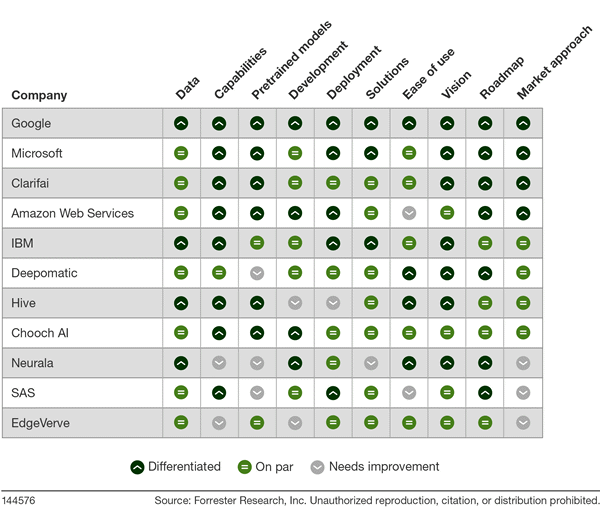
Find out more. Download The Forrester New Wave™: Computer Vision Platforms, Q4 2019.
4172
Of your peers have already watched this video.
1:30 Minutes
The most insightful time you'll spend today!
Video: How Pitney Bowes Leveraged Apigee to Create New Revenue Streams
Headquartered in Stamford, Connecticut, Pitney Bowes helps businesses navigate the complex world of commerce. They enable organizations to send parcels and packages across the globe. Pitney Bowes serves 90 percent of Fortune 500 companies, has 90 plus years of innovation, supports 1.5 million small businesses and has 15,000 employees globally.
The company leveraged the Apigee platform and was able to create a self-service model for both its internal and external customers. The monetization capability of Apigee empowered the organization to create new revenue streams.
“The monetization capability of Apigee has helped us create new revenue streams and business models for Pitney Bowes. Now we have tens and millions of dollars in revenue that we never had in 2016,” says Roger Pilc, Chief Innovation Officer, Pitney Bowes.
Watch the full video to get more insights on how Apigee helped Pitney Bowes boost its business.
3126
Of your peers have already watched this video.
12:00 Minutes
The most insightful time you'll spend today!
How Google Cloud Helps Banks and FinTech Create Cutting-edge, Digital Banking Products
Today’s customers demand sophisticated and secure banking platforms to keep up with the digital era. Banking and financial institutions spend time and investments either modernizing traditional banking products and solutions or building new cutting-edge products from the scratch. Money transfer solutions, bill payments and rewards, credit cards facilities, retail payments, loans services and more, banking products have a huge potential for leveraging Banking-as-a-service model which is a modular, cloud-native digital banking architecture that offers financial products and services via APIs and micro services. So, what typically goes under the sheets of a modern banking app that can easily build and adapt features in a matter of days and not months to keep up with the demand?
Watch the video to understand the role played by Google Cloud and its secure and scalable architecture for building digital banking products and services for today’s customers!
What You Need to Know About Compute Engines

6543
Of your peers have already read this article.
1:30 Minutes
The most insightful time you'll spend today!
Compute Engine is a customizable compute service that lets you create and run virtual machines on Google’s infrastructure. You can create a Virtual Machine (VM) that fits your needs. Predefined machine types are pre-built and ready-to-go configurations of VMs with specific amounts of vCPU and memory to start running apps quickly. With Custom Machine Types, you can create virtual machines with the optimal amount of CPU and memory for your workloads. This allows you to tailor your infrastructure to your workload. If requirements change, using the stop/start feature you can move your workload to a smaller or larger Custom Machine Type instance, or to a predefined configuration.
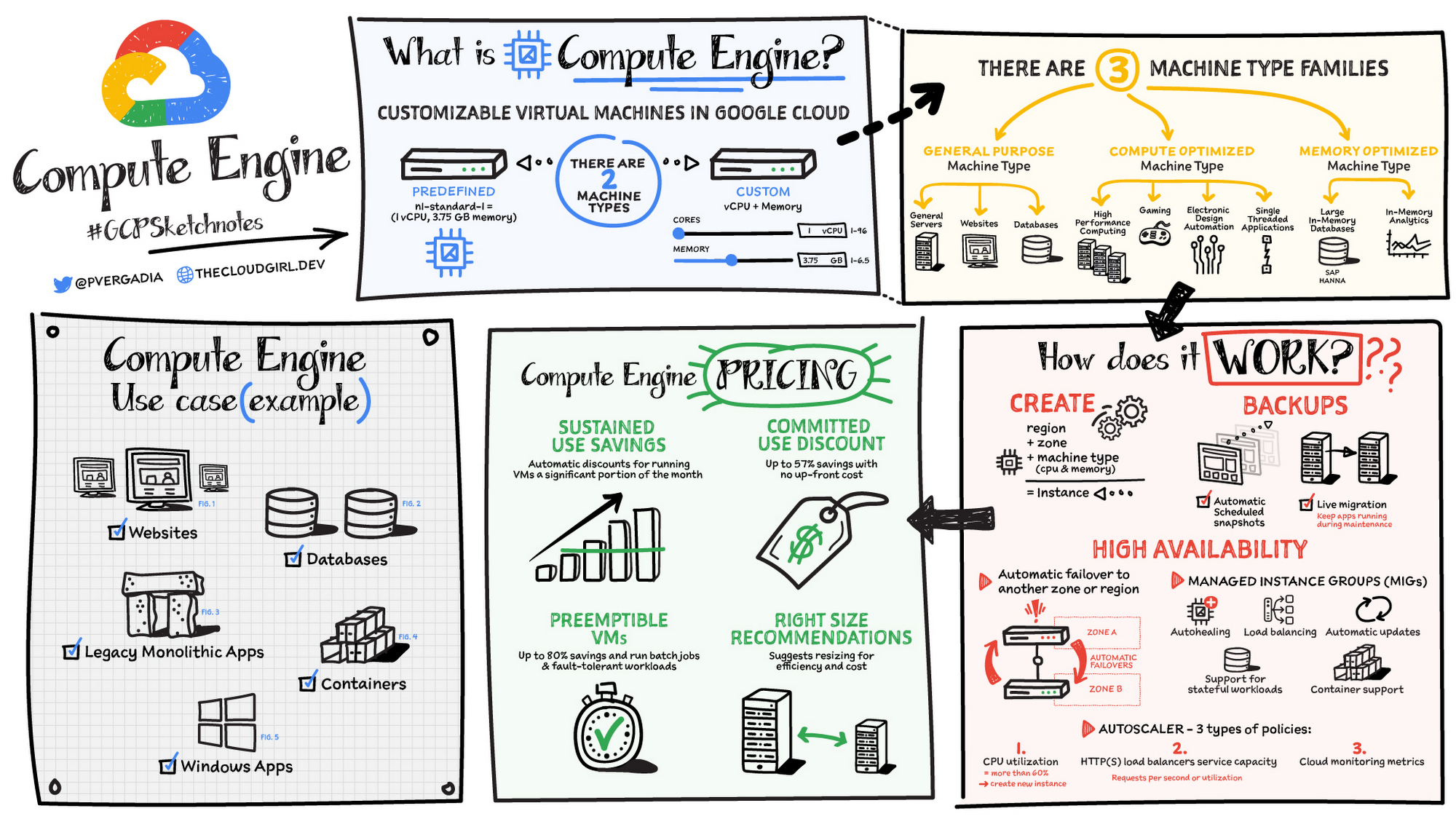
Machine types
In Compute Engine, machine types are grouped and curated by families for different workloads. You can choose from general-purpose, memory-optimized, compute-optimized and accelerator-optimized families.
- General-purpose machines are used for Day-to-day computing at a lower cost and for balanced price/performance across a wide range of VM shapes. The use cases that best fit here are web serving, app serving, back office applications, databases, cache, media-streaming, microservices, virtual desktops, development environments.
- Memory-Optimized machine are recommended for ultra high-memory workloads such as in-memory analytics and large in-memory databases such as SAP HANA
- Compute-Optimized machines are recommended for ultra high performance workloads such as High Performance Computing (HPC), Electronic Design Automation (EDA), gaming, video transcoding, single-threaded applications.
- Accelerator-Optimized machines are optimized for high performance computing workloads such as Machine learning (ML), Massive parallelized computations and High Performance Computing (HPC)
How does it work?
You can create a VM instance using a boot disk image, a boot disk snapshot, or a container image. The image can be a public operating system (OS) image or a custom one. Depending on where your users are you can define the zone you want the virtual machine to be created in. By default all traffic from the internet is blocked by the firewall and you can enable the HTTP(s) traffic if needed.
Use snapshot schedules (hourly, daily, or weekly) as a best practice to back up your Compute Engine workloads. Compute Engine offers live migration by default to keep your virtual machine instances running even when software or hardware update occurs. Your running instances are migrated to another host in the same zone instead of requiring your VMs to be rebooted.
Availability
For High Availability (HA) Compute Engine offers automatic failover to other regions or zones in event of a failure. Managed instance groups (MIGs) help keep the instances running by automatically replicating instances from a predefined image. They also provide application based autohealing health checks. If an application is not responding on a VM, the auto healer automatically recreates that VM for you. Regional MIGs let you spread app load across multiple zones. This replication protects against zonal failures. MIGs work with load balancing services to distribute traffic across all of the instances in the group.
Compute Engine offers autoscaling to automatically add or remove VM instances from a managed instance group based on increases or decreases in load. Autoscaling lets your apps gracefully handle increases in traffic, and it reduces cost when the need for resources is lower. You define the autoscaling policy for automatic scaling based on the measured load, CPU utilization, requests per second or other metrics.
Active Assist’s new feature, predictive autoscaling, helps improve response times for your applications–When you enable predictive autoscaling, Compute Engine forecasts future load based on your Managed Instance Group’s (MIG) history and scales it out in advance of predicted load, so that new instances are ready to serve when the load arrives. Without predictive autoscaling, an autoscaler can only scale a group reactively, based on observed changes in load in real time. With predictive autoscaling enabled, the autoscaler works with real-time data as well as with historical data to cover both the current and forecasted load. That makes predictive autoscaling ideal for those apps with long initialization times and whose workloads vary predictably with daily or weekly cycles. For more information, see How predictive autoscaling works or check if predictive autoscaling is suitable for your workload, and to learn more about other intelligent features, check out Active Assist.
Pricing
You pay for what you use. But you can save cost by taking advantage of some discounts! Sustained use saving are automatic discounts applied for running instances for a significant portion of the month. If you know your usage upfront, you can take advantage of committed use discounts which can lead up to significant savings without any upfront cost. And by using short lived preemptive instances you can save up to 80%, they are great for batch jobs and fault tolerant workloads. You can also optimize resource utilization with automatic recommendations. For example if you are using a bigger instance for a workload that can run on a smaller instance you can save costs applying these recommendations.
Security
Compute Engine provides you default hardware security. Using Identity and Access Management (IAM) you just have to ensure that proper permissions are given to control access to your VM resources. All the other basic security principles apply, if the resources are not related and don’t require network communication amongst themselves, consider hosting them on different VPC networks. By default, users in a project can create persistent disks or copy images using any of the public images or any images that project members can access through IAM roles. You may want to restrict your project members so that they can create boot disks only from images that contain approved software that meet your policy or security requirements. You can define an organization policy that only allows Compute Engine VMs to be created from approved images. This can be done by using the Trusted Images Policy to enforce images that can be used in your organization.
By default all VM families are Shielded VMs. Shielded VMs are virtual machine instances that are hardened with a set of easily configurable security features to ensure that when your VM boots, it’s running a verified bootloader and kernel — is the default for everyone using Compute Engine, at no additional charge. For more details on Shielded VMs refer to the documentation here.
For additional security, you also have the option to use Confidential VM to encrypt your data in use, while it’s being processed in Compute Engine. For more details on Confidential VM refer to the documentation here.
Use cases
There are many use cases Compute Engine can serve in addition to running websites and databases. You can also migrate your existing systems onto Google Cloud, with Migrate for Compute Engine, enabling you to run stateful workloads in the cloud within minutes rather than days or weeks. Windows, Oracle or VMware applications have solution sets enabling a smooth transition to Google Cloud. To run windows applications either bring your own license leveraging Sole-tenant nodes or using the included licenced images.
Conclusion
Whatever your application use case may be, from legacy enterprise applications to digital native applications, Compute Engine’s families will fit it. For a more in-depth look into Compute Engine check out the documentation.
For more #GCPSketchnote, follow the GitHub repo. For similar cloud content follow me on Twitter @pvergadia and keep an eye out on thecloudgirl.dev
Google Cloud’s Suite of DevOps Speeds Up ForgeRock’s Development

5697
Of your peers have already read this article.
3:00 Minutes
The most insightful time you'll spend today!
Editor’s note: Today we hear from ForgeRock, a multinational identity and access management software company with more than 1,100 enterprise customers, including a major public broadcaster. In total, customers use the ForgeRock Identity Platform to authenticate and log in over 45 million users daily, helping them manage identity, governance, and access management across all platforms, including on-premises and multicloud environments.
Operating at that kind of scale isn’t easy. In this blog post, ForgeRock Engineering Director, Warren Strange discusses the three things that help make their developers efficient and productive, and the Google Cloud tools they use along the way.
At ForgeRock, we’ve been an early adopter of Kubernetes, viewing it as a strategic platform. Running on Kubernetes allows us to drive multicloud support across Google Kubernetes Engine (GKE), Amazon (EKS), and Azure (AKS). So no matter which cloud our customers are running on, we are able to seamlessly integrate our products into customers’ environments.
Making it easier for ForgeRock’s developers and operators to build, deploy and manage applications has been crucial in our ability to continually provide high quality solutions for our customers. We’re always looking for tools to improve productivity and keep our developers focused on coding instead of configuration. Google Cloud’s suite of DevOps tools have streamlined three specific practices to help keep our developers productive:
1. Make developers productive within IDEs
Developer productivity is core to the success of any organization, including ForgeRock. Since developers spend most of their time within their IDE of choice, our goal at ForgeRock has been to make it easier for our developers to write Kubernetes applications within the IDEs they know and love. Cloud Code helps us precisely with that: it makes the process of building, deploying, scaling, and managing Kubernetes infrastructure and applications a breeze.
In particular, working with the Kubernetes YAML syntax and schema takes time, and a lot of trial and error to master. Thanks to YAML authoring support within Cloud Code, we can easily avoid the complicated and time consuming task of writing YAML files at ForgeRock. With YAML authoring support, developers save time on every bug. Cloud Code’s inline snippets, completions, and schema validation, a.k.a. “linting,” further streamline working with YAML files.
The benefits of Cloud Code extend to local development as well. Iterating locally on Kubernetes applications often requires multiple manual steps, including building container images, updating Kubernetes manifests, and redeploying applications. Doing these steps over and over again can be a chore. Cloud Code supports Skaffold under the hood, which tracks changes as they come and automatically rebuilds and redeploys—reducing repetitive development tasks.
Finally, developing for Kubernetes usually involves jumping between the IDE, documentation, samples etc. Cloud Code reduces this context switching with Kubernetes code samples. With samples, we can get new developers up and running quickly. They spend less time learning about configuration and management of the application—and spend more time on writing and evolving the code.
2. Drive end-to-end automation
To further improve developer productivity, we’ve focused on end-to-end automation: from writing code within IDEs, to automatically triggering CI/CD pipelines and running the code in production. In particular, Tekton, Cloud Build, Container Registry, and GKE have been critical to Forgerock as we streamline the flow of code, feedback and remediation through the build and deployment processes. The process looks something like this:
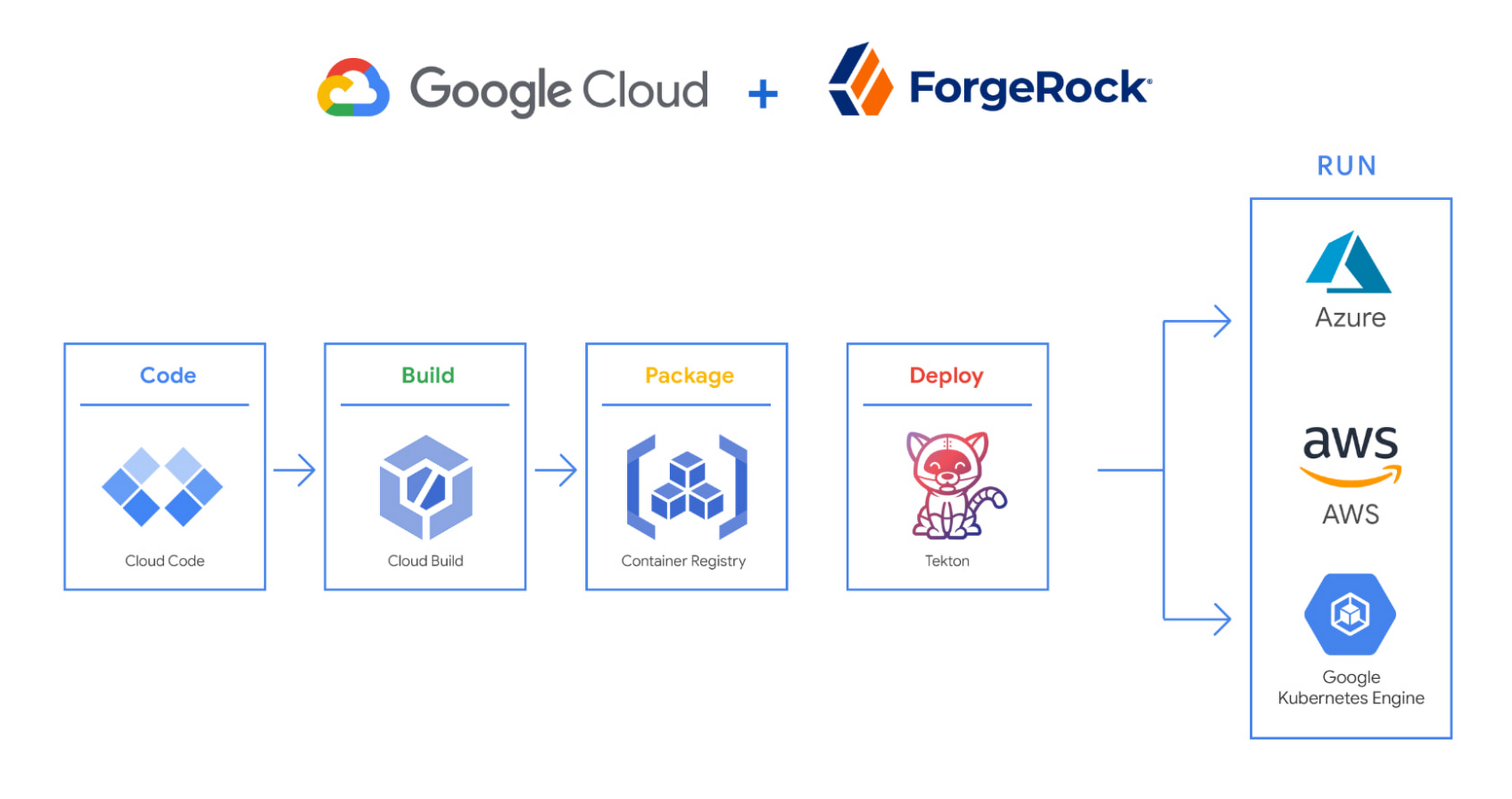
We begin by developing Kubernetes manifests and dockerfiles using Cloud Code. Then we use Skaffold to build containers locally, while Cloud Build helps with continuous integration (CI). The Cloud Build GitHub app allows us to automate builds and tests as part of our GitHub workflow. Cloud Build is differentiated from other continuous integration tools since it is fully serverless. It scales up and scales down in response to load, with no need for us to pre-provision servers or pay in advance for additional capacity. We pay for the exact resources we use.
Once the image is built by Cloud Build, it is stored, managed, and secured in Google’s Container Registry. Just like Cloud Build, Container Registry is serverless, so we only pay for what we use. Additionally, since Container Registry comes with automatic vulnerability scanning, every time we upload a new image to Container Registry, we can also scan it for vulnerabilities.
Next, a Tekton pipeline is triggered, which deploys the docker images stored in Container Registry and Kubernetes manifests to a running GKE cluster. Along with Cloud Build, Tekton is a critical part of our CI/CD process at ForgeRock. Most importantly, since Tekton comes with standardized Kubernetes-native primitives, we can create continuous delivery workflows very quickly.
After deployment, Tekton triggers a functional test suite to ensure that the applications we deploy perform as expected. The test results are posted to our team Slack channel so all developers have instant access and insights about each cluster. From there, we are able to provide our customers with their finished product request.
3. Leverage multicloud patterns and practices
The industry has seen a shift towards multicloud. Organizations have adopted multicloud strategies to minimize vendor lock-in, take advantage of best-in-class solutions, improve cost-efficiencies, and increase flexibility through choice.
At ForgeRock, we’re big proponents of multicloud. Part of that comes from the fact that our identity and access management product works across Google Cloud, AWS, and Azure. Developing products using open-source technologies such as Kubernetes has been particularly helpful in driving this interoperability.
Tekton has been another critical project that has allowed us to prevent vendor lock-in. Thanks to Tekton, our continuous delivery pipelines can deploy across any Kubernetes cluster. Most importantly, since Tekton pipelines run on Kubernetes, these pipelines can be decoupled from the runtime. Like Tekton and Kubernetes, both Cloud Build and Container Registry are based on open technologies. Community-contributed builders and official builder images allow us to connect to a variety of tools as a part of the build process. And finally, with support for open technologies like Google Cloud buildpacks within Cloud Build, we can build containers without even knowing Docker.
Making it easier for developers and operators to build, deploy and manage applications is critical for the success of any organization. Driving developer productivity within IDEs, leveraging end-to-end automation, and support for multi-cloud patterns and practices are just some of the ways we are trying to achieve this at ForgeRock. To learn more about ForgeRock, and to deploy the ForgeRock Identity Platform into your Kubernetes cluster, check out our open-source ForgeOps repository on GitHub.
More Relevant Stories for Your Company

Best Practices for Crafting Interfaces that Developers Love
Web APIs use HTTP, by definition. In the early days of web APIs, people spent a lot of time and effort figuring out how to implement the features of previous-generation distributed technologies like CORBA and DCOM on top of HTTP. This led to technologies like SOAP and WSDL. Experience showed

Rollouts Made Simple: Cloud Deploy’s Deploy Hooks
Cloud Deploy is a fully managed continuous delivery platform that automates the delivery of your application. Recently, we’ve heard from users that they want Cloud Deploy to also perform self-defined pre- and post-deployment operations to reduce the amount of additional toil required for each rollout. Examples of such operations include database schema

Pinterest Case: Pinning Its Past, Present, and Future on Cloud Native
After eight years in existence, Pinterest had grown into 1,000 microservices and multiple layers of infrastructure and diverse set-up tools and platforms. In 2016 the company launched a roadmap towards a new computing platform, led by the vision of creating the fastest path from an idea to production, without making




Leveraging APIs to Deliver Connected Customer Experiences
What does the connected customer experience even mean? It's not just about a checklist of assets like website and mobile but how those channels seamlessly work together with the physical world to give your customer great experiences with your brand. Modern APIs enable companies to mask back-end complexities behind a
