





3710
Of your peers have already downloaded this article
6:00 Minutes
The most insightful time you'll spend today!

Google Cloud Garners Highest Score in Forrester New Wave for Computer Vision Platforms
DOWNLOAD WHITEPAPER5339
Of your peers have already downloaded this article
8:30 Minutes
The most insightful time you'll spend today!
In Forrester’s evaluation of the emerging market for computer vision platforms, it identified the 11 most significant providers in the category — Amazon Web Services, Chooch AI, Clarifai, Deepomatic, EdgeVerve, Google, Hive, IBM, Microsoft, Neurala, and SAS — and evaluated them.
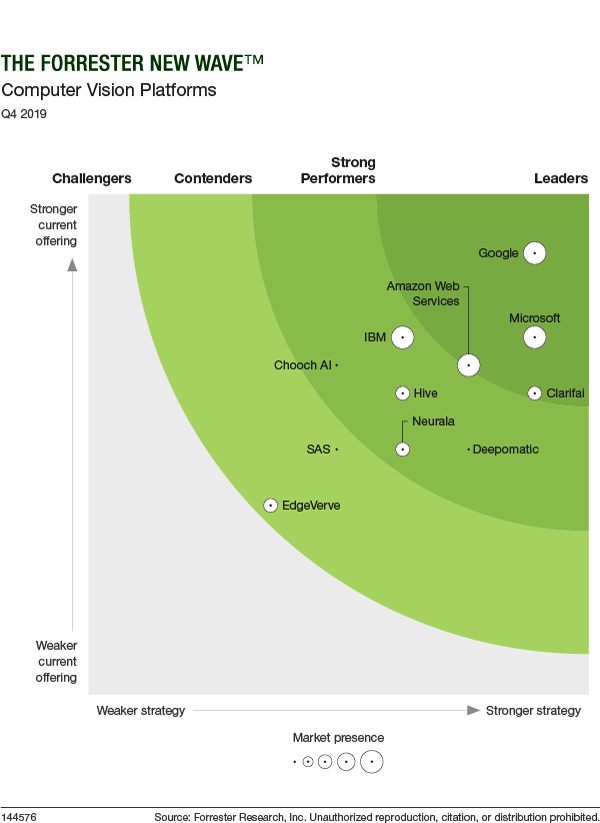
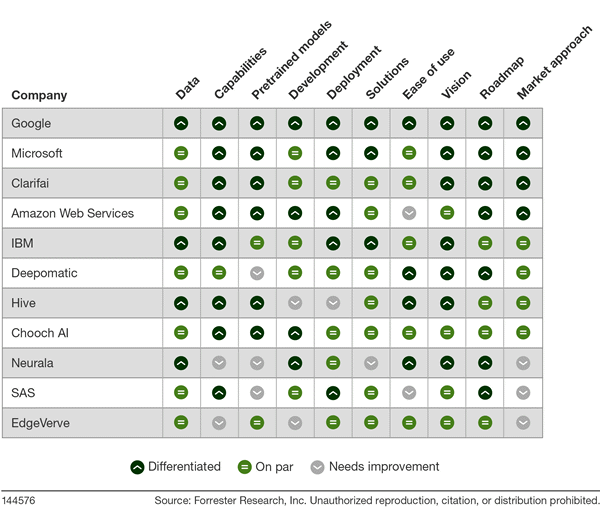
Its report details its findings about how well each vendor scored against 10 criteria and where they stand in relation to each other.
Google Cloud was classified as “differentiated” (the highest class) across all 10 criteria.
Find out more. Download The Forrester New Wave™: Computer Vision Platforms, Q4 2019.
5394
Of your peers have already watched this video.
4:00 Minutes
The most insightful time you'll spend today!
AppSheet is Useful for Schools & Universities to Custom-build Apps
AppSheet, Google Cloud’s no-code platform that eases application development and automation process without writing even a line of code. In the education space, AppSheet can come in handy easily as a unified platform to build custom applications that also integrates seamlessly with Workspace, allowing schools and universities to save on time and resources on updating IT infrastructure.
From updating sheets, sharing documents and study material over drive to scheduling events on Calendar, organizing lectures and team meets over Meets, AppSheet allows easy collaboration and access. Watch the video to build apps that are best for your University or school using Google Cloud’s AppSheet!
Dataflow Guarantees 50+% Increase in Developer Productivity and Infrastructure Cost Savings: Read More

8412
Of your peers have already read this article.
3:00 Minutes
The most insightful time you'll spend today!
In our conversations with technology leaders about data-driven transformation using Google Data Cloud – industry’s leading unified data and AI solution – , one important topic is incorporating continuous intelligence to move from answering questions such as “What has happened? to questions like “What is happening?” and “What might happen?”. The core to this evolution is the need for an underlying data processing that not only provides powerful real-time capabilities for events happening close to origination, but also brings together existing data sources under one unified data platform to enable organizations to draw insights and take actions holistically. Dataflow, Google’s cloud-native data processing and streaming analytics platform, is a key component of any modern data and AI architecture and data transformation journey, along with BigQuery, Google’s internet-scale warehouse with built-in streaming, BI engine and ML; Pub/Sub, a global no-ops event delivery service; and Looker, a modern BI and embedded analytics platform. One of the key evaluation factors is potential economic value of Dataflow to their organization, particularly in the context of engaging other stakeholders is key for many of the leaders that we engage with. So we commissioned Forrester Consulting to conduct a comprehensive study on the impact that Dataflow had on their organization by interviewing actual customers .
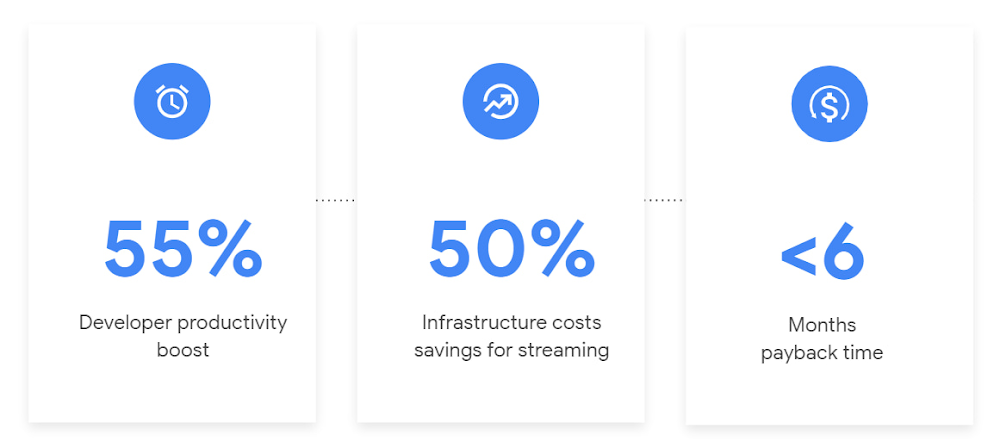
Today we’re excited to share our commissioned study conducted by Forrester Consulting, the Total Economic Impact™ of Google Cloud Dataflow, which allows data leaders to understand and quantify the benefits of Dataflow, and use cases it enables. Forrester conducted interviews with Dataflow customers to evaluate the benefits, costs, and risks of investing in Dataflow across an organization. Based on their interviews, Forrester identified major financial benefits across four different areas: business growth, infrastructure cost savings, data engineer productivity, and administration efficiency. In fact, Forrester found that customers adopting Dataflow can achieve a 55% boost in developer productivity and a 50% reduction in infrastructure costs. In fact, Forrester projects that customers adopting Dataflow can achieve a range of up to 171% Return on Investment (ROI) and a less than six months payback period. Customers can now use figures in the report to compute their own Return on Investment (ROI) and payback period.
“Dataflow is integral to accelerating time-to-market, decreasing time-to-production, reducing time to figure out how to use data for use cases, focusing time on value-add tasks, streamlining ingestion, and reducing total cost of ownership.” – Lead technical architect, CPG
Let’s take a deeper look at the ways that Forrester found that Dataflow can help you achieve your goals and unlock your business potential.
Benefit #1: Increase data engineer productivity by 55%
Developers can choose among a variety of programming languages to define and execute data workflows. Dataflow also seamlessly integrates with other Google Cloud Platform and open source technologies to maximize value and applicability to a wide variety of use cases. Dataflow streamlined workflows with code reusability,dynamic templates, and the simplicity of a managed service. Engineers trusted pipelines to run correctly and adhere to governance. Data engineers avoided laborious issue-monitoring and remediation tasks that were common in the legacy environments such as poor performance, lack of availability, and failed jobs. Teams valued the language flexibility and open source base.
“Dataflow provided us with ETL replacement that opened limitless potential use cases and enabled us to do smarter data enhancement while data remains in motion.” — Director of data projects, financial services
Benefit #2: Reduce infrastructure costs by up-to 50% for batch and streaming workloads
Dataflow’s serverless autoscaling and discrete control of job needs, scheduling, and regions eliminated overhead and optimized technology spending. Consolidating global data processing solutions to Dataflow further eliminated excess costs while ensuring performance, resilience, and governance across environments. Dataflow’s unified streaming and batch data platform gives organizations the flexibility to define either workload in the same programming model, run it on the same infrastructure, and manage it from a single operational management tool.
“Our costs with our cloud data platform using Dataflow are just a fraction of the costs we faced before. Now we only pay for cloud infrastructure consumption because the open source base helps us avoid licensing costs. We spend about $120,000 per year with Dataflow, but we’d be spending millions with our old technologies.” – Lead technical architect, CPG
Benefit #3: Increase top-line revenue by improving customer experience and retention with payback time of < 6 months
Streaming analytics is an essential capability in today’s digital world to gain real-time actionable insights. Likewise, organizations must also have flexible, high- performance batch environments to analyze historical data for building machine learning models, business intelligence, and advanced analytics. Dataflow enabled real-time streaming use cases, improved data enrichment, encouraged data exploration,improved performance and resiliency, reduced errors, increased trust, and eliminated barriers to scale. As a result, organizations provided customers with more accurate, relevant, and in-the-moment data-backed services and insights — boosting customer experience, creating new revenue streams, and improving acquisition, retention, and enrichment.
“It’s already been proven that we are getting more business [with Dataflow] because we can turn around results faster for customers.” – VP of technology, financial services technology
“When we provide data to our customers and partners with Dataflow, we are much more confident in those numbers and can provide accurate data within a minute. Our customers and partners have taken note and commented on this. It’s reduced complaints and prevented churn.” – Senior software engineer, media
Other benefits
Eliminated administrative overhead and toil
As a cloud-native managed service, all administration tasks such as provisioning, scaling, and updates are automatically handled by Google Cloud. Teams no longer need to manage servers and related software for legacy data processing solutions. Admins also streamlined processes for setting up data sources, adding pipelines, and enforcing governance.
Saved business operations costs for support teams and data end users
Dataflow improved the speed, quality, reliability, and ease of access to data for insights for general business users, saving time and empowering users to drive better data-backed outcomes. It also reduced support inquiry volume while automating manual job creation.
What’s next?
Download the Forrester Total Economic Impact study today to dive deep into the economic impact Dataflow can deliver your organization. We would love to partner with you to explore the potential Dataflow can unlock in your teams. Please reach out to our sales team to start a conversation about your data transformation with Google Cloud.
How Recommendation AI Helps Retailers Optimize Click-through and Conversion Rates

7077
Of your peers have already read this article.
3:00 Minutes
The most insightful time you'll spend today!
Time to go outside again, I guess. I’ll need a sun hat. Sunscreen. Maybe some new sandals? What else?
With the Recommendations AI service, I might be reminded to grab a reusable water bottle and a swimsuit. Or some after-sun aloe lotion. Good thing, cause I’ll need it.

Recommendations AI is a solution that uses machine learning to bring product recommendations to their shoppers across any catalog or client list. This service is part of our full suite of Retail solutions. When you integrate with the Retail API, you get the benefit of Google’s Product Discovery. Integrating once to reap the benefits over and over. Recommendations is the starting point, and you can easily extend into Retail Search and Vision Product Search in the upcoming future.
The Recommendations solution is fully managed, global-scale and powered by deep learning, so you can focus on a great shopping experience and let someone else worry about the infrastructure.
Compared to baseline recommendation systems used by customers, Recommendations AI showed double digit uplift in conversion and clickthrough rates in A/B experiments controlled by the customers. You can optimize for click-through, conversion or session revenue, and fine tune the models to make sure you omit out-of-stock items or duplicates, for example.

So how does it work, and how do you get started? Read on, and we’ll walk you through the pipeline, starting with the data you already have to placement in your online store.
Formula: Data -> Model -> Placement
You start with your catalog, the list of all the things (postcards, movies, pie recipes) that you want to show your customers. Then you ingest your PII-redacted user events -this is the historic event data like home page views, add to cart events and more along with real time user events. This user event is joined with the product catalog and items that allows us to construct the sequence of shoppers’ activity, thus being able to predict what the shopper has a high propensity to purchase next. The user events can come from both online activity across devices or offline store purchases
The recommendation model will return a list of products, which are the recommendations. The brains of the operation, if you will. This model is trained using all the data that you ingest, using the latest neural network models and techniques that Google has built expertise over the years in flagship products like Youtube and News, that allows us to uncover shopper intent, so it can best predict the right recommendations to show to the right people.
Every model outputs a list of product identifiers, but where do they go? They go into placements, the spots, panels, carousels on your customer’s journey interacting with your brand that you’ve set aside to highlight recommendations. A model can send recommendations to one or more placements, but each placement only receives information from one recommendation model. Your pages will then need to render the products with the right images, text or other metadata, using the product ID that is returned by the model.
What do recommendations look like?
Let’s start by browsing our postcard-selling website, where I’ve been buying some vintage California postcards already. The recommendations algorithm has caught on to my interest, showing me other potential cards to purchase based on my history:

Put your data to work
To get started we need to bring your data into the recommendation model, so it can understand your customers, your inventory, and your sales patterns.
The model takes in the product catalog you use, and metadata about those products to better understand nuances in assortment, pricing and variables like size and style. You might already have this data stored in BigQuery or Merchant Center, and hence we provide easy integrations that you can leverage to get started even faster.
As for the user events, don’t worry if you already have systems in place to capture web and mobile activity. We make it easy to bring in your real time event logs by providing seamless integrations with Google Tag Manager, Javascript pixel, or even historic events from Cloud Storage, BigQuery or using inline API or JSON, so you can immediately train the models on this imported data. All this allows you to kickstart integrating with Recommendations AI in a matter of days.
The models then construct a sequence of activities that the user went through and joins with the products that the user engaged with. Once your data is ready to go, it takes a few days to train the model. Next onto making the data work for you.
Quickly customize your model
Setting up your own recommendations project in the console gives you the ability to choose what sort of model to train (based on what recommendations you want to generate) and your objective. Are you optimizing for click-through rate–more people click on the recommendation links or products–or for conversion rate–more people choose or buy what was suggested or revenue ?
Different models can be optimized for different optimization goals.; the GCP console explains what each one can do and how you can choose to optimize it.

Let’s unpack some of this terminology real quick.
We’ve got three model types:
- Recommended for you – Means we think these are items you’ll want to buy, based on your history; this is usually used on a home page to showcase items.
- Others you may like – Means if you’re browsing the page of a water bottle, we will recommend alternative brands of water bottles that you may like as well as a backpack, based on your engagement history.
- Frequently bought together – Means that when anyone buys sunscreen, we notice that they often also buy aloe lotion, so we will surface those items when someone adds any one of them to their cart.
And then we have three business objectives that the models optimize for:
- Click-through rate – How frequently did somebody click on a recommended item?
- Conversion rate– How frequently did somebody add a recommended item to their cart?
- Revenue per session – How much money did the recommendations generate for you?
Deliver anywhere along the journey
Now that you’re all set up in the Retail AI console, you can test out the recommendations in the console, even before you deploy to production.

You can integrate Recommendations into your frontend by calling the Predict APIt. The placements of recommendations will report data back into the dashboard and you can analyze and measure success for future iterations.
On top of that you can use the recommendations for other parts of your customer’s journey. Email promotions, storefront kiosks, display ads or follow-up notifications can include recommendations based on past activity and cart contents. The model gives you useful product recommendations for a wide variety of touchpoints and steps in the purchasing process.
More best practices, and guides, are available inside our documentation.
How to get started
Training your own models can be tedious, time-consuming, and expensive. On top of that it requires deeper data science expertise to set up. Let us do it instead!
You can see how IKEA Retail uses Recommendations AI in this recent talk and blog from the Google Cloud Retail Summit..
To get started today you’ll need to make a Cloud project and enable the Retail API, which then allows you to access all the recommendation tools in one menu. Bring in your catalog and purchasing data, define a placement or two, and you can start putting recommendations on your site in a matter of days.
Google Cloud Offering a Natural Migration Path for Developers Accustomed to Heroku

2792
Of your peers have already read this article.
1:30 Minutes
The most insightful time you'll spend today!
Modern developers worldwide have grown accustomed to the comfort of writing code, pushing to a remote Git repository and having that code be deployed at an accessible URL without having to worry about how it is deployed. This was a workflow popularized by Heroku years ago which brought joy and productivity to developers even if it did impose some loss of flexibility for operation teams.
To address that loss of flexibility when meeting security and integration requirements, Heroku introduced Private Spaces. Private Spaces provide network isolation from the internet since any application or datastore provisioned by Heroku is accessible to the internet by default.
Cloud Run is quickly becoming the “swiss army knife” of serverless here at Google Cloud and it’s a natural migration path for developers accustomed to Heroku. The fundamentals are all there:
- Continuously Deploy via Git push using open source Buildpacks or Dockerfiles
- Set CPU and Memory requirements for each instance
- Horizontally scalable apps that scale from zero to thousands of instances to meet traffic demands automatically
So while devs are kept happy, can Cloud Run do something for the Ops folks? Yes. Here are some things available right in the Cloud Run UI:
- Proper Secret Management with IAM based access control. No more setting secrets as environment variables.
- Traffic management between different revisions for blue-green or canary deployments.
- Define SLIs and SLOs with ease. Eg: 90% of requests have to be served under 200ms in a calendar month.
- Secure your service with tools such as Software Delivery Shield, Binary Authorization, and Cloud Armor. Definitely deserves its own blog post.
Recreating Private Spaces on Cloud Run
Let’s focus on network isolation now, let’s say you have an internet-facing app and a private backend API that talks to a private database. Simplest architecture ever, it conceptually looks a bit like this:
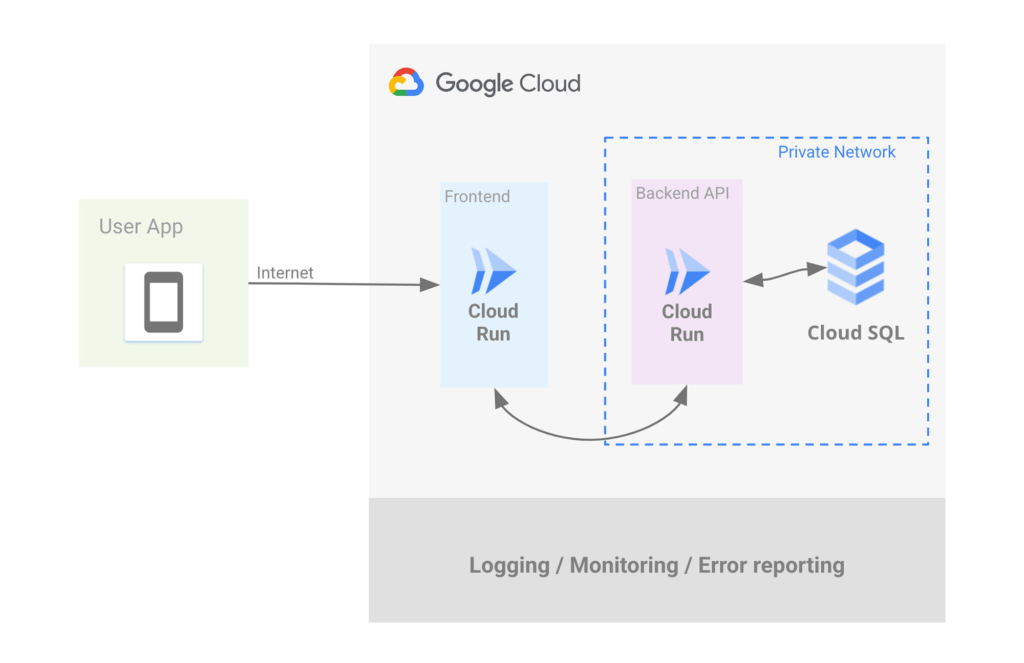
Let’s address the database first. If you want to use Postgres then Cloud SQL is most likely what you want, but do keep in mind that we have other datastores that speak Postgres such as AlloyDB and Spanner.
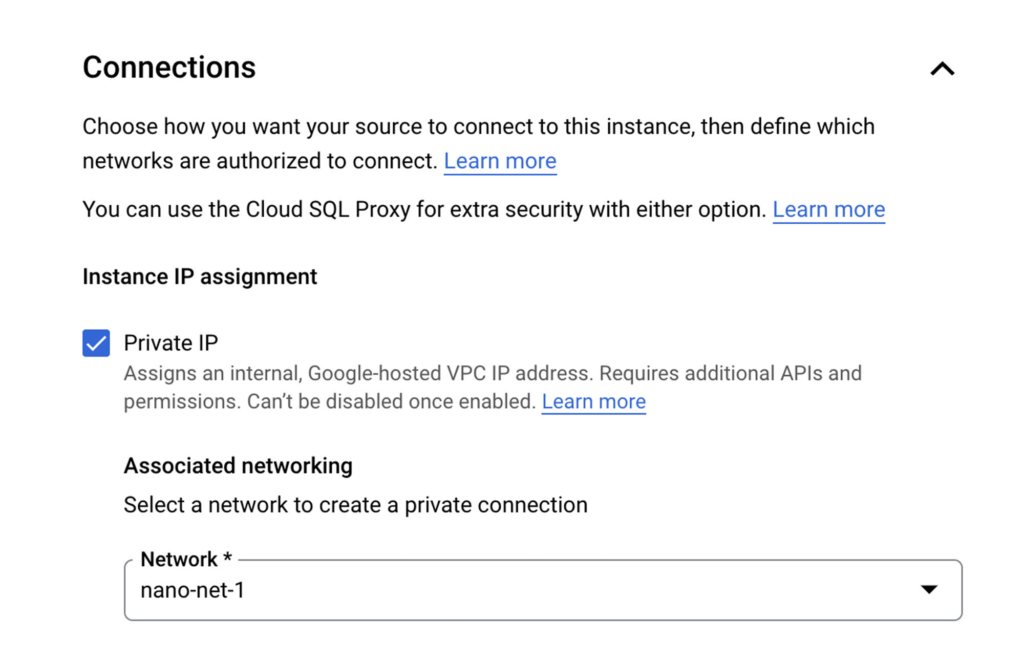
Cloud SQL allows you to create a Postgres instance that’s isolated from the internet by simply unchecking the Public IP checkbox and checking the Private IP checkbox. This will assign an IP address to your Postgres instance on your project’s network.
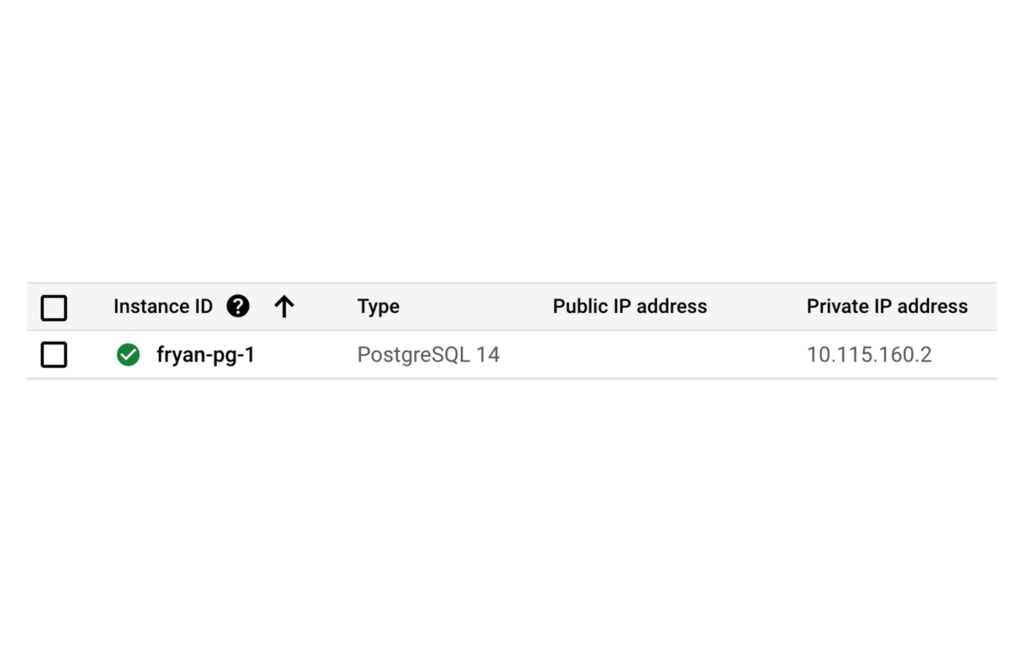
Once the DB is provisioned you’ll see the IP clearly listed, such as:
Of course there’s so much more to say about CloudSQL, to learn more please take a look at our documentation.
Ok now that you’ve dealt with Postgres, let’s address the private backend API on Cloud Run.
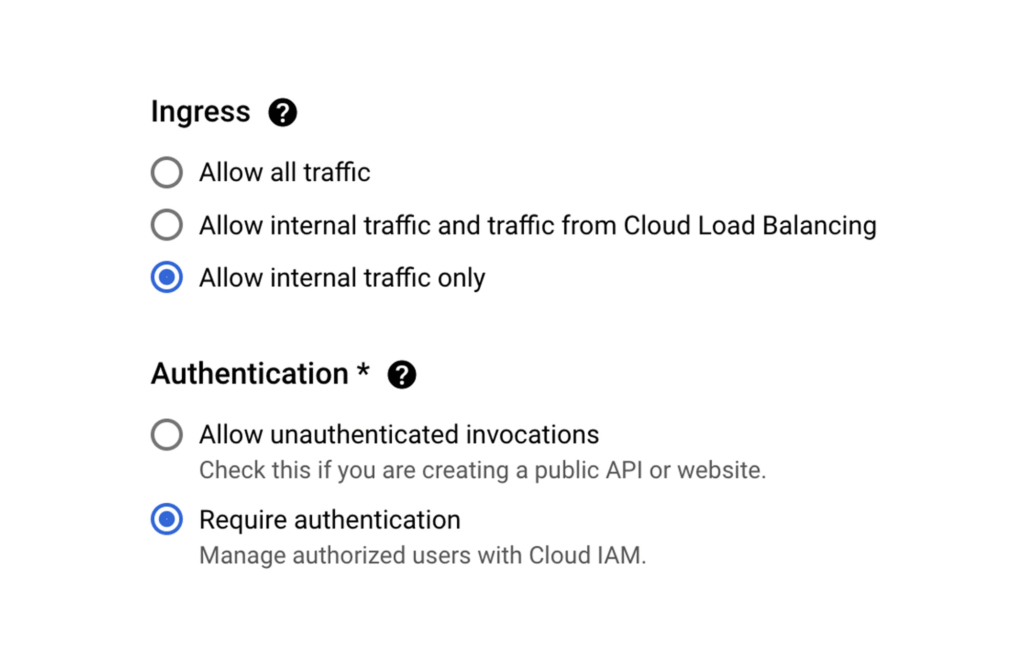
When creating a new Cloud Run service via the Google Cloud Console, Ingress can be limited to “Internal traffic only” so only traffic from internal sources, including your VPC, can access the service. In other words, the internet can not touch it.
As an additional level of security, it’s also possible to enforce that only requests from authorized users be served, In this case a “user” is most likely another service using its associated service account which will need the “roles/run.invoker” in order to call this service.
Now let’s make sure that our Backend API Service can reach the Postgres instance by configuring a VPC Connector. This will allow Cloud Run services to reach into the VPC and therefore, the internal IP for the Postgres instance.
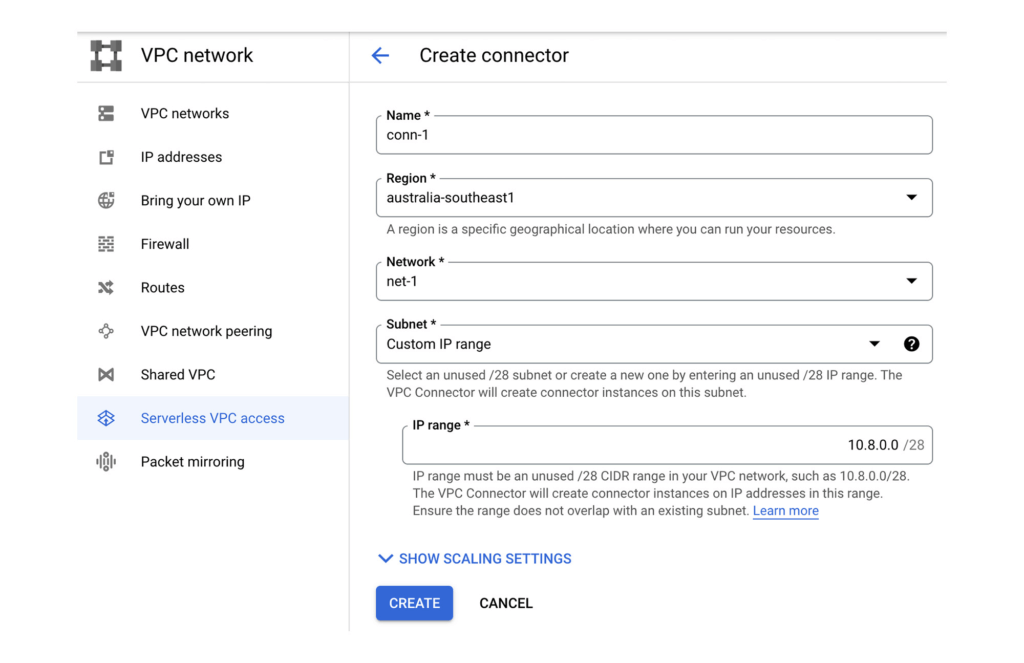
Once the VPC Connector is created, you can associate it with a Cloud Run service.
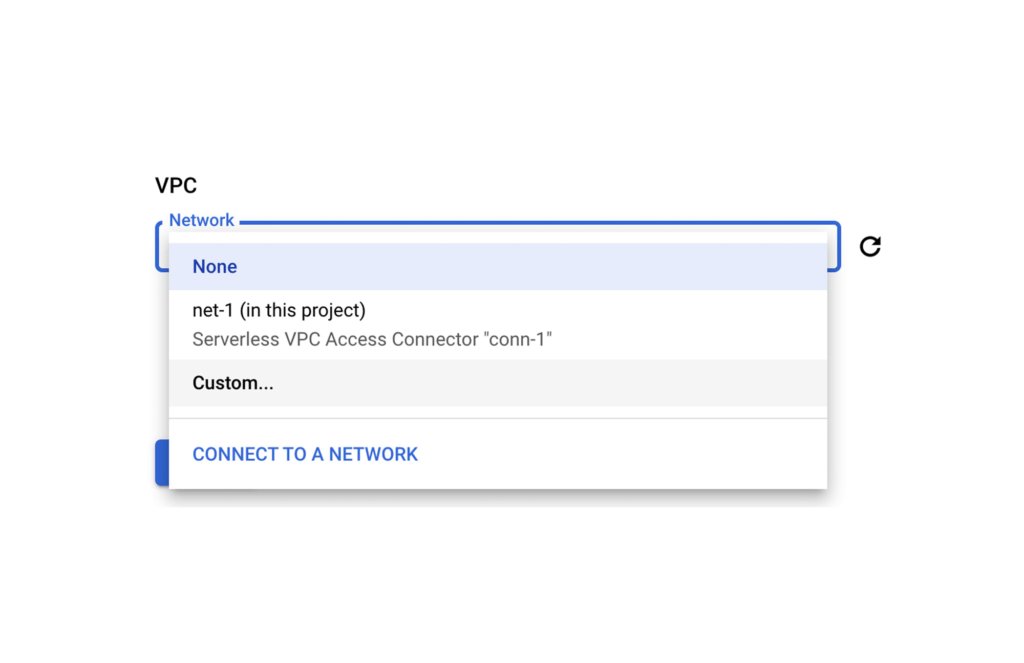
Then it’s just a matter of configuring your code to use the Postgres instance’s private IP address. A good 12-Factor app friendly spot to do that is with a connection string in an environment variable as part of the Cloud Run service configuration. Better yet, as this may contain a DB password, you can use Secret Manager to mount this environment variable from an encrypted and protected secret.
Finally, let’s now set up that Front End Cloud Run service which will respond to requests from the internet, and securely communicate with the backend API service.
For the frontend service choose to “Allow all traffic” and also “Allow unauthenticated invocations” so anyone on the web can access our URL. We could of course choose the middle option and use Cloud Load Balancing in conjunction with Cloud Armor which provides defenses against DDoS and application attacks, and offers a rich set of WAF rules. However, let’s keep it simple for now.
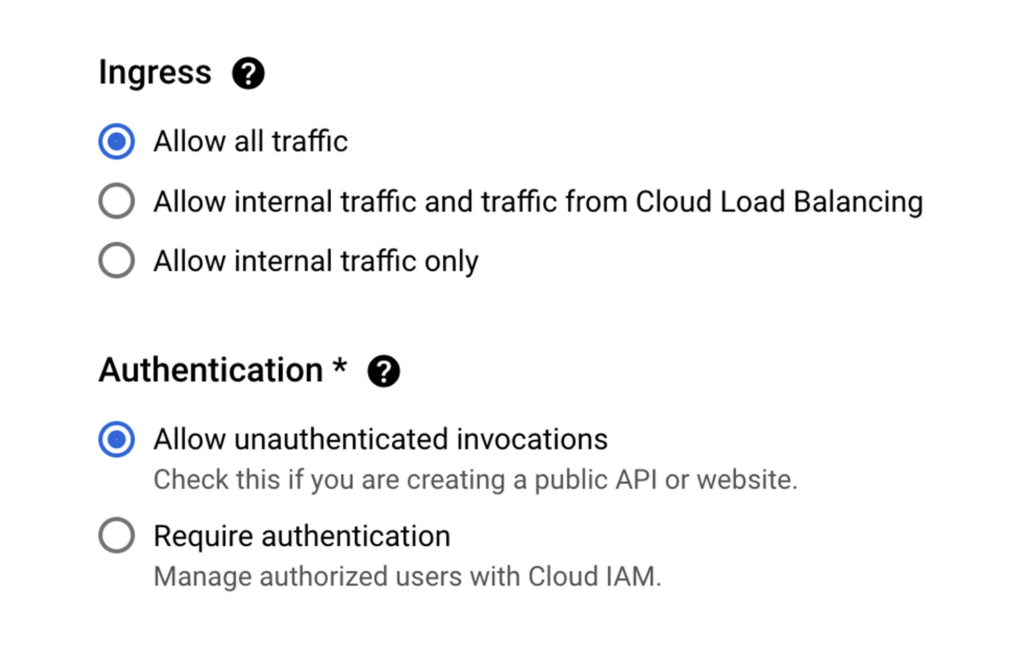
Keep in mind that our Backend service will only accept requests from within our VPC network, and that we don’t have a private IP address for Cloud Run.
So let’s ensure that all egresses from our Frontend actually get routed to the VPC Connector, this way when our Frontend calls a Backend API via it’s URL endpoint, the Backend will receive the request from within the VPC and allow it in.
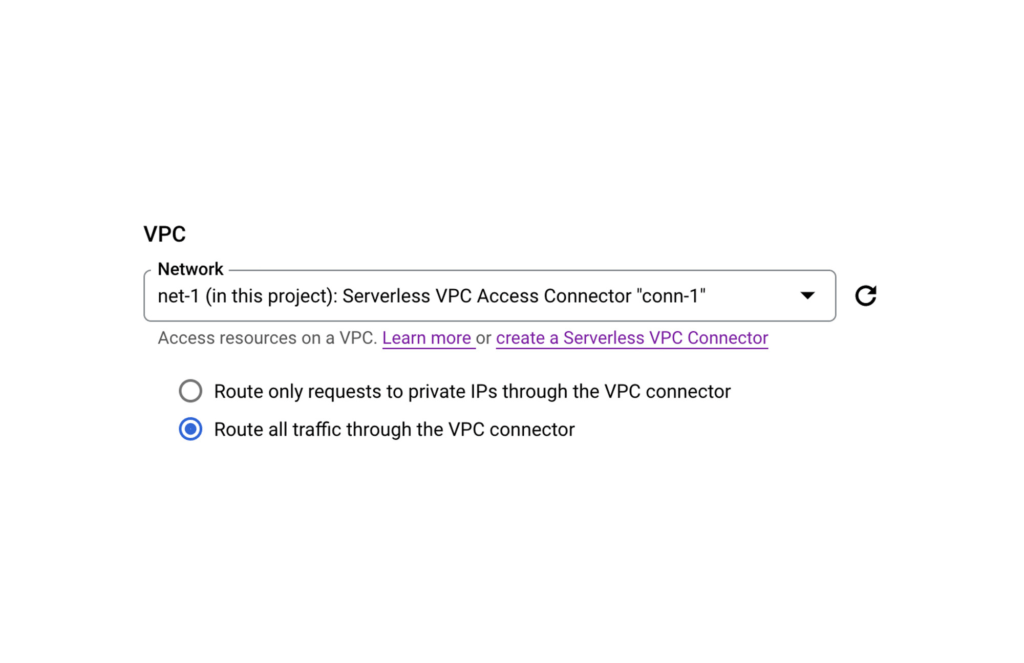
PS: If your Backend requires authentication don’t forget to create a Service Account for your Frontend Service and then give it the necessary role following a service-to-service auth pattern.
And that’s it. You now have an operationally acceptable private space like environment with an app composed of two Cloud Run services where the Backend service and Postgres instance are network isolated from the Internet. If after reading this blog you would like to get hands-on experience with the technologies mentioned above, then take a look at Google Cloud Skills Boost. There you will find learning paths, quests, and labs curated to boost your cloud skills in a particular area.
For example here’s a great lab that takes you through developing a REST API on Cloud Run using Go.
More Relevant Stories for Your Company

Contact Center AI (CCAI) with Agent Assist can Lower Opex and Handle 28% More Chats
Contact Center AI (CCAI) brings Google’s innovation in conversational AI to solve the most challenging customer service needs while lowering operational costs. More than a thousand customers have deployed CCAI and are steadily turning it on to power their production contact centers. Today, we're excited to announce that we’ve made CCAI

5 Ways You Need to Know to Reduce Costs with Containers
“Cloud Wisdom Weekly: for tech companies and startups” is a new blog series we’re running this fall to answer common questions our tech and startup customers ask us about how to build apps faster, smarter, and cheaper. In this installment, Google Cloud Product Manager Rachel Tsao explores how to save

Lower risk, greater return: Public sector organizations are focusing on multicloud adoption
Government organizations are starting to realize that no single cloud can meet their wide range of needs. According to the Nutanix 2022 Enterprise Cloud Index1, 75% of public sector organizations agree that multicloud is ideal, and more public sector organizations than average have adopted multicloud as a primary IT operating

A Run-through of an Innovative 2021 with Apigee
Apigee is committed to continually innovating new capabilities and solutions for our customers, and 2021 saw new product launches, partnerships, and best practices for managing your expanding range of business-critical use cases. Here are some of our favorite stories from 2021. Spotting the trends in APIs Our State of API Economy 2021
