





Make Meaningful Analysis with Geo Boundary Public Datasets on BigQuery

6339
Of your peers have already read this article.
4:00 Minutes
The most insightful time you'll spend today!
Geospatial data is a critical component for a comprehensive analytics strategy. Whether you are trying to visualize data using geospatial parameters or do deeper analysis or modeling on customer distribution or proximity, most organizations have some type of geospatial data they would like to use – whether it be customer zipcodes, store locations, or shipping addresses. However, converting geographic data into the correct format for analysis and aggregation at different levels can be difficult. In this post, we’ll walk through some examples of how you can leverage the Google Cloud platform alongside Google Cloud Public Datasets to perform robust analytics on geographic data. The full queries can be accessed from this notebook here.
Public US Geo Boundaries dataset
BigQuery hosts a slew of public datasets for you to access and integrate into your analytics. Google pays for the storage of these datasets and provides public access to the data via the bigquery-public-data project. You only pay for queries against the data. Plus, the first 1 TB per month is free! These public datasets are valuable on their own, but when joined against your own data they can unlock new analytics use cases and save the team a lot of time.
Within the Google Cloud Public Datasets Program there are several geographic datasets. Here, we’ll work with the geo_us_boundaries dataset, which contains a set of tables that have the boundaries of different geospatial areas as polygons and coordinates based on the center point (GEOGRAPHY column type in BigQuery), published by the US Census Bureau.
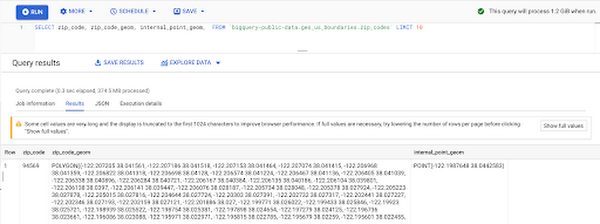
Mapping geospatial points to hierarchical areas
Many times you will find yourself in situations where you have a string representing an address. However, most tools require lat/long coordinates to actually plot points. Using the Google Maps Geocoding API we can convert an address into a lat/long and then store the results in the BigQuery table.
With a lat/long representation of our point, we can join our initial dataset back onto any of the tables here using the ST_WITHIN function. This allows us to check and see if a point is within the specified polygon.
ST_WITHIN(geography_1, geography_2)
This can be helpful for ensuring standard nomenclature; for example, metropolitan areas that might be named differently. The query below maps each customers’ address to a given metropolitan area name.
SELECTcust.id as customer_id,metro.name as metro_nameFROM `looker-private-demo.retail.customers` as cust,`bigquery-public-data.geo_us_boundaries.metropolitan_divisions` as metroWHERE ST_WITHIN(ST_GEOGPOINT(cust.longitude, cust.latitude),metro.metdiv_geom)
It can also be useful for converting to designated market area (DMA), which is often used in creating targeted digital marketing campaigns.
SELECTcust.id as customer_id,dma.dma_nameFROM `looker-private-demo.retail.customers` as cust,`bigquery-public-data.geo_us_boundaries.designated_market_area` as dmaWHERE ST_WITHIN(ST_GEOGPOINT(cust.longitude, cust.latitude),dma.dma_geom)
Or for filling in missing information; for example, some addresses may be missing zip code which results in incorrect calculations when aggregating up to the zipcode level. By joining onto the zip_codes table we can ensure all coordinates are mapped appropriately and aggregate up from there.
SELECTzip.zip_code,count(distinct cust.id) as unique_customersFROM `looker-private-demo.retail.customers` as cust,`bigquery-public-data.geo_us_boundaries.zip_codes` as zipWHERE ST_WITHIN(ST_GEOGPOINT(cust.longitude, cust.latitude),zip.zip_code_geom)GROUP BY 1
Note that the zip code table isn’t a comprehensive list of all US zip codes, they are zip code tabulation areas (ZCTAs). Details about the differences can be found here. Additionally, the zip code table gives us hierarchical information, which allows us to perform more meaningful analytics. One example is leveraging hierarchical drilling in Looker. I can aggregate my total sales up to the country level, and then drill down to state, city and zipcode to identify where sales are highest. You can also use the BigQuery GeoViz tool to visualize geospatial data!
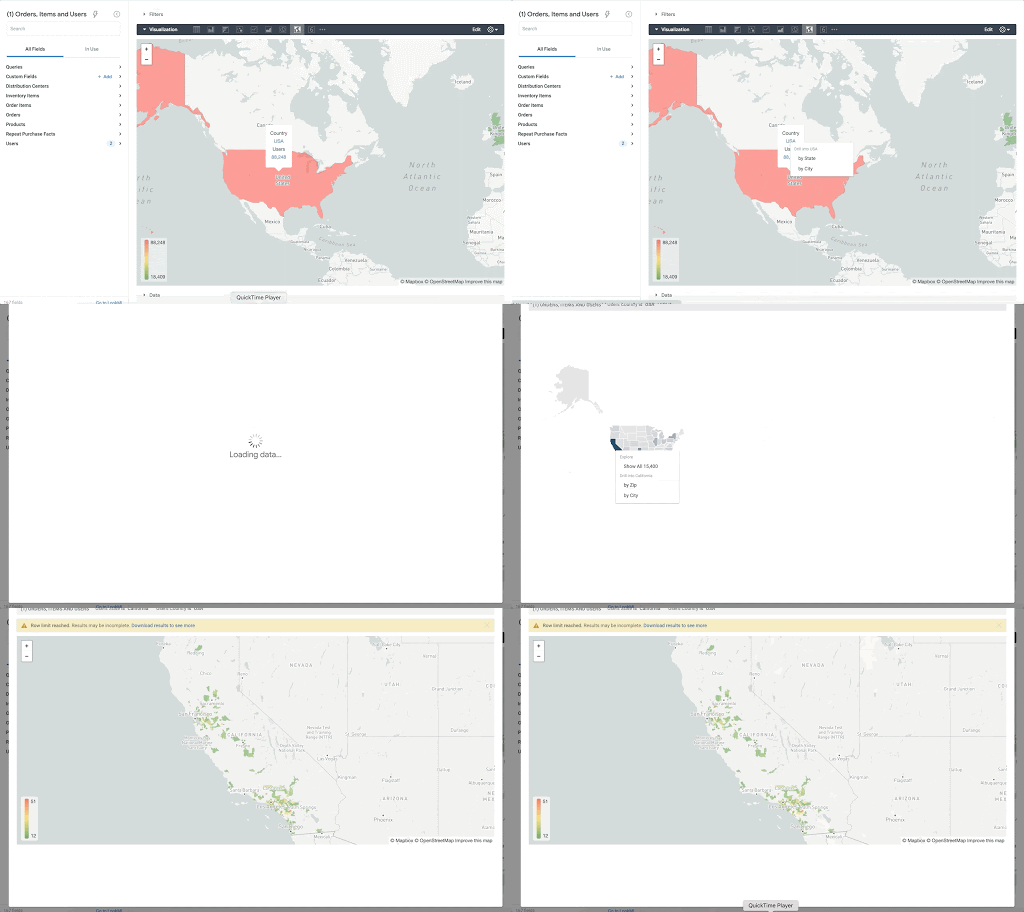
Aside from simply checking if a point is within an area, we can also use ST_DISTANCE to do something like find the closest city using the centerpoint for the metropolitan area table.
SELECTcust.id as customer_id,ARRAY_AGG(metro.name order by ST_DISTANCE(ST_GEOGPOINT(cust.longitude, cust.latitude),metro.internal_point_geom) asc limit 1)[offset(0)] as metro_nameFROM`looker-private-demo.retail.customers` as cust,`bigquery-public-data.geo_us_boundaries.metropolitan_divisions` as metroGROUP BY cust.id
This concept doesn’t just hold true for points, we can also leverage other GIS functions to see if a geospatial area is contained within areas that are listed in the boundaries datasets. If your data comes into BigQuery as a GeoJSON string, we can convert it to a GEOGRAPHY type using the ST_GEOGFROMGEOJSON function. Once our data is in a GEOGRAPHY type we can do things like check to see what urban area the geo is within – using either ST_WITHIN or ST_INTERSECTS to account for partial coverage. Here, I am using the customer’s zip code to find all metropolitan divisions where the zip code polygon and the metropolitan polygon intersect. I am then selecting the metropolitan area that has the most overlap (or the intersection has the largest area) to be the customer’s metro that we use for reporting.
SELECTcust.id as customer_id,ARRAY_AGG(metro.name order by ST_AREA(ST_INTERSECTION(zip.zip_code_geom,metro.metdiv_geom)) desc limit 1)[offset(0)] as metro_nameFROM`looker-private-demo.retail.customers` as custJOIN `bigquery-public-data.geo_us_boundaries.zip_codes` as zip on cust.zip=zip.zip_code,`bigquery-public-data.geo_us_boundaries.metropolitan_divisions` as metroWHERE ST_INTERSECTS(zip.zip_code_geom,metro.metdiv_geom)GROUP BY cust.id
The same ideas can be applied to the other tables in the dataset including the county, urban areas and National Weather Service forecast regions (which can also be useful if you want to join your datasets onto weather data).
Correcting for data discrepancy
One problem that we may run into when working with geospatial data is that different data sources may have different representations of the same information. For example, you might have one system that records state as a two letter abbreviation and another using the full name. Here, we can use the state table to join the different datasets.
SELECTst.state_name,sum(ab.sales+fn.sales) as total_salesFROM `bigquery-public-data.geo_us_boundaries.states` as stLEFT JOIN abbreviated_table as ab on ab.state = st.stateLEFT JOIN fullname_table as fn on fn.state = st.state_nameWHERE COALESCE(ab.state, fn.state) IS NOT NULLGROUP BY 1
Another example might be using the tables as a source of truth for fuzzy matching. If the address is a manually entered field somewhere in your application, there is a good chance that things will be misspelled. Different representations of the same name may prevent tables from joining with each other or lead to duplicate entries when performing aggregations. Here, I use a simple Soundex algorithm to generate a code for each county name, using helper functions from this blog post. We can see that even though some are misspelled they have the same Soundex code.
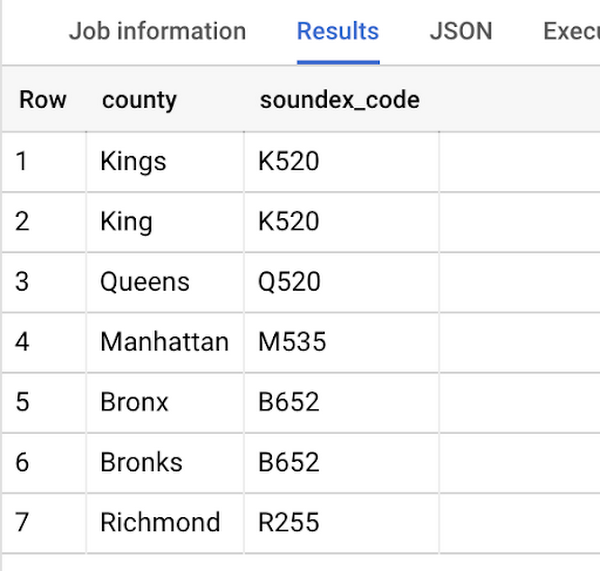
Next, we can join back onto our counties table so we make sure to use the correct spelling of the county name. Then, we can simply aggregate our data for more accurate reporting.
SELECTc.county_name,sum(sales) as total_salesFROMtableJOIN `bigquery-public-data.geo_us_boundaries.counties` as con testing.dq_fm_Soundex(table.county) = testing.dq_fm_Soundex(c.county_name)WHERE c.state_fips_code = cast(36 as string)GROUP BY 1
Note that fuzzy matching definitely isn’t perfect and you might need to try different methods or apply certain filters for it to work best depending on the specifics of your data.
The US Geo Boundary datasets allow you to perform meaningful geographic analysis without needing to worry about extracting, transforming or loading additional datasets into BigQuery. These datasets, along with all the other Google Cloud Public Datasets, will be available in the Analytics Hub. Please sign up for the Analytics Hub preview, which is scheduled to be available in the third quarter of 2021, by going to g.co/cloud/analytics-hub.
Google and Fervo Agreement to Shape-up Plans for 24/7 Carbon-free Energy by 2030

4801
Of your peers have already read this article.
1:30 Minutes
The most insightful time you'll spend today!
When Google announced our plan to go beyond purchasing renewable power for 100% of our energy usage and operate on 24/7 carbon-free energy by 2030, we noted that achieving this goal will require new transaction structures, advancements in clean energy policy, and innovative new technologies. Today, we’re pleased to announce that one of these new technologies—a first-of-its-kind, next-generation geothermal project—will soon begin adding carbon-free energy to the electric grid that serves our data centers and infrastructure throughout Nevada, including our Cloud region in Las Vegas.
Google and clean-energy startup Fervo have just signed the world’s first corporate agreement to develop a next-generation geothermal power project, which will provide an “always-on” carbon-free resource that can reduce our hourly reliance on fossil fuels. In 2022, Fervo will begin adding “firm” geothermal energy to the state’s electric grid system, where Google’s commitments already include one of the world’s largest corporate solar-plus-storage power purchase agreements.
Importantly, this collaboration also sets the stage for next-generation geothermal to play a role as a firm and flexible carbon-free energy source that can increasingly replace carbon-emitting fossil fuels—especially when aided by policies that expand and improve electricity markets; incentivize deployment of innovative technologies; and increase investments in clean energy research, development, and demonstration (RD&D).
Next-generation geothermal technology
Traditional geothermal already provides carbon-free baseload energy to a number of power grids. But because of cost and location constraints, it accounts for a very small percentage of global clean energy production.
That’s one reason this new approach is so exciting; by using advanced drilling, fiber-optic sensing, and analytics techniques, next-generation geothermal can unlock an entirely new class of resource. And the US Department of Energy has found that with advancements in policy, technology, and procurement, geothermal energy could provide up to 120 GW of firm, flexible generation capacity in the US by 2050.
As part of our agreement, Google is partnering with Fervo to develop AI and machine learning that could boost the productivity of next-generation geothermal and make it more effective at responding to demand, while also filling in the gaps left by variable renewable energy sources. Although this project is still in the early stages, it shows promise.

Using fiber-optic cables inside wells, Fervo can gather real-time data on flow, temperature, and performance of the geothermal resource. This data allows Fervo to identify precisely where the best resources exist, making it possible to control flow at various depths. Coupled with the AI and machine learning development outlined above, these capabilities can increase productivity and unlock flexible geothermal power in a range of new places.
This won’t be the first time that Google is applying software solutions to clean energy applications: we’ve just announced an update to our carbon-intelligent computing program that helps us reduce emissions associated with running applications at Google data centers. And other forms of AI and machine learning are currently being used to increase the value of wind energy.
Already this year, Google has taken significant strides toward sourcing 24/7 carbon-free energy for all our data centers, office campuses, and Cloud regions. On Earth Day, our CEO Sundar Pichai announced that for the first time, five of our global data center sites operated near or at 90% carbon-free energy in 2020.
Not only does this Fervo project bring our data centers in Nevada closer to round-the-clock clean energy, but it also acts as a proof-of-concept to show how firm clean energy sources such as next-generation geothermal could eventually help replace carbon-emitting power sources around the world.
Lending DocAI Shortens Borrowers’ Journey on Roostify

11806
Of your peers have already read this article.
3:00 Minutes
The most insightful time you'll spend today!
The home lending journey entails processing an immense number of documents daily from hundreds of thousands of borrowers. Currently, home lending document processing relies on some outdated digital models and a high dependency on manual labor, resulting in slow processing times and higher origination costs. Scaling a business that sorts through millions of documents daily, while increasing efficacy and accuracy, is no small feat. When it comes to applying for a mortgage loan, consumers expect a digital experience that’s as good as the in-person one. Roostify simplifies the home lending journey for lenders and their customers.
No time to spare: Overcoming document processing challenges with AI
Roostify provides enterprise cloud applications for mortgage and home lenders. In order to empower its customers to deliver a better, more personalized lending experience, they needed to automate and scale their in-house document parsing functionality.
As a key component of its document intelligence service, Roostify is leveraging Google Cloud’s Lending DocAI machine learning platform to automate processing documents required during a home loan application process, such as tax returns or bank statements with multi-language support. This partnership delivers data capture at scale, enabling Roostify customers to automatically identify document types from the uploaded file and to extract relevant entities such as wages, tax liabilities, names, and ID numbers for further processing, and make things move faster in the cumbersome lending process.
Roostify’s solutions leverage Google Cloud’s Lending DocAI, which is built on the recently announced Document AI platform, a unified console for document processing. Customers can easily create and customize all the specialized parsers (e.g., mortgage lending documents and tax returns parsers) on the platform without the need to perform additional data mapping or training. All Google Cloud’s specialized parsers are fine-tuned to achieve industry-leading accuracy, helping customers and partners confidently unlock insights from documents with machine learning. Learn more about the solution from the GA launch blog and the overview video.
Integrating Lending DocAI’s intelligent document processing capabilities into the Roostify platform means more innovation for their customers and tangible results: faster loan processing times, fewer document intake errors, and lower origination costs. Additional support in Google Lending DAI for other languages and more documents like global Know Your Customer (KYC) documents or payroll reports is in the near future.
Full integration of AI solutions
Working together with Roostify’s platform team, we were able to help them solve their document processing challenge through integration of various GCP products such as Lending DocAI (LDAI), Data Loss Prevention (DLP) for redacting sensitive data, BigQuery for data warehousing and analytics, and Firestore for API status. To make it very safe and secure, all data was encrypted end-to-end at Rest and in Transit. LDAI won’t require any training data to process. It is an easy plug and play API.
Here is a sneak peek in the high level deployment architecture for LDAI in Roostify environment:

Here are the steps for processing data:
- Receives document processing request from the client.
- API Function directs requests to the pre-processing service. For Async requests a processing ID is generated and returned to the caller.
- Pre-processing service sends the request for further processing (Long/short PDF conversion), calling other microservices and receives back the responses. Any error in the response received is then sent to the response processing service.
- If the response is synchronous, the pre-processing service directs it to the LDAI Invoker service.
- If the response is asynchronous, the pre-processing service feeds it into the Cloud Pub/Sub service.
- Cloud Pub/Sub service feeds the response back to the LDAI Invoker service.
- LDAI Invoker service routes the request to the Google LDAI API for classification if there are multiple pages in the document.
- Document will be split based on LDAI response and then saved in a GCS bucket for temporary storage.
- LDAI entity interface for single page processing and then LDAI Invoker sends LDAI results to LDAI Response Processing
- If a request is a synchronous request the LDAI Response Processor sends results to the API Function so that it can complete the synchronous call and respond to the rConnect caller.
- If the request is an asynchronous request the LDAI Response Processor will respond to the caller’s webhook and complete the transaction.
- Finally, Data stored in the GCP bucket will be deleted.
All the responses that come from the LDAI API can optionally feed into BigQuery via the Response Processor, after parsing it through Data Loss Prevention (DLP) API to redact the PII/sensitive information. Throughout the processing of both asynchronous and synchronous requests all transactions are logged using Cloud Logging. For asynchronous transactions, the state is maintained throughout the process using Cloud Firestore.
Roostify currently uses this technology to power two different solutions: Roostify Document Intelligence and Roostify Beyond™. Roostify Document Intelligence is a real-time document capture, classification, and data extraction solution built for home lenders. It ingests documents uploaded by borrowers and loan officers, identifies the relevant documents, and extracts and classifies key information. Roostify Document Intelligence is available as a standalone API service to any home lender with any digital lending infrastructure already in place.
Roostify Beyond™ is a robust suite of AI-powered solutions that enables home lenders to create intelligent experiences from start to close. It combines powerful data, insightful analytics, and meaningful visualization to streamline the underwriting process. Roostify Beyond™ is currently available only to Roostify customers as part of an Early Adopter program and will be rolled out to the market later this year.


Through this partnership, Roostify has enabled its customers to adopt a data-first approach to their home lending processes, which will lead to improved user experiences and significantly reduced loan processing times.
Fast track end-to-end deployment with Google Cloud AI Services (AIS)
Google AIS (Professional Services Organization), in collaboration with our partner Quantiphi, helped Roostify deploy this system into production and fast-tracked the development multifold to generate the final business value.
The partnership between Google Cloud and Roostify is just one of the latest examples of how we’re providing AI-powered solutions to solve business problems.
IBM Spectrum LSF and Google Collab: Leverage Google Cloud’s Scalability and Compute Engine Infrastructure

3576
Of your peers have already read this article.
3:00 Minutes
The most insightful time you'll spend today!
High Performance Computing (HPC) is prevalent today across many industries, including financial services, life sciences, higher education research, manufacturing, and energy. More and more businesses are deploying HPC workloads in the cloud to take advantage of its elasticity, scalability, and availability. Job schedulers are critical for HPC applications given the nature of these workloads that create, process, and tear down thousands, and sometimes millions, of vCPU and network resources with TB to PB of storage capacity. Job scheduling tools lead to improved operational efficiency and a degree of certainty that a particular HPC job, which can run for hours to weeks, will complete successfully.
IBM Spectrum LSF is used extensively in the manufacturing and semiconductor industry to manage Electronic Design Automation (EDA) workloads. Dynamically running workloads on-premises and in the cloud, also known as cloud bursting, is becoming a more common practice to address capacity and provisioning time constraints within data centers and enable enterprises to take advantage of virtually unlimited resources.
However, the challenge with cloud bursting is integrating and maintaining operational consistency across on-premises and cloud environments. IBM Spectrum LSF, in combination with Google Cloud, addresses this problem head on.
Google Cloud is excited to announce, in collaboration with IBM, enhanced capabilities to IBM Spectrum LSF that enables organizations to integrate their on-premises job scheduling scripts with resources deployed in Google Cloud. Customers are now able to fully leverage Google Cloud’s highly scalable and secure Compute Engine, networking and storage infrastructure.
The LSF-Google Cloud resource connector patch supports key Google Cloud differentiators including Local SSDs, GCE instance templates, Preemptible VMs, and more:
- Bulk API support– Deploy large fleets of VM instances in a matter of seconds.
- Instance Templates – Simplify VM configuration by creating reusable templates.
- All Machine Types – Supports all GCE VM families and machine types, including Custom Machine Types.
- GPUs – Attach up to 16 GPUs per instance, including the largest A2 instances with up to 16 NVIDIA A100 GPUs
- Preemptible VMs – Preemptible VMs are provisioned from excess Compute Engine capacity and is a significant way to save money on GCE resources.
- Local SSD – Attach up to 9TB of NVMe SSD per instance
- Hyperthreading – Supports the “threads-per-core” option in GCE, which allows per-VM hypervisor level Hyperthread configuration (when supported by Instance Templates)
- Images – Supports custom disk images, including full support for Windows, for all attached Persistent Disks
- Placement Policies – Control where the instances are physically located relative to each other within a zone for improved low-latency performance
- Labels – Supports GCE Labels, which can be used for management of firewall rules, tracking billing, etc
- Minimum CPU Platform – Supports the ability to specify a minimum CPU Platform for your Virtual Machines.
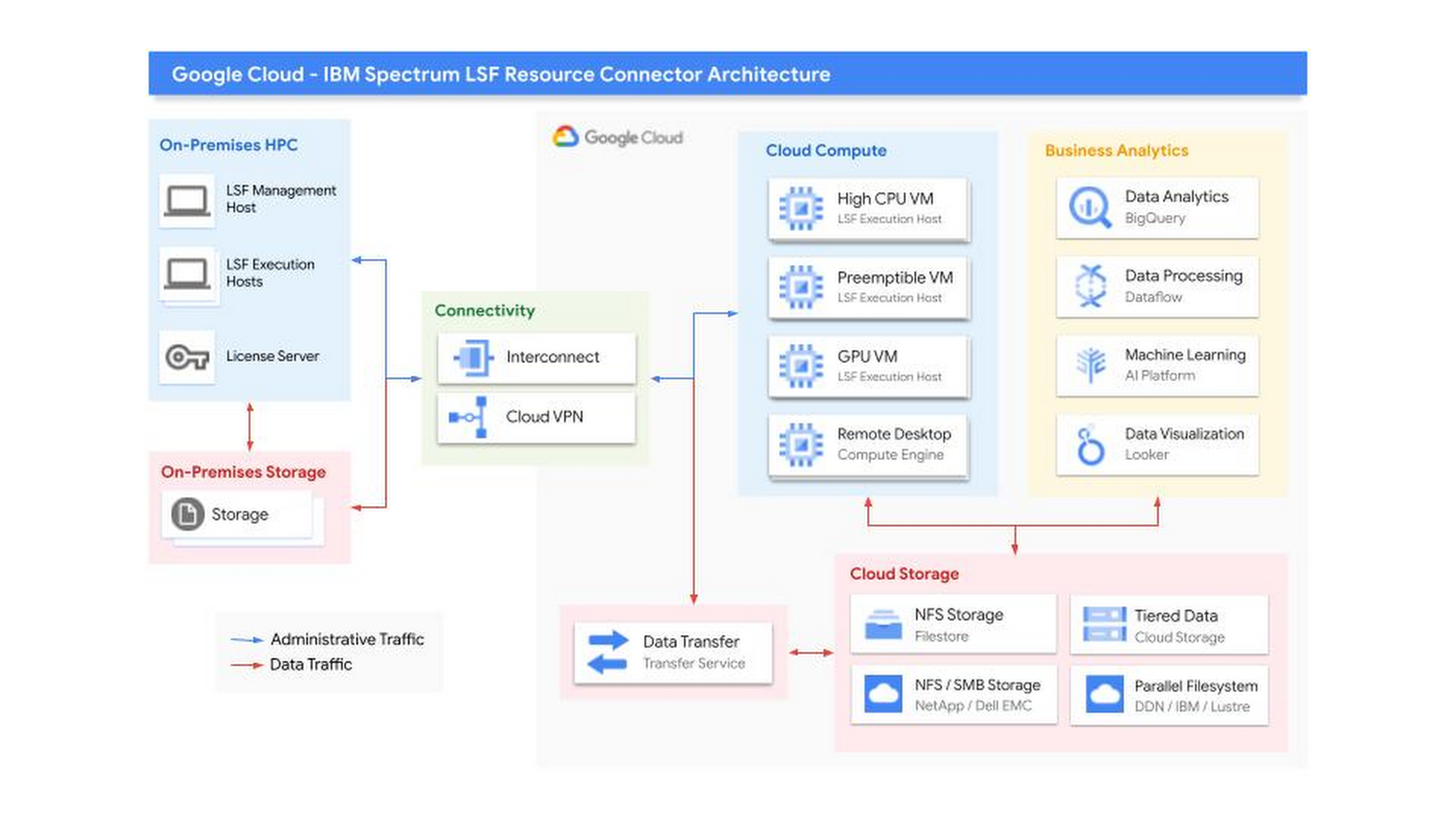
Getting Started
This improvement to the IBM LSF Resource Connector was developed by IBM in coordination with Google. Find out more about the new supported features and their operation in the official IBM Spectrum LSF Resource Connector Documentation. You can also find additional documentation and download the software in the IBM Spectrum Computing Community. If you have further questions, you can contact IBM, or Google Cloud Sales.
Special thanks to Annie Ma-Weaver, Mark Mims, and Wyatt Gorman for their contributions.
4873
Of your peers have already watched this video.
1:30 Minutes
The most insightful time you'll spend today!
How does Google Pick its Data Center ?
Google is well known for its sustainable tech and hardware initiatives. Did you know alongside its environmental friendly designs of its data centers, it takes into account various factors such as redundant power supplies, data replication, network connectivity, etc. Watch the video to learn more.

IDC: Firms Should Migrate VM-based Enterprise Workloads to Google Cloud for Optimal Price, Performance, and Security
DOWNLOAD WHITEPAPER4440
Of your peers have already downloaded this article
5:30 Minutes
The most insightful time you'll spend today!
Public cloud platforms provide the scale, elasticity, and operational efficiency that enable enterprises to both innovate and deliver more products and services to the market faster. This increased ability to innovate provides enterprises a competitive advantage and the businesses agility to stay ahead of their competition. Enterprises should leverage the business agility that public cloud infrastructure enables to their strategic advantage. Thus incorporating a cloud platform is an inherent part of their initiatives to modernize their IT infrastructure.
Enterprise cloud adoption is not without challenges. Enterprises cite a lack of skill set, decision fatigue, operational challenges, security concerns, and unpredictable TCO as significant inhibitors to adopting a public cloud service provider. Information technology decision makers (ITDMs) are caught between the need to innovate faster and the fear of instability and mismatched expectations. This dilemma is why enterprises that partner with a trusted service provider before, during, and after migration are more likely to succeed in their cloud journey.
Google Cloud is an ideal platform for virtual machine (VM)–based applications due to its key technical capabilities, such as high-performing virtual machines, including compute-optimized and memory-optimized VMs; custom sizes for virtual machines; high-performance network infrastructure for faster data transfers; and data protection capabilities.
Download this IDC report to understand why ITDMs should consider Google Cloud as the preferred cloud services partner — owing to Google Cloud being a reliable platform for VM-based applications; a trusted partner before, during, and after application migration; and an innovator to future proof the enterprise IT infrastructure.
More Relevant Stories for Your Company

Google Cloud and StartEd Join Forces to Boost EdTech Startups
Over the past few years, as the education sector was going through transformative change, EdTech startups rose to meet the demand of learners and help address some of the biggest challenges in education. At Google Cloud, we're inspired by how EdTech startups continue to solve challenges with agility, innovative technology,

FAQs: Everything Your Need to Know About Cloud Computing
There are a number of terms and concepts in cloud computing, and not everyone is familiar with all of them. To help, we’ve put together a list of common questions, and the meanings of a few of those acronyms. You can find all these, and many more, in our learning resources.

Towards The Next Wave of Google Cloud Infrastructure Innovation: New C3 VM and Hyperdisk
Meeting the rapidly growing demands of our customers’ high performance computing and data-intensive workloads requires deep innovation — at Google Cloud, we know we can’t rely on ever-faster CPUs alone, like Moore’s Law has enabled in the past. Customers can either optimize their workloads for a given platform, or we

8 Must-Have Google Cloud Products for Startups
Startups worldwide turn to Google Cloud tools to build fast on a strong and easy to use platform that helps them get to market and launch products faster, all while building on the cleanest cloud in the industry. Startups leverage Google Cloud and our Google for Startups Cloud Program to
