





New to Cloud Firestore? Here are Some Basics You Need to Know

3554
Of your peers have already read this article.
5:00 Minutes
The most insightful time you'll spend today!
Learning to use a new database can be daunting, even more so if you don’t already have technical knowledge about databases. In this article, I will break down some database basics, terms you should know, what Firestore is, how it works, how it stores data, and how to get started using it with the assumption that you don’t have any existing database knowledge.
Before we dive into what Cloud Firestore is, let’s discuss some key database terms you should know. Feel free to skip this section if you are already familiar with the basics of Relational and non-relational databases.
What is a database?
A database is software that allows you to easily access, manage, modify, update, control and organize data. The way you want to store information can impact what type of database you choose. There are two major categories of databases, Relational and non-relational.
Relational Database
A relational database can be thought of like a spreadsheet. You can store information in your spreadsheet like this:
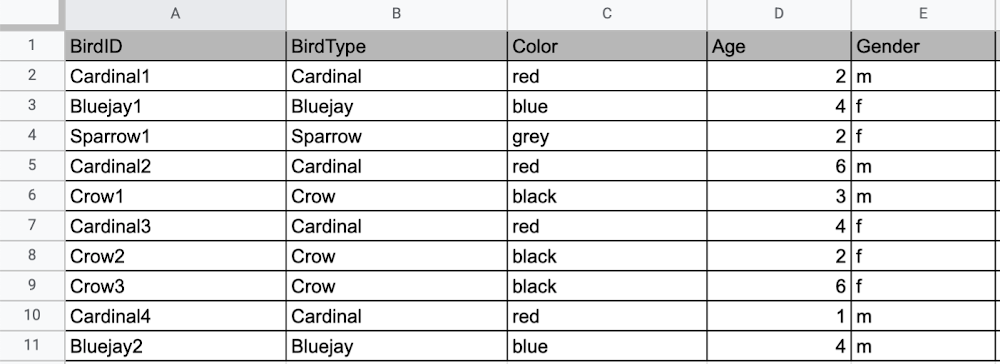
Now, what happens if I want to store information about where Sparrow1 lives, in my spreadsheet, but I don’t care about where the other birds live? I would have to add another column to my spreadsheet, called home, that would only contain data for the sparrow. That would look like this:
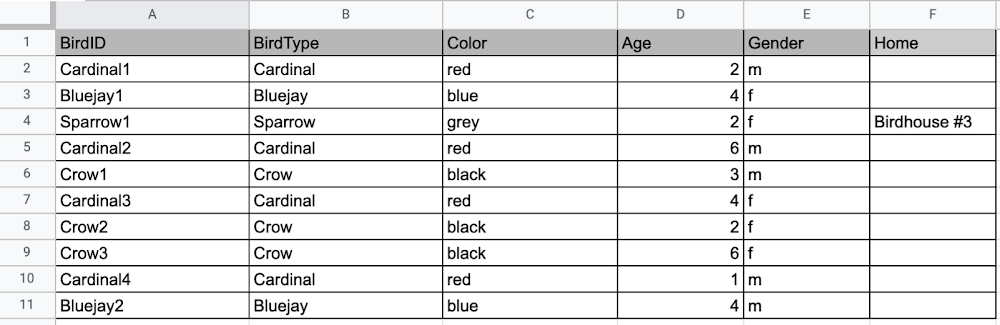
Even though I only want to know information about where the sparrow lives, I am required to have blank spaces in the column for all of the other animals. This is because in a relational database, you have a specific structure of your data called a schema. Just like in a spreadsheet, every item you are storing information on must have a place to put information about the bird’s home, even if you only want that information for one bird. This is enforced by the schema, which is essentially the column headers you put in the sheet and dictates a strict structure for the data, which has pros and cons.
The strict structure of a relational database allows your application to know what kind of data exists, to know what the data type is, and to enforce rules such as requiring data to be unique, or enforcing type of data stored etc. A schema, by design, forces the data in each row to have the same characteristics, which means it is not very flexible, unless you change the schema for the database. That means if you want to add different data that doesn’t fit your existing schema, you have to change the schema. As we discussed above, if you want to change the schema we are using to store information, such as Home, there is some information that will be stored for all rows, even if you don’t want to store anything. The amount of wasted storage is different between database engines, data types etc. Another thing to consider about Relational databases is that at scale, some traditional Relational databases will require more advanced deployments to handle the scale.
Changing the schema of a relational database can be highly disruptive, especially for busy workloads because it requires running scripts to change the schema and coordinating it carefully with the code changes in the app. Due to locking, you might even experience downtime in some cases. Now contrast that with a non-relational document database like Firestore, where you don’t have to worry about schema changes in the databases or downtime as a result of it.
Also, when you have a lot of data that you want to collect and it only applies to a few things in your database, having extra space with no information in it can become wasteful because it uses up storage space in many cases. A non-relational database can help get around this problem.
Non-relational databases
Generally speaking, a non-relational database stores information in a different format than a Relational database. There are 4 major categories of non-relational databases that you will hear most frequently.
- Column-Family
- Document (Firestore)
- Key-Value
- Graph
Since this post is focusing on Firestore, in this section we will dive into what a document database is, how it is used, and when to use it.
Document database (Firestore)
A document database can be thought of as a multi layered collection of entities, such as this:
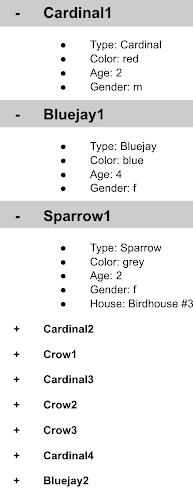
As you can see, when the list is all collapsed, you can only see the information at the top; in this case, that is the BirdID (Cardinal1, Bluejay1, Sparrow1, Cardinal2, Crow1 etc. When I open the list I see “word: word”. For example, the document ID Sparrow1, points to a document with “Type: Sparrow”. I also see “Color: grey”, “Age: 2”, “Gender: f” and “Home: Birdhouse #3”
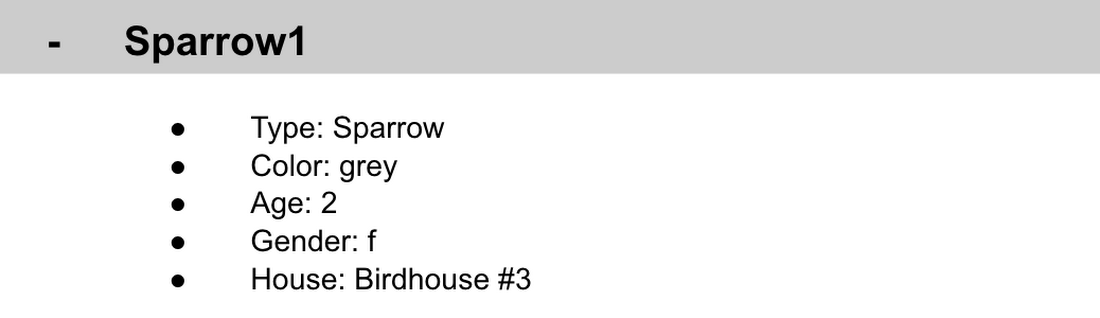
This is known as a key value pair. For “Type: Sparrow”, Type is the key and Sparrow is the value. All of the keys in the Sparrow1 document are: Type, Color, Age, Gender, House. All of the values in the Sparrow1 document are: Sparrow, grey, 2, f, Birdhouse #3.
Similarly to how the key gives you context, it allows you to ask the computer for a specific piece of information, such as the age of the bird. It is important to decide on a specific key term you will use for each piece of data you collect so your data can be easily read programmatically. This is called an implicit schema, an implied understanding of how data is stored that is not enforced by the database. Let’s go over what happens when we use an implicit schema.
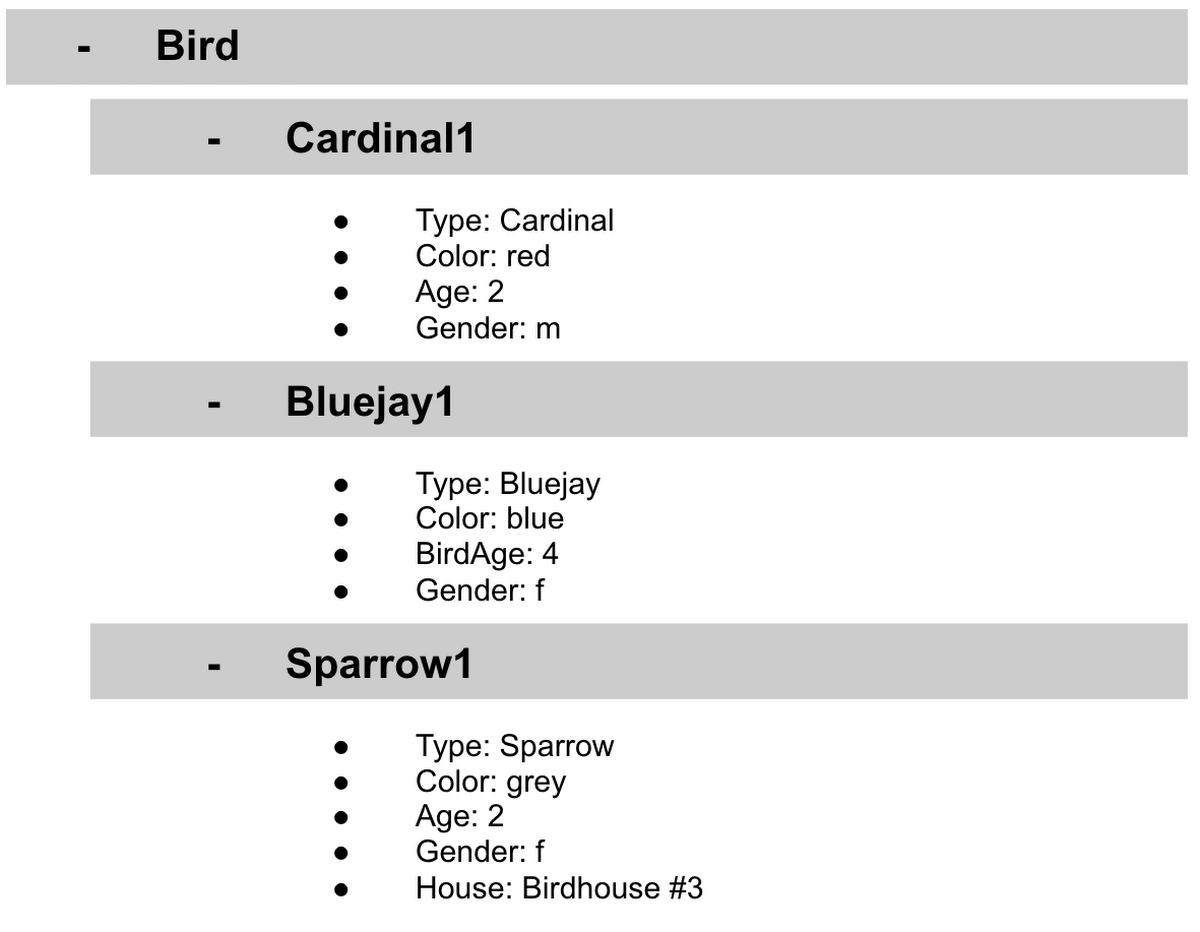
Under Cardinal1, you see Type, Color, Age, and Gender; however, under Sparrow1 you also see House. This is possible because in a non-relational database you don’t have a schema that requires you to store the same information about every bird in your database; instead, you can store the specific information that you need for each bird, regardless of what is stored for other birds. This is a great benefit in terms of flexibility, but because of this flexibility, maintaining standard naming conventions is very important.
Now, let’s discuss why using standard naming conventions is so important. In the example above, if I ask a human: “What is the age of Cardinal1?”, they would probably tell me 2. If I asked them: “What is the Age of Bluejay1?”, they would probably tell me 4. These are both correct answers, but they are only correct because a human is able to assume what Age means. A computer, on the other hand, can’t make assumptions. If I ask a computer: “What is the Age of Cardinal1?” it would say 2, but if I ask it: “What is the Age of Bluejay1?” it would not know. This is because the computer is looking for the keyword Age and it isn’t able to use any context clues to determine what other words might mean Age. However, if I asked the computer: “What is the BirdAge of Bluejay1?”, the computer would tell me 4. Why do I care that I need to tell the computer to look for BirdAge to get the age of blujay one, but to look for Age to get the age of Cardinal one? I care because it means I would have to write two entirely different sets of instructions (i.e software code) to get the age of Cardinal1 and the age of Bluejay1 if I am not careful in how I structure my data. But when I structure my data well, this is not an issue and is infact a benefit by adding added flexibility.
What we see from this example, is that even without a strict schema, we can (and should) define conventions for document formats. If conventions aren’t defined, things can get unwieldy quickly.
How information is accessed
Now, let’s discuss how the information is accessed. If I wanted to know information about which birds are blue in our drop down list example, I would need to expand every section of the list to check if the bird is blue or not. As you can imagine, once you start to get a lot of birds in your database, it becomes cumbersome to open every drop down and see if the bird is blue. Luckily, Firestore lets you run these types of queries against the data (See more here) and receive all the documents that satisfy your conditions. On the other hand, if I wanted to know all of the information about Cardinal1, I could just open the drop down for Cardinal1 and I would have all of the information about that bird.
Now let’s start using some Firestore specific terminology. For the example we just discussed:Collections
- In Firestore, your data lives in collections. You can think of collections as tabs in a spreadsheet.
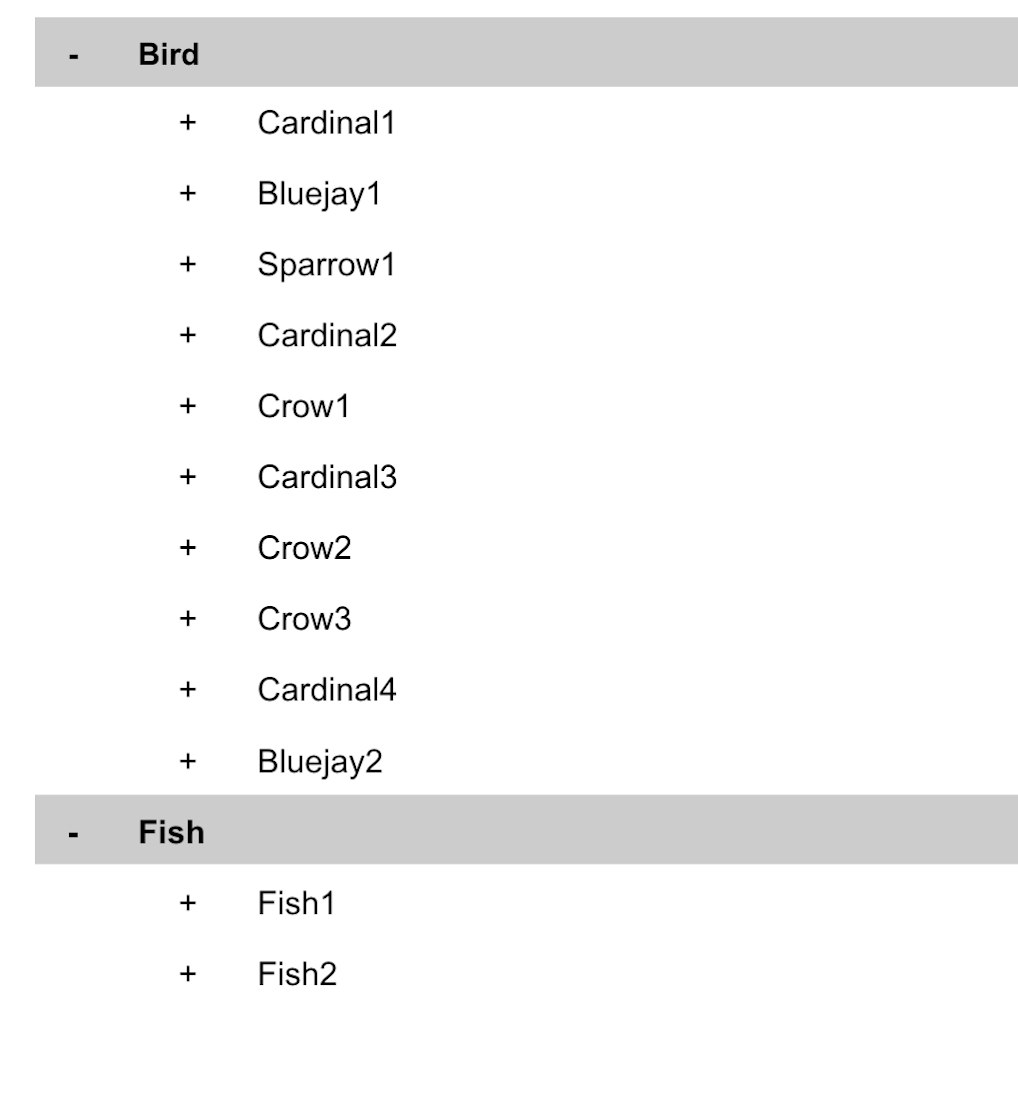
- Collections can be used to organize data. For example, if I decide that I want to collect data about birds and fish, the data about birds could be put in a birds collection, and the data about fish could be put in a Fish collection. ex:
- This is the unit of storage that Firestore uses. In our example, each bird is its own document. Documents reside in collections. This is what one document would contain:
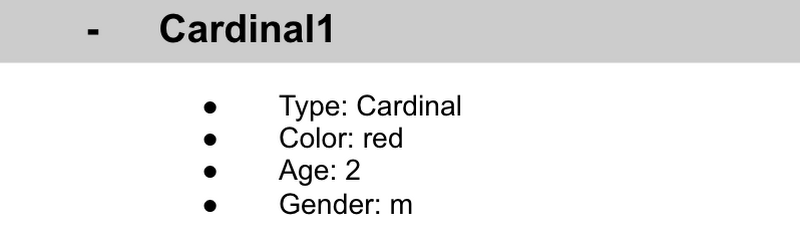
- Each Document corresponds to a row in the sheet. The following diagram demonstrates that each column header maps to a property name in the document and that each value in a row maps to a value in the document.
- Each document must be identified by a unique identifier. In our example, that is BirdID. Notice that the value for BirdID is stored at the top level of the list, so when the document is closed, you can only see Cardinal1 and Cardinal1 is not also stored within the document.
- All documents can be uniquely identified by their location. Let’s think through this in words first before we move to code. If I want to tell someone to get data about the sparrow from the drop down lists, I would need to tell them:
- In the bird drop down list, can you please get all the information under Sparrow1 and put it on a piece of paper called sparrow1Info?
- Now let’s try that again using Firestore terms.
- From the birds collection, can you please get the document for sparrow1 from the Firestore database (db) and save it as sparrow1Info?
- Now let’s try it in code.
- var sparrow1Info = db.collection(‘birds’).doc(‘sparrow1’);
- A subcollection is a collection associated with a document. Using our example of the drop down list, we can add a collection called sightings that stores documents about each sighting of the specific bird. This is what that would look like:
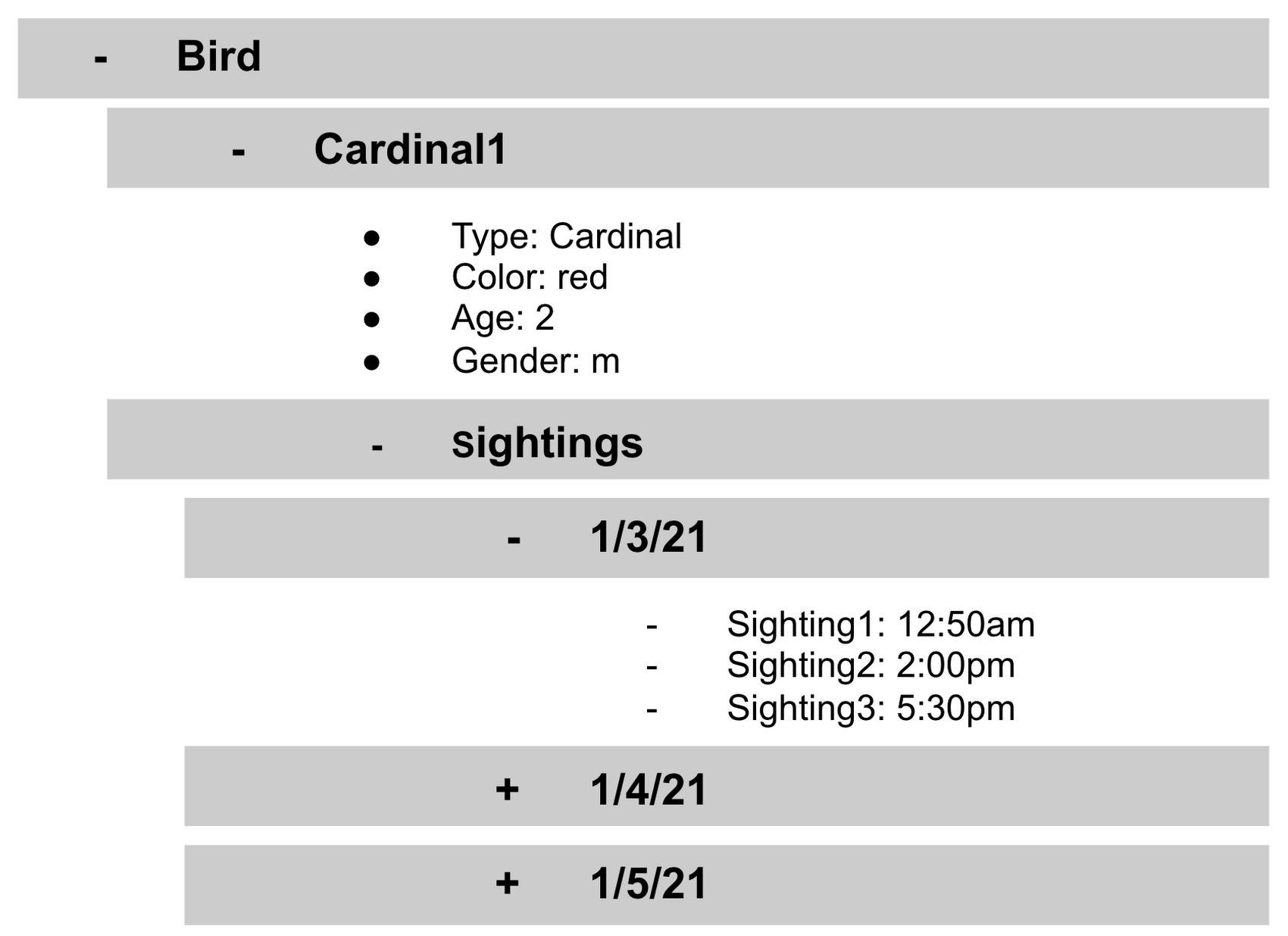
- It is important to note that you don’t need to have the same subcollections on all documents. For example, Cardinal1 can be the only document that has a subcollection of Sightings.
How to search on Google about Firestore
The hardest part of learning a new technology can often be knowing the right terms to put into Google search to get the answers you are looking for. Here are some key terms that can help you get started
Your question:
How should I arrange my data to store it in Firestore?
Search:
Document database implicit schema design
Your Question:
What other databases are similar to firestore?
Search:
What are some document databases
Your Question:
How do I get all documents in the Birds collection?
Search:
How to use wildcards in Firestore
What next?
Try this guide to get started building your first application that uses firestore: https://firebase.google.com/docs/firestore/quickstart
Google Spanner Wins SIGOPS Hall of Fame Award 2022

2922
Of your peers have already read this article.
1:30 Minutes
The most insightful time you'll spend today!
Earlier this month, SIGOPS announced that it had selected the paper, “Spanner: Google’s Globally-Distributed Database” for the 2022 SIGOPS Hall of Fame Award, an honor bestowed on the most influential Operating Systems papers published by the organization.
In giving this award, the award committee stated:
“Spanner showed how to balance the requirements of consistency, availability, and partition tolerance for a globally replicated transactional database system. In doing so, Spanner simplified the implementation of a range of higher level services which could then scale across the planet through a familiar and powerful transactional API. The key insights of leveraging clock synchronization using TrueTime and a dedicated, redundant, high-capacity datacenter WAN distinct from the public Internet as the basis for scaling remain fundamental design patterns today.”
As one of the original authors of the paper, to say that I am humbled by this award is an understatement. It’s also taken me on a trip down memory lane, and gotten me thinking about all the ways — expected and unexpected — that Spanner has influenced not only how Google builds its applications, but also how it’s simplified application design and operations for organizations that aren’t running at hyperscale.
From very early on — think early 2000s — one of Google’s biggest challenges was scaling its software to keep up with the rapid growth of the internet. We needed a database that scaled, that could be built with a small team. Those needs led to Bigtable and the NoSQL movement: a feature-lean database that performed and scaled.
But as Google grew, and entered other lines of business, our priorities evolved. We needed to simplify the jobs of our ever-larger engineering staff and support business-critical services like the AdWords and Payments platforms, as well as then-new consumer products like Gmail. To do that, we knew we had to give our product teams database features like ACID transactions, multi-region consistency, schema-declared invariants, SQL, and more — without compromising on cost or scale. At the time it was an outrageous goal, but with our experience building Bigtable and Megastore, as well as new innovations like TrueTime, we knew it could be done – and it was clear talking to our internal customers that it needed to be done.
Like most good software, our plans for Spanner really came together when we found our first serious customer: AdWords. At the time, Google’s entire advertiser-facing interface was sharded across MySQL instances on specially acquired hardware. Ads had just completed a very challenging resharding project to accommodate Google’s growing business, and was resolute in its desire to never do it again. So the Spanner team and Ads partnered on a project, called F1, to transparently move the entire AdWords stack from MySQL to Spanner.
“Before Spanner, Google’s entire advertiser-facing interface was sharded across MySQL instances on specially acquired hardware.”
By 2012, when we published the Spanner paper, we had just completed the migration of AdWords frontend traffic to the new Spanner backend, and we knew we had the seed of something really interesting. Since then, we have been rapidly improving Spanner in every dimension. Google, like most businesses, needs databases that are fully managed, easy to deploy, highly available, and robust in the face of any workload. Google services set a high bar: Spanner stores a copy of the Internet (actually several, at different stages of the indexing pipeline) and is the bedrock of availability and durability for billions of users that depend on Google in their daily lives.
Then, in 2017, Google Cloud launched Cloud Spanner, a fully managed database service that brought the unique capabilities of Spanner to every organization, allowing them to deliver always-on experiences at any scale from thousands to millions of active users across the world without sacrificing consistency.
That took us down another road: innovating to make it easy for all enterprises to build data-driven applications using Cloud Spanner. This meant adding enterprise features such as CMEK and access approval, fine-grained access control, backup and restore, and point-in-time recovery (PITR). We also added VPC Service Controls support and compliance certifications and necessary approvals so that Spanner can be used for workloads requiring ISO 27001, 27017, 27018, PCI DSS, SOC1|2|3, HIPAA and FedRamp. More recently, we added granular instance sizing, a PostgreSQL interface, and free trial instances to lower the barrier to entry for Spanner, and make it accessible for any developer and for any application, big or small.
Speaking of small, one of the interesting things we discovered along the way is that Spanner isn’t only a great fit for huge mission-critical applications – we also use it internally for smaller applications and internal tools, secure in the knowledge that the data is safe, available, and nowhere near any limits. That’s the thing about infrastructure innovations: at their best, they aren’t only about scale, they’re about extracting complexity from applications and presenting the solution in an easy-to-use package.
As we have incorporated solutions to those problems into Spanner, customers have dramatically simplified their applications. For example, application teams often created a dedicated “storage” tier to provide higher-level features like indexes, transactions, or data synchronization needed to support their business logic. Spanner enables application teams to hollow out or even completely eliminate these tiers for significant cost and maintenance savings. We have also seen big reliability dividends: rather than each application discovering the corner cases of transactions, consistency or high availability architectures one at a time, Spanner’s customers are all able to benefit from a rigorously designed and battle-tested implementation out of the gate.
“At their best, infrastructure innovations aren’t only about scale, they’re about extracting complexity from applications and presenting the solution in an easy-to-use package.”
The tradeoff between the scale limitations of relational databases and the functionality limitations of NoSQL systems is really familiar, and the software world has learned to build great applications within those confines. But we never tire of seeing great applications transform as Spanner melts the distinction away.
Get started with Spanner
It has never been easier to try out Spanner. With a free trial instance, you can try out Spanner at no cost for 90 days. You can even prototype an entire application for free on Google Cloud by using the Spanner free trial along with the free tier offered by other Google Cloud products such as Compute Engine and BigQuery.
Create a 90-day Spanner free trial instance. Try Spanner free.
Take a deep dive into the new trial experience and learn more about Spanner.
BURGER KING Germany: Serving Up Marketing Insights and Supply Chain Visibility Easily

13967
Of your peers have already read this article.
8:30 Minutes
The most insightful time you'll spend today!
Do hamburgers really come from Hamburg? This may still be a matter of debate, but the popularity of American-style burger joints not just in Hamburg but all over Germany, is clear. Germany’s top two fast food companies are both burger chains. One of them is BURGER KING®, a global brand that welcomes more than 11 million customers worldwide every day. The company arrived in Germany in 1976, when its first restaurant opened in Berlin. It now operates more than 100 restaurants across Germany, with franchisees operating more than 600 restaurants of their own.
“In the fast food industry, being able to move quickly is very important. That means delivering the right promotion to our app or launching a viral campaign within days. To do that across more than 700 restaurants, we need the support of the right technology.”
—Oliver Mielentz, IT Manager, BURGER KING® Deutschland GmbH
Previously a subsidiary of the U.S. business, BURGER KING® Germany became an independent company in 2015. As a result, it needed to develop its own IT infrastructure, and the changeover needed to happen fast. “We had to put in place systems that would work for the entire network of franchisees and enable us to easily roll out campaigns,” explains Oliver Mielentz, IT Manager at BURGER KING® Deutschland GmbH.
With the help of Google Cloud Premier partner Cloudwürdig, BURGER KING® Germany chose Google Cloud and G Suite as the right combination to suit its needs.
“In the fast food industry, being able to move quickly is very important,” says Oliver. “That means delivering the right promotion to our app or launching a viral campaign within days. To do that across more than 700 restaurants, we need the support of the right technology.”
Building a franchisee platform in just three months
When a business has multiple franchisees, it’s important to make sure everyone is on the same page, especially in the fast-paced fast food environment. “We have to collate data from all our franchisees and produce reports quickly in order to react to changes in customer behavior,” explains Oliver. “That means processing every transaction that takes place in our restaurants.” Following the restructure, BURGER KING® Germany also needed to build a secure invoicing system with data storage and optimize its communication channels.
“Using Tableau with BigQuery, we’re able to produce reports very quickly. Previously, it took much longer, as data had to be fetched manually. Our reaction time is now almost a business day faster.”
—Oliver Mielentz, IT Manager, BURGER KING® Deutschland GmbH
With support from Witter-IT, BURGER KING® Germany chose Cloudwürdig to build its BKD Connect internal platform on Google Cloud. Thanks to the ready-to-go tools on Google Cloud, it was able to put its invoicing system and data warehouse in place in just three months.
For the BURGER KING® Germany data warehouse, Cloudwürdig built an ETL pipeline that channels ticket data for every sale into BigQuery. “Data is gathered from the restaurants,” says Oliver, “and using Tableau with BigQuery, we’re able to produce reports very quickly. Previously, it took much longer, as data had to be fetched manually. Our reaction time is now almost a business day faster.”
As the ticket data for every transaction is stored in BigQuery, the marketing team can easily see exactly which products are selling well. That’s crucial for tweaking promotions as well as monitoring the supply chain to make sure enough produce is delivered to restaurants in response to changes in demand.
“Thanks to BigQuery, we have a speedy data pipeline that enables us to react on the same day to changes in the market and eliminate bottlenecks in production,” says Oliver.
Switching to G Suite to improve communication
To enable franchisees to sign in to its BKD Connect Platform, BURGER KING® Germany needed a secure authentication system. To solve that problem, it chose to provide franchisees with G Suite accounts. “It’s really easy to set up a new franchisee on the platform. I just create a new G Suite account and Drive folder for it, and it’s ready to go,” says Oliver. G Suite also helps the franchise network to run efficiently, as daily reports are automatically saved to Drive and shared to the appropriate regional network. “Thanks to that system, it’s much easier for any team at headquarters to access the information it needs,” Oliver explains.
BURGER KING® Germany also recently extended its use of G Suite across the whole company. “Following an evaluation of our previous email and productivity software, I made the decision to switch solely to G Suite,” says Oliver. BURGER KING® Germany employees now use Gmail, Calendar, and Drive for their day-to-day productivity needs. “We only just completed the migration, but already, everyone’s happy,” says Oliver. “It’s so easy to share a file using Drive or set up a meeting on Calendar.”
“We’re big fans of Hangouts Meet, and we have two rooms here at our Hanover headquarters equipped with Hangouts Meet hardware,” Oliver adds. “The speech quality is good, and it’s helpful to be able to see every participant, especially when you’re running a meeting with multiple franchisees.”
Optimizing infrastructure to power innovative campaigns
The BURGER KING® app, available for iOS and Android, helps the company to deliver a great customer experience. Through their MyBK accounts, guests can access coupons and special promotions. “We had a really interesting campaign for Easter: guests used the app to hunt for virtual Easter eggs,” explains Oliver. “We knew it was going to be big, and our previous back end wouldn’t have been able to handle the traffic.”
To enable the marketing campaign to go ahead, BURGER KING® Germany moved the back end of the app, along with its website, to Google Cloud. For developing and running its web and app back ends, it now uses App Engine and virtual machines on Compute Engine, as well as Memorystore and Cloud Functions. For monitoring and logging, it uses Stackdriver, and Cloud CDN and Cloud DNS to easily handle its traffic.
“We ran the campaign without any performance issues, even though we were receiving several million hits a day,” says Oliver. Since migrating the back end to Google Cloud, the marketing team also launched the popular “Escape the Clown” campaign. “That campaign blew our minds!” says Oliver. “It wouldn’t have been possible without Google Cloud, because it required a lot of back end capacity.”
To develop the app infrastructure it needs, BURGER KING® Germany relies on Cloudwürdig. “Working with Cloudwürdig is great because the team has the same agile mindset as us,” says Oliver. “When we have a new idea, we just set up a meeting, and in a couple of days the new infrastructure is in place. For Escape the Clown, it only took a few weeks to get everything ready to launch.”
Leveraging integrated tools to grow the business
Using Google Cloud together with G Suite enables BURGER KING® Germany to run its franchise network efficiently, while keeping its IT team lean. “Google Cloud and G Suite are the perfect fit for the way of working at BURGER KING® Germany,” says Oliver. “Many of the company’s operatives are often on the road, visiting restaurants and franchisees. With these tools, they can work flexibly and react quickly to the situation on the ground.”
“In order to grow the business, we need to use the data we receive every day to understand exactly what is happening in our restaurants. With the tools provided by Google Cloud, we can get more guests through the door and offer them a better experience.”
—Oliver Mielentz, IT Manager, BURGER KING® Deutschland GmbH
It also helps to keep infrastructure costs under control. “With Google Cloud, we only pay for what we use, which is really important for us,” Oliver explains. “It means we can scale up quickly if we see an opportunity to react to a trend in customer behavior and launch a new marketing campaign that resonates with the moment. When it’s finished, we can then scale down again, and that definitely saves us money.”
BURGER KING® is now working with Cloudwürdig to add more functionality to the BURGER KING® app using Google Kubernetes Engine. “We like to work with customers long-term to support their digital transformation. BURGER KING® Germany is a great example of how one project can develop into a great collaboration,” says Benny Woletz, Managing Director of Cloudwürdig.
BURGER KING® also plans to expand its presence in Germany and gain a greater market share by further tailoring both its marketing and the way it runs its restaurants to answer its guests’ needs. “In order to grow the business, we need to use the data we receive every day to understand exactly what is happening in our restaurants,” says Oliver. “With the tools provided by Google Cloud, we can get more guests through the door and offer them a better experience.”
Unifying Data and AI: Bringing Unstructured Data Analytics to BigQuery

4184
Of your peers have already read this article.
2:30 Minutes
The most insightful time you'll spend today!
Over one third of organizations believe that data analytics and machine learning have the most potential to significantly alter the way they run business over the next 3 to 5 years. However, only 26% of organizations are data driven. One of the biggest reasons for this gap is that a major portion of the data generated today is unstructured, which includes images, documents, and videos. It is estimated to cover roughly up to 80% of all data, which has so far remained untapped by organizations.
One of the goals of Google’s data cloud is to help customers realize value from data of all types and formats. Earlier this year, we announced BigLake, which unifies data lakes and warehouses under a single management framework, enabling you to analyze, search, secure, govern and share unstructured data using BigQuery.
At Next ‘22, we announced the preview of object tables, a new table type in BigQuery that provides a structured record interface for unstructured data stored in Google Cloud Storage. This enables you to directly run analytics and machine learning on images, audio, documents and other file types using existing frameworks like SQL and remote functions natively in BigQuery itself. Object tables also extend our best practices of securing, sharing and governing structured data to unstructured, without needing to learn or deploy new tools.
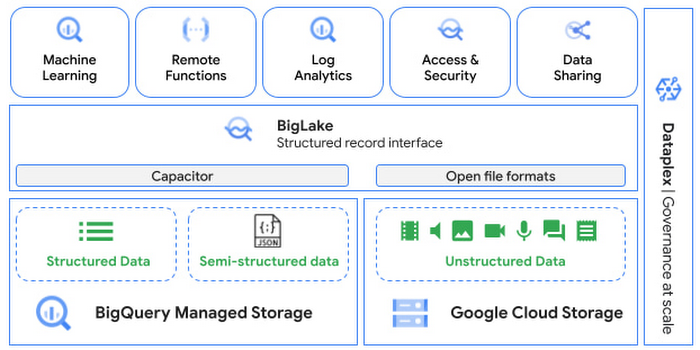
Directly process unstructured data using BigQuery ML
Object tables contain metadata such as URI (Uniform Resource Identifier), content type, and size that can be queried just like other BigQuery tables. You can then derive inferences using machine learning models on unstructured data with BigQuery ML. As part of preview, you can import open source TensorFlow Hub image models, or your own custom models to annotate the images. Very soon, we plan to enable this for audio, video, text and many other formats, and pre-trained models to enable out-of-the box analysis. Check out this video to learn more and watch a demo.
Create an object table
CREATE EXTERNAL TABLE my_dataset.object_table
WITH CONNECTION us.my_connection
OPTIONS(uris=["gs://mybucket/images/*.jpg"],
object_metadata="SIMPLE", metadata_cache_mode="AUTOMATIC");
# Generate inferences with BQML
SELECT * FROM ML.PREDICT(
MODEL my_dataset.vision_model,
(SELECT ML.DECODE_IMAGE(data) AS img FROM my_dataset.object_table)
);By analyzing unstructured data natively in BigQuery, businesses can
- Eliminate manual effort as pre-processing steps such as tuning image sizes to model requirements are automated
- Leverage the simple and familiar SQL interface to quickly gain insights
- Save costs by utilizing existing BigQuery slots without needing to provision new forms of compute
Adswerve is a leading Google Marketing, Analytics and Cloud partner on a mission to humanize data. Twiddy & Co. is Adswerve’s client – a vacation rental company in North Carolina. By combining structured and unstructured data, Twiddy and Adswerve used BigQuery ML to analyze images of rental listings and predict the click-through rate, enabling data-driven photo editorial decisions.
“Twiddy now has the capability to use advanced image analysis to stay competitive in an ever changing landscape of vacation rental providers – and can do this using their in-house SQL skills.” said Pat Grady, Technology Evangelist, Adswerve
Process unstructured data using remote functions
Customers today use remote functions (UDFs) to process structured data for languages and libraries that are not supported in BigQuery. We are extending this capability to process unstructured data using object tables.
Object tables provide signed URLs to allow remote UDFs running on Cloud Functions or Cloud Run to process the object table content. This is particularly useful for running Google’s pre-trained AI models, including Vision AI, Speech-to-Text, Document AI, open source libraries such as Apache Tika, or deploying your own custom models where performance SLAs are important.
Here’s an example of an object table being created over PDF files that are parsed using an open source library running as a remote UDF.
SELECT uri, extract_title(samples.parse_tika(signed_url)) AS title<br>FROM EXTERNAL_OBJECT_TRANSFORM(TABLE pdf_files_object_table,<br>["SIGNED_URL"]);
Extending more BigQuery capabilities to unstructured data
Business intelligence – The results of analyzing unstructured data either directly in BigQuery ML or via UDFs can be combined with your structured data to build unified reports using Looker Studio (at no charge), Looker or any of your preferred BI solutions. This allows you to gain more comprehensive business insights. For example, online retailers can analyze product return rates by correlating them with the images of defective products. Similarly, digital advertisers can correlate ad performance with various attributes of ad creatives to make more informed decisions.
BigQuery search index – Customers are increasingly using the search functionality of BigQuery to power search use cases. These capabilities now extend to unstructured data analytics as well. Whether you use BigQueryML to produce inference on images or use remote UDFs with Doc AI to produce document extraction, the results can now be search indexed and used to support search access patterns.
Here’s an example of search index on data that is parsed from PDF files:
CREATE SEARCH INDEX my_index ON pdf_text_extract(ALL COLUMNS);
SELECT * FROM pdf_text_extract WHERE SEARCH(pdf_text, "Google");Security and governance – We are extending BigQuery’s row-level security capabilities to help you secure objects in Google Cloud Storage. By securing specific rows in an object table, you can restrict the ability of end users to retrieve the signed URLs of corresponding URIs present in the table. This is a shared responsibility security model, for which administrators need to ensure that end users don’t have direct access to Google Cloud Storage, and use signed URLs from object tables as the only access mechanism.
Here’s an example of a policy for PII images that are secured to be first processed through a blur pipeline:
CREATE ROW ACCESS POLICY pii_data ON object_table_images
GRANT TO ("group:admin@example.com")
FILTER USING (ARRAY_LENGTH(metadata)=1 AND
metadata[OFFSET(0)].name="face_detected")
Soon, Dataplex will support object tables, allowing you to automatically create object tables in BigQuery and manage and govern unstructured data at scale.
Data sharing – You can now use Analytics Hub to share unstructured data with partners, customers and suppliers while not compromising on security and governance. Subscribers can consume the rows of object tables that are shared with them, and use signed URLs for unstructured data objects.
Getting Started
Submit this form to try these new capabilities that unlock the power of your unstructured data in BigQuery. Watch this demo to learn more about these new capabilities.
Special thanks to engineering leaders Amir Hormati, Justin Levandoski and Yuri Volobuev for contributing to this post.
1 Developer. 5 Months. A Revenue Generating App With 100K Users With Firebase

7874
Of your peers have already read this article.
5:30 Minutes
The most insightful time you'll spend today!
This is a guest post authored by Firebase customer, Anton Ivanov, Founder & CEO of DealCheck
Real estate investing is a fantastic way to build a stream of passive income and grow your wealth. Numerous studies have pointed out that real estate investing has created more millionaires throughout history than any other form of investing (like this one and this one). So why don’t more people do it?
I asked myself this very question a few years ago after talking to a group of friends about the success I’ve had with real estate, and listening to their reasons why they think it’s out of their reach.
A common theme among them was that they viewed it as something too difficult to learn and master. There were too many steps, the learning curve was steep and there was a lot of room for mistakes for somebody just starting out, especially when analyzing the financial performance of potential investment properties.
Traditionally, most investors used spreadsheets to do the math – which works only if you know what and how you’re calculating something. But if you don’t know that, it’s very easy to make mistakes and overlook things. And no one wants to make mathematical errors before a huge purchase like an investment property.
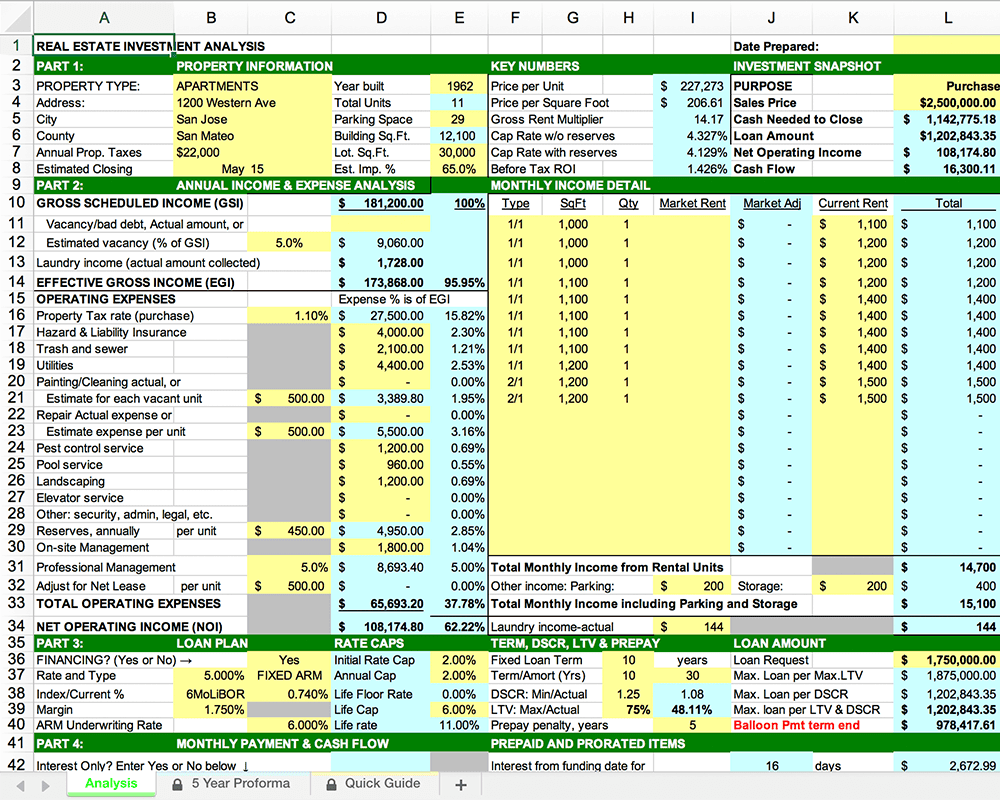
Where do I even begin?!
And that’s when I had the idea to build DealCheck – a cloud-based, easy-to-use property analysis tool for real estate investors and agents. I wanted to create a platform that would help new investors learn the ropes and avoid costly mistakes, but at the same time provide the flexibility to perform more advanced analysis with a click of a button.
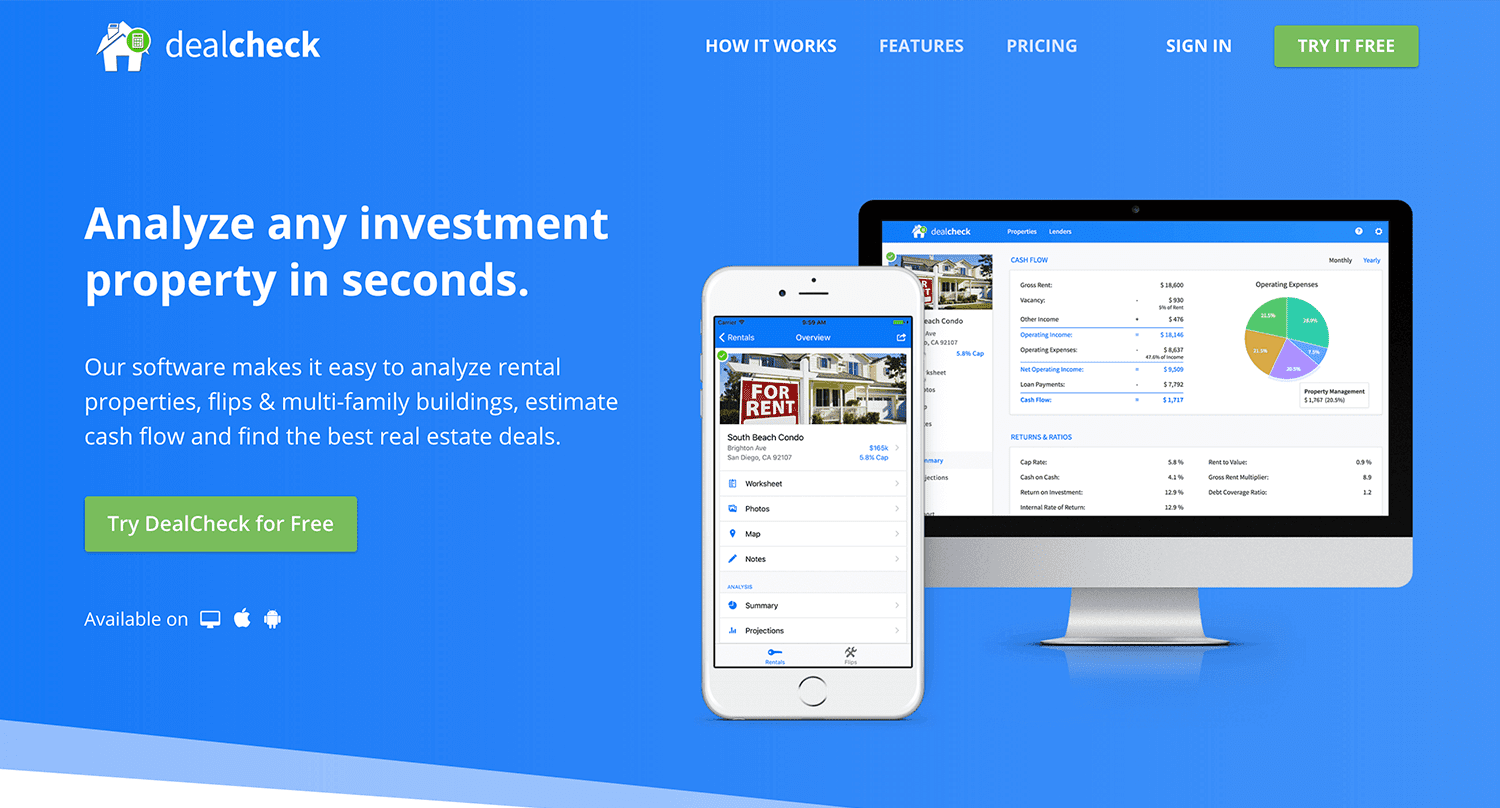
Making real estate investing easier and more accessible.
The Challenges of Solo Development
I was working as a front-end engineer at the time, so I knew I could build the UI myself, but what about the back-end, data storage, authentication, and a bunch of other things you need for a full-functioning cloud app?
I didn’t know anybody I could bring on as a co-founder, so I set out to research what technologies and platforms I could leverage to help me with the back-end and server infrastructure.
Firebase kept popping up again and again and I began to look at it in more detail. It was then recently acquired by Google and its collection of BaaS (backend-as-a-service) modules seemed to offer the exact solution I needed to build DealCheck.
I was especially impressed with the documentation for each feature and how well all of the different technologies could be tied together to create one unified platform.
It wasn’t long before I signed up and started building the first MVP of the app.
Using Firebase to Quickly Build a Scalable Backend
As the only developer on the project, I had limited time and resources to spend on building the back-end, so I set out to use every Firebase feature that was available at the time to my advantage.
My goal was actually to write as little server-side code as possible and instead focus on leveraging the different Firebase modules to solve three specific challenges:
Challenge #1 – Authentication and User Management
The first one was authentication and user management. DealCheck’s users needed the ability to create their accounts so they can view and analyze properties on any device (more on that later). I wanted to have the ability to sign in with email, Facebook or a Google account.
Firebase Authentication was designed specifically for this purpose and I used it to handle pretty much the entire authentication flow. Out-of-the-box, it has support for all the major social networks, cross-network credential linking and the basic account management operations like email changes, password resets and account deletions.
There was no server-side code required at all – I just needed to build the UI on the front-end.
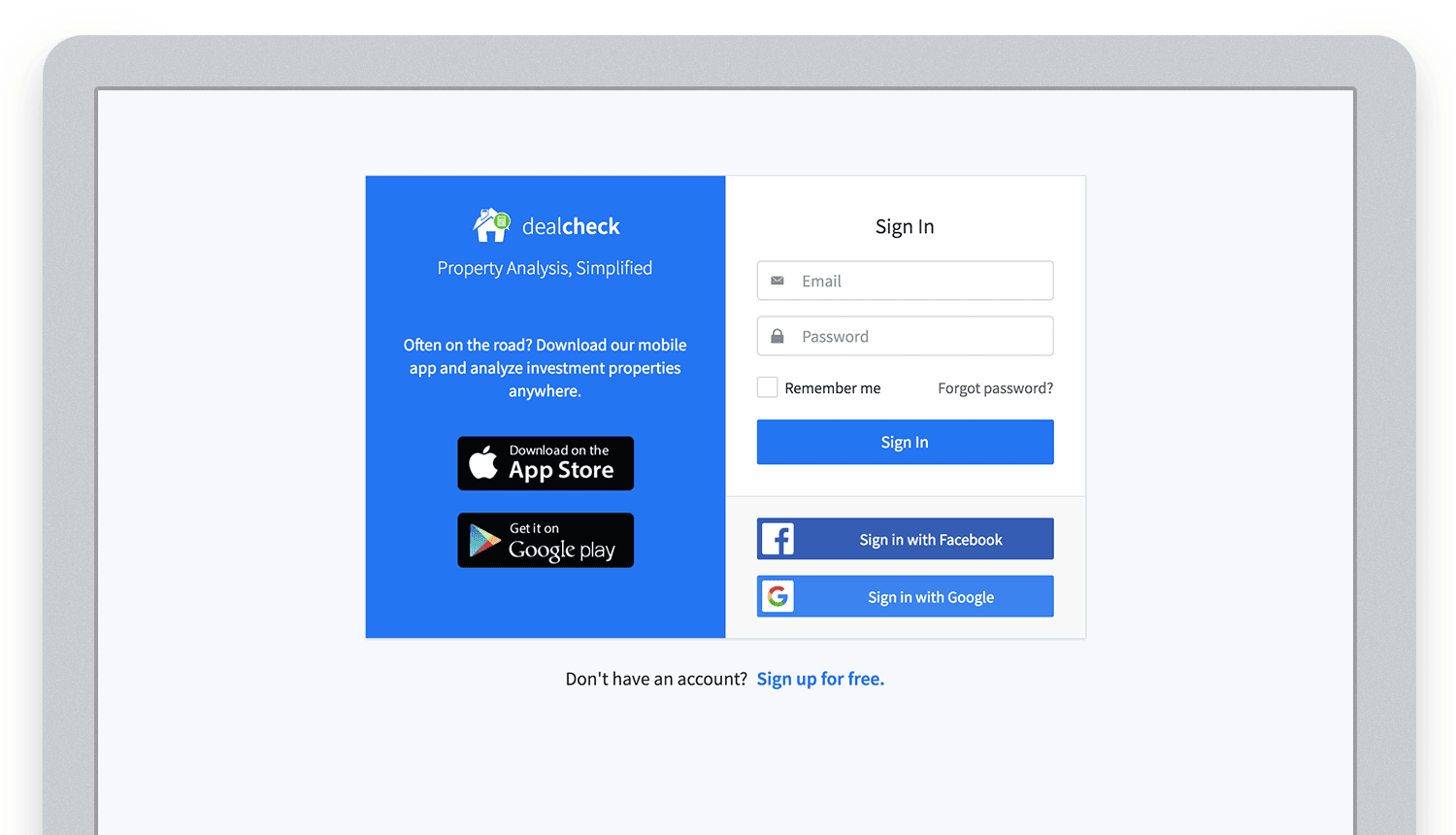
Email, Facebook and Google sign in powered by Firebase.
And as an added benefit, Firebase Authentication ties directly into the Realtime Database product to create a declarative permissions and access control framework that’s easy to implement and maintain. This helped me make sure user data was protected from unauthorized access, but also facilitate data sharing among users.
Challenge #2 – Cloud Storage with Cross-Device Sync
Next up was data storage. I knew that I wanted DealCheck’s users to be able to use the app and analyze properties online, on iOS and Android. So I needed a real-time, cloud-based database solution that could sync data across any device.
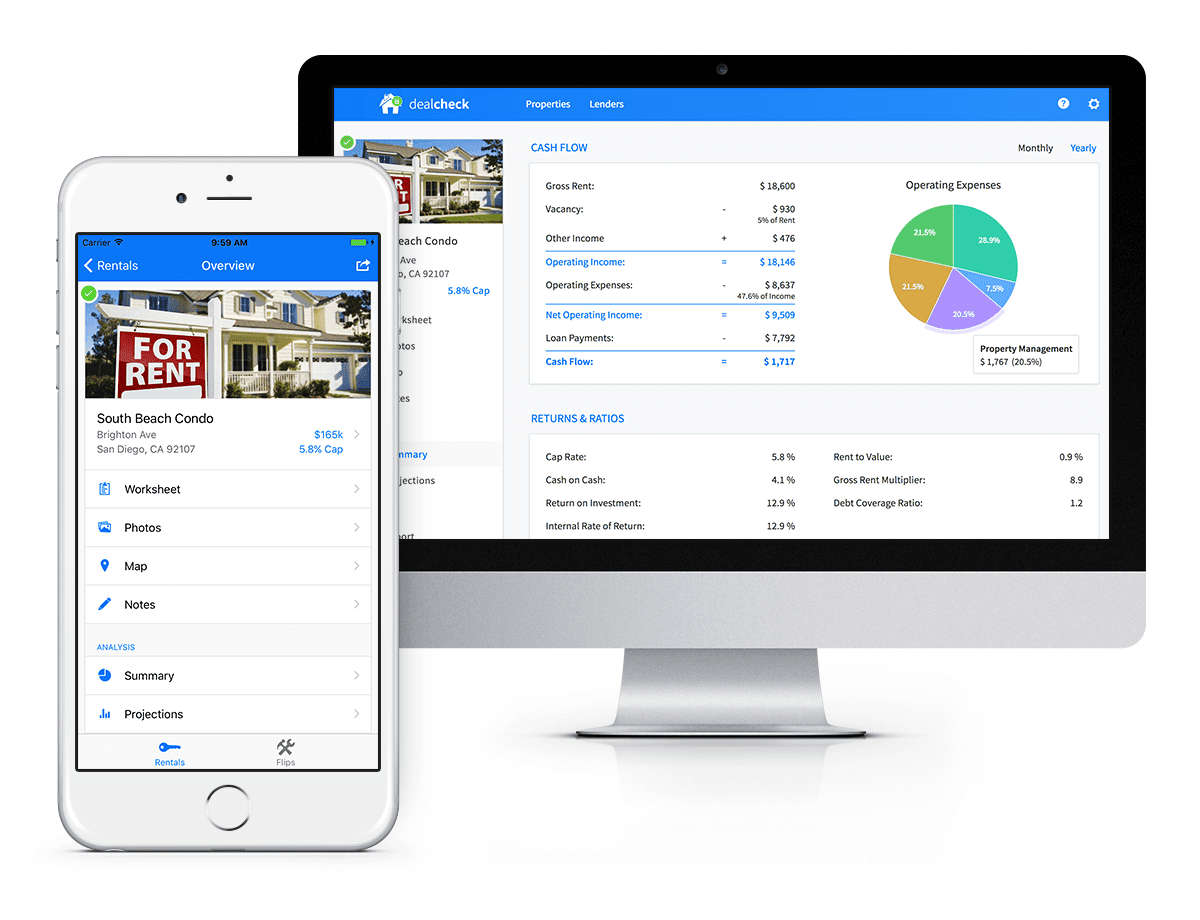
Syncing data across web and mobile is not easy!
Firebase Realtime Database is a NoSQL, JSON-based database solution that was designed exactly for this purpose, and I was actually surprised how great it worked. I used the official AngularJS bindings for Firebase on the front-end to read and write to it directly from the client.
I had to do some extra work on mobile to implement an offline mode with syncing after reconnections, but all-together the code required to make everything work was minimal.
As I mentioned, Firebase Authentication tied directly to the database to facilitate access control, so I really didn’t need to do anything extra there. And I was able to set up automatic daily backups of all the data with a click of a button.
Challenge #3 – Third-Party Integrations
Up to now, I had written exactly 0 lines of server-side code and everything was handled by the client directly. As DealCheck’s development progressed, however, I knew that I would need a server to handle some operations that could not be done in the client.
I wasn’t very experienced with server maintenance and DevOps, but fortunately the Firebase Cloud Functions product was able to solve all of my needs. Cloud Functions are essentially single-purpose functions that can be triggered (or executed) based on a specific HTTP request or events coming from the Authentication, Realtime Database or other Firebase products.
Each function can be run once based on a specific event trigger to perform its prescribed task. You don’t have to worry about provisioning a server instance or managing load – everything is done automatically for you by Firebase.
What’s even cooler, is that Cloud Functions can access the Realtime Database and Cloud Storage buckets of the same project, performing operations on them server-side, as needed.
This is how DealCheck processes subscription payments through Stripe, validates Apple and Google Play mobile subscription receipts, integrates with third-party APIs and updates database records without user interaction.
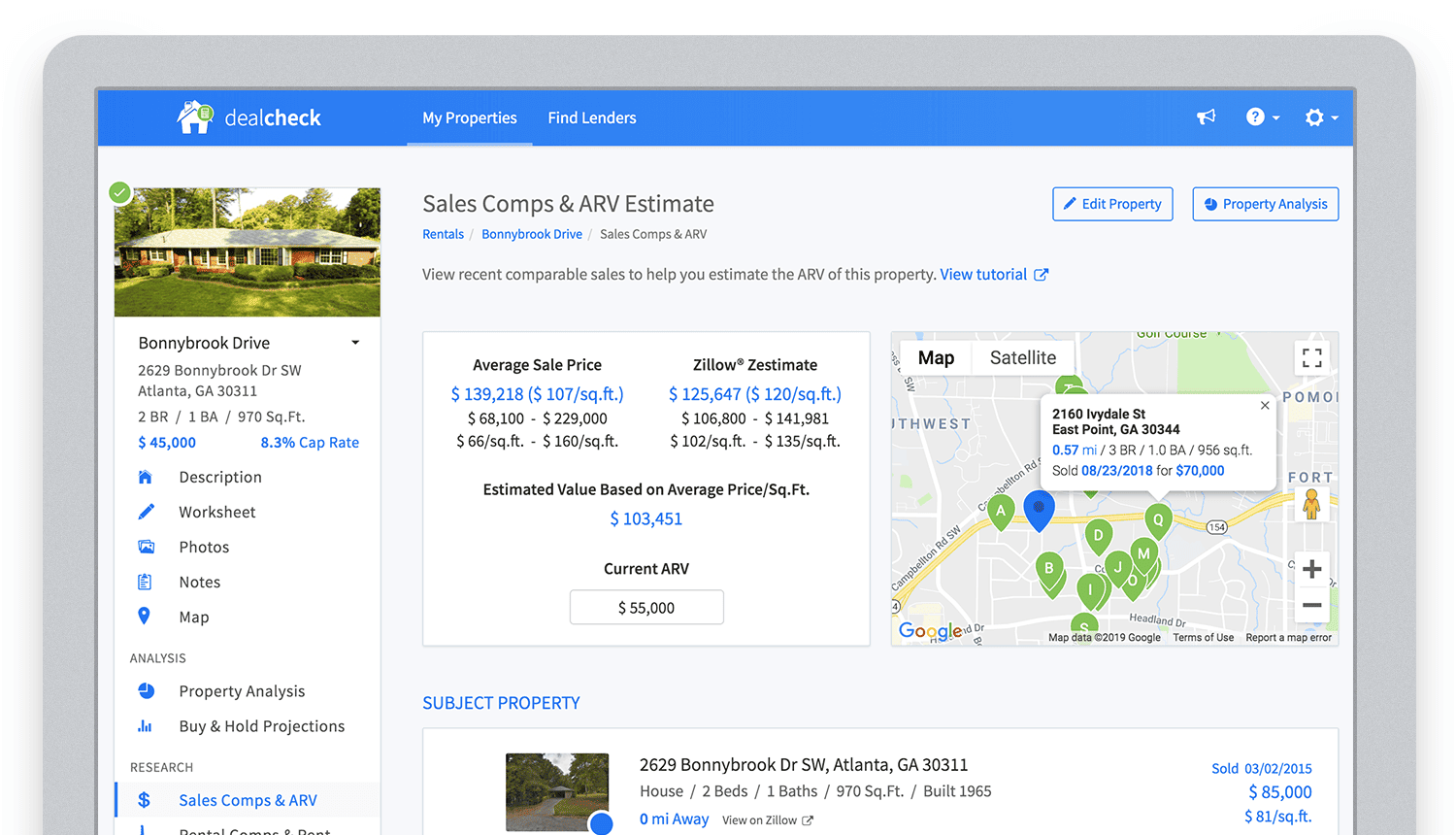
Bringing in sales comparable data from third-party providers into DealCheck.
Cloud Functions became the “glue” that tied the entire back-end infrastructure together.
Growing from an MVP to 100,000 Users with Firebase
The first version of the DealCheck app was built and launched in less than 5 months with just me on the development team. I definitely don’t think that would have been possible without Firebase powering the back-end infrastructure. Maybe the project wouldn’t have ever launched at all.
While Firebase is awesome for quick MVP development, it’s definitely designed to power production applications at scale as well. As DealCheck grew from a small side-project to one of the most popular real estate apps with over 100k users, all of the Firebase products that we use scaled to support the increasing load.
Moreover, the fantastic interoperability of all Firebase modules allows us to develop and release new features much faster because of the reduced coding requirements and ease of configuration.
So next time you’re looking to build an ambitious project with a small team – take a look at how Firebase can help you reduce development time and provide a suite of powerful tools that scale as your business grows.
This is exactly how DealCheck grew from a simple idea to make property analysis easier and faster, to an app that is helping tens of thousands of people grow their wealth and passive income through real estate investing. It’s a truly awesome and fulfilling experience to see your work positively impact so many people and it wouldn’t have been possible without Firebase.
Mrs. T’s Pierogies Moves SAP Systems to Google Cloud for Faster Analytics Capabilities for its SAP Data

6854
Of your peers have already read this article.
1:30 Minutes
The most insightful time you'll spend today!
Pierogies might just be the ultimate comfort food. But when Mrs. T’s Pierogies — the leading manufacturer of frozen pierogies in the US — learned it needed to transition its existing on-premises SAP ECC to S/4HANA, the company sought a little comfort for itself.
Founded in 1952, Mrs. T’s Pierogies now produces more than 650 million pierogies a year. Moving that many pierogies requires a powerful ERP system — and an equally powerful IT infrastructure on which to run it. Mrs. T’s realized that the SAP-mandated transition of its ERP solution to SAP S/4HANA was an opportunity to move its SAP systems to Google Cloud and gain real-time analytics capabilities for faster sales forecasting, more effective trade promotions, and more sophisticated planning.
From necessity to opportunity
Mrs. T’s successfully ran its SAP ECC solution on its own on-premises servers for years. But after SAP decided to sunset the product, Mrs. T’s realized that it faced multiple challenges, including:
- Migrating its SAP ECC 6.0 system from an on-premises leagcy OS to a cloud-based Linux environment
- Moving data from its SAP DB2 database to HANA
- Transitioning from ECC to SAP S/4HANA
That complex transition needed to take place with little or no downtime, since nearly all of the company’s invoices, warehouse movements, and transfer orders used the Electronic Data Interchange (EDI) protocol. Missing even a few hours of EDI transactions would put significant revenue at stake. Adding to the challenge: Some Mrs. T’s customers would not accept an invoice past five days, which left little room for error. Mrs. T’s chose Rackspace Technology, a longtime Google Cloud partner, to oversee the move.
Mrs. T’s could have chosen to run S/4HANA on its legacy hardware but saw migration to Google Cloud as an opportunity to improve key aspects of its business, in particular data analytics. Historically, sales planning and forecasting involved time-consuming manual processes. But the speed, availability, and scalability of Google Cloud meant that Mrs. T’s could take advantage of S/4HANA’s embedded analytics capabilities. Migrating could also open the door to leveraging Google Cloud’s native integration of SAP data to power Google tools such as BigQuery, Google Cloud AI Building Blocks, and more.
The move to Google Cloud also gave Mrs. T’s an opportunity to update its disaster recovery process. Previously, the company backed up to tape. So, if its SAP systems went down, a member of the IT department would have to drive the most recent tape backups an hour to its cold site, where the disaster recovery partner would load the SAP backup tape, boot the system up, switch network connections to that site, and cross their fingers. Not only would downtime be significant, but restored data would be limited to the periodic tape backup.
“Everything just worked”
Once Mrs. T’s decided to migrate to Google Cloud, the company worked with Rackspace Technology to implement the system. The first phase focused on moving the SAP production environment from on-premises infrastructure to Google Cloud and updating its database to HANA, which took place over 12 weeks. The switchover occurred over a weekend and was all but invisible to users. “We came in on Monday and everything just worked,” recalls Timothy Coyle, Director of Information Systems & Technology. In a second four-month phase, the company transitioned from ECC to S/4.
The move to Google Cloud paid dividends immediately. Batch transactions occurred twice as fast and on-screen end-user transactions rendered instantly. The upgrade also gave the finance team access to embedded analytics and monitoring for the first time. With everything now in the cloud, disaster recovery could be dynamic and nearly instantaneous, with a worst-case scenario of just 5 to 10 minutes of downtime.
“Mrs. T’s needed a skilled and experienced partner that could move its SAP environment to Google Cloud with no negative impacts to its business. We knew this migration was a key initiative in Mrs. T’s digital transformation journey,” says Chuck Britton, Google Partner Development Manager at Rackspace. “We also knew that running SAP on Google Cloud would give the business the fast and flexible analytical capabilities it needed for its SAP data.”
From ideation to production, Mrs. T’s migrated from its legacy on-premises infrastructure to a modern SAP S/4HANA solution on Google Cloud in only seven months, with minimal downtime and zero disruptions. Now that the migration is complete, Mrs. T’s has a flexible, highly scalable environment to run the SAP applications and data that fuel the business. Says Coyle, “Our strategic intent for IT is to make processes simpler, people more productive, and infrastructure more secure. This project fits right square in the middle of that strategic philosophy.”
Learn more about ways in which Google Cloud can transform your SAP experience and about Rackspace Google Cloud solutions for SAP customers.
More Relevant Stories for Your Company

Google Cloud Announces General Availability of BigQuery Row-level Security
Data security is an ongoing concern for anyone managing a data warehouse. Organizations need to control access to data, down to the granular level, for secure access to data both internally and externally. With the complexity of data platforms increasing day by day, it's become even more critical to identify

Cloud Spanner & Bigtable Helps Sabre Build Consistency & Scalability to Serve 1 Billion Travellers
Sabre is an innovative software and technology company that leverages highly scalable databases and artificial intelligence (AI) to power travel industry partners around the globe. Our company processes more than 12 billion shopping requests and serves over 1 billion travelers every year. The companies that partner with us include airlines, travel

Neo4J & Google Cloud: Graph Data in Cloud to Address Challenges in FinServ Industry
Over the last decade, financial service organizations have been adopting a cloud-first mindset. According to InformationWeek, lower costs and enhanced scalability were the biggest drivers for cloud adoption in financial services, and cloud-native applications allow access to the latest technology and talent, enabling adopters to rebuild transaction processing systems capable of

Incorporating Custom Holidays into Your Time-Series Models with BigQuery ML
About three years ago, JCB, one of the biggest Japanese payment companies, launched a project to develop new high-value services with agility. We set up a policy of starting small from scratch without using the existing system, which we call the concept of “Dejima”, where we focused on improving various aspects
