





4558
Of your peers have already watched this video.
43:30 Minutes
The most insightful time you'll spend today!
What is Cloud Spanner and Is It the Right Database for You?
You’ve probably heard about Cloud Spanner, but what exactly does it do that is so different from other databases out there?
How do you know if it’s worth spending your valuable time trying out?
Cloud Spanner is the first enterprise-grade, globally distributed, and strongly consistent database service built for the cloud specifically to combine the benefits of relational database structure with non-relational database scale.
Phew! That was a mouthful.
So, what really differentiates it? It’s unique in the marketplace in that it combines transactions, SQL query, and relational structure with the scalability you typically associate with non-relational or NoSQL databases.
Databases are part of every application. So it’s very important to pick the right database for your application.
With Cloud Spanner, you enjoy all the traditional benefits of a SQL database; transactions, high availability, schema changes without downtime, and SQL queries. But unlike many relational databases, Cloud Spanner scales horizontally from one to thousands of servers, an arbitrarily large number.
With fully automatic data replication and server redundancy, Cloud Spanner delivers up to five nines of availability in multi-region instances and four nines of availability in regional instances.
In fact, Google’s internal Spanner instance has been handling millions of queries per second from many Google services for years.
In this video, you’ll find out what Cloud Spanner is, what it’s useful for, why it’s unique, and the challenges it solves.
How We Built a Brand New Bank on Google Cloud and Cloud Spanner: The First Scalable, Enterprise-grade, Database Service

6544
Of your peers have already read this article.
6:30 Minutes
The most insightful time you'll spend today!
Editor’s note: Technology today lets companies of any size take on entire industries simply with an innovative business model plus digital distribution. Take Shine, a French startup whose platform helps freelancers manage their finances — and their administrative commitments. Here, Raphael Simon, Shine’s CTO and co-founder, talks about why Shine built a new bank on Google Cloud Platform, and in particular Cloud Spanner.
More and more people are deciding to take the plunge and start a freelance career. Some of them by choice, others out of necessity. One of their biggest pain points is dealing with administrative tasks.
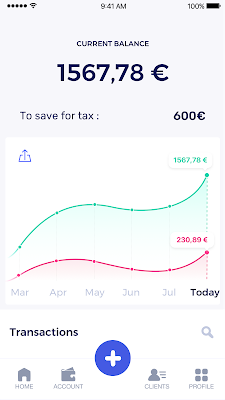
In some countries, especially in Europe, the administrative burden of being a freelancer is similar to what a company of 10 or more people deals with. A freelancer doesn’t necessarily have the time or skills to manage all this paperwork. So we are building a new bank for freelancers from the ground up that helps automate administrative tasks associated with their business.
Shine’s banking services and financial tools make it as easy to work as a freelancer as it is to work for a larger company. We deal with administrative tasks on behalf of the freelancer so that he or she can focus on their job: finding and wowing clients.

Building our infrastructure
As a new bank, we had the opportunity to build our infrastructure from the ground up. Designing an infrastructure and choosing a database presents tough decisions, especially in the financial services world. Financial institutions come under tremendous scrutiny to demonstrate stability and security. Even a tiny leak of banking data can have tremendous consequences both for the bank and its clients, and any service interruption can trigger a banking license to be suspended or a transaction to be declined.
At the same time, it’s vital for us to optimize our resources so we can maximize the time we spend developing user-facing features. In our first six months, we iterated and validated a prototype app using Firebase, and secured our seed funding round (one of the largest in Europe in 2017).
Based on our positive experience with Firebase, plus the ease-of-use and attractive pricing that Google Cloud offered, we decided to build our platform on Google Cloud Platform (GCP).
We were drawn to GCP because it has a simple, consistent interface that is easy to learn. We chose App Engine flexible environment with Google Cloud Endpoints for an auto-scaling microservices API. These helped us reduce the time, effort, and cost in terms of DevOps engineers, so we could invest more in developing features, while maintaining our agility.
We use Cloud Identity and Access Management (Cloud IAM) to help control developer access to critical parts of the application such as customer bank account data. It was quite a relief to lean on a reliable partner like Google Cloud for this.
Database decisions
Next came time to choose a database. Shine lives at the financial heart of our customers’ businesses and provides guidance on things like accounting and tax declaration. The app calculates the VAT for each invoice and forecasts the charges they must pay each quarter.
Due to the sensitivity of our customers’ data, the stakes are high. We pay careful attention to data integrity and availability and only a relational database with support for ACID transactions (Atomicity, Consistency, Isolation, Durability) can meet this requirement.
At the same time, we wanted to focus on the app and user experience, not on database administration or scalability issues. We’re trying to build the best possible product for our users, and administering a database has no direct value for our customers. In other words, we wanted a managed service.
Cloud Spanner combines a globally distributed relational database service with ACID transactions, industry-standard SQL semantics, horizontal scaling, and high availability. Cloud Spanner provided additional security, high-availability, and disaster recovery features out-of-the-box that would have taken months for us to implement on our own. Oh, and no need to worry about performance — Cloud Spanner is fast. Indeed, Cloud Spanner has been a real asset to the project, from the ease-of-use of creating an instance to scaling the database.
Cloud Spanner pro tips
We began working with Cloud Spanner and have learned a lot along the way. Here are some technical notes about our deployment and some best practices that may be useful to you down the road:
- Cloud Spanner allows us to change a schema in production without downtime. We always use a NOT NULL constraint, because we generally think that using NULL leads to more errors in application code. We always use a default value when we create an entity through our APIs and we use Cloud Dataflow to set values when we change a schema (e.g., adding a field to an entity).
- With microservices, it’s generally a good practice to make sure every service has its own database to ensure data isolation between the different services. However, we adopted a slightly different strategy to optimize our use of Cloud Spanner. We have an instance on which there are three databases — one for production, one for staging and one for testing our continuous integration (CI) pipeline. Each service has one or more interleaved tables that are isolated from others services’ tables (we do not use foreign-keys between tables from different services). This way our microservices data are not tightly “coupled”.
- We created an internal query service that performs read-only queries to Cloud Spanner to generate a dashboard or do complex queries for analytics. It is the only service where we allow joins between tables across services.
- We take advantage of Cloud Spanner’s scalability, and thus don’t delete any data that could one day be useful and/or profitable.
- We store all of our business logs on Cloud Spanner, for example connection attempts to the application. We append the ‘-Logs’ suffix to them.
- When possible, we always create an interleave.
In short, implementing Cloud Spanner has been a good choice for Shine:
- It’s saved us weeks, if not months, of coding.
- We feel we can rely on it since it’s been battle-tested by Google.
- We can focus on building a disruptive financial services product for freelancers and SMBs.
And because Cloud Spanner is fully managed and horizontally scalable, we don’t have to worry about hardware, security patches, scaling, database sharding, or the possibility of a long and risky database migration in the future. We are confident Cloud Spanner will grow with our business, particularly as we expand regionally and globally. I strongly recommend Cloud Spanner to any company looking for a complete database solution for business-critical, sensitive, and scalable data.
How One Company Uses AI and Data Analysis to Boost Revenue

9444
Of your peers have already read this article.
4:30 Minutes
The most insightful time you'll spend today!
AI, deep learning, and image recognition is transforming the shopping experience. These technologies enable consumers to use product images or screenshots rather than text to search for similar products. This improves the customer experience and enables retailers with online and offline outlets to provide a genuine omnichannel experience.
The lack of complexity and the ease of use of BigQuery has enabled ViSenze to reduce its data infrastructure and management costs by 30%–50%, and scale up without incurring downtime.
—Renjie Yao, Data Platform Lead, ViSenze
Visual commerce provider ViSenze is helping some of the world’s leading retailers improve conversion rates through image-based search.
The business’s products also enable media companies to use the platform to turn images and videos into engagement opportunities—driving new and incremental revenues.
Created through NExT—a research center established by the National University of Singapore and Tsinghua University of China—ViSenze now operates in the United States, United Kingdom, India, China, and Singapore. The business is backed by Japan-based internet and ecommerce company Rakuten and cross-border investment specialist WI Harper Group.
Growth in SMB and Mobiles
Renjie Yao, Data Platform Lead at ViSenze, sees opportunities for growth in the small-to-medium business sector, where companies do not have the resources to build similar technologies, and with mobile device OEMs to integrate ViSenze natively on smartphones.
Phone owners can activate a “shopping lens” on camera and gallery apps to capture an image of a product. They then receive matching results from more than 800 partner merchants and retailers and can then click through to product pages on partner apps or mobile websites. Alternatively, they may use a photo to compare products sold on different sites or shop matching styles.
“Our research found Google Cloud provided a complete, integrated ecosystem rather than a disparate collection of tools and components, and so was ideal for our needs.”
—Renjie Yao, Data Platform Lead, ViSenze
The ViSenze API analyzes the contents of a selected or clicked image and sends the information back to the organization’s visual commerce platform. The platform feeds back similar results based on that information.
The ViSenze offering also extends to image analysis for the tagging of product attributes—such as a white turtleneck cardigan with full sleeves—to provide an improved search experience.
Data Vital to ViSenze
Capturing and analyzing large volumes of data is integral to ViSenze. “We have to understand how consumers interact with our customers’ ecommerce websites and apps,” says Yao. “For example, we need to know who has looked at a particular pair of jeans on a website and whether that visit led to a conversion. We can then tell that customer whether they need to make more stock available.”
ViSenze also relies on data to provide high-quality training for its image recognition models and its domain-specific models for online retail.
Protect Customer Data
Data is vital to ViSenze—but customer privacy is most important. “All the data we collect is transparent to our customers, meaning they can decide what they do not want us to collect. In addition, all personal data processing complies with privacy protection regulations in each region, such as the General Data Protection Regulation in Europe.”
A Quick Move to the Cloud
ViSenze started operations using servers, storage, networking, and associated systems in an on-premises data center operated by NExT.
However, to support rapid growth, the business decided to move its workloads to the cloud. ViSenze opted for a multi-cloud architecture, using in part a Google Cloud data infrastructure.
“Our research found Google Cloud provided a complete, integrated ecosystem rather than a disparate collection of tools and components, and so was ideal for our needs,” says Yao. “We could connect different components with the click of a mouse.” Further, the business found it could easily configure rules and pipelines to route data logs to relevant Google Cloud services.
The review found Google Cloud’s extensive managed services would also remove administration and maintenance tasks from ViSenze’s in-house technology team—freeing team members to focus on more valuable tasks.
In addition, Google Cloud provided the security features—including custom hardware running hardened operating systems and file systems and encryption of data at rest and in transit—needed to protect sensitive information. Finally, the location of Google Cloud regions in several countries would enable the business to meet regulatory and data sovereignty requirements.
A Three-Month Implementation
ViSenze opted to move to Google Cloud in mid-2017 and completed a three-month implementation using internal resources. “The process was very smooth and intuitive, and we had no problems building our entire data platform within Google Cloud,” says Yao.
The business now uses an architecture comprising Google Kubernetes Engine to manage and orchestrate Docker containers running in Google Cloud Platform; BigQuery to provide an analytics data warehouse, with Google Data Studio providing customizable visualization and reports; Stackdriver to monitor and manage virtual machine instances and services inside Google Cloud; Cloud SQL to manage its relational databases for real-time analytics; Compute Engine to provide compute resources; Cloud Storage to store files and objects; Cloud Pub/Sub to provide real-time messaging between applications; and Cloud Functions to build event-driven applications.
After collecting the request logs of users in virtual machine instances and Docker containers, ViSenze distributes them in three directions. “We export raw logs into Cloud Pub/Sub for indexing inside an Elasticsearch search engine, and to a BigQuery data warehouse for further analytics,” explains Yao. “We also use Cloud Functions-created applications to obtain the logs from Cloud Pub/Sub to perform some real-time calculations.”
“We are currently using Airflow workflow management on Compute Engine as our hosted ETL platform, but are likely to move to Cloud Composer in future.”
500 Million Records Per Day
With Google Cloud providing its data infrastructure, ViSenze is well positioned to meet internal and customer demands for more granular insights. The business is now processing 500 million records per day through BigQuery and saves up to one year’s aggregated data—excluding any personal data—in the data warehouse for analysis.
The nature of ViSenze’s business means most reports are generated for data processed on an hourly, daily, or monthly basis. “BigQuery is extremely stable and performance optimized, regardless of the volume of data it processes,” says Yao. “Across BigQuery and other Google Cloud Platform services, we’ve recorded 99.99% availability over the past year.”
The lack of complexity and the ease of use of BigQuery has enabled ViSenze to reduce its data infrastructure and management costs by 30%–50%, and scale up without incurring downtime.
“With BigQuery, we have saved the equivalent of two full-time engineers and now need only half of one person’s time to maintain our whole data platform,” says Yao.
“In addition, BigQuery integrates closely with Data Studio, enabling non-technical people in our product and business teams to create dynamic, detailed analysis dashboards. We now use Data Studio to create nearly 50 separate reports.”
The business has now grown to offer access to more than 1 billion users and a listing of more than 400 million purchasable products.
Next Steps
ViSenze is now researching the potential of the Cloud AutoML suite of machine learning products to improve the training of its models and run a fully managed NoSQL database through Cloud Datastore.
“A NoSQL database service is the only missing piece of our architecture for now, and using Cloud Datastore would enable us to focus almost exclusively on our business,” says Yao. “With Google Cloud Platform, we are ideally positioned to continue providing support to our business team and help them continue expanding into new markets.
“In addition, we can help retailers and consumers to unlock the potential of the web and apps to transform the purchasing experience.”
How BigQuery’s Unique Features Support Your Data at Petabyte-scale

4782
Of your peers have already read this article.
3:00 Minutes
The most insightful time you'll spend today!
Organizations rely on data warehouses to aggregate data from disparate sources, process it, and make it available for data analysis in support of strategic decision-making. BigQuery is the Google Cloud enterprise data warehouse designed to help organizations to run large scale analytics with ease and quickly unlock actionable insights. You can ingest data into BigQuery either through batch uploading or by streaming data directly to unlock real-time insights. As a fully-managed data warehouse, BigQuery takes care of the infrastructure so you can focus on analyzing your data up to petabyte-scale. BigQuery supports SQL (Structured Query Language), which you’re likely already familiar with if you’ve worked with ANSI-compliant relational databases.
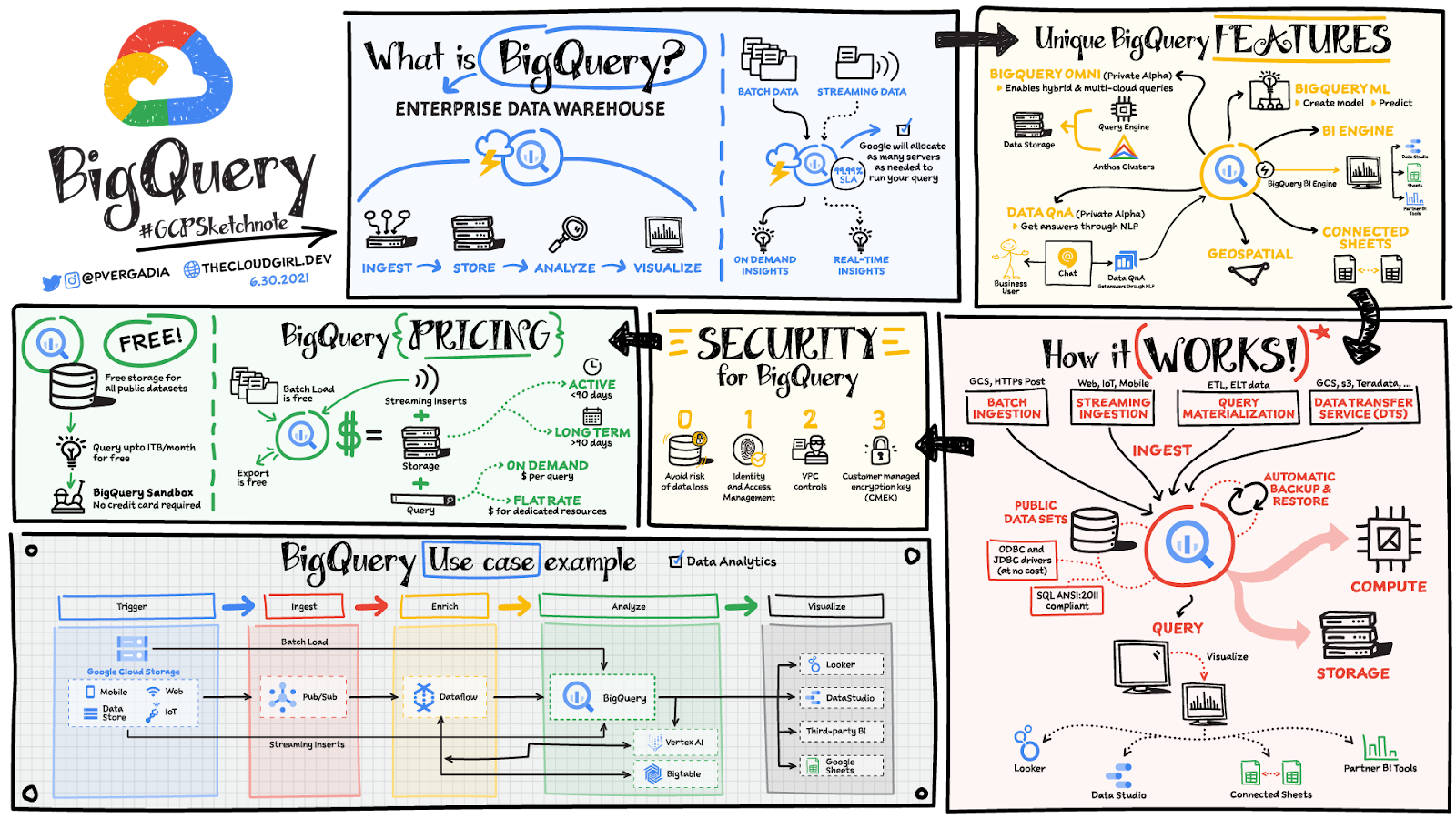
BigQuery unique features
BI Engine – BigQuery BI Engine is a fast, in-memory analysis service that provides subsecond query response times with high concurrency. BI Engine integrates with Google Data Studio and Looker for visualizing query results and enables integration with other popular business intelligence (BI) tools.
BigQuery ML: BigQuery ML is unlocking machine learning for millions of data analysts. It enables data analysts and data scientists to build and operationalize machine learning models directly within BigQuery, using simple SQL.
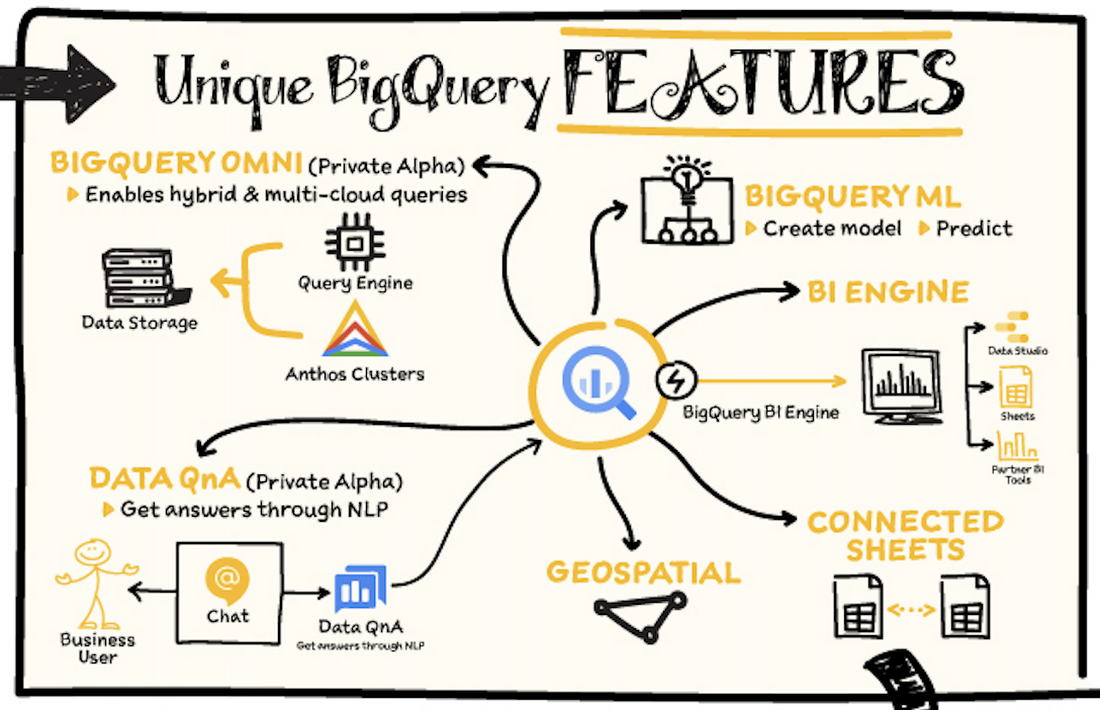
BigQuery Omni – BigQuery Omni is a flexible, multi-cloud analytics solution powered by Anthos that lets you cost-effectively access and securely analyze data across Google Cloud, Amazon Web Services (AWS), and Azure, without leaving the BigQuery user interface (UI). Using standard SQL and familiar BigQuery APIs, you can break down data silos and gain critical business insights from a single pane of glass.
Data QnA: Data QnA enables self-service analytics for business users on BigQuery data as well as federated data from Cloud Storage, Bigtable, Cloud SQL, or Google Drive. It uses Dialogflow and enables users to formulate free-form text analytical questions, with auto-suggested entities while users type a question.
Connected Sheets -The native integration between Sheets and BigQuery makes it possible for all business stakeholders, who are already quite familiar with spreadsheet tools, to get their own up-to-date insights at any time.
Geospatial data – BigQuery offers accurate and scalable geospatial analysis with geography data types. It supports core GIS functions – measurements, transforms, constructors, and more – using standard SQL.
How does it work?
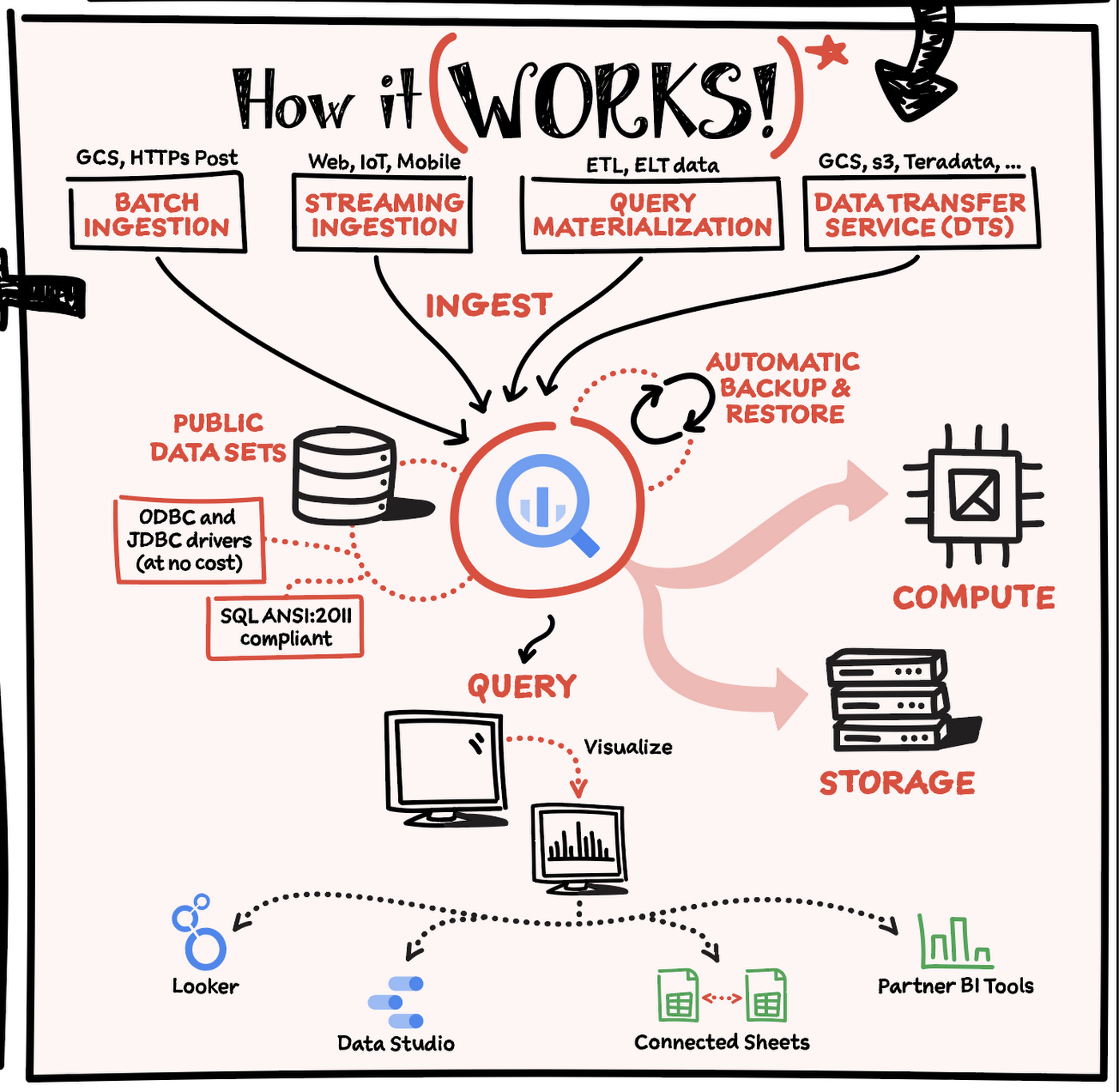
Here’s how it works: You ingest your own data into BigQuery or use data from the public datasets. Storage and compute are decoupled and can scale independently on demand. This offers immense flexibility and cost control for your business as you don’t need to keep expensive compute resources up and running all the time. As a result, BigQuery is much more cost-effective than traditional node-based cloud data warehouse solutions or on-premises systems. BigQuery also provides automatic backup and restore of your data.
You can ingest data into BigQuery in batches or stream real-time data from web, IoT, or mobile devices via Pub/Sub. You can also use Data Transfer Service to ingest data from other clouds, on-premises systems or third-party services. BigQuery also supports ODBC and JDBC drivers to connect with existing tools and infrastructure.
Interacting with BigQuery to load data, run queries, or create ML models can be done in three different ways. You can use the UI in the Cloud Console, the BigQuery command-line tool, or the API via client libraries available in several languages.
When it comes time to visualize your data, BigQuery integrates with Looker as well as several other business intelligence tools across the Google partner ecosystem.
What about security?
BigQuery offers built-in data protection at scale. It provides security and governance tools to efficiently govern data and democratize insights within your organization.
- Within BigQuery, users can assign dataset-level and project-level permissions to help govern data access. Secure data sharing ensures you can collaborate and operate your business with trust.
- Data is automatically encrypted both while in transit and at rest, ensuring that your data is protected from intrusions, theft, and attacks.
- Cloud DLP helps you discover and classify sensitive data assets.
- Cloud IAM provides access control and visibility into security policies.
- Data Catalog helps you discover and manage data.
How much does it cost?
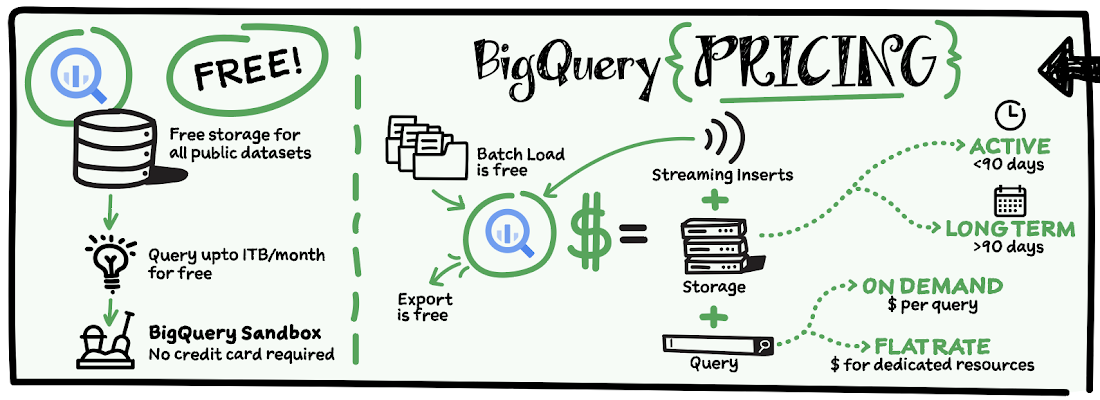
The BigQuery sandbox lets you explore BigQuery capabilities at no cost and confirm that BigQuery fits your needs. With BigQuery you get predictable price-performance: you pay for storing and querying data, and for streaming inserts. Loading and exporting data are free of charge. Storage costs are based on the amount of data stored, and have two rates based on how often the data is changing. Query costs can be either:
- On-demand – you are charged per query by the amount of data processed
- Flat-rate – if you prefer to purchase dedicated resources
You can start with the pay-as-you-go, on-demand option and later move to flat-rate if that better suits your usage. Or, start with flat-rate, get a better understanding of your usage and move to the pay-as-you-go models for additional workloads.
To explore BigQuery and its capabilities a bit more, check out the sandbox; and when you’re ready to modernize your data warehouse with BigQuery then check out the documentation to streamline your migration process here. https://www.youtube.com/embed/So-tVyBQt8E?enablejsapi=1&
For more #GCPSketchnote, follow the GitHub repo. For similar cloud content follow me on Twitter @pvergadia and keep an eye out on thecloudgirl.dev.
Autoclass: Simplify and Automate Cost Optimization for Cloud Storage

3223
Of your peers have already read this article.
3:00 Minutes
The most insightful time you'll spend today!
There is a data explosion challenge that most IT admins and companies are tackling regularly. The cost-effectiveness, durability and scalability make object storage the first choice for unstructured data. Cloud Storage is an object storage service capable of storing data at exabyte scale and easily managing billions, if not trillions, of objects. However, cost optimization for data stored in object storage is a hard problem.
Choosing the right storage class for your data requires you to know about the access patterns for this data. However, if the access patterns are unknown or unpredictable, it’s often difficult for customers to choose the right storage class for their data. Data placement can have a significant impact on cost as the storage price for the archive class is 6% the storage price for the standard storage class. Having frequently accessed data in colder storage classes can lead to unexpected operations charges. Having data that is never accessed in standard storage can lead to large at-rest storage bills.
As IT administrators and organizations enable different applications and workloads to start leveraging object storage at massive scale, optimizing for cost is only getting exponentially harder to solve. As they migrate workloads to cloud they would like to have predictability and control in their overall storage spend. Wouldn’t it be great if there was a way to automatically place your data in the best storage class?
Introducing Autoclass – a new managed data placement service for Cloud Storage.
Simplifying Lifecycle Management while Reducing TCO
Autoclass is an easy to use bucket-level setting that simplifies and automates lifecycle management of all your Cloud Storage data based on last access time.
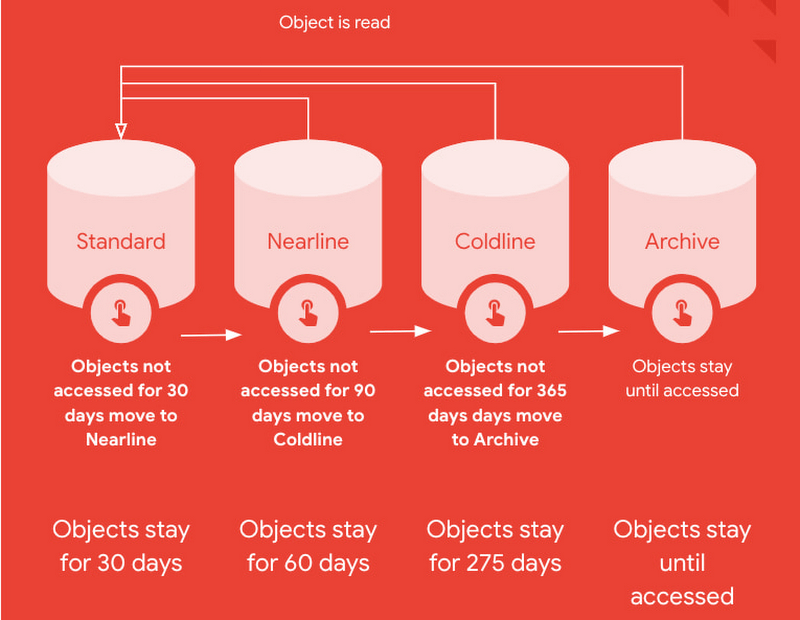
This is very useful for workloads with unpredictable and unknown access patterns. It automatically moves data that is not accessed to colder storage classes to reduce at-rest storage cost. When cold data is accessed, it is automatically promoted to Standard storage class to optimize the operations costs for future accesses.
Autoclass automatically delivers cost savings and removes inefficiencies by moving data to the storage class with the most favorable pricing for customer workloads.
It helps organizations achieve price predictability by removing surcharges associated with colder storage classes – there are no early deletion fees, retrieval fees or operations charges for class transitions when Autoclass is enabled on a bucket.
What are customers saying about Autoclass?
“Redivis is a data platform for academic research. We connect data managers with researchers to discover, understand, and analyze Petabytes of data. With Cloud Storage Autoclass, this shifts the paradigm in the research community,” said Ian Matthews, co-founder and CEO of Redivis Inc. “We can now keep more data for longer periods of time while reducing our costs. In fact, I’d estimate 90% of our data will benefit from Autoclass.”
Ian adds “Not only would it cost valuable engineering resources to build cost-optimization ourselves, but it would open us up to potentially costly mistakes in which we incur retrieval charges for prematurely archived data. Autoclass helps us reduce storage costs and achieve price predictability in a simple and automated way.”
Using Autoclass
With this release, Autoclass can be enabled when you create a new Cloud Storage bucket by using CLI, API, or Cloud Console. Once enabled on a bucket, Autoclass will manage the lifecycle of all objects that are uploaded to the bucket until disabled.
If you choose to disable Autoclass, all the objects in the bucket will remain in their current storage class. This disablement doesn’t require any data movement or any changes to storage classes of objects and hence, incurs no charge.
The support for enabling Autoclass on existing Cloud Storage buckets will be available in an upcoming release in 2023.
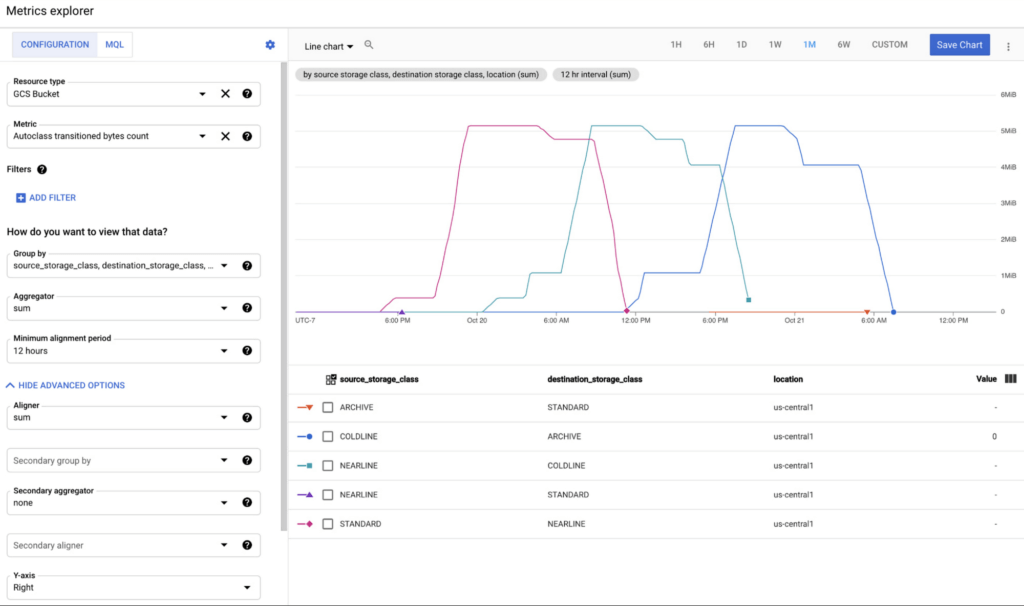
All transitions carried out by Autoclass can be observed using Cloud Monitoring dashboards. This provides easy observability and allows you to validate what Autoclass is doing for your data in an automated way. These dashboards can leverage 2 new Cloud metrics published for Autoclass:
- Number of objects transitioned by Autoclass (autoclass/transition_operation_count)
- Number of bytes transitioned between classes by Autoclass (autoclass/transitioned_bytes_count)
Getting Started
All Cloud Storage customers can enable Autoclass on their new buckets and realize the cost savings for themselves. For more information and detailed instructions on how to enable Autoclass, refer to the documentation here.
Google Introduces BigQuery Connector for SAP to Power Customers’ Data Analytics Strategy

5463
Of your peers have already read this article.
2:00 Minutes
The most insightful time you'll spend today!
Google Cloud has a genuine passion for solving technology problems that make a difference for our customers. With the release of our BigQuery Connector for SAP, we’re taking a another big step towards solving a major challenge for SAP customers with a quick, easy, and inexpensive way to integrate SAP data with BigQuery, our serverless, highly scalable, and cost-effective multi cloud data warehouse designed for business agility.
Solving for simplified data integration
Like most businesses today, SAP customers are eager to unlock the immediate insights and opportunities within their ever-growing stores of business data. However, many are discovering just how hard it can be to take the first step in any modern, cloud-enabled data analytics strategy: combining SAP data with other cloud-native, and enterprise data sets in real-time and at scale. According to a 2020 SAPInsider study, more than half of SAP customers surveyed said data integration was their top analytics pain point. These companies urgently need a rapid, sustainable, cost-effective and scalable way to integrate SAP data with modern cloud data analytics solutions.
The BigQuery Connector for SAP gives our customers a solution: a fast, simple, cost-effective and massively scalable way to make SAP data fully accessible within BigQuery by leveraging customers’ existing SAP Landscape Transformation Replication Server (SLT) tooling and skill sets. It’s the first SAP SLT direct near real-time connector for BigQuery without the need to set up additional infrastructure or third-party middleware, and can be deployed using a variety of embedded or stand-alone deployment options. In fact, most customers can install the BigQuery Connector for SAP in less than an hour—a remarkably easy way to start working with our industry-leading analytics solution that delivers proven and quantifiable business advantages for customers. Additionally, the BigQuery Connector for SAP is not restricted to customers who have deployed their SAP applications on Google Cloud. Customer’s who are running their SAP applications on-premise, or on any cloud, can also deploy and realize the analytical benefits of the solution.
Designing a solution with customer requirements and investments in mind
When the Google Cloud team started work on an analytics data integration tool for our SAP customers, we began with a set of requirements designed to root out the usual sources of cost and complexity. These included:
- The need for real-time performance with deltas replicated in milliseconds
- The ability to integrate data from almost any SAP Netweaver based application running today, regardless of its deployment location (on premises, any cloud, Google Cloud)
- Automatic BigQuery data type mapping with minimal transformation required
- Generation of target tables in BigQuery directly from source, if required
- Application layer integration that avoids the issues of direct database access
- Leveraging customers’ existing SAP skillsets, change data capture, and infrastructure
An important step towards meeting these requirements came when Alphabet, Google’s parent company, decided to leverage SAP SLT as a foundation for developing direct data replication between SAP and BigQuery for its internal corporate landscape. SLT as part of SAP’s strategic Business Technology Platform, supports real-time replication of data from SAP or third-party systems to SAP HANA, however, one of its limitations was direct integration with targets like BigQuery.
SAP SLT was a logical foundation for developing the connector for several reasons:
- It’s widely adopted among SAP customers who likely already leverage SLT for SAP analytics data integration
- It works with almost every non-SaaS SAP application environment running today
- It supports real-time replication performance at massive scale
It was an obvious choice for the Alphabet engineering team who saw immediate value from integrating SAP with BigQuery.
“The BigQuery Connector for SAP has enabled fast, low latency data replication for billions of records from 500+ tables of our most critical financial and supply chain data. Now in one cost-effective BigQuery data lake, this ERP data can be combined with other data sources for previously impossible real-time analytics and ML use cases. This allows us to drive much deeper strategic insights that support business and operational excellence, management and P&L reporting and more.”—Anil Nagalla, Sr. Engineering Director, Financial Systems, Google
SAP data integration with BigQuery enables new value
By leveraging SAP SLT, the BigQuery Connector for SAP can integrate real-time data streams from any SAP system—while also taking advantage of customers’ existing SAP investments and skillsets.
At the same time, the BigQuery Connector for SAP does a lot of heavy lifting on its own. For example, it automatically handles the complex, multi-step process of transforming SAP data types for use in BigQuery—mapping data-type transitions between the SAP and BigQuery environments, creating a target table schema on BigQuery for the transformed data types, building the target BigQuery table, and even adapting as new data types appear in your SAP environment.
For teams that want to fine-tune the BigQuery Connector for SAP’s automated recommendations, the connector supports additional levels of customization and choice. But if you simply want to get the job done and give your data analytics team greater support for their high-value work, then you’ll love just how quickly and easily the BigQuery Connector for SAP turns the complicated work of data integration and performance to process large volumes of data into a done deal. By integrating enterprise data sets in real time, customers can drive differentiated value and unlock new insights and actions that drive a competitive advantage.
The BigQuery Connector for SAP really shines as an enabling tool that transports and transforms your SAP data to power analytics solutions enabled by accelerators like the Google Cloud Cortex Framework: a comprehensive set of reference architectures, deployment accelerators, and integration services designed to give SAP customers a fast and seamless path to value with their data analytics investments. Simply put, the more SAP data you make available within Google Cloud, the easier it is to get meaningful—and often game-changing—insights from these solutions.
Learn more about the BigQuery Connector for SAP
Ready to get started with your own SAP data analytics strategy on Google Cloud? Install the Google Cloud BigQuery Connector for SAP, and discover a faster, simpler, more sustainable way to power your company’s data analytics strategy.
More Relevant Stories for Your Company




How to Move From Redshift to BigQuery Easily
Enterprise data warehouses are getting more expensive to maintain. Traditional data warehouses are hard to scale and often involve lots of data silos. Business teams need data insights quickly, but technology teams have to grapple with managing and providing that data using old tools that aren’t keeping up with demand.

Qlik and Google Cloud Combo: Extending Integration of SAP Data on BigQuery
If your organization is one of the 52% of SAP customers whose top analytics pain point is data integration1, Google Cloud has got you covered. By working with partners like Qlik, we are expanding our integration options and bringing real-time replication capability for SAP to BigQuery. Integrated data for accelerated insights

Speed Up Data-driven Innovation in Life Sciences with Google Cloud
The last few years have underscored the importance of speed in bringing new drugs and medical devices to market, while ensuring safety and efficacy. Over this time, healthcare and life sciences organizations have transformed the way they research, develop, and deliver patient care by embracing agility and innovation. Now, the



An Overview of Google’s Data Cloud
Data access, management and privacy has been at the center of priorities for enterprises that are aiming to be more agile, reliable and data-driven. Google Cloud's technology innovations spanning products like BigQuery, Spanner, Looker and VertexAI help organizations navigate the complexities related to siloed data in large volumes sprawled across
