





3682
Of your peers have already watched this video.
61:30 Minutes
The most insightful time you'll spend today!
How to Move From Redshift to BigQuery Easily
Enterprise data warehouses are getting more expensive to maintain. Traditional data warehouses are hard to scale and often involve lots of data silos. Business teams need data insights quickly, but technology teams have to grapple with managing and providing that data using old tools that aren’t keeping up with demand. Increasingly, enterprises are migrating their data warehouses to the cloud to take advantage of the speed, scalability, and access to advanced analytics it offers.
With this in mind, we introduced the BigQuery Data Transfer Service to automate data movement to BigQuery, so you can lay the foundation for a cloud data warehouse without writing a single line of code. Earlier this year, we added the capability to move data and schema from Teradata and S3 to BigQuery via the BigQuery Data Transfer Service. To help you take advantage of the scalability of BigQuery, we’ve now added a service to transfer data from Amazon Redshift, in beta, to that list.
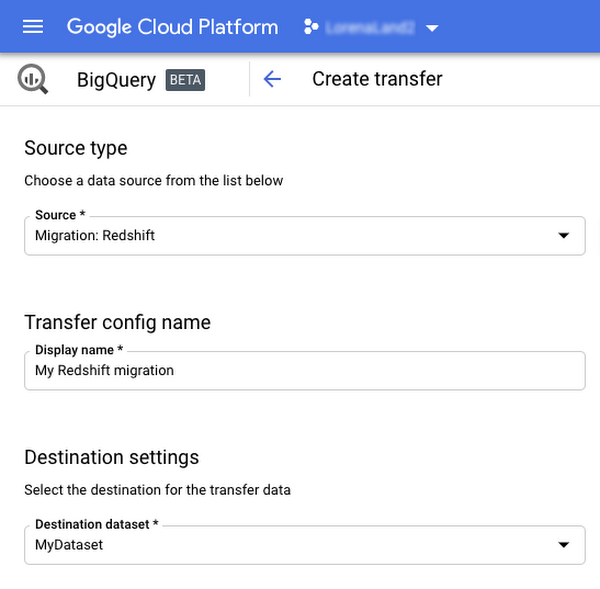
Data and schema migration from Redshift to BigQuery is provided by a combination of the BigQuery Data Transfer Service and a special migration agent running on Google Kubernetes Engine (GKE), and can be performed via UI, CLI or API. In the UI, Redshift to BigQuery migration can be initiated from BigQuery Data Transfer Service by choosing Redshift as a source.
The migration process has three steps:
- UNLOAD from Redshift to S3—The GKE agent initiates an UNLOAD operation from Redshift to S3. The agent extracts Redshift data as a compressed file, which helps customers minimize the egress costs.
- Transfer from S3 to Cloud Storage—The agent then moves data from Amazon S3 to a Cloud Storage bucket using Cloud Storage Transfer Service.
- Load from Cloud Storage to BigQuery—Cloud Storage data is loaded into BigQuery (up to 10 million files).
Watch the video to learn more!

Customer Voices: How Firms from Across Industries Leverage Google Cloud
DOWNLOAD CASE STUDY14077
Of your peers have already downloaded this article
1:30 Minutes
The most insightful time you'll spend today!
From powering everyday operations and accelerating application innovation, to providing tools for specific business needs and executing on big ideas, to advancing the security of technology solutions, companies from across industries have leveraged Google Cloud for business benefits.
Companies from across industries have turned to Google Cloud for transforming their business, modernizing their infrastructure, and gleaning intelligence from data. For instance:
- Johnson & Johnson achieved a 41% increase in search results from high-quality job applicants, significantly improving the company’s ability to quickly hire top talent.
- Sony Network Communications now processes 10 billion monthly queries faster, which advances data analysis.
- University College Dublin saw significant 6-figure savings by eliminating legacy hardware, software, and maintenance.
And there are many such examples. Read the collection of case studies to find out how companies from across industries and geographies leveraged Google Cloud for measurable business benefits and for solving complex problems.
11 Reasons Why Developers and DB Admins in APAC Are Moving to Google Cloud SQL From AWS RDS

4669
Of your peers have already read this article.
1:45 Minutes
The most insightful time you'll spend today!
We wanted to find out which of the most popular database services on two of the biggest cloud provider (AWS and Google), developers preferred to use.
More specifically, we wanted views from enterprises in the region (it’s hard to impossible to find data that’s specific to India.)
To simplify our quest, we looked at the most popular database services on AWS and then looked at the equivalent Google Cloud offering.
That’s how we came to pit AWS RDS and Google Cloud SQL.
For the uninitiated: Cloud SQL is a fully managed database service that makes it easy to set up and manage your relational PostgreSQL, MySQL, and SQL Server databases in the cloud.
It is ideal for: WordPress, backends, game states, CRM tools, MySQL, PostgreSQL, and Microsoft SQL Servers.
Based on real feedback from companies in the APAC region, there are 11 reasons why Google Cloud SQL is better.
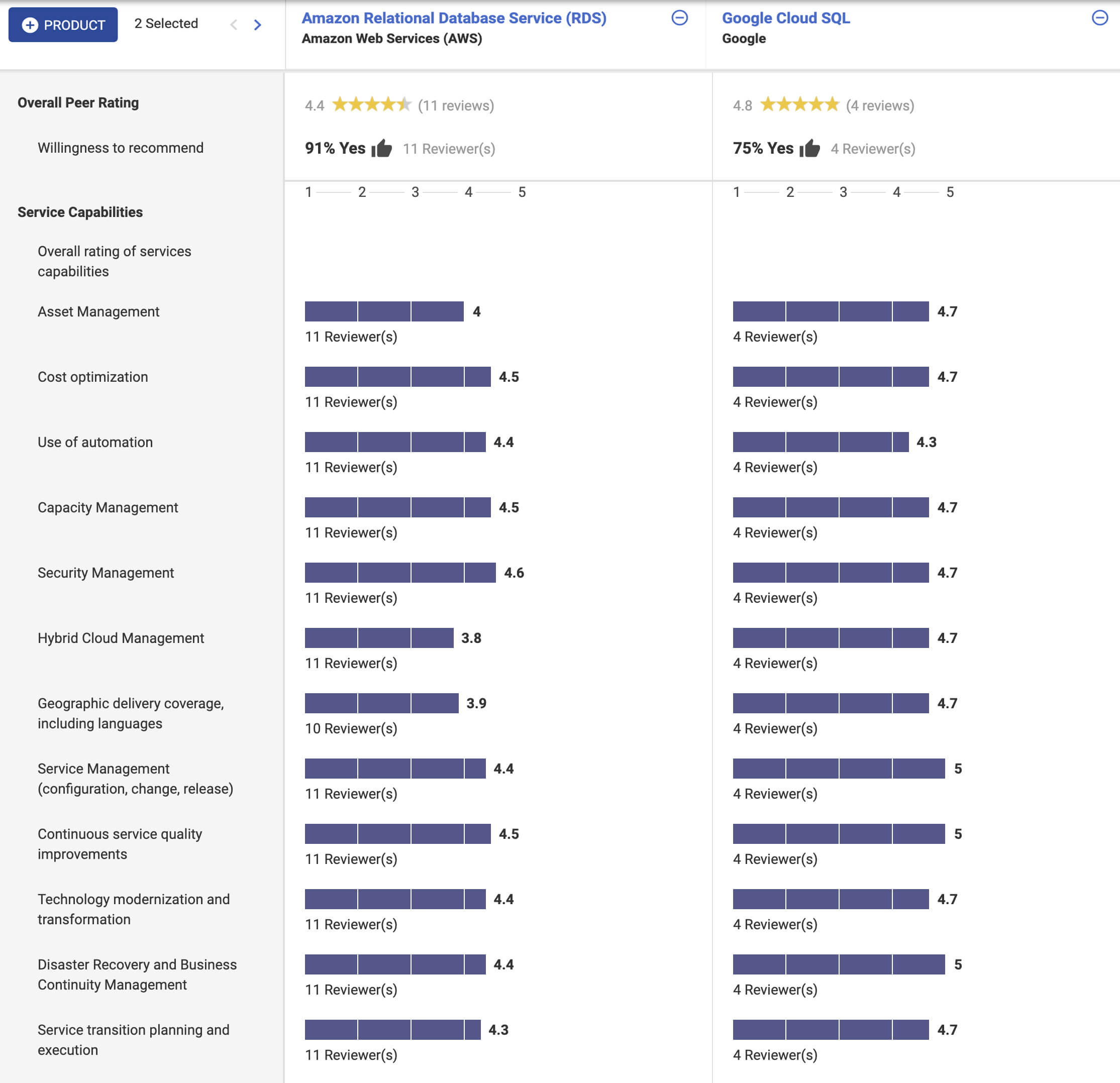
In addition, according to Stackshare and ITcentralstation, the biggest reason developers prefer Google Cloud SQL? Because it’s fully managed, easy to set up, easy to manage and it’s really scalable.
As one user says:
Its most valuable feature is that it’s scalable. I can start off with a base of a lot of data and move as much as I want and it’s the same as if asked to do a lot of infrastructure changes… it’s easy to use, simple, and user-friendly. The setup was straightforward. Just a couple of clicks, and we were done. My suggestion to anyone thinking about this solution is to jump into it head-first!
Making Mothers’ Day Special: How Google Cloud Migration for 1-800-FLOWERS.COM, Inc Impacts CX

6821
Of your peers have already read this article.
2:30 Minutes
The most insightful time you'll spend today!
Editor’s note: In honor of Mother’s Day, we look at how 1-800-FLOWERS.COM, Inc. migrated to Google Cloud as part of its digital transformation to quickly deploy seamless and convenient customer experiences across multiple brands on Mother’s Day and every day.
As a leading provider of gifts designed to help customers express, connect, and celebrate, 1-800-FLOWERS.COM, Inc. has embraced cloud technologies to grow and transform its business through constant innovation. As part of our digital transformation, we recently completed the migration of our ecommerce platform and other services to Google Cloud. We’ve transitioned from a monolithic to a microservices platform, moved many workloads from our on-premises data centers to our Google Cloud environment, and scaled both horizontally and vertically.
Since our migration, we’ve developed efficient processes to launch new brands, improved the customer experience across all brands, and seen significantly increased site traffic.
Nurturing a more delightful customer journey
Customer delight is at the core of everything we do. Whether it be with a flower bouquet, a sweet treat, or a personalized keepsake, our mission is to deliver smiles. With the rise of the COVID-19 pandemic, we’ve all been challenged to find unique and safe ways to continue honoring the special connections in our lives and celebrating occasions with loved ones. Our customers have adapted by doing things such as sending gifts to isolated loved ones, sharing the same meal together virtually, or using video to engage with others through group activities like flower arranging and building charcuterie boards.
The customer experience is a top priority for us, and we constantly look for innovative ways to enhance the customer journey across our ecommerce platform of more than a dozen brands. As a result, we’ve continued to see a rise in demand as customers enjoy the ease and convenience of our site and discover our full family of brands.
Migrating to a cloud-first mindset
As we’ve continued to innovate and iterate on the customer experience, we knew we wanted to evolve our platform. We wanted to shift to a microservices platform, which would allow our team the opportunity to release updates to our site more often and set up the right continuous integration/continuous deployment (CI/CD) practices.
Working with Google Cloud, we were able to move our ecommerce platform to the cloud and standardize our site and brand deployment by building one release that could then be repeated across all of our brands. We built everything in a modular fashion, including microservices and code libraries, so that sites could be easily constructed and replicated for each brand. And because of this, we were able to launch Shari’s Berries extremely quickly after we acquired the brand in 2019.
Moving our platform to a completely homegrown solution of microservices was a daunting task. But our team handled it beautifully through load-testing, stress-testing, and building new monitoring tools. And with Google Cloud supporting us all along the way, managing the migration process was simple and easy from start to finish.
Arranging a better bouquet of services
Currently, we’ve migrated every customer-facing touchpoint for all of our brands to Google Cloud—whether it’s on the web or mobile, our AI bots, or our chat interfaces.
- We run on Google Kubernetes Engine and Istio.
- We have nearly 200 microservices built to help power our entire ecommerce stack across several cloud services running on Google Cloud.
- We’re utilizing BigQuery for our offline intelligence.
Results are coming up roses
Our new stack on Google Cloud has benefits for both us and our customers. We moved from a session-based to a token-based system, which provides enhanced security as well as a consistent, convenient experience across all our brands. Using service workers and a single-page app, we are able to download all the relevant site content to the browser in under two seconds to create an instant-click experience for each and every customer. We also use Google Analytics to measure our user interactions and provide personalized results to each customer. Our hope is that with this new system, we can learn from customer behavior to offer gift givers a more personalized shopping experience during each visit.
The benefits of our new tech stack have not only helped us enhance the solutions we offer to customers today, they’ve also enabled us to offer new ones at lightning speed. With our legacy system, we used to release new code once a week or once a month. Now, even during our peak periods, we’re able to release 10 to 15 times a day and can deploy and pivot quickly to create new microservices and microsites on the fly—often without having to touch any code.
Efficiencies abound
The benefits of moving our platform to Google Cloud have extended to our internal teams as well. Before the migration, we had only two environments for developing and testing, which made it time-consuming to test updates before they went into production. Now with Google Cloud, we have several different journey teams—which are made up of developers, product owners, and technical owners—all working in several different environments, solving problems, and creating new solutions together.
Everyone is now empowered to be self-sufficient, developing and releasing microservices on their own when they’re ready. This has given our developers more time to take part in continued development and learning opportunities. For example, we offer lunch-and-learn sessions as well as other resources for everyone to take advantage of so they can continue to learn and refine their skills.
Planting the seeds for future growth
As we look to the future and think about how we help our customers express, connect, and celebrate, we’ll continue to collaborate across teams to deliver solutions that spread smiles. Specifically, we’re exploring additional use of AI to help us better serve our customers across all our brands.
We’ve enjoyed the ongoing support we’ve received from the Google Cloud team as they help us build new solutions and design a road map for the future. Their support has helped the 1-800-FLOWERS.COM, Inc. team to realize the power of the cloud and bring the very best experience to our customers.
Learn more about 1-800-FLOWERS.COM, Inc., or check out our recent blog about cloud migration for the real world.
Why and How to Migrate to Google BigQuery

5367
Of your peers have already read this article.
6:30 Minutes
The most insightful time you'll spend today!
Over the past few decades, organizations have mastered the science of data warehousing. They have increasingly applied descriptive analytics to large quantities of stored data, gaining insight into their core business operations. Conventional Business Intelligence (BI), which focuses on querying, reporting, and Online Analytical Processing, might have been a differentiating factor in the past, either making or breaking a company, but it’s no longer sufficient.
Today, not only do organizations need to understand past events using descriptive analytics, they need predictive analytics, which often uses machine learning (ML) to extract data patterns and make probabilistic claims about the future. The ultimate goal is to develop prescriptive analytics that combine lessons from the past with predictions about the future to automatically guide real-time actions.
Traditional data warehouse practices capture raw data from various sources, which are often Online Transactional Processing (OLTP) systems. Then, a subset of data is extracted in batches, transformed based on a defined schema, and loaded into the data warehouse. Because traditional data warehouses capture a subset of data in batches and store data based on rigid schemas, they are unsuitable for handling real-time analysis or responding to spontaneous queries. Google designed BigQuery in part in response to these inherent limitations.
Innovative ideas are often slowed by the size and complexity of the IT organization that implements and maintains these traditional data warehouses. It can take years and substantial investment to build a scalable, highly available, and secure data warehouse architecture. BigQuery offers sophisticated software as a service (SaaS) technology that can be used for serverless data warehouse operations. This lets you focus on advancing your core business while delegating infrastructure maintenance and platform development to Google Cloud.
BigQuery offers access to structured data storage, processing, and analytics that’s scalable, flexible, and cost effective. These characteristics are essential when your data volumes are growing exponentially—to make storage and processing resources available as needed, as well as to get value from that data. Furthermore, for organizations that are just starting with big data analytics and machine learning, and that want to avoid the potential complexities of on-premises big data systems, BigQuery offers a pay-as-you-go way to experiment with managed services.
With BigQuery, you can find answers to previously intractable problems, apply machine learning to discover emerging data patterns, and test new hypotheses. As a result, you have timely insight into how your business is performing, which enables you to modify processes for better results. In addition, the end user’s experience is often enriched with relevant insights gleaned from big data analysis, as we explain later in this series.
The migration framework
Undertaking a migration can be a complex and lengthy endeavor. Therefore, we recommend adhering to a framework to organize and structure the migration work in phases:
- Prepare and discover: Prepare for your migration with workload and use case discovery.
- Assess and plan: Assess and prioritize use cases, define measures of success, and plan your migration.
- Execute: Iterate the following steps for each use case:
- Migrate (offload): Migrate only your data, schema, and downstream business applications.
- Migrate (full): Alternatively, migrate the use case fully end-to-end. The same as Migrate (offload), with the addition of the upstream data pipelines.
- Verify and validate: Test and validate the migration to assess return on investment.
The following diagram illustrates the recommended framework and shows how the different phases are connected:

For a deeper understanding, read Migrating data warehouses to BigQuery: Introduction and overview
How Moving Database to the Cloud Helped Recruit Technologies Gain Higher Availability and Lower Cost
5452
Of your peers have already read this article.
1:30 Minutes
The most insightful time you'll spend today!
There are just under 8 billion people on Earth, depending on the source. Here at Recruit, our work is to develop and maintain an email marketing system that sends personalized emails to tens of millions of customers of hundreds of web services, all with the goal of providing the best, most relevant customer experience.
When Recruit was founded in 1960, the company was focused on helping match graduates to jobs. Over the years, we’ve expanded to help providers that deal with almost every personal moment and event a person encounters in their life. From travel plans to real estate, restaurant choices to haircuts, we offer software and services to help providers deliver on virtually everything and connect to their end-customers.
Recruit depends on email as a key marketing vehicle to end-customers and to provide a communications channel to clients and advertisers across its services. To maximize the impact of these emails, we customize each email we send. To help power this business objective, we developed a proprietary system named “Soup” that we host on Google Cloud Platform (GCP). Making use of Google Cloud Spanner, Soup is the connective tissue that manages the complex customization data needed for this system.
Of course, getting from idea to functioning product is easier said than done. We have massive datasets so requirements like high availability and serving data in real-time are particularly tricky. Add in a complex existing on-premises environment, some of which we had to maintain in our journey to the cloud creating a hybrid environment, and the project became even more challenging.
A Soup Primer
First, why the name “Soup”? The name of the app is actually “dashi-wake” in Japanese, from “dashi,” a type of soup. In theory, Soup is a fairly simple application: its API returns recommendation results based on the data we compute about a user via the user’s user ID. Soup ingests pre-computed recommendations and then serves those recommendations to the email generation engine and tracks metrics. While Soup doesn’t actually send the customer emails, it manages the entire volume of personalization and customization data for tens of millions of users. It also manages the computed metrics associated with these email sends such as opens, clicks, and other metadata.
Soup leverages other GCP services such as App Engine Flex (Node.js), BigQuery, Data Studio, and Stackdriver in addition to Cloud Spanner.
Soup Requirements
High availability
If the system is unavailable when a user decides to open an email they see a white screen with no content at all. Not only is that lost revenue for that particular email, it makes customers less likely to open future emails from us.
Low latency
Given a user ID, the system needs to search all its prediction data and generate the appropriate content—an HTML file, an image, multiple images, or other content—and deliver it, all very quickly.
Real-time log ingestion and fast JOINs
In today’s marketing environment, tracking user activity and being able to make dynamic recommendations based on it is a must-have. We live in an increasingly real-time world. In the past, it might have been OK to take a week or longer to adapt content based on customer behavior. Now? A delay of even a day can make the difference between a conversion and a lost opportunity.
The Problem
Pushing out billions of personalized emails to tens of millions of customers comes with some unique challenges. Our previous on-premises system was based on Apache HBase, the open-source NoSQL database, and Hive data warehouse software. This setup presented three major obstacles:
Cluster sizing
Email marketing is a bursty workload. You typically send a large batch of emails, which requires a lot of compute, and then there’s a quiet period. For our email workloads, we pre-compute a large set of recommendations and then serve those recommendations dynamically upon email open. On-premises, there wasn’t much flexibility and we had to resize clusters manually. We were plagued by errors whenever loads of email opens and the resulting requests to the system outpaced the traffic we could handle, because the cluster size of our HBase/Hive system couldn’t keep up.
Performance
The next issue was optimizing the schema model for performance. Soup has a couple of main functions: services write customer tracking data to it, and downstream “customers” read that data from it to create the personalized emails. On the write side, after the data is written to Soup, the writes need to be aggregated. We initially did this on-premises, which was quite difficult and time consuming because Hbase’s doesn’t offer aggregation queries, and because it was hard to scale in response to traffic bursts.
Transfer delays
Finally, every time we needed to generate a recommendation model for a personalized email blast, we needed to transfer the necessary data from HBase to Hive to create the model, then back to HBase. These complex data transfers were taking two-to-three days. Needless to say, this didn’t allow for the type of agility that we need to provide the best service to our customers.
Cloud Spanner allows us to store all our data in one place, and simply join the data tables and do aggregates; there’s no need for a time-intensive data transfer. Using this model, we believe we can cut the recommendation generation time from days to under a minute, bringing real-time back into the equation.
Why Cloud Spanner?
Compared to the previous application running on-premises, Cloud Spanner offers lower cost, lower operations requirements and higher availability. Most critically, we wanted to calculate metrics (KPIs) in real time without data transfer. Cloud Spanner allows us to do this by pumping SQL queries into a custom dashboard that monitors KPIs in real time.
Soup now runs on GCP, although the recommendations themselves are still generated in an on-premise Hadoop cluster. The computed recommendations are stored in Cloud Spanner for the reasons mentioned above. After moving to GCP and architecting for the cloud, we see an error rate of .005% per second vs. a previous rate of 4% per second, an improvement of 1/800. This means that for an email blast sent to all users in Japan, one user won’t be able to see one image in one email. Since these emails often contain 10 images or more, this error rate is acceptable.
Cloud Spanner also solved our scaling problem. In the future, Soup will have to support one million concurrent users in different geographical areas. Likewise, Soup has to perform 5,000 queries per second (QPS) at peak times on the read side, and will expand this requirement to 20,000 to 30,000 QPS in the near future. Cloud Spanner can handle all the different, complex transactions Soup has to run, while scaling horizontally with ease.
Takeaways
In migrating our database to Cloud Spanner, we learned many things that are worth taking note of, whether you have 10 or 10 million users.
Be prepared to scale
We took scaling into account from Day One, sketching out specific requirements for speed, high availability, and other metrics. Only by having these requirements specifically laid out were we able to choose—and build—a solution that could meet them. We knew we needed elastic scale.
With Cloud Spanner, we didn’t have to make any of the common trade-offs between the relational database structure we wanted, and the scalability and availability needed to keep up with the business requirements. Likewise, with a growing company, you don’t want to place any artificial limits on growth, and Cloud Spanner’s ability to scale to “arbitrarily large” database sizes eliminates this cap, as well as the need to rewrite or migrate in the future as our data needs grow.
Be realistic about downtime
For us, any downtime can result in literally thousands of lost opportunities. That meant that we had to demand virtually zero downtime from any solution, to avoid serving up errors to our users. This was an important realization. Google Cloud provides an SLA guarantee for Cloud Spanner. This solution is more available and resistant to outages than anything we would build on our own.
Don’t waste time on management overhead
When you’re worrying about millions of users and billions of emails, the last thing you have time to do is all the maintenance and administrative tasks required to keep a database system healthy and running. Of course, this is true for the smallest installations, as well. Nobody has a lot of extra time to do things that should be taken care of automatically.
Don’t be afraid of hybrid
We found that a hybrid architecture that leverages the cloud for fast data access but still using our existing on-premises investments for batch processing to be effective. In the future, we may move the entire workload to the cloud but data has gravity, and we currently have lots of data stored on-premises.
Aim for real-time
At this time, we can only move data in and out of Cloud Spanner in small volumes. This prevents us from making real-time changes to recommendations. Once Cloud Spanner supports batch and streaming connections, we’ll be able to enable an implementation to provide more real-time recommendations to deliver even more relevant results and outcomes.
Overall, we’re extremely happy with Cloud Spanner and GCP. Google Cloud has been a great partner in our move to the cloud, and the unique services provided enable us to offer the best service to our customers and stay competitive.
More Relevant Stories for Your Company

5 Best Practices for Cloud Cost Optimization
When customers migrate to Google Cloud Platform (GCP), their first step is often to adopt Compute Engine, which makes it easy to procure and set up virtual machines (VMs) in the cloud that provide large amounts of computing power. Launched in 2012, Compute Engine offers multiple machine types, many innovative features, and is available in

BigQuery Helps Insurance Firms Leverage Previous Storm Data for Better Pricing Insights
It may be surprising to know that U.S. natural catastrophe economic losses totaled $119 billion in 2020, and 75% (or $89.4B) of those economic losses were caused by severe storms and cyclones. In the insurance industry, data is everything. Insurers use data to influence underwriting, rating, pricing, forms, marketing, and

Benefits of BigQuery for SAP Customers
IDC recently examined the benefits of implementing BigQuery for SAP data. The findings reveal massive improvements to the SAP customers' overall business results due to faster access to data insights, lower data warehouse operation cost, and increased productivity among the data warehouse and development teams. Download the report now!




An Overview of Google’s Data Cloud
Data access, management and privacy has been at the center of priorities for enterprises that are aiming to be more agile, reliable and data-driven. Google Cloud's technology innovations spanning products like BigQuery, Spanner, Looker and VertexAI help organizations navigate the complexities related to siloed data in large volumes sprawled across
