





6422
Of your peers have already watched this video.
1:30 Minutes
The most insightful time you'll spend today!
Value Realization with Google Cloud for Retail SAP Data
Retail engagements have changed drastically over the last few years, and by the virtue of COVID-19 pandemic, retail data and customers’ expectations plummeted. To drive value and transformation across the entire value-chain retailers can make most of Google Cloud’s secure, reliable IaaS by migrating their SAP systems and taking advantage of integrations, insights and innovations. In times of change retail companies can gain maximum visibility of SAP data unlocking Google Cloud’s infrastructure modernization and Big Data and analytics capabilities. Watch the video to understand how Google Cloud and SAP partnership is a golden handshake for retail businesses’ future.
5553
Of your peers have already downloaded this article
1:30 Minutes
The most insightful time you'll spend today!
Protecting a global network against persistent and constantly evolving cyber threats is one of the most important challenges faced by Google Cloud. So, how does Google’s global network protects seven different global businesses, each with over 1 billion customers, including popular Google services such as Google Search, YouTube, Maps, and Gmail?
The answer is a multi-step process, which is constantly changing and evolving to stay one step ahead of the malicious hackers and attackers. For instance, it’s network communications protocols—the rules that enable communications between systems—change multiple times per second to make malicious intrusions much harder.
Data in Google Cloud is encrypted both in transit and at rest. Google’s network capacity far exceeds any traffic load it hosts to thwart and DDoS attack. In addition, it has numerous other products, tools, and processes at work to provide defense in depth.
Download this e-book to get a detailed overview of Google Cloud’s approach to security and privacy.
Bushel: Empowering Agribusinesses One Step at a Time with Google Cloud

3110
Of your peers have already read this article.
3:00 Minutes
The most insightful time you'll spend today!
Working to put food on all of our tables, today’s farmers are facing a higher amount of instability from input supply chain issues to weather patterns. Adding to this challenge are problems farmers face when trying to correctly time grain purchases, sales and transport. Farmers have always been stewards of the land, but now the demand for sustainable products has them needing to better prove their regenerative practices.
At Bushel, we understand these problems can’t be solved overnight or by a single company. We focus on empowering agribusinesses and farmers to work even more closely together to build a more sustainable agricultural supply chain by rapidly responding to market changes. With Bushel, farmers can track market prices in real time, instantly buy and sell grain, analyze inventory and transactions, and securely share verified information with grain operators and other producers. We provide the digital tools to streamline how farmers buy and sell commodities throughout the agricultural industry’s supply chain to help address market inefficiencies that can lead to waste, and have the information and resources to help them flex and adapt as complexity increases in farming operations.
Approximately 40% to 50% of all U.S. grain transactions now pass through the Bushel platform. As we continue to grow, Bushel continues to focus on what digital tEmpowering Farmers: Bushel Drives 40-50% of US Grain Transactions, Fueling Sustainable Agricultureools can support each point in the supply chain. Many focus on the first mile at the farm or last mile at the store. But Bushel is focused on modernizing the middle where grain purchasing and processing sit. We aim to help local grain industries and stabilize regional agricultural supply chains.
Starting with a simple mobile app; now scaling into an agricultural ecosystem
Bushel began its journey in 2017 as a small-scale platform for farmers that delivered grain contracts, cash bids, and receipts. As Bushel evolved into a comprehensive agricultural ecosystem, we realized we needed knowledgeable technology partners to help us rapidly scale while saving time and administrative costs. That’s why we started partnering with the Google for Startups Cloud Program to get support from Google and work with Google Cloud Managed Services partner, DoiT International to help support our use of GKE and create a multi-regional deployment as well as migrate our CUDs to new Compute Engine families and continue to optimize our footprint. We’ll also use DoiT’s Flexsave technology to reduce the management overhead of CUDs in the future.
In just one year, we expanded to over 1,200 live grain receiving locations and quickly grew our services portfolio with electronic signature capabilities, commodity balances, and web development. Because that relationship between farmer and agribusiness is so important, we provide more than 200 grain companies with white-labled digital experiences so each farmer sees their local grain facility they do business with on both desktop and mobile. To further our extension into the digital infrastructure of agriculture, we subsequently acquired GrainBridge and FarmLogs to help farmers handle specific jobs and tasks, and provide the needed insights to improve their business operations. Over 2,000 grain receiving locations across the United States and Canada now use Bushel products. We accomplished all this on Google Cloud.
We leverage the secure-by-design infrastructure to protect millions of financial transactions and keep sensitive customer data safe. Our data is processed and stored in Google’s secure data centers, which maintain adherence to a number of compliance frameworks. We utilize Google Kubernetes Engine extensively as it reduces operational overhead and offers auto scaling up to 15,000 nodes.
Database provisioning, storage capacity management, and other time-consuming tasks are automated with our Cloud SQL usage. Query Insights for Cloud SQL streamlines database observability and seamlessly integrates with existing apps and Google Cloud services such as GKE and BigQuery.
Empowering farmers and agribusinesses in North America
The Google Cloud Account Team had been instrumental in helping Bushel build an expansive agricultural platform that powers APIs, apps, websites, and digital solutions. Google’s startup experts are incredibly responsive, with deep technical knowledge that can’t be found elsewhere. Google Cloud also has provided us credits to explore new ways of analyzing the vast amounts of data we generate, verify, and transfer with solutions such as BigQuery and Pub/Sub.
With BigQuery, we can run analytics at scale with 26%–34% lower three-year TCO than cloud data warehouse alternatives. BigQuery delivers actionable insights on a highly secure and scalable platform, includes built-in machine learning capabilities, and integrates with Pub/Sub to ingest and stream analytic events via Dataflow.
With Bushel, farmers across North America are rapidly responding to sudden market changes by tracking grain prices in real time and instantly buying and selling crops. We see a future where this business information becomes insights – where a farmer can not just know where to sell their grain, but when to sell. The burden right now to engage with carbon markets is high, full of paper-based binders and verification forms. We see a world where farming practices recorded digitally can be permissioned along the supply chain for a better picture of how our food is grown.
With the Bushel platform, millions of farmers around the world will have the digital tools to modernize local grain industries, build more sustainable agricultural supply chains, and help to address global food inequity.
If you want to learn more about how Google Cloud can help your startup, visit our page here to get more information about our program, and sign up for our communications to get a look at our community activities, digital events, special offers, and more.
Pacemaker’s Automated Alerts and Alert Reporting: No More Outages for SAP Systems on Google Cloud!

3250
Of your peers have already read this article.
6:00 Minutes
The most insightful time you'll spend today!
When critical services fail, businesses risk losing revenue, productivity, and trust. That’s why Google Cloud customers running SAP applications choose to deploy high availability (HA) systems on Google Cloud.
In these deployments Linux operating system clustering provides application and guest awareness for the application state and automates recovery actions in case of failure — including cluster node, resource or node failover or failed action.
Pacemaker is the most popular software Linux administrators use to manage their HA clusters, which includes automating notifications about events — including failover fencing and node, attribute, and resource events — and reporting on events. With automated alerts and reports, Linux administrators can not only learn about events as they happen, but they can also make sure other stakeholders are alerted to take action when critical events occur. They can even discover past events to assess the overall health of their HA systems.
Here, we break down the steps to setting up automated alerts for HA cluster events and alert reporting.
How to Deploy the Alert Script
To set up event-based alerts, you’ll need to take the following steps to execute the script.
1. Download the script file ‘gcp_crm_alert.sh’ from
https://github.com/GoogleCloudPlatform/pacemaker-alerts-cloud-logging
2. Under root user, add exec flag for the script and execute deployment with:
chmod +x ./gcp_crm_alert.sh./gcp_crm_alert.sh -d
3. Confirm that the deployment runs successfully. If it does, you will see the following INFO log messages:
In the Red Hat Enterprise Linux (RHEL) system:
gcp_crm_alert.sh:2022-01-24T23:48:30+0000:INFO:'pcs alert recipient add gcp_cluster_alert value=gcp_cluster_alerts id=gcp_cluster_alert_recepient options value=/var/log/crm_alerts_log' rc=0
In the SUSE Linux Enterprise Server (SLES):
gcp_crm_alert.sh:2022-01-25T00:13:27+00:00:INFO:'crm configure alert gcp_cluster_alert /usr/share/pacemaker/alerts/gcp_crm_alert.sh meta timeout=10s timestamp-format=%Y-%m-%dT%H:%M:%S.%06NZ to { /var/log/crm_alerts_log attributes gcloud_timeout=5 gcloud_cmd=/usr/bin/gcloud }' rc=0Now, in the event of a cluster node, resource, node failover, or failed action, Pacemaker will start the alert mechanism. For further details on the alerting agent, check out the Pacemaker Explained documentation.
How to Use Cloud Logging for Alert Reporting
Alerted events are published in Cloud Logging. Below is an example of the log record payload, where the cluster alert key-value pairs get recorded in the jsonPayload node.
{
"insertId": "ktildwg1o3fbim", "jsonPayload": { "CRM_alert_recipient": "/var/log/crm_alerts_log", "CRM_alert_attribute_name": "", "CRM_alert_kind": "resource", "CRM_alert_status": "0", "CRM_alert_rsc": "STONITH-sapecc-scs", "CRM_alert_rc": "0", "CRM_alert_timestamp_usec": "", "CRM_alert_interval": "0", "CRM_alert_node_sequence": "21", "CRM_alert_task": "start", "CRM_alert_nodeid": "", "CRM_alert_timestamp": "2022-01-25T00:17:06.515313Z", "CRM_alert_timestamp_epoch": "", "CRM_alert_desc": "ok", "CRM_alert_target_rc": "0", "CRM_alert_version": "1.1.15", "CRM_alert_attribute_value": "", "CRM_alert_node": "sapecc-ers", "CRM_alert_exec_time": "" }, "resource": { "type": "global", "labels": { "project_id": "gcp-tse-sap-on-gcp-lab" } }, "timestamp": "2022-01-25T00:17:09.662557309Z", "severity": "INFO", "logName": "projects/gcp-tse-sap-on-gcp-lab/logs/sapecc-ers%2F%2Fvar%2Flog%2Fcrm_alerts_log", "receiveTimestamp": "2022-01-25T00:17:09.662557309Z" }
To get notified of a resource event — for example, when the HANA topology resource monitor fails — you can use the following filter for the alerting definition:
jsonPayload.CRM_alert_node=("hana-venus" OR "hana-mercury") -jsonPayload.CRM_alert_status="0" jsonPayload.CRM_alert_rsc="rsc_SAPHanaTopology_SBX_HDB00" jsonPayload.CRM_alert_task="monitor" To define an alert for a fencing event, your can apply this filter: jsonPayload.CRM_alert_node=("hana-venus" OR "hana-mercury") jsonPayload.CRM_alert_kind="fencing" The fencing log entry gets recorded with warning severity to give you deeper insight, and this additional information is also helpful for more specific filtering criteria: {   "insertId": "1plznskfjsxt82",   "jsonPayload": {     "CRM_alert_attribute_value": "",     "CRM_alert_recipient": "/var/log/crm_alerts_log",     "CRM_alert_rsc": "",     "CRM_alert_rc": "0",     "CRM_alert_timestamp_usec": "529261",     "CRM_alert_desc": "Operation reboot of hana-mercury by hana-venus for crmd.2361@hana-venus: OK (ref=2a9bf814-9adf-4247-af3f-94ac254fc3ca)", "CRM_alert_target_rc": "",     "CRM_alert_nodeid": "",     "CRM_alert_kind": "fencing",     "CRM_alert_node_sequence": "33",     "CRM_alert_task": "st_notify_fence",     "CRM_alert_status": "",     "CRM_alert_exec_time": "",     "CRM_alert_attribute_name": "",     "CRM_alert_timestamp_epoch": "1643072786",     "CRM_alert_version": "1.1.19",     "CRM_alert_timestamp": "2022-01-25T01:06:26.529261Z",     "CRM_alert_interval": "",     "CRM_alert_node": "hana-mercury"   },   "resource": {     "type": "global",     "labels": {       "project_id": "gcp-tse-sap-on-gcp-lab"     }   },   "timestamp": "2022-01-25T01:06:27.267017052Z",   "severity": "WARNING",   "logName": "projects/gcp-tse-sap-on-gcp-lab/logs/hana-venus%2F%2Fvar%2Flog%2Fcrm_alerts_log", "receiveTimestamp": "2022-01-25T01:06:27.267017052Z"
}
Alerts can be delivered through multiple channels, including text and email. Below is an example of an email notification for our earlier example, when we defined an alert for a HANA topology resource monitor failure:
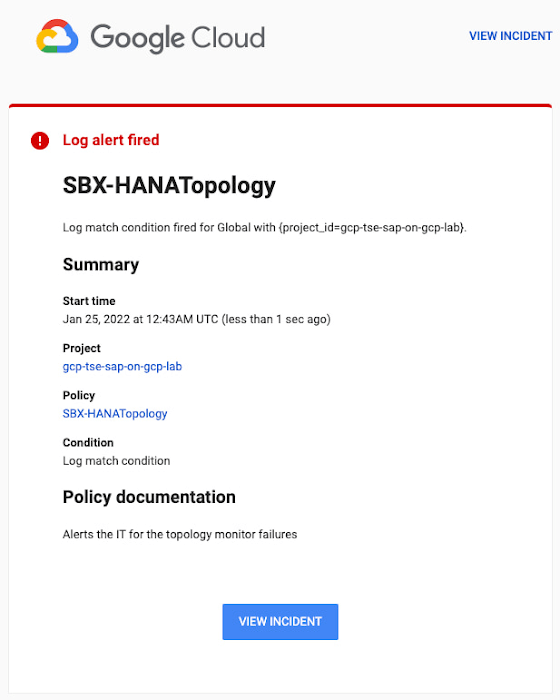
You can write and apply filters to your log-based alerts to isolate certain types of incidents and analyze events over time. For example, the following script will surface a resource event occurring within a two-hour window on a specific date:
timestamp>="2022-01-25T00:00:00Z" timestamp<="2022-01-25T02:00:00Z"
jsonPayload.CRM_alert_kind="resource"
With the ability to analyze these logged alerts over time, determine whether event patterns warrant any action.
[SIDEBAR]
The alert script prints details in the standard output and in the log file /var/log/crm_alerts_log, and this can grow over time. We recommend that the log file is set with the Linux logrotate service in order to limit the file system space. Use the following command to create the necessary logrotate setting for the alerting log file:
cat > /etc/logrotate.d/crm_alerts_log << END-OF-FILE /var/log/crm_alerts_log { create 0660 root root rotate 7 size 10M missingok compress delaycompress copytruncate dateext dateformat -%Y%m%d-%s notifempty } END-OF-FILE [END SIDEBAR]
Tips for Troubleshooting When you first deploy your alert script, how can you tell for certain that you’ve done it correctly? Use the following commands to test it out:
In RHEL:
pcs alert show
In SLES:
sudo crm config show | grep -A3 gcp_cluster_alert
You should see the following if the script is correct:
In RHEL:
Alerts: Alert: gcp_cluster_alert (path=/usr/share/pacemaker/alerts/gcp_crm_alert.sh) Description: "Cluster alerting for hana-node-X" Options: gcloud_cmd=/usr/bin/gcloud gcloud_timeout=5 Meta options: timeout=10s timestamp-format=%Y-%m-%dT%H:%M:%S.%06NZ Recipients: Recipient: gcp_cluster_alert_recepient (value=gcp_cluster_alerts) Options: value=/var/log/crm_alerts_log In SLES:
alert gcp_cluster_alert "/usr/share/pacemaker/alerts/gcp_crm_alert.sh" \ meta timeout=10s timestamp-format="%Y-%m-%dT%H:%M:%S.%06NZ" \ to "/var/log/crm_alerts_log" attributes gcloud_timeout=5 gcloud_cmd="/usr/bin/gcloud" If the commands do not display the alerts properly, re-deploy the script.
In case there is an issue with the script, or if the Cloud Logging records are not presenting as expected, examine the script log file /var/log/crm_alerts_log. The errors and warning can be filtered with:
egrep '(ERROR|WARN)' /var/log/crm_alerts_log
Any Pacemaker alert failures will be recorded in the messages and/or Pacemaker log. To examine recent alert failures, use the following command:
egrep '(gcp_crm_alert.sh|gcp_cluster_alert)' \ /var/log/messages /var/log/pacemaker.log
Keep in mind, though, that the Pacemaker log location may be different in your system from the one in the example above.
From reactive to proactive
Your SAP applications are too critical to risk outages. The most effective way to manage high availability clusters for your SAP systems on Google Cloud is to take full advantage of Pacemaker’s alerting capabilities, so you can be proactive in ensuring your systems are healthy and available.
Learn more about running SAP on Google Cloud.
Making Mothers’ Day Special: How Google Cloud Migration for 1-800-FLOWERS.COM, Inc Impacts CX

6809
Of your peers have already read this article.
2:30 Minutes
The most insightful time you'll spend today!
Editor’s note: In honor of Mother’s Day, we look at how 1-800-FLOWERS.COM, Inc. migrated to Google Cloud as part of its digital transformation to quickly deploy seamless and convenient customer experiences across multiple brands on Mother’s Day and every day.
As a leading provider of gifts designed to help customers express, connect, and celebrate, 1-800-FLOWERS.COM, Inc. has embraced cloud technologies to grow and transform its business through constant innovation. As part of our digital transformation, we recently completed the migration of our ecommerce platform and other services to Google Cloud. We’ve transitioned from a monolithic to a microservices platform, moved many workloads from our on-premises data centers to our Google Cloud environment, and scaled both horizontally and vertically.
Since our migration, we’ve developed efficient processes to launch new brands, improved the customer experience across all brands, and seen significantly increased site traffic.
Nurturing a more delightful customer journey
Customer delight is at the core of everything we do. Whether it be with a flower bouquet, a sweet treat, or a personalized keepsake, our mission is to deliver smiles. With the rise of the COVID-19 pandemic, we’ve all been challenged to find unique and safe ways to continue honoring the special connections in our lives and celebrating occasions with loved ones. Our customers have adapted by doing things such as sending gifts to isolated loved ones, sharing the same meal together virtually, or using video to engage with others through group activities like flower arranging and building charcuterie boards.
The customer experience is a top priority for us, and we constantly look for innovative ways to enhance the customer journey across our ecommerce platform of more than a dozen brands. As a result, we’ve continued to see a rise in demand as customers enjoy the ease and convenience of our site and discover our full family of brands.
Migrating to a cloud-first mindset
As we’ve continued to innovate and iterate on the customer experience, we knew we wanted to evolve our platform. We wanted to shift to a microservices platform, which would allow our team the opportunity to release updates to our site more often and set up the right continuous integration/continuous deployment (CI/CD) practices.
Working with Google Cloud, we were able to move our ecommerce platform to the cloud and standardize our site and brand deployment by building one release that could then be repeated across all of our brands. We built everything in a modular fashion, including microservices and code libraries, so that sites could be easily constructed and replicated for each brand. And because of this, we were able to launch Shari’s Berries extremely quickly after we acquired the brand in 2019.
Moving our platform to a completely homegrown solution of microservices was a daunting task. But our team handled it beautifully through load-testing, stress-testing, and building new monitoring tools. And with Google Cloud supporting us all along the way, managing the migration process was simple and easy from start to finish.
Arranging a better bouquet of services
Currently, we’ve migrated every customer-facing touchpoint for all of our brands to Google Cloud—whether it’s on the web or mobile, our AI bots, or our chat interfaces.
- We run on Google Kubernetes Engine and Istio.
- We have nearly 200 microservices built to help power our entire ecommerce stack across several cloud services running on Google Cloud.
- We’re utilizing BigQuery for our offline intelligence.
Results are coming up roses
Our new stack on Google Cloud has benefits for both us and our customers. We moved from a session-based to a token-based system, which provides enhanced security as well as a consistent, convenient experience across all our brands. Using service workers and a single-page app, we are able to download all the relevant site content to the browser in under two seconds to create an instant-click experience for each and every customer. We also use Google Analytics to measure our user interactions and provide personalized results to each customer. Our hope is that with this new system, we can learn from customer behavior to offer gift givers a more personalized shopping experience during each visit.
The benefits of our new tech stack have not only helped us enhance the solutions we offer to customers today, they’ve also enabled us to offer new ones at lightning speed. With our legacy system, we used to release new code once a week or once a month. Now, even during our peak periods, we’re able to release 10 to 15 times a day and can deploy and pivot quickly to create new microservices and microsites on the fly—often without having to touch any code.
Efficiencies abound
The benefits of moving our platform to Google Cloud have extended to our internal teams as well. Before the migration, we had only two environments for developing and testing, which made it time-consuming to test updates before they went into production. Now with Google Cloud, we have several different journey teams—which are made up of developers, product owners, and technical owners—all working in several different environments, solving problems, and creating new solutions together.
Everyone is now empowered to be self-sufficient, developing and releasing microservices on their own when they’re ready. This has given our developers more time to take part in continued development and learning opportunities. For example, we offer lunch-and-learn sessions as well as other resources for everyone to take advantage of so they can continue to learn and refine their skills.
Planting the seeds for future growth
As we look to the future and think about how we help our customers express, connect, and celebrate, we’ll continue to collaborate across teams to deliver solutions that spread smiles. Specifically, we’re exploring additional use of AI to help us better serve our customers across all our brands.
We’ve enjoyed the ongoing support we’ve received from the Google Cloud team as they help us build new solutions and design a road map for the future. Their support has helped the 1-800-FLOWERS.COM, Inc. team to realize the power of the cloud and bring the very best experience to our customers.
Learn more about 1-800-FLOWERS.COM, Inc., or check out our recent blog about cloud migration for the real world.
How Eventrac and Workflows Integration Helps Implement Hybrid Architecture in Google Cloud

6523
Of your peers have already read this article.
3:00 Minutes
The most insightful time you'll spend today!
I previously talked about Eventarc for choreographed (event-driven) Cloud Run services and introduced Workflows for orchestrated services.
Eventarc and Workflows are very useful in strictly choreographed or orchestrated architectures. However, you sometimes need a hybrid architecture that combines choreography and orchestration.
For example, imagine a use case where a message to a Pub/Sub topic triggers an automated infrastructure workflow or where a file upload to a Cloud Storage bucket triggers an image processing workflow. In these use cases, the trigger is an event but the actual work is done as an orchestrated workflow.
How do you implement these hybrid architectures in Google Cloud? The answer lies in Eventarc and Workflows integration.
Eventarc triggers
To recap, an Eventarc trigger enables you to read events from Google Cloud sources via Audit Logs and custom sources via Pub/Sub and direct them to Cloud Run services:

One limitation of Eventarc is that it currently only supports Cloud Run as targets. This will change in the future with more supported event targets. It’d be nice to have a future Eventarc trigger to route events from different sources to Workflows directly.
In absence of such a Workflows enabled trigger today, you need to do a little bit of work to connect Eventarc to Workflows. Specifically, you need to use a Cloud Run service as a proxy in the middle to execute the workflow.
Let’s take a look at a couple of concrete examples.
Eventarc Pub/Sub + Workflows integration
In the first example, imagine you want a Pub/Sub message to trigger a workflow.
Define and deploy a workflow
First, define a workflow that you want to execute. Here’s a sample workflows.yaml that simply decodes and logs the Pub/Sub message body:
main:params: [args]steps:- init:assign:- headers: ${args.headers}- body: ${args.body}...- pubSubMessageStep:call: sys.logargs:text: ${"Decoded Pub/Sub message data is " + text.decode(base64.decode(args.body.message.data))}severity: INFODeploy the workflow with a single command:gcloud workflows deploy ${WORKFLOW_NAME} --source=workflow.yaml --location=${REGION}
Deploy a Cloud Run service to execute the workflow
Next, you need a Cloud Run service to execute this workflow. Workflows has an execution API and client libraries that you can use for your favorite language. Here’s an example of the execution code from a Node app.js file. It simply passes the received HTTP request headers and body to the workflow and executes it:
const execResponse = await client.createExecution({parent: client.workflowPath(GOOGLE_CLOUD_PROJECT, WORKFLOW_REGION, WORKFLOW_NAME),execution: {argument: JSON.stringify({headers: req.headers, body: req.body})}});
Deploy the Cloud Run service with the Workflows name and region passed as environment variables:
gcloud run deploy ${SERVICE_NAME} \--image gcr.io/${PROJECT_ID}/${SERVICE_NAME} \--region=${REGION} \--allow-unauthenticated \--update-env-vars GOOGLE_CLOUD_PROJECT=${PROJECT_ID},WORKFLOW_REGION=${REGION},WORKFLOW_NAME=${WORKFLOW_NAME}
Connect a Pub/Sub topic to the Cloud Run service
With Cloud Run and Workflows connected, the next step is to connect a Pub/Sub topic to the Cloud Run service by creating an Eventarc Pub/Sub trigger:
gcloud eventarc triggers create ${SERVICE_NAME} \--destination-run-service=${SERVICE_NAME} \--destination-run-region=${REGION} \--location=${REGION} \--event-filters="type=google.cloud.pubsub.topic.v1.messagePublished"
This creates a Pub/Sub topic under the covers that you can access with:
export TOPIC_ID=$(basename $(gcloud eventarc triggers describe ${SERVICE_NAME} --format='value(transport.pubsub.topic)'))
Trigger the workflow
Now that all the wiring is done, you can trigger the workflow by simply sending a Pub/Sub message to the topic created by Eventarc:
gcloud pubsub topics publish ${TOPIC_ID} --message="Hello there"
In a few seconds, you should see the message in Workflows logs, confirming that the Pub/Sub message triggered the execution of the workflow:

Eventarc Audit Log-Storage + Workflows integration
In the second example, imagine you want a file creation event in a Cloud Storage bucket to trigger a workflow. The steps are similar to the Pub/Sub example with a few differences.
Define and deploy a workflow
As an example, you can use this workflow.yaml that logs the bucket and file names:
main:params: [args]steps:...- log:call: sys.logargs:text: ${"Workflows received event from bucket " + bucket + " for file " + file}severity: INFO
Deploy a Cloud Run service to execute the workflow
In the Cloud Run service, you read the CloudEvent from Eventarc and extract the bucket and file name in app.js using the CloudEvent SDK and the Google Event library:
const cloudEvent = HTTP.toEvent({ headers: req.headers, body: req.body });//"protoPayload" : {"resourceName":"projects/_/buckets/events-atamel-images-input/objects/atamel.jpg}";const logEntryData = toLogEntryData(cloudEvent.data);const tokens = logEntryData.protoPayload.resourceName.split('/');const bucket = tokens[3]
Executing the workflow is similar to the Pub/Sub example, except you don’t pass in the whole HTTP request but rather just the bucket and file name to the workflow:
const execResponse = await client.createExecution({parent: client.workflowPath(GOOGLE_CLOUD_PROJECT, WORKFLOW_REGION, WORKFLOW_NAME),execution: {argument: JSON.stringify({bucket: bucket, file: file})}});
Connect Cloud Storage events to the Cloud Run service
To connect Cloud Storage events to the Cloud Run service, create an Eventarc Audit Logs trigger with the service and method names for Cloud Storage:
gcloud eventarc triggers create ${SERVICE_NAME} \--destination-run-service=${SERVICE_NAME} \--destination-run-region=${REGION} \--location=${REGION} \--event-filters="type=google.cloud.audit.log.v1.written" \--event-filters="serviceName=storage.googleapis.com" \--event-filters="methodName=storage.objects.create" \--service-account=${PROJECT_NUMBER}-compute@developer.gserviceaccount.com
Trigger the workflow
Finally, you can trigger the workflow by creating and uploading a file to the bucket:
echo "Hello World" > random.txtgsutil cp random.txt gs://${BUCKET}/random.txt
In a few seconds, you should see the workflow log the bucket and object name.
Conclusion
In this blog post, I showed you how to trigger a workflow with two different event types from Eventarc. It’s certainly possible to do the opposite, namely, trigger a Cloud Run service via Eventarc with a Pub/Sub message (see connector_publish_pubsub.workflows.yaml) from Workflows or a file upload to a bucket from Workflows.
All the code mentioned in this blog post is in eventarc-workflows-integration. Feel free to reach out to me on Twitter @meteatamel for any questions or feedback.
More Relevant Stories for Your Company

Lending DocAI Shortens Borrowers’ Journey on Roostify
The home lending journey entails processing an immense number of documents daily from hundreds of thousands of borrowers. Currently, home lending document processing relies on some outdated digital models and a high dependency on manual labor, resulting in slow processing times and higher origination costs. Scaling a business that sorts

Google Cloud: Lowering Migration Risks for Indian Firms
A common perception is that migrating existing workloads to the public cloud—especially those with a lot of data—is complex, time consuming, and risky. But with the right planning, organizations can rapidly establish the right practices to accelerate migrations, lower risk, and succeed in the cloud.

Answering the 4 Common FAQs on Compute Engine
Compute Engine lets you create and run virtual machines (VMs) on Google’s infrastructure, allowing you to launch large compute clusters with ease. When it comes to getting started with Compute Engine, our customers have lots of questions—but some questions come up more often than others. We looked at an internal list
How Vertex Vizier’s Automated Hyperparameter Tuning Improves ML Models
We recently launched Vertex AI to help you move machine learning (ML) from experimentation into production faster and manage your models with confidence—speeding up your ability to improve outcomes at your organization. But we know many of you are just getting started with ML and there’s a lot to learn! In tandem
