





3374
Of your peers have already watched this video.
2:00 Minutes
The most insightful time you'll spend today!
Twitter Charts #HybridCloud Journey With Google Cloud
Social media giant Twitter needs no introduction. The 24/7 live platform, which crunches massive volumes of data every second, was using its data centers for a lot of its infrastructure and used the cloud for some of what it does.
However, it needed ever more storage and compute resources and looked at the cloud. The task involved transferring an estimated 300-400 petabytes of data to the cloud.
So, Twitter embarked on a rigorous evaluation process to determine if that was even possible. It did in-depth analysis with many engineers over many months. Finally, the company went to Google and it became obvious that this was a high-performance, high-quality cloud. When Twitter aggregated the network differences, the savings from having more flexible resources, the resulting difference was dramatic.
As a result, Twitter was impressed with Google Cloud’s performance, the flexibility it offered in scaling both storage and compute independently, and the suite of products that Google provided.
See how this move enabled Twitter to separate compute and storage needs and merge enthusiastically into a hybrid cloud strategy for the future.
How to Pick a Database that is Suitable for Your Application

7051
Of your peers have already read this article.
2:30 Minutes
The most insightful time you'll spend today!
Picking the right database for your application is not easy. The choice depends heavily on your use case—transactional processing, analytical processing, in-memory database, and so on—but it also depends on other factors. This post covers the different database options available within Google Cloud across relational (SQL) and non-relational (NoSQL) databases and explains which use cases are best suited for each database option.

Relational databases
In relational databases information is stored in tables, rows and columns, which typically works best for structured data. As a result they are used for applications in which the structure of the data does not change often. SQL (Structured Query Language) is used when interacting with most relational databases. They offer ACID consistency mode for the data, which means:
- Atomic: All operations in a transaction succeed or the operation is rolled back.
- Consistent: On the completion of a transaction, the database is structurally sound.
- Isolated: Transactions do not contend with one another. Contentious access to data is moderated by the database so that transactions appear to run sequentially.
- Durable: The results of applying a transaction are permanent, even in the presence of failures.
Because of these properties, relational databases are used in applications that require high accuracy and for transactional queries such as financial and retail transactions. For example: In banking when a customer makes a funds transfer request, you want to make sure the transaction is possible and it actually happens on the most up-to-date account balance, in this case an error or resubmit request is likely fine.
There are three relational database options in Google Cloud: Cloud SQL, Cloud Spanner, and Bare Metal Solution.
Cloud SQL: Provides managed MySQL, PostgreSQL and SQL Server databases on Google Cloud. It reduces maintenance cost and automates database provisioning, storage capacity management, back ups, and out-of-the-box high availability and disaster recovery/failover. For these reasons it is best for general-purpose web frameworks, CRM, ERP, SaaS and e-commerce applications.
Cloud Spanner: Cloud Spanner is an enterprise-grade, globally-distributed, and strongly-consistent database that offers up to 99.999% availability, built specifically to combine the benefits of relational database structure with non-relational horizontal scale. It is a unique database that combines ACID transactions, SQL queries, and relational structure with the scalability that you typically associate with non-relational or NoSQL databases. As a result, Spanner is best used for applications such as gaming, payment solutions, global financial ledgers, retail banking and inventory management that require ability to scale limitlessly with strong-consistency and high-availability.
Bare Metal Solution: Provides hardware to run specialized workloads with low latency on Google Cloud. This is specifically useful if there is an Oracle database that you want to lift and shift into Google Cloud. This enables data center retirements and paves a path to modernize legacy applications.
Non-relational databases
Non-relational databases (or NoSQL databases) store compex, unstructured data in a non-tabular form such as documents. Non-relational databases are often used when large quantities of complex and diverse data need to be organized. Unlike relational databases, they perform faster because a query doesn’t have to access several tables to deliver an answer, making them ideal for storing data that may change frequently or for applications that handle many different kinds of data.
For example, an apparel store might have a database in which shirts have their own document containing all of their information, including size, brand, and color with room for adding more parameters later such as sleeve size, collars, and so on.
Qualities that make NoSQL databases fast:
- Eventual consistency: stores usually exhibit consistency at some later point (e.g., lazily at read time)
- Horizontal scaling, usually using hashed distributions
- Typically, they are optimized for a specific workload pattern (i.e., key-value, graph, wide-column)
- Typically, they don’t support cross shard transactions or flexible isolation modes.
Because of these properties, non-relational databases are used in applications that require large scale, reliability, availability, and frequent data changes.They can easily scale horizontally by adding more servers, unlike some relational databases, which scale vertically by increasing the machine size as the data grows. Although, some relations databases such as Cloud Spanner support scale-out and strict consistency.
Non-relational databases can store a variety of unstructured data such as documents, key-value, graphs, wide columns, and more. Here are your non-relational database options in Google Cloud:
- Document databases: Store information as documents (in formats such as JSON and XML). For example: Firestore
- Key-value stores: Group associated data in collections with records that are identified with unique keys for easy retrieval. Key-value stores have just enough structure to mirror the value of relational databases while still preserving the benefits of NoSQL. For example: Datastore, Bigtable, Memorystore
- In-memory database: Purpose-built database that relies primarily on memory for data storage. These are designed to attain minimal response time by eliminating the need to access disks. They are ideal for applications that require microsecond response times and can have large spikes in traffic. For example: Memorystore
- Wide-column databases: Use the tabular format but allow a wide variance in how data is named and formatted in each row, even in the same table. They have some basic structure while preserving a lot of flexibility. For example: Bigtable
- Graph databases: Use graph structures to define the relationships between stored data points; useful for identifying patterns in unstructured and semi-structured information. For example: JanusGraph
There are three non-relational databases in Google Cloud:
- Firestore: Is a serverless document database which scales on demand and acts as a backend-as-a-service. It is DBaaS that increases the speed of building applications. It is perfect for all general purpose uses cases such as ecommerce, gaming, IoT and real time dashboards. With Firestore users can interact with and collaborate on live and offline data making it great for real-time application and mobile apps.
- Cloud Bigtable: Cloud Bigtable is a sparsely populated table that can scale to billions of rows and thousands of columns, enabling you to store terabytes or even petabytes of data. It is ideal for storing very large amounts of single-keyed data with very low latency. It supports high read and write throughput at sub-millisecond latency, and it is an ideal data source for MapReduce operations. It also supports the open-source HBase API standard to easily integrate with the Apache ecosystem including HBase, Beam, Hadoop and Spark along with Google Cloud ecosystem.
- Memorystore: Memorystore is a fully managed in-memory data store service for Redis and Memcached at Google Cloud. It is best for in-memory and transient data stores and automates the complex tasks of provisioning, replication, failover, and patching so you can spend more time coding. Because it offers extremely low latency and high performance, Memorystore is great for web and mobile, gaming, leaderboard, social, chat, and news feed applications.
Conclusion
Choosing a relational or a non-relational database largely depends on the use case. Broadly, if your application requires ACID transactions and your data structure is not going to change much, select a relational database.
In Google Cloud use Cloud SQL for any general-purpose SQL database and Cloud Spanner for large-scale globally scalable, strongly consistent use cases. In general, if your data structure may change later and if scale and availability is a bigger requirement than consistency then a non-relational database is a preferable choice. Google Cloud offers Firestore, Memorystore, and Cloud Bigtable to support a variety of use cases across the document, key-value, and wide column database spectrum.
For more comparison resources on each database check out the overview. For more hands-on experience with Bigtable, check out our on-demand training here and learn about migrating databases to managed services check out this whitepaper.
https://youtube.com/watch?v=2TZXSnCTd7E%3Fenablejsapi%3D1%26
For more #GCPSketchnote, follow the GitHub repo. For similar cloud content follow me on Twitter @pvergadia and keep an eye out on thecloudgirl.dev.
Payhawk Becomes a Unicorn with Google Cloud-Powered Automated Financing Software

2738
Of your peers have already read this article.
3:30 Minutes
The most insightful time you'll spend today!
For far too long, managing employee expenses has been a time-consuming process that requires manual data entry and reconciliation to bridge the gap between business bank accounts and ERP systems. In the absence of an integrated workflow, finance teams use multiple systems to manage credit card and cash payments, and finding receipts. In most cases, they also lack real-time visibility into company spending.
The complexity grows exponentially as businesses expand, especially into new regions. Extra administration required to manage new bank accounts, card issuers, and local accounting systems impedes decision making and negatively impacts revenues and growth. Businesses of all sizes struggle with this, but it can be especially challenging for medium to large enterprises.
Payhawk set out to help businesses overcome these challenges when we founded the company in 2018. We combine VISA company cards, reimbursable expenses, and accounts payable into a single product. Our customers can automate manual processes, maximize efficiency, and accelerate business expansion.

Setting up our first cloud cluster in less than a week
To support growth and attract investment we were keen to launch our solution on a scalable, future-proof IT architecture that didn’t require extensive technical support. This is where Google Cloud made a big impression, especially the user interface and documentation which massively reduces the resources required to set up clusters and put them into production.
I’m a CTO, not a DevOps specialist, but in less than a week I was able to set up a secure, reliable operating infrastructure. This enabled us to fast-track our application development and we were able to issue our first card in just eight months. Our Google Cloud partner, Cloud Office also gave us valuable assistance, guiding us through the deployment process and advising on Google Cloud’s extensive range of solutions.
Google Kubernetes Engine (GKE) played a critical role, accelerating the deployment and management of our cloud native applications. We use Cloud SQL as our database while other important tools include Cloud Memorystore, Vision AI, Cloud Storage and Artifact Registry for our wider data storage and application needs. With Firebase we’ve been able to build a notification system for mobile devices.
Another incentive is that most other cloud solutions require add-on services to build and keep your product live. With Google Cloud, all the services that Payhawk needs including logging, metrics, monitoring of resources, and utilization of CPU memory come as standard.
For instance, I was really impressed by Google Cloud’s operations suite, which includes Cloud Logging and Cloud Monitoring. If there are any anomalies in our cloud architecture, we can track and resolve them with minimal disruption to our operations. This also removes the need to invest in an additional observability solution.
Reliability that builds customer trust
Google Cloud also supports Payhawk’s mission to put customers at the center of our organization. Thanks to Google Cloud error reporting and tracking and Google Cloud single sign on, Payhawk’s engineering team can anticipate customer issues and correct them in less than one hour. Trust is everything, and Google Cloud gives us the tools to boost customer satisfaction and build long-term relationships.
As a young business, managing costs is also a priority. The Google for Startups Cloud Program, which includes credits for Google software and tools, enabled us to push the business forward without having to worry about financing our infrastructure, especially in the first year. This gave us breathing room to work through funding, application development, and the onboarding of our first customers.
In addition, Google Cloud gives us confidence that we can grow the business fast. In most months we have seen more than 10% growth — in some cases it’s been 20%. In the first half of 2022, the business doubled in size, but Google Cloud gave us the flexibility to scale our infrastructure, adding storage, memory, and processing power as we onboarded new customers. The pricing model is also generous so that we can grow our revenues while keeping control of operational expenditure.
Since launch we have acquired a valuable mix of customers from startups to large businesses that want to reduce the costs of their expenses programs and increase employee satisfaction. They include ATU, a German automobile servicing company, which has successfully digitized its entire procurement process, and Discordia, a Bulgarian logistics business with 10,000 trucks, which has issued Payhawk cards to all its drivers.
Looking to the future, it’s no exaggeration to say that Google Cloud is a foundation of our business and has given investors confidence in our operations. From a first seeding round of €3 million, early this year we closed a Series B extension of $100 million. This gives us a valuation of $1bn and makes Payhawk the first ever Bulgarian unicorn.
We now operate in 32 countries in Europe and the US, and plan to double our team by the end of the year. It feels like we’ve come a long way since we first started using Google Cloud, and I’m thrilled that we have Google Cloud as a global technology partner supporting our mission to transform expense management and financial operations worldwide.

If you want to learn more about how Google Cloud can help your startup, visit our page here to get more information about our program, and sign up for our communications to get a look at our community activities, digital events, special offers, and more.
End Security Risks with the Unattended Projects Recommender Feature

6145
Of your peers have already read this article.
3:00 Minutes
The most insightful time you'll spend today!
In fast-moving organizations, it’s not uncommon for cloud resources, including entire projects, to occasionally be forgotten about. Not only such unattended resources can be difficult to identify, but they also tend to create a lot of headaches for product teams down the road, including unnecessary waste and security risks.
To help you prune your idle cloud resources, we’re excited to introduce Unattended Project Recommender. It’s a new feature of Active Assist that provides you with a one-stop shop for discovering, reclaiming, and shutting down unattended projects. With actionable and automatic recommendations, you no longer have to worry about wasting money or mitigating security risks presented by your idle resources. Unattended Project Recommender uses machine learning to identify, with a high degree of confidence, projects that are likely abandoned based on API and networking activity, billing, usage of cloud services, and other signals. This feature is available via the Recommender API today, making it easy for you to integrate with your company’s existing workflow management and communication tools, or export results to a BigQuery table for custom analysis.
Thousands of projects can be unattended in large organizations, presenting major security risks
Your cloud projects can go abandoned or unattended for a number of reasons — ranging from a test environment that’s no longer needed, to project cancellation, to project owner switching jobs, and more. Not only can such projects contribute to your cloud bill (waste) but they may contain security issues such as open firewalls or privileged service account keys that attackers can exploit to get a hold of your cloud resources for cryptocurrency mining or, worse, compromise your company’s sensitive data. These security risks tend to grow over time because the latest best practices and patches are usually not applied to unattended projects.
We experience this issue here at Google, too… In fact, it has been on Google’s internal security team’s radar for some time now, so we joined forces and looked into this problem together, starting with our very own “google.com” organization cloud projects. We quickly found some projects that were unattended, but remediating this issue was easier said than done due to challenges in several areas:
- Detection: With lots of signals available to you via sources like Cloud Monitoring, what are the right ones you should look at (e.g. API, networking, user activity)? How can you tell the difference between an unattended project and a project that has a low level of activity by design (e.g. a “shell” project that holds an auth token)?
- Remediation: Once you have identified a project that seems abandoned, how do you go about ensuring that it’s indeed an unattended project? How do you reduce the risk of deleting something that might be essential to a production workload, causing irreversible data loss? How do you solve this at the scale of your entire organization, beyond a one-time cleanup?
Over the course of 2021 we built and tested a Google-internal prototype first, cleaning up many of our internal unattended projects, and then worked with a number of Google Cloud customers to build and tune this feature based on real-life data (thank you to all of our early adopters for working with us and your generous feedback that helped us shape this feature!) It was not uncommon for us to come across organizations with thousands of unattended projects, and we’re very excited to bring Unattended Project Recommender to all customers, in public preview.
Discovering and acting on unattended project recommendations
Unattended Project Recommender analyzes usage activity across all projects under your organization, including the following data:
- API activity (e.g. service accounts with authentication activity, API calls consumed)
- Networking activity (ingress and egress)
- Billing activity (e.g. services with billable usage)
- User activity (e.g. active project owners)
- Cloud services usage (e.g. number of active VMs, BigQuery jobs, storage requests)
Based on these signals, it can generate recommendations to clean up projects that have low usage activity (where “low usage” is defined using a machine learning model that ranks projects in your organization by level of usage), or recommendations to reclaim projects that have high usage activity but no active project owners. Here’s what an example post-processed summary list of recommendations can look like for the “foobar” organization that has 3 projects:
Project ID: demo-project-307815Recommendation: CLEANUP_PROJECTProject ID: new-projectRecommendation: N/AProject ID: bobs-playground-projectRecommendation: RECLAIM_PROJECT
In addition to the recommendations, you can also examine the underlying project activity insights that the recommendations are based upon. The insights provide additional information that can be useful for integration with your organization’s existing workflows and automation (e.g. send an auto-generated email or chat message to project owners based on the list provided by the owners field). Here’s an example insight payload:
content:activeAppengineInstanceDailyCount: 0activeCloudsqlInstanceDailyCount: 0activeGceInstanceDailyCount: 3activeServiceAccountDailyCount: 1apiClientDailyCount: 18922 // Daily average API calls producedbigqueryInflightJobDailyCount: 0bigqueryInflightQueryDailyCount: 0bigqueryStorageDailyBytes: 0bigqueryTableDailyCount: 0consumedApiDailyCount: 0 // Daily average API calls consumeddatastoreApiDailyCount: 0gcsObjectDailyCount: 11gcsRequestDailyCount: 0gcsStorageDailyBytes: 2663548hasActiveOauthTokens: false // OAuth tokens used in the last 180 dayshasBillingAccount: truenumActiveUserOwners: 1owners: // List of project owners- activeOnProject: falsemember: user:user1@example.com- activeOnProject: truemember: user:user2@example.comserviceWithBillableUsage:– Cloud Storage- Compute EnginevpcEgressDailyBytes: 264456938 // Daily average VPC egress bytesvpcIngressDailyBytes: 392435047 // Daily average VPC ingress bytesusagePercentile: 20 // Level of usage relative to other projects
GCP projects are used in many different ways and for many different purposes. In case you get a recommendation to delete a project that’s being used in a way that’s out of the scope for this feature, you can dismiss the recommendation and it will stop showing up for the given project.
Restoring deleted projects
When you choose to shut down a project using the projects.delete() method, it gets marked for deletion. After a project is marked for deletion, it becomes unusable, all resources within that project are shut down, and a 30-day wait period for the project and all of its data to get fully deleted begins.
In case a useful project is accidentally shut down, you have the option to restore the project within that 30-day wait period. Since restoring allows you to recover most but not necessarily all of your project data and resources, we recommend carefully examining the utilization insights associated with a project and considering any additional utilization signals that may not be captured by the Unattended Project Recommender before taking the cleanup action.
Early customer success stories
A number of enterprise customers are already using Unattended Project Recommender to keep their organizations clean of unattended projects and resources.
Decathlon, a French sporting goods retailer, is excited for the insight Unattended Project Recommender will bring to their environment, and are already deploying it as a part of their latest cloud security initiatives.
“After a thorough test of this feature and the validation of our CISO, we ended up deleting our first 775 projects, and no one complained! A great help to improve our security. The next step for us will be to operationalize it at scale, and implement a company wide policy for unattended resource management.” —Adeline Villette, Cloud Security Officer
For Veolia, one of the world’s largest water, waste and energy management companies, not only does this feature reduce security risks and waste, but also helps drive cultural shift and alignment with its ecological transformation strategy.
“This feature allows us to reduce our costs and security debt on assets that are no longer in use, and is also fully in line with Veolia’s philosophy of limiting its carbon footprint. After having tested Unattended Project Recommender on more than 3,000 projects throughout our organization, we are looking to bring it as proactive alerts to our project owners at scale.”—Thomas Meriadec, Product Manager
Box, a secure cloud content management provider, views it as a foundation for building a repeatable process to remediate unused resources.
“Unattended Project Recommender is a great fit for us. It gives us a unified view of project usage across our entire organization and enables us to address security risks of legacy projects in a systematic and organized manner, ensuring an even safer environment.” —Matt Bowes, Staff Security Engineer
Getting started with the Unattended Project Recommender
To help you get started, we’ve prepared a Cloud Shell tutorial (source code) that you can use to find unattended project recommendations within your own Projects/Folders/Organization. Click this button to clone the tutorial from GitHub and run in your Cloud Shell environment:

As you can see, listing recommendations for your projects only takes a few clicks with the tutorial (special thanks to Lanre Ogunmola, Security & Compliance Specialist, for making this look so easy)! For additional detail on using the gcloud CLI or API to discover unattended project recommendations, please refer to the documentation page.
You can also automatically export all recommendations from your Organization to BigQuery and then investigate the recommendations with DataStudio or Looker, or use Connected Sheets that let you use Google Workspace Sheets to interact with the data stored in BigQuery without having to write SQL queries.
As with any other Recommender, you can choose to opt out of data processing at any time by disabling the appropriate data groups in the Transparency & control tab under Privacy & Security settings.
We hope that you can leverage Unattended Project Recommender to improve your cloud security posture and reduce cost, and can’t wait to hear your feedback and thoughts about this feature! Please feel free to reach us at active-assist-feedback@google.com and we also invite you to sign up for our Active Assist Trusted Tester Group if you would like to get early access to the newest features as they are developed.
3726
Of your peers have already watched this video.
1:26 Minutes
The most insightful time you'll spend today!
How Sri Lanka’s Largest Ride-hailing Company Fixed its App and Improved Business
PickMe is Sri Lanka’s largest ride-hailing company.
“(Almost) every Sri Lankan is our customer. We have passengers who use us on a daily basis. We have drivers who use the platform to make a living. So obviously, the ecosystem is pretty big,” says Jiffry Zulfe, Founder & CEO, PickMe.
Before the company used Google Cloud, it hosted in a local data center. That strategy caused problems.
The first was the local provider’s ability to keep up.
“We were a company that was growing very fast. So the number of customers, the number of drivers, the volumes, would double every couple of months. And that required computer power, which the local provider struggled to do.”
The company also faced reliability issues. It’s servers would go down sometimes, which would slow down some of the services and affected customer experience.
That’s when they decided to get on the Google Cloud Platform.
“By bringing GCP into our platform, we saw a huge improvement in our latency. And also, we have had great reliability. The customers have gained confidence that when you open that app, it works all the time,” says Mithila Somasiri, Chief Technology Officer at PickMe.
Google Cloud Introduces Enterprise-grade Scheduler across All GCP Regions

3425
Of your peers have already read this article.
1:30 Minutes
The most insightful time you'll spend today!
Reliably executing tasks on a schedule is critical for everything from data engineering, to infrastructure management, and application maintenance. Today, we are thrilled to announce that Google Cloud Scheduler, our enterprise-grade scheduling service, is now available in more GCP regions and multiple regions can now be used from a single project removing the prior limit of a single region per project.
With many enterprise customers deploying complex distributed cloud systems, Cloud Scheduler has helped solve the problem of single-server cron scheduling being a single point of failure. With this update you are now able to create Scheduler jobs across distinct cloud regions that can help satisfy cross-regional availability and fail-over scenarios.
Furthermore, you are no longer required to create an AppEngine application in order to use Cloud Scheduler. For existing Cloud Scheduler jobs, it is safe to disable the AppEngine application within the project. Jobs will continue to function without an AppEngine application.
Creating jobs in different regions is easy. You simply pick the location where you would like your job to run. For example you can specify a location when creating a job through the gcloud command line :
HTTP Targets
gcloud scheduler jobs create http <job-name>--location <cloud-region>--schedule <cron-schedule>--uri <target-uri>
Pub/Sub Topics
gcloud scheduler jobs create pubsub <job-name>--location <cloud-region>--schedule <cron-schedule>--topic <topic-name>(--message-body <message-body> | --message-body-from-file <file-path>)
AppEngine Services
gcloud scheduler jobs create app-engine <job-name>--location <cloud-region>--schedule <cron-schedule>
Or you can pick a location when creating a job through the Cloud Console:
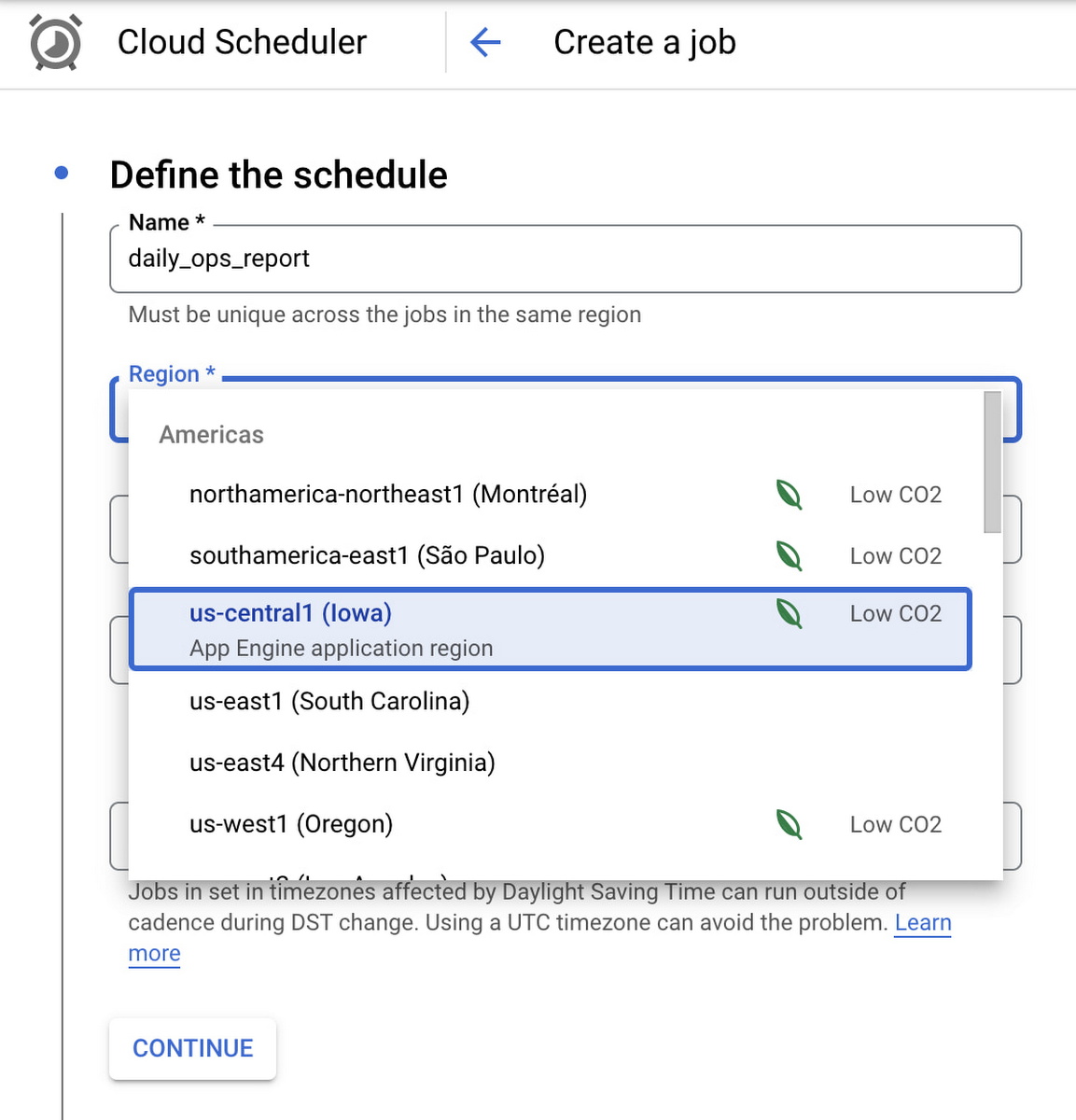
Google Cloud Scheduler is now available in 23 GCP Regions, and this number is expected to grow in the future. You can always find an up-to-date list of available regions by running:
gcloud scheduler locations list
We hope you are as excited about this launch as we are. Please reach out to us with any suggestions or questions in our public issue tracker.
More Relevant Stories for Your Company
Maximizing the Value of Your Cloud Migration
Technology leaders have shifted many apps and workloads to public cloud, and they are not finished; 63% plan further expansion in the next 12 months. According to this newly resealed Forrester report, enterprises are migrating all types of apps and workloads to cloud and the migration provides firms with a

What’s New in Retail: Bits from Google Cloud’s Retail & Consumer Goods Summit
Today we’re hosting our Retail & Consumer Goods Summit, a digital event dedicated to helping leading retailers and brands digitally transform their business. For me, this is a personally exciting moment, as I see tremendous opportunities for those companies that choose to focus on their customers and leverage technology to elevate

Google Cloud Region in Columbus to Accelerate Ohioan Businesses and Tech Transformation
Digital tools such as cloud computing are fueling economic transformation across the US, including Ohio. Google continues to invest across cities and communities in Ohio, bringing over 200 jobs to the state, and helping provide $12.85 billion of economic activity for tens of thousands of Ohio businesses, nonprofits, publishers, creators
IDC: Firms Should Migrate VM-based Enterprise Workloads to Google Cloud for Optimal Price, Performance, and Security
Public cloud platforms provide the scale, elasticity, and operational efficiency that enable enterprises to both innovate and deliver more products and services to the market faster. This increased ability to innovate provides enterprises a competitive advantage and the businesses agility to stay ahead of their competition. Enterprises should leverage the
