





4339
Of your peers have already watched this video.
20:00 Minutes
The most insightful time you'll spend today!
The New and Upcoming Infrastructure for Google Cloud’s AI and ML Solutions
How does Google manage to provide its customers a differentiated compute platform experience and define ways to fully leverage its infrastructure supporting its cutting-edge AI and ML offerings? Easy-to-use, scalable and ability to create innovative products and services to end-users at low cost of ownership is the narrative behind Google Cloud’s AI and ML solutions. Explore Google Cloud’s ML infrastructure and accelerator innovation for 2021.
Watch the video to find out how Google Cloud’s leadership in AI through Google research, Deep Mind and also practical application of AI within Google Products drive innovative platforms and offerings that cater to customers’ AI and ML use cases!
3203
Of your peers have already watched this video.
20:30 Minutes
The most insightful time you'll spend today!
Delivering analysis-ready financial data at scale
Refinitiv, is a leading provider of financial market data. It serves over 40,000 institutions and operates in 190 countries.
“We’re constantly looking at solving some of the most difficult problems our users face when accessing new data sets as well as onboarding new sources that will be relevant for workflows across the front, middle, and back office,” says Catalina Vazquez, Proposition Director, Tick History, Refinitiv.
For every dollar spent on financial market data, a further eight are spent in processing, storing, and transforming that data before it can be analyzed. That’s a problem Refinitiv wanted to get at.
Refinitiv partnered with Google Cloud to deliver instant access to 25 years of financial markets data. What was formerly delivered by hard disk then managed by hand is now provided automatically with BigQuery.
Watch Tom Salmon, Customer Engineer, Google Cloud and Catalina Vazquez and learn how Refinitiv addressed key challenges by designing their architecture with Google Cloud’s simplicity, security, scale, and speed in mind.
How a Mid-Sized Firm is Shrinking Inventory Carryovers 50% with AI

7471
Of your peers have already read this article.
5:30 Minutes
The most insightful time you'll spend today!
For more than 10 years, NMK Textile Mills has manufactured bed linens for major retailers in the United States and Canada. As e-commerce exploded, the company’s co-founder saw an opportunity to grow the business. So, in addition to manufacturing bed linens wholesale for retail customers, NMK Textile Mills reworked its complete supply chain to manufacture products for California Design Den, which became an e-commerce retailer selling its own fashion-forward products directly to consumers online.
With California Design Den’s push into e-commerce, it became apparent the SMB company (with about 250 global employees) faced the same tough supply chain questions as large retail customers, including maintaining enough inventory to meet customer demand in a timely, efficient way.
California Design Den depended upon a myriad of systems to track its complex forecasting and reordering processes. Team members typically planned inventory manually using desktop spreadsheet software, which could lead to excess inventory. Accurately forecasting demand and supply was essential to the company’s financial success—but it was also a challenge.
A couple years ago, California Design Den partnered with Pluto7, a technology solutions provider that offers a software as a service (SaaS) called Planning In A Box. Leveraging Google Cloud Platform machine learning and artificial intelligence, Planning In A Box intelligently helps predict demand and balances it with supply.
But that was just the beginning. “Along the way, we realized that to compete with larger retailers, make quicker decisions, and move faster, we needed to go further,” says Deepak Mehrotra, Co-founder and Chief Adventurer at California Design Den.
With guidance from Pluto7, California Design Den began migrating its database to Google Cloud Platform. Using Google BigQuery, Google Compute Engine, Google Cloud SQL, and Google Cloud Storage, and experimenting with Google Cloud Vision and Google Cloud AutoML, the company is reducing inventory carryovers by more than 50%, improving the accuracy of demand planning quarter over quarter, and gaining granular insights into how individual SKUs are performing.
“We would need an army of data scientists to make faster decisions on pricing and inventory levels. With Google Cloud Platform machine learning and artificial intelligence, we don’t need that. We can make much faster pricing decisions to optimize profitability and move inventory.”
—Deepak Mehrotra, Co-founder and Chief Adventurer, California Design Den
No need for army of data scientists
“Using Google Cloud Platform machine learning and AI was essential for California Design Den if it was to compete successfully with larger retailers,” Deepak says.
For example, tastes and fashions in bed linens can change quickly and consumer prices fluctuate. With more than 2,500 SKUs, it wasn’t possible for California Design Den’s team to continuously monitor product demand and experiment with competitive pricing in real time.
“We would need an army of data scientists to make faster decisions on pricing and inventory levels,” says Deepak. “With Google Cloud Platform machine learning and artificial intelligence, we don’t need that. We can make much faster pricing decisions to optimize profitability and move inventory.”
By integrating all its data onto Google Cloud Platform, California Design Den’s team gains deeper insights into product sales over time, which in turn helps the company improve demand planning by better determining which styles to manufacture and sell in the future.
“When experienced employees leave, their knowledge leaves with them. By having all data in one place, and with machine learning and AI, California Design Den can go back in its history, look at products made or sold years ago, and analyze product performance.”
—Deepak Mehrotra, Co-founder and Chief Adventurer, California Design Den
Merging visuals with data
Before Google Cloud Platform, team members had to dig through spreadsheets and run scenarios to get a sense of how particular products had sold. The next step was to perform keyword searches across the company’s photo library in the cloud to find each product’s image. From there, a team member would insert the product images into a presentation, along with relevant data points, to provide a report for stakeholders on how particular styles performed.
Today, California Design Den, with the help of Pluto7, is integrating its entire product image library with its database on Google Cloud Platform. Experimenting with Google Cloud Vision and Google Cloud AutoML, California Design Den is moving towards a day when team members can run sales scenarios and get deep background data on individual product performance while viewing images of the relevant products.
Merging product visuals with data will help designers and team members better understand sales patterns over time and in context. In the past, making correlations between things like which sheet colors sold well in California, compared to how the same sheet colors performed on the East Coast, was something that California Design Den employees primarily did in their heads.
“When experienced employees leave, their knowledge goes with them,” says Manjunath Devadas, Founder and CEO at Pluto7. “By having all data in one place, and with machine learning and AI, California Design Den can go back in its history, look at products made or sold years ago, and analyze product performance.”
“We are literally growing the complexity of our business on all levels, including designing, manufacturing, selling, reordering, inventory holding—everything.”
—Deepak Mehrotra, Co-founder and Chief Adventurer, California Design Den
Reimagining supply-demand balancing
Pluto7’s mission statement is to democratize supply demand balancing with machine learning and AI. California Design Den is a case in point, as the combination of Planning In A Box and Google Cloud Platform gives the company greater control over its destiny.
“Big retailers used to tell us what to manufacture and how much they would pay for it,” says Deepak. “That was our primary business, and if we didn’t accept the terms, a competitor would.” Today, in addition to continuing to make products for retailers, California Design Den can design, make, and sell a variety of designs for itself, including custom and limited-edition products, thanks to Google Cloud Platform and Pluto7 software offerings. The payoff is not only in having a more diversified business. California Design Den also receives more favorable profit margins by selling its own products.
“We are literally growing the complexity of our business on all levels, including designing, manufacturing, selling, reordering, inventory holding—everything,” Deepak says. “We can make smaller batches. We can connect directly with consumers. We can identify the missing pieces—what should we produce next, when, and how much? We otherwise couldn’t afford the level of talent it would take to do this.”
Cutting through the noise
Google and Pluto7 software helped California Design Den reduce inventory carryovers by more than 50%. Inventory tracking and distribution, along with insights and visibility into product sales, are faster, more efficient, and accurate. Google Cloud Platform flexible pricing, speed, reliability, security, and scalability enable California Design Den to stay relevant and be more competitive.
In addition to benefiting from Google Cloud Platform, California Design Den relies on G Suite—also part of Google Cloud—to enhance collaboration among its global teams. Previously, the company’s email server would sometimes crash, due to the heavy load of sharing product photos and other data. “Gmail and Google Drive handle the everyday demands on the business effortlessly and reliably,” Deepak says.
“Google machine learning and AI enable us to cut through all the noise from raw data, so we can see what’s important. We can focus on analytics to guide us to success today and in the future.”
—Deepak Mehrotra, Co-founder and Chief Adventurer, California Design Den
The company is exploring additional ways to leverage Google Cloud Platform in the near future. For example, one possibility is to import customer reviews from sites where products are sold into Google BigQuery, and to use that data to perform sentiment analysis via Google Cloud Natural Language. It could provide another valuable data source to help California Design Den’s team decide where to focus future designs.
“Google machine learning and AI enable us to cut through all the noise from raw data, so we can see what’s important,” Deepak says. “We can focus on analytics to guide us to success today and in the future.”
How to Enhance Incremental Pipeline Performance while Ingesting Data into BigQuery

6344
Of your peers have already read this article.
3:00 Minutes
The most insightful time you'll spend today!
When you build a data warehouse, the important question is how to ingest data from the source system to the data warehouse. If the table is small you can fully reload a table on a regular basis, however, if the table is large a common technique is to perform incremental table updates. This post demonstrates how you can enhance incremental pipeline performance when you ingest data into BigQuery.
Setting up a standard incremental data ingestion pipeline
We will use the below example to illustrate a common ingestion pipeline that incrementally updates a data warehouse table. Let’s say that you ingest data into BigQuery from a large and frequently updated table in the source system, and you have Staging and Reporting areas (datasets) in BigQuery.

The Reporting area in BigQuery stores the most recent, full data that has been ingested from the source system tables. Usually you create the base table as a full snapshot of the source system table. In our running example, we use BigQuery public data as the source system and create reporting.base_table as shown below. In our example each row is identified by a unique key which consists of two columns: block_hash and log_index.
CREATE TABLE reporting.base_table --156 GB processedPARTITION BY TIMESTAMP_TRUNC(block_timestamp, DAY) ASSELECT log_index, data, topics, block_timestamp, block_hashFROM bigquery-public-data.crypto_ethereum.logsWHERE block_timestamp BETWEEN TIMESTAMP '2020-01-01' AND TIMESTAMP '2020-11-30';
In data warehouses it is common to partition a large base table by a datetime column that has a business meaning. For example, it may be a transaction timestamp, or datetime when some business event happened, etc. The idea is that data analysts who use the data warehouse usually need to analyze only some range of dates and rarely need the full data. In our example, we partition the base table by block_timestamp which comes from the source system.
After ingesting the initial snapshot you need to capture changes that happen in the source system table and update the reporting base table accordingly. This is when the Staging area comes into the picture. The staging table will contain captured data changes that you will merge into the base table. Let’s say that in our source system on a regular basis we have a set of new rows and also some updated records. In our example we mock the staging data as follows: first, we create new data, than we mock the updated records:
CREATE TABLE staging.load_delta AS --5 GB processedSELECT log_index, data, topics, block_timestamp, block_hashFROM bigquery-public-data.crypto_ethereum.logsWHERE block_timestamp BETWEEN TIMESTAMP '2020-12-01' AND TIMESTAMP '2020-12-07';INSERT INTO staging.load_delta --2 GB processedSELECT log_index, CONCAT(data, RAND()), topics, block_timestamp, block_hashFROM bigquery-public-data.crypto_ethereum.logs TABLESAMPLE SYSTEM (5 PERCENT)WHERE block_timestamp BETWEEN TIMESTAMP '2020-10-01' AND TIMESTAMP '2020-11-30';
Next, the pipeline merges the staging data into the base table. It joins two tables by unique key and than updates the changed value or inserts a new row
MERGE INTO reporting.base_table T --161 GB processedUSING staging.load_delta SON T.block_hash = S.block_hashAND T.log_index = S.log_indexWHEN MATCHED THEN UPDATE SETT.data = S.dataWHEN NOT MATCHED THEN INSERT (log_index, data, topics, block_timestamp, block_hash)VALUES (log_index, data, topics, block_timestamp, block_hash);
It is often the case that the staging table contains keys from various partitions but the number of those partitions are relatively small. It holds, for instance, because in the source system the recently added data may get changed due to some initial errors or ongoing processes but older records are rarely updated. However, when the above MERGE gets executed, BigQuery scans all partitions in the base table and processes 161 GB of data. You might add additional join condition on block_timestamp:
MERGE INTO reporting.base_table T --161 GB processedUSING staging.load_delta SON T.block_hash = S.block_hashAND T.log_index = S.log_indexAND T.block_timestamp = S.block_timestampWHEN MATCHED THEN UPDATE SETT.data = S.dataWHEN NOT MATCHED THEN INSERT (log_index, data, topics, block_timestamp, block_hash)VALUES (log_index, data, topics, block_timestamp, block_hash);
But BigQuery would still scan all partitions in the base table because condition T.block_timestamp = S.block_timestamp is a dynamic predicate and BigQuery doesn’t automatically push such predicates down from one table to another in MERGE.
Can you improve the MERGE efficiency by making it scan less data? The answer is Yes.
As described in the MERGE documentation, pruning conditions may be located in a subquery filter, a merge_condition filter, or a search_condition filter. In this post we show how you can leverage the first two. The main idea is to turn a dynamic predicate into a static predicate.
Steps to enhance your ingestion pipeline
The initial step is to compute the range of partitions that will be updated during the MERGE and store it in a variable. As was mentioned above, in data ingestion pipelines, staging tables are usually small so the cost of the computation is relatively low.
DECLARE src_range STRUCT<date_min TIMESTAMP, date_max TIMESTAMP> --115 MB processedDEFAULT(SELECT STRUCT(MIN(block_timestamp) AS date_min,MAX(block_timestamp) AS date_max) FROM staging.load_delta);
Based on your existing ETL/ELT pipeline, you can add the above code as-is to your pipeline or you can compute date_min, data_max as part of some already existing transformation step. Alternatively, date_min, data_max can be computed on the Source System side while capturing the next ingestion data batch.
After computing date_min, date_max you pass those values to the MERGE statement as static predicates. There are several ways to enhance the MERGE and prune partitions in the base table based on precomputed date_min, data_max.
If your initial MERGE statement uses a subquery, you can incorporate a new filter into it:
BEGINDECLARE src_range STRUCT<date_min TIMESTAMP, date_max TIMESTAMP> --115 MB processedDEFAULT(SELECT STRUCT(MIN(block_timestamp) AS date_min,MAX(block_timestamp) AS date_max) FROM staging.load_delta);MERGE INTO reporting.base_table T --41 GB processedUSING (SELECT *FROM staging.load_deltaWHERE block_timestamp BETWEEN src_range.date_min AND src_range.date_max) SON T.block_hash = S.block_hashAND T.log_index = S.log_indexAND T.block_timestamp = S.block_timestampWHEN MATCHED THEN UPDATE SETT.data = S.dataWHEN NOT MATCHED THEN INSERT (log_index, data, topics, block_timestamp, block_hash)VALUES (log_index, data, topics, block_timestamp, block_hash);END;
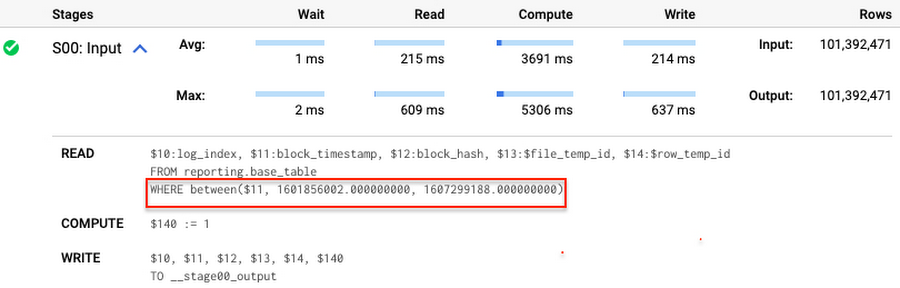
Note that you add the static filter to the staging table and keep T.block_timestamp = S.block_timestamp to convey to BigQuery that it can push that filter to the base table. This MERGE processes 41 GB of data in contrast to the initial 161 GB. You can see in the query plan that BigQuery pushes the partition filter from the staging table to the base table:
This type of optimization, when a pruning condition is pushed from a subquery to a large partitioned or clustered table, is not unique for MERGE. It also works for other types of queries. For instance:
SELECT * -- 41 GB processedFROM reporting.base_table TINNER JOIN staging.load_delta SON T.block_hash = S.block_hashAND T.log_index = S.log_indexAND T.block_timestamp = S.block_timestampWHERE S.block_timestamp BETWEEN TIMESTAMP '2020-10-05' AND TIMESTAMP '2020-12-07'
And you can check the query plan to verify that BigQuery pushed down the partition filter from one table to another.
Moreover, for SELECT statements, BigQuery can automatically infer a filter predicate on a join column and push it down from one table to another if your query meets the following criteria:
- The target table must be clustered or partitioned.
- The result size of the other table, i.e. after applying all filters, must qualify for broadcast join. Namly, the result set must be relatively small, less than ~100MB.
In our running example, reporting.base_table is partitioned by block_timestamp. If you define a selective filter on staging.load_delta and join two tables, you can see an inferred filter on the join key pushed to the target table
SELECT *FROM reporting.base_table TINNER JOIN staging.load_delta SON T.block_timestamp = S.block_timestampWHERE S.block_hash = '0x0c1caa16b34d94843aabfebc0d5a961db358135988f7498a6fdc450ad55f0870'
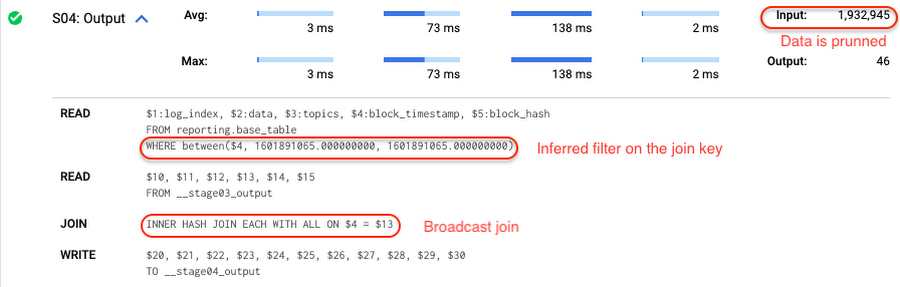
There is no requirement to join tables by partitioning or clustering key to kick off this type of optimization. However, in this case the pruning effect on the target table would be less significant.
But let us get back to the pipeline optimizations. Another way to enhance MERGE is to modify the merge_condition filter by adding static predicate on the base table:
BEGINDECLARE src_range STRUCT<date_min TIMESTAMP, date_max TIMESTAMP> --115 MB processedDEFAULT(SELECT STRUCT(MIN(block_timestamp) AS date_min,MAX(block_timestamp) AS date_max) FROM staging.load_delta);MERGE INTO reporting.base_table T --41 GB processedUSING staging.load_delta SON T.block_hash = S.block_hashAND T.log_index = S.log_indexAND T.block_timestamp BETWEEN src_range.date_min AND src_range.date_maxWHEN MATCHED THEN UPDATE SETT.data = S.dataWHEN NOT MATCHED THEN INSERT (log_index, data, topics, block_timestamp, block_hash)VALUES (log_index, data, topics, block_timestamp, block_hash);END;
To summarize, here are the steps that you can perform to enhance incremental ingestion pipelines in BigQuery. First you compute the range of updated partitions based on the small staging table. Next, you tweak the MERGE statement a bit to let BigQuery know to prune data in the base table.
All the enhanced MERGE statements scanned 41 GB of data, and setting up the src_range variable took 115 MB. Compare it with the initial 161 GB scan. Moreover, given that computing src_range may be incorporated into some existing transformation in your ETL/ELT, it results in a good performance improvement which you can leverage in your pipelines.
In this post we described how to enhance data ingestion pipelines by turning dynamic filter predicates into static predicates and letting BiQuery prune data for us. You can find more tips on BigQuery DML tuning here.
Special thanks to Daniel De Leo, who helped with examples and provided valuable feedback on this content.
An Expert’s Opinion on What Early-stage Startups Must Know

6472
Of your peers have already read this article.
3:00 Minutes
The most insightful time you'll spend today!
As lead for analytics and AI solutions at Google Cloud, my team works with startups building on Google Cloud. This puts us in the fortunate position to learn from founders and engineers about how early-stage startups’ investments can either constrain them or position them for success, even at the seed level. In this post, I want to share a few of the best practices to keep in mind as you’re building.
Understand your value proposition before diving into a technology stack
If you’re launching a startup in the cloud, you’re no doubt thinking about a technology stack, but it’s important to step back a bit and think carefully about the major value proposition that your startup offers to your customers. That value proposition is going to fundamentally drive the kind of technology that you should pick.
For example, does your system need processing in real time, or can it be done in a batch mode? Can you rely on once-a-day insights or do the insights have to come in as events happen?
Additionally, what kind of latency will your customers face? That latency makes your value proposition either usable or unusable. Early on in Google’s development, leaders realized that no one was going to wait more than a few hundred milliseconds for a web page to show them their results, and that realization drove the technology decisions that have allowed Google to scale from being a startup in a garage to being a trillion dollar company. Your startup needs to define its value to customers with this level of specificity before it can build a technology stack suited to its needs.
Focus on customer interactions
A few companies have gracefully pulled off big IT pivots that reshaped their value proposition. Netflix, for example, moved from mostly sending DVDs through the mail to becoming a streaming service and major content producer. That’s a huge shift in the user experience and the technology stack necessary to support it, even if the underlying value proposition (i.e., get content to customers) was broadly the same. But it’s also an outlier. If you’re planning for potential changes of this magnitude, rather than focused on getting your value proposition to users, you probably need to sharpen what that value proposition is.
Specifically, you need a clear vision of how customers will access and interact with your business. Typically, they’ll do so over a website or a mobile app, but there are still so many variables.
Are customers going to transmit documents? If so, in what format? Is handwriting supported or is input limited to typing? Can they use images for optical character recognition? Will it mostly be forms? Will the data be structured or unstructured? If all that sounds a little overwhelming, don’t worry, it’ll seem simpler by the end of this article—but also be aware: we’re just getting warmed up.
Imagine that most of your customers will access your business via voice, so you know you’ll want to prioritize conversational workflows. That’s a start—but dig deeper. Even if we suppose you’re usingDialogflow, a Google Cloud conversational AI platform that lets you build and deploy virtual agents, we’re still not really seeing the value proposition. How will all this work, from the beginning of a typical full customer interaction to the resolution? How many interactions will have to be facilitated over low-bandwidth connections, for example? When it comes to user interactions, make sure you can see an end-to-end use case.
Another example: you’re building a retail website, and one of your end-to-end use cases involves the customer asking if a certain amount of a given product is in stock, whether it’s one unit of the product, ten or hundreds. If the product is not sufficiently stocked, you want your app to offer similar items that are. Will your technology stack support this end-to-end use case?
These considerations are not an argument for premature optimization. There’s value in moving fast, getting minimum viable products to users, and then iterating. But in the early stages, you only get one chance to start on the right foot—and how you navigate that chance will influence a lot of dollars and effort down the road. You need to make sure you have business use cases, not just an idea, before you can start designing a technology stack.
Here’s how to get in the right frame of mind. Pick three use cases: two that are “bread and butter” and one that is technologically complex. Make sure your proposed technology stack can support all three, end to end.
Default toward higher levels of abstraction
Now that we’re in the right frame of mind, we’re ready to think about the technology stack more directly.
As a startup, you’ll need to conserve resources, and to do that, you’ll want to build at the highest level of abstraction possible for your value proposition. For example, you probably don’t want your people setting up clusters. You don’t want them configuring things if they can use a fully managed service. You want them focused on building your prototype, not managing infrastructure.
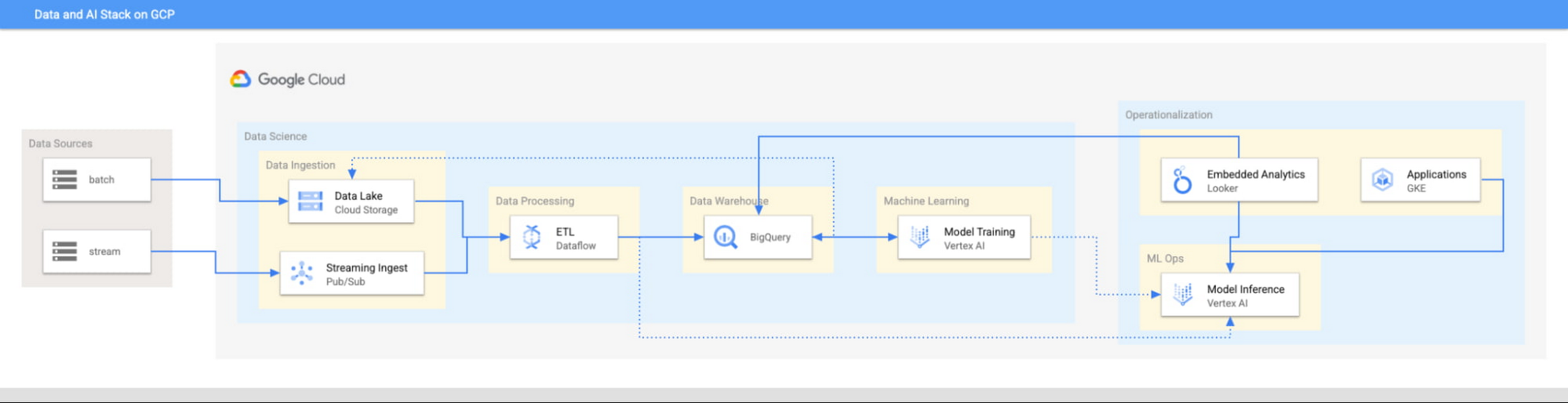
This focus has definitely informed how we create products at Google Cloud, as our canonical data stack—Pub/Sub, Dataflow, BigQuery, and Vertex AI—consists of auto-scaling and serverless products.
But management of infrastructure is not the only place where you should err toward a less-is-more philosophy.
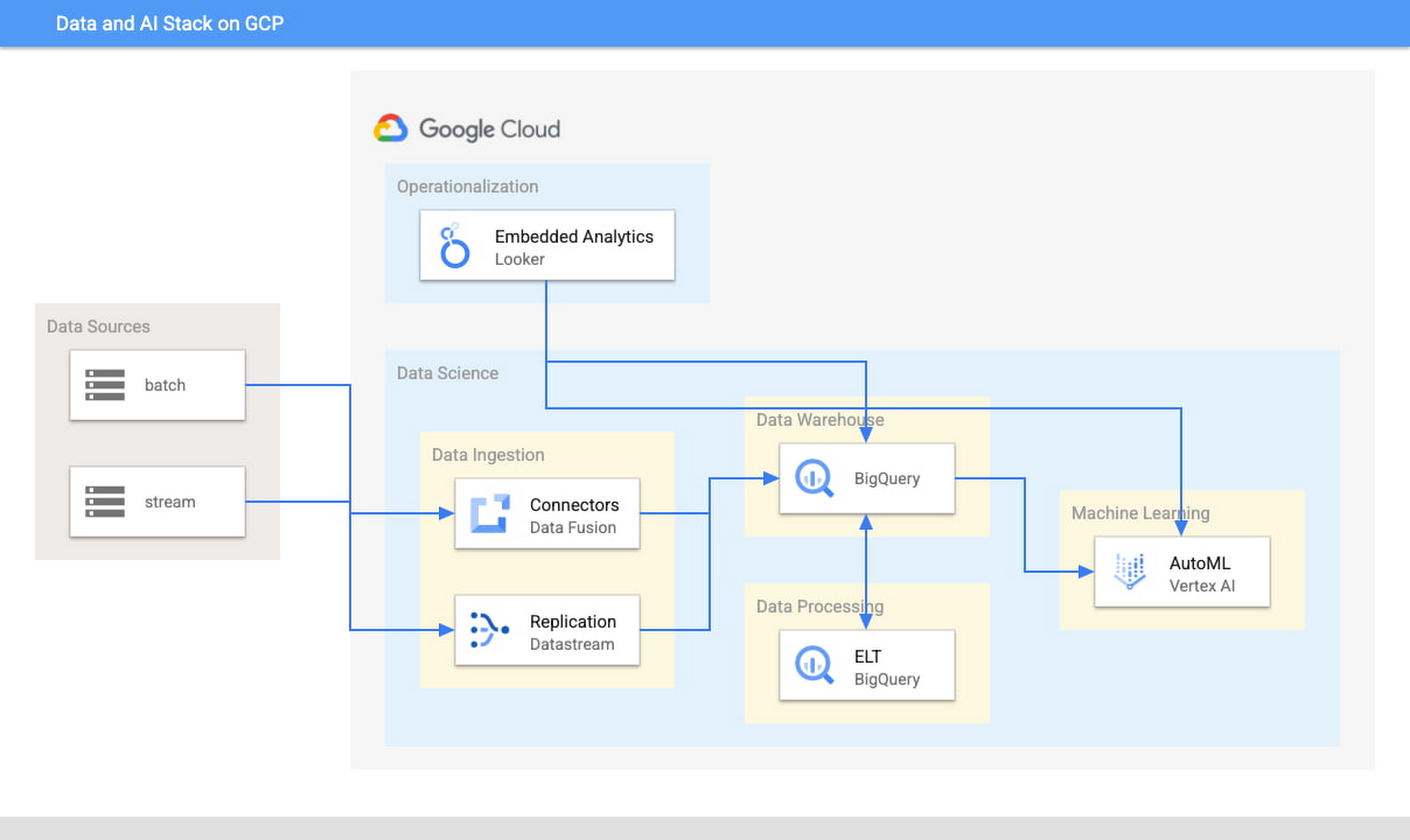
When it comes to architecture, choose no-code over low-code and low-code over writing custom code. For example, rather than writing ETL pipelines to transform the data you need before you land it into BigQuery, you could use pre-built connectors to directly land the raw data into BigQuery. That’s no code right there. Then, transform the data into the form you need using SQL views directly in the data warehouse. This is called ELT, and it is low code. You will be a lot more agile if you choose an ELT approach over an ETL approach.
Another place is when you choose your ML modeling framework. Don’t start with custom TensorFlow models. Start with AutoML. That’s no-code. You can invoke AutoML directly from BigQuery, avoiding the need to build complex data and ML pipelines. If necessary, move on to pre-built models from TensorFlow Hub, HuggingFace, etc. That’s low-code. Build your own custom ML models only as a last resort.
Focus on getting your vision to market, not chasing technology hype
The goal is to pick the right technology stack for bringing your vision to market, generating value for customers, conserving resources, and maintaining flexibility for growth. Early IT investments should usually gravitate toward things that preserve flexibility, such as managed services built on standard protocols or open APIs, but they needn’t always rush to the flashiest technologies. The answer isn’t always ML, for example. The answer might be heuristics to start, with a path to ML once you have collected enough data. You want to make sure that your intelligence layer has enough abstraction so you can mark it up with simple rules at first, but then replace it with a more robust system as you go along.
Launch and iterate fast with these principles
The preceding discussion is a reminder that your most expensive resource is your people—and that you really want them to be focused on building your prototype, minimum viable product or production app You want to launch fast and iterate fast, and the only way you can do that is by focusing on the things that differentiate you.
But regardless of the technologies you use, the bottom line is the same: follow these four principles.
- Figure out your major value proposition and design your tech stack around it.
- Be very careful about user interactions. User experience is super important; you need to make sure you deliver the kind of experience that your customers have grown to expect.
- When you’re building, pick the highest possible level of abstraction possible—the most fully managed tools and no-code/low-code frameworks that give you the functionality that you need.
- Instead of choosing new or flashy technologies, consider if you can build a “good enough” minimum viable product quickly and come back to a better implementation later.
To learn more about why startups are choosing Google Cloud, click here.
Insurer Uses Google Cloud AI to Battle Slow Growth: It Improves Sales by 5% in 8 Weeks

8860
Of your peers have already read this article.
7:30 Minutes
The most insightful time you'll spend today!
For a business to succeed in the long term, it needs to learn not just to adapt to inevitable change, but to harness it. South Africa-based PPS has been an insurance company since 1941 and today is the biggest mutual insurance provider in the country.
As a mutual company, PPS is owned by more than 200,000 members, making them shareholders. In recent years, PPS and other companies like it have been affected by a number of external factors.
“For one thing, technology platforms have brought in a new gig economy that has all kinds of implications for insurance,” says Avsharn Bachoo, CTO at PPS. “What we’ve been seeing is basically a disruption of the South African insurance industry. We chose to see that as an opportunity.”
“Our servers were at the end of their life cycle and we had to decide whether to refresh them or switch completely. To embrace the world of AI and machine learning effectively, we knew we needed a cloud-based infrastructure. We’ve found the answer in Google Cloud Platform.”
—Avsharn Bachoo, CTO, PPS
In early 2018, faced with an uncertain economic environment that was squeezing growth and profitability, PPS decided to transform itself from a traditional broker-based business into a digital insurance provider. A key pillar of this new strategy was to overhaul the company’s technology infrastructure. To turn the strategy into reality, Avsharn and his team chose Google Cloud Platform (GCP).
“Our servers were at the end of their life cycle and we had to decide whether to refresh them or switch completely,” says Avsharn. “To embrace the world of AI and machine learning (ML) effectively, we knew we needed a cloud-based infrastructure. We’ve found the answer in Google Cloud Platform.”
Power, speed, flexibility with Google Cloud Platform
Previously, PPS maintained an on-premises IT infrastructure, which worked for its traditional business but was unsuited for its new way of working. In early 2018, the company started working on new products for its members but this required large amounts of compute power that proved prohibitively expensive with on-premises servers. Even existing products were starting to require more than the infrastructure could deliver. Aging equipment meant that it’s testing and quality assurance environments bore little resemblance to the actual production environment.
“We had no pre-production environments at all,” says Avsharn, resulting in more work for developers after products had been released. Meanwhile, the capital required to buy and configure more servers for new projects meant fewer resources available for innovation, and left the company less able to react to changes in the market. PPS knew it had to find a cloud-based alternative.
Shortly after devising a new digital strategy, PPS engineers attended a training session on cloud infrastructure given by leading South African Google Cloud Partner Siatik. Impressed with the presentation, PPS engaged Siatik to help run a proof of concept for a cloud-based infrastructure, running on GCP. With on-site engineers and constant communication, Siatik formed a very close working relationship with PPS. “The team at Siatik was exemplary,” recalls Avsharn. “They were well-organized, with cutting-edge technical acumen and very creative solutions to our problems. They were real game-changers.”
“We wanted the platform to retrain its models in response to new data and improve its recommendations with more information. Normally this would be a manual process but Google Cloud ML Engine lets the models do this automatically.”
—Kimoon Kim, Lead Solution Architect and Data Engineer, Siatik
The proof of concept was successful, with GCP outperforming the existing infrastructure in terms of how it handled compute demands, databases, and storage.
“It’s the speed of GCP that really impresses us,” says Avsharn. PPS saw that GCP wasn’t just an opportunity to migrate its existing infrastructure to the cloud. With Siatik’s help, it redesigned its monolithic core architecture to one based around microservices using Google Kubernetes Engine (GKE). For data processing and storage, Cloud Dataflow and Cloud Datastore proved invaluable, while Stackdriver helped the IT team stay on top of logging and monitoring the system.
“Google Cloud makes migrations very easy,” says Brett St. Clair, CEO at Siatik. “It takes care of all the hard work with configurations and replications, so when we switch the machines on, everything is ready and working.”
The ease with which PPS migrated to GCP means that it can now tackle strategic goals much more quickly than before. The most ambitious of these is an AI-powered product recommendation platform. Information is collected from customers who opt in at a defined point in their journey, this database is queried using BigQuery, and the information is fed into the platform. The AI model then calculates the most appropriate products for each member, according to their personal history.
“Most of the product recommendation engines out there are based on clustering, where you’re offered products based on your peer groups,” explains Avsharn. “For the first time, we can make recommendations to members based on their individual preferences and historical behavior. That’s really powerful for us.”
Siatik helped PPS use TensorFlow and Cloud Machine Learning Engine to build the AI platform. For the engineers, these easy-to-use tools helped speed up the process considerably, allowing them to host the models locally without any fuss. Previously, it took one to three months to manually build the model and match an offer to a customer. With the AI platform, a match takes just a few minutes. Cloud ML Engine, in particular, helped the platform adapt to new information on the fly and easily make adjustments to its hyperparameters, that is, preset variables which define the model-training process.
“We wanted the platform to retrain its models in response to new data and improve its recommendations with more information,” says Kimoon Kim, Lead Solution Architect and Data Engineer at Siatik. “Normally this would be a manual process but Google Cloud ML Engine lets the models do this automatically.”
“Google Cloud helped us cancel out a lot of the noise around machine learning and AI. We don’t have to build new complicated algorithms or hire huge teams of data scientists to benefit. We just bring our data and use the right tools to focus on what’s really important.”
—Avsharn Bachoo, CTO, PPS
Harnessing artificial intelligence for real-world results
PPS deployed its new AI recommendation platform in December, 2018. Just a couple of months later, its impact was clear. “In around eight weeks, we saw a 5 percent growth in sales,” says Avsharn. “It’s been a direct result of building our recommendation platform with Google Cloud. We can offer the right products to the right members.”
For developers and engineers at PPS, working with Google Cloud gives them access to high performance technology and automation options with GKE. As a result, the infrastructure runs 70 percent faster than before with fewer cores and less memory. Developers can also work in mature testing environments, and for the first time, are able to build pre-production environments, leading to better quality products. More strategically, moving to a serverless, cloud-based infrastructure has helped PPS take control of its budget, moving away from intermittent, large capital spends to more manageable, project-to-project flows of operational expenditure. The company expects to see savings of around 50 percent, or $695,000.
“We have a lot more flexibility with our resources thanks to Google Cloud,” says Avsharn. “When we have a new idea, we don’t have to outlay new capital such as servers before we can even start working on it. We just spin up instances when we want and spin them back down when we’re done.”
With the AI platform deployed and working well, PPS is already looking at ways to improve it, including real-time updates and further automation. Soon, the company will integrate the platform with more sales campaigns for more effective targeting to boost sales even further. Meanwhile, it’s also experimenting with machine learning to spot patterns in data at scale for fraud analytics and risk assessment.
For PPS, working with Google Cloud has helped it transform quickly and effectively from disrupted to disruptor. The company is now looking to gain the same transformative effects by implementing G Suite for increased productivity and collaboration.
“Google Cloud helped us cancel out a lot of the noise around machine learning and AI,” says Avsharn. “We don’t have to build new complicated algorithms or hire huge teams of data scientists to benefit. We just bring our data and use the right tools to focus on what’s really important.”
More Relevant Stories for Your Company
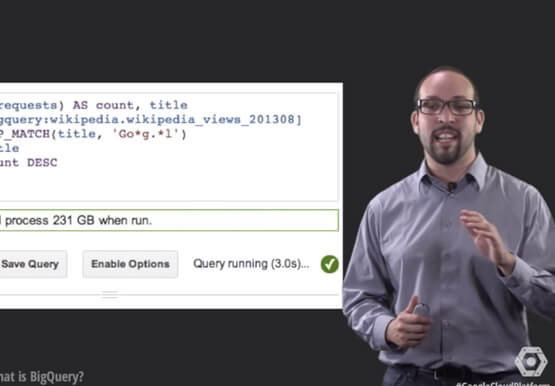



What’s BigQuery and Why Should IT Managers Care?
Today it’s impossible for anyone working in IT teams to have a day go by without a discussion about data, analytics, and big data. Often these conversations veer towards BigQuery. Many IT managers are unsure what BigQuery is and what it does. If you are one of them, you aren’t

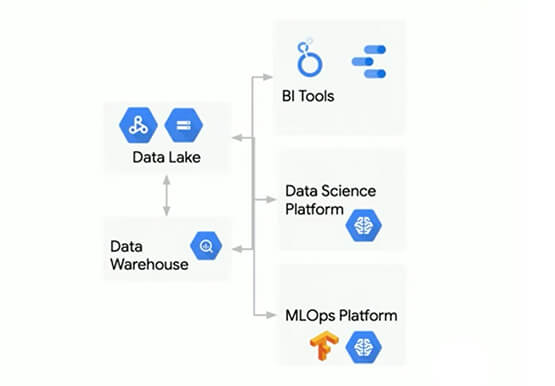
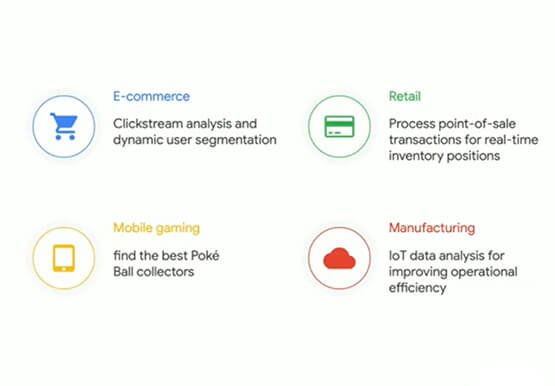
Lead Your Company Towards Data-Powered Innovation
In this talk, Lak Lakshmanan, Head of Analytics and AI Solutions, Google Cloud, presents a prescriptive, proven approach to foster the ability of your organization to innovate with data. This approach has helped other Google Cloud customers handle key challenges around data size, speed, and a (lack of) structure. This

NVIDIA and Google Cloud Pave the Way for Single-cell Genomic Analysis
In the past decade, the Healthcare and Life Sciences industry has enjoyed a boon in technological and scientific advancement. New insights and possibilities are revealed almost daily. At Google Cloud, driving innovation in cloud computing is in our DNA. Our team is dedicated to sharing ways Google Cloud can be

You Can Quantify and Maximize Value of Your Org’s AI/ML and Analytics Teams!
Investing in Artificial Intelligence (AI) can bring a competitive advantage to your organization. If you’re in charge of an AI or Data Science team, you’ll want to measure and maximize the value that you’re providing. Here is some advice from our years of experience in the field. A checklist to
