





5023
Of your peers have already watched this video.
1:50 Minutes
The most insightful time you'll spend today!
Small Fish Farmer Shows Big Corporates How to Be More Efficient
Red Deer, Canada is known for a lot of things. It’s the first city in Canada, for example, to have had a court case to include female jurors.
But, more recently, it’s made headlines for something on the outskirts of the city.
Just 22 minutes out of Red Deer is the Smoky Trout Farm, a family-run fish farm business that also specializes in lake and pond water management.
What’s amazing is how this tiny operation is taking a leaf out of the IT strategy followed by large corporations, including the likes of Whirlpool, Usha Martin, and Salesforce.
Smoky Trout Farm, started out by supplying rainbow trout to owners of private ponds and lakes in 1998. The nature of the business, however, made time a precious commodity. By 2016, the father and son duo, Dan and Max Menard, who started the business, found themselves unable to do more because they didn’t have the time.
“It’s 24×7. If we have something happen, then you can start to lose your crop (of fish) in 15 minutes. Consequently, someone is always here (the Smoky Trout Farm HQ). It has its days,” says Dan.
That’s when Dan’s other son Ray Menard decided to pitch in. He introduced the business to G-Suite, ensuring they could collaborate better and be more efficient.
“I was trying to make it more efficient so that they’d have more time to do what they do best. Google was basically an instant solution,” says Ray.
Find out how Smoky Trout Farm bucked the trend and the benefits it achieved. Watch this two-minute video.
3915
Of your peers have already watched this video.
15:11 Minutes
The most insightful time you'll spend today!
Communication in G Suite: The Future of Gmail, Chat, Meet, and More
Let’s take a step back and acknowledge the sudden shift that many of our businesses and employees have recently faced in the workplace.
A lot of people, who for a really long time relied on physical office space and infrastructure to both communicate and collaborate, have had to shift how they work and quickly. The crisis at hand has become a massive catalyst to remote, distributed and flexible work. And almost 3/4 of CFOs actually predict that these changes will permanently affect how companies choose to work moving forward.
While we’re well into this new reality, I want to quickly recap a few ways we’ve adapted to try to make this change to flexible work easier on people and organizations. First, we made premium Meet features available to all G Suite users, which meant that every customer, from schools to startups to small businesses to large enterprises, could leverage larger meeting sizes, live streams, recordings, and more.
In this video, find out more about how Google Workspace (formerly G Suite) is changing the future of work.
Tips to Get Most of Google Workspace and Make Hybrid Work Efficient and Effective!

3741
Of your peers have already read this article.
1:30 Minutes
The most insightful time you'll spend today!
In response to the pandemic, an overwhelming 92% of the U.S. workforce is now interested in working in a hybrid or fully remote capacity1. All employers, including government leaders, are now critically focused on finding the right tools and techniques to foster engagement, improve productivity, and strengthen relationships – in-person and virtually – or risk losing and/or retaining top talent.
Creating a positive work environment starts with having the right technology that can provide a variety of meeting tools to make work easier and more productive from any location. Google Workspace enables agency leaders to support their workforce with capabilities to address a variety of needs, from virtual training and learning, to mobilizing emergency response and critical service delivery. Below we’ve highlighted some of our top tips for getting the most out of Google Workspace to make hybrid work more efficient and effective.
Capture meeting agendas in a Google Doc
Create more effective, engaging meetings by attaching an agenda doc to your Google Calendar event and invite your attendees in to comment and review ahead of time. Google Docs, Google Slides, and Google Sheets allow collaborators to leave color-coded comments that can be incorporated into a live video meeting or a face-to-face roundtable meeting.
Engage attendees with interactive features in Google Meet
We’ve added new features to make meetings more interactive and inclusive throughout 2022. New in-meeting reactions, livestream Q&A and polls, and streaming meetings directly to YouTube, and client-side encryption are all coming to Google Meet soon. We’re incorporating Meet directly into Docs, Sheets, and Slides to make it easier to coordinate on projects.
Knowing how to include everyone into a meeting, even while some folks are remote and some are in the office, will be critical to bringing cohesion to the work experience. Government leaders can foster a culture that helps workers be more productive, satisfied, and perhaps even happier with their work lives.
Add focus time to your calendar and see how time is spent
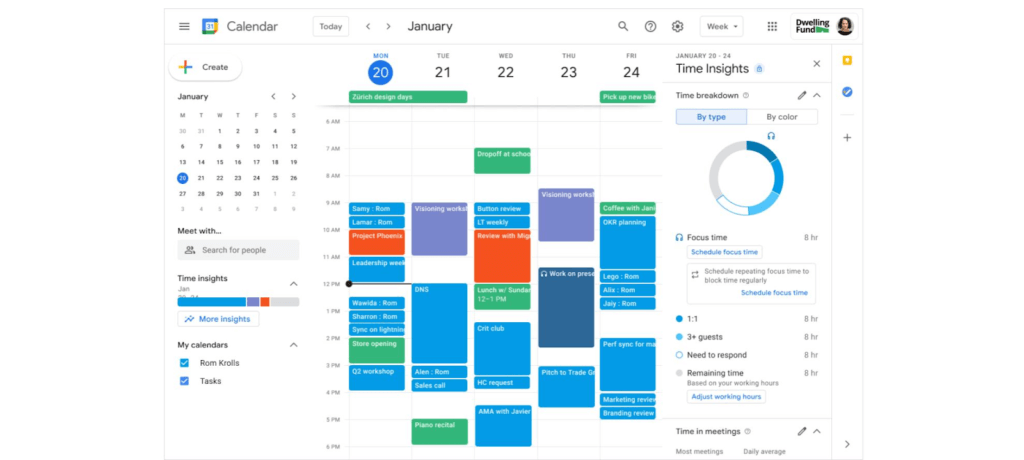
Google Workspace has also introduced product features to promote wellness. This includes focus time on Google Calendar, out of office and do not disturb statuses on Google Chat, or even backgrounds and noise cancellation on Google Meet that allow individuals to separate their home from work. Allowing employees to set boundaries or notify others of working times can help combat work fatigue. Time Insights in Calendar provide individuals with personalized analytics to see how time is spent across meetings and collaborators throughout a week. A secure cloud environment further brings these tools together to create systems of collaboration.
Creating positive outcomes with a culture focused on integrated work environments
The shift to hybrid work has already started leading to more meaningful engagements among all employees. Video calls have connected the new, tech savvy generation of workers with more experienced workers. In a Fedscoop Radio podcast on embracing hybrid-work strategies and tools, Gary Dannoff, Global Google Workspace Strategic Alliance Leader, noted that multigenerational teams with a 25-year age gap between team members are 75% more likely to have positive outcomes than teams with a smaller age span or none. As we return to the office, let’s engage with and support this new culture of cross-cultural, cross-generational, and cross-geographic collaborative environments created by the challenges we all adapted to during the pandemic.
Google Workspace supports a shift toward future-ready workplace cultures while providing the empathy and confidence needed for returning employees. Danoff also explains that to create a “future-proof” culture, you need to shift your mindset towards building a workplace that is future-ready. Using modern technology to foster collaboration in an evolving work environment helps organizations transform how work is done.
Collaborative technology facilitates productivity and constituent engagement
Agencies around the country are embracing the new era of hybrid work. The State of Arizona migrated 36,000 employees to Google Workspace with little disruption to the way people did their jobs. Now, Arizona is planning to expand their platform to support even more departments that require highly regulated data.
To help constituents get back to work, states like Rhode Island and Wisconsin have created Virtual Career Centers that leverage Google Cloud solutions, which includes Google Workspace, where constituents can schedule meetings and video conferences with career coaches, develop and collaborate on resumes using cloud-based document storage, communicate directly with job recruiters, attend virtual job fairs, and apply to open positions.
For more ideas on how to bring a collaborative, innovative culture into the workplace, catch up on content from the Google Workspace Summit.
1 Source: https://www.pwc.com/us/en/library/covid-19/us-remote-work-survey.html#content-free-1-0f39
5160
Of your peers have already watched this video.
14:00 Minutes
The most insightful time you'll spend today!
How Google Workspace Helps Manage, Govern and Protect Sensitive Data
The shift towards a hybrid work style and trends accelerated by the pandemic has resulted in data deluge. With companies and individuals sharing increasingly large volumes of information and collaborating with internal and external stakeholders, the need for innovations for higher security also escalates. View this video to learn how Google Workspace approaches security across content lifecycle from client-side encryption updates, data loss prevention, Google Vault, data regions, labels, and more!
Three months, 30x demand: How we scaled Google Meet during COVID-19

4174
Of your peers have already read this article.
10:30 Minutes
The most insightful time you'll spend today!
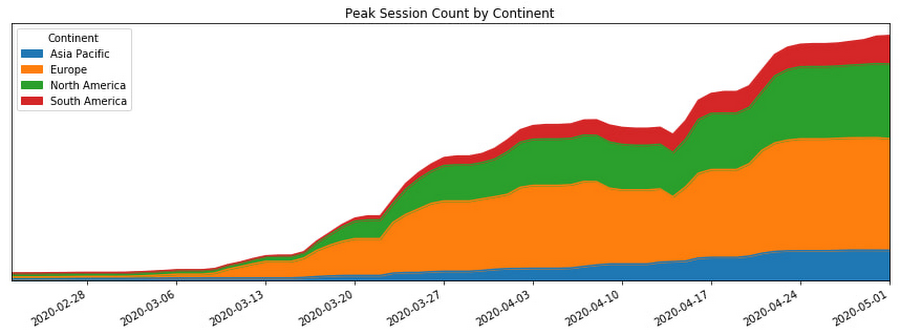
As COVID-19 turned our world into a more physically distant one, many people began looking to online video conferencing to maintain social, educational, and workplace contact. As shown in the graph below, this shift has driven huge numbers of additional users to Google Meet.
In this post, we’ll share how we ensured that Meet’s available service capacity was ahead of its 30x COVID-19 usage growth, and how we made that growth technically and operationally sustainable by leveraging a number of site reliability engineering (SRE) best practices.
Early alerts
As the world became more aware of COVID-19, people began to adapt their daily rhythms. The virus’s growing impact on how people were working, learning, and socializing with friends and family translated to a lot more people looking to services like Google Meet to keep in touch. On Feb. 17, the Meet SRE team started receiving pages for regional capacity issues.
The pages were symptomatic, or black-box alerts, like “Too Many Task Failures” and “Too Much Load Being Shed.” Because Google’s user-facing services are built with redundancy, these alerts didn’t indicate ongoing user-visible issues. But it soon became clear that usage of the product in Asia was trending sharply upward.
The SRE team began working with the capacity planning team to find additional resources to handle this increase, but it became obvious that we needed to start planning farther ahead, for the eventuality that the epidemic would spread beyond the region.
Sure enough, Italy began its COVID-19 lockdown soon thereafter, and usage of Meet in Italy began picking up.
A non-traditional incident
At this point, we began formulating our response. True to form, the SRE team began by declaring an incident and kicking off our incident response to this global capacity risk.
It’s worth noting, however, that while we approached this challenge using our tried-and-true incident management framework, at that point we were not in the middle of, or imminently about to have, an outage. There was no ongoing user impact. Most of the social effects of COVID-19 were unknown or very difficult to predict. Our mission was abstract: we needed to prevent any outages for what had become a critical product for large amounts of new users, while scaling the system without knowledge of where the growth would come from and when it would level off.
On top of that, the entire team (along with the rest of Google) was in the process of transitioning into an indefinite period of working from home due to COVID-19. Even though most of our workflows and tools were already accessible from beyond our offices, there were additional challenges associated with running such a long-standing incident virtually.
Without the ability to sit in the same room as everyone else, it became important to manage communication channels proactively to ensure we all had access to the information needed to achieve our goals. Many of us also had additional, non-work related challenges, like looking after friends and family members as we all adjusted. While these factors created extra challenges for our response, tactics like assigning and ramping up standbys and proactively managing ownership and communication channels helped us overcome these challenges.
Nevertheless, we carried on with our incident management approach. We started our global response by establishing an Incident Commander, Communications Lead, and Operations Lead in both North America and Europe so that we had around-the-clock coverage.
As one of the overall Incident Commanders, my function was like that of a stateful information router—albeit with opinions, influence, and decision-making power. I collected status information about which tactical problems lingered, who was working on what, and on the contexts that affected our response (e.g. governments’ COVID-19 responses), and then dispatched work to people who were able to help. By sniffing out and digging into areas of uncertainty (both in problem definition: “Is it a problem that we’re running at 50% CPU utilization in South America?” and solution spaces: “How will we speed up our turn-up process?”), I coordinated our overall response effort and ensured that all necessary tasks had clear owners.
Not long into the response, we realized that the scope of our mission was huge and the nature of our response would be long-running. To keep each contributor’s scope manageable, we shaped our response into a number of semi-independent workstreams. In cases where their scopes overlapped, the interface between the workstreams was well-defined.

We set up the following workstreams, visible in the diagram above:
- Capacity, which was tasked with finding resources and determining how much of the service we could turn up in which places.
- Dependencies, which worked with the teams that own Meet’s infrastructure (e.g., Google’s account authentication and authorization systems) to ensure that these systems also had enough resources to scale with the usage growth.
- Bottlenecks, which was responsible for identifying and removing relevant scaling limits in our system.
- Control knobs, which built new generic mitigations into the system in the case of an imminent or in-progress capacity outage.
- Production changes, which safely brought up all of the found capacity, re-deployed servers with newly-optimized tuning, and pushed new releases with additional control knobs ready to be used.
As incident responders, we continuously re-evaluated if our current operational structure still made sense. The goal was to have as much structure as required to operate effectively, but no more. With too little structure, people make decisions without having the right information, but with too much structure, people spend all of their time in planning meetings.
This was a marathon, and not a sprint. Throughout, we regularly checked in to see if anyone needed more help, or needed to take a break. This was essential in preventing burnout during such a long incident.
To help prevent exhaustion, each person in an incident response role designated another as their “standby.” A standby attended the same meetings as the role’s primary responder; got access to all relevant documents, mailing lists, and chat rooms; and asked the questions they’d need answers to if they had to take over for the primary without much notice. This approach came in handy when any of our responders got sick or needed a break because their standby already had the information they needed to be effective right away.
Building out our capacity runway
While the incident response team was figuring out how best to coordinate the flow of information and work needed to resolve this incident, most of those involved were actually addressing the risk in production.
Our primary technical requirement was simply to keep the amount of regionally available Meet service capacity ahead of user demand. With Google’s more than 20 data centers operating around the world, we had robust infrastructure to tap into. We quickly made use of raw resources already available to us, which was enough to approximately double Meet’s available serving capacity.
Previously, we relied on historical trends to establish how much more capacity we’d need to provision. But because we could no longer rely on the extrapolation of historical data, we needed to begin provisioning capacity based on predictive forecasts. To translate those models into terms our production changes team could act upon in production, the capacity workstream needed to translate the usage model into how much additional CPU and RAM we needed. Building this translation model is what later enabled us to speed up the process of getting available capacity in production, by teaching our tools and automation to understand it.
Soon, it became clear that merely doubling our footprint size was not going to be enough, so we started working against a previously unthinkable 50x growth forecast.
Reducing resource needs
In addition to scaling up our capacity, we also worked on identifying and removing inefficiencies in our serving stack. We could bucket much of this work into a couple of categories: tuning binary flags and resource allocations and rewriting code to make it cheaper to execute.
Making our server instances more resource-efficient was a multi-dimensional effort—the goal could be phrased as “the most requests handled at the cheapest resource cost, without sacrificing user experience or reliability of the system.”
Some investigative questions we asked ourselves included:
- Could we run fewer servers with larger resource reservations to reduce computational overhead?
- Had we been reserving more RAM than we needed, or more CPU than we needed? Could we better use those resources for something else?
- Did we have enough egress bandwidth at the edge of our network to serve video streams in all regions?
- Could we reduce the amount of memory and CPU needed by a given server instance by subsetting the number of backend servers in use?
Even though we always qualified new server shapes and configurations, at this point, it was very much worth reevaluating them. As Meet usage grew, its usage characteristics—like how long a meeting lasts, the number of meeting participants, how participants share audio time—also shifted.
As the Meet service required ever more raw resources, we began noticing that a significant percentage of our CPU cycles were being spent on process overhead like keeping connections to monitoring systems and load balancers alive, rather than on request handling.
In order to increase the throughput, or “number of requests processed per CPU per second,” we increased our processes’ resource specification in terms of both CPU and RAM reservation. This is sometimes called running “fatter” tasks.
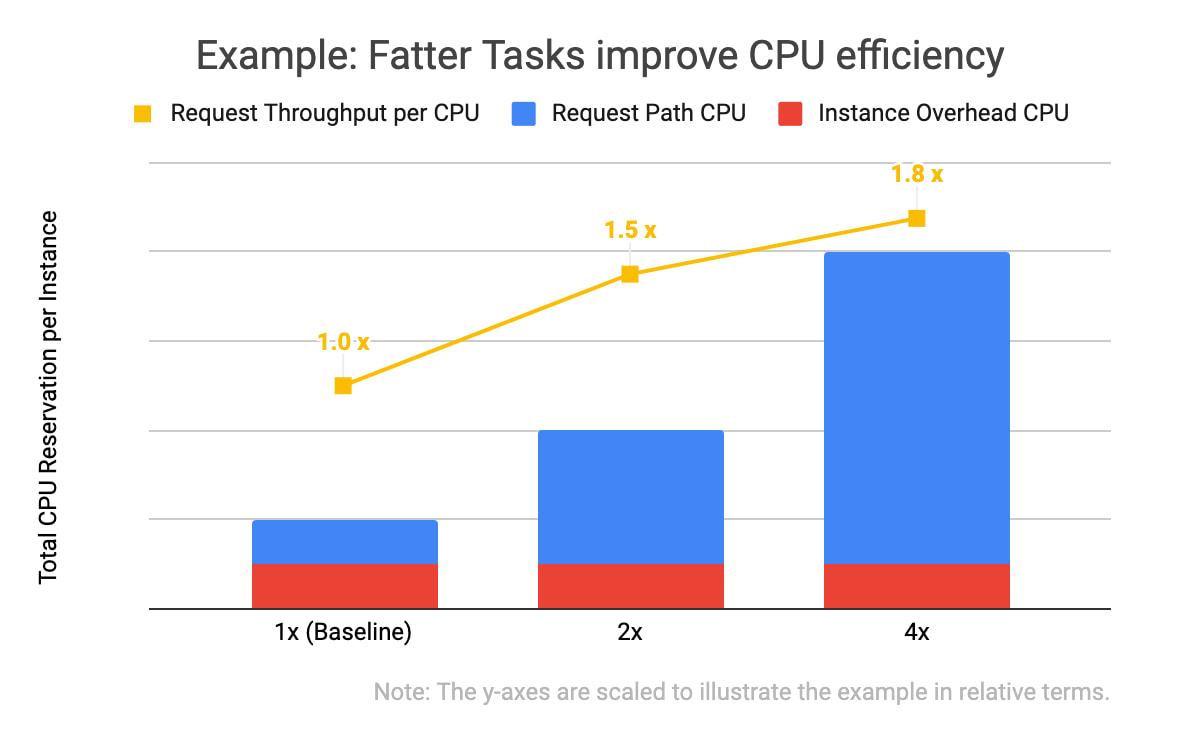
In the example data above, you will notice two things: that all three of the instance specifications have the same computational overhead (in red), and that the larger the overall CPU reservation of an instance, the more request throughput it has (in yellow). With the same total amount of CPU allocated, one instance of the 4x shape can handle 1.8 times as many requests as the four instances with the baseline shape. This is because the computational overhead (like persisting debug log entries, checking if network connection channels are still alive, and initializing classes) doesn’t scale linearly with the number of incoming requests the task is handling.
We kept trying to double our serving tasks’ reservations while cutting in half the number of tasks across our fleet until we hit a scaling limitation.
Of course, we needed to test and qualify each of these changes. We used canary environments to make sure that these changes behaved as expected and didn’t introduce or hit any previously undiscovered limitations. Similar to how we qualify new builds of our servers, we qualified that there weren’t any functional or performance regressions, and that the desired effects of the changes were indeed realized in production.
We also made functional improvements to our codebase. For example, we rewrote an in-memory distributed cache to be more flexible in how it sharded entries across task instances. This, in turn, let us store more entries in a single region when we grew the number of server instances in a cluster.
Crafting fire escapes
Though our confidence in our usage growth forecasts was improving, these predictions were still not 100% reliable. What would happen if we ran out of serving capacity in a region? What would happen if we saturated a particular network link? The control knob workstream’s goal was to provide satisfactory, if not ideal, answers to those kinds of questions. We needed an acceptable plan for any black swans that arrived on our consoles.
A group began working to identify and build more production controls and fire escapes—all of which we hoped we wouldn’t need. For example, these knobs would allow us to quickly downgrade the default video resolution from high-definition to standard-definition when someone joined a Meet conference. That change would buy us some time to course-correct using the other workstreams (provisioning and efficiency improvements) without substantial product degradation, but users would still be able to upgrade their video quality to high-definition if they wanted to.
Having a variety of instrumented controls like this built, tested, and ready to go bought us some additional runway if our worst-case forecasts weren’t accurate—along with some peace of mind.
Operational sustainability
This structured response involved large numbers of Googlers in a variety of roles. This meant that to keep making progress throughout the incident, we also needed some serious coordination and intentional communications.
We held daily handover meetings between our two time zones to accommodate Googlers based in Zurich, Stockholm, Kirkland, Wash., and Sunnyvale, Calif. Our communications leads provided regular updates to numerous stakeholders across our product team, executives, infrastructure teams, and customer support operations so that each team had up-to-date status information when they made their own decisions. The workstream leads used Google Docs to keep shared status documents updated with current sets of risks, points of contact, ongoing mitigation efforts, and meeting notes.
This approach worked well enough to get things going, but soon began to feel burdensome. We needed to lengthen our planning cycle from days to weeks in order to meaningfully reduce the amount of time spent coordinating, and increase the time we spent actually mitigating our crisis.
Our first tactic here was to build better and more trustworthy forecasting models. This increased predictability meant we could stabilize our target increase in serving capacity for the whole week, rather than just for tomorrow.
We also worked to reduce the amount of toil necessary to bring up any additional serving capacity. Our processes, just like the systems we operate, needed to be automated.
At that point, scaling Meet’s serving stack was our most work-intensive ongoing operation, due to the number of people who needed to be up-to-date on the latest forecast and resource numbers, and the number of (sometimes flaky) tools involved in certain operations.

As outlined in the life-cycle diagram above, the trick to automating these tasks was incremental improvements. First we documented tasks, and then we began automating pieces of them until finally, in the ideal case, the software could complete the task from start to finish without manual intervention.
To accomplish this, we committed a number of automation experts from within and outside the Meet organization to focus on tackling this problem space. Some of the work items here included:
- Making more of our production services responsive to changes in an authoritative, checked-in configuration file
- Augmenting common tools to support some of Meet’s more unique system requirements (e.g., its higher bandwidth and lower latency networking requirements)
- Tuning regression checks that had become more flaky as the system grew in scale
Automating and codifying these tasks made a significant dent in the manual operations required to turn up Meet in a new cluster or to deploy a new binary version that would unlock performance improvements. By the end of this scaling incident, we were able to fully automate our per-zone, per-serving job capacity footprint, which precluded hundreds of manually constructed invocations of command-line tools. This freed up time and energy for more than a few engineers to work on some of the more difficult (but equally important) problems.
At this point in scaling our operations, we could move to “offline” handoffs between sites via email, further reducing the number of meetings to attend. Now that our strategy was solidified and our runway was longer, we moved into a more purely tactical mode of execution.
Soon after, we wound down our incident structure and began to operate the remaining work more like how we’d run any long-term project.
Results
By the time we exited our incident, Meet had more than 100 million daily meeting participants. Getting there smoothly was not easy or straightforward; the scenarios the Meet team explored during disaster and incident response tests prior to COVID-19 did not encompass the length or the scale of increased capacity requirements we encountered. As a result, we formulated much of our response on the fly.
There were plenty of hiccups along the way, as we had to balance risk in a different way than we normally do during standard operations. For example, we deployed new server code to production with less canary baking time than normal because it contained some performance fixes that bought us additional time before we were due to run out of available regional capacity.
One of the most crucial skills we honed throughout this two month-long endeavour was the ability to catalog, quantify, and qualify risks and payoffs in a way that was flexible. Everyday, we learned new information about COVID-19 lockdowns, new customers’ plans to start using Meet, and available production capacity. Sometimes this new information made obsolete the work we’d started the day before.
Time was of the essence, so we couldn’t afford to treat each work item with the same priority or urgency, but we also couldn’t afford not to hedge our own forecast models. Waiting for perfect information wasn’t an option at any point, so the best we could do was build out our runway as much as possible, while making calculated but quick decisions with the data we did have.
All of this work was only possible because of the savvy, collaborative, and versatile people across a dozen teams and as many functions—SREs, developers, product managers, program managers, network engineers, and customer support—who worked together to make this happen.
We ended up well-positioned for what came next: making Meet available for free to everyone with a Google account. Normally, opening the product up to consumers would have been a dramatic scaling event all on its own, but after the intense scaling work we’d already done, we were ready for the next challenge.
Active Assist Expands Globally: Unleashing Cloud Optimization Insights Worldwide

1288
Of your peers have already read this article.
3:30 Minutes
The most insightful time you'll spend today!
Active Assist provides insights and recommendations to help Google Cloud customers proactively optimize their cloud environments for cost, security, performance, and sustainability. If you’re like most customers, you’ve likely encountered these insights and recommendations in the console — either in the Recommendations Hub or embedded on a resource page, like IAM or the VM list pages. (Note that for the rest of this post, we’ll use the word “recommendations” to mean “insights and recommendations.”)
We heard from customers who love recommendations that it should be easier to discover and work with these valuable suggestions across an entire organization, so last year we launched the Recommendations BigQuery export feature to Preview. This allows you to automatically export the recommendations to a BigQuery dataset, which you can then investigate with tools like DataStudio or Looker, and integrate with your company’s existing monitoring solutions and workflows.
Many of you have told us how powerful this feature is, so we’ve been working hard on improvements to make it even more useful. We’re happy to announce that BQ Export 1.0 is now in GA, and that BQ Export 2.0 is in Preview, with new support for Billing Account-level recommendations and cost optimization recommendations that include discount information. This post will cover what’s new with Active Assist BQ Export, as well as a couple other new features of Active Assist.
New features to Active Assist BigQuery Export
Before we dive into the details, if you’re new to Recommendations BQ Export check out our handy getting started guide. It covers the permissions you’ll need and how to set up the export, including instructions for using a service account. It also includes some sample queries and instructions for interacting with the data using Google Sheets. You may also want to check out our prior blog post showing how to optimize your cloud spend with BigQuery and Looker.
Now, on to what’s new!
1. Non-project scoped recommendations
You can now see non-project scoped recommendations, such as billing account, organization, and folder-level recommendations in your export to BigQuery. This ensures that in your export, you are able to see the full portfolio of recommendations that are available to you.
2. Custom contract Pricing
If you have any applicable custom contract pricing for your company, your cost-related recommendations now take those into account (based on your historical costs) in the cost saving calculation when you export them to BigQuery. This will ensure that you have the most accurate cost savings data we have for you and your organization to help you make the best judgment and prioritization when choosing to adopt recommendations. However, you must have the correct permissions first in order to see the custom contract pricing. If the user executing the export to BigQuery does not have the correct permissions, you may continue to see list pricing in your estimated savings. Also, note that the console UI and the Recommender API already have this support.
3. Export now available globally
Customers outside of the US can now set up an export of recommendations to a BigQuery dataset.
Improvements to Active Assist discoverability and usability
1. Global Recommender Viewer role: You can now add the global Recommender Viewer role, which gives you view access to all insights and recommendations available to you, simplifying permission management for new recommenders. Newly launched recommendations will also automatically be added as they become generally available.
2. Dismiss recommendations via Recommender API: You can now directly dismiss recommendations via our API, allowing you to focus on the recommendations you care about and work more efficiently.
3. Shareable links: Another feature that quietly launched recently is the availability of shareable URLs that link to recommendation details in the console. You can access these links in the UI from the upper right of the details panel of any recommendation.
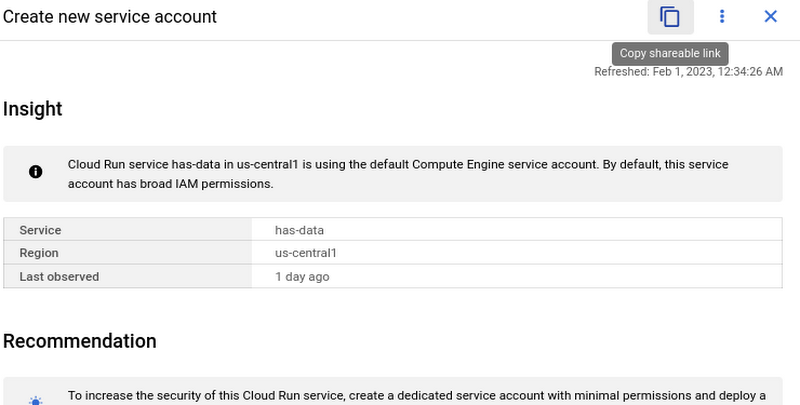
However, these links become even more powerful when combined with Recommendations BigQuery Export. The URLs all have a standard format. This means that within the BigQuery export tables you can easily calculate a new column containing these links using an expression like:
“https://console.cloud.google.com/home/recommendations/view-link/” +
name +
“?project=” +
cloud_entity_id
This example is for project level recommendations (where cloud_entity_type = PROJECT_NUMBER).
For cloud_entity_type = FOLDER, use:
“https://console.cloud.google.com/home/recommendations/view-link/” +
name +
“?folder=” +
cloud_entity_id
For cloud_entity_type = ORGANIZATION, use
“https://console.cloud.google.com/home/recommendations/view-link/” +
name +
“?organizationId=” +
cloud_entity_id
These links can then be embedded in your reports and dashboards, or used by other BigQuery clients.
As a reminder, if you’re interested in setting up reports or dashboards using Recommendations BigQuery Export, take a look at this previous blog post for some great ideas, or you can reference our getting started guide. If you have any feedback, please feel free to reach out to active-assist-feedback@google.com.
More Relevant Stories for Your Company
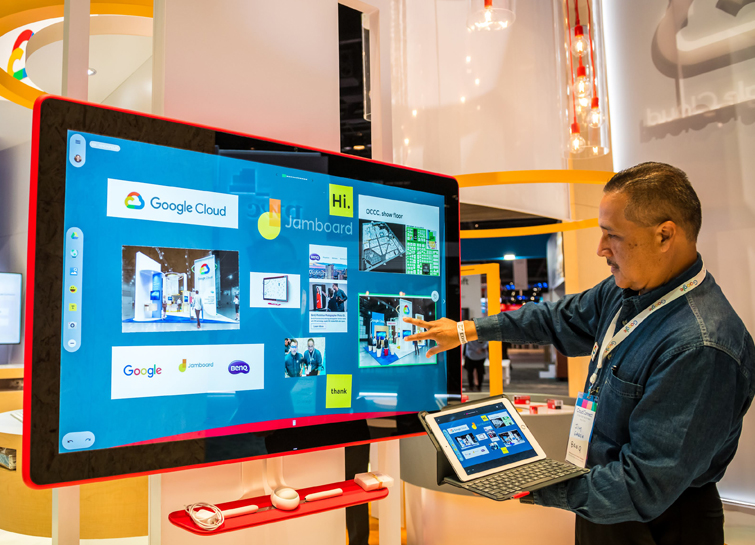
Forrester Report: Are You Listening to Your New-Age Cloud Workers?
Today’s modern workers are redefining organizations as we know it. They are no longer tied to a work desk or bound by geographies. And that’s how they ensure that your business is always-on, all the time, everywhere. This, in turn, points to the fact that today’s organizations need to ensure

How Google Maps Platform Boosts Domino’s Operations and Fast Growing Franchise across Indonesia
Editor’s note: Today’s blog post is from Mayank Singh, Chief Digital Officer and VP Marketing and IT at pizza delivery group Domino's Indonesia. He explains how Google Maps Platform is enabling their business to optimize their operations and supporting the franchise's ambitious expansion strategy in one of the world's most




How Manish Malhotra Created Masterpieces on G Suite for the World’s Biggest Names
From Hillary Clinton’s golden outfit at Isha Ambani’s wedding to scores of Indian movies, Manish Malhotra has been a household name for over two decades. It was in 1990 that Malhotra first designed outfits for an Indian movie and since then he has won several awards in the Best Costume

Google Dataflow Named Leader in The 2021 Forrester Wave™: Streaming Analytics
We are excited to announce that Google has been named a Leader in The Forrester Wave™: Streaming Analytics, Q2 2021 report. Thank you to our strong community of customers and partners for working with us to deliver a customer focused product. We believe Forrester’s recognition is an acknowledgement of our leadership
