





4084
Of your peers have already watched this video.
1:00 Minutes
The most insightful time you'll spend today!
Say Hello to Google Workspace
Make way for Google Workspace to connect, create, and collaborate with your team and organization. Watch the video to explore how you can achieve more with Google Workspace and how it can transform the future of workplace!
Google Cloud CCAI’s Support for the Public Sector Soars during the Pandemic

5271
Of your peers have already read this article.
2:00 Minutes
The most insightful time you'll spend today!
Scaling Virtual Support in the Pandemic Era: The AI Connection
Since the early days of the pandemic, we’ve partnered with government organizations and academic institutions to serve communities at scale with Contact Center Artificial Intelligence (CCAI). I sat down with Bill MacKenzie, IT liaison for the Upper Grand School District in Ontario, and Marco Palermo, director of digital government and modernization, to discuss how they embraced CCAI to introduce scalable service delivery to residents and students alike. I’m sharing more on their stories below, and for the full overview, check out our Google Cloud Public Sector Summit session, Scaling Virtual Support in the Pandemic Era: The AI Connection.
Upper Grand School District: Answering questions with speed and accuracy
Bill MacKenzie described the Upper Grand School District’s struggles at the beginning of the pandemic, particularly helping parents with IT issues. The staff-oriented help desk was not equipped to assist parents trying to securely login for students as young as kindergarten. Without sufficient support for parents, the District was struggling to handle thousands of phone calls a day.
To alleviate the manual strain, they turned to Quantiphi, a Google Cloud partner, to implement Google Cloud Dialogflow. They were fully functional within a few weeks. The new website provided real-time responses as well as clear documentation to help parents get up and running quickly.
“In the first 10 days, we had over 5,000 hits, and the accuracy rate was 92%,” MacKenzie said.
The district doesn’t know what the future holds, but now that they have been through the process, they are confident they now understand how to create their own bots to meet critical needs.
City of Toronto: Getting critical information to the community
Marco Palermo explained how the city of Toronto was facing a very rapid and fluid situation at the beginning of the pandemic. Getting information to constituents was extremely important, and they needed alternative channels to deliver that information.
Toronto has been committed to workforce equity and inclusivity in order to best represent the diversity of its residents. As a result, solutions had to be accessible to all. The bot handled 25,330 unique users and addressed 20,174 total questions with an 80% accurate response rate in the first four months. It’s been a huge success for the city, with plans to expand its capabilities.
Personalized response to the pandemic challenge
I noted that even before the pandemic, government leaders were asking for a way to provide more flexible personal experiences and better support outside of normal business hours. Around 60% of constituents want more self-service options and 75% would happily interact with digital resources if they could get the answers they needed.
Google Cloud CCAI addresses these needs with a single core of intelligence that provides a consistently high-quality conversational experience—human or virtual—across all channels and platforms. It can be deployed on legacy infrastructure without upgrades in an average of two weeks.
CCAI operates with a conversational core that centralizes the ability to talk, understand, and interact, orchestrating high-quality conversations at scale. It provides services in three different ways:
- Virtual Agent AI allows natural conversation with customers to identify and address their issues effectively
- Agent Assist AI helps human agents by providing real-time turn-by-turn guidance so they can better serve constituents
- Insight AI determines metrics and trends in real-time to enable faster and more accurate insights
CCAI provides consistency across every application. It can go off-script when answering complex questions, adjusting human conversation with the capacity to handle unexpected stops and starts, odd word choices, or implied meanings. It can also handle multiple use cases for the customer, such as taking payments, updating information, providing information, and more. By allowing agencies to automate routine tasks and reduce the amount of time employees need to dedicate to answering calls, the solution created cost savings for the agency.
Explore more on this session by visiting the Public Sector Summit on-demand video.
How This Online Shoe Retailer Transformed Itself by Reducing its Workload by Two Hours Per Day

4388
Of your peers have already read this article.
4:15 Minutes
The most insightful time you'll spend today!
By offering customers a choice of 30,000 shoe styles at reasonable prices with a straightforward returns policy, Footway has become one of the largest online shoe retailers in Europe. Founded in 2011 and based in Kista, Sweden, the company has grown to become a market leader and four years ago acquired the Heppo and Brandos brands.
In 2017, Footway expanded from the Nordic market to seven other European countries: Poland, Holland, the UK, France, Germany, Austria, and Switzerland.
To build the business, Footway has had to prove to its customers that buying shoes online is quick and easy. That means, at the backend, processing returns and queries efficiently to provide a seamless consumer experience. However, as the company’s IT infrastructure grew organically, its data storage procedures were not clearly systematized, which made it difficult to implement the efficient, time-saving processes that enable Footway to provide its excellent customer service.
The company needed to move its team onto a system that would resolve this issue, and make compliance to ever-changing data regulations easier. Implementing G Suite was the answer.
“One of our strategic objectives is to automate processes and increase efficiency in our organization,” says Louise Liljedahl, HR Manager and Co-founder at Footway. “We want to work more efficiently every day. One of our main goals with the G Suite project was to get everyone working in the same platform with good structure.”
Systematizing data storage
In order for a relatively small team to run a big retail operation, good organization and process automation are key. Before working with Google Cloud, Footway’s communications and data storage processes were not systematized, making it difficult to work effectively. “Our internal IT had many different places to save files, and, for example, no structure for where to save pictures or graphic elements or where to archive agreements,” explains Louise. “Another trigger for change was the GDPR. To be compliant, we needed to see who has access to what information, and looked for good audit systems to control those permissions”. To do that, Footway implemented G Suite.
With support from implementation partner Avalon Solutions, the migration of the company’s calendar, contacts, and email data using CloudMigrator was swift and seamless. “The transformation process was very lean and quick,” says Louise. “We had a small test group of six people working with G Suite for two weeks to see how to move over to Google Sheets from Excel, for example. Everyone was very enthusiastic.”
To systematize its storage and make day-to-day working easier, Footway moved its document and images to Google Drive. This means Footway can control access both internally and externally. “Google Drive helps us keep everything in the right place. And it is definitely an easier way to share things when it comes to working with external partners, as we know exactly who we’re sharing documents and information with.”
Increasing automation
Following the move to G Suite, Footway automated communications with influencers and bloggers using Gmail and Google Forms. This saves time and means more bloggers can be contacted.
“We send automatic emails through G Suite to different influencers to set up cooperative agreements and partnerships,” says Louise. “Using Gmail and Forms has helped us to go from having contact with 4 bloggers a day, to 200 a day. The person responsible saves two hours a day from his or her workload with this new process.”
Achieving stable growth
Thanks to G Suite, Footway’s data is now organized in a way that is easily accessible and highly secure. “It’s much easier to find company and client information because it’s structured,” says Louise. “That saves a lot of time when searching for something.” The ways people can collaborate have also been transformed, as Footway made the switch to using Google Chromebook, encouraging more flexible working and spontaneous collaboration. “Before, people would take notes on paper and come back to their computer to write everything down. Now they use their Chromebooks instead and have more small, spontaneous meetings.”
Now, Footway plans to extend the use of Chromebooks and to use the functions G Suite offers to further automate the company’s daily processes and grow the business. “People tend to be fearful of change, but this one has been very positive for the whole organization,” says Louise. “We’re excited about how G Suite can help us as a company to grow in a stable way. We can automate processes and use Google products to work more efficiently.”
Google Workspace and Miro Together Bring Immersive Team Collaboration Experience

3937
Of your peers have already read this article.
3:00 Minutes
The most insightful time you'll spend today!
While many of us are navigating the shift to hybrid work, every team’s experience is unique. Distributed work is taking many different forms—from the fully remote to a specific mix of in-person and in-office—but there are potential gaps across all the places that people work. Google Workspace helps teams bridge these gaps by providing tools for them to connect, create and collaborate securely wherever they are. Today, we’re taking this one step further by announcing new ways to bring Miro’s intuitive whiteboard experience to Google Workspace so that teams can ideate and innovate more immersively.
With a shared commitment to extending inclusive, flexible collaboration experiences for all, we’re partnering with Miro to bring whiteboarding capabilities into Google Meet. We’re also deepening the existing experience within Google Docs, Sheets and Slides, making it easier for teams to ideate and co-create asynchronously and in real time.
Deepening collaboration in meetings
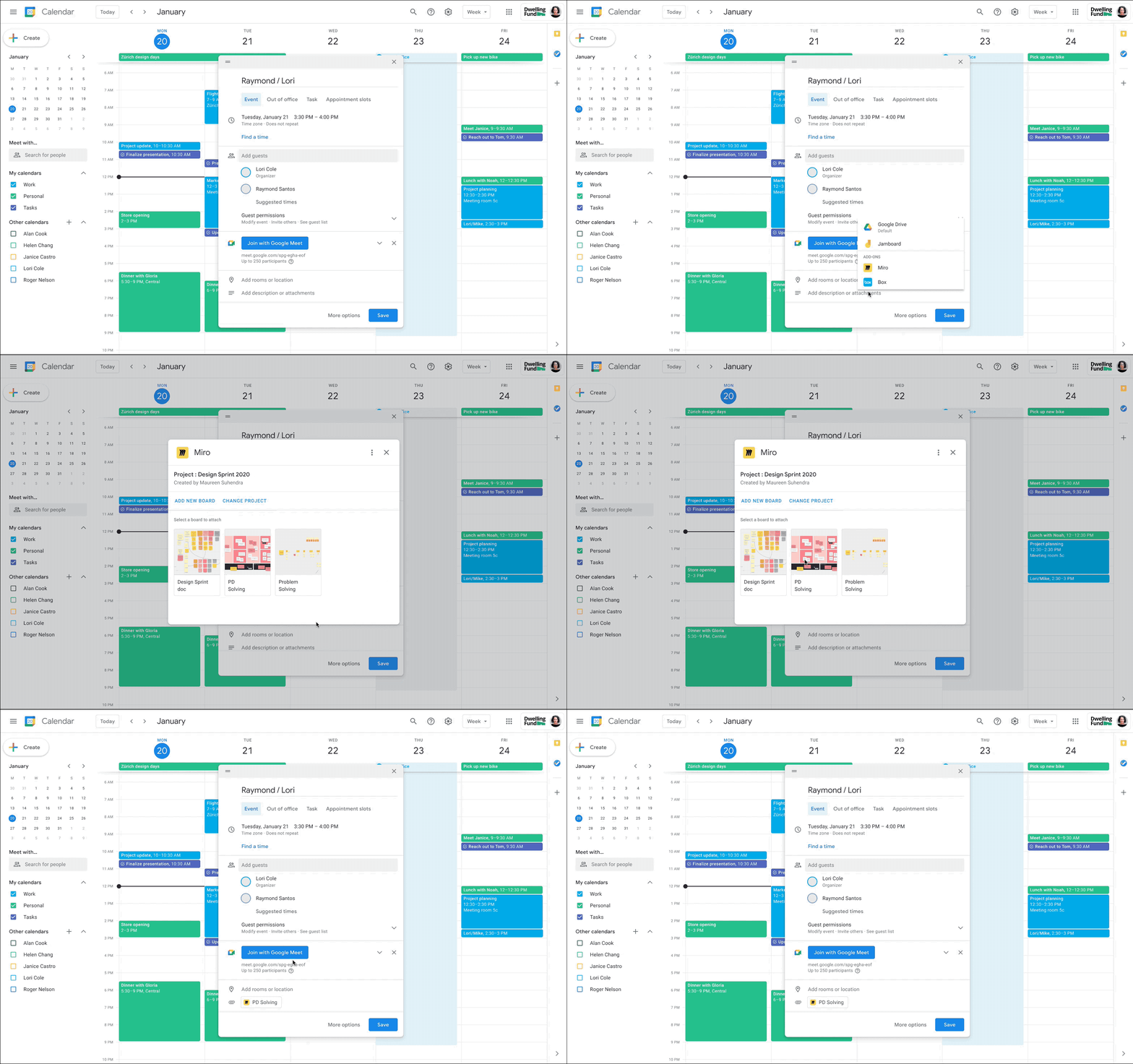
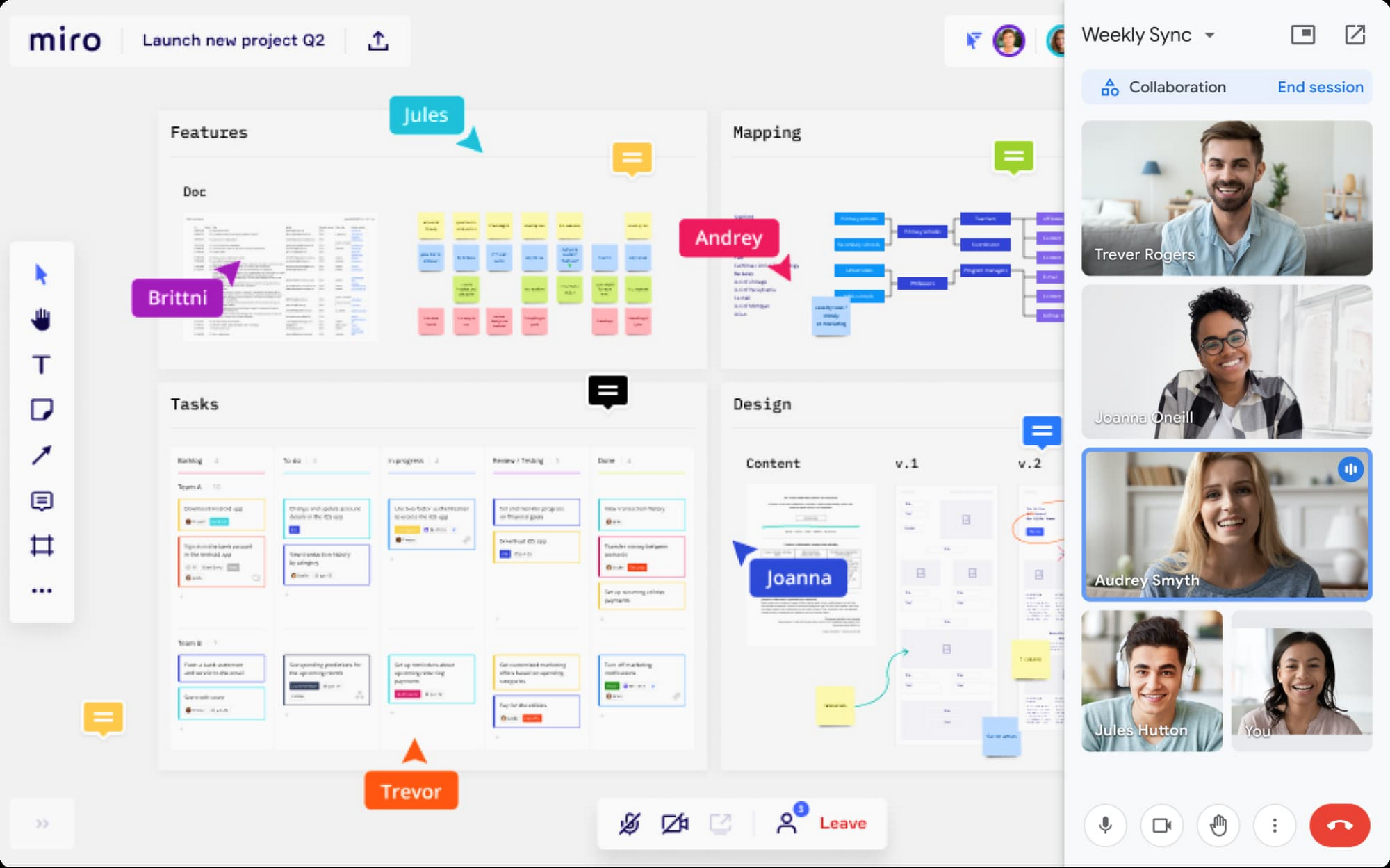
With the new Miro experience in Meet, you’ll get an immersive side-by-side video and whiteboard experience that’s ideal for brainstorming, sketching, and iteration during meetings. This approach fosters idea generation and participation from all team members, even if they’re in different locations. And using a Miro whiteboard in Meet is seamless: simply attach the Miro whiteboard to the meeting in Google Calendar or select a board during a meeting to share and collaborate in real-time. These new experiences will be available in early 2022.
Seamlessly integrate content from Google Docs, Sheets, and Slides
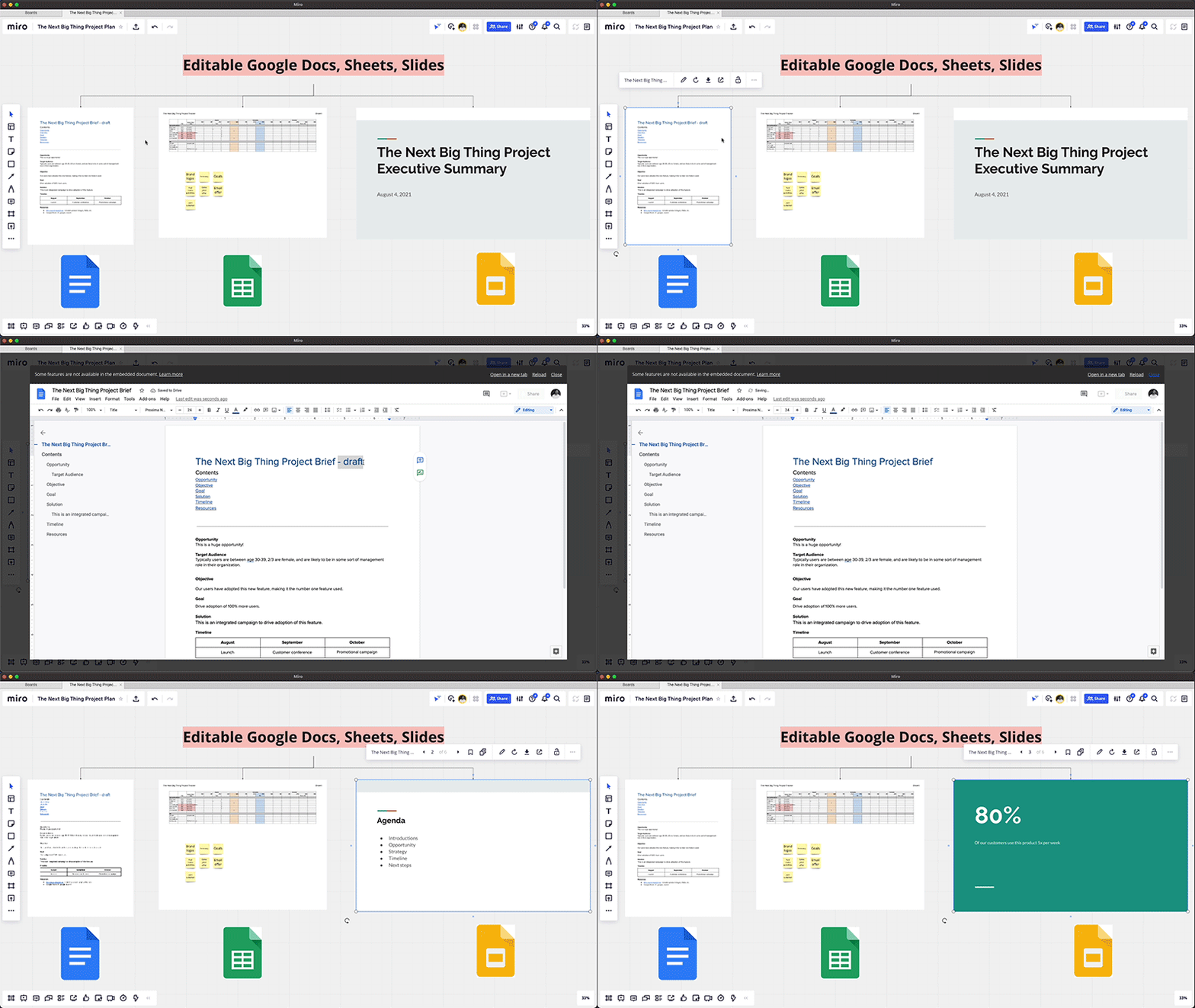
Real-time collaboration across a distributed team often spans multiple files—from brainstorming in documents, to project management in spreadsheets, to presenting your ideas in slides. Miro integrates with Google Drive, so teams can easily access and embed their Google Docs, Sheets, and Slides into Miro’s infinite canvas, making it easier to visualize and manage all the pieces of a project from one shared space. You can also save your Miro boards to Drive, and Docs, Sheets, and Slides automatically sync across both applications, so you’re always working with the latest content.
Start using Miro in Google Workspace today
The Miro app for Workspace is one of the growing number of 3rd-party applications you can use to bring the apps and services you use every day to your Google Workspace experience. Try the Miro app in Workspace with your existing credentials, or sign up for Workspace and Miro to start using the free versions together. And stay tuned for future innovation as we partner with Miro on delivering visual collaboration capabilities that are mission critical for the hybrid workplace.

4204
Of your peers have already downloaded this article
6.06 Minutes
The most insightful time you'll spend today!
Nearly 20 years after its debut, the Customer Relationship Management (CRM) software company, Salesforce, “dominates the market,” as Bloomberg puts it, with 19.6 percent market share in 2017, according to International Data Corporation. The company as also recently named number 1 in Fortune’s 2018 list of 100 Best Companies to Work For.
In the fast-changing, highly competitive industry that it helped establish, how does Salesforce maintain its position as a business, philanthropic, and workplace leader?
In part, the company’s success is a result of streamlined collaboration, both internally and externally, supported by real-time, easy communication between teams and partners.
As the company grew and expanded its network of offices and partners, it found that its on-premises email system and communication and collaboration tools couldn’t keep pace. That’s why it turned to G Suite.
“With all the stakeholders who need to review and comment, getting marketing materials out the door used to take weeks. With Google Docs, we can create, approve, and deliver assets in as little as 24 hours,” says Leandro Perez, Senior Director of Product Marketing, Salesforce.
4646
Of your peers have already watched this video.
3:00 Minutes
The most insightful time you'll spend today!
The Simple Salesforce Extension on Gmail That Can Make Sales and Marketing More Productive
What’s one of the big problems of sales and marketing? The inability to get a more holistic picture of a customer when reaching out to them.
There’s a fix for that if you’re using Gmail.
It’s a Salesforce Lightning Chrome extension. As you read and respond to emails in your inbox Salesforce Lightning for Gmail will surface relevant customer information from your CRM directly to you within the Gmail interface.
This will not only save you time by reducing how often you’re toggling between tools, but it’ll also ensure that you have the most current customer information at hand at all times.
With Salesforce Lightning for Gmail you’ll be able to see opportunities, cases, leads and other Salesforce records the contact has with your organisation enabling you to better craft your email response to match your customer’s specific situation.
Find out how else Salesforce Lightning for Gmail can make you smarter, faster and more accurate. Watch this short video now.
More Relevant Stories for Your Company

Go Green with Google’s Latest Tool and Pick the Most Sustainable Cloud Region
As a Google Cloud customer, your carbon footprint is already carbon neutral: Google first achieved carbon neutrality in 2007, and has been purchasing enough solar and wind energy to match 100% of its global electricity consumption since 2017. Now, Google is targeting a new sustainability goal: operating on carbon-free energy (CFE) 24/7,

From operations to planning, G Suite customers scale data insights with Connected Sheets
We recently announced the general availability of Connected Sheets, which brings you the power and scale of a BigQuery data warehouse in the familiar context of Google Sheets. With Connected Sheets, you can analyze billions of rows and petabytes of data in Sheets without specialized knowledge of computer languages like SQL.
Google Workspace Bolsters Data Security by Adding Client-Side Encryption to Gmail and Calendar
Editor's note: This post originally appeared on the Google Workspace blog. We consistently hear from our customers that the privacy of their data is top of mind, which is why we’ve built state-of-the-art security and privacy-preserving technologies into our products — to keep customer data private and secure. We’ve put

TELUS and Google Cloud Partner to Move Towards a More Sustainable Future
Environmental sustainability is a key priority for TELUS, a world-leading communications technology company. It continues to rank in the top 100 most sustainably managed companies in the world, and seeks to make a healthier planet for all by leveraging its global-leading technology, compassion to drive social change and reduce our
