





3184
Of your peers have already watched this video.
26:27 Minutes
The most insightful time you'll spend today!
Redefining the approach to mobile security
When it comes to mobile security, everyone assumes open means unsecure.
There are three terms that people often confuse: vulnerability, malware, and exploit.
A vulnerability is really nothing more than a software flaw that is potentially exposed, where there is a possibility of it being attacked. It doesn’t mean it will ever be attacked and it doesn’t mean it will ever be exposed.
Malware is software–again, it’s software–that is designed to disrupt, damage, or gain unauthorized access to a computer system.
An exploit is also software and it’s designed to take advantage of a vulnerability. And in most cases, it’s designed to typically do malicious things, such as install malware.
So, a vulnerability does not equal an exploit. A vulnerability is a chance.
Discover how to debunk these security myths and learn how the latest multi-layered security protections, encompassing software, and hardware and application levels now leverage the power of machine learning to protect your device fleet. Mark Burr, an Android expert, shares the latest on enterprise security innovations, backed by third-party validation.
Google Cloud’s Accountability and Transparency Adheres to EU’s Stringent Compliance Policies

3268
Of your peers have already read this article.
1:30 Minutes
The most insightful time you'll spend today!
Google Cloud’s industry-leading controls, contractual commitments, and accountability tools have helped organizations across Europe meet stringent data protection regulatory requirements for years. This commitment to supporting the compliance efforts of European companies has earned us the trust of businesses like retailers, manufacturers and financial services providers.
As part of our continued efforts to uphold that trust, Google Cloud was one of the first cloud providers to support and adopt the EU GDPR Cloud Code of Conduct (CoC). The CoC is a mechanism for cloud providers to demonstrate how they offer sufficient guarantees to implement appropriate technical and organizational measures as data processors under the GDPR.
Today the Belgian Data Protection Authority, based on a positive opinion by the European Data Protection Board (EDPB), approved the CoC, a product of years of constructive collaboration between the cloud computing community, the European Commission, and European data protection authorities. We are proud to say that Google Cloud Platform and Google Workspace already adhere to these provisions. This is the first European code approved under the GDPR; it is excellent news for the industry to have a new transparency and accountability tool that helps promote trust in the cloud.
In addition to the CoC, Google Cloud has already been certified against internationally-recognized privacy standards such as ISO/IEC 27001, ISO/IEC 27017, ISO/IEC 27018 and ISO/IEC 27701. These certifications provide independent validation of our ongoing dedication to world-class security and privacy.
This initiative reaffirms Google Cloud’s commitment to help our customers navigate their compliance journey when using our services. To learn more about how Google Cloud can help organizations with their compliance efforts, visit our Cloud Compliance resource center.
What Users and System Designers Must Learn from Google’s Best Practices for Password Management

5290
Of your peers have already read this article.
3:00 Minutes
The most insightful time you'll spend today!
Updated for 2021: This post includes updated best practices including the latest from Google’s Best Practices for Password Management whitepapers for both users and system designers.
Account management, authentication and password management can be tricky. Often, account management is a dark corner that isn’t a top priority for developers or product managers. The resulting experience often falls short of what some of your users would expect for data security and user experience.
Fortunately, Google Cloud brings several tools to help you make good decisions around the creation, secure handling and authentication of user accounts (in this context, anyone who identifies themselves to your system—customers or internal users). Whether you’re responsible for a website hosted in Google Kubernetes Engine, an API on Apigee, an app using Firebase, or other service with authenticated users, this post lays out the best practices to follow to ensure you have a safe, scalable, usable account authentication system.
1. Hash those passwords
My most important rule for account management is to safely store sensitive user information, including their password. You must treat this data as sacred and handle it appropriately.
Do not store plaintext passwords under any circumstances. Your service should instead store a cryptographically strong hash of the password that cannot be reversed—created with Argon2id, or Scrypt. The hash should be salted with a value unique to that specific login credential. Do not use deprecated hashing technologies such as MD5, SHA1 and under no circumstances should you use reversible encryption or try to invent your own hashing algorithm. Use a pepper that is not stored in the database to further protect the data in case of a breach. Consider the advantages of iteratively re-hashing the password multiple times.
Design your system assuming it will be compromised eventually. Ask yourself “If my database were exfiltrated today, would my users’ safety and security be in peril on my service or other services they use?” As well as “What can we do to mitigate the potential for damage in the event of a leak?”
Another point: If you could possibly produce a user’s password in plaintext at any time outside of immediately after them providing it to you, there’s a problem with your implementation.
If your system requires detection of near-duplicate passwords, such as changing “Password” to “pAssword1”, save the hashes of common variants you wish to ban with all letters normalized and converted to lowercase. This can be done when a password is created or upon successful login for pre-existing accounts. When the user creates a new password, generate the same type of variants and compare the hashes to those from the previous passwords. Use the same level of hashing security as with the actual password.
2. Allow for third-party identity providers if possible
Third-party identity providers enable you to rely on a trusted external service to authenticate a user’s identity. Google, Facebook, and Twitter are commonly used providers.
You can implement external identity providers alongside your existing internal authentication system using a platform such as Identity Platform. There are a number of benefits that come with Identity Platform, including simpler administration, a smaller attack surface, and a multi-platform SDK. We’ll touch on more benefits throughout this list.
3. Separate the concept of user identity and user account
Your users are not an email address. They’re not a phone number. They’re not even a unique username. Any of these authentication factors should be mutable without changing the content or personally identifiable information (PII) in the account. Your users are the multi-dimensional culmination of their unique, personalized data and experience within your service, not the sum of their credentials. A well-designed user management system has low coupling and high cohesion between different parts of a user’s profile.
Keeping the concepts of user account and credentials separate will greatly simplify the process of implementing third-party identity providers, allowing users to change their username, and linking multiple identities to a single user account. In practical terms, it may be helpful to have an abstract internal global identifier for every user and associate their profile and one or more sets of authentication datavia that ID as opposed to piling it all in a single record.
4. Allow multiple identities to link to a single user account
A user who authenticates to your service using their username and password one week might choose Google Sign-In the next without understanding that this could create a duplicate account. Similarly, a user may have very good reason to link multiple email addresses to your service. If you’ve properly separated user identity and authentication, it will be a simple process to link several authentication methods to a single user.
Your backend will need to account for the possibility that a user gets part or all the way through the signup process before they realize they’re using a new third-party identity not linked to their existing account in your system. This is most simply achieved by asking the user to provide a common identifying detail, such as email address, phone, or username. If that data matches an existing user in your system, require them to also authenticate with a known identity provider and link the new ID to their existing account.
5. Don’t block long or complex passwords
NIST publishes guidelines on password complexity and strength. Since you are (or will be very soon) using a strong cryptographic hash for password storage, a lot of problems are solved for you. Hashes will always produce a fixed-length output no matter the input length, so your users should be able to use passwords as long as they like. If you must cap password length, do so based on the limits of your infrastructure; often this is a matter of memory usage (memory used per login operation * potential concurrent logins per machine), or more likely—the maximum POST size allowable by your servers. We’re talking numbers from hundreds of KB to over 1MB. Seriously. Your application should already be hardened to prevent abuse from large inputs. This doesn’t create new opportunities for abuse if you employ controls to prevent credential stuffing and hash the input as soon as possible to free up memory.
Your hashed passwords will likely already consist of a small set of ASCII characters. If not, you can easily convert a binary hash to Base64. With that in mind, you should allow your users to use literally any characters they wish in their password. If someone wants a password made of Klingon, Emoji, and ASCII art with whitespace on both ends, you should have no technical reason to deny them. Just make sure to perform Unicode normalization to ensure cross-platform compatibility. See our system designers whitepaper (PDF) for more information on Unicode and supported characters in passwords.
Any user attempting to use an extreme password is probably following password best practices (PDF) including using a password manager, which allows the entry of complex passwords even on limited mobile device keyboards. If a user can input the string in the first place (i.e., the HTML specification for password input disallows line feed and carriage return), the password should be acceptable.
6. Don’t impose unreasonable rules for usernames
It’s not unreasonable for a site or service to require usernames longer than two or three characters, block hidden characters, and prevent whitespace at the beginning and end of a username. However, some sites go overboard with requirements such as a minimum length of eight characters or by blocking any characters outside of 7-bit ASCII letters and numbers.
A site with tight restrictions on usernames may offer some shortcuts to developers, but it does so at the expense of users and extreme cases will deter some users.
There are some cases where the best approach is to assign usernames. If that’s the case for your service, ensure the assigned username is user-friendly insofar as they need to recall and communicate it. Alphanumeric generated IDs should avoid visually ambiguous symbols such as “Il1O0.” You’re also advised to perform a dictionary scan on any randomly generated string to ensure there are no unintended messages embedded in the username. These same guidelines apply to auto-generated passwords.
7. Validate the user’s identity
If you ask a user for contact information, you should validate that contact as soon as possible. Send a validation code or link to the email address or phone number. Otherwise, users may make a typo in their contact info and then spend considerable time using your service only to find there is no account matching their info the next time they attempt login. These accounts are often orphaned and unrecoverable without manual intervention. Worse still, the contact info may belong to someone else, handing full control of the account to a third party.
8. Allow users to change their username
It’s surprisingly common in legacy systems or any platform that provides email accounts not to allow users to change their username. There are very good reasons not to automatically release usernames for reuse, but long-term users of your system will eventually come up with significant reasons to use a different username and they likely won’t want to create a new account.
You can honor your users’ desire to change their usernames by allowing aliases and letting your users choose the primary alias. You can apply any business rules you need on top of this functionality. Some orgs might limit the number of username changes per year or prevent a user from displaying or being contacted via anything but their primary username. Email address providers are advised to never re-issue email addresses, but they could alias an old email address to a new one. A progressive email address provider might even allow users to bring their own domain name and have any address they wish.
If you are working with a legacy architecture, this best practice can be very difficult to meet. Even companies like Google have technical hurdles that make this more difficult than it would seem. When designing new systems, make every effort to separate the concept of user identity and user account and allow multiple identities to link to a single user account and this will be a much smaller problem. Whether you are working on existing or greenfield code, choose the right rules for your organization with an emphasis on allowing your users to grow and change over time.
9. Let your users delete their accounts
A surprising number of services have no self-service means for a user to delete their account and associated PII. Depending on the nature of your service, this may or may not include public content they created such as posts and uploads. There are a number of good reasons for a user to close an account permanently and delete all their PII . These concerns need to be balanced against your user experience, security, and compliance needs. Many if not most systems operate under some sort of regulatory control (such as PCI or GDPR), which provides specific guidelines on data retention for at least some user data. A common solution to avoid compliance concerns and limit data breach potential is to let users schedule their account for automatic future deletion.
In some circumstances, you may be legally required to comply with a user’s request to delete their PII in a timely manner. You also greatly increase your exposure in the event of a data breach where the data from “closed” accounts is leaked.
10. Make a conscious decision on session length
An often overlooked aspect of security and authentication is session length. Google puts a lot of effort into ensuring users are who they say they are and will double-check based on certain events or behaviors. Users can take steps to increase their security even further.
Your service may have good reason to keep a session open indefinitely for non-critical analytics purposes, but there should be thresholds after which you ask for password, 2nd factor, or other user verification.
Consider how long a user should be able to be inactive before re-authenticating. Verify user identity in all active sessions if someone performs a password reset. Prompt for authentication or 2nd factor if a user changes core aspects of their profile or when they’re performing a sensitive action. Re-authenticate if the user’s location changes significantly in a short period of time. Consider whether it makes sense to disallow logging in from more than one device or location at a time.
When your service does expire a user session or requires re-authentication, prompt the user in real time or provide a mechanism to preserve any activity they have not saved since they were last authenticated. It’s very frustrating for a user to take a long time to fill out a form, only to find all their input has been lost and they must log in again.
11. Use 2-Step Verification
Consider the practical impact on a user of having their account stolen when choosing 2-Step Verification (also known as two-factor authentication, MFA, or 2FA) methods. Time-based one-time passwords (TOTP), email verification codes, or “magic links” are consumer-friendly and relatively secure. SMS 2FA auth has been deprecated by NIST due to multiple weaknesses, but it may be the most secure option your users will accept for what they consider a trivial service.
Offer the most secure 2FA auth you reasonably can. Hardware 2FA such as the Titan Security Key are ideal if feasible for your application. Even if a TOTP library is unavailable for your application, email verification or 2FA provided by third-party identity providers is a simple means to boost your security without great expense or effort. Just remember that your user accounts are only as secure as the weakest 2FA or account recovery method.
12. Make user IDs case-insensitive
Your users don’t care and may not even remember the exact case of their username. Usernames should be fully case-insensitive. It’s trivial to store usernames and email addresses in all lowercase and transform any input to lowercase before comparing. Make sure to specify a locale or employ Unicode normalization on any transformations.
Smartphones represent an ever-increasing percentage of user devices. Most of them offer autocorrect and automatic capitalization of plain-text fields. Preventing this behavior at the UI level might not be desirable or completely effective, and your service should be robust enough to handle an email address or username that was unintentionally auto-capitalized.
13. Build a secure auth system
If you’re using a service like Identity Platform, a lot of security concerns are handled for you automatically. However, your service will always need to be engineered properly to prevent abuse. Core considerations include implementing a password reset instead of password retrieval, detailed account activity logging, rate-limiting login attempts to prevent credential stuffing, locking out accounts after too many unsuccessful login attempts, and requiring two-factor authentication for unrecognized devices or accounts that have been idle for extended periods. There are many more aspects to a secure authentication system, so please see the further reading section below for links to more information.
Further reading
There are a number of excellent resources available to guide you through the process of developing, updating, or migrating your account and authentication management system. I recommend the following as a starting place:
- Our Modern Password Security for System Designers whitepaper (PDF)
- The related Modern password security for users whitepaper (PDF)
- NIST 800-063B covers Authentication and Lifecycle Management
- OWASP continually updates their Password Storage Cheat Sheet
- OWASP goes into even more detail with the Authentication Cheat Sheet
- Google Cloud Identity Platform is a multi-protocol customer identity and access management solution, with robust authentication features
- Google’s Firebase Authentication site has a rich library of guides, reference materials and sample code
Securing apps using Anthos Service Mesh

3990
Of your peers have already read this article.
1:30 Minutes
The most insightful time you'll spend today!
Hi there! I’m David Challoner from Access Site Reliability Engineering (SRE), here with Anthony Bushong from Developer Relations to talk about how Corp Eng is adopting Anthos Service Mesh internally at Google.
Corp Eng is Google’s take on “Enterprise IT”. A big part of the Corp Eng mission is running the first and third party software that powers internal business processes – from legal and finance to floor planning and even the app hosting our cafe menus – all with the same security or production standards as any of Google’s first party applications.
Googlers need to access these applications, which sometimes then need to access other applications or other Google Cloud services. This traffic can cross different trust boundaries which can trigger different policies.
Access SRE runs the systems that mediate this access, and we implemented Anthos Service Mesh as part of our solution to secure the way Googlers access these applications.
But why?
You can probably tell, but the applications Corp Eng is responsible for have disparate requirements. This often means that certain applications are tied to disparate infrastructure due to legal, business or technical reasons – which can be challenging when those infrastructures work and operate differently.
Enter Anthos. Google Cloud built Anthos to provide a consistent platform interface unifying the experience of working with apps on these varying underlying infrastructures, with the Kubernetes API at its foundation.
So when searching for the right tool to build a common authorization framework to mediate access to CorpEng services, we turned to Anthos – specifically Anthos Service Mesh, powered by the open-source project, Istio. Whether these services were deployed in Google Cloud, in Corp Eng data centers, or at the edge onsite at actual Google campuses, Anthos Service Mesh delivered a consistent means for us to program secure connectivity.
To frame the impact ASM had on our organization, it’s helpful to introduce the roles of the folks who manage and use it:
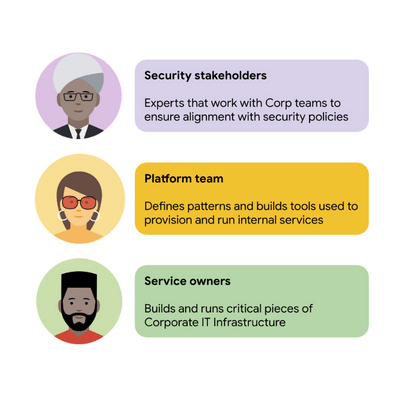
For security stakeholders, ASM provides an extensible policy enforcement point running next to each application capable of provisioning a certificate based on the identity of the workload and enforcing mandatory fine-grained application-aware access controls.
For platform operators, ASM is delivered as a managed product, which reduces operational overhead by providing out-of-the-box release channels, maintenance windows, and a published Service Level Objective(SLO).
For service owners, ASM enables the decoupling of their applications from networking concerns, while also providing features like rate limiting, load shedding, request tracing, monitoring, and more. Features like these were typically only available for applications that ran on Borg, Google’s first-party cluster manager that ultimately inspired the creation of Kubernetes.
In sum, we were able to secure access to a plethora of different services with minimal operational overhead, all while providing service owners granular traffic control.
Let’s see what this looks like in practice!
The architecture
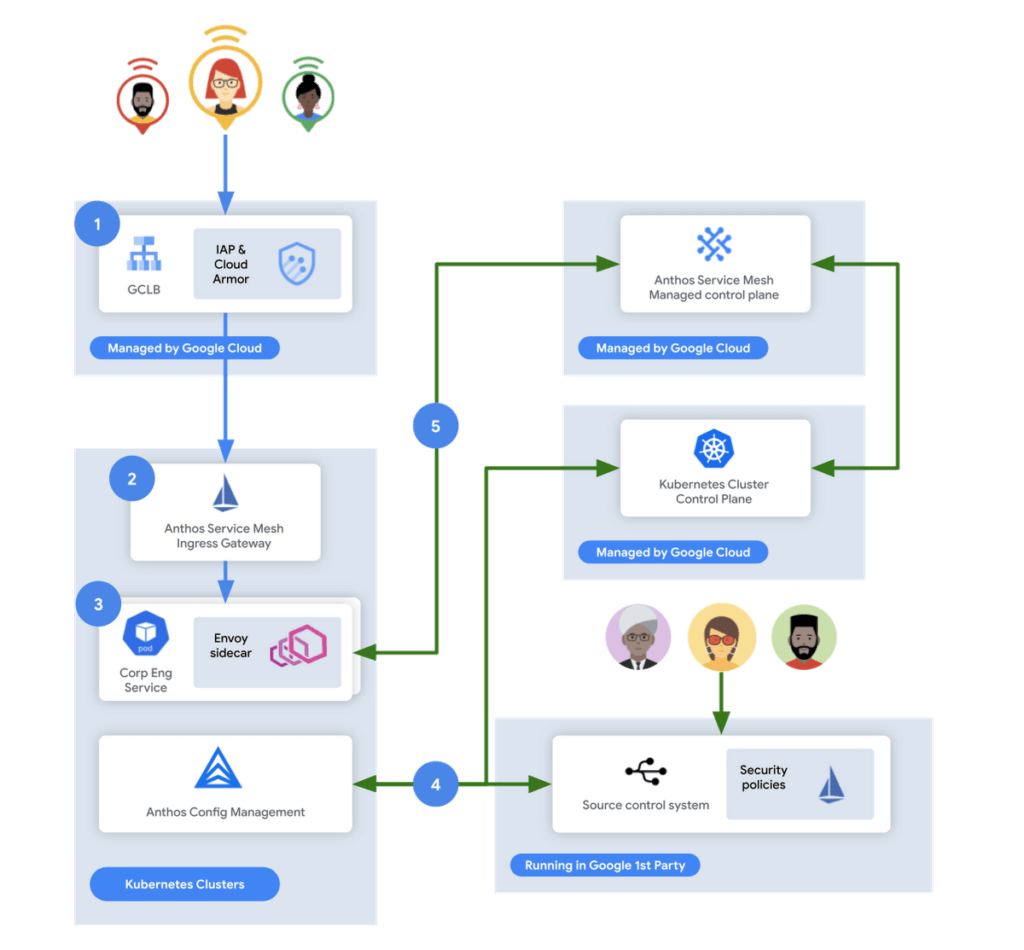
In this flow, user access first reaches the Google Cloud Global Load Balancer [1], configured with Identity Aware Proxy (IAP) and Cloud Armor. IAP is the publicly available implementation of Google’s internal philosophy of BeyondCorp, providing an authentication layer that works from untrusted networks without the need for a VPN.
Once a user is authenticated, their request then flows to the Ingress Gateway provided by Anthos Service Mesh [2]. This provides additional checks that traffic flows to services only when the request has come through IAP, while also enforcing mutual TLS (mTLS) between the Anthos Service Mesh Gateway to the Corp services owned by various teams.
Finally, additional policies are enforced by the sidecar running in every single service Pod [3]. Policies are pulled from source control using Anthos Config Management[4], and are propagated to all sidecars by the managed control plane provided by Anthos Service Mesh[5].
Managing the mesh
If you’re not familiar with how Istio works, it follows the pattern of a control plane and a data plane. We talked a little bit about the data plane – it is made up of the sidecar containers running alongside all of our service Pods. The control plane, however, is what’s responsible for updating these sidecars with the policies we want to enforce:
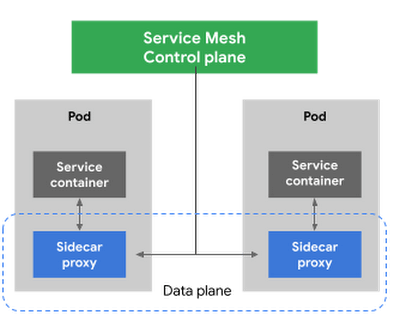
Figure 3 – High-level architecture for Istio
Thus, it is critical for us to ensure that the control plane is healthy. This is where Anthos Service Mesh gives our platform owners a huge advantage with its support for a fully-managed control plane. To provision cloud resources, like many other companies, our organization uses Terraform, the popular open-source infrastructure as code project. This gave us a declarative and familiar means for provisioning the Anthos Service Mesh control plane.
First, you enable the managed control plane feature for GKE by creating the google_gke_hub_feature resource below using Terraform.
resource "google_gke_hub_feature" "feature_asm" {
name = "servicemesh"
location = "global"
provider = google-beta
}
Keep in mind that at publication time, this is only available via the google-bet provider in Terraform.
Once created, we then provision a ControlPlaneRevision custom resource in a GKE cluster to spin up a managed control plane for ASM in that cluster:
apiVersion: mesh.cloud.google.com/v1alpha1
kind: ControlPlaneRevision
metadata:

name: asm-managed

namespace: istio-system
spec:

type: managed_service

channel: regular
Using this custom resource, we are able to set the release channel for the ASM managed control plane. This allows for our platform team to define the pace of upgrades in accordance with our team’s needs.
In addition to managing the control plane, ASM also provides management functionality around the data plane to ensure each sidecar Envoy is kept up to date with the latest security updates and is compatible with the control plane – one less thing for service operators to worry about. It does this using Kubernetes Mutating Admission Webhooks and Namespace labels to modify our Pod workload definitions to inject the appropriate sidecar proxy version.
Syncing mandatory access policies
With the core Anthos Service Mesh components in place, our security practitioners can define consistent, mandatory security policies for every single GKE cluster, using Istio APIs.
For example, one policy is enforcing strict mTLS between Pods using automatically provisioned workload identity certificates. Earlier, we talked about how this is enforced between the Istio Gateway; that same policy enforces mTLS between all Pods in our cluster.

Another policy we implement is denying all egress traffic by default, requiring service teams to explicitly declare their outbound dependencies. The following is an example of using an Istio Service Entry to allow granular access to a specific external service – in this case, Google. This helps prevent unintended access to external services.
apiVersion: networking.istio.io/v1alpha3

kind: ServiceEntry
metadata:

name: google
spec:

hosts:
  - www.google.com

ports:
  - number: 443

name: https

protocol: HTTPS

resolution: DNS

location: MESH_EXTERNAL
EOF
These policies are automatically synced to all service mesh namespaces in each cluster using Anthos Config Management. By using our internal source control system as a source of truth, Anthos Config Management can sync and reconcile policies across all of our GKE clusters, ensuring that these policies are in place for every single one of our services. You can find more details about our implementation of Anthos Config Management here.
With this in place, our team plans on eventually migrating away from security automation that operates solely based on explicit IP, port and protocol policies.
Integration with Identity-aware Proxy
The publicly available version of the BeyondCorp proxy used by CorpEng is called Identity-aware Proxy (IAP), which offers an integration with Anthos Service Mesh. IAP allows you to authenticate users trying to access your services and apply Context-Aware-Access policies. This integration comes with two main benefits:
- Ensuring that user traffic to services in the service mesh only come through Identity-aware Proxy
- Enforcing Context-aware access (CAA) trust levels for devices, defined by multiple device signals we collect
Identity-aware Proxy allows us to capture this information in a Request Context Token (RCToken), which is a JSON Web Token (JWT) created by Identity-aware Proxy that can be verified by ASM. IAP inserts this JWT into the Ingress-Authorization header. Using Istio Authorization Policies similar to the following policy, any requests without this JWT are denied:
apiVersion: security.istio.io/v1beta1
kind: AuthorizationPolicy
metadata:
name: iap-gateway-require-jwt
namespace: istio-system
spec:
selector:
matchLabels:
app: istio-iap-ingressgateway
action: DENY
rules:
- from:
- source:
notRequestPrincipals: ["*"]
Here is an example policy that requires a fullyTrustedDevice access level – this might be a device in your organization that is known to be corporate-owned, fully-updated, and running an IT-approved configuration :
apiVersion: security.istio.io/v1beta1
kind: AuthorizationPolicy
metadata:
  name: require-fully-trusted-device
  namespace: fooService
spec:
  selector:
    matchLabels:
      app: fooService
  action: ALLOW
  rules:
  - from:
    - source:
       requestPrincipals: ["*"]
    when:
    - key: request.auth.claims[google.access_levels]
      values: ["accessPolicies/$orgId/accessLevels/fullyTrustedDevice"]
This allows our security team to not only secure service to service communications, or outbound calls from services, but also specifically require incoming requests come from trusted devices and authenticated users using a trusted device.
Enabling service teams
As an SRE, one of our priorities is ensuring Service-level indicators (SLIs), SLOs, and Service-level agreements (SLAs) exist for services. Anthos Service Mesh helps us empower service owners to do this for their services, as it exposes horizontal request metrics like latency and availability to all services in the mesh.
Before Anthos Service Mesh, each application had to export these separately (if at all). With ASM service owners can easily define their Service’s SLOs in the cloud console or via terraform using these horizontally exported metrics. This then allows us to integrate SLOs into our higher-level service definitions so we can enable SLO monitoring and alerting by default. You can see the SRE book for more details on SLOs and Error budgets.
The takeaway
ASM is a powerful tool that enterprises can use to modernize their IT infrastructure. It provides:
- A shared environment-agnostic enforcement point to manage security policy
- A unified way to provision identities, describe application dependencies
This also enables previously unheard of operational capabilities such as distributed tracing or incremental canary rollouts – which were difficult to find in the typical enterprise application landscape.
Because it can be incrementally adopted and composed with existing authorization systems to close gaps – barriers to adoption are low and we recommend you start evaluating it today!
The Ultimate Guide to VPC Service Controls: Strengthening Your Security Posture

2514
Of your peers have already read this article.
2:30 Minutes
The most insightful time you'll spend today!
While cloud security skeptics might believe that data in the cloud is just one access configuration mistake away from a breach, the reality is that a well-designed set of defense in depth controls can help minimize the risk of configuration mistakes and other security issues. Our Virtual Private Cloud (VPC) Service Controls can play a vital role in creating an additional layer of security while also making it easier to manage your data in a way that most cloud services can’t do today.
Organizations across industries and business models use cloud services for activities such as processing their data, performing analytics, and deploying systems. VPC Service Controls can empower an organization when deciding how users and data can cross the perimeter of the supported cloud services, if at all. While VPC Service Controls are designed to help stop attackers, they can also enable contextual trusted data sharing (similar to how Zero Trust allows contextual access).
What are VPC Service Controls
VPC Service Controls help administrators define a security perimeter around Google-managed services, which can control communication to and between those services. The Service Controls isolate your Google Cloud resources from unauthorized networks, including the internet. For example, this can help you keep a clear separation between services that are allowed to run in production and services that are not.
VPC Service Controls can help you prevent mistakes that lead to costly data breaches because they control access to your data at a granular level. They add context-aware access controls on these services, and can help you achieve your organization’s Zero Trust access goals.
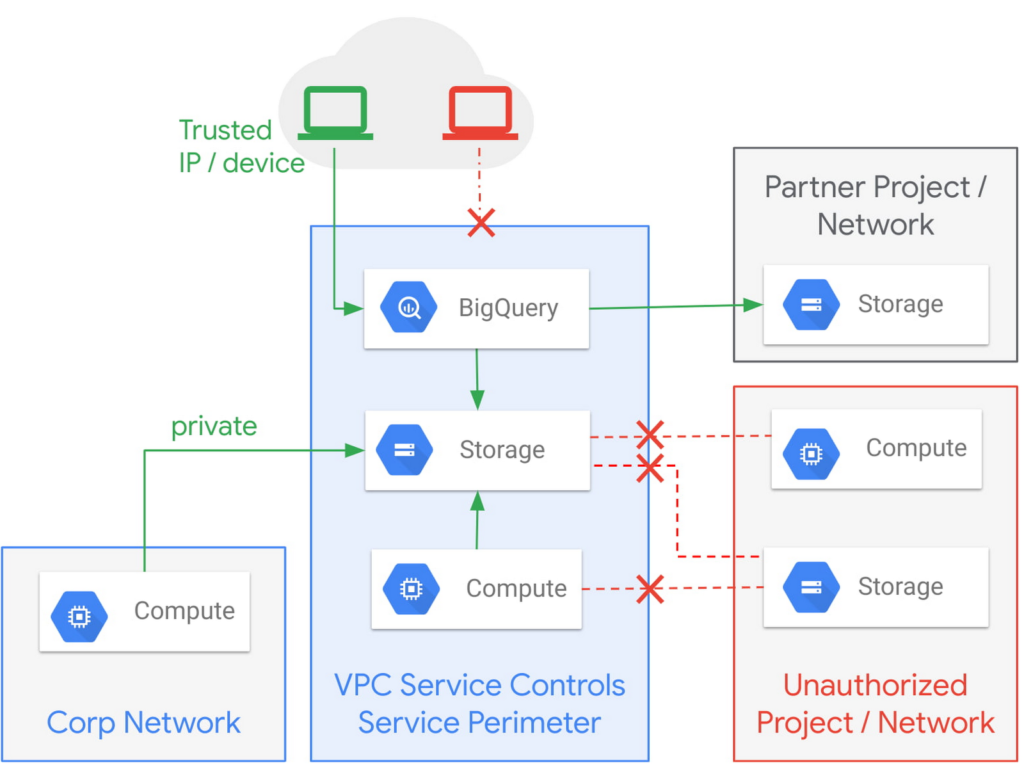
Example of the fine-grained policies based on access context that can be implemented with VPC Service Controls.
Like wearing two layers of clothing made from different fabrics to protect you from winter weather, VPC Service Controls may appear similar to Identity and Access Management (IAM) but they come from a different approach to implementing security. IAM enables granular identity based access control; VPC Service Controls create a security perimeter that protects your cloud resources and sets up private connectivity to Google Cloud’s APIs and services. While it’s recommended to use both, VPC Service Controls have an added bonus: They can support blocking data theft during a breach.
The additional layer of security that VPC Service Controls offer customers is challenging to achieve with on-premise systems or even with other cloud providers. You can think of it as an firewall for APIs that also adds a logical security control around three paths that data can take:
- From the public internet to your resources
- Inside your VPC and the cloud service perimeter
- For service-to-service communication (for example, denying access to someone who wants to load data to BigQuery or exfiltrate data from a BigQuery instance.)
How VPC Service Controls can help stop attackers
VPC Service Controls are used to enforce a security perimeter. They can help isolate resources of multi-tenant Google Cloud services, which can help reduce the risk of data exfiltration or a data breach.
For example, a bank that migrated financial data processing to Google Cloud can use VPC Service Controls to isolate their processing pipeline from public access (or any unauthorized access) by defining a trusted service perimeter.
How VPC Service Controls can enable trusted sharing
VPC Service Controls are used to securely share data across service perimeters with full control over what resource can connect to other resources, or outside the perimeter. This can help mitigate data exfiltration risks stemming from stolen identities, IAM policy misconfigurations, some insider threats, and compromised virtual machines.
Returning to our bank example, that same bank using VPC Service Controls may securely share or access data across Service Perimeters and Organizations. They may allow access to specific partners and for specific operations.
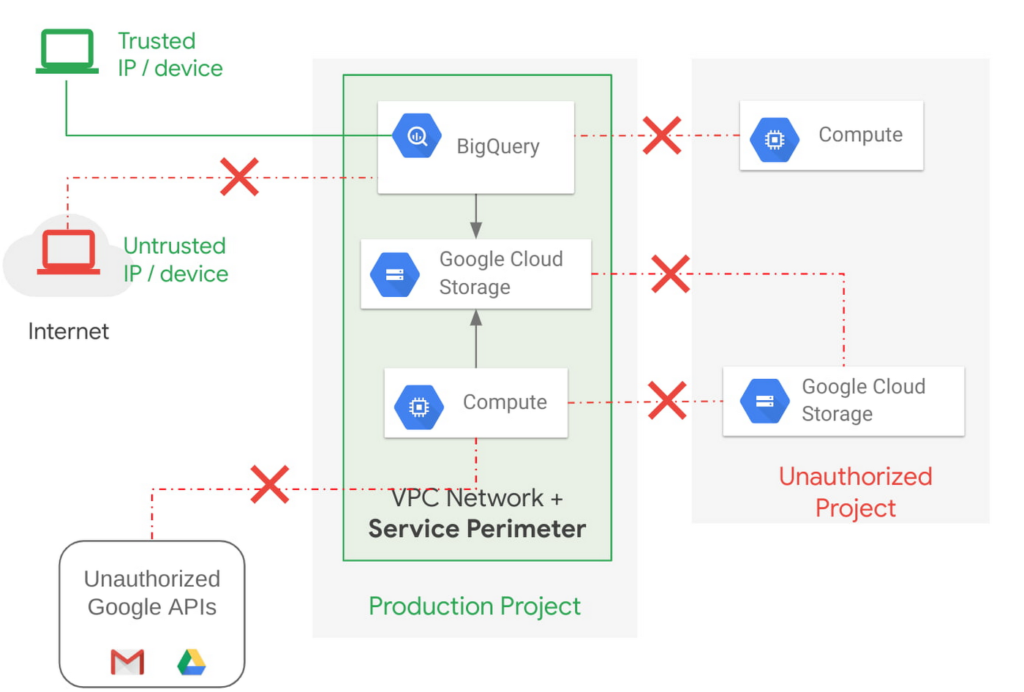
Example of allowing an authorized device plus authorized access.
How VPC Service Controls support Zero Trust access
VPC Service Controls deliver Zero Trust access to multi-tenant Google Cloud services. Clients can restrict access to authorized IPs, client context, user identity, and device parameters while connecting to multi-tenant services from the internet and other services.
A bank can use moving its services to the public cloud as an opportunity to abandon outdated access management approaches and adopt Zero Trust access. VPC Service Controls let them create granular access control policies in Access Context Manager based on attributes such as user location and IP address. For example, it would allow an analyst to only access Big Query from a corporate device on the corporate network during business hours. These policies can help ensure the appropriate security controls are in place when granting access to cloud resources from the Internet.
Next steps with VPC
Check out these pages to learn more about VPC Service Controls for your sensitive cloud deployments, especially for regulated workloads. This blog is the third in our Best Kept Security Secrets series, which includes how to tap into the power of Organization Policy Service and how Cloud EKM can help resolve the cloud trust paradox.
VCP Peering and Private Endpoints on Vertex AI to Better Security and Predictions in Near Real-time

4495
Of your peers have already read this article.
2:00 Minutes
The most insightful time you'll spend today!
One of the biggest challenges when serving machine learning models is delivering predictions in near real-time. Whether you’re a retailer generating recommendations for users shopping on your site, or a food service company estimating delivery time, being able to serve results with low latency is crucial. That’s why we’re excited to announce Private Endpoints on Vertex AI, a new feature in Vertex Predictions. Through VPC Peering, you can set up a private connection to talk to your endpoint without your data ever traversing the public internet, resulting in increased security and lower latency for online predictions.
Configuring VPC Network Peering
Before you make use of a Private Endpoint, you’ll first need to create connections between your VPC (Virtual Private Cloud) network and Vertex AI. A VPC network is a global resource that consists of regional virtual subnetworks, known as subnets, in data centers, all connected by a global network. You can think of a VPC network the same way you’d think of a physical network, except that it’s virtualized within GCP. If you’re new to cloud networking and would like to learn more, check out this introductory video on VPCs.
With VPC Network Peering, you can connect internal IP addresses across two VPC networks, regardless of whether they belong to the same project or the same organization. As a result, all traffic stays within Google’s network.
Deploying Models with Vertex Predictions
Vertex Predictions is a serverless way to serve machine learning models. You can host your model in the cloud and make predictions through a REST API. If your use case requires online predictions, you’ll need to deploy your model to an endpoint. Deploying a model to an endpoint associates physical resources with the model so it can serve predictions with low latency.
When deploying a model to an endpoint, you can specify details such as the machine type, and parameters for autoscaling. Additionally, you now have the option to create a Private Endpoint. Because your data never traverses the public internet, Private Endpoints offer security benefits in addition to reducing the time your system takes to serve the prediction when it receives the request. The overhead introduced by Private Endpoints is minimal, achieving performance nearly identical to DIY serving on GKE or GCE. There is also no payload size limit for models deployed on the private endpoint.
Creating a Private Endpoint on Vertex AI is simple.
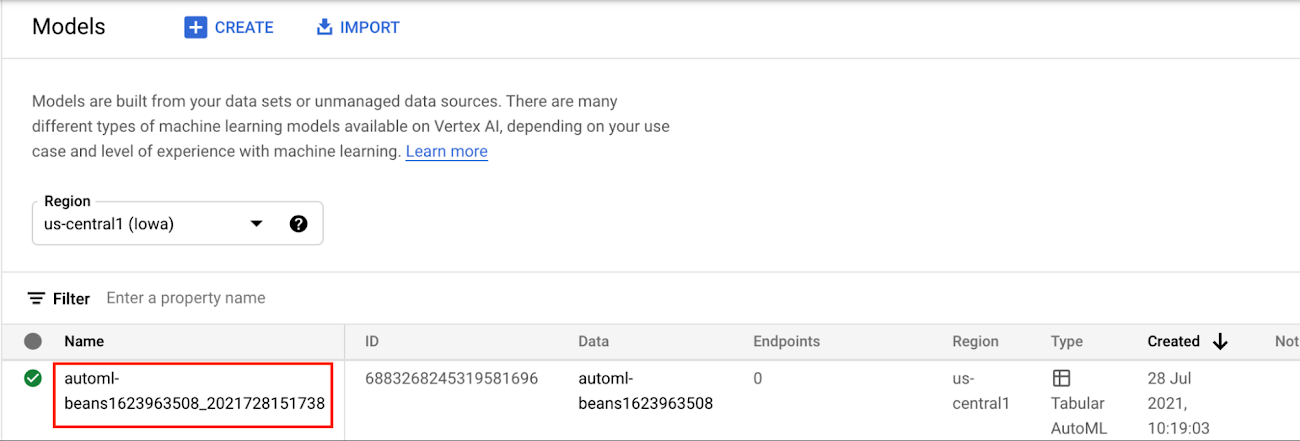
In the Models section of the Cloud console, select the model resource you want to deploy.
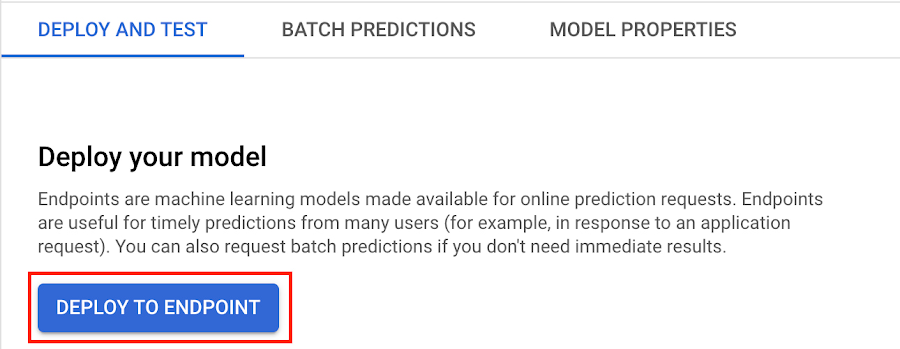
Next, select DEPLOY TO ENDPOINT
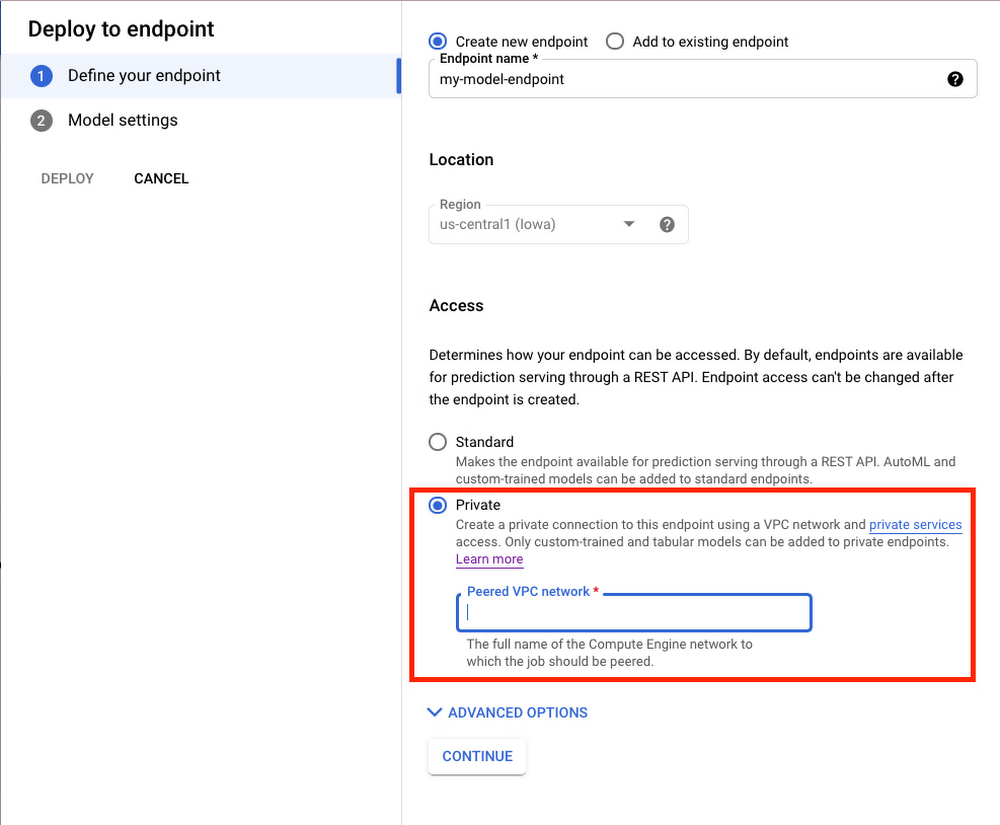
In the window on the right hand side of the console, navigate to the Access section and select Private. You’ll need to add the full name of the VPC network for which your deployment should be peered.
Note that many other managed services on GCP support VPC peering, such as Vertex Training, Cloud SQL, and Firestore. Endpoints is the latest to join that list.
What’s Next?
Now you know the basics of VPC Peering and how to use Private Endpoints on Vertex AI. If you want to learn more about configuring VPCs, check out this overview guide. And if you’re interested to learn more about how to use Vertex AI to support your ML workflow, check out this introductory video. Now it’s time for you to deploy your own ML model to a Private Endpoint for super speedy predictions!
More Relevant Stories for Your Company

Stop Cribbing About Shadow IT and Start Taking Charge Now
Employees use tools at their disposal to get work done, but if these tools (often legacy) hamper collaboration or are inflexible, they’ll turn to less secure options for the sake of convenience. According to Gartner, a third of successful attacks experienced by enterprises will come from Shadow IT usage by 2020.

Center for Internet Security’s Latest Benchmark for Securing Chrome
As the way people work continues to evolve, keeping security policies in place that protect organizations but give workers the ability to get things done is more important than ever. IT and security teams must aim to stay a step ahead of web-based security threats that come their organization’s way.

2022’s First Cloud CISO Perspectives: Recap of the Megatrends, Releases and News
I’m excited to share our first Cloud CISO Perspectives post of 2022. It's already shaping up to be an eventful year for our industry and we’re only in month one. There’s a lot to recap in this post, including the U.S. government’s recent efforts to address critical security issues, like

Create and Protect Admin Accounts
Setting up your new cloud infrastructure is scary. Extra scary when you realize that someone (is it gonna be you?) gets to have phenomenal cosmic power over the whole thing. Yes, I'm talking about the admin account, and today we'll dig into why they are important, dangerous and different. When
