





3899
Of your peers have already watched this video.
23:30 Minutes
The most insightful time you'll spend today!
How PwC Migrated 275,000+ Users to Google Workspace
PwC, a 150-year-old professional services firm, has deployed and measured the impact of G Suite on its network of firms in 158 countries to help change its culture and make digital mastery a competitive advantage.
In 2015, PwC embarked on a journey of cultural change by deploying G Suite* to drive collaboration, productivity, and innovation to better serve its clients. In late 2019, PwC concluded the implementation across 300,000+ G Suite licenses, 275,000+ users, ~670 OUs, and 150+ territories. It’s a transition that came in handy during the COVID-19 outbreak.
“We’re able to share files, suddenly, with even clients who don’t have G Suite. It was such a huge leap, real excitement in our network and real excitement with our clients. Even our clients notice, they said, boy, you guys are just continuing to work kind of as normal,” says Adrienne Schutte, the Global Change Director at PwC.
In this video, PwC will talk about the challenges on this five-year journey, lessons learned, and key change management strategies. Additionally, they will discuss how they are measuring the impact G Suite has made on their business from a behavioral standpoint, leading to business benefits.
*G Suite is now Google Workspace
Google Workspace Now has Adobe Add-on!
3871
Of your peers have already read this article.
2:00 Minutes
The most insightful time you'll spend today!
Every day, individual people and creative teams combine Google Workspace with Adobe Creative Cloud to bring their best ideas to life and delight their customers or friends, across photography, design, video, 3D design, and more. In fact, Adobe’s add-on for Google Workspace has had over a million installs and counting. By partnering with Adobe, we’re helping people boost creative collaboration wherever and however they work together. And they can benefit from a potential tenfold increase in productivity that results from things like shared libraries and styles across all the apps they use.
We started integrating Adobe apps with Google Workspace last year by introducing Adobe XD integration into Flutter, enabling developers to simplify the design-to-development workflow, and letting creative teams design apps in XD and convert those designs into Flutter code with the click of a button.
Next, we brought together Adobe Creative Cloud and Gmail to make it easier to share links to your creative assets with external teams and stakeholders through email. With this integration, you can search for your Creative Cloud assets and attach public links to synced files, libraries, and creations made on mobile devices without leaving Gmail. You can also save any attachments received in Gmail directly to Creative Cloud in a few clicks.
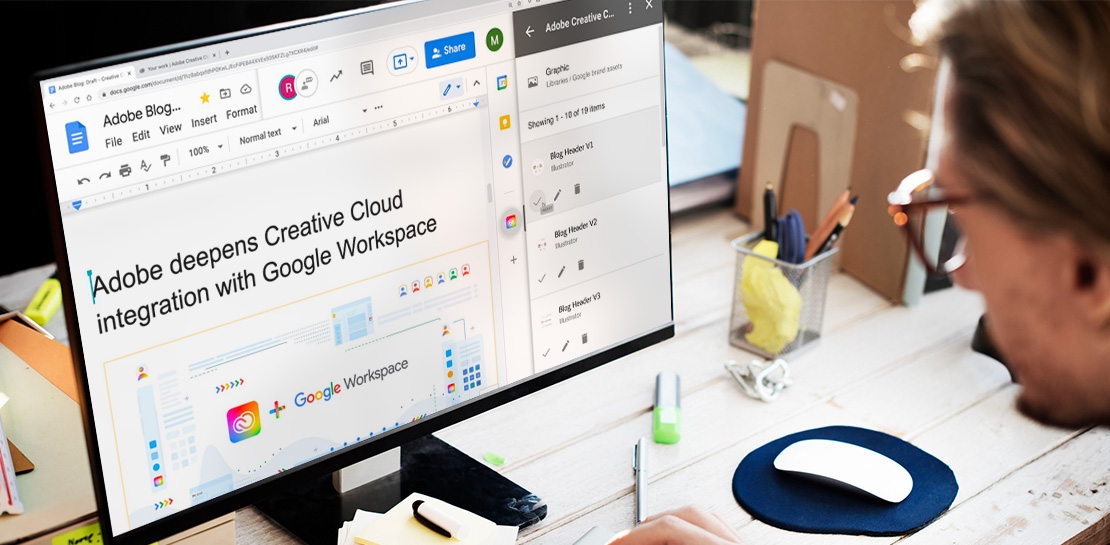
This year we are furthering our collaboration with Adobe with some exciting new capabilities. We’re integrating Adobe Creative Cloud with Docs and Slides, and launching Adobe Creative Cloud for Chrome.
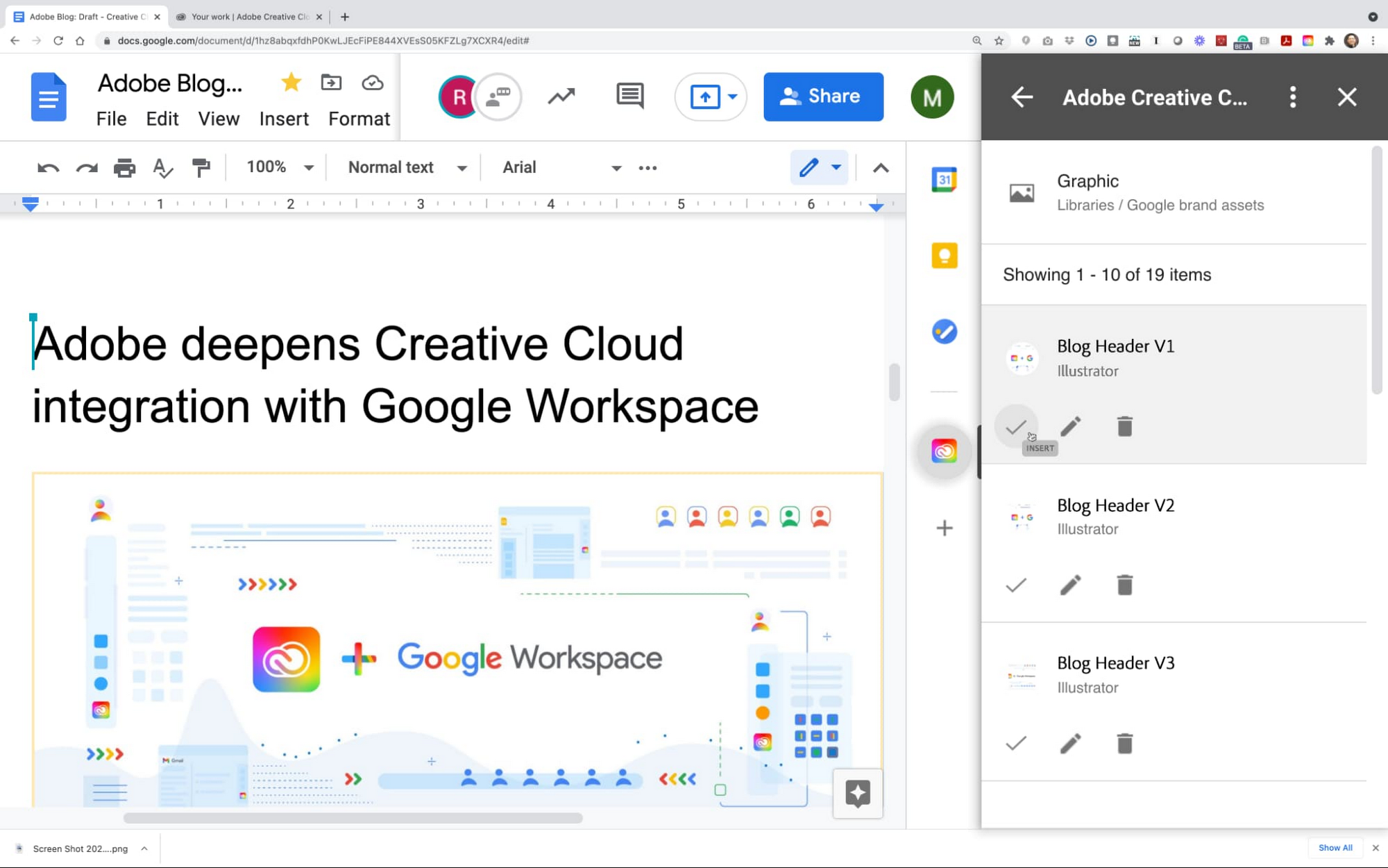
The integration of Adobe Creative Cloud with Docs and Slides will give creative and business stakeholders a single source of truth and a powerful new way to manage brand assets. With easy access to Creative Cloud Libraries inside both Adobe Creative Cloud (with apps like Photoshop, Illustrator, InDesign, XD, and more) and inside Google Workspace (with apps like Gmail, Docs, and Slides), marketing and product design teams can seamlessly share work, get feedback, and stay connected along the way. Learn more about this integration.
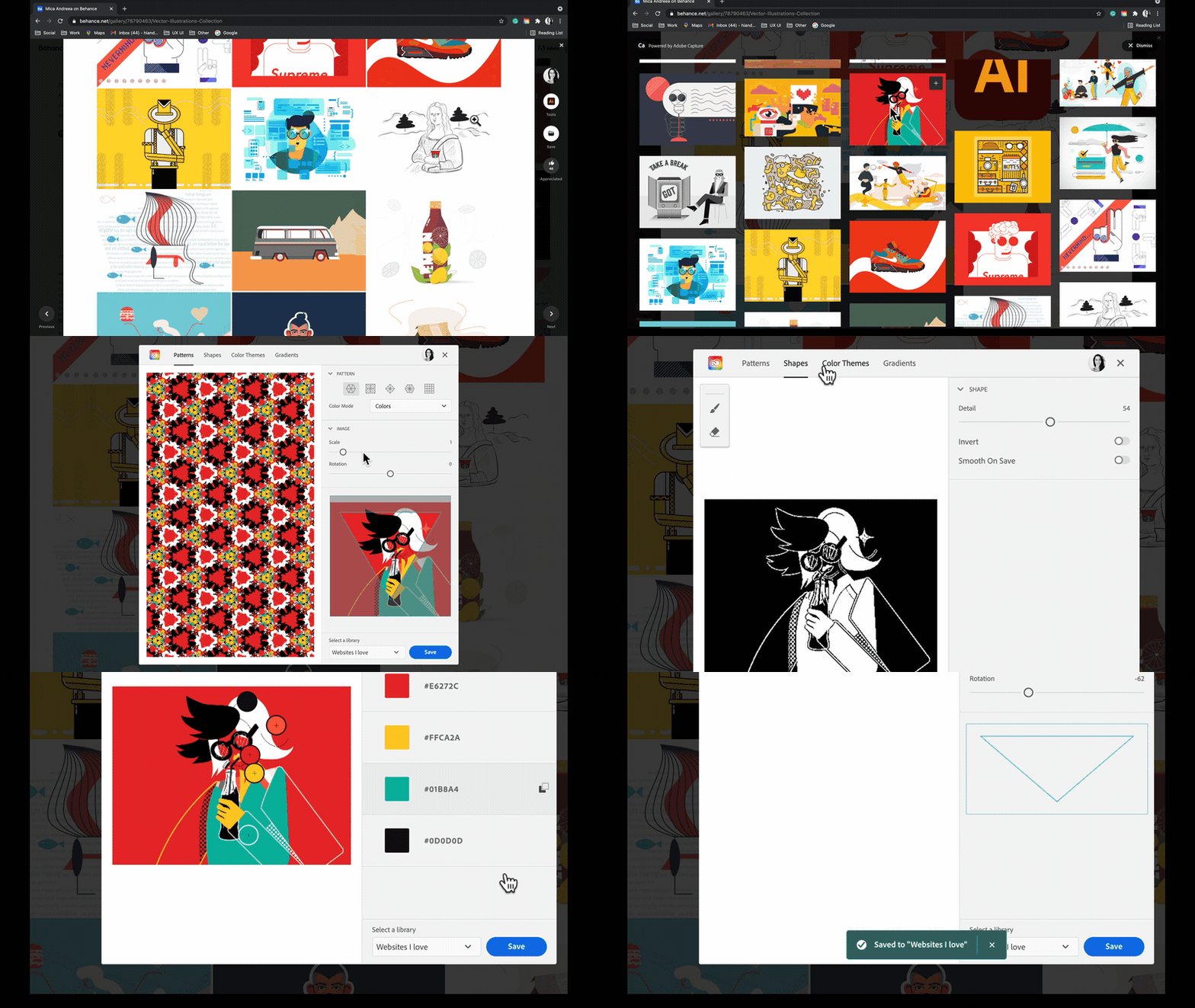
Adobe Creative Cloud for Chrome is a new extension that lets designers draw inspiration from the web’s most beautiful designs and artwork. Whether you’re looking for color combinations, patterns, vector shapes, or gradients extracted from images, the new Chrome extension helps you capture them from the source and apply them to your own design work. Adobe Capture features are available on mobile, on desktop for Photoshop and Creative Cloud Libraries, and now on the web, so wherever and whenever inspiration strikes, you’ll be ready to capture the moment. This feature became available in May. Learn more
These new integrations between Adobe Creative Cloud and Google Workspace and Google Chrome let creatives focus on what they do best: ideate, create, and innovate. Creative teams of 1 or 100 have fast, seamless access to the digital assets and editor tools that bring their work to life. And they’re ready to capture inspiration from the web whenever and wherever it strikes using Google Chrome. We’re committed to boosting creative collaboration in Google Workspace with Adobe as a trusted partner. Start using Google Workspace and Creative Cloud today.
Discovery’s Massive Workspace Migration Fuels Innovation and Collaboration

3835
Of your peers have already read this article.
1:30 Minutes
The most insightful time you'll spend today!
In the past two decades, Discovery has moved from a purely cable business based in the U.S. to a global media and entertainment powerhouse. Like many other businesses in the industry, we’ve had to adjust to the unique shifts in people’s behaviors and preferences, almost all of which result from the rise in streaming.
We have always been consumer-obsessed at Discovery, with a corporate culture built on the desire to entertain and inspire people of all ages and backgrounds with exceptional content. As we’ve grown, we have also learned just how important it is to be staff-obsessed, giving our employees the best possible experiences so they can continue to innovate and deliver the world-class content our customers expect.
In 2019, we decided one way to fuel innovation and collaboration among employees was to bring in Google Workspace. Selected for its intuitive, easy-to-use, and constantly evolving tools, Google Workspace enables teams to seamlessly create, connect, and collaborate anywhere, anytime.
Given the scope of our ambitions, and recognizing the challenges of migrating 16,500 global employees to a new collaboration solution, we worked with Google Cloud premier partner SADA to get the job done.
Change management amid a massive migration
We began the move to Google Workspace by migrating our document storage system from a legacy cloud provider to Google Drive. This included 86 million items amounting to about two petabytes of data migrated with minimal disruptions. A few months later we completed our move to Google Workspace by migrating 1.2 million calendar invites and 20,800 mail accounts, including thousands of collaborative inboxes and delegated accounts.
In addition to the technical support and Google Workspace expertise that SADA provided, they also partnered with our project team on the change management strategy. Despite challenges presented by the COVID-19 pandemic, our training team and SADA were able to offer outstanding educational opportunities to assist our workforce in the transition and to get the most out of Google Workspace. This included collaborating on over 240 global webinars in seven languages.
Discovering the power of transformative tools
Discovery has many types of end users, from finance professionals and marketing teams to producers and content developers. The fact that Google Workspace has been well-received across the company is a testament to the power of the solution.
Many of our teams have taken advantage of collaborative Gmail accounts and shared drives, providing them with a centralized location to seamlessly communicate and work together on team-focused projects. Our internal communications team is especially happy with the real-time collaborative editing experience within Docs as they work on company-wide emails, announcements, and other projects.
These collaboration tools have allowed us to stay agile amid global lockdowns and will continue to do so as we adapt to a more flexible working environment.
The value of partnership
While we were comfortable with our legacy collaboration suite, one of the biggest benefits of switching to Google Workspace has been Google Cloud’s and SADA’s partnership. They provide us with regular updates on product roadmaps, upcoming features, and more.
This is just the beginning as we plan to grow, deliver new content, and lead the media and entertainment industry with the help of these two great partners and their solutions.
To learn more about Discovery’s journey with Google Workspace, read the full case study.
Cloud-Native Observability: Google Cloud and Chronosphere Join Forces

1353
Of your peers have already read this article.
2:30 Minutes
The most insightful time you'll spend today!
As digital transformation continues apace, cloud native adoption has skyrocketed — and so has the volume, velocity, and variety of data that organizations must monitor to maintain visibility over their IT environments. Rather than a fixed number of virtual machines (VMs) running a single application each, systems are more flexible and ephemeral — with thousands of containers and microservices emitting data — and services and systems have greater interdependencies. All of this has led to an explosion in complexity that makes it nearly impossible to reliably and efficiently operate cloud-native services using traditional observability solutions without dramatically increasing overhead.
Built on Google Kubernetes Engine (GKE), Chronosphere is the only cloud-native observability solution that helps teams quickly resolve incidents before they affect the customer experience and the bottom line. And the relationship between Google Cloud and Chronosphere has developed into a growing partnership. Chronosphere brings the ability to rapidly and reliably control observability data and costs to Google Cloud customers, while maintaining open source compatibility. Recently, GV (Google Ventures) participated in Chronosphere’s $115 million round of Series C funding. Chronosphere is also available on Google Cloud Marketplace, making it easy for customers to procure and deploy.
Why Chronosphere chose to build on Google Cloud
Chronosphere’s founders, CEO, Martin Mao, and CTO, Rob Skillington, wanted to build an observability solution that solved some of the same problems they encountered when leading the observability team at Uber. The challenges at Uber focused on scale, reliability and cost, with a key emphasis on how these were not easily solvable for monitoring of cloud-native applications. Martin and Rob were looking to build a solution that was cloud-native, highly reliable, and capable of managing the high volume of data that modern organizations process every day. For those reasons, Martin and Rob chose to build Chronosphere on top of Google Kubernetes Engine (GKE):
Cloud-native mindset: When Martin and Rob launched Chronosphere, one of the first considerations was this: A cloud-native problem needs a cloud-native solution. Google Cloud and Chronosphere work together to provide a purpose-built software-as-a-service (SaaS) observability solution platform for cloud-native technologies like Kubernetes. Chronosphere runs much of its critical infrastructure on Google Cloud, using the service’s global infrastructure to deliver secure and reliable services to hypergrowth customers.
Open platform: Martin and Rob have a commitment to openness — a commitment that Google Cloud makes to its customers as well. All of the ins and outs of Chronosphere are open source compatible –built on GKE, the platform ingests both metric and trace data in a variety of open source formats, such as Prometheus, OpenTelemetry, and StatsD, so teams can get onboard easily while avoiding vendor lock-in. And they remain fully in control of how much data to ingest, how it’s ingested, how it’s stored, and for how long. That way, customers remain in control of their observability costs while their systems and data continue to grow, and can troubleshoot and remediate issues more quickly.
Mission-critical performance: Observability is a mission-critical service because it is essential for the reliability and performance of mission-critical systems. For this reason, Martin and Rob wanted to offer the strongest service level agreements (SLAs) possible for availability, reliability, and performance. Google Cloud provides the secure global infrastructure that allows them to do so.
Data volume: Modern organizations emit huge volumes of data that they have to sift through in near-real time to gain full visibility. Google Cloud offers the same infrastructure and networks that Google uses to support billions of users every day, capable of processing petabytes of data with ease.
How Chronosphere works with Google Cloud
GKE provides specific technical benefits that Chronosphere leverages to offer customers the performance and availability they need to spend less time managing their observability systems and more time creating value.
The Chronosphere collector is a Kubernetes-native, Prometheus-compatible agent that collects, processes, and exports telemetry data, including metrics and traces. When you install the collector in a Kubernetes cluster, it automatically discovers all your workloads and starts to gather data from them.
The Chronosphere UI tailors the experience to each user based on what services that individual owns or which teams that person belongs to. This makes the overall user experience friendlier and less overwhelming while helping people get to the bottom of issues faster.
Running on GKE means that Chronosphere can leverage Google Cloud’s multiple zones in each geographic region to distribute workloads evenly, ensure customer data stores are isolated from each other, and build tolerance for zonal failures. It also allows for data persistence across multiple zones. At the same time, Google Cloud’s global load balancers bring the data physically closer to the customer, shortening the time it takes for a data point to be visible to a user after its emission.
What this means for customers
The partnership brings together the best in cloud-native services and cloud-native observability. With the power of Google Cloud and Chronosphere, observability teams can transform their observability data based on need, context, and utility, storing only the useful data to reduce costs and improve performance. With purpose-built solutions for a cloud-native world, teams gain faster issue detection and resolution, and also benefit from Chronosphere’s 99.99% availability and open source compatibility — eliminating vendor lock-in.
“Companies growing their online infrastructure risk huge hits to their bottom line if they don’t also manage increased complexity and cost,” says Martin. “Our partnership with Google Cloud brings together the world’s leading cloud services platform with our powerful observability solution to unlock the benefits of a cloud-native world, while optimizing for efficiency, reliability, and cost.”
Google Cloud and Chronosphere: The perfect match
Google Cloud and Chronosphere offer an industry-leading observability solution built from the ground up to abstract away the complexities of cloud computing for already stressed teams. And the future of this partnership is sure to bring new innovations around performance, reliability, and cost efficiency as both companies continue to invest in these three areas. The goal: to deliver the best performance for cost in the industry.
Learn more about what Chronosphere and Google Cloud are doing for customers, and check out the Chronosphere listing on Google Cloud Marketplace.
How We Proved Everyone Wrong and Scaled Our Sports Apparel Company Across Continents

5615
Of your peers have already read this article.
4:30 Minutes
The most insightful time you'll spend today!
There were several reasons why Suddora and CustomOnIt shouldn’t have been successes. My friend Adam and I were working in a Michigan video store and knew next to nothing about running a business. We started with an idea to sell sweatbands, like the ones I used to wear in my band, and over several months managed to launch it legitimately. This led us to bail on the video store and move to Vegas—smack in the middle of the 2008 financial crisis. We lived on ramen noodles and little else for two years while we got the company going. Our friends took bets on how long we’d stay in business.
But 11 years later, we have not one but several successful sports apparel businesses, I’m running a bunch of other e-commerce companies (including SweatBands.com), and we’re selling in the United Kingdom and soon in Asia Pacific.
How did two broke-but-determined guys working in a video store get this far? We always believed in moving ahead, no matter what obstacles came our way—and we learned a lot about how technology like G Suite can make a small business look and operate like a bigger one, and how searching Google for business resources can pay off.
Starting with an idea, a domain and…ramen noodles
In my band days in Michigan, we tried to think of ways to get our name out there. Instead of the usual T-shirts or stickers, I pitched the idea of custom sweatbands since I wore sweatbands when I played guitar. I figured other people might like sweatbands with the names of their bands.
We knew we needed a web domain and email addresses so we could sell online. We found out about G Suite during a Google search, and it seemed like the most pain-free way to get started by buying the domains Customonit.com and Suddora.com (Adam made up that name. “Sudor” is Spanish for “sweat,” which is what the businesses were about, and we added the “d” and the “a” to make the name stand out.).
Even though the company was just me and Adam, we needed to look professional (and also a bit bigger than we actually were). With G Suite, we set up email aliases for various business functions, like help@suddora.com and sales@suddora.com, and arranged to route email from these addresses into our regular Gmail inboxes; that way, customers could easily reach us.
Scaling our business in the Las Vegas heat
Next, we decided to move to Las Vegas because, in the aftermath of the recession, we could live cheaply there. When we got our first big sweatband order from a major NCAA football team, the momentum started. Now we had to scale up the business so we could handle more orders and deal with suppliers, even though we were still working out of our living room.
We grew to a five-person team, including a customer service person and a designer, and G Suite made it easy to onboard everyone quickly. In addition to giving new employees their own email addresses with the Suddora.com or STbands.com domain names, we routed emails to various people from the “help” and “sales” email aliases we had set up. We also made sure that all of our employees were set up on G Suite, too.
Once orders started to roll in from major fast-food restaurants, football teams, and sports apparel companies, our roles constantly changed. G Suite helped us shave off precious time by helping us manage email less manually—we automatically re-routed emails depending on who’s working on what. If I wanted to take on more sales work, I forwarded emails from sales@suddora.com to my inbox with one click. Same thing with customer service: We never want to lose track of customer service inquiries, which are a high priority.
In 2009, a year after starting the business, Adam and I left our part-time jobs at a local department store to run the business full-time. We promised ourselves that when we hit a revenue target of $15,000 in one month we’d buy a TV for the apartment—and we got that TV!
Going international (without leaving our office)
The business was taking off. We decided to split STbands.com into two websites: Suddora.com for sports sweatbands and CustomOnIt.com for custom apparel and party goods. We recognized that half our customers wanted athletic wear and accessories, while the other half wanted custom items like T-shirts and wristbands. It was a move that would allow each business to thrive.
Creating products and managing suppliers was getting more complicated. Once again, G Suite helped us move our business forward. We used Google search to find suppliers in China, and were able to set up supplier relationships and talk one-on-one with the people making our products—without extensive and time-consuming travel to China. You can accomplish so much with video meetings and chat.
With more suppliers and more customers, we needed to constantly up our game in terms of product design. When we create new designs it generates a ton of files and iterations, which get shared back and forth between pattern designers, photo editors, writers, and marketing professionals. To help centralize these files, we store everything in Google Drive so they can be shared and accessed anytime, from anywhere. For example, we use Sheets to house updated data on our products across all of our e-commerce platforms.
Lessons learned
Eleven years on, I’m still learning every day about what it takes to run and grow a business. I think what helps is finding tools like G Suite that are so easy to use, you don’t need much ramp-up time to get started—nor do your employees. That means we’re all productive much faster.
Also, you might be thinking about a million ideas for starting a business. But the truth is, you only need one—an opportunity that makes you think, “Okay, this is going to be big.” So go for it. You can’t afford not to.
5142
Of your peers have already watched this video.
18:00 Minutes
The most insightful time you'll spend today!
Trusted Collaboration for Hybrid Workplace with Google Workspace
Hybrid workspace need high levels of security, data privacy, and trust for seamless collaboration across workforce. As we navigate to the new normal, your enterprise can learn about the security and privacy specific innovations Google Workspace utilizes to help customers realize powerful, trusted, cloud-native collaboration.
More Relevant Stories for Your Company

How Japan’s Vaccine Locator Platform Became A One-stop Shop for COVID-19 and Vaccination-related Information
Editor’s Note: David Moore, Founder and CEO of Navagis, shares his story of teaming up with the Google Maps Platform team to help people across Japan get vaccinated amid COVID-19 pandemic. The roots of Navagis go back to Hurricane Katrina, when I led an Army Corps of Engineers team that

The Future of Cloud Computing: Choose Your Own Services and Payment Options
As the saying goes, “it’s hard to make predictions, especially about the future.” Some organizations find it challenging to predict what cloud resources they’ll need in months or years ahead. Every organization is on its own unique cloud journey. To help, we’re developing new ways for customers to consume and

How Buffalo Tours CEO Found a Way to Increase Bookings by Over 1 Percent
Buffalo Tours serves tons of passengers each month, helping them with various aspects of their travel. These involve tour booking requests from passengers, request processing and information checking. Prior to the Google implementation, Buffalo Tour’s email exchange was supported by another email server. Employees lamented the frequent loss of emails

Enhancing SAP Build Process Automation with Google Document AI and Google Workspace
SAP Build Process Automation is designed to optimize business processes and boost efficiency. The platform helps both business users and developers alike digitize core workflows and incorporate artificial intelligence (AI) into time consuming and error-prone manual tasks. All digital paths can benefit from automation. The pandemic, supply chain shortages, and
