





6431
Of your peers have already watched this video.
1:40 Minutes
The most insightful time you'll spend today!
How Haydenshapes Expanded its Business to 70 Countries With Real-Time Collaboration
Hayden Cox was only 15 years old when he broke his surfboard. And he was only 15 years old when he decided to make one.
That’s how Haydenshapes, Cox’s surfboard manufacturing company, took form. That was five years ago. Today, the company has manufacturing units in Los Angeles, Sydney, and Thailand and is selling surfboards in 70 countries around the world.
One of the major enablers that ensured Haydenshapes expanded its reach across continents—in just five years—is collaboration. For any company wanting to spread its wings and expand quickly to reach more customers, real-time collaboration is imperative.
That’s why Haydenshapes turned to Google Cloud’s G Suite to ensure its teams in Los Angeles, Sydney, and Thailand are working together towards the same goal in real-time. Its marketing, sales, and other business teams collaborated on Google Docs, Slides and Sheets to help the business grow across the world.
This, in turn, ensured that Cox could dedicate a significant amount of time in coming up with the next big idea and getting more products out to market quickly and cost-effectively.
5134
Of your peers have already watched this video.
18:00 Minutes
The most insightful time you'll spend today!
Trusted Collaboration for Hybrid Workplace with Google Workspace
Hybrid workspace need high levels of security, data privacy, and trust for seamless collaboration across workforce. As we navigate to the new normal, your enterprise can learn about the security and privacy specific innovations Google Workspace utilizes to help customers realize powerful, trusted, cloud-native collaboration.
5381
Of your peers have already watched this video.
4:00 Minutes
The most insightful time you'll spend today!
AppSheet is Useful for Schools & Universities to Custom-build Apps
AppSheet, Google Cloud’s no-code platform that eases application development and automation process without writing even a line of code. In the education space, AppSheet can come in handy easily as a unified platform to build custom applications that also integrates seamlessly with Workspace, allowing schools and universities to save on time and resources on updating IT infrastructure.
From updating sheets, sharing documents and study material over drive to scheduling events on Calendar, organizing lectures and team meets over Meets, AppSheet allows easy collaboration and access. Watch the video to build apps that are best for your University or school using Google Cloud’s AppSheet!
How Google Classroom Helps State of Iowa Employees Serve the Public Better

5585
Of your peers have already read this article.
1:30 Minutes
The most insightful time you'll spend today!
Organizations are pressed with the need to engage, retain, and upskill employees with many positions staying fully or partially remote as the pandemic continues. The Center for Digital Government (CDG) reports that 74% of state and local governments believe they will continue hybrid operations for the long-term. This transition is the latest in a long list of reasons agencies are looking for solutions to help train their workforce digitally. Some have found Google Classroom to be the perfect solution.
The State of Iowa knew about the advantages of digital classrooms even before the pandemic. They were already successfully using Google Classroom for in-person training, making the transition to digital seamless when the state closed down. Jessica Van Heuveln, a Google support specialist for the State of Iowa CIO’s Office, says the switch to digital doesn’t deprive workers of hands-on training. “You can use Google Classroom for many different environments, so if you’re doing self-taught, in-person or virtual training, it’s going to work with all those approaches.”
The logistics of a digital classroom
Iowa uses Google Classroom to onboard and upskill employees as well as train volunteers. When the pandemic shifted the state’s workforce to 70% working from home, they needed a platform that could not only handle a vast range of topics and teaching styles to support remote workers but also scale to meet their demand. Van Heuveln notes that Google Classroom was particularly helpful for handling compliance training, especially with its integration with Google Meet. These trainings often require an entire sector of the workforce to attend a single class with more than 100 attendees, according to Van Heuveln. The logistics of these larger sessions cuts down on the number of total sessions the state needs to host. Iowa also found that employees were less apprehensive about learning when they could do it from the comfort of their own homes.
Iowa follows a train-the-trainer model to train employees expected to instruct using Google Classroom. Trainers working in departments across the state learn to use Google Classroom to create and host virtual learning experiences specific to their own departments.
Collaborative classrooms made simple
Google Classroom meets many needs for Iowa, such as setting up training, managing attendance, reviewing uploaded coursework, and communicating with attendees. Both course attendees and trainers have everything they need in one place, and robust engagement tools help attendees stay focused while giving trainers the feedback they need from their lessons. Built-in survey options let trainers gauge attendee knowledge, and the chat function ensures no one ever misses a question. The reporting dashboard gives trainers access to analytics to track engagement and attendance, providing insights that can improve future training sessions.
Google Classroom also makes it easier to ensure attendees stay on board throughout the training program. Coursework can be uploaded directly into Google Classroom, and training sessions can be recorded and archived. This feature allows employees to work at their own pace or lets them catch up when a scheduling conflict means they might miss a session.
The enterprise version of Google Classroom Iowa uses interfaces with other Google Workspace tools such as Google Meet, Google Calendar, Google Drive, and Gmail, which streamlines training and leads to more collaboration between employees and trainers. It can also interface with applications from other providers, further boosting its utility as an effective virtual classroom. Google Drive stores training materials securely. Lastly, Google Classroom enterprise comes with 24/7 support to make sure agencies always have everything they need for success.
Helping employees be better prepared to serve
Google Classroom can be a powerful part of any training program, whether it be digital or in-person. Building virtual connections empowers organizations to deliver better experiences. Google Classroom is helping the State of Iowa accomplish this for their constituents. Designed to scale and be accessible from anywhere, the platform helps public employees better serve the public. Virtual training strategies are essential for agencies that are looking to grow their workforce and build employee skill levels. The most important thing, however, is that training programs enable employees to further your agency’s mission. To learn more about Google Classroom and see more solutions designed with government in mind, check out the Google Cloud for government page.
Building the future of work with Google Workspace

4401
Of your peers have already read this article.
7:30 Minutes
The most insightful time you'll spend today!
Since we launched Google Workspace last October, we’ve heard from many of our customers—from global enterprises to small businesses—about the new ways they’re connecting, creating, and collaborating, often across living rooms, time zones, and continents. This response propels us on our mission to build for the future with a solution that’s flexible, helpful, and inspires innovation. We’re proud to support the millions of customers and billions of end-users who trust Google Workspace to bring their own future visions to life.
Today, we’re excited to announce new innovations in Google Workspace that will further empower all the ways work happens—and deepen its impact—in an ever-changing world. These updates include a frontline worker solution, a set of features to help people find more time and focus, and powerful tools for strengthening collaboration.
Learning from our own transformation
At Google, like many of the organizations we support, we’ve been in a state of change, experimentation, and transformation this past year, as we reimagine what work will look like in the post-pandemic future. According to a Gartner survey, 90% of respondents plan to allow employees to work remotely at least part of the time even after the COVID-19 vaccine is widely adopted. This hybrid blend of at-home and in-office work will become the norm for many businesses.
As a company, we’ve been focused on how we can make this new hybrid work model support collaboration and innovation, and enhance inclusion and wellbeing for Google employees. We’re especially interested in what we call collaboration equity, or the ability to contribute equally, regardless of location, role, experience level, language, and device preference. We’ve been experimenting with ways to bridge the gap between the in-person and the “somewhere else” by pushing our technology and the physical spaces of our campuses to be more inclusive. We’re looking for ways to maximize participation everywhere we can—from personal desk space to conference rooms to group collaboration areas.
Google Workspace is at the nexus of Google’s own transformation. After all, Google Workspace was built in the cloud to power flexible, real-time, anywhere creation and equitable collaboration. Whether it’s with our Google Meet Series One hardware kits that enable safe, touch-free meetings and use Google AI to create immersive and inclusive experiences for all. Or the ways we help people focus their time and attention with intelligent, proactive suggestions that thoughtfully connect distributed content, people, and conversations. Or the features that promote inclusion, like live captions in multiple languages, so that everyone can participate effectively in video meetings.
It’s all part of Google Workspace’s mission to enable a hybrid work experience that enhances collaboration, strengthens human connection, and increases wellbeing for people—wherever they are and however they work.
And we’re inspired to hear how Google Workspace has been at the center of our customers’ evolving work plans, helping to forge human connection during a time of change for businesses like Sony Pictures Imageworks and Airbus.
“As we look to the next chapter in the future of work, Google Workspace will continue to keep us connected, wherever we are. Google Meet helps us build trust and relationships, not only within the studio, but with a worldwide network of talent. And Chat is our go-to for sharing ideas and feedback during production meetings in real-time. Google Workspace is how we work together to create together!”
– Mike Ford, VP, Software Development and Systems Engineering at Sony Pictures Imageworks
“Airbus has spent the past year thinking about what it actually means to return to work and we’re looking to support greater flexibility with Google Workspace in a leading role. In 2020, we held 5.6M Google Meet sessions and we now have more than 70,000 shared Drives where people collaborate. Google Workspace has changed the way people work at Airbus and that will continue as the solution empowers the hybrid work reality.”
– Andrew Plunkett, Airbus Vice President Digital Workplace
New ways to help businesses make an impact in changing times
Today, we’re announcing new tools and features to help people make the most of their time, collaborate equally, and deliver more impact. We’re also announcing new security tools with Assured Controls and expanded Data Regions coverage. Assured Controls will allow customers to make decisions about how to control provider access, while expanded Data Regions coverage helps customers choose where their data is geographically located at rest.
Enabling collaboration equity on the frontlines
From nurses to grocery store associates to warehouse employees, essential frontline workers have played a crucial and often heroic role during the pandemic. Despite their importance, those on the frontlines seldom have access to the same collaboration and communication tools that keep knowledge workers informed and connected. As a result, frontline workers often resort to their own personal devices and apps to get the information they need, when they need it.
In the coming weeks, we’ll be launching Google Workspace Frontline with these challenges in mind. This will open up communication and collaboration channels between frontline workers and corporate teams in a way that’s safe and secure. Workspace Frontline is a custom solution that includes communication and collaboration apps like Gmail, Chat, Docs, Drive, and more, as well as business-grade support and security features like advanced endpoint management that help keep a company’s data secure.
We’ve also made it easier for business teams to build custom AppSheet apps directly from Google Sheets and Drive, so that frontline workers can digitize and streamline their work, whether it’s collecting data in the field, reporting safety risks, or managing customer requests. By closing the gap between the frontline and the corporate team, we’re giving frontline workers secure access, on any device, to the information they need to be at their best.
Managing time and attention
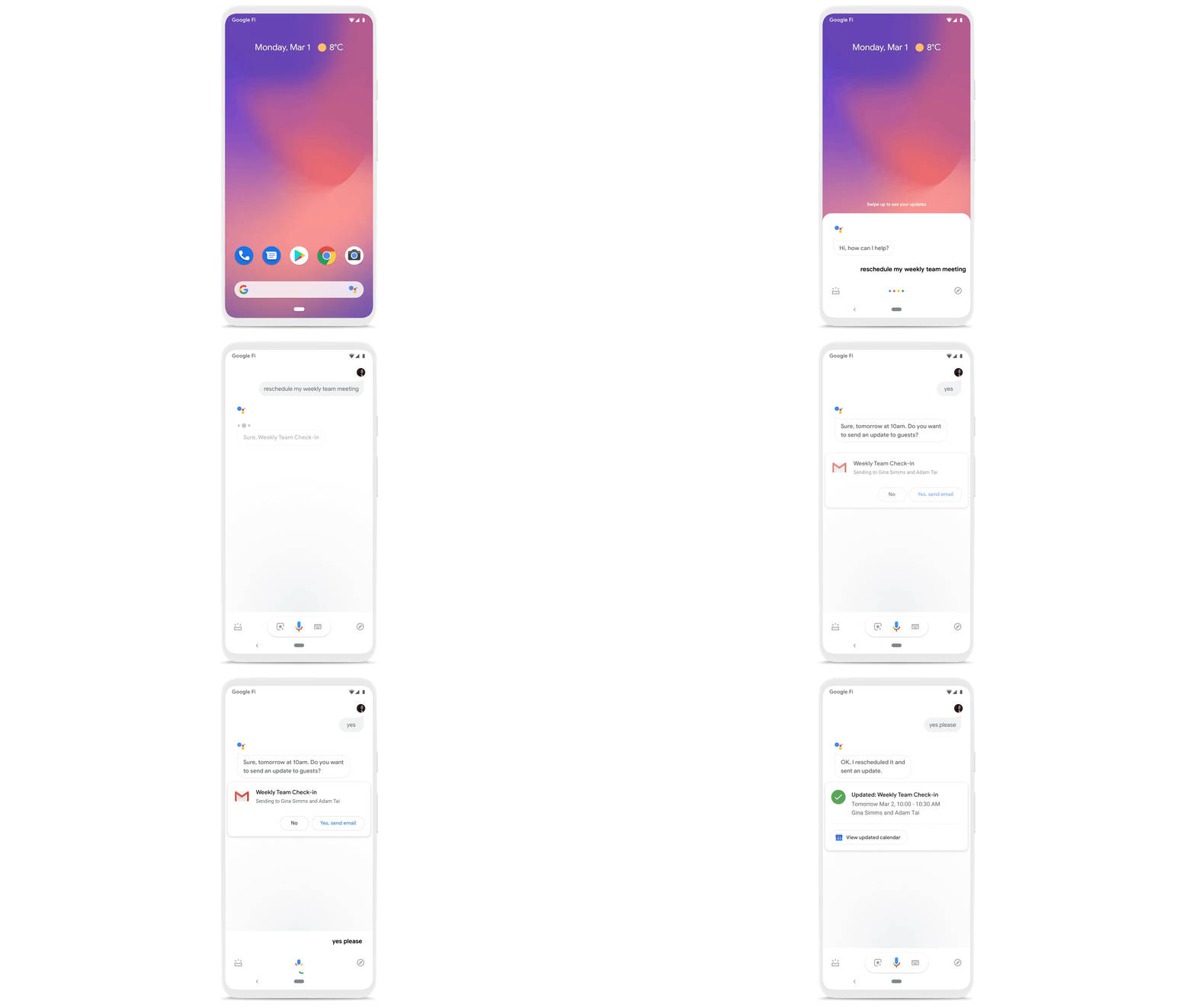
To help people save valuable time, we’re excited to share that using Google Workspace with Google Assistant is now generally available. You can ask Google what’s next on your work calendar, to quickly join meetings, or to send a message. Google Assistant is currently available for Google Workspace on supported mobile devices and is in beta for smart speakers and Smart Displays, like Nest Hub Max. Google Workspace customers can learn how to enable this feature for their users here.
Elsewhere on the time management front, a key trend we’re seeing in today’s workforce is the juggling of professional and personal responsibilities, with many employees now working in “sprints,” like two- to four-hour blocks of time instead of the traditional workday. As more businesses embrace a flexible, hybrid model, we expect this trend to continue, and we’ll all need tools to help us achieve better work-life balance and make the best use of our time.
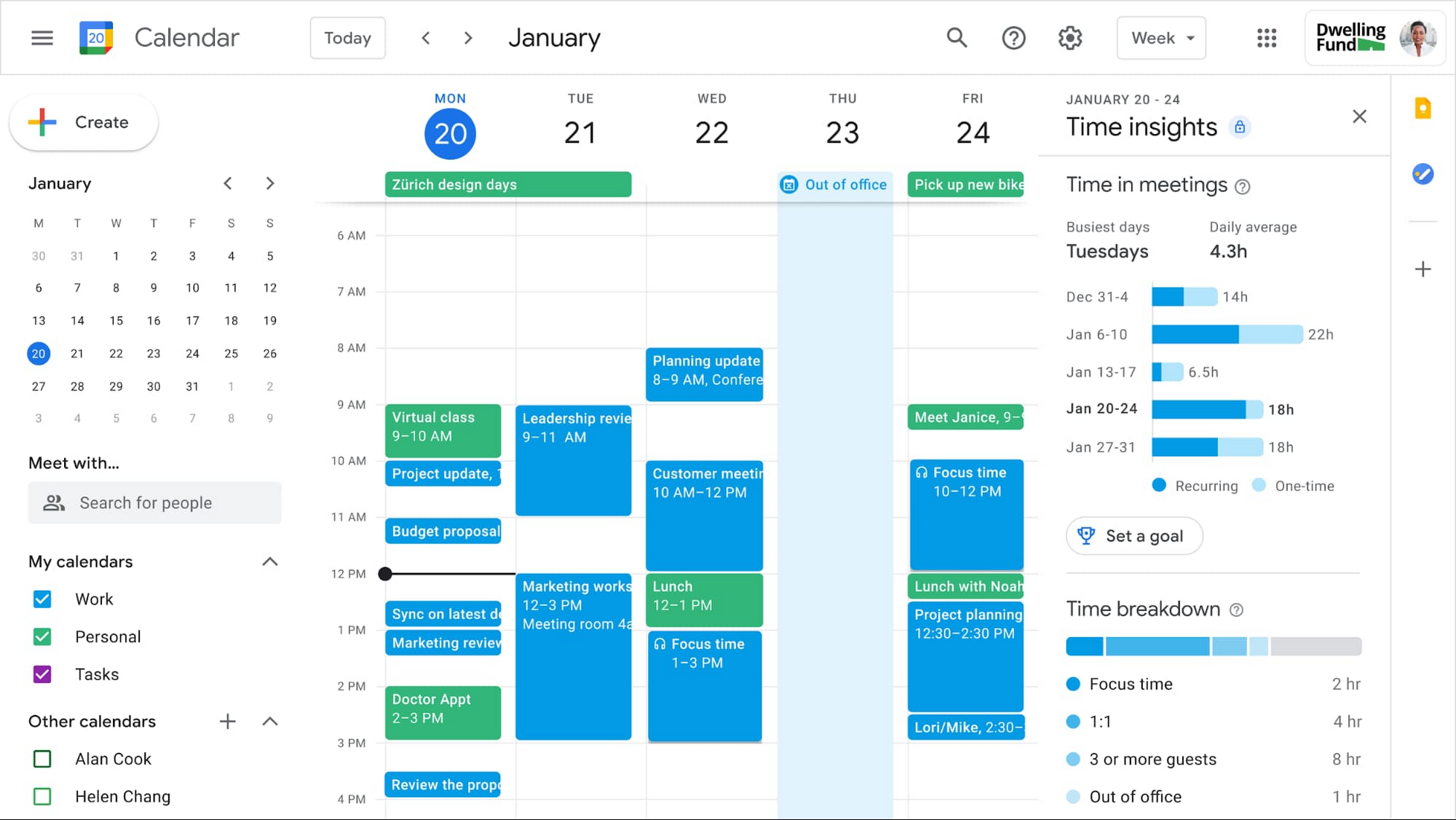
In the coming weeks, we’re releasing an integrated set of features in Google Workspace that help people easily share their work hours and location, while also finding more time to focus on what matters most. Features like segmentable working hours, recurring out-of-office entries, and location indicators let employees share their availability and location with their colleagues. Meanwhile, a new event type—Focus Time—lets people minimize distractions by limiting notifications during these event windows. All these availability and location indicators will show up seamlessly across Google Workspace, as teams engage with Calendar, Meet, Chat, and Gmail. We’ll also be delivering Time Insights to Google Workspace users (visible to the employee only, not their manager), so that employees can assess how they’re spending their time against their own priorities.
Strengthening collaboration equity for all
Ever since we pioneered real-time document editing fifteen years ago, collaboration has been a cornerstone for Google Workspace. In the coming months, we’ll make collaboration more equitable and accessible in a number of ways. First, we’re creating second-screen experiences in Google Meet for those using a mix of devices to host their meetings, like Google Meet hardware for those in conference rooms and Nest Hub Max for those at home. With new second-screen capabilities, people can present and fully participate in the Google Meet experience, including with chat, polls, and Q&As, from any device, no matter where they are.
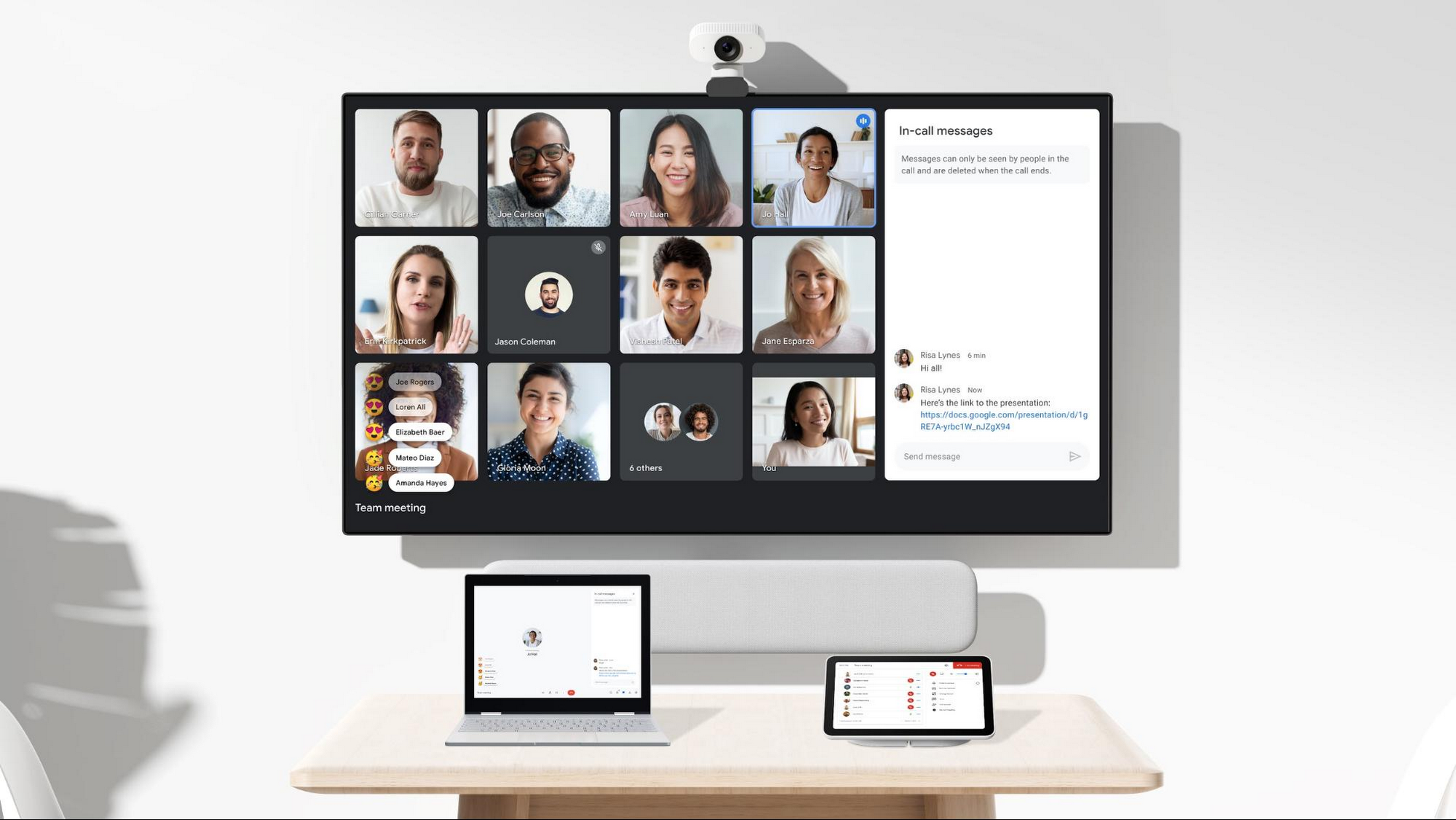
And specifically for those joining meetings from their mobile devices, we’re making it easier to have a bigger impact on a smaller screen. We’re rolling out mobile tile view so you can see more people at once, while split-screen and picture-in-picture support on Meet mobile will help you seamlessly chat or browse your Gmail without missing the visual thread of a meeting. Mobile support for background replace, Q&A, and polls will also help you stay productive and connected on the go.
Live streams will also become more powerful and inclusive in Google Workspace with the addition of Q&A, polls, and live captions (in English, Spanish, German, Portuguese, and French). And because we recognize how organizations are connecting across different groups of people, we’re also enabling live streaming across multiple Google Workspace domains within the same organization.
Finally, to give teams even more ways to connect and collaborate, we’re adding Chat, Jamboard, and Calendar to Google Workspace Essentials.
Building the future of work—together
If there’s a mantra that captures the last year of work, it might be “flexibility in the face of change.” It’s how our customers and our own employees have bridged the physical distances to continue making an impact in a rapidly changing world. As work continues to evolve for all of us, Google Workspace is committed to providing a solution that’s flexible, helpful, and that fuels innovation. We’re also committed to enabling collaboration equity wherever and however we can. At its core, this has been our mission for more than a decade and we’re excited to partner with our customers and users to continue bringing it to life.
Streamlining Your Experience: Enhanced Search and Navigation in Google Cloud Console
1372
Of your peers have already read this article.
4:30 Minutes
The most insightful time you'll spend today!
The Google Cloud console is a powerful platform that lets users manage their cloud projects end-to-end with an intuitive web-based UI. With over 120 Google Cloud products across thousands of pages, it can be challenging to navigate through the console quickly, and many users don’t like to use the command line interface. To help, Google Cloud console team recently made several improvements to our search and navigation features, making it easier to find what you need, when you need it.
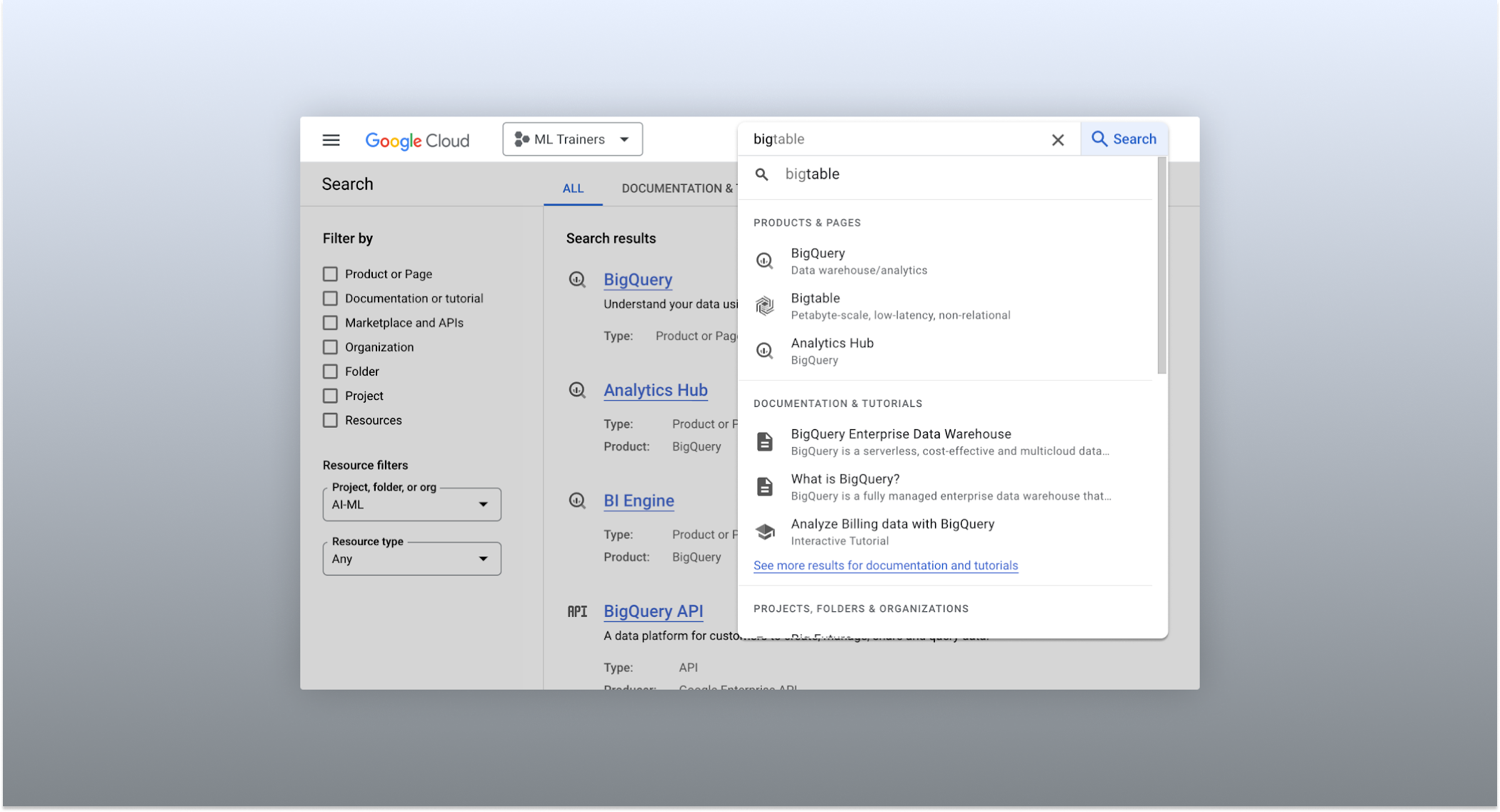
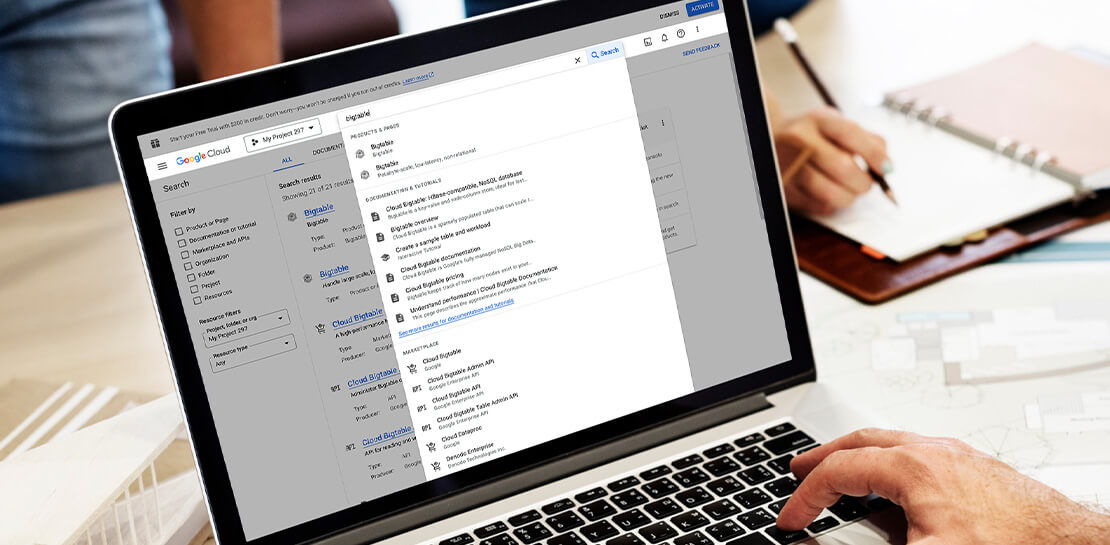
The Cloud console’s search dropdown and result page
Expanded resource-type search
One of the most significant improvements to the console’s search feature is the increased resource-type coverage. You can now find instances of nearly all of the over 120 products that Google Cloud offers directly from the search bar, rather than by manually clicking to the details section nested within specific product pages. This wider coverage saves you time compared to browsing through the different product categories to find what you’re looking for. This improvement also allows the console experience team to continuously add new resource types as we develop new features and capabilities in our various product offerings.
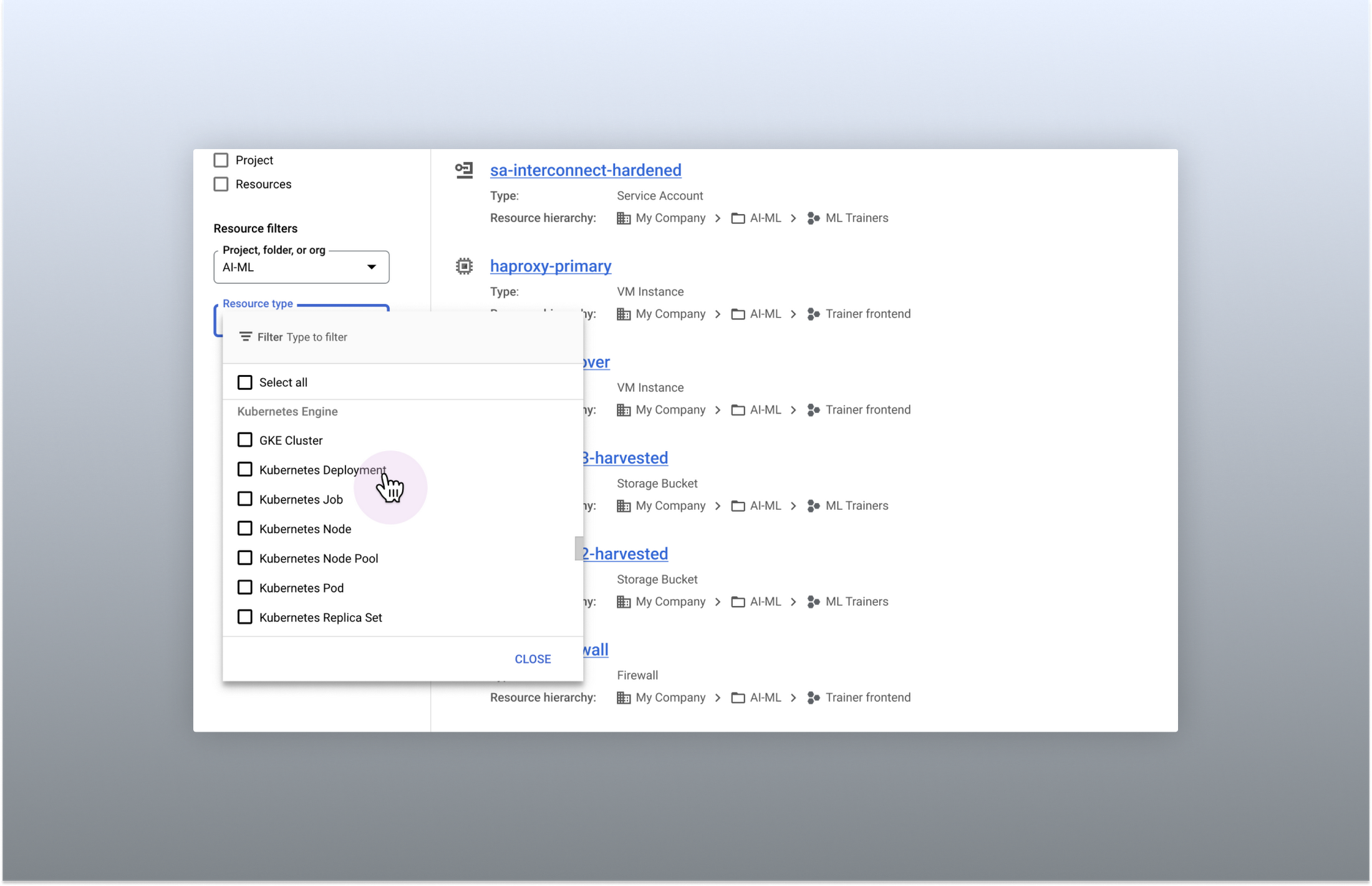
Search for more than 90 types of resources using Google Cloud console
Improved documentation search
We also improved the coverage and accuracy of the search experience for documentation, making it easier to find specific pages or interactive tutorials. Developers looking to get started with something they’re unfamiliar with may want to undertake tutorials in the context of their own working environment. Even experienced developers just looking for a quick answer to their question may not want to leave the console, so we expect these improvements can help users of all experience levels.
We’ve heard from you that finding the right documentation from within the console can be tricky, and so we hope this change can save you from needing to switch over to web search to be confident that they’ll find what you’re looking for.
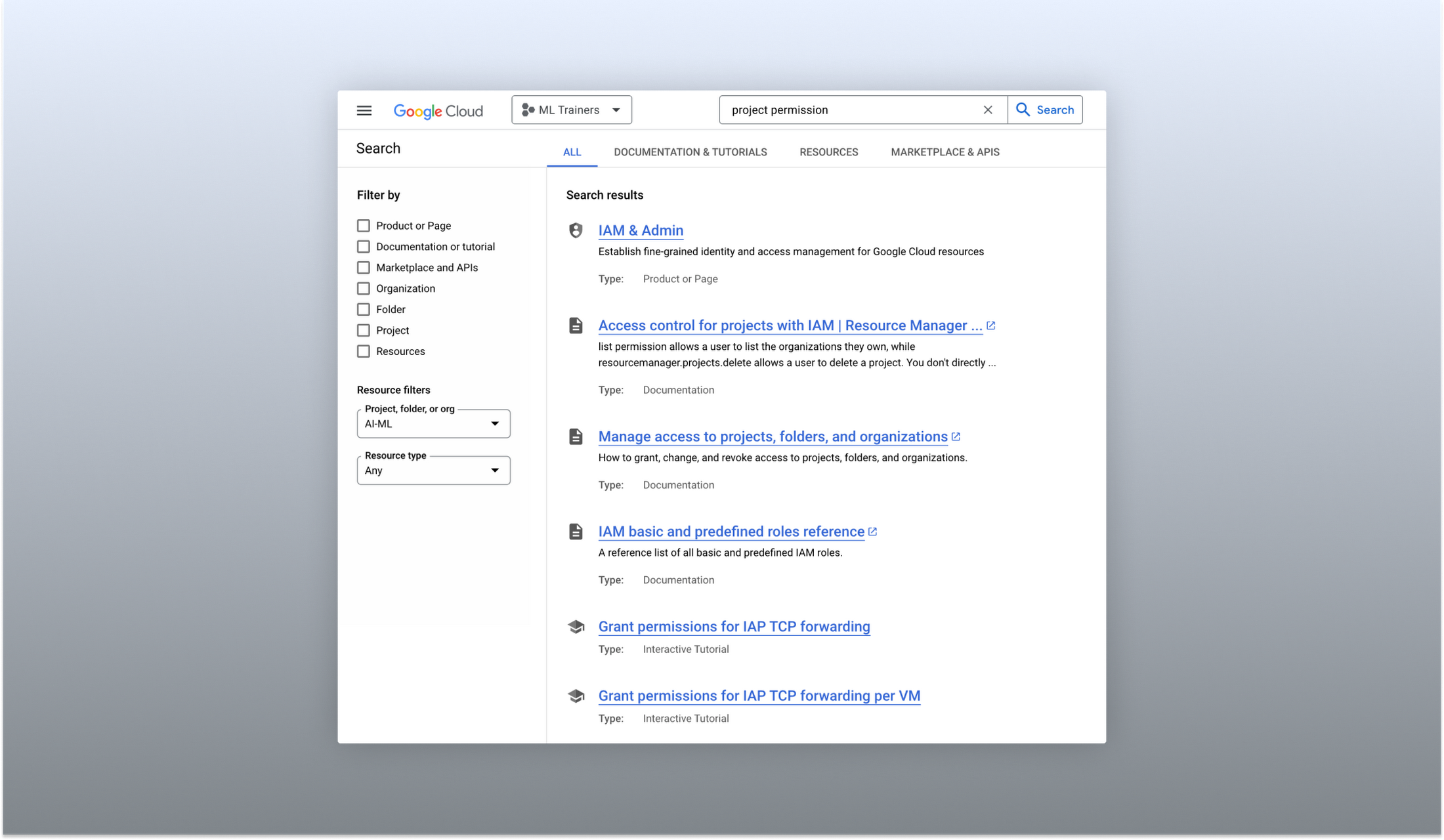
Cloud documentation and tutorials are available for search in the console
A refreshed search results page
To make browsing search results easier, we also overhauled our search results page by dividing results into tabs, similar to Google web search. This means that you can refine your search by diving into one of those categories individually. In addition to maintaining an “all results” tab, there are tabs for:
- Documentation and tutorials
- Resource instances, and
- Marketplace and APIs
Each tab also has a better filtering experience that’s unique to that search result category. For instance, the Resources tab lets you filter by metadata like the last time a resource was interacted with, while the Documentation tab allows you to search for interactive tutorials only. If you can’t find what you’re looking for in the autocomplete dropdown, try the search results page. It can provide additional results or context to help you find exactly what you’re looking for.
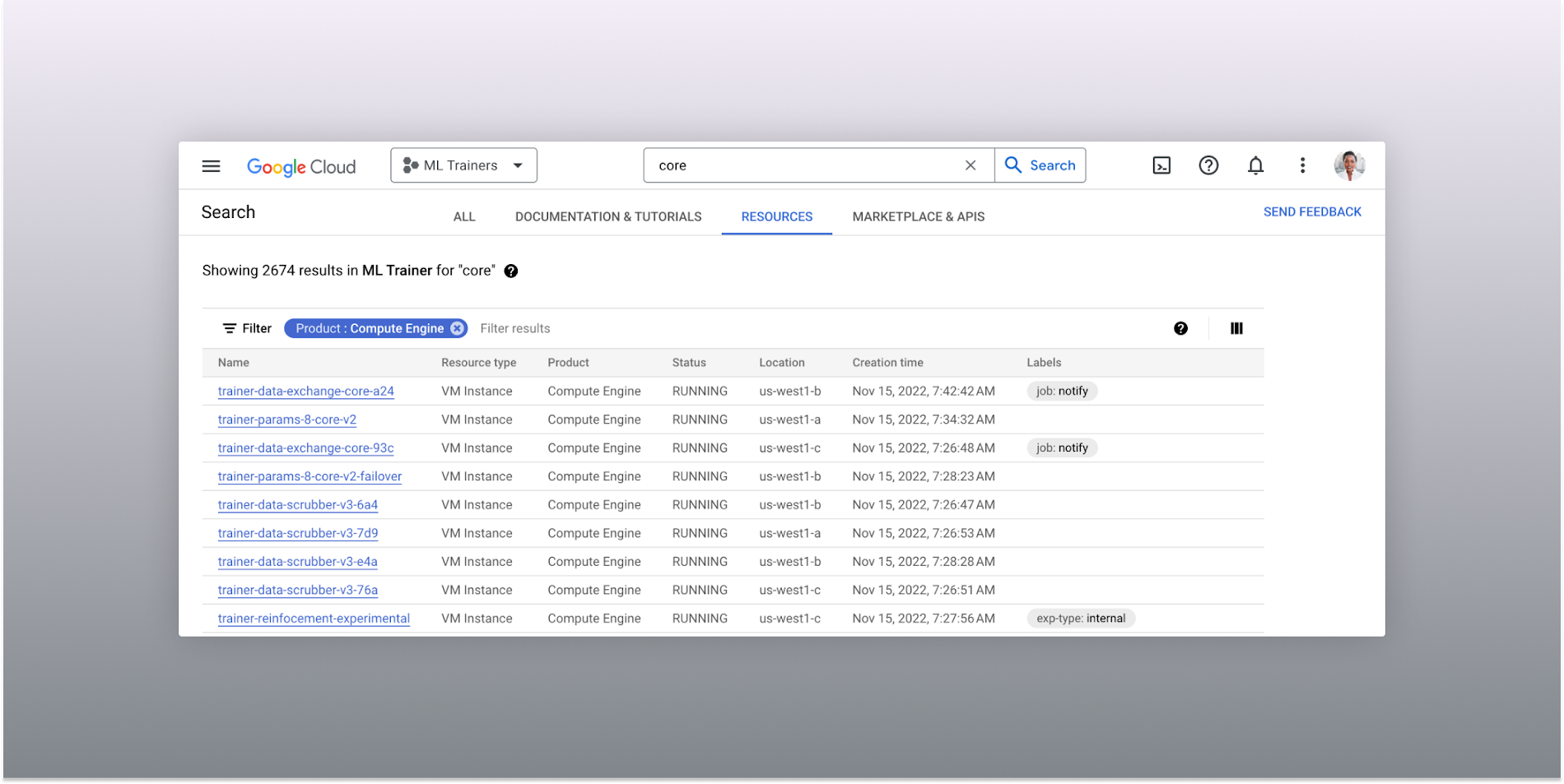
The Resources tab lists results in a denser, metadata-rich format with filtering available
Accurate industry-wide synonyms
Google Cloud console search now interprets industry-wide synonyms accurately — if you’re coming from AWS or Azure and know the name of a product in that ecosystem, searching for it will return the Google Cloud equivalent. A full list of synonyms can be found here.
General usability improvements
We also shipped several smaller quality-of-life improvements related to search, including:
- Improvements to accessibility, including better color contrast and zoom behaviors
- Faster latency targets and shorter load times for results
- A search keyboard shortcut — just type “/” to begin searching without using your mouse
- The ability to search for an API resource by its key
We also updated the look and feel of our platform bar to a cleaner, more modern experience that’s more in line with the branding across other Google Cloud interfaces.
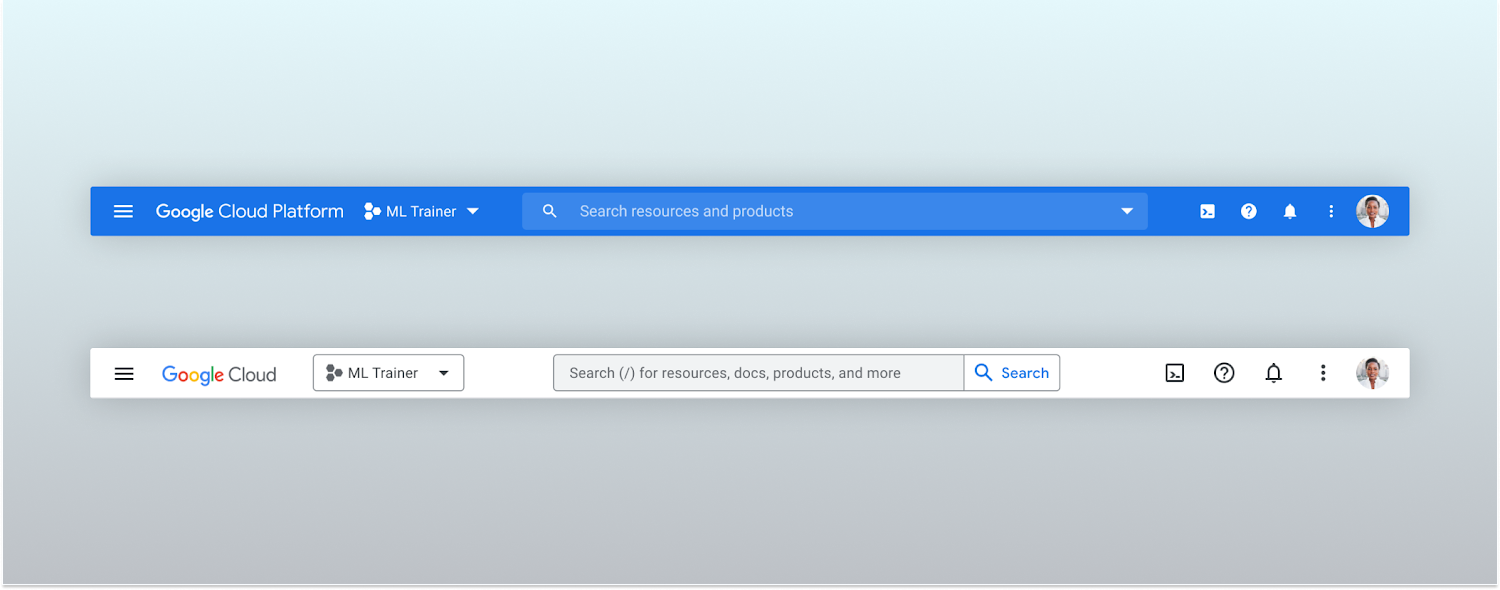
Google Cloud console’s old platform bar (top) and the updated version (bottom)
A customizable navigation menu
Finally, we made usability improvements to the left-hand navigation menu by allowing you to pin specific products. Products can be pinned from the left nav menu or our brand new All Product Page. This is a shift away from the default ordering of products that attempted a “one size fits all” approach to navigation. This customization feature lets you tailor the console to your specific needs and work more efficiently.
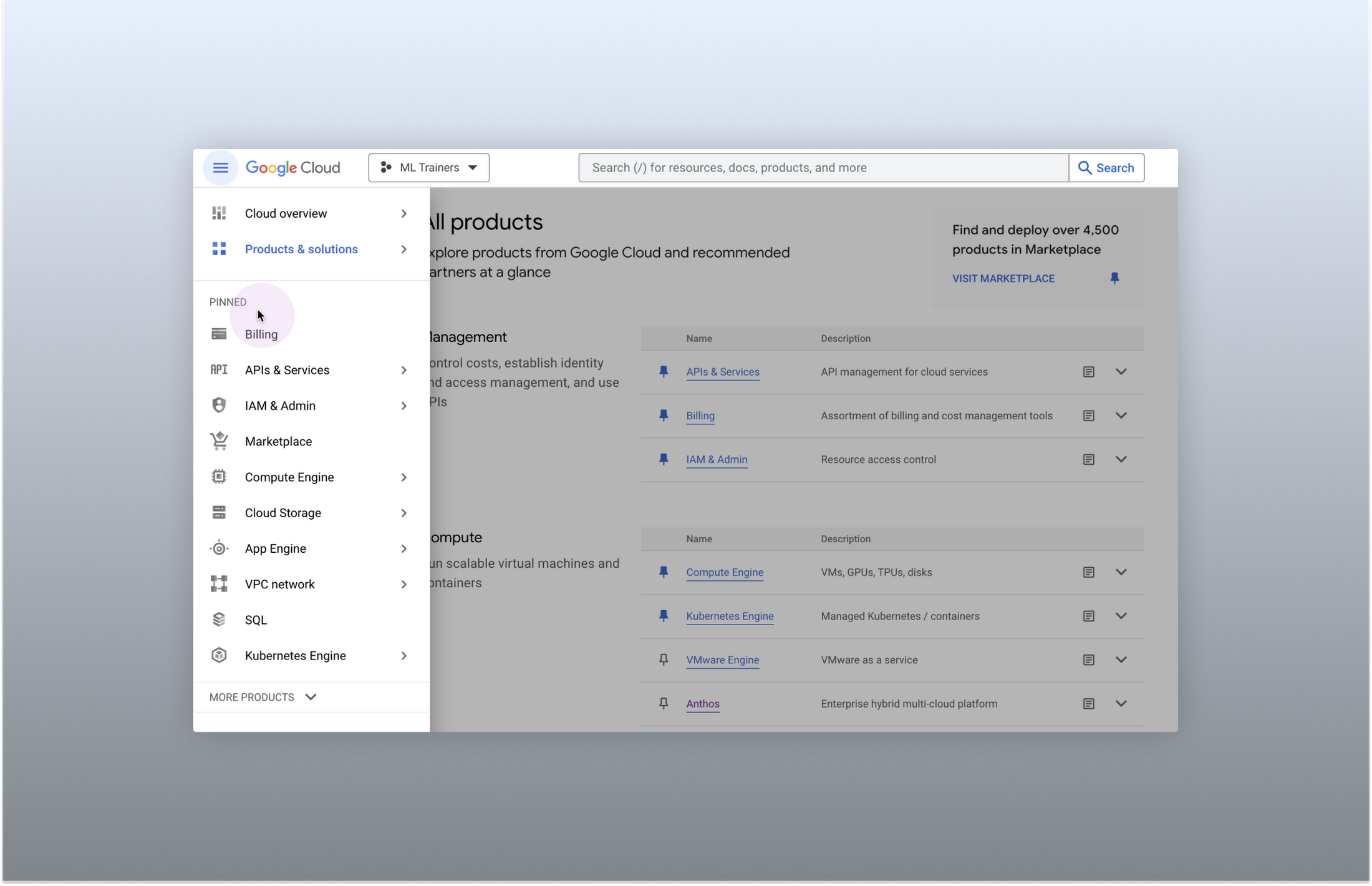
Products can be pinned to the left nav menu for easy access
Final thoughts
The Google Cloud console’s navigation and search features have come a long way. With these recent improvements, you can find what you need quickly and efficiently, making it easier to manage your cloud resources. From expanded resource-type search to improved documentation search and refined search results, the console is more user-friendly than ever before.
More Relevant Stories for Your Company

Google Launches Product Locator and Gives Store Locator Plus an Upgrade to Expand Retail Offerings
We all experienced, first hand, how Covid-19 has impacted the world and our communities. Last year, store closures, reduced hours, and social-distancing requirements drove people to adopt more e-commerce options, which, according to eMarketer, grew 27.6% worldwide in 2020. Meanwhile, consumer desires to shop locally also grew with Google searches for
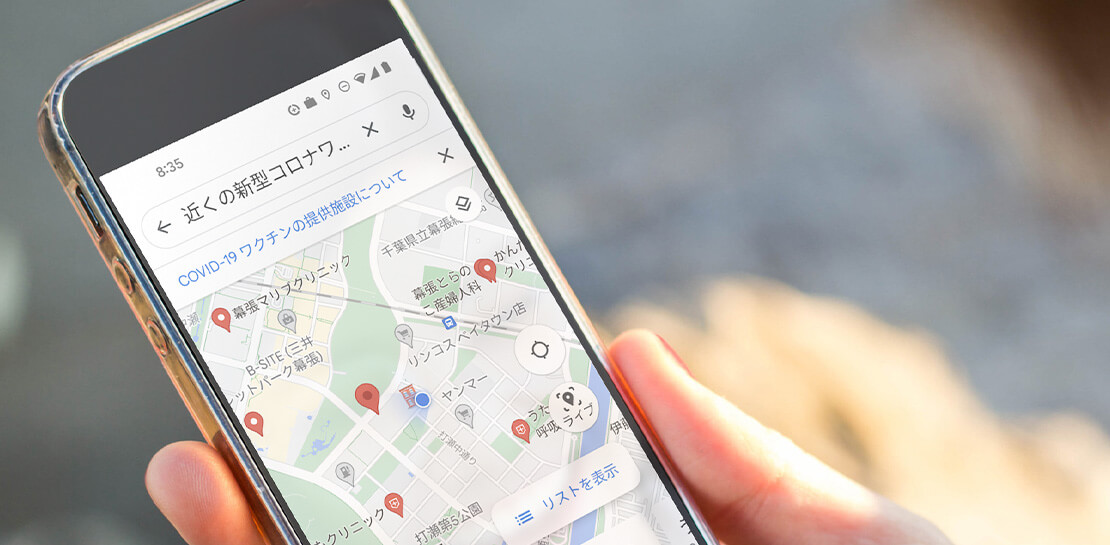
How Japan’s Vaccine Locator Platform Became A One-stop Shop for COVID-19 and Vaccination-related Information
Editor’s Note: David Moore, Founder and CEO of Navagis, shares his story of teaming up with the Google Maps Platform team to help people across Japan get vaccinated amid COVID-19 pandemic. The roots of Navagis go back to Hurricane Katrina, when I led an Army Corps of Engineers team that

Messages by Google: Unveiling New Features for AT&T Android Users
Today, we’re announcing that we’re working with AT&T to establish Messages by Google as the default messaging application for all AT&T customers in the United States using Android phones. The collaboration aims to help accelerate the industry toward global Rich Communication Services (RCS) coverage and interoperability to offer a consistent, secure, and

Usha Martin Consolidates and Modernizes with Google
Usha Martin operates several wire and rope manufacturing plants in India, Thailand, the United Arab Emirates, and the United Kingdom. In 1974, Usha Martin established an integrated alloy steel plant in Jamshedpur, India. The business operates a range of joint ventures internationally, including a partnership with Joh Pengg AG of
