





3107
Of your peers have already watched this video.
21:30 Minutes
The most insightful time you'll spend today!
How Google Cloud is Fortifying the Social Safety Net
The COVID-19 crisis is triggering both immediate and longer-term challenges for state and local governments.
In this video, Denise Winkler, Strategic Business Executive, Google Cloud and Jennifer Ricker, Assistant Secretary – Illinois Department of Innovation & Technology (DoIT), discuss a number of challenges and solutions around the pandemic.
First, they outline the programs that constitute the social safety net and the impact that COVID-19 has had on the social safety net and citizens. Then they share the Google Cloud solutions that have been mobilized to assist these agencies.
Ricker will also share how Google Cloud Contact Center AI supported the Illinois Department of Employment Security.
Finally, they talk about how Google Analytics can help communities open and recover.
Learn how Google Cloud is enabling public officials to gear up to meet unprecedented demand for unemployment and social services programs, launch expanded digital services, and more.
You Can Quantify and Maximize Value of Your Org’s AI/ML and Analytics Teams!

4423
Of your peers have already read this article.
1:30 Minutes
The most insightful time you'll spend today!
Investing in Artificial Intelligence (AI) can bring a competitive advantage to your organization. If you’re in charge of an AI or Data Science team, you’ll want to measure and maximize the value that you’re providing. Here is some advice from our years of experience in the field.
A checklist to embark on a project:
As you embark on projects we’ve found it’s good to have the following areas covered:
- Have a customer. It’s important to have a customer for your work, and that they agree with what you’re trying to achieve. Be sure to know what value you’re delivering to them.
- Have a business case. This will rely on estimates and assumptions, and may take no more than a few minute’s work. You should revise this, but always know what justifies your team’s effort, and what you (and your customer) expect to get in return.
- Know what process you will change or create. You’ll want to put your work in production, so you have to be clear about what business operations are changing or created around your work and who needs to be involved to make it happen
- Have a measurement plan. You’ll want to show that ongoing work is impacting some relevant business indicator. Measure and show incremental value. The goal of these measurements is to establish what has changed because of your project that would otherwise not have changed. Be sure to account for other factors like seasonality or other business changes that may affect your measurements.
- Use all the above to get your organization’s support for your team and your work.
What measures to use?
As you start the work, what measures and indicators can you use to show that your team’s work is useful for your organization?
How many decisions you make. A major function of ML is to automate and optimize decisions: which product to recommend, which route to follow, etc. Use logs to track how many decisions your systems are making.
Changes to revenue or costs. Better and quicker decisions often lead to increased revenue or savings. If possible, measure it directly, otherwise estimate it (for example fuel costs saved from less distance traveled, or increased purchases from personalized offers).
As an example, the Illinois Department of Employment Security is using Contact Center AI to rapidly deploy virtual agents to help more than 1 million citizens file unemployment claims. To measure success the team tracked the two outcomes: (1) the number of web inquiries and voice calls they were able to handle, and (2) the overall cost of the call center after the implementation. Post implementation, they were able to observe more than 140,000 phone and web inquiries per day and over 40,000 after-hours calls per night. They also anticipate an estimated annual cost savings of $100M based on an initial analysis of IDES’s virtual agent data (see more in the link to case study).
Implementation costs. The other side of increased revenue or savings, is to put your achievements in the context of how much they cost. Show the technology costs that your team incurs and, ideally, how you can deliver more value, more efficiently.
How much time was saved. If the team built a routing system then it saved travel time, if it built an email classifier then it saved reading time, etc. Quantify how many hours were given back to the organization thanks to the efficiency of your system.
In the medical field, quicker diagnostics matter. Johns Hopkins University’s Brain Injury Outcomes (BIOS) Division has focused on studying brain hemorrhage aiming to improve medical outcomes. The team identified the time to insights as a key metric in measuring business success. They experimented with a range of cloud computing solutions like Dataflow, Cloud Healthcare API, Compute Engine, and AI Platform for distributed training to accelerate iterations. As a result, in their recent work they were able to accelerate insights from scans from approximately 500 patients from 2,500 hours to 90 minutes.
How many applications your team supports. Some of your organization’s operations don’t use ML (say reconciling financial ledgers) but others do. Know how many parts of your organization benefit from the optimization and automation your team builds.
User experience. You may be able to measure your customer’s experience: fewer complaints, better reviews, reduced latency, more interactions, etc. This is valid both for internal and external stakeholders. At Google we measure usage and regularly ask for feedback on any internal system or process.
One of our customers, The City of Memphis, is using VisionAI and ML to tackle a common but very challenging issue: identifying and addressing potholes. The implementation team identified the percentage increase of potholes identified as one of the key metrics along with accuracy and cost savings. The solution captures video footage from it’s public vehicles and leverages Google Cloud capabilities like Compute Engine, AI Platform, and BigQuery to automate the review of videos. The project increased pothole detection by 75% with over 90% accuracy. By measuring and demonstrating these outcomes, the team proved the viability of a cost-effective, cloud-based machine learning model and is looking into new applications of AI and ML that will further improve city services and help it build a better future for its 652,000 residents.
Acknowledgements
Filipe and Payam would like to thank our colleague and co-author Mona Mona (AI/ML Customer Engineer, Healthcare and lifesciences) who contributed equally to the writing.
Document AI: A Platform for Businesses to Simplify Document Automation

2365
Of your peers have already read this article.
2:30 Minutes
The most insightful time you'll spend today!
As I type this blog in a Google Doc, I can’t help but think about how much we rely on digital documents to communicate, collaborate, and do business. Yet most of the data in documents remains un-analyzed. Even when documents are part of customer-facing workflows like processing a mortgage application or a contract, businesses frequently struggle with the data those documents contain. Often, even finding the right document in a haystack of thousands across the organization can be challenging. To resolve these difficulties, most organizations rely on manual, time-consuming, and resource-intensive processes—all of which are incredibly frustrating for employees at the forefront of document workflows.
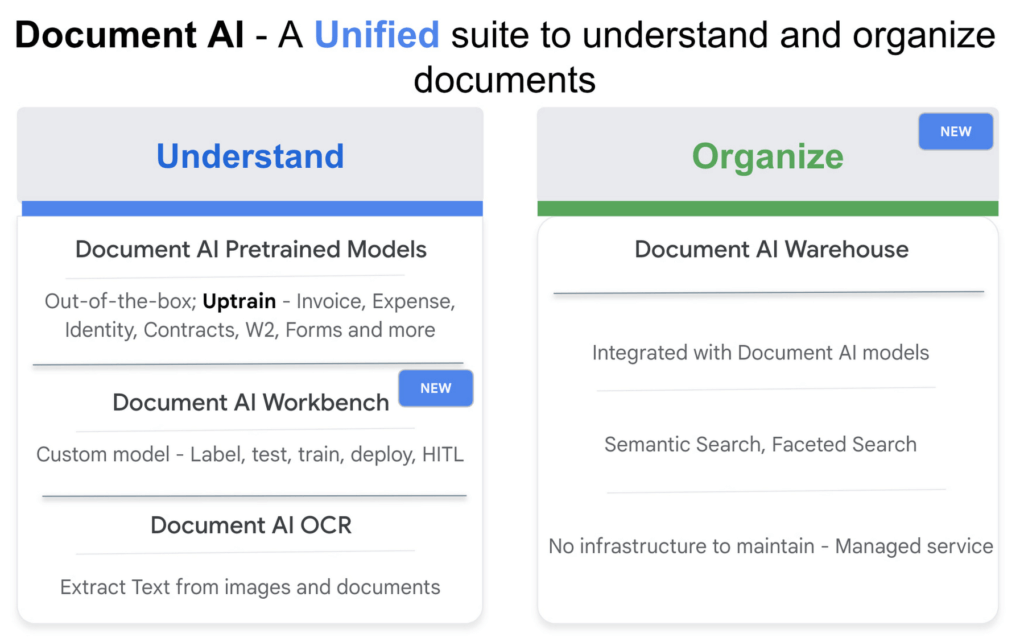
Because of challenges like these, in 2020, we launched Document AI, an AI agent that lets organizations apply machine learning (ML) to their hardest document automation problems. Since then, we have introduced specialized models to extract data for industry-specific use cases such as mortgage processing and procurement. With the launch of Document AI Workbench and Document AI Warehouse at Google Cloud Next ‘22, we’ve continued to take significant steps in our mission to help organizations simplify and automate document processing. Let’s double click on each of these announcements.
Custom document processing with Document AI Workbench
With Document AI Workbench, organizations can process documents by creating custom ML models that are specific to their business needs and extract unstructured data with a high degree of accuracy. Thanks to the user-friendly interface, even business users who do not have extensive ML skills can get started training or uptraining models.
Moreover, if an organization wants to transfer learning from pretrained models and enhance a model further to, say, include new fields, users can now do so by what we call “uptraining.” The uptraining feature is especially valuable for the most common yet complex use cases because it helps to save time and resources, so businesses don’t have to start from scratch. Uptraining for the invoice, purchase order (PO), contracts, W2, 1099-R, payslip, and 1040 pre-trained models unlocks new possibilities for improving accuracy, adding new language support, and schema customization.
We’re continuing to invest in these pretrained models. At Next’22, we announced an update to our invoice and expense pre-trained models with improvements to normalization and line item entities detection, as well as new ID proofing capabilities via a flexible API designed to spot fake, altered, or doctored ID documents. We’ve also added support for five new languages across invoice and expense models, in addition to the 12 previously-supported languages, and expanded availability in Canada and Australia regions, in addition to previously-supported US, EU, and Singapore regions.
According to Daan De Groodt, Managing Director, Deloitte Consulting LLP, Document AI Workbench “is poised to be a game changer, because we can now uptrain various text documents and forms utilizing powerful Google Machine Learning models to get the desired accuracy creating greater time and resource efficiencies for our clients.”
And customers are already seeing benefits. Libeo used Document AI to uptrain an invoice parser with 1,600 documents and increase its testing accuracy from 75.6% to 83.9%. “Thanks to uptraining, the Document AI results now beat the results of a competitor and will help Libeo save ~20% on the overall cost for model training over the long run,” said Libeo chief technology officer, Pierre-Antoine Glandier.
Google-powered document search with Document AI Warehouse
With Document AI Warehouse we are bringing the best of Google’s semantic search to documents. Document AI Warehouse lets enterprises search, store, govern and manage documents and their AI-extracted data and metadata in a single platform. With Document AI Warehouse’s simple and intuitive web accessible user interface, users can explore, view, bulk update and organize documents into folders. Document AI Warehouse offers robust enterprise control and governance so you can control who has access at the document and folder levels and assign users and groups permissions to view, edit, manage (share, delete) documents. You can migrate, sync, or federate documents from other repositories, such as Microsoft SharePoint, Amazon S3, and IBM FileNet. Or if that’s not an option we simply index the content and any extracted/tagged metadata).
We also will consolidate a number of next-generation product enhancements on Document AI OCR and Form Parser by the end of this year – including deeper insights into document quality & semantics, a unified document OCR experience, expanded language coverage for Form Parser, and advanced tooling for model lifecycle management. Google’s DeepMind team developed a new method that allows the creation of document parsing ML models for utility bills and purchase orders with 50%-70% less training data than what was previously needed for Document AI. We’re working on integrating this method into Document AI Workbench in the coming months.
Getting started
I’m very excited about what the future holds for Document AI as a platform for businesses to simplify document automation. Learn more about all these exciting developments in my session at Next’22 or try out one of our offerings today.
How Toyota’s Google Cloud-powered Voice Assistant Gives a Turboboost to Drivers’ Experience

4820
Of your peers have already read this article.
2:00 Minutes
The most insightful time you'll spend today!
Over the decades, technology has helped us organize large amounts of physical information in ways that are streamlined, efficient, and easily accessible. Rows upon rows of encyclopedias are no longer needed; simply punch in or speak a query into Google Search and find numerous results at your fingertips. There’s no need to haul around cases of CDs or cassettes either, when you can access hundreds of thousands of songs on music streaming services.
We wanted to bring that same level of accessibility to one specific type of publication: the printed car manual. Here’s how we shifted the paper manual to become an easy-to-access, voice-activated digital experience for owners of the all-new Sienna. It’s helped this resource become just as modern and useful as Toyotas themselves.
Putting cloud technology in the driver’s seat
Far too often, the printed car manual remains unused, collecting dust in the glove compartment—that is, until it’s needed during a roadside emergency or to solve the meaning of a mysterious light popping up on the dashboard. Even then, thumbing through hundreds of pages during high-stakes moments can be stressful. On top of that, these manuals can be expensive to print and update.
Digital versions, such as a PDF file, are a nice start. But, they’re often little more than reformatted flat documents. In poor visual conditions on the side of a road, the last thing a driver wants to do is squint at a phone or scroll through pages of tiny text. And similar to printed manuals, digital versions don’t facilitate ongoing, real-time conversations between drivers and automakers when it matters the most; they’re often only text and pictures, and at best, schematic drawings.
With that in mind, we set out to elevate and personalize the car manual by creating a voice-activated digital owner’s manual experience, all powered by Google Cloud. A voice-based assistant was the clear choice because, as it felt like the most intuitive, natural option, especially while driving. In fact, 51% of U.S. adults have used a voice assistant while driving, and 95% of all drivers expect to use a voice assistant in the next three years.
We’re now putting this technology on the road by powering the Toyota Driver’s Companion for the all-new 2021 Toyota Sienna model. Accessible through the existing Toyota app, this companion provides real-time assistance, any time of the day. Drivers can ask questions and the companion will efficiently provide helpful answers in convenient ways, from voice to 3D walkthroughs and explorable environments.
What a modern car manual should do
The Toyota Driver’s Companion has interactive features to help drivers discover the Sienna’s dashboard, set up the car’s interior and exterior appearance, better understand vehicle maintenance, and explore Dynamic Radar Cruise Control, Lane Departure Alert and other features.
Here are a few other additional key features to call out within the Toyota Driver’s Companion:
- An easily accessible virtual voice through the Toyota Driver’s Companion lets app users ask personal questions about their 2021 Sienna such as “what’s the height of my car?” and receive immediate answers either by voice, display or interactive input.
- The manual automatically connects with the purchased vehicle’s VIN number to create a completely personalized experience, curated specifically for the driver. For example, if an unfamiliar light on the dashboard pops up, the Toyota Driver’s Companion can help identify the light’s meaning.
- Interactive hotspots throughout the vehicle’s interior let drivers explore the cabin virtually. Drivers can discover button functionalities, find specific dials, and learn more about car functions, such as how to slide seats or open doors, to become acclimated with their new vehicle.
To bring this experience to life, we tapped into some of our key Google Cloud solutions:
- APIs powered by Google Cloud artificial intelligence technology make accessing specific vehicle information easy and effortless, by leveraging Google’s natural language processing:
- Google Cloud DialogFlow API serves as the decision tree that gives intelligence for both finding an answer for a question, i.e., how the Companion responds to the end user’s questions.
- One of our Text-to-Speech APIs—called Wavenet—creates the Companion’s realistic voice.
- And finally, our Speech-to-Text API “listens” to the user’s voice and finds the correct information to craft responses. That means a driver can ask a question multiple ways, and the Companion will still respond with the right answer.
Our Firebase mobile app dev platform gleans analytic insights that help improve the overall experience and services for OEMs and drivers alike.https://www.youtube.com/embed/66QxWS-PzIM?enablejsapi=1&
We’re encouraging better consumer experiences by providing faster access to fresh information, in a natural, accessible format—voice. But these new voice-activated experiences aren’t only an opportunity to help out drivers; it’s also about strengthening connections between drivers, their vehicles, and automakers, too.
Our hope is that through this information exchange, drivers can provide feedback on the most frequently misunderstood features, enabling OEMs to address questions early on. By understanding the most requested features, OEMs can also predict and inform driver questions about features. We’re incredibly excited to help make the driver’s experience more connected and helpful.
Google Cloud CCAI’s Support for the Public Sector Soars during the Pandemic

5273
Of your peers have already read this article.
2:00 Minutes
The most insightful time you'll spend today!
Scaling Virtual Support in the Pandemic Era: The AI Connection
Since the early days of the pandemic, we’ve partnered with government organizations and academic institutions to serve communities at scale with Contact Center Artificial Intelligence (CCAI). I sat down with Bill MacKenzie, IT liaison for the Upper Grand School District in Ontario, and Marco Palermo, director of digital government and modernization, to discuss how they embraced CCAI to introduce scalable service delivery to residents and students alike. I’m sharing more on their stories below, and for the full overview, check out our Google Cloud Public Sector Summit session, Scaling Virtual Support in the Pandemic Era: The AI Connection.
Upper Grand School District: Answering questions with speed and accuracy
Bill MacKenzie described the Upper Grand School District’s struggles at the beginning of the pandemic, particularly helping parents with IT issues. The staff-oriented help desk was not equipped to assist parents trying to securely login for students as young as kindergarten. Without sufficient support for parents, the District was struggling to handle thousands of phone calls a day.
To alleviate the manual strain, they turned to Quantiphi, a Google Cloud partner, to implement Google Cloud Dialogflow. They were fully functional within a few weeks. The new website provided real-time responses as well as clear documentation to help parents get up and running quickly.
“In the first 10 days, we had over 5,000 hits, and the accuracy rate was 92%,” MacKenzie said.
The district doesn’t know what the future holds, but now that they have been through the process, they are confident they now understand how to create their own bots to meet critical needs.
City of Toronto: Getting critical information to the community
Marco Palermo explained how the city of Toronto was facing a very rapid and fluid situation at the beginning of the pandemic. Getting information to constituents was extremely important, and they needed alternative channels to deliver that information.
Toronto has been committed to workforce equity and inclusivity in order to best represent the diversity of its residents. As a result, solutions had to be accessible to all. The bot handled 25,330 unique users and addressed 20,174 total questions with an 80% accurate response rate in the first four months. It’s been a huge success for the city, with plans to expand its capabilities.
Personalized response to the pandemic challenge
I noted that even before the pandemic, government leaders were asking for a way to provide more flexible personal experiences and better support outside of normal business hours. Around 60% of constituents want more self-service options and 75% would happily interact with digital resources if they could get the answers they needed.
Google Cloud CCAI addresses these needs with a single core of intelligence that provides a consistently high-quality conversational experience—human or virtual—across all channels and platforms. It can be deployed on legacy infrastructure without upgrades in an average of two weeks.
CCAI operates with a conversational core that centralizes the ability to talk, understand, and interact, orchestrating high-quality conversations at scale. It provides services in three different ways:
- Virtual Agent AI allows natural conversation with customers to identify and address their issues effectively
- Agent Assist AI helps human agents by providing real-time turn-by-turn guidance so they can better serve constituents
- Insight AI determines metrics and trends in real-time to enable faster and more accurate insights
CCAI provides consistency across every application. It can go off-script when answering complex questions, adjusting human conversation with the capacity to handle unexpected stops and starts, odd word choices, or implied meanings. It can also handle multiple use cases for the customer, such as taking payments, updating information, providing information, and more. By allowing agencies to automate routine tasks and reduce the amount of time employees need to dedicate to answering calls, the solution created cost savings for the agency.
Explore more on this session by visiting the Public Sector Summit on-demand video.
4908
Of your peers have already watched this video.
5:00 Minutes
The most insightful time you'll spend today!
Video: How AI is Helping Biologists Protect Wildlife
According to the World Wildlife Fund, vertebrate populations have shrunk an average of 60 percent since the 1970s. And a recent UN global assessment found that we’re at risk of losing one million species to extinction, many of which may become extinct within the next decade.
To better protect wildlife, seven organizations, led by Conservation International, and Google have mapped more than 4.5 million animals in the wild using photos taken from motion-activated cameras known as camera traps. The photos are all part of Wildlife Insights, an AI-enabled, Google Cloud-based platform that streamlines conservation monitoring by speeding up camera trap photo analysis.
With photos and aggregated data available for the world to see, people can change the way protected areas are managed, empower local communities in conservation, and bring the best data closer to conservationists and decision-makers.
Camera traps help researchers assess the health of wildlife species, especially those that are reclusive and rare. Worldwide, biologists and land managers place motion-triggered cameras in forests and wilderness areas to monitor species, snapping millions of photos a year.
But what do you do when you have millions of wildlife selfies to sort through? On top of that, how do you quickly process photos where animals are difficult to find, like when an animal is in the dark or hiding behind a bush? And how do you quickly sort through up to 80 percent of photos that have no wildlife at all because the camera trap was triggered by the elements, like grass blowing in the wind?
Watch this video to find out.
More Relevant Stories for Your Company

Enhance Dev Workflows with Duet AI’s AI-Powered Support
Last week we announced the private preview of Duet AI for Google Cloud, an always-on AI collaborator that uses generative AI to provide help to developers and cloud users. This article gives you a detailed look at Duet AI for developers, showing how Duet AI can help provide developers with real-time code

Wayfair: Carving the path towards MLOps excellence with Vertex AI
Editor’s note: In part one of this blog, Wayfair shared how it supports each of its 30 million active customers using machine learning (ML). Wayfair’s Vinay Narayana, Head of ML Engineering, Bas Geerdink, Lead ML Engineer, and Christian Rehm, Senior Machine Learning Engineer, take us on a deeper dive into

Built on Google Cloud, Enexor’s Bio-CHP Unit Powers 100 Homes with Renewable Energy!
Editor’s note: Earth Day reminds us that we all can contribute to creating a cleaner, healthier, and more sustainable future. Google Cloud is excited to celebrate innovative startup companies developing new technology and driving sustainable change. On this year’s Earth Day we’re highlighting Enexor BioEnergy and their initiative to produce

An Out-of-the-box, End-to-end Solution for Contact Centers!
Providing best-in-class customer service is crucial for the success of your business. Contact centers are a critical touch point, as they have to balance between representing your brand and prioritizing customer care. When your customers seek help and support, they expect efficient service that is accessible through modern voice and
