





4874
Of your peers have already watched this video.
1:30 Minutes
The most insightful time you'll spend today!
How does Google Pick its Data Center ?
Google is well known for its sustainable tech and hardware initiatives. Did you know alongside its environmental friendly designs of its data centers, it takes into account various factors such as redundant power supplies, data replication, network connectivity, etc. Watch the video to learn more.
Next-Level Ecommerce Engagement: Transforming User Identities with GCIP

923
Of your peers have already read this article.
2:30 Minutes
The most insightful time you'll spend today!
One of the fundamental questions that retailers constantly ask themselves is how well they know their customers and how they can build deeper relationships. Knowing who their customers are can have a direct impact on improving customer engagement, which can lead to increased conversion rates, customer loyalty, lifetime value, and higher return on marketing spend.
Retailers have started to use innovative new methods like identity graphs, which connect information from multiple sources such as internal databases, marketing systems, online interactions and social media platforms. While these new methods have shown promise, the best and most effective approach remains customer self-identification through an authentication process.
As a result, retailers require a sophisticated user identity platform that protects customer information with proper authentication and authorization, one which incorporates advanced mechanisms like multi-factor authentication and intelligent account protection, to ensure customer information is protected throughout its lifecycle.
Google Cloud Identity Platform (GCIP) is a customer identity and access management (CIAM) solution that can enable retailers (and any other organization) to add identity and access management capabilities to online applications. GCIP is easy to administer and develop with, and is able to grow with an organization’s online user base.
With a customer identity and access management (CIAM) solution like GCIP, a retailer can quickly and easily implement powerful identity management and security capabilities such as:
- Advanced authentication through email or SMS/text messaging.
- Quicker onboarding with social logins from Google, Facebook and others.
- Flexibility to support external identity providers through identity federation.
- Support for multi-tenant B2B use cases with the ability to create unique silos of users and configurations.
- Easy to use interfaces and libraries to help web/mobile application developers quickly integrate and launch.
- Broad authentication protocol support, including SAML 2.0, OAuth/OIDC or simple email- and password-based authentication.
- Built on Google Cloud’s planet-scale infrastructure to support a growing customer base.
How does it work?
GCIP allows end users to authenticate to web and mobile applications. For retailers, this could be their online shopping app for mobile devices or an ecommerce website accessible over the internet through a web browser.
Users can sign-in with their email/passwords, phone numbers or using their social logins . If the organization uses an existing OpenID Connect (OIDC) provider, a Security Assertion Markup Language (SAML 2.0) provider or even a custom authentication system which issues signed tokens, Google Cloud Identity platform can be used as the authentication orchestrator.
Using Google Cloud Identity Platform as the primary authentication system
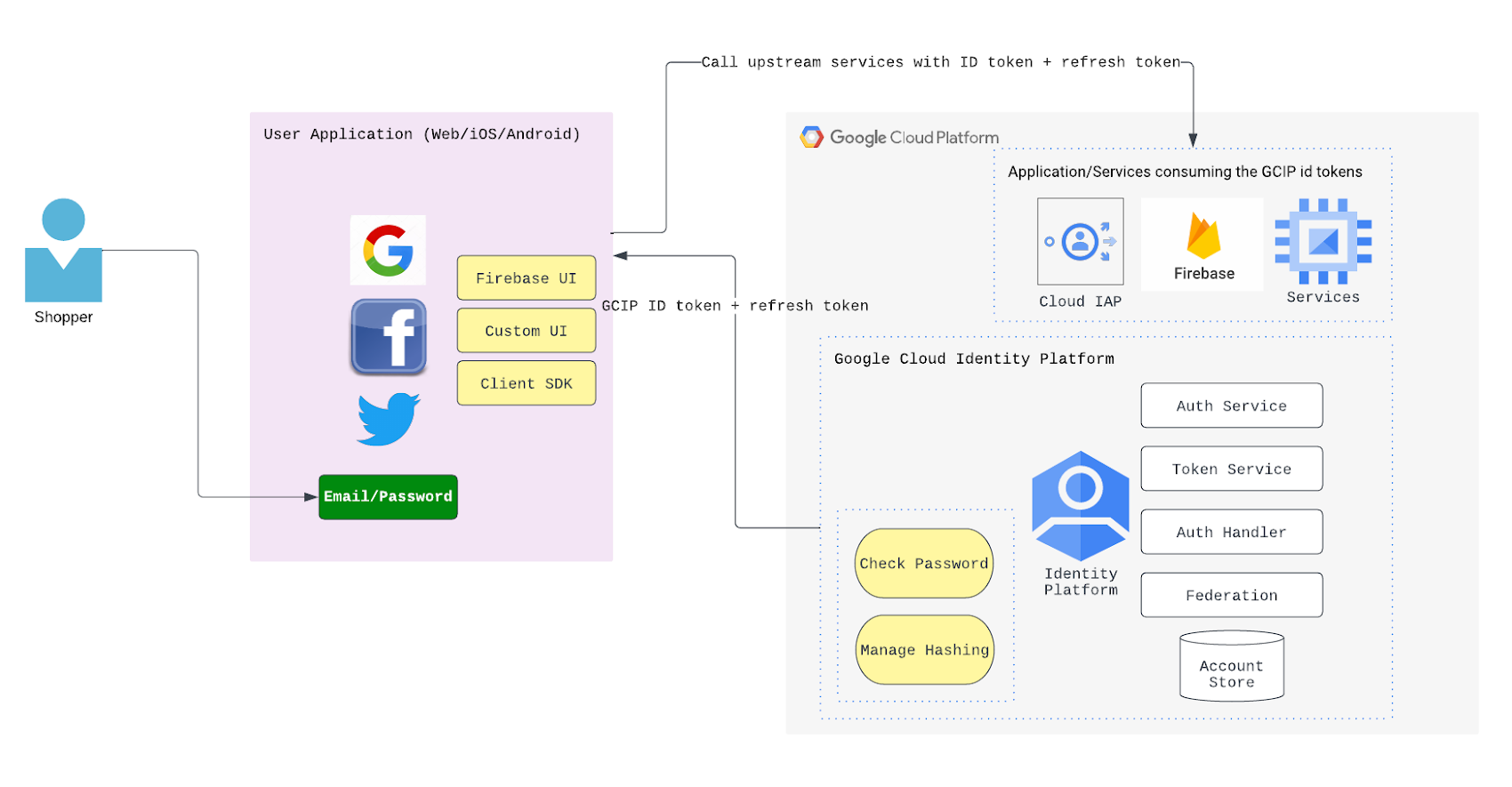
GCIP can serve as the primary authentication system, meaning users are provisioned into GCIP. In this case, the end user identities are securely persisted in the “account store” database. The database is a part of fully managed GCIP services and needs no provisioning or scaling from the retailer as their end user base grows. A high level architectural overview of how this flow may look like is shown below:
Using Google Cloud Identity Platform with social logins
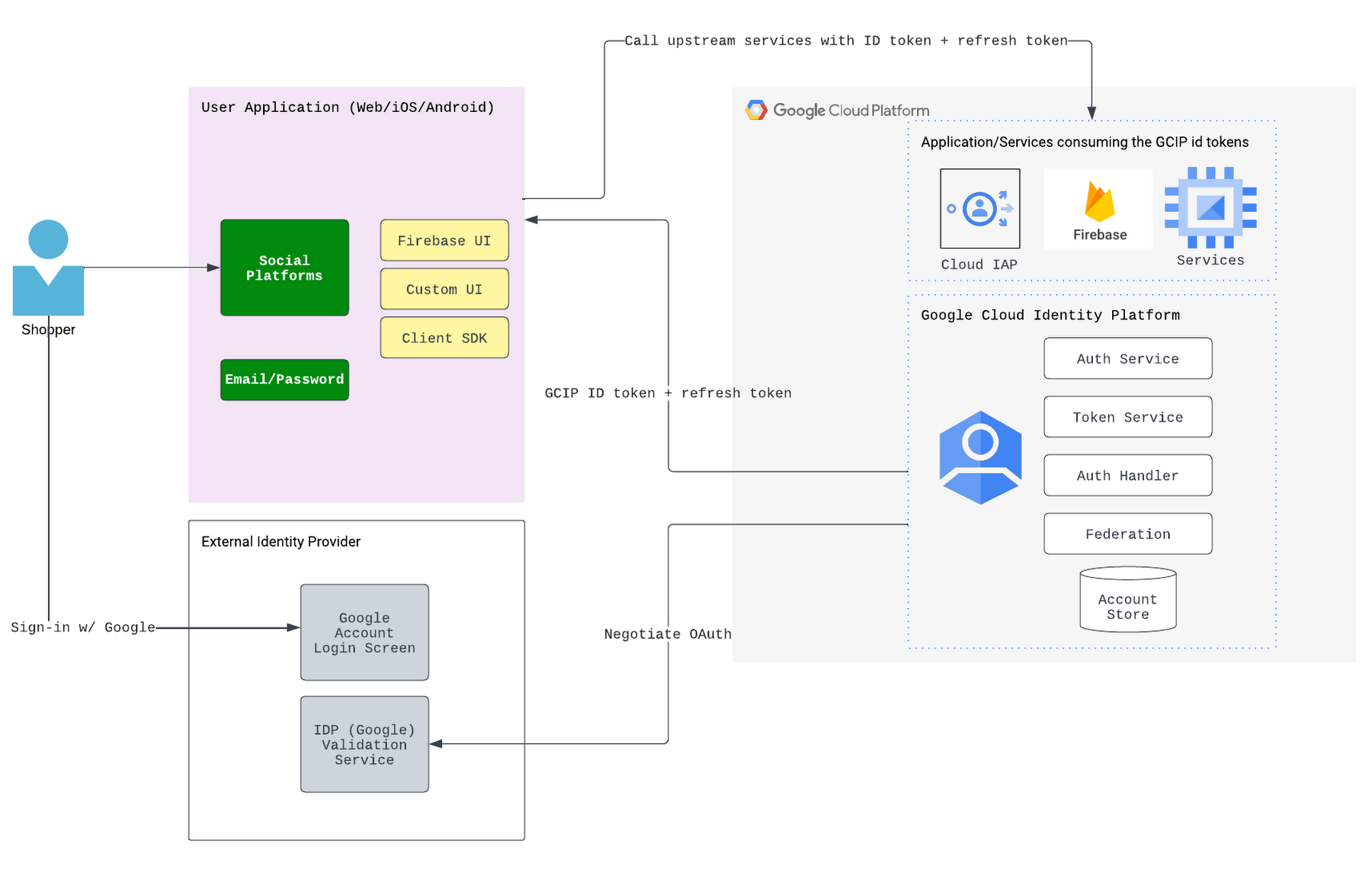
Google Cloud Identity Platform can also be used with popular social logins such as Google, Facebook and others. This gives users a familiar option and eliminates the need to provision users in the GCIP identity store. Below is a high-level architecture diagram showing how GCIP integrates with the social login providers.
Customizing user flows
Many organizations want to be able to customize their login flows. Sometimes, an organization wants to make data related to new user creation and user logins (barring the passwords) available to other systems. These systems can include analytical systems, recommendations or promotions engines (such as sending welcome emails and promotions upon new sign-ups,) security operations (for example, to run analysis on sign-in requests to help detect account takeover attempts,) customer master data management systems, and customer data platforms. GCIP supports blocking functions and asynchronous functions to help customize the login flows and enable syndication of the login or sign-up activity related data to external systems.
Next steps
Google Cloud Identity Platform can provide a robust, scalable, secure-by-design mechanism for managing and authenticating users to online apps. To learn more about GCIP and how it can benefit your organization, please check out the documentation.
All About Cloud Run, its Scalability and Management Features

7389
Of your peers have already read this article.
3:00 Minutes
The most insightful time you'll spend today!
Mindful Containers is a fictitious company that is creating containerized microservice applications. They need a fully managed compute environment for deploying and scaling serverless containerized microservices. So, they are considering Cloud Run.
They are excited about Cloud Run because it abstracts away the cluster configuration, monitoring, and management so they can focus on building the features for their apps. Cloud Run is a fully-managed compute environment for deploying and scaling serverless containerized microservices.

What is Cloud Run?
Cloud Run is a fully-managed compute environment for deploying and scaling serverless HTTP containers without worrying about provisioning machines, configuring clusters, or autoscaling.
- No vendor lock-in – Because Cloud Run takes standard OCI containers and implements the standard Knative Serving API, you can easily port over your applications to on-premises or any other cloud environment.
- Fast autoscaling – Microservices deployed in Cloud Run scale automatically based on the number of incoming requests, without you having to configure or manage a full-fledged Kubernetes cluster. Cloud Run scales to zero— that is, uses no resources—if there are no requests.
- Split traffic – Cloud Run enables you to split traffic between multiple revisions, so you can perform gradual rollouts such as canary deployments or blue/green deployments.
- Custom domains – You can set up custom domain mapping in Cloud Run and it will provision a TLS certificate for your domain.
- Automatic redundancy – Cloud Run offers automatic redundancy so you don’t have to worry about creating multiple instances for high availability
How to use Cloud Run
With Cloud Run, you write your code in your favorite language and/or use a binary library of your choice. Then push it to Cloud Build to create a container build. With a single command—“gcloud run deploy”—you go from a container image to a fully managed web application that runs on a domain with a TLS certificate and auto-scales with requests.
How does Cloud Run work?
Cloud Run service can be invoked in the following ways:
HTTPS: You can send HTTPS requests to trigger a Cloud Run-hosted service. Note that all Cloud Run services have a stable HTTPS URL. Some use cases include:
- Custom RESTful web API
- Private microservice
- HTTP middleware or reverse proxy for your web applications
- Prepackaged web application
gRPC: You can use gRPC to connect Cloud Run services with other services—for example, to provide simple, high-performance communication between internal microservices. gRPC is a good option when you:
- Want to communicate between internal microservices
- Support high data loads (gRPC uses protocol buffers, which are up to seven times faster than REST calls)
- Need only a simple service definition you don’t want to write a full client library
- Use streaming gRPCs in your gRPC server to build more responsive applications and APIs
WebSockets: WebSockets applications are supported on Cloud Run with no additional configuration required. Potential use cases include any application that requires a streaming service, such as a chat application.
Trigger from Pub/Sub: You can use Pub/Sub to push messages to the endpoint of your Cloud Run service, where the messages are subsequently delivered to containers as HTTP requests. Possible use cases include:
- Transforming data after receiving an event upon a file upload to a Cloud Storage bucket
- Processing your Google Cloud operations suite logs with Cloud Run by exporting them to Pub/Sub
- Publishing and processing your own custom events from your Cloud Run services
Running services on a schedule: You can use Cloud Scheduler to securely trigger a Cloud Run service on a schedule. This is similar to using cron jobs. Possible use cases include:
- Performing backups on a regular basis
- Performing recurrent administration tasks, such as regenerating a sitemap or deleting old data, content, configurations, synchronizations, or revisions
- Generating bills or other documents
Executing asynchronous tasks: You can use Cloud Tasks to securely enqueue a task to be asynchronously processed by a Cloud Run service. Typical use cases include:
- Handling requests through unexpected production incidents
- Smoothing traffic spikes by delaying work that is not user-facing
- Reducing user response time by delegating slow background operations, such as database updates or batch processing, to be handled by another service,
- Limiting the call rate to backend services like databases and third-party APIs
Events from Eventrac: You can trigger Cloud Run with events from more than 60 Google Cloud sources. For example:
- Use a Cloud Storage event (via Cloud Audit Logs) to trigger a data processing pipeline
- Use a BigQuery event (via Cloud Audit Logs) to initiate downstream processing in Cloud Run each time a job is completed
How is Cloud Run different from Cloud Functions?
Cloud Run and Cloud Functions are both fully managed services that run on Google Cloud’s serverless infrastructure, auto-scale, and handle HTTP requests or events. They do, however, have some important differences:
- Cloud Functions lets you deploy snippets of code (functions) written in a limited set of programming languages, while Cloud Run lets you deploy container images using the programming language of your choice.
- Cloud Run also supports the use of any tool or system library from your application; Cloud Functions does not let you use custom executables.
- Cloud Run offers a longer request timeout duration of up to 60 minutes, while with Cloud Functions the requests timeout can be set as high as 9 mins.
- Cloud Functions only sends one request at a time to each function instance, while by default Cloud Run is configured to send multiple concurrent requests on each container instance. This is helpful to improve latency and reduce costs if you’re expecting large volumes.
Pricing
Cloud Run comes with a generous free tier and is pay per use, which means you only pay while a request is being handled on your container instance. If it is idle with no traffic, then you don’t pay anything.
Conclusion
After learning about the ease of set up, scalability, and management capabilities of Cloud Run the Mindful Containers team is using it to deploy stateless microservices. If you are interested in learning more, check out the documentation.https://www.youtube.com/embed/oR4btKLRdn4?enablejsapi=1&
For more #GCPSketchnote, follow the GitHub repo. For similar cloud content follow me on Twitter @pvergadia and keep an eye out on thecloudgirl.dev
Three Reasons Why Enterprises Must Think Next-gen Serverless

4920
Of your peers have already read this article.
2:00 Minutes
The most insightful time you'll spend today!
As we reflect on the past year, Heraclitus’ phrase “The only constant in life is change” has never rang more true. With the pandemic, companies had to shift operations, launch new products and adapt to extreme demand patterns, sometimes within a matter of weeks.
To respond to customer needs faster and more efficiently, many companies turned to serverless technology, designing applications with real-time signals and intelligence built in. From apps and sites for healthcare appointments and vaccinations, public-sector employment benefits, contact tracing, retail logistics, curbside delivery, hotel and travel booking—you name it, companies built it with serverless.
Redefining serverless
The world changed, the market changed, our lives changed and we here at Google Cloud also changed, introducing new products to meet our customers’ needs and grow with them.
Serverless technology, in particular, has changed a lot since it was first introduced. Google first launched serverless compute in 2008 with the launch of App Engine, helping customers scale their applications faster and seamlessly. We then added the ability to run Functions as a Service with Cloud Functions, giving customers a simple developer experience with integrated telemetry and observability. In parallel, we also introduced innovations to the container market with Kubernetes. Pretty soon, customers started asking us if we could combine the awesome serverless attributes of auto-scaling and developer experience with the flexibility of containers.
Enter Cloud Run, the next generation of serverless. Serverless is now no longer just about event-driven programming or microservices. It’s also about running complex workloads at scale while still preserving a delightful developer experience. In fact, serverless with Cloud Run is about having a true developer platform with the flexibility to run any language, any library, any binary.
There are three capabilities that make Cloud Run the next-generation of serverless, and not the same ‘serverless’ you find elsewhere:
- A great developer-centric experience
- Versatility: expanding to a broader set of containerized apps
- Built-in DevOps and security
Let’s take a look at the attributes in greater depth.
A great developer experience
Being developer-centric comes from having fully-managed self-operating infrastructure and a great developer experience. We want everyone to be able to develop smart applications and for that we have to make it easy. We also want to be sure we are bringing your technical talent closer to where you generate your business value.
To make things easy, last year we introduced buildpacks, which creates container images directly from source code. No need to learn Docker or containers. Although there are containers underneath, they’re transparent to the developer.
To simplify things further, we also introduced a single “gcloud run deploy” command to build and deploy code to Cloud Run. These types of features are some of the reasons why 98% of Cloud Run users deploy an application on their first try in less than 5 minutes.
In fact, in the past year alone, we added over 25 new features and services to our serverless stack, making development of complex apps easier. One of our main launches was Workflows, which lets you combine Cloud Run with any Google Cloud product or any HTTP-based API service. As a developer, this is very useful when automating complex processes, or integrating GCP’s analytic services across a variety of systems.
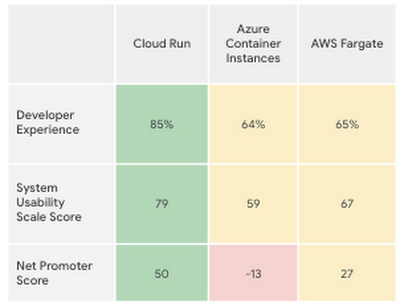
Taken together, all these new features make the Cloud Run developer experience far easier than its competitors’, according to a recent report by User Research International.
Versatility
Next-generation serverless is also about versatility. It supports a wider variety of applications and caters to enterprise requirements. Functions and web apps of course, but also heavyweight applications, and in the fullness of time, also brownfield and third-party containerized apps. This versatility is enabled by the container primitive, which removes restrictions on languages, run times, and hardware.
Being able to run a greater variety of apps on our serverless stack means you can optimize for predictable usage. Today, we announced new spend-based committed use discounts for Cloud Run. Enterprises with stable, steady-state, and predictable usage can now purchase committed use contracts directly in the billing UI. There are no upfront payments, so these discounts are a perfect way to reduce your spend by as much as 17%. RELATED ARTICLEMaximize your Cloud Run investments with new committed use discountsCommitted use discounts in Cloud Run enable predictable costs—and a substantial discount!
Another way we provide versatility is with support for WebSockets and gRPC in Cloud Run. With these new additions, you get the benefits of serverless infrastructure to build responsive, high-performance applications. We also added the use of min instances with Cloud Run. This feature allows you to cut cold-start times and run latency-sensitive applications on Cloud Run! At the same time, you can still scale to zero, or keep a minimum amount of compute available, for example when running brownfield Java applications.
Built-in DevOps
Serverless doesn’t just make it faster for developers to set up their apps—it also helps once the application is up and running, taking a big management load off of operations teams. Notably, serverless systems take care of “scaling” an application up or down. That means that if your application suddenly starts fielding a lot of traffic, the serverless platform automatically spins up more resources to handle the load. No more dreaded timeouts, wheels or hourglasses—or work for your operations team. Likewise, as soon as demand goes down, the platform takes care of decommissioning resources, i.e., scaling down, so that you’re not paying for resources that you no longer need. Want to run your service globally with low latency, without an operations team, and zero stranded costs? Cloud Run takes care of global load balancing and autoscaling to zero for you in every Google Cloud region.
Further, features like support for gradual rollouts and rollbacks allow developers to experiment and test ideas quickly, as well as sophisticated traffic management in Cloud Run. Likewise, Cloud Run provides access to distributed tracing with no setup or configuration, allowing developers to find performance bottlenecks in production.
Next up: serverless security
As part of DevOps best practices, we build in security for your serverless applications at every layer: deployment time, runtime and networking. For example, built-in vulnerability scanning ensures you only deploy artifacts you trust.
Today, we are announcing Cloud Run support for Google Secret Manager and customer-managed encryption keys (CMEK), making it easy to protect data at rest and store sensitive data. We’re also integrating Cloud Run with Binary Authorization, which lets you enforce specific policies to make sure only verified images make it to production. And finally, we added a new integration with Identity-Aware Proxy, support for VPC-SC, and egress controls that you can use to enforce a security perimeter, limiting both who can access specific services and what resources can be accessed when these services run in production. You can read more about these security enhancements here. RELATED ARTICLE4 new features to secure your Cloud Run servicesWe’re improving the security of your Cloud Run environment with things like support for Secret Manager and Binary Authorization.
In summary, the next generation of serverless combines the best of serverless with containers to run a broad spectrum of apps, with no language, networking or regional restrictions. The next generation of serverless will help developers build the modern applications of tomorrow—applications that adapt easily to change, scale as needed, respond to the needs of their customers faster and more efficiently, all while giving developers the best developer experience. Learn more by attending The Power of Serverless, a two-hour virtual event where we’ll lay out our vision for serverless compute, and where serverless subject matter experts will present on in-depth serverless development topics. Hope to see you there!
Want to learn even more about serverless and cloud-native application development? Check out the upcoming Modern App Dev & Delivery workshop, and our Ask the Experts roundtable.
5682
Of your peers have already watched this video.
22:00 Minutes
The most insightful time you'll spend today!
Chronicle Security Analytics: Key to Address Security Data Overload
Google Cloud’s Chronicle is a security analytics platform built for modern use cases to combat modern threats. In today’s world, enterprises have undergone significant changes in all aspects, and must adapt to their security needs to counter threats and attacks. Watch the video to learn Google Cloud’s initiative to help businesses improve their security by 10x to catch up with the way the world is changing and how Chronicle Security Analytics is poised to help address data security challenges.
Building a Stronger Software Supply Chain: Five Essential Steps

2855
Of your peers have already read this article.
2:30 Minutes
The most insightful time you'll spend today!
Today, we published a new Google research report on software supply chain security because we’ve seen a sharp rise in software supply chain attacks across almost every sector —and expect these trends to continue for the foreseeable future. We urge all organizations to act now to improve their software supply chain security.
Among the report’s conclusions, there are two key findings we want to highlight. First, the lessons we’ve learned from various security events call for a more holistic approach to strengthen defenses against software supply chain attacks. Second, we have worked with the security community to develop and deploy a common Supply-chain Levels for Software Artifacts (SLSA) framework that can mitigate threats across the entire software supply chain ecosystem. These frameworks can help organizations securely build and verify the integrity of software. You can find more information on the report’s conclusions here.
We know that modern day software supply chains continue to grow deeper, wider, and more complex. That complexity can make it challenging for customers to even know where to begin analyzing their supply chains for security issues. Our research shows that organizations must deal with these same complex issues regardless of which environments they operate in.
At Google Cloud, we’re deeply committed to working with our customers to help ensure that they have the support they need to evaluate their security posture, resiliency, and hygiene. Below, we suggest five steps to protect software across processes and systems, and tap into relevant Google Cloud products and services. These recommendations can enable customers to benefit from Google’s extensive security experience and reduce their need to develop, maintain, and operate complex processes to secure their open source dependencies.
Implementing best practices with Google Cloud
Customers who are interested in improving their software supply chain security can take immediate steps to implement best practices.
- Enhance your existing Google Cloud security features with the Google Cloud security foundation guide. The guide can help you weigh important considerations including organizational structure, authentication and authorization, resource hierarchy, networking, logging, and detective controls. You can further engage Mandiant experts to assess your readiness.
You can also view centralized information about vulnerabilities and possible risks using Google Cloud services like Security Command Center, and get information about your service usage with Recommender, including recommendations that can help you to reduce risk. For example, you can identify IAM principals with excess permissions or unattended Google Cloud projects. You can also find additional resources from the Google Cybersecurity Action Team (GCAT), our premier security advisory team, here.
- Explore fast software delivery and reliable and secure software with Google Cloud’s DevOps capabilities. You also should review foundational practices for designing, developing, and testing code that apply to most programming languages.
We strongly recommend you evaluate how you distribute software and the terms of software licenses in all of your dependencies. For more information on Google’s approach to helping organizations address vulnerabilities in open source software, see Appendix B in the research report.
- Document the policies for your organization and incorporate validation of policies into your development, build, and deployment processes as you implement best practices. For example, your organization’s policies might include criteria for deployment that you implement with Binary Authorization. GCAT has published additional information on security policies and other cloud security transformation tips for CISOs here.
You can also explore Minimum Viable Secure Product, a security checklist of controls to establish a baseline security posture for a product. You can use the checklist to establish your minimum security control requirements and to evaluate software by third-party vendors.
Tapping into new Google product and service offerings
At Google Cloud, we continue to focus on delivering new and innovative security capabilities to help customers address the latest security threats. From the attack on SolarWinds to the community response to open source vulnerabilities such as Log4j, we’re seeing a spike in demand from customers on what we can do to help them manage software supply chain risk. We’ve made several recent announcements on that front that can help customers get started with Google Cloud today.
- Use Google Cloud’s Software Delivery Shield. It provides a fully managed software supply chain security solution that offers a modular set of capabilities to help equip developers, DevOps, and security teams with the tools they need to build secure cloud applications. Software Delivery Shield spans across a family of Google Cloud services from developer tooling to runtimes including GKE, Cloud Code, Cloud Build, Cloud Deploy, Artifact Registry, and Binary Authorization. To learn more about Software Delivery Shield, check out the solution page, or watch this Google Cloud Next session to get a quick overview of Software Delivery Shield.
- Enable our Assured Open Source Software (OSS) service, which can help enterprise and public sector open source software users to easily incorporate the same OSS packages that we use at Google into their own developer workflows. Packages curated by the Assured OSS service:
- are regularly scanned, analyzed, and fuzz-tested for vulnerabilities;
- have corresponding enriched metadata incorporating Container/Artifact Analysis data;
- are built with Cloud Build including evidence of verifiable Supply chain Levels for Software Artifacts (SLSA)-compliance;
- are verifiably signed by Google;
- and are distributed from an Artifact Registry that is secured and protected by Google.
If you are interested in learning more about software supply chain security in general, please contact us or reach out to your sales representative to schedule a software supply chain security workshop.
More Relevant Stories for Your Company

Improving Your Security Posture: Integrating Cloud DLP with Security Command Center
Our Cloud Data Loss Prevention (Cloud DLP) discovery service can monitor and profile your data warehouse to bring awareness of where sensitive data is stored and processed. Profiling is also useful for confirming that data is not being stored and processed where you don’t want it. But how can you

IT Leaders are Prioritizing Organizations’ Sustainability Goals: Study Finds
The global-wide interruptions of the coronavirus pandemic provided the opportunity for businesses to take a closer look at how we work, learn, live, and consume. With work stoppages and quarantine orders in place, carbon emissions and pollution levels saw significant reductions, highlighting how business and environmental sustainability are linked. As
Google Workspace to Extend Digital Sovereignity for EU Organizations in Later Part of 2022
European organizations are moving their operations and data to the cloud in increasing numbers to enable collaboration, drive business value, and transition to hybrid work. However, the cloud solutions that underpin these powerful capabilities must meet an organization’s critical requirements for security, privacy, and digital sovereignty. We often hear from

Building Unique Customer Experiences with Speed & Scale: Sprinklr & Google Cloud
Enterprises are increasingly seeking out technologies that help them create unique experiences for customers with speed and at scale. At the same time, customers want flexibility when deciding where to manage their enterprise data, particularly when it comes to business-critical applications. That’s why I’m thrilled that Sprinklr, the unified customer
