





Building Unique Customer Experiences with Speed & Scale: Sprinklr & Google Cloud

8201
Of your peers have already read this article.
2:00 Minutes
The most insightful time you'll spend today!
Enterprises are increasingly seeking out technologies that help them create unique experiences for customers with speed and at scale. At the same time, customers want flexibility when deciding where to manage their enterprise data, particularly when it comes to business-critical applications.
That’s why I’m thrilled that Sprinklr, the unified customer experience management (Unified-CXM) platform for modern enterprises, has partnered with Google Cloud to accelerate its go-to-market strategy and grow awareness among our joint customers. Sprinklr will work closely with our global salesforce, benefitting from our deep relationships with enterprises that have chosen to build on Google Cloud.
Akin to Google Cloud’s mission to accelerate every organization’s ability to digitally transform their business through data-powered innovation, Sprinklr’s primary objective is to empower the world’s largest and most loved brands to make their customers happier by listening, learning, and taking action through insights. With this strategic partnership now in place, Sprinklr and Google Cloud will go-to-market together with the end-customer as our sole focus.
Traditionally, brands have adopted point solutions to manage segments of the customer journey. In isolation, these may work — but they rarely work collaboratively, even when vendors build “Frankenstacks” of disconnected products. These solutions can’t deliver a 360° view of the customer, and often reinforce departmental silos. All of which creates point-solution chaos.
Sprinklr’s approach is fundamentally different and is the way out of the aforementioned point-solution chaos. As the first platform purpose-built for unified customer experience management (Unified-CXM) and trusted by the enterprise, Sprinklr’s industry-leading AI and powerful Care, Marketing, Research, and Engagement solutions enable the world’s top brands to learn about their customers, understand the marketplace, and reach, engage, and serve customers on all channels to drive business growth.
Sprinklr was built from the ground up as a platform-first solution, designed to evolve and grow with the rapid expansion of digital channels and applications. The results? Faster innovation. Stronger performance. And a future-proof strategy for customer engagement on an enterprise scale.
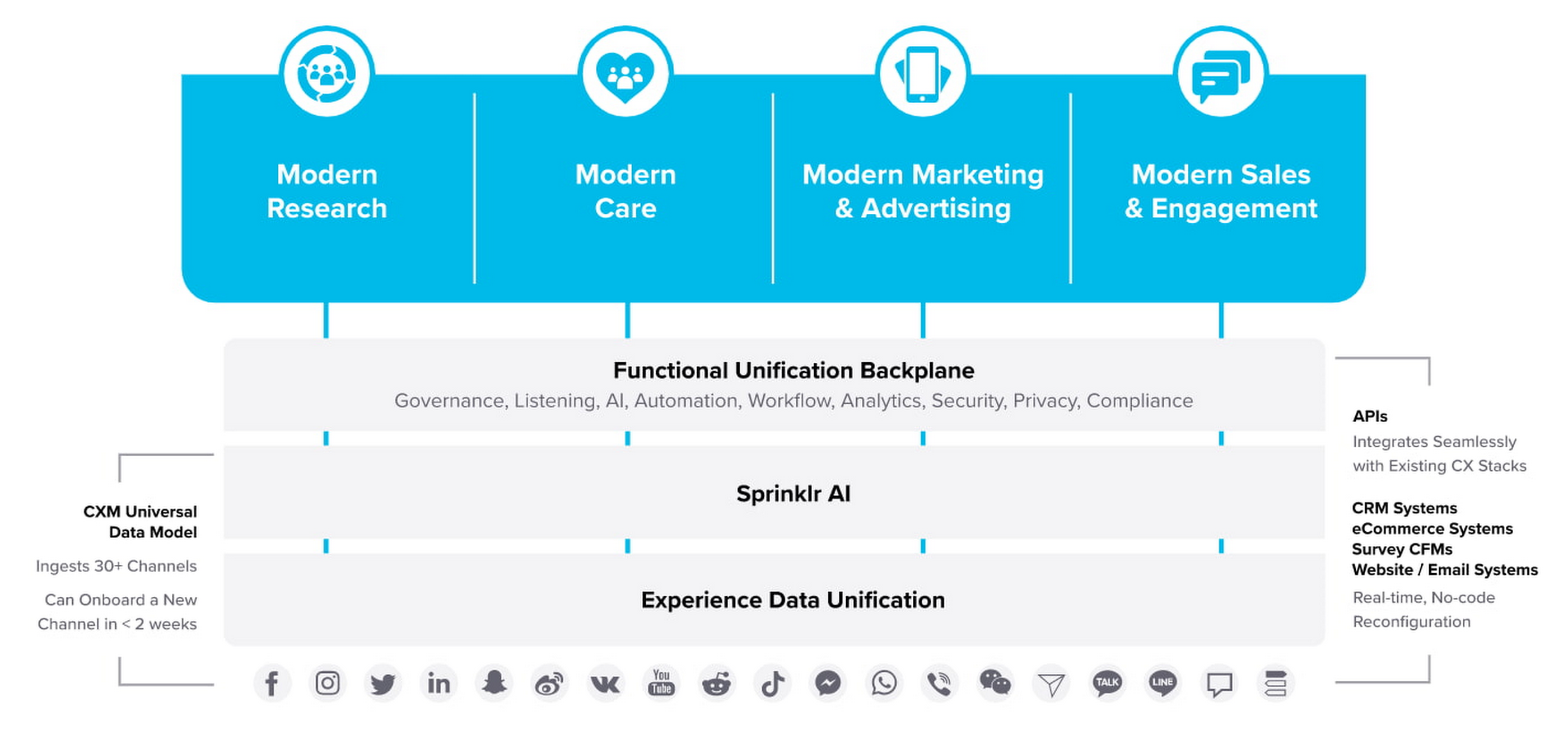
“Sprinklr works with large, global companies that want flexibility when deciding where to manage their enterprise data and consider our platform a business-critical application,” said Doug Balut, Senior Vice President of Global Alliances, Sprinklr. “Giving our customers the opportunity to manage Sprinklr on Google Cloud empowers them to create engaging customer experiences while maintaining the high security, scalability, and performance they need to run their business.”
To learn more about this exciting partnership and the challenges we jointly solve for customers, check out the recent conversation between Google Cloud’s VP of Marketing, Sarah Kennedy, and Sprinklr’s Chief Experience Officer, Grad Conn. Or read the press release on the partnership.
Monitoring and defending threats in the cloud

2802
Of your peers have already read this article.
3:00 Minutes
The most insightful time you'll spend today!
As your organization transitions from on-premises to hybrid cloud or pure cloud, how you think about threat detection must evolve as well—especially when confronting threats across many cloud environments. A new foundational framework for thinking about threat detection in public cloud computing is needed to better secure digital transformations.
Because these terms have had different meanings over time, here’s what we mean by threat detection and detection and response. A balanced security strategy covers all three elements of a security triad: prevention, detection, and response. Prevention can improve, but never becomes perfect. Despite preventative controls, we still need to be on the lookout for threats that penetrate our defenses. Finding and confirming malicious activities, and automatically responding to them or presenting them to the security team constitutes detection and response.
Vital changes impact the transition from the traditional environment to the cloud and affect three key areas:
- Threat landscapes
- IT environment
- Detection methods
First, threat landscapes change. This means new threats evolve, old threats disappear, and the importance of many threats changes. If you perform a threat assessment on your environment and then migrate the entire environment to the public cloud, even if you use the lift and shift approach, the threat assessment will look very different. MITRE ATT&CK Cloud can help us understand how some threat activities apply to public cloud computing.
Second, the entire technology environment around you changes. This applies to the types of systems and applications you as a defender would encounter, but also to technologies and operational practices. Essentially, cloud as a realm where you have to detect threats is different —this applies to the assets being threatened and technologies doing the detecting. Sometimes cloud looks to traditional “blue teams” as some alien landscape where they would have only challenges. In reality, cloud does bring a lot of new opportunities for detection. The main theme here is change, some for the worse and some for the better.
After all, cloud is
- Usually distributed—running over many regions and data centers
- Often immutable—utilizes systems that are replaced, rather than updated
- Ephemeral uses workloads often created for the task and then removed
- API driven—enabled by pervasive APIs
- Centered on identity layer—mostly uses identities and not just network perimeter to separate workloads
- Automatically scalable—able to expand with the increasing workload
- Shared with the provider
Sometimes the combination of Distributed, Immutable, and Ephemeral cloud properties is called a DIE triad. All these affect detection for the cloud environment.
Third, telemetry sources and detection methods also change. While this may seem like it’s derived from the previous point we made, that’s not entirely true. For some cloud services, and definitely for SaaS, a popular approach of using an agent such as EDR would not work. However, new and rich sources of telemetry may be available—Cloud Audit Logs are a great example here.
Similarly, the expectation that you can sniff traffic on the perimeter, and that you even will have a perimeter, may not be entirely correct. Pervasive encryption hampers Layer 7 traffic analysis, while public APIs rewrite the rules on what a perimeter is. Finally, detection sources and methods are also inherently shared with the cloud provider, with some under cloud service provider control while others are under cloud user control.
This leads to several domains where we can and should detect threats in the cloud.
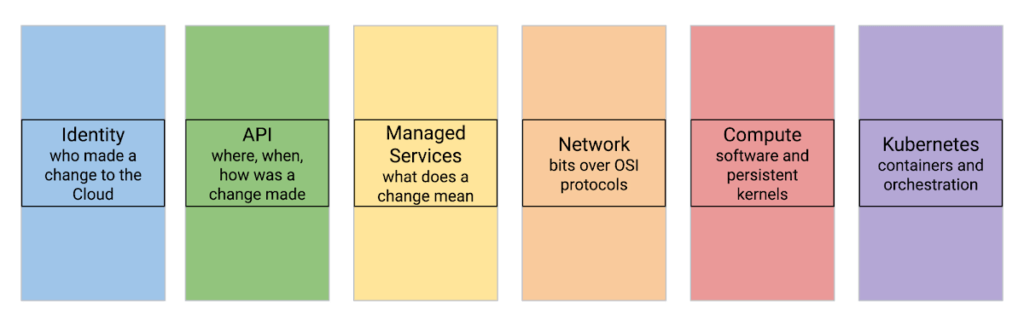
Let’s review a few cloud threat detection scenarios.
Everybody highlights the role of identity in cloud security. Naturally, it matters in threat detection as well—and it matters a lot. While we don’t want to repeat the cliche that in a public cloud you are one IAM mistake away from a data breach, we know that cloud security missteps can be costly. To help protect organizations, Google Cloud offers services that automatically and in real-time analyze every IAM grant to detect outsiders being added—even indirectly.
Detecting threats inside compute instances such as virtual machines (VM) using agents seems to be about the past. After all, VMs are just servers, right? However, this is an area where cloud brings new opportunities. For example, VM Threat Detection allows security teams to do completely agentless YARA rule execution against their entire compute fleet.
Finally, products like BigQuery require new ways of thinking about detecting data exfiltration. Security Command Center Premium detects queries and backups in BigQuery that would copy data to different Google Cloud organizations.
Naturally, some things stay the same in the cloud. These include broad threat categories such as insiders or outsiders; steps in the cyber exploit chain such as coarse-grained stages of an attack; and the MITRE ATT&CK Tactics are largely unchanged. It is also likely that broad detection use cases stay the same.
What does that mean for the defenders?
When you move to the cloud, your threats and your IT change—and change a lot.
This means that using on-premises detection technology and approaches as a foundation for future development may not work well.
This also means that merely copying all your on-premise detection tools and their threat detection content is not optimal.
Instead, moving to Google Cloud is an opportunity to transform how you can achieve your continued goals of confidentiality, integrity, and availability with the new opportunities created by the technology and process of cloud.
Call to action:
- Listen to “Threat Models and Cloud Security” (ep12)
- Listen to “What Does Good Detection and Response Look Like in the Cloud? Insights from Expel MDR” (ep72)
- Listen to “Cloud Threats and How to Observe Them” (ep69) and read the related blog “How to think about cloud threats today”
- Review how to test cloud detections
- Read the guidance on cloud threat investigation with SCC and Chronicle
How to Evolve Security for the Cloud: McKinsey with Google Cloud

3950
Of your peers have already read this article.
8:30 Minutes
The most insightful time you'll spend today!
Not too long ago, McKinsey released a report titled “Making a secure transition to the public cloud,” the result of interviews with IT security experts at nearly 100 enterprises around the world.
Leveraging the expertise of Google Cloud and McKinsey security experts, the research presents a strategic framework for IT security in cloud and hybrid environments, and provides recommendations on how to migrate to the cloud while keeping security top of mind.
The research shows what many already know: that public cloud adoption is accelerating thanks to increased technical flexibility, simpler scaling, and lower operating costs.
What’s exciting is that the research also reveals that many Chief Information Security Officers (CISOs) no longer view security as an inhibitor to adoption but instead an opportunity.
“In many cases [CISOs] acknowledge that cloud service providers’ security resources dwarf their own,” the authors write—and now these companies are focused on how to best adopt and configure cloud services for increased security.
The research identifies three common archetypes for perimeter security: backhauling, cleansheeting, and adopting cloud provider controls by default.
- Backhauling allows companies to continue managing IT security on-prem, with an external gateway connecting the data center to the public cloud. Approximately half of the companies surveyed currently use this model, but only 11% plan to continue doing so, since it can keep companies from realizing certain cloud benefits, such as agility.
- Cleansheeting requires greater investment and expertise, as it calls for redesigning IT security around a “virtual perimeter” and leveraging multiple cloud-native tools and services.
- Using cloud provider controls is the most cost-effective solution, but—depending on the cloud provider—can limit autonomy and may offer limited capabilities.
McKinsey uses these three models, along with the decision to re-architect applications for the cloud, to identify six “archetypes” for cloud security. Each archetype has its own tradeoffs.
The report also includes a tactical 10-step plan for successful cloud migration. Download it now.
Latest Enhancements in reCAPTCHA Enterprise Helps Govts Sites Protect against Digital Frauds

2991
Of your peers have already read this article.
1:30 Minutes
The most insightful time you'll spend today!
Download our guidebook to learn how reCAPTCHA Enterprise can help strengthen your website security quickly.
Cyber threats on the rise
In 2021, the United States saw 40.5% of website attacks committed through “bad bots” on the internet, with 37.2% of government website traffic being bad bots, according to research by cybersecurity firm Imperva1. As cyber threats increase, government agencies need a way to safely let constituents access digital services. Google Cloud reCAPTCHA Enterprise protects websites by distinguishing between humans and bots. Full-scale implementation of reCAPTCHA Enterprise solution expands on bot detection to protect public sector websites from a broad range of digital fraud. Below are some highlights from our new reCAPTCHA Enterprise guidebook detailing functional enhancements and ways for government agencies to take advantage of enterprise capabilities.
Advanced website protection
reCAPTCHA Enterprise builds upon the existing reCAPTCHA API that has defended 5+ million websites for over a decade. It uses advanced risk analysis techniques to distinguish between humans and bots, protecting sites from spam and abuse as well as detecting other fraudulent activities, including credential stuffing, account takeovers (ATO), and automated account creation.
How it works
Detecting password leaks and credential breaches
With reCAPTCHA Enterprise’s password leak protection, agencies can conduct regular audits of user credentials, such as passwords, to detect leaks and breaches and prevent account takeovers (ATOs), as well as credential stuffing attacks.
UI challenge vs. frictionless
reCAPTCHA Enterprise returns a score, giving you the ability to take a number of actions, including requiring additional factors of authentication or throttling bots that may be scraping content. This functionality allows you to verify if an interaction is legitimate without any user interaction.
User-friendly migration
Google Cloud’s reCAPTCHA Enterprise offers a simple migration process in which your account is moved from the reCAPTCHA Admin to the Google Cloud Platform (GCP) after you create a project to migrate it to. Watch our 10-minute webinar to see how.
A cost-effective upgrade to a standard cybersecurity solution
Google reCAPTCHA Enterprise comes with 99.9%+ uptime, multi-factor authentication, and support for Android, iOS, and web applications. Our reCAPTCHA offering is structured in a way that allows you to fully control your investment and responsibly allocate taxpayer dollars.
reCAPTCHA Enterprise in action
Google Cloud’s reCAPTCHA protects against key automated attacks, including account creation, credential stuffing, cashing out, denial of inventory, and skewing. State governments have found success with using Google Cloud’s reCAPTCHA for cyber risk management. Wisconsin’s Workforce Development Agency used fraud detection and identification, including reCAPTCHA, to mitigate malicious bot logins on its external website, and several agencies in the Commonwealth of Pennsylvania have implemented reCAPTCHA to prevent bots from booking and reselling COVID-19 vaccine appointments.
Protecting public sector websites from bad actors can be challenging, especially with emerging threats from adversaries and extremist groups. Google Cloud’s reCAPTCHA Enterprise offers comprehensive website security solutions to successfully protect against cyber threats.
Download our reCAPTCHA Enterprise guidebook for a detailed look at how you can use reCAPTCHA Enterprise to strengthen your website security and implement the solution quickly and easily.
References:
Create and Protect Admin Accounts

4857
Of your peers have already read this article.
1:30 Minutes
The most insightful time you'll spend today!
Setting up your new cloud infrastructure is scary. Extra scary when you realize that someone (is it gonna be you?) gets to have phenomenal cosmic power over the whole thing.
Yes, I’m talking about the admin account, and today we’ll dig into why they are important, dangerous and different.
When the team at pistach.io got their nuts-as-a-service business growing fruitfully, they knew they needed to think carefully about admin accounts. These people would have tremendous control over their use of Google Cloud, and they could potentially cause very big problems if any were compromised. Definitely resources that require a protective shell.

Early in pistach.io’s development, an employee named Walter Nutt wanted to play a prank by changing his co-worker’s profile photo from an almond to a peanut (pretty devious, since a peanut is actually a legume). He didn’t have access to his friend’s computer, but he did have access to the company’s Cloud Storage bucket. While searching for the profile photo in question, Wally inadvertently deleted the entire contents of the bucket!
As he searched for ways to restore its contents, Wally modified access to two other pistach.io buckets. The company was ground to a halt for a week while teams worked to crack through the permissions issues.
Time to rethink permissions a bit, so this couldn’t spoil their buttery smooth operations in the future.
Following the resource manager guide, the team made a super admin email address that wasn’t tied to a particular individual or Workspace account, and secured it with strong multi-factor authentication. This would be their backup in case an admin account were to be compromised, so they could recover and repair.
The team already uses Google Workspace, so they have an organization set up already. That creation process established initial super administrators, allowing them to create and modify all other resources inside the organization. As they looked toward using Google Cloud, the super administrators could:
- Give the admin role to people, for Cloud
- Act as a point of contact for account recovery
- Modify or delete the organization if needed
Making admin users for the organization allows other people to then flesh out the resources and policies for pistach.io, before they go nuts and give everyone all the permissions. While that would speed things up, it would make it easy for an attacker to crack through the security shell because any account compromise could give ousize access. Yikes!

Instead, the IT leads specified certain people to act as organization admins, and then gave them permissions to:
- Define Identity and Access Management policies
- Structure the Resource Hierarchy
- Delegate control of specific Cloud elements to others on the team
Once those organization admins were set up, they could give management and oversight of Compute, Storage, Networking and other resource types to the relevant leads, making sure each person had just the right amount of permission for the role they needed to perform. The organization admins don’t have permissions themselves to make these resources. They just delegate.
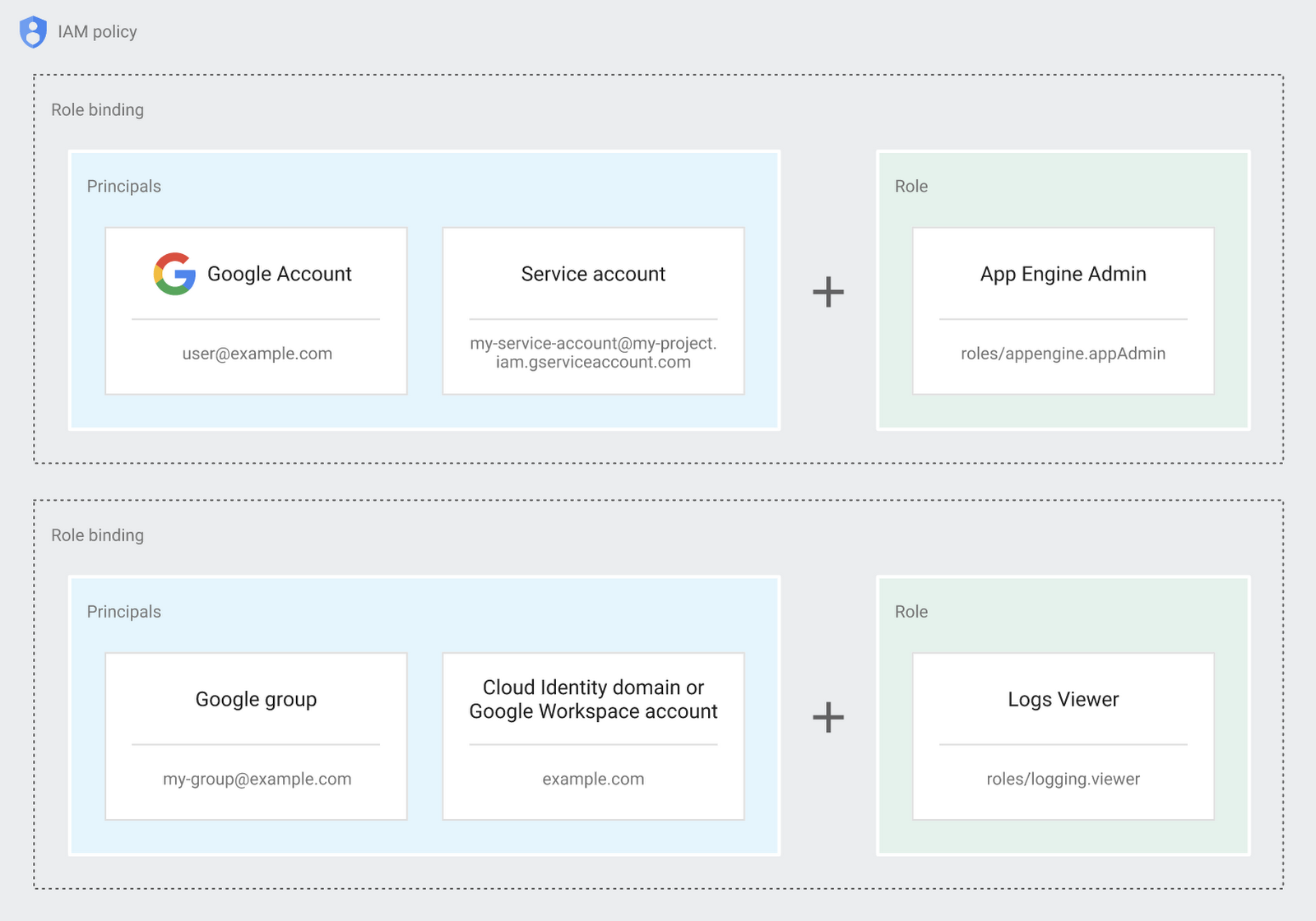
Now each person can accomplish the job they’re responsible for, but doesn’t have overly permissive access. Delegating like this keeps the entire organization safer, and limits the blast radius if someone does manage to break in.
You can go through these steps yourself with this tutorial.
By default the creation of an organization resource for the domain gives everyone the ability to create projects and billing accounts. Once they set up their Organization Admin at pistach.io they decided to remove some of these wide permissions and, in a nutshell, bring everything down to a much finer control. So people could get permissions for a folder or a project, but not the entire organization!
Remember to take care of your admin roles, as they have the power, and responsibility, to cause serious harm if not used safely. Be safe with your Identity and Access Management. And keep your data yours!
Next time we join you we’ll take a crack at creating and provisioning an app to run inside the policies and resource management frameworks created today.
Google Unveils New Cloud Region in Delhi NCR to Power India’s Digitization

8303
Of your peers have already read this article.
2:00 Minutes
The most insightful time you'll spend today!
In the past year, Google has worked to surface timely and reliable health information, amplify public health campaigns, and help nonprofits get urgent support to Indians in need. Now, we are continuing to focus on helping India’s businesses accelerate their digital transformation, deepening our commitment to India’s digitization and economic recovery. To support customers and the public sector in India and across Asia Pacific, we’re excited to announce that our new Google Cloud region in Delhi National Capital Region (NCR) is now open.
Designed to help both Indian and global companies alike build highly available applications for their customers, the Delhi NCR region is our second Google Cloud region in India and 10th to open in Asia Pacific.
What customers and partners are saying
Navigating this past year has been a challenge for companies as they grapple with changing customers demands and economic uncertainty. Technology has played a critical role, and we’ve been fortunate to partner with and serve people, companies, and government institutions around the world to help them adapt. The Google Cloud region in Delhi NCR will help our customers adapt to new requirements, new opportunities and new ways of working, like we’ve helped so many companies do in the region:
- InMobi scaled a personalized AI platform to support 120+ million active users. “With the arrival of the Google Cloud Delhi NCR, InMobi Group sees the opportunity to continue closing the gap between our users and products,” says Mohit Saxena, Co-founder and Group CTO of Inmobi. “Glance, especially, has been serving AI-powered personalised content to over 120 million active users. We can’t wait to continue giving them truly meaningful experiences that are speedy, scale well, and are relevant to them, by expanding the use of our current tools working on Google Cloud with the opening of a new region.”
- Groww now supports a sizable user base. “Google Cloud provides great technology that enables us to build and scale infrastructure to millions of users, and the new Google Cloud region in Delhi NCR will continue to help more businesses and startups in India access powerful cloud-based infrastructure, products and services,” says Neeraj Singh, Co-founder and Chief Technology Officer, Groww.
- HDFC Bank is positioned for the future. “At HDFC Bank, we are harnessing technology platforms to both run and build the bank. As we progress to be future ready, the objective is to invest in future technologies that give us scale, efficiency and resiliency. Towards this the Google Cloud region in Delhi NCR will enable us to enhance our resiliency and help us in building an active-active design framework for our new generation applications on cloud,” says Ramesh Lakshminarayanan, CIO, HDFC Bank.
- Dr. Reddy’s Lab built a modern data platform with Google Cloud. “At Dr Reddy’s, we pride ourselves in helping patients regain good health, acting quickly to provide innovative solutions to address patients’ unmet needs and in accelerating access to medicines to people worldwide. Our Google Cloud-powered data platform is helping us realize these objectives and we welcome Google’s investment in the new Delhi NCR region as helping us and other businesses in India make further contributions to our social and economic future,” says Mukesh Rathi, Senior Vice President & CIO, Dr. Reddy’s Laboratories.
- “To survive the disruption caused by the pandemic and to succeed in the long term, organizations need to become digital natives, so they can be more agile, explore new business models and build new capabilities that boost resilience. A cloud-first strategy plays a key role in enabling businesses to do this,” said Piyush N. Singh, Lead – India market unit & lead – Growth and Strategic Client Relationships, Asia Pacific and Latin America, Accenture. “Harnessing the potential of cloud requires the right data infrastructure and this expansion by Google Cloud will undoubtedly help Indian enterprises in their digital transformation journeys.”
A global network of regions
Delhi NCR joins 25 existing Google Cloud regions connected via our high-performance network, helping customers better serve their users and customers throughout the globe. As the second region in India, customers benefit from improved business continuity planning with distributed, secure infrastructure needed to meet IT and business requirements for disaster recovery, while maintaining data sovereignty.
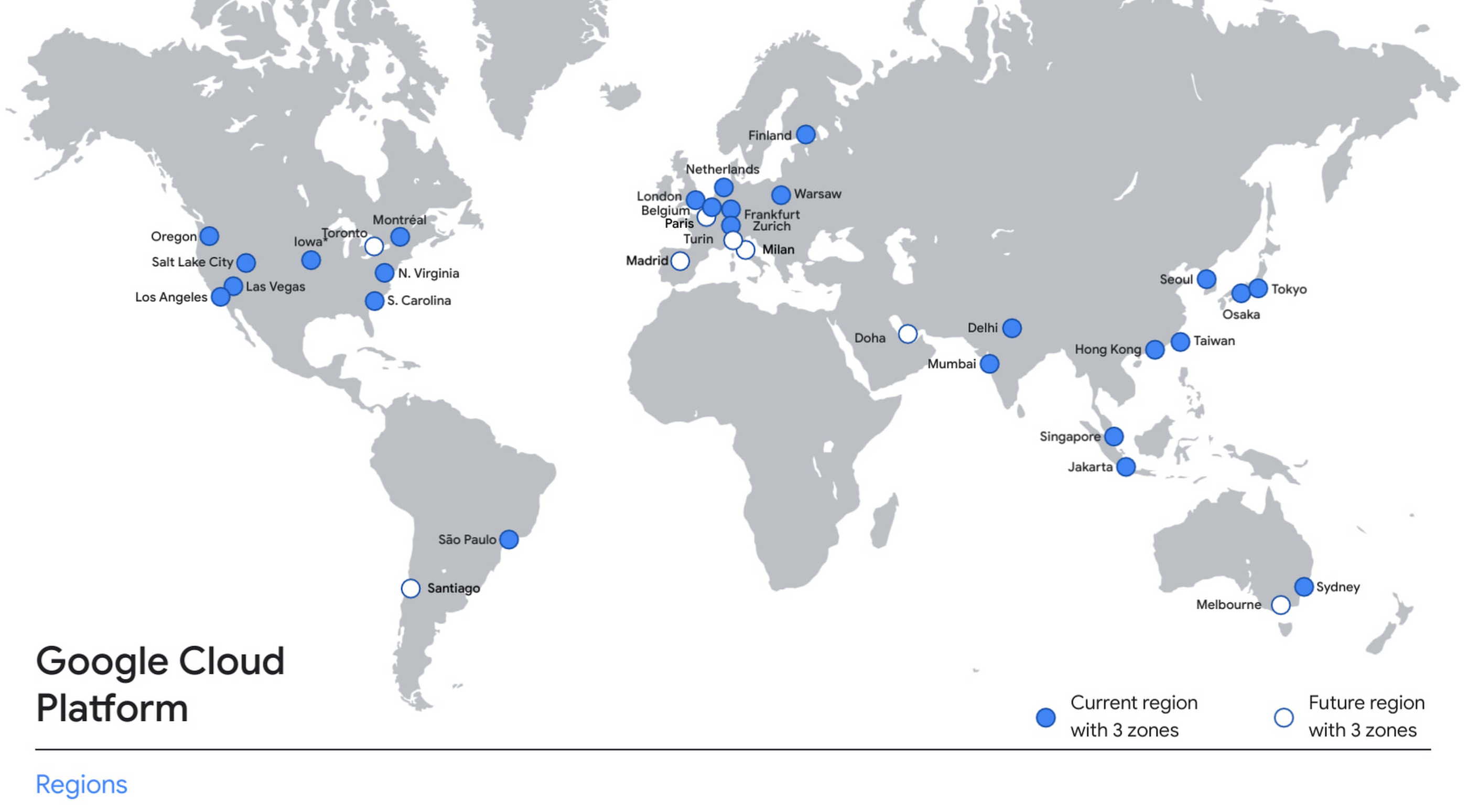
With this new region, Google Cloud customers operating in India also benefit from low latency and high performance of their cloud-based workloads and data. Designed for high availability, the region opens with three availability zones to protect against service disruptions, and offers a portfolio of key products, including Compute Engine, App Engine, Google Kubernetes Engine, Cloud Bigtable, Cloud Spanner, and BigQuery.
Supporting India’s recovery with training and education
Google and Google Cloud will also continue to support our customers with people and education programs. We’re investing in local talent and the local developer community to help enterprises digitally transform and support economic recovery.
Through the India Digitization Fund, we expanded our efforts to support India’s recovery from COVID-19—in particular, through programs to support education and small businesses. In addition to expanding internet access, and investments to help start-ups accelerate India’s digital transformation, we’ve grown our Grow with Google efforts. Businesses can access digital tools to maintain business continuity, find resources like quick help videos, and learn digital skills—in both English and in Hindi.
Helping customers build their transformation clouds
Google Cloud is here to support businesses, helping them get smarter with data, deploy faster, connect more easily with people and customers throughout the globe, and protect everything that matters to their businesses. The cloud region in Delhi NCR offers new technology and tools that can be a catalyst for this change. To learn more, visit the Google Cloud locations page, and be sure to watch the region launch event here.
More Relevant Stories for Your Company

How Air Asia’s CIO Ensures Its 22,000 Employees Service Customers Efficiently and Preserve Security
At AirAsia, we operate a fleet of more than 270 aircraft across 23 markets, fly to more than 150 destinations and carry 100m guests each year. We’ve also been named the world’s best low-cost carrier for 11 years running. To accomplish all of this, we rely heavily on our 22,000 Allstars (employees).

Securing apps using Anthos Service Mesh
Hi there! I'm David Challoner from Access Site Reliability Engineering (SRE), here with Anthony Bushong from Developer Relations to talk about how Corp Eng is adopting Anthos Service Mesh internally at Google. Corp Eng is Google's take on "Enterprise IT". A big part of the Corp Eng mission is running
Broadcom’s Journey to Simplified Compliance with Google Cloud’s Assured Workloads
Broadcom is a global technology leader that designs, develops, and supplies many semiconductor and infrastructure software solutions. Broadcom’s category-leading product portfolio serves critical markets including data center, networking, software, broadband, wireless, storage, and industrial sectors. Our customers, many of whom operate in the federal public sector, need ready-made SaaS solutions to

Google Cloud Accelerates Financial Organizations’ Journey towards Digital Transformation
When I reflect back on the past year and the pandemic, I’m struck by how the reliance on remote work and operations has changed the fundamentals of business forever. For the financial services industry, this rings particularly true. Many conversations I’m having right now with organizations revolve around embracing a transformation
