





6589
Of your peers have already watched this video.
8:00 Minutes
The most insightful time you'll spend today!
Hospitals Can Offer Interconnected Patient Experiences Using Google’s Natural Language Services
Machine Learning (ML) in healthcare helps extract data from conversations, medical records, forms, research reports, insurance claims and other documents across the care value-chain to help care providers have a holistic view of their patients to draw insights for diagnoses and treatments. With Natural Language Processing(NLP), healthcare organizations can program computers and systems to process and analyse large volumes of human communication in form of spoken texts, written documentation and utterances. Watch the video to learn how the healthcare community can leverage Google’s NLP services to process structured and unstructured data to offer interconnected experiences for patients.
New Capabilities in BigQuery to Ease Anomalies Detection in the Absence of Labeled Data

6332
Of your peers have already read this article.
4:00 Minutes
The most insightful time you'll spend today!
When it comes to anomaly detection, one of the key challenges that many organizations face is that it can be difficult to know how to define what an anomaly is. How do you define and anticipate unusual network intrusions, manufacturing defects, or insurance fraud? If you have labeled data with known anomalies, then you can choose from a variety of supervised machine learning model types that are already supported in BigQuery ML. But what can you do if you don’t know what kind of anomaly to expect, and you don’t have labeled data? Unlike typical predictive techniques that leverage supervised learning, organizations may need to be able to detect anomalies in the absence of labeled data.
Today we are announcing the public preview of new anomaly detection capabilities in BigQuery ML that leverage unsupervised machine learning to help you detect anomalies without needing labeled data. Depending on whether or not the training data is time series, users can now detect anomalies in training data or on new input data using a new ML.DETECT_ANOMALIES function (documentation), with the following models:
- Autoencoder model, now in Public Preview (documentation)
- K-means model, already GA (documentation)
- ARIMA_PLUS time series model, already GA (documentation)
How does anomaly detection with ML.DETECT_ANOMALIES work?
To detect anomalies in non-time-series data, you can use:
- K-means clustering models: When you use
ML.DETECT_ANOMALIESwith a k-means model, anomalies are identified based on the value of each input data point’s normalized distance to its nearest cluster. If that distance exceeds a threshold determined by the contamination value provided by the user, the data point is identified as an anomaly. - Autoencoder models: When you use
ML.DETECT_ANOMALIESwith an autoencoder model, anomalies are identified based on the reconstruction error for each data point. If the error exceeds a threshold determined by the contamination value, it is identified as an anomaly.
To detect anomalies in time-series data, you can use:
- ARIMA_PLUS time series models: When you use
ML.DETECT_ANOMALIESwith an ARIMA_PLUS model, anomalies are identified based on the confidence interval for that timestamp. If the probability that the data point at that timestamp occurs outside of the prediction interval exceeds a probability threshold provided by the user, the datapoint is identified as an anomaly.
Below we show code examples of anomaly detection in BigQuery ML for each of the above scenarios.
Anomaly detection with a k-means clustering model
You can now detect anomalies using k-means clustering models, by running ML.DETECT_ANOMALIES to detect anomalies in the training data or in new input data. Begin by creating a k-means clustering model:
Language: SQL
CREATE MODEL `mydataset.my_kmeans_model`OPTIONS(MODEL_TYPE = 'kmeans',NUM_CLUSTERS = 8,KMEANS_INIT_METHOD = 'kmeans++') ASSELECT* EXCEPT(Time, Class)FROM`bigquery-public-data.ml_datasets.ulb_fraud_detection`;
With the k-means clustering model trained, you can now run ML.DETECT_ANOMALIES to detect anomalies in the training data or in new input data.
To detect anomalies in the training data, use ML.DETECT_ANOMALIES with the same data used during training:
Language: SQL
SELECT*FROMML.DETECT_ANOMALIES(MODEL `mydataset.my_kmeans_model`,STRUCT(0.02 AS contamination),TABLE `bigquery-public-data.ml_datasets.ulb_fraud_detection`);
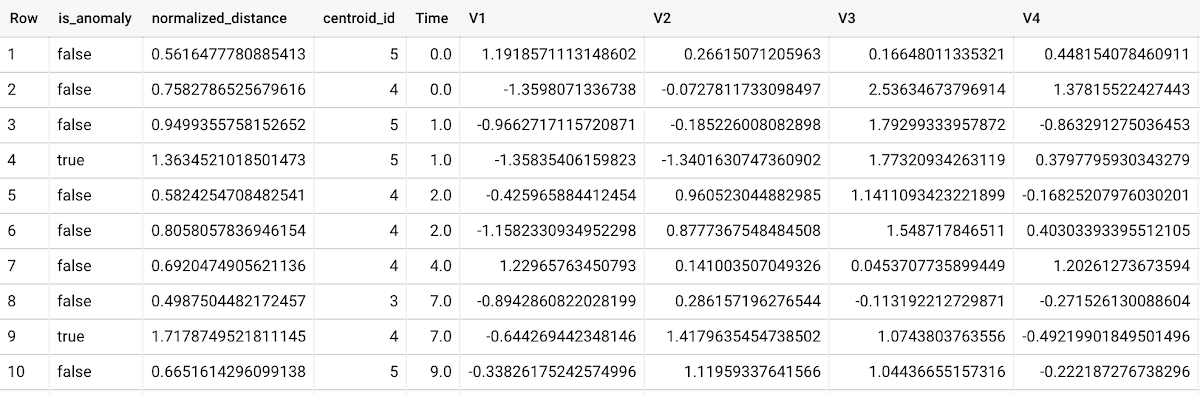
To detect anomalies in new data, use ML.DETECT_ANOMALIES and provide new data as input:
Language: SQL
SELECT*FROMML.DETECT_ANOMALIES(MODEL `mydataset.my_kmeans_model`,STRUCT(0.02 AS contamination),(SELECT * FROM `mydataset.newdata`));

How does anomaly detection work for k-means clustering models?
Anomalies are identified based on the value of each input data point’s normalized distance to its nearest cluster, which, if exceeds a threshold determined by the contamination value, is identified as an anomaly. How does this work exactly? With a k-means model and data as inputs, ML.DETECT_ANOMALIES first computes the absolute distance for each input data point to all cluster centroids in the model, then normalizes each distance by the respective cluster radius (which is defined as the standard deviation of the absolute distances of all points in this cluster to the centroid). For each data point, ML.DETECT_ANOMALIES returns the nearest centroid_id based on normalized_distance, as seen in the screenshot above. The contamination value, specified by the user, determines the threshold of whether a data point is considered an anomaly. For example, a contamination value of 0.1 means that the top 10% of descending normalized distance from the training data will be used as the cut-off threshold. If the normalized distance for a datapoint exceeds the threshold, then it is identified as an anomaly. Setting an appropriate contamination will be highly dependent on the requirements of the user or business.
For more information on anomaly detection with k-means clustering, please see the documentation here.
Anomaly detection with an autoencoder model
You can now detect anomalies using autoencoder models, by running ML.DETECT_ANOMALIES to detect anomalies in the training data or in new input data.
Begin by creating an autoencoder model:
Language: SQL
CREATE MODEL `mydataset.my_autoencoder_model`OPTIONS(model_type='autoencoder',activation_fn='relu',batch_size=8,dropout=0.2,hidden_units=[32, 16, 4, 16, 32],learn_rate=0.001,l1_reg_activation=0.0001,max_iterations=10,optimizer='adam') ASSELECT* EXCEPT(Time, Class)FROM`bigquery-public-data.ml_datasets.ulb_fraud_detection`;
To detect anomalies in the training data, use ML.DETECT_ANOMALIES with the same data used during training:
Language: SQL
SELECT*FROMML.DETECT_ANOMALIES(MODEL `mydataset.my_autoencoder_model`,STRUCT(0.02 AS contamination),TABLE `bigquery-public-data.ml_datasets.ulb_fraud_detection`);
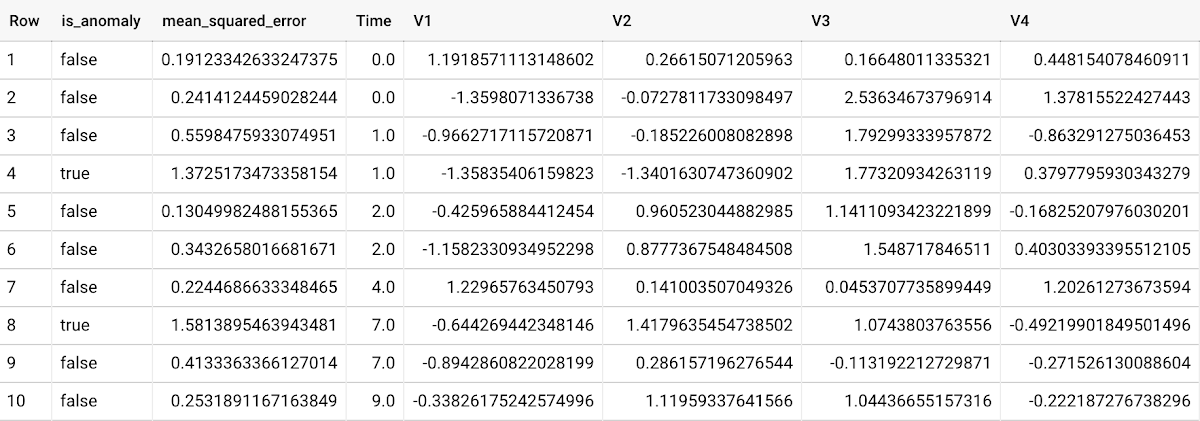
To detect anomalies in new data, use ML.DETECT_ANOMALIES and provide new data as input:
Language: SQL
SELECT*FROMML.DETECT_ANOMALIES(MODEL `mydataset.my_autoencoder_model`,STRUCT(0.02 AS contamination),(SELECT * FROM `mydataset.newdata`));

How does anomaly detection work for autoencoder models?
Anomalies are identified based on the value of each input data point’s reconstructed error, which, if exceeds a threshold determined by the contamination value, is identified as an anomaly. How does this work exactly? With an autoencoder model and data as inputs, ML.DETECT_ANOMALIES first computes the mean_squared_error for each data point between its original values and its reconstructed values. The contamination value, specified by the user, determines the threshold of whether a data point is considered an anomaly. For example, a contamination value of 0.1 means that the top 10% of descending error from the training data will be used as the cut-off threshold. Setting an appropriate contamination will be highly dependent on the requirements of the user or business.
For more information on anomaly detection with autoencoder models, please see the documentation here.
Anomaly detection with an ARIMA_PLUS time-series model
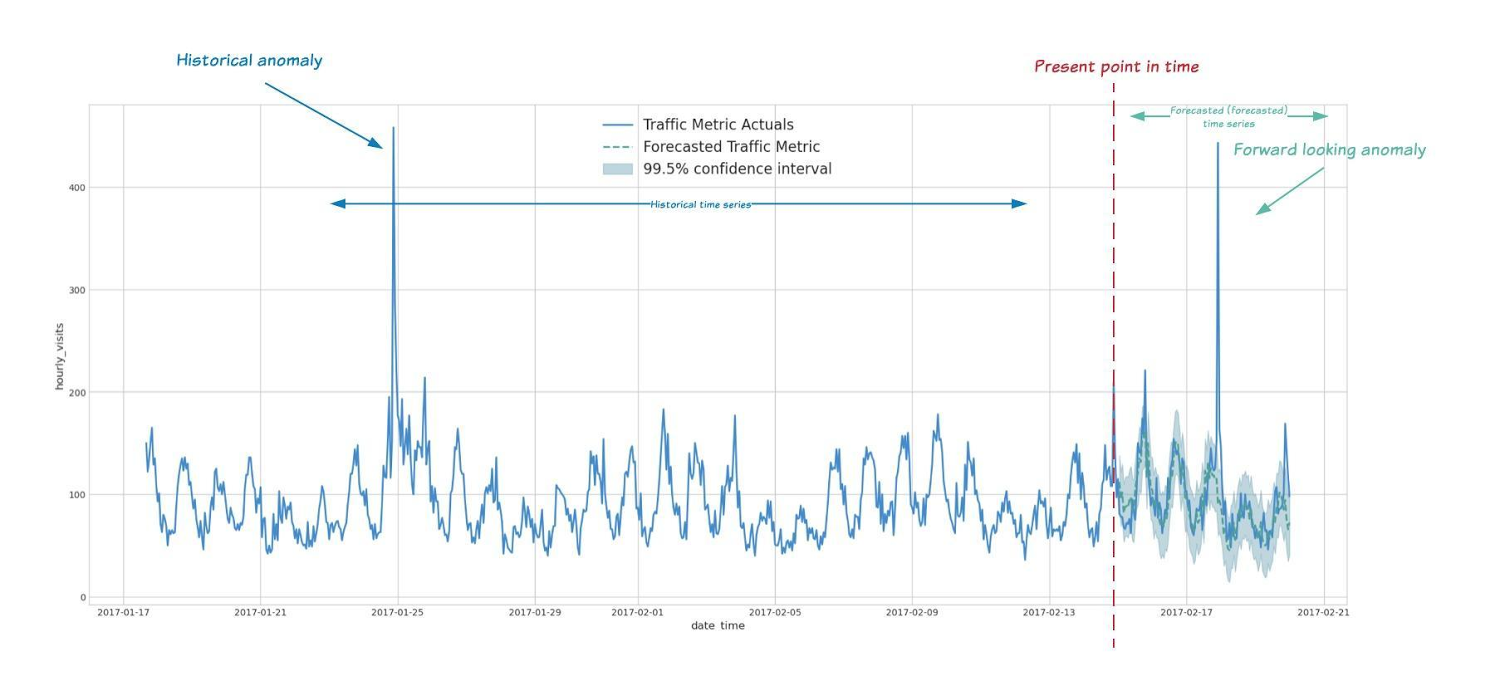
With ML.DETECT_ANOMALIES, you can now detect anomalies using ARIMA_PLUS time series models in the (historical) training data or in new input data. Here are some examples of when might you want to detect anomalies with time-series data:
Detecting anomalies in historical data:
- Cleaning up data for forecasting and modeling purposes, e.g. preprocessing historical time series before using them to train an ML model.
- When you have a large number of retail demand time series (thousands of products across hundreds of stores or zip codes), you may want to quickly identify which stores and product categories had anomalous sales patterns, and then perform a deeper analysis of why that was the case.
Forward looking anomaly detection:
- Detecting consumer behavior and pricing anomalies as early as possible: e.g. if traffic to a specific product page suddenly and unexpectedly spikes, it might be because of an error in the pricing process that leads to an unusually low price.
- When you have a large number of retail demand time series (thousands of products across hundreds of stores or zip codes), you would like to identify which stores and product categories had anomalous sales patterns based on your forecasts, so you can quickly respond to any unexpected spikes or dips.
How do you detect anomalies using ARIMA_PLUS? Begin by creating an ARIMA_PLUS time series model:
Language: SQL
CREATE OR REPLACE MODEL mydataset.my_arima_plus_modelOPTIONS(MODEL_TYPE='ARIMA_PLUS',TIME_SERIES_TIMESTAMP_COL='date',TIME_SERIES_DATA_COL='total_amount_sold',TIME_SERIES_ID_COL='item_name',HOLIDAY_REGION='US') ASSELECTdate,item_description AS item_name,SUM(bottles_sold) AS total_amount_soldFROM`bigquery-public-data.iowa_liquor_sales.sales`GROUP BYdate,item_nameHAVINGdate BETWEEN DATE('2016-01-04') AND DATE('2017-06-01')AND item_name IN ("Black Velvet", "Captain Morgan Spiced Rum","Hawkeye Vodka", "Five O'Clock Vodka", "Fireball Cinnamon Whiskey");
To detect anomalies in the training data, use ML.DETECT_ANOMALIES with the model obtained above:
Language: SQL
SELECT*FROMML.DETECT_ANOMALIES(MODEL `mydataset.my_arima_plus_model`,STRUCT(0.8 AS anomaly_prob_threshold));
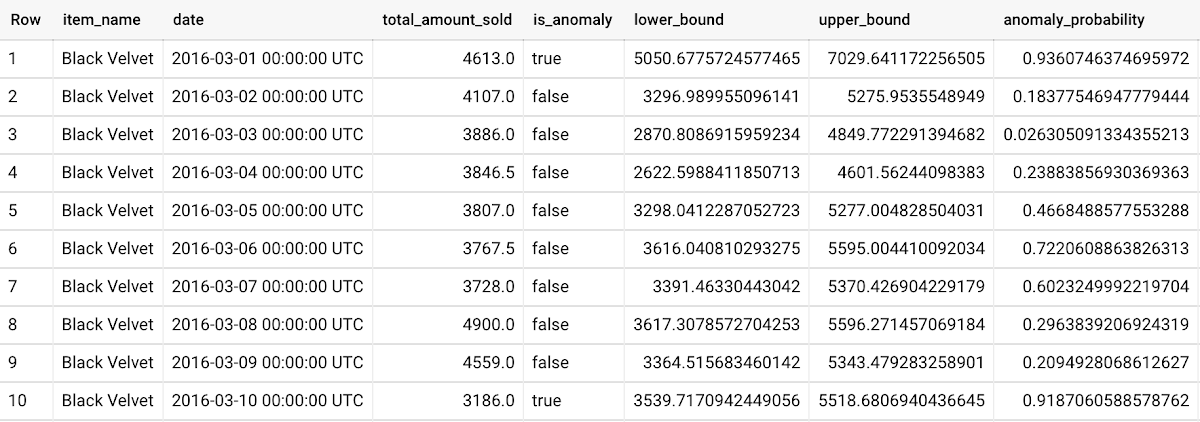
To detect anomalies in new data, use ML.DETECT_ANOMALIES and provide new data as input:
Language: SQL
WITHnew_data AS (SELECTdate,item_description AS item_name,SUM(bottles_sold) AS total_amount_soldFROM`bigquery-public-data.iowa_liquor_sales.sales`GROUP BYdate,item_nameHAVINGdate BETWEEN DATE('2017-06-02')AND DATE('2017-10-01')AND item_name IN ('Black Velvet','Captain Morgan Spiced Rum','Hawkeye Vodka',"Five O'Clock Vodka",'Fireball Cinnamon Whiskey') )SELECT*FROMML.DETECT_ANOMALIES(MODEL `mydataset.my_arima_plus_model`,STRUCT(0.8 AS anomaly_prob_threshold),(SELECT*FROMnew_data));
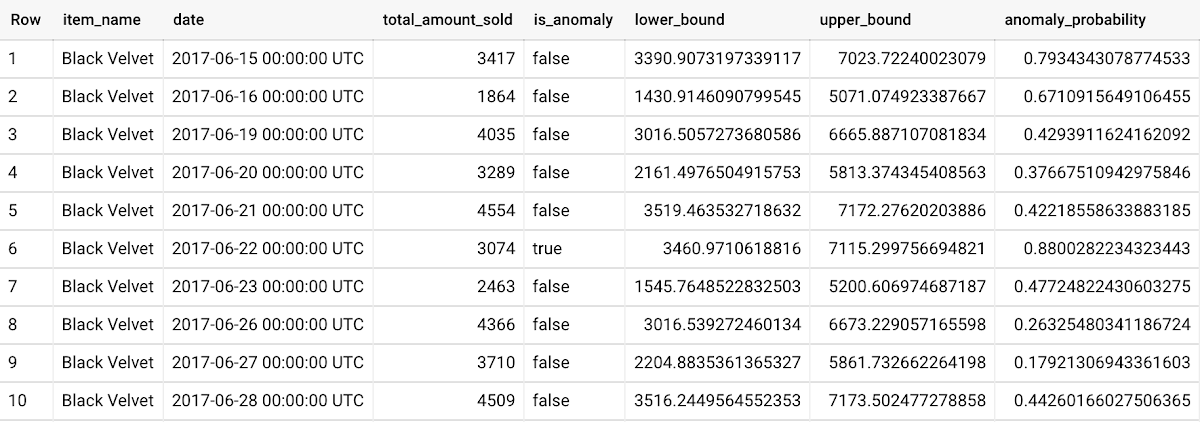
For more information on anomaly detection with ARIMA_PLUS time series models, please see the documentation here.
Thanks to the BigQuery ML team, especially Abhinav Khushraj, Abhishek Kashyap, Amir Hormati, Jerry Ye, Xi Cheng, Skander Hannachi, Steve Walker, and Stephanie Wang.
Conversational AI drives better customer experiences

3370
Of your peers have already read this article.
3:30 Minutes
The most insightful time you'll spend today!
Conversational AI is opening up a new world of possibilities in areas like customer experience, user engagement, and access to content.
In Cloud AI, we’ve taken Google’s groundbreaking machine learning models in speech and natural language processing and applied them to the contact center space, radically improving the customer experience while also driving down operational costs. It’s shifting the focus of contact centers from the backroom, out of sight (and mind) to the boardroom and the strategic heart of the business.
Our solution, called Contact Center AI (CCAI), is an accelerator of digital transformation as organizations all over the world figure out how to support their customers during these challenging times. One customer that’s redefined the possibilities of AI-powered conversation using CCAI, is Verizon.
Whether through voice calls or chat, Verizon customers will no longer need to go through menu prompts or option trees; they simply say or type their question, and CCAI’s natural-language recognition feature finds the best way to assist them. No stilted speech or robot-like commands.
“These customer service enhancements, powered by the Verizon collaboration with Google Cloud, offer a faster and more personalized digital experience for our customers while empowering our customer support agents to provide a higher level of service,” said Shankar Arumugavelu, SVP & CIO at Verizon.
CCAI is also driving cost savings without cutting corners on customer service. In the past, to improve customer satisfaction (CSAT), you had to hire more agents, increasing operating costs. Conversely, if you reduced the number of agents, your CSAT scores went down. Contact Center AI (CCAI) lets you have both.
CCAI does this by expediting customer requests using virtual agents, assisting live agents, and providing insights on customer interactions to drive improvements back into the system. The result is a better experience for your customers—they get answers faster—and you get lower operating costs. It allows human agents to focus on higher value tasks in their customer interactions.
New products and features add richer customer experience
We are continuing to invest in CCAI and today we are excited to announce the following new capabilities:
Dialogflow CX is the latest version of Dialogflow, a development suite used by over a million developers for building natural, rich conversational experiences into mobile and web applications, smart devices, bots, interactive voice response systems, popular messaging platforms and more. This new version of Dialogflow is optimized for large contact centers that deal with complex (multi-turn) conversations and it is truly omnichannel – you build it once and deploy it everywhere – in your contact centers and digital channels. Dialogflow CX features a new visual builder to create, build and manage virtual agents. It’s available now, in beta.
Lukasz Rewerenda
Dialogflow CX brings conversation state management to a whole new level
Principal Solutions Architect, Randstad (Netherlands)
Agent Assist for Chat is a new module for Agent Assist that provides agents with continuous support over “chat” in addition to voice calls, by identifying intent and providing real-time, step-by-step assistance. Agent Assist enables agents to be more agile and efficient and spend more time on difficult conversations, giving both the customer and the agent a better experience. It transcribes calls in real time, identifies customer intent, provides real-time, step by step assistance (recommended articles, workflows, etc.), and automates call dispositions.
For customers in regulated industries, Agent Assist can remove the risk of agents providing inaccurate information (which can happen due to high agent turnover and limited training). Agent Assist can also surface the latest discount information, deals and special offers, which can be hard for agents to keep track of as this information changes frequently.
Custom Voice, available in beta, is a new capability for CCAI and our Text-to-Speech API that lets you create a unique voice to represent your brand across all your customer touchpoints, instead of using a common voice shared with other organizations. By taking advantage of the custom Text-to-Speech model created with Custom Voice, you can define and choose the voice profile that suits your business and adjust to changes without scheduling studio time with voice actors to record new phrases.
At Google Cloud, we are committed to ensuring that our products and features are in alignment with our AI Principles. If you are interested in Custom Voice, there is a review process to ensure that your use case is aligned with our AI principles. Learn more about Custom Voice and how to sign up here.
Bring Google’s groundbreaking speech models on-prem
For many customers, an all-in approach to public cloud is not an option, which is why we’re extending our AI capabilities to run on-prem. Last week we announced Speech-to-Text On-Prem, the first of our hybrid AI offerings, now generally available. Speech-to-Text On-Prem gives you full control over speech data and since it runs in your own data center, it’s easy to comply with your data residency and compliance requirements. At the same time, Speech-to-Text On-Prem uses state-of-the-art speech models from Google researchers that are more accurate, smaller, and require less computing resources to run than existing solutions.
Take a look at how businesses saved costs and improved customer experience with CCAI in the new commissioned study conducted by Forrester Consulting: “New Technology: The Projected Total Economic Impact™ Of Google Cloud Contact Center AI.” To learn more about CCAI and conversational AI, see how our customers are using the solution and check out these sessions at Next OnAir:

TPUs Can Cut Deep Learning Costs by upto 80%—and Other Things You Didn’t Know About TPUs
DOWNLOAD E-BOOK3523
Of your peers have already downloaded this article
6:15 Minutes
The most insightful time you'll spend today!
The Tensor Processing Unit (TPU) is a custom ASIC chip—designed from the ground up by Google for machine learning workloads—that powers several of Google’s major products including Translate, Photos, Search Assistant and Gmail.
Cloud TPU provides the benefit of the TPU as a scalable and easy-to-use cloud computing resource to all developers and data scientists running cutting-edge ML models on Google Cloud.
But what is a TPU, how is it different from CPUs and GPUs, and how much does it lower cost by?
Download the whitepaper, What Makes TPUs Fine-tuned for Deep Learning?, to find out:
- Back to the basics: How CPUs and GPUs work
- The difference between CPUs, GPUs and TPUs
- Why TPUs are best-suited for deep-learning workloads
- Cost-benefit analysis: How much you can save by leveraging TPU-architecture
AI Features in Apigee X Helps Build and Manage APIs at Scale

5267
Of your peers have already read this article.
2:00 Minutes
The most insightful time you'll spend today!
APIs are the backbone of digital transformation. Via APIs, you can securely share data and functionality with developers both inside and outside of your organizational boundaries, letting you build applications faster, seamlessly connect and interact with partners, and drive new business revenue.
Because APIs encompass business-critical information, any downtime or performance degradation can lead to significant loss in revenue, customers, and brand value. Therefore, there’s mounting pressure on operations teams to ensure that APIs are always available and performing as expected. If the APIs go down, so too do the services that fuel customer experiences and on which the organization relies for collaboration and business processes.
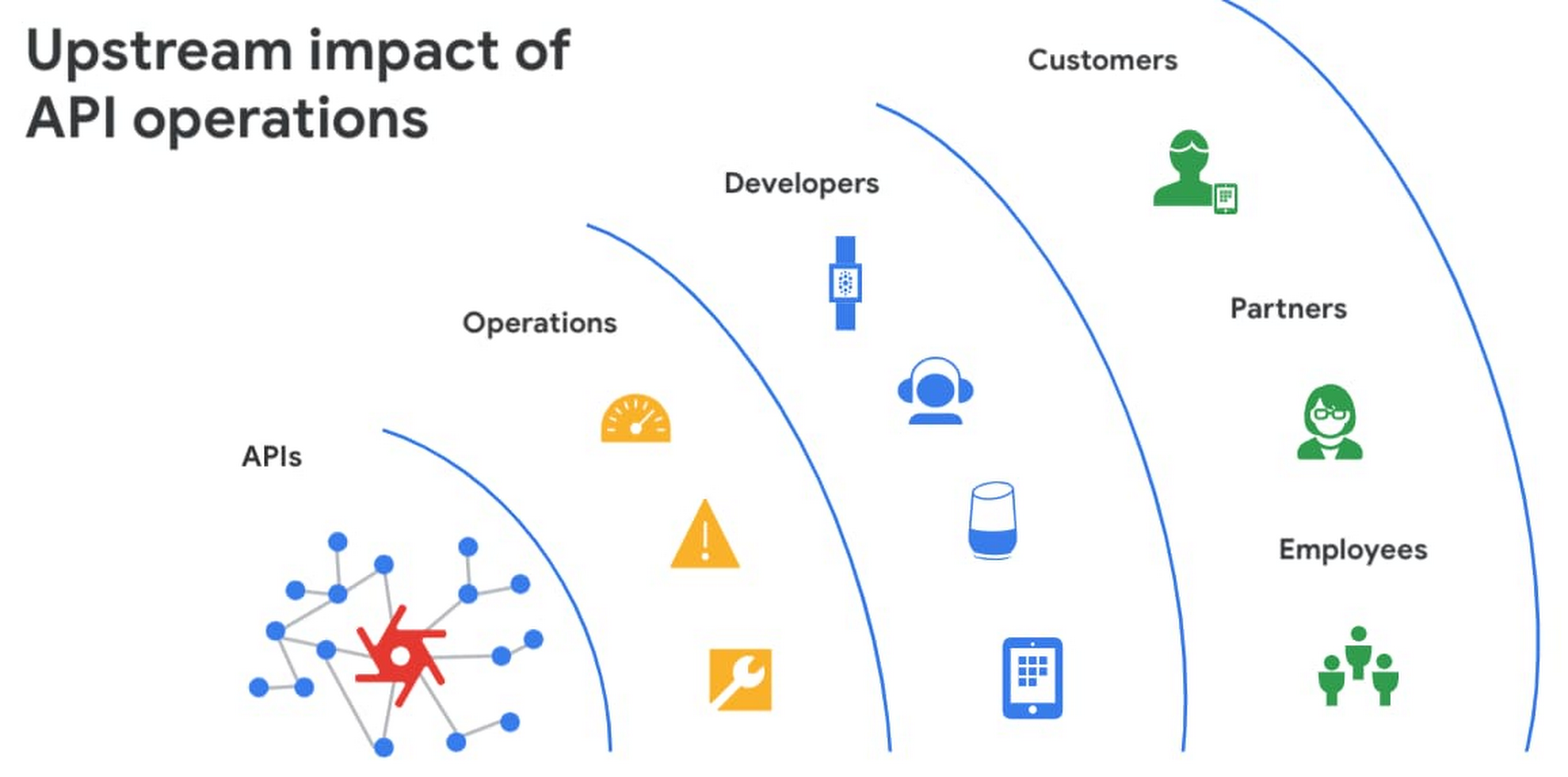
However, as you build and scale your API programs, it becomes practically impossible for API operators to manually monitor and manage all your APIs. To help, we brought the power of industry-leading AI and ML technologies to API operations via Apigee X, a major release of our API management platform. Apigee X seamlessly weaves together Google Cloud’s expertise in AI, security and networking to help you efficiently build and manage APIs at scale.
Put your API data into action
Apigee applies machine learning to your API metadata and provides you the required tools that simplify various aspects of API operations. A great example of AI for APIs is anomaly detection:
- AI-powered rules trigger alerts based on a set of predefined conditions that are determined by applying Google’s industry-leading machine learning models to your historical API data.
- Auto-thresholds adjust the monitoring criteria of your APIs and set them to pattern-based values.
- Reduce overhead results because operators don’t have to manually monitor anomalies or adjust the monitoring thresholds on APIs.
“By applying AI and ML models to our historical API data, these advanced features are able to alert us about scenarios we haven’t thought of. Such automation capabilities significantly reduce our upfront efforts. And from a security perspective, the actionable insights help us ensure that our proxies are exposed only over secure HTTPs ports and adhere to compliance requirements. We’re also able to closely monitor user activity and quickly pull out reports during audits.” – Adam Brancato, Sr. Manager, Global Technology and Security at Citrix

As our customers scale their API programs, they find it extremely useful to harness AI-powered capabilities. In our recent State of the API Economy 2021 report, we found a 230% increase in enterprises’ use of anomaly detection, bot protection, and security analytics features.

To learn more about Apigee X, and see AI and machine learning in action, check out this video, and to try Apigee X for free, click here.
Quick Recap on Google Cloud: Latest News, Launches, Updates, Events and More

12910
Of your peers have already read this article.
2:00 Minutes
The most insightful time you'll spend today!
Want to know the latest from Google Cloud? Find it here in one handy location. Check back regularly for our newest updates, announcements, resources, events, learning opportunities, and more.
Tip: Not sure where to find what you’re looking for on the Google Cloud blog? Start here: Google Cloud blog 101: Full list of topics, links, and resources.
Week of May 24-May 28 2021
- Google Cloud for financial services: driving your transformation cloud journey–As we welcome the industry to our Financial Services Summit, we’re sharing more on how Google Cloud accelerates a financial organization’s digital transformation through app and infrastructure modernization, data democratization, people connections, and trusted transactions. Read more or watch the summit on demand.
- Introducing Datashare solution for financial services–We announced the general availability of Datashare for financial services, a new Google Cloud solution that brings together the entire capital markets ecosystem—data publishers and data consumers—to exchange market data securely and easily. Read more.
- Announcing Datastream in Preview–Datastream, a serverless change data capture (CDC) and replication service, allows enterprises to synchronize data across heterogeneous databases, storage systems, and applications reliably and with minimal latency to support real-time analytics, database replication, and event-driven architectures. Read more.
- Introducing Dataplex: An intelligent data fabric for analytics at scale–Dataplex provides a way to centrally manage, monitor, and govern your data across data lakes, data warehouses and data marts, and make this data securely accessible to a variety of analytics and data science tools. Read more.
- Announcing Dataflow Prime–Available in Preview in Q3 2021, Dataflow Prime is a new platform based on a serverless, no-ops, auto-tuning architecture built to bring unparalleled resource utilization and radical operational simplicity to big data processing. Dataflow Prime builds on Dataflow and brings new user benefits with innovations in resource utilization and distributed diagnostics. The new capabilities in Dataflow significantly reduce the time spent on infrastructure sizing and tuning tasks, as well as time spent diagnosing data freshness problems. Read more.
- Secure and scalable sharing for data and analytics with Analytics Hub–With Analytics Hub, available in Preview in Q3, organizations get a rich data ecosystem by publishing and subscribing to analytics-ready datasets; control and monitoring over how their data is being used; a self-service way to access valuable and trusted data assets; and an easy way to monetize their data assets without the overhead of building and managing the infrastructure. Read more.
- Cloud Spanner trims entry cost by 90%–Coming soon to Preview, granular instance sizing in Spanner lets organizations run workloads at as low as 1/10th the cost of regular instances, equating to approximately $65/month. Read more.
- Cloud Bigtable lifts SLA and adds new security features for regulated industries–Bigtable instances with a multi-cluster routing policy across 3 or more regions are now covered by a 99.999% monthly uptime percentage under the new SLA. In addition, new Data Access audit logs can help determine whether sensitive customer information has been accessed in the event of a security incident, and if so, when, and by whom. Read more.
- Build a no-code journaling app–In honor of Mental Health Awareness Month, Google Cloud’s no-code application development platform, AppSheet, demonstrates how you can build a journaling app complete with titles, time stamps, mood entries, and more. Learn how with this blog and video here.
- New features in Security Command Center—On May 24th, Security Command Center Premium launched the general availability of granular access controls at project- and folder-level and Center for Internet Security (CIS) 1.1 benchmarks for Google Cloud Platform Foundation. These new capabilities enable organizations to improve their security posture and efficiently manage risk for their Google Cloud environment. Learn more.
- Simplified API operations with AI–Google Cloud’s API management platform Apigee applies Google’s industry leading ML and AI to your API metadata. Understand how it works with anomaly detection here.
- This week: Data Cloud and Financial Services Summits–Our Google Cloud Summit series begins this week with the Data Cloud Summit on Wednesday May 26 (Global). At this half-day event, you’ll learn how leading companies like PayPal, Workday, Equifax, and many others are driving competitive differentiation using Google Cloud technologies to build their data clouds and transform data into value that drives innovation. The following day, Thursday May 27 (Global & EMEA) at the Financial Services Summit, discover how Google Cloud is helping financial institutions such as PayPal, Global Payments, HSBC, Credit Suisse, AXA Switzerland and more unlock new possibilities and accelerate business through innovation. Read more and explore the entire summit series.
- Announcing the Google for Games Developer Summit 2021 on July 12th-13th–With a surge of new gamers and an increase in time spent playing games in the last year, it’s more important than ever for game developers to delight and engage players. To help developers with this opportunity, the games teams at Google are back to announce the return of the Google for Games Developer Summit 2021 on July 12th-13th. Hear from experts across Google about new game solutions they’re building to make it easier for you to continue creating great games, connecting with players and scaling your business. Registration is free and open to all game developers. Register for the free online event at g.co/gamedevsummit to get more details in the coming weeks. We can’t wait to share our latest innovations with the developer community. Learn more.
More Relevant Stories for Your Company

How Vertex AI NAS is Suitable for Most Advanced ML Workloads
Vertex AI launched with the premise “one AI platform, every ML tool you need.” Let’s talk about how Vertex AI streamlines modeling universally for a broad range of use cases. The overall purpose of Vertex AI is to simplify modeling so that enterprises can fast track their innovation, accelerate time to market,

Speech Analytics and AI: Leverage Every Customer Interaction as a Data Point
Contact centers can transform customer experience using AI-driven speech analytics to evaluate every customer interaction and use it as a 'data point' to identify key patterns, enquiries, pain points, reviews and feedback to enhance customer experience with real-time, personalized recommendations. Knowlarity's AI-based cloud telephony solutions for businesses built with Google

Combining IoT and Analytics to Warn Manufacturers of Line Break Downs and Increase Profitability
Oden Technologies is using the Internet of Things (IoT) to improve the factories of today. The giant network of “things” (including people) connected to each other via the Internet has the potential to reduce waste, increase efficiency, and improve safety across all walks of life. Oden is leading IoT innovation in

KLM’s Doubles Bookings With the Same Spend With Machine Learning
GOALS Develop smarter, more effective media buying models through dataDrive relevant advertisingScale predictive modelling across all touchpoints in the customer journey APPROACH Combined contextual data to create a predictive model with granular layers Activated data in real-time RESULTS 40% lower cost per bookingMore than twice as many bookings at same
