





3097
Of your peers have already watched this video.
21:00 Minutes
The most insightful time you'll spend today!
Google Cloud’s AI Adoption Framework: Helping You Build a Transformative AI Capability
AI can help organizations improve the decision-making process across most business functions. However, building an effective AI capability encompasses more than just creating a technology platform.
To do this effectively requires alignment to business objectives, strong executive sponsorship, and collaboration between skilled employees and strategic partners.
Additionally, you need your initiatives to be powered by secure data management and cloud-native services to scale and automate ML workloads, and ensure all of this is underpinned by responsible AI principles.
Successfully adopting AI in your business is determined by your practices in these areas. Learn more about the AI journey and how you can gain value every step of the way.
2989
Of your peers have already watched this video.
17:30 Minutes
The most insightful time you'll spend today!
Signal Generation in the Investment Management Industry
Machine learning is seeing a lot of use cases in the financial sector. One of them is leverage AI to sift signal from noise and create insights or predictions that can give financial planners an edge.
In this video, David Li, Head of Advanced Analytics, BlackRock and Colman Madden, Customer Engineer, Google Cloud, present on how BlackRock leverages NLP on Google Cloud to search for signals in the investment management industry.
“We analyze large volumes of textual news via NLP to classify text into sentiment scores as well as other metrics such as news volume and emotions in these articles,” says David Li.
He also discusses some of the challenges they faced, and the solutions they found, and why they selected Google Cloud to run this project.
How Recommendation AI Helps Retailers Optimize Click-through and Conversion Rates

7060
Of your peers have already read this article.
3:00 Minutes
The most insightful time you'll spend today!
Time to go outside again, I guess. I’ll need a sun hat. Sunscreen. Maybe some new sandals? What else?
With the Recommendations AI service, I might be reminded to grab a reusable water bottle and a swimsuit. Or some after-sun aloe lotion. Good thing, cause I’ll need it.

Recommendations AI is a solution that uses machine learning to bring product recommendations to their shoppers across any catalog or client list. This service is part of our full suite of Retail solutions. When you integrate with the Retail API, you get the benefit of Google’s Product Discovery. Integrating once to reap the benefits over and over. Recommendations is the starting point, and you can easily extend into Retail Search and Vision Product Search in the upcoming future.
The Recommendations solution is fully managed, global-scale and powered by deep learning, so you can focus on a great shopping experience and let someone else worry about the infrastructure.
Compared to baseline recommendation systems used by customers, Recommendations AI showed double digit uplift in conversion and clickthrough rates in A/B experiments controlled by the customers. You can optimize for click-through, conversion or session revenue, and fine tune the models to make sure you omit out-of-stock items or duplicates, for example.

So how does it work, and how do you get started? Read on, and we’ll walk you through the pipeline, starting with the data you already have to placement in your online store.
Formula: Data -> Model -> Placement
You start with your catalog, the list of all the things (postcards, movies, pie recipes) that you want to show your customers. Then you ingest your PII-redacted user events -this is the historic event data like home page views, add to cart events and more along with real time user events. This user event is joined with the product catalog and items that allows us to construct the sequence of shoppers’ activity, thus being able to predict what the shopper has a high propensity to purchase next. The user events can come from both online activity across devices or offline store purchases
The recommendation model will return a list of products, which are the recommendations. The brains of the operation, if you will. This model is trained using all the data that you ingest, using the latest neural network models and techniques that Google has built expertise over the years in flagship products like Youtube and News, that allows us to uncover shopper intent, so it can best predict the right recommendations to show to the right people.
Every model outputs a list of product identifiers, but where do they go? They go into placements, the spots, panels, carousels on your customer’s journey interacting with your brand that you’ve set aside to highlight recommendations. A model can send recommendations to one or more placements, but each placement only receives information from one recommendation model. Your pages will then need to render the products with the right images, text or other metadata, using the product ID that is returned by the model.
What do recommendations look like?
Let’s start by browsing our postcard-selling website, where I’ve been buying some vintage California postcards already. The recommendations algorithm has caught on to my interest, showing me other potential cards to purchase based on my history:

Put your data to work
To get started we need to bring your data into the recommendation model, so it can understand your customers, your inventory, and your sales patterns.
The model takes in the product catalog you use, and metadata about those products to better understand nuances in assortment, pricing and variables like size and style. You might already have this data stored in BigQuery or Merchant Center, and hence we provide easy integrations that you can leverage to get started even faster.
As for the user events, don’t worry if you already have systems in place to capture web and mobile activity. We make it easy to bring in your real time event logs by providing seamless integrations with Google Tag Manager, Javascript pixel, or even historic events from Cloud Storage, BigQuery or using inline API or JSON, so you can immediately train the models on this imported data. All this allows you to kickstart integrating with Recommendations AI in a matter of days.
The models then construct a sequence of activities that the user went through and joins with the products that the user engaged with. Once your data is ready to go, it takes a few days to train the model. Next onto making the data work for you.
Quickly customize your model
Setting up your own recommendations project in the console gives you the ability to choose what sort of model to train (based on what recommendations you want to generate) and your objective. Are you optimizing for click-through rate–more people click on the recommendation links or products–or for conversion rate–more people choose or buy what was suggested or revenue ?
Different models can be optimized for different optimization goals.; the GCP console explains what each one can do and how you can choose to optimize it.

Let’s unpack some of this terminology real quick.
We’ve got three model types:
- Recommended for you – Means we think these are items you’ll want to buy, based on your history; this is usually used on a home page to showcase items.
- Others you may like – Means if you’re browsing the page of a water bottle, we will recommend alternative brands of water bottles that you may like as well as a backpack, based on your engagement history.
- Frequently bought together – Means that when anyone buys sunscreen, we notice that they often also buy aloe lotion, so we will surface those items when someone adds any one of them to their cart.
And then we have three business objectives that the models optimize for:
- Click-through rate – How frequently did somebody click on a recommended item?
- Conversion rate– How frequently did somebody add a recommended item to their cart?
- Revenue per session – How much money did the recommendations generate for you?
Deliver anywhere along the journey
Now that you’re all set up in the Retail AI console, you can test out the recommendations in the console, even before you deploy to production.

You can integrate Recommendations into your frontend by calling the Predict APIt. The placements of recommendations will report data back into the dashboard and you can analyze and measure success for future iterations.
On top of that you can use the recommendations for other parts of your customer’s journey. Email promotions, storefront kiosks, display ads or follow-up notifications can include recommendations based on past activity and cart contents. The model gives you useful product recommendations for a wide variety of touchpoints and steps in the purchasing process.
More best practices, and guides, are available inside our documentation.
How to get started
Training your own models can be tedious, time-consuming, and expensive. On top of that it requires deeper data science expertise to set up. Let us do it instead!
You can see how IKEA Retail uses Recommendations AI in this recent talk and blog from the Google Cloud Retail Summit..
To get started today you’ll need to make a Cloud project and enable the Retail API, which then allows you to access all the recommendation tools in one menu. Bring in your catalog and purchasing data, define a placement or two, and you can start putting recommendations on your site in a matter of days.
Supercharging Security with Generative AI

1505
Of your peers have already read this article.
3:30 Minutes
The most insightful time you'll spend today!
At Google Cloud, we continue to invest in key technologies to progress towards our true north star on invisible security: making strong security pervasive and simple for everyone. Our investments are based on insights from our world-class threat intelligence teams and experience helping customers respond to the most sophisticated cyberattacks. Customers can tap into these capabilities to gain perspective and visibility on the most dangerous threat actors that no one else has.
Recent advances in artificial intelligence (AI), particularly large language models (LLMs), accelerate our ability to help the people who are responsible for keeping their organizations safe. These new models not only give people a more natural and creative way to understand and manage security, they give people access to AI-powered expertise to go beyond what they could do alone.
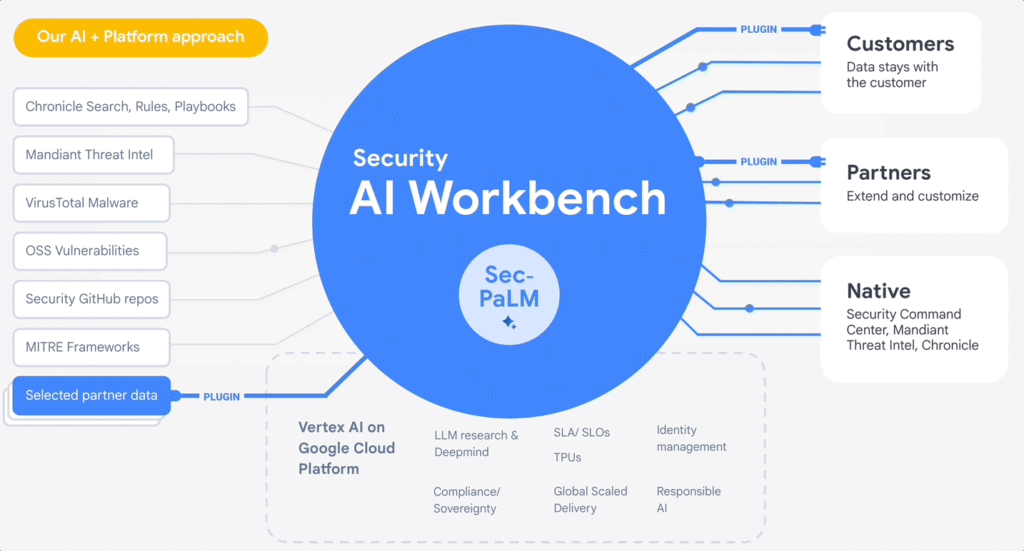
At the RSA Conference 2023, we are excited to announce Google Cloud Security AI Workbench, an industry-first extensible platform powered by a specialized, security LLM, Sec-PaLM. This new security model is fine-tuned for security use cases, incorporating our unsurpassed security intelligence such as Google’s visibility into the threat landscape and Mandiant’s frontline intelligence on vulnerabilities, malware, threat indicators, and behavioral threat actor profiles.
Google Cloud Security AI Workbench powers new offerings that can now uniquely address three top security challenges: threat overload, toilsome tools, and the talent gap. It will also feature partner plug-in integrations to bring threat intelligence, workflow, and other critical security functionality to customers, with Accenture being the first partner to utilize Security AI Workbench.
The platform will also let customers make their private data available to the platform at inference time; ensuring we honor all our data privacy commitments to customers. Because Security AI Workbench is built on Google Cloud’s Vertex AI infrastructure, customers control their data with enterprise-grade capabilities such as data isolation, data protection, sovereignty, and compliance support.
Preventing threats from spreading beyond the first infection
We already provide best-in-class capabilities to help organizations immediately respond to threats. But what if we could not just identify and contain initial infections, but also help prevent them from happening anywhere else? With our AI advances, we can now combine world class threat intelligence with point-in-time incident analysis and novel AI-based detections and analytics to help prevent new infections. These advances are critical to help counter a potential surge in adversarial attacks that use machine learning and generative AI systems. That’s why we’re excited to introduce:
- VirusTotal Code Insight uses Sec-PaLM to help analyze and explain the behavior of potentially malicious scripts, and will be able to better detect which scripts are actually threats.
- Mandiant Breach Analytics for Chronicle leverages Google Cloud and Mandiant Threat Intelligence to automatically alert you to active breaches in your environment. It will use Sec-PaLM to help contextualize and respond instantly to these critical findings.
These new updates build on the existing AI in Google’s industry-leading solutions. For example, Chronicle Security Operations already uses frontline intelligence, integrated reasoning, and machine learning to identify initial infections, prioritize impact, and contain threats. Another example is reCAPTCHA Enterprise, which uses image noising capabilities to help protect your site from adversaries that leverage novel AI advances, greatly enhancing our defenses against bots.
Adding intelligence to reduce toil
At Google Cloud, we help organizations modernize security wherever they are, in part by simplifying their security tools and controls whenever possible. Advances in generative AI can help reduce the number of tools organizations need to secure their vast attack surface areas and ultimately, empower systems to secure themselves. This will minimize the toil it takes to manage multiple environments, to generate security design and capabilities, and to generate security controls. Today, we’re announcing:
- Assured OSS will use LLMs to help us add even more open-source software (OSS) packages to our OSS vulnerability management solution, which offers the same curated and vulnerability-tested packages that we use at Google.
- Mandiant Threat Intelligence AI, built on top of Mandiant’s massive threat graph, will leverage Sec-PaLM to quickly find, summarize, and act on threats relevant to your organization.
These announcements build on existing capabilities that help customers centralize visibility and control, detect targets, and improve security across their platform. For example, Security Command Center (SCC) uses always-on machine learning to detect malicious scripts executing in the customer container environment and immediately alert the customer. In addition, Cloud Data Loss Prevention leverages machine learning to find and classify data, and with Confidential Computing you can collaborate on, train, and deploy sensitive and regulated AI models in the cloud, all while preserving confidentiality.
Evolving how practitioners do security to close the talent gap
At Google, we believe that to truly democratize security, we need to first acknowledge that AI will soon usher in a new era for security expertise that will profoundly impact how practitioners “do” security. Most people who are responsible for security — developers, system administrators, SRE, even junior analysts — are not security specialists by training.
Imagine a world where novices and security experts are paired with AI expertise to free themselves from repetition and burnout, and accomplish tasks that seem impossible to us today. To help power this evolution, we’re embedding Sec-PaLM-based features that can make security more understandable while helping to improve effectiveness with exciting new capabilities in two of our solutions:
- Chronicle AI: Chronicle customers will be able to search billions of security events and interact conversationally with the results, ask follow-up questions, and quickly generate detections, all without learning a new syntax or schema.
- Security Command Center AI: Security Command Center will translate complex attack graphs to human-readable explanations of attack exposure, including impacted assets and recommended mitigations. It will also provide AI-powered risk summaries for security, compliance, and privacy findings for Google Cloud.
These new releases bolster our existing efforts to tackle these issues through capabilities like IAM Recommender, which suggests permissions better suited to actual usage patterns. We will soon be augmenting this capability to cover organizational policies, further enabling the administrator to help improve the security posture of their organization. In addition, Mandiant Automated Defense applies machine learning to help reduce the repetitive Tier 1 alert triage problem and address alert fatigue.
Offering availability
VirusTotal Code Insight, available now in Preview, is our first example of putting Security AI Workbench to work for our customers. We will be rolling out other offerings to trusted testers in coming months, and they will be available in Preview more broadly this summer. Click here for the demo.
Security AI Workbench, including Sec-PaLM and partner integrations, in addition to the product innovations described in our demo, are all building blocks for a larger effort to elevate security across the ecosystem. So far, that effort:
- Provides assistive functions to rapidly develop IT generalist talent to Tier 1 security operator status in a way that wasn’t previously feasible. Security Command Center now can summarize threat intelligence insights and findings for Google Cloud, and Chronicle can quickly generate YARA-L rules or other detections.
- Provides advanced functions such as iterative query and multivariate detection generation, conversational filtering and interaction with results, and smart case awareness to empower advanced Tier 2 and 3 security operators to focus on threat analysis instead of struggling with process and toil. Mandiant Threat Intelligence users now can elevate their core competencies to hunt, investigate, and remediate threats — using the same tools our own Mandiant experts use.
- Fuses threat intelligence and AI-based analytic capabilities, which are unsurpassed in the market. VirusTotal Code Insight enables security teams to help gain insights and identify threats in suspicious code. This can significantly enhance their ability to detect and mitigate potential attacks.
However, this is just an initial step. We’ll continue to iterate and innovate, and we encourage customers and partners to leverage Security AI Workbench in new and exciting ways. Moving forward, we anticipate many new use cases to emerge over time.
Building a safer future
While generative AI has recently captured the imagination, Sec-PaLM is based on years of foundational AI research by Google and DeepMind, and the deep expertise of our security teams. This work includes new efforts to expand our partner ecosystem to provide businesses with security capabilities at every layer of the cybersecurity stack. We have only just begun to realize the power of applying generative AI to security, and we look forward to continuing to leverage this expertise for our customers and drive advancements across the security community.
Transform ‘Dark Data’ from Documents with Document AI, Cloud Functions and Workflows

8204
Of your peers have already read this article.
2:00 Minutes
The most insightful time you'll spend today!
At enterprises across industries, documents are at the center of core business processes. Documents store a treasure trove of valuable information whether it’s a company’s invoices, HR documents, tax forms and much more. However, the unstructured nature of documents make them difficult to work with as a data source. We call this “dark data” or unstructured data that businesses collect, process and store but do not utilize for purposes such as analytics, monetization, etc. These documents in pdf or image formats, often trigger complex processes that have historically relied on fragmented technology and manual steps. With compute solutions on Google Cloud and Document AI, you can create seamless integrations and easy to use applications for your users. Document AI is a platform and a family of solutions that help businesses to transform documents into structured data backed by machine learning. In this blog post we’ll walk you through how to use Serverless technology to process documents with Cloud Functions, and with workflows of business processes orchestrating microservices, API calls, and functions, thanks to Workflows.
At Cloud Next 2021, we presented how to build easy AI-powered applications with Google Cloud. We introduced a sample application for handling incoming expense reports, analyzing expense receipts with Procurement Document AI, a DocAI solution for automating procurement data capture from forms including invoices, utility statements and more. Then organizing the logic of a report approval process with Workflows, and used Cloud Functions as glue to invoke the workflow, and do analysis of the parsed document.

We also open sourced the code on this Github repository, if you’re interested in learning more about this application.

In the above diagram, there are two user journeys: the employee submitting an expense report where multiple receipts are processed at once, and the manager validating or rejecting the expense report.
First, the employee goes to the website, powered by Vue.js for the frontend progressive JavaScript framework and Shoelace for the library of web components. The website is hosted via Firebase Hosting. The frontend invokes an HTTP function that triggers the execution of our business workflow, defined using the Workflows YAML syntax.
Workflows is able to handle long-running operations without any additional code required, in our case we are asynchronously processing a set receipt files. Here, the Document AI connector directly calls the batch processing endpoint for service. This API returns a long-running operation: if you poll the API, the operation state will be “RUNNING” until it has reached a “SUCCEEDED” or “FAILED” state. You would have to wait for its completion. However, Workflows’ connectors handle such long-running operations, without you having to poll the API multiple times till the state changes. Here’s how we call the batch processing operation of the Document AI connector:
- invoke_document_ai:call: googleapis.documentai.v1.projects.locations.processors.batchProcessargs:name: ${"projects/" + project + "/locations/eu/processors/" + processorId}location: "eu"body:inputDocuments:gcsPrefix:gcsUriPrefix: ${bucket_input + report_id}documentOutputConfig:gcsOutputConfig:gcsUri: ${bucket_output + report_id}skipHumanReview: trueresult: document_ai_response
Machine learning uses state of the art Vision and Natural Language Processing models to intelligently extract schematized data from documents with Document AI. As a developer, you don’t have to figure out how to fine tune or reframe the receipt pictures, or how to find the relevant field and information in the receipt. It’s Document AI’s job to help you here: it will return a JSON document whose fields are: line_item, currency, supplier_name, total_amount, etc. Document AI is capable of understanding standardized papers and forms, including invoices, lending documents, pay slips, driver licenses, and more.
A cloud function retrieves all the relevant fields of the receipts, and makes its own tallies, before submitting the expense report for approval to the manager. Another useful feature of Workflows is put to good use: Callbacks, that we introduced last year. In the workflow definition we create a callback endpoint, and the workflow execution will wait for the callback to be called to continue its flow, thanks to those two instructions:
- create_callback:call: events.create_callback_endpointargs:http_callback_method: "POST"result: callback_details...- await_callback:try:call: events.await_callbackargs:callback: ${callback_details}timeout: 3600result: callback_requestexcept:as: esteps:- update_status_to_error:...
In this example application, we combined the intelligent capabilities of Document AI to transform complex image documents into usable structured data, with Cloud Functions for data transformation, process triggering, and callback handling logic, and Workflows enabled us to orchestrate the underlying business process and its service call logic.
Going further
If you’re looking to make sense of your documents, turning dark data into structured information, be sure to check out what Document AI offers. You can also get your hands on a codelab to get started quickly, in which you’ll get a chance at processing handwritten forms. If you want to explore Workflows, quickstarts are available to guide you through your first steps, and likewise, another codelab explores the basics of Workflows. As mentioned earlier, for a concrete example, the source code of our smart expense application is available on Github. Don’t hesitate to reach out to us at @glaforge and @asrivas_dev to discuss smart scalable apps with us.
Dataflow Guarantees 50+% Increase in Developer Productivity and Infrastructure Cost Savings: Read More

8384
Of your peers have already read this article.
3:00 Minutes
The most insightful time you'll spend today!
In our conversations with technology leaders about data-driven transformation using Google Data Cloud – industry’s leading unified data and AI solution – , one important topic is incorporating continuous intelligence to move from answering questions such as “What has happened? to questions like “What is happening?” and “What might happen?”. The core to this evolution is the need for an underlying data processing that not only provides powerful real-time capabilities for events happening close to origination, but also brings together existing data sources under one unified data platform to enable organizations to draw insights and take actions holistically. Dataflow, Google’s cloud-native data processing and streaming analytics platform, is a key component of any modern data and AI architecture and data transformation journey, along with BigQuery, Google’s internet-scale warehouse with built-in streaming, BI engine and ML; Pub/Sub, a global no-ops event delivery service; and Looker, a modern BI and embedded analytics platform. One of the key evaluation factors is potential economic value of Dataflow to their organization, particularly in the context of engaging other stakeholders is key for many of the leaders that we engage with. So we commissioned Forrester Consulting to conduct a comprehensive study on the impact that Dataflow had on their organization by interviewing actual customers .
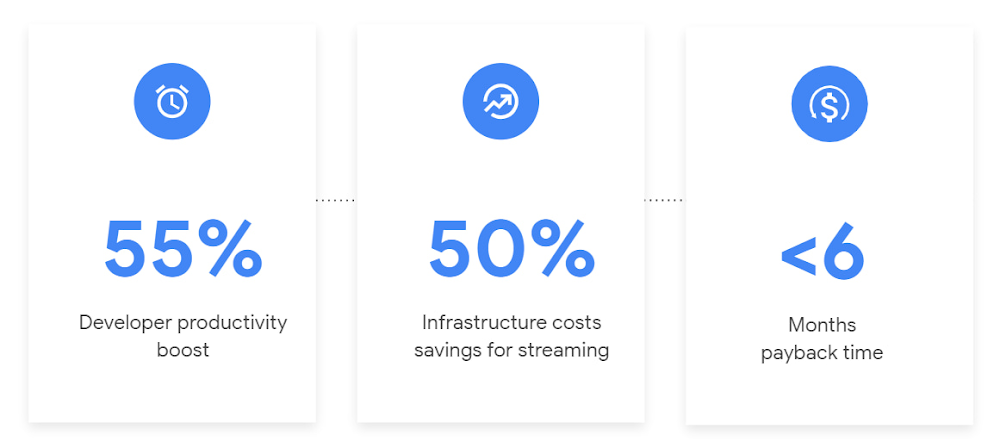
Today we’re excited to share our commissioned study conducted by Forrester Consulting, the Total Economic Impact™ of Google Cloud Dataflow, which allows data leaders to understand and quantify the benefits of Dataflow, and use cases it enables. Forrester conducted interviews with Dataflow customers to evaluate the benefits, costs, and risks of investing in Dataflow across an organization. Based on their interviews, Forrester identified major financial benefits across four different areas: business growth, infrastructure cost savings, data engineer productivity, and administration efficiency. In fact, Forrester found that customers adopting Dataflow can achieve a 55% boost in developer productivity and a 50% reduction in infrastructure costs. In fact, Forrester projects that customers adopting Dataflow can achieve a range of up to 171% Return on Investment (ROI) and a less than six months payback period. Customers can now use figures in the report to compute their own Return on Investment (ROI) and payback period.
“Dataflow is integral to accelerating time-to-market, decreasing time-to-production, reducing time to figure out how to use data for use cases, focusing time on value-add tasks, streamlining ingestion, and reducing total cost of ownership.” – Lead technical architect, CPG
Let’s take a deeper look at the ways that Forrester found that Dataflow can help you achieve your goals and unlock your business potential.
Benefit #1: Increase data engineer productivity by 55%
Developers can choose among a variety of programming languages to define and execute data workflows. Dataflow also seamlessly integrates with other Google Cloud Platform and open source technologies to maximize value and applicability to a wide variety of use cases. Dataflow streamlined workflows with code reusability,dynamic templates, and the simplicity of a managed service. Engineers trusted pipelines to run correctly and adhere to governance. Data engineers avoided laborious issue-monitoring and remediation tasks that were common in the legacy environments such as poor performance, lack of availability, and failed jobs. Teams valued the language flexibility and open source base.
“Dataflow provided us with ETL replacement that opened limitless potential use cases and enabled us to do smarter data enhancement while data remains in motion.” — Director of data projects, financial services
Benefit #2: Reduce infrastructure costs by up-to 50% for batch and streaming workloads
Dataflow’s serverless autoscaling and discrete control of job needs, scheduling, and regions eliminated overhead and optimized technology spending. Consolidating global data processing solutions to Dataflow further eliminated excess costs while ensuring performance, resilience, and governance across environments. Dataflow’s unified streaming and batch data platform gives organizations the flexibility to define either workload in the same programming model, run it on the same infrastructure, and manage it from a single operational management tool.
“Our costs with our cloud data platform using Dataflow are just a fraction of the costs we faced before. Now we only pay for cloud infrastructure consumption because the open source base helps us avoid licensing costs. We spend about $120,000 per year with Dataflow, but we’d be spending millions with our old technologies.” – Lead technical architect, CPG
Benefit #3: Increase top-line revenue by improving customer experience and retention with payback time of < 6 months
Streaming analytics is an essential capability in today’s digital world to gain real-time actionable insights. Likewise, organizations must also have flexible, high- performance batch environments to analyze historical data for building machine learning models, business intelligence, and advanced analytics. Dataflow enabled real-time streaming use cases, improved data enrichment, encouraged data exploration,improved performance and resiliency, reduced errors, increased trust, and eliminated barriers to scale. As a result, organizations provided customers with more accurate, relevant, and in-the-moment data-backed services and insights — boosting customer experience, creating new revenue streams, and improving acquisition, retention, and enrichment.
“It’s already been proven that we are getting more business [with Dataflow] because we can turn around results faster for customers.” – VP of technology, financial services technology
“When we provide data to our customers and partners with Dataflow, we are much more confident in those numbers and can provide accurate data within a minute. Our customers and partners have taken note and commented on this. It’s reduced complaints and prevented churn.” – Senior software engineer, media
Other benefits
Eliminated administrative overhead and toil
As a cloud-native managed service, all administration tasks such as provisioning, scaling, and updates are automatically handled by Google Cloud. Teams no longer need to manage servers and related software for legacy data processing solutions. Admins also streamlined processes for setting up data sources, adding pipelines, and enforcing governance.
Saved business operations costs for support teams and data end users
Dataflow improved the speed, quality, reliability, and ease of access to data for insights for general business users, saving time and empowering users to drive better data-backed outcomes. It also reduced support inquiry volume while automating manual job creation.
What’s next?
Download the Forrester Total Economic Impact study today to dive deep into the economic impact Dataflow can deliver your organization. We would love to partner with you to explore the potential Dataflow can unlock in your teams. Please reach out to our sales team to start a conversation about your data transformation with Google Cloud.
More Relevant Stories for Your Company

How Public Sectors Leverage Google Cloud to Push the Envelop in Human Services and Labor
The COVID-19 pandemic tested our nation’s public benefits system in unimaginable ways. With an unprecedented 60 million individuals turning to unemployment and social services to satisfy their basic needs, state and local governments were stretched to meet the demand. But state and local government leaders have risen to the challenge

Enabling Sustainable Agriculture: InstaDeep uses Cloud TPU v4
You are what you eat. We’ve all been told this, but the truth is what we eat is often more complex than we are – genetically at least. Take a grain of rice. The plant that produces rice has 40,000 to 50,000 genes, double that of humans, yet we know

Customer Voices: How Firms from Across Industries Leverage Google Cloud
From powering everyday operations and accelerating application innovation, to providing tools for specific business needs and executing on big ideas, to advancing the security of technology solutions, companies from across industries have leveraged Google Cloud for business benefits. Companies from across industries have turned to Google Cloud for transforming their

Conversational AI drives better customer experiences
Conversational AI is opening up a new world of possibilities in areas like customer experience, user engagement, and access to content. In Cloud AI, we’ve taken Google’s groundbreaking machine learning models in speech and natural language processing and applied them to the contact center space, radically improving the customer experience
