





4885
Of your peers have already watched this video.
11:30 Minutes
The most insightful time you'll spend today!
Driving Business Transformation in Manufacturing, Industrial, and Transportation Using Google Cloud and AI/ML
Google Cloud partners closely with manufacturing, industrial, and transportation organizations to drive business transformation.
In this video, Mandeep Waraich, Head of Product – Industrial AI, Google Cloud, shares customer stories as well as Google Cloud’s differentiated AI products and solutions.
Waraich covers the current state of automation and industrial efficiency and how artificial intelligence is revealing an entirely new universe of possibilities.
He also speaks about Google Cloud’s approach to bringing these AI technologies to the market, and Google Cloud’s “deploy anywhere” methodology that helps achieve the impact of AI at a global enterprise scale.
6533
Of your peers have already watched this video.
24:00 Minutes
The most insightful time you'll spend today!
Swarovski’s Journey towards Online and Offline Conversion with Predictive Analytics
Luxury brand and leader in crystals and glass production, Swarovski has charmed customers with its exquisite collections for over 125 years. To understand their customers better and map their online behaviors, Swarovski had to overcome prediction hurdles as majority of the purchases are not frequent or habitual. They are mostly impulse buys or have no rational behind the purchase in order for the brand to accurately map customers’ interest and delight them with relevant personalization or website customization strategy.
Swarovski used a machine learning (ML) model to predict the most performing SKUs and list of products based on both online and offline indicators to target buyers. A score was assigned to each product in the list and was personalized at the country level that delivered relevant insights. Swarovski is aiming to expand the product listing page to personalize at customer level. Watch the video to dive deep into Swarovski’s data analytics efforts to answer complex questions, reporting and prediction using both online and offline data.
Discover Latest Resources on Google Cloud’s Datasets Solution

6326
Of your peers have already read this article.
3:00 Minutes
The most insightful time you'll spend today!
Editor’s note: With Google Cloud’s datasets solution, you can access an ever-expanding resource of the newest datasets to support and empower your analyses and ML models, as well as frequently updated best practices on how to get the most out of any of our datasets. We will be regularly updating this blog with new datasets and announcements, so be sure to bookmark this link and check back often.
August 2021
New dataset: Google Cloud Release Notes
- Looking for a new way to access Google Cloud Release Notes besides the docs, the XML feed, and Cloud Console? Check out the Google Cloud Release Notes dataset. With up-to-date release notes for all generally available Google Cloud products, this dataset allows you to use BigQuery to programmatically analyze release notes across all products, exploring security bulletin updates, fixes, changes, and the latest feature releases.
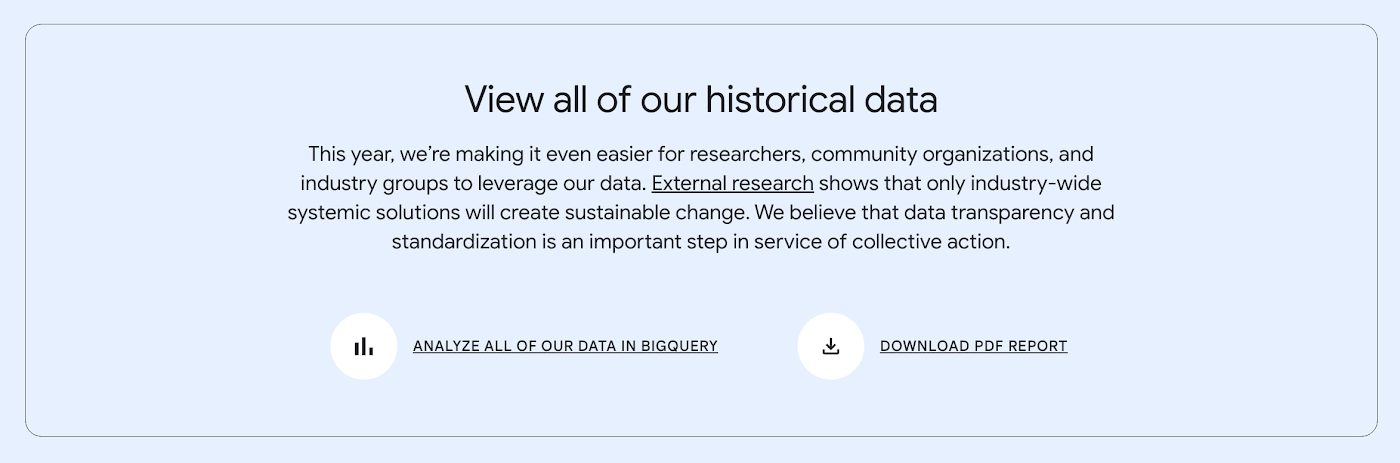
- Access the dataset

July 2021
Best practice: Use Google Trends data for common business needs
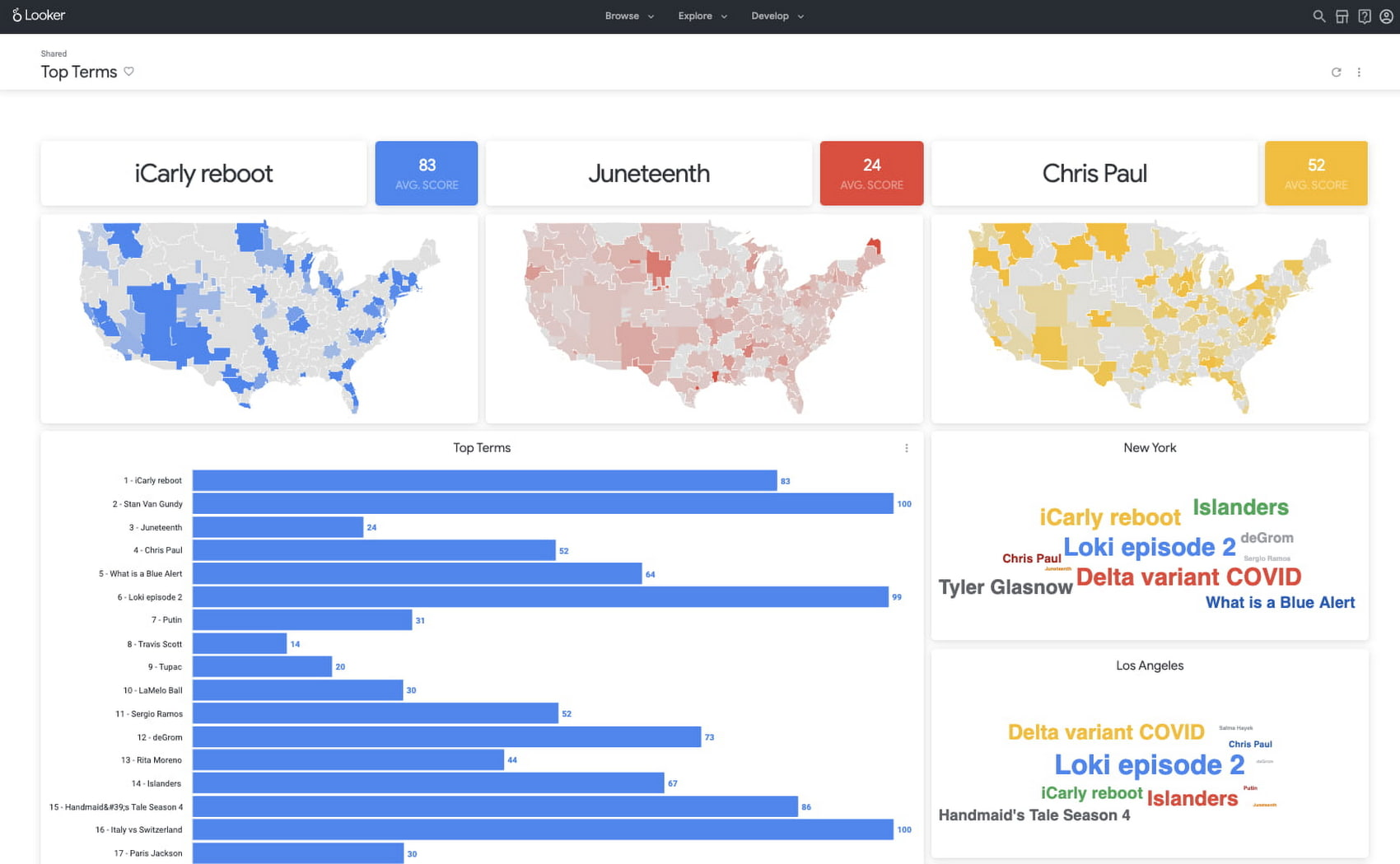
- The Google Trends dataset represents the first time we’re adding Google-owned Search data into Datasets for Google Cloud. The Trends data allows users to measure interest in a particular topic or search term across Google Search, from around the United States, down to the city-level. You can learn more about the dataset here, and check out the Looker dashboard here! These tables are super valuable in their own right, but when you blend them with other actionable data you can unlock whole new areas of opportunity for your team. To learn how to make informed decisions with Google Trends data, keep reading.
- Access the dataset
New dataset: COVID-19 Vaccination Search Insights
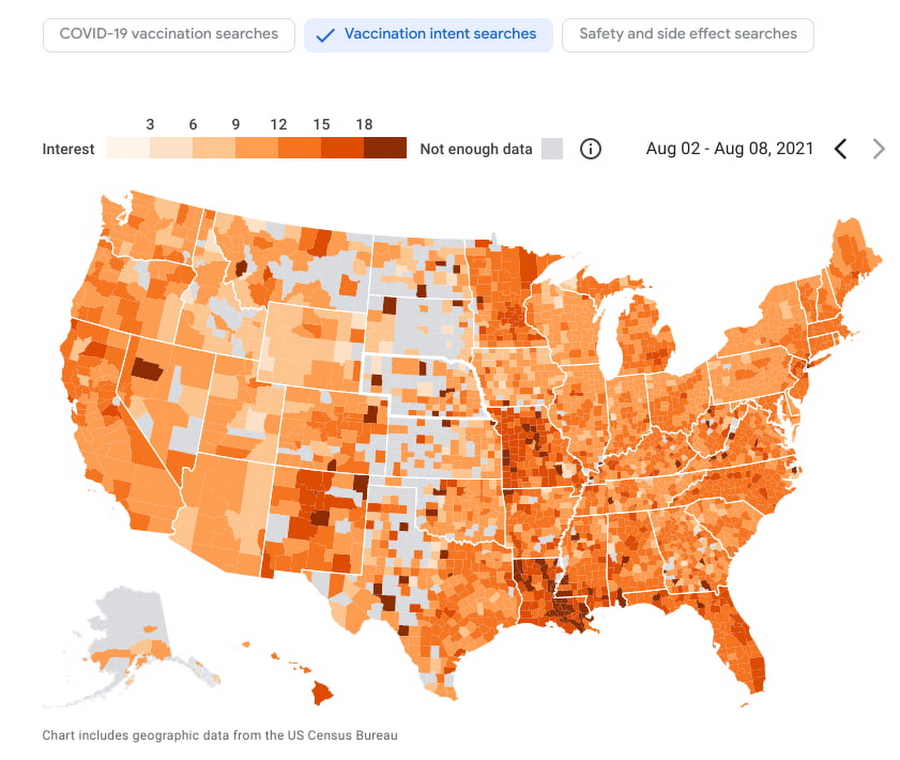
- With COVID-19 vaccinations being a topic of interest around the United States, this dataset shows aggregated, anonymized trends in searches related to COVID-19 vaccination and is intended to help public health officials design, target, and evaluate public education campaigns. Check out this interactive dashboard to explore searches for COVID-19 vaccination topics by region.
- Access the dataset
June 2021
New dataset: Google Diversity Annual Report 2021
- Since 2014, Google has disclosed data on the diversity of its workforce in an effort to bring candid transparency to the challenges technology companies like Google face in recruitment and retention of underrepresented communities. In an effort to make this data more accessible and useful, we’ve loaded it into BigQuery for the first time ever. To view Google’s Diversity Annual Report and learn more, check it out.
- Access the dataset
New dataset: Google Trends Top 25 Search terms
- The most popular and surging Google Search terms are now available in BigQuery as a public dataset. View the Top 25 and Top 25 rising queries from Google Trends from the past 30-days, including 5 years of historical data across the 210 Designated Market Areas (DMAs) in the US. Keep reading.
- Access the dataset
New dataset: COVID-19 Vaccination Access
- With metrics quantifying travel times to COVID-19 vaccination sites, this dataset is intended to help Public Health officials, researchers, and Healthcare Providers to identify areas with insufficient access, deploy interventions, and research these issues. Check out how this data is being used in a number of new tools.
- Access the dataset

Best practice: Leveraging BigQuery Public Boundaries datasets for geospatial analytics
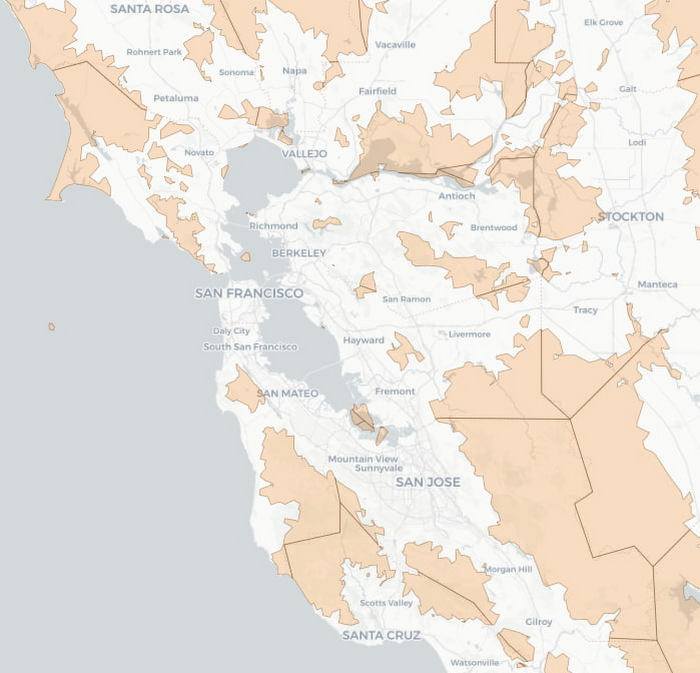
- Geospatial data is a critical component for a comprehensive analytics strategy. Whether you are trying to visualize data using geospatial parameters or do deeper analysis or modeling on customer distribution or proximity, most organizations have some type of geospatial data they would like to use – whether it be customer zipcodes, store locations, or shipping addresses. However, converting geographic data into the correct format for analysis and aggregation at different levels can be difficult. In this post, we’ll walk through some examples of how you can leverage the Google Cloud platform alongside Google Cloud Public Datasets to perform robust analytics on geographic data. Keep reading.
- Access the dataset

Get the metadata and try BigQuery sandbox
When you’ve learned about many of our datasets and pre-built solutions from across Google, you may be ready to start querying them. Check out the full dataset directory and read all the metadata at g.co/cloud/marketplace-datasets, then dig into the data with our free-to-use BigQuery sandbox account, or $300 in credits with our Google Cloud free trial.
899
Of your peers have already watched this video.
9:30 Minutes
The most insightful time you'll spend today!
Building Ethical AI: Why Organizations Need to Define Their Own Principles
In this video, learn about the importance of responsible AI, and how Google implements responsible AI in their products. You will also get an introduction to Google’s 7 AI principles.
Want to learn more about the importance of responsible AI? Enroll on Google Cloud Skills Boost → https://goo.gle/3CGhlXo
View the Generative AI Learning path playlist → https://goo.gle/LearnGenAI
Subscribe to Google Cloud Tech → https://goo.gle/GoogleCloudTech
Achieving MLOps Excellence with Google Cloud and Equinix Collaboration

1232
Of your peers have already read this article.
3:30 Minutes
The most insightful time you'll spend today!
In recent years, machine learning (ML) has gained tremendous popularity as a powerful tool for solving complex problems across various domains. However, building and deploying ML models at scale can be challenging, as it involves a range of tasks such as data preparation, feature engineering, model training, deployment, monitoring, maintenance and so on.
According to “The Art of AI maturity” report published by Accenture “87% of data science projects never make it into production.” This is where MLOps comes in – it can help to address the core challenges by providing a framework for managing the entire ML lifecycle, from data collection and preparation to model development, testing, and deployment. It also reduces the time from ML model development to production and increases the success rate of ML projects.
In Google Cloud, we understand how important MLOps is to successfully productionize ML models. So we collaborated with Equinix, the world’s digital infrastructure company™ and a leader in global colocation data center market share, with 248 data centers in 27 countries on five continents. We helped them by providing the advisory services on the MLOps best practices and architecture.
Let’s take a sneak peek at the MLOps requirements at Equinix and the final architecture that was proposed.
What does MLOps mean for Equinix?
After multiple discovery sessions with the Equinix Team, we identified the core requirements and pain points to address in their new MLOps architecture:
- Reusability: Components such as features and pipeline components should be reused across projects to reduce costs and improve efficiency.
- Foundations: The foundations of the infrastructure, such as environments, folder structure, and project hierarchy, should be well-designed to support scalability and reliability.
- Early identification of problems: Problems should be identified early by including data validation, notifications, and retry mechanisms.
- Cost optimization: Costs should be optimized by paying only for what is used.
- Enterprise CI/CD requirements: Enterprise CI/CD requirements should be met by integrating with GitHub and GitActions.
- Scaling: The infrastructure must scale to support future growth.
- Security: Enterprise security requirements should be met in terms of IAM roles, network, etc.
MLOps Architecture
Based on the above requirements from Equinix, key design considerations were made for example – using Vertex AI Feature Store instead of Big Query for online feature serving, using DataFlow for pre-processing vs using the existing python based pre-processing and so on. After carefully assessing all the alternatives, the below reference architecture for MLOps in GCP was proposed:
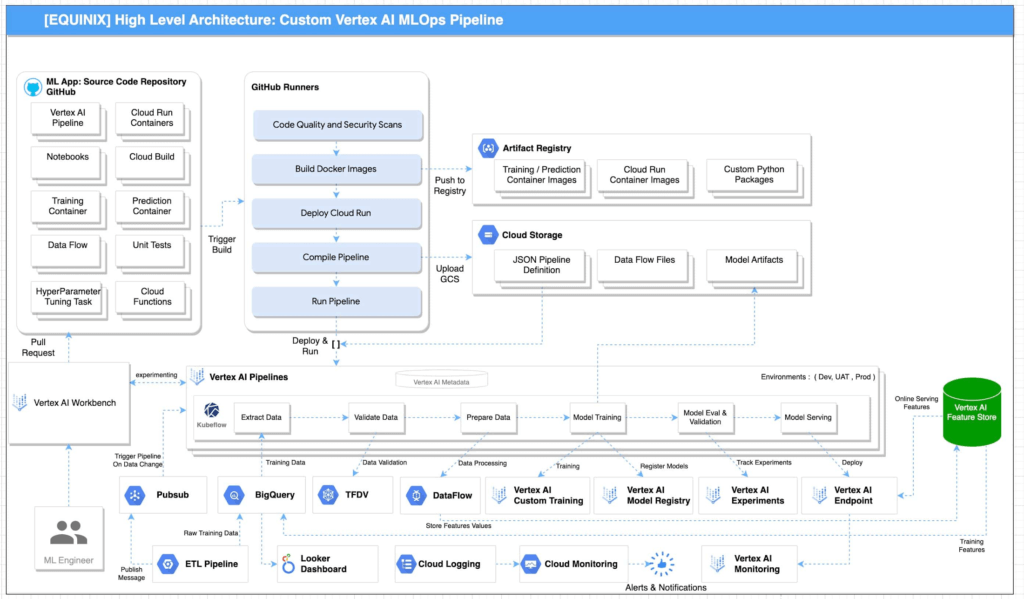
Reference architecture for MLOPs using GCP is illustrated in Figure 1. This architecture includes the following pipeline stages:
- Vertex AI Workbench enables data scientists to quickly explore new ideas and develop/experiment new models. The source code is saved in GitHub repository
- Github Actions with self-hosted runners are integrated with Github as the source code repository. This enables continuous integration of code, quality and security scans. The artifacts generated during the process are saved in Artifact Registry and Google Cloud Storage. These artifacts are deployed to implement the pipeline.
- Unit tests and integration tests can be performed during the continuous integration in Github Actions with self-hosted runners. End-to-end tests are performed on demand in the continuous integration pipeline.
- Metadata about the artifacts is generated and saved in Vertex ML Metadata.
- Automated triggers can be enabled to run pipelines. For example, one trigger is the availability of new training data. These triggers can run the model training pipeline and the new trained model can be pushed to Vertex AI Model Registry.
- To train a new ML model with new data, the deployed Vertex AI Pipeline is executed.
- To train a new ML model with new implementation, a new pipeline will be deployed through CI/CD pipeline.
“The proposed architecture design covers the requirements and scenarios that we were looking for. As our AI and ML portfolio is growing in scale and complexity, it’s important to follow a clear and up-to-date architecture if we want to keep increasing the value delivered by our solutions. As part of the process, the team also acquired the skills required to fully implement it” according to Bernardo Fernandes, Data Science Senior Manager at Equinix.
Below is the snapshot of the features before and after MLOps implementation at Equinix:
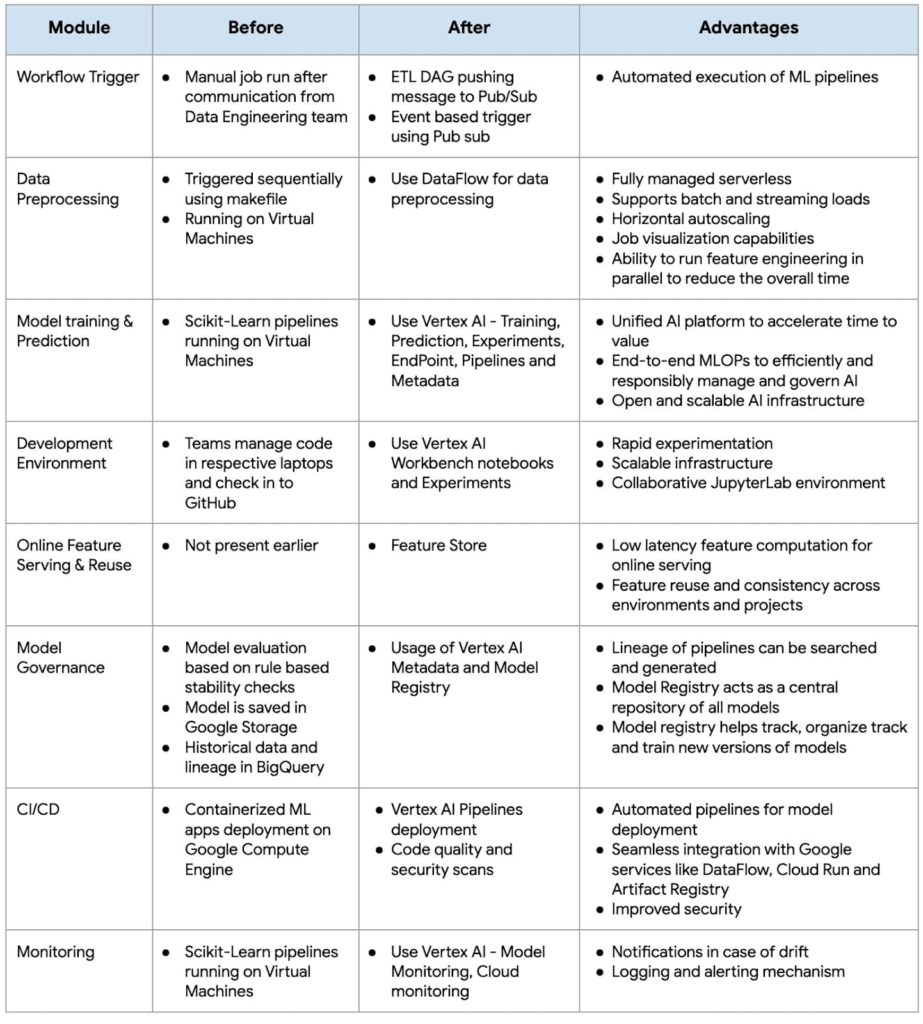
As businesses increasingly rely on machine learning to gain a competitive edge, MLOps has become a critical component of their strategy. By adopting MLOps practices, organizations can achieve faster time-to-market, better performance, and higher ROI for their machine learning initiatives.
Fast track end-to-end deployment with Google Cloud AI Services (AIS)
The partnership between Google Cloud and Equinix is just one of the latest examples of how we’re providing AI-powered solutions to solve complex problems to help organizations drive the desired outcomes. To learn more about Google Cloud’s AI services, visit our AI & ML Products page.
We’d like to give special thanks to Nitin Aggarwal, Vijay Surampudi, Parag Mhatre and Anantha Narayanan Krishnamurthy for their support and guidance throughout the project. We are also grateful to the super awesome collaboration with the Equinix Team (Ravi Pasula and Brendan Coffey, Bernardo Fernandes, Łukasz Murawski, Jakub Michałowski, Sonia Przygocka-Groszyk, Marek Opechowski, Daria Bondara, Nila Velu, Vijay Narayanan, Dharmendra Kumar, Shailesh Sukare, Arunraj Kumar Raje, Seng Cheong Lee).
Google Introduces ML-based Predictive Autoscaling to Forecast Capacity and Match Scaling Demands

4985
Of your peers have already read this article.
3:00 Minutes
The most insightful time you'll spend today!
At Google Cloud, we believe you get most benefits from the cloud when you scale infrastructure based on changing demand. Compute Engine allows you to configure autoscaling to save costs during periods of low demand, and add capacity to support peak loads.
When you use a managed instance group (MIG), you can have an autoscaler automatically create or delete virtual machine (VM) instances based on increases or decreases in load. However, if your application takes several minutes to initialize, creating VMs in response to growing load might not increase your application’s capacity quickly enough. For example, if there’s a large increase in load (like when users first wake up in the morning), some users might experience delays while your application is initializing on new instances.
A good way to solve this problem would be to create VMs ahead of demand so that your application has enough time to initialize beforehand. This requires knowing upcoming demand. If only we could predict the future… Well, now we can!
Introducing predictive autoscaling
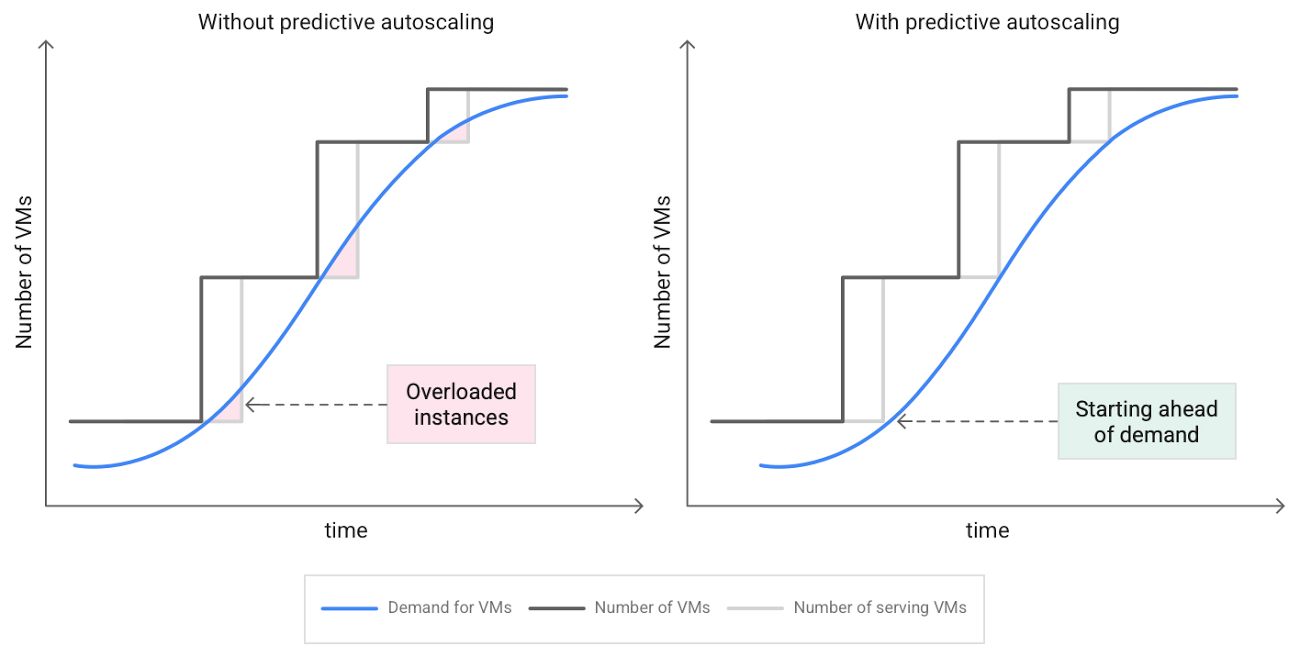
Predictive autoscaling uses Google Cloud’s machine learning capabilities to forecast capacity needs. It creates VMs ahead of growing demand allowing enough time for your application to initialize.
How does it work?
Predictive autoscaling uses your instance group’s CPU history to forecast future load and calculate how many VMs are needed to meet your target CPU utilization. Our machine learning adjusts the forecast based on recurring load patterns for each MIG.
You can specify how far in advance you want autoscaler to create new VMs by configuring the application initialization period. For example, if your app takes 5 minutes to initialize, autoscaler will create new instances 5 minutes ahead of the anticipated load increase. This allows you to keep your CPU utilization within the target and keep your application responsive even when there’s high growth in demand.
Many of our customers have different capacity needs during different times of the day or different days of the week. Our forecasting model understands weekly and daily patterns to cover for these differences. For example, if your app usually needs less capacity on the weekend our forecast will capture that. Or, if you have higher capacity needs during working hours, we also have you covered.
Why should you try it?
Predictive autoscaling continuously adapts forecasted capacity to best match upcoming demand. Autoscaler checks the forecast several times per minute and creates or deletes VMs to match its prediction. The forecast itself is updated every few minutes to match recent load trends so if your growth rate is higher or lower than usual we will adjust the forecast accordingly. This gives you capacity needed to cover peak load while saving on cost when demand goes down.
You can start using predictive autoscaling without worry as it’s fully compatible with the current autoscaler. Autoscaler will calculate enough VMs to cover both forecasted as well as real-time CPU load—whichever is higher. This works with other autoscaling features as well: you can scale based on schedule, your Load Balancer request target or Cloud Monitoring metrics. Autoscaler provides enough capacity to all of your configurations by taking the highest number of VMs needed to meet all your targets.
Getting started
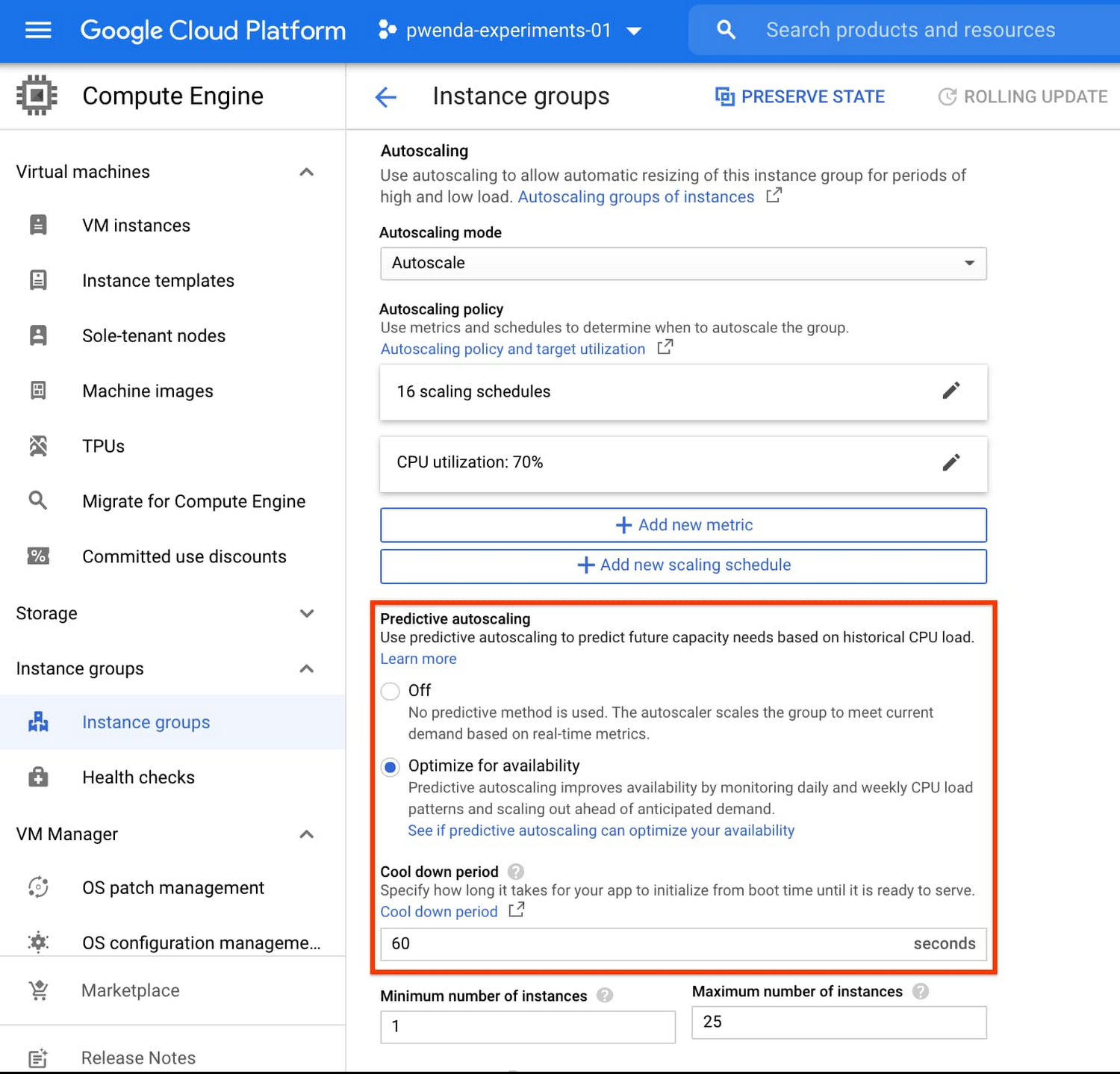
You can enable predictive autoscaling in the Google Cloud Console. Select an autoscaled MIG from the instance groups page and click Edit group. Change predictive autoscaling configuration from Off to Optimize for availability.
To better understand whether predictive autoscaling is good for your application, click the link See if predictive autoscaling can optimize your availability. This will show you a comparison of the last seven days with your current autoscaling configuration vs. with predictive autoscaling enabled.
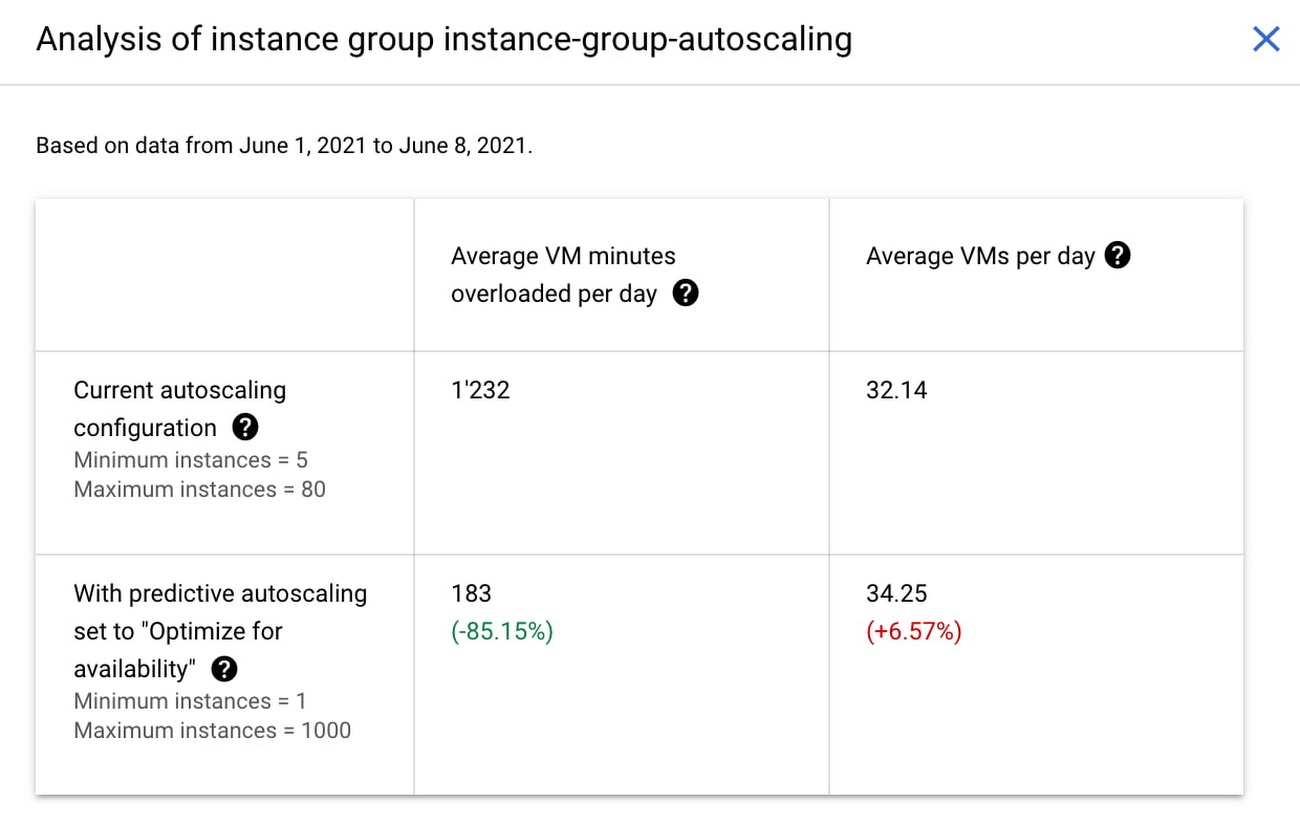
In the above chart,
- Average VM minutes overloaded per day shows how often your VMs exceed your CPU utilization target. This happens when demand is higher than available capacity. Predictive autoscaling can reduce this by starting VMs ahead of anticipated load.
- Average VMs per day is a proxy for cost. This shows how much additional VM capacity you need to keep your CPU utilization within the target you have set. You can optimize your cost by adjusting Minimum instances andCPU utilization as explained below.
Optimizing your configuration
Make sure your Cool down period reflects how long it takes for your application to initialize from VM boot time until it’s ready to serve the load. Predictive autoscaling will use this value to start VMs ahead of forecasted load. If you set it to 10 minutes (600 seconds) your VMs will start 10 minutes before the load is expected to increase.
Review your autoscaling CPU utilization target and Minimum number of instances. With predictive autoscaling you no longer need a buffer to compensate for the time it takes for a VM to start. If your application works best at 70% CPU utilization you don’t need to set target to a much lower value as predictive autoscaling will start VMs ahead of usual load. A higher CPU utilization and lower Minimum number of instances allows you to reduce the cost as you don’t need to pay for additional capacity to prepare for growing demand.
Try predictive autoscaling today
Predictive autoscaling is generally available across all Google Cloud regions. For more information on how to configure, simulate and monitor predictive autoscaling, consult the documentation.
More Relevant Stories for Your Company

Largest Beauty Retailer in the US Powers Digital Transformation with Google Cloud Smart Analytics
Digital technology offers increasing flexibility and choice to consumers. As a result, the retail industry is dramatically shifting toward more tailored and personalized experiences for shoppers, and businesses are rethinking how they deliver value to customers. This couldn’t be more true for the beauty retailing industry where leading companies are

Next-Level Search: Discover the Game-Changing Capabilities of Enterprise Search on Gen App Builder
In our conversations with customers, few generative AI use cases have driven as much enthusiasm as generative search. Leaders at enterprises know the limits of traditional enterprise search, with queries producing a list of links based on pattern matching, and significant manual investigation required to find the more relevant answers. In generative

Contact Center AI (CCAI) with Agent Assist can Lower Opex and Handle 28% More Chats
Contact Center AI (CCAI) brings Google’s innovation in conversational AI to solve the most challenging customer service needs while lowering operational costs. More than a thousand customers have deployed CCAI and are steadily turning it on to power their production contact centers. Today, we're excited to announce that we’ve made CCAI


AI-as-a-Service is Here. It’s Really Almost Plug-and-Play
What is the one thing that enterprises want providers to do vis-à-vis AI? To decomplexify it. Today, the path to AI adoption is confusing, and requires skills that are out of reach for most enterprises. That’s what Google Cloud is addressing. “It used to be—still is true—that AI's a pretty
